Disclaimer: This presentation is prepared by trainees of
baabtra as a part of mentoring program. This is not official
document of baabtra –Mentoring Partner
Baabtra-Mentoring Partner is the mentoring division of baabte System Technologies Pvt .
Ltd
Jobs Applied
#
1
2
3

Company

Designation

Applied Date

Current Status
Typing Speed
Week

Target Achieved

1

40

2
3

27wpm
AJAX

Anjali G
anjalig2009@gmail.com
www.facebook.com/Anjali Geetha
twitter.com/Anjali Geetha
in.linkedin.com/in/Anjali G
9497879952
AJAX
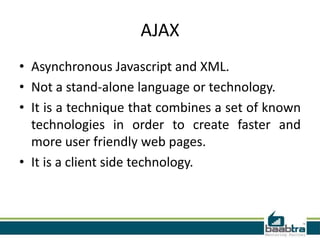
• Asynchronous Javascript and XML.
• Not a stand-alone language or technology.
• It is a technique that combines a set of known
technologies in order to create faster and
more user friendly web pages.
• It is a client side technology.
AJAX
• Prevents unnecessary reloading of a page.
• When we submit a form, whole page is
reloaded from the server.
• This causes very long waiting times.
• AJAX aims at loading only the necessary
information, and making only the necessary
changes on the current page without
reloading the whole page.
AJAX
• AJAX is based on Javascript, and the main
functionality is to access the web server inside
the Javascript code.
• We access to the server using special objects;
• When user initiates an event, a javascript
function is called which access server using
the objects.
• The received information is shown to the user
by means of the Javascript’s functions.
XMLHTTP Object
• The object that is used to connect to the
remote server is called XMLHTTP.
• It resembles the Java’s URL object that is used
to access a specific URL and get the contents.
Sending information
• After creating the object, we can send information to the web
server and get the answer using this object’s functions:
• GET METHOD:
• POST METHOD:

xmlhttp.open(“GET”, url, true)
xmlhttp.send()
xmlhttp.open("POST", url, true)
xmlhttp.send(“date=11-11-2006&name=Ali")

• Third argument tells that data will be processes asynchronously. When
server responds, the “OnReadyStateChange” event handler will be called.
The onreadystatechange Event
Property

Description

onreadystate Stores a function (or the name of a function) to be
change
called automatically each time the readyState
property changes
readyState

Holds the status of the XMLHttpRequest. Changes
from 0 to 4:
0: request not initialized
1: server connection established
2: request received
3: processing request
4: request finished and response is ready

status

200: "OK"
404: Page not found
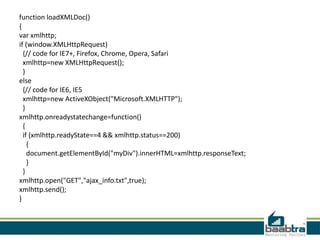
function loadXMLDoc()
{
var xmlhttp;
if (window.XMLHttpRequest)
{// code for IE7+, Firefox, Chrome, Opera, Safari
xmlhttp=new XMLHttpRequest();
}
else
{// code for IE6, IE5
xmlhttp=new ActiveXObject("Microsoft.XMLHTTP");
}
xmlhttp.onreadystatechange=function()
{
if (xmlhttp.readyState==4 && xmlhttp.status==200)
{
document.getElementById("myDiv").innerHTML=xmlhttp.responseText;
}
}
xmlhttp.open("GET","ajax_info.txt",true);
xmlhttp.send();
}
</script>
</head>
<body>
<div id="myDiv"><h2>Let AJAX change this text</h2></div>
<button type="button" onclick="loadXMLDoc()">Change Content</button>
</body>
</html>
THANKYOU
If this presentation helped you, please visit our
page facebook.com/baabtra and like it.

Thanks in advance.
www.baabtra.com | www.massbaab.com |www.baabte.com
Contact Us
Emarald Mall (Big Bazar Building)
Mavoor Road, Kozhikode,
Kerala, India.
Ph: + 91 – 495 40 25 550

Start up Village
Eranakulam,
Kerala, India.
Email: info@baabtra.com

NC Complex, Near Bus Stand
Mukkam, Kozhikode,
Kerala, India.
Ph: + 91 – 495 40 25 550

Ajax

  • 2.
    Disclaimer: This presentationis prepared by trainees of baabtra as a part of mentoring program. This is not official document of baabtra –Mentoring Partner Baabtra-Mentoring Partner is the mentoring division of baabte System Technologies Pvt . Ltd
  • 3.
  • 4.
  • 5.
  • 6.
    AJAX • Asynchronous Javascriptand XML. • Not a stand-alone language or technology. • It is a technique that combines a set of known technologies in order to create faster and more user friendly web pages. • It is a client side technology.
  • 7.
    AJAX • Prevents unnecessaryreloading of a page. • When we submit a form, whole page is reloaded from the server. • This causes very long waiting times. • AJAX aims at loading only the necessary information, and making only the necessary changes on the current page without reloading the whole page.
  • 8.
    AJAX • AJAX isbased on Javascript, and the main functionality is to access the web server inside the Javascript code. • We access to the server using special objects; • When user initiates an event, a javascript function is called which access server using the objects. • The received information is shown to the user by means of the Javascript’s functions.
  • 9.
    XMLHTTP Object • Theobject that is used to connect to the remote server is called XMLHTTP. • It resembles the Java’s URL object that is used to access a specific URL and get the contents.
  • 10.
    Sending information • Aftercreating the object, we can send information to the web server and get the answer using this object’s functions: • GET METHOD: • POST METHOD: xmlhttp.open(“GET”, url, true) xmlhttp.send() xmlhttp.open("POST", url, true) xmlhttp.send(“date=11-11-2006&name=Ali") • Third argument tells that data will be processes asynchronously. When server responds, the “OnReadyStateChange” event handler will be called.
  • 11.
    The onreadystatechange Event Property Description onreadystateStores a function (or the name of a function) to be change called automatically each time the readyState property changes readyState Holds the status of the XMLHttpRequest. Changes from 0 to 4: 0: request not initialized 1: server connection established 2: request received 3: processing request 4: request finished and response is ready status 200: "OK" 404: Page not found
  • 12.
    function loadXMLDoc() { var xmlhttp; if(window.XMLHttpRequest) {// code for IE7+, Firefox, Chrome, Opera, Safari xmlhttp=new XMLHttpRequest(); } else {// code for IE6, IE5 xmlhttp=new ActiveXObject("Microsoft.XMLHTTP"); } xmlhttp.onreadystatechange=function() { if (xmlhttp.readyState==4 && xmlhttp.status==200) { document.getElementById("myDiv").innerHTML=xmlhttp.responseText; } } xmlhttp.open("GET","ajax_info.txt",true); xmlhttp.send(); }
  • 13.
    </script> </head> <body> <div id="myDiv"><h2>Let AJAXchange this text</h2></div> <button type="button" onclick="loadXMLDoc()">Change Content</button> </body> </html>
  • 14.
  • 15.
    If this presentationhelped you, please visit our page facebook.com/baabtra and like it. Thanks in advance. www.baabtra.com | www.massbaab.com |www.baabte.com
  • 16.
    Contact Us Emarald Mall(Big Bazar Building) Mavoor Road, Kozhikode, Kerala, India. Ph: + 91 – 495 40 25 550 Start up Village Eranakulam, Kerala, India. Email: info@baabtra.com NC Complex, Near Bus Stand Mukkam, Kozhikode, Kerala, India. Ph: + 91 – 495 40 25 550