

By SAFAL AGRAWAL
Why AJAX ?
 What is AJAX ?
Technologies Used In AJAX
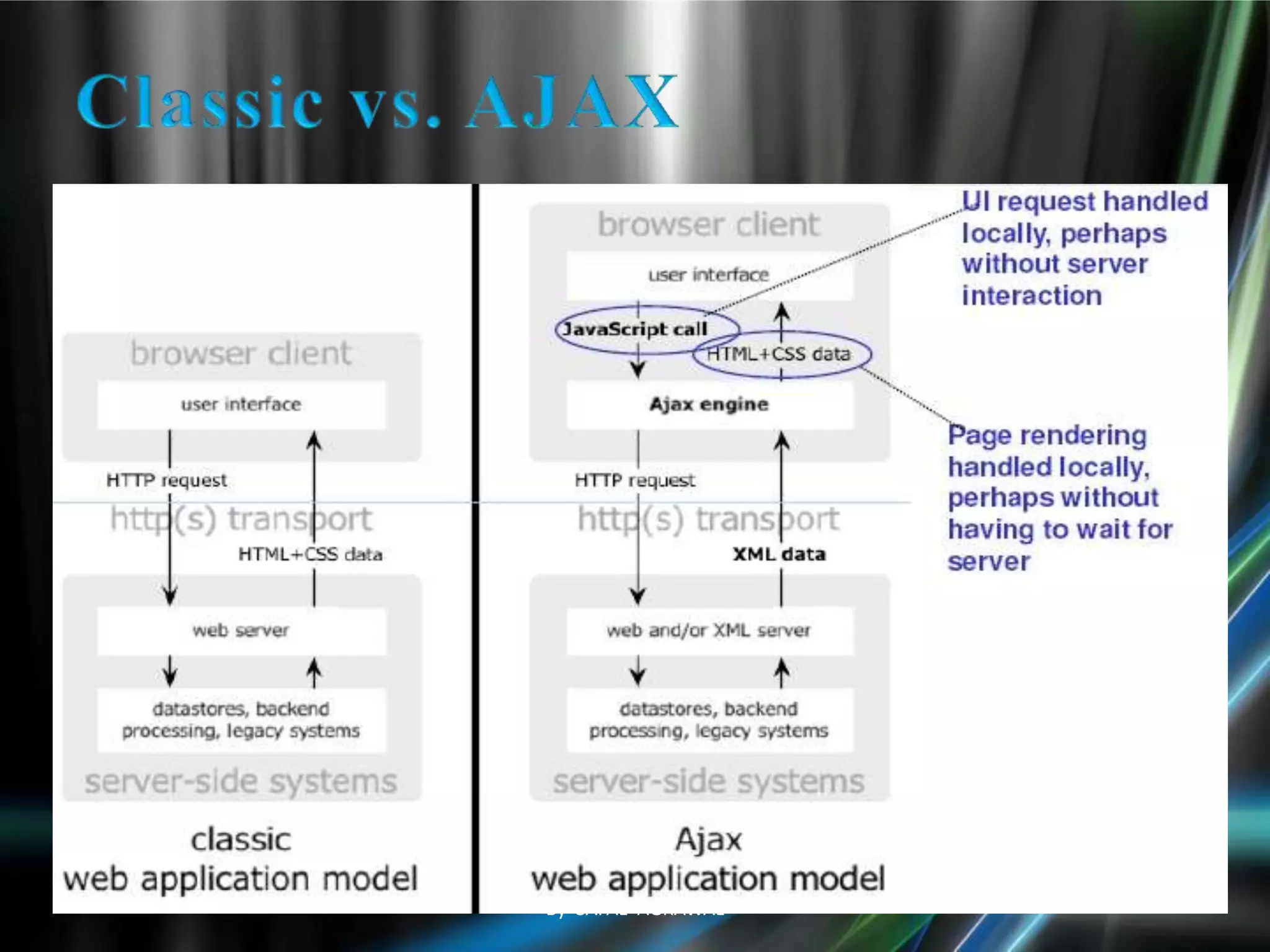
Classic vs. AJAX
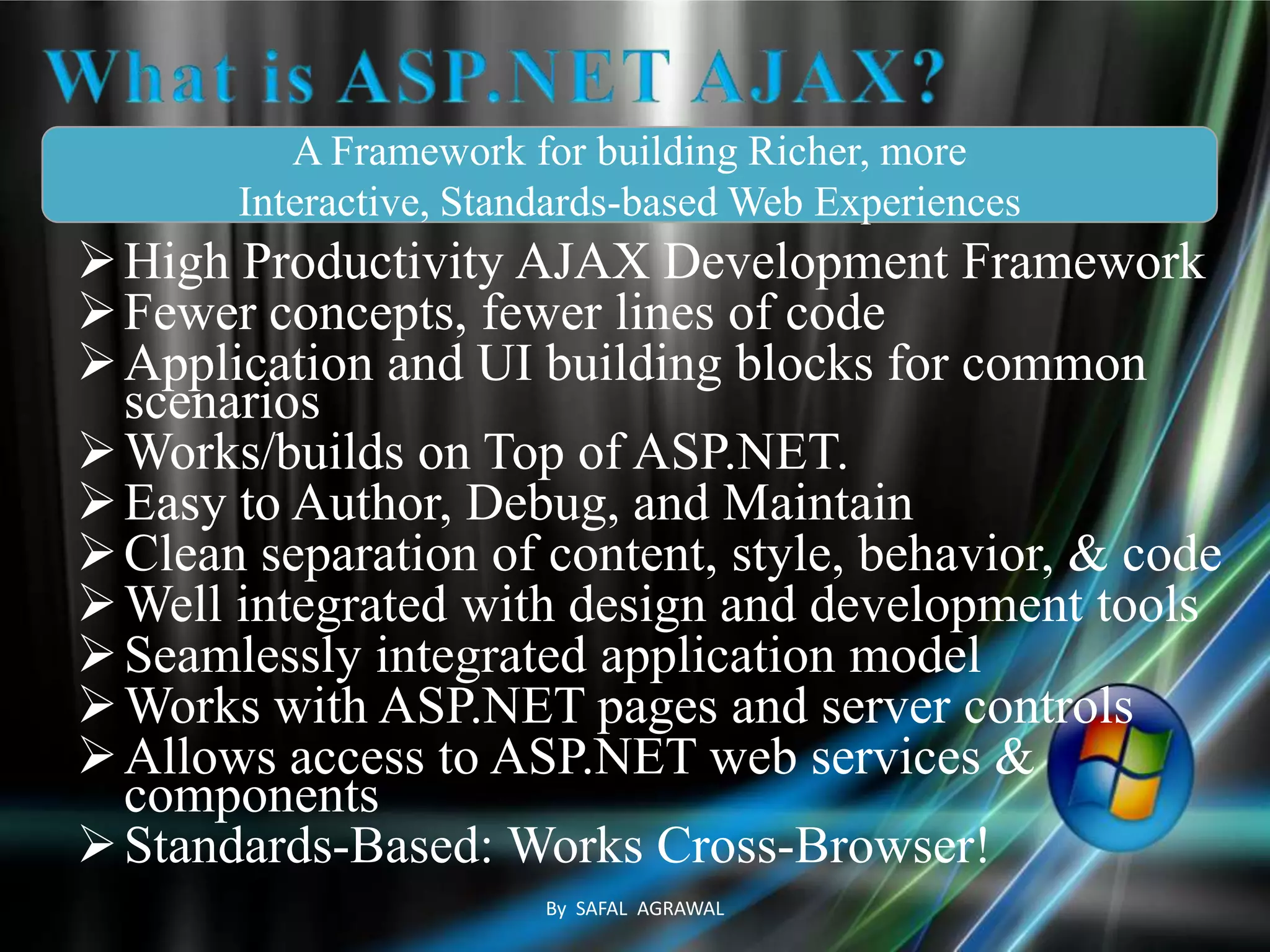
What is ASP.NET AJAX?
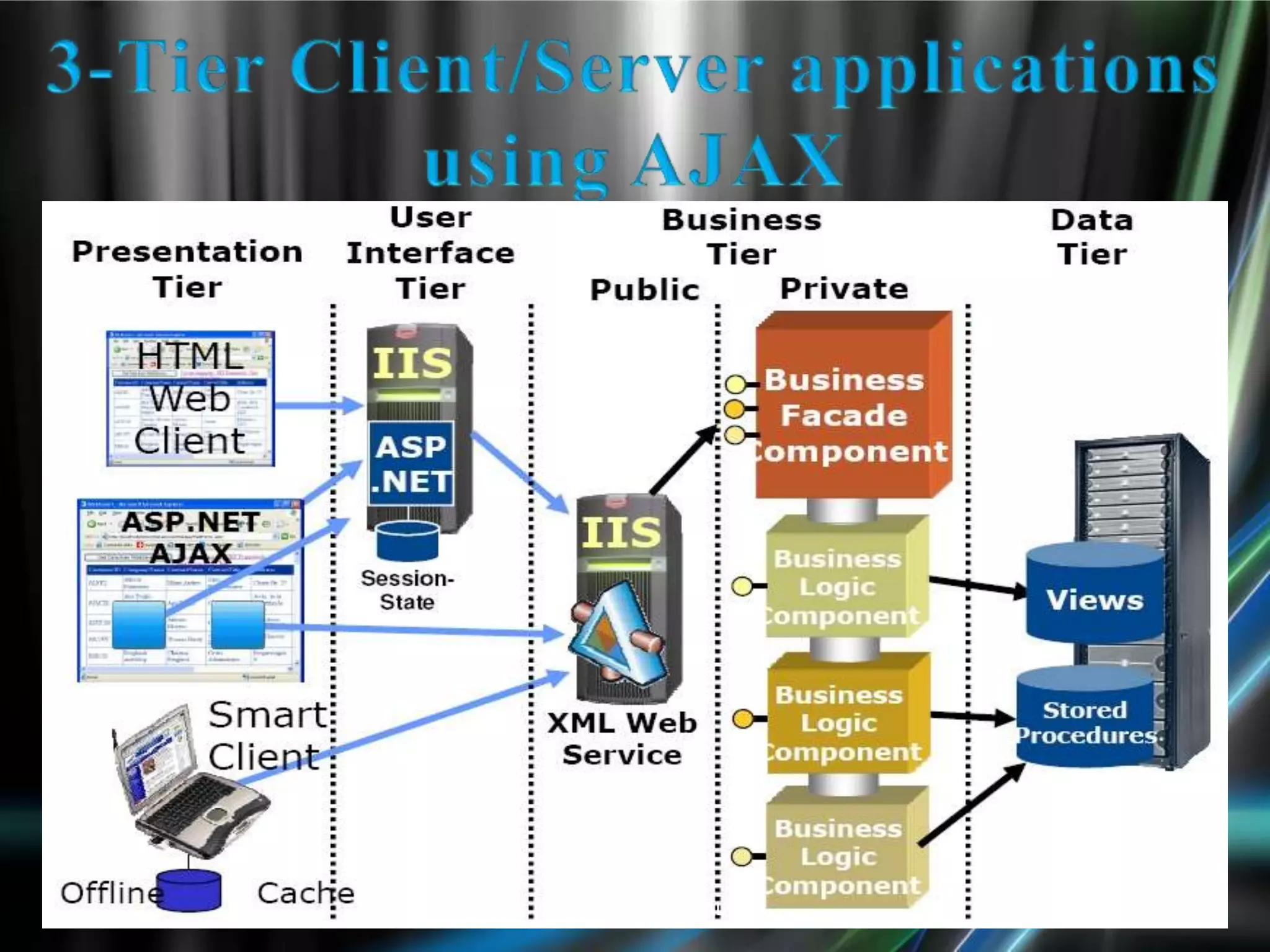
3-Tier Client/Server applications using AJAX.
ASP. Net AJAX Framework
Characteristics of Conventional Web Applications
Macromedia Flash
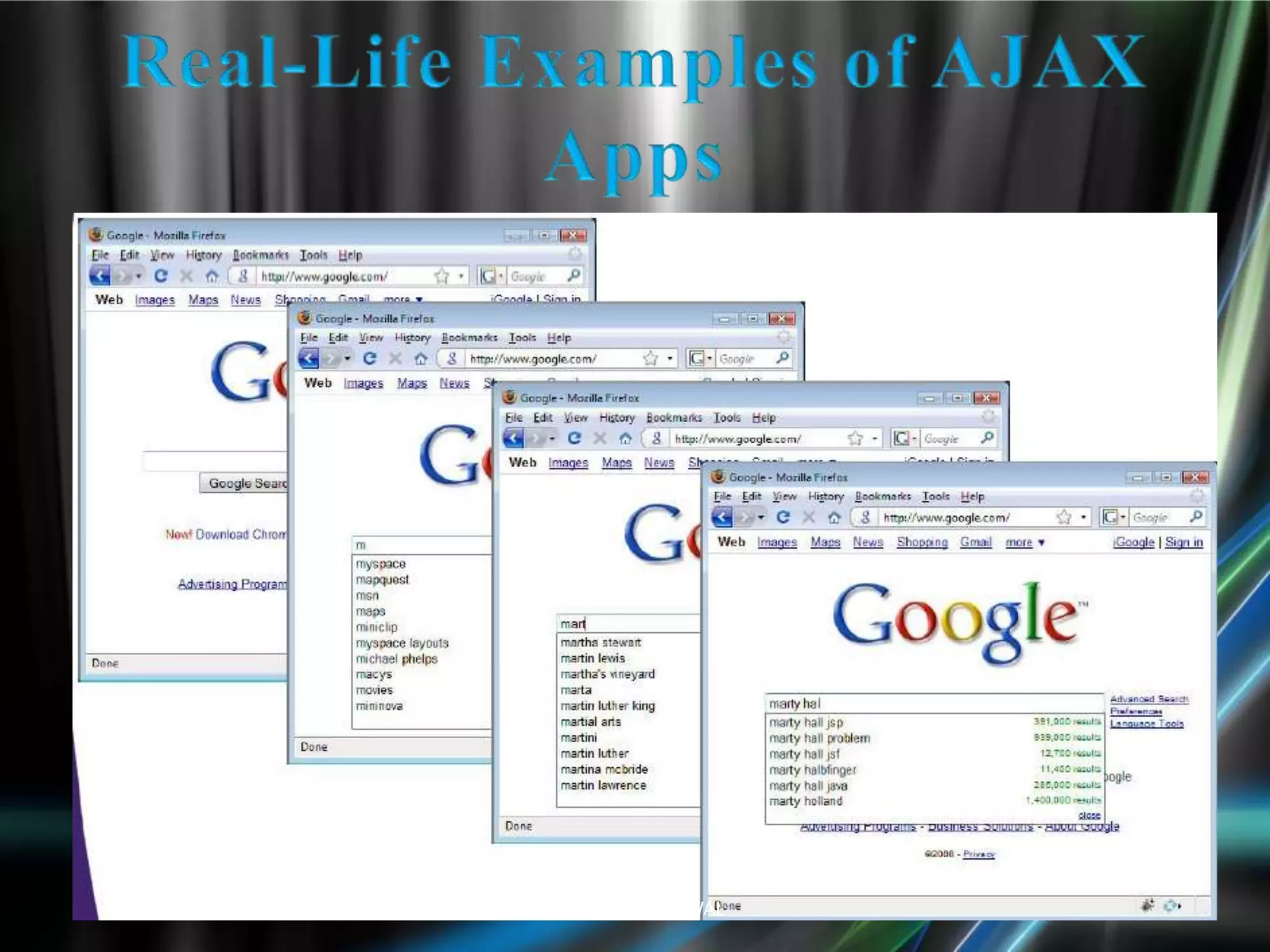
Real-Life Examples of AJAX AppsBy SAFAL AGRAWAL
 Intuitive and natural user interaction
No clicking required
Mouse movement is a sufficient event trigger
 "Partial screen update" replaces the
"click, wait, & refresh" user interaction model
 Only user interface elements that contain new
information are updated asynchronously
 The rest of the user interface remains
displayed without interruption
By SAFAL AGRAWAL
Standards-based presentation using
XHTML and CSS
Dynamic display and interaction
Using the Document Object Model
Data Interchange and Manipulation using XML
and XSLT
Asynchronous data retrieval using
XMLHttpRequest
JavaScript binding everything together
By SAFAL AGRAWAL
AJAX Uses HTTP Requests
With AJAX, your JavaScript communicates
directly with the server, through the JavaScript
XMLHttpRequest object
With an HTTP request, a web page can make a
request to, and get a response from a web server -
without reloading the page. The user will stay on
the same page, and he or she will not notice that
scripts request pages, or send data to a server in
the background.
By SAFAL AGRAWAL
JavaScript
Loosely typed scripting language
 JavaScript function is called when an event in a page occurs
 Glue for the whole AJAX operation
DOM
Represents the structure of XML and HTML documents
API for accessing and manipulating structured documents
CSS
Allows for a clear separation of the presentation style from the
content and may be changed programmatically by JavaScript
XMLHttpRequest
JavaScript object that performs asynchronous interaction with
the server By SAFAL AGRAWAL
Scripting language
Dynamic and weakly typed
Prototype-based with first-class functions
Semantics similar to functional languages
Standardized as ECMAScript
Supported by most modern browsers
But sometimes disabled for security reasons
Although standardized, browser-specific issues
exist
By SAFAL AGRAWAL
Object Oriented Representation for XML and
HTML documents
Based on Hierarchical (Tree) Structure
Allows programs and scripts to build
documents, navigate their structure, add,
modify or delete elements and contents
Provides a foundation for developing querying,
filtering, transformation, rendering etc.
applications on top of DOM implementations
By SAFAL AGRAWAL
Set of Formatting rules that tell the browser how
to present the document
Helps to separate the content from the
presentation
Reduce the download time by removing the
formatting information from the document
More control over formatting than HTML
By SAFAL AGRAWAL
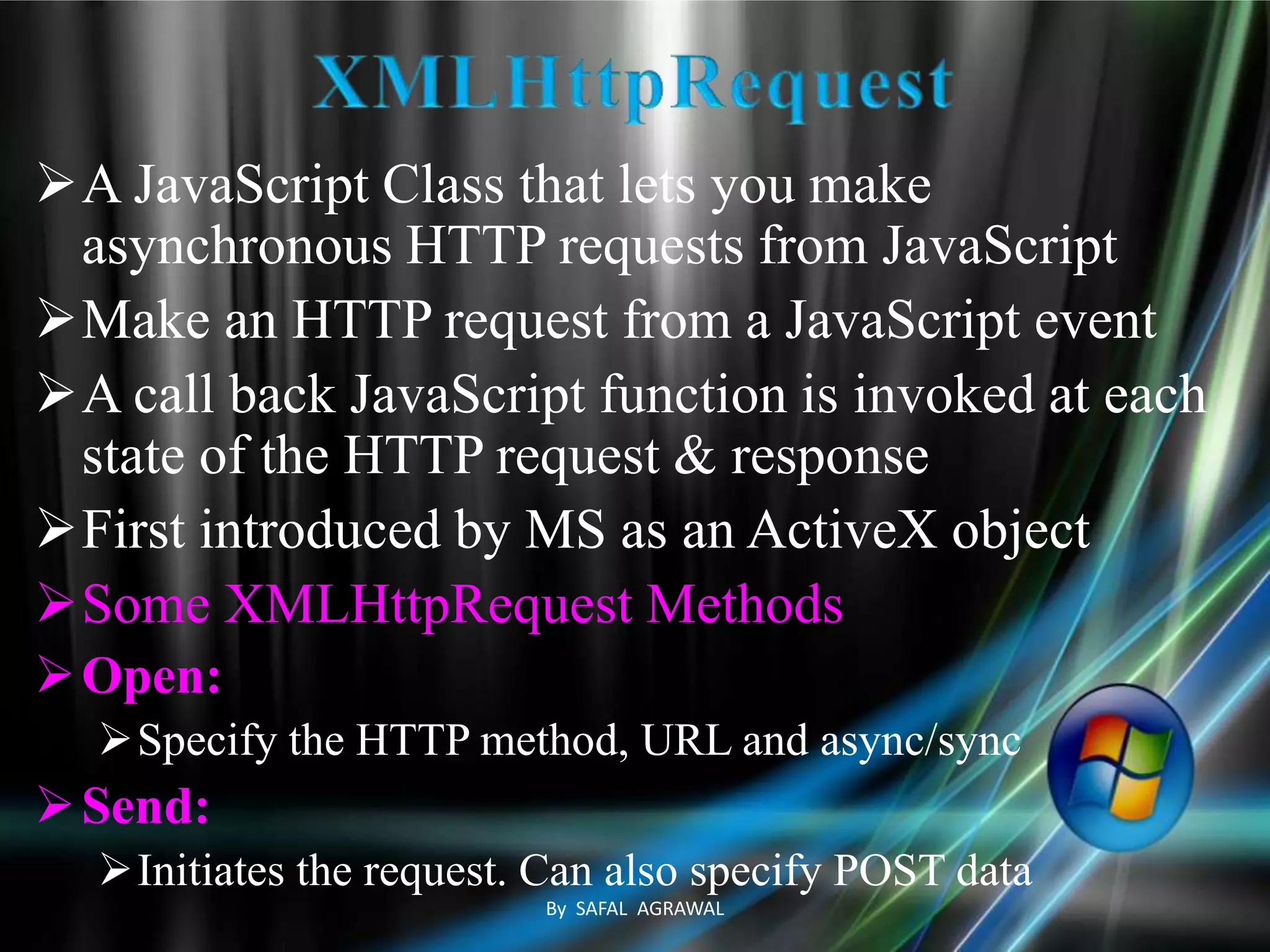
A JavaScript Class that lets you make
asynchronous HTTP requests from JavaScript
Make an HTTP request from a JavaScript event
A call back JavaScript function is invoked at each
state of the HTTP request & response
First introduced by MS as an ActiveX object
Some XMLHttpRequest Methods
Open:
Specify the HTTP method, URL and async/sync
Send:
Initiates the request. Can also specify POST data
By SAFAL AGRAWAL
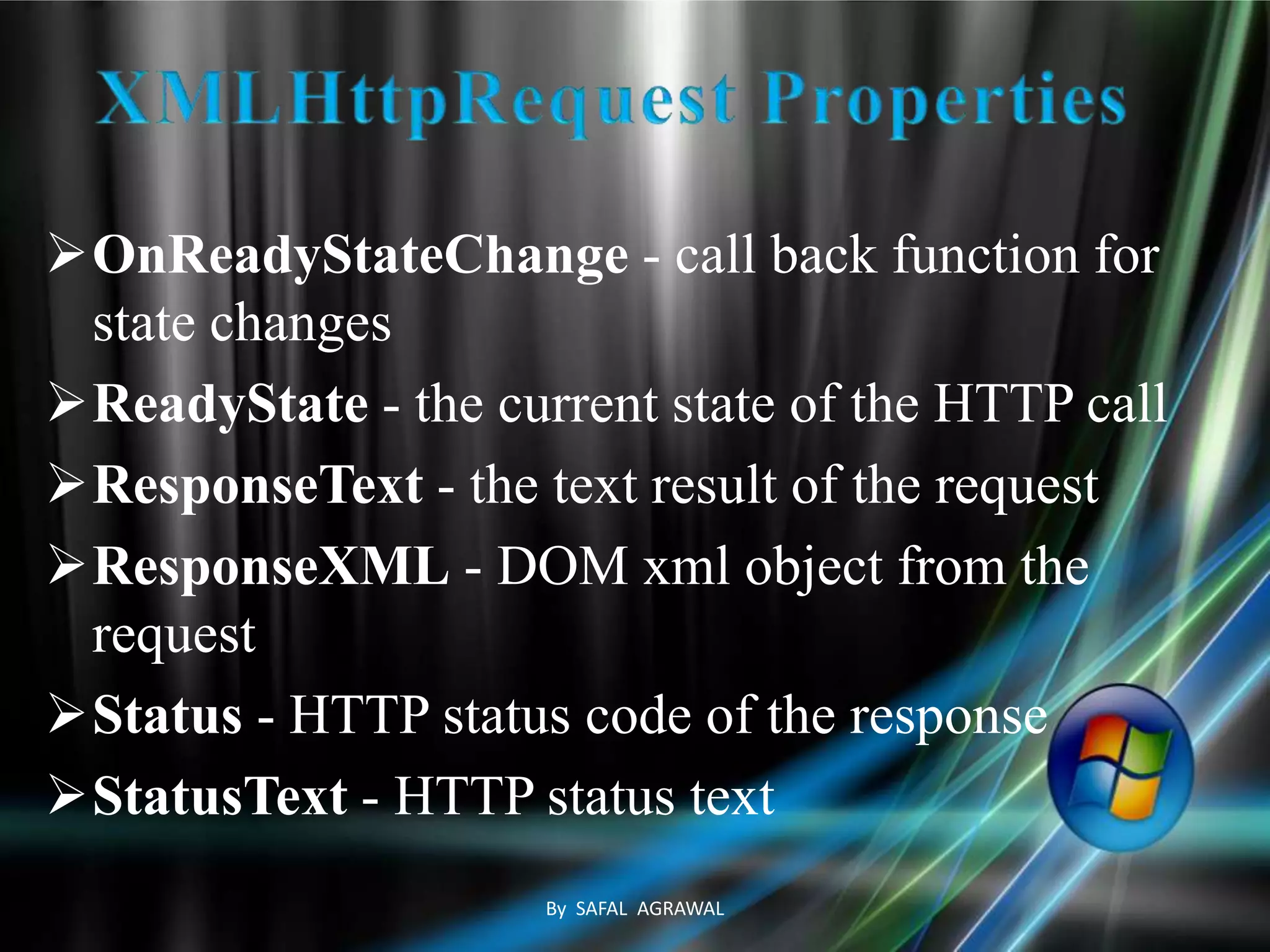
OnReadyStateChange - call back function for
state changes
ReadyState - the current state of the HTTP call
ResponseText - the text result of the request
ResponseXML - DOM xml object from the
request
Status - HTTP status code of the response
StatusText - HTTP status text
By SAFAL AGRAWAL
By SAFAL AGRAWAL
High Productivity AJAX Development Framework
Fewer concepts, fewer lines of code
Application and UI building blocks for common
scenarios
Works/builds on Top of ASP.NET.
Easy to Author, Debug, and Maintain
Clean separation of content, style, behavior, & code
Well integrated with design and development tools
Seamlessly integrated application model
Works with ASP.NET pages and server controls
Allows access to ASP.NET web services &
components
Standards-Based: Works Cross-Browser!
A Framework for building Richer, more
Interactive, Standards-based Web Experiences
By SAFAL AGRAWAL
By SAFAL AGRAWAL
Desktop application “Look and Feel”
Richer user interactions
Improved scalability
Increased responsiveness
Richer application functionality
Better end-user experiences
Decreased bandwidth utilization
More rapid user feedback
By SAFAL AGRAWAL
Scenarios
Mash-up and composite applications and sites
Components and Gadgets (Live.com, Windows Sidebar)
Powerful script framework
Rich type system and class library for JavaScript
Component model and UI framework
Rich client-side data access and data binding
Easily integrated with server application model
Easily consume web services from browser
Script access to ASP.NET application services
Server-side bridge to reuse 3rd party services
By SAFAL AGRAWAL
Server-centric web sites and apps
 Work with existing server application model
Keep core UI/application logic on server
 Improve latency, interactivity, personalization
Client-centric browser applications
 Fully exploit DHTML in presentation tier
 The DOM is back … never went away ;-)
 Use AJAX for data, services, composition
 Enable new immersive experiences
ASP.net AJAX provides a great framework for
both
By SAFAL AGRAWAL
By SAFAL AGRAWAL
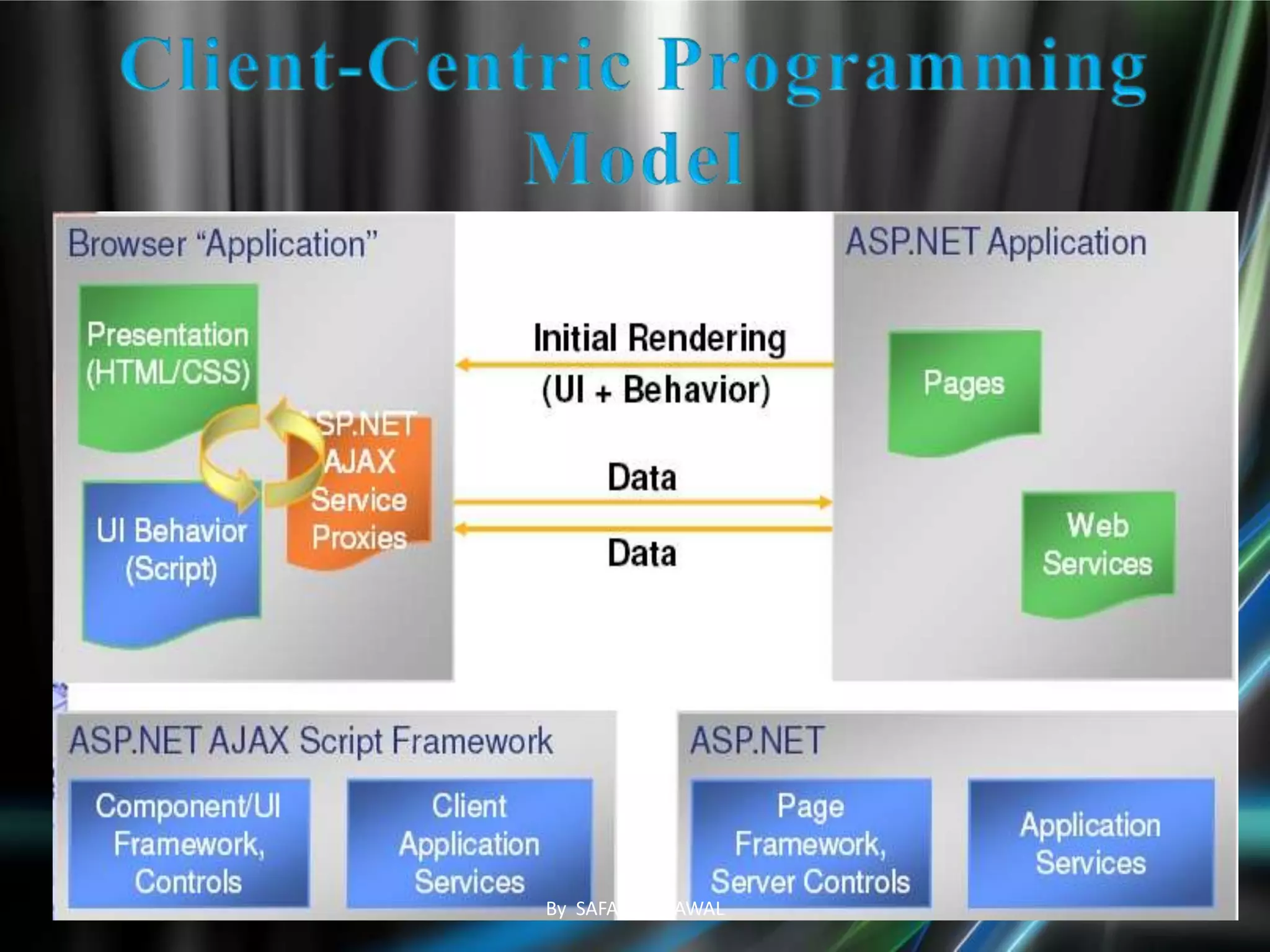
The client architecture includes libraries for
component support, Browser compatibility,
Networking, and Core services.
Client components enable rich behaviors in the
browser without PostBacks
Components, which are non-visual objects that
encapsulate code.
Behaviors, which extend the behavior of existing
DOM elements.
Controls, which represent a new DOM element
that has custom behavior.By SAFAL AGRAWAL
By SAFAL AGRAWAL
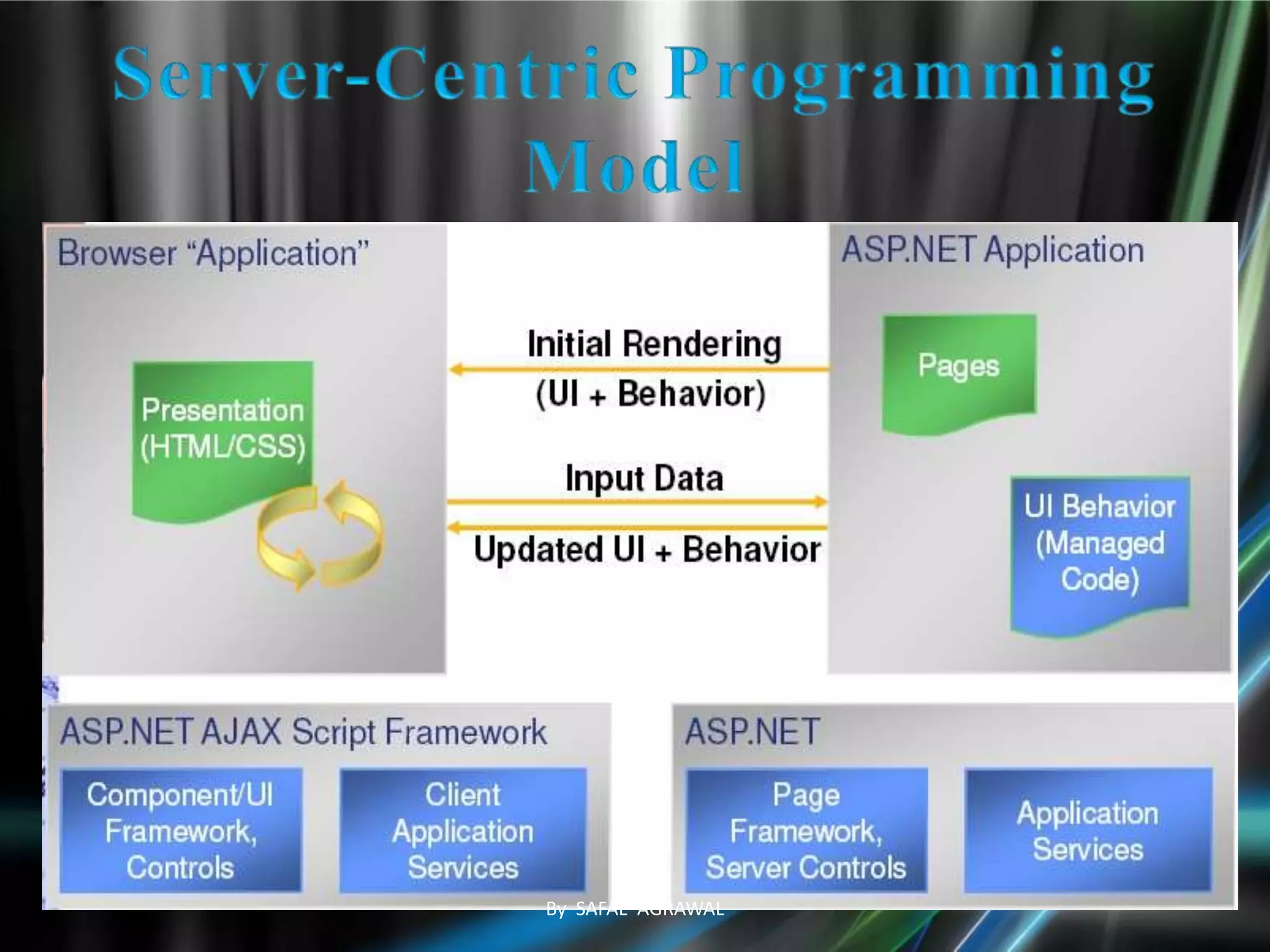
The server pieces that support Ajax development
consist of ASP.NET Web server controls and
components that manage the UI and flow of an
application.
The server pieces also manage serialization,
validation, and control extensibility.
 There are also ASP.NET Web services that enable
you to access ASP.NET application services for
forms authentication, roles, and user profiles.
Partial-page rendering, which updates regions of the
page by using an asynchronous PostBack.
By SAFAL AGRAWAL
“Click, wait, and refresh” user interaction
Any communication with the server forces a page
refresh
Synchronous “request/response” communication
model
The user has to wait for the response
Page-driven: Workflow is based on pages
Page-navigation logic is determined by the server
By SAFAL AGRAWAL
Navigation & control
Easier movement within or between Websites
Searching
Improved search engine capabilities
Communication
Aids for human-to-human and human-to-computer
interaction
Web services
Ajax is useful for supporting Service-Oriented
Architectures (SOA)
System tasks
Background tasks not directly apparent to the user
By SAFAL AGRAWAL
Designed for playing interactive movies
 Programmed with ActionScript
 Implementation examples
Macromedia Flex
Laszlo suite (open source)
Pros:
Good for vector graphics
Cons:
Browser needs a Flash plug-in
ActionScript is proprietary and hard to debug
By SAFAL AGRAWAL
No plug-ins for AJAX
Flash development tools cost money
Flash typically has slower page load time
Flash can work on older browsers
ActionScript doesn't have a cross
Browser Issues
Flash can access other domains if
There is a crossdomain.xml file
By SAFAL AGRAWAL
By SAFAL AGRAWAL
By SAFAL AGRAWAL
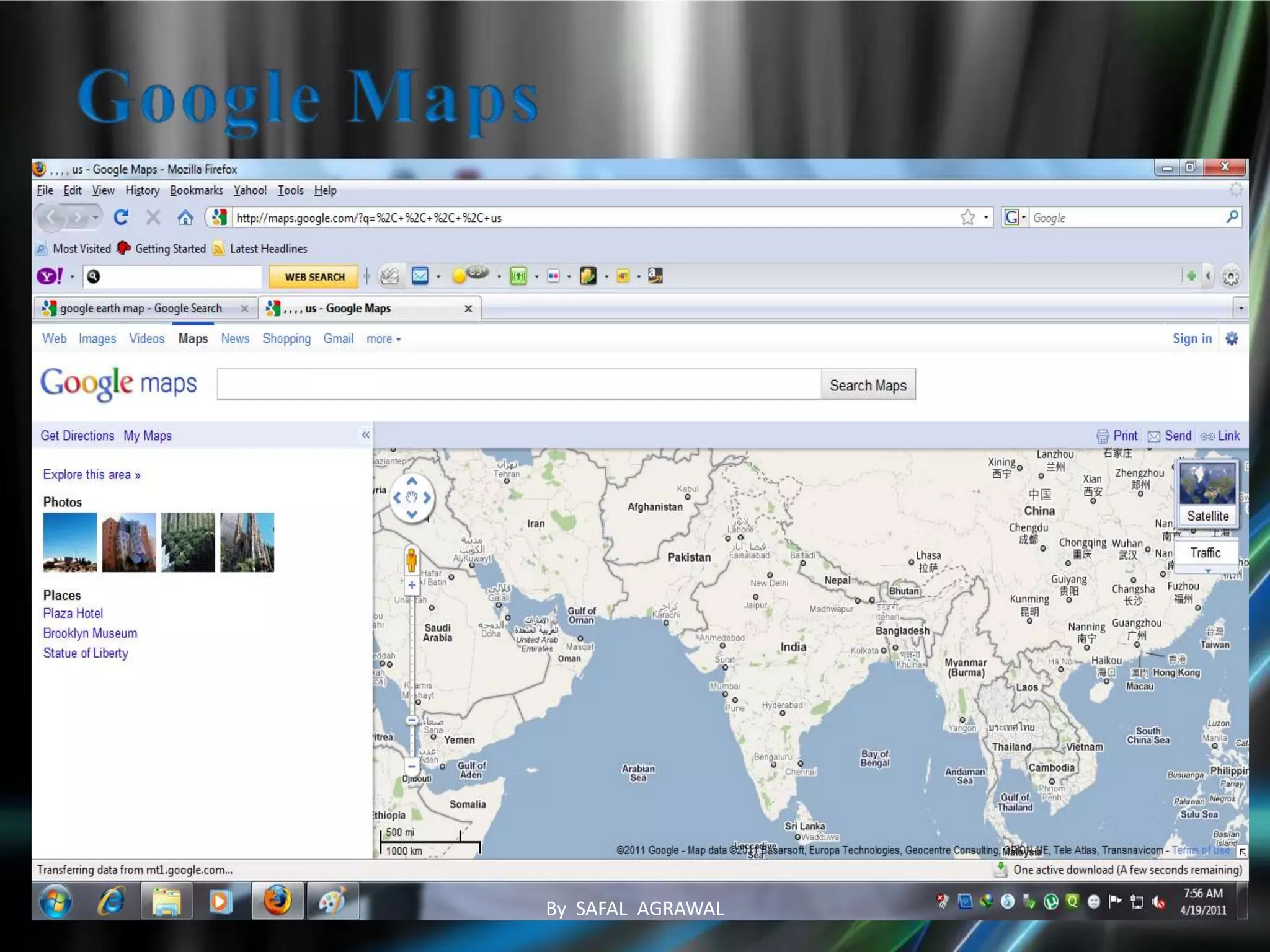
A user can drag the entire map by using the
mouse
Instead of clicking on a button or something
The action that triggers the download of new
map data is not a specific click on a link but a
moving the map around with a mouse
Behind the scene - AJAX is used
The map data is requested and downloaded
asynchronously in the background
Other parts of the page remains the same
No loss of operational context
By SAFAL AGRAWAL
Simple navigation & control
Simple search tasks
Non-Synchronizable system tasks
By SAFAL AGRAWAL
AJAX represents a generic application model
that would enable more interactive, more
responsive, and smarter Web applications.
AJAX is not tied to a particular programming
language, data format, or network object and
is defined by two core attributes: partial
screen update and asynchronous
communication.
By SAFAL AGRAWAL
http://www.Google.com
http://msdn.microsoft.com/en-us/library
/ee341002.aspx
http://jquery.com
http://www.Bing.com
http://www.asp.net
http://www.a jax.org
http://en.wikip edia.org/wiki/AJAX
By SAFAL AGRAWAL
By SAFAL AGRAWAL

Ajax technology

  • 1.
  • 2.
    Why AJAX ? What is AJAX ? Technologies Used In AJAX Classic vs. AJAX What is ASP.NET AJAX? 3-Tier Client/Server applications using AJAX. ASP. Net AJAX Framework Characteristics of Conventional Web Applications Macromedia Flash Real-Life Examples of AJAX AppsBy SAFAL AGRAWAL
  • 3.
     Intuitive andnatural user interaction No clicking required Mouse movement is a sufficient event trigger  "Partial screen update" replaces the "click, wait, & refresh" user interaction model  Only user interface elements that contain new information are updated asynchronously  The rest of the user interface remains displayed without interruption By SAFAL AGRAWAL
  • 4.
    Standards-based presentation using XHTMLand CSS Dynamic display and interaction Using the Document Object Model Data Interchange and Manipulation using XML and XSLT Asynchronous data retrieval using XMLHttpRequest JavaScript binding everything together By SAFAL AGRAWAL
  • 5.
    AJAX Uses HTTPRequests With AJAX, your JavaScript communicates directly with the server, through the JavaScript XMLHttpRequest object With an HTTP request, a web page can make a request to, and get a response from a web server - without reloading the page. The user will stay on the same page, and he or she will not notice that scripts request pages, or send data to a server in the background. By SAFAL AGRAWAL
  • 6.
    JavaScript Loosely typed scriptinglanguage  JavaScript function is called when an event in a page occurs  Glue for the whole AJAX operation DOM Represents the structure of XML and HTML documents API for accessing and manipulating structured documents CSS Allows for a clear separation of the presentation style from the content and may be changed programmatically by JavaScript XMLHttpRequest JavaScript object that performs asynchronous interaction with the server By SAFAL AGRAWAL
  • 7.
    Scripting language Dynamic andweakly typed Prototype-based with first-class functions Semantics similar to functional languages Standardized as ECMAScript Supported by most modern browsers But sometimes disabled for security reasons Although standardized, browser-specific issues exist By SAFAL AGRAWAL
  • 8.
    Object Oriented Representationfor XML and HTML documents Based on Hierarchical (Tree) Structure Allows programs and scripts to build documents, navigate their structure, add, modify or delete elements and contents Provides a foundation for developing querying, filtering, transformation, rendering etc. applications on top of DOM implementations By SAFAL AGRAWAL
  • 9.
    Set of Formattingrules that tell the browser how to present the document Helps to separate the content from the presentation Reduce the download time by removing the formatting information from the document More control over formatting than HTML By SAFAL AGRAWAL
  • 10.
    A JavaScript Classthat lets you make asynchronous HTTP requests from JavaScript Make an HTTP request from a JavaScript event A call back JavaScript function is invoked at each state of the HTTP request & response First introduced by MS as an ActiveX object Some XMLHttpRequest Methods Open: Specify the HTTP method, URL and async/sync Send: Initiates the request. Can also specify POST data By SAFAL AGRAWAL
  • 11.
    OnReadyStateChange - callback function for state changes ReadyState - the current state of the HTTP call ResponseText - the text result of the request ResponseXML - DOM xml object from the request Status - HTTP status code of the response StatusText - HTTP status text By SAFAL AGRAWAL
  • 12.
  • 13.
    High Productivity AJAXDevelopment Framework Fewer concepts, fewer lines of code Application and UI building blocks for common scenarios Works/builds on Top of ASP.NET. Easy to Author, Debug, and Maintain Clean separation of content, style, behavior, & code Well integrated with design and development tools Seamlessly integrated application model Works with ASP.NET pages and server controls Allows access to ASP.NET web services & components Standards-Based: Works Cross-Browser! A Framework for building Richer, more Interactive, Standards-based Web Experiences By SAFAL AGRAWAL
  • 14.
  • 15.
    Desktop application “Lookand Feel” Richer user interactions Improved scalability Increased responsiveness Richer application functionality Better end-user experiences Decreased bandwidth utilization More rapid user feedback By SAFAL AGRAWAL
  • 16.
    Scenarios Mash-up and compositeapplications and sites Components and Gadgets (Live.com, Windows Sidebar) Powerful script framework Rich type system and class library for JavaScript Component model and UI framework Rich client-side data access and data binding Easily integrated with server application model Easily consume web services from browser Script access to ASP.NET application services Server-side bridge to reuse 3rd party services By SAFAL AGRAWAL
  • 17.
    Server-centric web sitesand apps  Work with existing server application model Keep core UI/application logic on server  Improve latency, interactivity, personalization Client-centric browser applications  Fully exploit DHTML in presentation tier  The DOM is back … never went away ;-)  Use AJAX for data, services, composition  Enable new immersive experiences ASP.net AJAX provides a great framework for both By SAFAL AGRAWAL
  • 18.
  • 19.
    The client architectureincludes libraries for component support, Browser compatibility, Networking, and Core services. Client components enable rich behaviors in the browser without PostBacks Components, which are non-visual objects that encapsulate code. Behaviors, which extend the behavior of existing DOM elements. Controls, which represent a new DOM element that has custom behavior.By SAFAL AGRAWAL
  • 20.
  • 21.
    The server piecesthat support Ajax development consist of ASP.NET Web server controls and components that manage the UI and flow of an application. The server pieces also manage serialization, validation, and control extensibility.  There are also ASP.NET Web services that enable you to access ASP.NET application services for forms authentication, roles, and user profiles. Partial-page rendering, which updates regions of the page by using an asynchronous PostBack. By SAFAL AGRAWAL
  • 22.
    “Click, wait, andrefresh” user interaction Any communication with the server forces a page refresh Synchronous “request/response” communication model The user has to wait for the response Page-driven: Workflow is based on pages Page-navigation logic is determined by the server By SAFAL AGRAWAL
  • 23.
    Navigation & control Easiermovement within or between Websites Searching Improved search engine capabilities Communication Aids for human-to-human and human-to-computer interaction Web services Ajax is useful for supporting Service-Oriented Architectures (SOA) System tasks Background tasks not directly apparent to the user By SAFAL AGRAWAL
  • 24.
    Designed for playinginteractive movies  Programmed with ActionScript  Implementation examples Macromedia Flex Laszlo suite (open source) Pros: Good for vector graphics Cons: Browser needs a Flash plug-in ActionScript is proprietary and hard to debug By SAFAL AGRAWAL
  • 25.
    No plug-ins forAJAX Flash development tools cost money Flash typically has slower page load time Flash can work on older browsers ActionScript doesn't have a cross Browser Issues Flash can access other domains if There is a crossdomain.xml file By SAFAL AGRAWAL
  • 26.
  • 27.
  • 28.
    A user candrag the entire map by using the mouse Instead of clicking on a button or something The action that triggers the download of new map data is not a specific click on a link but a moving the map around with a mouse Behind the scene - AJAX is used The map data is requested and downloaded asynchronously in the background Other parts of the page remains the same No loss of operational context By SAFAL AGRAWAL
  • 29.
    Simple navigation &control Simple search tasks Non-Synchronizable system tasks By SAFAL AGRAWAL
  • 30.
    AJAX represents ageneric application model that would enable more interactive, more responsive, and smarter Web applications. AJAX is not tied to a particular programming language, data format, or network object and is defined by two core attributes: partial screen update and asynchronous communication. By SAFAL AGRAWAL
  • 31.
  • 32.