Jinkun Liu
Xinhua Wang
Advanced Sliding Mode Control for
Mechanical Systems
Design, Analysis and MATLAB Simulation
Jinkun Liu
Xinhua Wang
Advanced Sliding Mode
Control for Mechanical
Systems
Design, Analysis and MATLAB
Simulation
With 165 figures
Authors
Jinkun Liu
Beijing University of Aeronautics
and Astronautics
Beijing 100191, P.R.China
E-mail: ljk@bucc.edu.cn
Xinhua Wang
National University of Singapore
21 Lower Kent Ridge Road
Singapore 119077
E-mail: wangxinhua04@gmail.com
ISBN 978-7-302-24827-9
Tsinghua University Press, Beijing
ISBN 978-3-642-20906-2
Springer Heidelberg Dordrecht London New York
Library of Congress Control Number: 2011926501
¤ Tsinghua University Press, Beijing and Springer-Verlag Berlin Heidelberg 201
This work is subject to copyright. All rights are reserved, whether the whole or part of the material
is concerned, specifically the rights of translation, reprinting, reuse of illustrations, recitation,
broadcasting, reproduction on microfilm or in any other way, and storage in data banks.
Duplication of this publication or parts thereof is permitted only under the provisions of the
German Copyright Law of September 9, 1965, in its current version, and permission for use must
always be obtained from Springer. Violations are liable to prosecution under the German Copyright
Law.
The use of general descriptive names, registered names, trademarks, etc. in this publication does
not imply, even in the absence of a specific statement, that such names are exempt from the
relevant protective laws and regulations and therefore free for general use.
Printed on acid-free paper
Springer is part of Springer Science+Business Media (www.springer.com)
(eBook)ISBN 978-3-642-20907-9
2
Jinkun Liu
Xinhua Wang
MATLAB
Advanced Sliding Mode
Control for Mechanical
Systems
Design, Analysis and MATLAB
Simulation
With 165 figures
MATLAB
12
MATLAB
010-62782989 13701121933
(CIP)
MATLAB = Advanced Sliding Mode Control
for Mechanical Systems: Design, Analysis and MATLAB Simulation: / .
-- 2011. 6
ISBN 978-7-302-24827-9
. . . – – – . TM571.6
CIP (2011) 033028
A
http://www.tup.com.cn 100084
010-62770175 010-62786544
010-62776969, c-service@tup.tsinghua.edu.cn
010-62772015, zhiliang@tup.tsinghua.edu.cn
153u 235 23 515
2011 10 1 2011 10 1
1 ~ 0000
00.00
i
Preface
In the formulation of any control problem there will be typical discrepancies between
the actual plant and the mathematical model developed for the controller design.
This mismatch may be due to unmodelled dynamics, variation in system parameters
or the approximation of complex plant behavior by a straightforward model. The
engineer must ensure the practical applicability of the resulting controller to produce
the required performance levels despite such plant /model mismatches. This has
led to an intense interest in the development of robust control methods to solve
this problem. One particular approach to robust controller design is the sliding
mode control methodology.
One of the most intriguing aspects of the sliding mode is the discontinuous
nature of the control action. The primary function of each of the feedback channels
is to switch between two distinctively different system structures (or components)
such that a new type of system motion called the sliding mode exists in a
manifold. This peculiar system characteristic is claimed to result in superb system
performance which includes insensitivity to parameter variations and complete
rejection of disturbances.
Sliding mode control is a specific type of variable structure control. The control
systems are designed to drive and then constrain the system state to lie within a
neighborhood of the switching function. There are two main advantages to this
approach. Firstly, the dynamic behavior of the system may be tailored by the
particular choice of switching function. Secondly, the closed-loop response becomes
totally insensitive to a particular class of uncertainty. The latter invariance property
clearly makes the methodology appropriate for robust control. Additionally, the
ability to specify performance directly makes the sliding mode control attractive
from the design perspective.
The sliding mode design approach consists of two components. The first involves
the design of a switching function so that the sliding motion satisfies design
specifications. The second is concerned with the selection of a control law to
ii
make the switching function attractive to the system state. Note that this control
law is not necessarily discontinuous.
The chattering phenomenon is generally perceived as a motion which oscillates
about the sliding manifold. There are two possible mechanisms which produce
such a motion. Firstly, in the absence of switching nonidealities such as delays,
i.e., the switching device is switching ideally at an infinite frequency, the presence
of a parasitic dynamics in series with the plant causes a small amplitude high-
frequency oscillation to appear in the neighborhood of the sliding manifold.
These parasitic dynamics represent the fast actuator and sensor dynamics. Secondly,
the switching nonidealities alone can cause such high-frequency oscillations.
It is our goal to accomplish these objectives:
• Provide reasonable methods of the chattering phenomenon alleviating;
• Offer a catalog of implementable robust sliding mode control design solutions
for engineering applications;
• Provide advanced sliding mode controller design methods and their stability
analysis;
• For each sliding mode control algorithm, we offer its simulation example and
Matlab program.
This book provides the reader with a thorough grounding in the sliding mode
controller design. More advanced theoretical results are developed on the basis.
Typical sliding mode controller design is emphasized using Matlab simulation. In
this book, concrete case studies, which present the results of sliding mode controller
implementations are used to illustrate the successful practical application of the
theory.
The book is structured as follows. Chapter 1 introduces the concept of sliding
mode control and illustrates the attendant features of robustness and performance
specification using a straightforward example and graphical exposition, several
typical sliding mode controllers for continuous system are introduced, and concrete
stability analysis, simulation examples and Matlab programs are given. Chapter 2
introduces several normal sliding mode controllers design, including sliding
mode control based on nominal model, global sliding mode control, sliding mode
control based on linearization feedback technology and sliding mode control
based on low pass filter. Chapter 3 introduces two kind of advanced sliding mode
controllers design, including sliding mode control based on LMI technology and
sliding mode control based on backstepping technology. Chapter 4 introduces
discrete sliding mode controller design, including discrete sliding mode controller
design analysis and a kind of discrete sliding mode controller design based on
disturbance observer. Chapter 5 introduces a kind of dynamic sliding mode
controller design. Chapter 6 introduces a kind of adaptive sliding mode controller
design for mechanical systems. Chapter 7 introduces three kind of terminal sliding
mode controllers design, including a typical terminal sliding mode controller
design, a nonsingular terminal sliding mode controller design and a fast terminal
iii
sliding mode controller design. Chapter 8 introduces sliding mode control based
on several observers; four kinds of observers are used, including high gain
observer, extended state observer, integral-chain differentiator, disturbance observer
and delayed output observer. Chapter 9 introduces four kinds of fuzzy sliding mode
controllers design, including fuzzy sliding mode control based on equivalent
control, sliding mode control based on fuzzy switch-gain regulation, sliding mode
control based on fuzzy system approximation and adaptive fuzzy control based
on fuzzy compensation for manipulator. Chapter 10 introduces two kinds of neural
network sliding mode controllers design, including sliding mode controller
design based on RBF neural network approximation and adaptive RBF network
sliding mode control for manipulator. Chapter 11 introduces three kinds of sliding
mode controllers design for robot, including sliding mode controller design based
on input-output stability, sliding mode controller design based on computed
torque method and adaptive sliding mode controller design for manipulator.
Chapter 12 introduces two kinds of sliding mode controllers design for aircraft,
which are sliding mode control for helicopter and sliding mode control for an
uncertain VTOL aircraft.
Welcome to find and download the simulation programs of the book from
http://ljk.buaa.edu.cn/ or email to ljk@buaa.edu.cn.
v
Contents
1 Introduction.................................................................................................... 1
1.1 Parameters of Sliding Surface Design .................................................... 7
1.2 Sliding Mode Control Based on Reaching Law ..................................... 8
1.2.1 Classical Reaching Laws ............................................................ 8
1.2.2 Controller Design........................................................................ 9
1.3 Robust Sliding Mode Control Based on Reaching Law....................... 14
1.3.1 System Description................................................................... 14
1.3.2 Simulation Example.................................................................. 15
1.4 Sliding Mode Robust Control Based on Upper Bound......................... 19
1.4.1 System Description................................................................... 19
1.4.2 Controller Design...................................................................... 19
1.4.3 Simulation Example.................................................................. 20
1.5 Sliding Mode Control Based on Quasi-Sliding Mode.......................... 25
1.5.1 Quasi-Sliding Mode.................................................................. 25
1.5.2 Simulation Example.................................................................. 26
1.6 Sliding Mode Control Based on the Equivalent Control ...................... 31
1.6.1 System Description................................................................... 31
1.6.2 Sliding Mode Controller Design............................................... 31
1.6.3 Simulation Example.................................................................. 33
1.7 Digital Simulation of Sliding Mode Control ........................................ 36
1.7.1 Basic Theory............................................................................. 36
1.7.2 Simulation Example.................................................................. 37
References ..................................................................................................... 40
2 Normal Sliding Mode Control .................................................................... 41
2.1 Sliding Mode Control Based on Nominal Model ................................. 41
2.1.1 System Description................................................................... 41
2.1.2 The Structure of Control System .............................................. 42
2.1.3 Design of Nominal Model ........................................................ 42
2.1.4 Sliding Mode Controller Design for Actual Plant..................... 43
2.1.5 Simulation................................................................................. 45
2.2 Global Sliding Mode Control for an Uncertain System........................ 50
2.2.1 System Description................................................................... 50
vi
2.2.2 Global Sliding Mode Design .................................................... 51
2.2.3 Sliding Mode Controller Design............................................... 51
2.2.4 Simulation Example.................................................................. 52
2.3 Sliding Mode Control Based on Linearization Feedback Control........ 57
2.3.1 Linearization Feedback Control................................................ 57
2.3.2 Simulation Example.................................................................. 57
2.3.3 Sliding Mode Control Based on Linearization Feedback ......... 61
2.3.4 Simulation Example.................................................................. 62
2.4 Input-Output Feedback Linearization Control...................................... 65
2.4.1 System Description................................................................... 65
2.4.2 Controller Design...................................................................... 66
2.4.3 Simulation Example.................................................................. 67
2.5 Sliding Mode Control Based on Input-Output Feedback
Linearization......................................................................................... 70
2.5.1 System Description................................................................... 70
2.5.2 Controller Design...................................................................... 70
2.5.3 Simulation Example.................................................................. 72
2.6 Sliding Mode Control Based on Low Pass Filter ................................. 75
2.6.1 System Description................................................................... 75
2.6.2 Sliding Mode Controller Design............................................... 75
2.6.3 Simulation Example.................................................................. 77
References ..................................................................................................... 80
3 Advanced Sliding Mode Control ................................................................ 81
3.1 Sliding Mode Control Based on a Linear Matrix Inequality for
Inverted Pendulum................................................................................ 81
3.1.1 System Description................................................................... 81
3.1.2 Equivalent Sliding Mode Control ............................................. 82
3.1.3 Sliding Mode Control Based on Auxiliary Feedback ............... 83
3.1.4 Simulation Example.................................................................. 84
3.2 Backstepping Sliding Mode Control for a Inverted Pendulum............. 91
3.2.1 The Basic Theory...................................................................... 91
3.2.2 System Description................................................................... 91
3.2.3 Controller Design...................................................................... 92
3.2.4 Simulation Example.................................................................. 93
References ..................................................................................................... 96
4 Discrete Sliding Mode Control.................................................................... 97
4.1 Discrete Sliding Mode Controller Design and Analysis....................... 97
4.1.1 System Description................................................................... 97
4.1.2 Controller Design and Analysis ................................................ 98
4.1.3 Simulation Example................................................................ 100
vii
4.2 Discrete Sliding Mode Control Based on Disturbance Observer ....... 102
4.2.1 System Description................................................................. 102
4.2.2 Discrete Sliding Mode Control Based on Disturbance
Observer ................................................................................. 103
4.2.3 Convergent Analysis of Disturbance Observer....................... 104
4.2.4 Stability Analysis .................................................................... 105
4.2.5 Simulation Example................................................................ 107
Reference..................................................................................................... 110
5 Dynamic Sliding Mode Control ................................................................ 111
5.1 Problem Statement.............................................................................. 111
5.2 Dynamic Sliding Mode Control Based on Dynamic
Switching Functions ........................................................................... 111
5.2.1 System Description................................................................. 111
5.2.2 Design of Controller ............................................................... 112
5.2.3 Simulation Example................................................................ 113
Reference..................................................................................................... 116
6 Adaptive Sliding Mode Control for Mechanical Systems....................... 117
6.1 Adaptive Sliding Mode Control for Mechanical Systems .................. 117
6.1.1 System Description................................................................. 117
6.1.2 Design of Adaptive Sliding Mode Controller ......................... 118
6.1.3 Simulation Example................................................................ 119
6.2 Adaptive Sliding Mode Control of Inverted Pendulum...................... 126
6.2.1 System Description................................................................. 126
6.2.2 Control System Design ........................................................... 126
6.2.3 Simulation Example................................................................ 129
References ................................................................................................... 135
7 Terminal Sliding Mode Control................................................................ 137
7.1 Terminal Sliding Mode Control.......................................................... 137
7.1.1 System Description................................................................. 137
7.1.2 Design of Terminal Sliding Mode Controller ......................... 138
7.1.3 The Solution of p(t)................................................................ 139
7.1.4 Simulation Example: Terminal Sliding Mode Control for the
Inverted Pendulum.................................................................. 141
7.2 Nonsingular Terminal Sliding Mode Control ..................................... 146
7.2.1 System Description................................................................. 146
7.2.2 Normal Terminal Sliding Mode Control................................. 147
7.2.3 Nonsingular Terminal Sliding Mode Control ......................... 148
7.2.4 Simulation Example................................................................ 149
7.3 Fast Terminal Sliding Mode Control .................................................. 155
viii
7.3.1 Design of Fast Terminal Sliding Mode Controller.................. 155
7.3.2 Design of Global Fast Sliding Mode Controller ..................... 157
7.3.3 Design of Position Tracking Controller .................................. 158
7.3.4 Simulation Example................................................................ 158
References ................................................................................................... 162
8 Sliding Mode Control Based on Observer ............................................... 163
8.1 High-Gain Observer ........................................................................... 163
8.1.1 High-Gain Observer Description ............................................ 163
8.1.2 Stability Analysis for Second-Order System........................... 164
8.1.3 Simulation Example................................................................ 166
8.2 Sliding Mode Control Based on High Gain Observer ........................ 168
8.2.1 System Description................................................................. 168
8.2.2 Controller Design.................................................................... 169
8.2.3 Simulation Example................................................................ 170
8.3 Extended State Observer Design ........................................................ 174
8.3.1 System Description................................................................. 174
8.3.2 Extended State Observer Design............................................. 175
8.3.3 Simulation Example................................................................ 178
8.4 Sliding Mode Control Based on Extended State Observer................. 183
8.4.1 System Description................................................................. 183
8.4.2 Sliding Mode Controller Design............................................. 184
8.4.3 Simulation Example................................................................ 185
8.5 Universal Approximation Using High-Order Integral-Chain
Differentiator ...................................................................................... 191
8.5.1 System Description................................................................. 191
8.5.2 Integral-Chain Differentiator .................................................. 191
8.5.3 Simulation Example................................................................ 193
8.6 Sliding Mode Control Based on Integral-Chain Differentiator .......... 197
8.6.1 Integral-Chain Differentiator Approximation ......................... 197
8.6.2 Design of Sliding Mode Controller......................................... 198
8.6.3 Simulation Example................................................................ 201
8.7 Design and Analysis of Slow Time-Varying Disturbance
Observer.............................................................................................. 206
8.7.1 System Description................................................................. 206
8.7.2 Disturbance Observer Design ................................................. 206
8.7.3 Simulation Example................................................................ 207
8.8 Sliding Mode Control Based on Disturbance Observer...................... 210
8.8.1 Problem Statement.................................................................. 210
8.8.2 Design and Analysis of Disturbance Observer ....................... 210
8.8.3 Sliding Mode Controller Design............................................. 211
8.8.4 Simulation Example................................................................ 212
ix
8.9 Delayed Output Observer ................................................................... 217
8.9.1 System Description................................................................. 217
8.9.2 Delayed Output Observer Design ........................................... 218
8.9.3 Delayed Output Observer Analysis......................................... 218
8.9.4 Simulation Example................................................................ 220
8.10 Design of Controller Based on Delayed Output Observer................ 221
8.10.1 Design of Controller ............................................................. 221
8.10.2 Simulation Example.............................................................. 223
References ................................................................................................... 231
9 Fuzzy Sliding Mode Control ..................................................................... 233
9.1 Fuzzy Sliding Mode Control Based on Equivalent Control ............... 234
9.1.1 Design of Fuzzy Control......................................................... 234
9.1.2 Simulation Example................................................................ 235
9.2 Sliding Mode Control Based on Fuzzy Switch-Gain Regulation ....... 242
9.2.1 System Description................................................................. 242
9.2.2 Design of Sliding Mode Controller......................................... 242
9.2.3 Design of Fuzzy System ......................................................... 243
9.2.4 Simulation Example................................................................ 245
9.3 Sliding Mode Control Based on Fuzzy System Approximation......... 251
9.3.1 Problem Statement.................................................................. 251
9.3.2 Controller Design Based on Fuzzy System............................. 251
9.3.3 Simulation Example................................................................ 254
9.4 Adaptive Fuzzy Control Based on Fuzzy Compensation for
Manipulator......................................................................................... 260
9.4.1 System Description................................................................. 260
9.4.2 Control Based on Fuzzy Compensation.................................. 260
9.4.3 Control Based on Friction Compensation............................... 262
9.4.4 Simulation Example................................................................ 263
9.5 Adaptive Sliding Mode Control Based on Switching Fuzzy.............. 271
9.5.1 Plant Description..................................................................... 271
9.5.2 Design of Adaptive Fuzzy Sliding Mode Controller............... 272
9.5.3 Simulation Example................................................................ 274
References ................................................................................................... 279
10 Neural Network Sliding Mode Control.................................................. 281
10.1 Sliding Mode Control Based on RBF Neural Network
Approximation................................................................................ 282
10.1.1 Problem Statement............................................................ 282
10.1.2 Controller Design Based on a Radial Basis Function
Neural Network ................................................................ 282
10.1.3 Simulation Example.......................................................... 284
x
10.2 RBF Network Adaptive Sliding Mode Control for
Manipulator..................................................................................... 288
10.2.1 Problem Statement............................................................ 288
10.2.2 Sliding Mode Control with Respect to the
Approximation of f(x)..................................................... 290
10.2.3 Simulation Example.......................................................... 291
References.................................................................................................. 300
11 Sliding Mode Control for Robot ............................................................. 301
11.1 Model of Robotic Joints.................................................................. 301
11.1.1 Model Description............................................................. 301
11.1.2 Model Description Example ............................................. 302
11.2 Sliding Mode Control Based on Input-Output Stability.................. 303
11.2.1 System Description ........................................................... 303
11.2.2 Design of Controller.......................................................... 304
11.2.3 Simulation Example.......................................................... 306
11.3 Sliding Mode Control Based on Computed Torque Method........... 312
11.3.1 Design of Controller.......................................................... 312
11.3.2 Simulation Example.......................................................... 313
11.4 Adaptive Sliding Mode Control for Manipulator............................ 318
11.4.1 Adaptive Sliding Mode Controller.................................... 318
11.4.2 Simulation Example.......................................................... 319
References.................................................................................................. 329
12 Sliding Mode Control for Aircraft.......................................................... 331
12.1 Sliding Mode Control for a Helicopter ........................................... 331
12.1.1 Mathematical Model of a Helicopter ................................ 331
12.1.2 Dynamic Inversion Uncoupling Linearization.................. 332
12.1.3 Sliding Mode Controller Design....................................... 333
12.1.4 Simulation Example.......................................................... 334
12.2 Sliding Mode Control for an Uncertain Vertical Take-Off and
Landing Aircraft.............................................................................. 339
12.2.1 System Description........................................................... 339
12.2.2 Transform of Model.......................................................... 341
12.2.3 Controller Design.............................................................. 344
12.2.4 Simulation Example.......................................................... 347
References.................................................................................................. 353
Index.................................................................................................................. 355
1 Introduction
Jinkun Liu
Beijing University of Aeronautics and Astronautics
P.R.China
E-mail: ljk@buaa.edu.cn
Xinhua Wang
National University of Singapore
Singapore
E-mail: wangxinhua04@gmail.com
Abstract This chapter introduces the concept of sliding mode control and
illustrates the attendant features of robustness and performance specification
using a straightforward example, several typical sliding mode controllers for
continuous system are given, a concrete stability analysis, simulation examples
and Matlab programs are given too.
Keywords sliding mode control, sliding surface, Reaching Law, quasi-sliding
mode, equivalent control
One of the methods used to solve control problems are the sliding mode techniques.
These techniques are generating greater interest.
This book provides the reader with an introduction to classical sliding mode
control design examples. Fully worked design examples, which can be used as
tutorial material, are included. Industrial case studies, which present the results of
sliding mode controller implementations, are used to illustrate successful practical
applications of the theory.
Typically, discrepancies may occur between the actual plant and the mathematical
model developed for the controller design. These mismatches may be due to various
factors. The engineer’s role is to ensure required performance levels despite such
mismatches. A set of robust control methods have been developed to eliminate any
discrepancy. One such approach to the robust control controller design is called
the sliding mode control (SMC) methodology. This is a specific type of variable
structure control system (VSCS).
In the early 1950s, Emelyanov and several co-researchers such as Utkins and
Itkis[1]
from the Soviet Union, proposed and elaborated the variable structure control
Advanced Sliding Mode Control for Mechanical Systems
© Tsinghua University Press, Beijing and Springer-Verlag Berlin Heidelberg 201
J. Liu et al.,
2
Advanced Sliding Mode Control for Mechanical Systems: Design, Analysis and MATLAB Simulation
2
(VSC) with sliding mode control. During the past decades, VSC and SMC have
generated significant interest in the control research community.
SMC has been applied into general design method being examined for wide
spectrum of system types including nonlinear system, multi-input multi-output
(MIMO) systems, discrete-time models, large-scale and infinite-dimension systems,
and stochastic systems. The most eminent feature of SMC is it is completely
insensitive to parametric uncertainty and external disturbances during sliding
mode[2]
.
VSC utilizes a high-speed switching control law to achieve two objectives.
Firstly, it drives the nonlinear plant’s state trajectory onto a specified and user-
chosen surface in the state space which is called the sliding or switching surface.
This surface is called the switching surface because a control path has one gain if
the state trajectory of the plant is “above” the surface and a different gain if the
trajectory drops “below” the surface. Secondly, it maintains the plant’s state
trajectory on this surface for all subsequent times. During the process, the control
system’s structure varies from one to another and thereby earning the name
variable structure control. The control is also called as the sliding mode control[3]
to emphasize the importance of the sliding mode.
Under sliding mode control, the system is designed to drive and then constrain
the system state to lie within a neighborhood of the switching function. Its two
main advantages are (1) the dynamic behavior of the system may be tailored by
the particular choice of switching function, and (2) the closed-loop response
becomes totally insensitive to a particular class of uncertainty. Also, the ability to
specify performance directly makes sliding mode control attractive from the
design perspective.
Trajectory of a system can be stabilized by a sliding mode controller. The
system states “slides” along the line 0s after the initial reaching phase. The
particular 0s surface is chosen because it has desirable reduced-order dynamics
when constrained to it. In this case, the 1 1,s cx x 0c ! surface corresponds to
the first-order LTI system 1 1,x cx which has an exponentially stable origin. Now,
we consider a simple example of the sliding mode controller design as under.
Consider a plant as
( ) ( )J t u tT (1.1)
where J is the inertia moment, ( )tT is the angle signal, and ( )u t is the control
input.
Firstly, we design the sliding mode function as
( ) ( ) ( )s t ce t e t (1.2)
where c must satisfy the Hurwitz condition, 0.c !
The tracking error and its derivative value are
d( ) ( ) ( ),e t t tT T d( ) ( ) ( )e t t tT T
1 Introduction
3
where ( )tT is the practical position signal, and d ( )tT is the ideal position signal.
Therefore, we have
d d
1
( ) ( ) ( ) ( ) ( ) ( ) ( ) ( )s t ce t e t ce t t t ce t u t
J
T T T     (1.3)
and
d
1
ss s ce u
J
T
§ ·
 ¨ ¸
© ¹
Secondly, to satisfy the condition 0,ss  we design the sliding mode controller as
d( ) ( sgn( )),u t J ce sT K  
1, 0
sgn( ) 0, 0
1, 0
s
s s
s
!­
°
®
° ¯
(1.4)
Then, we get
| | 0ss sK 
A simulation example is presented for explanation. Consider the plant as
( ) ( )J t u tT
where 10.J
The initial state is set as [0.5 1.0] after choosing the position ideal signal
d ( ) sin .t tT Using controller Eq. (1.4) wherein 0.5,c 0.5K the results are
derived as shown in Fig. 1.1  Fig. 1.3.
Figure 1.1 Position and speed tracking
Advanced Sliding Mode Control for Mechanical Systems: Design, Analysis and MATLAB Simulation
4
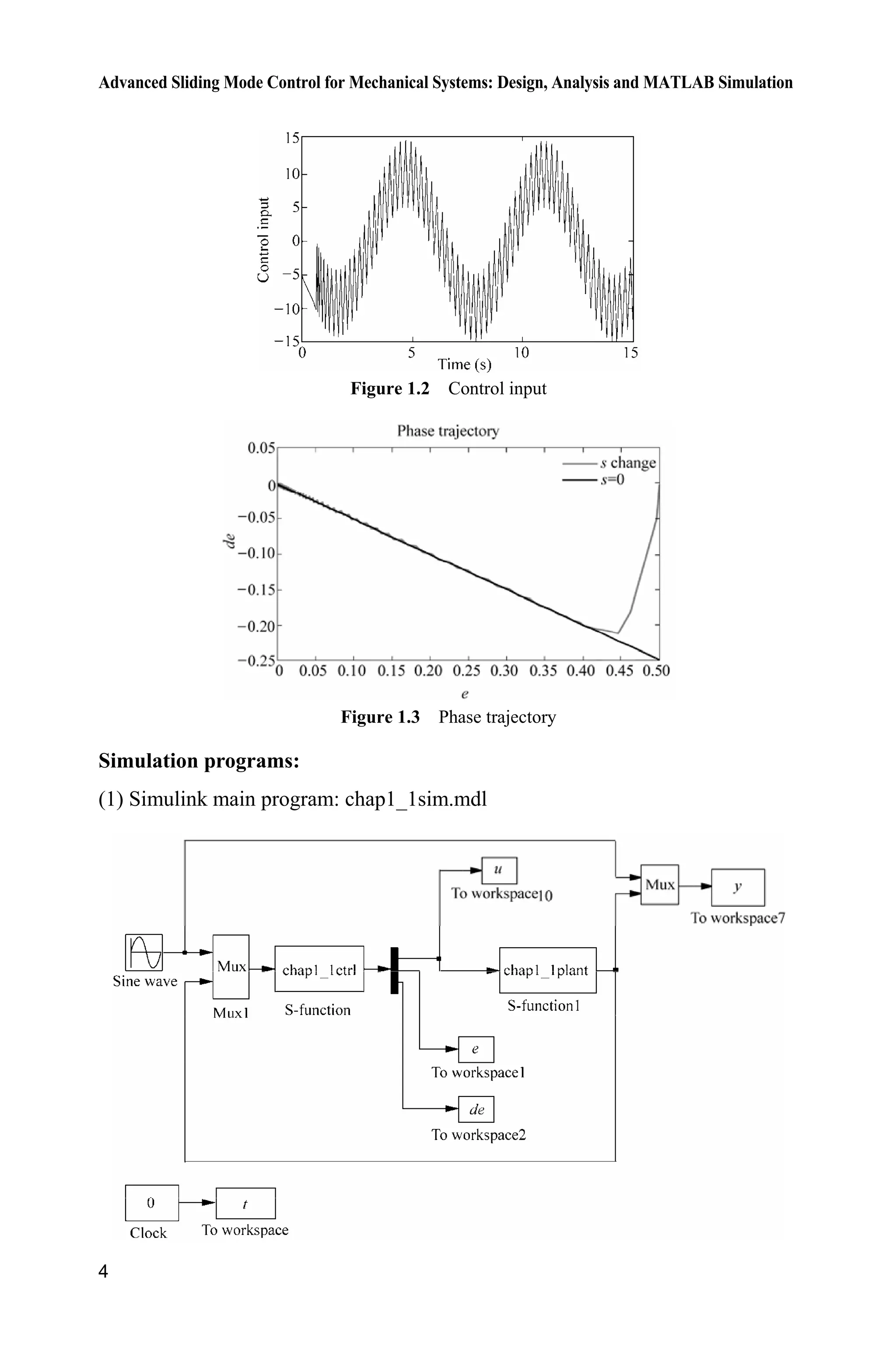
Figure 1.2 Control input
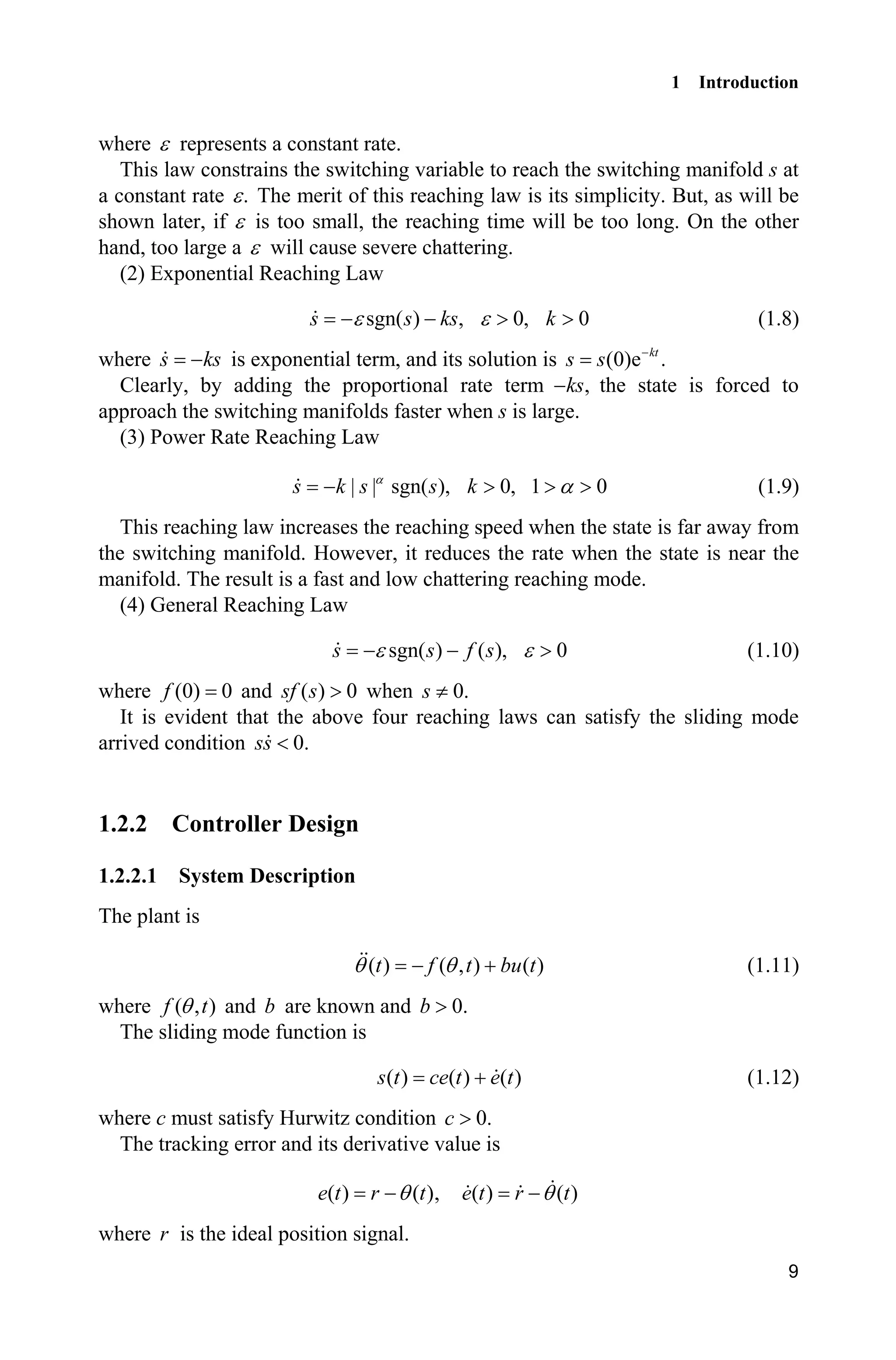
Figure 1.3 Phase trajectory
Simulation programs:
(1) Simulink main program: chap1_1sim.mdl
1 Introduction
5
(2) Controller: chap1_1ctrl.m
function [sys,x0,str,ts] = spacemodel(t,x,u,flag)
switch flag,
case 0,
[sys,x0,str,ts]=mdlInitializeSizes;
case 3,
sys=mdlOutputs(t,x,u);
case {2,4,9}
sys=[];
otherwise
error(['Unhandled flag = ',num2str(flag)]);
end
function [sys,x0,str,ts]=mdlInitializeSizes
sizes = simsizes;
sizes.NumContStates = 0;
sizes.NumDiscStates = 0;
sizes.NumOutputs = 3;
sizes.NumInputs = 3;
sizes.DirFeedthrough = 1;
sizes.NumSampleTimes = 0;
sys = simsizes(sizes);
x0 = [];
str = [];
ts = [];
function sys=mdlOutputs(t,x,u)
thd=u(1);
dthd=cos(t);
ddthd=-sin(t);
th=u(2);
dth=u(3);
c=0.5;
e=th-thd;
de=dth-dthd;
s=c*e+de;
J=10;
xite=0.50;
ut=J*(-c*de+ddthd-xite*sign(s));
sys(1)=ut;
sys(2)=e;
sys(3)=de;
(3) Plant: chap1_1plant.m
function [sys,x0,str,ts]=s_function(t,x,u,flag)
switch flag,
case 0,
[sys,x0,str,ts]=mdlInitializeSizes;
case 1,
Advanced Sliding Mode Control for Mechanical Systems: Design, Analysis and MATLAB Simulation
6
sys=mdlDerivatives(t,x,u);
case 3,
sys=mdlOutputs(t,x,u);
case {2, 4, 9 }
sys = [];
otherwise
error(['Unhandled flag = ',num2str(flag)]);
end
function [sys,x0,str,ts]=mdlInitializeSizes
sizes = simsizes;
sizes.NumContStates = 2;
sizes.NumDiscStates = 0;
sizes.NumOutputs = 2;
sizes.NumInputs = 1;
sizes.DirFeedthrough = 0;
sizes.NumSampleTimes = 0;
sys=simsizes(sizes);
x0=[0.5 1.0];
str=[];
ts=[];
function sys=mdlDerivatives(t,x,u)
J=10;
sys(1)=x(2);
sys(2)=1/J*u;
function sys=mdlOutputs(t,x,u)
sys(1)=x(1);
sys(2)=x(2);
(4) Plot program: chap1_1plot.m
close all;
figure(1);
subplot(211);
plot(t,y(:,1),'k',t,y(:,2),'r:','linewidth',2);
legend('Ideal position signal','Position tracking');
xlabel('time(s)');ylabel('Angle response');
subplot(212);
plot(t,cos(t),'k',t,y(:,3),'r:','linewidth',2);
legend('Ideal speed signal','Speed tracking');
xlabel('time(s)');ylabel('Angle speed response');
figure(2);
plot(t,u(:,1),'k','linewidth',0.01);
xlabel('time(s)');ylabel('Control input');
c=0.5;
figure(3);
plot(e,de,'r',e,-c'.*e,'k','linewidth',2);
xlabel('e');ylabel('de');
legend('s change','s=0');
title( phase trajectory');
1 Introduction
7
Sliding mode control is a nonlinear control method that alters the dynamics of
a nonlinear system by the multiple control structures are designed so as to ensure
that trajectories always move towards a switching condition. Therefore, the ultimate
trajectory will not exist entirely within one control structure. The state-feedback
control law is not a continuous function of time. Instead, it switches from one
continuous structure to another based on the current position in the state space.
Hence, sliding mode control is a variable structure control method. The multiple
control structures are designed so as to ensure that trajectories always move
towards a switching condition. Therefore, the ultimate trajectory will not exist
entirely within one control structure. Instead, the ultimate trajectory will slide
along the boundaries of the control structures. The motion of the system as it
slides along these boundaries is called a sliding mode[3]
and the geometrical locus
consisting of the boundaries is called the sliding (hyper) surface. Figure 1.3 shows
an example of the trajectory of a system under sliding mode control. The sliding
surface is described by s 0, and the sliding mode along the surface commences
after the finite time when system trajectories have reached the surface. In the
context of modern control theory, any variable structure system like a system
under SMC, may be viewed as a special case of a hybrid dynamical system.
Intuitively, sliding mode control uses practically infinite gain to force the
trajectories of a dynamic system to slide along the restricted sliding mode
subspace. Trajectories from this reduced-order sliding mode have desirable
properties (e.g., the system naturally slides along it until it comes to rest at a
desired equilibrium). The main strength of sliding mode control is its robustness.
Because the control can be as simple as a switching between two states, it need
not be precise and will not be sensitive to parameter variations that enter into the
control channel. Additionally, because the control law is not a continuous function,
the sliding mode can be reached in finite time (i.e., better than asymptotic behavior).
There are two steps in the SMC design. The first step is designing a sliding
surface so that the plant restricted to the sliding surface has a desired system
response. This means the state variables of the plant dynamics are constrained to
satisfy another set of equations which define the so-called switching surface. The
second step is constructing a switched feedback gains necessary to drive the
plant’s state trajectory to the sliding surface. These constructions are built on the
generalized Lyapunov stability theory.
1.1 Parameters of Sliding Surface Design
For linear system
, ,n
u u  x Ax b x R R (1.5)
where x is system state, A is an nun matrix, b is an nu1 vector, and u is control
input. A sliding variable can be designed as
Advanced Sliding Mode Control for Mechanical Systems: Design, Analysis and MATLAB Simulation
8
1
T
1 1
( )
n n
i i i i n
i i
c x c x x

¦ ¦s x C x (1.6)
where x is state vector, T
1 1[ 1] .nc c C 
In sliding mode control, parameters 1 2 1, , , nc c c  should be selected so that
the polynomial 1 2
1 2 1
n n
np c p c p c 
    is a Hurwitz polynomial, where p
is a Laplace operator.
For example, 2,n 1 1 2( ) ,c x xs x to satisfy the condition that the polynomial
1p c is Hurwitz, the eigenvalue of 1 0p c should have a negative real part,
i.e. 1 0.c !
Consider another example, 3,n 1 1 2 2 3( ) ,c x c x x s x to satisfy the condition
that the polynomial 2
2 1p c p c  is Hurwitz, the eigenvalue of 2
2p c p  1 0c
should have a negative real part. For a positive constant O in 2
( ) 0,p O we
can get 2 2
2 0.p pO O  Therefore, we have 2 2 ,c O 2
1 .c O
1.2 Sliding Mode Control Based on Reaching Law
Sliding mode based on reaching law includes reaching phase and sliding phase.
The reaching phase drive system is to maintain a stable manifold and the sliding
phase drive system ensures slide to equilibrium. The idea of sliding mode can be
described as Fig. 1.4.
Figure 1.4 The idea of sliding mode
1.2.1 Classical Reaching Laws
(1) Constant Rate Reaching Law
sgn( ), 0s sH H ! (1.7)
1 Introduction
9
where H represents a constant rate.
This law constrains the switching variable to reach the switching manifold s at
a constant rate .H The merit of this reaching law is its simplicity. But, as will be
shown later, if H is too small, the reaching time will be too long. On the other
hand, too large a H will cause severe chattering.
(2) Exponential Reaching Law
sgn( ) , 0, 0s s ks kH H  ! ! (1.8)
where s ks is exponential term, and its solution is (0)e .kt
s s 
Clearly, by adding the proportional rate term ,ks the state is forced to
approach the switching manifolds faster when s is large.
(3) Power Rate Reaching Law
| | sgn( ), 0, 1 0s k s s kD
D ! ! ! (1.9)
This reaching law increases the reaching speed when the state is far away from
the switching manifold. However, it reduces the rate when the state is near the
manifold. The result is a fast and low chattering reaching mode.
(4) General Reaching Law
sgn( ) ( ), 0s s f sH H  ! (1.10)
where (0) 0f and ( ) 0sf s ! when 0.s z
It is evident that the above four reaching laws can satisfy the sliding mode
arrived condition 0.ss 
1.2.2 Controller Design
1.2.2.1 System Description
The plant is
( ) ( , ) ( )t f t bu tT T  (1.11)
where ( , )f tT and b are known and 0.b !
The sliding mode function is
( ) ( ) ( )s t ce t e t (1.12)
where c must satisfy Hurwitz condition 0.c !
The tracking error and its derivative value is
( ) ( )e t r tT , ( ) ( )e t r tT
where r is the ideal position signal.
Advanced Sliding Mode Control for Mechanical Systems: Design, Analysis and MATLAB Simulation
10
Therefore, we have
( ) ( ) ( ) ( ( )) ( ( ))
( ( )) ( ( , ) ( ))
s t ce t e t c r t r t
c r t r f t bu t
T T
T T
   
   
(1.13)
According to the exponential reaching law, we have
sgn , 0, 0s s ks kH H  ! ! (1.14)
From Eqs. (1.13) and (1.14), we have
( ( )) ( ( , ) ( )) sgnc r t r f t bu t s ksT T H     
Then we can get the sliding mode controller as
1
( ) ( sgn( ) ( ( )) ( , ))u t s ks c r t r f t
b
H T T     (1.15)
1.2.2.2 Simulation Example
Consider the plant as
( ) ( , ) ( )t f t bu tT T 
where ( ) 25 ,tT T 133b .
Choosing position ideal signal ( ) sin ,r t t the initial state is set as
[ 0.15 0.15],  using controller Eq. (1.15), 15,c 5,H 10,k the results
can be seen in Fig. 1.5  Fig. 1.7.
Figure 1.5 Position tracking
1 Introduction
11
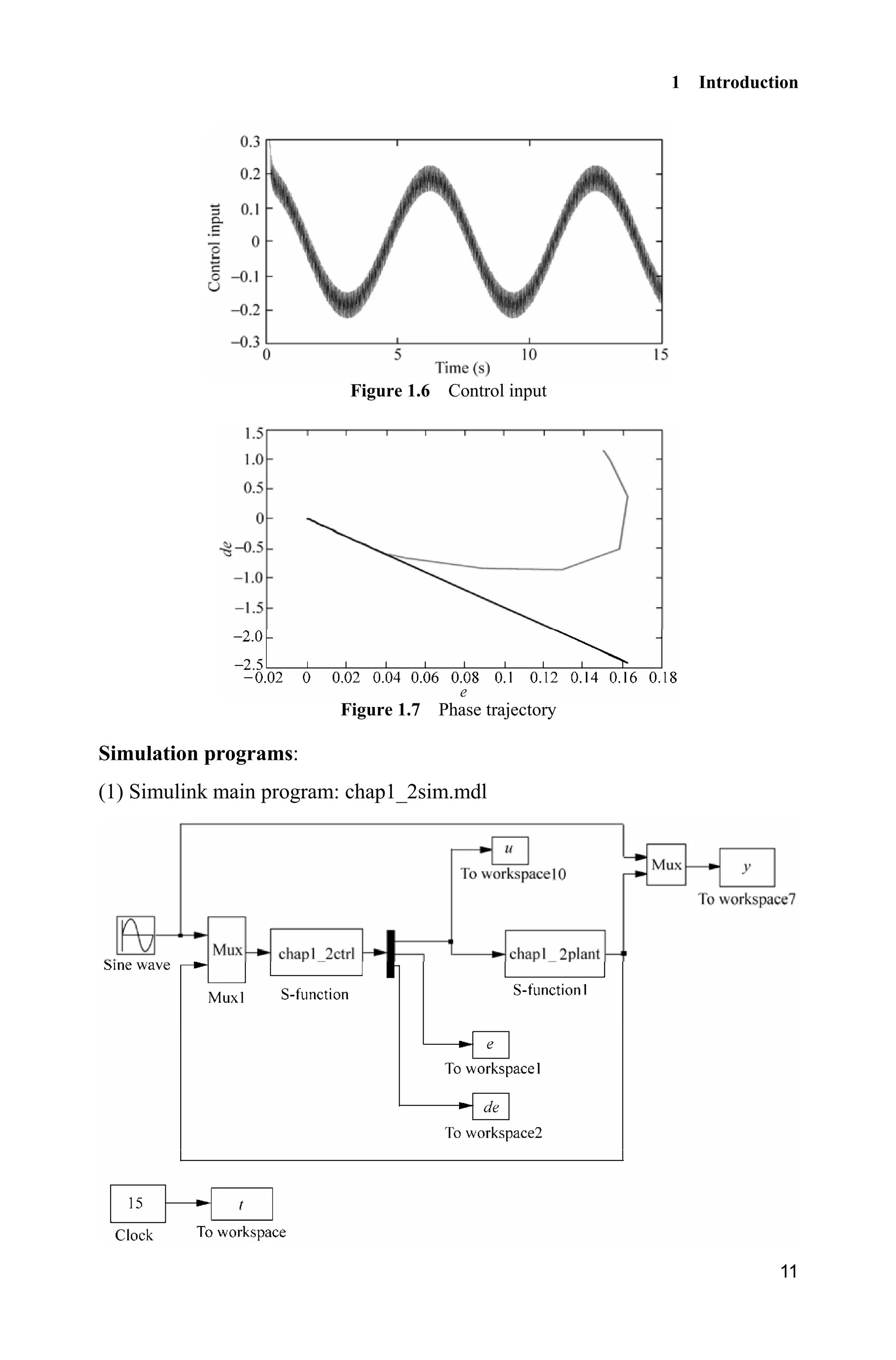
Figure 1.6 Control input
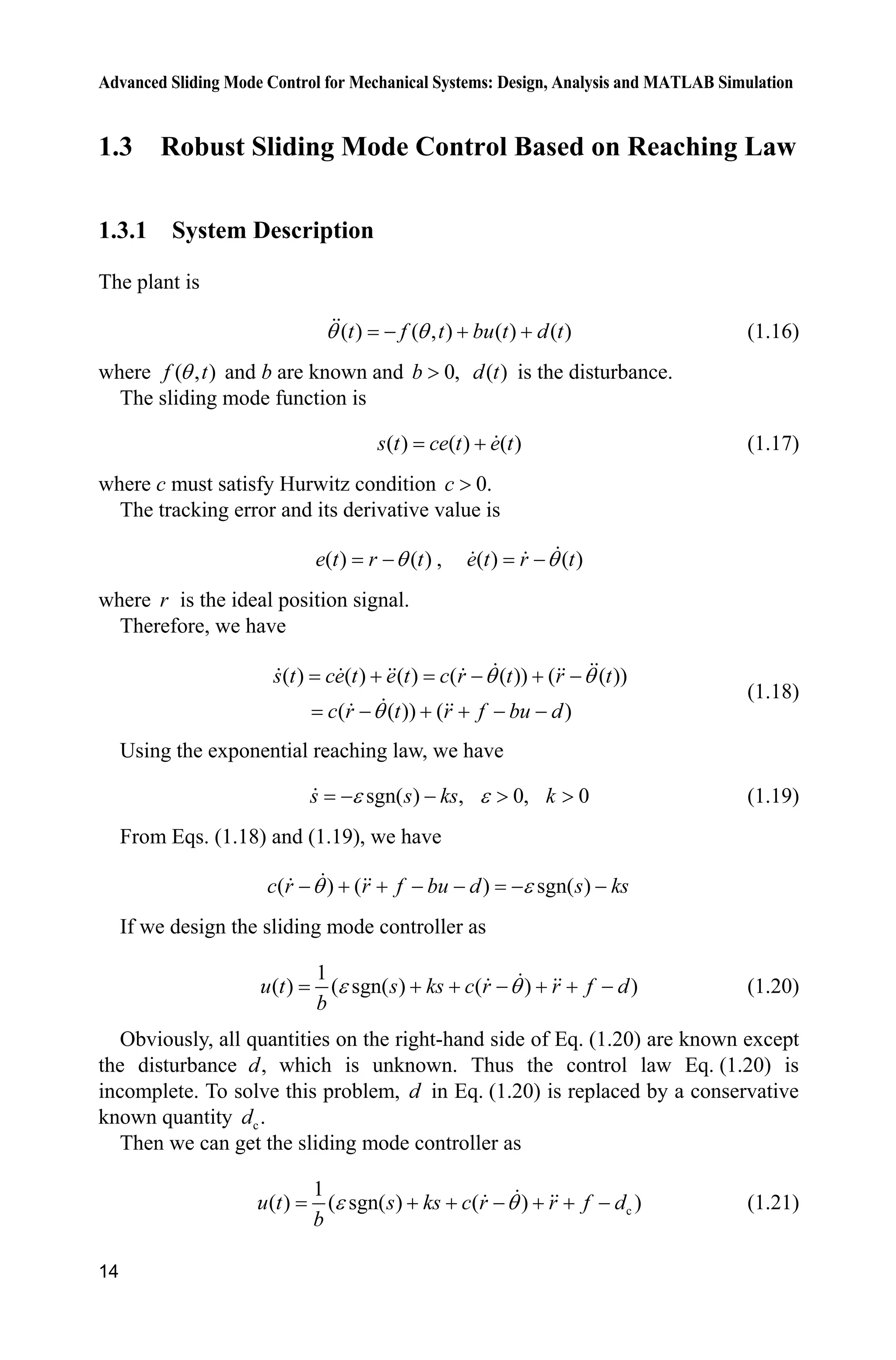
Figure 1.7 Phase trajectory
Simulation programs:
(1) Simulink main program: chap1_2sim.mdl
Advanced Sliding Mode Control for Mechanical Systems: Design, Analysis and MATLAB Simulation
12
(2) Controller: chap1_2ctrl.m
function [sys,x0,str,ts] = spacemodel(t,x,u,flag)
switch flag,
case 0,
[sys,x0,str,ts]=mdlInitializeSizes;
case 3,
sys=mdlOutputs(t,x,u);
case {2,4,9}
sys=[];
otherwise
error(['Unhandled flag = ',num2str(flag)]);
end
function [sys,x0,str,ts]=mdlInitializeSizes
sizes = simsizes;
sizes.NumContStates = 0;
sizes.NumDiscStates = 0;
sizes.NumOutputs = 3;
sizes.NumInputs = 3;
sizes.DirFeedthrough = 1;
sizes.NumSampleTimes = 0;
sys = simsizes(sizes);
x0 = [];
str = [];
ts = [];
function sys=mdlOutputs(t,x,u)
r=u(1);
dr=cos(t);
ddr=-sin(t);
th=u(2);
dth=u(3);
c=15;
e=r-th;
de=dr-dth;
s=c*e+de;
fx=25*dth;
b=133;
epc=5;k=10;
ut=1/b*(epc*sign(s)+k*s+c*de+ddr+fx);
sys(1)=ut;
sys(2)=e;
sys(3)=de;
(3) Plant: chap1_2plant.m
function [sys,x0,str,ts]=s_function(t,x,u,flag)
1 Introduction
13
switch flag,
case 0,
[sys,x0,str,ts]=mdlInitializeSizes;
case 1,
sys=mdlDerivatives(t,x,u);
case 3,
sys=mdlOutputs(t,x,u);
case {2, 4, 9 }
sys = [];
otherwise
error(['Unhandled flag = ',num2str(flag)]);
end
function [sys,x0,str,ts]=mdlInitializeSizes
sizes = simsizes;
sizes.NumContStates = 2;
sizes.NumDiscStates = 0;
sizes.NumOutputs = 2;
sizes.NumInputs = 1;
sizes.DirFeedthrough = 0;
sizes.NumSampleTimes = 0;
sys=simsizes(sizes);
x0=[-0.15 -0.15];
str=[];
ts=[];
function sys=mdlDerivatives(t,x,u)
sys(1)=x(2);
sys(2)=-25*x(2)+133*u;
function sys=mdlOutputs(t,x,u)
sys(1)=x(1);
sys(2)=x(2);
(4) Plot program: chap1_2plot.m
close all;
figure(1);
plot(t,y(:,1),'k',t,y(:,2),'r:','linewidth',2);
legend('Ideal position signal','Position tracking');
xlabel('time(s)');ylabel('Angle response');
figure(2);
plot(t,u(:,1),'k','linewidth',0.01);
xlabel('time(s)');ylabel('Control input');
c=15;
figure(3);
plot(e,de,'r',e,-c'.*e,'k','linewidth',2);
xlabel('e');ylabel('de');
Advanced Sliding Mode Control for Mechanical Systems: Design, Analysis and MATLAB Simulation
14
1.3 Robust Sliding Mode Control Based on Reaching Law
1.3.1 System Description
The plant is
( ) ( , ) ( ) ( )t f t bu t d tT T   (1.16)
where ( , )f tT and b are known and 0,b ! ( )d t is the disturbance.
The sliding mode function is
( ) ( ) ( )s t ce t e t (1.17)
where c must satisfy Hurwitz condition 0.c !
The tracking error and its derivative value is
( ) ( )e t r tT , ( ) ( )e t r tT
where r is the ideal position signal.
Therefore, we have
( ) ( ) ( ) ( ( )) ( ( ))
( ( )) ( )
s t ce t e t c r t r t
c r t r f bu d
T T
T
   
    
(1.18)
Using the exponential reaching law, we have
sgn( ) , 0, 0H H  ! !s s ks k (1.19)
From Eqs. (1.18) and (1.19), we have
( ) ( ) sgn( )c r r f bu d s ksT H      
If we design the sliding mode controller as
1
( ) ( sgn( ) ( ) )u t s ks c r r f d
b
H T      (1.20)
Obviously, all quantities on the right-hand side of Eq. (1.20) are known except
the disturbance ,d which is unknown. Thus the control law Eq. (1.20) is
incomplete. To solve this problem, d in Eq. (1.20) is replaced by a conservative
known quantity c.d
Then we can get the sliding mode controller as
c
1
( ) ( sgn( ) ( ) )u t s ks c r r f d
b
H T      (1.21)
1 Introduction
15
where, cd is chosen to guarantee the reaching condition.
Substituting Eq. (1.21) into Eq. (1.18) and simplifying the result, we get
c( ) sgn( )s t s ks d dH    (1.22)
The term cd can be chosen to ensure the reaching condition. It is reasonable to
assume that d is bounded, therefore, so is c.d That is
L U( )d d t d (1.23)
where the bounds Ld and Ud are known.
Referring to Eq. (1.22), cd is chosen according to the following logic;
When ( ) 0,s t ! c( ) ,s t ks d dH    we want ( ) 0,s t  so let c Ld d
When ( ) 0,s t  c( ) ,s t ks d dH    we want ( ) 0,s t ! so let c Ud d
Therefore, if we define U L
1 ,
2
d d
d
 U L
2 ,
2
d d
d

then we can get
c 2 1 sgn( )d d d s (1.24)
1.3.2 Simulation Example
Consider the plant as
( ) ( , ) ( ) ( )t f t bu t d tT T  
where ( ) 25 ,tT T 133,b ( ) 10sin ( ).d t tS
Choosing position ideal signal ( ) sin ,r t t the initial state is set as
[ 0.15 0.15],  using controller Eq. (1.21), 15,c 0.5,H 10,k the results
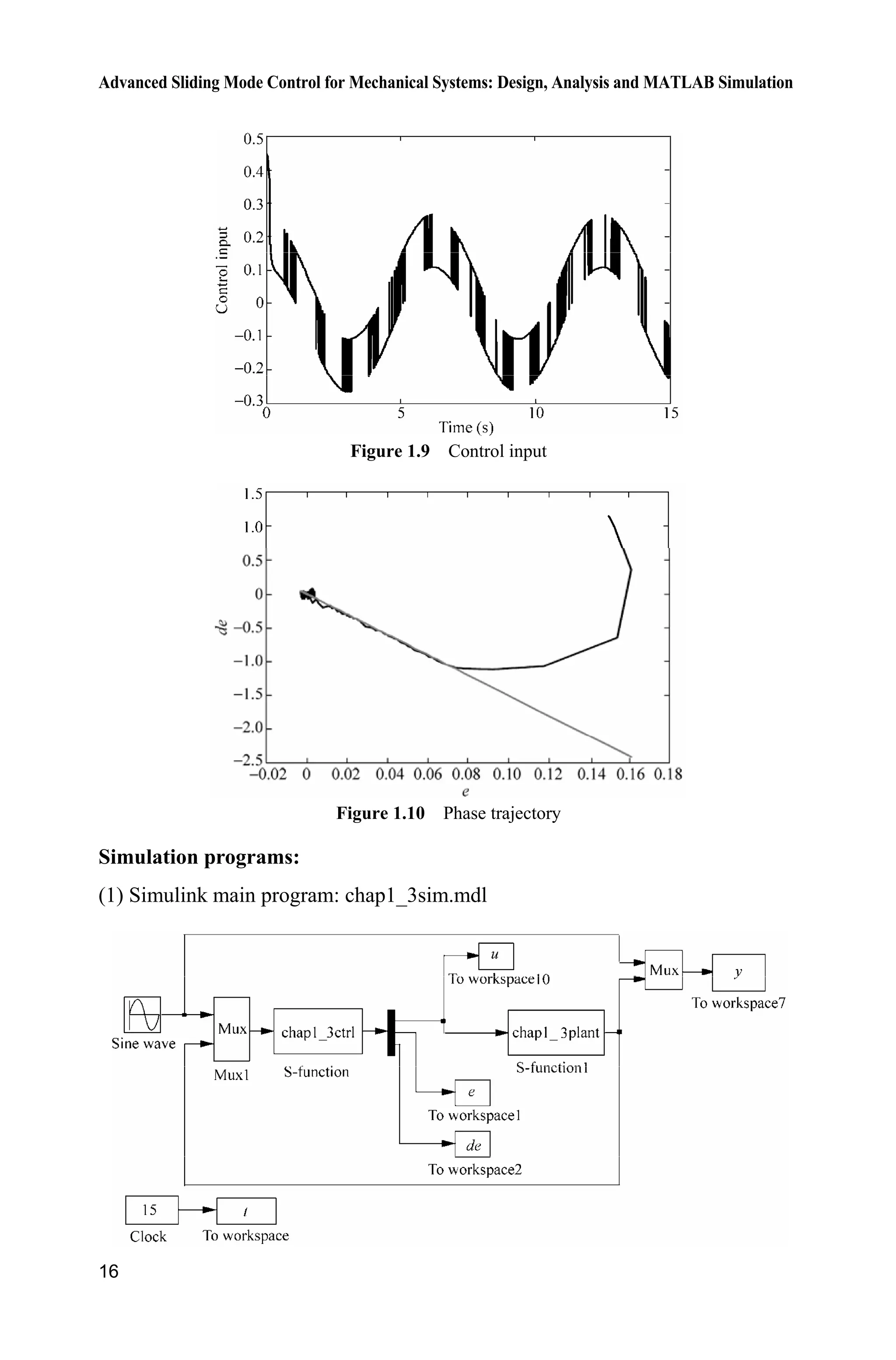
can be seen in Fig. 1.8  Fig. 1.10.
Figure 1.8 Position tracking
Advanced Sliding Mode Control for Mechanical Systems: Design, Analysis and MATLAB Simulation
16
Figure 1.9 Control input
Figure 1.10 Phase trajectory
Simulation programs:
(1) Simulink main program: chap1_3sim.mdl
1 Introduction
17
(2) Controller: chap1_3ctrl.m
function [sys,x0,str,ts] = spacemodel(t,x,u,flag)
switch flag,
case 0,
[sys,x0,str,ts]=mdlInitializeSizes;
case 3,
sys=mdlOutputs(t,x,u);
case {2,4,9}
sys=[];
otherwise
error(['Unhandled flag = ',num2str(flag)]);
end
function [sys,x0,str,ts]=mdlInitializeSizes
sizes = simsizes;
sizes.NumContStates = 0;
sizes.NumDiscStates = 0;
sizes.NumOutputs = 3;
sizes.NumInputs = 3;
sizes.DirFeedthrough = 1;
sizes.NumSampleTimes = 0;
sys = simsizes(sizes);
x0 = [];
str = [];
ts = [];
function sys=mdlOutputs(t,x,u)
r=u(1);
dr=cos(t);
ddr=-sin(t);
th=u(2);
dth=u(3);
c=15;
e=r-th;
de=dr-dth;
s=c*e+de;
fx=25*dth;
b=133;
dL=-10;dU=10;
d1=(dU-dL)/2;
d2=(dU+dL)/2;
dc=d2-d1*sign(s);
epc=0.5;k=10;
ut=1/b*(epc*sign(s)+k*s+c*de+ddr+fx-dc);
sys(1)=ut;
sys(2)=e;
sys(3)=de;
Advanced Sliding Mode Control for Mechanical Systems: Design, Analysis and MATLAB Simulation
18
(3) Plant: chap1_3plant.m
function [sys,x0,str,ts]=s_function(t,x,u,flag)
switch flag,
case 0,
[sys,x0,str,ts]=mdlInitializeSizes;
case 1,
sys=mdlDerivatives(t,x,u);
case 3,
sys=mdlOutputs(t,x,u);
case {2, 4, 9 }
sys = [];
otherwise
error(['Unhandled flag = ',num2str(flag)]);
end
function [sys,x0,str,ts]=mdlInitializeSizes
sizes = simsizes;
sizes.NumContStates = 2;
sizes.NumDiscStates = 0;
sizes.NumOutputs = 2;
sizes.NumInputs = 1;
sizes.DirFeedthrough = 0;
sizes.NumSampleTimes = 0;
sys=simsizes(sizes);
x0=[-0.15 -0.15];
str=[];
ts=[];
function sys=mdlDerivatives(t,x,u)
sys(1)=x(2);
sys(2)=-25*x(2)+133*u+10*sin(pi*t);
function sys=mdlOutputs(t,x,u)
sys(1)=x(1);
sys(2)=x(2);
(4) Plot program: chap1_3plot.m
close all;
figure(1);
plot(t,y(:,1),'k',t,y(:,2),'r:','linewidth',2);
legend('Ideal position signal','Position tracking');
xlabel('time(s)');ylabel('Position tracking');
figure(2);
plot(t,u(:,1),'k','linewidth',2);
xlabel('time(s)');ylabel('Control input');
c=15;
figure(3);
plot(e,de,'k',e,-c'.*e,'r','linewidth',2);
xlabel('e');ylabel('de');
1 Introduction
19
1.4 Sliding Mode Robust Control Based on Upper Bound
1.4.1 System Description
Consider a second-order nonlinear inverted pendulum as follows:
0( , ) ( , ) ( , ) ( , ) ( )f f g u g u d tT T T T T T T T T '   '  (1.25)
where f and g are known nonlinear functions, u R and y RT  are the
control input and measurement output respectively. 0 ( )d t is the disturbance, and
| ( , , ) | ,d t DT T D is a positive constant.
Let 0( , , ) ( , ) ( , ) ( ),d t f g u d tT T T T T T'  '  therefore, Eq. (1.25) can be written
as
( , ) ( , ) ( , , )f g u d tT T T T T T T  (1.26)
1.4.2 Controller Design
Let desired position input be d ,T and d .e T T The sliding variable is selected as
s = e+ce (1.27)
where 0.c ! Therefore,
d ds e +ce ce f gu d ceT T T     
The controller is adopted as
d
1
[ sgn( )]u f ce s
g
T K    (1.28)
elect the Lyapunov function as
21
2
L s
Therefore, we have
d
d d
( )
( ( sgn( )) )
( sgn ( ))
| |
L ss s f gu d ce
s f f ce s d ce
s d s
sd s
T
T T K
K
K


If ,DK then
| | 0L sd sK
Advanced Sliding Mode Control for Mechanical Systems: Design, Analysis and MATLAB Simulation
20
In order to restrain the chattering phenomenon, the saturated function sat( )s
is adopted instead of sgn( )s in Eq. (1.29) as
1,
sat( ) , | | , 1/
1,
s
s ks s k
s
'
' '
'
!­
°
®
°  ¯
(1.29)
where ' is the “boundary layer”.
The nature of saturated function is: out of the boundary layer, switch control is
selected, in the boundary layer, the usual feedback control is adopted. Therefore,
the chattering phenomenon can be restrained thoroughly.
1.4.3 Simulation Example
The dynamic equation of inverted pendulum is
1 2
2 ( ) ( )
x x
x f g u
­
®
 ˜¯ x x
where
2
1 2 1 1 c
2
1 c
sin cos sin /( )
( )
(4/3 cos /( ))
g x mlx x x m m
f
l m x m m
 
 
x
1 c
2
1 c
cos /( )
( )
(4/3 cos /( ))
x m m
g
l m x m m

 
x
where 1 2[ ],x xx 1x and 2x are the oscillation angle and oscillation rate respec-
tively, 2
9.8 m/s ,g cm is the vehicle mass, c 1kg,m m is the mass of pendulum
bar, 0.1kg,m l is one half of pendulum length, 0.5 m,l u is the control input.
Figure 1.11 Inverted pendulum system
Let 1 ,x T and the desired trajectory is d ( ) 0.1sin ( ).t tT The initial state of
the inverted pendulum is [ / 60 0],S and 0.20.K The controller is Eq. (1.28)
M is a variable in the simulation program. M 1 indicates the controller with a
switch function, and M 2 indicates the controller with a saturation function. The
1 Introduction
21
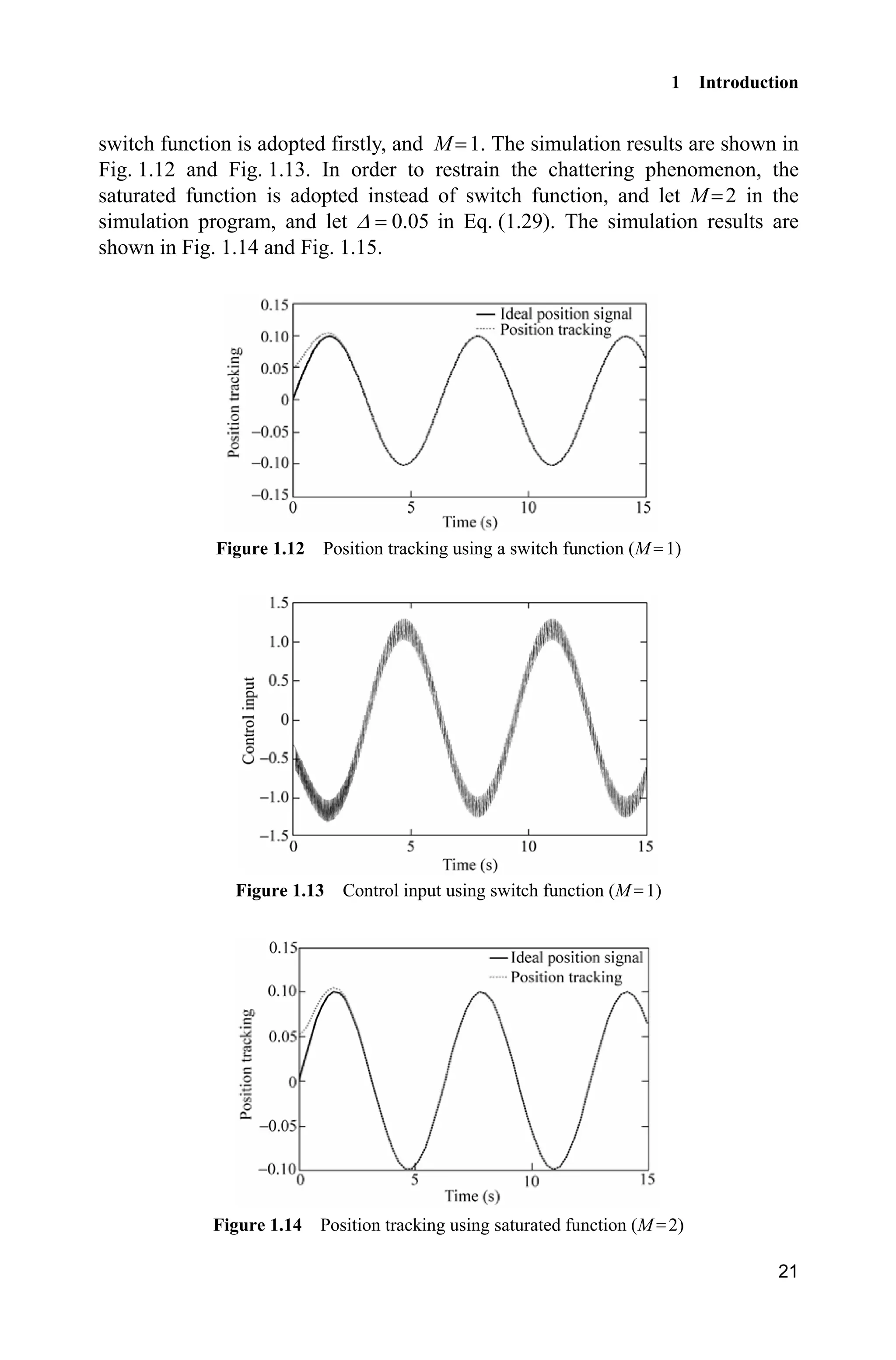
switch function is adopted firstly, and M 1. The simulation results are shown in
Fig. 1.12 and Fig. 1.13. In order to restrain the chattering phenomenon, the
saturated function is adopted instead of switch function, and let M 2 in the
simulation program, and let 0.05' in Eq. (1.29). The simulation results are
shown in Fig. 1.14 and Fig. 1.15.
Figure 1.12 Position tracking using a switch function (M 1)
Figure 1.13 Control input using switch function (M 1)
Figure 1.14 Position tracking using saturated function (M 2)
Advanced Sliding Mode Control for Mechanical Systems: Design, Analysis and MATLAB Simulation
22
Figure 1.15 Control input using saturated function (M 2)
Simulation programs:
(1) Simulink main program: chap1_4sim.mdl
(2) S-function of controller: chap1_4ctrl.m
function [sys,x0,str,ts] = spacemodel(t,x,u,flag)
switch flag,
case 0,
[sys,x0,str,ts]=mdlInitializeSizes;
case 3,
sys=mdlOutputs(t,x,u);
case {1,2,4,9}
sys=[];
otherwise
error(['Unhandled flag = ',num2str(flag)]);
end
function [sys,x0,str,ts]=mdlInitializeSizes
sizes = simsizes;
sizes.NumContStates = 0;
sizes.NumDiscStates = 0;
1 Introduction
23
sizes.NumOutputs = 1;
sizes.NumInputs = 3;
sizes.DirFeedthrough = 1;
sizes.NumSampleTimes = 0;
sys = simsizes(sizes);
x0 = [];
str = [];
ts = [];
function sys=mdlOutputs(t,x,u)
r=0.1*sin(t);
dr=0.1*cos(t);
ddr=-0.1*sin(t);
x1=u(2);
x2=u(3);
e=r-x1;
de=dr-x2;
c=1.5;
s=c*e+de;
g=9.8;mc=1.0;m=0.1;l=0.5;
T=l*(4/3-m*(cos(x1))^2/(mc+m));
fx=g*sin(x1)-m*l*x2^2*cos(x1)*sin(x1)/(mc+m);
fx=fx/T;
gx=cos(x1)/(mc+m);
gx=gx/T;
xite=0.20;
M=2;
if M==1
ut=1/gx*(-fx+ddr+c*de+xite*sign(s));
elseif M==2 %Saturated function
delta=0.05;
kk=1/delta;
if abs(s)delta
sats=sign(s);
else
sats=kk*s;
end
ut=1/gx*(-fx+ddr+c*de+xite*sats);
end
sys(1)=ut;
(3) S-function of the plant: chap1_4plant.m
function [sys,x0,str,ts]=s_function(t,x,u,flag)
Advanced Sliding Mode Control for Mechanical Systems: Design, Analysis and MATLAB Simulation
24
switch flag,
case 0,
[sys,x0,str,ts]=mdlInitializeSizes;
case 1,
sys=mdlDerivatives(t,x,u);
case 3,
sys=mdlOutputs(t,x,u);
case {2, 4, 9 }
sys = [];
otherwise
error(['Unhandled flag = ',num2str(flag)]);
end
function [sys,x0,str,ts]=mdlInitializeSizes
sizes = simsizes;
sizes.NumContStates = 2;
sizes.NumDiscStates = 0;
sizes.NumOutputs = 2;
sizes.NumInputs = 1;
sizes.DirFeedthrough = 0;
sizes.NumSampleTimes = 0;
sys=simsizes(sizes);
x0=[pi/60 0];
str=[];
ts=[];
function sys=mdlDerivatives(t,x,u)
g=9.8;mc=1.0;m=0.1;l=0.5;
S=l*(4/3-m*(cos(x(1)))^2/(mc+m));
fx=g*sin(x(1))-m*l*x(2)^2*cos(x(1))*sin(x(1))/(mc+m);
fx=fx/S;
gx=cos(x(1))/(mc+m);
gx=gx/S;
%%%%%%%%%
dt=0*10*sin(t);
%%%%%%%%%
sys(1)=x(2);
sys(2)=fx+gx*u+dt;
function sys=mdlOutputs(t,x,u)
sys(1)=x(1);
sys(2)=x(2);
(4) plot program: chap1_4plot.m
close all;
figure(1);
plot(t,y(:,1),'k',t,y(:,2),'r:','linewidth',2);
legend('Ideal position signal','Position tracking');
xlabel('time(s)');ylabel('Position tracking');
1 Introduction
25
figure(2);
plot(t,ut(:,1),'k','linewidth',2);
xlabel('time(s)');ylabel('Control input');
1.5 Sliding Mode Control Based on Quasi-Sliding Mode
1.5.1 Quasi-Sliding Mode
In practical engineering systems, the chattering of sliding mode control may
cause damage to system components such as actuators. One way to alleviate the
chattering is to use the quasi-sliding mode method which can make the state stay
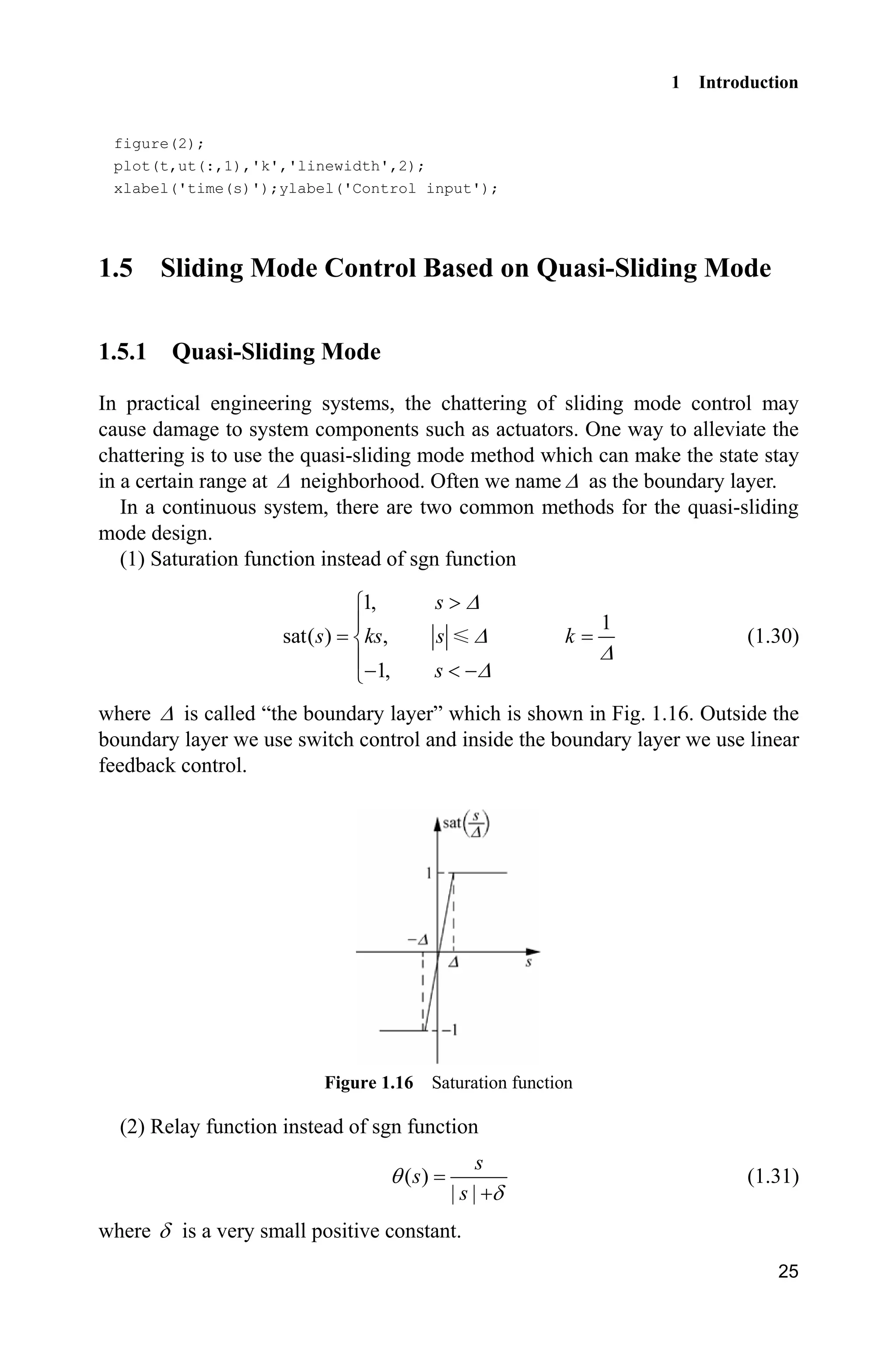
in a certain range at ' neighborhood. Often we name ' as the boundary layer.
In a continuous system, there are two common methods for the quasi-sliding
mode design.
(1) Saturation function instead of sgn function
1,
1
sat( ) ,
1,
s
s ks s k
s
'
'
'
'
!­
°
®
°  ¯
(1.30)
where ' is called “the boundary layer” which is shown in Fig. 1.16. Outside the
boundary layer we use switch control and inside the boundary layer we use linear
feedback control.
Figure 1.16 Saturation function
(2) Relay function instead of sgn function
( )
| |
s
s
s
T
G
(1.31)
where G is a very small positive constant.
Advanced Sliding Mode Control for Mechanical Systems: Design, Analysis and MATLAB Simulation
26
1.5.2 Simulation Example
Consider the plant as
( ) ( , ) ( ) ( )t f t bu t d tT T  
where, ( ) 25 ,tT T 133,b ( ) 50sin .d t t
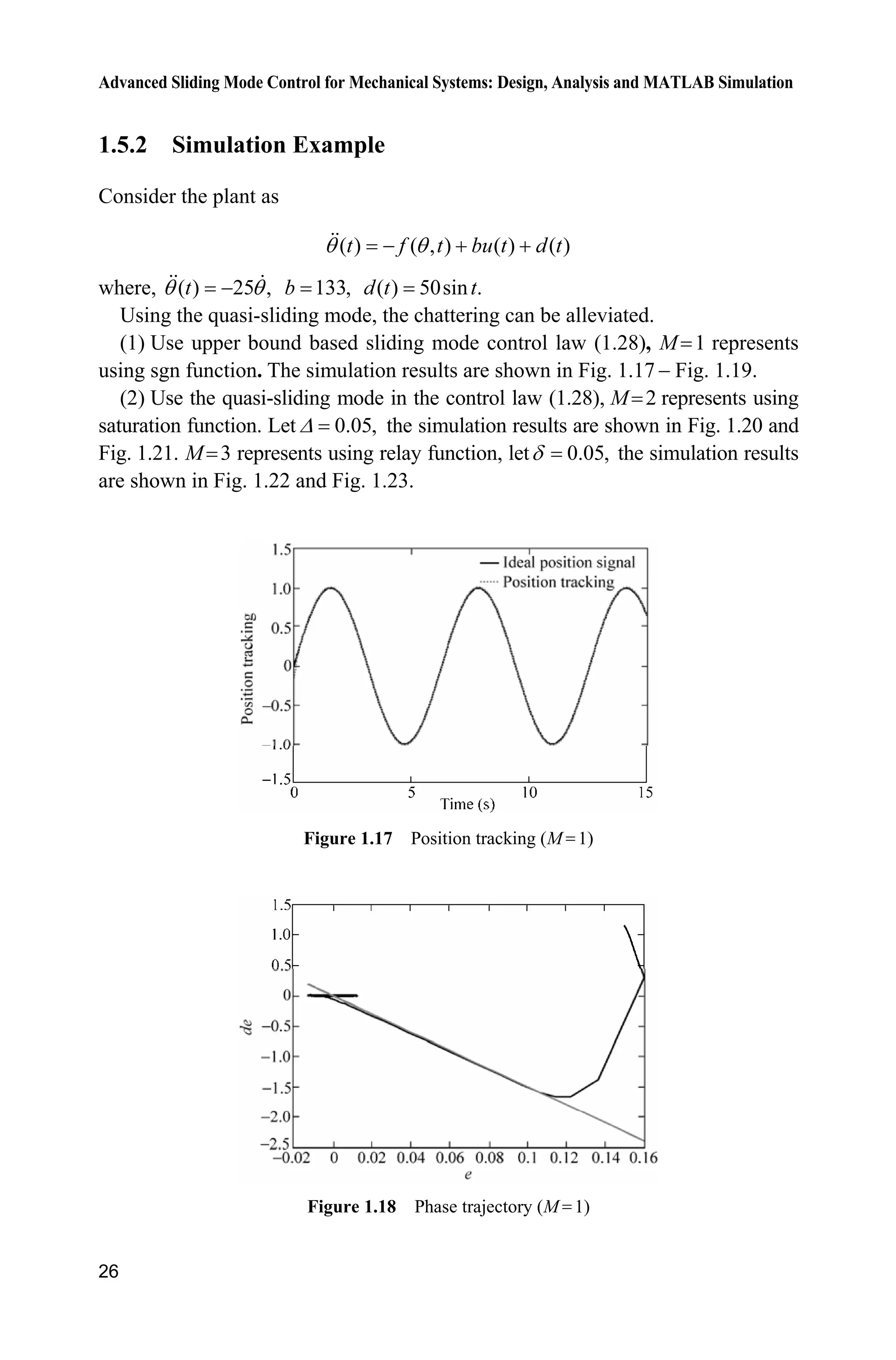
Using the quasi-sliding mode, the chattering can be alleviated.
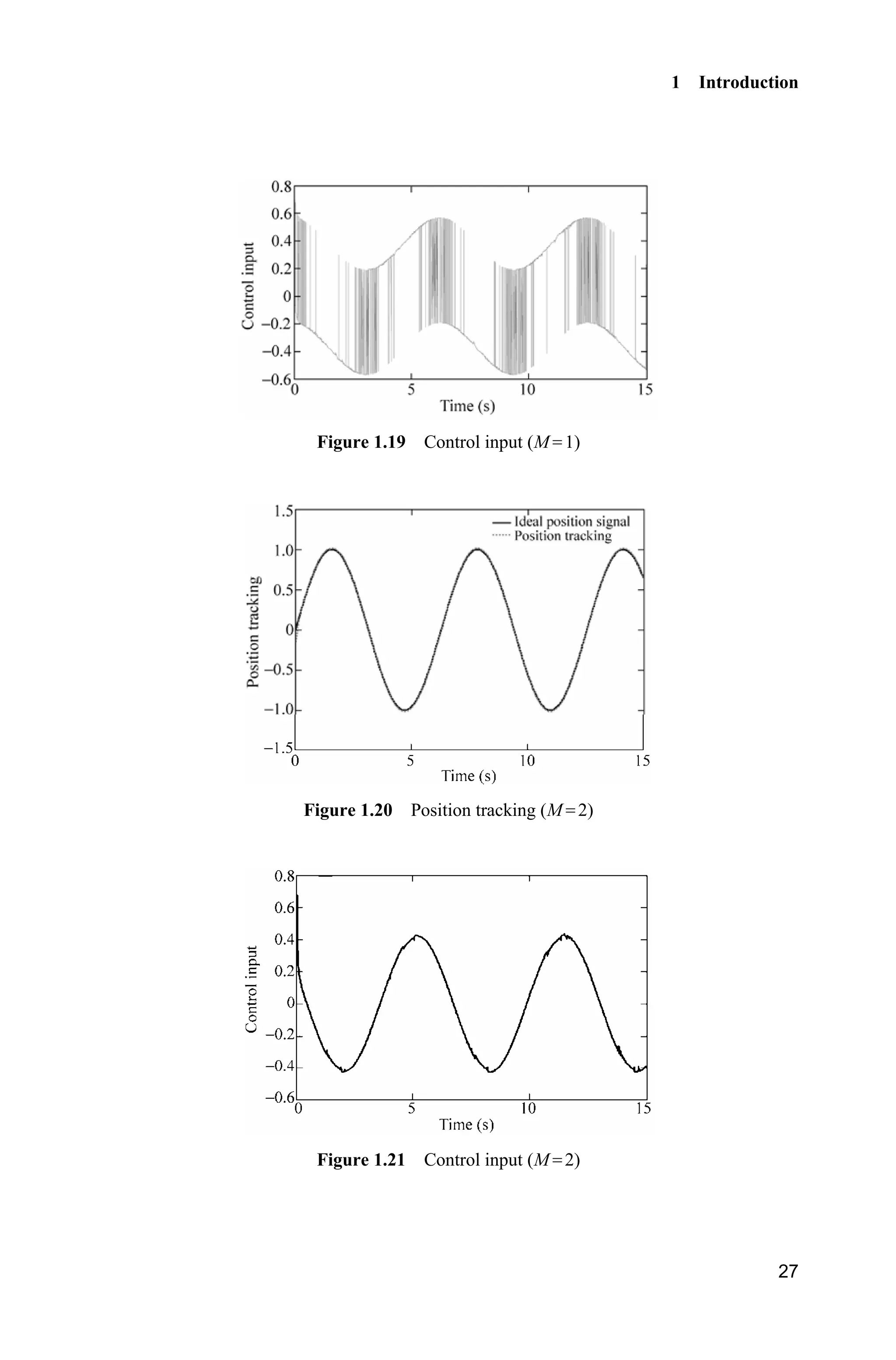
(1) Use upper bound based sliding mode control law (1.28), M 1 represents
using sgn function. The simulation results are shown in Fig. 1.17  Fig. 1.19.
(2) Use the quasi-sliding mode in the control law (1.28), M 2 represents using
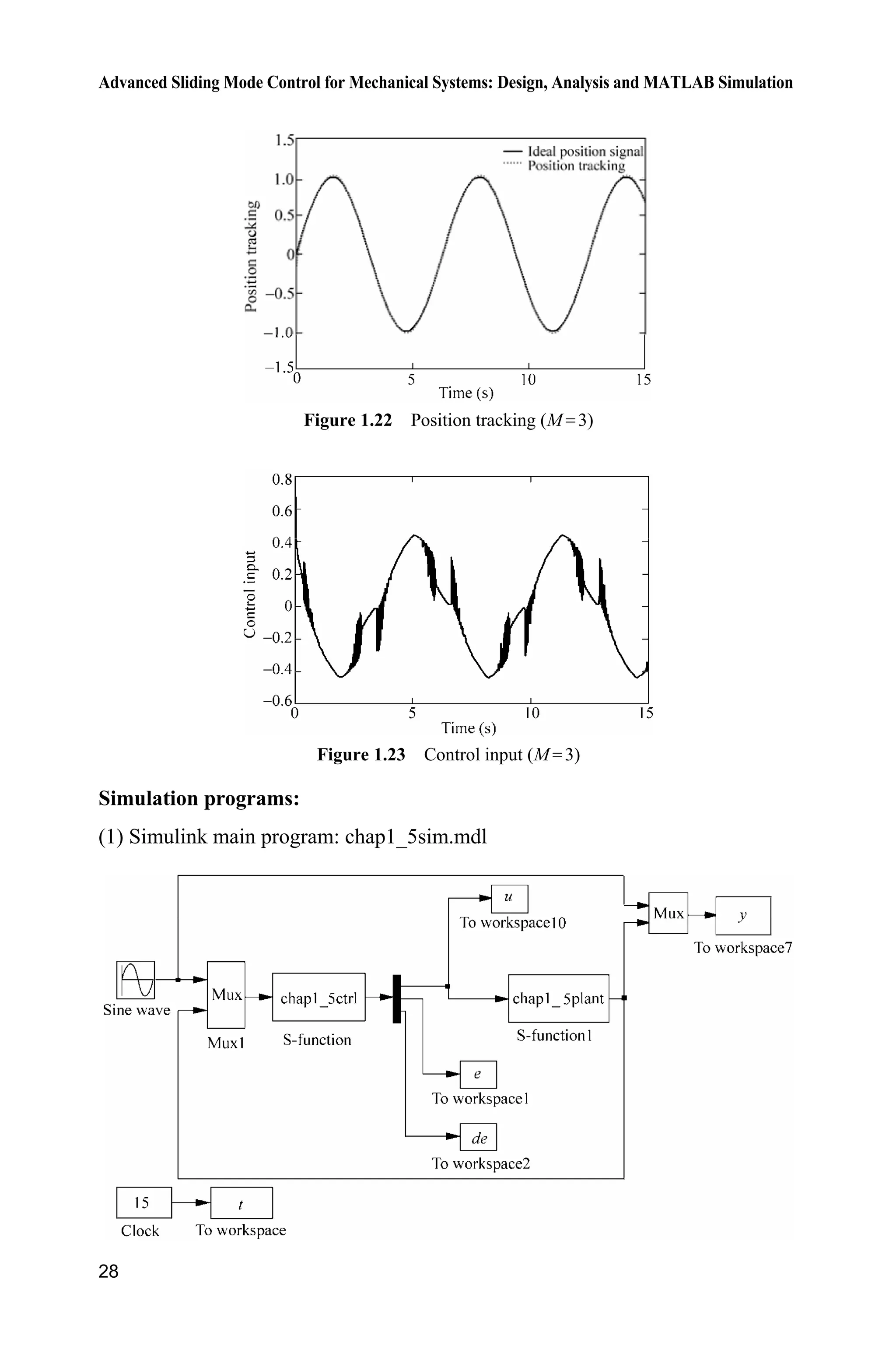
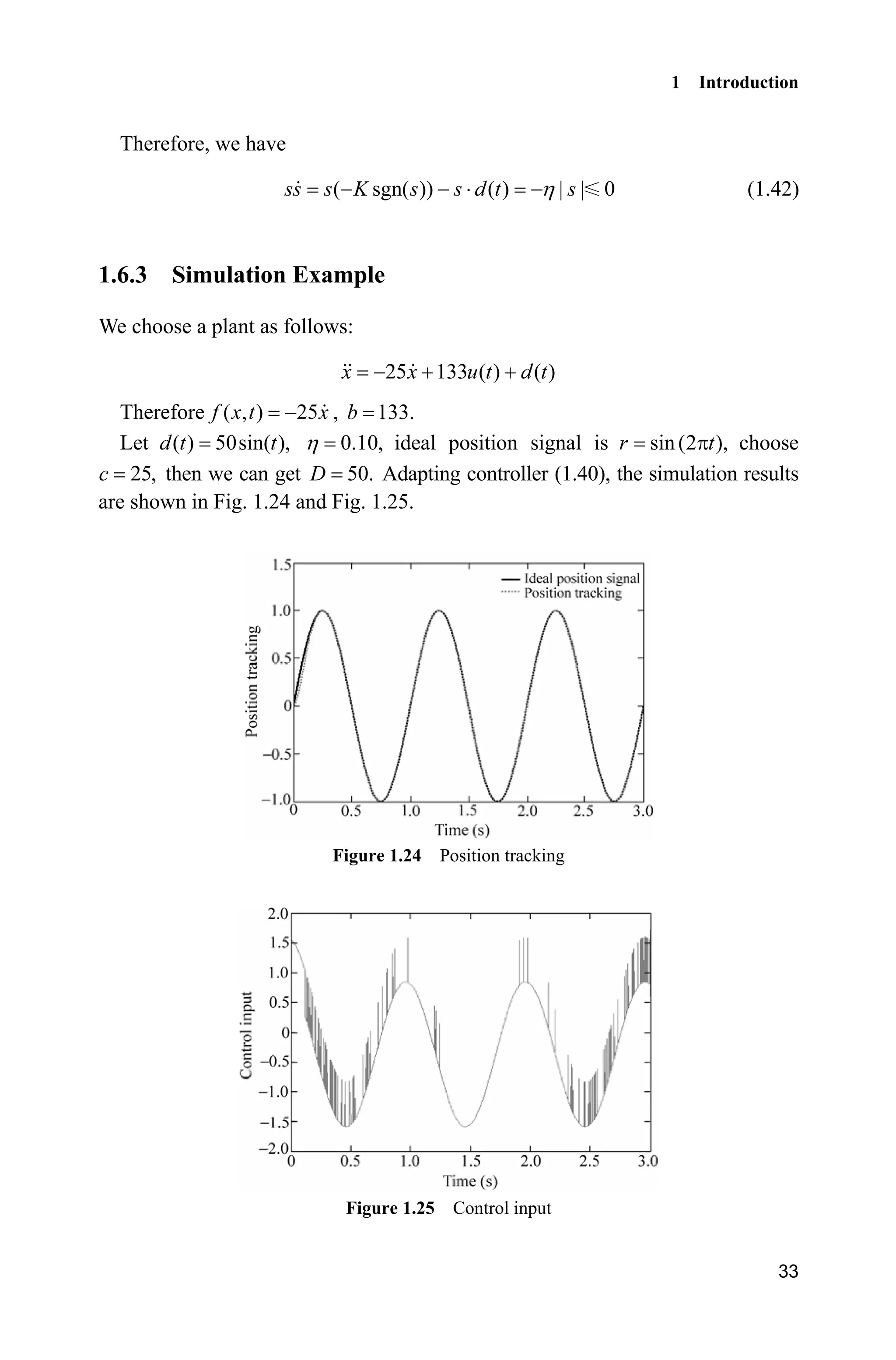
saturation function. Let 0.05,' the simulation results are shown in Fig. 1.20 and
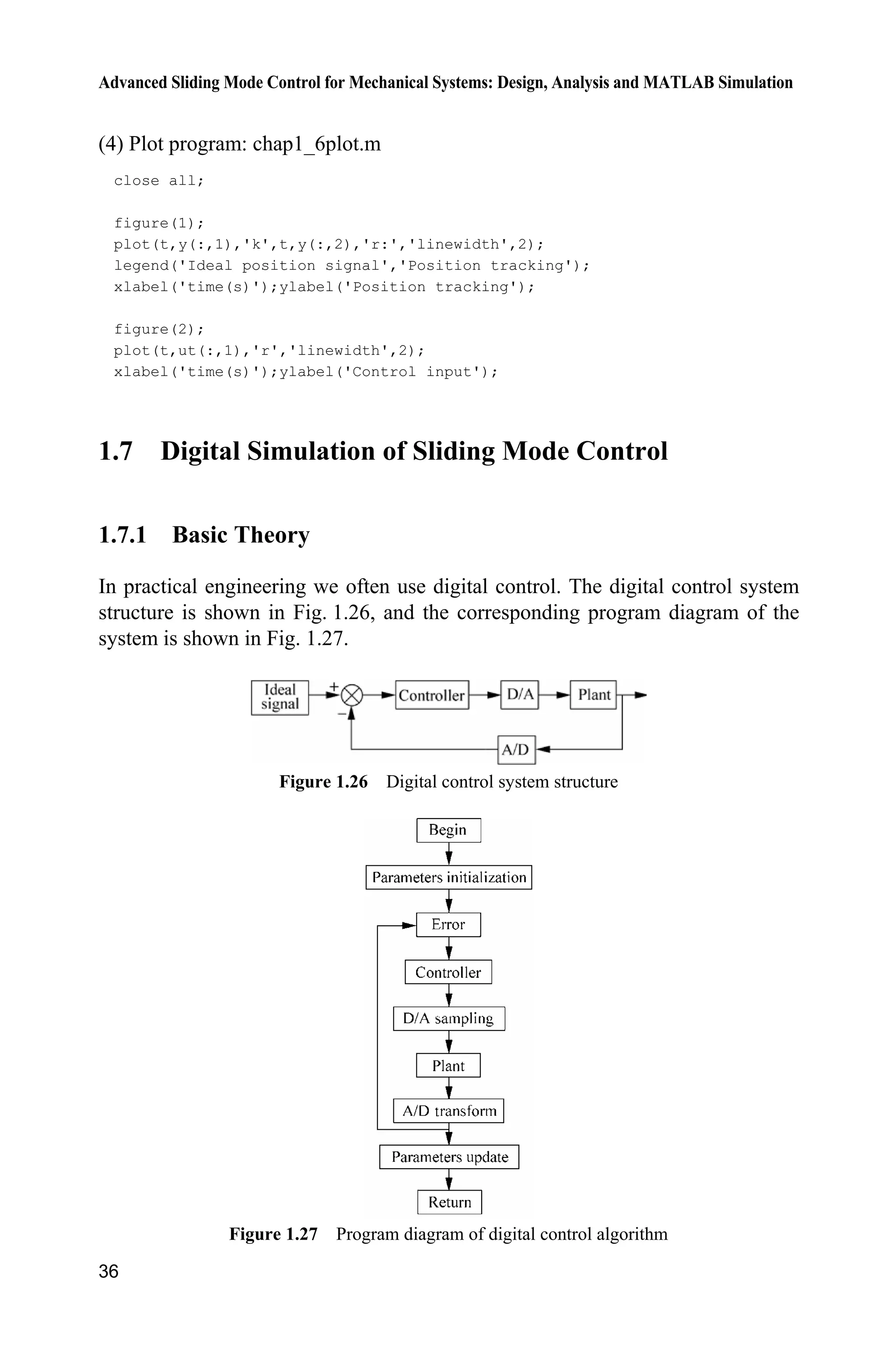
Fig. 1.21. M 3 represents using relay function, let 0.05,G the simulation results
are shown in Fig. 1.22 and Fig. 1.23.
Figure 1.17 Position tracking (M 1)
Figure 1.18 Phase trajectory (M 1)
1 Introduction
27
Figure 1.19 Control input (M 1)
Figure 1.20 Position tracking (M 2)
Figure 1.21 Control input (M 2)
Advanced Sliding Mode Control for Mechanical Systems: Design, Analysis and MATLAB Simulation
28
Figure 1.22 Position tracking (M 3)
Figure 1.23 Control input (M 3)
Simulation programs:
(1) Simulink main program: chap1_5sim.mdl
1 Introduction
29
(2) Controller: chap1_5ctrl.m
function [sys,x0,str,ts] = spacemodel(t,x,u,flag)
switch flag,
case 0,
[sys,x0,str,ts]=mdlInitializeSizes;
case 3,
sys=mdlOutputs(t,x,u);
case {2,4,9}
sys=[];
otherwise
error(['Unhandled flag = ',num2str(flag)]);
end
function [sys,x0,str,ts]=mdlInitializeSizes
sizes = simsizes;
sizes.NumContStates = 0;
sizes.NumDiscStates = 0;
sizes.NumOutputs = 3;
sizes.NumInputs = 3;
sizes.DirFeedthrough = 1;
sizes.NumSampleTimes = 0;
sys = simsizes(sizes);
x0 = [];
str = [];
ts = [];
function sys=mdlOutputs(t,x,u)
r=u(1);
dr=cos(t);
ddr=-sin(t);
th=u(2);
dth=u(3);
c=15;
e=r-th;
de=dr-dth;
s=c*e+de;
D=50;
xite=1.50;
fx=25*dth;
b=133;
M=2;
if M==1 %Switch function
ut=1/b*(c*(dr-dth)+ddr+fx+(D+xite)*sign(s));
elseif M==2 %Saturated function
fai=0.20;
if abs(s)=fai
Advanced Sliding Mode Control for Mechanical Systems: Design, Analysis and MATLAB Simulation
30
sat=s/fai;
else
sat=sign(s);
end
ut=1/b*(c*(dr-dth)+ddr+fx+(D+xite)*sat);
elseif M==3 %Relay function
delta=0.015;
rs=s/(abs(s)+delta);
ut=1/b*(c*(dr-dth)+ddr+fx+(D+xite)*rs);
end
sys(1)=ut;
sys(2)=e;
sys(3)=de;
(3) Plant: chap1_5plant.m
function [sys,x0,str,ts]=s_function(t,x,u,flag)
switch flag,
case 0,
[sys,x0,str,ts]=mdlInitializeSizes;
case 1,
sys=mdlDerivatives(t,x,u);
case 3,
sys=mdlOutputs(t,x,u);
case {2, 4, 9 }
sys = [];
otherwise
error(['Unhandled flag = ',num2str(flag)]);
end
function [sys,x0,str,ts]=mdlInitializeSizes
sizes = simsizes;
sizes.NumContStates = 2;
sizes.NumDiscStates = 0;
sizes.NumOutputs = 2;
sizes.NumInputs = 1;
sizes.DirFeedthrough = 0;
sizes.NumSampleTimes = 0;
sys=simsizes(sizes);
x0=[-0.15 -0.15];
str=[];
ts=[];
function sys=mdlDerivatives(t,x,u)
dt=50*sin(t);
sys(1)=x(2);
sys(2)=-25*x(2)+133*u+dt;
function sys=mdlOutputs(t,x,u)
sys(1)=x(1);
sys(2)=x(2);
1 Introduction
31
(4) Plot program: chap1_5plot.m
close all;
figure(1);
plot(t,y(:,1),'k',t,y(:,2),'r:','linewidth',2);
legend('Ideal position signal','Position tracking');
xlabel('time(s)');ylabel('Position tracking');
figure(2);
plot(t,u(:,1),'k','linewidth',2);
xlabel('time(s)');ylabel('Control input');
c=15;
figure(3);
plot(e,de,'k',e,-c'.*e,'r','linewidth',2);
xlabel('e');ylabel('de');
1.6 Sliding Mode Control Based on the Equivalent Control
In the sliding mode controller, the control law usually consists of the equivalent
control equ and the switching control sw .u The equivalent control keeps the state
of system on the sliding surface, while the switching control forces the system
sliding on the sliding surface.
1.6.1 System Description
A n -order SISO nonlinear system can be described as
( )
( , ) ( ) ( )n
x f x t bu t d t  (1.32)
( 1) T
[ ]n
x x x 
x  (1.33)
where 0b ! , ,n
xR ,u R ( )d t denotes external disturbance and uncertainty
while we assume | ( ) | .d t D
1.6.2 Sliding Mode Controller Design
1.6.2.1 Equivalent Controller Design
Ignoring external disturbance and uncertainty, the plant can be described as
Advanced Sliding Mode Control for Mechanical Systems: Design, Analysis and MATLAB Simulation
32
( )
( , ) ( )n
x f x t bu t (1.34)
The tracking error vector is
( 1) T
d [ ]n
e e e 
e x x  (1.35)
Then switch function is
( 1)
1 2( , ) n
s x t c e c e e 
  Ce  (1.36)
where 1 2 1[ 1]nc c c C  is a 1un vector.
Choose 0s , we get
( ) ( 1) ( ) ( )
1 2 1 2 1 d
1
( ) ( )
d
1
( , )
( , ) ( ) 0
n n n n
n
n
i n
i
i
s x t c e c e e c e c e c e x x
c e x f x t bu t


  ¦
 
(1.37)
The control law is designed as
1
( ) ( )
eq d
1
1
( , )
n
i n
i
i
u c e x f x t
b

§ ·
 ¨ ¸
© ¹
¦ (1.38)
1.6.2.2 Sliding Mode Controller Design
In order to satisfy reaching conditions of sliding mode control ( , ) ( , )s x t s x t˜
| |,sK 0K ! , we must choose switching control whose control law is
sw
1
sgn( )u K s
b
(1.39)
where .K D K
The sliding mode controller include the equivalent control and the switching
control, then we have
eq swu u u (1.40)
Stability proof:
1
( ) ( )
d
1
( , ) ( , ) ( ) ( )
n
i n
i
i
s x t c e x f x t bu t d t

   ¦ (1.41)
Submitting Eqs. (1.40)  (1.41), we can get:
1 1
( ) ( ) ( ) ( )
d d
1 1
1 1
( , ) ( , ) ( , ) sgn( ) ( )
sgn( ) ( )
n n
i n i n
i i
i i
s x t c e x f x t b c e x f x t K s d t
b b
K s d t
 
§ ·§ ·
      ¨ ¸¨ ¸
© ¹© ¹
 
¦ ¦
1 Introduction
33
Therefore, we have
( sgn( )) ( ) | | 0ss s K s s d t sK  ˜  (1.42)
1.6.3 Simulation Example
We choose a plant as follows:
25 133 ( ) ( )x x u t d t  
Therefore ( , ) 25f x t x , 133.b
Let ( ) 50sin( ),d t t 0.10,K ideal position signal is sin(2 ),r tS choose
25,c then we can get 50.D Adapting controller (1.40), the simulation results
are shown in Fig. 1.24 and Fig. 1.25.
Figure 1.24 Position tracking
Figure 1.25 Control input
Advanced Sliding Mode Control for Mechanical Systems: Design, Analysis and MATLAB Simulation
34
Simulation programs:
(1) Simulink main program: chap1_6sim.mdl
(2) Controller: chap1_6ctrl.m
function [sys,x0,str,ts]=s_function(t,x,u,flag)
switch flag,
case 0,
[sys,x0,str,ts]=mdlInitializeSizes;
case 3,
sys=mdlOutputs(t,x,u);
case {2, 4, 9 }
sys = [];
otherwise
error(['Unhandled flag = ',num2str(flag)]);
end
function [sys,x0,str,ts]=mdlInitializeSizes
sizes = simsizes;
sizes.NumContStates = 0;
sizes.NumDiscStates = 0;
sizes.NumOutputs = 1;
sizes.NumInputs = 3;
sizes.DirFeedthrough = 1;
sizes.NumSampleTimes = 0;
sys=simsizes(sizes);
x0=[];
str=[];
ts=[];
function sys=mdlOutputs(t,x,u)
r=u(1);
dr=2*pi*cos(2*pi*t);
ddr=-(2*pi)^2*sin(2*pi*t);
x=u(2);dx=u(3);
e=r-x;
de=dr-dx;
1 Introduction
35
c=25;
s=c*e+de;
f=-25*dx;
b=133;
ueq=1/b*(c*de+ddr-f);
D=50;
xite=0.10;
K=D+xite;
usw=1/b*K*sign(s);
ut=ueq+usw;
sys(1)=ut;
(3) Plant: chap1_6plant.m
function [sys,x0,str,ts]=s_function(t,x,u,flag)
switch flag,
case 0,
[sys,x0,str,ts]=mdlInitializeSizes;
case 1,
sys=mdlDerivatives(t,x,u);
case 3,
sys=mdlOutputs(t,x,u);
case {2, 4, 9 }
sys = [];
otherwise
error(['Unhandled flag = ',num2str(flag)]);
end
function [sys,x0,str,ts]=mdlInitializeSizes
sizes = simsizes;
sizes.NumContStates = 2;
sizes.NumDiscStates = 0;
sizes.NumOutputs = 2;
sizes.NumInputs = 1;
sizes.DirFeedthrough = 0;
sizes.NumSampleTimes = 0;
sys=simsizes(sizes);
x0=[0,0];
str=[];
ts=[];
function sys=mdlDerivatives(t,x,u)
dt=50*sin(t);
sys(1)=x(2);
sys(2)=-25*x(2)+133*u+dt;
function sys=mdlOutputs(t,x,u)
sys(1)=x(1);
sys(2)=x(2);
Advanced Sliding Mode Control for Mechanical Systems: Design, Analysis and MATLAB Simulation
36
(4) Plot program: chap1_6plot.m
close all;
figure(1);
plot(t,y(:,1),'k',t,y(:,2),'r:','linewidth',2);
legend('Ideal position signal','Position tracking');
xlabel('time(s)');ylabel('Position tracking');
figure(2);
plot(t,ut(:,1),'r','linewidth',2);
xlabel('time(s)');ylabel('Control input');
1.7 Digital Simulation of Sliding Mode Control
1.7.1 Basic Theory
In practical engineering we often use digital control. The digital control system
structure is shown in Fig. 1.26, and the corresponding program diagram of the
system is shown in Fig. 1.27.
Figure 1.26 Digital control system structure
Figure 1.27 Program diagram of digital control algorithm
1 Introduction
37
1.7.2 Simulation Example
We choose a plant as follow:
25 133 ( ) ( )x x u t d t  
Therefore ( , ) 25 ,f x t x 133.b We choose sampling time 0.001.T Let
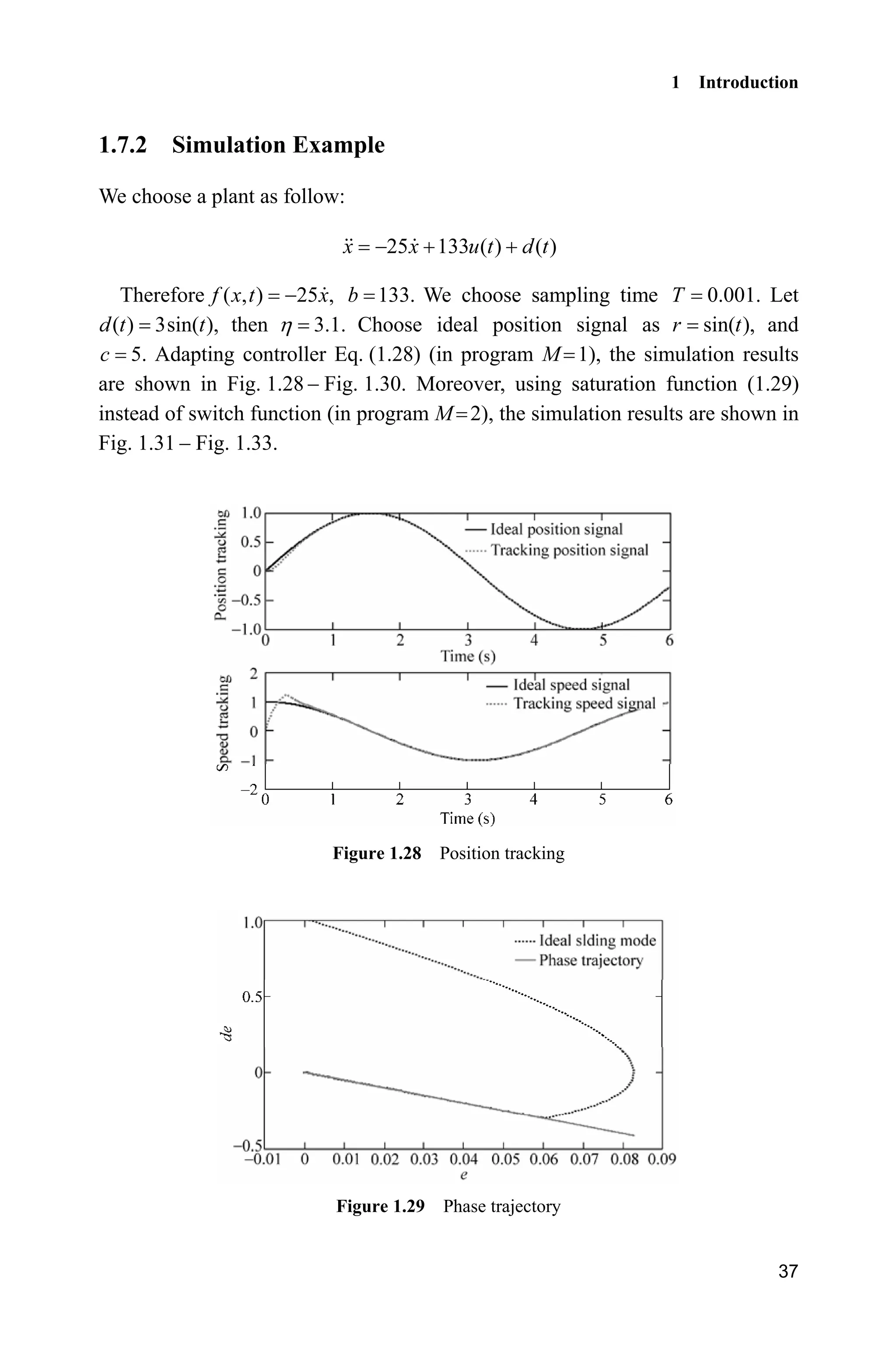
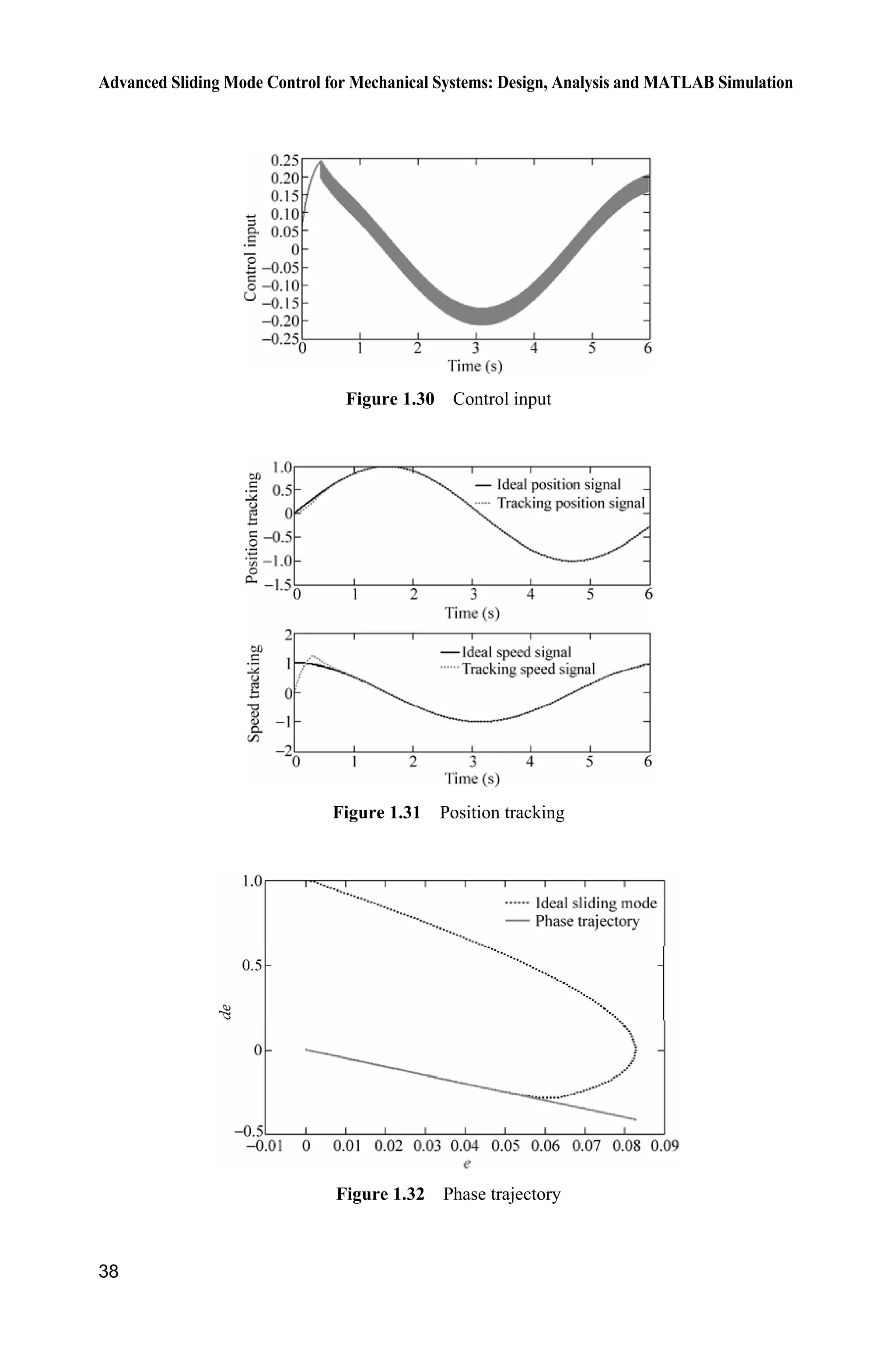
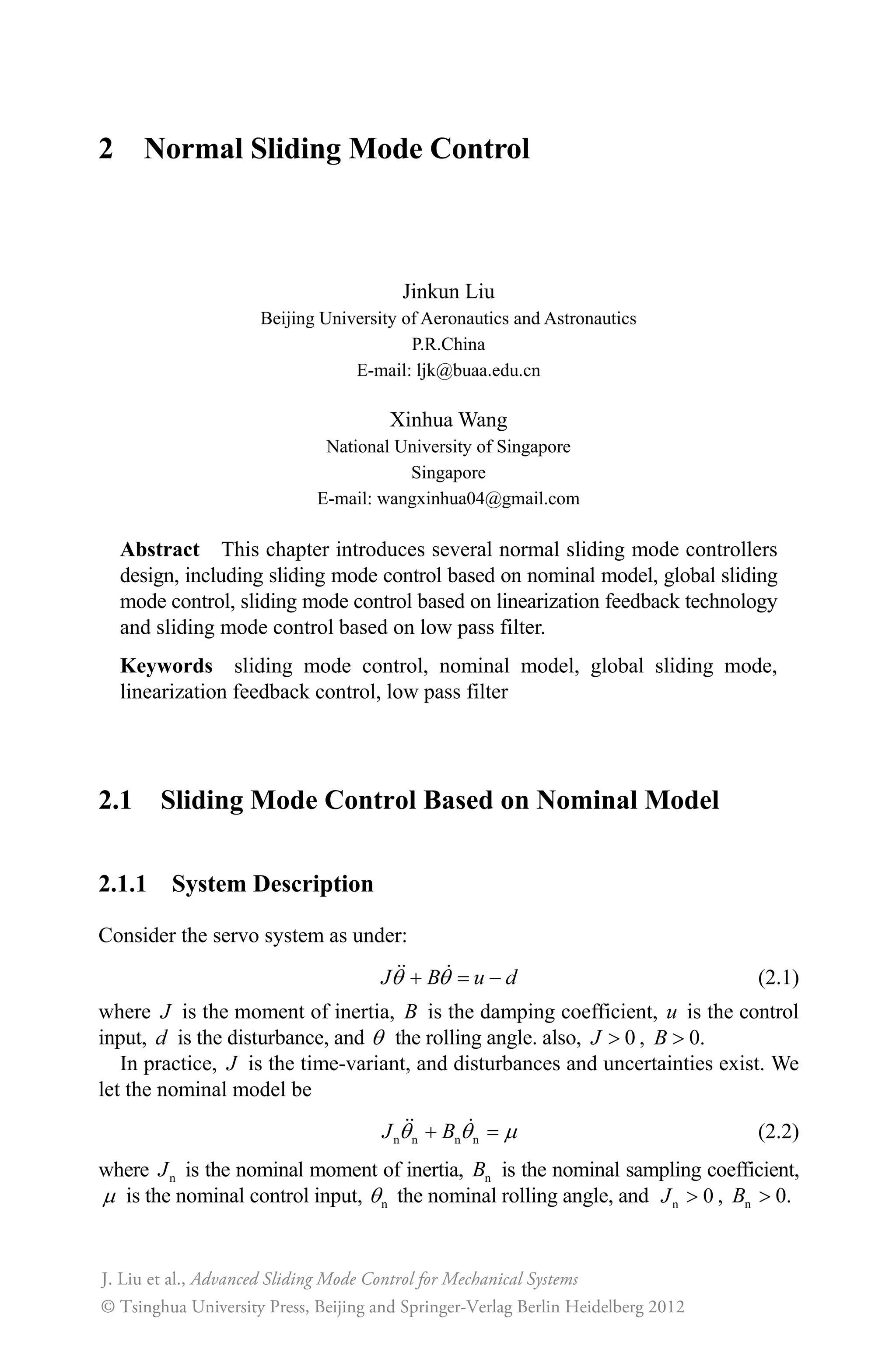
( ) 3sin( ),d t t then 3.1.K Choose ideal position signal as sin( ),r t and
5.c Adapting controller Eq. (1.28) (in program M 1), the simulation results
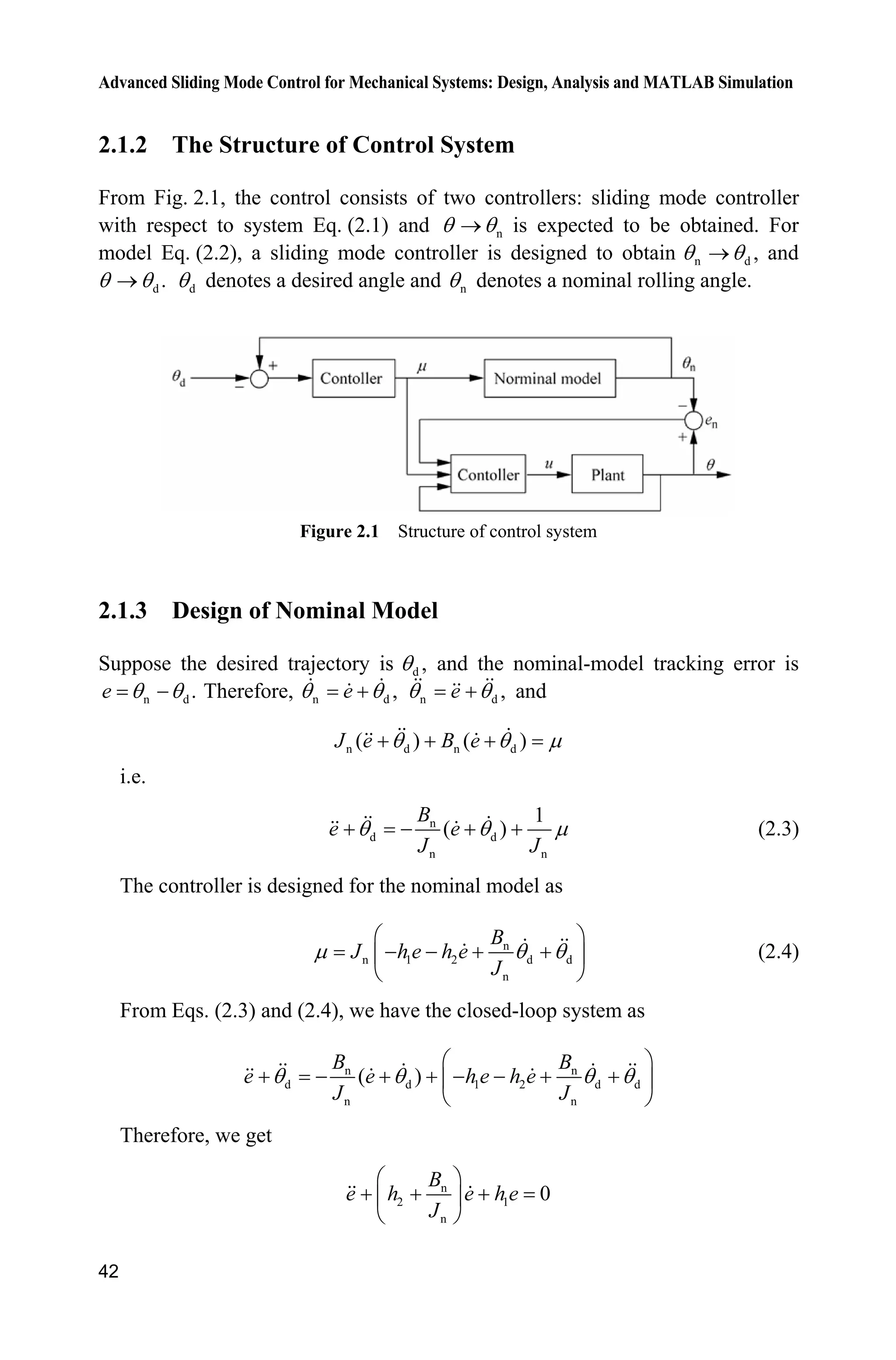
are shown in Fig. 1.28  Fig. 1.30. Moreover, using saturation function (1.29)
instead of switch function (in program M 2), the simulation results are shown in
Fig. 1.31  Fig. 1.33.
Figure 1.28 Position tracking
Figure 1.29 Phase trajectory
Advanced Sliding Mode Control for Mechanical Systems: Design, Analysis and MATLAB Simulation
38
Figure 1.30 Control input
Figure 1.31 Position tracking
Figure 1.32 Phase trajectory
1 Introduction
39
Figure 1.33 Control input
Simulation programs:
(1) Main program: chap1_7.m
clear all;
close all;
a=25;b=133;
xk=zeros(2,1);
ut_1=0;
c=5;
T=0.001;
for k=1:1:6000
time(k)=k*T;
thd(k)=sin(k*T);
dthd(k)=cos(k*T);
ddthd(k)=-sin(k*T);
tSpan=[0 T];
para=ut_1; % D/A
[tt,xx]=ode45('chap1_7plant',tSpan,xk,[],para);
xk=xx(length(xx),:); % A/D
th(k)=xk(1);
dth(k)=xk(2);
e(k)=thd(k)-th(k);
de(k)=dthd(k)-dth(k);
s(k)=c*e(k)+de(k);
xite=3.1; % xitemax(dt)
M=1;
if M==1
ut(k)=1/b*(a*dth(k)+ddthd(k)+c*de(k)+xite*sign(s(k)));
elseif M==2 %Saturated function
delta=0.05;
kk=1/delta;
Advanced Sliding Mode Control for Mechanical Systems: Design, Analysis and MATLAB Simulation
40
if abs(s(k))delta
sats=sign(s(k));
else
sats=kk*s(k);
end
ut(k)=1/b*(a*dth(k)+ddthd(k)+c*de(k)+xite*sats);
end
ut_1=ut(k);
end
figure(1);
subplot(211);
plot(time,thd,'k',time,th,'r:','linewidth',2);
xlabel('time(s)');ylabel('position tracking');
legend('ideal position signal','tracking position signal');
subplot(212);
plot(time,dthd,'k',time,dth,'r:','linewidth',2);
xlabel('time(s)');ylabel('speed tracking');
legend('ideal speed signal','tracking speed signal');
figure(2);
plot(thd-th,dthd-dth,'k:',thd-th,-c*(thd-th),'r','linewidth',2);
%Draw line(s=0)
xlabel('e');ylabel('de');
legend('ideal sliding mode','phase trajectory');
figure(3);
plot(time,ut,'r','linewidth',2);
xlabel('time(s)');ylabel('Control input');
(2) Plant program: chap1_7plant.m
function dx=Plant(t,x,flag,para)
dx=zeros(2,1);
a=25;b=133;
ut=para(1);
dt=3.0*sin(t);
dx(1)=x(2);
dx(2)=-a*x(2)+b*ut+dt;
References
[1] Itkis U. Control System of Variable Structure. New York: Wiley, 1976
[2] Hung JY, Gao W, Hung JC. Variable Structure Control: A Survey, IEEE Transaction on
Industrial Electronics, 1993,40(1): 2  22
[3] Edwards C, Spurgeon S. Sliding Mode Control: Theory and Applications, London: Taylor
and Francis, 1998
2 Normal Sliding Mode Control
Jinkun Liu
Beijing University of Aeronautics and Astronautics
P.R.China
E-mail: ljk@buaa.edu.cn
Xinhua Wang
National University of Singapore
Singapore
E-mail: wangxinhua04@gmail.com
Abstract This chapter introduces several normal sliding mode controllers
design, including sliding mode control based on nominal model, global sliding
mode control, sliding mode control based on linearization feedback technology
and sliding mode control based on low pass filter.
Keywords sliding mode control, nominal model, global sliding mode,
linearization feedback control, low pass filter
2.1 Sliding Mode Control Based on Nominal Model
2.1.1 System Description
Consider the servo system as under:
J B u dT T  (2.1)
where J is the moment of inertia, B is the damping coefficient, u is the control
input, d is the disturbance, and T the rolling angle. also, 0J ! , 0.B !
In practice, J is the time-variant, and disturbances and uncertainties exist. We
let the nominal model be
n n n nJ BT T P (2.2)
where nJ is the nominal moment of inertia, nB is the nominal sampling coefficient,
P is the nominal control input, nT the nominal rolling angle, and n 0J ! , n 0.B !
Advanced Sliding Mode Control for Mechanical Systems
© Tsinghua University Press, Beijing and Springer-Verlag Berlin Heidelberg 2012
J. Liu et al.,
Advanced Sliding Mode Control for Mechanical Systems: Design, Analysis and MATLAB Simulation
42
2.1.2 The Structure of Control System
From Fig. 2.1, the control consists of two controllers: sliding mode controller
with respect to system Eq. (2.1) and nT To is expected to be obtained. For
model Eq. (2.2), a sliding mode controller is designed to obtain n d ,T To and
d .T To dT denotes a desired angle and nT denotes a nominal rolling angle.
Figure 2.1 Structure of control system
2.1.3 Design of Nominal Model
Suppose the desired trajectory is d ,T and the nominal-model tracking error is
n d .e T T Therefore, n d ,eT T n d ,eT T and
n d n d( ) ( )J e B eT T P  
i.e.
n
d d
n n
1
( )
B
e e
J J
T T P    (2.3)
The controller is designed for the nominal model as
n
n 1 2 d d
n
B
J h e h e
J
P T T
§ ·
   ¨ ¸
© ¹
(2.4)
From Eqs. (2.3) and (2.4), we have the closed-loop system as
n n
d d 1 2 d d
n n
( )
B B
e e h e h e
J J
T T T T
§ ·
       ¨ ¸
© ¹
Therefore, we get
n
2 1
n
0
B
e h e h e
J
§ ·
  ¨ ¸
© ¹
2 Normal Sliding Mode Control
43
In order to make the system stable, 2 n
2 1
n
B
s h s h
J
§ ·
  ¨ ¸
© ¹
must be Hurwitz .
For 0,k ! let the eigenvalue be .k From 2
( ) 0,s k we have 2
2s ks 
2
0,k therefore, n
2
n
2 ,
B
h k
J
 2
1 ,h k i.e. n
2
n
2 ,
B
h k
J
 2
1 .h k Therefore,
we can get 1h and 2.h
2.1.4 Sliding Mode Controller Design for Actual Plant
Suppose the following relations are stratified:
m MJ J J , m MB B B , M| |d d (2.5)
where mJ is the minimum value of J, MJ is the maximum value of J, mB is the
minimum value of B, MB is the maximum value of B, and Md is the maximum
value of d.
Let:
n ne T T (2.6)
Define the sliding variable as
n ns e eO (2.7)
where 0,O ! and O is defined as
n
n
B
J
O (2.8)
Denote:
a m M
1
( )
2
J J J (2.9)
a m M
1
( )
2
B B B (2.10)
Select the controller as
a a
n
1
sgn( )u Ks h s J B
J
P OT T
§ ·
  ˜   ¨ ¸
© ¹
(2.11)
where 0.K !
Define
M M m M m
n
1 1 1
( ) ( ) | |
2 2
h d J J B B
J
P OT T     (2.12)
Advanced Sliding Mode Control for Mechanical Systems: Design, Analysis and MATLAB Simulation
44
Let the Lyapunov function be
21
2
V Js
Therefore, we have
n n
n n n n n n n
n n n
n n n n
n
n
( ) ( )
( ) ( )
( ) ( )
Js J
J J J
J B B J B B J
J J J
J
J B J B B J
J
J
u d B J
J
T T O T T
T T T T T T O T T
T T T T T O T
P T O T
ª º  ¬ ¼


From Eq. (2.11), we get
a a
n n
a a
n
1
sgn( )
1
sgn( ) ( ) ( )
J
Js Ks h s J B d B J
J J
Ks h s d J J B B
J
P OT T P T O T
P OT T
§ ·
        ¨ ¸
© ¹
§ ·
       ¨ ¸
© ¹
Therefore,
2
a a
n
2
a a
n
1
| | ( ) ( )
1
| | | | | | | | | || |
V Jss Ks h s s d J J B B
J
Ks h s s d J J B B
J
P OT T
P OT T
ª º§ ·
        « »¨ ¸
« »© ¹¬ ¼
ª º
       « »
« »¬ ¼
From Eqs. (2.9) and (2.10), we have
M m a
1
( )
2
J J J J 
M m a
1
( ) | |
2
B B B B 
Therefore,
a a
n
1
| | | | | || |h d J J B B
J
P OT T    
Then,
2
V Ks
2 Normal Sliding Mode Control
45
From 21
,
2
V Js we get 2
,Jss Ks i.e. 2
.
K
ss s
J
 Therefore, we have
( ) (0) exp
K
s t s t
J
§ ·
¨ ¸
© ¹
Finally, we can find that ( )s t is exponentially convergent.
2.1.5 Simulation
Consider the system as follows:
J B u dT T 
where 10 3sin (2 )B t S , 3 0.5sin (2 )J t S , and ( ) 10sind t t .
Let n 10,B n 3,J and we get m 7,B M 13,B m 2.5,J M 3.5,J M 10.d
We select 1.0,k therefore, n
2
n
2 ,
B
h k
J
 2
1 .h k In Eq. (2.11), select O n
n
B
J
10
,
3
10,K and the desired trajectory is d ( ) sin ,t tT the initial state vector is
[0.5 0]. The simulation results are shown in Fig. 2.2  Fig. 2.4.
Figure 2.2 Position tracking
Figure 2.3 Velocity tracking
Advanced Sliding Mode Control for Mechanical Systems: Design, Analysis and MATLAB Simulation
46
Figure 2.4 Control input
Simulation programs:
(1) Simulink main program: chap2_1sim.mdl
(2) S-function of controller for the nominal model: chap2_1ctrl1.m
function [sys,x0,str,ts]=s_function(t,x,u,flag)
switch flag,
case 0,
[sys,x0,str,ts]=mdlInitializeSizes;
case 3,
sys=mdlOutputs(t,x,u);
case {2, 4, 9 }
sys = [];
otherwise
error(['Unhandled flag = ',num2str(flag)]);
end
function [sys,x0,str,ts]=mdlInitializeSizes
sizes = simsizes;
sizes.NumContStates = 0;
sizes.NumDiscStates = 0;
2 Normal Sliding Mode Control
47
sizes.NumOutputs = 1;
sizes.NumInputs = 3;
sizes.DirFeedthrough = 1;
sizes.NumSampleTimes = 0;
sys=simsizes(sizes);
x0=[];
str=[];
ts=[];
function sys=mdlOutputs(t,x,u)
thn=u(1);
dthn=u(2);
thd=u(3);dthd=cos(t);ddthd=-sin(t);
e=thn-thd;
de=dthn-dthd;
k=3;
Bn=10;Jn=3;
h1=k^2;
h2=2*k-Bn/Jn;
ut=Jn*(-h1*e-h2*de+Bn/Jn*dthd+ddthd);
sys(1)=ut;
(3) S-function of nominal model: chap2_1model.m
function [sys,x0,str,ts]=s_function(t,x,u,flag)
switch flag,
case 0,
[sys,x0,str,ts]=mdlInitializeSizes;
case 1,
sys=mdlDerivatives(t,x,u);
case 3,
sys=mdlOutputs(t,x,u);
case {2, 4, 9 }
sys = [];
otherwise
error(['Unhandled flag = ',num2str(flag)]);
end
function [sys,x0,str,ts]=mdlInitializeSizes
sizes = simsizes;
sizes.NumContStates = 2;
sizes.NumDiscStates = 0;
sizes.NumOutputs = 2;
sizes.NumInputs = 1;
sizes.DirFeedthrough = 0;
sizes.NumSampleTimes = 0;
sys=simsizes(sizes);
x0=[0.5,0];
str=[];
ts=[];
function sys=mdlDerivatives(t,x,u)
Advanced Sliding Mode Control for Mechanical Systems: Design, Analysis and MATLAB Simulation
48
Bn=10;
Jn=3;
sys(1)=x(2);
sys(2)=1/Jn*(u-Bn*x(2));
function sys=mdlOutputs(t,x,u)
sys(1)=x(1);
sys(2)=x(2);
(4) S-function of sliding mode controller for the actual plant: chap2_1ctrl2.m
function [sys,x0,str,ts]=s_function(t,x,u,flag)
switch flag,
case 0,
[sys,x0,str,ts]=mdlInitializeSizes;
case 3,
sys=mdlOutputs(t,x,u);
case {2, 4, 9 }
sys = [];
otherwise
error(['Unhandled flag = ',num2str(flag)]);
end
function [sys,x0,str,ts]=mdlInitializeSizes
sizes = simsizes;
sizes.NumContStates = 0;
sizes.NumDiscStates = 0;
sizes.NumOutputs = 1;
sizes.NumInputs = 5;
sizes.DirFeedthrough = 1;
sizes.NumSampleTimes = 0;
sys=simsizes(sizes);
x0=[];
str=[];
ts=[];
function sys=mdlOutputs(t,x,u)
Bn=10;Jn=3;
lamt=Bn/Jn;
Jm=2.5;JM=3.5;
Bm=7;BM=13;
dM=0.10;
K=10;
thn=u(1);dthn=u(2);
nu=u(3);
th=u(4);dth=u(5);
en=th-thn;
den=dth-dthn;
s=den+lamt*en;
temp0=(1/Jn)*nu-lamt*dth;
2 Normal Sliding Mode Control
49
Ja=1/2*(JM+Jm);
Ba=1/2*(BM+Bm);
h=dM+1/2*(JM-Jm)*abs(temp0)+1/2*(BM-Bm)*abs(dth);
ut=-K*s-h*sign(s)+Ja*((1/Jn)*nu-lamt*dth)+Ba*dth;
sys(1)=ut;
(5) S-function of the actual plant: chap2_1plant.m
function [sys,x0,str,ts]=s_function(t,x,u,flag)
switch flag,
case 0,
[sys,x0,str,ts]=mdlInitializeSizes;
case 1,
sys=mdlDerivatives(t,x,u);
case 3,
sys=mdlOutputs(t,x,u);
case {2, 4, 9 }
sys = [];
otherwise
error(['Unhandled flag = ',num2str(flag)]);
end
function [sys,x0,str,ts]=mdlInitializeSizes
sizes = simsizes;
sizes.NumContStates = 2;
sizes.NumDiscStates = 0;
sizes.NumOutputs = 2;
sizes.NumInputs = 1;
sizes.DirFeedthrough = 0;
sizes.NumSampleTimes = 0;
sys=simsizes(sizes);
x0=[0.5,0];
str=[];
ts=[];
function sys=mdlDerivatives(t,x,u)
d=0.10*sin(t);
B=10+3*sin(2*pi*t);
J=3+0.5*sin(2*pi*t);
sys(1)=x(2);
sys(2)=1/J*(u-B*x(2)-d);
function sys=mdlOutputs(t,x,u)
sys(1)=x(1);
sys(2)=x(2);
(6) Plot program: chap2_1plot.m
close all;
figure(1);
plot(t,sin(t),'k',t,y(:,2),'r:','linewidth',2);
Advanced Sliding Mode Control for Mechanical Systems: Design, Analysis and MATLAB Simulation
50
xlabel('time(s)');ylabel('Position tracking');
legend('Ideal position signal','tracking signal');
figure(2);
plot(t,cos(t),'k',t,y(:,3),'r:','linewidth',2);
xlabel('time(s)');ylabel('Speed tracking');
legend('Ideal speed signal','tracking signal');
figure(3);
plot(t,ut,'r','linewidth',2);
xlabel('time(s)');ylabel('control input');
2.2 Global Sliding Mode Control for an Uncertain System
The tending mode and the sliding mode are the conclusions drawn from the
responses of the traditional sliding mode variable structure control. The robustness
of this control to parameter uncertainties and disturbances exists only in the phase
of sliding mode. However, the kinetic characteristic of this system is robust during
the whole response.
Global sliding mode control can be obtained by designing an equation of
dynamic nonlinear sliding surface. Global sliding mode control eliminates the
attaining motion phase and ensures that the whole process of system response is
robust. Thus, the drawback of the traditional sliding mode variable structure
which has no robustness in the attaining mode is overcome.
2.2.1 System Description
Consider a second-order uncertain system as follows:
( ) ( )J u t d tT  (2.13)
We can get
( ) ( ( ) ( ))t b u t d tT 
where J is the moment of inertia,
1
0,b
J
! ( )d t is the disturbance.
Suppose:
min maxJ J J (2.14)
| ( ) |d t D (2.15)
2 Normal Sliding Mode Control
51
2.2.2 Global Sliding Mode Design
Let the desired trajectory be dT and the tracking error be:
de T T (2.16)
The global dynamic sliding mode variable is designed as
( )s e ce f t  (2.17)
where 0,c ! ( )f t is a function to be designed so as to attain at the sliding
surface, and ( )f t is satisfied with the following conditions[1]
: (1) (0)f
0 0 ;e ce (2) ( ) 0f t o as ;t o f and (3) ( )f t is derivable.
From the above three conditions, ( )f t can be designed as
( ) (0)e kt
f t f 
(2.18)
2.2.3 Sliding Mode Controller Design
The global sliding mode controller is designed as
d d d d
ˆ ˆ( ) ( ) ( | | | |)sgn( )u J c f J c J c f D J c sT T T T T T     '    '  (2.19)
where,
max minˆ ,
2
J J
J
 max min
2
J J
J

' (2.20)
Let the Lyapunov function be
21
2
V s (2.21)
From Eq. (2.17), we have
d d
d d
1 1
d d
( )
( ) ( )
( ( ) ( ) )
s e ce f c f
bu bd c f c
b b c f b c u d
T T T T
T T T
T T T 


and from Eq. (2.19), we have
1 1 1
d d d d
d d
1 1
d d
d d
ˆ ˆ( ) ( ) ( ) ( )
| | | |)sgn( )
ˆ ˆ( )( ) | | sgn( ) ( )( )
| | sgn( ) sgn( )
b s b c f b c J c f J c
J c f D J c s d
b J c f J c f s b J c
J c s d D s
T T T T T T
T T T
T T T T
T T


 '    '  
   '    
 '
Advanced Sliding Mode Control for Mechanical Systems: Design, Analysis and MATLAB Simulation
52
Therefore,
1 1 1 1
d d
d d
ˆ ˆ( )( ) | || | ( )( )
| || | | |
b V b ss b J c f s J c f s b J c s
J c s ds D s
T T T T
T T
   
   '    
 '   
From Eq. (2.20), we get
1 max min max minˆ 0
2 2
J J J J
b J J J  
  ' !
Therefore,
1
| | 0b V ds D s
   
i.e.,
0V 
In order to reduce the chattering phenomenon, the saturated function can be
used, i.e.
1, 1
sat , 1
1, 1
V
M
V V V
M M M
V
M
­
!°
°
°§ · °
®¨ ¸
© ¹ °
°
  °
°¯
(2.22)
2.2.4 Simulation Example
Let the plant be
( ) ( )J u t d tT 
where 1.0 0.2sin ,J t ( ) 0.1sin(2 ).d t tS
We can get: min 0.80J , max 1.2J , 0.10.D From Eq. (2.20), we have:
ˆJ max min
1.0,
2
J J max min
0.20.
2
J J
J

'
Let the desired position trajectory be d sin .tT The controller is given in
Eq. (2.19), and 10,c 130
( ) (0)e .t
f t s 
1M and 2M denote the saturated
function and the switch function respectively. Let 2,M 0.05,M and the
simulation results are shown in Fig. 2.5  Fig. 2.7. The use of saturated function
can reduce the chattering phenomenon effectively.
2 Normal Sliding Mode Control
53
Figure 2.5 Position tracking
Figure 2.6 Control input
Figure 2.7 Switch function
Advanced Sliding Mode Control for Mechanical Systems: Design, Analysis and MATLAB Simulation
54
Simulation programs:
(1) Simulink main program: chap2_2sim.mdl
(2) S-function of controller: chap2_2ctrl.m
function [sys,x0,str,ts] = spacemodel(t,x,u,flag)
switch flag,
case 0,
[sys,x0,str,ts]=mdlInitializeSizes;
case 3,
sys=mdlOutputs(t,x,u);
case {2,4,9}
sys=[];
otherwise
error(['Unhandled flag = ',num2str(flag)]);
end
function [sys,x0,str,ts]=mdlInitializeSizes
sizes = simsizes;
sizes.NumContStates = 0;
sizes.NumDiscStates = 0;
sizes.NumOutputs = 2;
sizes.NumInputs = 3;
sizes.DirFeedthrough = 1;
sizes.NumSampleTimes = 1;
sys = simsizes(sizes);
x0 = [];
str = [];
ts = [0 0];
function sys=mdlOutputs(t,x,u)
thd=u(1);
dthd=cos(t);
2 Normal Sliding Mode Control
55
ddthd=-sin(t);
th=u(2);
dth=u(3);
c=10;
e=th-thd;
de=dth-dthd;
dt=0.10*sin(2*pi*t);
D=0.10;
e0=pi/6;
de0=0-1.0;
s0=de0+c*e0;
ft=s0*exp(-130*t);
df=-130*s0*exp(-130*t);
s=de+c*e-ft;
R=ddthd+c*dthd;
J_min=0.80;
J_max=1.20;
aJ=(J_min+J_max)/2;
dJ=(J_max-J_min)/2;
M=2;
if M==1
ut=-aJ*(c*dth-df)+aJ*R-[dJ*abs(c*dth-df)+D+dJ*abs(R)]*sign(s);
elseif M==2
fai=0.05;
if s/fai1
sat=1;
elseif abs(s/fai)=1
sat=s/fai;
elseif s/fai-1
sat=-1;
end
ut=-aJ*(c*dth-df)+aJ*R-[dJ*abs(c*dth-df)+D+dJ*abs(R)]*sat;
end
sys(1)=ut;
sys(2)=s;
(3) S-function of the plant: chap2_2plant.m
function [sys,x0,str,ts] = spacemodel(t,x,u,flag)
switch flag,
case 0,
[sys,x0,str,ts]=mdlInitializeSizes;
Advanced Sliding Mode Control for Mechanical Systems: Design, Analysis and MATLAB Simulation
56
case 1,
sys=mdlDerivatives(t,x,u);
case 3,
sys=mdlOutputs(t,x,u);
case {2,4,9}
sys=[];
otherwise
error(['Unhandled flag = ',num2str(flag)]);
end
function [sys,x0,str,ts]=mdlInitializeSizes
sizes = simsizes;
sizes.NumContStates = 2;
sizes.NumDiscStates = 0;
sizes.NumOutputs = 2;
sizes.NumInputs = 1;
sizes.DirFeedthrough = 0;
sizes.NumSampleTimes = 0;
sys = simsizes(sizes);
x0 = [pi/6;0];
str = [];
ts = [];
function sys=mdlDerivatives(t,x,u)
J=1.0+0.2*sin(t);
dt=0.10*sin(2*pi*t);
sys(1)=x(2);
sys(2)=1/J*(u-dt);
function sys=mdlOutputs(t,x,u)
sys(1)=x(1);
sys(2)=x(2);
(4) Plot program: chap2_2plot.m
close all;
figure(1);
figure(1);
plot(t,y(:,1),'k',t,y(:,2),'r:','linewidth',2);
xlabel('time(s)');ylabel('Position tracking');
legend('ideal position signal','tracking position signal');
figure(2);
plot(t,u(:,1),'r','linewidth',2);
xlabel('time(s)');ylabel('Control input');
figure(3);
plot(t,s(:,1),'r','linewidth',2);
xlabel('time(s)');ylabel('Switch function');
2 Normal Sliding Mode Control
57
2.3 Sliding Mode Control Based on Linearization
Feedback Control
2.3.1 Linearization Feedback Control
Consider the following second-order SISO nonlinear system:
( , ) ( , )x f x t g x t u (2.23)
where f and g are known nonlinear functions.
Let dx denote the desired trajectory, and d .e x x Based on linearization
feedback technique, sliding mode controller is designed as
( , )
( , )
v f x t
u
g x t

(2.24)
where v is the auxiliary controller and will be designed in the following.
From Eqs. (2.24) and (2.23), we have
x v (2.25)
We design v as
d 1 2v x k e k e  (2.26)
where 1k and 2k are all positive constants.
From Eqs. (2.26) and (2.25), we get
1 2 0e k e k e  (2.27)
Therefore, 1 0e o and 2 0e o as .t o f
The shortcoming of this method is: In designing controller Eq. (2.24), f and
g must be known. The solution is that the robustness can be introduced in the
controller.
2.3.2 Simulation Example
The dynamic equation of the inverted pendulum is
1 2
2
1 2 1 1 c 1 c
2 2 2
1 c 1 c
sin cos sin /( ) cos /( )
(4/3 cos /( )) (4/3 cos /( ))
x x
g x mlx x x m m x m m
x u
l m x m m l m x m m
­
°
  ®
°    ¯
where 1x and 2x are the oscillation angle and the oscillation rate respectively.
2
9.8 m/s ,g cm is the vehicle mass, c 1kg,m m is the mass of pendulum bar,
0.1kg,m l is one half of pendulum length, 0.5 m,l u is the control input.
Advanced Sliding Mode Control for Mechanical Systems: Design, Analysis and MATLAB Simulation
58
The desired trajectory is d ( ) 0.1sin ( ).x t tS Controller is Eq. (2.24), 1 2 5,k k
The initial state of the inverted pendulum is [ / 60 0].S The simulation results
are shown in Fig. 2.8 and Fig. 2.9.
Figure 2.8 Position tracking
Figure 2.9 Control input
Simulation programs:
(1) Simulink main program: chap2_3sim.mdl
2 Normal Sliding Mode Control
59
(2) S-function of controller: chap2_3ctrl.m
function [sys,x0,str,ts] = spacemodel(t,x,u,flag)
switch flag,
case 0,
[sys,x0,str,ts]=mdlInitializeSizes;
case 1,
sys=mdlDerivatives(t,x,u);
case 3,
sys=mdlOutputs(t,x,u);
case {1,2,4,9}
sys=[];
otherwise
error(['Unhandled flag = ',num2str(flag)]);
end
function [sys,x0,str,ts]=mdlInitializeSizes
sizes = simsizes;
sizes.NumContStates = 0;
sizes.NumDiscStates = 0;
sizes.NumOutputs = 1;
sizes.NumInputs = 5;
sizes.DirFeedthrough = 1;
sizes.NumSampleTimes = 0;
sys = simsizes(sizes);
x0 = [];
str = [];
ts = [];
function sys=mdlOutputs(t,x,u)
r=0.1*sin(pi*t);
dr=0.1*pi*cos(pi*t);
ddr=-0.1*pi*pi*sin(pi*t);
e=u(1);
de=u(2);
fx=u(4);
gx=u(5);
k1=5;k2=5;
v=ddr+k1*e+k2*de;
ut=(v-fx)/(gx+0.002);
sys(1)=ut;
(3) S-function of the plant: chap2_3plant.m
function [sys,x0,str,ts]=s_function(t,x,u,flag)
switch flag,
case 0,
[sys,x0,str,ts]=mdlInitializeSizes;
case 1,
Advanced Sliding Mode Control for Mechanical Systems: Design, Analysis and MATLAB Simulation
60
sys=mdlDerivatives(t,x,u);
case 3,
sys=mdlOutputs(t,x,u);
case {2, 4, 9 }
sys = [];
otherwise
error(['Unhandled flag = ',num2str(flag)]);
end
function [sys,x0,str,ts]=mdlInitializeSizes
sizes = simsizes;
sizes.NumContStates = 2;
sizes.NumDiscStates = 0;
sizes.NumOutputs = 3;
sizes.NumInputs = 1;
sizes.DirFeedthrough = 0;
sizes.NumSampleTimes = 0;
sys=simsizes(sizes);
x0=[pi/60 0];
str=[];
ts=[];
function sys=mdlDerivatives(t,x,u)
g=9.8;mc=1.0;m=0.1;l=0.5;
S=l*(4/3-m*(cos(x(1)))^2/(mc+m));
fx=g*sin(x(1))-m*l*x(2)^2*cos(x(1))*sin(x(1))/(mc+m);
fx=fx/S;
gx=cos(x(1))/(mc+m);
gx=gx/S;
sys(1)=x(2);
sys(2)=fx+gx*u;
function sys=mdlOutputs(t,x,u)
g=9.8;mc=1.0;m=0.1;l=0.5;
S=l*(4/3-m*(cos(x(1)))^2/(mc+m));
fx=g*sin(x(1))-m*l*x(2)^2*cos(x(1))*sin(x(1))/(mc+m);
fx=fx/S;
gx=cos(x(1))/(mc+m);
gx=gx/S;
sys(1)=x(1);
sys(2)=fx;
sys(3)=gx;
(4) Plot program: chap2_3plot.m
close all;
figure(1);
plot(t,y(:,1),'k',t,y(:,2),'r:','linewidth',2);
xlabel('time(s)');ylabel('Position tracking');
legend('Ideal position signal','tracking signal');
2 Normal Sliding Mode Control
61
figure(2);
plot(t,ut(:,1),'k','linewidth',2);
xlabel('time(s)');ylabel('Control input');
2.3.3 Sliding Mode Control Based on Linearization Feedback
Consider the following second-order SISO uncertain nonlinear system:
( , ) ( , ) ( )x f x t g x t u d t  (2.28)
where f and g are known nonlinear functions, ( )d t is the uncertainty, and
| ( ) | .d t D
Let the desired trajectory be d ,x therefore, we denote:
T
d [ ]e ee x x (2.29)
Sliding variable is selected as
( , )s x t ce (2.30)
where [ 1].cc
Based on linearization feedback technique, the sliding mode controller is
designed as
( , )
( , )
v f x t
u
g x t

(2.31)
d sgn( ),v x ce sK  DK ! (2.32)
We select the Lyapunov function is
21
2
V s
therefore, we have
d
d
( ) ( )
( ( , ) ( , ) ( ) )
V ss s e ce s x x ce
s f x t g x t u d t x ce
  
   
From Eq. (2.31), we get
d
d d
( ( ) )
( sgn( ) ( ) )
( sgn( ) ( )) | | ( ) 0
V s v d t x ce
s x ce s d t x ce
s s d t s d t s
K
K K
Advanced Sliding Mode Control for Mechanical Systems: Design, Analysis and MATLAB Simulation
62
2.3.4 Simulation Example
The dynamic equation of the inverted pendulum is
1 2
2
1 2 1 1 c 1 c
2 2 2
1 c 1 c
sin cos sin /( ) cos /( )
( )
(4/3 cos /( )) (4/3 cos /( ))
­
°
  ®
 °    ¯
x x
g x mlx x x m m x m m
x u d t
l m x m m l m x m m
where 1x and 2x are the oscillation angle and the oscillation rate respectively.
2
9.8 m/s ,g cm is the vehicle mass, c 1kg,m m is the mass of pendulum bar,
0.1kg,m l is one half of pendulum length, 0.5 m,l u is the control input.
( )d t is the disturbance.
The desired trajectory is d ( ) 0.1sin( ).x t tS The sliding variable is ,s ce e
where 10.c Controller is Eq. (2.31). The initial state of the inverted pendulum
is [ /60 0].S In the simulation program, M 1 denoes the sgn function is
adopted, and M 2 denotes the saturated function is adopted, and let M 2,
0 0.03,G 1 5,G 0 1 | |,G G G e 5.k The simulation results are shown in
Fig. 2.10 and Fig. 2.11.
Figure 2.10 Position tracking
Figure 2.11 Control input
2 Normal Sliding Mode Control
63
Simulation programs:
(1) Simulink main program: chap2_4sim.mdl
(2) S-function of controller: chap2_4ctrl.m
function [sys,x0,str,ts] = spacemodel(t,x,u,flag)
switch flag,
case 0,
[sys,x0,str,ts]=mdlInitializeSizes;
case 1,
sys=mdlDerivatives(t,x,u);
case 3,
sys=mdlOutputs(t,x,u);
case {1,2,4,9}
sys=[];
otherwise
error(['Unhandled flag = ',num2str(flag)]);
end
function [sys,x0,str,ts]=mdlInitializeSizes
sizes = simsizes;
sizes.NumContStates = 0;
sizes.NumDiscStates = 0;
sizes.NumOutputs = 1;
sizes.NumInputs = 5;
sizes.DirFeedthrough = 1;
sizes.NumSampleTimes = 0;
sys = simsizes(sizes);
x0 = [];
str = [];
ts = [];
function sys=mdlOutputs(t,x,u)
r=0.1*sin(pi*t);
dr=0.1*pi*cos(pi*t);
Advanced Sliding Mode Control for Mechanical Systems: Design, Analysis and MATLAB Simulation
64
ddr=-0.1*pi*pi*sin(pi*t);
e=u(1);
de=u(2);
fx=u(4);
gx=u(5);
c=10;
s=de+c*e;
M=1;
if M==1
xite=10;
v=ddr-c*de-xite*sign(s);
elseif M==2
xite=30;
delta0=0.03;
delta1=5;
delta=delta0+delta1*abs(e);
v=ddr-c*de-xite*s/(abs(s)+delta);
end
xx(1)=r+e;
xx(2)=dr+de;
ut=(-fx+v)/(gx+0.002);
sys(1)=ut;
(3) S-function of the plant: chap2_4plant.m
function [sys,x0,str,ts]=s_function(t,x,u,flag)
switch flag,
case 0,
[sys,x0,str,ts]=mdlInitializeSizes;
case 1,
sys=mdlDerivatives(t,x,u);
case 3,
sys=mdlOutputs(t,x,u);
case {2, 4, 9 }
sys = [];
otherwise
error(['Unhandled flag = ',num2str(flag)]);
end
function [sys,x0,str,ts]=mdlInitializeSizes
sizes = simsizes;
sizes.NumContStates = 2;
sizes.NumDiscStates = 0;
sizes.NumOutputs = 3;
sizes.NumInputs = 1;
sizes.DirFeedthrough = 0;
2 Normal Sliding Mode Control
65
sizes.NumSampleTimes = 0;
sys=simsizes(sizes);
x0=[pi/60 0];
str=[];
ts=[];
function sys=mdlDerivatives(t,x,u)
g=9.8;mc=1.0;m=0.1;l=0.5;
S=l*(4/3-m*(cos(x(1)))^2/(mc+m));
fx=g*sin(x(1))-m*l*x(2)^2*cos(x(1))*sin(x(1))/(mc+m);
fx=fx/S;
gx=cos(x(1))/(mc+m);
gx=gx/S;
dt=10*sin(t);
sys(1)=x(2);
sys(2)=fx+gx*u+dt;
function sys=mdlOutputs(t,x,u)
g=9.8;mc=1.0;m=0.1;l=0.5;
S=l*(4/3-m*(cos(x(1)))^2/(mc+m));
fx=g*sin(x(1))-m*l*x(2)^2*cos(x(1))*sin(x(1))/(mc+m);
fx=fx/S;
gx=cos(x(1))/(mc+m);
gx=gx/S;
sys(1)=x(1);
sys(2)=fx;
sys(3)=gx;
(4) Plot program: chap2_4plot.m
close all;
figure(1);
plot(t,y(:,1),'k',t,y(:,2),'r:','linewidth',2);
xlabel('time(s)');ylabel('Position tracking');
legend('Ideal position signal','tracking signal');
figure(2);
plot(t,ut(:,1),'r','linewidth',2);
xlabel('time(s)');ylabel('Control input');
2.4 Input-Output Feedback Linearization Control
2.4.1 System Description
Consider the following system:
Advanced Sliding Mode Control for Mechanical Systems: Design, Analysis and MATLAB Simulation
66
1 2 2 3
5
2 1 3
2
3 1
1
sin ( 1)x x x x
x x x
x x u
y x
  ½
°
 °
¾
 °
°
¿
(2.33)
Problem statement: to make the output y track the desired trajectory d .y From
Eq. (2.33), the output y is connected with u indirectly through .x It is difficult
to design the controller.
2.4.2 Controller Design
In order to obtain the relation of y and ,u we differentiate y as follows:
1 2 2 3sin ( 1)y x x x x  (2.34)
From Eq. (2.34), we can find that y and u have no direct relation, thus,
differentiating y
1 2 2 2 3 2 3
5 5 2
1 3 2 1 3 3 2 1
5 2
1 3 2 3 2 1 2
cos ( 1)
( )cos ( ) ( 1)( )
( )(cos ) ( 1) ( 1)
y x x x x x x x
x x x x x x x x u
x x x x x x x u
  
     
      (2.35)
Let 5 2
1 3 2 3 2 1( ) ( )(cos ) ( 1)f x x x x x x x    , therefore, we have
2( 1) ( )y x u f x  (2.36)
Equation (2.36) denotes the visible relation of the output y and the input .u
We select:
2
1
( )
1
u v f
x


(2.37)
where v is the auxiliary controller and will be designed in the following.
From Eqs. (2.37) and (2.36), we get
y v (2.38)
Denote d ,e y y We design v with PD and feedforward forms:
d 1 2v y k e k e  (2.39)
where 1k and 2k are positive constants.
2 Normal Sliding Mode Control
67
From Eqs. (2.39) and (2.38), we can get
2 1 0e k e k e  (2.40)
Therefore, 1 0e o and 2 0e o as .t o f
The shortcoming of this method is: The model of the plant must be precise.
The solution is that the robustness can be introduced in the controller.
2.4.3 Simulation Example
The desired trajectory is d sin .y t Let 1 2 10.k k The controller is Eq. (2.37).
The simulation results are shown in Fig. 2.12 and Fig. 2.13. From the simulation,
we can see that using linearization feedback control, high-precise position tracking
can be realized, and relative smaller controller is needed.
Figure 2.12 Position tracking using linearization feedback method
Figure 2.13 Control input using linearization feedback method
Advanced Sliding Mode Control for Mechanical Systems: Design, Analysis and MATLAB Simulation
68
Simulation programs:
(1) Simulink main program: chap2_5sim.mdl
(2) Sub-program of controller: chap2_5ctrl.m
function [sys,x0,str,ts]=obser(t,x,u,flag)
switch flag,
case 0,
[sys,x0,str,ts]=mdlInitializeSizes;
case 1,
sys=mdlDerivatives(t,x,u);
case 3,
sys=mdlOutputs(t,x,u);
case {1, 2, 4, 9 }
sys = [];
otherwise
error(['Unhandled flag = ',num2str(flag)]);
end
function [sys,x0,str,ts]=mdlInitializeSizes
sizes = simsizes;
sizes.NumDiscStates = 0;
sizes.NumOutputs = 1;
sizes.NumInputs = 6;
sizes.DirFeedthrough = 1;
sizes.NumSampleTimes = 0;
sys=simsizes(sizes);
x0=[];
str=[];
ts=[];
function sys=mdlOutputs(t,x,u)
yd=u(1);
dyd=cos(t);
ddyd=-sin(t);
2 Normal Sliding Mode Control
69
e=u(2);
de=u(3);
x1=u(4);
x2=u(5);
x3=u(6);
f=(x1^5+x3)*(x3+cos(x2))+(x2+1)*x1^2;
k1=10;k2=10;
v=ddyd+k1*e+k2*de;
ut=1.0/(x2+1)*(v-f);
sys(1)=ut;
(3) Sub-program of the plant: chap2_5plant.m
function [sys,x0,str,ts]=obser(t,x,u,flag)
switch flag,
case 0,
[sys,x0,str,ts]=mdlInitializeSizes;
case 1,
sys=mdlDerivatives(t,x,u);
case 3,
sys=mdlOutputs(t,x,u);
case {2, 4, 9 }
sys = [];
otherwise
error(['Unhandled flag = ',num2str(flag)]);
end
function [sys,x0,str,ts]=mdlInitializeSizes
sizes = simsizes;
sizes.NumContStates = 3;
sizes.NumDiscStates = 0;
sizes.NumOutputs = 3;
sizes.NumInputs = 1;
sizes.DirFeedthrough = 1;
sizes.NumSampleTimes = 0;
sys=simsizes(sizes);
x0=[0.15 0 0];
str=[];
ts=[];
function sys=mdlDerivatives(t,x,u)
ut=u(1);
sys(1)=sin(x(2))+(x(2)+1)*x(3);
sys(2)=x(1)^5+x(3);
sys(3)=x(1)^2+ut;
function sys=mdlOutputs(t,x,u)
sys(1)=x(1);
sys(2)=x(2);
sys(3)=x(3);
Advanced Sliding Mode Control for Mechanical Systems: Design, Analysis and MATLAB Simulation
70
(4) Plot program: chap2_5plot.m
close all;
figure(1);
subplot(211);
plot(t,y(:,1),'k',t,y(:,2),'r:','linewidth',2);
xlabel('time(s)');ylabel('Position tracking');
legend('Ideal position signal','tracking signal');
subplot(212);
plot(t,y(:,1)-y(:,2),'k','linewidth',2);
xlabel('time');ylabel('position tracking error');
legend('position tracking error');
figure(2);
plot(t,ut(:,1),'k','linewidth',2);
xlabel('time');ylabel('control input');
2.5 Sliding Mode Control Based on Input-Output Feedback
Linearization
Sliding mode robust item is introduced into the controller to overcome the faults
in the usual input-output feedback linearization sliding mode control. Then, the
input-output feedback linearization sliding mode control is designed.
2.5.1 System Description
Consider the following uncertain system:
1 2 2 3 1
5
2 1 3 2
2
3 1 3
1
sin ( 1)x x x x d
x x x d
x x u d
y x
   ½
°
  °
¾
  °
°
¿
(2.41)
where 1,d 2d and 3d are the uncertainties in the three sub-systems respectively.
Problem statement: to make the output y track the desired trajectory d .y From
Eq. (2.41), the output y is connected with u indirectly through .x It is difficult
to design the controller.
2.5.2 Controller Design
In order to obtain the relation of y and ,u we differentiate y as follows:
2 Normal Sliding Mode Control
71
1 2 2 3 1sin ( 1)y x x x x d   (2.42)
From Eq. (2.42), we can find that y and u have no direct relation, thus,
differentiate :y
1 2 2 2 3 2 3 1
5 5 2
1 3 2 2 1 3 2 3 2 1 3 1
5 2
1 3 2 3 2 1 2
cos ( 1)
( )cos ( ) ( 1)( )
( )(cos ) ( 1) ( 1)
y x x x x x x x d
x x d x x x d x x x u d d
x x x x x x x u d
   
         
       (2.43)
where 2 2 2 3 2 3 1cos ( 1) .d d x d x x d d    We assume | | .d D
Let 5 2
1 3 2 3 2 1( ) ( )(cos ) ( 1) ,f x x x x x x x    therefore, equation (2.43) can be
transferred to
2( 1) ( )y x u f x d   (2.44)
Denote d ,e y y and the sliding variable is selected as
( , )s x t ce (2.45)
where [ 1],cc 0,c ! T
[ ] .e ee
Equation (2.44)denotes the visible relation of the output y and the input .u
We select:
2
1
( sgn( ))
1
u v f s
x
K 

(2.46)
where v is the auxiliary controller and will be designed in the following. .DK
Select Lyapunov function as
21
2
V s
We have
d
d 2
( ) ( )
( ( 1) ( ) )
V ss s e ce s y y ce
s y x u f x d ce
  
    
From Eq. (2.46), we have
d
d
( ( ( ) sgn( )) ( ) )
( ( ) sgn( ) ( ) )
V s y v f x s f x d ce
s y v f x s f x d ce
K
K
     
      (2.47)
Select v be
dv y ce (2.48)
Advanced Sliding Mode Control for Mechanical Systems: Design, Analysis and MATLAB Simulation
72
From Eqs. (2.47) and (2.48), we get
( sgn( ) ) | | ( ) | | 0V s s d ds s D sK K K   
2.5.3 Simulation Example
Let the desired trajectory be d sin .y t 10c , 3.0.K The controller is
Eq. (2.46). The simulation results are shown in Fig. 2.14 and Fig. 2.15. From the
simulation, we can see that the linearization feedback sliding mode control can
realize the high-precise position tracking for the uncertain systems.
Figure 2.14 Position tracking using linearization feedback method
Figure 2.15 Control input using linearization feedback method
2 Normal Sliding Mode Control
73
Simulation programs:
(1) Simulink main program: chap2_6sim.mdl
(2) Controller program: chap2_6ctrl.m
function [sys,x0,str,ts]=obser(t,x,u,flag)
switch flag,
case 0,
[sys,x0,str,ts]=mdlInitializeSizes;
case 1,
sys=mdlDerivatives(t,x,u);
case 3,
sys=mdlOutputs(t,x,u);
case {1, 2, 4, 9 }
sys = [];
otherwise
error(['Unhandled flag = ',num2str(flag)]);
end
function [sys,x0,str,ts]=mdlInitializeSizes
sizes = simsizes;
sizes.NumDiscStates = 0;
sizes.NumOutputs = 1;
sizes.NumInputs = 6;
sizes.DirFeedthrough = 1;
sizes.NumSampleTimes = 0;
sys=simsizes(sizes);
x0=[];
str=[];
ts=[];
function sys=mdlOutputs(t,x,u)
yd=u(1);
dyd=cos(t);
ddyd=-sin(t);
Advanced Sliding Mode Control for Mechanical Systems: Design, Analysis and MATLAB Simulation
74
e=u(2);
de=u(3);
x1=u(4);
x2=u(5);
x3=u(6);
f=(x1^5+x3)*(x3+cos(x2))+(x2+1)*x1^2;
c=10;
s=de+c*e;
v=ddyd+c*de;
xite=3.0;
ut=1.0/(x2+1)*(v-f+xite*sign(s));
sys(1)=ut;
(3) The program of the plant: chap2_6plant.m
function [sys,x0,str,ts]=obser(t,x,u,flag)
switch flag,
case 0,
[sys,x0,str,ts]=mdlInitializeSizes;
case 1,
sys=mdlDerivatives(t,x,u);
case 3,
sys=mdlOutputs(t,x,u);
case {2, 4, 9 }
sys = [];
otherwise
error(['Unhandled flag = ',num2str(flag)]);
end
function [sys,x0,str,ts]=mdlInitializeSizes
sizes = simsizes;
sizes.NumContStates = 3;
sizes.NumDiscStates = 0;
sizes.NumOutputs = 3;
sizes.NumInputs = 1;
sizes.DirFeedthrough = 1;
sizes.NumSampleTimes = 0;
sys=simsizes(sizes);
x0=[0.15 0 0];
str=[];
ts=[];
function sys=mdlDerivatives(t,x,u)
ut=u(1);
d1=sin(t);
d2=sin(t);
d3=sin(t);
sys(1)=sin(x(2))+(x(2)+1)*x(3)+d1;
sys(2)=x(1)^5+x(3)+d2;
sys(3)=x(1)^2+ut+d3;
function sys=mdlOutputs(t,x,u)
2 Normal Sliding Mode Control
75
sys(1)=x(1);
sys(2)=x(2);
sys(3)=x(3);
(4) Plot program: chap2_6plot.m
close all;
figure(1);
subplot(211);
plot(t,y(:,1),'k',t,y(:,2),'r:','linewidth',2);
xlabel('time(s)');ylabel('Position tracking');
legend('Ideal position signal','tracking signal');
subplot(212);
plot(t,y(:,1)-y(:,2),'k','linewidth',2);
xlabel('time');ylabel('position tracking error');
legend('position tracking error');
figure(2);
plot(t,ut(:,1),'k','linewidth',2);
xlabel('time');ylabel('control input');
2.6 Sliding Mode Control Based on Low Pass Filter
2.6.1 System Description
Consider the following second servo system:
( )J d tT W  (2.49)
where J is the initial moment, W is the control input, ( )d t is the disturbance.
2.6.2 Sliding Mode Controller Design
Sliding mode control system with low pass filter is shown in Fig. 2.16.
Figure 2.16 Sliding mode control system with low pass filter
In Fig. 2.16, ( )u t is the virtual control input and ( )tW is the practical control
input. To decrease control chattering, low pass filter is designed as[2]
Advanced Sliding Mode Control for Mechanical Systems: Design, Analysis and MATLAB Simulation
76
( )Q s
s
O
O
(2.50)
where 0.O !
From Fig. 2.16, we have
uW OW O (2.51)
where 0.O !
From Eq. (2.51), we have
( )J d tW T 
( )J d J d uT O T O  
and
( )J u d J dT O O T  
We assume ideal position signal is d ( ),tT the tracking error is
d( ) ( ) ( )e t t tT T (2.52)
Sliding function is designed as
1 2( ) O O s t e e e (2.53)
where 1 0O ! , 2 0.O !
Then
1 2 d 1 2
d 1 2
( ) ( ) ( )
( ) ( )
Js t J e e e J J e e
u d J d J e e
O O T T O O
O O T T O O
     
      
Define Lyapunov function as
21
2
V Js (2.54)
Then
d 1 2
d 1 2
( ( ) ( ))
( ( ))
V Jss s u d J d J e e
s u d d J J e e
O O T T O O
O O O T T O O
      
      
Sliding mode controller is designed as
d 1 2
1
( ( ) sgn( ))u J J e e sO T T O O K
O
       (2.55)
2 Normal Sliding Mode Control
77
where | |d dK O!  .
Then
( sgn( ) ) ( ) sgn( ) ( ) | | 0V s s d d s d d s s s d d sK O O K O K         
2.6.3 Simulation Example
The plant is
( )J d tT W 
where
1
,
133
J ( ) 10sin .d t t
Choose ideal position signal as sin ,r t and the initial plant state is T
(0.5 0) .
Using the controller (2.55) with low pass filter (2.50), design 25,O 1 30,O
2 50O , 50.K The simulation results are shown in Fig. 2.17  Fig. 2.19.
Figure 2.17 Position tracking
Figure 2.18 Virtual control input u
Advanced Sliding Mode Control for Mechanical Systems: Design, Analysis and MATLAB Simulation
78
Figure 2.19 Practical control input W
Simulation programs:
(1) Main Simulink program: chap2_7sim.mdl
(2) Control law program: chap2_7ctrl.m
function [sys,x0,str,ts] = spacemodel(t,x,u,flag)
switch flag,
case 0,
[sys,x0,str,ts]=mdlInitializeSizes;
case 3,
sys=mdlOutputs(t,x,u);
case {2,4,9}
sys=[];
otherwise
error(['Unhandled flag = ',num2str(flag)]);
end
function [sys,x0,str,ts]=mdlInitializeSizes
2 Normal Sliding Mode Control
79
sizes = simsizes;
sizes.NumContStates = 0;
sizes.NumDiscStates = 0;
sizes.NumOutputs = 1;
sizes.NumInputs = 5;
sizes.DirFeedthrough = 1;
sizes.NumSampleTimes = 1;
sys = simsizes(sizes);
x0 = [];
str = [];
ts = [0 0];
function sys=mdlOutputs(t,x,u)
tol=u(1);
th=u(2);
d_th=u(3);
dd_th=u(5);
J=10;
thd=sin(t);
d_thd=cos(t);
dd_thd=-sin(t);
ddd_thd=-cos(t);
e=th-thd;
de=d_th-d_thd;
dde=dd_th-dd_thd;
n1=30;n2=30;
n=25;
s=dde+n1*de+n2*e;
xite=80; %dot(d)+n*dmax,dmax=3
ut=-1/n*(-n*J*dd_th+J*(-ddd_thd+n1*dde+n2*de)+xite*sign(s));
sys(1)=ut;
(3) Plant S function: chap2_7plant.m
function [sys,x0,str,ts] = spacemodel(t,x,u,flag)
switch flag,
case 0,
[sys,x0,str,ts]=mdlInitializeSizes;
case 1,
sys=mdlDerivatives(t,x,u);
case 3,
sys=mdlOutputs(t,x,u);
case {2,4,9}
sys=[];
otherwise
error(['Unhandled flag = ',num2str(flag)]);
end
Advanced Sliding Mode Control for Mechanical Systems: Design, Analysis and MATLAB Simulation
80
function [sys,x0,str,ts]=mdlInitializeSizes
sizes = simsizes;
sizes.NumContStates = 2;
sizes.NumDiscStates = 0;
sizes.NumOutputs = 2;
sizes.NumInputs = 1;
sizes.DirFeedthrough = 1;
sizes.NumSampleTimes = 1; % At least one sample time is needed
sys = simsizes(sizes);
x0 = [0.5;0];
str = [];
ts = [0 0];
function sys=mdlDerivatives(t,x,u) %Time-varying model
J=10;
ut=u(1);
d=3.0*sin(t);
sys(1)=x(2);
sys(2)=1/J*(ut-d);
function sys=mdlOutputs(t,x,u)
sys(1)=x(1);
sys(2)=x(2);
(4) Plot program: chap2_7plot.m
close all;
figure(1);
plot(t,y(:,1),'k',t,y(:,2),'r:','linewidth',2);
xlabel('time(s)');ylabel('Position tracking');
legend('ideal signal','practical signal');
figure(2);
plot(t,u,'k','linewidth',2);
xlabel('time(s)');ylabel('initial control input');
figure(3);
plot(t,tol,'k','linewidth',2);
xlabel('time(s)');ylabel('practical control input');
References
[1] Choi HS, Park YH, Cho Y, Lee M. Global sliding mode control. IEEE Control Magazine,
2001, 21(3): 27  35
[2] Kang BP, Ju JL. Sliding mode controller with filtered signal for robot manipulators using
virtual plant/controller, Mechatronics, 1997, 7(3): 277  286
3 Advanced Sliding Mode Control
Jinkun Liu
Beijing University of Aeronautics and Astronautics
P.R.China
E-mail: ljk@buaa.edu.cn
Xinhua Wang
National University of Singapore
Singapore
E-mail: wangxinhua04@gmail.com
Abstract This chapter introduces two kinds of advanced sliding mode
controllers design, including sliding mode control based on LMI technology
and sliding mode control based on back-stepping technology.
Keywords sliding mode control, LMI, back-stepping
3.1 Sliding Mode Control Based on a Linear Matrix
Inequality for Inverted Pendulum
3.1.1 System Description
The kinetic equation of the inverted pendulum is given as follows:
2 2
2 2 2
2 2
( )
( ) ( )
( ) ( )
T T
T
 ½
 °    °
¾
 ° 
°    ¿
m m M gl ml
u
M m I Mml M m I Mml
m gl I ml
x u
M m I Mml M m I Mml
(3.1)
where 21
,
12
I mL
1
,
2
l L T and x are pendulum swing angle and vehicle
position respectively, g 9.8 m/s2
, M is vehicle mass, m is pendulum mass, e is
one half of the pendulum length, and u is control input.
Control object: rolling angle 0,T o rolling rate 0,T o the position of vehicle
Advanced Sliding Mode Control for Mechanical Systems
© Tsinghua University Press, Beijing and Springer-Verlag Berlin Heidelberg 2012
J. Liu et al.,
Advanced Sliding Mode Control for Mechanical Systems: Design, Analysis and MATLAB Simulation
82
0x o and the velocity of vehicle 0.x o
Let (1) ,Tx (2) ,Tx (3) ,xx (4) ,xx therefore, Eq. (3.1) can be written as
x x uA B (3.2)
where 1
2
0 1 0 0
0 0 0
,
0 0 0 1
0 0 0
t
t
ª º
« »
« »
« »
« »
¬ ¼
A
3
4
0
,
0
t
t
ª º
« »
« »
« »
« »
¬ ¼
B 1 2
( )
,
( )
m m M gl
t
M m I Mml

 
2t 
2 2
2
,
( )
m gl
M m I Mml 
3 2
,
( )
ml
t
M m I Mml

 
2
4 2
.
( )
I ml
t
M m I Mml

 
Considering the uncertainties and the disturbances, Eq. (3.2) can be written as
( ) ( ) ( ( ))x t Ax t B u f t  (3.3)
where T
( ) ,x xT Tx (1) ,Tx (2) ,Tx (3) ,xx (4) ,xx | ( ) |f t f ,G
fG is upper bound of ( ),f t and 0 0.H !
3.1.2 Equivalent Sliding Mode Control
The sliding variable is selected as
T
s B Px (3.4)
where P is a 4 4u positive-definite matrix.
The controller can be designed as
eq n( )u t u u (3.5)
T 1 T
eq ( ) ( )
u x tB PB B PA
T 1 T
n f 0( ) (| | )sgn( )u sG H
 B PB B PB
Select the Lyapunov function as
21
2
V s (3.6)
T T
T T T
T T T 1 T
T 1 T T
f 0
T T
f 0
( ) ( ( ) ( ( )))
( ) ( )
( ) ( ( ) ( )
( ) (| | )sgn( )) ( )
(| | )sgn( ) ( )
s t t u f t
t u f t
t t
s f t
s f t
G H
G H


B Px B P Ax B
B PAx B PB B PB
B PAx B PB B PB B PAx
B PB B PB B PB
B PB B PB
3 Advanced Sliding Mode Control
83
Therefore, we have
T T
f 0 0(| | ) | | ( ) | |V ss s f t sG H H   B PB B PB
3.1.3 Sliding Mode Control Based on Auxiliary Feedback
In order to solve for symmetric positive-definite matrix P, the controller is
designed as[1,2]
( ) ( )u t v t Kx (3.7)
where eq n( ) .v t u u Kx
There exists K such that A A BK is stable, therefore, we have
( ) ( ) ( ( ))t t v f t x Ax B (3.8)
where K is a 1u4 vector, P, A and A are 4u4 matrixes, and B is a 4u1 vector.
Select the Lyapunov function as
T
V x Px (3.9)
Therefore,
T T
T T
2 2 ( ( ) ( ( )))
2 ( ) 2 ( ( ))
V t v f t
t v f t
 
 
x Px x P Ax B
x PAx x PB
When 0t t , there exists T
( ) 0s tB Px , i.e. T T
0s x PB , such that
T T T T
2 ( ) 2V x PAx x PA A P x x Mx
In order to satisfy 0,V  0M is needed, i.e.
T
0 PA A P
Since A is Hurwitz, then T
0 PA A P can be guaranteed[3]
.
Multiplying 1
P in the above inequality, we have
1 1 T
0 
 AP P A
Let 1
,
X P we get
T
0 AX XA
T
( ) ( ) 0   A BK X X A BK
Select ,L KX we have
T T T
0   AX BL XA L B (3.10)
In LMI, to guarantted P as symmetrical matrix, we design
T
P P or T
X X (3.11)
Advanced Sliding Mode Control for Mechanical Systems: Design, Analysis and MATLAB Simulation
84
3.1.4 Simulation Example
The parameters: 2
9.8 m/sg (gravity acceleration), 1.0 kgM (vehicle mass),
0.1kgm (pole mass), 0.5 mL (half length of pole). Sampling period
20 ms,T initial states: (0) 60 , (0) 0,T T D
(0) 5.0, (0) 0,x x The desired
states: (0) 0,T (0) 0,T (0) 0,x (0) 0,x and ( ) 0.3sin .f t t
Sliding mode controller is given in Eq. (3.5), and select f 0.30,G 0 0.15,H
the saturated function is adopted instead of switching function, and the boundary
layer is selected as 0.05.' From Eqs. (3.10) and (3.11), we can get:
7.4496 1.2493 1.0782 1.1384
1.2493 0.3952 0.2108 0.3252
=
1.0782 0.2108 0.3854 0.2280
1.1384 0.3252 0.2280 0.4286
ª º
« »
« »
« »
« »
¬ ¼
P
The simulation results are shown in Fig. 3.1  Fig. 3.3. Note that robust control
can be realized by sliding mode controller for a single-stage inverted pendulum.
Figure 3.1 Rolling angle and rolling velocity of vehicle
3 Advanced Sliding Mode Control
85
Figure 3.2 Control input
Figure 3.3 Sliding variable
Simulation programs:
(1) Program of LMI design: chap3_lmi.m
clear all;
close all;
g=9.8;M=1.0;m=0.1;L=0.5;
I=1/12*m*L^2;
l=1/2*L;
t1=m*(M+m)*g*l/[(M+m)*I+M*m*l^2];
t2=-m^2*g*l^2/[(m+M)*I+M*m*l^2];
t3=-m*l/[(M+m)*I+M*m*l^2];
t4=(I+m*l^2)/[(m+M)*I+M*m*l^2];
A=[0,1,0,0;
t1,0,0,0;
0,0,0,1;
t2,0,0,0];
B=[0;t3;0;t4];
Advanced Sliding Mode Control for Mechanical Systems: Design, Analysis and MATLAB Simulation
86
% LMI Var Description
setlmis([]);
X = lmivar(1, [4 1]); % 1 - symmetric block diagonal, then P is symmetric
L = lmivar(2, [1 4]); % Define L is 1 row,4 column
% LMI
%First LMI
lmiterm([1 1 1 X], A, 1, 's'); % A*X+X'*A'0
lmiterm([-1 1 1 L], B, 1, 's'); % 0B*L+L'*B'
%Second LMI
lmiterm([-2 1 1 X], 1, 1); % 0X, then P is positive matrix
lmis=getlmis;
[tmin,xfeas] = feasp(lmis);
X = dec2mat(lmis,xfeas,X)
P=inv(X)
%Verify A_bar is Hurwitz
L = dec2mat(lmis,xfeas,L)
K=L*inv(X);
A_bar=A-B*K
eig(A_bar)
save Pfile A B P;
(2) Simulation program of continuous system
Simulink main program: chap3_1sim.mdl
Program of controller: chap3_1ctrl.m
function [sys,x0,str,ts] = spacemodel(t,x,u,flag)
switch flag,
case 0,
[sys,x0,str,ts]=mdlInitializeSizes;
3 Advanced Sliding Mode Control
87
case 3,
sys=mdlOutputs(t,x,u);
case {2,4,9}
sys=[];
otherwise
error(['Unhandled flag = ',num2str(flag)]);
end
function [sys,x0,str,ts]=mdlInitializeSizes
sizes = simsizes;
sizes.NumContStates = 0;
sizes.NumDiscStates = 0;
sizes.NumOutputs = 2;
sizes.NumInputs = 4;
sizes.DirFeedthrough = 1;
sizes.NumSampleTimes = 1;
sys = simsizes(sizes);
x0 = [];
str = [];
ts = [0 0];
function sys=mdlOutputs(t,x,u)
g=9.8;M=1.0;m=0.1;L=0.5;
I=1/12*m*L^2;
l=1/2*L;
t1=m*(M+m)*g*l/[(M+m)*I+M*m*l^2];
t2=-m^2*g*l^2/[(m+M)*I+M*m*l^2];
t3=-m*l/[(M+m)*I+M*m*l^2];
t4=(I+m*l^2)/[(m+M)*I+M*m*l^2];
A=[0,1,0,0;
t1,0,0,0;
0,0,0,1;
t2,0,0,0];
B=[0;t3;0;t4];
% P is solved by LMI
P=[7.4496 1.2493 1.0782 1.1384;
1.2493 0.3952 0.2108 0.3252;
1.0782 0.2108 0.3854 0.2280;
1.1384 0.3252 0.2280 0.4286];
deltaf=0.30;
epc0=0.5;
x=[u(1) u(2) u(3) u(4)]';
s=B'*P*x;
ueq=-inv(B'*P*B)*B'*P*A*x;
M=2;
if M==1
un=-inv(B'*P*B)*(norm(B'*P*B)*deltaf+epc0)*sign(s);
Advanced Sliding Mode Control for Mechanical Systems: Design, Analysis and MATLAB Simulation
88
elseif M==2 %Saturated function
delta=0.05;
kk=1/delta;
if abs(s)delta
sats=sign(s);
else
sats=kk*s;
end
un=-inv(B'*P*B)*(norm(B'*P*B)*deltaf+epc0)*sats;
end
ut=un+ueq;
sys(1)=ut;
sys(2)=s;
Program of the plant: chap3_1plant.m
function [sys,x0,str,ts] = spacemodel(t,x,u,flag)
switch flag,
case 0,
[sys,x0,str,ts]=mdlInitializeSizes;
case 1,
sys=mdlDerivatives(t,x,u);
case 3,
sys=mdlOutputs(t,x,u);
case {2,4,9}
sys=[];
otherwise
error(['Unhandled flag = ',num2str(flag)]);
end
function [sys,x0,str,ts]=mdlInitializeSizes
sizes = simsizes;
sizes.NumContStates = 4;
sizes.NumDiscStates = 0;
sizes.NumOutputs = 4;
sizes.NumInputs = 1;
sizes.DirFeedthrough = 0;
sizes.NumSampleTimes = 0;
sys = simsizes(sizes);
x0 =[-pi/3,0,5.0,0];
str = [];
ts = [];
function sys=mdlDerivatives(t,x,u)
g=9.8;M=1.0;m=0.1;L=0.5;
I=1/12*m*L^2;
l=1/2*L;
t1=m*(M+m)*g*l/[(M+m)*I+M*m*l^2];
t2=-m^2*g*l^2/[(m+M)*I+M*m*l^2];
t3=-m*l/[(M+m)*I+M*m*l^2];
t4=(I+m*l^2)/[(m+M)*I+M*m*l^2];
A=[0,1,0,0;
3 Advanced Sliding Mode Control
89
t1,0,0,0;
0,0,0,1;
t2,0,0,0];
B=[0;t3;0;t4];
f=1*0.3*sin(t);
ut=u(1);
dx=A*x+B*(ut-f);
sys(1)=x(2);
sys(2)=dx(2);
sys(3)=x(4);
sys(4)=dx(4);
function sys=mdlOutputs(t,x,u)
sys(1)=x(1);
sys(2)=x(2);
sys(3)=x(3);
sys(4)=x(4);
Plot program: chap3_1plot.m
close all;
figure(1);
subplot(411);
plot(t,x(:,1),'r','linewidth',2);
xlabel('time(s)');ylabel('Angle response');
subplot(412);
plot(t,x(:,2),'r','linewidth',2);
xlabel('time(s)');ylabel('Angle speed response');
subplot(413);
plot(t,x(:,3),'r','linewidth',2);
xlabel('time(s)');ylabel('Cart position response');
subplot(414);
plot(t,x(:,4),'r','linewidth',2);
xlabel('time(s)');ylabel('Cart speed response');
figure(2);
plot(t,ut(:,1),'r','linewidth',2);
xlabel('time(s)');ylabel('Control input');
figure(3);
plot(t,s(:,1),'r','linewidth',2);
xlabel('time(s)');ylabel('Sliding mode');
(3) Simulation program of the discrete system Main program: chap3_2.m
%Single Link Inverted Pendulum Control: LMI
clear all;
close all;
global A B
load Pfile;
u_1=0;
Advanced Sliding Mode Control for Mechanical Systems: Design, Analysis and MATLAB Simulation
90
xk=[-pi/6,0,5.0,0]; %Initial state
ts=0.02; %Sampling time
for k=1:1:1000
time(k)=k*ts;
Tspan=[0 ts];
para(1)=u_1;
para(2)=time(k);
[t,x]=ode45('chap3_2plant',Tspan,xk,[],para);
xk=x(length(x),:);
x1(k)=xk(1);
x2(k)=xk(2);
x3(k)=xk(3);
x4(k)=xk(4);
x=[x1(k) x2(k) x3(k) x4(k)]';
s(k)=B'*P*x;
deltaf=0.30;
epc0=0.5;
ueq(k)=-inv(B'*P*B)*B'*P*A*x;
M=2;
if M==1
un(k)=-inv(B'*P*B)*(norm(B'*P*B)*deltaf+epc0)*sign(s(k));
elseif M==2 %Saturated function
delta=0.05;
kk=1/delta;
if abs(s(k))delta
sats=sign(s(k));
else
sats=kk*s(k);
end
un(k)=-inv(B'*P*B)*(norm(B'*P*B)*deltaf+epc0)*sats;
end
u(k)=ueq(k)+un(k);
u_1=u(k);
end
figure(1);
subplot(411);
plot(time,x1,'k','linewidth',2); %Pendulum Angle
xlabel('time(s)');ylabel('Angle');
subplot(412);
plot(time,x2,'k','linewidth',2); %Pendulum Angle Rate
xlabel('time(s)');ylabel('Angle rate');
subplot(413);
plot(time,x3,'k','linewidth',2); %Car Position
xlabel('time(s)');ylabel('Cart position');
subplot(414);
3 Advanced Sliding Mode Control
91
plot(time,x4,'k','linewidth',2); %Car Position Rate
xlabel('time(s)');ylabel('Cart rate');
figure(5);
plot(time,u,'k','linewidth',2); %Force F change
xlabel('time(s)');ylabel('Control input');
Sub-program: chap3_2plant.m
function dx=dym(t,x,flag,para)
global A B
dx=zeros(4,1);
ut=para(1);
time=para(2);
%State equation for one link inverted pendulum
f=0.3*sin(time);
dx=A*x+B*(ut-f);
3.2 Backstepping Sliding Mode Control for a Inverted
Pendulum
3.2.1 The Basic Theory
The basic idea of backstepping design is that a complex nonlinear system is
decomposed into the subsystems, and the degree of each subsystem doesn’t exceed
that of the whole system. Accordingly, the Lyapunov function and medial-fictitious
control are designed respectively, and the whole system is obtained through
“backstepping”. Thus the control rule is designed thoroughly. The backstepping
method is called as back-deduce method, and the desired dynamic indexes are
satisfied.
3.2.2 System Description
The backstepping method and the sliding mode control are integrated to designed
a backstepping-sliding-mode controller which realizes the robust control for
uncertain systems. Suppose the plant is a nonlinear system as under:
1 2
2 ( , ) ( , ) ( , )
½
¾
  ¿
x x
x f t b t u d tx x x
(3.12)
where ( , )f tx and ( , )b tx are the nonlinear functions, ( , )d tx is the sum of the
unmatched uncertainties and the disturbances, and | ( , ) | ,d x t D ( , ) 0.b x t z
Advanced Sliding Mode Control for Mechanical Systems: Design, Analysis and MATLAB Simulation
92
3.2.3 Controller Design
The steps of the basic backstepping-sliding-mode control cah be designed as follow.
Step 1
Let
1 1e x r (3.13)
where r is the desired trajectory. Therefore, we have
1 1 2e x r x r 
Select the Lyapunov function as
2
1 1
1
2
V e (3.14)
Therefore,
1 1 1 1 2( )V e e e x r
In order to realize 1 0,V we let 2 1 1 ,x s c e r  i.e.
2 1 1 1 1 1,  s x c e r c e e 1 0c ! (3.15)
where s is the sliding variable. Therefore, we have
2
1 1 1 1V e s c e
If 0,s then 1V 0. Therefore, the next step is required.
Step 2
Select the Lyapunov be as
2
2 1
1
2
V V s (3.16)
Because 2 1 1 1 1( , ) ( , ) ( , ) ,s x c e r f x t b x t u d x t c e r      we have
2
2 1 1 1 1 1 1( ( , ) ( , ) ( , ) )V V ss e s c e s f x t b x t u d x t c e r      
In order to realize 2 0,V a controller is designed as
2 1 1 1
1
( ( , ) sgn( ))
( , )
u f x t c s e c e r s
b x t
K      (3.17)
where 2 0,c ! .DK Therefore, we have
2 2
2 1 1 2 ( , ) | | 0V c e c s sd x t sK   
Therefore, 1 0e o and 2 0e o as .t o f
3 Advanced Sliding Mode Control
93
3.2.4 Simulation Example
Considering a one link inverted pendulum as follows:
1 2
2
1 2 1 1 c 1 c
2 2 2
1 c 1 c
sin cos sin /( ) cos /( )
(4/3 cos /( )) (4/3 cos /( ))
­
°
  ®
°    ¯
x x
g x mlx x x m m x m m
x u
l m x m m l m x m m
where 1x and 2x are the oscillation angle and the oscillation rate respectively.
2
9.8 m/s ,g cm is the vehicle mass, c 1kg,m m is the mass of pendulum bar,
0.1kg,m l is one half of pendulum length, 0.5 m,l u is the control input.
The desired trajectory is d ( ) 0.1sin( ),x t tS control rule is Eq. (3.17), and select
1 35c and 2 15.c The initial state of the inverted pendulum is [ /60 0].S
Simulation results are shown in Fig. 3.4 and Fig. 3.5.
Figure 3.4 Position tracking
Figure 3.5 Control input
Advanced Sliding Mode Control for Mechanical Systems: Design, Analysis and MATLAB Simulation
94
Simulation programs:
(1) Simulink main program: chap3_3sim.mdl
(2) S-function of controller: chap3_3ctrl.m
function [sys,x0,str,ts] = spacemodel(t,x,u,flag)
switch flag,
case 0,
[sys,x0,str,ts]=mdlInitializeSizes;
case 3,
sys=mdlOutputs(t,x,u);
case {2,4,9}
sys=[];
otherwise
error(['Unhandled flag = ',num2str(flag)]);
end
function [sys,x0,str,ts]=mdlInitializeSizes
global M V x0 fai
sizes = simsizes;
sizes.NumDiscStates = 0;
sizes.NumOutputs = 1;
sizes.NumInputs = 3;
sizes.DirFeedthrough = 1;
sizes.NumSampleTimes = 1;
sys = simsizes(sizes);
x0=[];
str = [];
ts = [0 0];
function sys=mdlOutputs(t,x,u)
c1=35;
c2=15;
r=u(1);
dr=0.1*pi*cos(pi*t);
3 Advanced Sliding Mode Control
95
ddr=-0.1*pi^2*sin(pi*t);
x1=u(2);
x2=u(3);
g=9.8;mc=1.0;m=0.1;l=0.5;
S=l*(4/3-m*(cos(x1))^2/(mc+m));
fx=g*sin(x1)-m*l*x2^2*cos(x1)*sin(x1)/(mc+m);
fx=fx/S;
gx=cos(x1)/(mc+m);
gx=gx/S;
e1=x1-r;
de1=x2-dr;
s=x2+c1*e1-dr;
xite=0.010;
ut=(1/gx)*(-fx-c2*s-e1-c1*de1+ddr-xite*sign(s));
sys(1)=ut;
(3) The program of the plant: chap3_3plant.m
function [sys,x0,str,ts]=s_function(t,x,u,flag)
switch flag,
case 0,
[sys,x0,str,ts]=mdlInitializeSizes;
case 1,
sys=mdlDerivatives(t,x,u);
case 3,
sys=mdlOutputs(t,x,u);
case {2, 4, 9 }
sys = [];
otherwise
error(['Unhandled flag = ',num2str(flag)]);
end
function [sys,x0,str,ts]=mdlInitializeSizes
sizes = simsizes;
sizes.NumContStates = 2;
sizes.NumDiscStates = 0;
sizes.NumOutputs = 2;
sizes.NumInputs = 1;
sizes.DirFeedthrough = 0;
sizes.NumSampleTimes = 0;
sys=simsizes(sizes);
x0=[pi/60 0];
str=[];
ts=[];
function sys=mdlDerivatives(t,x,u)
g=9.8;mc=1.0;m=0.1;l=0.5;
Advanced Sliding Mode Control for Mechanical Systems: Design, Analysis and MATLAB Simulation
96
S=l*(4/3-m*(cos(x(1)))^2/(mc+m));
fx=g*sin(x(1))-m*l*x(2)^2*cos(x(1))*sin(x(1))/(mc+m);
fx=fx/S;
gx=cos(x(1))/(mc+m);
gx=gx/S;
sys(1)=x(2);
sys(2)=fx+gx*u;
function sys=mdlOutputs(t,x,u)
sys(1)=x(1);
sys(2)=x(2);
(4) Plot program: chap3_3plot.m
close all;
figure(1);
subplot(211);
plot(t,y(:,1),'r',t,y(:,2),'k:','linewidth',2);
xlabel('time(s)');ylabel('Position tracking');
subplot(212);
plot(t,y(:,1)-y(:,2),'k','linewidth',2);
xlabel('time(s)');ylabel('Position tracking error');
figure(2);
plot(t,ut(:,1),'k','linewidth',2);
xlabel('time(s)');ylabel('Control input');
References
[1] Gouaisbaut F, Dambrine M, Richard JP. Robust control of delay systems: a sliding mode
control, design via LMI, Systems  Control Letters 46 (2002): 219  230
[2] Qu SC. Sliding mode control theory and application for uncertain system, Huazhong Normal
University Press, 2008, 6 (In chinese)
[3] Khalil HK. Nonlinear Systems (third edition). Prentice Hall, 2002
4 Discrete Sliding Mode Control
Jinkun Liu
Beijing University of Aeronautics and Astronautics
P.R.China
E-mail: ljk@buaa.edu.cn
Xinhua Wang
National University of Singapore
Singapore
E-mail: wangxinhua04@gmail.com
Abstract This chapter introduces discrete sliding mode controllers, including
a typical discrete sliding mode controller and a kind of discrete sliding mode
controller based on disturbance observer.
Keywords discrete sliding mode control, disturbance observer, stability
analysis
4.1 Discrete Sliding Mode Controller Design and Analysis
4.1.1 System Description
Consider the following uncertain system
( 1) ( ) ( ) ( ) ( )  '  k k u k kx A A x B f (4.1)
where x is system state, 2 2u
RA and 2 2u
' RA are matrix, 2 1u
RB is a vector,
u R is control input, 2 1
f u
R is a vector, T
[0 ] ,bB 0.b !
The uncertain term 'A and the perturbation term ( )f k satisfy the classical
matching conditions, i.e.
'A BA , f Bf (4.2)
Advanced Sliding Mode Control for Mechanical Systems
© Tsinghua University Press, Beijing and Springer-Verlag Berlin Heidelberg 201
J. Liu et al.,
2
Advanced Sliding Mode Control for Mechanical Systems: Design, Analysis and MATLAB Simulation
98
Then, the system (4.1) can be described as
( 1) ( ) [ ( ) ( )]  k k k kx Ax B u d (4.3)
where ( ) ( ) ( ).d k k kAx f
4.1.2 Controller Design and Analysis
The controller is designed as
T 1 T T
d( ) ( ) ( ( 1) ( ) ( ) sgn( ( )))u k k k qs k s kK
   C B C x C Ax (4.4)
where K , q , c are positive constant values, c must be Hurwitz, T
[ 1] ,cC
0 1,q  | | ,d D T
.D KC B
Stability analysis is given as follows: If the ideal position signal is d ( )x k then
the tracking error is d( ) ( ) ( ),e k x k x k then
T
T T
d
T T T T
d
T T T
d
T T
d
T
( 1)
( 1)
( 1) ( 1)
( ) ( ) ( ) ( 1)
( ) ( 1) ( ) ( ) sgn( ( ))
( ) ( 1)
( ) sgn( ( )) ( )
K
K


s k
e k
x k x k
k u k d k k
k k k qs k s k
d k k
qs k s k d k
C
C C
C Ax C B C B C x
C Ax C x C Ax
C B C x
C B (4.5)
Since T T
| ( ) | ,d k D K C B C B then T
( )d kK K  C B , T T
( )D d k  C B C B
T
,DC B and then we have T
( ) 0,d kK  !C B T
( ) 0,d kK  C B T
D C B
T
( ) 0d k !C B and T T
( ) 0.D d k  C B C B
Four conditions are analyzed as follows:
(1) When T
( ) ,s k D KC B we have
Consider ( ) 0,s k ! 0 1,q  T
( ) 0,d kK  C B T T
( ) 0,D d k !C B C B then
T
( 1) ( ) ( 1) ( ) ( ) 0s k s k q s k d kK     C B
T T T
T T T
( 1) ( ) ( 1) ( ) ( ) ( 1)( ) ( )
( ) ( ) 0
s k s k q s k d k q D d k
q D D d k
K K K
K
        
   !
C B C B C B
C B C B C B
Then,
4 Discrete Sliding Mode Control
99
2 2
( 1) ( )s k s k 
(2) When T
0 ( ) ,s k D K  C B we have
T T T
T T
( 1) ( ) ( ) ( ) ( )
( )
s k qs k d k q D d k
q D D
K K K
K K
      
   
C B C B C B
C B C B
T T T
( 1) ( ) ( ) ( )s k qs k d k d k DK K K   !   !  C B C B C B
Then,
T
| ( 1) |s k D K  C B
(3) When T
( ) 0,D s kK   C B we have
T T
T T T
( 1) ( ) ( ) ( ) ( )
( )
s k qs k d k s k d k
D d k D
K K
K K K
   !  
!     !  
C B C B
C B C B C B
T T T
( 1) ( ) ( ) ( )s k qs k d k d k DK K K      C B C B C B
Then,
T
| ( 1) |s k D K  C B
(4) When T
( ) 0,s k D K  C B we have
T
( 1) ( ) ( 1) ( ) ( ) 0K     !s k s k q s k d kC B
T T
T T T T
( 1) ( ) ( 1) ( ) ( ) ( ) ( )
( ) ( ) 0
s k s k q s k d k s k d k
D d k D d k
K K
K K
       
      
C B C B
C B C B C B C B
Then,
2 2
( 1) ( )s k s k 
From the above analysis we conclude as follows:
When T
| ( ) | ,Ks k DC B 2 2
( 1) ( )s k s k  (4.6)
When T
| ( ) | ,s k D K C B T
| ( 1) |s k D K  C B (4.7)
From Eqs. (4.6) and (4.7), since T
,DK ! C B ( )s k converge to T
.D KC B
Therefore, to increase convergence performance, a disturbance observer is required
to be designed.
Advanced Sliding Mode Control for Mechanical Systems: Design, Analysis and MATLAB Simulation
100
4.1.3 Simulation Example
Consider the plant
2
133
( )
25
G s
s s
The sampling time is chosen as 0.001 s. Considering disturbance, the discrete
system can be written as
( 1) ( ) ( ( ) ( ))k k u k d k  x Ax B
where
1 0.001
,
0 0.9753
ª º
« »
¬ ¼
A
0.0001
,
0.1314
ª º
« »
¬ ¼
B and ( )d k is disturbance.
Using the control law Eq. (4.4), and assuming the disturbance as ( )d k
1.5sin ,t choosing the ideal position signal as d ( ) sin ,x k t and designing T
C
[15 1], 0.80,q 1.5.D The initial state is [0.15 0]. The term d ( 1)x k  can
be received by extrapolation method. The simulation results are shown in
Fig. 4.1  Fig. 4.3.
Figure 4.1 Sine signal tracking
Figure 4.2 Control input
4 Discrete Sliding Mode Control
101
Figure 4.3 Phase trajectory
Simulation programs: chap4_1.m
%VSS controller based on decoupled disturbance compensator
clear all;
close all;
ts=0.001;
a=25;
b=133;
sys=tf(b,[1,a,0]);
dsys=c2d(sys,ts,'z');
[num,den]=tfdata(dsys,'v');
A=[0,1;0,-a];
B=[0;b];
C=[1,0];
D=0;
%Change transfer function to discrete position equation
[A1,B1,C1,D1]=c2dm(A,B,C,D,ts,'z');
A=A1;
b=B1;
c=15;
Ce=[c,1];
q=0.80; %0q1
d_up=1.5;
eq=Ce*b*d_up+0.10; %eqabs(Ce*b*m/g);0eq/faiq1
x_1=[0.15;0];
s_1=0;
u_1=0;
d_1=0;ed_1=0;
r_1=0;r_2=0;dr_1=0;
for k=1:1:10000
time(k)=k*ts;
Advanced Sliding Mode Control for Mechanical Systems: Design, Analysis and MATLAB Simulation
102
d(k)=1.5*sin(k*ts);
x=A*x_1+b*(u_1+d(k));
r(k)=sin(k*ts);
%Using Waitui method
dr(k)=(r(k)-r_1)/ts;
dr_1=(r_1-r_2)/ts;
r1(k)=2*r(k)-r_1;
dr1(k)=2*dr(k)-dr_1;
xd=[r(k);dr(k)];
xd1=[r1(k);dr1(k)];
e(k)=x(1)-r(k);
de(k)=x(2)-dr(k);
s(k)=c*e(k)+de(k);
u(k)=inv(Ce*b)*(Ce*xd1-Ce*A*x+q*s(k)-eq*sign(s(k)));
r_2=r_1;r_1=r(k);
dr_1=dr(k);
x_1=x;
s_1=s(k);
x1(k)=x(1);
x2(k)=x(2);
u_1=u(k);
end
figure(1);
plot(time,r,'k',time,x1,'r:','linewidth',2);
xlabel('time(s)');ylabel('Position tracking');
legend('Ideal position signal','tracking signal');
figure(2);
plot(time,u,'k','linewidth',2);
xlabel('time(s)');ylabel('u');
figure(3);
plot(e,de,'k',e,-Ce(1)*e,'r','linewidth',2);
xlabel('e');ylabel('de');
4.2 Discrete Sliding Mode Control Based on Disturbance
Observer
4.2.1 System Description
Consider the uncertain discrete system as follow:
( 1) ( ) ( ( ) ( ))k k u k d k  x Ax B (4.8)
4 Discrete Sliding Mode Control
103
where x is system state, 2 2u
A R is a matrix, 2 1u
B R is a vector, 2 1
u u
R is
control input, T
[0 ] , 0,b b d! B R is the disturbance.
Let the desired input command be d ( ),kx and the tracking error be ( )ke
d( ) ( ).k kx x The sliding variable is designed as
( ) ( )s k kCe (4.9)
where [ 1],cC 0.c !
4.2.2 Discrete Sliding Mode Control Based on Disturbance Observer
In this section, we introduce a typical sliding mode controller base on disturbance
observer, which was proposed by Eun et al[1]
.
For Eq. (4.8), the sliding mode controller consists of the sliding mode control
element and the disturbance compensation. The controller proposed by Eun et al. as[1]
s c( ) ( ) ( )u k u k u k (4.10)
where
T 1 T T
s d( ) ( ) ( ( 1) ( ) ( ) sgn( ( )))u k k k qs k s kK
   C B C x C Ax
c
ˆ( ) ( )u k d k
The disturbance observer was proposed by Eun et al. as:
T 1ˆ ˆ( ) ( 1) ( ) ( ( ) ( 1) sgn( ( 1)))d k d k g s k qs k s kK
     C B (4.11)
where ˆ( ) ( ) ( )d k d k d k , K , q , and g are positive constants.
From Eqs. (4.8) and (4.10), we have
T T T
d
T T
d
T T T
d
T T T
d
T
( 1) ( 1) ( 1) ( 1)
( ( ) ( ) ( )) ( 1)
( ) ( ( 1) ( ) ( )
ˆsgn( ( ))) ( ) ( ) ( 1)
( ) sgn( ( )) ( )
s k k k k
k u k d k k
k k k qs k
s k d k d k k
qs k s k d k
K
K


C e C x C x
C Ax B B C x
C Ax C x C Ax
C B C B C x
C B
(4.12)
From Eqs. (4.11) and (4.12), we can get
T 1
T 1 T
ˆ( 1) ( 1) ( 1)
ˆ( 1) ( ) ( ) ( ( 1) ( ) sgn( ( )))
( 1) ( ) ( ) ( ) ( ) ( )
( 1) ( ) (1 ) ( )
d k d k d k
d k d k g s k qs k s k
d k d k d k g d k
d k d k g d k
K


C B
C B C B
(4.13)
Advanced Sliding Mode Control for Mechanical Systems: Design, Analysis and MATLAB Simulation
104
4.2.3 Convergent Analysis of Disturbance Observer
Theorem 1 proposed by Eun et al. as follows.
Theorem 1[1]
: For the disturbance observer Eq. (4.11) there exists a positive
constant m, if | ( 1) ( ) |d k d k m   then 0k exists, and when 0k k! then ( )d k 
/m g is satisfied where 0 1.g 
Proof:
( )d k can be decomposed as
1 2( ) ( ) ( )d k d k d k
Let 1(0) 0,d we can get 2 (0) (0),d d and because
1 2( 1) ( 1) ( 1)d k d k d k   
We let
1 1( 1) (1 ) ( ) ( 1) ( )d k g d k d k d k     (4.14)
From Eq. (4.13), we have
2 2( 1) (1 ) ( )d k g d k  (4.15)
Inductive method is used to prove the theorem. Firstly, we prove 1( ) /d k m g .
(1) When 0,k we get: 1(0) 0 / .d m g
(2) Suppose 1| ( ) | / ,d k m g and from Eq. (4.14)and 0 1,g  we can get
when 1,k 
1 1| ( 1) | (1 ) | ( ) | | ( 1) ( ) | (1 )
m m
d k g d k d k d k g m
g g
       
is satisfied. From the above two equations, we have
1| ( ) | / ,d k m g 0k
From Eq. (4.15) and 0 1 1,g   we get
2 2 2 2( 1) (1 ) ( ) (1 ) | ( ) | | ( ) |d k g d k g d k d k   
Therefore, 2 ( )d k is decreasing. And if there exists 0 ,kc when 0 ,k kc! then 2 ( )d k
is arbitrary small.
From the analysis above, we find that there exists 0 ,k when 0 ,k k! such that
1 2 1 2| ( ) | | ( ) ( ) | ( ) | ( ) |
m
d k d k d k d k d k
g
4 Discrete Sliding Mode Control
105
4.2.4 Stability Analysis
Theorem 2 proposed by Eun et al. as follows.
Theorem 2[1]
: For controller Eq. (4.10), the system is stable if the following
conditions are satisfied:
(1) 0 1,q  0 1;g 
(2) There exists a positive constant m, | ( 1) ( ) | ;d k d k m  
(3) T
0 .
m
g
K C B
Proof: Let T
( ) ( ),v k d kC B we have
T
| ( ) | ,
m
v k
g
K C B i.e. ( ) ,v kK K   T T
( )
m m
v k
g g
  C B C B
Equation (4.12)can be written as
( 1) ( ) sgn( ( )) ( )s k qs k s k v kK  
The following four cases are discussed:
(1) When T
( ) 0,
m
s k
g
K !C B we have
( 1) ( ) ( 1) ( ) ( ) 0s k s k q s k v kK     
T
T T
( 1) ( ) ( 1) ( ) ( ) ( 1) ( )
( ) 0
m
s k s k q s k v k q v k
g
m m
q v k
g g
K K K
K
§ ·
        ¨ ¸
© ¹
§ ·
   !¨ ¸
© ¹
C B
C B C B
Therefore,
2 2
( 1) ( )s k s k 
(2) When T
( ) 0,
m
s k
g
K  C B we have
( 1) ( ) ( 1) ( ) ( ) 0s k s k q s k v kK     !
T T
( 1) ( ) ( 1) ( ) ( ) ( ) ( )
( ) ( ) 0
s k s k q s k v k s k v k
m m
v k v k
g g
K K
K K
       
      C B C B
Advanced Sliding Mode Control for Mechanical Systems: Design, Analysis and MATLAB Simulation
106
Therefore,
2 2
( 1) ( )s k s k 
(3) When T
0 ( ) ,
m
s k
g
K  C B we have
T
T T
( 1) ( ) ( ) ( )
m
s k qs k v k q v k
g
m m
q
g g
K K K
K K
§ ·
      ¨ ¸
© ¹
§ ·
   ¨ ¸
© ¹
C B
C B C B
T
( 1) ( ) ( ) ( )
m
s k qs k v k v k
g
K K K   !   !  C B
Therefore,
T
| ( 1) |
m
s k
g
K  C B
(4) When T
( ) 0,
m
s k
g
K   C B we have
T T
( 1) ( ) ( ) ( ) ( )
( )
s k qs k v k s k v k
m m
v k
g g
K K
K K K
   !  
!     !  C B C B
T
( 1) ( ) ( ) ( )
m
s k qs k v k v k
g
K K K      C B
Therefore,
T
| ( 1) |
m
s k
g
K  C B
From the above analysis the following conclusions can be obtained.
When T
| ( ) | ,
m
s k
g
KC B 2 2
( 1) ( )s k s k  (4.16)
When T
| ( ) | ,
m
s k
g
K C B T
| ( 1) |
m
s k
g
K  C B (4.17)
The disturbance ( )d t is supposed to be continuous. If the sampling time is
sufficiently small, then | ( 1) ( ) |d k d k m   can be guaranteed and m is
4 Discrete Sliding Mode Control
107
sufficiently small. If m and g are selected such that 1,
m
g
 and because
T
,
m
g
KC B K is selected sufficiently small and make T
1.
m
g
KC B  Therefore,
the convergence of ( 1)s k  can be realized.
4.2.5 Simulation Example
Consider the plant as follows:
2
133
( )
25
G s
s s
The sampling time is 0.001 s. The discretization equation of the plant is after
factoring disturbance is
( 1) ( ) ( ( ) ( ))k k u k d k  x Ax B
where
1 0.001
,
0 0.9753
ª º
« »
¬ ¼
A
0.0001
,
0.1314
ª º
« »
¬ ¼
B ( )d k is disturbance, and ( )d k
1.5sin(2 ).tS
Let the desired command be d ( ) sin ,x k t and use the control law (4.10).
Therefore, according to linear extrapolation method, we get d ( 1)x k 
d d2 ( ) ( 1).x k x k  The controller parameters are T
[15 1],C 0.80,q g
0.95, 0.01,m T
0.001.
m
g
K C B The initial state vector is [0.5 0]. The
simulation results are shown in Fig. 4.4  Fig. 4.7.
Figure 4.4 Sine tracking
Advanced Sliding Mode Control for Mechanical Systems: Design, Analysis and MATLAB Simulation
108
Figure 4.5 Observation of disturbance
Figure 4.6 Control input
Figure 4.7 Phase trajectory
Simulation program:
chap4_2.m
%SMC controller based on decoupled disturbance compensator
clear all;
close all;
ts=0.001;
a=25;b=133;
sys=tf(b,[1,a,0]);
4 Discrete Sliding Mode Control
109
dsys=c2d(sys,ts,'z');
[num,den]=tfdata(dsys,'v');
A0=[0,1;0,-a];
B0=[0;b];
C0=[1,0];
D0=0;
%Change transfer function to discrete position xiteuation
[A1,B1,C1,D1]=c2dm(A0,B0,C0,D0,ts,'z');
A=A1;
B=B1;
c=15;
C=[c,1];
q=0.80; %0q1
g=0.95;
m=0.010; %mabs(d(k+1)-d(k))
xite=C*B*m/g+0.0010; %xiteabs(C*B*m/g);0xite/faiq1
x_1=[0.5;0];
s_1=0;
u_1=0;
d_1=0;ed_1=0;
xd_1=0;xd_2=0;dxd_1=0;
for k=1:1:10000
time(k)=k*ts;
d(k)=1.5*sin(2*pi*k*ts);
d_1=d(k);
x=A*x_1+B*(u_1+d(k));
xd(k)=sin(k*ts);
dxd(k)=(xd(k)-xd_1)/ts;
dxd_1=(xd_1-xd_2)/ts;
xd1(k)=2*xd(k)-xd_1; %Using Waitui method
dxd1(k)=2*dxd(k)-dxd_1;
Xd=[xd(k);dxd(k)];
Xd1=[xd1(k);dxd1(k)];
e(k)=x(1)-Xd(1);
de(k)=x(2)-Xd(2);
s(k)=C*(x-Xd);
ed(k)=ed_1+inv(C*B)*g*(s(k)-q*s_1+xite*sign(s_1));
u(k)=-ed(k)+inv(C*B)*(C*Xd1-C*A*x+q*s(k)-xite*sign(s(k)));
Advanced Sliding Mode Control for Mechanical Systems: Design, Analysis and MATLAB Simulation
110
xd_2=xd_1;xd_1=xd(k);
dxd_1=dxd(k);
ed_1=ed(k);
x_1=x;
s_1=s(k);
x1(k)=x(1);
x2(k)=x(2);
u_1=u(k);
end
figure(1);
plot(time,xd,'k',time,x1,'r:','linewidth',2);
xlabel('time(s)');ylabel('Position tracking');
legend('Ideal position signal','tracking signal');
figure(2);
plot(time,d,'k',time,ed,'r:','linewidth',2);
xlabel('time(s)');ylabel('d,ed');
legend('Practical d','Estimation d');
figure(3);
plot(time,u,'r','linewidth',2);
xlabel('time(s)');ylabel('Control input');
figure(4);
plot(e,de,'b',e,-C(1)*e,'r');
xlabel('e');ylabel('de');
Reference
[1] Yongsoon Eun, Jung-Ho Kim, Kwangsoo Kim, Dong-ll Cho, Discrete-time variable structure
controller with a decoupled disturbance compensator and its application to a CNC
servomechanism, IEEE Transactions on Control Systems Technology, 1999, 7(4): 414  423
5 Dynamic Sliding Mode Control
Jinkun Liu
Beijing University of Aeronautics and Astronautics
P.R.China
E-mail: ljk@buaa.edu.cn
Xinhua Wang
National University of Singapore
Singapore
E-mail: wangxinhua04@gmail.com
Abstract This chapter introduces a kind of dynamic sliding mode controller
design, stability analysis and simulation examples are given.
Keywords dynamic sliding mode control, stability analysis
5.1 Problem Statement
Dynamic sliding method is used to design a new switching function. Alternatively,
it is used to construct a switching s in the normal sliding mode into a new
switching function. The switching function is relative to the first-order or high-order
derivative in the control input. Also, it can shift the discontinuous items into the
first-order or high-order derivative in the control input[1]
. Accordingly, a continuous
dynamic sliding mode control rule is obtained and the chatting phenomenon can
be reduced sufficiently.
5.2 Dynamic Sliding Mode Control Based on Dynamic
Switching Functions
5.2.1 System Description
Consider a nonlinear system as under:
Advanced Sliding Mode Control for Mechanical Systems
© Tsinghua University Press, Beijing and Springer-Verlag Berlin Heidelberg 201
J. Liu et al.,
2
Advanced Sliding Mode Control for Mechanical Systems: Design, Analysis and MATLAB Simulation
112
1 2
2
1
( ) ( ) ( )
x x
x f g u d t
y x
½
°
  ¾
°
¿
x x (5.1)
where 1 2 1[ ],x x xx and 2x are system states, y is output, ( )f x and ( )g x are
the known smoothing functions, ( )d t is uncertain, and 0| ( ) | ,d t D | ( ) | .d t D
5.2.2 Design of Controller
Define the tracking error and the switching function as de y y and s ce e
respectively. Where 0c ! must be Hurwitz. Therefore,
( ) ( ) ( ) ds f x g x u d t y ce    (5.2)
Construct a new dynamic switching function as
s sV O (5.3)
where 0O ! must be Hurwitz.
When 0,V 0s sO is a asymptotically stable, therefore, 0e o and 0e o .
Stability analysis is given as follows: from Eq. (5.3), we have
( ) ( ) ( ) ds s f x g x u d t y ce sV O O     
Therefore,
d
d
( ) ( ) ( ) ( )
( ) ( ) ( ) ( ) ( ( ) ( ) ( ) )
( ( ) ( ) ( ) )
( ) ( ) ( ) ( ) ( ) ( ( ) ( ) ( ))
( ) (
V O
O
O O O
O


d
d
d
d
f x g x u g x u d t y ce s
f x g x u g x u d t y c f x g x u d t y
f x g x u d t y ce
f x c y y d t c d t g x cg x g x u
c f x) ( ) O g x u ce (5.4)
Select the dynamic controller as
d
1
( ( ) ( ) ( ( ) ( )
( )
( )) ( ) ( ) sgn( ))
du f x c y y g x cg x
g x
g x u c f x ce
O
O O O K V
     
     (5.5)
From Eqs. (5.5)and (5.4), we can get
( ) ( ) ( ) sgn( )d t c d tV O K V  
Let 0( ) ,D c DK O!   therefore,
0
( ( ) ( ) ( ) sgn( ))
( ( ) ( ) ( )) | | ( ( ) ) | | 0
d t c d t
d t c d t D c D
VV V O K V
V O K V O V K V
5 Dynamic Sliding Mode Control
113
5.2.3 Simulation Example
Consider the time-variant system below:
1 2
2 225 133 3sin
x x
x x u t  
where 2( ) 25 ,f x x ( ) 133,g x ( ) 3sin .d t t
Therefore, we have 0 3,D 3,D 2( ) 25 ,f x x ( ) 0.g x Then DK ! 
0( ) 3 (5 15) 3 63.c DO   u
Let the desired trajectory be sin ,r t the tracking error is 1 .e x r Let
5,c 15,O The initial state vector is (0) [0.5 0].x The controller is shown
in Eq. (5.5), i.e.
d
1
( ( ) ( ) ( ) ( ) ( ) ( ) sgn( ))
( )
du f x c y y c g x u c f x ce
g x
O O O O K V         
The simulation results are shown in Fig. 5.1  Fig. 5.3.
Figure 5.1 Position tracking
Figure 5.2 Dynamic controller u
Advanced Sliding Mode Control for Mechanical Systems: Design, Analysis and MATLAB Simulation
114
Figure 5.3 Actual controller u
Simulation programs:
(1) Main program: chap5_1sim.mdl
(2) S-function: chap5_1ctrl.m
function [sys,x0,str,ts] = spacemodel(t,x,u,flag)
switch flag,
case 0,
[sys,x0,str,ts]=mdlInitializeSizes;
case 3,
sys=mdlOutputs(t,x,u);
case {2,4,9}
sys=[];
otherwise
error(['Unhandled flag = ',num2str(flag)]);
end
function [sys,x0,str,ts]=mdlInitializeSizes
sizes = simsizes;
sizes.NumContStates = 0;
sizes.NumDiscStates = 0;
sizes.NumOutputs = 2;
5 Dynamic Sliding Mode Control
115
sizes.NumInputs = 4;
sizes.DirFeedthrough = 1;
sizes.NumSampleTimes = 0;
sys = simsizes(sizes);
x0 = [];
str = [];
ts = [];
function sys=mdlOutputs(t,x,u)
x1=u(1);
dx1=u(2);
ddx1=u(3);
ut=u(4);
r=sin(t);
dr=cos(t);
ddr=-sin(t);
dddr=-cos(t);
e=x1-r;
de=dx1-dr;
dde=ddx1-ddr;
c=15;
s=c*e+de;
fx=-25*dx1;df=-25*ddx1;
gx=133;
nmn=15;
D0=3;D=3;
xite=D+(c+nmn)*D0+0.50;
ds=c*de+dde;
rou=ds+nmn*s;
du=1/gx*[-df+(c+nmn)*ddr+dddr-(c+nmn)*gx*ut-(c+nmn)*fx-nmn*c*de-xite*sign(
rou)];
sys(1)=r;
sys(2)=du;
(3) The program of the plant: chap5_1plant.m
function [sys,x0,str,ts]=s_function(t,x,u,flag)
switch flag,
case 0,
[sys,x0,str,ts]=mdlInitializeSizes;
case 1,
sys=mdlDerivatives(t,x,u);
case 3,
sys=mdlOutputs(t,x,u);
case {2, 4, 9 }
sys = [];
Advanced Sliding Mode Control for Mechanical Systems: Design, Analysis and MATLAB Simulation
116
otherwise
error(['Unhandled flag = ',num2str(flag)]);
end
function [sys,x0,str,ts]=mdlInitializeSizes
sizes = simsizes;
sizes.NumContStates = 2;
sizes.NumDiscStates = 0;
sizes.NumOutputs = 1;
sizes.NumInputs = 1;
sizes.DirFeedthrough = 0;
sizes.NumSampleTimes = 0;
sys=simsizes(sizes);
x0=[0,0];
str=[];
ts=[];
function sys=mdlDerivatives(t,x,u)
dt=3*sin(t);
sys(1)=x(2);
sys(2)=-25*x(2)+133*u+dt;
function sys=mdlOutputs(t,x,u)
sys(1)=x(1);
(4) Plot program: chap5_1plot.m
close all;
figure(1);
plot(t,y(:,1),'k',t,y(:,2),'r:','linewidth',2);
xlabel('time(s)');ylabel('Position tracking');
legend('ideal signal','tracking signal');
figure(2);
plot(t,du(:,1),'r','linewidth',2);
xlabel('time(s)');ylabel('Derivative of Control input');
figure(3);
plot(t,u,'r','linewidth',2);
xlabel('time(s)');ylabel('Control input');
Reference
[1] Ramirez HS, Santiago OL. Adaptive dynamical sliding mode control via backstepping,
Proceedings of the 32th
Conference on Decision and Control, San Antonia, Texas, December,
1992, 1422  1427
6 Adaptive Sliding Mode Control for Mechanical
Systems
Jinkun Liu
Beijing University of Aeronautics and Astronautics
P.R.China
E-mail: ljk@buaa.edu.cn
Xinhua Wang
National University of Singapore
Singapore
E-mail: wangxinhua04@gmail.com
Abstract This chapter introduces a kind of adaptive sliding mode control
for mechanical systems. stability analysis and simulation examples are given.
Keywords adaptive sliding mode control, mechanical systems, stability
analysis
6.1 Adaptive Sliding Mode Control for Mechanical Systems
In this section, m is assumed unknown.
6.1.1 System Description
The uncertain mechanical system is described as
1
2
d
d
x
x
t
(6.1)
2d
( )
d
x
m u t
t
' (6.2)
where 1x and 2x are the position and velocity respectively. m is the unknown
moment inertia and a constant value. ' is the uncertainty including matched and
unmatched disturbances.
Advanced Sliding Mode Control for Mechanical Systems
© Tsinghua University Press, Beijing and Springer-Verlag Berlin Heidelberg 201
J. Liu et al.,
2
Advanced Sliding Mode Control for Mechanical Systems: Design, Analysis and MATLAB Simulation
118
Let ,mT then, equation (6.2) can be written as
2d
d
x
u
t
T ' (6.3)
Assumption 1: The upper bound of the uncertain parameter T is defined as:
T : def
min max{ :0 }T T T T (6.4)
Assumption 2: The uncertainty ' is bounded, and
| | D' (6.5)
6.1.2 Design of Adaptive Sliding Mode Controller
We select the sliding variable as
2
d
s e ce x q
q x ce
  ½
¾
 ¿
(6.6)
where 1 de x x is the position tracking error and 0c ! must be Hurwitz.
Therefore, we have 2 ,s x q the controller is selected as
1 2a s su u u u  (6.7)
where
ˆ
au qT (6.8)
1 ssu k s (6.9)
2 sgn( )su sK (6.10)
and ˆT is estimation of ,T au is the adaptive compensation, 1su is the feedback
item, 2su is the robustness item, and s 0,k ! .DK !
Therefore, controller Eq. (6.7) can be rewritten as
s
ˆ sgn( )u q k s sT K 
Select the Lyapunov function as
2 21 1
2 2
V sT T
J
 (6.11)
where ˆ ,T T T 0.J !
Therefore, we get
6 Adaptive Sliding Mode Control for Mechanical Systems
119
2
1 1 ˆ( )V ss s x qT TT T T TT
J J
  
Select the adaptive law as
ˆ qsT J (6.12)
Therefore,
2 2
s
1 ˆ( )
1ˆ( sgn( ) ) ( )
( sgn( ) ) ( )
| | 0
s
s
s
V s u q
s q k s s q qs
s q k s s qs
k s s s k s
' T TT
J
T K ' T T J
J
T K ' T
K '


   ˜  
In order to avoid ˆT which is too big to make ( )u t too big, we rewrite Eq. (6.12)
by using the discontinuous projection mapping proposed in [1] as
ˆ
ˆ Proj ( )qsT
T J (6.13)
max
ˆ min
ˆ0, if and 0
ˆProj ( ) 0, if and 0
, otherwise
T
T T
T T
­ !
°°
®
°
°¯
˜
˜ ˜
˜
6.1.3 Simulation Example
The plant is
1
2
2
d
d
d
( )
d
x
x
t
x
m u t
t
'
where 1.0,m ' is the friction model and denoted as 0.5 1.5sign( ).' T T
The desired trajectory is selected as sint , and the range of the parameter T is
assumed as min 0.5T and max 1.5.T Choosing 15,c s 15,k 500J and
0.01 1.01.DK  The adaptive sliding mode controller (6.7) is adopted (M 1).
If the adaptive law is selected as Eq. (6.12) (N 1), then the simulation results are
shown in Fig. 6.1  Fig. 6.3. If the adaptive law is selected as Eq. (6.13) (N 2), then
the simulation results are shown in Fig. 6.4  Fig. 6.6. By adopting the improved
adaptive law the range of T can be limited and a too big ( )u t is avoided.
Advanced Sliding Mode Control for Mechanical Systems: Design, Analysis and MATLAB Simulation
120
Figure 6.1 Position tracking based on adaptive law Eq. (6.12) (where M 1, N 1)
Figure 6.2 Control input based on adaptive law Eq. (6.12) (where M 1, N 1)
Figure 6.3 The parameter estimation based on adaptive law Eq. (6.12)
(where M 1, N 1)
6 Adaptive Sliding Mode Control for Mechanical Systems
121
Figure 6.4 Position tracking based on adaptive law Eq. (6.13)
(where M 1, N 2)
Figure 6.5 Control input based on adaptive law Eq. (6.13) (where M 1, N 2)
Figure 6.6 The parameter estimation based on adaptive law Eq. (6.13)
(where M 1, N 2)
Advanced Sliding Mode Control for Mechanical Systems: Design, Analysis and MATLAB Simulation
122
PD controller (M 2) is selected, and p d100, 50.k k The simulation result
is shown in Fig. 6.7. We can find that the flattop phenomenon happens and the
high precise tracking performance can be obtained.
Figure 6.7 Position tracking by PD controller (M 2)
In the adaptive control simulation, the parameter estimation error isn’t converged
to zero for the latter case, the reason can be explained that the tracking error
convergence can be achieved by many possible values of the estimated parameter
m, besides the true parameter m. Therefore, the parameter adaption law does not
bother to find out the ture parameter m[5]
.
Simulation programs:
(1) Main Simulink program: chap6_1sim.mdl
(2) Control law program: chap6_1ctrl.m
function [sys,x0,str,ts]=s_function(t,x,u,flag)
switch flag,
6 Adaptive Sliding Mode Control for Mechanical Systems
123
case 0,
[sys,x0,str,ts]=mdlInitializeSizes;
case 3,
sys=mdlOutputs(t,x,u);
case {1,2, 4, 9 }
sys = [];
otherwise
error(['Unhandled flag = ',num2str(flag)]);
end
function [sys,x0,str,ts]=mdlInitializeSizes
sizes = simsizes;
sizes.NumContStates = 0;
sizes.NumDiscStates = 0;
sizes.NumOutputs = 1;
sizes.NumInputs = 3;
sizes.DirFeedthrough = 1;
sizes.NumSampleTimes = 1;
sys=simsizes(sizes);
x0=[];
str=[];
ts=[0 0];
function sys=mdlOutputs(t,x,u)
e=u(1);
de=u(2);
dxd=cos(t);
ddxd=-sin(t);
thp=u(3);
c=15;
s=de+c*e; %Sliding Mode
x2=dxd+de;
dq=ddxd-c*de;
ks=15;
xite=2.01;
ua=thp*dq;
us1=-ks*s;
us2=-xite*sign(s);
M=1;
if M==1 %DRC
ut=ua+us1+us2;
elseif M==2 %PD
kp=100;kd=50;
ut=-kp*e-kd*de;
end
sys(1)=ut;
(3) Plant S-function chap6_1plant.m
function [sys,x0,str,ts]=s_function(t,x,u,flag)
switch flag,
Advanced Sliding Mode Control for Mechanical Systems: Design, Analysis and MATLAB Simulation
124
case 0,
[sys,x0,str,ts]=mdlInitializeSizes;
case 1,
sys=mdlDerivatives(t,x,u);
case 3,
sys=mdlOutputs(t,x,u);
case {2, 4, 9 }
sys = [];
otherwise
error(['Unhandled flag = ',num2str(flag)]);
end
function [sys,x0,str,ts]=mdlInitializeSizes
sizes = simsizes;
sizes.NumContStates = 2;
sizes.NumDiscStates = 0;
sizes.NumOutputs = 2;
sizes.NumInputs = 1;
sizes.DirFeedthrough = 1;
sizes.NumSampleTimes = 0;
sys=simsizes(sizes);
x0=[0.5;0];
str=[];
ts=[];
function sys=mdlDerivatives(t,x,u)
m=1.0;
ut=u(1);
F=0.5*x(2)+1.5*sign(x(2));
sys(1)=x(2);
sys(2)=1/m*(ut-F);
function sys=mdlOutputs(t,x,u)
m=1.0;
sys(1)=x(1);
sys(2)=m;
(4) Adapt S-function of drc chap6_1adapt.m
function [sys,x0,str,ts]=s_function(t,x,u,flag)
switch flag,
case 0,
[sys,x0,str,ts]=mdlInitializeSizes;
case 1,
sys=mdlDerivatives(t,x,u);
case 3,
sys=mdlOutputs(t,x,u);
case {2, 4, 9 }
sys = [];
otherwise
error(['Unhandled flag = ',num2str(flag)]);
end
function [sys,x0,str,ts]=mdlInitializeSizes
sizes = simsizes;
6 Adaptive Sliding Mode Control for Mechanical Systems
125
sizes.NumContStates = 1;
sizes.NumDiscStates = 0;
sizes.NumOutputs = 1;
sizes.NumInputs = 2;
sizes.DirFeedthrough = 1;
sizes.NumSampleTimes = 0;
sys=simsizes(sizes);
x0=[0];
str=[];
ts=[];
function sys=mdlDerivatives(t,x,u)
e=u(1);
de=u(2);
dxd=cos(t);
ddxd=-sin(t);
x2=dxd+de;
c=15;
gama=500;
s=de+c*e;
thp=x(1);
dq=ddxd-c*de;
th_min=0.5;
th_max=1.5;
alaw=-gama*dq*s; %Adaptive law
N=2;
if N==1 %Adaptive law
sys(1)=alaw;
elseif N==2 %Adaptive law with Proj
if thp=th_maxalaw0
sys(1)=0;
elseif thp=th_minalaw0
sys(1)=0;
else
sys(1)=alaw;
end
end
function sys=mdlOutputs(t,x,u)
sys(1)=x(1); %m estimate
(5) Plot program: chap6_1plot.m
close all;
figure(1);
subplot(211);
plot(t,y(:,1),'k',t,y(:,2),'r:','linewidth',2);
xlabel('time(s)');ylabel('Position tracking');
Advanced Sliding Mode Control for Mechanical Systems: Design, Analysis and MATLAB Simulation
126
legend('Ideal position signal','Position signal tracking');
subplot(212);
plot(t,y(:,1)-y(:,2),'r','linewidth',2);
xlabel('time(s)');ylabel('Position tracking error');
figure(2);
plot(t,ut(:,1),'r','linewidth',2);
xlabel('time(s)');ylabel('Control input');
figure(3);
plot(t,y(:,3),'k',t,p(:,1),'r:','linewidth',2);
xlabel('time(s)');ylabel('J and its estimate');
legend('Practical J','Estimated J');
6.2 Adaptive Sliding Mode Control of Inverted Pendulum
6.2.1 System Description
The kinetic equation of the inverted pendulum is given as follow:
1 2
2
1 p 2 1 1 c p 1 c p
2 2 2
p 1 c p p 1 c p
sin cos sin /( ) cos /( )
(4/3 cos /( )) (4/3 cos /( ))
x x
g x m lx x x m m x m m
x u
l m x m m l m x m m
½
°
   ¾
 °    ¿
(6.14)
where 1x and 2x are the pendulum angle T and pendulum speed T respectively,
u is control input, cm is the cart mass, pm is the pendulum mass, and l is the half
of pendulum length.
6.2.2 Control System Design
In order to realize the controller design for system (6.14) without modeling
information, we arrange Eq. (6.14) by using the methods proposed by Ebrahim
and Murphy[4]
as follows:
2 2
c p p 1 2 1 c p p 2 1 1 1(4/3( ) cos ) sin ( ) cos sin cosl m m m x x g x m m m lx x x x u    
and
2
c p 1 p 1 2 1 c p p 2 1(4/3( )sec cos ) tan ( ) sinl m m x m x x g x m m m lx x u
6 Adaptive Sliding Mode Control for Mechanical Systems
127
Since 2
p
1
,
3
I m l then
2
p
p
4
3
I m l
l
m l

and
2
p 2
c p 1 p 1 2 1 c p p 2 1
p
( )sec cos tan ( ) sin
I m l
m m x m l x x g x m m m lx x u
m l
§ ·
    ¨ ¸¨ ¸
© ¹
(6.15)
In order to design controller without need model information, we choose[4]
2
p
1 c p
p
( )
( ) ,I

 ˜
I m l
m m
m l
2 c p( ) ,m m gI  3 pm lI
Considering outer disturbance, we transfer Eq. (6.15) to state equation as
1 2
2
1 2 2 1 3 2 1( ) tan sin
x x
g x x u x x x dtI I  
(6.16)
where 1 1 1 3 1( ) sec cos ,g x x xI I dt is the outer disturbance.
Define dT as the ideal position signal and 1 de x T as the position tracking
error. Then, the sliding function is ,s ce e 0.c !
The Lyapunov function is defined as
2 2 2 2
1 1 1 2 2 3 3
1 2 3
1 1 1 1ˆ ˆ ˆ( ) ( ) ( ) ( )
2 2 2 2
V g x s I I I I I I
J J J
      (6.17)
where 0,iJ ! ˆ
iI is estimation value of ( 1,2,3).i iI
Choose 2
1 1
1
( ) ,
2
V g x s 2 2 2
2 1 1 2 2 3 3
1 2 3
1 1 1ˆ ˆ ˆ( ) ( ) ( ) ,
2 2 2
V I I I I I I
J J J
     then
2
1 1 1
1
( ) ( )
2
V g x s g x ss
2 1 1 1 2 2 2 3 3 3
1 2 3
1 1 1ˆ ˆ ˆ ˆ ˆ ˆ( ) ( ) ( )V I I I I I I I I I
J J J
     
where
1 1 1 1 3 1 2( ) sec tan sing x x x x xI I ,
1 1 2 d 1 d
2
2 1 3 2 1
( ) ( ) ( ) ( ( )( )
( tan sin ))
g x ss g x s ce x s g x ce
u x x x dt
T T
I I
Advanced Sliding Mode Control for Mechanical Systems: Design, Analysis and MATLAB Simulation
128
then
2
1 1 1 1 3 1 2 1 d
2
2 1 3 2 1
2
1 1 1 3 1 2 1 1 3 1 d
2
2 1 3 2 1
2
1 2 1 1 1 d
1
( sec tan sin ) ( ( )( )
2
( tan sin ))
1
( sec tan sin ) (( sec cos )( )
2
( tan sin ))
1
sec tan sec ( )
2
V x x x x s s g x ce
u x x x dt
x x x x s s x x ce
u x x x dt
x s x x s x ce
I I T
I I
I I I I T
I I
I T


§
  2 1
2 2
3 2 1 2 1 1 d
( tan )
1
sin sin cos ( ) ( )
2
s x
x s x sx x s x ce s u dt
I
I T
·
¨ ¸
© ¹
§ ·
     ¨ ¸
© ¹
The control law is defined as
1 2 1 1 1 d 2 1
2
3 2 1 2 1 1 d
1ˆ ˆsgn sec tan sec ( ) tan
2
1ˆ sin sin cos ( )
2
u s sx x x x ce x
sx x x x x ce
K I T I
I T
§ ·
    ¨ ¸
© ¹
§ ·
   ¨ ¸
© ¹
(6.18)
where K is a constant and max | |.dtK
Substitute the control law Eq. (6.18) to 1,V we have
2
1 1 1 2 1 1 1 d
2 2
2 2 1 3 3 2 1 2 1 1 d
1ˆ| | ( ) sec tan sec ( )
2
1ˆ ˆ( )( tan ) ( ) sin sin cos ( )
2
V s sdt s x x x s x ce
s x s x x sx x s x ce
K I I T
I I I I T
§ ·
     ¨ ¸
© ¹
§ ·
      ¨ ¸
© ¹
1 2
2
1 1 2 1 1 1 d 1
1
2 2 1 2
2
2 2
3 3 2 1 2 1 1 d 3
3
| |
1 1ˆ ˆ( ) sec tan sec ( )
2
1ˆ ˆ( ) tan
1 1ˆ ˆ( ) sin sin cos ( )
2
  
§ ·§ ·
    ¨ ¸¨ ¸
© ¹© ¹
§ ·
  ¨ ¸
© ¹
§ ·§ ·
     ¨ ¸¨ ¸
© ¹© ¹
V V V s sdt
s x x x s x ce
s x
s x x sx x s x ce
K
I I T I
J
I I I
J
I I T I
J
The adaptive law is designed as
6 Adaptive Sliding Mode Control for Mechanical Systems
129
2
1 1 2 1 1 1 d
2 2 1
2 2
3 3 2 1 2 1 1 d
1ˆ sec tan sec ( )
2
ˆ (tan )
1ˆ sin sin cos ( )
2
s x x x s x ce
s x
s x x sx x s x ce
I J T
I J
I J T
½§ ·
 ¨ ¸ °
© ¹ °
°
¾
°
§ ·°  ¨ ¸
°© ¹
¿
(6.19)
then
| | 0V s sdtK 
6.2.3 Simulation Example
Consider the dynamic Eq. (6.14), choose 2
9.8 m/s ,g c 0.5 kg,m p 0.5 kg,m
0.3 m,l sin .dt t The desired trajectory is d 0.1sin .tT
Choose 10,c and the initial states of the plant are T(0) 0.01, Z(0) 0, the
initial states of ( 1,2,3)i iI are (0) 0.iI Use the controller Eq. (6.18) and the
adaptive law Eq. (6.19), and adapt saturation function instead of switch function
in the controller, choose 10,c 0.05,' 1 2 3 150.J J J The simulation
results are shown in Fig. 6.8Fig. 6.10. It is seen that the tracking error converge
to a very small value.
Figure 6.8 Position tracking
Advanced Sliding Mode Control for Mechanical Systems: Design, Analysis and MATLAB Simulation
130
Figure 6.9 Control input
Figure 6.10 The parameters ( 1,2,3)i iI change
Simulation programs:
(1) Main Simulink program: chap6_2sim.mdl
6 Adaptive Sliding Mode Control for Mechanical Systems
131
(2) Control law program: chap6_2ctrl.m
function [sys,x0,str,ts]=s_function(t,x,u,flag)
switch flag,
case 0,
[sys,x0,str,ts]=mdlInitializeSizes;
case 3,
sys=mdlOutputs(t,x,u);
case {1,2, 4, 9 }
sys = [];
otherwise
error(['Unhandled flag = ',num2str(flag)]);
end
function [sys,x0,str,ts]=mdlInitializeSizes
sizes = simsizes;
sizes.NumContStates = 0;
sizes.NumDiscStates = 0;
sizes.NumOutputs = 1;
sizes.NumInputs = 6;
sizes.DirFeedthrough = 1;
sizes.NumSampleTimes = 1;
sys=simsizes(sizes);
x0=[];
str=[];
ts=[0 0];
function sys=mdlOutputs(t,x,u)
thd=u(1);
dthd=0.1*cos(t);
ddthd=-0.1*sin(t);
x1=u(2);
x2=u(3);
fai1p=u(4);
fai2p=u(5);
fai3p=u(6);
e=x1-thd;
de=x2-dthd;
c=10;
s=c*e+de;
xite=1.0;
delta=0.05;
kk=1/delta;
if abs(s)delta
sats=sign(s);
else
sats=kk*s;
Advanced Sliding Mode Control for Mechanical Systems: Design, Analysis and MATLAB Simulation
132
end
delta=0.05;
kk=1/delta;
if abs(s)delta
sats=sign(s);
else
sats=kk*s;
end
%ut=-xite*sign(s)-fai1p*(0.5*s*x2*sec(x1)*tan(x1)+sec(x1)*(c*de-ddthd))
-fai2p*tan(x1)-fai3p*(0.5*s*x2*sin(x1)-x2^2*sin(x1)-cos(x1)*(c*de-ddthd));
ut=-xite*sats-fai1p*(0.5*s*x2*sec(x1)*tan(x1)+sec(x1)*(c*de-ddthd))-fai2p
*tan(x1)-fai3p*(0.5*s*x2*sin(x1)-x2^2*sin(x1)-cos(x1)*(c*de-ddthd));
sys(1)=ut;
(3) Plant S-function: chap6_2plant.m
function [sys,x0,str,ts]=s_function(t,x,u,flag)
switch flag,
case 0,
[sys,x0,str,ts]=mdlInitializeSizes;
case 1,
sys=mdlDerivatives(t,x,u);
case 3,
sys=mdlOutputs(t,x,u);
case {2, 4, 9 }
sys = [];
otherwise
error(['Unhandled flag = ',num2str(flag)]);
end
function [sys,x0,str,ts]=mdlInitializeSizes
sizes = simsizes;
sizes.NumContStates = 2;
sizes.NumDiscStates = 0;
sizes.NumOutputs = 5;
sizes.NumInputs = 1;
sizes.DirFeedthrough = 1;
sizes.NumSampleTimes = 0;
sys=simsizes(sizes);
x0=[0.01;0];
str=[];
ts=[];
function sys=mdlDerivatives(t,x,u)
F=u(1);
mc=0.5;mp=0.5;
l=0.3;
I=0.006;
g=9.8;
6 Adaptive Sliding Mode Control for Mechanical Systems
133
fai1=(mc+mp)*(I+mp*l^2)/(mp*l);
fai2=(mc+mp)*g;
fai3=mp*l;
gx1=fai1*sec(x(1))-fai3*cos(x(1));
dt=1.0*sin(t);
sys(1)=x(2);
sys(2)=1/gx1*(u-dt+fai2*tan(x(1))-fai3*x(2)^2*sin(x(1)));
function sys=mdlOutputs(t,x,u)
mc=0.5;mp=0.5;
l=0.3;
I=1/3*mp*l^2;
g=9.8;
fai1=(mc+mp)*(I+mp*l^2)/(mp*l);
fai2=(mc+mp)*g;
fai3=mp*l;
sys(1)=x(1);
sys(2)=x(2);
sys(3)=fai1;
sys(4)=fai2;
sys(5)=fai3;
(4) Adaptive law S-function: chap6_2adapt.m
function [sys,x0,str,ts]=s_function(t,x,u,flag)
switch flag,
case 0,
[sys,x0,str,ts]=mdlInitializeSizes;
case 1,
sys=mdlDerivatives(t,x,u);
case 3,
sys=mdlOutputs(t,x,u);
case {2, 4, 9 }
sys = [];
otherwise
error(['Unhandled flag = ',num2str(flag)]);
end
function [sys,x0,str,ts]=mdlInitializeSizes
sizes = simsizes;
sizes.NumContStates = 3;
sizes.NumDiscStates = 0;
sizes.NumOutputs = 3;
sizes.NumInputs = 2;
Advanced Sliding Mode Control for Mechanical Systems: Design, Analysis and MATLAB Simulation
134
sizes.DirFeedthrough = 1;
sizes.NumSampleTimes = 0;
sys=simsizes(sizes);
x0=[0 0 0];
str=[];
ts=[];
function sys=mdlDerivatives(t,x,u)
x1=u(1);
x2=u(2);
thd=0.1*sin(t);
dthd=0.1*cos(t);
ddthd=-0.1*sin(t);
e=x1-thd;
de=x2-dthd;
c=10;
s=c*e+de;
gama1=150;gama2=150;gama3=150;
sys(1)=gama1*(0.5*s^2*x2*sec(x1)*tan(x1)+s*sec(x1)*(c*de-ddthd));
sys(2)=gama2*s*tan(x1);
sys(3)=gama3*(0.5*s^2*x2*sin(x1)-s*x2^2*sin(x1)-s*cos(x1)*(c*de-ddthd));
function sys=mdlOutputs(t,x,u)
sys(1)=x(1); %fai1
sys(2)=x(2); %fai2
sys(3)=x(3); %fai3
(5) Plot program: chap6_2plot.m
close all;
figure(1);
subplot(211);
plot(t,y(:,1),'k',t,y(:,2),'r:','linewidth',2);
xlabel('time(s)');ylabel('Position tracking');
legend('Ideal position signal','Position signal tracking');
subplot(212);
plot(t,y(:,1)-y(:,2),'r','linewidth',2);
xlabel('time(s)');ylabel('Position tracking error');
figure(2);
plot(t,ut(:,1),'r','linewidth',2);
xlabel('time(s)');ylabel('Control input');
figure(3);
subplot(311);
6 Adaptive Sliding Mode Control for Mechanical Systems
135
plot(t,fai(:,1),'k',t,fai(:,4),'r','linewidth',2);
xlabel('time(s)');ylabel('fai1 estimation');
subplot(312);
plot(t,fai(:,2),'k',t,fai(:,5),'r','linewidth',2);
xlabel('time(s)');ylabel('fai2 estimation');
subplot(313);
plot(t,fai(:,3),'k',t,fai(:,6),'r','linewidth',2);
xlabel('time(s)');ylabel('fai3 estimation');
References
[1] Xu L, Yao B. Adaptive robust control of mechanical systems with non-linear dynamic friction
compensation, International Journal of control, February 2008, 81(2): 167  176
[2] C.Canudas de Wit, Olsson H, Astrom KJ and Lischinsky P. A new model for control of
systems with friction, IEEE Transaction on Automatic Control, 1995, 40: 419  425
[3] Tan Y and Kanellakopoulos I. Adaptive non-linear friction compensation with parametric
uncertainties. Proc. of the American Control Conference, San Diego, 1999, 2511  2515
[4] Ebrahim A, Murphy GV. Adaptive backstepping controller design of an inverted pendulum,
Proceedings of the Thirty-Seventh Southeastern Symposium on System Theory, 2005,
172  174
[5] Slotine JE, Li W. Applied Nonlinear Control. Prentice Hall, 1991
7 Terminal Sliding Mode Control
Jinkun Liu
Beijing University of Aeronautics and Astronautics
P.R.China
E-mail: ljk@buaa.edu.cn
Xinhua Wang
National University of Singapore
Singapore
E-mail: wangxinhua04@gmail.com
Abstract This chapter introduces three kinds of terminal sliding mode
controllers, including a typical terminal sliding mode controller, a nonsingular
terminal sliding mode controller and a fast terminal sliding mode controller.
Keywords typical terminal sliding mode controller, nonsingular terminal
sliding mode controller, fast terminal sliding mode controller, stability analysis
7.1 Terminal Sliding Mode Control
Terminal sliding mode control adds nonlinear functions into the design of the sliding
upper plane. Thus, a terminal sliding surface is constructed and the tracking errors
on the sliding surface converge to zero in a finite time.
7.1.1 System Description
Consider the system as follows:
1 2
2 ( ) ( ) ( )
½
¾
  ¿
x x
x f g u d tx x
(7.1)
where 1x and 2x are system states, ( )f x and ( )g x are the known nonlinear func-
tions respectively, u is the control input, and ( )d t is the disturbance satisfied with
| ( ) |d t D (7.2)
Advanced Sliding Mode Control for Mechanical Systems
© Tsinghua University Press, Beijing and Springer-Verlag Berlin Heidelberg 201
J. Liu et al.,
2
Advanced Sliding Mode Control for Mechanical Systems: Design, Analysis and MATLAB Simulation
138
7.1.2 Design of Terminal Sliding Mode Controller
In this section, we introduced a terminal sliding mode controller[1]
proposed by
Zhuang et al.
7.1.2.1 Design of Switch Plane
In order to make the states converge to the desired trajectories in a finite time the
sliding variable proposed in[1]
as:
( )V C E P (7.3)
where [ 1],cC c0 must be Hurwitz, T
[ ] ,e eE T
[ ( ) ( )] ,p t p tP e
1 1dx x is the tracking error, and 1dx is the desired trajectory.
The design rule of ( )p t is: for 0,T ! ( )p t has the upper boundless on [0, ].T
In order to guarantee (0) 0,V let (0) (0),E P i.e. (0) (0),p e (0) (0);p e at
the same time, we make ( ) 0,p T ( ) 0p T and ( ) 0.p T
According to the above condition, Zhuang et al. designed ( )p t as
2 2 2
( ) ( ) 3
3
0 0 0
1
(0) (0) , 0
( ) !
0,

 
­ § ·
 ˜° ¨ ¸
® © ¹
°
!¯
¦ ¦ ¦ jlk k l j
i ij l
k j l
a
e t e t t T
p t k T
t T
(7.4)
where jla is constant and can be obtained by solving the equations[1]
.
7.1.2.2 Design of Terminal Sliding Mode Controller
From Eq. (7.3), we get
T T
[ ] [ , ] ( ) ( )e,e p p c e p e pV     CE CP C C
i.e.
d( ) ( ) ( ) ( )c e p f x g x u d t x pV      
Select the Lyapunov function as:
21
2
V V (7.5)
The controller can be designed as:
d
1
( ) ( ( ) ( ) sgn( ))
( )
t f x x p c e p
g x
K V     u (7.6)
where .DK Therefore, we have
( sgn( ) ( )) | | ( ) 0V d t d tVV V K V K V V
7 Terminal Sliding Mode Control
139
Remark1: From (0) (0),p e (0) (0)p e and Eq. (7.3), we have
(0) (0) (0) ( (0) (0)) 0V  CE W C E P
Therefore, in the initial state of the system on the sliding surface, the attaining
phrase of the sliding mode control is removed and the global robustness of the
closed-loop system is guaranteed.
Remark2: Because the global robustness can be guaranteed, i.e., ( ) 0,tV
( ) ( ).t tE P By selecting the sliding surface ( ) 0,TP we can obtain ( ) 0.TE
Accordingly, the tracking error converges to zero in a finite time T.
Remark3: The switching function is substituted by the saturated function to
reduce the chattering phenomenon.
7.1.3 The Solution of p t( )
For a second-order SISO system 1i and 0,1,2j the function ( )p t and its
respective derivatives are as follows:
2 300 01 02
3 2
4 510 2011 12 21 22
4 3 2 5 4 3
1
( ) (0) (0) (0) (0) (0) (0)
2
(0) (0) (0) (0) (0) (0)
a a a
p t e e t e t e e e t
T T T
a aa a a a
e e e t e e e t
T T T T T T
§ ·
    ¨ ¸
© ¹
§ · § ·
     ¨ ¸ ¨ ¸
© ¹ © ¹
200 01 02
3 2
3 410 2011 12 21 22
4 3 2 5 4 3
( ) (0) (0) 3 (0) (0) (0)
4 (0) (0) (0) 5 (0) (0) (0)
a a a
p t e e t e e e t
T T T
a aa a a a
e e e t e e e t
T T T T T T
§ ·
   ¨ ¸
© ¹
§ · § ·
     ¨ ¸ ¨ ¸
© ¹ © ¹
00 01 02
3 2
2 310 2011 12 21 22
4 3 2 5 4 3
( ) (0) 6 (0) (0) (0)
12 (0) (0) (0) 20 (0) (0) (0)
a a a
p t e e e e t
T T T
a aa a a a
e e e t e e e t
T T T T T T
§ ·
  ¨ ¸
© ¹
§ · § ·
     ¨ ¸ ¨ ¸
© ¹ © ¹
Because ( ) 0,p T we have
2 300 01 02
3 2
4 510 2011 12 21 22
4 3 2 5 4 3
1
( ) (0) (0) (0) (0) (0) (0)
2
(0) (0) (0) (0) (0) (0)
§ ·
    ¨ ¸
© ¹
§ · § ·
     ¨ ¸ ¨ ¸
© ¹ © ¹
a a a
p T e e T e T e e e T
T T T
a aa a a a
e e e T e e e T
T T T T T T
Advanced Sliding Mode Control for Mechanical Systems: Design, Analysis and MATLAB Simulation
140
00 10 20 01 11 21
2
02 12 22
1 (0) 1 (0)
1
(0) 0
2
      
§ ·
   ¨ ¸
© ¹
a a a e a a a e T
a a a e T
Therefore, the conditions of ( ) 0p T are:
00 10 20
01 11 21
02 12 22
1 0
1 0
0.5 0
a a a
a a a
a a a
   ½
°
   ¾
°   ¿
(7.7)
At the same time, as ( ) 0,p T ( ) 0,p T we have
00 10 20
01 11 21
02 12 22
3 4 5 0
1 3 4 5 0
1 3 4 5 0
a a a
a a a
a a a
  ½
°
   ¾
°   ¿
(7.8)
00 10 20
01 11 21
02 12 22
6 12 20 0
6 12 20 0
1 6 12 20 0
a a a
a a a
a a a
  ½
°
  ¾
°   ¿
(7.9)
From Eqs. (7.7)  (7.9), we can get:
00 10 20
00 10 20
00 10 20
1
3 4 5 0
6 12 20 0
a a a
a a a
a a a
  ­
°
 ®
°  ¯
01 11 21
01 11 21
01 11 21
1
3 4 5 1
6 12 20 0
a a a
a a a
a a a
  ­
°
  ®
°  ¯
02 12 22
02 12 22
02 12 22
0.5
3 4 5 1
6 12 20 1
a a a
a a a
a a a
  ­
°
  ®
°   ¯
The above equations can be written as the following three forms respectively.
1 1 1,xA B 1
1 1 1
3 4 5 ,
6 12 20
ª º
« »
« »
« »¬ ¼
A 1
1
0
0
ª º
« »
« »
« »¬ ¼
B
7 Terminal Sliding Mode Control
141
2 2 2 ,xA B 2
1 1 1
3 4 5 ,
6 12 20
ª º
« »
« »
« »¬ ¼
A 2
1
1
0
ª º
« »« »
« »¬ ¼
B
3 3 3 ,xA B 3
1 1 1
3 4 5 ,
6 12 20
ª º
« »
« »
« »¬ ¼
A 3
0.5
1
1
ª º
« »« »
« »¬ ¼
B
Running the initializing sub-program chap7_1int.m, the solutions of the above
equations are:
00
10
20
10
15
6
a
a
a
­
°
®
° ¯
01
11
21
6
8
3
a
a
a
­
°
®
° ¯
02
12
22
1.5
1.5
0.5
a
a
a
­
°
®
° ¯
Therefore, ( )p t can be written as:
2 3 4
0 0 0 0 0 0 0 0 03 2 4 3 2
5
0 0 05 4 3
1 10 6 3 15 8 3
2 2 2
6 3 1
, 0( )
2
0,
­ § · § ·
       ¨ ¸ ¨ ¸°
© ¹ © ¹°
° § ·
  ® ¨ ¸
© ¹°
°
°
!¯
e e t e t e e e t e e e t
T T T T T T
e e e t t Tp t
T T T
t T
(7.10)
From Eq. (7.10), we have (0) (0)p e and (0) (0).p e
7.1.4 Simulation Example: Terminal Sliding Mode Control for
the Inverted Pendulum
The dynamic equation of the inverted pendulum is:
1 2
2 ( ) ( ) ( )
­
®
 ˜ ¯
x x
x f g u d tx x
where
2
1 2 1 1 c
2
1 c
sin cos sin /( )
( ) ,
(4/3 cos /( ))
 
 
g x mlx x x m m
f
l m x m m
x 1 c
2
1 c
cos /( )
( ) ,
(4/3 cos /( ))

 
x m m
g
l m x m m
x
1x and 2x are rolling angle and rolling rate respectively, 2
9.8 m/s ,g u is the
control input.
Advanced Sliding Mode Control for Mechanical Systems: Design, Analysis and MATLAB Simulation
142
The mass of vehicle is c 1kg,m the mass of pendulum is 0.1kg,m half
length of pendulum is 0.5 m,l the disturbance is ( ) 3.0 sin(2 ).d t tS The desired
trajectory is d sin .x t
Select (4 1)C , then, we have 4 4 .e e p pV    Controller is shown in
Eq. (7.6) and ( )p t is described in Eq. (7.10). In the simulation, the symbol
function is adopted when M 1 and the saturated function is adopted when M 2.
Let 0.05,' the system initial condition is 0 ,
60
Sª º
« »
¬ ¼
and 1.0.T When M 2,
simulation results are shown in Figs. 7.1  7.3. We can find that the tracking error
keeps zero for t T and the chattering phenomenon can be reduced
Figure 7.1 Position tracking ( 1.0)T
Figure 7.2 Velocity tracking ( 1.0)T
7 Terminal Sliding Mode Control
143
Figure 7.3 Control input ( 1.0)T
Simulation programs:
(1) Initialization program: chap7_1int.m
close all;
clear all;
A1=[1 1 1;3 4 5;6 12 20];
b1=[-1;0;0];
x1=A1b1
A2=[1 1 1;3 4 5;6 12 20];
b2=[-1;-1;0];
x2=A2b2
A3=[1 1 1;3 4 5;6 12 20];
b3=[-1/2;-1;-1];
x3=A3b3
(2) Main program: chap7_1sim.mdl
(3) S-function of controller: chap7_1ctrl.m
function [sys,x0,str,ts] = spacemodel(t,x,u,flag)
switch flag,
Advanced Sliding Mode Control for Mechanical Systems: Design, Analysis and MATLAB Simulation
144
case 0,
[sys,x0,str,ts]=mdlInitializeSizes;
case 3,
sys=mdlOutputs(t,x,u);
case {2,4,9}
sys=[];
otherwise
error(['Unhandled flag = ',num2str(flag)]);
end
function [sys,x0,str,ts]=mdlInitializeSizes
sizes = simsizes;
sizes.NumContStates = 0;
sizes.NumDiscStates = 0;
sizes.NumOutputs = 1;
sizes.NumInputs = 5;
sizes.DirFeedthrough = 1;
sizes.NumSampleTimes = 1;
sys = simsizes(sizes);
x0 = [];
str = [];
ts = [0 0];
function sys=mdlOutputs(t,x,u)
persistent e0 de0 dde0
T=1.0;
xd=u(1);dxd=cos(t);ddxd=-sin(t);
x1=u(2);x2=u(3);
dx1=u(4);dx2=u(5);
if t==0
e0=x1;
de0=x2-1;
dde0=dx2;
end
e=x1-xd;
de=x2-dxd;
if t=T
A0=-10/T^3*e0-6/T^2*de0-1.5/T*dde0;
A1=15/T^4*e0+8/T^3*de0+1.5/T^2*dde0;
A2=-6/T^5*e0-3/T^4*de0-0.5/T^3*dde0;
p=e0+de0*t+1/2*dde0*t^2+A0*t^3+A1*t^4+A2*t^5;
dp=de0+dde0*t+A0*3*t^2+A1*4*t^3+A2*5*t^4;
ddp=dde0+A0*3*2*t+A1*4*3*t^2+A2*5*4*t^3;
else
p=0;dp=0;ddp=0;
end
c=15;
rou=(c*e+de)-(c*p+dp);
%%%%%%%%%%%%%%%%%%%%%%%%%%%%%%%%%%%%%%
g=9.8;mc=1.0;m=0.1;l=0.5;
S=l*(4/3-m*(cos(x1))^2/(mc+m));
7 Terminal Sliding Mode Control
145
fx=g*sin(x1)-m*l*x2^2*cos(x1)*sin(x1)/(mc+m);
fx=fx/S;
gx=cos(x1)/(mc+m);
gx=gx/S;
%%%%%%%%%%%%%%%%%%%%%%%%%%%%%%%%%%%%%%
delta=0.05;
if abs(rou)delta
sat=sign(rou);
else
sat=1/delta*rou;
end
xite=3.1;
M=2;
if M==1
ut=-1/gx*(fx-ddxd-ddp+c*(de-dp)+xite*sign(rou));
elseif M==2
ut=-1/gx*(fx-ddxd-ddp+c*(de-dp)+xite*sat);
end
sys(1)=ut;
(4) S-function of the plant: chap7_1plant.m
function [sys,x0,str,ts]=s_function(t,x,u,flag)
switch flag,
case 0,
[sys,x0,str,ts]=mdlInitializeSizes;
case 1,
sys=mdlDerivatives(t,x,u);
case 3,
sys=mdlOutputs(t,x,u);
case {2, 4, 9 }
sys = [];
otherwise
error(['Unhandled flag = ',num2str(flag)]);
end
function [sys,x0,str,ts]=mdlInitializeSizes
sizes = simsizes;
sizes.NumContStates = 2;
sizes.NumDiscStates = 0;
sizes.NumOutputs = 2;
sizes.NumInputs = 1;
sizes.DirFeedthrough = 0;
sizes.NumSampleTimes = 0;
sys=simsizes(sizes);
x0=[pi/60 0];
str=[];
ts=[];
function sys=mdlDerivatives(t,x,u)
g=9.8;mc=1.0;m=0.1;l=0.5;
S=l*(4/3-m*(cos(x(1)))^2/(mc+m));
fx=g*sin(x(1))-m*l*x(2)^2*cos(x(1))*sin(x(1))/(mc+m);
fx=fx/S;
gx=cos(x(1))/(mc+m);
Advanced Sliding Mode Control for Mechanical Systems: Design, Analysis and MATLAB Simulation
146
gx=gx/S;
%%%%%%%%%
dt=3*sin(t);
%%%%%%%%%
sys(1)=x(2);
sys(2)=fx+gx*u+dt;
function sys=mdlOutputs(t,x,u)
sys(1)=x(1);
sys(2)=x(2);
(5) Plot program: chap7_1plot.m
close all;
figure(1);
subplot(211);
plot(t,y(:,1),'k',t,y(:,2),'r:','linewidth',2);
xlabel('time(s)');ylabel('Position tracking');
legend('Ideal position signal','tracking signal');
subplot(212);
plot(t,y(:,2)-y(:,1),'r','linewidth',2);
xlabel('time(s)');ylabel('Position tracking error');
figure(2);
subplot(211);
plot(t,cos(t),'k',t,y(:,3),'r:','linewidth',2);
xlabel('time(s)');ylabel('Speed tracking');
legend('Ideal speed signal','tracking signal');
subplot(212);
plot(t,y(:,3)-cos(t),'r','linewidth',2);
xlabel('time(s)');ylabel('Speed tracking error');
figure(3);
plot(t,ut,'r','linewidth',2);
xlabel('time(s)');ylabel('control input');
7.2 Nonsingular Terminal Sliding Mode Control
7.2.1 System Description
Consider the second-order uncertain nonlinear system as under:
1 2
2 ( ) ( ) ( , )
x x
x f g u d t
½
¾
  ¿x x x
(7.11)
where T
1 2 1 2[ ] , andx x x xx are system states, ( ) 0,g zx ( , )d tx is the uncertainty
or disturbance, | ( , ) |d t Lx .
7 Terminal Sliding Mode Control
147
7.2.2 Normal Terminal Sliding Mode Control
7.2.2.1 Design of Controller
The sliding variable is selected as:
/
2 1
q p
s x xE (7.12)
where 0, , ( )p q p qE ! ! are positive odd numbers.
The controller is designed as:
1 / 1
1 2( ) ( ) ( )sgn( )q pq
u g f x x L s
p
E K § ·
   ¨ ¸
© ¹
x x (7.13)
where 0.K !
Analysis of stability:
1 1
2 1 1 1 1
1 1
1 2 1 1
( ) ( ) ( , )
( ) ( , ) ( ) ( )sgn( )
( , ) ( )sgn( )
q q
p p
q q
p p
g
g
q q
s x x x f g u d t x x
p p
q q
f d t f x x l s x x
p p
d t l s
E E
E K E
K


x x x
x x x
x
( , ) ( ) | | | |ss sd t L s sK K  x
From Eq. (7.12) we have 1 0.
q
p
  When 1 0x and 2 0x z a singular problem
exists for the normal terminal controller.
7.2.2.2 Finite-Time Analysis
Suppose the attaining time is rt from (0) 0s z to 0.s When ,rt t we have
( ) 0.rs t
When 0,s from | |,ss sK we can get
s K
( )
(0) 0
d d
r rs s t t t
s s t
s tK³ ³
i.e.,
( ) (0)r rs t s tK 
(0)
r
s
t
K
Advanced Sliding Mode Control for Mechanical Systems: Design, Analysis and MATLAB Simulation
148
At the same time, when 0,s
(0)
,r
s
t
K
 i.e.,
| (0) |
r
s
t
K
(7.14)
Suppose the attaining time is st from 1( ) 0rx t z to 1( ) 0.s rx t t In this phase,
0,s i.e.,
/
2 1 0q p
x xE
1 1
q
p
x xE
Integrating the above differential equation, we have
1
0
1 1( )
d d
r s
r r
q
t t
p
x t t
x x tE
 
³ ³
1
1 ( )
q
p
r s
p
x t t
p q
E


1
1| ( ) |
( )
q
p
s r
p
t x t
p qE


(7.15)
7.2.3 Nonsingular Terminal Sliding Mode Control
A nonsingular terminal sliding mode control method is proposed by Feng et al.[2]
to deal with the singular problem of normal terminal sliding mode control.
The nonsingular sliding variable is designed by Feng et al. as:
/
1 2
1 p q
s x x
E
 (7.16)
where 0, , ( )p q p qE ! ! are positive odd numbers[2]
.
The nonsingular sliding mode controller is designed by Feng et al. as:
1 2 /
2( ) ( ) ( )sgn( )p qq
u g f x L s
p
E K § ·
   ¨ ¸
© ¹
x x (7.17)
where 1 / 2,p q  0.K !
Analysis of stability
7 Terminal Sliding Mode Control
149
1 1
1 2 2 2 2
1
2 /
2 2 2
1
2
1 1
( ( ) ( , ) ( ) )
1
( ) ( , ) ( ) ( )sgn( )
1
( ( , ) ( )sgn( ))
p p
q q
p
p qq
p
q
p p
s x x x x x f d t g u
q q
p q
x x f d t f x L s
q p
p
x d t L s
q
E E
E K
E
K
E


§ ·
     ¨ ¸
© ¹
 
x x x
x x x
x
1
2
1
( ( , ) ( ) | |)
p
qp
ss x sd t L s
q
K
E

 x
Because 1 2,
p
q
  we have 0 1 1.
p
q
   Moreover, 0, , ( )p q p qE ! ! are
positive odd numbers, therefore,
1
2 0
p
q
x

! (when 2 0x z )
1 1
2 2
1 1
( | |) | | '| |
p p
q qp p
ss x s x s s
q q
K K K
E E
 
  
where
1
2
1
' 0
p
qp
x
q
K K
E

! (when 2 0x z ).
We find that the Lyapunov condition is satisfied when 2 0.x z
From Eqs. (7.17) and (7.11), we have
2 /
2 2 ( , ) ( )sgn( )p qq
x x d t L s
p
E K
   x
When 2 0,x we get
2 ( , ) ( )sgn( )x d t L sK x
When 0,s ! 2 ;x K when 0,s  2 ;x K when 2 0,x 0s can be
obtained in a finite time.
7.2.4 Simulation Example
The kinetic equation of the single-stage inverted pendulum is:
1 2
2 ( ) ( ) ( )
x x
x f g u d t
­
®
 ¯ x x
where
Advanced Sliding Mode Control for Mechanical Systems: Design, Analysis and MATLAB Simulation
150
2
1 2 1 1 c
2
1 c
sin cos sin /( )
( )
(4/3 cos /( ))
g x mlx x x m m
f
l m x m m
 
 
x
1 c
2
1 c
cos /( )
( )
(4/3 cos /( ))
x m m
g
l m x m m

 
x
1x and 2x are the roll angle and roll rate respectively, 2
9.8 m/s ,g u is the control
input. c 1kgm is the mass of the vehicle, 0.1kgm is the mass of the roll pole,
0.5 ml is the haft length of the roll pole, and ( ) 3.0 sin (2 )d t tS is selected as
the disturbance.
Let 3, 5,q p The sliding variables of NTSM and TSM are designed as:
3/5
TSM 2 1s x x and
5/3
NTSM 1 2s x x .
The initial state vector is (0.1 0) and the parameters of the controller are
5,L 1.0,E 0.20.K The controllers of TSM and NTSM in the programs
are denoted as 1M and 2M respectively. The simulation results are shown in
Figs. 7.4  7.9. The chattering phenomenon can be reduced effectively if sgn( )s
is used in the controllers instead of the saturated functions.
Figure 7.4 State response trajectories (M 1:TSM)
Figure 7.5 Control input (M 1:TSM)
7 Terminal Sliding Mode Control
151
Figure 7.6 Phase trajectory (M 1:TSM)
Figure 7.7 State response trajectories (M 2:NTSM)
Figure 7.8 Control input (M 2:NTSM)
Advanced Sliding Mode Control for Mechanical Systems: Design, Analysis and MATLAB Simulation
152
Figure 7.9 Phase trajectories (M 2:NTSM)
Simulation programs:
(1) Main program: chap7_2sim.mdl
(2) S-function of control input: chap7_2ctrl.m
function [sys,x0,str,ts]=s_function(t,x,u,flag)
switch flag,
case 0,
[sys,x0,str,ts]=mdlInitializeSizes;
case 3,
sys=mdlOutputs(t,x,u);
case {2, 4, 9 }
sys = [];
otherwise
error(['Unhandled flag = ',num2str(flag)]);
end
function [sys,x0,str,ts]=mdlInitializeSizes
sizes = simsizes;
sizes.NumContStates = 0;
sizes.NumDiscStates = 0;
sizes.NumOutputs = 1;
sizes.NumInputs = 2;
sizes.DirFeedthrough = 1;
7 Terminal Sliding Mode Control
153
sizes.NumSampleTimes = 0;
sys=simsizes(sizes);
x0=[];
str=[];
ts=[];
function sys=mdlOutputs(t,x,u)
x1=u(1);x2=u(2);
g=9.8;mc=1.0;m=0.1;l=0.5;
S=l*(4/3-m*(cos(x1))^2/(mc+m));
fx=g*sin(x1)-m*l*x2^2*cos(x1)*sin(x1)/(mc+m);
fx=fx/S;
gx=cos(x1)/(mc+m);
gx=gx/S;
L=5;
beta=1.0;
xite=0.3;
q=3;p=5;
M=1;
if M==1 %TSM
T1=abs(x1)^(q/p)*sign(x1);
T2=abs(x1)^(q/p-1)*sign(x1);
s=x2+beta*T1;
delta=0.015;
kk=1/delta;
if abs(s)delta
sats=sign(s);
else
sats=kk*s;
end
% ut=-inv(gx)*(fx+beta*q/p*T2*x2+(L+xite)*sign(s));
ut=-inv(gx)*(fx+beta*q/p*T2*x2+(L+xite)*sats); %With saturation
elseif M==2 %NTSM
T1=abs(x2)^(p/q)*sign(x2);
T2=abs(x2)^(2-p/q)*sign(x2);
s=x1+1/beta*T1;
delta=0.015;
kk=1/delta;
if abs(s)delta
sats=sign(s);
else
sats=kk*s;
end
% ut=-inv(gx)*(fx+beta*q/p*T2+(L+xite)*sign(s));
ut=-inv(gx)*(fx+beta*q/p*T2+(L+xite)*sats); %With saturation
Advanced Sliding Mode Control for Mechanical Systems: Design, Analysis and MATLAB Simulation
154
end
sys(1)=ut;
(3) S-function of the plant: chap7_2plant.m
function [sys,x0,str,ts]=s_function(t,x,u,flag)
switch flag,
case 0,
[sys,x0,str,ts]=mdlInitializeSizes;
case 1,
sys=mdlDerivatives(t,x,u);
case 3,
sys=mdlOutputs(t,x,u);
case {2, 4, 9 }
sys = [];
otherwise
error(['Unhandled flag = ',num2str(flag)]);
end
function [sys,x0,str,ts]=mdlInitializeSizes
sizes = simsizes;
sizes.NumContStates = 2;
sizes.NumDiscStates = 0;
sizes.NumOutputs = 2;
sizes.NumInputs = 1;
sizes.DirFeedthrough = 0;
sizes.NumSampleTimes = 0;
sys=simsizes(sizes);
x0=[pi/60 0];
str=[];
ts=[];
function sys=mdlDerivatives(t,x,u)
g=9.8;mc=1.0;m=0.1;l=0.5;
S=l*(4/3-m*(cos(x(1)))^2/(mc+m));
fx=g*sin(x(1))-m*l*x(2)^2*cos(x(1))*sin(x(1))/(mc+m);
fx=fx/S;
gx=cos(x(1))/(mc+m);
gx=gx/S;
%%%%%%%%%
dt=0.1*sin(t);
%%%%%%%%%
sys(1)=x(2);
sys(2)=fx+gx*u+dt;
function sys=mdlOutputs(t,x,u)
sys(1)=x(1);
sys(2)=x(2);
(4) Plot program: chap7_2plot.m
close all;
figure(1);
7 Terminal Sliding Mode Control
155
plot(t,x(:,1),'k',t,x(:,2),'k:','linewidth',2);
xlabel('time(s)');ylabel('State response');
legend('x1 response','x2 response');
figure(2);
plot(t,ut(:,1),'r','linewidth',2);
xlabel('time(s)');ylabel('Control input');
figure(3);
M=1;
q=3;p=5;
if M==1 %TSM
plot(x(:,1),x(:,2),'k',x(:,1),-(abs(x(:,1))).^(q/p).*sign(x(:,1)),'r','lin
ewidth',2);
legend('ideal sliding mode','practical trajectory');
elseif M==2 %NTSM
plot(x(:,1),x(:,2),'k',x(:,1),(abs(-x(:,1))).^(q/p).*sign(-x(:,1)),'r','li
newidth',2);
legend('ideal sliding mode','practical trajectory');
end
xlabel('x1');ylabel('x2');
7.3 Fast Terminal Sliding Mode Control
Fast Terminal sliding mode control can make the system states converge to zero in
a finite time. Asymptotical convergence of states under the normal sliding mode
is overcome. The convergent characteristic of fast terminal sliding mode control is
superior to that of the normal sliding mode control. Moreover, there is no switch
function in terminal sliding mode control, therefore, the chattering phenomenon
is evitable.
7.3.1 Design of Fast Terminal Sliding Mode Controller
7.3.1.1 Traditional Terminal Sliding Surface
A kind of fast terminal sliding surface was proposed by park et al. as follows:
/
0q p
s x xE (7.18)
where xR is the state, 0, , ( )p q p qE ! ! are positive odd numbers[3]
.
From Eq. (7.18), we have
/d
d
q px
x
t
E
Advanced Sliding Mode Control for Mechanical Systems: Design, Analysis and MATLAB Simulation
156
i.e.,
/1
d dq p
t x x
E


Therefore,
0
0
/
0
1
d d
t
q p
x
t x x
E

³ ³
The time interval that the initial state (0) 0x z takes to attain equilibrium 0x
along the sliding surface Eq. (7.18) is:
( ) /
| (0) |
( )
p q p
s
p
t x
p qE


(7.19)
The equilibrium 0x is called as the terminal attractor. The convergent velocity
increases as the nonlinear part /q p
xE is introduced. However, the convergent
time of the terminal sliding mode control may not be optimal. This is because the
convergent velocity of nonlinear sliding surface Eq. (7.19) is slower than that of
the linear one ( )p q when the state approaches equilibrium. Therefore, a new
global fast terminal sliding surface was presented in[3]
.
7.3.1.2 Global Fast Terminal Sliding Surface
Considering the linear and the terminal sliding surfaces a new global fast terminal
sliding surface proposed by Park et al. as follows:
/
0q p
s x x xD E  (7.20)
where xR is state, , 0,D E ! and ( )p q p q! are positive odd numbers[3]
.
The time interval that the initial state (0) 0x z attains at 0x is:
( ) /
(0)
ln
( )
p q p
s
p x
t
p q
D E
D E


(7.21)
By designing , , ,p qD E we can make the system state attain equilibrium in a
finite time .st From Eq. (7.20), we have
/q p
x x xD E  (7.22)
When the state x is far away from the origin, then, the convergent time is
decided by the fast terminal attractor /
;q p
x xE when the state x approaches
the origin 0,x then, the convergent time is decided by the equation .x xD
Exponentially, x converges to zero. Therefore, the terminal attractor is introduced
in the sliding surface Eq. (7.20) and makes the state converge to zero in a finite
time. Moreover, the speed of the linear sliding surface is guaranteed. Accordingly,
7 Terminal Sliding Mode Control
157
the state can converge to equilibrium speedily and precisely. We call the sliding
surface Eq. (7.20) as the global fast sliding surface.
7.3.2 Design of Global Fast Sliding Mode Controller
Consider a SISO second-order nonlinear system as follows:
1 2
2 ( ) ( ) ( )
x x
x f g u d t
½
¾
  ¿x x
(7.23)
where 1 2 1[ ],x x xx and 2x are system states, ( ), ( )f gx x are smooth functions,
( ) 0,g zx ( )d t denotes the uncertainties and | ( ) |d t L denotes the disturbances.
The fast sliding surface is selected as[3]
:
0 0
1 0 0 0 0 0
q p
s s s sD E  (7.24)
where 0 0, 0,D E ! and 0 0 0 0, ( )q p q p are positive odd numbers, 0 1.s x
The global fast sliding mode controller is designed as:
0 0/ /
0 0 0 0 1 1
1 d
( ) ( )
( ) d
q p q p
u t f s s s s
g t
D E I J
§ ·
    ¨ ¸
© ¹
x
x
(7.25)
where 0.J !
The Lyapunov function is selected as
2
1
1
2
V s
Because
0 0 0 0/ /
1 0 0 0 0 0 0 0 0 0
d d
( ) ( ) ( )
d d
q p q p
s s s s f g u d t s s
t t
D E D E     x x
Equation (7.25) is introduced into the above equation, then, we have:
1 1 1 ( )q p
s s s d tI J  
Therefore,
2 ( ) /
1 1 1 1 1 ( )q p p
V s s s s s d tI J 
   (7.26)
We know that ( )p q is an even number because ( ) /
1 1 ( ) 0q p p
s s d tJ 
 
satisfied, i.e., /
1
1
| ( ) |q p
d t
s
J or /
1
1
,q p
L
s
J therefore, we have 0.V
Advanced Sliding Mode Control for Mechanical Systems: Design, Analysis and MATLAB Simulation
158
7.3.3 Design of Position Tracking Controller
Let the desired position command be d ,x and 0 1 d ,s x x therefore, 0 1s x  d .x
The position tracking controller is designed as:
0 0/ /
d 0 0 0 0 1 1
1 d
( ) ( )
( ) d
q p q p
u t f x s s s s
g t
D E I J
§ ·
     ¨ ¸
© ¹
x
x
(7.27)
Because
0 0 0 0/ /
1 0 0 0 0 0 d 0 0 0 0
d d
( ) ( ) ( )
d d
q p q p
s s s s f g u d t x s s
t t
D E D E      x x
we have
1 1 1 ( )q p
s s s d tI J  
The stability analysis is the same as that of Eq. (7.26).
7.3.4 Simulation Example
The kinetic equation of the single-stage inverted pendulum is:
1 2
2 ( ) ( ) ( )
x x
x f g u d t
­
®
 ˜ ¯ x x
where
2
1 2 1 1 c
2
1 c
sin cos sin /( )
( )
(4/3 cos /( ))
g x mlx x x m m
f
l m x m m
 
 
x
1 c
2
1 c
cos /( )
( )
(4/3 cos /( ))
x m m
g
l m x m m

 
x
1x and 2x are the roll angular and roll rate respectively, 2
9 8 m s ,g . / u is the
control input. c 1kgm is the mass of the vehicle, 0 1kgm . is the mass of
the pendulum, 0 5 ml . is half of the pendulum, and ( ) 0.3 sind t t is the
disturbance.
The desired position command is d 0.1sin .x t The controller is given in
Eq. (7.27), 0.3,L the parameters of controller are 0 02, 1,D E 0 9,p 0 5,q
0.10,I 3, 1,p q /
1
,
| |q p
L
s
J K 0.10.K The simulation results are shown
in Figs. 7.10 and 7.11.
7 Terminal Sliding Mode Control
159
Figure 7.10 Position tracking
Figure 7.11 Control input
Simulation programs:
(1) Simulink main program: chap7_3sim.mdl
(2) S-function of controller: chap7_3ctrl.m
function [sys,x0,str,ts]=s_function(t,x,u,flag)
switch flag,
case 0,
Advanced Sliding Mode Control for Mechanical Systems: Design, Analysis and MATLAB Simulation
160
[sys,x0,str,ts]=mdlInitializeSizes;
case 3,
sys=mdlOutputs(t,x,u);
case {2, 4, 9 }
sys = [];
otherwise
error(['Unhandled flag = ',num2str(flag)]);
end
function [sys,x0,str,ts]=mdlInitializeSizes
sizes = simsizes;
sizes.NumContStates = 0;
sizes.NumDiscStates = 0;
sizes.NumOutputs = 1;
sizes.NumInputs = 2;
sizes.DirFeedthrough = 1;
sizes.NumSampleTimes = 0;
sys=simsizes(sizes);
x0=[];
str=[];
ts=[];
function sys=mdlOutputs(t,x,u)
x1=u(1);x2=u(2);
g=9.8;mc=1.0;m=0.1;l=0.5;
S=l*(4/3-m*(cos(x1))^2/(mc+m));
fx=g*sin(x1)-m*l*x2^2*cos(x1)*sin(x1)/(mc+m);
fx=fx/S;
gx=cos(x1)/(mc+m);
gx=gx/S;
L=5;
beta=1.0;
xite=0.3;
q=3;p=5;
M=1;
if M==1 %TSM
T1=abs(x1)^(q/p)*sign(x1);
T2=abs(x1)^(q/p-1)*sign(x1);
s=x2+beta*T1;
delta=0.015;
kk=1/delta;
if abs(s)delta
sats=sign(s);
else
sats=kk*s;
end
% ut=-inv(gx)*(fx+beta*q/p*T2*x2+(L+xite)*sign(s));
7 Terminal Sliding Mode Control
161
ut=-inv(gx)*(fx+beta*q/p*T2*x2+(L+xite)*sats); %With saturation
elseif M==2 %NTSM
T1=abs(x2)^(p/q)*sign(x2);
T2=abs(x2)^(2-p/q)*sign(x2);
s=x1+1/beta*T1;
delta=0.015;
kk=1/delta;
if abs(s)delta
sats=sign(s);
else
sats=kk*s;
end
% ut=-inv(gx)*(fx+beta*q/p*T2+(L+xite)*sign(s));
ut=-inv(gx)*(fx+beta*q/p*T2+(L+xite)*sats); %With saturation
end
sys(1)=ut;
(3) S-function of the plant: chap7_3plant.m
function [sys,x0,str,ts]=s_function(t,x,u,flag)
switch flag,
case 0,
[sys,x0,str,ts]=mdlInitializeSizes;
case 1,
sys=mdlDerivatives(t,x,u);
case 3,
sys=mdlOutputs(t,x,u);
case {2, 4, 9 }
sys = [];
otherwise
error(['Unhandled flag = ',num2str(flag)]);
end
function [sys,x0,str,ts]=mdlInitializeSizes
sizes = simsizes;
sizes.NumContStates = 2;
sizes.NumDiscStates = 0;
sizes.NumOutputs = 2;
sizes.NumInputs = 1;
sizes.DirFeedthrough = 0;
sizes.NumSampleTimes = 0;
sys=simsizes(sizes);
x0=[pi/60 0];
str=[];
ts=[];
function sys=mdlDerivatives(t,x,u)
g=9.8;mc=1.0;m=0.1;l=0.5;
S=l*(4/3-m*(cos(x(1)))^2/(mc+m));
fx=g*sin(x(1))-m*l*x(2)^2*cos(x(1))*sin(x(1))/(mc+m);
fx=fx/S;
gx=cos(x(1))/(mc+m);
Advanced Sliding Mode Control for Mechanical Systems: Design, Analysis and MATLAB Simulation
162
gx=gx/S;
%%%%%%%%%
dt=0.1*sin(t);
%%%%%%%%%
sys(1)=x(2);
sys(2)=fx+gx*u+dt;
function sys=mdlOutputs(t,x,u)
sys(1)=x(1);
sys(2)=x(2);
(4) Plot program: chap7_3plot.m
close all;
figure(1);
plot(t,x(:,1),'k',t,x(:,2),'k:','linewidth',2);
xlabel('time(s)');ylabel('State response');
legend('x1 response','x2 response');
figure(2);
plot(t,ut(:,1),'r','linewidth',2);
xlabel('time(s)');ylabel('Control input');
figure(3);
M=1;
q=3;p=5;
if M==1 %TSM
plot(x(:,1),x(:,2),'k',x(:,1),-(abs(x(:,1))).^(q/p).*sign(x(:,1)),'r','lin
ewidth',2);
legend('ideal sliding mode','practical trajectory');
elseif M==2 %NTSM
plot(x(:,1),x(:,2),'k',x(:,1),(abs(-x(:,1))).^(q/p).*sign(-x(:,1)),'r','li
newidth',2);
legend('ideal sliding mode','practical trajectory');
end
xlabel('x1');ylabel('x2');
References
[1] Zhuang KY, Zhang KQ, Su HY, and Chu J. Terminal sliding mode control for high-order
nonlinear dynamic systems. Journal of Zhejiang University, 2002,36(5):482  485
[2] Feng Y, Yu XH, Man ZH. Non-singular terminal sliding mode control of rigid manipulators,
Automatica, 2002, 38: 2159  2167
[3] Park KB, Tsuiji T. Terminal sliding mode control of second-order nonlinear uncertain
systems, International Journal of Robust and Nonlinear Control, 1999, 9 (11): 769  780
8 Sliding Mode Control Based on Observer
Jinkun Liu
Beijing University of Aeronautics and Astronautics
P.R.China
E-mail: ljk@buaa.edu.cn
Xinhua Wang
National University of Singapore
Singapore
E-mail: wangxinhua04@gmail.com
Abstract This chapter introduces the sliding mode control based on several
observers. Five kinds of observers are used, including high gain observer,
extended state observer, integral-chain differentiator, disturbance observer and
delayed output observer.
Keywords sliding mode control, high gain observer, extended state observer,
integral-chain differentiator, disturbance observer, delayed output observer
8.1 High-Gain Observer
8.1.1 High-Gain Observer Description
The high-gain observer is designed as
1 2 1
1
2 3 12
2
1 11
1
1
ˆ ˆ ˆ( ( ))
ˆ ˆ ˆ( ( ))
ˆ ˆ ˆ( ( ))
ˆ ˆ( ( ))

 
½
  °
°
° 
°
°
¾
°
  °
°
°  °¿
n
n
n n n
n n
a
x x x v t
a
x x x v t
a
x x x v t
a
x x v t
H
H
H
H
# (8.1)
Advanced Sliding Mode Control for Mechanical Systems
© Tsinghua University Press, Beijing and Springer-Verlag Berlin Heidelberg 201
J. Liu et al.,
2
Advanced Sliding Mode Control for Mechanical Systems: Design, Analysis and MATLAB Simulation
164
where 1 2[ ] nx x x is the system state vector, 1 2
ˆ ˆ ˆ[ ] nx x x is the estimated
system state vector, ( )v t is the measurement signal, ( 1, 2, , )ia i n is selected
such that 1
2 1 0n n
ns a s a s a
    is a Hurwitz polynomial. By high-gain
observer, the system states can be observed, i.e., Eq. (8.1) is satisfied with the
following condition[1,2]
:
( 1)
0
lim ( ), 1,2, ,i
ix v t i n
H

o
 (8.2)
8.1.2 Stability Analysis for Second-Order System
Consider the second-order system, 1x is the measurement signal. The high-gain
observer is designed as:
2
1 2 1 1
1
2 1 12
ˆ ˆ ˆ( )
ˆ ˆ( )
a
x x x x
a
x x x
H
H
½
  °°
¾
° 
°¿
(8.3)
where 1D and 2D are constants and make the real parts of the eigenvalues of the
following equation negative:
2
1 2 0s sD D  (8.4)
The observing error is defined as:
T
1 2[ ]K KȘ
where 1 1 2 2
1 22
ˆ ˆ
, .
x x x x
K K
H H
 
Because
1 1 2
1 2 2 1 1
2 2
2 2 1 1 1 1 2 2 2 1 22
ˆ 1
ˆ ˆ( )
1 1
ˆ ˆ ˆ ˆ( ) ( ) ( )
x x a
x x x x
x x x x x x x x
HK
H H H
D D
D K K
H H H H
 § ·§ ·
  ¨ ¸¨ ¸
© ¹© ¹
§ ·
        ¨ ¸
© ¹
2 2 2 2
2 1 1 1 1 2 12 2
ˆ
ˆ ˆ( ) ( )
x x
bu bu x x x x
D D
HK H D K
H H H
 § ·§ ·
     ¨ ¸¨ ¸
© ¹© ¹
We can obtain the observing error equation as follow:
H AK K (8.5)
8 Sliding Mode Control Based on Observer
165
where 1
2
1 0
, .
0 1
D
D
ª º ª º
« » « » ¬ ¼¬ ¼
A B
The characteristic equation of matrix A is:
1
2
1
| | 0
O D
O
D O
 
I A
Therefore,
1 2( ) 0O D O D 
i.e.,
2
1 2 0O D O D  (8.6)
The design of ( 1,2) :i iD For equation 2
1 2 0,O D O D  in order to make the
eigenvalues negative, 1 1O  and 2 2O  are selected, i.e. ( 1)( 2) 0,O O 
therefore, 2
3 2 0.O O  Finally we get 1 3,D 2 2.D
Because the negative real parts of equation roots are required in the design of
observer, matrix A is Hurwitz. Based on stability theory, for the arbitrary given
positive-definite matrix 3
,Q R the following Lyapunov equation
T
0 A P PA Q (8.7)
has a positive-definite symmetrical solution P.
For the observing error system (8.5), the following Lyapunov function is designed
T
o HV PK K (8.8)
Therefore,
T T T T
o
T T T T T T
( ) ( )
( )
H H 
  
V P P A P P A
A P PA A P PA Q
K K K K K K K K
K K K K K K K K
Therefore, we get
2
o min ( ) || ||V O Q K
where min ( )O Q is the minimum eigenvalue of matrix Q.
Therefore, the convergence condition of o 0V is
min
2 || ||
|| ||
( )
LH
K
O
PB
Q
(8.9)
From the analysis above, we can find that the convergent velocity of the
observing error K is related with parameter .H In fact, when parameter H is very
small, from the singular perturbation, the error dynamic Eq. (8.5) is a rapid-
variant sub-system. Moreover, the smaller H is, the more rapid the convergent
Advanced Sliding Mode Control for Mechanical Systems: Design, Analysis and MATLAB Simulation
166
velocity of K is. || ||K is ( ),O H and with H decreasing, the observing error
converges to zero.
8.1.3 Simulation Example
Consider the second-order system as follow:
1 2
2 225 133 ( )
x x
x x u d t  
where 2( ) sgn( ),d t x 1x is the measurement signal.
Use the designed observer Eq. (8.3), and we choose 1 6,D 2 9,D 0.01.H
The observed values of 1x and 2x are shown in Fig. 8.1.
Figure 8.1 States x1, x2 and their observed values
Simulation programs:
(1) Main Simulink: chap8_1sim.mdl
8 Sliding Mode Control Based on Observer
167
(2) High gain observer: chap8_1obv.m
function [sys,x0,str,ts]=s_function(t,x,u,flag)
switch flag,
case 0,
[sys,x0,str,ts]=mdlInitializeSizes;
case 1,
sys=mdlDerivatives(t,x,u);
case 3,
sys=mdlOutputs(t,x,u);
case {2, 4, 9 }
sys = [];
otherwise
error(['Unhandled flag = ',num2str(flag)]);
end
function [sys,x0,str,ts]=mdlInitializeSizes
sizes = simsizes;
sizes.NumContStates = 2;
sizes.NumDiscStates = 0;
sizes.NumOutputs = 2;
sizes.NumInputs = 1;
sizes.DirFeedthrough = 1;
sizes.NumSampleTimes = 0;
sys=simsizes(sizes);
x0=[0 0];
str=[];
ts=[];
function sys=mdlDerivatives(t,x,u)
v=u(1);
alfa2=6;alfa1=9;
epc=0.01;
e=x(1)-v;
sys(1)=x(2)-alfa2/epc*e;
sys(2)=-alfa1/(epc^2)*e;
function sys=mdlOutputs(t,x,u)
sys(1)=x(1);
sys(2)=x(2);
(3) Plant program: chap8_1plant.m
function [sys,x0,str,ts]=s_function(t,x,u,flag)
switch flag,
case 0,
[sys,x0,str,ts]=mdlInitializeSizes;
case 1,
sys=mdlDerivatives(t,x,u);
case 3,
sys=mdlOutputs(t,x,u);
case {2, 4, 9 }
sys = [];
otherwise
error(['Unhandled flag = ',num2str(flag)]);
Advanced Sliding Mode Control for Mechanical Systems: Design, Analysis and MATLAB Simulation
168
end
function [sys,x0,str,ts]=mdlInitializeSizes
sizes = simsizes;
sizes.NumContStates = 2;
sizes.NumDiscStates = 0;
sizes.NumOutputs = 2;
sizes.NumInputs = 1;
sizes.DirFeedthrough = 0;
sizes.NumSampleTimes = 0;
sys=simsizes(sizes);
x0=[0.05;0];
str=[];
ts=[];
function sys=mdlDerivatives(t,x,u)
a=25;
b=133;
ut=u(1);
dt=1*sign(x(2));
f=-a*x(2)-dt;
sys(1)=x(2);
sys(2)=f+b*ut;
function sys=mdlOutputs(t,x,u)
sys(1)=x(1);
sys(2)=x(2);
(4) Plot program: chap8_1plot.m
close all;
figure(1);
subplot(211);
plot(t,x(:,1),'k',t,x(:,3),'r:','linewidth',2);
xlabel('time(s)');ylabel('x1 and its estimate');
legend('ideal x1','estimate x1');
subplot(212);
plot(t,x(:,2),'k',t,x(:,4),'r:','linewidth',2);
xlabel('time(s)');ylabel('x2 and its estimate');
legend('ideal x2','estimate x2');
8.2 Sliding Mode Control Based on High Gain Observer
8.2.1 System Description
Consider the plant as
( ) ( )bu t f tT  (8.10)
where T and T are position signal and speed signal respectively, u(t) is control
8 Sliding Mode Control Based on Observer
169
input, T is unknown, and ( )f t is uncertain and bounded, | ( ) | ,ff t l fl is a
positive constant.
Let 1 2,x xT T , then we have
1 2
2 ( ) ( )
x x
x f t bu t
½
¾
 ¿
(8.11)
The designed extended observer is
1
1 2 1
2
2 12
ˆ ˆ ˆ( )
ˆ ˆ( )
½
  °°
¾
° 
°¿
k
x x x
k
x x
T
H
T
H
(8.12)
Therefore, we have
1 1 2 2
0 0
ˆ ˆlim , lim
H Ho o
x x x x
8.2.2 Controller Design
Let r denote the desired trajectory and 1 1 2 2, .e x r e x r  Therefore, the error
system is
1 2
2 ( ) ( )
e e
e f t r bu t
½
¾
  ¿
(8.13)
Denote the sliding mode variable as 2 1,s e ce where 0c ! is a positive
constant. Moreover, denote the observing sliding mode variable as 2 1
ˆ ˆ ˆ ,s e ce
where 1 1 2 2
ˆ ˆ ˆ ˆ, .e x r e x r  Therefore, we have
2 1 2( ) ( )s e ce f t r bu t ce   
Let the Lyapunov function be
21
2
V s
Therefore, we have
2( ( ) ( ) )V ss s f t r bu t ce  
Select the controller as
2
1
ˆ ˆ( sgn( ))u r ce l s
b
  (8.14)
where 0.fl l! !
Then
2 2
1
ˆ ˆ( ) ( sgn( ))
§ ·
    ¨ ¸
© ¹
V s f t r b r ce l s ce
b
Advanced Sliding Mode Control for Mechanical Systems: Design, Analysis and MATLAB Simulation
170
2 2
2 2
2 2 2 2
2 2
ˆ ˆ( sgn( ) ( ) ( ))
ˆ ˆ ˆ ˆ ˆ ˆ ˆ ˆ( ) sgn( ) ( ) ( ) ( ) ( )
ˆ ˆ ˆ ˆ ˆ ˆ ˆsgn( ) | | (| ( ) | | |) | | | | (| ( ) | | |)
ˆ ˆ ˆ ˆ ˆ| | | | (| ( ) | | |) | | | | (| ( ) |


s l s f t c e e
s s s l s s s s f t s s s c e e
sl s l s s f t c e e s s s f t c e e
l s l s s f t c x x s s s f t 2 2
2 2 2 2
ˆ| |)
ˆ ˆ ˆ ˆ ˆ| | ( | |) | | | | ( | |)
 
        f f
c x x
l s l c x x s s s l l c x x
Because of the convergence of the extended observer we have
2 2
ˆ| |x x and ˆ| |s s
are bounded and sufficiently small, therefore, 2 2
ˆ ˆ| | ( | |)fs s l l c x x    is
sufficiently small, then We have that 0.V 
8.2.3 Simulation Example
Consider a servo system as follows
( ) ( )J u t d tT 
where J represents equivalent inertia, u represents control input signal, ( )d t
represents total uncertainties, which include equivalent friction force and disturbance,
and T represents angle.
In this simulation, we choose ( ) 5sin .d t t For the plant equation, we assume
2
10N ms /rad.J ˜
We assume the ideal signal is d sin .tT Use the designed control law Eq. (8.14)
with the proposed observer Eq. (8.12), and we choose 50,c 1 3,k 2 2,k
0.01,H 1.5.l The observed values of position signal, speed signal are shown in
Fig. 8.2, the position tracking, speed tracking are shown in Fig. 8.3. From the results,
we can see that good position tracking performance, speed signal can be estimated.
Figure 8.2 ,T T and their observed values
8 Sliding Mode Control Based on Observer
171
Figure 8.3 Position and speed tracking with high gain observer
Matlab programs:
(1) Main Simulink: chap8_2sim.mdl
(2) Sliding mode control: chap8_2ctrl.m
function [sys,x0,str,ts]=s_function(t,x,u,flag)
switch flag,
case 0,
[sys,x0,str,ts]=mdlInitializeSizes;
case 3,
Advanced Sliding Mode Control for Mechanical Systems: Design, Analysis and MATLAB Simulation
172
sys=mdlOutputs(t,x,u);
case {1,2, 4, 9 }
sys = [];
otherwise
error(['Unhandled flag = ',num2str(flag)]);
end
function [sys,x0,str,ts]=mdlInitializeSizes
sizes = simsizes;
sizes.NumContStates = 0;
sizes.NumDiscStates = 0;
sizes.NumOutputs = 1;
sizes.NumInputs = 5;
sizes.DirFeedthrough = 1;
sizes.NumSampleTimes = 0;
sys=simsizes(sizes);
x0=[];
str=[];
ts=[];
function sys=mdlOutputs(t,x,u)
r=u(1);
x1p=u(2);x2p=u(3);
x1=u(4);x2=u(5);
dr=cos(t);
ddr=-sin(t);
J=10;b=1/J;
c=50;
e1p=x1p-r;
e2p=x2p-dr;
sp=e2p+c*e1p;
delta=0.15;
kk=1/delta;
if spdelta
sat_sp=1;
elseif abs(sp)=delta
sat_sp=kk*sp;
elseif sp-delta
sat_sp=-1;
end
M=2;
l=1.50; %l=5/10;
if M==1
ut=1/b*(ddr-c*e2p-l*sign(sp));
elseif M==2
ut=1/b*(ddr-c*e2p-l*sat_sp);
8 Sliding Mode Control Based on Observer
173
end
sys(1)=ut;
(3) Plant program: chap8_2plant.m
function [sys,x0,str,ts]=s_function(t,x,u,flag)
switch flag,
case 0,
[sys,x0,str,ts]=mdlInitializeSizes;
case 1,
sys=mdlDerivatives(t,x,u);
case 3,
sys=mdlOutputs(t,x,u);
case {2, 4, 9 }
sys = [];
otherwise
error(['Unhandled flag = ',num2str(flag)]);
end
function [sys,x0,str,ts]=mdlInitializeSizes
sizes = simsizes;
sizes.NumContStates = 2;
sizes.NumDiscStates = 0;
sizes.NumOutputs = 2;
sizes.NumInputs = 1;
sizes.DirFeedthrough = 0;
sizes.NumSampleTimes = 0;
sys=simsizes(sizes);
x0=[0.1;0];
str=[];
ts=[];
function sys=mdlDerivatives(t,x,u)
J=10;
ut=u(1);
d=5.0*sin(t);
sys(1)=x(2);
sys(2)=1/J*(ut-d);
function sys=mdlOutputs(t,x,u)
sys(1)=x(1);
sys(2)=x(2);
(4) Plot program: chap8_2plot.m
close all;
figure(1);
subplot(211);
plot(t,y(:,1),'k',t,y(:,3),'r:','linewidth',2);
xlabel('time(s)');ylabel('Position tracking');
legend('ideal angle signal','practical angle signal');
subplot(212);
plot(t,y(:,2),'k',t,y(:,4),'r:','linewidth',2);
Advanced Sliding Mode Control for Mechanical Systems: Design, Analysis and MATLAB Simulation
174
xlabel('time(s)');ylabel('speed tracking');
legend('ideal angle speed signal','practical angle speed signal');
figure(2);
plot(t,ut(:,1),'k','linewidth',2);
xlabel('time(s)');ylabel('control input');
(5) Observer Plot program:chap8_2obv_plot
close all;
figure(1);
subplot(211);
plot(t,x(:,1),'k',t,x(:,3),'r:','linewidth',2);
xlabel('time(s)');ylabel('x1 and x1 estimate');
legend('angle practical value','angle estimated value');
subplot(212);
plot(t,x(:,2),'k',t,x(:,4),'r:','linewidth',2);
xlabel('time(s)');ylabel('x2 and x2 estimate');
legend('angle speed practical value','angle speed estimated value');
8.3 Extended State Observer Design
8.3.1 System Description
A classical servo system can be described as follows:
( ) ( )J u t d tT  (8.15)
where J is the moment of inertia, u is control input, T represents practical
position, 0,J ! ( )d t represents disturbance.
The Eq. (8.15) can also be expressed as
( ) ( )bu t f tT  (8.16)
where
1
,b
J
1
( ) ( ),f t d t
J
 the derivative of ( )f ˜ exits and is limited.
Equation (8.16) can be expressed as
( ( ))x bu f t Ax B (8.17)
y Cx (8.18)
where 1
2
,
x
x
T
T
ª º ª º
« » « »
¬ ¼¬ ¼
x  @
0 1 0
, , 1 0 ,
0 0 1
ª º ª º
« » « »
¬ ¼ ¬ ¼
A B C | ( ) | .f L˜
8 Sliding Mode Control Based on Observer
175
8.3.2 Extended State Observer Design
Refer to [3], the extended state observer is designed as follows:
1
1 2 1
ˆ ˆ ˆ( )x x y x
D
H
  (8.19)
2
2 12
ˆ ˆ ˆ( )x bu y x
D
V
H
   (8.20)
3
13
ˆ ˆ( )y x
D
V
H
 (8.21)
The goals of the observer are that
1 1 2 2 3
ˆ ˆ ˆ( ) ( ), ( ) ( ), ( ) ( , , )T To o ox t x t x t x t x t f t as .t o f
where 1
ˆx , 2
ˆx and ˆV are states of the observer, 0,H ! 1D , 2D and 3D are positive
constants, polynomial 3 2
1 2 3s s sD D D   is Hurwitz.
Refer to [4], we define observer error as
 @
T
1 2 3K K KK
where
1 1 2 2
1 2 32
ˆ ˆ
ˆ, ,
x x x x
fK K K V
H H
 

Since
1 1 1
1 2 2 1
1 1
2 2 1 1 1 2 2 1 1 22
ˆ 1
ˆ ˆ( )
1 1
ˆ ˆ ˆ ˆ( ) ( ) ( )
x x
x x y x
x x y x x x x x
D
HK
H H H
D D
D K K
H H H H
 § ·§ ·
  ¨ ¸¨ ¸
© ¹© ¹
§ ·
        ¨ ¸
© ¹
2 2 2
2 12
2 2
1 1 1 2 1 32 2
ˆ
ˆ ˆ( ) ( )
ˆ ˆ ˆ ˆ( ) ( ) ( ) ( )
x x
bu f bu y x
f y x x x f
D
HK H V
H H
D D
V V D K K
H H
 § ·§ ·
 ˜    ¨ ¸¨ ¸
© ¹© ¹
§ ·
˜         ¨ ¸
© ¹
3 3
3 1 1 3 13 2
ˆ ˆ ˆ( ) ( ) ( )f f y x f y x f
D D
HK H V H H D K H
H H
§ ·
      ¨ ¸
© ¹
Advanced Sliding Mode Control for Mechanical Systems: Design, Analysis and MATLAB Simulation
176
From above, we can get the observation error system as
fHK HA BK (8.22)
where
1
2
3
1 0 0
0 1 , 0
0 0 1
D
D
D
ª º ª º
« » « »« » « »
« » « » ¬ ¼¬ ¼
A B
The characteristic equation of matrix A is
1
2
3
1 0
| | 1 0
0
I
O D
O D O
D O
 
 A
then
2
1 2 3( ) 0O D O D O D  
and
3 2
1 2 3 0O D O D O D   (8.23)
If ( 1,2,3)i iD is properly chosen so that A is Hurwitz, then for any given
symmetric positive definite matrix Q, there exists a unique symmetric positive
definite matrix P satisfying the Lyapunov equation as follows:
T
0 A P PA Q (8.24)
We define the Lyapunov function as follows:
T
oV H PK K (8.25)
then
T T
o
T T
T T T T T
T T T
T
( ) ( )
( )
( ) 2
2 || || || || | |
V
f f
f f
f
f
H H
H H
H H
H
H


  ˜ ˜
P P
A B P P A B
A P B P PA PB
A P PA PB
Q PB
K K K K
K K K K
K K K K K K
K K K
K K K
8 Sliding Mode Control Based on Observer
177
and
2
o min ( ) || || 2 || |||| ||V LO H Q PBK K (8.26)
where min ( )O Q is the minimum eigenvalue of Q.
From o 0,V we get observer error convergence conclusion as
min
2 || ||
|| ||
( )
LH
O
PB
Q
K (8.27)
From Eq. (8.27), we can see the convergence of observer error K is related
to .H If H is designed as very positive small, || ||K is ( ).O H
Remark:
(1) If the initial value of the extended observer and the initial value of the plant
is different, for very small H , peaking phenomenon will appear, which can affect
convergence of the extended observer greatly. To alleviate peaking phenomenon,
we design H as [5]
3
100 , 0 11
100, 1
t t
R
tH
­
®
!¯
(8.28)
or
1
2
max
max
1 e
, 01
1 e
,
t
t
t t
R
t t
O
O
P
H
P


­ 
°
®
° !¯
(8.29)
where ,P 1O and 2O are positive value.
For example, choose 1 2 50,O O 100,P run simulink program chap8_3sim.mdl,
the change of R and H are shown in Fig. 8.4.
(2) If the practical measurement signal is mixed with noise, for very small ,H
big observer error can be caused. To alleviate the effect of noisy signal, a switched-
gain can be used in the observer[6]
.
(3) Design of ( 1,2,3).i iD For 3 2
1 2 3 0,O D O D O D   we choose ( 1)(O O 
2)( 3) 0,O  then 3 2
6 11 6 0,O O O   we can get 1 6,D 2 11D , 3 6.D
Advanced Sliding Mode Control for Mechanical Systems: Design, Analysis and MATLAB Simulation
178
Figure 8.4 The change of R and H
8.3.3 Simulation Example
Consider a servo system as follows:
( ) ( )J u t d tT 
where J represents equivalent inertia, u represents control input signal, ( )d t
represents total uncertainties, which include equivalent friction force and
disturbance, T represents angle.
In this simulation, we choose ( ) 3sind t t and 10.J We assume the input
signal is ( ) 0.1sin .u t t
In the extended observer Eqs. (8.19)  (8.21), we choose 1 6,D 2 11,D
3 6.D The conventional gain is chosen as 0.01,H to alleviate peaking
phenomenon, we design H with Eq. (8.28) or Eq. (8.29), the observed value of
position signal, speed signal, and control input are shown in Fig. 8.5  Fig. 8.7.
Figure 8.5 T and its observed value
8 Sliding Mode Control Based on Observer
179
Figure 8.6 T and its observed value
Figure 8.7 Total uncertainty and its observed value
Simulation programs of peak supression function:
(1) Simulink program: chap8_3sim.mdl
(2) S-function of peak program: chap8_3.m
function [sys,x0,str,ts]=s_function(t,x,u,flag)
switch flag,
case 0,
[sys,x0,str,ts]=mdlInitializeSizes;
case 3,
sys=mdlOutputs(t,x,u);
Advanced Sliding Mode Control for Mechanical Systems: Design, Analysis and MATLAB Simulation
180
case {1, 2, 4, 9 }
sys = [];
otherwise
error(['Unhandled flag = ',num2str(flag)]);
end
function [sys,x0,str,ts]=mdlInitializeSizes
sizes = simsizes;
sizes.NumDiscStates = 0;
sizes.NumOutputs = 2;
sizes.NumInputs = 0;
sizes.DirFeedthrough = 1;
sizes.NumSampleTimes = 1;
sys = simsizes(sizes);
x0 = [];
str = [];
ts = [0 0];
function sys=mdlOutputs(t,x,u)
Lambda=50;
R=100*(1-exp(-Lambda*t))/(1+exp(-Lambda*t));
Epsilon=1/R;
sys(1)=R;
sys(2)=Epsilon;
(3) plot program: chap8_3plot.m
close all;
figure(1);
subplot(211);
plot(t,y(:,1),'r','linewidth',2);
xlabel('time(s)');ylabel('R change');
subplot(212);
plot(t,y(:,2),'r','linewidth',2);
xlabel('time(s)');ylabel('Epsilon change');
Simulation programs of ESO:
(1) Main Simulink: chap8_4sim.mdl
8 Sliding Mode Control Based on Observer
181
(2) Extended observer: chap8_4eso.m
function [sys,x0,str,ts]=s_function(t,x,u,flag)
switch flag,
case 0,
[sys,x0,str,ts]=mdlInitializeSizes;
case 1,
sys=mdlDerivatives(t,x,u);
case 3,
sys=mdlOutputs(t,x,u);
case {2, 4, 9 }
sys = [];
otherwise
error(['Unhandled flag = ',num2str(flag)]);
end
function [sys,x0,str,ts]=mdlInitializeSizes
sizes = simsizes;
sizes.NumContStates = 3;
sizes.NumDiscStates = 0;
sizes.NumOutputs = 3;
sizes.NumInputs = 2;
sizes.DirFeedthrough = 1;
sizes.NumSampleTimes = 0;
sys=simsizes(sizes);
x0=[0 0 0];
str=[];
ts=[];
function sys=mdlDerivatives(t,x,u)
y=u(1);
ut=u(2);
J=10;
b=1/J;
alfa1=6;alfa2=11;alfa3=6;
M=1;
if M==1
epc=0.01;
elseif M==2
if t=1;
R=100*t^3;
elseif t1;
R=100;
end
epc=1/R;
elseif M==3
nmn=0.1;
R=100*(1-exp(-nmn*t))/(1+exp(-nmn*t));
Advanced Sliding Mode Control for Mechanical Systems: Design, Analysis and MATLAB Simulation
182
epc=1/R;
end
e=y-x(1);
sys(1)=x(2)+alfa1/epc*e;
sys(2)=b*ut+x(3)+alfa2/epc^2*e;
sys(3)=alfa3/epc^3*e;
function sys=mdlOutputs(t,x,u)
sys(1)=x(1);
sys(2)=x(2);
sys(3)=x(3);
(3) Plant program: chap8_4plant.m
function [sys,x0,str,ts]=s_function(t,x,u,flag)
switch flag,
case 0,
[sys,x0,str,ts]=mdlInitializeSizes;
case 1,
sys=mdlDerivatives(t,x,u);
case 3,
sys=mdlOutputs(t,x,u);
case {2, 4, 9 }
sys = [];
otherwise
error(['Unhandled flag = ',num2str(flag)]);
end
function [sys,x0,str,ts]=mdlInitializeSizes
sizes = simsizes;
sizes.NumContStates = 2;
sizes.NumDiscStates = 0;
sizes.NumOutputs = 3;
sizes.NumInputs = 1;
sizes.DirFeedthrough = 0;
sizes.NumSampleTimes = 0;
sys=simsizes(sizes);
x0=[0.5;0];
str=[];
ts=[];
function sys=mdlDerivatives(t,x,u)
J=10;
ut=u(1);
d=3.0*sin(t);
sys(1)=x(2);
sys(2)=1/J*(ut-d);
function sys=mdlOutputs(t,x,u)
J=10;
d=3.0*sin(t);
8 Sliding Mode Control Based on Observer
183
f=-d/J;
sys(1)=x(1);
sys(2)=x(2);
sys(3)=f;
(4) Plot program: chap8_4plot.m
close all;
figure(1);
plot(t,x(:,1),'k',t,x(:,4),'k:','linewidth',2);
xlabel('time(s)');ylabel('x1 and x1 estimate');
legend('angle practical value','angle estimated value');
figure(2);
plot(t,x(:,2),'k',t,x(:,5),'k:','linewidth',2);
xlabel('time(s)');ylabel('x2 and x2 estimate');
legend('angle speed practical value','angle speed estimated value');
figure(3);
plot(t,x(:,3),'k',t,x(:,6),'k:','linewidth',2);
xlabel('time(s)');ylabel('x3 and x3 estimate');
legend('fx practical value','fx estimated value');
8.4 Sliding Mode Control Based on Extended State
Observer
8.4.1 System Description
Consider a second order system as
( ) ( )bu t f tT  (8.30)
Let 1 2, ,x xT T then we have
1 2
2 ( ) ( )
x x
x f t bu t
½
¾
 ¿
(8.31)
Let 3 ( ), ( ) ( ),x f t t f tU therefore, the original system can be transferred into
1 2
2 3
3
( )
( )
x x
x x bu t
x tU
½
°
 ¾
°
¿
(8.32)
Advanced Sliding Mode Control for Mechanical Systems: Design, Analysis and MATLAB Simulation
184
The designed extended observer is
1
1 2 1
2
2 3 12
3
3 13
ˆ ˆ ˆ( )
ˆ ˆ ˆ( ) ( )
ˆ ˆ( )
k
x x x
k
x x x bu t
k
x x
T
H
T
H
T
H
½
  °
°
°
   ¾
°
°
  °
¿
(8.33)
we have
1 1 2 2 3
0 0 0
ˆ ˆ ˆlim , lim , lim ( )
H H Ho o o
x x x x x f t
8.4.2 Sliding Mode Controller Design
Denote the desired trajectory as r, and 1 1 2 2, .e x r e x r  Therefore, the error
system is
1 2
2 ( ) ( )
e e
e f t r bu t
½
¾
  ¿
(8.34)
Select sliding mode variable be 2 1,s e ce where 0c ! is a positive constant.
Moreover, the observing sliding mode variable be 2 1
ˆ ˆ ˆ ,s e ce where 1 1
ˆ ˆe x 
2 2
ˆ ˆ, .r e x r Therefore, we have
2 1 2( ) ( )s e ce f t r bu t ce   
Let the Lyapunov function be
21
2
V s
we have
2( ( ) ( ) )V ss s f t r bu t ce  
Select the controller as
3 2
1
ˆ ˆ ˆ( sgn( ))u x r ce l s
b
    (8.35)
where 0.l !
8 Sliding Mode Control Based on Observer
185
then
3 2 2
3 2 2
3 2 2
3 2 2
1
ˆ ˆ ˆ( ) ( sgn( ))
ˆ ˆ ˆ( sgn( ) ( ) ( ))
ˆ ˆ ˆ ˆ ˆ ˆ ˆ ˆ ˆ( ) sgn( ) ( )( ( ) ) ( ) ( )
ˆ ˆ ˆ ˆ ˆ ˆ ˆsgn( ) | | (| ( ) | | |) | | | | (| ( )
§ ·
      ¨ ¸
© ¹


V s f t r b x r ce l s ce
b
s l s f t x c e e
s s s l s s s s f t x s s s c e e
sl s l s s f t x c e e s s s f t
3 2 2
3 2 2
3 2 2
ˆ ˆ| | |)
ˆ ˆ ˆ ˆ ˆ ˆ| | | | (| ( ) | | |) | | | | (| ( )
ˆ ˆ| | |)


x c e e
l s l s s f t x c x x s s s f t
x c x x
Because of the convergence of the extended observer,
3 2 2 3 2 2
ˆ ˆ ˆ ˆ ˆ ˆ ˆ| | (| ( ) | | |) | | | | (| ( ) | | |)l s s f t x c x x s s s f t x c x x         
is bounded and sufficiently small, and then we have 0.V 
8.4.3 Simulation Example
Consider a servo system as follows:
( ) ( )J u t d tT 
where J represents equivalent inertia, u represents control input signal, ( )d t
represents total uncertainties, which include equivalent friction force and
disturbance, T represents angle.
In this simulation, we choose ( ) 3sin .d t t For the plant equation, we assume
10.J The plant can be described as
( ) ( )bu t f tT 
where 0.10,b ( ) 0.3sin .f t t
We assume the ideal signal is d 0.1sin .tT Use the designed control law
Eq. (8.35) with the proposed observer Eq. (8.33), and we choose 10,c 1 6,D
2 11,D 3 6,D 0.01,H 0.50.l The observed value of position signal, speed
signal, and total uncertainties are shown in Fig. 8.8 and Fig. 8.9, the position
tracking, speed tracking and control input are shown in Fig. 8.10 and Fig. 8.11.
From the results, we can see that good position tracking performance and high
robustness can be achieved, friction and disturbance can be estimated and
compensated in the controller, chattering phenomenon can be alleviated
effectively.
Advanced Sliding Mode Control for Mechanical Systems: Design, Analysis and MATLAB Simulation
186
Figure 8.8 Position, speed value and their observed values
Figure 8.9 Total uncertainty and its observed value
Figure 8.10 Position and speed tracking with extended observer
8 Sliding Mode Control Based on Observer
187
Figure 8.11 Control input with extended observer
Simulation programs:
(1) Main Simulink: chap8_5sim.mdl
(2) Extended observer: chap8_5eso.m
function [sys,x0,str,ts]=s_function(t,x,u,flag)
switch flag,
case 0,
[sys,x0,str,ts]=mdlInitializeSizes;
case 1,
sys=mdlDerivatives(t,x,u);
case 3,
sys=mdlOutputs(t,x,u);
case {2, 4, 9 }
Advanced Sliding Mode Control for Mechanical Systems: Design, Analysis and MATLAB Simulation
188
sys = [];
otherwise
error(['Unhandled flag = ',num2str(flag)]);
end
function [sys,x0,str,ts]=mdlInitializeSizes
sizes = simsizes;
sizes.NumContStates = 3;
sizes.NumDiscStates = 0;
sizes.NumOutputs = 3;
sizes.NumInputs = 4;
sizes.DirFeedthrough = 1;
sizes.NumSampleTimes = 0;
sys=simsizes(sizes);
x0=[0 0 0];
str=[];
ts=[];
function sys=mdlDerivatives(t,x,u)
ut=u(1);
y=u(2);
b=0.1;
alfa1=6;alfa2=11;alfa3=6;
M=3;
if M==1
epc=0.01;
elseif M==2
if t=1;
R=100*t^3;
elseif t1;
R=100;
end
epc=1/R;
elseif M==3
nmn=0.1;
R=100*(1-exp(-nmn*t))/(1+exp(-nmn*t));
epc=1/R;
end
e=y-x(1);
sys(1)=x(2)+alfa1/epc*e;
sys(2)=b*ut+x(3)+alfa2/epc^2*e;
sys(3)=alfa3/epc^3*e;
function sys=mdlOutputs(t,x,u)
sys(1)=x(1);
sys(2)=x(2);
sys(3)=x(3);
(3) Controller program: chap8_5ctrl.m
function [sys,x0,str,ts]=s_function(t,x,u,flag)
switch flag,
8 Sliding Mode Control Based on Observer
189
case 0,
[sys,x0,str,ts]=mdlInitializeSizes;
case 3,
sys=mdlOutputs(t,x,u);
case {1,2, 4, 9 }
sys = [];
otherwise
error(['Unhandled flag = ',num2str(flag)]);
end
function [sys,x0,str,ts]=mdlInitializeSizes
sizes = simsizes;
sizes.NumContStates = 0;
sizes.NumDiscStates = 0;
sizes.NumOutputs = 1;
sizes.NumInputs = 7;
sizes.DirFeedthrough = 1;
sizes.NumSampleTimes = 0;
sys=simsizes(sizes);
x0=[];
str=[];
ts=[];
function sys=mdlOutputs(t,x,u)
r=u(1);
x1p=u(2);x2p=u(3);x3p=u(4);
x1=u(5);x2=u(6);
dr=0.1*cos(t);
ddr=-0.1*sin(t);
b=0.1;c=10;l=0.5;
e1p=x1p-r;
e2p=x2p-dr;
sp=e2p+c*e1p;
ut=1/b*(-x3p+ddr-c*e2p-l*sign(sp)); %With Extended Observer
delta=0.15;
kk=1/delta;
if spdelta
sat_sp=1;
elseif abs(sp)=delta
sat_sp=kk*sp;
elseif sp-delta
sat_sp=-1;
end
ut=1/b*(-x3p+ddr-c*e2p-l*sat_sp); %With Extended Observer
sys(1)=ut;
(4) Plant program: chap8_5plant.m
function [sys,x0,str,ts]=s_function(t,x,u,flag)
switch flag,
case 0,
Advanced Sliding Mode Control for Mechanical Systems: Design, Analysis and MATLAB Simulation
190
[sys,x0,str,ts]=mdlInitializeSizes;
case 1,
sys=mdlDerivatives(t,x,u);
case 3,
sys=mdlOutputs(t,x,u);
case {2, 4, 9 }
sys = [];
otherwise
error(['Unhandled flag = ',num2str(flag)]);
end
function [sys,x0,str,ts]=mdlInitializeSizes
sizes = simsizes;
sizes.NumContStates = 2;
sizes.NumDiscStates = 0;
sizes.NumOutputs = 3;
sizes.NumInputs = 1;
sizes.DirFeedthrough = 0;
sizes.NumSampleTimes = 0;
sys=simsizes(sizes);
x0=[0.1;0];
str=[];
ts=[];
function sys=mdlDerivatives(t,x,u)
b=0.10;
f=0.3*sin(t);
ut=u(1);
sys(1)=x(2);
sys(2)=b*ut+f;
function sys=mdlOutputs(t,x,u)
b=0.10;
f=0.3*sin(t);
sys(1)=x(1);
sys(2)=x(2);
sys(3)=f;
(5) Plot program: chap8_5plot.m
close all;
figure(1);
plot(t,y(:,1),'k',t,y(:,3),'r:','linewidth',2);
xlabel('time(s)');ylabel('Position tracking');
legend('ideal signal','practical signal');
figure(2);
plot(t,y(:,2),'k',t,y(:,4),'r:','linewidth',2);
xlabel('time(s)');ylabel('speed tracking');
legend('angle speed ideal signal','angle speed practical signal');
figure(3);
plot(t,ut(:,1),'k','linewidth',2);
xlabel('time(s)');ylabel('control input');
8 Sliding Mode Control Based on Observer
191
(6) Plot program of ESO: chap8_5eso_plot.m
close all;
figure(1);
plot(t,x(:,1),'k',t,x(:,4),'r:','linewidth',2);
xlabel('time(s)');ylabel('x1 and x1 estimate');
legend('angle practical value','angle estimated value');
figure(2);
plot(t,x(:,2),'k',t,x(:,5),'r:','linewidth',2);
xlabel('time(s)');ylabel('x2 and x2 estimate');
legend('angle speed practical value','angle speed estimated value');
figure(3);
plot(t,x(:,3),'k',t,x(:,6),'r:','linewidth',2);
xlabel('time(s)');ylabel('x3 and x3 estimate');
legend('ft practical value','ft estimated value');
8.5 Universal Approximation Using High-Order
Integral-Chain Differentiator
8.5.1 System Description
Consider n-order nonlinear system as follow:
1 2
2 3
1
1
( ) ( )
n n
n
x x
x x
x x
x f g u
y x

½
°
°
°°
¾
°
°
°
°¿
x x
#
(8.36)
where T
1 2[ ]nx x xx  is the state vector, f and g are all nonlinear functions,
u R and y R are the input control and output respectively. Function g(x) is
bounded.
8.5.2 Integral-Chain Differentiator
For the system (8.36), we suppose that ( )f x is uncertain and 2 3, , , nx x x are
unknown. We give the following estimation theorem.
Advanced Sliding Mode Control for Mechanical Systems: Design, Analysis and MATLAB Simulation
192
Theorem 1: For the system (8.36), we design the following integral-chain
differentiator[5]
:
1 2
2 3
1
1
11 2
1 1 1 2 11 2
ˆ ˆ
ˆ ˆ
ˆ ˆ
ˆ ˆ
ˆ ˆ ˆ ˆ ˆ( )
n n
n n
n n
n n nn n
x x
x x
x x
x x
a aa a
x x x x x x
H H H H


½
°
°
°
°°
¾
°
°
°
°     
°¿
#

(8.37)
to approximate ( )f x and estimate 2 3, , , nx x x from the output 1y x and input
u of the system (8.36). Where 0H ! perturbation parameter which is sufficiently
small. 1
1 2 1 0n n
ns a s a s a
    is Hurwitz. Therefore, we have that
0
ˆlim , 1,2, ,i ix x i n
H o
 (8.38)
and
1
0
ˆlim ( ) ( )nx f g u
H

o
x x or 1
0
ˆˆ( ) lim( ( ) )nf t x g u
H

o
 x (8.39)
where
1 2
ˆ ˆ ˆ ˆ[ ]nx x x 7
x 
Proof: The Laplace transformation of the integral-chain differentiator (8.37) is
ˆ ( )ˆ ( ) , 0,1, , 1; 1,2, , 1   i
i k k
X s
X s k i i n
s
(8.40)
1 2 1 1
1 1 2 1 12 1 1
ˆ ˆ ˆ ˆ ˆ( ) ( ) ( ) ( ) ( ) ( )n n
n n n n n n
a a a a a
sX s X s X s X s X s X s
H H H H H


(8.41)
where ˆ ( )iX s is the Laplace transformation of ˆ ( ),ix t 1,2, , 1.i n 
From Eqs. (8.39) and (8.40), we have
1 2 1 1
1
2
1 1 2 1
1 1 12 1
ˆ ( ) ( )
1,2, ,
n n i n n i n n i
n n
i
i i i
i i ii i
s a s a s
a a a
a s a X s a X s
s s s
i n
H H H
H H
H H


§
  ¨
©
·
      ¸
¹


 (8.42)
8 Sliding Mode Control Based on Observer
193
Therefore, we get
1
0
1
ˆ ( )
lim , 1,2, , 1
( )
iiX s
s i n
X sH

o
 (8.43)
Accordingly, we get Eq. (8.38). Moreover, from Eq. (8.37), we have
1
0
ˆlim n nx x
H

o
From ( ) ( )nx f g ux x in Eq. (8.36), we can get Eq. (8.39).
This concludes the proof.
Remark: From Eq. (8.41), we get
1
1
1
1 1 2 11
2 1
ˆ ( )
( )
n
n n nn n
n n
a
X s
a a a aX s
s s s s
H
H H H H


We know that if the selection of 1 2 1, , , na a a  is suitable, the filtering ability can
be obtained.
8.5.3 Simulation Example
Consider the following inverted pendulum:
1 2
2
1 2 1 1 c 1 c
2 2 2
1 c 1 c
sin cos sin /( ) cos /( )
(4/3 cos /( )) (4/3 cos /( ))
x x
g x mlx x x m m x m m
x u
l m x m m l m x m m
­
°
  ®
°    ¯
where 1x and 2x are the swing angle and swing rate respectively. 2
9.8 m/s ,g
c 1 kgm is the vehicle mass, 0.1 kgm is the mass of pendulum. 0.5 ml is
one half of the pendulum length, and u is the control input.
From Eq. (8.37), the integral-chain differentiator is designed as
1 2
2 3
31 2
3 1 1 2 33 2
ˆ ˆ
ˆ ˆ
ˆ ˆ ˆ ˆ( )
x x
x x
aa a
x x x x x
H H H
   
where 0.01,H 1 2 3 10.a a a The input signal is ( ) 0.1sin ,u t t the initial
state is [ / 60 0].S The curves of position tracking, velocity estimation and
uncertainty approximation using integral-chain differentiator are in Fig. 8.12 
Fig. 8.14.
Advanced Sliding Mode Control for Mechanical Systems: Design, Analysis and MATLAB Simulation
194
Figure 8.12 Position estimated by TD
Figure 8.13 Speed estimated by TD
Figure 8.14 Acceleration estimated by TD
8 Sliding Mode Control Based on Observer
195
Simulation programs:
(1) Main Simulink program: chap8_6sim.mdl
(2) TD differentiator program: chap8_6TD.m
function [sys,x0,str,ts] = Differentiator(t,x,u,flag)
switch flag,
case 0,
[sys,x0,str,ts]=mdlInitializeSizes;
case 1,
sys=mdlDerivatives(t,x,u);
case 3,
sys=mdlOutputs(t,x,u);
case {2, 4, 9 }
sys = [];
otherwise
error(['Unhandled flag = ',num2str(flag)]);
end
function [sys,x0,str,ts]=mdlInitializeSizes
sizes = simsizes;
sizes.NumContStates = 3;
sizes.NumDiscStates = 0;
sizes.NumOutputs = 3;
sizes.NumInputs = 1;
sizes.DirFeedthrough = 1;
sizes.NumSampleTimes = 1;
sys = simsizes(sizes);
x0 = [0 0 0];
str = [];
ts = [0 0];
function sys=mdlDerivatives(t,x,u)
vt=u(1);
Advanced Sliding Mode Control for Mechanical Systems: Design, Analysis and MATLAB Simulation
196
epc=0.01;
alfa1=1;
alfa2=3;
alfa3=3;
e=x(1)-vt;
sys(1)=x(2);
sys(2)=x(3);
sys(3)=-alfa1/epc^3*e-alfa2/epc^2*x(2)-alfa3/epc*x(3);
function sys=mdlOutputs(t,x,u)
sys = x;
(3) Plant program: chap8_6plant.m
function [sys,x0,str,ts]=s_function(t,x,u,flag)
switch flag,
case 0,
[sys,x0,str,ts]=mdlInitializeSizes;
case 1,
sys=mdlDerivatives(t,x,u);
case 3,
sys=mdlOutputs(t,x,u);
case {2, 4, 9 }
sys = [];
otherwise
error(['Unhandled flag = ',num2str(flag)]);
end
function [sys,x0,str,ts]=mdlInitializeSizes
sizes = simsizes;
sizes.NumContStates = 2;
sizes.NumDiscStates = 0;
sizes.NumOutputs = 3;
sizes.NumInputs = 1;
sizes.DirFeedthrough = 0;
sizes.NumSampleTimes = 0;
sys=simsizes(sizes);
x0=[pi/60 0];
str=[];
ts=[];
function sys=mdlDerivatives(t,x,u)
g=9.8;mc=1.0;m=0.1;l=0.5;
S=l*(4/3-m*(cos(x(1)))^2/(mc+m));
fx=g*sin(x(1))-m*l*x(2)^2*cos(x(1))*sin(x(1))/(mc+m);
fx=fx/S;
gx=cos(x(1))/(mc+m);
gx=gx/S;
sys(1)=x(2);
8 Sliding Mode Control Based on Observer
197
sys(2)=fx+gx*u;
function sys=mdlOutputs(t,x,u)
g=9.8;mc=1.0;m=0.1;l=0.5;
S=l*(4/3-m*(cos(x(1)))^2/(mc+m));
fx=g*sin(x(1))-m*l*x(2)^2*cos(x(1))*sin(x(1))/(mc+m);
fx=fx/S;
sys(1)=x(1);
sys(2)=x(2);
sys(3)=fx;
(4) Plot program: chap8_6plot.m
close all;
figure(1);
plot(t,x(:,1),'k',t,x(:,3),'k:','linewidth',2);
xlabel('time(s)');ylabel('Position estimated');
legend('Practical Position','Position estimated by TD');
figure(2);
plot(t,x(:,2),'k',t,x(:,4),'k:','linewidth',2);
xlabel('time(s)');ylabel('Speed estimated');
legend('Practical Speed','Speed estimated by TD');
figure(3);
plot(t,x(:,5),'k','linewidth',2);
xlabel('time(s)');ylabel('Acceleration estimated');
legend('Acceleration estimated by TD');
8.6 Sliding Mode Control Based on Integral-Chain
Differentiator
8.6.1 Integral-Chain Differentiator Approximation
The desired trajectory is dy which is derivable up to order n, therefore, the
tracking error system from Eq. (8.36) is
1 2
2 3
1
( )
d( ) ( )
n n
n
n
e e
e e
e e
e f g u y

½
°
°°
¾
°
°
  °¿x x
# (8.44)
where ( 1)
d , 1,2, , .i
i ie x y i n
Advanced Sliding Mode Control for Mechanical Systems: Design, Analysis and MATLAB Simulation
198
Let
(1) ( 1)
1 2 1 d 2 d d
ˆ ˆ ˆ ˆ ˆ ˆ ˆ[ ] [ ]7  7
    n
n ne e e x y x y x ye
We select a bounded controller u, i.e.,
| | uu l
Let
1
ˆ ˆˆ( ) ( )nf x g u x x (8.45)
and ( 1)
d
ˆ ˆ , 1,2, , .i
i ie x y i n
 
From Eq. (8.36), we have
( ) ( )nf x g ux x
Therefore, we have
1
ˆ ˆˆ( ) ( ) ( ( ) ( ))n nf f x x g g u   x x x x
Therefore,
1
ˆ ˆˆ| ( ) ( ) | | | | ( ) ( ) || |n nf f x x g g u   x x x x
For bounded u, we suppose exist constant gl such that
ˆ ˆ| ( ) ( ) | || ||gg g l x x x x (8.46)
Therefore, we get
1
ˆ ˆˆ| ( ) ( ) | | | || ||n n u gf f x x l l   x x x x (8.47)
For system (8.36), we will design a controller based on integral-chain differentiator
to track desired trajectory, and given the following Theorem. Firstly, we can suppose
( )
1 d 1 1 2
ˆ ˆ ˆ| |n
n n nx y c e c e      is bounded[7]
, i.e.
( ) T
d 1
ˆ ˆ| ( ) |n
f y l  x C e (8.48)
where T
1 2 1[ ] ,n nc c c   C  T
1 2
ˆ ˆ ˆ ˆ[ ]n ne e ee  and
inf sup( )l g lx (8.49)
8.6.2 Design of Sliding Mode Controller
The sliding variable:
1
1 1 1 1 1
n
n n n
d
s c e e c e c e
dt

 
§ ·
   ¨ ¸
© ¹
8 Sliding Mode Control Based on Observer
199
The observing sliding variable:
1
1 1 1 1 1
ˆ ˆ ˆ ˆ ˆ
n
n n n
d
s c e e c e c e
dt

 
§ ·
   ¨ ¸
© ¹

Theorem 2: For system (8.36) with unknown ( )f x and 2 3, , , ,nx x x we select
the controller as follows:
( )
d 1 1 2
1 ˆ ˆ ˆ ˆ( ( ) sgn( ))
ˆ( )
n
n nu f y c e c e l s
g
     x
x
 (8.50)
with the high-order integral-chain differentiator (8.37), we have a conclusion that
( 1)
d , 1,2, ,i
ix y i n
o 
as .t o f
where
( ) ( 1)
1 1 1 1 1
n
n n
n
d
e e k e k e
dt
O § ·
   ¨ ¸
© ¹

Proof:
Select the Lyapunov function as
21
2
V s
Therefore, we have
1 1 2
( )
d 1 1 2
( )
d 1 1 2
( )
d 1 1 2
( )
d 1 1 2
( )
( ( ) ( ) )
1 ˆ ˆ ˆ ˆ( ) ( ) ( ( ) sgn( ))
ˆ( )
ˆ ˆ( ) ( ) ( ) ˆ ˆ ˆ( ) ( ( ) sg
ˆ( )


§
      ¨
©
·
    ¸
¹


n n n
n
n n
n
n n
n
n n
n
n n
V s e c e c e
s f g u y c e c e
s f g f y c e c e l s
g
y c e c e
g g g
s f f y c e c e l
g
x x
x x x
x
x x x
x x
x
( )
d 1 1 2
1
2
( )
d 1 1 2
ˆn( ))
ˆ ˆ ˆ( ) ( ) ( ) sgn( )
ˆ( ) ( ) ˆ ˆ ˆ ˆ( ( ) sgn( ))
ˆ( )


§
¨
©
·
    ¸
¹
§
   ¨
©
·
       ¸
¹
¦


n
n n
n
i i i
i
n
n n
s
y c e c e
s f f c x x l s
g g
f y c e c e l s
g
x x
x x
x
x
Advanced Sliding Mode Control for Mechanical Systems: Design, Analysis and MATLAB Simulation
200
Therefore,
1
2
( )
d 1 1 2
1 1
2 2
ˆ ˆ ˆ ˆ ˆ ˆ( ( ) ( )) ( ) sgn( ) ( ) sgn( )
ˆ( ) ( ) ˆ ˆ ˆ ˆ( ( ) sgn( ))
ˆ( )
ˆ ˆˆ ˆ ˆ ˆ ˆ ˆ( ( ) ( )) ( )( ( ) ( )) ( ) ( ) ( )
( )


¦
¦ ¦

n
i i i
i
n
n n
n n
i i i i i i
i i
V s f f s c x x sl s s s l s
g g
s f y c e c e l s
g
s f f s s f f s c x x s s c x x
g
x x
x x
x
x
x x x x
x ( )
d 1 1 2
( )
d 1 1 2
ˆ( ) ˆˆ ˆ ˆ ˆ( ( ) sgn( ))
ˆ( )
ˆ( ) ( ) ˆˆ ˆ ˆ ˆ( )[ ( ) sgn( )]
ˆ( )
ˆ ˆ ˆ ˆsgn( ) ( ) sgn( )


n
n n
n
n n
g
s f y c e c e l s
g
g g
s s f x y c e c e l s
g
sl s s s l s
x
x
x
x x
x
Therefore, we have
1
2
( )
1 d 1
2
( )
1 2 d 1
ˆ ˆˆ ˆ ˆ ˆ( ) ( ) | || ( ) ( ) | | | | || |
ˆ| ( ) ( ) | ˆˆ ˆ ˆ ˆ| | | || | | || ( )
ˆ| ( ) |
ˆ| ( ) ( ) | ˆˆ ˆ ˆ ˆsgn( ) | | || ( )
ˆ| ( ) |


¦
¦ 

n
i i i
i
n
n
i i i n n
i
n
n n
V f f s s s f f s c x x
g g
s s c x x s f y c e
g
g g
c e l s s s f y c e
g
x x x x
x x
x
x
x x
x
x
1 2
1
2
g ( )
1 d 1
2 inf
g
1 2
inf
ˆ ˆ ˆ ˆsgn( ) | | | | |
ˆ ˆˆ ˆ ˆ ˆ( ) ( ) | || ( ) ( ) | | | | || |
ˆ| | ˆˆ ˆ ˆ ˆ| | | || | | || ( )
ˆ| | ˆˆ ˆ ˆsgn( ) | | || ( )


¦
¦ 
n
i i i
i
n
n
i i i n n
i
c e l s l s s l s
f f s s s f f s c x x
l x x
s s c x x s f y c e
l
l
c e l s s s f y
l
x x x x
x
x x
x ( )
d 1
1 2
ˆ
ˆ ˆ ˆ ˆsgn( ) | | | | |
 
    
n
n nc e
c e l s l s s l s
When H is sufficient small, we have
0
ˆlim | | 0,s s
H o

0
ˆlim | | 0,i ix x
H o
 1
0
ˆlim | | 0n nx x
H

o

and from Eq. (8.47), we have
8 Sliding Mode Control Based on Observer
201
0
ˆlim | ( ) ( ) | 0f f
H o
x x
Finally, we have 0.V Therefore, ( 1)
d , 1,2, , ,i
ix y i n
o  as .t o f
This concludes the proof.
8.6.3 Simulation Example
Consider the following inverted pendulum:
1 2
2
1 2 1 1 c 1 c
2 2 2
1 c 1 c
sin cos sin /( ) cos /( )
(4/3 cos /( )) (4/3 cos /( ))
x x
g x mlx x x m m x m m
x u
l m x m m l m x m m
­
°
  ®
°    ¯
where 1x and 2x are the swing angle and swing rate respectively. 2
9.8 m /s ,g
c 1 kgm is the vehicle mass, 0.1kgm is the mass of pendulum. 0.5 ml is
one half of the pendulum length, and u is the control input. The desired trajectory
is d ( ) 0.1sin( ).y t tS
The integral-chain differentiator is designed as
1 2
2 3
31 2
3 1 1 2 33 2
ˆ ˆ
ˆ ˆ
ˆ ˆ ˆ ˆ( )
x x
x x
aa a
x x x x x
H H H
   
where 0.01,H 1 2 3 10.a a a The controller is selected as Eq. (8.50), and
1 20,k 2 10.k The curves of position tracking, velocity estimation and uncertainty
approximation using integral-chain differentiator are in Fig. 8.15  Fig. 8.17.
Figure 8.15 Position tracking
Advanced Sliding Mode Control for Mechanical Systems: Design, Analysis and MATLAB Simulation
202
Figure 8.16 ( )f x and ˆ( )f x
Figure 8.17 Control input u
Simulation programs:
(1) Main Simulink program: chap8_7sim.mdl
8 Sliding Mode Control Based on Observer
203
(2) Sliding mode controller: chap8_7ctrl.m
function [sys,x0,str,ts] = spacemodel(t,x,u,flag)
switch flag,
case 0,
[sys,x0,str,ts]=mdlInitializeSizes;
case 3,
sys=mdlOutputs(t,x,u);
case {1,2,4,9}
sys=[];
otherwise
error(['Unhandled flag = ',num2str(flag)]);
end
function [sys,x0,str,ts]=mdlInitializeSizes
sizes = simsizes;
sizes.NumContStates = 0;
sizes.NumDiscStates = 0;
sizes.NumOutputs = 2;
sizes.NumInputs = 4;
sizes.DirFeedthrough = 1;
sizes.NumSampleTimes = 0;
sys = simsizes(sizes);
x0 = [];
str = [];
ts = [];
function sys=mdlOutputs(t,x,u)
yd=0.1*sin(t);
dyd=0.1*cos(t);
ddyd=-0.1*sin(t);
x1p=u(2);
x2p=u(3);
fxp=u(4);
e1p=x1p-yd;
e2p=x2p-dyd;
c=30;
sp=e2p+c*e1p;
delta=0.05;
k=1/delta;
if abs(sp)=delta
sat=sign(sp);
else
sat=k*sp;
end
g=9.8;mc=1.0;m=0.1;l=0.5;
S=l*(4/3-m*(cos(x1p))^2/(mc+m));
Advanced Sliding Mode Control for Mechanical Systems: Design, Analysis and MATLAB Simulation
204
fx=g*sin(x1p)-m*l*x2p^2*cos(x1p)*sin(x1p)/(mc+m);
fxp=fx/S;
gx=cos(x1p)/(mc+m);
gxp=gx/S;
%ut=1/gxp*(-fxp+ddyd-c*e2p-l*sign(sp));
l=0.20;
ut=1/gxp*(-fxp+ddyd-c*e2p-l*sat);
sys(1)=ut;
sys(2)=gxp*ut;
(3) TD differentiator program: chap8_7td.m
function [sys,x0,str,ts] = Differentiator(t,x,u,flag)
switch flag,
case 0,
[sys,x0,str,ts]=mdlInitializeSizes;
case 1,
sys=mdlDerivatives(t,x,u);
case 3,
sys=mdlOutputs(t,x,u);
case {2, 4, 9 }
sys = [];
otherwise
error(['Unhandled flag = ',num2str(flag)]);
end
function [sys,x0,str,ts]=mdlInitializeSizes
sizes = simsizes;
sizes.NumContStates = 3;
sizes.NumDiscStates = 0;
sizes.NumOutputs = 3;
sizes.NumInputs = 1;
sizes.DirFeedthrough = 1;
sizes.NumSampleTimes = 1;
sys = simsizes(sizes);
x0 = [0 0 0];
str = [];
ts = [0 0];
function sys=mdlDerivatives(t,x,u)
vt=u(1);
epc=0.01;
alfa1=1;alfa2=3;alfa3=3;
e=x(1)-vt;
sys(1)=x(2);
sys(2)=x(3);
sys(3)=-alfa1/epc^3*e-alfa2/epc^2*x(2)-alfa3/epc*x(3);
8 Sliding Mode Control Based on Observer
205
function sys=mdlOutputs(t,x,u)
sys = x;
(4) Plant program: chap8_7plant.m
function [sys,x0,str,ts]=s_function(t,x,u,flag)
switch flag,
case 0,
[sys,x0,str,ts]=mdlInitializeSizes;
case 1,
sys=mdlDerivatives(t,x,u);
case 3,
sys=mdlOutputs(t,x,u);
case {2, 4, 9 }
sys = [];
otherwise
error(['Unhandled flag = ',num2str(flag)]);
end
function [sys,x0,str,ts]=mdlInitializeSizes
sizes = simsizes;
sizes.NumContStates = 2;
sizes.NumDiscStates = 0;
sizes.NumOutputs = 3;
sizes.NumInputs = 1;
sizes.DirFeedthrough = 0;
sizes.NumSampleTimes = 0;
sys=simsizes(sizes);
x0=[pi/60 0];
str=[];
ts=[];
function sys=mdlDerivatives(t,x,u)
g=9.8;mc=1.0;m=0.1;l=0.5;
S=l*(4/3-m*(cos(x(1)))^2/(mc+m));
fx=g*sin(x(1))-m*l*x(2)^2*cos(x(1))*sin(x(1))/(mc+m);
fx=fx/S;
gx=cos(x(1))/(mc+m);
gx=gx/S;
sys(1)=x(2);
sys(2)=fx+gx*u;
%sys(2)=-25*x(2)+133*u;
function sys=mdlOutputs(t,x,u)
g=9.8;mc=1.0;m=0.1;l=0.5;
S=l*(4/3-m*(cos(x(1)))^2/(mc+m));
fx=g*sin(x(1))-m*l*x(2)^2*cos(x(1))*sin(x(1))/(mc+m);
fx=fx/S;
sys(1)=x(1);
sys(2)=x(2);
sys(3)=fx;
Advanced Sliding Mode Control for Mechanical Systems: Design, Analysis and MATLAB Simulation
206
(5) Position tracking plot program: chap8_7plot.m
close all;
figure(1);
plot(t,y(:,1),'k',t,y(:,2),'k:','linewidth',2);
xlabel('time(s)');ylabel('Position tracking');
legend('ideal signal','practical signal');
figure(2);
plot(t,fx(:,1),'k',t,fx(:,2),'k:','linewidth',2);
xlabel('time(s)');ylabel('fx and its estimation');
legend('fx','estimated fx');
figure(3);
plot(t,ut(:,1),'k','linewidth',2);
xlabel('time(s)');ylabel('Control input');
8.7 Design and Analysis of Slow Time-Varying Disturbance
Observer
8.7.1 System Description
Consider a second-order system with slow time-varying disturbance as follows:
b au dT T   (8.51)
where T is the angle signal, 0,b ! 0,a ! a and b are all known, d is a slow
time-varying disturbance.
8.7.2 Disturbance Observer Design
Atsuo et al. proposed an observer[8]
for the system (8.51) with time-varying
disturbance as:
1
ˆ ˆ( )d k Z T (8.52)
2
ˆˆ ˆ( )d au k bZ Z T T     (8.53)
where ˆd is the estimation of d , and ˆZ is the estimation of ,T 1 0,k ! 2 0.k !
8 Sliding Mode Control Based on Observer
207
Analysis of stability:
Select the Lyapunov function as
2 2
1
1 1
2 2
V d
k
Z (8.54)
where ˆd d d , ˆ.Z T Z
Therefore, we have
1 1
1 1 ˆ ˆ( ) ( )V dd d d d
k k
ZZ Z T Z   
Suppose d is bounded, and when 1k is selected as a relative large value, we have
1
1
0d
k
| (8.55)
From above, we have:
2
1 1
1 2
1 1
2
1
2
2 2
1 1
1 1 ˆ ˆ ˆ( ( ( ) ))
1 1 ˆˆ ˆ( ) ( ( ( ) ))
1 ˆˆ ˆ( ) ( ( ))
1 1
( ) 0
V dd dd d au k b
k k
dd dk b au d d au k b
k k
dd d d d k
k
dd d d k dd k
k k
Z T Z T T
Z T Z T Z T T
Z T Z Z T
Z Z Z Z


Obviously, the disturbance d can be estimated by this observer, and the
compensation will be realized in the feedback control.
8.7.3 Simulation Example
The kinetic equation of system is considered as:
b au dT T  
where 5,a 0.15,b 150sin(0.1 ).d t
The observer is given in Eqs. (8.52) and (8.53), and 1 500,k 2 200.k The
simulation result is shown in Fig. 8.18.
Advanced Sliding Mode Control for Mechanical Systems: Design, Analysis and MATLAB Simulation
208
Figure 8.18 The disturbance and its estimation
Simulation programs:
(1) Simulink main program: chap8_8sim.mdl
(2) Observer S-function: chap8_8obv.m
function [sys,x0,str,ts]=s_function(t,x,u,flag)
switch flag,
case 0,
[sys,x0,str,ts]=mdlInitializeSizes;
case 1,
sys=mdlDerivatives(t,x,u);
case 3,
sys=mdlOutputs(t,x,u);
case {2, 4, 9 }
sys = [];
otherwise
error(['Unhandled flag = ',num2str(flag)]);
end
function [sys,x0,str,ts]=mdlInitializeSizes
sizes = simsizes;
sizes.NumContStates = 2;
sizes.NumDiscStates = 0;
8 Sliding Mode Control Based on Observer
209
sizes.NumOutputs = 2;
sizes.NumInputs = 4;
sizes.DirFeedthrough = 0;
sizes.NumSampleTimes = 0;
sys=simsizes(sizes);
x0=[0;0];
str=[];
ts=[];
function sys=mdlDerivatives(t,x,u)
ut=u(1);
dth=u(3);
k1=1000;
k2=200;
a=5;b=0.15;
sys(1)=k1*(x(2)-dth);
sys(2)=-x(1)+a*ut-k2*(x(2)-dth)-b*dth;
function sys=mdlOutputs(t,x,u)
sys(1)=x(1); %d estimate
sys(2)=x(2); %speed estimate
(3) S-function of the plant: chap8_8plant.m
function [sys,x0,str,ts]=s_function(t,x,u,flag)
switch flag,
case 0,
[sys,x0,str,ts]=mdlInitializeSizes;
case 1,
sys=mdlDerivatives(t,x,u);
case 3,
sys=mdlOutputs(t,x,u);
case {2, 4, 9 }
sys = [];
otherwise
error(['Unhandled flag = ',num2str(flag)]);
end
function [sys,x0,str,ts]=mdlInitializeSizes
sizes = simsizes;
sizes.NumContStates = 2;
sizes.NumDiscStates = 0;
sizes.NumOutputs = 3;
sizes.NumInputs = 1;
sizes.DirFeedthrough = 0;
sizes.NumSampleTimes = 0;
sys=simsizes(sizes);
x0=[0;0];
str=[];
ts=[];
function sys=mdlDerivatives(t,x,u)
Advanced Sliding Mode Control for Mechanical Systems: Design, Analysis and MATLAB Simulation
210
ut=u(1);
b=0.15;
a=5;
d=150*sin(0.1*t);
ddth=-b*x(2)+a*ut-d;
sys(1)=x(2);
sys(2)=ddth;
function sys=mdlOutputs(t,x,u)
d=150*sin(0.1*t);
sys(1)=x(1);
sys(2)=x(2);
sys(3)=d;
(4) plot program: chap8_8plot.m
close all;
figure(1);
plot(t,p(:,3),'r',t,p(:,4),'b');
xlabel('time(s)');ylabel('d and its estimate');
legend('d','Estimated d');
8.8 Sliding Mode Control Based on Disturbance Observer
8.8.1 Problem Statement
A second-order system is given as follow:
2
( )
a
G s
s bs
(8.56)
and considering disturbances, the system (8.56) can be written as
b au dT T  
where T is the angle signal, a and b are all known positive constant, d is the
slow time-varying disturbance.
8.8.2 Design and Analysis of Disturbance Observer
For the system (8.51), the observer proposed by Atsuo et al. as:
1
ˆ ˆ( )d k Z T (8.57)
8 Sliding Mode Control Based on Observer
211
2
ˆˆ ˆ( )d au k bZ Z T T     (8.58)
where ˆd is the estimation of d, and ˆZ is the estimation of ,T 1 0,k ! 2 0k ! [9]
.
Select the Lyapunov function as
2 2
1
1
1 1
2 2
V d
k
Z (8.59)
where ˆ,d d d ˆ.Z T Z
Therefore, we have
1
1 1
1 1 ˆ ˆ( ) ( )V dd d d d
k k
ZZ Z T Z   
From Eqs. (8.57) and (8.58), we have:
1 2
1 1
1 2
1 1
2
1
2
2 2
1 1
1 1 ˆ ˆ ˆ( ( ( ) ))
1 1 ˆˆ ˆ( ) ( ( ( ) ))
1 ˆˆ ˆ( ) ( ( ))
1 1
( ) 0
V dd dd d au k b
k k
dd dk b au d d au k b
k k
dd d d d k
k
dd d d k dd k
k k
Z T Z T T
Z T Z T Z T T
Z T Z Z T
Z Z Z Z


Suppose the disturbance d be a slow time-varying signal, and d is bounded.
When 1k is relative large, we can get
1
1
0.d
k
| At the same time, 2k is also
relative large, we can get:
2
1 2
1
1
0V dd k
k
Z (8.60)
The disturbance d can be estimated by the designed disturbance observer, and
the compensation will be realized in the feedback control.
8.8.3 Sliding Mode Controller Design
For system (8.56), let desired position input be d ,T and d .e T T The sliding
variable is selected as
s = e+ce (8.61)
Advanced Sliding Mode Control for Mechanical Systems: Design, Analysis and MATLAB Simulation
212
where 0.c ! Therefore,
d ds e +ce ce b au d ceT T T T     
The controller is adopted as
d
1 ˆ[ sgn( )]u b ce d s
a
T T K    (8.62)
where ˆ,d d d | |.dK
Select the Lyapunov function as
2
2
1
2
V s
Therefore, we have
2 d
d d
( )
ˆ( ( sgn( )) )
ˆ( sgn( )) | | 0
V ss s b au d ce
s b b ce d s d ce
s d d s ds s
T T
T T T T K
K K


(8.63)
The Lyapunov function of the whole closed system can be described as
2 2 2
1 2
1
1 1 1
2 2 2
V V V d s
k
Z  
From Eqs. (8.60) and (8.63), we can get 0.V
In order to restrain the chattering phenomenon, the saturated function sat( )s
is adopted instead of sgn( )s in Eq. (8.62),
1,
sat( ) , | | , 1/
1,
s
s ks s k
s
'
' '
'
!­
°
®
°  ¯
(8.64)
where ' is the “boundary layer”.
The nature of saturated function is: Out of the boundary layer, switch control
is selected, in the boundary layer, the usual feedback control is adopted.
Therefore, the chattering phenomenon can be restrained thoroughly.
8.8.4 Simulation Example
The kinetic equation of system is given as follow:
b au dT T
8 Sliding Mode Control Based on Observer
213
where 5,a 0.15,b 150sin(0.5 ).d t
Let the desired position trajectory be d sin ,tT and the observer is given in
Eqs. (8.57) and (8.58). Let 1 500,k 2 200.k The controller is given in Eq. (8.62),
According to the upper boundless of observing error, select 5.0,K 15,c
0.10.' The simulation results are shown in Fig. 8.19  Fig. 8.21.
Figure 8.19 Position tracking and speed tracking
Figure 8.20 Disturbance and its observer value
Figure 8.21 Control input
Advanced Sliding Mode Control for Mechanical Systems: Design, Analysis and MATLAB Simulation
214
Simulation programs:
(1) Simulink main program: chap8_9sim.mdl
(2) S-function of controller: chap8_9ctrl.m
function [sys,x0,str,ts]=s_function(t,x,u,flag)
switch flag,
case 0,
[sys,x0,str,ts]=mdlInitializeSizes;
case 1,
sys=mdlDerivatives(t,x,u);
case 3,
sys=mdlOutputs(t,x,u);
case {1, 2, 4, 9 }
sys = [];
otherwise
error(['Unhandled flag = ',num2str(flag)]);
end
function [sys,x0,str,ts]=mdlInitializeSizes
sizes = simsizes;
sizes.NumDiscStates = 0;
sizes.NumOutputs = 1;
sizes.NumInputs = 5;
sizes.DirFeedthrough = 1;
sizes.NumSampleTimes = 0;
sys=simsizes(sizes);
x0=[];
str=[];
ts=[];
function sys=mdlOutputs(t,x,u)
thd=u(1);dthd=cos(t);ddthd=-sin(t);
th=u(2);
8 Sliding Mode Control Based on Observer
215
dth=u(3);
dp=u(5);
b=0.15;a=5;
e=thd-th;
de=dthd-dth;
c=15;
s=c*e+de;
xite=5.0;
M=2;
if M==1
ut=1/a*(ddthd+b*dth+c*de+dp+xite*sign(s));
elseif M==2 %Saturated function
delta=0.10;
kk=1/delta;
if abs(s)delta
sats=sign(s);
else
sats=kk*s;
end
ut=1/a*(ddthd+b*dth+c*de+dp+xite*sign(s));
end
sys(1)=ut;
(3) Observer S-function: chap8_9obv.m
function [sys,x0,str,ts]=s_function(t,x,u,flag)
switch flag,
case 0,
[sys,x0,str,ts]=mdlInitializeSizes;
case 1,
sys=mdlDerivatives(t,x,u);
case 3,
sys=mdlOutputs(t,x,u);
case {2, 4, 9 }
sys = [];
otherwise
error(['Unhandled flag = ',num2str(flag)]);
end
function [sys,x0,str,ts]=mdlInitializeSizes
sizes = simsizes;
sizes.NumContStates = 2;
sizes.NumDiscStates = 0;
sizes.NumOutputs = 1;
sizes.NumInputs = 4;
sizes.DirFeedthrough = 0;
sizes.NumSampleTimes = 0;
sys=simsizes(sizes);
x0=[0;0];
str=[];
Advanced Sliding Mode Control for Mechanical Systems: Design, Analysis and MATLAB Simulation
216
ts=[];
function sys=mdlDerivatives(t,x,u)
ut=u(1);
dth=u(3);
k1=5000;
k2=500;
a=5;b=0.15;
sys(1)=k1*(x(2)-dth);
sys(2)=-x(1)+a*ut-k2*(x(2)-dth)-b*dth;
function sys=mdlOutputs(t,x,u)
sys(1)=x(1); %d estimate
(4) S-function of the plant: chap8_9plant.m
function [sys,x0,str,ts]=s_function(t,x,u,flag)
switch flag,
case 0,
[sys,x0,str,ts]=mdlInitializeSizes;
case 1,
sys=mdlDerivatives(t,x,u);
case 3,
sys=mdlOutputs(t,x,u);
case {2, 4, 9 }
sys = [];
otherwise
error(['Unhandled flag = ',num2str(flag)]);
end
function [sys,x0,str,ts]=mdlInitializeSizes
sizes = simsizes;
sizes.NumContStates = 2;
sizes.NumDiscStates = 0;
sizes.NumOutputs = 3;
sizes.NumInputs = 1;
sizes.DirFeedthrough = 0;
sizes.NumSampleTimes = 0;
sys=simsizes(sizes);
x0=[0;0];
str=[];
ts=[];
function sys=mdlDerivatives(t,x,u)
ut=u(1);
b=0.15;
a=5;
d=100*sin(0.5*t);
ddth=-b*x(2)+a*ut-d;
sys(1)=x(2);
8 Sliding Mode Control Based on Observer
217
sys(2)=ddth;
function sys=mdlOutputs(t,x,u)
d=100*sin(0.5*t);
sys(1)=x(1);
sys(2)=x(2);
sys(3)=d;
(5) plot program: chap8_9plot.m
close all;
figure(1);
subplot(211);
plot(t,y(:,1),'k',t,y(:,2),'r:','linewidth',2);
legend('ideal position','tracking position');
subplot(212);
plot(t,cos(t),'k',t,y(:,3),'r:','linewidth',2);
legend('ideal speed','tracking speed');
figure(2);
subplot(211);
plot(t,p(:,3),'k',t,p(:,4),'r:','linewidth',2);
xlabel('time(s)');ylabel('d and its estimate');
legend('d','Estimate d');
subplot(212);
plot(t,p(:,3)-p(:,4),'r','linewidth',2);
xlabel('time(s)');ylabel('error between d and its estimate');
legend('Estimate error of d');
figure(3);
plot(t,ut(:,1),'r','linewidth',2);
xlabel('time(s)');ylabel('Control input');
8.9 Delayed Output Observer
8.9.1 System Description
Consider a second order transfer function as
2
1
( )
10 1
G s
s s 
(8.65)
The system (8.65) can be described as
10 u
T Z
Z T T  
(8.66)
Advanced Sliding Mode Control for Mechanical Systems: Design, Analysis and MATLAB Simulation
218
where T (t) denote angle at time t; u are the input signal, ( ) ( ).y t tT
Denote:
( ) [ ( ) ( )]T Z 7
t t tz
The goal is to observe that
ˆ ˆ( ) ( ), ( ) ( )t t t tT T Z Zo o as .t o f
where ' is the time delay brought from measurement delay.
8.9.2 Delayed Output Observer Design
We rewrite system (8.65) as:
( ) ( ) ( )t z t u tz A H (8.67)
where A is a Hurwitz matrix, and
0 1
,
1 10
ª º
« » ¬ ¼
A
0
.
1
ª º
« »
¬ ¼
H
The measurement outputs are:
( ) ( ) ( )y t t z tT ' ' C (8.68)
where (1 0).C
We design an observer[9]
for system (8.67) as follow:
ˆ ˆ ˆ( ) ( ) ( ) e [ ( ) ( )]t t u t y t t ''
   A
z Az H K Cz (8.69)
ˆ ˆ ˆ( ) ( ) ( ) [ ( ) ( )]t t u t y t z t' ' ' '      z Az H K C (8.70)
where A must be Hurwitz, K is selected to make A KC Hurwitz, and
2 2 11
e
0 12!
I' '
' '
ª º
   « »
¬ ¼
A
A A
Denote
1 2
ˆ ˆ( ) [ ( ) ( )] [ ( ) ( ) ( ) ( )]G G T T Z Z7 7
 t t t t t t tį (8.71)
8.9.3 Delayed Output Observer Analysis
From Eq. (8.67), we have
8 Sliding Mode Control Based on Observer
219
( ) ( ) ( )t t u t' ' '   z Az H (8.72)
From Eqs. (8.67) and (8.71), we get
ˆ( ) ( ) ( )t z t z tG ' ' '    (8.73)
Therefore, from Eqs. (8.70) and (8.73), we get
( ) ( ) ( )t A KC tG ' G '   (8.74)
The solution of Eq. (8.74) is
0( )( )
0( ) ( )e A KC t t
t tG ' G '  
  (8.75)
where 0t is the initial time.
We select K such that A KC is Hurwitz. From Eq. (8.75), there exist positive
constants O and l such that
0
0|| ( ) || || ( ) || e
t t
t l t
O
G ' G '  
  (8.76)
Lemma 1[9]
: The observer (8.79) is equivalent to the following relations:
ˆ ˆ( ) e ( ) e ( )d
t A tA
t
z t z t Hu
W'
'
' W W

  ³ (8.77)
Proof: For Eq. (8.77), after an application of Leibniz integral rule, we obtain
ˆ ˆ( ) ( ) e ( )d ( ) e ( )
ˆ ˆ ˆ( ) ( ( ) e ( )) ( ) e ( )
ˆ ˆ ˆ( ) ( ) e ( ( ) ( ) ( ))
t A tA A
t
A A A
A
z t e z t A Hu Hu t Hu t
e z t A z t z t Hu t Hu t
Az t Hu t z t Az t Hu t
W' '
'
' ' '
'
' W W '
' ' '
' ' '


³
(8.78)
From there it follows, after rearranging the terms in Eq. (8.78), we get
ˆ ˆ ˆ( ) ( ) ( ) e ( ( ) ( ))A
z t Az t Hu t K y t Cz t'
'    (8.79)
This concludes Lemma 1.
Theorem 3[9]
: For system (8.73) with Eq. (8.74), and the designed observers
(8.69) and (8.70), there exist positive constants O and l such that
0( )
0|| ( ) || || e |||| ( ) || e t tA
t l t O'
G G '  
 (8.80)
where ( )tG is defined in Eq. (8.76).
Proof: From Eq. (8.73), we have
( )
( ) e ( ) e ( )d
t
A A t
t
z t z t Hu' W
'
' W W

  ³ (8.81)
Advanced Sliding Mode Control for Mechanical Systems: Design, Analysis and MATLAB Simulation
220
From Eq. (8.77) in lemma 1 and Eq. (8.81), we can get
( ) e ( )A
t t'
G G ' (8.82)
Therefore, from Eqs. (8.76) and (8.82), we have
0( )
0|| ( ) || || e |||| ( ) || || e |||| ( ) || e t tA A
t t l t O' '
G G ' G '  
  (8.83)
This concludes the proof.
8.9.4 Simulation Example
Consider the system (8.65) with delayed output, choose ( ) sin .u t t
We select K to make A KC Hurwitz. Since
1 1
22
10 1
[1 0]
1 101 10
k k
kk
ª º ª ºª º
  « » « »« »    ¬ ¼ ¬ ¼¬ ¼
A KC
according to | ( ) | 0,O  I A KC we can get 1
2
1
0,
1 10
k
k
O
O
 
 
that is
2
1 2 1( 10) 1 10 0.k k kO O     From 2
( ) 0aO  and 0,a ! we can get
2 2
2 0,a aO O  then we can choose 1 10 2 ,k a 2
2 11 10 .k k a 
To guarantee A KC to be Hurwitz, we can choose 10,a then 1 10,k
2 1,k  and initial states of the plant and the observers (8.69) and (8.70) are
T (0) 0.20, Z(0) 0, ˆ ˆ(0) (0) 0,T Z 3.0.' The simulation results are
shown in Fig. 8.22  Fig. 8.24. It is seen that the observer errors asymptotically
converge to zero.
Figure 8.22 The estimation of T(t) and Z(t)
8 Sliding Mode Control Based on Observer
221
Figure 8.23 The estimation error of T(t) and Z(t)
Figure 8.24 The practical T(t) and its delay output
8.10 Design of Controller Based on Delayed Output
Observer
8.10.1 Design of Controller
Let the desired trajectory be d d( , ),T Z and let
1 1 d 2 d( ) , ( )e t e tT T Z Z 
and
1 1 d 2 d
ˆˆ ˆ ˆ( ) , ( )e t e tT T Z Z
Advanced Sliding Mode Control for Mechanical Systems: Design, Analysis and MATLAB Simulation
222
For the delayed output sub-observer (8.69), we rewrite it as
1 2
2
ˆ ˆˆ( ) ( ) ( )( ( ) ( ))
ˆ ˆˆ ˆ( ) 10 ( ) ( ( ) ( ))
t t k k t t
t u t k t t
T Z ' T ' T '
Z T Z T ' T '
½     °
¾
       °¿
(8.84)
The tracking error system between the delayed output sub-observer (8.84) and
the desired trajectory be d d( , )T Z is
1 2 1 2
2 2 d
ˆˆ ˆ( ) ( ) ( )( ( ) ( ))
ˆ ˆˆ ˆ( ) 10 ( ) ( ( ) ( ))
e t e t k k t t
e t u t k t t
' T ' T '
T Z T ' T ' Z
    
       
Let the observing sliding variable be
2 1
ˆ ˆ ˆs e eO
where O is a positive constant. The Lyapunov function is selected as
21
ˆ
2
V s
Therefore, we have
2 1
2 d
2 1 2
ˆˆ ˆ ˆ( )
ˆ ˆˆ ˆ( 10 ( ) ( ( ) ( ))
ˆˆ( ( ) ( )( ( ) ( ))))
V s e e
s u t k t t
e t k k t t
O
T Z T ' T ' Z
' T ' T '


We select the controller as
d 2 1 2 2
ˆ ˆˆ ˆ ˆ( ) 10 sgn( ) ( ) ( ( ) )( ( ) ( ))u t l s e t k k k t tT Z Z O O ' T ' T '         
(8.85)
where O is a positive constant. Therefore, we have
ˆ ˆ ˆsgn( ) | | 0V ls s l s 
Therefore, there exist s ,t for s ,t t we have 2 1
ˆ ˆ ˆ 0,s e eO i.e.,
2 1
ˆ ˆ0 and 0e eo o as 0t o
From Theorem 3, it implies that Eqs. (8.69) and (8.70) are the global exponential
observer. Therefore, 1( ) 0,e t o 2 ( ) 0e t o as .t o f
8 Sliding Mode Control Based on Observer
223
8.10.2 Simulation Example
Consider the system (8.65) with delayed output, choose ( ) sin .u t t In the
observer (8.69) and (8.70), to guarantee A KC to be Hurwitz, we choose
10,a then 1 10,k 2 1,k  and initial states of the plant are T(0) 0.20,
Z(0) 0, ˆ ˆ(0) (0) 0,T Z 3.0.' Using the observers (8.69) and (8.70) and the
controller (8.85), the simulation results are shown in Fig. 8.25  Fig. 8.27. It is
seen that the tracking errors converge to very small.
Figure 8.25 Position tracking and speed tracking
Figure 8.26 Estimation value of x
Advanced Sliding Mode Control for Mechanical Systems: Design, Analysis and MATLAB Simulation
224
Figure 8.27 Control input
Simulation programs:
1. Observer program
(1) Simulink main program: chap8_10sim.mdl
(2) S-function of observer: chap8_10obv.m
function [sys,x0,str,ts]=s_function(t,x,u,flag)
switch flag,
case 0,
[sys,x0,str,ts]=mdlInitializeSizes;
case 1,
sys=mdlDerivatives(t,x,u);
case 3,
sys=mdlOutputs(t,x,u);
case {2, 4, 9 }
8 Sliding Mode Control Based on Observer
225
sys = [];
otherwise
error(['Unhandled flag = ',num2str(flag)]);
end
function [sys,x0,str,ts]=mdlInitializeSizes
sizes = simsizes;
sizes.NumContStates = 4;
sizes.NumDiscStates = 0;
sizes.NumOutputs = 4;
sizes.NumInputs = 3;
sizes.DirFeedthrough = 1;
sizes.NumSampleTimes = 1;
sys=simsizes(sizes);
x0=[0 0 0 0];
str=[];
ts=[-1 0];
function sys=mdlDerivatives(t,x,u)
tol=3.0;
th_tol=u(1);
y3p=th_tol;
ut=u(2);
ut_tol=u(3);
z3_tol=[x(3);x(4)];
thp_tol=x(3);
thp=x(1);wp=x(2);
%%%%%%%%%
A=[0 1;-1 -10];
C=[1 0];
H3=[0;1];
k1=1;k2=2;
k1=10;k2=-1;
K=[k1 k2]';
z3=[thp wp]';
%%%%%%%%%
E=[exp(-1*tol) 0;0 exp(-1*tol)];
dz3=A*z3+H3*ut+E*K*(y3p-C*z3_tol);
dz3_tol=A*z3_tol+H3*ut_tol+K*(y3p-C*z3_tol);
for i=1:2
sys(i)=dz3(i);
Advanced Sliding Mode Control for Mechanical Systems: Design, Analysis and MATLAB Simulation
226
sys(i+2)=dz3_tol(i);
end
function sys=mdlOutputs(t,x,u)
thp=x(1);wp=x(2);
thp_tol=x(3);wp_tol=x(4);
sys(1)=thp;
sys(2)=wp;
sys(3)=thp_tol;
sys(4)=wp_tol;
(3) S-function of plant: chap8_10plant.m
function [sys,x0,str,ts]=s_function(t,x,u,flag)
switch flag,
case 0,
[sys,x0,str,ts]=mdlInitializeSizes;
case 1,
sys=mdlDerivatives(t,x,u);
case 3,
sys=mdlOutputs(t,x,u);
case {2, 4, 9 }
sys = [];
otherwise
error(['Unhandled flag = ',num2str(flag)]);
end
function [sys,x0,str,ts]=mdlInitializeSizes
sizes = simsizes;
sizes.NumContStates = 2;
sizes.NumDiscStates = 0;
sizes.NumOutputs = 2;
sizes.NumInputs =1;
sizes.DirFeedthrough = 1;
sizes.NumSampleTimes = 1;
sys=simsizes(sizes);
x0=[0.2 0];
str=[];
ts=[-1 0];
function sys=mdlDerivatives(t,x,u)
sys(1)=x(2);
sys(2)=-10*x(2)-x(1)+u(1);
function sys=mdlOutputs(t,x,u)
th=x(1);w=x(2);
sys(1)=th;
sys(2)=w;
(4) S-function of plot: chap8_10plot.m
close all;
8 Sliding Mode Control Based on Observer
227
figure(1);
subplot(211);
plot(t,p(:,1),'k',t,p(:,3),'r:','linewidth',2);
xlabel('time(s)');ylabel('x1 and its estimation');
legend('ideal signal','estimation signal');
subplot(212);
plot(t,p(:,2),'k',t,p(:,4),'r:','linewidth',2);
xlabel('time(s)');ylabel('x2 and its estimation');
legend('ideal signal','estimation signal');
figure(2);
subplot(211);
plot(t,p(:,1)-p(:,3),'r','linewidth',2);
xlabel('time(s)');ylabel('error of x1 and its estimation');
subplot(212);
plot(t,p(:,2)-p(:,4),'r','linewidth',2);
xlabel('time(s)');ylabel('error of x2 and its estimation');
figure(3);
plot(t,p1(:,1),'k',t,p1(:,2),'r:','linewidth',2);
xlabel('time(s)');ylabel('x1 and its estimation');
legend('ideal signal','delay signal');
2. Sliding mode controller
(1) Simulink main program: chap8_11sim.mdl
Advanced Sliding Mode Control for Mechanical Systems: Design, Analysis and MATLAB Simulation
228
(2) S-function of controller: chap8_11ctrl.m
function [sys,x0,str,ts]=s_function(t,x,u,flag)
switch flag,
case 0,
[sys,x0,str,ts]=mdlInitializeSizes;
case 3,
sys=mdlOutputs(t,x,u);
case {1,2, 4, 9 }
sys = [];
otherwise
error(['Unhandled flag = ',num2str(flag)]);
end
function [sys,x0,str,ts]=mdlInitializeSizes
sizes = simsizes;
sizes.NumContStates = 0;
sizes.NumDiscStates = 0;
sizes.NumOutputs = 1;
sizes.NumInputs = 6;
sizes.DirFeedthrough = 1;
sizes.NumSampleTimes = 1;
sys=simsizes(sizes);
x0=[];
str=[];
ts=[-1 0];
function sys=mdlOutputs(t,x,u)
tol=3;
thd=1*sin(t);
wd=1*cos(t);
ddthd=-sin(t);
k1=10;k2=-1;
nmn=15;
thp=u(2);
wp=u(3);
thp_tol=u(4);
th_tol=u(6);
e1p=thp-thd;
e2p=wp-wd;
sp=e2p+nmn*e1p;
l=3.0;
fai=0.05;
if sp/fai1
sat=1;
elseif abs(sp/fai)=1
sat=sp/fai;
elseif sp/fai-1
8 Sliding Mode Control Based on Observer
229
sat=-1;
end
%ut=thp+10*wp-l*sign(sp)+wd-nmn*e2p-(nmn*(k1+k2*tol)+k2)*(th_tol-thp_tol);
ut=thp+10*wp-l*sat+wd-nmn*e2p-(nmn*(k1+k2*tol)+k2)*(th_tol-thp_tol);
sys(1)=ut;
(3) S-function of observer: chap8_11obv.m
function [sys,x0,str,ts]=s_function(t,x,u,flag)
switch flag,
case 0,
[sys,x0,str,ts]=mdlInitializeSizes;
case 1,
sys=mdlDerivatives(t,x,u);
case 3,
sys=mdlOutputs(t,x,u);
case {2, 4, 9 }
sys = [];
otherwise
error(['Unhandled flag = ',num2str(flag)]);
end
function [sys,x0,str,ts]=mdlInitializeSizes
sizes = simsizes;
sizes.NumContStates = 4;
sizes.NumDiscStates = 0;
sizes.NumOutputs = 4;
sizes.NumInputs = 3;
sizes.DirFeedthrough = 1;
sizes.NumSampleTimes = 1;
sys=simsizes(sizes);
x0=[0 0 0 0];
str=[];
ts=[-1 0];
function sys=mdlDerivatives(t,x,u)
tol=3.0;
th_tol=u(1);
y3p=th_tol;
ut=u(2);
ut_tol=u(3);
z3_tol=[x(3);x(4)];
thp_tol=x(3);
thp=x(1);wp=x(2);
%%%%%%%%%
A=[0 1;-1 -10];
C=[1 0];
Advanced Sliding Mode Control for Mechanical Systems: Design, Analysis and MATLAB Simulation
230
H3=[0;1];
k1=10;k2=-1;
K=[k1 k2]';
z3=[thp wp]';
%%%%%%%%%
E=[exp(-1*tol) 0;0 exp(-1*tol)];
dz3=A*z3+H3*ut+E*K*(y3p-C*z3_tol);
dz3_tol=A*z3_tol+H3*ut_tol+K*(y3p-C*z3_tol);
for i=1:2
sys(i)=dz3(i);
sys(i+2)=dz3_tol(i);
end
function sys=mdlOutputs(t,x,u)
thp=x(1);wp=x(2);
thp_tol=x(3);wp_tol=x(4);
sys(1)=thp;
sys(2)=wp;
sys(3)=thp_tol;
sys(4)=wp_tol;
(4) S-function of plant: chap8_11plant.m
function [sys,x0,str,ts]=s_function(t,x,u,flag)
switch flag,
case 0,
[sys,x0,str,ts]=mdlInitializeSizes;
case 1,
sys=mdlDerivatives(t,x,u);
case 3,
sys=mdlOutputs(t,x,u);
case {2, 4, 9 }
sys = [];
otherwise
error(['Unhandled flag = ',num2str(flag)]);
end
function [sys,x0,str,ts]=mdlInitializeSizes
sizes = simsizes;
sizes.NumContStates = 2;
sizes.NumDiscStates = 0;
sizes.NumOutputs = 2;
sizes.NumInputs =1;
sizes.DirFeedthrough = 1;
sizes.NumSampleTimes = 1;
sys=simsizes(sizes);
x0=[0.2 0];
8 Sliding Mode Control Based on Observer
231
str=[];
ts=[-1 0];
function sys=mdlDerivatives(t,x,u)
sys(1)=x(2);
sys(2)=-10*x(2)-x(1)+u(1);
function sys=mdlOutputs(t,x,u)
th=x(1);w=x(2);
sys(1)=th;
sys(2)=w;
(5) S-function of plot: chap8_11plot.m
close all;
figure(1);
subplot(211);
plot(t,y(:,1),'k',t,y(:,2),'r:','linewidth',2);
xlabel('time(s)');ylabel('thd and y');
legend('ideal signal','position tracking signal');
subplot(212);
plot(t,cos(t),'k',t,y(:,3),'r:','linewidth',2);
xlabel('time(s)');ylabel('thd and y');
legend('ideal signal','speed tracking signal');
figure(2);
subplot(211);
plot(t,y1(:,1),'k',t,y1(:,3),'r:',t,y1(:,5),'b','linewidth',2);
xlabel('time(s)');ylabel('x1 and its estimation');
legend('ideal signal x1','estimation signal x1','delayed x1');
subplot(212);
plot(t,y1(:,2),'k',t,y1(:,4),'r:',t,y1(:,6),'b','linewidth',2);
xlabel('time(s)');ylabel('x2 and its estimation');
legend('ideal signal x2','estimation signal x2','delayed x2');
figure(3);
plot(t,ut(:,1),'k','linewidth',2);
xlabel('time(s)');ylabel('Control input');
References
[1] Kahlil HK. Nonlinear Systems, 3nd ed. Englewood Cliffs, NJ: Prentice-Hall, 2002
[2] Khalil HK. High-gain observers in nonlinear feedback control, Int. Conf. on Control,
Automation and Systems, Seoul, Korea, 2008
[3] Wang XH, Chen ZQ, Yuan ZZ. Output tracking based on extended observer for nonlinear
uncertain systems, Control and Decision, 2004, 19(10): 1113  1116 (In Chinese)
Advanced Sliding Mode Control for Mechanical Systems: Design, Analysis and MATLAB Simulation
232
[4] Khalil HK. Nonlinear Systems, Prentice Hall, Upper Saddle River, New Jersey, 3rd edition,
2002
[5] Wang XH and Liu JK. Differentiator Design and Application-Filtering and Differentiating
for Signals (In Chinese)
[6] Ahrens JH, Khalil HK. High-gain observers in the presence of measurement noise: A
switched-gain approach, Automatica, 2009, 45: 936  943
[7] Slotine JJ. and Li WP. Applied nonlinear control. Prentice-Hall, 1991
[8] Atsuo K, Hiroshi I, Kiyoshi S. Chattering reduction of disturbance observer based sliding
mode control. IEEE Transactions on Industry Applications, 1994, 30(2): 456  461
[9] Wang XH, Liu JK, Cai KY. Tracking control for a velocity-sensorless VTOL aircraft with
delayed outputs, Automatica, 2009, 45: 2876  2882
9 Fuzzy Sliding Mode Control
Jinkun Liu
Beijing University of Aeronautics and Astronautics
P.R.China
E-mail: ljk@buaa.edu.cn
Xinhua Wang
National University of Singapore
Singapore
E-mail: wangxinhua04@gmail.com
Abstract This chapter introduces four kinds of fuzzy sliding mode controllers
design, including fuzzy sliding mode control based on equivalent control,
sliding mode control based on fuzzy switch-gain regulation, sliding mode
control based on fuzzy system approximation and adaptive fuzzy control based
on fuzzy compensation for manipulator.
Keywords fuzzy sliding mode control, equivalent control, fuzzy switch-gain,
fuzzy system approximation, adaptive fuzzy control
Section 9.1 deals with the control system that comprises a logic fuzzy control
design and an equivalent control. We introduce a fuzzy sliding mode control based
on the equivalent control scheme for a class of nonlinear systems. The sliding
mode control law in the existing equivalent sliding mode control system is directly
substituted by a fuzzy logic controller. Hence, a control input without chattering
is obtained in the systems with uncertainties. The chattering phenomenon in the
sliding mode control is attenuated.
A chattering-free fuzzy sliding-mode control strategy for uncertain systems is
introduced in section 9.2. The discontinuous switch gain in the traditional sliding-
mode control is replaced by a fuzzy logic control. Hence, a control input without
chattering is obtained in the systems with uncertainties. Based on the Lyapunov
stability theory, we address the design schemes of the fuzzy sliding-mode control
where the fuzzy control is designed by a set of linguistic rules and the control
input is chattering free.
Past research of the universal approximation theorem[1]
shows that any nonlinear
function over a compact set with arbitrary accuracy can be approximated by a
Advanced Sliding Mode Control for Mechanical Systems
© Tsinghua University Press, Beijing and Springer-Verlag Berlin Heidelberg 201
J. Liu et al.,
2
Advanced Sliding Mode Control for Mechanical Systems: Design, Analysis and MATLAB Simulation
234
fuzzy system. There have been significant research efforts on the adaptive fuzzy
control for nonlinear systems[2]
. Section 9.3 and section 9.4 propose an adaptive
fuzzy sliding mode control algorithm for a class of continuous time unknown
nonlinear systems. The unknown nonlinearities are approximated by the fuzzy
system with a set of fuzzy IF-THEN rules whose parameters are adjusted on-line
according to some adaptive laws. This aids in controlling the output of the nonlinear
system to track a given trajectory. The Lyapunov synthesis approach is used to
develop an adaptive control algorithm which is based on the adaptive fuzzy model.
The chattering action is attenuated and robust performance can be ensured. The
stability analysis for the proposed control algorithm is provided.
9.1 Fuzzy Sliding Mode Control Based on Equivalent
Control
In section 6 of Chapter 1, the equivalent sliding mode control has been described.
The control law consists of an equivalent control equ and a switch control su .
System states are kept on the sliding surface by an equivalent control and system
states attain the sliding surface by a switch control. Using fuzzy rules, the fuzzy
system is established based on the equivalent control and the switch control.
The sliding mode control based on an equivalent control uses the switching-gain
switch control to reduce the chattering phenomenon and guarantee the Lyapunov
stability. The small switching-gain switch control is adopted when the magnitudes
of disturbances are small and the large switching-gain switch control is adopted
when magnitudes of disturbances are large. This function can be realized by fuzzy
system with fuzzy rules[3]
.
9.1.1 Design of Fuzzy Control
Consider the following system with disturbances and uncertainties:
( , ) ( , ) ( ) ( )x f x t g x t u t d t  (9.1)
Let the tracking error be de x x , and the switch function be
s ce e (9.2)
According to the sliding mode control theory, a sliding mode controller consists
of equivalent sliding mode control and switch control. The control law is shown
as follows:
If ( )s t is N then P is P (9.3a)
If ( )s t is Z then P is Z (9.3b)
9 Fuzzy Sliding Mode Control
235
If ( )s t is P then P is P (9.3c)
where the fuzzy sets Z, N and P denote “zero”, “negative”, and “positive”
respectively.
Fuzzy rule (9.3b) states that the fuzzy controller is the equivalent control equ when
the switch function is equal to zero. Also, fuzzy rules (9.3a) and (9.3c) state that
the fuzzy controller is the equivalent control equ + P u the switch control su when
switch function is not equal to zero.
The output of the fuzzy deduce system is membership P . Adopting reverse
fuzzification method, the fuzzy control is designed as:
eq su u uP ˜ (9.4)
When 1P , eq su u u . Therefore, the control law is the traditional equivalent
sliding mode control. When 1P z , the chattering phenomenon can be reduced by
the variant membership P .
9.1.2 Simulation Example
Consider the kinetic equation of a single-stage inverted pendulum as follows:
1 2
2 ( ) ( ) ( )
x x
x f g u d t
­
®
 ˜ ¯ x x
where
2
1 2 1 1 c
2
1 c
sin cos sin /( )
( )
(4/3 cos /( ))
g x mlx x x m m
f
l m x m m
 
 
x
1 c
2
1 c
cos /( )
( )
(4/3 cos /( ))
x m m
g
l m x m m

 
x
1 2 1[ ],x x xx and 2x are the roll angle and roll rate respectively, 2
9.8 m /sg ,
u is the control input, c 1kgm is the mass of the vehicle, 0.1kgm is the
mass of the pendulum, 0.5 ml is the length of one half of the pendulum.
Consider the disturbance ( )d t with the form of Gauss function in the following:
2
2
( )
( ) 5exp
2
i
i
t c
d t
b
§ ·
¨ ¸
© ¹
Let 0.50ib , 5.0ic and 0.15K . The upper bound of disturbance is D
max(| ( ) |) 5.15d t K . The disturbance ( )d t is shown in Fig. 9.1. The desired
position trajectory is d sinx t.
Advanced Sliding Mode Control for Mechanical Systems: Design, Analysis and MATLAB Simulation
236
Figure 9.1 The disturbance with the form of Gauss function
The fuzzy system is established in S-function chap4_5s.m and the rule library
is kept running by the command of persistent. The membership functions of
input and output of fuzzy system are in Figs. 9.2 and 9.3 respectively. Fuzzy rule
is designed as:
(1) If (s is N) then (Mu is P);
(2) If (s is Z) then (u is Z);
(3) If (s is P) then (Mu is P).
Figure 9.2 The membership function of fuzzy input s
Figure 9.3 The membership function of fuzzy output P
9 Fuzzy Sliding Mode Control
237
Use control law (9.4) with 1P , and let 25c , simulation results are shown in
Fig. 9.4 and Fig. 9.5. Using control law (9.4) with 1P z , and let 25c , simulation
results are shown in Fig. 9.6 Fig. 9.8. It can be found that the chattering
Figure 9.4 Position tracking by equivalent sliding mode control ( 1)P
Figure 9.5 Control input ( 1)P
Figure 9.6 Position tracking by fuzzy sliding mode control ( 1)P z
Advanced Sliding Mode Control for Mechanical Systems: Design, Analysis and MATLAB Simulation
238
Figure 9.7 Control input ( 1)P z
Figure 9.8 Membership function ( ) ( 1)NZ sP P z
phenomenon can be reduced effectively when the fuzzy sliding mode control
based on an equivalent control is adopted.
Simulation programs:
(1) Fuzzy logic system program: chap9_1fuzz.m
close all
clear all;
a=newfis('fuzz_smc');
a=addvar(a,'input','s',1/25*[-25,25]);
a=addmf(a,'input',1,'N','trapmf',1/25*[-25,-25,-3,0]);
a=addmf(a,'input',1,'Z','trimf',1/25*[-3,0,3]);
a=addmf(a,'input',1,'P','trapmf',1/25*[0,3,25,25]);
% a=addvar(a,'output','Mu',20*[-5,5]);
% a=addmf(a,'output',1,'N','trapmf',20*[-5,-5,-3,0]);
% a=addmf(a,'output',1,'Z','trimf',20*[-3,0,3]);
% a=addmf(a,'output',1,'P','trapmf',20*[0,3,5,5]);
9 Fuzzy Sliding Mode Control
239
a=addvar(a,'output','Mu',[-1,1]);
a=addmf(a,'output',1,'N','trapmf',[-1,-1,-0.5,0]);
a=addmf(a,'output',1,'Z','trapmf',[0,0.1,0.2,0.3]);
a=addmf(a,'output',1,'P','trapmf',[0,0.5,1,1]);
rulelist=[1 3 1 1;
2 2 1 1;
3 3 1 1];
a=addrule(a,rulelist);
showrule(a) %Show fuzzy rule base
a1=setfis(a,'DefuzzMethod','centroid'); %Defuzzy
a1=setfis(a,'DefuzzMethod','lom'); %Defuzzy
writefis(a1,'fsmc'); %Save fuzzy system as fsmc.fis
a2=readfis('fsmc');
ruleview(a2);
figure(1);
plotmf(a,'input',1);
figure(2);
plotmf(a,'output',1);
(2) Simulink main program: chap9_1sim.mdl
(3) S-function of controller: chap9_1ctrl.m
function [sys,x0,str,ts]=s_function(t,x,u,flag)
switch flag,
case 0,
[sys,x0,str,ts]=mdlInitializeSizes;
case 3,
sys=mdlOutputs(t,x,u);
case {2, 4, 9 }
Advanced Sliding Mode Control for Mechanical Systems: Design, Analysis and MATLAB Simulation
240
sys = [];
otherwise
error(['Unhandled flag = ',num2str(flag)]);
end
function [sys,x0,str,ts]=mdlInitializeSizes
sizes = simsizes;
sizes.NumContStates = 0;
sizes.NumDiscStates = 0;
sizes.NumOutputs = 2;
sizes.NumInputs = 2;
sizes.DirFeedthrough = 1;
sizes.NumSampleTimes = 0;
sys=simsizes(sizes);
x0=[];
str=[];
ts=[];
function sys=mdlOutputs(t,x,u)
persistent a2
if t==0
a2=readfis('fsmc.fis');
end
xd=sin(t);
dxd=cos(t);
ddxd=-sin(t);
e=u(1);
de=u(2);
c=25;
s=c*e+de;
x1=xd-e;
x2=dxd-de;
g=9.8;mc=1.0;m=0.1;l=0.5;
S=l*(4/3-m*(cos(x1))^2/(mc+m));
fx=g*sin(x1)-m*l*x2^2*cos(x1)*sin(x1)/(mc+m);
fx=fx/S;
gx=cos(x1)/(mc+m);
gx=gx/S;
ueq=1/gx*(c*de+ddxd-fx);
D=5;
xite=D+0.15;
us=1/gx*xite*sign(s);
M=2;
if M==1 % Using conventional equavalent sliding mode control
Mu=1.0;
elseif M==2
Mu=evalfis([s],a2); % Using fuzzy equavalent sliding mode control
9 Fuzzy Sliding Mode Control
241
end
ut=ueq+Mu*us;
sys(1)=ut;
sys(2)=Mu;
(4) S-function of the plant: chap9_1plant.m
function [sys,x0,str,ts]=s_function(t,x,u,flag)
switch flag,
case 0,
[sys,x0,str,ts]=mdlInitializeSizes;
case 1,
sys=mdlDerivatives(t,x,u);
case 3,
sys=mdlOutputs(t,x,u);
case {2, 4, 9 }
sys = [];
otherwise
error(['Unhandled flag = ',num2str(flag)]);
end
function [sys,x0,str,ts]=mdlInitializeSizes
sizes = simsizes;
sizes.NumContStates = 2;
sizes.NumDiscStates = 0;
sizes.NumOutputs = 2;
sizes.NumInputs = 1;
sizes.DirFeedthrough = 0;
sizes.NumSampleTimes = 0;
sys=simsizes(sizes);
x0=[pi/60 0];
str=[];
ts=[];
function sys=mdlDerivatives(t,x,u)
g=9.8;mc=1.0;m=0.1;l=0.5;
S=l*(4/3-m*(cos(x(1)))^2/(mc+m));
fx=g*sin(x(1))-m*l*x(2)^2*cos(x(1))*sin(x(1))/(mc+m);
fx=fx/S;
gx=cos(x(1))/(mc+m);
gx=gx/S;
%%%%%%%%%
bi=0.50;ci=5;
dt=5*exp(-(t-ci)^2/(2*bi^2)); %rbf_func.m
%%%%%%%%%
sys(1)=x(2);
sys(2)=fx+gx*u+dt;
function sys=mdlOutputs(t,x,u)
bi=0.50;ci=5;
dt=5*exp(-(t-ci)^2/(2*bi^2)); %rbf_func.m
sys(1)=x(1);
sys(2)=dt;
Advanced Sliding Mode Control for Mechanical Systems: Design, Analysis and MATLAB Simulation
242
(5) Plot program: chap9_1plot.m
close all;
figure(1);
subplot(211);
plot(t,y(:,1),'k',t,y(:,2),'r:','linewidth',2);
xlabel('time(s)');ylabel('Position tracking');
legend('Ideal position signal','tracking signal');
subplot(212);
plot(t,y(:,1)-y(:,2),'linewidth',2);
xlabel('time(s)');ylabel('Position tracking error');
figure(2);
plot(t,ut,'r','linewidth',2);
xlabel('time(s)');ylabel('control input');
figure(3);
plot(t,d(:,1),'r','linewidth',2);
xlabel('time(s)');ylabel('Disturbance');
figure(4);
plot(t,miu(:,1),'r','linewidth',2);
xlabel('time(s)');ylabel('Membership function degree');
9.2 Sliding Mode Control Based on Fuzzy Switch-Gain
Regulation
Fuzzy rule is adopted and the switch gain is estimated effectively according to
the attaining condition of sliding mode. Thus, the disturbances and chattering
phenomenon are reduced using switch gain.
9.2.1 System Description
Consider the uncertain system as follows:
( , ) ( ( ) ( ))f b u t E tT T T   (9.5)
where ( )u t R is control input ( , )f T T is known, 0b ! , ( )E t is the unknown
disturbance.
9.2.2 Design of Sliding Mode Controller
Select sliding mode variable as
s e ce , 0c ! (9.6)
9 Fuzzy Sliding Mode Control
243
where e is the tracking error and de T T , dT is the desired trajectory.
Sliding mode controller is designed as
d
1
( ( ) ( )sgn( ))u f ce K t s
b
T T    (9.7)
and select
( ) max | ( ) |K t E t K (9.8)
where 0K ! .
Analysis of stability:
Select the Lyapunov function as
21
2
V s
Therefore, we have
d d( ) ( ) ( ( ) ( ) )V ss s e ce s ce s f bu E t ceT T T T      
From Eq. (9.7), we have
( ( )sgn( ) ( )) ( ) | | ( ) | |V s K t s E t K t s E t s sK    
In Eq. (9.7), ( )K t is used to compensate the uncertainty ( )E t and guarantee the
existing condition of the sliding mode. The switch gain ( )K t brings out chattering
phenomenon. If ( )E t is time variant, then, in order to bring out the chattering
phenomenon, ( )K t should be the time variant.
Using fuzzy rule and designing the fuzzy system, the estimation of ( )K t can
be obtained.
9.2.3 Design of Fuzzy System
Existing condition of the sliding mode:
0ss  (9.9)
If Eq. (9.9) is satisfied, then the system states are on the sliding surface when the
system states attain on the sliding surface. The selection of ( )K t must remove
the effect of uncertainties in order to make system state attain sliding surface.
In order to guarantee the existence condition of sliding mode, fuzzy rule is given
as follows:
If 0ss ! then ( )K t should be increased;
If 0ss  then ( )K t should be decreased.
Advanced Sliding Mode Control for Mechanical Systems: Design, Analysis and MATLAB Simulation
244
From the rule above, the fuzzy system of the relation between ss and ( )K t'
can be designed. In this system, ss is the input, and ( )K t' is the output. The fuzzy
sets of the input and output are defined respectively as follows:
^ `ss NB NM ZO PM PB
^ `K NB NM ZO PM PB'
where NB is negative and large, NM is negative and mid, ZO is zero, PM is
the right mid, PB is positive and large.
The membership functions of the input and output of fuzzy system are shown
in Fig. 9.9 and Fig. 9.10 respectively.
Figure 9.9 The membership function of fuzzy input
Figure 9.10 The membership function of fuzzy output
Fuzzy rule is selected as:
R1: IF ss is PB THEN K' is PB
R2: IF ss is PM THEN K' is PM
R3: IF ss is ZO THEN K' is ZO
R4: IF ss is NM THEN K' is NM
R5: IF ss is NB THEN K' is NB
9 Fuzzy Sliding Mode Control
245
Using integral method, the supper bound of ˆ ( )K t is estimated:
0
ˆ ( ) d
t
K t G K t'³ (9.10)
where G is proportionality coefficient and is decided according to the experiences.
ˆ ( )K t is used in Eq. (9.7) instead of ( )K t , therefore, the controller is designed as:
d
1 ˆ( ( ) ( )sgn( ))u f ce K t s
b
T T    (9.11)
Replace Eq. (9.7) with Eq. (9.11), we have
( ( )sgn( ) ( )) ( ) | | ( ) | |V s K t s E t K t s E t s sK    
9.2.4 Simulation Example
Consider the system as follows:
( ) ( ( ) ( ))f b u t E tT T  
where ( ) 25f T T , 133b . The uncertainty ( )E t is the form of Gauss function:
2
2
( )
200exp
2
i
i
t c
E t
b
§ ·
¨ ¸
© ¹
Select 0.50ib , 5.0ic , 1.0K . Therefore, the switch gain of the controller
is ˆ ( ) max(| ( ) |) 201K t E t K . ( )E t is shown in Fig.9.11.
Figure 9.11 The uncertainty ( )E t of Gaussian function
Program of Gaussian function: chap4_3func.m
Desired position trajectory is d sin(2ʌ )tT . Fuzzy system is established using
S-function program chap4_3rule.m, and the membership functions are shown in
Fig. 9.9 and Fig. 9.10.
Advanced Sliding Mode Control for Mechanical Systems: Design, Analysis and MATLAB Simulation
246
Firstly, M 2 is selected, the controller is given in Eq. (9.11), and 400G ,
150c . The simulation results are shown in Fig. 9.12  Fig. 9.14. M 1 is selected,
the controller is given in Eq. (9.7), 200D , and 150c . The simulation results
are shown in Fig. 9.15 and Fig. 9.16.
From the simulation, we can find that the fuzzy sliding mode control method
based fuzzy rule can reduce effectively disturbances by switch gain.
Figure 9.12 Position tracking using controller with Eq. (9.11)
Figure 9.13 ( )E t and its ˆ ( )K t
Figure 9.14 Control input with Eq. (9.11)
9 Fuzzy Sliding Mode Control
247
Figure 9.15 Position tracking using controller with Eq. (9.7)
Figure 9.16 Control input with Eq. (9.7)
Simulation programs:
(1) Simulink main program: chap9_2sim.mdl
Advanced Sliding Mode Control for Mechanical Systems: Design, Analysis and MATLAB Simulation
248
(2) S-function of controller: chap9_2ctrl.m
function [sys,x0,str,ts]=s_function(t,x,u,flag)
switch flag,
case 0,
[sys,x0,str,ts]=mdlInitializeSizes;
case 3,
sys=mdlOutputs(t,x,u);
case {2, 4, 9 }
sys = [];
otherwise
error(['Unhandled flag = ',num2str(flag)]);
end
function [sys,x0,str,ts]=mdlInitializeSizes
sizes = simsizes;
sizes.NumContStates = 0;
sizes.NumDiscStates = 0;
sizes.NumOutputs = 3;
sizes.NumInputs = 3;
sizes.DirFeedthrough = 1;
sizes.NumSampleTimes = 0;
sys=simsizes(sizes);
x0=[];
str=[];
ts=[];
function sys=mdlOutputs(t,x,u)
persistent s0
e=u(1);
de=u(2);
c=150;
thd=sin(2*pi*t);
dthd=2*pi*cos(2*pi*t);
ddthd=-(2*pi)^2*sin(2*pi*t);
x1=thd-e;
x2=dthd-de;
fx=-25*x2;b=133;
s=c*e+de;
D=200;xite=1.0;
M=2;
if M==1
K=D+xite;
elseif M==2 %Estimation for K with fuzzy
K=abs(u(3))+xite;
end
9 Fuzzy Sliding Mode Control
249
ut=1/b*(-fx+ddthd+c*de+K*sign(s));
sys(1)=ut;
sys(2)=s;
sys(3)=K;
(3) S-function of the plant: chap9_2plant.m
function [sys,x0,str,ts]=s_function(t,x,u,flag)
switch flag,
case 0,
[sys,x0,str,ts]=mdlInitializeSizes;
case 1,
sys=mdlDerivatives(t,x,u);
case 3,
sys=mdlOutputs(t,x,u);
case {2, 4, 9 }
sys = [];
otherwise
error(['Unhandled flag = ',num2str(flag)]);
end
function [sys,x0,str,ts]=mdlInitializeSizes
sizes = simsizes;
sizes.NumContStates = 2;
sizes.NumDiscStates = 0;
sizes.NumOutputs = 2;
sizes.NumInputs = 1;
sizes.DirFeedthrough = 0;
sizes.NumSampleTimes = 0;
sys=simsizes(sizes);
x0=[0.15,0];
str=[];
ts=[];
function sys=mdlDerivatives(t,x,u)
%bi=0.05;ci=5;
bi=0.5;ci=5;
dt=200*exp(-(t-ci)^2/(2*bi^2)); %rbf_func.m
%dt=0;
sys(1)=x(2);
sys(2)=-25*x(2)+133*u+dt;
function sys=mdlOutputs(t,x,u)
%bi=0.05;ci=5;
bi=0.5;ci=5;
dt=200*exp(-(t-ci)^2/(2*bi^2)); %rbf_func.m
%dt=0;
sys(1)=x(1);
sys(2)=dt;
Advanced Sliding Mode Control for Mechanical Systems: Design, Analysis and MATLAB Simulation
250
(4) S-function of fuzzy system: chap9_2rule.m
function [sys,x0,str,ts]=s_function(t,x,u,flag)
switch flag,
case 0,
[sys,x0,str,ts]=mdlInitializeSizes;
case 3,
sys=mdlOutputs(t,x,u);
case {2, 4, 9 }
sys = [];
otherwise
error(['Unhandled flag = ',num2str(flag)]);
end
function [sys,x0,str,ts]=mdlInitializeSizes
sizes = simsizes;
sizes.NumContStates = 0;
sizes.NumDiscStates = 0;
sizes.NumOutputs = 1;
sizes.NumInputs = 1;
sizes.DirFeedthrough = 1;
sizes.NumSampleTimes = 0;
sys=simsizes(sizes);
x0=[];
str=[];
ts=[];
function sys=mdlOutputs(t,x,u)
warning off;
persistent a1
if t==0
a1=readfis('smc_fuzz');
end
sys(1)=evalfis([u(1)],a1);
(5) Plot program: chap9_2plot.m
close all;
figure(1);
plot(t,y(:,1),'k',t,y(:,2),'r:','linewidth',2);
xlabel('time(s)');ylabel('Position tracking');
legend('Ideal position signal','tracking signal');
figure(2);
plot(t,E(:,1),'k',t,E(:,2),'r:','linewidth',2);
xlabel('time(s)');ylabel('E and estimated K');
legend('Ideal E','estimated E');
figure(3);
plot(t,ut(:,1),'k','linewidth',2);
xlabel('time(s)');ylabel('Control input');
9 Fuzzy Sliding Mode Control
251
9.3 Sliding Mode Control Based on Fuzzy System
Approximation
9.3.1 Problem Statement
Consider a second-order nonlinear system as follows:
( , ) ( , ) ( )f g u d tT T T T T  (9.12)
where f and g are all nonlinear functions, u R and is the input control, ( )d t is
the outer disturbance, and | ( ) |d t D.
Let the desired output be dT , and denote
de T T
Design the sliding mode function as
s = e+ce (9.13)
where 0c ! , then
d d ( )s e +ce ce f gu d t ceT T T      (9.14)
If f and g are known, we can design control law as
d
1
[ sgn( )]u f ce s
g
T K    (9.15)
Then Eq. (9.14) becomes
d d ( ) sgn( ) ( )s e +ce ce f gu d t ce s d tT T T K       
Therefore, if DK , we have
| | ( ) 0ss s s d tK  ˜
If ( )f x is unknown, we should estimate ( )f x by some algorithms. In the
following, we will simply recall fuzzy systems approximate uncertain item ( )f x .
9.3.2 Controller Design Based on Fuzzy System
9.3.2.1 Uncertainty Approximation Using Fuzzy System
If ( )f x is unknown, we can replace ( )f x with the fuzzy estimation ˆ( )f x to realize
feedback control[1]
. The universal approximation theorem is described as
Advanced Sliding Mode Control for Mechanical Systems: Design, Analysis and MATLAB Simulation
252
Step one: For ix ( 1,2, ,i n ), define the fuzzy sets il
iA , 1,2, ,i il p .
Step two: Adopt
1
n
i
i
p– fuzzy rules to construct fuzzy system ˆ( | )ff x T :
( )
:j
R If 1x is 1
1
l
A and … and nx is 1
nl
A then ˆf is 1 , , nl l
E 
(9.16)
where 1,2, ,i il p , 1,2, ,i n .
Therefore, the output of fuzzy system is
1
1
1
1
1
, ,
1 1 1
1 1 1
( )
ˆ( | )
( )
n
n
li
i
n
n
li
i
n
pp n
l l
f iA
l l i
f pp n
iA
l l i
y x
f
x
P
T
P
§ ·
¨ ¸
© ¹
§ ·
¨ ¸
© ¹
¦ ¦ –
¦ ¦ –
x


(9.17)
where ( )j
i
iA
xP is the membership function of ix . All the states are required known.
Moreover, if there are noises in the measurement output 1y x , the computation
of ( )j
i
iA
xP is affected seriously, therefore, fuzzy system is contaminated.
Let 1 , , nl l
fy 
be a free parameter and be put in the set 1ˆ
n
i
i
p
f
–
ș R . Column vector
( )ȟ x is introduced and Eq. (9.17) can be written as:
Tˆ ˆ( | ) ( )f ff x ș ș ȟ x (9.18)
where ( )ȟ x is the
1
n
i
i
p– -dimensional column vector, and 1, , nl l elements are
respectively
1 1
1
1
, ,
1 1 1
( )
( )
li
i
n n
li
i
n
n
iA
i
l l pp n
iA
l l i
x
x
x
P
[
P
§ ·
¨ ¸
© ¹
–
¦ ¦ –


(9.19)
The membership functions are needed to be selected according to experiences.
Moreover, all the states must be known.
9.3.2.2 Design of Adaptive Fuzzy Sliding Mode Controller
Suppose the optimal parameter as
*
R
ˆarg min sup | ( | ) ( ) |
T :
T T


§ ·
¨ ¸
© ¹nf f
f f
x
f fx x
where f: is the set of fT , i.e. f fT : .
9 Fuzzy Sliding Mode Control
253
The term f can be expressed as
*T
( )ff Hș ȟ x (9.20)
where x is the input signal of the fuzzy system, where ( )ȟ x is the fuzzy vector, H is
approximation error of fuzzy system, and NH H .
The fuzzy system is used to approximate f . The fuzzy system input is selected
as T
[ ]e ex , and the output of the fuzzy system is
Tˆ ˆ( | ) ( )f ff x ș ș ȟ x (9.21)
The control input Eq. (9.15) is written as
d
1 ˆ( sgn( ))u f ce s
g
T K    (9.22)
Submitting Eqs. (9.22) to (9.14), we have
d d d
ˆ( ) ( sgn( )) ( )
ˆ sgn( ) ( ) ( ) sgn( )
s f gu d t ce f f ce s d t ce
f f s d t f d t s
T T T K
K K
           
       (9.23)
Since
* T T Tˆ ˆ( ) ( ) ( )f f ff f f f H H   ș ȟ x ș ȟ x ș ȟ x (9.24)
where * ˆ
f f fș ș ș .
Define the Lyapunov function as
2 T1 1
2 2
f fL s J ș ș
where 0J ! .
Derivative L, and from Eqs. (9.23) and (9.24), we have
T T
T T
T
ˆ( ( ) sgn( ))
ˆ( ( ) ( ) sgn( ))
ˆ( ( ) ) ( ( ) sgn( ))
f f f f
f f f
f f
L ss s f d t s
s d t s
s s d t s
J K J
H K J
J H K


ș ș ș ș
ș ȟ x ș ș
ș ȟ x ș
Let the adaptive rule be
1ˆ ( )f s
J
ș ȟ x (9.25)
Advanced Sliding Mode Control for Mechanical Systems: Design, Analysis and MATLAB Simulation
254
Then
( ( ) sgn( )) ( ( )) | |L s d t s s d t sH K H K     
Due to the approximation error H is sufficiently small, design N DK H  , we
can obtain approximately 0L .
9.3.3 Simulation Example
Consider the following inverted pendulum:
1 2
2
1 2 1 1 c 1 c
2 2 2
1 c 1 c
sin cos sin /( ) cos /( )
(4/3 cos /( )) (4/3 cos /( ))
x x
g x mlx x x m m x m m
x u
l m x m m l m x m m
­
°
  ®
°    ¯
where 1x and 2x are the swing angle and swing rate respectively. 2
9.8 m/sg ,
c 1kgm is the vehicle mass, 0.10m is the mass of the pendulum. 0.50l is
one half of the pendulum length, and u is the control input.
W select the following five membership functions as:
2
NM ( ) exp[ (( ʌ / 6)/(ʌ / 24)) ]i ix xP   , 2
NS ( ) exp[ (( ʌ /12)/(ʌ / 24)) ]i ix xP   ,
2
Z ( ) exp[ ( /(ʌ / 24)) ]i ix xP  , 2
PS ( ) exp[ (( ʌ /12)/(ʌ / 24)) ]i ix xP   ,
2
PM ( ) exp[ (( ʌ / 6)/(ʌ / 24)) ]i ix xP  
The membership functions curves are shown in Fig. 9.17.
Figure 9.17 The membership function of ix
Choosing 1x T, The desired trajectory is d ( ) 0.1sint tT . The initial state is
[ʌ /60 0], (0) 0.1fT . We adapt control law as Eq. (9.22) and adaptive law as
Eq. (9.25), choosing 0.1K 1 20k , 2 10k and adaptive parameter 0.05J .
9 Fuzzy Sliding Mode Control
255
The curves of position tracking and uncertainty approximation are shown in
Fig. 9.18  Fig. 9.20.
Figure 9.18 Position tracking
Figure 9.19 Control input
Figure 9.20 ( )f x and ˆ( )f x
Advanced Sliding Mode Control for Mechanical Systems: Design, Analysis and MATLAB Simulation
256
Simulation programs:
(1) Main Simulink program: chap9_3sim.mdl
(2) Control law program: chap9_3ctrl.m
function [sys,x0,str,ts] = spacemodel(t,x,u,flag)
switch flag,
case 0,
[sys,x0,str,ts]=mdlInitializeSizes;
case 1,
sys=mdlDerivatives(t,x,u);
case 3,
sys=mdlOutputs(t,x,u);
case {2,4,9}
sys=[];
otherwise
error(['Unhandled flag = ',num2str(flag)]);
end
function [sys,x0,str,ts]=mdlInitializeSizes
sizes = simsizes;
sizes.NumContStates = 25;
sizes.NumDiscStates = 0;
sizes.NumOutputs = 2;
sizes.NumInputs = 2;
sizes.DirFeedthrough = 1;
sizes.NumSampleTimes = 0;
sys = simsizes(sizes);
x0 = [zeros(25,1)];
str = [];
ts = [];
function sys=mdlDerivatives(t,x,u)
gama=0.005;
r=0.1*sin(t);
dr=0.1*cos(t);
ddr=-0.1*sin(t);
9 Fuzzy Sliding Mode Control
257
e=u(1);
de=u(2);
n=25;
s=n*e+de;
x1=e;
x2=de;
for i=1:1:25
thtaf(i,1)=x(i);
end
%%%%%%%%%%%%%%%%%%%%%%%%%%%%%%%%
FS1=0;
for l1=1:1:5
gs1=-[(x1+pi/6-(l1-1)*pi/12)/(pi/24)]^2;
u1(l1)=exp(gs1);
end
for l2=1:1:5
gs2=-[(x2+pi/6-(l2-1)*pi/12)/(pi/24)]^2;
u2(l2)=exp(gs2);
end
for l1=1:1:5
for l2=1:1:5
FS2(5*(l1-1)+l2)=u1(l1)*u2(l2);
FS1=FS1+u1(l1)*u2(l2);
end
end
FS=FS2/FS1;
for i=1:1:25
sys(i)=-1/gama*s*FS(i);
end
function sys=mdlOutputs(t,x,u)
r=0.1*sin(t);
dr=0.1*cos(t);
ddr=-0.1*sin(t);
e=u(1);
de=u(2);
n=25;
s=n*e+de;
x1=e;
x2=de;
for i=1:1:25
thtaf(i,1)=x(i);
end
Advanced Sliding Mode Control for Mechanical Systems: Design, Analysis and MATLAB Simulation
258
FS1=0;
for l1=1:1:5
gs1=-[(x1+pi/6-(l1-1)*pi/12)/(pi/24)]^2;
u1(l1)=exp(gs1);
end
for l2=1:1:5
gs2=-[(x2+pi/6-(l2-1)*pi/12)/(pi/24)]^2;
u2(l2)=exp(gs2);
end
for l1=1:1:5
for l2=1:1:5
FS2(5*(l1-1)+l2)=u1(l1)*u2(l2);
FS1=FS1+u1(l1)*u2(l2);
end
end
FS=FS2/FS1;
fxp=thtaf'*FS';
g=9.8;mc=1.0;m=0.1;l=0.5;
S=l*(4/3-m*(cos(x1))^2/(mc+m));
gx=cos(x1)/(mc+m);
gx=gx/S;
if t=1.0
xite=1.0;
else
xite=0.10;
end
ut=1/gx*(-fxp+ddr+n*de+xite*sign(s));
sys(1)=ut;
sys(2)=fxp;
(3) Membership function program: chap9_3mf.m
clear all;
close all;
L1=-pi/6;
L2=pi/6;
L=L2-L1;
T=L*1/1000;
x=L1:T:L2;
figure(1);
for i=1:1:5
9 Fuzzy Sliding Mode Control
259
gs=-[(x+pi/6-(i-1)*pi/12)/(pi/24)].^2;
u=exp(gs);
hold on;
plot(x,u);
end
xlabel('x');ylabel('Membership function degree');
(4) Plant program: chap9_3plant.m
function [sys,x0,str,ts]=s_function(t,x,u,flag)
switch flag,
case 0,
[sys,x0,str,ts]=mdlInitializeSizes;
case 1,
sys=mdlDerivatives(t,x,u);
case 3,
sys=mdlOutputs(t,x,u);
case {2, 4, 9 }
sys = [];
otherwise
error(['Unhandled flag = ',num2str(flag)]);
end
function [sys,x0,str,ts]=mdlInitializeSizes
sizes = simsizes;
sizes.NumContStates = 2;
sizes.NumDiscStates = 0;
sizes.NumOutputs = 2;
sizes.NumInputs = 1;
sizes.DirFeedthrough = 0;
sizes.NumSampleTimes = 0;
sys=simsizes(sizes);
x0=[pi/60 0];
str=[];
ts=[];
function sys=mdlDerivatives(t,x,u)
g=9.8;mc=1.0;m=0.1;l=0.5;
S=l*(4/3-m*(cos(x(1)))^2/(mc+m));
fx=g*sin(x(1))-m*l*x(2)^2*cos(x(1))*sin(x(1))/(mc+m);
fx=fx/S;
gx=cos(x(1))/(mc+m);
gx=gx/S;
%%%%%%%%%
dt=0*10*sin(t);
%%%%%%%%%
sys(1)=x(2);
sys(2)=fx+gx*u+dt;
function sys=mdlOutputs(t,x,u)
g=9.8;
mc=1.0;
Advanced Sliding Mode Control for Mechanical Systems: Design, Analysis and MATLAB Simulation
260
m=0.1;
l=0.5;
S=l*(4/3-m*(cos(x(1)))^2/(mc+m));
fx=g*sin(x(1))-m*l*x(2)^2*cos(x(1))*sin(x(1))/(mc+m);
fx=fx/S;
sys(1)=x(1);
sys(2)=fx;
(5) Plot program: chap9_3plot.m
close all;
figure(1);
plot(t,y(:,1),'k',t,y(:,2),'k:','linewidth',2);
xlabel('time(s)');ylabel('Position tracking');
legend('ideal signal','practical signal');
figure(2);
plot(t,u(:,1),'k','linewidth',2);
xlabel('time(s)');ylabel('Control input');
figure(3);
plot(t,fx(:,1),'k',t,fx(:,2),'k:','linewidth',2);
xlabel('time(s)');ylabel('fx and estiamted fx');
legend('fx','estiamted fx');
9.4 Adaptive Fuzzy Control Based on Fuzzy Compensation
for Manipulator
9.4.1 System Description
Dynamic equation of manipulator:
( ) ( , ) ( ) ( , , )  H q q C q q q G q F q q q IJ (9.26)
where ( )H q is the inertia matrix, ( , )C q q is the matrix resulting from Coriolis
and centrifugal forces, ( )G q is the gravity. ( , , )F q q q is the uncertainty generated
by rF , IJ is the control input, dIJ is the disturbance adding on the IJ.
9.4.2 Control Based on Fuzzy Compensation
Suppose ( )H q , ( , )C q q and ( )G q are known, and all the states are measured.
9 Fuzzy Sliding Mode Control
261
Select sliding variable as:
s q ȁq (9.27)
where ȁ is positive-definite, ( )tq is the tracking error.
Denote:
r d( ) ( ) ( )t t tq q ȁq (9.28)
and select the Lyapunov function as
T T
1
1
( )
2
n
i i i
i
V t
§ ·
¨ ¸
© ¹
¦s Hs Ĭ ī Ĭ (9.29)
where *
i i iĬ Ĭ Ĭ , *
iĬ is the desired parameter, 0i !* .
Because d r   s q ȁq q q ȁq q q , we have
d r   s q ȁq q q ȁq q q
r r    Hs Hq Hq IJ Cq G F Hq
Therefore,
T T T
1
T T
r
1
T T
r r
1
1
( )
2
( )
( )
n
i i i
i
n
i i i
i
n
i i i
i
V t  
       
     
¦
¦
¦
s Hs s Hs Ĭ Ĭ
s IJ Cq G F Hq Cs Ĭ ī Ĭ
s Hq Cq G F IJ Ĭ Ĭ
*
*
(9.30)
where ( , , )F q q q is unknown nonlinear function. MIMO fuzzy system ˆ ( , , )F q q q Ĭ
is adopted to approximate to ( , , )F q q q .
Fuzzy adaptive sliding mode controller is designed as:
r r D
ˆ( ) ( , ) ( ) ( , , ) sgn( )    IJ H q q C q q q G q F q q q Ĭ K s W s (9.31)
where 1 2m m m mdiag [ , , , ], | |, 1,2, ,n i iw w w w i nZW   , D diag( ),iKK 0iK ! ,
1,2, ,i n , and
T
1 1 1
T
22 2
T
ˆ ( , , | ) ( , , )
ˆ ( , , )( , , | )ˆ ( , , | )
ˆ ( , , )( , , | ) nn n
F
F
F
ª º ª º
« » « »
« » « »
« » « »
« » « »
« » « »¬ ¼¬ ¼
##
q q q Ĭ Ĭ ȟ q q q
Ĭ ȟ q q qq q q Ĭ
F q q q Ĭ
Ĭ ȟ q q qq q q Ĭ
(9.32)
Fuzzy approximating error is
Advanced Sliding Mode Control for Mechanical Systems: Design, Analysis and MATLAB Simulation
262
*ˆ( , , ) ( , , | )Ȧ F q q q F q q q Ĭ (9.33)
From Eqs. (9.31) and (9.30), we have
T T
D
1
T *
* T
D
1
T T T
D
ˆ( ) ( ( , , ) ( , , | ) sgn( ))
ˆ ˆ( ( , , ) ( , , | ) ( , , | )
ˆ ( , , | ) sgn( ))
( ( , , ) sgn( ))
n
i i i
i
n
i i i
i
i i
i
V t     


¦
¦
s F q q q F q q q Ĭ K s W s Ĭ Ĭ
s F q q q F q q q Ĭ F q q q Ĭ
F q q q Ĭ K s W s Ĭ Ĭ
s Ĭ ȟ q q q Ȧ K s W s Ĭ
*
*
*
1
T T T T
D
1
|| || ( ( , , ))
n
i
n
i i i i i
i
s    
¦
¦
Ĭ
s K s s Ȧ W s Ĭ Ĭ Ĭ ȟ q q q*
where *
Ĭ Ĭ Ĭ, ( , , )ȟ q q q is the fuzzy system.
The adaptive rule is
1
( , , ), 1,2, ,i i is i n
Ĭ ȟ q q q * (9.34)
Therefore, we have
T T T
D D( ) || || 0V t    s K s s Ȧ W s s K s
Suppose the joint number of manipulator is n, and if MIMO fuzzy system
ˆ ( , , | )F q q q Ĭ is adopted to approximate to ( , , )F q q q , then for each joint, the
number of input variables is 3. If k membership functions are designed for each
input variable, then the whole number of rules is 3n
k [4]
.
For instance, the joint number of the manipulator is 2, the number of input
variable is 3, there are 5 membership functions, then the whole rule number is
3 2 6
5 5 15625u
. The two many rules will bring out excessive computation. In order
to decrease the number of fuzzy rules, independent design should be adopted
with respect to ( , , , )tF q q q .
9.4.3 Control Based on Friction Compensation
When ( , , )F q q q only consists of rF , we can consider the case of fuzzy com-
pensation with respect to friction. Because the friction is relative to velocity, the
fuzzy system which approximates friction can be written as ˆ ( | )F q ș .
The method based on traditional fuzzy compensation, i.e., Eqs. (9.31) and (9.34),
is adopted to design the controller. The fuzzy adaptive sliding mode controller is
designed as:
9 Fuzzy Sliding Mode Control
263
r r D
ˆ( ) ( , ) ( ) ( | ) sgn( )    IJ H q q C q q q G q F q ș K s W s (9.35)
The adaptive rule is
1
( ), 1,2, ,i i is i n
ș ī ȟ q  (9.36)
and the fuzzy system is
T 1
1 1 1 1
T 2
2 22 2
T
ˆ ( ) ( )
ˆ ( )( )ˆ ( | )
ˆ ( )( )
n
n nn n
F
F
F
ª º ª º
« » « »
« » « »
« » « »
« » « »
« » « »¬ ¼¬ ¼
##
q ș ȟ q
ș ȟ qq
F q ș
ș ȟ qq
9.4.4 Simulation Example
The kinetic equation of dual-joint rigid manipulator is:
11 2 12 2 12 2 2 12 2 1 21
221 2 22 2 12 2 1
1 1 2 1
22 1 2
0
( , , )
H q H q C q q C q q qq
qH q H q C q q
g q q g
F q q q
g q q g
W
W
§ · §   ·§ ·
 ˜¨ ¸ ¨ ¸¨ ¸¨ ¸ ¨ ¸© ¹© ¹ © ¹
§  · § ·
¨ ¸ ¨ ¸¨ ¸ © ¹© ¹
where
2 2
11 2 1 2 1 2 2 2 1 2 2( ) ( ) 2 cos( )H q m m r m r m rr q  
2
12 2 21 2 2 2 2 1 2 2( ) ( ) cos( )H q H q m r m rr q
2
22 2 2 2( )H q m r
12 2 2 1 2 2( ) sin( )C q m rr q
where 1m and 2m are the mass of link1 and link2, and 1r and 2r are the lengths
of link1 and link2.
Let T
1 2[ ] ,q qy T
1 2[ ] ,W WIJ T
1 1 2 2[ ] .q q q qx The parameters:
1 1m,r 2 0.8 m,r 1 1 kg,m 2 1.5 kg.m
The control object is to make the outputs 1,q 2q track the desired trajectories
d1 0.3siny t and d2 0.3siny t respectively. The membership function is defined
as:
2
( ) exp
ʌ / 24
l
i
l
i i
iA
x x
xP
§ ·§ ·
¨ ¸¨ ¸
¨ ¸© ¹© ¹
Advanced Sliding Mode Control for Mechanical Systems: Design, Analysis and MATLAB Simulation
264
where l
ix are ʌ / 6, ʌ /12, 0, ʌ /12, and ʌ / 6, respectively, 1,2, ,5,i  l
iA is
the fuzzy set including NB, NS, ZO, PS, PB belong to lth fuzzy rule.
The control based on friction compensation is used for the case with friction,
and the controller parameters are: 1 10,O 2 10,O D 20 ,K I 1 2 0.0001.* *
The initial states are: 1 2 1 2(0) (0) (0) (0) 0q q q q . The friction is ( )F q
1 1
2 2
15 6sgn( )
15 6sgn( )
ª º
« »
¬ ¼
q q
q q
, diag[2,2]W . The fuzzy sliding mode controller is given in
Eq. (9.35), and the adaptive rule is given in Eq. (9.36). The simulation results are
shown in Fig. 9.21  Fig. 9.23.
Figure 9.21 Position tracking of dual joints
Figure 9.22 Friction and the compensation of dual joints
9 Fuzzy Sliding Mode Control
265
Figure 9.23 Control input of dual joints
Simulation program:
Control based on friction fuzzy compensation for manipulator
(1) Simulink main program: chap9_4sim.mdl
(2) S-function of controller: chap9_4ctrl.m
function [sys,x0,str,ts] = MIMO_Tong_s(t,x,u,flag)
switch flag,
case 0,
[sys,x0,str,ts]=mdlInitializeSizes;
Advanced Sliding Mode Control for Mechanical Systems: Design, Analysis and MATLAB Simulation
266
case 1,
sys=mdlDerivatives(t,x,u);
case 3,
sys=mdlOutputs(t,x,u);
case {2,4,9}
sys=[];
otherwise
error(['Unhandled flag = ',num2str(flag)]);
end
function [sys,x0,str,ts]=mdlInitializeSizes
global nmn1 nmn2 Fai
nmn1=10;nmn2=10;
Fai=[nmn1 0;0 nmn2];
sizes = simsizes;
sizes.NumContStates = 10;
sizes.NumDiscStates = 0;
sizes.NumOutputs = 4;
sizes.NumInputs = 8;
sizes.DirFeedthrough = 1;
sizes.NumSampleTimes = 0;
sys = simsizes(sizes);
x0 = [0.1*ones(10,1)];
str = [];
ts = [];
function sys=mdlDerivatives(t,x,u)
global nmn1 nmn2 Fai
qd1=u(1);
qd2=u(2);
dqd1=0.3*cos(t);
dqd2=0.3*cos(t);
dqd=[dqd1 dqd2]';
ddqd1=-0.3*sin(t);
ddqd2=-0.3*sin(t);
ddqd=[ddqd1 ddqd2]';
q1=u(3);dq1=u(4);
q2=u(5);dq2=u(6);
%%%%%%%%%%%%%%%%%%%%%%%%%%%%%%%%%%%%%%%%%%%
fsd1=0;
for l1=1:1:5
gs1=-[(dq1+pi/6-(l1-1)*pi/12)/(pi/24)]^2;
u1(l1)=exp(gs1);
end
fsd2=0;
for l2=1:1:5
gs2=-[(dq2+pi/6-(l2-1)*pi/12)/(pi/24)]^2;
u2(l2)=exp(gs2);
end
9 Fuzzy Sliding Mode Control
267
for l1=1:1:5
fsu1(l1)=u1(l1);
fsd1=fsd1+u1(l1);
end
for l2=1:1:5
fsu2(l2)=u2(l2);
fsd2=fsd2+u2(l2);
end
fs1=fsu1/(fsd1+0.001);
fs2=fsu2/(fsd2+0.001);
%%%%%%%%%%%%%%%%%%%%%%%%%%%%%%%%%%%%%%%%%%%
e1=q1-qd1;
e2=q2-qd2;
e=[e1 e2]';
de1=dq1-dqd1;
de2=dq2-dqd2;
de=[de1 de2]';
s=de+Fai*e;
Gama1=0.0001;Gama2=0.0001;
S1=-1/Gama1*s(1)*fs1;
S2=-1/Gama2*s(2)*fs2;
for i=1:1:5
sys(i)=S1(i);
end
for j=6:1:10
sys(j)=S2(j-5);
end
function sys=mdlOutputs(t,x,u)
global nmn1 nmn2 Fai
q1=u(3);dq1=u(4);
q2=u(5);dq2=u(6);
r1=1;r2=0.8;
m1=1;m2=1.5;
H11=(m1+m2)*r1^2+m2*r2^2+2*m2*r1*r2*cos(q2);
H22=m2*r2^2;
H21=m2*r2^2+m2*r1*r2*cos(q2);
H12=H21;
H=[H11 H12;H21 H22];
C12=m2*r1*sin(q2);
C=[-C12*dq2 -C12*(dq1+dq2);C12*q1 0];
g1=(m1+m2)*r1*cos(q2)+m2*r2*cos(q1+q2);
g2=m2*r2*cos(q1+q2);
Advanced Sliding Mode Control for Mechanical Systems: Design, Analysis and MATLAB Simulation
268
G=[g1;g2];
qd1=u(1);
qd2=u(2);
dqd1=0.3*cos(t);
dqd2=0.3*cos(t);
dqd=[dqd1 dqd2]';
ddqd1=-0.3*sin(t);
ddqd2=-0.3*sin(t);
ddqd=[ddqd1 ddqd2]';
e1=q1-qd1;
e2=q2-qd2;
e=[e1 e2]';
de1=dq1-dqd1;
de2=dq2-dqd2;
de=[de1 de2]';
s=de+Fai*e;
dqr=dqd-Fai*e;
ddqr=ddqd-Fai*de;
for i=1:1:5
thta1(i,1)=x(i);
end
for i=1:1:5
thta2(i,1)=x(i+5);
end
fsd1=0;
for l1=1:1:5
gs1=-[(dq1+pi/6-(l1-1)*pi/12)/(pi/24)]^2;
u1(l1)=exp(gs1);
end
fsd2=0;
for l2=1:1:5
gs2=-[(dq2+pi/6-(l2-1)*pi/12)/(pi/24)]^2;
u2(l2)=exp(gs2);
end
for l1=1:1:5
fsu1(l1)=u1(l1);
fsd1=fsd1+u1(l1);
end
for l2=1:1:5
fsu2(l2)=u2(l2);
fsd2=fsd2+u2(l2);
9 Fuzzy Sliding Mode Control
269
end
fs1=fsu1/(fsd1+0.001);
fs2=fsu2/(fsd2+0.001);
Fp(1)=thta1'*fs1';
Fp(2)=thta2'*fs2';
KD=20*eye(2);
W=[1.5 0;0 1.5];
tol=H*ddqr+C*dqr+G+1*Fp'-KD*s-W*sign(s); %(4.134)
sys(1)=tol(1);
sys(2)=tol(2);
sys(3)=Fp(1);
sys(4)=Fp(2);
(3) Membership function program: chap9_4mf.m
clear all;
close all;
L1=-pi/6;
L2=pi/6;
L=L2-L1;
T=L*1/1000;
x=L1:T:L2;
figure(1);
for i=1:1:5
gs=-[(x+pi/6-(i-1)*pi/12)/(pi/24)].^2;
u=exp(gs);
hold on;
plot(x,u);
end
xlabel('x');ylabel('Membership function degree');
(4) S-function of the plant: chap9_4plant.m
function [sys,x0,str,ts]=MIMO_Tong_plant(t,x,u,flag)
switch flag,
case 0,
[sys,x0,str,ts]=mdlInitializeSizes;
case 1,
sys=mdlDerivatives(t,x,u);
case 3,
sys=mdlOutputs(t,x,u);
case {2, 4, 9 }
sys = [];
otherwise
Advanced Sliding Mode Control for Mechanical Systems: Design, Analysis and MATLAB Simulation
270
error(['Unhandled flag = ',num2str(flag)]);
end
function [sys,x0,str,ts]=mdlInitializeSizes
sizes = simsizes;
sizes.NumContStates = 4;
sizes.NumDiscStates = 0;
sizes.NumOutputs = 6;
sizes.NumInputs = 4;
sizes.DirFeedthrough = 0;
sizes.NumSampleTimes = 0;
sys=simsizes(sizes);
x0=[0 0 0 0];
str=[];
ts=[];
function sys=mdlDerivatives(t,x,u)
r1=1;r2=0.8;
m1=1;m2=1.5;
H11=(m1+m2)*r1^2+m2*r2^2+2*m2*r1*r2*cos(x(3));
H22=m2*r2^2;
H21=m2*r2^2+m2*r1*r2*cos(x(3));
H12=H21;
H=[H11 H12;H21 H22];
C12=m2*r1*sin(x(3));
C=[-C12*x(4) -C12*(x(2)+x(4));C12*x(1) 0];
g1=(m1+m2)*r1*cos(x(3))+m2*r2*cos(x(1)+x(3));
g2=m2*r2*cos(x(1)+x(3));
G=[g1;g2];
Fr=[15*x(2)+6*sign(x(2));15*x(4)+6*sign(x(4))];
tol=[u(1) u(2)]';
S=inv(H)*(tol-C*[x(2);x(4)]-G-Fr);
sys(1)=x(2);
sys(2)=S(1);
sys(3)=x(4);
sys(4)=S(2);
function sys=mdlOutputs(t,x,u)
Fr=[15*x(2)+6*sign(x(2));15*x(4)+6*sign(x(4))];
sys(1)=x(1);
sys(2)=x(2);
sys(3)=x(3);
sys(4)=x(4);
sys(5)=Fr(1);
sys(6)=Fr(2);
9 Fuzzy Sliding Mode Control
271
(5) Plot program: chap9_4plot.m
close all;
figure(1);
subplot(211);
plot(t,yd1(:,1),'k',t,y(:,1),'r:','linewidth',2);
xlabel('time(s)');ylabel('Position tracking of link1');
legend('Ideal position signal','tracking signal');
subplot(212);
plot(t,yd2(:,1),'k',t,y(:,3),'r:','linewidth',2);
xlabel('time(s)');ylabel('Position tracking of link2');
legend('Ideal position signal','tracking signal');
figure(2);
subplot(211);
plot(t,y(:,5),'k',t,u(:,3),'r:','linewidth',2);
xlabel('time(s)');ylabel('F and Fc of link1');
legend('Practical F','Estimation of F');
subplot(212);
plot(t,y(:,6),'k',t,u(:,4),'r:','linewidth',2);
xlabel('time(s)');ylabel('F and Fc of link2');
legend('Practical F','Estimation of F');
figure(3);
subplot(211);
plot(t,u(:,1),'r','linewidth',2);
xlabel('time(s)');ylabel('Control input of Link1');
subplot(212);
plot(t,u(:,2),'r','linewidth',2);
xlabel('time(s)');ylabel('Control input of Link2');
9.5 Adaptive Sliding Mode Control Based on Switching
Fuzzy
Using the adaptive fuzzy control method, the switching item in the sliding mode
controller is approximated and the switching item is continued. Therefore, the
chattering phenomenon can be reduced sufficiently[5]
.
9.5.1 Plant Description
Considering the following n-order SISO nonlinear system:
1 2
2 3
( , ) ( , ) ( ) ( )n
x x
x x
x f t g t u t d t x x
#
(9.37)
Advanced Sliding Mode Control for Mechanical Systems: Design, Analysis and MATLAB Simulation
272
1y x
where f and g are the known nonlinear function, n
x R , u R, y R, ( )d t
is the unknown disturbance, | ( ) | ,d t D ( , ) 0.g t !x
9.5.2 Design of Adaptive Fuzzy Sliding Mode Controller
The switching function is defined as
( 1) ( 1)
1 2 1( )n n
ns k e k e k e e k 
      e (9.38)
where ( 1) T
d [ ] ,
  n
e e ee x x 1 2 1, , , nk k k  is satisfied with Hurwitzian
stability condition.
The sliding mode controller is designed as
1
( ) ( )
d sw
1
1
( ) ( , )
( , )
n
i n
i
i
u t f t k e x u
g t

§ ·
   ¨ ¸
© ¹
¦x
x
(9.39)
where sw sgn( ),u sK .DK !
From Eqs. (9.37) and (9.38), we get
1
( ) ( ) ( )
d
1
1
( )
d
1
( , ) ( , ) ( ) ( )
n
i n n
i
i
n
i n
i
i
s k e x x
k e f t g t u t d t x


¦
¦ x x
(9.40)
And from Eq. (9.39), we have
( ) sgn( )s d t sK
i.e.
( ) | | 0ss d t s sK (9.41)
When d is relative large, the switching item K in controller (9.39) is large. This
results in serious chattering phenomenon. Fuzzy system ˆh is used to approximate
sgn( ).sK Therefore, the switching signal is weakened and the chattering phenomenon
can be reduced.
Using product deduce, single-value fuzzy and center average fuzzy, the fuzzy
output is ˆ.h From Eq. (9.39), the controller is written as[5]
1
( ) ( )
d
1
1 ˆ( ) ( , ) ( )
( , )
n
i n
i
i
u t f t k e x h s
g t

§ ·
   ¨ ¸
© ¹
¦x
x
(9.42)
9 Fuzzy Sliding Mode Control
273
T
h h
ˆ( | ) ( )h s sIT T (9.43)
where h
ˆ( | )h s T is the fuzzy output of the universal approximation Eq. (9.18),
( )sI is the fuzzy vector, vector T
hT varies according to the adaptive rule. The
ideal h
ˆ( | )h s T is
*
h
ˆ( | ) sgn( )h s sKT (9.44)
where .DK !
The adaptive rule is:
h ( )s sJT I (9.45)
where 0.J !
Proof:
The optimization parameter is defined as:
h h
*
h h
ˆarg min[sup | ( | ) sgn( ) |]h s s
:
K


T
T T (9.46)
where h: is the set of h .T
Therefore, we have
1
( ) ( ) ( )
d
1
1
( ) ( )
d
1
h
* *
h h h
T *
h h
( , ) ( , ) ( ) ( )
ˆ( | ) ( )
ˆ ˆ ˆ( | ) ( ) ( | ) ( | )
ˆ( ) ( ) ( | )
n
i n n
i
i
n
i n
i
i
s k e x x
k e f x t g x t u t d t x
h s d t
h s d t h s h s
s d t h sI


¦
¦
T
T T T
T T (9.47)
where *
h h h .T T T
The Lyapunov function is selected as
2 T
h h
1 1
2
V s
J
§ ·
¨ ¸
© ¹
T T (9.48)
Therefore,
T
h h
T * T
h h h h
1
1ˆ( ( ) ( ) ( | ))
V ss
s s d t h s
J
J

  
T T
T I T T T
Advanced Sliding Mode Control for Mechanical Systems: Design, Analysis and MATLAB Simulation
274
T T *
h h h h
1 ˆ( ) ( ( ) ( | ))s s s d t h s
J
  T I T T T (9.49)
Because
*
h
ˆ( | ) sgn( )h s sKT
we have
T
h h
1
( ( ) ) ( ) | |V s s sd t sJ K
J
  T I T (9.50)
where h h .T T
From Eqs. (9.45) and (9.50), we get
( ) | | 0V sd t sK 
9.5.3 Simulation Example
The kinetic equation of the inverted pendulum is:
1 2
2
1 2 1 1 c 1 c
2 2 2
1 c 1 c
sin cos sin /( ) cos /( )
( )
(4/3 cos /( )) (4/3 cos /( ))
x x
g x mlx x x m m x m m
x u d t
l m x m m l m x m m
­
°
  ®
 °    ¯
where 1x and 2x are the rolling angle and the rolling rate respectively. 2
9.8 m/s ,g
cm is the mass of the vehicle, 1kg,cm m is the mass of the rolling pole,
0.1kg,m l is one half of the rolling pole, 0.5 m,l u is the controller, and
( ) 10sin .d t t
The desired trajectory is d ( ) 0.1sin ,x t t the switching function is 1 ,s k e e 
1 30k . The membership function of the switching function is defined as ( )N sP
1
1 exp(5( 3))s 
, 2
( ) exp( ),Z s sP 
1
( ) .
1 exp(5( 3))
P s
s
P
 
Let T
hT is a 3 1u vector, and the initial value of each argument in the vector
is 0.10. Controller (9.42) and adaptive rule (9.45) are adopted. The initial state
of the inverted pendulum is [ ʌ /60 0]. The adaptive parameter is selected as
150.J In the program, fsd, fsu and fs denote the numerator, denominator and
itself of ( )sI respectively. The simulation results are shown in Figs. 9.24  9.26.
9 Fuzzy Sliding Mode Control
275
Figure 9.24 Tracking for sine position
Figure 9.25 Control input
Figure 9.26 Control switching part and its fuzzy approximation
Advanced Sliding Mode Control for Mechanical Systems: Design, Analysis and MATLAB Simulation
276
Simulation programs:
(1) Simulink main program: chap9_5sim.mdl
(2) S-function of controller: chap9_5ctrl.m
function [sys,x0,str,ts] = spacemodel(t,x,u,flag)
switch flag,
case 0,
[sys,x0,str,ts]=mdlInitializeSizes;
case 1,
sys=mdlDerivatives(t,x,u);
case 3,
sys=mdlOutputs(t,x,u);
case {2,4,9}
sys=[];
otherwise
error(['Unhandled flag = ',num2str(flag)]);
end
function [sys,x0,str,ts]=mdlInitializeSizes
sizes = simsizes;
sizes.NumContStates = 3;
sizes.NumDiscStates = 0;
sizes.NumOutputs = 3;
sizes.NumInputs = 2;
sizes.DirFeedthrough = 1;
sizes.NumSampleTimes = 0;
sys = simsizes(sizes);
x0 = [0.1*ones(3,1)];
str = [];
ts = [];
function sys=mdlDerivatives(t,x,u)
xd=0.1*sin(t);
dxd=0.1*cos(t);
ddxd=-0.1*sin(t);
e=u(1);
9 Fuzzy Sliding Mode Control
277
de=u(2);
x1=xd-e;
x2=de-dxd;
k1=30;
s=-(k1*e+de);
for i=1:1:3
thtah(i,1)=x(i);
end
%%%%%%%%%%%%%%%%%%%%%%%%%%%%%%%%%
fsd=0;
gs=5*(s+3);
uh(1)=1/(1+exp(gs));
uh(2)=exp(-s^2);
gs=5*(s-3);
uh(3)=1/(1+exp(gs));
%%%%%%%%%%%%%%%%%%%%%%%%%%%%%%%%%
fsu=uh;
for i=1:1:3
fsd=fsd+uh(i);
end
fs=fsu/(fsd+0.001);
gama=150;
S=gama*s*fs;
for j=1:1:3
sys(j)=S(j);
end
function sys=mdlOutputs(t,x,u)
xd=0.1*sin(t);
dxd=0.1*cos(t);
ddxd=-0.1*sin(t);
e=u(1);
de=u(2);
x1=xd-e;
x2=de-dxd;
k1=30;
s=-(k1*e+de);
for i=1:1:3
thtah(i,1)=x(i);
end
%%%%%%%%%%%%%%%%%%%%%%%%%%%%%%%%%
fsd=0;
Advanced Sliding Mode Control for Mechanical Systems: Design, Analysis and MATLAB Simulation
278
gs=5*(s+3);
uh(1)=1/(1+exp(gs));
uh(2)=exp(-s^2);
gs=5*(s-3);
uh(3)=1/(1+exp(gs));
%%%%%%%%%%%%%%%%%%%%%%%%%%%%%%%%%
fsu=uh;
for i=1:1:3
fsd=fsd+uh(i);
end
fs=fsu/(fsd+0.001);
h=thtah'*fs';
%%%%%%%%%%%%%%%%%%%%%%%%%%%%%%%%%%%
g=9.8;mc=1.0;m=0.1;l=0.5;
S=l*(4/3-m*(cos(x1))^2/(mc+m));
fx=g*sin(x1)-m*l*x2^2*cos(x1)*sin(x1)/(mc+m);
fx=fx/S;
gx=cos(x1)/(mc+m);
gx=gx/S;
%%%%%%%%%%%%%%%%%%%%%%%%%%%%%%%%%%%
ut=1/gx*(-fx+ddxd-1*h+k1*de);
xite=10+0.01;
sys(1)=ut;
sys(2)=xite*sign(s);
sys(3)=h;
(3) S-function of the plant: chap9_5plant.m
function [sys,x0,str,ts]=s_function(t,x,u,flag)
switch flag,
case 0,
[sys,x0,str,ts]=mdlInitializeSizes;
case 1,
sys=mdlDerivatives(t,x,u);
case 3,
sys=mdlOutputs(t,x,u);
case {2, 4, 9 }
sys = [];
otherwise
error(['Unhandled flag = ',num2str(flag)]);
end
function [sys,x0,str,ts]=mdlInitializeSizes
sizes = simsizes;
sizes.NumContStates = 2;
sizes.NumDiscStates = 0;
sizes.NumOutputs = 1;
sizes.NumInputs = 1;
sizes.DirFeedthrough = 0;
sizes.NumSampleTimes = 0;
9 Fuzzy Sliding Mode Control
279
sys=simsizes(sizes);
x0=[pi/60 0];
str=[];
ts=[];
function sys=mdlDerivatives(t,x,u)
g=9.8;mc=1.0;m=0.1;l=0.5;
S=l*(4/3-m*(cos(x(1)))^2/(mc+m));
fx=g*sin(x(1))-m*l*x(2)^2*cos(x(1))*sin(x(1))/(mc+m);
fx=fx/S;
gx=cos(x(1))/(mc+m);
gx=gx/S;
dt=10*sin(t);
sys(1)=x(2);
sys(2)=fx+gx*u-dt;
function sys=mdlOutputs(t,x,u)
sys(1)=x(1);
(4) Plot program: chap9_5plot.m
close all;
figure(1);
plot(t,y(:,1),'k',t,y(:,2),'r:','linewidth',2);
xlabel('time(s)');ylabel('Position tracking');
legend('ideal position signal','position tracking signal');
figure(2);
plot(t,ut(:,1),'k','linewidth',2);
xlabel('time(s)');ylabel('Control input');
figure(3);
plot(t,h(:,1),'k',t,h(:,2),'r:','linewidth',2);
xlabel('time(s)');ylabel('h and estiamted h');
legend('Switch part','fuzzy estination');
References
[1] Wang LX. A Course in Fuzzy System and Control, Prentice Hall, 1997
[2] Wang LX. Stable adaptive fuzzy control of nonlinear systems, IEEE Transactions on Fuzzy
Systems, 1993, 1(2): 146  155
[3] Chen JY. Expert SMC-based fuzzy control with genetic algorithms, Journal of the Franklin
Institute, 1999, 336: 589  610
[4] Yoo BK, Ham WC. Adaptive Control of Robot Manipulator Using Fuzzy Compensator. IEEE
Transactions on Fuzzy Systems, 2000, 8(2): 186  199
[5] Wang J, Rad AB, Chan PT. Indirect adaptive fuzzy sliding mode control: Part I: fuzzy
switching, Fuzzy Sets and systems, 2001, 122, 21  30
10 Neural Network Sliding Mode Control
Jinkun Liu
Beijing University of Aeronautics and Astronautics
P.R.China
E-mail: ljk@buaa.edu.cn
Xinhua Wang
National University of Singapore
Singapore
E-mail: wangxinhua04@gmail.com
Abstract This chapter introduces two kinds of neural network sliding
mode controllers, including a sliding mode controller design based on RBF
neural network approximation and an adaptive RBF network sliding mode
control for manipulator.
Keywords sliding mode control, RBF neural network, manipulator
Past research of the universal approximation theorem[1, 2]
show that any nonlinear
function over a compact set with arbitrary accuracy can be approximated by the
RBF neural network. There have been significant research efforts on the RBF
neural control for nonlinear systems[3]
. In section 10.1 an adaptive neural sliding
mode control algorithm is proposed for a class of continuous time unknown
nonlinear systems. This is in contrast to the existing sliding mode control design
where the presence of hitting control may introduce problems to the controlled
systems. These unknown nonlinearities are approximated by the RBF neural
network whose weight value parameters are adjusted on-line according to some
adaptive laws. The purpose of controlling the output of the nonlinear system is
to track a given trajectory. Based on the RBF model, the Lyapunov synthesis
approach is used to develop an adaptive control algorithm. The chattering action
is attenuated and a robust performance can be ensured. The stability analysis for
the proposed control algorithm is provided. In section 10.2 the RBF network is
used to approximate the unknown part of the manipulator dynamic equation. This
does not require modeling. Also, the approximation error and disturbance can be
compensated by the sliding mode control.
Advanced Sliding Mode Control for Mechanical Systems
© Tsinghua University Press, Beijing and Springer-Verlag Berlin Heidelberg 201
J. Liu et al.,
2
Advanced Sliding Mode Control for Mechanical Systems: Design, Analysis and MATLAB Simulation
282
10.1 Sliding Mode Control Based on RBF Neural Network
Approximation
10.1.1 Problem Statement
Consider a second-order nonlinear system as follow:
( , ) ( , ) ( )f g u d tT T T T T  (10.1)
where ( )f ˜ and ( )g ˜ are all nonlinear functions, u R and y R are the input
control and output respectively, ( )d t is the outer disturbance and | ( ) | .d t D
Let the desired output be dT and denote
de T T
Design sliding mode function as
s = e+ce (10.2)
where 0c ! , then
d d ( )s e +ce ce f gu d t ceT T T      (10.3)
If f and g are known, we can design control law as
d
1
( sgn( ))u f ce s
g
T K    (10.4)
Then Eq. (10.3) becomes
d d ( ) sgn( ) ( )s e +ce ce f gu d t ce s d tT T T K       
Therefore, if ,DK we have
| | ( ) 0ss s s d tK  ˜
If ( )f x is unknown, we should estimate ( )f x by some algorithms. In the
following, we will simply recall RBF neural network approximate uncertain item ( )f x .
10.1.2 Controller Design Based on a Radial Basis Function
Neural Network
RBF networks are adaptively used to approximate the uncertain f. The algorithm
of a radial basis function (RBF) networks is[2]
:
2 2
(|| || / )j ij jh g c bx
T
( )f HW h x
where x is the input state of the network, i is the input number of the network,
10 Neural Network Sliding Mode Control
283
j is the number of hidden layer nodes in the network, T
1 2[ ] nh h hh is the
output of Gaussian function, W is the neural network weights, H is approximation
error of neural network, and N .H H
RBF network approximation f is used. The network input is selected as
T
[ ]e ex , and the output of RBF neural network is
Tˆ ˆ( ) ( )f x W h x (10.5)
where ( )h x is the Gaussian function of neural network.
We know that Gaussian function and the neural network weights are difficult
to select.
The control input Eq. (10.4) is written as
d
1 ˆ( ( ) sgn( ))u f ce s
g
T K   x (10.6)
Submitting Eq. (10.6) to Eq. (10.3), we have
d d d
ˆ( ) ( ) ( ) ( ( ) sgn( )) ( )
ˆ( ) ( ) sgn( ) ( ) ( ) ( ) sgn( ) (10.7)
s f gu d t ce f f ce t d t ce
f f s d t f d t s
T T T K
K K
           
      
x x x
x x x
where
T T Tˆ ˆ( ) ( ) ( ) ( ) ( ) ( )f f f H H   x x x W h x W h x W h x (10.8)
Define the Lyapunov function as
2 T1 1
2 2
L s J W W
where J is a positive coefficient.
Derivative L, and from Eqs. (10.6) and (10.7), we have
T T
T T
T
ˆ( ( ) ( ) sgn( ))
ˆ( ( ) ( ) sgn( ))
ˆ( ( ) ) ( ) sgn( )


L ss s f d t s
s d t s
s s d t s
J K J
H K J
J H K
W W x W W
W h x W W
W h x W
Let the adaptive rule be
1ˆ ( )s
J
W h x (10.9)
Then
( ( ) sgn( )) ( ( )) | |L s d t s s d t sH K H K     
We get 0L approximately as the approximation error H is sufficiently small
in the design N .DK H
Advanced Sliding Mode Control for Mechanical Systems: Design, Analysis and MATLAB Simulation
284
10.1.3 Simulation Example
Consider the following inverted pendulum:
1 2
2
1 2 1 1 c 1 c
2 2 2
1 c 1 c
sin cos sin /( ) cos /( )
(4/3 cos /( )) (4/3 cos /( ))
x x
g x mlx x x m m x m m
x u
l m x m m l m x m m
­
°
  ®
°    ¯
where 1x and 2x are the swing angle and swing rate respectively. 2
9.8 m/sg ,
c 1kgm is the vehicle mass, m is the mass of the pendulum. l is one half of the
pendulum length, and u is the control input.
Choosing 1 ,x T the desired trajectory is d ( ) 0.1sin .t tT The initial state of
the plant is [ʌ /60,0]. We adapt control law as Eq. (10.6) and adaptive law as
Eq. (10.9), choose 15,c 0.1K and adaptive parameter 0.05.J
The structure of RBF is chosen with two input-five hidden-one output, 0.20,ijc
0.50,jb the initial value of RBF weight value is set as 0.10. The curves of
position tracking and uncertainty approximation are shown in Fig. 10.1  Fig.10.3.
Figure 10.1 Position tracking
Figure 10.2 Control input
10 Neural Network Sliding Mode Control
285
Figure 10.3 ( )f x and ˆ( )f x
Simulation programs:
(1) Main Simulink program: chap10_1sim.mdl
(2) Control law program: chap10_1ctrl.m
function [sys,x0,str,ts] = spacemodel(t,x,u,flag)
switch flag,
case 0,
[sys,x0,str,ts]=mdlInitializeSizes;
case 1,
sys=mdlDerivatives(t,x,u);
case 3,
sys=mdlOutputs(t,x,u);
case {2,4,9}
sys=[];
otherwise
error(['Unhandled flag = ',num2str(flag)]);
end
function [sys,x0,str,ts]=mdlInitializeSizes
global c b n
sizes = simsizes;
Advanced Sliding Mode Control for Mechanical Systems: Design, Analysis and MATLAB Simulation
286
sizes.NumContStates = 5;
sizes.NumDiscStates = 0;
sizes.NumOutputs = 2;
sizes.NumInputs = 2;
sizes.DirFeedthrough = 1;
sizes.NumSampleTimes = 0;
sys = simsizes(sizes);
x0 = 0*ones(1,5);
str = [];
ts = [];
c=0.10*ones(2,5);
b=0.50*ones(5,1);
n=15;
function sys=mdlDerivatives(t,x,u)
global c b n
e=u(1);
de=u(2);
s=n*e+de;
xi=[e;de];
h=zeros(5,1);
for j=1:1:5
h(j)=exp(-norm(xi-c(:,j))^2/(2*b(j)*b(j)));
end
gama=0.015;
W=[x(1) x(2) x(3) x(4) x(5)]';
for i=1:1:5
sys(i)=-1/gama*s*h(i);
end
function sys=mdlOutputs(t,x,u)
global c b n
e=u(1);
de=u(2);
thd=0.1*sin(t);
dthd=0.1*cos(t);
ddthd=-0.1*sin(t);
x1=thd-e;
s=n*e+de;
W=[x(1) x(2) x(3) x(4) x(5)]';
xi=[e;de];
h=zeros(5,1);
for j=1:1:5
h(j)=exp(-norm(xi-c(:,j))^2/(2*b(j)*b(j)));
end
fn=W'*h;
g=9.8;mc=1.0;m=0.1;l=0.5;
S=l*(4/3-m*(cos(x1))^2/(mc+m));
gx=cos(x1)/(mc+m);
gx=gx/S;
10 Neural Network Sliding Mode Control
287
if t=1.5
xite=1.0;
else
xite=0.10;
end
ut=1/gx*(-fn+ddthd+n*de+xite*sign(s));
sys(1)=ut;
sys(2)=fn;
(3) Plant program: chap10_1plant.m
function [sys,x0,str,ts]=s_function(t,x,u,flag)
switch flag,
case 0,
[sys,x0,str,ts]=mdlInitializeSizes;
case 1,
sys=mdlDerivatives(t,x,u);
case 3,
sys=mdlOutputs(t,x,u);
case {2, 4, 9 }
sys = [];
otherwise
error(['Unhandled flag = ',num2str(flag)]);
end
function [sys,x0,str,ts]=mdlInitializeSizes
sizes = simsizes;
sizes.NumContStates = 2;
sizes.NumDiscStates = 0;
sizes.NumOutputs = 2;
sizes.NumInputs = 1;
sizes.DirFeedthrough = 0;
sizes.NumSampleTimes = 0;
sys=simsizes(sizes);
x0=[pi/60 0];
str=[];
ts=[];
function sys=mdlDerivatives(t,x,u)
g=9.8;mc=1.0;m=0.1;l=0.5;
S=l*(4/3-m*(cos(x(1)))^2/(mc+m));
fx=g*sin(x(1))-m*l*x(2)^2*cos(x(1))*sin(x(1))/(mc+m);
fx=fx/S;
gx=cos(x(1))/(mc+m);
gx=gx/S;
%%%%%%%%%
dt=0*10*sin(t);
%%%%%%%%%
sys(1)=x(2);
sys(2)=fx+gx*u+dt;
function sys=mdlOutputs(t,x,u)
g=9.8;
mc=1.0;
m=0.1;
Advanced Sliding Mode Control for Mechanical Systems: Design, Analysis and MATLAB Simulation
288
l=0.5;
S=l*(4/3-m*(cos(x(1)))^2/(mc+m));
fx=g*sin(x(1))-m*l*x(2)^2*cos(x(1))*sin(x(1))/(mc+m);
fx=fx/S;
sys(1)=x(1);
sys(2)=fx;
(4) Plot program: chap10_1plot.m
close all;
figure(1);
plot(t,y(:,1),'k',t,y(:,2),'r:','linewidth',2);
xlabel('time(s)');ylabel('Position tracking');
legend('ideal signal','practical signal');
figure(2);
plot(t,u(:,1),'k','linewidth',2);
xlabel('time(s)');ylabel('Control input');
figure(3);
plot(t,fx(:,1),'k',t,fx(:,2),'r:','linewidth',2);
xlabel('time(s)');ylabel('fx and estiamted fx');
legend('fx','estiamted fx');
10.2 RBF Network Adaptive Sliding Mode Control
for Manipulator
10.2.1 Problem Statement
Consider the dynamic equation of an n-joint manipulator as follows:
d( ) ( , ) ( ) ( )   H q q C q q q G q IJ F q IJ (10.10)
where ( )H q is an n nu positive definite inertial matrix, ( , )C q q is an n nu
inertial matrix, ( )G q is an 1nu inertial vector, ( )F q is friction force, dIJ is the
unknown disturbance, and IJ is the control input.
Denote the tracking error as:
d( ) ( ) ( )t t te q q
Select the sliding variable as:
s e ȁe (10.11)
where ȁ is a symmetric positive definite constant matrix and T
0,!ȁ ȁ therefore,
10 Neural Network Sliding Mode Control
289
we have
d  q s q ȁe
d d
d d
d d d
d
( ) ( )
( )
( ) ( )


Hs H q q ȁe H q ȁe Hq
H q ȁe Cq G F IJ IJ
H q ȁe Cs C q ȁe G F IJ IJ
Cs IJ f IJ (10.12)
where d d( ) ( ) ( ) .    f x H q ȁe C q ȁe G F
In engineering, ( )f x is unknown and, therefore, it is required to approximate
( )f x . The RBF network is adopted to approximate ( )f x . The network input is
selected based on the expression of ( )f x [4]
:
T T T T T
d d d[ ]x e e q q q
The controller is designed as:
v
ˆ( ) IJ f x K s (10.13)
where vK is a symmetric positive definite constant matrix, ˆ( )f x is the output of
RBF network. ˆ( )f x approximates ( )f x .
From Eqs. (10.13) and (10.12), we have
v d
v d v 0
ˆ( ) ( )
( ) ( ) ( )
    
      
Hs Cs f x K s f x IJ
K C s f x IJ K C s Ȣ (10.14)
where ˆ( ) ( ) ( )f x f x f x , 0 d( ) Ȣ f x IJ .
Select the Lyapunov function as:
T1
2
L s Hs
Therefore,
T T T T T
v 0
1 1
( 2 )
2 2
L     s Hs s Hs s K s s H C s s Ȣ
T T
0 vL s Ȣ s K s
It indicates that, with v ,K the stability of control system depends on 0 ,Ȣ i.e. the
approximation precision and the magnitude of d .IJ
RBF network can be adopted to approximate ( )f x . The desired algorithm of
RBF network is:
2 2
(|| || / ),I Vi i ig x c 1,2, ,i n
*T
( )y W ij x , *T
( ) ( ) f x W ij x H
Advanced Sliding Mode Control for Mechanical Systems: Design, Analysis and MATLAB Simulation
290
where x is the input state of network, T
1 2( ) [ ] ,nI I Iij x  H is the appro-
ximation error of neural network, *
W is the weight vector of desired RBF network.
10.2.2 Sliding Mode Control with Respect to the Approximation
of f x( )
10.2.2.1 Design of Controller
RBF network is adopted to approximate ( ),f x therefore, the output of RBF
network is:
Tˆ ˆ( ) ( )f x W ij x (10.15)
Select
* ˆ ,W W W *
F max|| || WW
Therefore, we have
T
0 d d( ) ( )  Ȣ f x IJ W ij x İ IJ
Controller is designed as[4]
:
v
ˆ( )  IJ f x K s v (10.16)
where v is the robust element required to overcome the network approximation
error İ and the disturbance d .IJ
From Eqs. (10.16) and (10.12), we have
T
v d v 1( ) ( ) ( ) ( )        Hs K C s W ij x İ IJ v K C s Ȣ (10.17)
where T
1 d( ) ( ) .  Ȣ W ij x İ IJ v
The robust element v is designed as:
N d( )sgn( )bH v s (10.18)
where N|| || Hİ , d d|| || .bIJ
10.2.2.2 Stability Analysis
Select the Lyapunov function as
T T 1
W
1 1
tr( )
2 2
L 
s Hs W F W
where H and WF are positive matrices. Therefore, we have
10 Neural Network Sliding Mode Control
291
T T T 1
W
1
tr( )
2
L 
 s Hs s Hs W F W
From Eq. (10.17), we have
T T T 1 T T
v W d
1
( 2 ) tr ( ) ( )
2
L 
       s K s s H C s W F W ijs s İ IJ v
We know that the manipulator has the characteristic of T
( 2 ) 0.s H C s Select
T
W ,W F ijs i.e., the adaptive rule of the network is
T
W
ˆW F ijs (10.19)
Therefore,
T T
v d( )L    s K s s İ IJ v
Because
T T T T
d d d N d( ) ( ) ( ) || || ( ) 0      s İ IJ v s İ IJ s v s İ IJ s İ b
We have
0L
10.2.3 Simulation Example
The kinetic equation of the two-joint manipulator is:
d( ) ( ) ( ) ( )   H q q C q,q q G q IJ F q IJ
where
1 2 3 2 2 3 2
2 3 2 2
2 cos cos
( )
cos
p p p q p p q
p p q p
  ª º
« »
¬ ¼
H q
3 2 2 3 1 2 2
3 1 2
sin ( )sin
( , )
sin 0
p q q p q q q
p q q
  ª º
« »
¬ ¼
C q q
4 1 5 1 2
5 1 2
cos cos( )
( )
cos( )
p g q p g q q
p g q q
 ª º
« »
¬ ¼
G q
( ) 0.02sgn( )F q q ,
T
d [0.2sin 0.2sin ]t tIJ
Let 1 2 3 4 5[ ] [2.9 0.76 0.87 3.04 0.87].p p p p pp The selection
of the Gauss function of the RBF network is very important to the control of the
Advanced Sliding Mode Control for Mechanical Systems: Design, Analysis and MATLAB Simulation
292
neural network. If the parameter is not suitable, then, the available mapping of the
Gauss function cannot be obtained. Hence, the RBF network is unavailable.
Therefore, c should be selected according to the scope of network input. We
select 0.20.b The initial weight matrix of the network is selected as 0 or 0.1,
and the network input is selected as d d d[ ].z e e q q q
The initial state vector of the system is [0.09 0 0.09 0]. The desired
position commands of the two joints are 1d 0.1sinq t and 2d 0.1sinq t respectively.
The controller parameters are: v diag{20,20},K W diag{15,15},F diag{5,5}.ȁ
In the sliding robust element, select N 0.20H and d 0.10b . The controller is
given in Eq. (10.16), and the adaptive rule is given in Eq. (10.19). Simulation
results are shown in Fig.10.4Fig.10.7.
Figure 10.4 Position tracking of joints 1 and 2
Figure 10.5 Velocity tracking of joints 1 and 2
10 Neural Network Sliding Mode Control
293
Figure 10.6 Control inputs of joints 1 and 2
Figure 10.7 || ( ) ||f x and ˆ|| ( ) ||f x of joints 1 and 2
Simulation programs:
(1) Simulink main program: chap10_2sim.mdl
Advanced Sliding Mode Control for Mechanical Systems: Design, Analysis and MATLAB Simulation
294
(2) Program of position commands: chap10_2input.m
function [sys,x0,str,ts] = spacemodel(t,x,u,flag)
switch flag,
case 0,
[sys,x0,str,ts]=mdlInitializeSizes;
case 1,
sys=mdlDerivatives(t,x,u);
case 3,
sys=mdlOutputs(t,x,u);
case {2,4,9}
sys=[];
otherwise
error(['Unhandled flag = ',num2str(flag)]);
end
function [sys,x0,str,ts]=mdlInitializeSizes
sizes = simsizes;
sizes.NumContStates = 0;
sizes.NumDiscStates = 0;
sizes.NumOutputs = 6;
sizes.NumInputs = 0;
sizes.DirFeedthrough = 0;
sizes.NumSampleTimes = 1;
sys = simsizes(sizes);
x0 = [];
str = [];
ts = [0 0];
function sys=mdlOutputs(t,x,u)
qd1=0.1*sin(t);
d_qd1=0.1*cos(t);
dd_qd1=-0.1*sin(t);
qd2=0.1*sin(t);
d_qd2=0.1*cos(t);
dd_qd2=-0.1*sin(t);
sys(1)=qd1;
sys(2)=d_qd1;
sys(3)=dd_qd1;
sys(4)=qd2;
sys(5)=d_qd2;
sys(6)=dd_qd2;
(3) Controller S function: chap10_2ctrl.m
function [sys,x0,str,ts] = spacemodel(t,x,u,flag)
switch flag,
case 0,
[sys,x0,str,ts]=mdlInitializeSizes;
case 1,
sys=mdlDerivatives(t,x,u);
10 Neural Network Sliding Mode Control
295
case 3,
sys=mdlOutputs(t,x,u);
case {2,4,9}
sys=[];
otherwise
error(['Unhandled flag = ',num2str(flag)]);
end
function [sys,x0,str,ts]=mdlInitializeSizes
global node c b Fai
node=7;
c=0.1*[-1.5 -1 -0.5 0 0.5 1 1.5;
-1.5 -1 -0.5 0 0.5 1 1.5;
-1.5 -1 -0.5 0 0.5 1 1.5;
-1.5 -1 -0.5 0 0.5 1 1.5;
-1.5 -1 -0.5 0 0.5 1 1.5];
b=10;
Fai=5*eye(2);
sizes = simsizes;
sizes.NumContStates = 2*node;
sizes.NumDiscStates = 0;
sizes.NumOutputs = 3;
sizes.NumInputs = 11;
sizes.DirFeedthrough = 1;
sizes.NumSampleTimes = 0;
sys = simsizes(sizes);
x0 = 0.1*ones(1,2*node);
str = [];
ts = [];
function sys=mdlDerivatives(t,x,u)
global node c b Fai
qd1=u(1);
d_qd1=u(2);
dd_qd1=u(3);
qd2=u(4);
d_qd2=u(5);
dd_qd2=u(6);
q1=u(7);
d_q1=u(8);
q2=u(9);
d_q2=u(10);
q=[q1;q2];
e1=qd1-q1;
e2=qd2-q2;
de1=d_qd1-d_q1;
de2=d_qd2-d_q2;
Advanced Sliding Mode Control for Mechanical Systems: Design, Analysis and MATLAB Simulation
296
e=[e1;e2];
de=[de1;de2];
S=de+Fai*e;
qd=[qd1;qd2];
dqd=[d_qd1;d_qd2];
dqr=dqd+Fai*e;
ddqd=[dd_qd1;dd_qd2];
ddqr=ddqd+Fai*de;
z1=[e(1);de(1);qd(1);dqd(1);ddqd(1)];
z2=[e(2);de(2);qd(2);dqd(2);ddqd(2)];
for j=1:1:node
h1(j)=exp(-norm(z1-c(:,j))^2/(b*b));
h2(j)=exp(-norm(z2-c(:,j))^2/(b*b));
end
Fw=15*eye(node);
for i=1:1:node
sys(i)=15*h1(i)*S(1);
sys(i+node)=15*h2(i)*S(2);
end
function sys=mdlOutputs(t,x,u)
global node c b Fai
qd1=u(1);
d_qd1=u(2);
dd_qd1=u(3);
qd2=u(4);
d_qd2=u(5);
dd_qd2=u(6);
q1=u(7);
d_q1=u(8);
q2=u(9);
d_q2=u(10);
q=[q1;q2];
e1=qd1-q1;
e2=qd2-q2;
de1=d_qd1-d_q1;
de2=d_qd2-d_q2;
e=[e1;e2];
de=[de1;de2];
S=de+Fai*e;
qd=[qd1;qd2];
dqd=[d_qd1;d_qd2];
dqr=dqd+Fai*e;
10 Neural Network Sliding Mode Control
297
ddqd=[dd_qd1;dd_qd2];
ddqr=ddqd+Fai*de;
z=[e;de;qd;dqd;ddqd];
W_f1=[x(1:node)]';
W_f2=[x(node+1:node*2)]';
z1=[e(1);de(1);qd(1);dqd(1);ddqd(1)];
z2=[e(2);de(2);qd(2);dqd(2);ddqd(2)];
for j=1:1:node
h1(j)=exp(-norm(z1-c(:,j))^2/(b*b));
h2(j)=exp(-norm(z2-c(:,j))^2/(b*b));
end
fn=[W_f1*h1';
W_f2*h2'];
Kv=20*eye(2);
epN=0.20;bd=0.1;
v=-(epN+bd)*sign(S);
tol=fn+Kv*S-v;
fn_norm=norm(fn);
sys(1)=tol(1);
sys(2)=tol(2);
sys(3)=fn_norm;
(4) Program of the plant: chap10_2plant.m
function [sys,x0,str,ts]=s_function(t,x,u,flag)
switch flag,
case 0,
[sys,x0,str,ts]=mdlInitializeSizes;
case 1,
sys=mdlDerivatives(t,x,u);
case 3,
sys=mdlOutputs(t,x,u);
case {2, 4, 9 }
sys = [];
otherwise
error(['Unhandled flag = ',num2str(flag)]);
end
function [sys,x0,str,ts]=mdlInitializeSizes
global p g
sizes = simsizes;
sizes.NumContStates = 4;
sizes.NumDiscStates = 0;
sizes.NumOutputs = 5;
sizes.NumInputs =3;
Advanced Sliding Mode Control for Mechanical Systems: Design, Analysis and MATLAB Simulation
298
sizes.DirFeedthrough = 0;
sizes.NumSampleTimes = 0;
sys=simsizes(sizes);
x0=[0.09 0 -0.09 0];
str=[];
ts=[];
p=[2.9 0.76 0.87 3.04 0.87];
g=9.8;
function sys=mdlDerivatives(t,x,u)
global p g
H=[p(1)+p(2)+2*p(3)*cos(x(3)) p(2)+p(3)*cos(x(3));
p(2)+p(3)*cos(x(3)) p(2)];
C=[-p(3)*x(4)*sin(x(3)) -p(3)*(x(2)+x(4))*sin(x(3));
p(3)*x(2)*sin(x(3)) 0];
G=[p(4)*g*cos(x(1))+p(5)*g*cos(x(1)+x(3));
p(5)*g*cos(x(1)+x(3))];
dq=[x(2);x(4)];
F=0.2*sign(dq);
told=[0.1*sin(t);0.1*sin(t)];
tol=u(1:2);
S=inv(H)*(tol-C*dq-G-F-told);
sys(1)=x(2);
sys(2)=S(1);
sys(3)=x(4);
sys(4)=S(2);
function sys=mdlOutputs(t,x,u)
global p g
H=[p(1)+p(2)+2*p(3)*cos(x(3)) p(2)+p(3)*cos(x(3));
p(2)+p(3)*cos(x(3)) p(2)];
C=[-p(3)*x(4)*sin(x(3)) -p(3)*(x(2)+x(4))*sin(x(3));
p(3)*x(2)*sin(x(3)) 0];
G=[p(4)*g*cos(x(1))+p(5)*g*cos(x(1)+x(3));
p(5)*g*cos(x(1)+x(3))];
dq=[x(2);x(4)];
F=0.2*sign(dq);
told=[0.1*sin(t);0.1*sin(t)];
qd1=0.1*sin(t);
d_qd1=0.1*cos(t);
dd_qd1=-0.1*sin(t);
qd2=0.1*sin(t);
d_qd2=0.1*cos(t);
dd_qd2=-0.1*sin(t);
10 Neural Network Sliding Mode Control
299
q1=x(1);
d_q1=dq(1);
q2=x(3);
d_q2=dq(2);
q=[q1;q2];
e1=qd1-q1;
e2=qd2-q2;
de1=d_qd1-d_q1;
de2=d_qd2-d_q2;
e=[e1;e2];
de=[de1;de2];
Fai=5*eye(2);
dqd=[d_qd1;d_qd2];
dqr=dqd+Fai*e;
ddqd=[dd_qd1;dd_qd2];
ddqr=ddqd+Fai*de;
f=H*ddqr+C*dqr+G+F;
f_norm=norm(f);
sys(1)=x(1);
sys(2)=x(2);
sys(3)=x(3);
sys(4)=x(4);
sys(5)=f_norm;
(5) Plot program: chap10_2plot.m
close all;
figure(1);
subplot(211);
plot(t,y(:,1),'k',t,y(:,7),'r:','linewidth',2);
xlabel('time(s)');ylabel('Position tracking for link 1');
legend('Ideal position signal','Position tracking');
subplot(212);
plot(t,y(:,4),'k',t,y(:,9),'r:','linewidth',2);
xlabel('time(s)');ylabel('Position tracking for link 2');
legend('Ideal position signal','Position tracking');
figure(2);
subplot(211);
plot(t,y(:,2),'k',t,y(:,8),'r:','linewidth',2);
xlabel('time(s)');ylabel('Speed tracking for link 1');
legend('Ideal speed signal','Speed tracking');
subplot(212);
plot(t,y(:,5),'k',t,y(:,10),'r:','linewidth',2);
xlabel('time(s)');ylabel('Speed tracking for link 2');
legend('Ideal speed signal','Speed tracking');
figure(3);
Advanced Sliding Mode Control for Mechanical Systems: Design, Analysis and MATLAB Simulation
300
subplot(211);
plot(t,tol1(:,1),'r','linewidth',2);
xlabel('time(s)');ylabel('control input of link 1');
subplot(212);
plot(t,tol2(:,1),'r','linewidth',2);
xlabel('time(s)');ylabel('control input of link 2');
figure(4);
plot(t,y(:,11),'k',t,y(:,12),'r:','linewidth',2);
xlabel('time(s)');ylabel('f and fn');
legend('Practical f(x)','Estimate f(x)');
References
[1] Hartman EJ, Keeler JD, Kowalski JM. Layered neural networks with Gaussian hidden
units as universal approximations. Neural computation, 1990, 2(2): 210  215
[2] Park J, Sandberg IW. Universal approximation using radial-basis-function networks. Neural
computation, 1991,3: 246  257
[3] Ge SS, Lee TH, Harris CJ. Adaptive Neural Network Control of Robotic Manipulators. World
Scientific, London, 1998
[4] Lewis FL, Liu K, Yesildirek A. Neural Net Robot Controller with Guaranteed Tracking
Performance. IEEE Transactions on Neural Networks, 1995, 6(3): 703  715
11 Sliding Mode Control for Robot
Jinkun Liu
Beijing University of Aeronautics and Astronautics
P.R.China
E-mail: ljk@buaa.edu.cn
Xinhua Wang
National University of Singapore
Singapore
E-mail: wangxinhua04@gmail.com
Abstract This chapter introduces three kinds of sliding mode controllers
design for robot, including sliding mode controller design based on input-
output stability, sliding mode controller design based on computed torque
method and adaptive sliding mode controller design for manipulator.
Keywords sliding mode control, input-output stability, computed torque
method, adaptive sliding mode control, manipulator
11.1 Model of Robotic Joints
11.1.1 Model Description
In engineering, robots not only can improve productivity but also can achieve
high-strength and hazardous jobs. Manipulators are the usual plants in robotics.
Consider an n-joint manipulator as follows:
d( ) ( , ) ( ) ( )   H q q C q q q G q F q IJ IJ (11.1)
where n
q R is the angle vector, ( ) n nu
H q R is the inertia matrix, ( , ) n
C q q R
denotes the centrifugal and coriolis forces ( ) n
G q R is the gravity, ( ) n
F q R I
is the frictional force, n
IJ R is the control moment, and d
n
IJ R is the disturbance
moment.
The characteristics of the kinetic model of a manipulator[1]
:
Advanced Sliding Mode Control for Mechanical Systems
© Tsinghua University Press, Beijing and Springer-Verlag Berlin Heidelberg 201
J. Liu et al.,
2
Advanced Sliding Mode Control for Mechanical Systems: Design, Analysis and MATLAB Simulation
302
(1) Kinetic model contains more number of items. The number of items included
in the equation increases with the increase in the number of robot joints.
(2) Highly nonlinearity: Each item of the equations contains non-linear factors
such as sine and cosine, et al.
(3) High degree of coupling.
(4) Model uncertainty and time-variant: The load will vary when the robot
moves the objects because the objects are not similar. Also, the Joint friction
torque will also change over time.
The characteristics of the kinetic model of a manipulator:
(1) ( )H q is a positive-definite symmetrical and bounded matrix, i.e., there
exist positive constants 1m and 2m such that 1 2( )m mI H q I ;
(2) ( , )C q q is bounded, i.e., there exists known ( )bc q such that | ( , ) |C q q
( ) || ||bc q q ;
(3) Matrix 2H C is a skew-symmetric matrix, i.e., T
( 2 ) 0,x H C x where
x is a vector;
(4) The known disturbance is satisfied with || || ,d MWIJ where MW is a known
positive constant.
A classical dual-joint rigid manipulator is shown in Fig. 11.1.
Figure 11.1 A classical dual-joint rigid manipulator
11.1.2 Model Description Example
Using the kinetic equation of a two-joint manipulator[3]
as follows:
( ) ( ) ( ) H q q C q,q q G q IJ (11.2)
where T
1 2[ ] ,q qq T
1 2[ ] ,W WIJ and
2 2 2 2
2 2
2 cos( ) 2 sin( ) cos( ) sin( )
cos( ) sin( )
q q q q
q q
D H K E H K
E H K E
   ª º
« » ¬ ¼
H
2 2 2 2 2 2
2 2 1
( 2 sin( ) 2 cos( )) ( sin( ) cos( ))
( sin( ) cos( )) 0
q q q q q q
q q q
H K H K
H K
   ª º
« »¬ ¼
C
11 Sliding Mode Control for Robot
303
2 1 2 2 1 2 1 2 1
2 1 2 2 1 2
cos( ) sin( ) ( ) cos( )
cos( ) sin( )
e q q e q q e e q
e q q e q q
H K D E
H K
     ª º
« »  ¬ ¼
G
where ,D ,E H and K are constants, 2 2 2
1 1 1 1 ,c e e ce eI m l I m l m lD     eIE 
2
,e cem l 1 cos( ),e ce em l lH G 1 sin( ).e ce em l lK G
As an illustration, the practical parameters of a manipulator are shown in
Table 11.1.[3]
Table 11.1 Parameters of a dual-joint manipulator
1m 1l 1cl 1I em cel eI eG 1e 2e
1 kg 1 m 1/2 m 1/12 kg 3 kg 1 m 2/5 kg 0 –7/12 9.81
Let T
[ ] ,D E H Ka and ˆa is the estimation of ,a Tˆˆ ˆˆ ˆ[ ] .D E H Ka
We assume ˆ ,a a a since a is a constant vector, ˆ.a a The estimated matrices
of the above three matrices can be written respectively as:
2 2 2 2
2 2
ˆˆ ˆˆ ˆ ˆ2 cos( ) 2 sin( ) cos( ) sin( )ˆ
ˆ ˆˆ ˆcos( ) sin( )
q q q q
q q
D H K E H K
E H K E
ª º   
« »
 « »¬ ¼
H
2 2 2 2 2 2
2 2 1
ˆ ˆˆ ˆ( 2 sin( ) 2 cos( )) ( sin( ) cos( ))ˆ
ˆ ˆ( sin( ) cos( )) 0
q q q q q q
q q q
H K H K
H K
   ª º
« »¬ ¼
C
2 1 2 2 1 2 1 2 1
2 1 2 2 1 2
ˆˆ ˆ ˆcos( ) sin( ) ( ) cos( )ˆ
ˆ ˆcos( ) sin( )
e q q e q q e e q
e q q e q q
H K D E
H K
ª º     
« »
  « »¬ ¼
G
11.2 Sliding Mode Control Based on Input-Output Stability
11.2.1 System Description
For the system (11.2), we assume ,D ,E H and K are the unknown constant
parameters.
Let d ( )tq denote the desired trajectory. The tracking error is
d e q q
Define
r d d( ) q q ȁ q q
Advanced Sliding Mode Control for Mechanical Systems: Design, Analysis and MATLAB Simulation
304
where ȁ is a positive diagonal matrix.
Let T
[ ] ,D E H Kp ˆp is the estimation of .p Therefore, the vector p is
a constant vector. Let ˆ ,p p p therefore we can get ˆ.p p
According to the linear characteristic of robotics[1]
, we have
r r r r( ) ( , ) ( ) ( , , , ) H q q C q q q G q Y q q q q p (11.3a)
r r r r( ) ( , ) ( ) ( , , , ) H q q C q q q G q Y q q q q p (11.3b)
where ˆ( ) ( ) ( ),H q H q H q ˆ( , ) ( , ) ( , ),C q q C q q C q q ˆ( ) ( ) ( ),G q G q G q
r r
2 r1 2 r2 2 r1 2 r2
r1 r2 2 2 r1 2 2 r1
2 1 2 1 2 2 r2 2 2 r2
2 1 2 2 1 2
r1 r2
( , , , )
2cos( ) cos( ) 2sin( ) sin( )
2sin( ) 2cos( )
cos( ) cos( ) sin( ) cos( )
cos( ) sin( )
cos0
q q q q q q q q
q q q q q q q q
e q e q q q q q q q
e q q e q q
q q


Y q q q q
2 r1 2 1 1 2 1 2 1 r1
2 1 2 2 1 2
( ) sin( ) sin( ) cos( )
cos( ) sin( )
r rq q q q q q q q q q
e q q e q q
ª º
« »
« »
« »
« »
« »
« » 
« »
   « »¬ ¼
The expression of r r( , , , )Y q q q q is called the dynamic regression matrix, which
is deduced in Eq. (11.20).
11.2.2 Design of Controller
The sliding variable is selected as
s e ȁe (11.4)
Select the Lyapunov function as
T1
( ) ( )
2
V t s H q s
Therefore,
T T T T
T
r r
T
r r
1
( ) ( ) ( ) ( ) ( , )
2
[ ( )( ) ( , )( )]
[ ( ) ( , ) ( ) ]
V t  
  
  
s H q s s H q s s H q s s C q q s
s H q q q C q q q q
s H q q C q q q G q IJ (11.5)
The following methods can be adopted to realize the sliding mode control.
Method 1: Sliding mode control based on the estimated model
11 Sliding Mode Control for Robot
305
The controller is designed as
r r s
ˆ ˆˆ ( ) ( , ) ( )  IJ H q q C q q q G q IJ (11.6)
where sIJ is the robustness element to be designed
From Eqs. (11.5) and (11.6), we have:
T
r r r r s
T T
r r s r r s
ˆ ˆˆ( ) [ ( ) ( , ) ( ) ( ) ( , ) ( ) ]
[ ( ) ( , ) ( ) ] [ ( , , , ) ]
V t      
   
s H q q C q q q G q H q q C q q q G q IJ
s H q q C q q q G q IJ s Y q q q q p IJ
where
T
1 2 3 4[ ]p p p pp , | |i ip p , 1,2,3,4i
r r( , , , ) [ ], | |ij ij ijY Y YY q q q q , 1,2i ; 1,2,3,4j
Therefore, we select
1 1 1
s
2 2 2
sgn( )
sgn( )
sgn( )
k s s
k s s
ª º
 « »
¬ ¼
IJ k s s (11.7)
where
4
1
,i ij j
j
k Y p¦ 1,2.i
Therefore, we have
2 4 2 2
2
1 1 1 1
2 4 2 4 2 2
2 2
1 1 1 1 1 1
( ) sgn( )
0
i ij j i i i i
i j i i
i ij j i ij j i i
i j i j i i
V t s Y p s k s s
s Y p s Y p s s
 
  
¦¦ ¦ ¦
¦¦ ¦¦ ¦ ¦
Method 2: Sliding mode control based on the bound of model
Equation (11.5) can be written as:
T
r r
T
r r
( ) [ ( ( ) ( , ) ( ))]
[ ( , , , ) ]
V t    
 
s IJ H q q C q q q G q
s IJ Y q q q q p
The controller can be designed as:
1 1 1
2 2 2
sgn( )
sgn( )
sgn( )
k s s
k s s
ª º
 « »
« »¬ ¼
IJ k s s (11.8)
where
4
1
,i ij j
j
k Y p¦ 1,2.i
Advanced Sliding Mode Control for Mechanical Systems: Design, Analysis and MATLAB Simulation
306
Therefore, we have
2 2 2 4
2
1 1 1 1
2 4 2 2 4 2
2 2
1 1 1 1 1 1
( ) sgn( )
| | 0
i i i i i ij j
i i i j
i ij j i i ij j i
i j i i j i
V t s k s s s Y p
s Y p s s Y p s
ª º
  « »
¬ ¼
ª º
   « »
¬ ¼
¦ ¦ ¦¦
¦¦ ¦ ¦¦ ¦
From the switching gain ik in controller (11.8) and the switching gain ik in
Eq. (11.7), ik is larger than .ik Therefore, the chattering generated by controller
(11.8) is larger than that generated by controller (11.6).
11.2.3 Simulation Example
We consider the plant as Eq. (11.2). The desired trajectories are d1 sin(2ʌ )q t
and d2 sin(2ʌ )q t . In sliding mode control, select
5 0
.
0 5
ª º
« »
¬ ¼
ȁ When M 1, the
controller is given in Eq. (11.6) where | | 0.50.i ip p  The saturated function is
used instead of the switch function where 0.05' . The simulation results are
shown in Figs. 11.2  11.4. Simultaneously, when M 2, the controller is given in
Eq. (11.8) where | | 0.50.i ip p  The same simulation results are obtained.
Figure 11.2 Tracking of position and velocity for the first joint
11 Sliding Mode Control for Robot
307
Figure 11.3 Tracking of position and velocity for the second joint
Figure 11.4 Control input
Simulation programs:
(1) Simulink main program: chap11_1sim.mdl
Advanced Sliding Mode Control for Mechanical Systems: Design, Analysis and MATLAB Simulation
308
(2) Program of the controller: chap11_1ctrl.m
function [sys,x0,str,ts] = control_strategy(t,x,u,flag)
switch flag,
case 0,
[sys,x0,str,ts]=mdlInitializeSizes;
case 3,
sys=mdlOutputs(t,x,u);
case {2,4,9}
sys=[];
otherwise
error(['Unhandled flag = ',num2str(flag)]);
end
function [sys,x0,str,ts]=mdlInitializeSizes
sizes = simsizes;
sizes.NumOutputs = 2;
sizes.NumInputs = 10;
sizes.DirFeedthrough = 1;
sizes.NumSampleTimes = 0;
sys = simsizes(sizes);
x0 = [];
str = [];
ts = [];
function sys=mdlOutputs(t,x,u)
q1_d=u(1);dq1_d=u(2);ddq1_d=u(3);
q2_d=u(4);dq2_d=u(5);ddq2_d=u(6);
q1=u(7);dq1=u(8);
q2=u(9);dq2=u(10);
dq=[dq1;dq2];
p=[6.7 3.4 3.0 0]; %Practical p
ep=0.95*p; %Estimated p
alfa_p=ep(1);
beta_p=ep(2);
epc_p=ep(3);
eta_p=ep(4);
m1=1;l1=1;
lc1=1/2;I1=1/12;
g=9.8;
e1=m1*l1*lc1-I1-m1*l1^2;
e2=g/l1;
dq_d=[dq1_d,dq2_d]';
ddq_d=[ddq1_d,ddq2_d]';
e=[q1_d-q1,q2_d-q2]';
de=[dq1_d-dq1,dq2_d-dq2]';
H_p=[alfa_p+2*epc_p*cos(q2)+2*eta_p*sin(q2),beta_p+epc_p*cos(q2)+eta_p*sin(q2);
beta_p+epc_p*cos(q2)+eta_p*sin(q2),beta_p];
C_p=[(-2*epc_p*sin(q2)+2*eta_p*cos(q2))*dq2,(-epc_p*sin(q2)+eta_p*cos(q2))*dq2;
(epc_p*sin(q2)-eta_p*cos(q2))*dq1,0];
11 Sliding Mode Control for Robot
309
G_p=[epc_p*e2*cos(q1+q2)+eta_p*e2*sin(q1+q2)+(alfa_p-beta_p+e1)*e2*cos(q1);
epc_p*e2*cos(q1+q2)+eta_p*e2*sin(q1+q2)];
Fai=5*eye(2);
s=de+Fai*e;
delta=0.05;
kk=1/delta;
if abs(s)delta
sats=sign(s);
else
sats=kk*s;
end
dqr=dq_d+Fai*e;
ddqr=ddq_d+Fai*de;
Y=[ddqr(1)+e2*cos(q1),ddqr(2)-e2*cos(q1),2*cos(q2)*ddqr(1)+cos(q2)*ddqr(2)
-2*sin(q2)*dq2*dqr(1)-sin(q2)*dq2*dqr(2)+e2*cos(q1+q2),2*sin(q2)*ddqr(1)+
sin(q2)*ddqr(2)+2*cos(q2)*dq2*dqr(1)+cos(q2)*dq2*dqr(2)+e2*sin(q1+q2);
0,ddqr(1)+ddqr(2),cos(q2)*ddqr(1)+sin(q2)*dq1*dqr(1)+e2*cos(q1+q2),sin(q2)
*ddqr(1)-cos(q2)*dq1*dqr(1)+e2*sin(q1+q2)];
Y_max=abs(Y)+0.10;
M=1;
if M==1
ep_up=abs(p-ep)+0.50; %Upper p-ep
k=Y_max*ep_up';
% tols=[sign(s(1)) 0;0 sign(s(2))]*k+s;
tols=[sats(1) 0;0 sats(2)]*k+s;
tol=H_p*ddqr+C_p*dqr+G_p+tols;
elseif M==2
p_up=abs(p)+0.50; %Upper p value
k_up=Y_max*p_up';
% tol=[sign(s(1)) 0;0 sign(s(2))]*k_up+s;
tol=[sats(1) 0;0 sats(2)]*k_up+s;
end
sys(1)=tol(1);
sys(2)=tol(2);
(3) Program of the plant: chap11_1plant.m
function [sys,x0,str,ts]=s_function(t,x,u,flag)
switch flag,
case 0,
[sys,x0,str,ts]=mdlInitializeSizes;
case 1,
sys=mdlDerivatives(t,x,u);
case 3,
sys=mdlOutputs(t,x,u);
case {2, 4, 9 }
sys = [];
otherwise
error(['Unhandled flag = ',num2str(flag)]);
end
Advanced Sliding Mode Control for Mechanical Systems: Design, Analysis and MATLAB Simulation
310
function [sys,x0,str,ts]=mdlInitializeSizes
sizes = simsizes;
sizes.NumContStates = 4;
sizes.NumDiscStates = 0;
sizes.NumOutputs = 4;
sizes.NumInputs = 2;
sizes.DirFeedthrough = 0;
sizes.NumSampleTimes = 0;
sys=simsizes(sizes);
x0=[1.0,0,1.0,0];
str=[];
ts=[];
function sys=mdlDerivatives(t,x,u)
tol=[u(1);u(2)];
q1=x(1);
dq1=x(2);
q2=x(3);
dq2=x(4);
p=[6.7 3.4 3.0 0];
alfa=p(1);
beta=p(2);
epc=p(3);
eta=p(4);
m1=1;l1=1;
lc1=1/2;I1=1/12;
g=9.8;
e1=m1*l1*lc1-I1-m1*l1^2;
e2=g/l1;
H=[alfa+2*epc*cos(q2)+2*eta*sin(q2),beta+epc*cos(q2)+eta*sin(q2);
beta+epc*cos(q2)+eta*sin(q2),beta];
C=[(-2*epc*sin(q2)+2*eta*cos(q2))*dq2,(-epc*sin(q2)+eta*cos(q2))*dq2;
(epc*sin(q2)-eta*cos(q2))*dq1,0];
G=[epc*e2*cos(q1+q2)+eta*e2*sin(q1+q2)+(alfa-beta+e1)*e2*cos(q1);
epc*e2*cos(q1+q2)+eta*e2*sin(q1+q2)];
%robot dynamic equation as
S=inv(H)*(tol-C*[dq1;dq2]-G);
sys(1)=x(2);
sys(2)=S(1);
sys(3)=x(4);
sys(4)=S(2);
function sys=mdlOutputs(t,x,u)
sys(1)=x(1);
sys(2)=x(2);
sys(3)=x(3);
sys(4)=x(4);
(4) Program of the input command: chap11_1input.m
function [sys,x0,str,ts] = input(t,x,u,flag)
switch flag,
11 Sliding Mode Control for Robot
311
case 0,
[sys,x0,str,ts]=mdlInitializeSizes;
case 3,
sys=mdlOutputs(t,x,u);
case {2,4,9}
sys=[];
otherwise
error(['Unhandled flag = ',num2str(flag)]);
end
function [sys,x0,str,ts]=mdlInitializeSizes
sizes = simsizes;
sizes.NumOutputs =6;
sizes.NumInputs = 0;
sizes.DirFeedthrough = 0;
sizes.NumSampleTimes = 0;
sys = simsizes(sizes);
x0 = [];
str = [];
ts = [];
function sys=mdlOutputs(t,x,u)
q1_d=sin(2*pi*t);
q2_d=sin(2*pi*t);
dq1_d=2*pi*cos(2*pi*t);
dq2_d=2*pi*cos(2*pi*t);
ddq1_d=-(2*pi)^2*sin(2*pi*t);
ddq2_d=-(2*pi)^2*sin(2*pi*t);
sys(1)=q1_d;
sys(2)=dq1_d;
sys(3)=ddq1_d;
sys(4)=q2_d;
sys(5)=dq2_d;
sys(6)=ddq2_d;
(5) Plot program: chap11_1plot.m
close all;
figure(1);
subplot(211);
plot(t,qd(:,1),'k',t,q(:,1),'r:','linewidth',2);
xlabel('time(s)');ylabel('Position tracking of link 1');
legend('Ideal position signal','Tracking position signal');
subplot(212);
plot(t,qd(:,2),'k',t,q(:,2),'r:','linewidth',2);
xlabel('time(s)');ylabel('Speed tracking of link 1');
legend('Ideal speed signal','Tracking speed signal');
figure(2);
subplot(211);
plot(t,qd(:,4),'k',t,q(:,3),'r:','linewidth',2);
xlabel('time(s)');ylabel('Position tracking of link 2');
legend('Ideal position signal','Tracking position signal');
subplot(212);
Advanced Sliding Mode Control for Mechanical Systems: Design, Analysis and MATLAB Simulation
312
plot(t,qd(:,5),'k',t,q(:,4),'r:','linewidth',2);
xlabel('time(s)');ylabel('Speed tracking of link 2');
legend('Ideal speed signal','Tracking speed signal');
figure(3);
subplot(211);
plot(t,ut(:,1),'k','linewidth',2);
xlabel('time(s)');ylabel('Control input of link 1');
subplot(212);
plot(t,ut(:,2),'k','linewidth',2);
xlabel('time(s)');ylabel('Control input of link 2');
11.3 Sliding Mode Control Based on Computed
Torque Method
11.3.1 Design of Controller
Using the computed torque method, the control law can be designed for system
(11.2) as follows:
ˆ ˆˆ , IJ H q v C q q q G q (11.9)
where v is the auxiliary control input, ˆ ( )H q , ˆ( , )C q q and ˆ( )G q are the respective
estimations of ,H C and G by using inertial parameter ˆp of manipulator.
Substituting Eq. (11.9) into Eq. (11.1), neglecting ( )F q and d ,W considering
Eq. (11.3b), we have
ˆ ˆˆ( ) ( , ) ( ) ( ) ( , ) ( )   H q q C q q q G q H q v C q q q G q (11.10)
i.e.
ˆ ˆ ˆ( ) [ ( ) ( , ) ( )] ( ) ( , , )   Hq H q v H q q C q q q G q H q v Y q q q p
where ˆ ,H H H ˆ,C C C ˆ,G G G ˆ.p p p
If the parameter estimation ˆp makes ˆ ( )H q invertible, then the above equation
can be written as:
1ˆ( ( )) ( , , )
 q v H q Y q q q p v d
where 1ˆˆ( , , , ) ( ( )) ( , , ),
ij q q q p H q Y q q q ˆ( , , , ) .ij q q q p p d
The sliding variable can be selected as:
s e ȁe (11.11)
where d ,e q q d ,e q q T
1 2[ ] , ns s ss ȁ is a positive diagonal matrix.
11 Sliding Mode Control for Robot
313
Therefore,
d d( )     s e ȁe q q ȁe q v d ȁe
Select
d  v q ȁe d (11.12)
where ( )sgn( ), || || ,d d Ș s d d 0.!Ș
Therefore, we have
s d d
The Lyapunov function is selected as T1
,
2
V s s therefore, we have
T T T T T
( ) sgn( ) sgn( ) || || 0V    s s s d d s d ds s Șs s Ș s
From the controller, the more precise the estimation of ˆp is, the smaller
are || ||p and ,d and smaller is the chattering of the sliding mode.
11.3.2 Simulation Example
We consider the plant as Eq. (11.2) The initial state vector is T
[0 0 0 0] . The
sliding mode controller is given in Eqs. (11.9) and (11.12). The desired trajectory
is d1 sin ,q t d2 sin .q t ˆ 0.6 ,H H ˆ 0.6 ,C C ˆ 0.6 ,G G 30,d 0.10,K
25 0
.
0 25
ª º
« »
¬ ¼
ȁ The simulation results are shown in Fig. 11.5 and Fig. 11.6.
Figure 11.5 The position tracking of a dual-joint manipulator
Advanced Sliding Mode Control for Mechanical Systems: Design, Analysis and MATLAB Simulation
314
Figure 11.6 The control input of a dual-joint manipulator
Simulation program:
(1) Simulink main program: chap11_2sim.mdl
(2) Program of control law: chap11_2ctrl.m
function [sys,x0,str,ts] = spacemodel(t,x,u,flag)
switch flag,
case 0,
[sys,x0,str,ts]=mdlInitializeSizes;
case 3,
sys=mdlOutputs(t,x,u);
case {2,4,9}
sys=[];
otherwise
error(['Unhandled flag = ',num2str(flag)]);
end
function [sys,x0,str,ts]=mdlInitializeSizes
11 Sliding Mode Control for Robot
315
global nmn
nmn=25*eye(2);
sizes = simsizes;
sizes.NumContStates = 0;
sizes.NumDiscStates = 0;
sizes.NumOutputs = 2;
sizes.NumInputs = 6;
sizes.DirFeedthrough = 1;
sizes.NumSampleTimes = 1;
sys = simsizes(sizes);
x0 = [];
str = [];
ts = [0 0];
function sys=mdlOutputs(t,x,u)
global nmn
qd1=u(1);
dqd1=cos(t);
ddqd1=-sin(t);
qd2=u(2);
dqd2=cos(t);
ddqd2=-sin(t);
ddqd=[ddqd1;ddqd2];
dqd=[dqd1;dqd2];
ddqd=[ddqd1;ddqd2];
q1=u(3);dq1=u(4);
q2=u(5);dq2=u(6);
dq=[dq1;dq2];
e1=qd1-q1;
e2=qd2-q2;
e=[e1;e2];
de1=dqd1-dq1;
de2=dqd2-dq2;
de=[de1;de2];
alfa=6.7;beta=3.4;
epc=3.0;eta=0;
m1=1;l1=1;
lc1=1/2;I1=1/12;
g=9.8;
e1=m1*l1*lc1-I1-m1*l1^2;
e2=g/l1;
H=[alfa+2*epc*cos(q2)+2*eta*sin(q2),beta+epc*cos(q2)+eta*sin(q2);
beta+epc*cos(q2)+eta*sin(q2),beta];
C=[(-2*epc*sin(q2)+2*eta*cos(q2))*dq2,(-epc*sin(q2)+eta*cos(q2))*dq2;
(epc*sin(q2)-eta*cos(q2))*dq1,0];
G=[epc*e2*cos(q1+q2)+eta*e2*sin(q1+q2)+(alfa-beta+e1)*e2*cos(q1);
epc*e2*cos(q1+q2)+eta*e2*sin(q1+q2)];
H0=0.6*H;
C0=0.6*C;
G0=0.6*G;
Advanced Sliding Mode Control for Mechanical Systems: Design, Analysis and MATLAB Simulation
316
s=de+nmn*e;
d_up=30;
xite=0.10;
M=2;
if M==1
d=(d_up+xite)*sign(s);
elseif M==2 %Saturated function
delta=0.05;
kk=1/delta;
if abs(s)delta
sats=sign(s);
else
sats=kk*s;
end
end
d=(d_up+xite)*sats;
v=ddqd+nmn*de+d;
tol=H0*v+C0*dq+G0;
sys(1)=tol(1);
sys(2)=tol(2);
(3) Program of the plant: chap11_2plant.m
function [sys,x0,str,ts]=s_function(t,x,u,flag)
switch flag,
case 0,
[sys,x0,str,ts]=mdlInitializeSizes;
case 1,
sys=mdlDerivatives(t,x,u);
case 3,
sys=mdlOutputs(t,x,u);
case {2, 4, 9 }
sys = [];
otherwise
error(['Unhandled flag = ',num2str(flag)]);
end
function [sys,x0,str,ts]=mdlInitializeSizes
sizes = simsizes;
sizes.NumContStates = 4;
sizes.NumDiscStates = 0;
sizes.NumOutputs = 4;
sizes.NumInputs = 2;
sizes.DirFeedthrough = 0;
sizes.NumSampleTimes = 0;
sys=simsizes(sizes);
x0=[0;0;0;0];
str=[];
ts=[];
function sys=mdlDerivatives(t,x,u)
q1=x(1);dq1=x(2);
11 Sliding Mode Control for Robot
317
q2=x(3);dq2=x(4);
dq=[dq1;dq2];
% The model is given by Slotine and Weiping Li(MIT 1987)
alfa=6.7;beta=3.4;
epc=3.0;eta=0;
m1=1;l1=1;
lc1=1/2;I1=1/12;
g=9.8;
e1=m1*l1*lc1-I1-m1*l1^2;
e2=g/l1;
H=[alfa+2*epc*cos(q2)+2*eta*sin(q2),beta+epc*cos(q2)+eta*sin(q2);
beta+epc*cos(q2)+eta*sin(q2),beta];
C=[(-2*epc*sin(q2)+2*eta*cos(q2))*dq2,(-epc*sin(q2)+eta*cos(q2))*dq2;
(epc*sin(q2)-eta*cos(q2))*dq1,0];
G=[epc*e2*cos(q1+q2)+eta*e2*sin(q1+q2)+(alfa-beta+e1)*e2*cos(q1);
epc*e2*cos(q1+q2)+eta*e2*sin(q1+q2)];
tol(1)=u(1);
tol(2)=u(2);
ddq=inv(H)*(tol'-C*dq-G);
sys(1)=x(2);
sys(2)=ddq(1);
sys(3)=x(4);
sys(4)=ddq(2);
function sys=mdlOutputs(t,x,u)
sys(1)=x(1);
sys(2)=x(2);
sys(3)=x(3);
sys(4)=x(4);
(4) Plot program: chap11_2plot.m
close all;
figure(1);
subplot(211);
plot(t,y1(:,1),'k',t,y1(:,2),'r:','linewidth',2);
xlabel('time(s)');ylabel('Position tracking of joint 1');
legend('Ideal position signal','tracking signal');
subplot(212);
plot(t,y2(:,1),'k',t,y2(:,2),'r:','linewidth',2);
xlabel('time(s)');ylabel('Position tracking of joint 2');
legend('Ideal position signal','tracking signal');
figure(2);
subplot(211);
plot(t,tol(:,1),'r','linewidth',2);
xlabel('time(s)');ylabel('Control input 1');
subplot(212);
plot(t,tol(:,2),'r','linewidth',2);
xlabel('time(s)');ylabel('Control input 2');
Advanced Sliding Mode Control for Mechanical Systems: Design, Analysis and MATLAB Simulation
318
11.4 Adaptive Sliding Mode Control for Manipulator
We discussed an adaptive sliding mode controller design method for the manipulator.
Refer to paper[2]
.
11.4.1 Adaptive Sliding Mode Controller
For the system (11.2), we assume ,D ,E H and K are the unknown constant
parameters.
Let d( ) ( ) ( )t t tq q q be the tracking error, and denote
r d ,q q ȁq r d q q ȁq (11.13)
where 1
2
0
,
0
O
O
ª º
« »
¬ ¼
ȁ 0,iO ! 1,2.i
Define the sliding variable as:
= +s q ȁq (11.14)
Slotine et al. proposed the controller[2,3]
as:
r r D
ˆ ˆˆ ( ) ( , ) ( )  IJ H q q C q q q G q K s (11.15)
where d1
D
d2
0
,
0
ª º
« »
¬ ¼
k
k
K d 0,ik ! 1,2.i
Because H is a positive-definite matrix, we select the Lyapunov function as
T T1 1
( )
2 2
V t s Hs a īa (11.16)
where
1
2
3
4
0 0 0
0 0 0
,
0 0 0
0 0 0
J
J
J
J
ª º
« »
« »
« »
« »
¬ ¼
ī 0,iJ ! 1,2,3,4.i
Therefore, we have
T T T T T T
T T T
r
T T T
r r
1 1
( ) ( )
2 2
1
( )
2
1
( ( ) )
2
V t     
    
     
rs Hs s Hs a īa s Hq Hq s Hs a īa
s IJ Cq G Hq s Hs a īa
s IJ C s q G Hq s Hs a īa
From Eq. (11.15), we can get
11 Sliding Mode Control for Robot
319
T T T
r r D r r
T T T
r r D
1ˆ ˆˆ( ) ( ( ) )
2
1
( )
2
V t        
     
s Hq Cq G K s C s q G - Hq s Hs a īa
s Hq Cq G K s Cs s Hs a īa
From the linear characteristic of the kinetic equation of the manipulator[3]
, just
like Eq. (11.3b), it follows:
r r r r( , , , ) Hq Cq G Y q q q q a (11.17)
Therefore,
T T T
D
T T T
D
T T T T T T
D D
T T T
D
1
( ) ( )
2
1
( ) ( 2 )
2
( )
( )
V t    


s Ya K s Cs s Hs a īa
s Ya K s s H C s a īa
s Ya K s a īa a Y s s K s a īa
a Y s īa s K s
Adaptive rule[2, 3]
was designed by slotine et al. as follows:
1 T
ˆ 
a ī Y s (11.18)
Therefore,
T
D( ) 0V t s K s
Then 0oq as .t o f
11.4.2 Simulation Example
We consider the plant as Eq. (11.2). The desired trajectories of the two arms are
d1 sin(2ʌ )q t and d2 sin(2ʌ )q t respectively. The controller and the adaptive rule
are shown in Eqs. (11.15) and (11.18) respectively. r r( , , , )Y q q q q is given in
Eq. (11.20). Select
5 0
,
0 5
ª º
« »
¬ ¼
ȁ D
100 0
,
0 100
ª º
« »
¬ ¼
K
1 0 0 0
0 1 0 0
0 0 1 0
0 0 0 1
ª º
« »
« »
« »
« »
¬ ¼
ī (See the
appendix). The simulation results are shown in Fig. 11.7  Fig. 11.10. We can see
from Fig. 11.9 and Fig. 11.10 that the effects of identification to ,D ,E ,H and
K are not satisfied. The convergence of trajectories tracking can be guaranteed by
the adaptive rule. However, the estimations cannot converge to the desired values,
the reason is explained in Section 6.1. The information of desired trajectories must
be abundant[2]
to improve the estimation precision.
Advanced Sliding Mode Control for Mechanical Systems: Design, Analysis and MATLAB Simulation
320
Figure 11.7 Position and velocity tracking of the first joint
Figure 11.8 Position and velocity tracking of the second joint
Figure 11.9 The estimations of D and E
11 Sliding Mode Control for Robot
321
Figure 11.10 The estimations of H and K
Simulation programs:
(1) Simulink main program: chap11_3sim.mdl
(2) Program of input command: chap11_3input.m
function [sys,x0,str,ts] = input(t,x,u,flag)
switch flag,
case 0,
[sys,x0,str,ts]=mdlInitializeSizes;
case 3,
sys=mdlOutputs(t,x,u);
case {2,4,9}
sys=[];
otherwise
error(['Unhandled flag = ',num2str(flag)]);
end
Advanced Sliding Mode Control for Mechanical Systems: Design, Analysis and MATLAB Simulation
322
function [sys,x0,str,ts]=mdlInitializeSizes
sizes = simsizes;
sizes.NumOutputs =6;
sizes.NumInputs = 0;
sizes.DirFeedthrough = 0;
sizes.NumSampleTimes = 0;
sys = simsizes(sizes);
x0 = [];
str = [];
ts = [];
function sys=mdlOutputs(t,x,u)
q1_d=sin(2*pi*t);
q2_d=sin(2*pi*t);
dq1_d=2*pi*cos(2*pi*t);
dq2_d=2*pi*cos(2*pi*t);
ddq1_d=-(2*pi)^2*sin(2*pi*t);
ddq2_d=-(2*pi)^2*sin(2*pi*t);
sys(1)=q1_d;
sys(2)=dq1_d;
sys(3)=ddq1_d;
sys(4)=q2_d;
sys(5)=dq2_d;
sys(6)=ddq2_d;
(3) Program of controller: chap11_3ctrl.m
function [sys,x0,str,ts] = control_strategy(t,x,u,flag)
switch flag,
case 0,
[sys,x0,str,ts]=mdlInitializeSizes;
case 3,
sys=mdlOutputs(t,x,u);
case {2,4,9}
sys=[];
otherwise
error(['Unhandled flag = ',num2str(flag)]);
end
function [sys,x0,str,ts]=mdlInitializeSizes
sizes = simsizes;
sizes.NumOutputs = 2;
sizes.NumInputs = 14;
sizes.DirFeedthrough = 1;
sizes.NumSampleTimes = 0;
sys = simsizes(sizes);
x0 = [];
str = [];
ts = [];
function sys=mdlOutputs(t,x,u)
q1_d=u(1);dq1_d=u(2);ddq1_d=u(3);
11 Sliding Mode Control for Robot
323
q2_d=u(4);dq2_d=u(5);ddq2_d=u(6);
q1=u(7);dq1=u(8);
q2=u(9);dq2=u(10);
alfa_p=u(11);
beta_p=u(12);
epc_p=u(13);
eta_p=u(14);
m1=1;l1=1;
lc1=1/2;I1=1/12;
g=9.8;
e1=m1*l1*lc1-I1-m1*l1^2;
e2=g/l1;
dq_d=[dq1_d,dq2_d]';
ddq_d=[ddq1_d,ddq2_d]';
q_error=[q1-q1_d,q2-q2_d]';
dq_error=[dq1-dq1_d,dq2-dq2_d]';
H_p=[alfa_p+2*epc_p*cos(q2)+2*eta_p*sin(q2),beta_p+epc_p*cos(q2)+eta_p*sin(q2);
beta_p+epc_p*cos(q2)+eta_p*sin(q2),beta_p];
C_p=[(-2*epc_p*sin(q2)+2*eta_p*cos(q2))*dq2,(-epc_p*sin(q2)+eta_p*cos(q2))*dq2;
(epc_p*sin(q2)-eta_p*cos(q2))*dq1,0];
G_p=[epc_p*e2*cos(q1+q2)+eta_p*e2*sin(q1+q2)+(alfa_p-beta_p+e1)*e2*cos(q1);
epc_p*e2*cos(q1+q2)+eta_p*e2*sin(q1+q2)];
Fai=5*eye(2);
dqr=dq_d-Fai*q_error;
ddqr=ddq_d-Fai*dq_error;
s=Fai*q_error+dq_error;
Kd=100*eye(2);
tol=H_p*ddqr+C_p*dqr+G_p-Kd*s;
sys(1)=tol(1);
sys(2)=tol(2);
(4) Program of adaptive rule: chap11_3adapt.m
function [sys,x0,str,ts]=para_estimate(t,x,u,flag)
switch flag,
case 0,
[sys,x0,str,ts]=mdlInitializeSizes;
case 1,
sys=mdlDerivatives(t,x,u);
case 3,
sys=mdlOutputs(t,x,u);
case {2, 4, 9 }
sys = [];
Advanced Sliding Mode Control for Mechanical Systems: Design, Analysis and MATLAB Simulation
324
otherwise
error(['Unhandled flag = ',num2str(flag)]);
end
function [sys,x0,str,ts]=mdlInitializeSizes
sizes = simsizes;
sizes.NumContStates = 4;
sizes.NumDiscStates = 0;
sizes.NumOutputs = 4;
sizes.NumInputs = 10;
sizes.DirFeedthrough = 1;
sizes.NumSampleTimes = 0;
sys=simsizes(sizes);
x0=[4.1,1.9,1.7,0];
str=[];
ts=[];
function sys=mdlDerivatives(t,x,u)
g=9.8;l1=1;
e2=g/l1;
gama=eye(4);
q1_d=u(1);dq1_d=u(2);ddq1_d=u(3);
q2_d=u(4);dq2_d=u(5);ddq2_d=u(6);
q1=u(7);dq1=u(8);
q2=u(9);dq2=u(10);
q_error=[q1-q1_d,q2-q2_d]';
dq_error=[dq1-dq1_d,dq2-dq2_d]';
Fai=5*eye(2);
s=Fai*q_error+dq_error;
ddq_d=[ddq1_d,ddq2_d]';
dq_d=[dq1_d,dq2_d]';
dqr=dq_d-Fai*q_error;
ddqr=ddq_d-Fai*dq_error;
Y=[ddqr(1)+e2*cos(q1),ddqr(2)-e2*cos(q1),2*cos(q2)*ddqr(1)+cos(q2)*ddqr(2)
-2*sin(q2)*dq2*dqr(1)-sin(q2)*dq2*dqr(2)+e2*cos(q1+q2),2*sin(q2)*ddqr(1)
+sin(q2)*ddqr(2)+2*cos(q2)*dq2*dqr(1)+cos(q2)*dq2*dqr(2)+e2*sin(q1+q2);
0,ddqr(1)+ddqr(2),cos(q2)*ddqr(1)+sin(q2)*dq1*dqr(1)+e2*cos(q1+q2),
sin(q2)*ddqr(1)-cos(q2)*dq1*dqr(1)+e2*sin(q1+q2)];
A_law=-inv(gama)*Y'*s; %Adaptive law
% The parameter update law is proposed by Slotine and Weiping Li(MIT 1987)
for i=1:1:4
sys(i)=A_law(i);
end
function sys=mdlOutputs(t,x,u)
11 Sliding Mode Control for Robot
325
sys(1)=x(1);
sys(2)=x(2);
sys(3)=x(3);
sys(4)=x(4);
(5) Program of the plant: chap11_3plant.m
function [sys,x0,str,ts]=s_function(t,x,u,flag)
switch flag,
case 0,
[sys,x0,str,ts]=mdlInitializeSizes;
case 1,
sys=mdlDerivatives(t,x,u);
case 3,
sys=mdlOutputs(t,x,u);
case {2, 4, 9 }
sys = [];
otherwise
error(['Unhandled flag = ',num2str(flag)]);
end
function [sys,x0,str,ts]=mdlInitializeSizes
sizes = simsizes;
sizes.NumContStates = 4;
sizes.NumDiscStates = 0;
sizes.NumOutputs = 4;
sizes.NumInputs = 2;
sizes.DirFeedthrough = 0;
sizes.NumSampleTimes = 0;
sys=simsizes(sizes);
x0=[1.0,0,1.0,0];
str=[];
ts=[];
function sys=mdlDerivatives(t,x,u)
tol=[u(1);u(2)];
q1=x(1);
dq1=x(2);
q2=x(3);
dq2=x(4);
alfa=6.7;
beta=3.4;
epc=3.0;
eta=0;
m1=1;l1=1;
lc1=1/2;I1=1/12;
g=9.8;
e1=m1*l1*lc1-I1-m1*l1^2;
e2=g/l1;
Advanced Sliding Mode Control for Mechanical Systems: Design, Analysis and MATLAB Simulation
326
H=[alfa+2*epc*cos(q2)+2*eta*sin(q2),beta+epc*cos(q2)+eta*sin(q2);
beta+epc*cos(q2)+eta*sin(q2),beta];
C=[(-2*epc*sin(q2)+2*eta*cos(q2))*dq2,(-epc*sin(q2)+eta*cos(q2))*dq2;
(epc*sin(q2)-eta*cos(q2))*dq1,0];
G=[epc*e2*cos(q1+q2)+eta*e2*sin(q1+q2)+(alfa-beta+e1)*e2*cos(q1);
epc*e2*cos(q1+q2)+eta*e2*sin(q1+q2)];
S=inv(H)*(tol-C*[dq1;dq2]-G);
sys(1)=x(2);
sys(2)=S(1);
sys(3)=x(4);
sys(4)=S(2);
function sys=mdlOutputs(t,x,u)
sys(1)=x(1);
sys(2)=x(2);
sys(3)=x(3);
sys(4)=x(4);
(6) Plot program: chap11_3plot.m
close all;
figure(1);
subplot(211);
plot(t,qd(:,1),'k',t,q(:,1),'r:','linewidth',2);
xlabel('time(s)');ylabel('position tracking of link 1');
legend('ideal signal','tracking signal');
subplot(212);
plot(t,qd(:,2),'k',t,q(:,2),'r:','linewidth',2);
xlabel('time(s)');ylabel('speed tracking of link 1');
legend('ideal signal','tracking signal');
figure(2);
subplot(211);
plot(t,qd(:,4),'k',t,q(:,3),'r:','linewidth',2);
xlabel('time(s)');ylabel('position tracking of link 2');
legend('ideal signal','tracking signal');
subplot(212);
plot(t,qd(:,5),'k',t,q(:,4),'r:','linewidth',2);
xlabel('time(s)');ylabel('speed tracking of link 2');
legend('ideal signal','tracking signal');
figure(3);
subplot(211);
plot(t,p(:,1)/6.7,'r','linewidth',2);
xlabel('time(s)');ylabel('alfa estimation');
subplot(212);
plot(t,p(:,2)/3.4,'r','linewidth',2);
xlabel('time(s)');ylabel('beta estimation');
11 Sliding Mode Control for Robot
327
figure(4);
subplot(211);
plot(t,p(:,3)/3.0,'r','linewidth',2);
xlabel('time(s)');ylabel('epc estimation');
subplot(212);
plot(t,p(:,4)/3,'r','linewidth',2);
xlabel('time(s)');ylabel('eta estimation');
Appendix: The Expression of Matrix Y
For the system (11.2), the estimations of the joints are:
2 2 2 2
2 2
2 cos( ) 2 sin( ) cos( ) sin( )ˆ
cos( ) sin( )
q q q q
q q
D H K E H K
E H K E
ª º   
 « »
 ¬ ¼
H H H
2 2 2 2 2 2
2 2 1
( 2 sin( ) 2 cos( )) ( sin( ) cos( ))ˆ
( sin( ) cos( )) 0
q q q q q q
q q q
H K H K
H K
   ª º
 « »¬ ¼
C C C
2 1 2 2 1 2 2 1
2 1 2 2 1 2
cos( ) sin( ) ( ) cos( )ˆ
cos( ) sin( )
e q q e q q e q
e q q e q q
H K D E
H K
ª º    
 « »
  ¬ ¼
G G G
Therefore, we have
2 2 d1 2 2 d2
d d
2 2 d1 d2
2 2 2 d1 2 2 2 d2
2
( 2 cos( ) 2 sin( )) ( cos( ) sin( ))
( cos( ) sin( ))
( 2 sin( ) 2 cos( )) ( sin( ) cos( ))
( sin( ) cos
D H K E H K
E H K E
H K H K
H K
ª º    
  « »
  « »¬ ¼


q q q q q q
q q q q
q q q q q q q q
q
Hq Cq G
2 1 d1( ))
ª º
« »
¬ ¼q q q
G
d1 2 1 d2 2 1
2 d1 2 d2 2 2 d1 2 2 d2
2 1 2 2 d1 2 d2 2 2 d1
2 2 d2 2 1 2
( cos( )) ( cos( ))
(2cos( ) cos( ) 2sin( ) sin( )
cos( )) (2sin( ) sin( ) 2cos( )
cos( ) sin( ))
0
q e q q e q
q q q q q q q q q q
e q q q q q q q q q
q q q e q q
D E
H
K
D


˜ d1 d2 2 d1 2 1 d1 2 1 2
2 d1 2 1 d1 2 1 2
( ) (cos( ) sin( ) cos( ))
(sin( ) cos( ) sin( ))
q q q q q q q e q q
q q q q q e q q
E H
K
ª º
« »
« »
« »
« »
« »
« »
     « »
« »   ¬ ¼
d d( , , , )
D
E
H
K
ª º
« »
« »˜
« »
« »
¬ ¼
Y q q q q
Therefore, form Eq. (11.3b), we can get d d( , , , )Y q q q q and a as Eqs. (11.19).
At the same time, in Eq. (11.19), substituting d d,q q for r r, ,q q we can get
r r( , , , )Y q q q q as Eq. (11.20).
Advanced Sliding Mode Control for Mechanical Systems: Design, Analysis and MATLAB Simulation
328
11 Sliding Mode Control for Robot
329
References
[1] Sadao kawamura, Mikhail Svinin. eds., Advances in Robot Control: From Everyday physics
to Human-like Movements. Springer, 2006
[2] Slotine JE, Li WP. On the adaptive control of robot manipulators. The Interational Journal
of Robotics Research, 1987, 6(3): 49  59
[3] Slotine JE, Li WP. Applied Non Linear Control. Prentice Hall, 1991
12 Sliding Mode Control for Aircraft
Jinkun Liu
Beijing University of Aeronautics and Astronautics
P.R.China
E-mail: ljk@buaa.edu.cn
Xinhua Wang
National University of Singapore
Singapore
E-mail: wangxinhua04@gmail.com
Abstract This chapter introduces two kinds of sliding mode controllers for
aircrafts. They are a sliding mode controller for helicopter and a sliding mode
controller for an uncertain VTOL aircraft. Stability analysis and simulation
examples are given.
Keywords sliding mode control, helicopter, VTOL aircraft
12.1 Sliding Mode Control for a Helicopter
12.1.1 Mathematical Model of a Helicopter
The control system of a helicopter is a multiple input multiple output (MIMO)
system. The nonlinear motion characteristics of helicopter are obvious. Moreover,
the stability, operation, and maneuverability are relatively worse. The height of a
helicopter varies according to the pitch angle. Ignoring the ground effect, the
kinetic equation of a helicopter is described as follows:
1 1 2 2
T T
1 2 1 4
( ) ( ) ( )
[ ] [ ]
  ½
¾
¿
u u
y y x x
x f x g x g x
y
(12.1)
where T
1( ) [0 0 1 0 0] ,g x T
2 ( ) [0 0 0 0 1] ,g x T
1 2 3 4 5( ) [ ] ,f f f f ff x
2
2 2
0 1 2 2 2 3 4 4 5 6 34
T 2
1 2 3 4 5 7 8 3 9 4 10 3
5
2
11 12 4 13 3 4 14 5
( )
( ) [ ] ( sin ) ,
sin
ª º
« »     
« »
  « »
« »
« »  ¬ ¼
x
a a x a x a a x a a x x
f f f f f a a x a x a x
x
a a x a x x a x
f x
Advanced Sliding Mode Control for Mechanical Systems
© Tsinghua University Press, Beijing and Springer-Verlag Berlin Heidelberg 201
J. Liu et al.,
2

Advanced sliding mode control for mechanical systems

  • 1.
    Jinkun Liu Xinhua Wang AdvancedSliding Mode Control for Mechanical Systems Design, Analysis and MATLAB Simulation
  • 2.
    Jinkun Liu Xinhua Wang AdvancedSliding Mode Control for Mechanical Systems Design, Analysis and MATLAB Simulation With 165 figures
  • 3.
    Authors Jinkun Liu Beijing Universityof Aeronautics and Astronautics Beijing 100191, P.R.China E-mail: ljk@bucc.edu.cn Xinhua Wang National University of Singapore 21 Lower Kent Ridge Road Singapore 119077 E-mail: wangxinhua04@gmail.com ISBN 978-7-302-24827-9 Tsinghua University Press, Beijing ISBN 978-3-642-20906-2 Springer Heidelberg Dordrecht London New York Library of Congress Control Number: 2011926501 ¤ Tsinghua University Press, Beijing and Springer-Verlag Berlin Heidelberg 201 This work is subject to copyright. All rights are reserved, whether the whole or part of the material is concerned, specifically the rights of translation, reprinting, reuse of illustrations, recitation, broadcasting, reproduction on microfilm or in any other way, and storage in data banks. Duplication of this publication or parts thereof is permitted only under the provisions of the German Copyright Law of September 9, 1965, in its current version, and permission for use must always be obtained from Springer. Violations are liable to prosecution under the German Copyright Law. The use of general descriptive names, registered names, trademarks, etc. in this publication does not imply, even in the absence of a specific statement, that such names are exempt from the relevant protective laws and regulations and therefore free for general use. Printed on acid-free paper Springer is part of Springer Science+Business Media (www.springer.com) (eBook)ISBN 978-3-642-20907-9 2
  • 4.
    Jinkun Liu Xinhua Wang MATLAB AdvancedSliding Mode Control for Mechanical Systems Design, Analysis and MATLAB Simulation With 165 figures
  • 5.
    MATLAB 12 MATLAB 010-62782989 13701121933 (CIP) MATLAB =Advanced Sliding Mode Control for Mechanical Systems: Design, Analysis and MATLAB Simulation: / . -- 2011. 6 ISBN 978-7-302-24827-9 . . . – – – . TM571.6 CIP (2011) 033028 A http://www.tup.com.cn 100084 010-62770175 010-62786544 010-62776969, c-service@tup.tsinghua.edu.cn 010-62772015, zhiliang@tup.tsinghua.edu.cn 153u 235 23 515 2011 10 1 2011 10 1 1 ~ 0000 00.00
  • 6.
    i Preface In the formulationof any control problem there will be typical discrepancies between the actual plant and the mathematical model developed for the controller design. This mismatch may be due to unmodelled dynamics, variation in system parameters or the approximation of complex plant behavior by a straightforward model. The engineer must ensure the practical applicability of the resulting controller to produce the required performance levels despite such plant /model mismatches. This has led to an intense interest in the development of robust control methods to solve this problem. One particular approach to robust controller design is the sliding mode control methodology. One of the most intriguing aspects of the sliding mode is the discontinuous nature of the control action. The primary function of each of the feedback channels is to switch between two distinctively different system structures (or components) such that a new type of system motion called the sliding mode exists in a manifold. This peculiar system characteristic is claimed to result in superb system performance which includes insensitivity to parameter variations and complete rejection of disturbances. Sliding mode control is a specific type of variable structure control. The control systems are designed to drive and then constrain the system state to lie within a neighborhood of the switching function. There are two main advantages to this approach. Firstly, the dynamic behavior of the system may be tailored by the particular choice of switching function. Secondly, the closed-loop response becomes totally insensitive to a particular class of uncertainty. The latter invariance property clearly makes the methodology appropriate for robust control. Additionally, the ability to specify performance directly makes the sliding mode control attractive from the design perspective. The sliding mode design approach consists of two components. The first involves the design of a switching function so that the sliding motion satisfies design specifications. The second is concerned with the selection of a control law to
  • 7.
    ii make the switchingfunction attractive to the system state. Note that this control law is not necessarily discontinuous. The chattering phenomenon is generally perceived as a motion which oscillates about the sliding manifold. There are two possible mechanisms which produce such a motion. Firstly, in the absence of switching nonidealities such as delays, i.e., the switching device is switching ideally at an infinite frequency, the presence of a parasitic dynamics in series with the plant causes a small amplitude high- frequency oscillation to appear in the neighborhood of the sliding manifold. These parasitic dynamics represent the fast actuator and sensor dynamics. Secondly, the switching nonidealities alone can cause such high-frequency oscillations. It is our goal to accomplish these objectives: • Provide reasonable methods of the chattering phenomenon alleviating; • Offer a catalog of implementable robust sliding mode control design solutions for engineering applications; • Provide advanced sliding mode controller design methods and their stability analysis; • For each sliding mode control algorithm, we offer its simulation example and Matlab program. This book provides the reader with a thorough grounding in the sliding mode controller design. More advanced theoretical results are developed on the basis. Typical sliding mode controller design is emphasized using Matlab simulation. In this book, concrete case studies, which present the results of sliding mode controller implementations are used to illustrate the successful practical application of the theory. The book is structured as follows. Chapter 1 introduces the concept of sliding mode control and illustrates the attendant features of robustness and performance specification using a straightforward example and graphical exposition, several typical sliding mode controllers for continuous system are introduced, and concrete stability analysis, simulation examples and Matlab programs are given. Chapter 2 introduces several normal sliding mode controllers design, including sliding mode control based on nominal model, global sliding mode control, sliding mode control based on linearization feedback technology and sliding mode control based on low pass filter. Chapter 3 introduces two kind of advanced sliding mode controllers design, including sliding mode control based on LMI technology and sliding mode control based on backstepping technology. Chapter 4 introduces discrete sliding mode controller design, including discrete sliding mode controller design analysis and a kind of discrete sliding mode controller design based on disturbance observer. Chapter 5 introduces a kind of dynamic sliding mode controller design. Chapter 6 introduces a kind of adaptive sliding mode controller design for mechanical systems. Chapter 7 introduces three kind of terminal sliding mode controllers design, including a typical terminal sliding mode controller design, a nonsingular terminal sliding mode controller design and a fast terminal
  • 8.
    iii sliding mode controllerdesign. Chapter 8 introduces sliding mode control based on several observers; four kinds of observers are used, including high gain observer, extended state observer, integral-chain differentiator, disturbance observer and delayed output observer. Chapter 9 introduces four kinds of fuzzy sliding mode controllers design, including fuzzy sliding mode control based on equivalent control, sliding mode control based on fuzzy switch-gain regulation, sliding mode control based on fuzzy system approximation and adaptive fuzzy control based on fuzzy compensation for manipulator. Chapter 10 introduces two kinds of neural network sliding mode controllers design, including sliding mode controller design based on RBF neural network approximation and adaptive RBF network sliding mode control for manipulator. Chapter 11 introduces three kinds of sliding mode controllers design for robot, including sliding mode controller design based on input-output stability, sliding mode controller design based on computed torque method and adaptive sliding mode controller design for manipulator. Chapter 12 introduces two kinds of sliding mode controllers design for aircraft, which are sliding mode control for helicopter and sliding mode control for an uncertain VTOL aircraft. Welcome to find and download the simulation programs of the book from http://ljk.buaa.edu.cn/ or email to ljk@buaa.edu.cn.
  • 9.
    v Contents 1 Introduction.................................................................................................... 1 1.1Parameters of Sliding Surface Design .................................................... 7 1.2 Sliding Mode Control Based on Reaching Law ..................................... 8 1.2.1 Classical Reaching Laws ............................................................ 8 1.2.2 Controller Design........................................................................ 9 1.3 Robust Sliding Mode Control Based on Reaching Law....................... 14 1.3.1 System Description................................................................... 14 1.3.2 Simulation Example.................................................................. 15 1.4 Sliding Mode Robust Control Based on Upper Bound......................... 19 1.4.1 System Description................................................................... 19 1.4.2 Controller Design...................................................................... 19 1.4.3 Simulation Example.................................................................. 20 1.5 Sliding Mode Control Based on Quasi-Sliding Mode.......................... 25 1.5.1 Quasi-Sliding Mode.................................................................. 25 1.5.2 Simulation Example.................................................................. 26 1.6 Sliding Mode Control Based on the Equivalent Control ...................... 31 1.6.1 System Description................................................................... 31 1.6.2 Sliding Mode Controller Design............................................... 31 1.6.3 Simulation Example.................................................................. 33 1.7 Digital Simulation of Sliding Mode Control ........................................ 36 1.7.1 Basic Theory............................................................................. 36 1.7.2 Simulation Example.................................................................. 37 References ..................................................................................................... 40 2 Normal Sliding Mode Control .................................................................... 41 2.1 Sliding Mode Control Based on Nominal Model ................................. 41 2.1.1 System Description................................................................... 41 2.1.2 The Structure of Control System .............................................. 42 2.1.3 Design of Nominal Model ........................................................ 42 2.1.4 Sliding Mode Controller Design for Actual Plant..................... 43 2.1.5 Simulation................................................................................. 45 2.2 Global Sliding Mode Control for an Uncertain System........................ 50 2.2.1 System Description................................................................... 50
  • 10.
    vi 2.2.2 Global SlidingMode Design .................................................... 51 2.2.3 Sliding Mode Controller Design............................................... 51 2.2.4 Simulation Example.................................................................. 52 2.3 Sliding Mode Control Based on Linearization Feedback Control........ 57 2.3.1 Linearization Feedback Control................................................ 57 2.3.2 Simulation Example.................................................................. 57 2.3.3 Sliding Mode Control Based on Linearization Feedback ......... 61 2.3.4 Simulation Example.................................................................. 62 2.4 Input-Output Feedback Linearization Control...................................... 65 2.4.1 System Description................................................................... 65 2.4.2 Controller Design...................................................................... 66 2.4.3 Simulation Example.................................................................. 67 2.5 Sliding Mode Control Based on Input-Output Feedback Linearization......................................................................................... 70 2.5.1 System Description................................................................... 70 2.5.2 Controller Design...................................................................... 70 2.5.3 Simulation Example.................................................................. 72 2.6 Sliding Mode Control Based on Low Pass Filter ................................. 75 2.6.1 System Description................................................................... 75 2.6.2 Sliding Mode Controller Design............................................... 75 2.6.3 Simulation Example.................................................................. 77 References ..................................................................................................... 80 3 Advanced Sliding Mode Control ................................................................ 81 3.1 Sliding Mode Control Based on a Linear Matrix Inequality for Inverted Pendulum................................................................................ 81 3.1.1 System Description................................................................... 81 3.1.2 Equivalent Sliding Mode Control ............................................. 82 3.1.3 Sliding Mode Control Based on Auxiliary Feedback ............... 83 3.1.4 Simulation Example.................................................................. 84 3.2 Backstepping Sliding Mode Control for a Inverted Pendulum............. 91 3.2.1 The Basic Theory...................................................................... 91 3.2.2 System Description................................................................... 91 3.2.3 Controller Design...................................................................... 92 3.2.4 Simulation Example.................................................................. 93 References ..................................................................................................... 96 4 Discrete Sliding Mode Control.................................................................... 97 4.1 Discrete Sliding Mode Controller Design and Analysis....................... 97 4.1.1 System Description................................................................... 97 4.1.2 Controller Design and Analysis ................................................ 98 4.1.3 Simulation Example................................................................ 100
  • 11.
    vii 4.2 Discrete SlidingMode Control Based on Disturbance Observer ....... 102 4.2.1 System Description................................................................. 102 4.2.2 Discrete Sliding Mode Control Based on Disturbance Observer ................................................................................. 103 4.2.3 Convergent Analysis of Disturbance Observer....................... 104 4.2.4 Stability Analysis .................................................................... 105 4.2.5 Simulation Example................................................................ 107 Reference..................................................................................................... 110 5 Dynamic Sliding Mode Control ................................................................ 111 5.1 Problem Statement.............................................................................. 111 5.2 Dynamic Sliding Mode Control Based on Dynamic Switching Functions ........................................................................... 111 5.2.1 System Description................................................................. 111 5.2.2 Design of Controller ............................................................... 112 5.2.3 Simulation Example................................................................ 113 Reference..................................................................................................... 116 6 Adaptive Sliding Mode Control for Mechanical Systems....................... 117 6.1 Adaptive Sliding Mode Control for Mechanical Systems .................. 117 6.1.1 System Description................................................................. 117 6.1.2 Design of Adaptive Sliding Mode Controller ......................... 118 6.1.3 Simulation Example................................................................ 119 6.2 Adaptive Sliding Mode Control of Inverted Pendulum...................... 126 6.2.1 System Description................................................................. 126 6.2.2 Control System Design ........................................................... 126 6.2.3 Simulation Example................................................................ 129 References ................................................................................................... 135 7 Terminal Sliding Mode Control................................................................ 137 7.1 Terminal Sliding Mode Control.......................................................... 137 7.1.1 System Description................................................................. 137 7.1.2 Design of Terminal Sliding Mode Controller ......................... 138 7.1.3 The Solution of p(t)................................................................ 139 7.1.4 Simulation Example: Terminal Sliding Mode Control for the Inverted Pendulum.................................................................. 141 7.2 Nonsingular Terminal Sliding Mode Control ..................................... 146 7.2.1 System Description................................................................. 146 7.2.2 Normal Terminal Sliding Mode Control................................. 147 7.2.3 Nonsingular Terminal Sliding Mode Control ......................... 148 7.2.4 Simulation Example................................................................ 149 7.3 Fast Terminal Sliding Mode Control .................................................. 155
  • 12.
    viii 7.3.1 Design ofFast Terminal Sliding Mode Controller.................. 155 7.3.2 Design of Global Fast Sliding Mode Controller ..................... 157 7.3.3 Design of Position Tracking Controller .................................. 158 7.3.4 Simulation Example................................................................ 158 References ................................................................................................... 162 8 Sliding Mode Control Based on Observer ............................................... 163 8.1 High-Gain Observer ........................................................................... 163 8.1.1 High-Gain Observer Description ............................................ 163 8.1.2 Stability Analysis for Second-Order System........................... 164 8.1.3 Simulation Example................................................................ 166 8.2 Sliding Mode Control Based on High Gain Observer ........................ 168 8.2.1 System Description................................................................. 168 8.2.2 Controller Design.................................................................... 169 8.2.3 Simulation Example................................................................ 170 8.3 Extended State Observer Design ........................................................ 174 8.3.1 System Description................................................................. 174 8.3.2 Extended State Observer Design............................................. 175 8.3.3 Simulation Example................................................................ 178 8.4 Sliding Mode Control Based on Extended State Observer................. 183 8.4.1 System Description................................................................. 183 8.4.2 Sliding Mode Controller Design............................................. 184 8.4.3 Simulation Example................................................................ 185 8.5 Universal Approximation Using High-Order Integral-Chain Differentiator ...................................................................................... 191 8.5.1 System Description................................................................. 191 8.5.2 Integral-Chain Differentiator .................................................. 191 8.5.3 Simulation Example................................................................ 193 8.6 Sliding Mode Control Based on Integral-Chain Differentiator .......... 197 8.6.1 Integral-Chain Differentiator Approximation ......................... 197 8.6.2 Design of Sliding Mode Controller......................................... 198 8.6.3 Simulation Example................................................................ 201 8.7 Design and Analysis of Slow Time-Varying Disturbance Observer.............................................................................................. 206 8.7.1 System Description................................................................. 206 8.7.2 Disturbance Observer Design ................................................. 206 8.7.3 Simulation Example................................................................ 207 8.8 Sliding Mode Control Based on Disturbance Observer...................... 210 8.8.1 Problem Statement.................................................................. 210 8.8.2 Design and Analysis of Disturbance Observer ....................... 210 8.8.3 Sliding Mode Controller Design............................................. 211 8.8.4 Simulation Example................................................................ 212
  • 13.
    ix 8.9 Delayed OutputObserver ................................................................... 217 8.9.1 System Description................................................................. 217 8.9.2 Delayed Output Observer Design ........................................... 218 8.9.3 Delayed Output Observer Analysis......................................... 218 8.9.4 Simulation Example................................................................ 220 8.10 Design of Controller Based on Delayed Output Observer................ 221 8.10.1 Design of Controller ............................................................. 221 8.10.2 Simulation Example.............................................................. 223 References ................................................................................................... 231 9 Fuzzy Sliding Mode Control ..................................................................... 233 9.1 Fuzzy Sliding Mode Control Based on Equivalent Control ............... 234 9.1.1 Design of Fuzzy Control......................................................... 234 9.1.2 Simulation Example................................................................ 235 9.2 Sliding Mode Control Based on Fuzzy Switch-Gain Regulation ....... 242 9.2.1 System Description................................................................. 242 9.2.2 Design of Sliding Mode Controller......................................... 242 9.2.3 Design of Fuzzy System ......................................................... 243 9.2.4 Simulation Example................................................................ 245 9.3 Sliding Mode Control Based on Fuzzy System Approximation......... 251 9.3.1 Problem Statement.................................................................. 251 9.3.2 Controller Design Based on Fuzzy System............................. 251 9.3.3 Simulation Example................................................................ 254 9.4 Adaptive Fuzzy Control Based on Fuzzy Compensation for Manipulator......................................................................................... 260 9.4.1 System Description................................................................. 260 9.4.2 Control Based on Fuzzy Compensation.................................. 260 9.4.3 Control Based on Friction Compensation............................... 262 9.4.4 Simulation Example................................................................ 263 9.5 Adaptive Sliding Mode Control Based on Switching Fuzzy.............. 271 9.5.1 Plant Description..................................................................... 271 9.5.2 Design of Adaptive Fuzzy Sliding Mode Controller............... 272 9.5.3 Simulation Example................................................................ 274 References ................................................................................................... 279 10 Neural Network Sliding Mode Control.................................................. 281 10.1 Sliding Mode Control Based on RBF Neural Network Approximation................................................................................ 282 10.1.1 Problem Statement............................................................ 282 10.1.2 Controller Design Based on a Radial Basis Function Neural Network ................................................................ 282 10.1.3 Simulation Example.......................................................... 284
  • 14.
    x 10.2 RBF NetworkAdaptive Sliding Mode Control for Manipulator..................................................................................... 288 10.2.1 Problem Statement............................................................ 288 10.2.2 Sliding Mode Control with Respect to the Approximation of f(x)..................................................... 290 10.2.3 Simulation Example.......................................................... 291 References.................................................................................................. 300 11 Sliding Mode Control for Robot ............................................................. 301 11.1 Model of Robotic Joints.................................................................. 301 11.1.1 Model Description............................................................. 301 11.1.2 Model Description Example ............................................. 302 11.2 Sliding Mode Control Based on Input-Output Stability.................. 303 11.2.1 System Description ........................................................... 303 11.2.2 Design of Controller.......................................................... 304 11.2.3 Simulation Example.......................................................... 306 11.3 Sliding Mode Control Based on Computed Torque Method........... 312 11.3.1 Design of Controller.......................................................... 312 11.3.2 Simulation Example.......................................................... 313 11.4 Adaptive Sliding Mode Control for Manipulator............................ 318 11.4.1 Adaptive Sliding Mode Controller.................................... 318 11.4.2 Simulation Example.......................................................... 319 References.................................................................................................. 329 12 Sliding Mode Control for Aircraft.......................................................... 331 12.1 Sliding Mode Control for a Helicopter ........................................... 331 12.1.1 Mathematical Model of a Helicopter ................................ 331 12.1.2 Dynamic Inversion Uncoupling Linearization.................. 332 12.1.3 Sliding Mode Controller Design....................................... 333 12.1.4 Simulation Example.......................................................... 334 12.2 Sliding Mode Control for an Uncertain Vertical Take-Off and Landing Aircraft.............................................................................. 339 12.2.1 System Description........................................................... 339 12.2.2 Transform of Model.......................................................... 341 12.2.3 Controller Design.............................................................. 344 12.2.4 Simulation Example.......................................................... 347 References.................................................................................................. 353 Index.................................................................................................................. 355
  • 15.
    1 Introduction Jinkun Liu BeijingUniversity of Aeronautics and Astronautics P.R.China E-mail: ljk@buaa.edu.cn Xinhua Wang National University of Singapore Singapore E-mail: wangxinhua04@gmail.com Abstract This chapter introduces the concept of sliding mode control and illustrates the attendant features of robustness and performance specification using a straightforward example, several typical sliding mode controllers for continuous system are given, a concrete stability analysis, simulation examples and Matlab programs are given too. Keywords sliding mode control, sliding surface, Reaching Law, quasi-sliding mode, equivalent control One of the methods used to solve control problems are the sliding mode techniques. These techniques are generating greater interest. This book provides the reader with an introduction to classical sliding mode control design examples. Fully worked design examples, which can be used as tutorial material, are included. Industrial case studies, which present the results of sliding mode controller implementations, are used to illustrate successful practical applications of the theory. Typically, discrepancies may occur between the actual plant and the mathematical model developed for the controller design. These mismatches may be due to various factors. The engineer’s role is to ensure required performance levels despite such mismatches. A set of robust control methods have been developed to eliminate any discrepancy. One such approach to the robust control controller design is called the sliding mode control (SMC) methodology. This is a specific type of variable structure control system (VSCS). In the early 1950s, Emelyanov and several co-researchers such as Utkins and Itkis[1] from the Soviet Union, proposed and elaborated the variable structure control Advanced Sliding Mode Control for Mechanical Systems © Tsinghua University Press, Beijing and Springer-Verlag Berlin Heidelberg 201 J. Liu et al., 2
  • 16.
    Advanced Sliding ModeControl for Mechanical Systems: Design, Analysis and MATLAB Simulation 2 (VSC) with sliding mode control. During the past decades, VSC and SMC have generated significant interest in the control research community. SMC has been applied into general design method being examined for wide spectrum of system types including nonlinear system, multi-input multi-output (MIMO) systems, discrete-time models, large-scale and infinite-dimension systems, and stochastic systems. The most eminent feature of SMC is it is completely insensitive to parametric uncertainty and external disturbances during sliding mode[2] . VSC utilizes a high-speed switching control law to achieve two objectives. Firstly, it drives the nonlinear plant’s state trajectory onto a specified and user- chosen surface in the state space which is called the sliding or switching surface. This surface is called the switching surface because a control path has one gain if the state trajectory of the plant is “above” the surface and a different gain if the trajectory drops “below” the surface. Secondly, it maintains the plant’s state trajectory on this surface for all subsequent times. During the process, the control system’s structure varies from one to another and thereby earning the name variable structure control. The control is also called as the sliding mode control[3] to emphasize the importance of the sliding mode. Under sliding mode control, the system is designed to drive and then constrain the system state to lie within a neighborhood of the switching function. Its two main advantages are (1) the dynamic behavior of the system may be tailored by the particular choice of switching function, and (2) the closed-loop response becomes totally insensitive to a particular class of uncertainty. Also, the ability to specify performance directly makes sliding mode control attractive from the design perspective. Trajectory of a system can be stabilized by a sliding mode controller. The system states “slides” along the line 0s after the initial reaching phase. The particular 0s surface is chosen because it has desirable reduced-order dynamics when constrained to it. In this case, the 1 1,s cx x 0c ! surface corresponds to the first-order LTI system 1 1,x cx which has an exponentially stable origin. Now, we consider a simple example of the sliding mode controller design as under. Consider a plant as ( ) ( )J t u tT (1.1) where J is the inertia moment, ( )tT is the angle signal, and ( )u t is the control input. Firstly, we design the sliding mode function as ( ) ( ) ( )s t ce t e t (1.2) where c must satisfy the Hurwitz condition, 0.c ! The tracking error and its derivative value are d( ) ( ) ( ),e t t tT T d( ) ( ) ( )e t t tT T
  • 17.
    1 Introduction 3 where ()tT is the practical position signal, and d ( )tT is the ideal position signal. Therefore, we have d d 1 ( ) ( ) ( ) ( ) ( ) ( ) ( ) ( )s t ce t e t ce t t t ce t u t J T T T (1.3) and d 1 ss s ce u J T § · ¨ ¸ © ¹ Secondly, to satisfy the condition 0,ss we design the sliding mode controller as d( ) ( sgn( )),u t J ce sT K 1, 0 sgn( ) 0, 0 1, 0 s s s s !­ ° ® ° ¯ (1.4) Then, we get | | 0ss sK A simulation example is presented for explanation. Consider the plant as ( ) ( )J t u tT where 10.J The initial state is set as [0.5 1.0] after choosing the position ideal signal d ( ) sin .t tT Using controller Eq. (1.4) wherein 0.5,c 0.5K the results are derived as shown in Fig. 1.1 Fig. 1.3. Figure 1.1 Position and speed tracking
  • 18.
    Advanced Sliding ModeControl for Mechanical Systems: Design, Analysis and MATLAB Simulation 4 Figure 1.2 Control input Figure 1.3 Phase trajectory Simulation programs: (1) Simulink main program: chap1_1sim.mdl
  • 19.
    1 Introduction 5 (2) Controller:chap1_1ctrl.m function [sys,x0,str,ts] = spacemodel(t,x,u,flag) switch flag, case 0, [sys,x0,str,ts]=mdlInitializeSizes; case 3, sys=mdlOutputs(t,x,u); case {2,4,9} sys=[]; otherwise error(['Unhandled flag = ',num2str(flag)]); end function [sys,x0,str,ts]=mdlInitializeSizes sizes = simsizes; sizes.NumContStates = 0; sizes.NumDiscStates = 0; sizes.NumOutputs = 3; sizes.NumInputs = 3; sizes.DirFeedthrough = 1; sizes.NumSampleTimes = 0; sys = simsizes(sizes); x0 = []; str = []; ts = []; function sys=mdlOutputs(t,x,u) thd=u(1); dthd=cos(t); ddthd=-sin(t); th=u(2); dth=u(3); c=0.5; e=th-thd; de=dth-dthd; s=c*e+de; J=10; xite=0.50; ut=J*(-c*de+ddthd-xite*sign(s)); sys(1)=ut; sys(2)=e; sys(3)=de; (3) Plant: chap1_1plant.m function [sys,x0,str,ts]=s_function(t,x,u,flag) switch flag, case 0, [sys,x0,str,ts]=mdlInitializeSizes; case 1,
  • 20.
    Advanced Sliding ModeControl for Mechanical Systems: Design, Analysis and MATLAB Simulation 6 sys=mdlDerivatives(t,x,u); case 3, sys=mdlOutputs(t,x,u); case {2, 4, 9 } sys = []; otherwise error(['Unhandled flag = ',num2str(flag)]); end function [sys,x0,str,ts]=mdlInitializeSizes sizes = simsizes; sizes.NumContStates = 2; sizes.NumDiscStates = 0; sizes.NumOutputs = 2; sizes.NumInputs = 1; sizes.DirFeedthrough = 0; sizes.NumSampleTimes = 0; sys=simsizes(sizes); x0=[0.5 1.0]; str=[]; ts=[]; function sys=mdlDerivatives(t,x,u) J=10; sys(1)=x(2); sys(2)=1/J*u; function sys=mdlOutputs(t,x,u) sys(1)=x(1); sys(2)=x(2); (4) Plot program: chap1_1plot.m close all; figure(1); subplot(211); plot(t,y(:,1),'k',t,y(:,2),'r:','linewidth',2); legend('Ideal position signal','Position tracking'); xlabel('time(s)');ylabel('Angle response'); subplot(212); plot(t,cos(t),'k',t,y(:,3),'r:','linewidth',2); legend('Ideal speed signal','Speed tracking'); xlabel('time(s)');ylabel('Angle speed response'); figure(2); plot(t,u(:,1),'k','linewidth',0.01); xlabel('time(s)');ylabel('Control input'); c=0.5; figure(3); plot(e,de,'r',e,-c'.*e,'k','linewidth',2); xlabel('e');ylabel('de'); legend('s change','s=0'); title( phase trajectory');
  • 21.
    1 Introduction 7 Sliding modecontrol is a nonlinear control method that alters the dynamics of a nonlinear system by the multiple control structures are designed so as to ensure that trajectories always move towards a switching condition. Therefore, the ultimate trajectory will not exist entirely within one control structure. The state-feedback control law is not a continuous function of time. Instead, it switches from one continuous structure to another based on the current position in the state space. Hence, sliding mode control is a variable structure control method. The multiple control structures are designed so as to ensure that trajectories always move towards a switching condition. Therefore, the ultimate trajectory will not exist entirely within one control structure. Instead, the ultimate trajectory will slide along the boundaries of the control structures. The motion of the system as it slides along these boundaries is called a sliding mode[3] and the geometrical locus consisting of the boundaries is called the sliding (hyper) surface. Figure 1.3 shows an example of the trajectory of a system under sliding mode control. The sliding surface is described by s 0, and the sliding mode along the surface commences after the finite time when system trajectories have reached the surface. In the context of modern control theory, any variable structure system like a system under SMC, may be viewed as a special case of a hybrid dynamical system. Intuitively, sliding mode control uses practically infinite gain to force the trajectories of a dynamic system to slide along the restricted sliding mode subspace. Trajectories from this reduced-order sliding mode have desirable properties (e.g., the system naturally slides along it until it comes to rest at a desired equilibrium). The main strength of sliding mode control is its robustness. Because the control can be as simple as a switching between two states, it need not be precise and will not be sensitive to parameter variations that enter into the control channel. Additionally, because the control law is not a continuous function, the sliding mode can be reached in finite time (i.e., better than asymptotic behavior). There are two steps in the SMC design. The first step is designing a sliding surface so that the plant restricted to the sliding surface has a desired system response. This means the state variables of the plant dynamics are constrained to satisfy another set of equations which define the so-called switching surface. The second step is constructing a switched feedback gains necessary to drive the plant’s state trajectory to the sliding surface. These constructions are built on the generalized Lyapunov stability theory. 1.1 Parameters of Sliding Surface Design For linear system , ,n u u  x Ax b x R R (1.5) where x is system state, A is an nun matrix, b is an nu1 vector, and u is control input. A sliding variable can be designed as
  • 22.
    Advanced Sliding ModeControl for Mechanical Systems: Design, Analysis and MATLAB Simulation 8 1 T 1 1 ( ) n n i i i i n i i c x c x x ¦ ¦s x C x (1.6) where x is state vector, T 1 1[ 1] .nc c C In sliding mode control, parameters 1 2 1, , , nc c c should be selected so that the polynomial 1 2 1 2 1 n n np c p c p c is a Hurwitz polynomial, where p is a Laplace operator. For example, 2,n 1 1 2( ) ,c x xs x to satisfy the condition that the polynomial 1p c is Hurwitz, the eigenvalue of 1 0p c should have a negative real part, i.e. 1 0.c ! Consider another example, 3,n 1 1 2 2 3( ) ,c x c x x s x to satisfy the condition that the polynomial 2 2 1p c p c is Hurwitz, the eigenvalue of 2 2p c p 1 0c should have a negative real part. For a positive constant O in 2 ( ) 0,p O we can get 2 2 2 0.p pO O Therefore, we have 2 2 ,c O 2 1 .c O 1.2 Sliding Mode Control Based on Reaching Law Sliding mode based on reaching law includes reaching phase and sliding phase. The reaching phase drive system is to maintain a stable manifold and the sliding phase drive system ensures slide to equilibrium. The idea of sliding mode can be described as Fig. 1.4. Figure 1.4 The idea of sliding mode 1.2.1 Classical Reaching Laws (1) Constant Rate Reaching Law sgn( ), 0s sH H ! (1.7)
  • 23.
    1 Introduction 9 where Hrepresents a constant rate. This law constrains the switching variable to reach the switching manifold s at a constant rate .H The merit of this reaching law is its simplicity. But, as will be shown later, if H is too small, the reaching time will be too long. On the other hand, too large a H will cause severe chattering. (2) Exponential Reaching Law sgn( ) , 0, 0s s ks kH H ! ! (1.8) where s ks is exponential term, and its solution is (0)e .kt s s Clearly, by adding the proportional rate term ,ks the state is forced to approach the switching manifolds faster when s is large. (3) Power Rate Reaching Law | | sgn( ), 0, 1 0s k s s kD D ! ! ! (1.9) This reaching law increases the reaching speed when the state is far away from the switching manifold. However, it reduces the rate when the state is near the manifold. The result is a fast and low chattering reaching mode. (4) General Reaching Law sgn( ) ( ), 0s s f sH H ! (1.10) where (0) 0f and ( ) 0sf s ! when 0.s z It is evident that the above four reaching laws can satisfy the sliding mode arrived condition 0.ss 1.2.2 Controller Design 1.2.2.1 System Description The plant is ( ) ( , ) ( )t f t bu tT T (1.11) where ( , )f tT and b are known and 0.b ! The sliding mode function is ( ) ( ) ( )s t ce t e t (1.12) where c must satisfy Hurwitz condition 0.c ! The tracking error and its derivative value is ( ) ( )e t r tT , ( ) ( )e t r tT where r is the ideal position signal.
  • 24.
    Advanced Sliding ModeControl for Mechanical Systems: Design, Analysis and MATLAB Simulation 10 Therefore, we have ( ) ( ) ( ) ( ( )) ( ( )) ( ( )) ( ( , ) ( )) s t ce t e t c r t r t c r t r f t bu t T T T T (1.13) According to the exponential reaching law, we have sgn , 0, 0s s ks kH H ! ! (1.14) From Eqs. (1.13) and (1.14), we have ( ( )) ( ( , ) ( )) sgnc r t r f t bu t s ksT T H Then we can get the sliding mode controller as 1 ( ) ( sgn( ) ( ( )) ( , ))u t s ks c r t r f t b H T T (1.15) 1.2.2.2 Simulation Example Consider the plant as ( ) ( , ) ( )t f t bu tT T where ( ) 25 ,tT T 133b . Choosing position ideal signal ( ) sin ,r t t the initial state is set as [ 0.15 0.15], using controller Eq. (1.15), 15,c 5,H 10,k the results can be seen in Fig. 1.5 Fig. 1.7. Figure 1.5 Position tracking
  • 25.
    1 Introduction 11 Figure 1.6Control input Figure 1.7 Phase trajectory Simulation programs: (1) Simulink main program: chap1_2sim.mdl
  • 26.
    Advanced Sliding ModeControl for Mechanical Systems: Design, Analysis and MATLAB Simulation 12 (2) Controller: chap1_2ctrl.m function [sys,x0,str,ts] = spacemodel(t,x,u,flag) switch flag, case 0, [sys,x0,str,ts]=mdlInitializeSizes; case 3, sys=mdlOutputs(t,x,u); case {2,4,9} sys=[]; otherwise error(['Unhandled flag = ',num2str(flag)]); end function [sys,x0,str,ts]=mdlInitializeSizes sizes = simsizes; sizes.NumContStates = 0; sizes.NumDiscStates = 0; sizes.NumOutputs = 3; sizes.NumInputs = 3; sizes.DirFeedthrough = 1; sizes.NumSampleTimes = 0; sys = simsizes(sizes); x0 = []; str = []; ts = []; function sys=mdlOutputs(t,x,u) r=u(1); dr=cos(t); ddr=-sin(t); th=u(2); dth=u(3); c=15; e=r-th; de=dr-dth; s=c*e+de; fx=25*dth; b=133; epc=5;k=10; ut=1/b*(epc*sign(s)+k*s+c*de+ddr+fx); sys(1)=ut; sys(2)=e; sys(3)=de; (3) Plant: chap1_2plant.m function [sys,x0,str,ts]=s_function(t,x,u,flag)
  • 27.
    1 Introduction 13 switch flag, case0, [sys,x0,str,ts]=mdlInitializeSizes; case 1, sys=mdlDerivatives(t,x,u); case 3, sys=mdlOutputs(t,x,u); case {2, 4, 9 } sys = []; otherwise error(['Unhandled flag = ',num2str(flag)]); end function [sys,x0,str,ts]=mdlInitializeSizes sizes = simsizes; sizes.NumContStates = 2; sizes.NumDiscStates = 0; sizes.NumOutputs = 2; sizes.NumInputs = 1; sizes.DirFeedthrough = 0; sizes.NumSampleTimes = 0; sys=simsizes(sizes); x0=[-0.15 -0.15]; str=[]; ts=[]; function sys=mdlDerivatives(t,x,u) sys(1)=x(2); sys(2)=-25*x(2)+133*u; function sys=mdlOutputs(t,x,u) sys(1)=x(1); sys(2)=x(2); (4) Plot program: chap1_2plot.m close all; figure(1); plot(t,y(:,1),'k',t,y(:,2),'r:','linewidth',2); legend('Ideal position signal','Position tracking'); xlabel('time(s)');ylabel('Angle response'); figure(2); plot(t,u(:,1),'k','linewidth',0.01); xlabel('time(s)');ylabel('Control input'); c=15; figure(3); plot(e,de,'r',e,-c'.*e,'k','linewidth',2); xlabel('e');ylabel('de');
  • 28.
    Advanced Sliding ModeControl for Mechanical Systems: Design, Analysis and MATLAB Simulation 14 1.3 Robust Sliding Mode Control Based on Reaching Law 1.3.1 System Description The plant is ( ) ( , ) ( ) ( )t f t bu t d tT T (1.16) where ( , )f tT and b are known and 0,b ! ( )d t is the disturbance. The sliding mode function is ( ) ( ) ( )s t ce t e t (1.17) where c must satisfy Hurwitz condition 0.c ! The tracking error and its derivative value is ( ) ( )e t r tT , ( ) ( )e t r tT where r is the ideal position signal. Therefore, we have ( ) ( ) ( ) ( ( )) ( ( )) ( ( )) ( ) s t ce t e t c r t r t c r t r f bu d T T T (1.18) Using the exponential reaching law, we have sgn( ) , 0, 0H H ! !s s ks k (1.19) From Eqs. (1.18) and (1.19), we have ( ) ( ) sgn( )c r r f bu d s ksT H If we design the sliding mode controller as 1 ( ) ( sgn( ) ( ) )u t s ks c r r f d b H T (1.20) Obviously, all quantities on the right-hand side of Eq. (1.20) are known except the disturbance ,d which is unknown. Thus the control law Eq. (1.20) is incomplete. To solve this problem, d in Eq. (1.20) is replaced by a conservative known quantity c.d Then we can get the sliding mode controller as c 1 ( ) ( sgn( ) ( ) )u t s ks c r r f d b H T (1.21)
  • 29.
    1 Introduction 15 where, cdis chosen to guarantee the reaching condition. Substituting Eq. (1.21) into Eq. (1.18) and simplifying the result, we get c( ) sgn( )s t s ks d dH (1.22) The term cd can be chosen to ensure the reaching condition. It is reasonable to assume that d is bounded, therefore, so is c.d That is L U( )d d t d (1.23) where the bounds Ld and Ud are known. Referring to Eq. (1.22), cd is chosen according to the following logic; When ( ) 0,s t ! c( ) ,s t ks d dH we want ( ) 0,s t so let c Ld d When ( ) 0,s t c( ) ,s t ks d dH we want ( ) 0,s t ! so let c Ud d Therefore, if we define U L 1 , 2 d d d U L 2 , 2 d d d then we can get c 2 1 sgn( )d d d s (1.24) 1.3.2 Simulation Example Consider the plant as ( ) ( , ) ( ) ( )t f t bu t d tT T where ( ) 25 ,tT T 133,b ( ) 10sin ( ).d t tS Choosing position ideal signal ( ) sin ,r t t the initial state is set as [ 0.15 0.15], using controller Eq. (1.21), 15,c 0.5,H 10,k the results can be seen in Fig. 1.8 Fig. 1.10. Figure 1.8 Position tracking
  • 30.
    Advanced Sliding ModeControl for Mechanical Systems: Design, Analysis and MATLAB Simulation 16 Figure 1.9 Control input Figure 1.10 Phase trajectory Simulation programs: (1) Simulink main program: chap1_3sim.mdl
  • 31.
    1 Introduction 17 (2) Controller:chap1_3ctrl.m function [sys,x0,str,ts] = spacemodel(t,x,u,flag) switch flag, case 0, [sys,x0,str,ts]=mdlInitializeSizes; case 3, sys=mdlOutputs(t,x,u); case {2,4,9} sys=[]; otherwise error(['Unhandled flag = ',num2str(flag)]); end function [sys,x0,str,ts]=mdlInitializeSizes sizes = simsizes; sizes.NumContStates = 0; sizes.NumDiscStates = 0; sizes.NumOutputs = 3; sizes.NumInputs = 3; sizes.DirFeedthrough = 1; sizes.NumSampleTimes = 0; sys = simsizes(sizes); x0 = []; str = []; ts = []; function sys=mdlOutputs(t,x,u) r=u(1); dr=cos(t); ddr=-sin(t); th=u(2); dth=u(3); c=15; e=r-th; de=dr-dth; s=c*e+de; fx=25*dth; b=133; dL=-10;dU=10; d1=(dU-dL)/2; d2=(dU+dL)/2; dc=d2-d1*sign(s); epc=0.5;k=10; ut=1/b*(epc*sign(s)+k*s+c*de+ddr+fx-dc); sys(1)=ut; sys(2)=e; sys(3)=de;
  • 32.
    Advanced Sliding ModeControl for Mechanical Systems: Design, Analysis and MATLAB Simulation 18 (3) Plant: chap1_3plant.m function [sys,x0,str,ts]=s_function(t,x,u,flag) switch flag, case 0, [sys,x0,str,ts]=mdlInitializeSizes; case 1, sys=mdlDerivatives(t,x,u); case 3, sys=mdlOutputs(t,x,u); case {2, 4, 9 } sys = []; otherwise error(['Unhandled flag = ',num2str(flag)]); end function [sys,x0,str,ts]=mdlInitializeSizes sizes = simsizes; sizes.NumContStates = 2; sizes.NumDiscStates = 0; sizes.NumOutputs = 2; sizes.NumInputs = 1; sizes.DirFeedthrough = 0; sizes.NumSampleTimes = 0; sys=simsizes(sizes); x0=[-0.15 -0.15]; str=[]; ts=[]; function sys=mdlDerivatives(t,x,u) sys(1)=x(2); sys(2)=-25*x(2)+133*u+10*sin(pi*t); function sys=mdlOutputs(t,x,u) sys(1)=x(1); sys(2)=x(2); (4) Plot program: chap1_3plot.m close all; figure(1); plot(t,y(:,1),'k',t,y(:,2),'r:','linewidth',2); legend('Ideal position signal','Position tracking'); xlabel('time(s)');ylabel('Position tracking'); figure(2); plot(t,u(:,1),'k','linewidth',2); xlabel('time(s)');ylabel('Control input'); c=15; figure(3); plot(e,de,'k',e,-c'.*e,'r','linewidth',2); xlabel('e');ylabel('de');
  • 33.
    1 Introduction 19 1.4 SlidingMode Robust Control Based on Upper Bound 1.4.1 System Description Consider a second-order nonlinear inverted pendulum as follows: 0( , ) ( , ) ( , ) ( , ) ( )f f g u g u d tT T T T T T T T T ' ' (1.25) where f and g are known nonlinear functions, u R and y RT  are the control input and measurement output respectively. 0 ( )d t is the disturbance, and | ( , , ) | ,d t DT T D is a positive constant. Let 0( , , ) ( , ) ( , ) ( ),d t f g u d tT T T T T T' ' therefore, Eq. (1.25) can be written as ( , ) ( , ) ( , , )f g u d tT T T T T T T (1.26) 1.4.2 Controller Design Let desired position input be d ,T and d .e T T The sliding variable is selected as s = e+ce (1.27) where 0.c ! Therefore, d ds e +ce ce f gu d ceT T T The controller is adopted as d 1 [ sgn( )]u f ce s g T K (1.28) elect the Lyapunov function as 21 2 L s Therefore, we have d d d ( ) ( ( sgn( )) ) ( sgn ( )) | | L ss s f gu d ce s f f ce s d ce s d s sd s T T T K K K If ,DK then | | 0L sd sK
  • 34.
    Advanced Sliding ModeControl for Mechanical Systems: Design, Analysis and MATLAB Simulation 20 In order to restrain the chattering phenomenon, the saturated function sat( )s is adopted instead of sgn( )s in Eq. (1.29) as 1, sat( ) , | | , 1/ 1, s s ks s k s ' ' ' ' !­ ° ® ° ¯ (1.29) where ' is the “boundary layer”. The nature of saturated function is: out of the boundary layer, switch control is selected, in the boundary layer, the usual feedback control is adopted. Therefore, the chattering phenomenon can be restrained thoroughly. 1.4.3 Simulation Example The dynamic equation of inverted pendulum is 1 2 2 ( ) ( ) x x x f g u ­ ® ˜¯ x x where 2 1 2 1 1 c 2 1 c sin cos sin /( ) ( ) (4/3 cos /( )) g x mlx x x m m f l m x m m x 1 c 2 1 c cos /( ) ( ) (4/3 cos /( )) x m m g l m x m m x where 1 2[ ],x xx 1x and 2x are the oscillation angle and oscillation rate respec- tively, 2 9.8 m/s ,g cm is the vehicle mass, c 1kg,m m is the mass of pendulum bar, 0.1kg,m l is one half of pendulum length, 0.5 m,l u is the control input. Figure 1.11 Inverted pendulum system Let 1 ,x T and the desired trajectory is d ( ) 0.1sin ( ).t tT The initial state of the inverted pendulum is [ / 60 0],S and 0.20.K The controller is Eq. (1.28) M is a variable in the simulation program. M 1 indicates the controller with a switch function, and M 2 indicates the controller with a saturation function. The
  • 35.
    1 Introduction 21 switch functionis adopted firstly, and M 1. The simulation results are shown in Fig. 1.12 and Fig. 1.13. In order to restrain the chattering phenomenon, the saturated function is adopted instead of switch function, and let M 2 in the simulation program, and let 0.05' in Eq. (1.29). The simulation results are shown in Fig. 1.14 and Fig. 1.15. Figure 1.12 Position tracking using a switch function (M 1) Figure 1.13 Control input using switch function (M 1) Figure 1.14 Position tracking using saturated function (M 2)
  • 36.
    Advanced Sliding ModeControl for Mechanical Systems: Design, Analysis and MATLAB Simulation 22 Figure 1.15 Control input using saturated function (M 2) Simulation programs: (1) Simulink main program: chap1_4sim.mdl (2) S-function of controller: chap1_4ctrl.m function [sys,x0,str,ts] = spacemodel(t,x,u,flag) switch flag, case 0, [sys,x0,str,ts]=mdlInitializeSizes; case 3, sys=mdlOutputs(t,x,u); case {1,2,4,9} sys=[]; otherwise error(['Unhandled flag = ',num2str(flag)]); end function [sys,x0,str,ts]=mdlInitializeSizes sizes = simsizes; sizes.NumContStates = 0; sizes.NumDiscStates = 0;
  • 37.
    1 Introduction 23 sizes.NumOutputs =1; sizes.NumInputs = 3; sizes.DirFeedthrough = 1; sizes.NumSampleTimes = 0; sys = simsizes(sizes); x0 = []; str = []; ts = []; function sys=mdlOutputs(t,x,u) r=0.1*sin(t); dr=0.1*cos(t); ddr=-0.1*sin(t); x1=u(2); x2=u(3); e=r-x1; de=dr-x2; c=1.5; s=c*e+de; g=9.8;mc=1.0;m=0.1;l=0.5; T=l*(4/3-m*(cos(x1))^2/(mc+m)); fx=g*sin(x1)-m*l*x2^2*cos(x1)*sin(x1)/(mc+m); fx=fx/T; gx=cos(x1)/(mc+m); gx=gx/T; xite=0.20; M=2; if M==1 ut=1/gx*(-fx+ddr+c*de+xite*sign(s)); elseif M==2 %Saturated function delta=0.05; kk=1/delta; if abs(s)delta sats=sign(s); else sats=kk*s; end ut=1/gx*(-fx+ddr+c*de+xite*sats); end sys(1)=ut; (3) S-function of the plant: chap1_4plant.m function [sys,x0,str,ts]=s_function(t,x,u,flag)
  • 38.
    Advanced Sliding ModeControl for Mechanical Systems: Design, Analysis and MATLAB Simulation 24 switch flag, case 0, [sys,x0,str,ts]=mdlInitializeSizes; case 1, sys=mdlDerivatives(t,x,u); case 3, sys=mdlOutputs(t,x,u); case {2, 4, 9 } sys = []; otherwise error(['Unhandled flag = ',num2str(flag)]); end function [sys,x0,str,ts]=mdlInitializeSizes sizes = simsizes; sizes.NumContStates = 2; sizes.NumDiscStates = 0; sizes.NumOutputs = 2; sizes.NumInputs = 1; sizes.DirFeedthrough = 0; sizes.NumSampleTimes = 0; sys=simsizes(sizes); x0=[pi/60 0]; str=[]; ts=[]; function sys=mdlDerivatives(t,x,u) g=9.8;mc=1.0;m=0.1;l=0.5; S=l*(4/3-m*(cos(x(1)))^2/(mc+m)); fx=g*sin(x(1))-m*l*x(2)^2*cos(x(1))*sin(x(1))/(mc+m); fx=fx/S; gx=cos(x(1))/(mc+m); gx=gx/S; %%%%%%%%% dt=0*10*sin(t); %%%%%%%%% sys(1)=x(2); sys(2)=fx+gx*u+dt; function sys=mdlOutputs(t,x,u) sys(1)=x(1); sys(2)=x(2); (4) plot program: chap1_4plot.m close all; figure(1); plot(t,y(:,1),'k',t,y(:,2),'r:','linewidth',2); legend('Ideal position signal','Position tracking'); xlabel('time(s)');ylabel('Position tracking');
  • 39.
    1 Introduction 25 figure(2); plot(t,ut(:,1),'k','linewidth',2); xlabel('time(s)');ylabel('Control input'); 1.5Sliding Mode Control Based on Quasi-Sliding Mode 1.5.1 Quasi-Sliding Mode In practical engineering systems, the chattering of sliding mode control may cause damage to system components such as actuators. One way to alleviate the chattering is to use the quasi-sliding mode method which can make the state stay in a certain range at ' neighborhood. Often we name ' as the boundary layer. In a continuous system, there are two common methods for the quasi-sliding mode design. (1) Saturation function instead of sgn function 1, 1 sat( ) , 1, s s ks s k s ' ' ' ' !­ ° ® ° ¯ (1.30) where ' is called “the boundary layer” which is shown in Fig. 1.16. Outside the boundary layer we use switch control and inside the boundary layer we use linear feedback control. Figure 1.16 Saturation function (2) Relay function instead of sgn function ( ) | | s s s T G (1.31) where G is a very small positive constant.
  • 40.
    Advanced Sliding ModeControl for Mechanical Systems: Design, Analysis and MATLAB Simulation 26 1.5.2 Simulation Example Consider the plant as ( ) ( , ) ( ) ( )t f t bu t d tT T where, ( ) 25 ,tT T 133,b ( ) 50sin .d t t Using the quasi-sliding mode, the chattering can be alleviated. (1) Use upper bound based sliding mode control law (1.28), M 1 represents using sgn function. The simulation results are shown in Fig. 1.17 Fig. 1.19. (2) Use the quasi-sliding mode in the control law (1.28), M 2 represents using saturation function. Let 0.05,' the simulation results are shown in Fig. 1.20 and Fig. 1.21. M 3 represents using relay function, let 0.05,G the simulation results are shown in Fig. 1.22 and Fig. 1.23. Figure 1.17 Position tracking (M 1) Figure 1.18 Phase trajectory (M 1)
  • 41.
    1 Introduction 27 Figure 1.19Control input (M 1) Figure 1.20 Position tracking (M 2) Figure 1.21 Control input (M 2)
  • 42.
    Advanced Sliding ModeControl for Mechanical Systems: Design, Analysis and MATLAB Simulation 28 Figure 1.22 Position tracking (M 3) Figure 1.23 Control input (M 3) Simulation programs: (1) Simulink main program: chap1_5sim.mdl
  • 43.
    1 Introduction 29 (2) Controller:chap1_5ctrl.m function [sys,x0,str,ts] = spacemodel(t,x,u,flag) switch flag, case 0, [sys,x0,str,ts]=mdlInitializeSizes; case 3, sys=mdlOutputs(t,x,u); case {2,4,9} sys=[]; otherwise error(['Unhandled flag = ',num2str(flag)]); end function [sys,x0,str,ts]=mdlInitializeSizes sizes = simsizes; sizes.NumContStates = 0; sizes.NumDiscStates = 0; sizes.NumOutputs = 3; sizes.NumInputs = 3; sizes.DirFeedthrough = 1; sizes.NumSampleTimes = 0; sys = simsizes(sizes); x0 = []; str = []; ts = []; function sys=mdlOutputs(t,x,u) r=u(1); dr=cos(t); ddr=-sin(t); th=u(2); dth=u(3); c=15; e=r-th; de=dr-dth; s=c*e+de; D=50; xite=1.50; fx=25*dth; b=133; M=2; if M==1 %Switch function ut=1/b*(c*(dr-dth)+ddr+fx+(D+xite)*sign(s)); elseif M==2 %Saturated function fai=0.20; if abs(s)=fai
  • 44.
    Advanced Sliding ModeControl for Mechanical Systems: Design, Analysis and MATLAB Simulation 30 sat=s/fai; else sat=sign(s); end ut=1/b*(c*(dr-dth)+ddr+fx+(D+xite)*sat); elseif M==3 %Relay function delta=0.015; rs=s/(abs(s)+delta); ut=1/b*(c*(dr-dth)+ddr+fx+(D+xite)*rs); end sys(1)=ut; sys(2)=e; sys(3)=de; (3) Plant: chap1_5plant.m function [sys,x0,str,ts]=s_function(t,x,u,flag) switch flag, case 0, [sys,x0,str,ts]=mdlInitializeSizes; case 1, sys=mdlDerivatives(t,x,u); case 3, sys=mdlOutputs(t,x,u); case {2, 4, 9 } sys = []; otherwise error(['Unhandled flag = ',num2str(flag)]); end function [sys,x0,str,ts]=mdlInitializeSizes sizes = simsizes; sizes.NumContStates = 2; sizes.NumDiscStates = 0; sizes.NumOutputs = 2; sizes.NumInputs = 1; sizes.DirFeedthrough = 0; sizes.NumSampleTimes = 0; sys=simsizes(sizes); x0=[-0.15 -0.15]; str=[]; ts=[]; function sys=mdlDerivatives(t,x,u) dt=50*sin(t); sys(1)=x(2); sys(2)=-25*x(2)+133*u+dt; function sys=mdlOutputs(t,x,u) sys(1)=x(1); sys(2)=x(2);
  • 45.
    1 Introduction 31 (4) Plotprogram: chap1_5plot.m close all; figure(1); plot(t,y(:,1),'k',t,y(:,2),'r:','linewidth',2); legend('Ideal position signal','Position tracking'); xlabel('time(s)');ylabel('Position tracking'); figure(2); plot(t,u(:,1),'k','linewidth',2); xlabel('time(s)');ylabel('Control input'); c=15; figure(3); plot(e,de,'k',e,-c'.*e,'r','linewidth',2); xlabel('e');ylabel('de'); 1.6 Sliding Mode Control Based on the Equivalent Control In the sliding mode controller, the control law usually consists of the equivalent control equ and the switching control sw .u The equivalent control keeps the state of system on the sliding surface, while the switching control forces the system sliding on the sliding surface. 1.6.1 System Description A n -order SISO nonlinear system can be described as ( ) ( , ) ( ) ( )n x f x t bu t d t (1.32) ( 1) T [ ]n x x x x (1.33) where 0b ! , ,n xR ,u R ( )d t denotes external disturbance and uncertainty while we assume | ( ) | .d t D 1.6.2 Sliding Mode Controller Design 1.6.2.1 Equivalent Controller Design Ignoring external disturbance and uncertainty, the plant can be described as
  • 46.
    Advanced Sliding ModeControl for Mechanical Systems: Design, Analysis and MATLAB Simulation 32 ( ) ( , ) ( )n x f x t bu t (1.34) The tracking error vector is ( 1) T d [ ]n e e e e x x (1.35) Then switch function is ( 1) 1 2( , ) n s x t c e c e e Ce (1.36) where 1 2 1[ 1]nc c c C is a 1un vector. Choose 0s , we get ( ) ( 1) ( ) ( ) 1 2 1 2 1 d 1 ( ) ( ) d 1 ( , ) ( , ) ( ) 0 n n n n n n i n i i s x t c e c e e c e c e c e x x c e x f x t bu t ¦ (1.37) The control law is designed as 1 ( ) ( ) eq d 1 1 ( , ) n i n i i u c e x f x t b § · ¨ ¸ © ¹ ¦ (1.38) 1.6.2.2 Sliding Mode Controller Design In order to satisfy reaching conditions of sliding mode control ( , ) ( , )s x t s x t˜ | |,sK 0K ! , we must choose switching control whose control law is sw 1 sgn( )u K s b (1.39) where .K D K The sliding mode controller include the equivalent control and the switching control, then we have eq swu u u (1.40) Stability proof: 1 ( ) ( ) d 1 ( , ) ( , ) ( ) ( ) n i n i i s x t c e x f x t bu t d t ¦ (1.41) Submitting Eqs. (1.40) (1.41), we can get: 1 1 ( ) ( ) ( ) ( ) d d 1 1 1 1 ( , ) ( , ) ( , ) sgn( ) ( ) sgn( ) ( ) n n i n i n i i i i s x t c e x f x t b c e x f x t K s d t b b K s d t § ·§ · ¨ ¸¨ ¸ © ¹© ¹ ¦ ¦
  • 47.
    1 Introduction 33 Therefore, wehave ( sgn( )) ( ) | | 0ss s K s s d t sK ˜ (1.42) 1.6.3 Simulation Example We choose a plant as follows: 25 133 ( ) ( )x x u t d t Therefore ( , ) 25f x t x , 133.b Let ( ) 50sin( ),d t t 0.10,K ideal position signal is sin(2 ),r tS choose 25,c then we can get 50.D Adapting controller (1.40), the simulation results are shown in Fig. 1.24 and Fig. 1.25. Figure 1.24 Position tracking Figure 1.25 Control input
  • 48.
    Advanced Sliding ModeControl for Mechanical Systems: Design, Analysis and MATLAB Simulation 34 Simulation programs: (1) Simulink main program: chap1_6sim.mdl (2) Controller: chap1_6ctrl.m function [sys,x0,str,ts]=s_function(t,x,u,flag) switch flag, case 0, [sys,x0,str,ts]=mdlInitializeSizes; case 3, sys=mdlOutputs(t,x,u); case {2, 4, 9 } sys = []; otherwise error(['Unhandled flag = ',num2str(flag)]); end function [sys,x0,str,ts]=mdlInitializeSizes sizes = simsizes; sizes.NumContStates = 0; sizes.NumDiscStates = 0; sizes.NumOutputs = 1; sizes.NumInputs = 3; sizes.DirFeedthrough = 1; sizes.NumSampleTimes = 0; sys=simsizes(sizes); x0=[]; str=[]; ts=[]; function sys=mdlOutputs(t,x,u) r=u(1); dr=2*pi*cos(2*pi*t); ddr=-(2*pi)^2*sin(2*pi*t); x=u(2);dx=u(3); e=r-x; de=dr-dx;
  • 49.
    1 Introduction 35 c=25; s=c*e+de; f=-25*dx; b=133; ueq=1/b*(c*de+ddr-f); D=50; xite=0.10; K=D+xite; usw=1/b*K*sign(s); ut=ueq+usw; sys(1)=ut; (3) Plant:chap1_6plant.m function [sys,x0,str,ts]=s_function(t,x,u,flag) switch flag, case 0, [sys,x0,str,ts]=mdlInitializeSizes; case 1, sys=mdlDerivatives(t,x,u); case 3, sys=mdlOutputs(t,x,u); case {2, 4, 9 } sys = []; otherwise error(['Unhandled flag = ',num2str(flag)]); end function [sys,x0,str,ts]=mdlInitializeSizes sizes = simsizes; sizes.NumContStates = 2; sizes.NumDiscStates = 0; sizes.NumOutputs = 2; sizes.NumInputs = 1; sizes.DirFeedthrough = 0; sizes.NumSampleTimes = 0; sys=simsizes(sizes); x0=[0,0]; str=[]; ts=[]; function sys=mdlDerivatives(t,x,u) dt=50*sin(t); sys(1)=x(2); sys(2)=-25*x(2)+133*u+dt; function sys=mdlOutputs(t,x,u) sys(1)=x(1); sys(2)=x(2);
  • 50.
    Advanced Sliding ModeControl for Mechanical Systems: Design, Analysis and MATLAB Simulation 36 (4) Plot program: chap1_6plot.m close all; figure(1); plot(t,y(:,1),'k',t,y(:,2),'r:','linewidth',2); legend('Ideal position signal','Position tracking'); xlabel('time(s)');ylabel('Position tracking'); figure(2); plot(t,ut(:,1),'r','linewidth',2); xlabel('time(s)');ylabel('Control input'); 1.7 Digital Simulation of Sliding Mode Control 1.7.1 Basic Theory In practical engineering we often use digital control. The digital control system structure is shown in Fig. 1.26, and the corresponding program diagram of the system is shown in Fig. 1.27. Figure 1.26 Digital control system structure Figure 1.27 Program diagram of digital control algorithm
  • 51.
    1 Introduction 37 1.7.2 SimulationExample We choose a plant as follow: 25 133 ( ) ( )x x u t d t Therefore ( , ) 25 ,f x t x 133.b We choose sampling time 0.001.T Let ( ) 3sin( ),d t t then 3.1.K Choose ideal position signal as sin( ),r t and 5.c Adapting controller Eq. (1.28) (in program M 1), the simulation results are shown in Fig. 1.28 Fig. 1.30. Moreover, using saturation function (1.29) instead of switch function (in program M 2), the simulation results are shown in Fig. 1.31 Fig. 1.33. Figure 1.28 Position tracking Figure 1.29 Phase trajectory
  • 52.
    Advanced Sliding ModeControl for Mechanical Systems: Design, Analysis and MATLAB Simulation 38 Figure 1.30 Control input Figure 1.31 Position tracking Figure 1.32 Phase trajectory
  • 53.
    1 Introduction 39 Figure 1.33Control input Simulation programs: (1) Main program: chap1_7.m clear all; close all; a=25;b=133; xk=zeros(2,1); ut_1=0; c=5; T=0.001; for k=1:1:6000 time(k)=k*T; thd(k)=sin(k*T); dthd(k)=cos(k*T); ddthd(k)=-sin(k*T); tSpan=[0 T]; para=ut_1; % D/A [tt,xx]=ode45('chap1_7plant',tSpan,xk,[],para); xk=xx(length(xx),:); % A/D th(k)=xk(1); dth(k)=xk(2); e(k)=thd(k)-th(k); de(k)=dthd(k)-dth(k); s(k)=c*e(k)+de(k); xite=3.1; % xitemax(dt) M=1; if M==1 ut(k)=1/b*(a*dth(k)+ddthd(k)+c*de(k)+xite*sign(s(k))); elseif M==2 %Saturated function delta=0.05; kk=1/delta;
  • 54.
    Advanced Sliding ModeControl for Mechanical Systems: Design, Analysis and MATLAB Simulation 40 if abs(s(k))delta sats=sign(s(k)); else sats=kk*s(k); end ut(k)=1/b*(a*dth(k)+ddthd(k)+c*de(k)+xite*sats); end ut_1=ut(k); end figure(1); subplot(211); plot(time,thd,'k',time,th,'r:','linewidth',2); xlabel('time(s)');ylabel('position tracking'); legend('ideal position signal','tracking position signal'); subplot(212); plot(time,dthd,'k',time,dth,'r:','linewidth',2); xlabel('time(s)');ylabel('speed tracking'); legend('ideal speed signal','tracking speed signal'); figure(2); plot(thd-th,dthd-dth,'k:',thd-th,-c*(thd-th),'r','linewidth',2); %Draw line(s=0) xlabel('e');ylabel('de'); legend('ideal sliding mode','phase trajectory'); figure(3); plot(time,ut,'r','linewidth',2); xlabel('time(s)');ylabel('Control input'); (2) Plant program: chap1_7plant.m function dx=Plant(t,x,flag,para) dx=zeros(2,1); a=25;b=133; ut=para(1); dt=3.0*sin(t); dx(1)=x(2); dx(2)=-a*x(2)+b*ut+dt; References [1] Itkis U. Control System of Variable Structure. New York: Wiley, 1976 [2] Hung JY, Gao W, Hung JC. Variable Structure Control: A Survey, IEEE Transaction on Industrial Electronics, 1993,40(1): 2 22 [3] Edwards C, Spurgeon S. Sliding Mode Control: Theory and Applications, London: Taylor and Francis, 1998
  • 55.
    2 Normal SlidingMode Control Jinkun Liu Beijing University of Aeronautics and Astronautics P.R.China E-mail: ljk@buaa.edu.cn Xinhua Wang National University of Singapore Singapore E-mail: wangxinhua04@gmail.com Abstract This chapter introduces several normal sliding mode controllers design, including sliding mode control based on nominal model, global sliding mode control, sliding mode control based on linearization feedback technology and sliding mode control based on low pass filter. Keywords sliding mode control, nominal model, global sliding mode, linearization feedback control, low pass filter 2.1 Sliding Mode Control Based on Nominal Model 2.1.1 System Description Consider the servo system as under: J B u dT T (2.1) where J is the moment of inertia, B is the damping coefficient, u is the control input, d is the disturbance, and T the rolling angle. also, 0J ! , 0.B ! In practice, J is the time-variant, and disturbances and uncertainties exist. We let the nominal model be n n n nJ BT T P (2.2) where nJ is the nominal moment of inertia, nB is the nominal sampling coefficient, P is the nominal control input, nT the nominal rolling angle, and n 0J ! , n 0.B ! Advanced Sliding Mode Control for Mechanical Systems © Tsinghua University Press, Beijing and Springer-Verlag Berlin Heidelberg 2012 J. Liu et al.,
  • 56.
    Advanced Sliding ModeControl for Mechanical Systems: Design, Analysis and MATLAB Simulation 42 2.1.2 The Structure of Control System From Fig. 2.1, the control consists of two controllers: sliding mode controller with respect to system Eq. (2.1) and nT To is expected to be obtained. For model Eq. (2.2), a sliding mode controller is designed to obtain n d ,T To and d .T To dT denotes a desired angle and nT denotes a nominal rolling angle. Figure 2.1 Structure of control system 2.1.3 Design of Nominal Model Suppose the desired trajectory is d ,T and the nominal-model tracking error is n d .e T T Therefore, n d ,eT T n d ,eT T and n d n d( ) ( )J e B eT T P i.e. n d d n n 1 ( ) B e e J J T T P (2.3) The controller is designed for the nominal model as n n 1 2 d d n B J h e h e J P T T § · ¨ ¸ © ¹ (2.4) From Eqs. (2.3) and (2.4), we have the closed-loop system as n n d d 1 2 d d n n ( ) B B e e h e h e J J T T T T § · ¨ ¸ © ¹ Therefore, we get n 2 1 n 0 B e h e h e J § · ¨ ¸ © ¹
  • 57.
    2 Normal SlidingMode Control 43 In order to make the system stable, 2 n 2 1 n B s h s h J § · ¨ ¸ © ¹ must be Hurwitz . For 0,k ! let the eigenvalue be .k From 2 ( ) 0,s k we have 2 2s ks 2 0,k therefore, n 2 n 2 , B h k J 2 1 ,h k i.e. n 2 n 2 , B h k J 2 1 .h k Therefore, we can get 1h and 2.h 2.1.4 Sliding Mode Controller Design for Actual Plant Suppose the following relations are stratified: m MJ J J , m MB B B , M| |d d (2.5) where mJ is the minimum value of J, MJ is the maximum value of J, mB is the minimum value of B, MB is the maximum value of B, and Md is the maximum value of d. Let: n ne T T (2.6) Define the sliding variable as n ns e eO (2.7) where 0,O ! and O is defined as n n B J O (2.8) Denote: a m M 1 ( ) 2 J J J (2.9) a m M 1 ( ) 2 B B B (2.10) Select the controller as a a n 1 sgn( )u Ks h s J B J P OT T § · ˜ ¨ ¸ © ¹ (2.11) where 0.K ! Define M M m M m n 1 1 1 ( ) ( ) | | 2 2 h d J J B B J P OT T (2.12)
  • 58.
    Advanced Sliding ModeControl for Mechanical Systems: Design, Analysis and MATLAB Simulation 44 Let the Lyapunov function be 21 2 V Js Therefore, we have n n n n n n n n n n n n n n n n n n ( ) ( ) ( ) ( ) ( ) ( ) Js J J J J J B B J B B J J J J J J B J B B J J J u d B J J T T O T T T T T T T T O T T T T T T T O T P T O T ª º ¬ ¼ From Eq. (2.11), we get a a n n a a n 1 sgn( ) 1 sgn( ) ( ) ( ) J Js Ks h s J B d B J J J Ks h s d J J B B J P OT T P T O T P OT T § · ¨ ¸ © ¹ § · ¨ ¸ © ¹ Therefore, 2 a a n 2 a a n 1 | | ( ) ( ) 1 | | | | | | | | | || | V Jss Ks h s s d J J B B J Ks h s s d J J B B J P OT T P OT T ª º§ · « »¨ ¸ « »© ¹¬ ¼ ª º « » « »¬ ¼ From Eqs. (2.9) and (2.10), we have M m a 1 ( ) 2 J J J J M m a 1 ( ) | | 2 B B B B Therefore, a a n 1 | | | | | || |h d J J B B J P OT T Then, 2 V Ks
  • 59.
    2 Normal SlidingMode Control 45 From 21 , 2 V Js we get 2 ,Jss Ks i.e. 2 . K ss s J Therefore, we have ( ) (0) exp K s t s t J § · ¨ ¸ © ¹ Finally, we can find that ( )s t is exponentially convergent. 2.1.5 Simulation Consider the system as follows: J B u dT T where 10 3sin (2 )B t S , 3 0.5sin (2 )J t S , and ( ) 10sind t t . Let n 10,B n 3,J and we get m 7,B M 13,B m 2.5,J M 3.5,J M 10.d We select 1.0,k therefore, n 2 n 2 , B h k J 2 1 .h k In Eq. (2.11), select O n n B J 10 , 3 10,K and the desired trajectory is d ( ) sin ,t tT the initial state vector is [0.5 0]. The simulation results are shown in Fig. 2.2 Fig. 2.4. Figure 2.2 Position tracking Figure 2.3 Velocity tracking
  • 60.
    Advanced Sliding ModeControl for Mechanical Systems: Design, Analysis and MATLAB Simulation 46 Figure 2.4 Control input Simulation programs: (1) Simulink main program: chap2_1sim.mdl (2) S-function of controller for the nominal model: chap2_1ctrl1.m function [sys,x0,str,ts]=s_function(t,x,u,flag) switch flag, case 0, [sys,x0,str,ts]=mdlInitializeSizes; case 3, sys=mdlOutputs(t,x,u); case {2, 4, 9 } sys = []; otherwise error(['Unhandled flag = ',num2str(flag)]); end function [sys,x0,str,ts]=mdlInitializeSizes sizes = simsizes; sizes.NumContStates = 0; sizes.NumDiscStates = 0;
  • 61.
    2 Normal SlidingMode Control 47 sizes.NumOutputs = 1; sizes.NumInputs = 3; sizes.DirFeedthrough = 1; sizes.NumSampleTimes = 0; sys=simsizes(sizes); x0=[]; str=[]; ts=[]; function sys=mdlOutputs(t,x,u) thn=u(1); dthn=u(2); thd=u(3);dthd=cos(t);ddthd=-sin(t); e=thn-thd; de=dthn-dthd; k=3; Bn=10;Jn=3; h1=k^2; h2=2*k-Bn/Jn; ut=Jn*(-h1*e-h2*de+Bn/Jn*dthd+ddthd); sys(1)=ut; (3) S-function of nominal model: chap2_1model.m function [sys,x0,str,ts]=s_function(t,x,u,flag) switch flag, case 0, [sys,x0,str,ts]=mdlInitializeSizes; case 1, sys=mdlDerivatives(t,x,u); case 3, sys=mdlOutputs(t,x,u); case {2, 4, 9 } sys = []; otherwise error(['Unhandled flag = ',num2str(flag)]); end function [sys,x0,str,ts]=mdlInitializeSizes sizes = simsizes; sizes.NumContStates = 2; sizes.NumDiscStates = 0; sizes.NumOutputs = 2; sizes.NumInputs = 1; sizes.DirFeedthrough = 0; sizes.NumSampleTimes = 0; sys=simsizes(sizes); x0=[0.5,0]; str=[]; ts=[]; function sys=mdlDerivatives(t,x,u)
  • 62.
    Advanced Sliding ModeControl for Mechanical Systems: Design, Analysis and MATLAB Simulation 48 Bn=10; Jn=3; sys(1)=x(2); sys(2)=1/Jn*(u-Bn*x(2)); function sys=mdlOutputs(t,x,u) sys(1)=x(1); sys(2)=x(2); (4) S-function of sliding mode controller for the actual plant: chap2_1ctrl2.m function [sys,x0,str,ts]=s_function(t,x,u,flag) switch flag, case 0, [sys,x0,str,ts]=mdlInitializeSizes; case 3, sys=mdlOutputs(t,x,u); case {2, 4, 9 } sys = []; otherwise error(['Unhandled flag = ',num2str(flag)]); end function [sys,x0,str,ts]=mdlInitializeSizes sizes = simsizes; sizes.NumContStates = 0; sizes.NumDiscStates = 0; sizes.NumOutputs = 1; sizes.NumInputs = 5; sizes.DirFeedthrough = 1; sizes.NumSampleTimes = 0; sys=simsizes(sizes); x0=[]; str=[]; ts=[]; function sys=mdlOutputs(t,x,u) Bn=10;Jn=3; lamt=Bn/Jn; Jm=2.5;JM=3.5; Bm=7;BM=13; dM=0.10; K=10; thn=u(1);dthn=u(2); nu=u(3); th=u(4);dth=u(5); en=th-thn; den=dth-dthn; s=den+lamt*en; temp0=(1/Jn)*nu-lamt*dth;
  • 63.
    2 Normal SlidingMode Control 49 Ja=1/2*(JM+Jm); Ba=1/2*(BM+Bm); h=dM+1/2*(JM-Jm)*abs(temp0)+1/2*(BM-Bm)*abs(dth); ut=-K*s-h*sign(s)+Ja*((1/Jn)*nu-lamt*dth)+Ba*dth; sys(1)=ut; (5) S-function of the actual plant: chap2_1plant.m function [sys,x0,str,ts]=s_function(t,x,u,flag) switch flag, case 0, [sys,x0,str,ts]=mdlInitializeSizes; case 1, sys=mdlDerivatives(t,x,u); case 3, sys=mdlOutputs(t,x,u); case {2, 4, 9 } sys = []; otherwise error(['Unhandled flag = ',num2str(flag)]); end function [sys,x0,str,ts]=mdlInitializeSizes sizes = simsizes; sizes.NumContStates = 2; sizes.NumDiscStates = 0; sizes.NumOutputs = 2; sizes.NumInputs = 1; sizes.DirFeedthrough = 0; sizes.NumSampleTimes = 0; sys=simsizes(sizes); x0=[0.5,0]; str=[]; ts=[]; function sys=mdlDerivatives(t,x,u) d=0.10*sin(t); B=10+3*sin(2*pi*t); J=3+0.5*sin(2*pi*t); sys(1)=x(2); sys(2)=1/J*(u-B*x(2)-d); function sys=mdlOutputs(t,x,u) sys(1)=x(1); sys(2)=x(2); (6) Plot program: chap2_1plot.m close all; figure(1); plot(t,sin(t),'k',t,y(:,2),'r:','linewidth',2);
  • 64.
    Advanced Sliding ModeControl for Mechanical Systems: Design, Analysis and MATLAB Simulation 50 xlabel('time(s)');ylabel('Position tracking'); legend('Ideal position signal','tracking signal'); figure(2); plot(t,cos(t),'k',t,y(:,3),'r:','linewidth',2); xlabel('time(s)');ylabel('Speed tracking'); legend('Ideal speed signal','tracking signal'); figure(3); plot(t,ut,'r','linewidth',2); xlabel('time(s)');ylabel('control input'); 2.2 Global Sliding Mode Control for an Uncertain System The tending mode and the sliding mode are the conclusions drawn from the responses of the traditional sliding mode variable structure control. The robustness of this control to parameter uncertainties and disturbances exists only in the phase of sliding mode. However, the kinetic characteristic of this system is robust during the whole response. Global sliding mode control can be obtained by designing an equation of dynamic nonlinear sliding surface. Global sliding mode control eliminates the attaining motion phase and ensures that the whole process of system response is robust. Thus, the drawback of the traditional sliding mode variable structure which has no robustness in the attaining mode is overcome. 2.2.1 System Description Consider a second-order uncertain system as follows: ( ) ( )J u t d tT (2.13) We can get ( ) ( ( ) ( ))t b u t d tT where J is the moment of inertia, 1 0,b J ! ( )d t is the disturbance. Suppose: min maxJ J J (2.14) | ( ) |d t D (2.15)
  • 65.
    2 Normal SlidingMode Control 51 2.2.2 Global Sliding Mode Design Let the desired trajectory be dT and the tracking error be: de T T (2.16) The global dynamic sliding mode variable is designed as ( )s e ce f t (2.17) where 0,c ! ( )f t is a function to be designed so as to attain at the sliding surface, and ( )f t is satisfied with the following conditions[1] : (1) (0)f 0 0 ;e ce (2) ( ) 0f t o as ;t o f and (3) ( )f t is derivable. From the above three conditions, ( )f t can be designed as ( ) (0)e kt f t f (2.18) 2.2.3 Sliding Mode Controller Design The global sliding mode controller is designed as d d d d ˆ ˆ( ) ( ) ( | | | |)sgn( )u J c f J c J c f D J c sT T T T T T ' ' (2.19) where, max minˆ , 2 J J J max min 2 J J J ' (2.20) Let the Lyapunov function be 21 2 V s (2.21) From Eq. (2.17), we have d d d d 1 1 d d ( ) ( ) ( ) ( ( ) ( ) ) s e ce f c f bu bd c f c b b c f b c u d T T T T T T T T T T and from Eq. (2.19), we have 1 1 1 d d d d d d 1 1 d d d d ˆ ˆ( ) ( ) ( ) ( ) | | | |)sgn( ) ˆ ˆ( )( ) | | sgn( ) ( )( ) | | sgn( ) sgn( ) b s b c f b c J c f J c J c f D J c s d b J c f J c f s b J c J c s d D s T T T T T T T T T T T T T T T ' ' ' '
  • 66.
    Advanced Sliding ModeControl for Mechanical Systems: Design, Analysis and MATLAB Simulation 52 Therefore, 1 1 1 1 d d d d ˆ ˆ( )( ) | || | ( )( ) | || | | | b V b ss b J c f s J c f s b J c s J c s ds D s T T T T T T ' ' From Eq. (2.20), we get 1 max min max minˆ 0 2 2 J J J J b J J J ' ! Therefore, 1 | | 0b V ds D s i.e., 0V In order to reduce the chattering phenomenon, the saturated function can be used, i.e. 1, 1 sat , 1 1, 1 V M V V V M M M V M ­ !° ° °§ · ° ®¨ ¸ © ¹ ° ° ° °¯ (2.22) 2.2.4 Simulation Example Let the plant be ( ) ( )J u t d tT where 1.0 0.2sin ,J t ( ) 0.1sin(2 ).d t tS We can get: min 0.80J , max 1.2J , 0.10.D From Eq. (2.20), we have: ˆJ max min 1.0, 2 J J max min 0.20. 2 J J J ' Let the desired position trajectory be d sin .tT The controller is given in Eq. (2.19), and 10,c 130 ( ) (0)e .t f t s 1M and 2M denote the saturated function and the switch function respectively. Let 2,M 0.05,M and the simulation results are shown in Fig. 2.5 Fig. 2.7. The use of saturated function can reduce the chattering phenomenon effectively.
  • 67.
    2 Normal SlidingMode Control 53 Figure 2.5 Position tracking Figure 2.6 Control input Figure 2.7 Switch function
  • 68.
    Advanced Sliding ModeControl for Mechanical Systems: Design, Analysis and MATLAB Simulation 54 Simulation programs: (1) Simulink main program: chap2_2sim.mdl (2) S-function of controller: chap2_2ctrl.m function [sys,x0,str,ts] = spacemodel(t,x,u,flag) switch flag, case 0, [sys,x0,str,ts]=mdlInitializeSizes; case 3, sys=mdlOutputs(t,x,u); case {2,4,9} sys=[]; otherwise error(['Unhandled flag = ',num2str(flag)]); end function [sys,x0,str,ts]=mdlInitializeSizes sizes = simsizes; sizes.NumContStates = 0; sizes.NumDiscStates = 0; sizes.NumOutputs = 2; sizes.NumInputs = 3; sizes.DirFeedthrough = 1; sizes.NumSampleTimes = 1; sys = simsizes(sizes); x0 = []; str = []; ts = [0 0]; function sys=mdlOutputs(t,x,u) thd=u(1); dthd=cos(t);
  • 69.
    2 Normal SlidingMode Control 55 ddthd=-sin(t); th=u(2); dth=u(3); c=10; e=th-thd; de=dth-dthd; dt=0.10*sin(2*pi*t); D=0.10; e0=pi/6; de0=0-1.0; s0=de0+c*e0; ft=s0*exp(-130*t); df=-130*s0*exp(-130*t); s=de+c*e-ft; R=ddthd+c*dthd; J_min=0.80; J_max=1.20; aJ=(J_min+J_max)/2; dJ=(J_max-J_min)/2; M=2; if M==1 ut=-aJ*(c*dth-df)+aJ*R-[dJ*abs(c*dth-df)+D+dJ*abs(R)]*sign(s); elseif M==2 fai=0.05; if s/fai1 sat=1; elseif abs(s/fai)=1 sat=s/fai; elseif s/fai-1 sat=-1; end ut=-aJ*(c*dth-df)+aJ*R-[dJ*abs(c*dth-df)+D+dJ*abs(R)]*sat; end sys(1)=ut; sys(2)=s; (3) S-function of the plant: chap2_2plant.m function [sys,x0,str,ts] = spacemodel(t,x,u,flag) switch flag, case 0, [sys,x0,str,ts]=mdlInitializeSizes;
  • 70.
    Advanced Sliding ModeControl for Mechanical Systems: Design, Analysis and MATLAB Simulation 56 case 1, sys=mdlDerivatives(t,x,u); case 3, sys=mdlOutputs(t,x,u); case {2,4,9} sys=[]; otherwise error(['Unhandled flag = ',num2str(flag)]); end function [sys,x0,str,ts]=mdlInitializeSizes sizes = simsizes; sizes.NumContStates = 2; sizes.NumDiscStates = 0; sizes.NumOutputs = 2; sizes.NumInputs = 1; sizes.DirFeedthrough = 0; sizes.NumSampleTimes = 0; sys = simsizes(sizes); x0 = [pi/6;0]; str = []; ts = []; function sys=mdlDerivatives(t,x,u) J=1.0+0.2*sin(t); dt=0.10*sin(2*pi*t); sys(1)=x(2); sys(2)=1/J*(u-dt); function sys=mdlOutputs(t,x,u) sys(1)=x(1); sys(2)=x(2); (4) Plot program: chap2_2plot.m close all; figure(1); figure(1); plot(t,y(:,1),'k',t,y(:,2),'r:','linewidth',2); xlabel('time(s)');ylabel('Position tracking'); legend('ideal position signal','tracking position signal'); figure(2); plot(t,u(:,1),'r','linewidth',2); xlabel('time(s)');ylabel('Control input'); figure(3); plot(t,s(:,1),'r','linewidth',2); xlabel('time(s)');ylabel('Switch function');
  • 71.
    2 Normal SlidingMode Control 57 2.3 Sliding Mode Control Based on Linearization Feedback Control 2.3.1 Linearization Feedback Control Consider the following second-order SISO nonlinear system: ( , ) ( , )x f x t g x t u (2.23) where f and g are known nonlinear functions. Let dx denote the desired trajectory, and d .e x x Based on linearization feedback technique, sliding mode controller is designed as ( , ) ( , ) v f x t u g x t (2.24) where v is the auxiliary controller and will be designed in the following. From Eqs. (2.24) and (2.23), we have x v (2.25) We design v as d 1 2v x k e k e (2.26) where 1k and 2k are all positive constants. From Eqs. (2.26) and (2.25), we get 1 2 0e k e k e (2.27) Therefore, 1 0e o and 2 0e o as .t o f The shortcoming of this method is: In designing controller Eq. (2.24), f and g must be known. The solution is that the robustness can be introduced in the controller. 2.3.2 Simulation Example The dynamic equation of the inverted pendulum is 1 2 2 1 2 1 1 c 1 c 2 2 2 1 c 1 c sin cos sin /( ) cos /( ) (4/3 cos /( )) (4/3 cos /( )) x x g x mlx x x m m x m m x u l m x m m l m x m m ­ ° ® ° ¯ where 1x and 2x are the oscillation angle and the oscillation rate respectively. 2 9.8 m/s ,g cm is the vehicle mass, c 1kg,m m is the mass of pendulum bar, 0.1kg,m l is one half of pendulum length, 0.5 m,l u is the control input.
  • 72.
    Advanced Sliding ModeControl for Mechanical Systems: Design, Analysis and MATLAB Simulation 58 The desired trajectory is d ( ) 0.1sin ( ).x t tS Controller is Eq. (2.24), 1 2 5,k k The initial state of the inverted pendulum is [ / 60 0].S The simulation results are shown in Fig. 2.8 and Fig. 2.9. Figure 2.8 Position tracking Figure 2.9 Control input Simulation programs: (1) Simulink main program: chap2_3sim.mdl
  • 73.
    2 Normal SlidingMode Control 59 (2) S-function of controller: chap2_3ctrl.m function [sys,x0,str,ts] = spacemodel(t,x,u,flag) switch flag, case 0, [sys,x0,str,ts]=mdlInitializeSizes; case 1, sys=mdlDerivatives(t,x,u); case 3, sys=mdlOutputs(t,x,u); case {1,2,4,9} sys=[]; otherwise error(['Unhandled flag = ',num2str(flag)]); end function [sys,x0,str,ts]=mdlInitializeSizes sizes = simsizes; sizes.NumContStates = 0; sizes.NumDiscStates = 0; sizes.NumOutputs = 1; sizes.NumInputs = 5; sizes.DirFeedthrough = 1; sizes.NumSampleTimes = 0; sys = simsizes(sizes); x0 = []; str = []; ts = []; function sys=mdlOutputs(t,x,u) r=0.1*sin(pi*t); dr=0.1*pi*cos(pi*t); ddr=-0.1*pi*pi*sin(pi*t); e=u(1); de=u(2); fx=u(4); gx=u(5); k1=5;k2=5; v=ddr+k1*e+k2*de; ut=(v-fx)/(gx+0.002); sys(1)=ut; (3) S-function of the plant: chap2_3plant.m function [sys,x0,str,ts]=s_function(t,x,u,flag) switch flag, case 0, [sys,x0,str,ts]=mdlInitializeSizes; case 1,
  • 74.
    Advanced Sliding ModeControl for Mechanical Systems: Design, Analysis and MATLAB Simulation 60 sys=mdlDerivatives(t,x,u); case 3, sys=mdlOutputs(t,x,u); case {2, 4, 9 } sys = []; otherwise error(['Unhandled flag = ',num2str(flag)]); end function [sys,x0,str,ts]=mdlInitializeSizes sizes = simsizes; sizes.NumContStates = 2; sizes.NumDiscStates = 0; sizes.NumOutputs = 3; sizes.NumInputs = 1; sizes.DirFeedthrough = 0; sizes.NumSampleTimes = 0; sys=simsizes(sizes); x0=[pi/60 0]; str=[]; ts=[]; function sys=mdlDerivatives(t,x,u) g=9.8;mc=1.0;m=0.1;l=0.5; S=l*(4/3-m*(cos(x(1)))^2/(mc+m)); fx=g*sin(x(1))-m*l*x(2)^2*cos(x(1))*sin(x(1))/(mc+m); fx=fx/S; gx=cos(x(1))/(mc+m); gx=gx/S; sys(1)=x(2); sys(2)=fx+gx*u; function sys=mdlOutputs(t,x,u) g=9.8;mc=1.0;m=0.1;l=0.5; S=l*(4/3-m*(cos(x(1)))^2/(mc+m)); fx=g*sin(x(1))-m*l*x(2)^2*cos(x(1))*sin(x(1))/(mc+m); fx=fx/S; gx=cos(x(1))/(mc+m); gx=gx/S; sys(1)=x(1); sys(2)=fx; sys(3)=gx; (4) Plot program: chap2_3plot.m close all; figure(1); plot(t,y(:,1),'k',t,y(:,2),'r:','linewidth',2); xlabel('time(s)');ylabel('Position tracking'); legend('Ideal position signal','tracking signal');
  • 75.
    2 Normal SlidingMode Control 61 figure(2); plot(t,ut(:,1),'k','linewidth',2); xlabel('time(s)');ylabel('Control input'); 2.3.3 Sliding Mode Control Based on Linearization Feedback Consider the following second-order SISO uncertain nonlinear system: ( , ) ( , ) ( )x f x t g x t u d t (2.28) where f and g are known nonlinear functions, ( )d t is the uncertainty, and | ( ) | .d t D Let the desired trajectory be d ,x therefore, we denote: T d [ ]e ee x x (2.29) Sliding variable is selected as ( , )s x t ce (2.30) where [ 1].cc Based on linearization feedback technique, the sliding mode controller is designed as ( , ) ( , ) v f x t u g x t (2.31) d sgn( ),v x ce sK DK ! (2.32) We select the Lyapunov function is 21 2 V s therefore, we have d d ( ) ( ) ( ( , ) ( , ) ( ) ) V ss s e ce s x x ce s f x t g x t u d t x ce From Eq. (2.31), we get d d d ( ( ) ) ( sgn( ) ( ) ) ( sgn( ) ( )) | | ( ) 0 V s v d t x ce s x ce s d t x ce s s d t s d t s K K K
  • 76.
    Advanced Sliding ModeControl for Mechanical Systems: Design, Analysis and MATLAB Simulation 62 2.3.4 Simulation Example The dynamic equation of the inverted pendulum is 1 2 2 1 2 1 1 c 1 c 2 2 2 1 c 1 c sin cos sin /( ) cos /( ) ( ) (4/3 cos /( )) (4/3 cos /( )) ­ ° ® ° ¯ x x g x mlx x x m m x m m x u d t l m x m m l m x m m where 1x and 2x are the oscillation angle and the oscillation rate respectively. 2 9.8 m/s ,g cm is the vehicle mass, c 1kg,m m is the mass of pendulum bar, 0.1kg,m l is one half of pendulum length, 0.5 m,l u is the control input. ( )d t is the disturbance. The desired trajectory is d ( ) 0.1sin( ).x t tS The sliding variable is ,s ce e where 10.c Controller is Eq. (2.31). The initial state of the inverted pendulum is [ /60 0].S In the simulation program, M 1 denoes the sgn function is adopted, and M 2 denotes the saturated function is adopted, and let M 2, 0 0.03,G 1 5,G 0 1 | |,G G G e 5.k The simulation results are shown in Fig. 2.10 and Fig. 2.11. Figure 2.10 Position tracking Figure 2.11 Control input
  • 77.
    2 Normal SlidingMode Control 63 Simulation programs: (1) Simulink main program: chap2_4sim.mdl (2) S-function of controller: chap2_4ctrl.m function [sys,x0,str,ts] = spacemodel(t,x,u,flag) switch flag, case 0, [sys,x0,str,ts]=mdlInitializeSizes; case 1, sys=mdlDerivatives(t,x,u); case 3, sys=mdlOutputs(t,x,u); case {1,2,4,9} sys=[]; otherwise error(['Unhandled flag = ',num2str(flag)]); end function [sys,x0,str,ts]=mdlInitializeSizes sizes = simsizes; sizes.NumContStates = 0; sizes.NumDiscStates = 0; sizes.NumOutputs = 1; sizes.NumInputs = 5; sizes.DirFeedthrough = 1; sizes.NumSampleTimes = 0; sys = simsizes(sizes); x0 = []; str = []; ts = []; function sys=mdlOutputs(t,x,u) r=0.1*sin(pi*t); dr=0.1*pi*cos(pi*t);
  • 78.
    Advanced Sliding ModeControl for Mechanical Systems: Design, Analysis and MATLAB Simulation 64 ddr=-0.1*pi*pi*sin(pi*t); e=u(1); de=u(2); fx=u(4); gx=u(5); c=10; s=de+c*e; M=1; if M==1 xite=10; v=ddr-c*de-xite*sign(s); elseif M==2 xite=30; delta0=0.03; delta1=5; delta=delta0+delta1*abs(e); v=ddr-c*de-xite*s/(abs(s)+delta); end xx(1)=r+e; xx(2)=dr+de; ut=(-fx+v)/(gx+0.002); sys(1)=ut; (3) S-function of the plant: chap2_4plant.m function [sys,x0,str,ts]=s_function(t,x,u,flag) switch flag, case 0, [sys,x0,str,ts]=mdlInitializeSizes; case 1, sys=mdlDerivatives(t,x,u); case 3, sys=mdlOutputs(t,x,u); case {2, 4, 9 } sys = []; otherwise error(['Unhandled flag = ',num2str(flag)]); end function [sys,x0,str,ts]=mdlInitializeSizes sizes = simsizes; sizes.NumContStates = 2; sizes.NumDiscStates = 0; sizes.NumOutputs = 3; sizes.NumInputs = 1; sizes.DirFeedthrough = 0;
  • 79.
    2 Normal SlidingMode Control 65 sizes.NumSampleTimes = 0; sys=simsizes(sizes); x0=[pi/60 0]; str=[]; ts=[]; function sys=mdlDerivatives(t,x,u) g=9.8;mc=1.0;m=0.1;l=0.5; S=l*(4/3-m*(cos(x(1)))^2/(mc+m)); fx=g*sin(x(1))-m*l*x(2)^2*cos(x(1))*sin(x(1))/(mc+m); fx=fx/S; gx=cos(x(1))/(mc+m); gx=gx/S; dt=10*sin(t); sys(1)=x(2); sys(2)=fx+gx*u+dt; function sys=mdlOutputs(t,x,u) g=9.8;mc=1.0;m=0.1;l=0.5; S=l*(4/3-m*(cos(x(1)))^2/(mc+m)); fx=g*sin(x(1))-m*l*x(2)^2*cos(x(1))*sin(x(1))/(mc+m); fx=fx/S; gx=cos(x(1))/(mc+m); gx=gx/S; sys(1)=x(1); sys(2)=fx; sys(3)=gx; (4) Plot program: chap2_4plot.m close all; figure(1); plot(t,y(:,1),'k',t,y(:,2),'r:','linewidth',2); xlabel('time(s)');ylabel('Position tracking'); legend('Ideal position signal','tracking signal'); figure(2); plot(t,ut(:,1),'r','linewidth',2); xlabel('time(s)');ylabel('Control input'); 2.4 Input-Output Feedback Linearization Control 2.4.1 System Description Consider the following system:
  • 80.
    Advanced Sliding ModeControl for Mechanical Systems: Design, Analysis and MATLAB Simulation 66 1 2 2 3 5 2 1 3 2 3 1 1 sin ( 1)x x x x x x x x x u y x ½ ° ° ¾ ° ° ¿ (2.33) Problem statement: to make the output y track the desired trajectory d .y From Eq. (2.33), the output y is connected with u indirectly through .x It is difficult to design the controller. 2.4.2 Controller Design In order to obtain the relation of y and ,u we differentiate y as follows: 1 2 2 3sin ( 1)y x x x x (2.34) From Eq. (2.34), we can find that y and u have no direct relation, thus, differentiating y 1 2 2 2 3 2 3 5 5 2 1 3 2 1 3 3 2 1 5 2 1 3 2 3 2 1 2 cos ( 1) ( )cos ( ) ( 1)( ) ( )(cos ) ( 1) ( 1) y x x x x x x x x x x x x x x x u x x x x x x x u (2.35) Let 5 2 1 3 2 3 2 1( ) ( )(cos ) ( 1)f x x x x x x x , therefore, we have 2( 1) ( )y x u f x (2.36) Equation (2.36) denotes the visible relation of the output y and the input .u We select: 2 1 ( ) 1 u v f x (2.37) where v is the auxiliary controller and will be designed in the following. From Eqs. (2.37) and (2.36), we get y v (2.38) Denote d ,e y y We design v with PD and feedforward forms: d 1 2v y k e k e (2.39) where 1k and 2k are positive constants.
  • 81.
    2 Normal SlidingMode Control 67 From Eqs. (2.39) and (2.38), we can get 2 1 0e k e k e (2.40) Therefore, 1 0e o and 2 0e o as .t o f The shortcoming of this method is: The model of the plant must be precise. The solution is that the robustness can be introduced in the controller. 2.4.3 Simulation Example The desired trajectory is d sin .y t Let 1 2 10.k k The controller is Eq. (2.37). The simulation results are shown in Fig. 2.12 and Fig. 2.13. From the simulation, we can see that using linearization feedback control, high-precise position tracking can be realized, and relative smaller controller is needed. Figure 2.12 Position tracking using linearization feedback method Figure 2.13 Control input using linearization feedback method
  • 82.
    Advanced Sliding ModeControl for Mechanical Systems: Design, Analysis and MATLAB Simulation 68 Simulation programs: (1) Simulink main program: chap2_5sim.mdl (2) Sub-program of controller: chap2_5ctrl.m function [sys,x0,str,ts]=obser(t,x,u,flag) switch flag, case 0, [sys,x0,str,ts]=mdlInitializeSizes; case 1, sys=mdlDerivatives(t,x,u); case 3, sys=mdlOutputs(t,x,u); case {1, 2, 4, 9 } sys = []; otherwise error(['Unhandled flag = ',num2str(flag)]); end function [sys,x0,str,ts]=mdlInitializeSizes sizes = simsizes; sizes.NumDiscStates = 0; sizes.NumOutputs = 1; sizes.NumInputs = 6; sizes.DirFeedthrough = 1; sizes.NumSampleTimes = 0; sys=simsizes(sizes); x0=[]; str=[]; ts=[]; function sys=mdlOutputs(t,x,u) yd=u(1); dyd=cos(t); ddyd=-sin(t);
  • 83.
    2 Normal SlidingMode Control 69 e=u(2); de=u(3); x1=u(4); x2=u(5); x3=u(6); f=(x1^5+x3)*(x3+cos(x2))+(x2+1)*x1^2; k1=10;k2=10; v=ddyd+k1*e+k2*de; ut=1.0/(x2+1)*(v-f); sys(1)=ut; (3) Sub-program of the plant: chap2_5plant.m function [sys,x0,str,ts]=obser(t,x,u,flag) switch flag, case 0, [sys,x0,str,ts]=mdlInitializeSizes; case 1, sys=mdlDerivatives(t,x,u); case 3, sys=mdlOutputs(t,x,u); case {2, 4, 9 } sys = []; otherwise error(['Unhandled flag = ',num2str(flag)]); end function [sys,x0,str,ts]=mdlInitializeSizes sizes = simsizes; sizes.NumContStates = 3; sizes.NumDiscStates = 0; sizes.NumOutputs = 3; sizes.NumInputs = 1; sizes.DirFeedthrough = 1; sizes.NumSampleTimes = 0; sys=simsizes(sizes); x0=[0.15 0 0]; str=[]; ts=[]; function sys=mdlDerivatives(t,x,u) ut=u(1); sys(1)=sin(x(2))+(x(2)+1)*x(3); sys(2)=x(1)^5+x(3); sys(3)=x(1)^2+ut; function sys=mdlOutputs(t,x,u) sys(1)=x(1); sys(2)=x(2); sys(3)=x(3);
  • 84.
    Advanced Sliding ModeControl for Mechanical Systems: Design, Analysis and MATLAB Simulation 70 (4) Plot program: chap2_5plot.m close all; figure(1); subplot(211); plot(t,y(:,1),'k',t,y(:,2),'r:','linewidth',2); xlabel('time(s)');ylabel('Position tracking'); legend('Ideal position signal','tracking signal'); subplot(212); plot(t,y(:,1)-y(:,2),'k','linewidth',2); xlabel('time');ylabel('position tracking error'); legend('position tracking error'); figure(2); plot(t,ut(:,1),'k','linewidth',2); xlabel('time');ylabel('control input'); 2.5 Sliding Mode Control Based on Input-Output Feedback Linearization Sliding mode robust item is introduced into the controller to overcome the faults in the usual input-output feedback linearization sliding mode control. Then, the input-output feedback linearization sliding mode control is designed. 2.5.1 System Description Consider the following uncertain system: 1 2 2 3 1 5 2 1 3 2 2 3 1 3 1 sin ( 1)x x x x d x x x d x x u d y x ½ ° ° ¾ ° ° ¿ (2.41) where 1,d 2d and 3d are the uncertainties in the three sub-systems respectively. Problem statement: to make the output y track the desired trajectory d .y From Eq. (2.41), the output y is connected with u indirectly through .x It is difficult to design the controller. 2.5.2 Controller Design In order to obtain the relation of y and ,u we differentiate y as follows:
  • 85.
    2 Normal SlidingMode Control 71 1 2 2 3 1sin ( 1)y x x x x d (2.42) From Eq. (2.42), we can find that y and u have no direct relation, thus, differentiate :y 1 2 2 2 3 2 3 1 5 5 2 1 3 2 2 1 3 2 3 2 1 3 1 5 2 1 3 2 3 2 1 2 cos ( 1) ( )cos ( ) ( 1)( ) ( )(cos ) ( 1) ( 1) y x x x x x x x d x x d x x x d x x x u d d x x x x x x x u d (2.43) where 2 2 2 3 2 3 1cos ( 1) .d d x d x x d d We assume | | .d D Let 5 2 1 3 2 3 2 1( ) ( )(cos ) ( 1) ,f x x x x x x x therefore, equation (2.43) can be transferred to 2( 1) ( )y x u f x d (2.44) Denote d ,e y y and the sliding variable is selected as ( , )s x t ce (2.45) where [ 1],cc 0,c ! T [ ] .e ee Equation (2.44)denotes the visible relation of the output y and the input .u We select: 2 1 ( sgn( )) 1 u v f s x K (2.46) where v is the auxiliary controller and will be designed in the following. .DK Select Lyapunov function as 21 2 V s We have d d 2 ( ) ( ) ( ( 1) ( ) ) V ss s e ce s y y ce s y x u f x d ce From Eq. (2.46), we have d d ( ( ( ) sgn( )) ( ) ) ( ( ) sgn( ) ( ) ) V s y v f x s f x d ce s y v f x s f x d ce K K (2.47) Select v be dv y ce (2.48)
  • 86.
    Advanced Sliding ModeControl for Mechanical Systems: Design, Analysis and MATLAB Simulation 72 From Eqs. (2.47) and (2.48), we get ( sgn( ) ) | | ( ) | | 0V s s d ds s D sK K K 2.5.3 Simulation Example Let the desired trajectory be d sin .y t 10c , 3.0.K The controller is Eq. (2.46). The simulation results are shown in Fig. 2.14 and Fig. 2.15. From the simulation, we can see that the linearization feedback sliding mode control can realize the high-precise position tracking for the uncertain systems. Figure 2.14 Position tracking using linearization feedback method Figure 2.15 Control input using linearization feedback method
  • 87.
    2 Normal SlidingMode Control 73 Simulation programs: (1) Simulink main program: chap2_6sim.mdl (2) Controller program: chap2_6ctrl.m function [sys,x0,str,ts]=obser(t,x,u,flag) switch flag, case 0, [sys,x0,str,ts]=mdlInitializeSizes; case 1, sys=mdlDerivatives(t,x,u); case 3, sys=mdlOutputs(t,x,u); case {1, 2, 4, 9 } sys = []; otherwise error(['Unhandled flag = ',num2str(flag)]); end function [sys,x0,str,ts]=mdlInitializeSizes sizes = simsizes; sizes.NumDiscStates = 0; sizes.NumOutputs = 1; sizes.NumInputs = 6; sizes.DirFeedthrough = 1; sizes.NumSampleTimes = 0; sys=simsizes(sizes); x0=[]; str=[]; ts=[]; function sys=mdlOutputs(t,x,u) yd=u(1); dyd=cos(t); ddyd=-sin(t);
  • 88.
    Advanced Sliding ModeControl for Mechanical Systems: Design, Analysis and MATLAB Simulation 74 e=u(2); de=u(3); x1=u(4); x2=u(5); x3=u(6); f=(x1^5+x3)*(x3+cos(x2))+(x2+1)*x1^2; c=10; s=de+c*e; v=ddyd+c*de; xite=3.0; ut=1.0/(x2+1)*(v-f+xite*sign(s)); sys(1)=ut; (3) The program of the plant: chap2_6plant.m function [sys,x0,str,ts]=obser(t,x,u,flag) switch flag, case 0, [sys,x0,str,ts]=mdlInitializeSizes; case 1, sys=mdlDerivatives(t,x,u); case 3, sys=mdlOutputs(t,x,u); case {2, 4, 9 } sys = []; otherwise error(['Unhandled flag = ',num2str(flag)]); end function [sys,x0,str,ts]=mdlInitializeSizes sizes = simsizes; sizes.NumContStates = 3; sizes.NumDiscStates = 0; sizes.NumOutputs = 3; sizes.NumInputs = 1; sizes.DirFeedthrough = 1; sizes.NumSampleTimes = 0; sys=simsizes(sizes); x0=[0.15 0 0]; str=[]; ts=[]; function sys=mdlDerivatives(t,x,u) ut=u(1); d1=sin(t); d2=sin(t); d3=sin(t); sys(1)=sin(x(2))+(x(2)+1)*x(3)+d1; sys(2)=x(1)^5+x(3)+d2; sys(3)=x(1)^2+ut+d3; function sys=mdlOutputs(t,x,u)
  • 89.
    2 Normal SlidingMode Control 75 sys(1)=x(1); sys(2)=x(2); sys(3)=x(3); (4) Plot program: chap2_6plot.m close all; figure(1); subplot(211); plot(t,y(:,1),'k',t,y(:,2),'r:','linewidth',2); xlabel('time(s)');ylabel('Position tracking'); legend('Ideal position signal','tracking signal'); subplot(212); plot(t,y(:,1)-y(:,2),'k','linewidth',2); xlabel('time');ylabel('position tracking error'); legend('position tracking error'); figure(2); plot(t,ut(:,1),'k','linewidth',2); xlabel('time');ylabel('control input'); 2.6 Sliding Mode Control Based on Low Pass Filter 2.6.1 System Description Consider the following second servo system: ( )J d tT W (2.49) where J is the initial moment, W is the control input, ( )d t is the disturbance. 2.6.2 Sliding Mode Controller Design Sliding mode control system with low pass filter is shown in Fig. 2.16. Figure 2.16 Sliding mode control system with low pass filter In Fig. 2.16, ( )u t is the virtual control input and ( )tW is the practical control input. To decrease control chattering, low pass filter is designed as[2]
  • 90.
    Advanced Sliding ModeControl for Mechanical Systems: Design, Analysis and MATLAB Simulation 76 ( )Q s s O O (2.50) where 0.O ! From Fig. 2.16, we have uW OW O (2.51) where 0.O ! From Eq. (2.51), we have ( )J d tW T ( )J d J d uT O T O and ( )J u d J dT O O T We assume ideal position signal is d ( ),tT the tracking error is d( ) ( ) ( )e t t tT T (2.52) Sliding function is designed as 1 2( ) O O s t e e e (2.53) where 1 0O ! , 2 0.O ! Then 1 2 d 1 2 d 1 2 ( ) ( ) ( ) ( ) ( ) Js t J e e e J J e e u d J d J e e O O T T O O O O T T O O Define Lyapunov function as 21 2 V Js (2.54) Then d 1 2 d 1 2 ( ( ) ( )) ( ( )) V Jss s u d J d J e e s u d d J J e e O O T T O O O O O T T O O Sliding mode controller is designed as d 1 2 1 ( ( ) sgn( ))u J J e e sO T T O O K O (2.55)
  • 91.
    2 Normal SlidingMode Control 77 where | |d dK O! . Then ( sgn( ) ) ( ) sgn( ) ( ) | | 0V s s d d s d d s s s d d sK O O K O K 2.6.3 Simulation Example The plant is ( )J d tT W where 1 , 133 J ( ) 10sin .d t t Choose ideal position signal as sin ,r t and the initial plant state is T (0.5 0) . Using the controller (2.55) with low pass filter (2.50), design 25,O 1 30,O 2 50O , 50.K The simulation results are shown in Fig. 2.17 Fig. 2.19. Figure 2.17 Position tracking Figure 2.18 Virtual control input u
  • 92.
    Advanced Sliding ModeControl for Mechanical Systems: Design, Analysis and MATLAB Simulation 78 Figure 2.19 Practical control input W Simulation programs: (1) Main Simulink program: chap2_7sim.mdl (2) Control law program: chap2_7ctrl.m function [sys,x0,str,ts] = spacemodel(t,x,u,flag) switch flag, case 0, [sys,x0,str,ts]=mdlInitializeSizes; case 3, sys=mdlOutputs(t,x,u); case {2,4,9} sys=[]; otherwise error(['Unhandled flag = ',num2str(flag)]); end function [sys,x0,str,ts]=mdlInitializeSizes
  • 93.
    2 Normal SlidingMode Control 79 sizes = simsizes; sizes.NumContStates = 0; sizes.NumDiscStates = 0; sizes.NumOutputs = 1; sizes.NumInputs = 5; sizes.DirFeedthrough = 1; sizes.NumSampleTimes = 1; sys = simsizes(sizes); x0 = []; str = []; ts = [0 0]; function sys=mdlOutputs(t,x,u) tol=u(1); th=u(2); d_th=u(3); dd_th=u(5); J=10; thd=sin(t); d_thd=cos(t); dd_thd=-sin(t); ddd_thd=-cos(t); e=th-thd; de=d_th-d_thd; dde=dd_th-dd_thd; n1=30;n2=30; n=25; s=dde+n1*de+n2*e; xite=80; %dot(d)+n*dmax,dmax=3 ut=-1/n*(-n*J*dd_th+J*(-ddd_thd+n1*dde+n2*de)+xite*sign(s)); sys(1)=ut; (3) Plant S function: chap2_7plant.m function [sys,x0,str,ts] = spacemodel(t,x,u,flag) switch flag, case 0, [sys,x0,str,ts]=mdlInitializeSizes; case 1, sys=mdlDerivatives(t,x,u); case 3, sys=mdlOutputs(t,x,u); case {2,4,9} sys=[]; otherwise error(['Unhandled flag = ',num2str(flag)]); end
  • 94.
    Advanced Sliding ModeControl for Mechanical Systems: Design, Analysis and MATLAB Simulation 80 function [sys,x0,str,ts]=mdlInitializeSizes sizes = simsizes; sizes.NumContStates = 2; sizes.NumDiscStates = 0; sizes.NumOutputs = 2; sizes.NumInputs = 1; sizes.DirFeedthrough = 1; sizes.NumSampleTimes = 1; % At least one sample time is needed sys = simsizes(sizes); x0 = [0.5;0]; str = []; ts = [0 0]; function sys=mdlDerivatives(t,x,u) %Time-varying model J=10; ut=u(1); d=3.0*sin(t); sys(1)=x(2); sys(2)=1/J*(ut-d); function sys=mdlOutputs(t,x,u) sys(1)=x(1); sys(2)=x(2); (4) Plot program: chap2_7plot.m close all; figure(1); plot(t,y(:,1),'k',t,y(:,2),'r:','linewidth',2); xlabel('time(s)');ylabel('Position tracking'); legend('ideal signal','practical signal'); figure(2); plot(t,u,'k','linewidth',2); xlabel('time(s)');ylabel('initial control input'); figure(3); plot(t,tol,'k','linewidth',2); xlabel('time(s)');ylabel('practical control input'); References [1] Choi HS, Park YH, Cho Y, Lee M. Global sliding mode control. IEEE Control Magazine, 2001, 21(3): 27 35 [2] Kang BP, Ju JL. Sliding mode controller with filtered signal for robot manipulators using virtual plant/controller, Mechatronics, 1997, 7(3): 277 286
  • 95.
    3 Advanced SlidingMode Control Jinkun Liu Beijing University of Aeronautics and Astronautics P.R.China E-mail: ljk@buaa.edu.cn Xinhua Wang National University of Singapore Singapore E-mail: wangxinhua04@gmail.com Abstract This chapter introduces two kinds of advanced sliding mode controllers design, including sliding mode control based on LMI technology and sliding mode control based on back-stepping technology. Keywords sliding mode control, LMI, back-stepping 3.1 Sliding Mode Control Based on a Linear Matrix Inequality for Inverted Pendulum 3.1.1 System Description The kinetic equation of the inverted pendulum is given as follows: 2 2 2 2 2 2 2 ( ) ( ) ( ) ( ) ( ) T T T ½ ° ° ¾ ° ° ¿ m m M gl ml u M m I Mml M m I Mml m gl I ml x u M m I Mml M m I Mml (3.1) where 21 , 12 I mL 1 , 2 l L T and x are pendulum swing angle and vehicle position respectively, g 9.8 m/s2 , M is vehicle mass, m is pendulum mass, e is one half of the pendulum length, and u is control input. Control object: rolling angle 0,T o rolling rate 0,T o the position of vehicle Advanced Sliding Mode Control for Mechanical Systems © Tsinghua University Press, Beijing and Springer-Verlag Berlin Heidelberg 2012 J. Liu et al.,
  • 96.
    Advanced Sliding ModeControl for Mechanical Systems: Design, Analysis and MATLAB Simulation 82 0x o and the velocity of vehicle 0.x o Let (1) ,Tx (2) ,Tx (3) ,xx (4) ,xx therefore, Eq. (3.1) can be written as x x uA B (3.2) where 1 2 0 1 0 0 0 0 0 , 0 0 0 1 0 0 0 t t ª º « » « » « » « » ¬ ¼ A 3 4 0 , 0 t t ª º « » « » « » « » ¬ ¼ B 1 2 ( ) , ( ) m m M gl t M m I Mml 2t 2 2 2 , ( ) m gl M m I Mml 3 2 , ( ) ml t M m I Mml 2 4 2 . ( ) I ml t M m I Mml Considering the uncertainties and the disturbances, Eq. (3.2) can be written as ( ) ( ) ( ( ))x t Ax t B u f t (3.3) where T ( ) ,x xT Tx (1) ,Tx (2) ,Tx (3) ,xx (4) ,xx | ( ) |f t f ,G fG is upper bound of ( ),f t and 0 0.H ! 3.1.2 Equivalent Sliding Mode Control The sliding variable is selected as T s B Px (3.4) where P is a 4 4u positive-definite matrix. The controller can be designed as eq n( )u t u u (3.5) T 1 T eq ( ) ( ) u x tB PB B PA T 1 T n f 0( ) (| | )sgn( )u sG H B PB B PB Select the Lyapunov function as 21 2 V s (3.6) T T T T T T T T 1 T T 1 T T f 0 T T f 0 ( ) ( ( ) ( ( ))) ( ) ( ) ( ) ( ( ) ( ) ( ) (| | )sgn( )) ( ) (| | )sgn( ) ( ) s t t u f t t u f t t t s f t s f t G H G H B Px B P Ax B B PAx B PB B PB B PAx B PB B PB B PAx B PB B PB B PB B PB B PB
  • 97.
    3 Advanced SlidingMode Control 83 Therefore, we have T T f 0 0(| | ) | | ( ) | |V ss s f t sG H H B PB B PB 3.1.3 Sliding Mode Control Based on Auxiliary Feedback In order to solve for symmetric positive-definite matrix P, the controller is designed as[1,2] ( ) ( )u t v t Kx (3.7) where eq n( ) .v t u u Kx There exists K such that A A BK is stable, therefore, we have ( ) ( ) ( ( ))t t v f t x Ax B (3.8) where K is a 1u4 vector, P, A and A are 4u4 matrixes, and B is a 4u1 vector. Select the Lyapunov function as T V x Px (3.9) Therefore, T T T T 2 2 ( ( ) ( ( ))) 2 ( ) 2 ( ( )) V t v f t t v f t x Px x P Ax B x PAx x PB When 0t t , there exists T ( ) 0s tB Px , i.e. T T 0s x PB , such that T T T T 2 ( ) 2V x PAx x PA A P x x Mx In order to satisfy 0,V 0M is needed, i.e. T 0 PA A P Since A is Hurwitz, then T 0 PA A P can be guaranteed[3] . Multiplying 1 P in the above inequality, we have 1 1 T 0 AP P A Let 1 , X P we get T 0 AX XA T ( ) ( ) 0 A BK X X A BK Select ,L KX we have T T T 0 AX BL XA L B (3.10) In LMI, to guarantted P as symmetrical matrix, we design T P P or T X X (3.11)
  • 98.
    Advanced Sliding ModeControl for Mechanical Systems: Design, Analysis and MATLAB Simulation 84 3.1.4 Simulation Example The parameters: 2 9.8 m/sg (gravity acceleration), 1.0 kgM (vehicle mass), 0.1kgm (pole mass), 0.5 mL (half length of pole). Sampling period 20 ms,T initial states: (0) 60 , (0) 0,T T D (0) 5.0, (0) 0,x x The desired states: (0) 0,T (0) 0,T (0) 0,x (0) 0,x and ( ) 0.3sin .f t t Sliding mode controller is given in Eq. (3.5), and select f 0.30,G 0 0.15,H the saturated function is adopted instead of switching function, and the boundary layer is selected as 0.05.' From Eqs. (3.10) and (3.11), we can get: 7.4496 1.2493 1.0782 1.1384 1.2493 0.3952 0.2108 0.3252 = 1.0782 0.2108 0.3854 0.2280 1.1384 0.3252 0.2280 0.4286 ª º « » « » « » « » ¬ ¼ P The simulation results are shown in Fig. 3.1 Fig. 3.3. Note that robust control can be realized by sliding mode controller for a single-stage inverted pendulum. Figure 3.1 Rolling angle and rolling velocity of vehicle
  • 99.
    3 Advanced SlidingMode Control 85 Figure 3.2 Control input Figure 3.3 Sliding variable Simulation programs: (1) Program of LMI design: chap3_lmi.m clear all; close all; g=9.8;M=1.0;m=0.1;L=0.5; I=1/12*m*L^2; l=1/2*L; t1=m*(M+m)*g*l/[(M+m)*I+M*m*l^2]; t2=-m^2*g*l^2/[(m+M)*I+M*m*l^2]; t3=-m*l/[(M+m)*I+M*m*l^2]; t4=(I+m*l^2)/[(m+M)*I+M*m*l^2]; A=[0,1,0,0; t1,0,0,0; 0,0,0,1; t2,0,0,0]; B=[0;t3;0;t4];
  • 100.
    Advanced Sliding ModeControl for Mechanical Systems: Design, Analysis and MATLAB Simulation 86 % LMI Var Description setlmis([]); X = lmivar(1, [4 1]); % 1 - symmetric block diagonal, then P is symmetric L = lmivar(2, [1 4]); % Define L is 1 row,4 column % LMI %First LMI lmiterm([1 1 1 X], A, 1, 's'); % A*X+X'*A'0 lmiterm([-1 1 1 L], B, 1, 's'); % 0B*L+L'*B' %Second LMI lmiterm([-2 1 1 X], 1, 1); % 0X, then P is positive matrix lmis=getlmis; [tmin,xfeas] = feasp(lmis); X = dec2mat(lmis,xfeas,X) P=inv(X) %Verify A_bar is Hurwitz L = dec2mat(lmis,xfeas,L) K=L*inv(X); A_bar=A-B*K eig(A_bar) save Pfile A B P; (2) Simulation program of continuous system Simulink main program: chap3_1sim.mdl Program of controller: chap3_1ctrl.m function [sys,x0,str,ts] = spacemodel(t,x,u,flag) switch flag, case 0, [sys,x0,str,ts]=mdlInitializeSizes;
  • 101.
    3 Advanced SlidingMode Control 87 case 3, sys=mdlOutputs(t,x,u); case {2,4,9} sys=[]; otherwise error(['Unhandled flag = ',num2str(flag)]); end function [sys,x0,str,ts]=mdlInitializeSizes sizes = simsizes; sizes.NumContStates = 0; sizes.NumDiscStates = 0; sizes.NumOutputs = 2; sizes.NumInputs = 4; sizes.DirFeedthrough = 1; sizes.NumSampleTimes = 1; sys = simsizes(sizes); x0 = []; str = []; ts = [0 0]; function sys=mdlOutputs(t,x,u) g=9.8;M=1.0;m=0.1;L=0.5; I=1/12*m*L^2; l=1/2*L; t1=m*(M+m)*g*l/[(M+m)*I+M*m*l^2]; t2=-m^2*g*l^2/[(m+M)*I+M*m*l^2]; t3=-m*l/[(M+m)*I+M*m*l^2]; t4=(I+m*l^2)/[(m+M)*I+M*m*l^2]; A=[0,1,0,0; t1,0,0,0; 0,0,0,1; t2,0,0,0]; B=[0;t3;0;t4]; % P is solved by LMI P=[7.4496 1.2493 1.0782 1.1384; 1.2493 0.3952 0.2108 0.3252; 1.0782 0.2108 0.3854 0.2280; 1.1384 0.3252 0.2280 0.4286]; deltaf=0.30; epc0=0.5; x=[u(1) u(2) u(3) u(4)]'; s=B'*P*x; ueq=-inv(B'*P*B)*B'*P*A*x; M=2; if M==1 un=-inv(B'*P*B)*(norm(B'*P*B)*deltaf+epc0)*sign(s);
  • 102.
    Advanced Sliding ModeControl for Mechanical Systems: Design, Analysis and MATLAB Simulation 88 elseif M==2 %Saturated function delta=0.05; kk=1/delta; if abs(s)delta sats=sign(s); else sats=kk*s; end un=-inv(B'*P*B)*(norm(B'*P*B)*deltaf+epc0)*sats; end ut=un+ueq; sys(1)=ut; sys(2)=s; Program of the plant: chap3_1plant.m function [sys,x0,str,ts] = spacemodel(t,x,u,flag) switch flag, case 0, [sys,x0,str,ts]=mdlInitializeSizes; case 1, sys=mdlDerivatives(t,x,u); case 3, sys=mdlOutputs(t,x,u); case {2,4,9} sys=[]; otherwise error(['Unhandled flag = ',num2str(flag)]); end function [sys,x0,str,ts]=mdlInitializeSizes sizes = simsizes; sizes.NumContStates = 4; sizes.NumDiscStates = 0; sizes.NumOutputs = 4; sizes.NumInputs = 1; sizes.DirFeedthrough = 0; sizes.NumSampleTimes = 0; sys = simsizes(sizes); x0 =[-pi/3,0,5.0,0]; str = []; ts = []; function sys=mdlDerivatives(t,x,u) g=9.8;M=1.0;m=0.1;L=0.5; I=1/12*m*L^2; l=1/2*L; t1=m*(M+m)*g*l/[(M+m)*I+M*m*l^2]; t2=-m^2*g*l^2/[(m+M)*I+M*m*l^2]; t3=-m*l/[(M+m)*I+M*m*l^2]; t4=(I+m*l^2)/[(m+M)*I+M*m*l^2]; A=[0,1,0,0;
  • 103.
    3 Advanced SlidingMode Control 89 t1,0,0,0; 0,0,0,1; t2,0,0,0]; B=[0;t3;0;t4]; f=1*0.3*sin(t); ut=u(1); dx=A*x+B*(ut-f); sys(1)=x(2); sys(2)=dx(2); sys(3)=x(4); sys(4)=dx(4); function sys=mdlOutputs(t,x,u) sys(1)=x(1); sys(2)=x(2); sys(3)=x(3); sys(4)=x(4); Plot program: chap3_1plot.m close all; figure(1); subplot(411); plot(t,x(:,1),'r','linewidth',2); xlabel('time(s)');ylabel('Angle response'); subplot(412); plot(t,x(:,2),'r','linewidth',2); xlabel('time(s)');ylabel('Angle speed response'); subplot(413); plot(t,x(:,3),'r','linewidth',2); xlabel('time(s)');ylabel('Cart position response'); subplot(414); plot(t,x(:,4),'r','linewidth',2); xlabel('time(s)');ylabel('Cart speed response'); figure(2); plot(t,ut(:,1),'r','linewidth',2); xlabel('time(s)');ylabel('Control input'); figure(3); plot(t,s(:,1),'r','linewidth',2); xlabel('time(s)');ylabel('Sliding mode'); (3) Simulation program of the discrete system Main program: chap3_2.m %Single Link Inverted Pendulum Control: LMI clear all; close all; global A B load Pfile; u_1=0;
  • 104.
    Advanced Sliding ModeControl for Mechanical Systems: Design, Analysis and MATLAB Simulation 90 xk=[-pi/6,0,5.0,0]; %Initial state ts=0.02; %Sampling time for k=1:1:1000 time(k)=k*ts; Tspan=[0 ts]; para(1)=u_1; para(2)=time(k); [t,x]=ode45('chap3_2plant',Tspan,xk,[],para); xk=x(length(x),:); x1(k)=xk(1); x2(k)=xk(2); x3(k)=xk(3); x4(k)=xk(4); x=[x1(k) x2(k) x3(k) x4(k)]'; s(k)=B'*P*x; deltaf=0.30; epc0=0.5; ueq(k)=-inv(B'*P*B)*B'*P*A*x; M=2; if M==1 un(k)=-inv(B'*P*B)*(norm(B'*P*B)*deltaf+epc0)*sign(s(k)); elseif M==2 %Saturated function delta=0.05; kk=1/delta; if abs(s(k))delta sats=sign(s(k)); else sats=kk*s(k); end un(k)=-inv(B'*P*B)*(norm(B'*P*B)*deltaf+epc0)*sats; end u(k)=ueq(k)+un(k); u_1=u(k); end figure(1); subplot(411); plot(time,x1,'k','linewidth',2); %Pendulum Angle xlabel('time(s)');ylabel('Angle'); subplot(412); plot(time,x2,'k','linewidth',2); %Pendulum Angle Rate xlabel('time(s)');ylabel('Angle rate'); subplot(413); plot(time,x3,'k','linewidth',2); %Car Position xlabel('time(s)');ylabel('Cart position'); subplot(414);
  • 105.
    3 Advanced SlidingMode Control 91 plot(time,x4,'k','linewidth',2); %Car Position Rate xlabel('time(s)');ylabel('Cart rate'); figure(5); plot(time,u,'k','linewidth',2); %Force F change xlabel('time(s)');ylabel('Control input'); Sub-program: chap3_2plant.m function dx=dym(t,x,flag,para) global A B dx=zeros(4,1); ut=para(1); time=para(2); %State equation for one link inverted pendulum f=0.3*sin(time); dx=A*x+B*(ut-f); 3.2 Backstepping Sliding Mode Control for a Inverted Pendulum 3.2.1 The Basic Theory The basic idea of backstepping design is that a complex nonlinear system is decomposed into the subsystems, and the degree of each subsystem doesn’t exceed that of the whole system. Accordingly, the Lyapunov function and medial-fictitious control are designed respectively, and the whole system is obtained through “backstepping”. Thus the control rule is designed thoroughly. The backstepping method is called as back-deduce method, and the desired dynamic indexes are satisfied. 3.2.2 System Description The backstepping method and the sliding mode control are integrated to designed a backstepping-sliding-mode controller which realizes the robust control for uncertain systems. Suppose the plant is a nonlinear system as under: 1 2 2 ( , ) ( , ) ( , ) ½ ¾ ¿ x x x f t b t u d tx x x (3.12) where ( , )f tx and ( , )b tx are the nonlinear functions, ( , )d tx is the sum of the unmatched uncertainties and the disturbances, and | ( , ) | ,d x t D ( , ) 0.b x t z
  • 106.
    Advanced Sliding ModeControl for Mechanical Systems: Design, Analysis and MATLAB Simulation 92 3.2.3 Controller Design The steps of the basic backstepping-sliding-mode control cah be designed as follow. Step 1 Let 1 1e x r (3.13) where r is the desired trajectory. Therefore, we have 1 1 2e x r x r Select the Lyapunov function as 2 1 1 1 2 V e (3.14) Therefore, 1 1 1 1 2( )V e e e x r In order to realize 1 0,V we let 2 1 1 ,x s c e r i.e. 2 1 1 1 1 1, s x c e r c e e 1 0c ! (3.15) where s is the sliding variable. Therefore, we have 2 1 1 1 1V e s c e If 0,s then 1V 0. Therefore, the next step is required. Step 2 Select the Lyapunov be as 2 2 1 1 2 V V s (3.16) Because 2 1 1 1 1( , ) ( , ) ( , ) ,s x c e r f x t b x t u d x t c e r we have 2 2 1 1 1 1 1 1( ( , ) ( , ) ( , ) )V V ss e s c e s f x t b x t u d x t c e r In order to realize 2 0,V a controller is designed as 2 1 1 1 1 ( ( , ) sgn( )) ( , ) u f x t c s e c e r s b x t K (3.17) where 2 0,c ! .DK Therefore, we have 2 2 2 1 1 2 ( , ) | | 0V c e c s sd x t sK Therefore, 1 0e o and 2 0e o as .t o f
  • 107.
    3 Advanced SlidingMode Control 93 3.2.4 Simulation Example Considering a one link inverted pendulum as follows: 1 2 2 1 2 1 1 c 1 c 2 2 2 1 c 1 c sin cos sin /( ) cos /( ) (4/3 cos /( )) (4/3 cos /( )) ­ ° ® ° ¯ x x g x mlx x x m m x m m x u l m x m m l m x m m where 1x and 2x are the oscillation angle and the oscillation rate respectively. 2 9.8 m/s ,g cm is the vehicle mass, c 1kg,m m is the mass of pendulum bar, 0.1kg,m l is one half of pendulum length, 0.5 m,l u is the control input. The desired trajectory is d ( ) 0.1sin( ),x t tS control rule is Eq. (3.17), and select 1 35c and 2 15.c The initial state of the inverted pendulum is [ /60 0].S Simulation results are shown in Fig. 3.4 and Fig. 3.5. Figure 3.4 Position tracking Figure 3.5 Control input
  • 108.
    Advanced Sliding ModeControl for Mechanical Systems: Design, Analysis and MATLAB Simulation 94 Simulation programs: (1) Simulink main program: chap3_3sim.mdl (2) S-function of controller: chap3_3ctrl.m function [sys,x0,str,ts] = spacemodel(t,x,u,flag) switch flag, case 0, [sys,x0,str,ts]=mdlInitializeSizes; case 3, sys=mdlOutputs(t,x,u); case {2,4,9} sys=[]; otherwise error(['Unhandled flag = ',num2str(flag)]); end function [sys,x0,str,ts]=mdlInitializeSizes global M V x0 fai sizes = simsizes; sizes.NumDiscStates = 0; sizes.NumOutputs = 1; sizes.NumInputs = 3; sizes.DirFeedthrough = 1; sizes.NumSampleTimes = 1; sys = simsizes(sizes); x0=[]; str = []; ts = [0 0]; function sys=mdlOutputs(t,x,u) c1=35; c2=15; r=u(1); dr=0.1*pi*cos(pi*t);
  • 109.
    3 Advanced SlidingMode Control 95 ddr=-0.1*pi^2*sin(pi*t); x1=u(2); x2=u(3); g=9.8;mc=1.0;m=0.1;l=0.5; S=l*(4/3-m*(cos(x1))^2/(mc+m)); fx=g*sin(x1)-m*l*x2^2*cos(x1)*sin(x1)/(mc+m); fx=fx/S; gx=cos(x1)/(mc+m); gx=gx/S; e1=x1-r; de1=x2-dr; s=x2+c1*e1-dr; xite=0.010; ut=(1/gx)*(-fx-c2*s-e1-c1*de1+ddr-xite*sign(s)); sys(1)=ut; (3) The program of the plant: chap3_3plant.m function [sys,x0,str,ts]=s_function(t,x,u,flag) switch flag, case 0, [sys,x0,str,ts]=mdlInitializeSizes; case 1, sys=mdlDerivatives(t,x,u); case 3, sys=mdlOutputs(t,x,u); case {2, 4, 9 } sys = []; otherwise error(['Unhandled flag = ',num2str(flag)]); end function [sys,x0,str,ts]=mdlInitializeSizes sizes = simsizes; sizes.NumContStates = 2; sizes.NumDiscStates = 0; sizes.NumOutputs = 2; sizes.NumInputs = 1; sizes.DirFeedthrough = 0; sizes.NumSampleTimes = 0; sys=simsizes(sizes); x0=[pi/60 0]; str=[]; ts=[]; function sys=mdlDerivatives(t,x,u) g=9.8;mc=1.0;m=0.1;l=0.5;
  • 110.
    Advanced Sliding ModeControl for Mechanical Systems: Design, Analysis and MATLAB Simulation 96 S=l*(4/3-m*(cos(x(1)))^2/(mc+m)); fx=g*sin(x(1))-m*l*x(2)^2*cos(x(1))*sin(x(1))/(mc+m); fx=fx/S; gx=cos(x(1))/(mc+m); gx=gx/S; sys(1)=x(2); sys(2)=fx+gx*u; function sys=mdlOutputs(t,x,u) sys(1)=x(1); sys(2)=x(2); (4) Plot program: chap3_3plot.m close all; figure(1); subplot(211); plot(t,y(:,1),'r',t,y(:,2),'k:','linewidth',2); xlabel('time(s)');ylabel('Position tracking'); subplot(212); plot(t,y(:,1)-y(:,2),'k','linewidth',2); xlabel('time(s)');ylabel('Position tracking error'); figure(2); plot(t,ut(:,1),'k','linewidth',2); xlabel('time(s)');ylabel('Control input'); References [1] Gouaisbaut F, Dambrine M, Richard JP. Robust control of delay systems: a sliding mode control, design via LMI, Systems Control Letters 46 (2002): 219 230 [2] Qu SC. Sliding mode control theory and application for uncertain system, Huazhong Normal University Press, 2008, 6 (In chinese) [3] Khalil HK. Nonlinear Systems (third edition). Prentice Hall, 2002
  • 111.
    4 Discrete SlidingMode Control Jinkun Liu Beijing University of Aeronautics and Astronautics P.R.China E-mail: ljk@buaa.edu.cn Xinhua Wang National University of Singapore Singapore E-mail: wangxinhua04@gmail.com Abstract This chapter introduces discrete sliding mode controllers, including a typical discrete sliding mode controller and a kind of discrete sliding mode controller based on disturbance observer. Keywords discrete sliding mode control, disturbance observer, stability analysis 4.1 Discrete Sliding Mode Controller Design and Analysis 4.1.1 System Description Consider the following uncertain system ( 1) ( ) ( ) ( ) ( ) ' k k u k kx A A x B f (4.1) where x is system state, 2 2u RA and 2 2u ' RA are matrix, 2 1u RB is a vector, u R is control input, 2 1 f u R is a vector, T [0 ] ,bB 0.b ! The uncertain term 'A and the perturbation term ( )f k satisfy the classical matching conditions, i.e. 'A BA , f Bf (4.2) Advanced Sliding Mode Control for Mechanical Systems © Tsinghua University Press, Beijing and Springer-Verlag Berlin Heidelberg 201 J. Liu et al., 2
  • 112.
    Advanced Sliding ModeControl for Mechanical Systems: Design, Analysis and MATLAB Simulation 98 Then, the system (4.1) can be described as ( 1) ( ) [ ( ) ( )] k k k kx Ax B u d (4.3) where ( ) ( ) ( ).d k k kAx f 4.1.2 Controller Design and Analysis The controller is designed as T 1 T T d( ) ( ) ( ( 1) ( ) ( ) sgn( ( )))u k k k qs k s kK C B C x C Ax (4.4) where K , q , c are positive constant values, c must be Hurwitz, T [ 1] ,cC 0 1,q | | ,d D T .D KC B Stability analysis is given as follows: If the ideal position signal is d ( )x k then the tracking error is d( ) ( ) ( ),e k x k x k then T T T d T T T T d T T T d T T d T ( 1) ( 1) ( 1) ( 1) ( ) ( ) ( ) ( 1) ( ) ( 1) ( ) ( ) sgn( ( )) ( ) ( 1) ( ) sgn( ( )) ( ) K K s k e k x k x k k u k d k k k k k qs k s k d k k qs k s k d k C C C C Ax C B C B C x C Ax C x C Ax C B C x C B (4.5) Since T T | ( ) | ,d k D K C B C B then T ( )d kK K C B , T T ( )D d k C B C B T ,DC B and then we have T ( ) 0,d kK !C B T ( ) 0,d kK C B T D C B T ( ) 0d k !C B and T T ( ) 0.D d k C B C B Four conditions are analyzed as follows: (1) When T ( ) ,s k D KC B we have Consider ( ) 0,s k ! 0 1,q T ( ) 0,d kK C B T T ( ) 0,D d k !C B C B then T ( 1) ( ) ( 1) ( ) ( ) 0s k s k q s k d kK C B T T T T T T ( 1) ( ) ( 1) ( ) ( ) ( 1)( ) ( ) ( ) ( ) 0 s k s k q s k d k q D d k q D D d k K K K K ! C B C B C B C B C B C B Then,
  • 113.
    4 Discrete SlidingMode Control 99 2 2 ( 1) ( )s k s k (2) When T 0 ( ) ,s k D K C B we have T T T T T ( 1) ( ) ( ) ( ) ( ) ( ) s k qs k d k q D d k q D D K K K K K C B C B C B C B C B T T T ( 1) ( ) ( ) ( )s k qs k d k d k DK K K ! ! C B C B C B Then, T | ( 1) |s k D K C B (3) When T ( ) 0,D s kK C B we have T T T T T ( 1) ( ) ( ) ( ) ( ) ( ) s k qs k d k s k d k D d k D K K K K K ! ! ! C B C B C B C B C B T T T ( 1) ( ) ( ) ( )s k qs k d k d k DK K K C B C B C B Then, T | ( 1) |s k D K C B (4) When T ( ) 0,s k D K C B we have T ( 1) ( ) ( 1) ( ) ( ) 0K !s k s k q s k d kC B T T T T T T ( 1) ( ) ( 1) ( ) ( ) ( ) ( ) ( ) ( ) 0 s k s k q s k d k s k d k D d k D d k K K K K C B C B C B C B C B C B Then, 2 2 ( 1) ( )s k s k From the above analysis we conclude as follows: When T | ( ) | ,Ks k DC B 2 2 ( 1) ( )s k s k (4.6) When T | ( ) | ,s k D K C B T | ( 1) |s k D K C B (4.7) From Eqs. (4.6) and (4.7), since T ,DK ! C B ( )s k converge to T .D KC B Therefore, to increase convergence performance, a disturbance observer is required to be designed.
  • 114.
    Advanced Sliding ModeControl for Mechanical Systems: Design, Analysis and MATLAB Simulation 100 4.1.3 Simulation Example Consider the plant 2 133 ( ) 25 G s s s The sampling time is chosen as 0.001 s. Considering disturbance, the discrete system can be written as ( 1) ( ) ( ( ) ( ))k k u k d k x Ax B where 1 0.001 , 0 0.9753 ª º « » ¬ ¼ A 0.0001 , 0.1314 ª º « » ¬ ¼ B and ( )d k is disturbance. Using the control law Eq. (4.4), and assuming the disturbance as ( )d k 1.5sin ,t choosing the ideal position signal as d ( ) sin ,x k t and designing T C [15 1], 0.80,q 1.5.D The initial state is [0.15 0]. The term d ( 1)x k can be received by extrapolation method. The simulation results are shown in Fig. 4.1 Fig. 4.3. Figure 4.1 Sine signal tracking Figure 4.2 Control input
  • 115.
    4 Discrete SlidingMode Control 101 Figure 4.3 Phase trajectory Simulation programs: chap4_1.m %VSS controller based on decoupled disturbance compensator clear all; close all; ts=0.001; a=25; b=133; sys=tf(b,[1,a,0]); dsys=c2d(sys,ts,'z'); [num,den]=tfdata(dsys,'v'); A=[0,1;0,-a]; B=[0;b]; C=[1,0]; D=0; %Change transfer function to discrete position equation [A1,B1,C1,D1]=c2dm(A,B,C,D,ts,'z'); A=A1; b=B1; c=15; Ce=[c,1]; q=0.80; %0q1 d_up=1.5; eq=Ce*b*d_up+0.10; %eqabs(Ce*b*m/g);0eq/faiq1 x_1=[0.15;0]; s_1=0; u_1=0; d_1=0;ed_1=0; r_1=0;r_2=0;dr_1=0; for k=1:1:10000 time(k)=k*ts;
  • 116.
    Advanced Sliding ModeControl for Mechanical Systems: Design, Analysis and MATLAB Simulation 102 d(k)=1.5*sin(k*ts); x=A*x_1+b*(u_1+d(k)); r(k)=sin(k*ts); %Using Waitui method dr(k)=(r(k)-r_1)/ts; dr_1=(r_1-r_2)/ts; r1(k)=2*r(k)-r_1; dr1(k)=2*dr(k)-dr_1; xd=[r(k);dr(k)]; xd1=[r1(k);dr1(k)]; e(k)=x(1)-r(k); de(k)=x(2)-dr(k); s(k)=c*e(k)+de(k); u(k)=inv(Ce*b)*(Ce*xd1-Ce*A*x+q*s(k)-eq*sign(s(k))); r_2=r_1;r_1=r(k); dr_1=dr(k); x_1=x; s_1=s(k); x1(k)=x(1); x2(k)=x(2); u_1=u(k); end figure(1); plot(time,r,'k',time,x1,'r:','linewidth',2); xlabel('time(s)');ylabel('Position tracking'); legend('Ideal position signal','tracking signal'); figure(2); plot(time,u,'k','linewidth',2); xlabel('time(s)');ylabel('u'); figure(3); plot(e,de,'k',e,-Ce(1)*e,'r','linewidth',2); xlabel('e');ylabel('de'); 4.2 Discrete Sliding Mode Control Based on Disturbance Observer 4.2.1 System Description Consider the uncertain discrete system as follow: ( 1) ( ) ( ( ) ( ))k k u k d k x Ax B (4.8)
  • 117.
    4 Discrete SlidingMode Control 103 where x is system state, 2 2u A R is a matrix, 2 1u B R is a vector, 2 1 u u R is control input, T [0 ] , 0,b b d! B R is the disturbance. Let the desired input command be d ( ),kx and the tracking error be ( )ke d( ) ( ).k kx x The sliding variable is designed as ( ) ( )s k kCe (4.9) where [ 1],cC 0.c ! 4.2.2 Discrete Sliding Mode Control Based on Disturbance Observer In this section, we introduce a typical sliding mode controller base on disturbance observer, which was proposed by Eun et al[1] . For Eq. (4.8), the sliding mode controller consists of the sliding mode control element and the disturbance compensation. The controller proposed by Eun et al. as[1] s c( ) ( ) ( )u k u k u k (4.10) where T 1 T T s d( ) ( ) ( ( 1) ( ) ( ) sgn( ( )))u k k k qs k s kK C B C x C Ax c ˆ( ) ( )u k d k The disturbance observer was proposed by Eun et al. as: T 1ˆ ˆ( ) ( 1) ( ) ( ( ) ( 1) sgn( ( 1)))d k d k g s k qs k s kK C B (4.11) where ˆ( ) ( ) ( )d k d k d k , K , q , and g are positive constants. From Eqs. (4.8) and (4.10), we have T T T d T T d T T T d T T T d T ( 1) ( 1) ( 1) ( 1) ( ( ) ( ) ( )) ( 1) ( ) ( ( 1) ( ) ( ) ˆsgn( ( ))) ( ) ( ) ( 1) ( ) sgn( ( )) ( ) s k k k k k u k d k k k k k qs k s k d k d k k qs k s k d k K K C e C x C x C Ax B B C x C Ax C x C Ax C B C B C x C B (4.12) From Eqs. (4.11) and (4.12), we can get T 1 T 1 T ˆ( 1) ( 1) ( 1) ˆ( 1) ( ) ( ) ( ( 1) ( ) sgn( ( ))) ( 1) ( ) ( ) ( ) ( ) ( ) ( 1) ( ) (1 ) ( ) d k d k d k d k d k g s k qs k s k d k d k d k g d k d k d k g d k K C B C B C B (4.13)
  • 118.
    Advanced Sliding ModeControl for Mechanical Systems: Design, Analysis and MATLAB Simulation 104 4.2.3 Convergent Analysis of Disturbance Observer Theorem 1 proposed by Eun et al. as follows. Theorem 1[1] : For the disturbance observer Eq. (4.11) there exists a positive constant m, if | ( 1) ( ) |d k d k m then 0k exists, and when 0k k! then ( )d k /m g is satisfied where 0 1.g Proof: ( )d k can be decomposed as 1 2( ) ( ) ( )d k d k d k Let 1(0) 0,d we can get 2 (0) (0),d d and because 1 2( 1) ( 1) ( 1)d k d k d k We let 1 1( 1) (1 ) ( ) ( 1) ( )d k g d k d k d k (4.14) From Eq. (4.13), we have 2 2( 1) (1 ) ( )d k g d k (4.15) Inductive method is used to prove the theorem. Firstly, we prove 1( ) /d k m g . (1) When 0,k we get: 1(0) 0 / .d m g (2) Suppose 1| ( ) | / ,d k m g and from Eq. (4.14)and 0 1,g we can get when 1,k 1 1| ( 1) | (1 ) | ( ) | | ( 1) ( ) | (1 ) m m d k g d k d k d k g m g g is satisfied. From the above two equations, we have 1| ( ) | / ,d k m g 0k From Eq. (4.15) and 0 1 1,g we get 2 2 2 2( 1) (1 ) ( ) (1 ) | ( ) | | ( ) |d k g d k g d k d k Therefore, 2 ( )d k is decreasing. And if there exists 0 ,kc when 0 ,k kc! then 2 ( )d k is arbitrary small. From the analysis above, we find that there exists 0 ,k when 0 ,k k! such that 1 2 1 2| ( ) | | ( ) ( ) | ( ) | ( ) | m d k d k d k d k d k g
  • 119.
    4 Discrete SlidingMode Control 105 4.2.4 Stability Analysis Theorem 2 proposed by Eun et al. as follows. Theorem 2[1] : For controller Eq. (4.10), the system is stable if the following conditions are satisfied: (1) 0 1,q 0 1;g (2) There exists a positive constant m, | ( 1) ( ) | ;d k d k m (3) T 0 . m g K C B Proof: Let T ( ) ( ),v k d kC B we have T | ( ) | , m v k g K C B i.e. ( ) ,v kK K T T ( ) m m v k g g C B C B Equation (4.12)can be written as ( 1) ( ) sgn( ( )) ( )s k qs k s k v kK The following four cases are discussed: (1) When T ( ) 0, m s k g K !C B we have ( 1) ( ) ( 1) ( ) ( ) 0s k s k q s k v kK T T T ( 1) ( ) ( 1) ( ) ( ) ( 1) ( ) ( ) 0 m s k s k q s k v k q v k g m m q v k g g K K K K § · ¨ ¸ © ¹ § · !¨ ¸ © ¹ C B C B C B Therefore, 2 2 ( 1) ( )s k s k (2) When T ( ) 0, m s k g K C B we have ( 1) ( ) ( 1) ( ) ( ) 0s k s k q s k v kK ! T T ( 1) ( ) ( 1) ( ) ( ) ( ) ( ) ( ) ( ) 0 s k s k q s k v k s k v k m m v k v k g g K K K K C B C B
  • 120.
    Advanced Sliding ModeControl for Mechanical Systems: Design, Analysis and MATLAB Simulation 106 Therefore, 2 2 ( 1) ( )s k s k (3) When T 0 ( ) , m s k g K C B we have T T T ( 1) ( ) ( ) ( ) m s k qs k v k q v k g m m q g g K K K K K § · ¨ ¸ © ¹ § · ¨ ¸ © ¹ C B C B C B T ( 1) ( ) ( ) ( ) m s k qs k v k v k g K K K ! ! C B Therefore, T | ( 1) | m s k g K C B (4) When T ( ) 0, m s k g K C B we have T T ( 1) ( ) ( ) ( ) ( ) ( ) s k qs k v k s k v k m m v k g g K K K K K ! ! ! C B C B T ( 1) ( ) ( ) ( ) m s k qs k v k v k g K K K C B Therefore, T | ( 1) | m s k g K C B From the above analysis the following conclusions can be obtained. When T | ( ) | , m s k g KC B 2 2 ( 1) ( )s k s k (4.16) When T | ( ) | , m s k g K C B T | ( 1) | m s k g K C B (4.17) The disturbance ( )d t is supposed to be continuous. If the sampling time is sufficiently small, then | ( 1) ( ) |d k d k m can be guaranteed and m is
  • 121.
    4 Discrete SlidingMode Control 107 sufficiently small. If m and g are selected such that 1, m g and because T , m g KC B K is selected sufficiently small and make T 1. m g KC B Therefore, the convergence of ( 1)s k can be realized. 4.2.5 Simulation Example Consider the plant as follows: 2 133 ( ) 25 G s s s The sampling time is 0.001 s. The discretization equation of the plant is after factoring disturbance is ( 1) ( ) ( ( ) ( ))k k u k d k x Ax B where 1 0.001 , 0 0.9753 ª º « » ¬ ¼ A 0.0001 , 0.1314 ª º « » ¬ ¼ B ( )d k is disturbance, and ( )d k 1.5sin(2 ).tS Let the desired command be d ( ) sin ,x k t and use the control law (4.10). Therefore, according to linear extrapolation method, we get d ( 1)x k d d2 ( ) ( 1).x k x k The controller parameters are T [15 1],C 0.80,q g 0.95, 0.01,m T 0.001. m g K C B The initial state vector is [0.5 0]. The simulation results are shown in Fig. 4.4 Fig. 4.7. Figure 4.4 Sine tracking
  • 122.
    Advanced Sliding ModeControl for Mechanical Systems: Design, Analysis and MATLAB Simulation 108 Figure 4.5 Observation of disturbance Figure 4.6 Control input Figure 4.7 Phase trajectory Simulation program: chap4_2.m %SMC controller based on decoupled disturbance compensator clear all; close all; ts=0.001; a=25;b=133; sys=tf(b,[1,a,0]);
  • 123.
    4 Discrete SlidingMode Control 109 dsys=c2d(sys,ts,'z'); [num,den]=tfdata(dsys,'v'); A0=[0,1;0,-a]; B0=[0;b]; C0=[1,0]; D0=0; %Change transfer function to discrete position xiteuation [A1,B1,C1,D1]=c2dm(A0,B0,C0,D0,ts,'z'); A=A1; B=B1; c=15; C=[c,1]; q=0.80; %0q1 g=0.95; m=0.010; %mabs(d(k+1)-d(k)) xite=C*B*m/g+0.0010; %xiteabs(C*B*m/g);0xite/faiq1 x_1=[0.5;0]; s_1=0; u_1=0; d_1=0;ed_1=0; xd_1=0;xd_2=0;dxd_1=0; for k=1:1:10000 time(k)=k*ts; d(k)=1.5*sin(2*pi*k*ts); d_1=d(k); x=A*x_1+B*(u_1+d(k)); xd(k)=sin(k*ts); dxd(k)=(xd(k)-xd_1)/ts; dxd_1=(xd_1-xd_2)/ts; xd1(k)=2*xd(k)-xd_1; %Using Waitui method dxd1(k)=2*dxd(k)-dxd_1; Xd=[xd(k);dxd(k)]; Xd1=[xd1(k);dxd1(k)]; e(k)=x(1)-Xd(1); de(k)=x(2)-Xd(2); s(k)=C*(x-Xd); ed(k)=ed_1+inv(C*B)*g*(s(k)-q*s_1+xite*sign(s_1)); u(k)=-ed(k)+inv(C*B)*(C*Xd1-C*A*x+q*s(k)-xite*sign(s(k)));
  • 124.
    Advanced Sliding ModeControl for Mechanical Systems: Design, Analysis and MATLAB Simulation 110 xd_2=xd_1;xd_1=xd(k); dxd_1=dxd(k); ed_1=ed(k); x_1=x; s_1=s(k); x1(k)=x(1); x2(k)=x(2); u_1=u(k); end figure(1); plot(time,xd,'k',time,x1,'r:','linewidth',2); xlabel('time(s)');ylabel('Position tracking'); legend('Ideal position signal','tracking signal'); figure(2); plot(time,d,'k',time,ed,'r:','linewidth',2); xlabel('time(s)');ylabel('d,ed'); legend('Practical d','Estimation d'); figure(3); plot(time,u,'r','linewidth',2); xlabel('time(s)');ylabel('Control input'); figure(4); plot(e,de,'b',e,-C(1)*e,'r'); xlabel('e');ylabel('de'); Reference [1] Yongsoon Eun, Jung-Ho Kim, Kwangsoo Kim, Dong-ll Cho, Discrete-time variable structure controller with a decoupled disturbance compensator and its application to a CNC servomechanism, IEEE Transactions on Control Systems Technology, 1999, 7(4): 414 423
  • 125.
    5 Dynamic SlidingMode Control Jinkun Liu Beijing University of Aeronautics and Astronautics P.R.China E-mail: ljk@buaa.edu.cn Xinhua Wang National University of Singapore Singapore E-mail: wangxinhua04@gmail.com Abstract This chapter introduces a kind of dynamic sliding mode controller design, stability analysis and simulation examples are given. Keywords dynamic sliding mode control, stability analysis 5.1 Problem Statement Dynamic sliding method is used to design a new switching function. Alternatively, it is used to construct a switching s in the normal sliding mode into a new switching function. The switching function is relative to the first-order or high-order derivative in the control input. Also, it can shift the discontinuous items into the first-order or high-order derivative in the control input[1] . Accordingly, a continuous dynamic sliding mode control rule is obtained and the chatting phenomenon can be reduced sufficiently. 5.2 Dynamic Sliding Mode Control Based on Dynamic Switching Functions 5.2.1 System Description Consider a nonlinear system as under: Advanced Sliding Mode Control for Mechanical Systems © Tsinghua University Press, Beijing and Springer-Verlag Berlin Heidelberg 201 J. Liu et al., 2
  • 126.
    Advanced Sliding ModeControl for Mechanical Systems: Design, Analysis and MATLAB Simulation 112 1 2 2 1 ( ) ( ) ( ) x x x f g u d t y x ½ ° ¾ ° ¿ x x (5.1) where 1 2 1[ ],x x xx and 2x are system states, y is output, ( )f x and ( )g x are the known smoothing functions, ( )d t is uncertain, and 0| ( ) | ,d t D | ( ) | .d t D 5.2.2 Design of Controller Define the tracking error and the switching function as de y y and s ce e respectively. Where 0c ! must be Hurwitz. Therefore, ( ) ( ) ( ) ds f x g x u d t y ce (5.2) Construct a new dynamic switching function as s sV O (5.3) where 0O ! must be Hurwitz. When 0,V 0s sO is a asymptotically stable, therefore, 0e o and 0e o . Stability analysis is given as follows: from Eq. (5.3), we have ( ) ( ) ( ) ds s f x g x u d t y ce sV O O Therefore, d d ( ) ( ) ( ) ( ) ( ) ( ) ( ) ( ) ( ( ) ( ) ( ) ) ( ( ) ( ) ( ) ) ( ) ( ) ( ) ( ) ( ) ( ( ) ( ) ( )) ( ) ( V O O O O O O d d d d f x g x u g x u d t y ce s f x g x u g x u d t y c f x g x u d t y f x g x u d t y ce f x c y y d t c d t g x cg x g x u c f x) ( ) O g x u ce (5.4) Select the dynamic controller as d 1 ( ( ) ( ) ( ( ) ( ) ( ) ( )) ( ) ( ) sgn( )) du f x c y y g x cg x g x g x u c f x ce O O O O K V (5.5) From Eqs. (5.5)and (5.4), we can get ( ) ( ) ( ) sgn( )d t c d tV O K V Let 0( ) ,D c DK O! therefore, 0 ( ( ) ( ) ( ) sgn( )) ( ( ) ( ) ( )) | | ( ( ) ) | | 0 d t c d t d t c d t D c D VV V O K V V O K V O V K V
  • 127.
    5 Dynamic SlidingMode Control 113 5.2.3 Simulation Example Consider the time-variant system below: 1 2 2 225 133 3sin x x x x u t where 2( ) 25 ,f x x ( ) 133,g x ( ) 3sin .d t t Therefore, we have 0 3,D 3,D 2( ) 25 ,f x x ( ) 0.g x Then DK ! 0( ) 3 (5 15) 3 63.c DO u Let the desired trajectory be sin ,r t the tracking error is 1 .e x r Let 5,c 15,O The initial state vector is (0) [0.5 0].x The controller is shown in Eq. (5.5), i.e. d 1 ( ( ) ( ) ( ) ( ) ( ) ( ) sgn( )) ( ) du f x c y y c g x u c f x ce g x O O O O K V The simulation results are shown in Fig. 5.1 Fig. 5.3. Figure 5.1 Position tracking Figure 5.2 Dynamic controller u
  • 128.
    Advanced Sliding ModeControl for Mechanical Systems: Design, Analysis and MATLAB Simulation 114 Figure 5.3 Actual controller u Simulation programs: (1) Main program: chap5_1sim.mdl (2) S-function: chap5_1ctrl.m function [sys,x0,str,ts] = spacemodel(t,x,u,flag) switch flag, case 0, [sys,x0,str,ts]=mdlInitializeSizes; case 3, sys=mdlOutputs(t,x,u); case {2,4,9} sys=[]; otherwise error(['Unhandled flag = ',num2str(flag)]); end function [sys,x0,str,ts]=mdlInitializeSizes sizes = simsizes; sizes.NumContStates = 0; sizes.NumDiscStates = 0; sizes.NumOutputs = 2;
  • 129.
    5 Dynamic SlidingMode Control 115 sizes.NumInputs = 4; sizes.DirFeedthrough = 1; sizes.NumSampleTimes = 0; sys = simsizes(sizes); x0 = []; str = []; ts = []; function sys=mdlOutputs(t,x,u) x1=u(1); dx1=u(2); ddx1=u(3); ut=u(4); r=sin(t); dr=cos(t); ddr=-sin(t); dddr=-cos(t); e=x1-r; de=dx1-dr; dde=ddx1-ddr; c=15; s=c*e+de; fx=-25*dx1;df=-25*ddx1; gx=133; nmn=15; D0=3;D=3; xite=D+(c+nmn)*D0+0.50; ds=c*de+dde; rou=ds+nmn*s; du=1/gx*[-df+(c+nmn)*ddr+dddr-(c+nmn)*gx*ut-(c+nmn)*fx-nmn*c*de-xite*sign( rou)]; sys(1)=r; sys(2)=du; (3) The program of the plant: chap5_1plant.m function [sys,x0,str,ts]=s_function(t,x,u,flag) switch flag, case 0, [sys,x0,str,ts]=mdlInitializeSizes; case 1, sys=mdlDerivatives(t,x,u); case 3, sys=mdlOutputs(t,x,u); case {2, 4, 9 } sys = [];
  • 130.
    Advanced Sliding ModeControl for Mechanical Systems: Design, Analysis and MATLAB Simulation 116 otherwise error(['Unhandled flag = ',num2str(flag)]); end function [sys,x0,str,ts]=mdlInitializeSizes sizes = simsizes; sizes.NumContStates = 2; sizes.NumDiscStates = 0; sizes.NumOutputs = 1; sizes.NumInputs = 1; sizes.DirFeedthrough = 0; sizes.NumSampleTimes = 0; sys=simsizes(sizes); x0=[0,0]; str=[]; ts=[]; function sys=mdlDerivatives(t,x,u) dt=3*sin(t); sys(1)=x(2); sys(2)=-25*x(2)+133*u+dt; function sys=mdlOutputs(t,x,u) sys(1)=x(1); (4) Plot program: chap5_1plot.m close all; figure(1); plot(t,y(:,1),'k',t,y(:,2),'r:','linewidth',2); xlabel('time(s)');ylabel('Position tracking'); legend('ideal signal','tracking signal'); figure(2); plot(t,du(:,1),'r','linewidth',2); xlabel('time(s)');ylabel('Derivative of Control input'); figure(3); plot(t,u,'r','linewidth',2); xlabel('time(s)');ylabel('Control input'); Reference [1] Ramirez HS, Santiago OL. Adaptive dynamical sliding mode control via backstepping, Proceedings of the 32th Conference on Decision and Control, San Antonia, Texas, December, 1992, 1422 1427
  • 131.
    6 Adaptive SlidingMode Control for Mechanical Systems Jinkun Liu Beijing University of Aeronautics and Astronautics P.R.China E-mail: ljk@buaa.edu.cn Xinhua Wang National University of Singapore Singapore E-mail: wangxinhua04@gmail.com Abstract This chapter introduces a kind of adaptive sliding mode control for mechanical systems. stability analysis and simulation examples are given. Keywords adaptive sliding mode control, mechanical systems, stability analysis 6.1 Adaptive Sliding Mode Control for Mechanical Systems In this section, m is assumed unknown. 6.1.1 System Description The uncertain mechanical system is described as 1 2 d d x x t (6.1) 2d ( ) d x m u t t ' (6.2) where 1x and 2x are the position and velocity respectively. m is the unknown moment inertia and a constant value. ' is the uncertainty including matched and unmatched disturbances. Advanced Sliding Mode Control for Mechanical Systems © Tsinghua University Press, Beijing and Springer-Verlag Berlin Heidelberg 201 J. Liu et al., 2
  • 132.
    Advanced Sliding ModeControl for Mechanical Systems: Design, Analysis and MATLAB Simulation 118 Let ,mT then, equation (6.2) can be written as 2d d x u t T ' (6.3) Assumption 1: The upper bound of the uncertain parameter T is defined as: T : def min max{ :0 }T T T T (6.4) Assumption 2: The uncertainty ' is bounded, and | | D' (6.5) 6.1.2 Design of Adaptive Sliding Mode Controller We select the sliding variable as 2 d s e ce x q q x ce ½ ¾ ¿ (6.6) where 1 de x x is the position tracking error and 0c ! must be Hurwitz. Therefore, we have 2 ,s x q the controller is selected as 1 2a s su u u u (6.7) where ˆ au qT (6.8) 1 ssu k s (6.9) 2 sgn( )su sK (6.10) and ˆT is estimation of ,T au is the adaptive compensation, 1su is the feedback item, 2su is the robustness item, and s 0,k ! .DK ! Therefore, controller Eq. (6.7) can be rewritten as s ˆ sgn( )u q k s sT K Select the Lyapunov function as 2 21 1 2 2 V sT T J (6.11) where ˆ ,T T T 0.J ! Therefore, we get
  • 133.
    6 Adaptive SlidingMode Control for Mechanical Systems 119 2 1 1 ˆ( )V ss s x qT TT T T TT J J Select the adaptive law as ˆ qsT J (6.12) Therefore, 2 2 s 1 ˆ( ) 1ˆ( sgn( ) ) ( ) ( sgn( ) ) ( ) | | 0 s s s V s u q s q k s s q qs s q k s s qs k s s s k s ' T TT J T K ' T T J J T K ' T K ' ˜ In order to avoid ˆT which is too big to make ( )u t too big, we rewrite Eq. (6.12) by using the discontinuous projection mapping proposed in [1] as ˆ ˆ Proj ( )qsT T J (6.13) max ˆ min ˆ0, if and 0 ˆProj ( ) 0, if and 0 , otherwise T T T T T ­ ! °° ® ° °¯ ˜ ˜ ˜ ˜ 6.1.3 Simulation Example The plant is 1 2 2 d d d ( ) d x x t x m u t t ' where 1.0,m ' is the friction model and denoted as 0.5 1.5sign( ).' T T The desired trajectory is selected as sint , and the range of the parameter T is assumed as min 0.5T and max 1.5.T Choosing 15,c s 15,k 500J and 0.01 1.01.DK The adaptive sliding mode controller (6.7) is adopted (M 1). If the adaptive law is selected as Eq. (6.12) (N 1), then the simulation results are shown in Fig. 6.1 Fig. 6.3. If the adaptive law is selected as Eq. (6.13) (N 2), then the simulation results are shown in Fig. 6.4 Fig. 6.6. By adopting the improved adaptive law the range of T can be limited and a too big ( )u t is avoided.
  • 134.
    Advanced Sliding ModeControl for Mechanical Systems: Design, Analysis and MATLAB Simulation 120 Figure 6.1 Position tracking based on adaptive law Eq. (6.12) (where M 1, N 1) Figure 6.2 Control input based on adaptive law Eq. (6.12) (where M 1, N 1) Figure 6.3 The parameter estimation based on adaptive law Eq. (6.12) (where M 1, N 1)
  • 135.
    6 Adaptive SlidingMode Control for Mechanical Systems 121 Figure 6.4 Position tracking based on adaptive law Eq. (6.13) (where M 1, N 2) Figure 6.5 Control input based on adaptive law Eq. (6.13) (where M 1, N 2) Figure 6.6 The parameter estimation based on adaptive law Eq. (6.13) (where M 1, N 2)
  • 136.
    Advanced Sliding ModeControl for Mechanical Systems: Design, Analysis and MATLAB Simulation 122 PD controller (M 2) is selected, and p d100, 50.k k The simulation result is shown in Fig. 6.7. We can find that the flattop phenomenon happens and the high precise tracking performance can be obtained. Figure 6.7 Position tracking by PD controller (M 2) In the adaptive control simulation, the parameter estimation error isn’t converged to zero for the latter case, the reason can be explained that the tracking error convergence can be achieved by many possible values of the estimated parameter m, besides the true parameter m. Therefore, the parameter adaption law does not bother to find out the ture parameter m[5] . Simulation programs: (1) Main Simulink program: chap6_1sim.mdl (2) Control law program: chap6_1ctrl.m function [sys,x0,str,ts]=s_function(t,x,u,flag) switch flag,
  • 137.
    6 Adaptive SlidingMode Control for Mechanical Systems 123 case 0, [sys,x0,str,ts]=mdlInitializeSizes; case 3, sys=mdlOutputs(t,x,u); case {1,2, 4, 9 } sys = []; otherwise error(['Unhandled flag = ',num2str(flag)]); end function [sys,x0,str,ts]=mdlInitializeSizes sizes = simsizes; sizes.NumContStates = 0; sizes.NumDiscStates = 0; sizes.NumOutputs = 1; sizes.NumInputs = 3; sizes.DirFeedthrough = 1; sizes.NumSampleTimes = 1; sys=simsizes(sizes); x0=[]; str=[]; ts=[0 0]; function sys=mdlOutputs(t,x,u) e=u(1); de=u(2); dxd=cos(t); ddxd=-sin(t); thp=u(3); c=15; s=de+c*e; %Sliding Mode x2=dxd+de; dq=ddxd-c*de; ks=15; xite=2.01; ua=thp*dq; us1=-ks*s; us2=-xite*sign(s); M=1; if M==1 %DRC ut=ua+us1+us2; elseif M==2 %PD kp=100;kd=50; ut=-kp*e-kd*de; end sys(1)=ut; (3) Plant S-function chap6_1plant.m function [sys,x0,str,ts]=s_function(t,x,u,flag) switch flag,
  • 138.
    Advanced Sliding ModeControl for Mechanical Systems: Design, Analysis and MATLAB Simulation 124 case 0, [sys,x0,str,ts]=mdlInitializeSizes; case 1, sys=mdlDerivatives(t,x,u); case 3, sys=mdlOutputs(t,x,u); case {2, 4, 9 } sys = []; otherwise error(['Unhandled flag = ',num2str(flag)]); end function [sys,x0,str,ts]=mdlInitializeSizes sizes = simsizes; sizes.NumContStates = 2; sizes.NumDiscStates = 0; sizes.NumOutputs = 2; sizes.NumInputs = 1; sizes.DirFeedthrough = 1; sizes.NumSampleTimes = 0; sys=simsizes(sizes); x0=[0.5;0]; str=[]; ts=[]; function sys=mdlDerivatives(t,x,u) m=1.0; ut=u(1); F=0.5*x(2)+1.5*sign(x(2)); sys(1)=x(2); sys(2)=1/m*(ut-F); function sys=mdlOutputs(t,x,u) m=1.0; sys(1)=x(1); sys(2)=m; (4) Adapt S-function of drc chap6_1adapt.m function [sys,x0,str,ts]=s_function(t,x,u,flag) switch flag, case 0, [sys,x0,str,ts]=mdlInitializeSizes; case 1, sys=mdlDerivatives(t,x,u); case 3, sys=mdlOutputs(t,x,u); case {2, 4, 9 } sys = []; otherwise error(['Unhandled flag = ',num2str(flag)]); end function [sys,x0,str,ts]=mdlInitializeSizes sizes = simsizes;
  • 139.
    6 Adaptive SlidingMode Control for Mechanical Systems 125 sizes.NumContStates = 1; sizes.NumDiscStates = 0; sizes.NumOutputs = 1; sizes.NumInputs = 2; sizes.DirFeedthrough = 1; sizes.NumSampleTimes = 0; sys=simsizes(sizes); x0=[0]; str=[]; ts=[]; function sys=mdlDerivatives(t,x,u) e=u(1); de=u(2); dxd=cos(t); ddxd=-sin(t); x2=dxd+de; c=15; gama=500; s=de+c*e; thp=x(1); dq=ddxd-c*de; th_min=0.5; th_max=1.5; alaw=-gama*dq*s; %Adaptive law N=2; if N==1 %Adaptive law sys(1)=alaw; elseif N==2 %Adaptive law with Proj if thp=th_maxalaw0 sys(1)=0; elseif thp=th_minalaw0 sys(1)=0; else sys(1)=alaw; end end function sys=mdlOutputs(t,x,u) sys(1)=x(1); %m estimate (5) Plot program: chap6_1plot.m close all; figure(1); subplot(211); plot(t,y(:,1),'k',t,y(:,2),'r:','linewidth',2); xlabel('time(s)');ylabel('Position tracking');
  • 140.
    Advanced Sliding ModeControl for Mechanical Systems: Design, Analysis and MATLAB Simulation 126 legend('Ideal position signal','Position signal tracking'); subplot(212); plot(t,y(:,1)-y(:,2),'r','linewidth',2); xlabel('time(s)');ylabel('Position tracking error'); figure(2); plot(t,ut(:,1),'r','linewidth',2); xlabel('time(s)');ylabel('Control input'); figure(3); plot(t,y(:,3),'k',t,p(:,1),'r:','linewidth',2); xlabel('time(s)');ylabel('J and its estimate'); legend('Practical J','Estimated J'); 6.2 Adaptive Sliding Mode Control of Inverted Pendulum 6.2.1 System Description The kinetic equation of the inverted pendulum is given as follow: 1 2 2 1 p 2 1 1 c p 1 c p 2 2 2 p 1 c p p 1 c p sin cos sin /( ) cos /( ) (4/3 cos /( )) (4/3 cos /( )) x x g x m lx x x m m x m m x u l m x m m l m x m m ½ ° ¾ ° ¿ (6.14) where 1x and 2x are the pendulum angle T and pendulum speed T respectively, u is control input, cm is the cart mass, pm is the pendulum mass, and l is the half of pendulum length. 6.2.2 Control System Design In order to realize the controller design for system (6.14) without modeling information, we arrange Eq. (6.14) by using the methods proposed by Ebrahim and Murphy[4] as follows: 2 2 c p p 1 2 1 c p p 2 1 1 1(4/3( ) cos ) sin ( ) cos sin cosl m m m x x g x m m m lx x x x u and 2 c p 1 p 1 2 1 c p p 2 1(4/3( )sec cos ) tan ( ) sinl m m x m x x g x m m m lx x u
  • 141.
    6 Adaptive SlidingMode Control for Mechanical Systems 127 Since 2 p 1 , 3 I m l then 2 p p 4 3 I m l l m l and 2 p 2 c p 1 p 1 2 1 c p p 2 1 p ( )sec cos tan ( ) sin I m l m m x m l x x g x m m m lx x u m l § · ¨ ¸¨ ¸ © ¹ (6.15) In order to design controller without need model information, we choose[4] 2 p 1 c p p ( ) ( ) ,I ˜ I m l m m m l 2 c p( ) ,m m gI 3 pm lI Considering outer disturbance, we transfer Eq. (6.15) to state equation as 1 2 2 1 2 2 1 3 2 1( ) tan sin x x g x x u x x x dtI I (6.16) where 1 1 1 3 1( ) sec cos ,g x x xI I dt is the outer disturbance. Define dT as the ideal position signal and 1 de x T as the position tracking error. Then, the sliding function is ,s ce e 0.c ! The Lyapunov function is defined as 2 2 2 2 1 1 1 2 2 3 3 1 2 3 1 1 1 1ˆ ˆ ˆ( ) ( ) ( ) ( ) 2 2 2 2 V g x s I I I I I I J J J (6.17) where 0,iJ ! ˆ iI is estimation value of ( 1,2,3).i iI Choose 2 1 1 1 ( ) , 2 V g x s 2 2 2 2 1 1 2 2 3 3 1 2 3 1 1 1ˆ ˆ ˆ( ) ( ) ( ) , 2 2 2 V I I I I I I J J J then 2 1 1 1 1 ( ) ( ) 2 V g x s g x ss 2 1 1 1 2 2 2 3 3 3 1 2 3 1 1 1ˆ ˆ ˆ ˆ ˆ ˆ( ) ( ) ( )V I I I I I I I I I J J J where
  • 142.
    1 1 11 3 1 2( ) sec tan sing x x x x xI I , 1 1 2 d 1 d 2 2 1 3 2 1 ( ) ( ) ( ) ( ( )( ) ( tan sin )) g x ss g x s ce x s g x ce u x x x dt T T I I
  • 143.
    Advanced Sliding ModeControl for Mechanical Systems: Design, Analysis and MATLAB Simulation 128 then 2 1 1 1 1 3 1 2 1 d 2 2 1 3 2 1 2 1 1 1 3 1 2 1 1 3 1 d 2 2 1 3 2 1 2 1 2 1 1 1 d 1 ( sec tan sin ) ( ( )( ) 2 ( tan sin )) 1 ( sec tan sin ) (( sec cos )( ) 2 ( tan sin )) 1 sec tan sec ( ) 2 V x x x x s s g x ce u x x x dt x x x x s s x x ce u x x x dt x s x x s x ce I I T I I I I I I T I I I T § 2 1 2 2 3 2 1 2 1 1 d ( tan ) 1 sin sin cos ( ) ( ) 2 s x x s x sx x s x ce s u dt I I T · ¨ ¸ © ¹ § · ¨ ¸ © ¹ The control law is defined as
  • 144.
    1 2 11 1 d 2 1 2 3 2 1 2 1 1 d 1ˆ ˆsgn sec tan sec ( ) tan 2 1ˆ sin sin cos ( ) 2 u s sx x x x ce x sx x x x x ce K I T I I T § · ¨ ¸ © ¹ § · ¨ ¸ © ¹ (6.18) where K is a constant and max | |.dtK Substitute the control law Eq. (6.18) to 1,V we have 2 1 1 1 2 1 1 1 d 2 2 2 2 1 3 3 2 1 2 1 1 d 1ˆ| | ( ) sec tan sec ( ) 2 1ˆ ˆ( )( tan ) ( ) sin sin cos ( ) 2 V s sdt s x x x s x ce s x s x x sx x s x ce K I I T I I I I T § · ¨ ¸ © ¹ § · ¨ ¸ © ¹ 1 2 2 1 1 2 1 1 1 d 1 1 2 2 1 2 2 2 2 3 3 2 1 2 1 1 d 3 3 | | 1 1ˆ ˆ( ) sec tan sec ( ) 2 1ˆ ˆ( ) tan 1 1ˆ ˆ( ) sin sin cos ( ) 2 § ·§ · ¨ ¸¨ ¸ © ¹© ¹ § · ¨ ¸ © ¹ § ·§ · ¨ ¸¨ ¸ © ¹© ¹ V V V s sdt s x x x s x ce s x s x x sx x s x ce K I I T I J I I I J I I T I J The adaptive law is designed as
  • 145.
    6 Adaptive SlidingMode Control for Mechanical Systems 129 2 1 1 2 1 1 1 d 2 2 1 2 2 3 3 2 1 2 1 1 d 1ˆ sec tan sec ( ) 2 ˆ (tan ) 1ˆ sin sin cos ( ) 2 s x x x s x ce s x s x x sx x s x ce I J T I J I J T ½§ · ¨ ¸ ° © ¹ ° ° ¾ ° § ·° ¨ ¸ °© ¹ ¿ (6.19) then | | 0V s sdtK 6.2.3 Simulation Example Consider the dynamic Eq. (6.14), choose 2 9.8 m/s ,g c 0.5 kg,m p 0.5 kg,m 0.3 m,l sin .dt t The desired trajectory is d 0.1sin .tT Choose 10,c and the initial states of the plant are T(0) 0.01, Z(0) 0, the initial states of ( 1,2,3)i iI are (0) 0.iI Use the controller Eq. (6.18) and the adaptive law Eq. (6.19), and adapt saturation function instead of switch function in the controller, choose 10,c 0.05,' 1 2 3 150.J J J The simulation results are shown in Fig. 6.8Fig. 6.10. It is seen that the tracking error converge to a very small value. Figure 6.8 Position tracking
  • 146.
    Advanced Sliding ModeControl for Mechanical Systems: Design, Analysis and MATLAB Simulation 130 Figure 6.9 Control input Figure 6.10 The parameters ( 1,2,3)i iI change Simulation programs: (1) Main Simulink program: chap6_2sim.mdl
  • 147.
    6 Adaptive SlidingMode Control for Mechanical Systems 131 (2) Control law program: chap6_2ctrl.m function [sys,x0,str,ts]=s_function(t,x,u,flag) switch flag, case 0, [sys,x0,str,ts]=mdlInitializeSizes; case 3, sys=mdlOutputs(t,x,u); case {1,2, 4, 9 } sys = []; otherwise error(['Unhandled flag = ',num2str(flag)]); end function [sys,x0,str,ts]=mdlInitializeSizes sizes = simsizes; sizes.NumContStates = 0; sizes.NumDiscStates = 0; sizes.NumOutputs = 1; sizes.NumInputs = 6; sizes.DirFeedthrough = 1; sizes.NumSampleTimes = 1; sys=simsizes(sizes); x0=[]; str=[]; ts=[0 0]; function sys=mdlOutputs(t,x,u) thd=u(1); dthd=0.1*cos(t); ddthd=-0.1*sin(t); x1=u(2); x2=u(3); fai1p=u(4); fai2p=u(5); fai3p=u(6); e=x1-thd; de=x2-dthd; c=10; s=c*e+de; xite=1.0; delta=0.05; kk=1/delta; if abs(s)delta sats=sign(s); else sats=kk*s;
  • 148.
    Advanced Sliding ModeControl for Mechanical Systems: Design, Analysis and MATLAB Simulation 132 end delta=0.05; kk=1/delta; if abs(s)delta sats=sign(s); else sats=kk*s; end %ut=-xite*sign(s)-fai1p*(0.5*s*x2*sec(x1)*tan(x1)+sec(x1)*(c*de-ddthd)) -fai2p*tan(x1)-fai3p*(0.5*s*x2*sin(x1)-x2^2*sin(x1)-cos(x1)*(c*de-ddthd)); ut=-xite*sats-fai1p*(0.5*s*x2*sec(x1)*tan(x1)+sec(x1)*(c*de-ddthd))-fai2p *tan(x1)-fai3p*(0.5*s*x2*sin(x1)-x2^2*sin(x1)-cos(x1)*(c*de-ddthd)); sys(1)=ut; (3) Plant S-function: chap6_2plant.m function [sys,x0,str,ts]=s_function(t,x,u,flag) switch flag, case 0, [sys,x0,str,ts]=mdlInitializeSizes; case 1, sys=mdlDerivatives(t,x,u); case 3, sys=mdlOutputs(t,x,u); case {2, 4, 9 } sys = []; otherwise error(['Unhandled flag = ',num2str(flag)]); end function [sys,x0,str,ts]=mdlInitializeSizes sizes = simsizes; sizes.NumContStates = 2; sizes.NumDiscStates = 0; sizes.NumOutputs = 5; sizes.NumInputs = 1; sizes.DirFeedthrough = 1; sizes.NumSampleTimes = 0; sys=simsizes(sizes); x0=[0.01;0]; str=[]; ts=[]; function sys=mdlDerivatives(t,x,u) F=u(1); mc=0.5;mp=0.5; l=0.3; I=0.006; g=9.8;
  • 149.
    6 Adaptive SlidingMode Control for Mechanical Systems 133 fai1=(mc+mp)*(I+mp*l^2)/(mp*l); fai2=(mc+mp)*g; fai3=mp*l; gx1=fai1*sec(x(1))-fai3*cos(x(1)); dt=1.0*sin(t); sys(1)=x(2); sys(2)=1/gx1*(u-dt+fai2*tan(x(1))-fai3*x(2)^2*sin(x(1))); function sys=mdlOutputs(t,x,u) mc=0.5;mp=0.5; l=0.3; I=1/3*mp*l^2; g=9.8; fai1=(mc+mp)*(I+mp*l^2)/(mp*l); fai2=(mc+mp)*g; fai3=mp*l; sys(1)=x(1); sys(2)=x(2); sys(3)=fai1; sys(4)=fai2; sys(5)=fai3; (4) Adaptive law S-function: chap6_2adapt.m function [sys,x0,str,ts]=s_function(t,x,u,flag) switch flag, case 0, [sys,x0,str,ts]=mdlInitializeSizes; case 1, sys=mdlDerivatives(t,x,u); case 3, sys=mdlOutputs(t,x,u); case {2, 4, 9 } sys = []; otherwise error(['Unhandled flag = ',num2str(flag)]); end function [sys,x0,str,ts]=mdlInitializeSizes sizes = simsizes; sizes.NumContStates = 3; sizes.NumDiscStates = 0; sizes.NumOutputs = 3; sizes.NumInputs = 2;
  • 150.
    Advanced Sliding ModeControl for Mechanical Systems: Design, Analysis and MATLAB Simulation 134 sizes.DirFeedthrough = 1; sizes.NumSampleTimes = 0; sys=simsizes(sizes); x0=[0 0 0]; str=[]; ts=[]; function sys=mdlDerivatives(t,x,u) x1=u(1); x2=u(2); thd=0.1*sin(t); dthd=0.1*cos(t); ddthd=-0.1*sin(t); e=x1-thd; de=x2-dthd; c=10; s=c*e+de; gama1=150;gama2=150;gama3=150; sys(1)=gama1*(0.5*s^2*x2*sec(x1)*tan(x1)+s*sec(x1)*(c*de-ddthd)); sys(2)=gama2*s*tan(x1); sys(3)=gama3*(0.5*s^2*x2*sin(x1)-s*x2^2*sin(x1)-s*cos(x1)*(c*de-ddthd)); function sys=mdlOutputs(t,x,u) sys(1)=x(1); %fai1 sys(2)=x(2); %fai2 sys(3)=x(3); %fai3 (5) Plot program: chap6_2plot.m close all; figure(1); subplot(211); plot(t,y(:,1),'k',t,y(:,2),'r:','linewidth',2); xlabel('time(s)');ylabel('Position tracking'); legend('Ideal position signal','Position signal tracking'); subplot(212); plot(t,y(:,1)-y(:,2),'r','linewidth',2); xlabel('time(s)');ylabel('Position tracking error'); figure(2); plot(t,ut(:,1),'r','linewidth',2); xlabel('time(s)');ylabel('Control input'); figure(3); subplot(311);
  • 151.
    6 Adaptive SlidingMode Control for Mechanical Systems 135 plot(t,fai(:,1),'k',t,fai(:,4),'r','linewidth',2); xlabel('time(s)');ylabel('fai1 estimation'); subplot(312); plot(t,fai(:,2),'k',t,fai(:,5),'r','linewidth',2); xlabel('time(s)');ylabel('fai2 estimation'); subplot(313); plot(t,fai(:,3),'k',t,fai(:,6),'r','linewidth',2); xlabel('time(s)');ylabel('fai3 estimation'); References [1] Xu L, Yao B. Adaptive robust control of mechanical systems with non-linear dynamic friction compensation, International Journal of control, February 2008, 81(2): 167 176 [2] C.Canudas de Wit, Olsson H, Astrom KJ and Lischinsky P. A new model for control of systems with friction, IEEE Transaction on Automatic Control, 1995, 40: 419 425 [3] Tan Y and Kanellakopoulos I. Adaptive non-linear friction compensation with parametric uncertainties. Proc. of the American Control Conference, San Diego, 1999, 2511 2515 [4] Ebrahim A, Murphy GV. Adaptive backstepping controller design of an inverted pendulum, Proceedings of the Thirty-Seventh Southeastern Symposium on System Theory, 2005, 172 174 [5] Slotine JE, Li W. Applied Nonlinear Control. Prentice Hall, 1991
  • 152.
    7 Terminal SlidingMode Control Jinkun Liu Beijing University of Aeronautics and Astronautics P.R.China E-mail: ljk@buaa.edu.cn Xinhua Wang National University of Singapore Singapore E-mail: wangxinhua04@gmail.com Abstract This chapter introduces three kinds of terminal sliding mode controllers, including a typical terminal sliding mode controller, a nonsingular terminal sliding mode controller and a fast terminal sliding mode controller. Keywords typical terminal sliding mode controller, nonsingular terminal sliding mode controller, fast terminal sliding mode controller, stability analysis 7.1 Terminal Sliding Mode Control Terminal sliding mode control adds nonlinear functions into the design of the sliding upper plane. Thus, a terminal sliding surface is constructed and the tracking errors on the sliding surface converge to zero in a finite time. 7.1.1 System Description Consider the system as follows: 1 2 2 ( ) ( ) ( ) ½ ¾ ¿ x x x f g u d tx x (7.1) where 1x and 2x are system states, ( )f x and ( )g x are the known nonlinear func- tions respectively, u is the control input, and ( )d t is the disturbance satisfied with | ( ) |d t D (7.2) Advanced Sliding Mode Control for Mechanical Systems © Tsinghua University Press, Beijing and Springer-Verlag Berlin Heidelberg 201 J. Liu et al., 2
  • 153.
    Advanced Sliding ModeControl for Mechanical Systems: Design, Analysis and MATLAB Simulation 138 7.1.2 Design of Terminal Sliding Mode Controller In this section, we introduced a terminal sliding mode controller[1] proposed by Zhuang et al. 7.1.2.1 Design of Switch Plane In order to make the states converge to the desired trajectories in a finite time the sliding variable proposed in[1] as: ( )V C E P (7.3) where [ 1],cC c0 must be Hurwitz, T [ ] ,e eE T [ ( ) ( )] ,p t p tP e 1 1dx x is the tracking error, and 1dx is the desired trajectory. The design rule of ( )p t is: for 0,T ! ( )p t has the upper boundless on [0, ].T In order to guarantee (0) 0,V let (0) (0),E P i.e. (0) (0),p e (0) (0);p e at the same time, we make ( ) 0,p T ( ) 0p T and ( ) 0.p T According to the above condition, Zhuang et al. designed ( )p t as 2 2 2 ( ) ( ) 3 3 0 0 0 1 (0) (0) , 0 ( ) ! 0, ­ § · ˜° ¨ ¸ ® © ¹ ° !¯ ¦ ¦ ¦ jlk k l j i ij l k j l a e t e t t T p t k T t T (7.4) where jla is constant and can be obtained by solving the equations[1] . 7.1.2.2 Design of Terminal Sliding Mode Controller From Eq. (7.3), we get T T [ ] [ , ] ( ) ( )e,e p p c e p e pV CE CP C C i.e. d( ) ( ) ( ) ( )c e p f x g x u d t x pV Select the Lyapunov function as: 21 2 V V (7.5) The controller can be designed as: d 1 ( ) ( ( ) ( ) sgn( )) ( ) t f x x p c e p g x K V u (7.6) where .DK Therefore, we have ( sgn( ) ( )) | | ( ) 0V d t d tVV V K V K V V
  • 154.
    7 Terminal SlidingMode Control 139 Remark1: From (0) (0),p e (0) (0)p e and Eq. (7.3), we have (0) (0) (0) ( (0) (0)) 0V CE W C E P Therefore, in the initial state of the system on the sliding surface, the attaining phrase of the sliding mode control is removed and the global robustness of the closed-loop system is guaranteed. Remark2: Because the global robustness can be guaranteed, i.e., ( ) 0,tV ( ) ( ).t tE P By selecting the sliding surface ( ) 0,TP we can obtain ( ) 0.TE Accordingly, the tracking error converges to zero in a finite time T. Remark3: The switching function is substituted by the saturated function to reduce the chattering phenomenon. 7.1.3 The Solution of p t( ) For a second-order SISO system 1i and 0,1,2j the function ( )p t and its respective derivatives are as follows: 2 300 01 02 3 2 4 510 2011 12 21 22 4 3 2 5 4 3 1 ( ) (0) (0) (0) (0) (0) (0) 2 (0) (0) (0) (0) (0) (0) a a a p t e e t e t e e e t T T T a aa a a a e e e t e e e t T T T T T T § · ¨ ¸ © ¹ § · § · ¨ ¸ ¨ ¸ © ¹ © ¹ 200 01 02 3 2 3 410 2011 12 21 22 4 3 2 5 4 3 ( ) (0) (0) 3 (0) (0) (0) 4 (0) (0) (0) 5 (0) (0) (0) a a a p t e e t e e e t T T T a aa a a a e e e t e e e t T T T T T T § · ¨ ¸ © ¹ § · § · ¨ ¸ ¨ ¸ © ¹ © ¹ 00 01 02 3 2 2 310 2011 12 21 22 4 3 2 5 4 3 ( ) (0) 6 (0) (0) (0) 12 (0) (0) (0) 20 (0) (0) (0) a a a p t e e e e t T T T a aa a a a e e e t e e e t T T T T T T § · ¨ ¸ © ¹ § · § · ¨ ¸ ¨ ¸ © ¹ © ¹ Because ( ) 0,p T we have 2 300 01 02 3 2 4 510 2011 12 21 22 4 3 2 5 4 3 1 ( ) (0) (0) (0) (0) (0) (0) 2 (0) (0) (0) (0) (0) (0) § · ¨ ¸ © ¹ § · § · ¨ ¸ ¨ ¸ © ¹ © ¹ a a a p T e e T e T e e e T T T T a aa a a a e e e T e e e T T T T T T T
  • 155.
    Advanced Sliding ModeControl for Mechanical Systems: Design, Analysis and MATLAB Simulation 140
  • 157.
    00 10 2001 11 21 2 02 12 22 1 (0) 1 (0) 1 (0) 0 2 § · ¨ ¸ © ¹ a a a e a a a e T a a a e T Therefore, the conditions of ( ) 0p T are: 00 10 20 01 11 21 02 12 22 1 0 1 0 0.5 0 a a a a a a a a a ½ ° ¾ ° ¿ (7.7) At the same time, as ( ) 0,p T ( ) 0,p T we have 00 10 20 01 11 21 02 12 22 3 4 5 0 1 3 4 5 0 1 3 4 5 0 a a a a a a a a a ½ ° ¾ ° ¿ (7.8) 00 10 20 01 11 21 02 12 22 6 12 20 0 6 12 20 0 1 6 12 20 0 a a a a a a a a a ½ ° ¾ ° ¿ (7.9) From Eqs. (7.7) (7.9), we can get: 00 10 20 00 10 20 00 10 20 1 3 4 5 0 6 12 20 0 a a a a a a a a a ­ ° ® ° ¯ 01 11 21 01 11 21 01 11 21 1 3 4 5 1 6 12 20 0 a a a a a a a a a ­ ° ® ° ¯ 02 12 22 02 12 22 02 12 22 0.5 3 4 5 1 6 12 20 1 a a a a a a a a a ­ ° ® ° ¯ The above equations can be written as the following three forms respectively. 1 1 1,xA B 1 1 1 1 3 4 5 , 6 12 20 ª º « » « » « »¬ ¼ A 1 1 0 0 ª º « » « » « »¬ ¼ B
  • 158.
    7 Terminal SlidingMode Control 141 2 2 2 ,xA B 2 1 1 1 3 4 5 , 6 12 20 ª º « » « » « »¬ ¼ A 2 1 1 0 ª º « »« » « »¬ ¼ B 3 3 3 ,xA B 3 1 1 1 3 4 5 , 6 12 20 ª º « » « » « »¬ ¼ A 3 0.5 1 1 ª º « »« » « »¬ ¼ B Running the initializing sub-program chap7_1int.m, the solutions of the above equations are: 00 10 20 10 15 6 a a a ­ ° ® ° ¯ 01 11 21 6 8 3 a a a ­ ° ® ° ¯ 02 12 22 1.5 1.5 0.5 a a a ­ ° ® ° ¯ Therefore, ( )p t can be written as: 2 3 4 0 0 0 0 0 0 0 0 03 2 4 3 2 5 0 0 05 4 3 1 10 6 3 15 8 3 2 2 2 6 3 1 , 0( ) 2 0, ­ § · § · ¨ ¸ ¨ ¸° © ¹ © ¹° ° § · ® ¨ ¸ © ¹° ° ° !¯ e e t e t e e e t e e e t T T T T T T e e e t t Tp t T T T t T (7.10) From Eq. (7.10), we have (0) (0)p e and (0) (0).p e 7.1.4 Simulation Example: Terminal Sliding Mode Control for the Inverted Pendulum The dynamic equation of the inverted pendulum is: 1 2 2 ( ) ( ) ( ) ­ ® ˜ ¯ x x x f g u d tx x where 2 1 2 1 1 c 2 1 c sin cos sin /( ) ( ) , (4/3 cos /( )) g x mlx x x m m f l m x m m x 1 c 2 1 c cos /( ) ( ) , (4/3 cos /( )) x m m g l m x m m x 1x and 2x are rolling angle and rolling rate respectively, 2 9.8 m/s ,g u is the control input.
  • 159.
    Advanced Sliding ModeControl for Mechanical Systems: Design, Analysis and MATLAB Simulation 142 The mass of vehicle is c 1kg,m the mass of pendulum is 0.1kg,m half length of pendulum is 0.5 m,l the disturbance is ( ) 3.0 sin(2 ).d t tS The desired trajectory is d sin .x t Select (4 1)C , then, we have 4 4 .e e p pV Controller is shown in Eq. (7.6) and ( )p t is described in Eq. (7.10). In the simulation, the symbol function is adopted when M 1 and the saturated function is adopted when M 2. Let 0.05,' the system initial condition is 0 , 60 Sª º « » ¬ ¼ and 1.0.T When M 2, simulation results are shown in Figs. 7.1 7.3. We can find that the tracking error keeps zero for t T and the chattering phenomenon can be reduced Figure 7.1 Position tracking ( 1.0)T Figure 7.2 Velocity tracking ( 1.0)T
  • 160.
    7 Terminal SlidingMode Control 143 Figure 7.3 Control input ( 1.0)T Simulation programs: (1) Initialization program: chap7_1int.m close all; clear all; A1=[1 1 1;3 4 5;6 12 20]; b1=[-1;0;0]; x1=A1b1 A2=[1 1 1;3 4 5;6 12 20]; b2=[-1;-1;0]; x2=A2b2 A3=[1 1 1;3 4 5;6 12 20]; b3=[-1/2;-1;-1]; x3=A3b3 (2) Main program: chap7_1sim.mdl (3) S-function of controller: chap7_1ctrl.m function [sys,x0,str,ts] = spacemodel(t,x,u,flag) switch flag,
  • 161.
    Advanced Sliding ModeControl for Mechanical Systems: Design, Analysis and MATLAB Simulation 144 case 0, [sys,x0,str,ts]=mdlInitializeSizes; case 3, sys=mdlOutputs(t,x,u); case {2,4,9} sys=[]; otherwise error(['Unhandled flag = ',num2str(flag)]); end function [sys,x0,str,ts]=mdlInitializeSizes sizes = simsizes; sizes.NumContStates = 0; sizes.NumDiscStates = 0; sizes.NumOutputs = 1; sizes.NumInputs = 5; sizes.DirFeedthrough = 1; sizes.NumSampleTimes = 1; sys = simsizes(sizes); x0 = []; str = []; ts = [0 0]; function sys=mdlOutputs(t,x,u) persistent e0 de0 dde0 T=1.0; xd=u(1);dxd=cos(t);ddxd=-sin(t); x1=u(2);x2=u(3); dx1=u(4);dx2=u(5); if t==0 e0=x1; de0=x2-1; dde0=dx2; end e=x1-xd; de=x2-dxd; if t=T A0=-10/T^3*e0-6/T^2*de0-1.5/T*dde0; A1=15/T^4*e0+8/T^3*de0+1.5/T^2*dde0; A2=-6/T^5*e0-3/T^4*de0-0.5/T^3*dde0; p=e0+de0*t+1/2*dde0*t^2+A0*t^3+A1*t^4+A2*t^5; dp=de0+dde0*t+A0*3*t^2+A1*4*t^3+A2*5*t^4; ddp=dde0+A0*3*2*t+A1*4*3*t^2+A2*5*4*t^3; else p=0;dp=0;ddp=0; end c=15; rou=(c*e+de)-(c*p+dp); %%%%%%%%%%%%%%%%%%%%%%%%%%%%%%%%%%%%%% g=9.8;mc=1.0;m=0.1;l=0.5; S=l*(4/3-m*(cos(x1))^2/(mc+m));
  • 162.
    7 Terminal SlidingMode Control 145 fx=g*sin(x1)-m*l*x2^2*cos(x1)*sin(x1)/(mc+m); fx=fx/S; gx=cos(x1)/(mc+m); gx=gx/S; %%%%%%%%%%%%%%%%%%%%%%%%%%%%%%%%%%%%%% delta=0.05; if abs(rou)delta sat=sign(rou); else sat=1/delta*rou; end xite=3.1; M=2; if M==1 ut=-1/gx*(fx-ddxd-ddp+c*(de-dp)+xite*sign(rou)); elseif M==2 ut=-1/gx*(fx-ddxd-ddp+c*(de-dp)+xite*sat); end sys(1)=ut; (4) S-function of the plant: chap7_1plant.m function [sys,x0,str,ts]=s_function(t,x,u,flag) switch flag, case 0, [sys,x0,str,ts]=mdlInitializeSizes; case 1, sys=mdlDerivatives(t,x,u); case 3, sys=mdlOutputs(t,x,u); case {2, 4, 9 } sys = []; otherwise error(['Unhandled flag = ',num2str(flag)]); end function [sys,x0,str,ts]=mdlInitializeSizes sizes = simsizes; sizes.NumContStates = 2; sizes.NumDiscStates = 0; sizes.NumOutputs = 2; sizes.NumInputs = 1; sizes.DirFeedthrough = 0; sizes.NumSampleTimes = 0; sys=simsizes(sizes); x0=[pi/60 0]; str=[]; ts=[]; function sys=mdlDerivatives(t,x,u) g=9.8;mc=1.0;m=0.1;l=0.5; S=l*(4/3-m*(cos(x(1)))^2/(mc+m)); fx=g*sin(x(1))-m*l*x(2)^2*cos(x(1))*sin(x(1))/(mc+m); fx=fx/S; gx=cos(x(1))/(mc+m);
  • 163.
    Advanced Sliding ModeControl for Mechanical Systems: Design, Analysis and MATLAB Simulation 146 gx=gx/S; %%%%%%%%% dt=3*sin(t); %%%%%%%%% sys(1)=x(2); sys(2)=fx+gx*u+dt; function sys=mdlOutputs(t,x,u) sys(1)=x(1); sys(2)=x(2); (5) Plot program: chap7_1plot.m close all; figure(1); subplot(211); plot(t,y(:,1),'k',t,y(:,2),'r:','linewidth',2); xlabel('time(s)');ylabel('Position tracking'); legend('Ideal position signal','tracking signal'); subplot(212); plot(t,y(:,2)-y(:,1),'r','linewidth',2); xlabel('time(s)');ylabel('Position tracking error'); figure(2); subplot(211); plot(t,cos(t),'k',t,y(:,3),'r:','linewidth',2); xlabel('time(s)');ylabel('Speed tracking'); legend('Ideal speed signal','tracking signal'); subplot(212); plot(t,y(:,3)-cos(t),'r','linewidth',2); xlabel('time(s)');ylabel('Speed tracking error'); figure(3); plot(t,ut,'r','linewidth',2); xlabel('time(s)');ylabel('control input'); 7.2 Nonsingular Terminal Sliding Mode Control 7.2.1 System Description Consider the second-order uncertain nonlinear system as under: 1 2 2 ( ) ( ) ( , ) x x x f g u d t ½ ¾ ¿x x x (7.11) where T 1 2 1 2[ ] , andx x x xx are system states, ( ) 0,g zx ( , )d tx is the uncertainty or disturbance, | ( , ) |d t Lx .
  • 164.
    7 Terminal SlidingMode Control 147 7.2.2 Normal Terminal Sliding Mode Control 7.2.2.1 Design of Controller The sliding variable is selected as: / 2 1 q p s x xE (7.12) where 0, , ( )p q p qE ! ! are positive odd numbers. The controller is designed as: 1 / 1 1 2( ) ( ) ( )sgn( )q pq u g f x x L s p E K § · ¨ ¸ © ¹ x x (7.13) where 0.K ! Analysis of stability: 1 1 2 1 1 1 1 1 1 1 2 1 1 ( ) ( ) ( , ) ( ) ( , ) ( ) ( )sgn( ) ( , ) ( )sgn( ) q q p p q q p p g g q q s x x x f g u d t x x p p q q f d t f x x l s x x p p d t l s E E E K E K x x x x x x x ( , ) ( ) | | | |ss sd t L s sK K x From Eq. (7.12) we have 1 0. q p When 1 0x and 2 0x z a singular problem exists for the normal terminal controller. 7.2.2.2 Finite-Time Analysis Suppose the attaining time is rt from (0) 0s z to 0.s When ,rt t we have ( ) 0.rs t When 0,s from | |,ss sK we can get s K ( ) (0) 0 d d r rs s t t t s s t s tK³ ³ i.e., ( ) (0)r rs t s tK (0) r s t K
  • 165.
    Advanced Sliding ModeControl for Mechanical Systems: Design, Analysis and MATLAB Simulation 148 At the same time, when 0,s (0) ,r s t K i.e., | (0) | r s t K (7.14) Suppose the attaining time is st from 1( ) 0rx t z to 1( ) 0.s rx t t In this phase, 0,s i.e., / 2 1 0q p x xE 1 1 q p x xE Integrating the above differential equation, we have 1 0 1 1( ) d d r s r r q t t p x t t x x tE ³ ³ 1 1 ( ) q p r s p x t t p q E 1 1| ( ) | ( ) q p s r p t x t p qE (7.15) 7.2.3 Nonsingular Terminal Sliding Mode Control A nonsingular terminal sliding mode control method is proposed by Feng et al.[2] to deal with the singular problem of normal terminal sliding mode control. The nonsingular sliding variable is designed by Feng et al. as: / 1 2 1 p q s x x E (7.16) where 0, , ( )p q p qE ! ! are positive odd numbers[2] . The nonsingular sliding mode controller is designed by Feng et al. as: 1 2 / 2( ) ( ) ( )sgn( )p qq u g f x L s p E K § · ¨ ¸ © ¹ x x (7.17) where 1 / 2,p q 0.K ! Analysis of stability
  • 166.
    7 Terminal SlidingMode Control 149 1 1 1 2 2 2 2 1 2 / 2 2 2 1 2 1 1 ( ( ) ( , ) ( ) ) 1 ( ) ( , ) ( ) ( )sgn( ) 1 ( ( , ) ( )sgn( )) p p q q p p qq p q p p s x x x x x f d t g u q q p q x x f d t f x L s q p p x d t L s q E E E K E K E § · ¨ ¸ © ¹ x x x x x x x 1 2 1 ( ( , ) ( ) | |) p qp ss x sd t L s q K E x Because 1 2, p q we have 0 1 1. p q Moreover, 0, , ( )p q p qE ! ! are positive odd numbers, therefore, 1 2 0 p q x ! (when 2 0x z ) 1 1 2 2 1 1 ( | |) | | '| | p p q qp p ss x s x s s q q K K K E E where 1 2 1 ' 0 p qp x q K K E ! (when 2 0x z ). We find that the Lyapunov condition is satisfied when 2 0.x z From Eqs. (7.17) and (7.11), we have 2 / 2 2 ( , ) ( )sgn( )p qq x x d t L s p E K x When 2 0,x we get 2 ( , ) ( )sgn( )x d t L sK x When 0,s ! 2 ;x K when 0,s 2 ;x K when 2 0,x 0s can be obtained in a finite time. 7.2.4 Simulation Example The kinetic equation of the single-stage inverted pendulum is: 1 2 2 ( ) ( ) ( ) x x x f g u d t ­ ® ¯ x x where
  • 167.
    Advanced Sliding ModeControl for Mechanical Systems: Design, Analysis and MATLAB Simulation 150 2 1 2 1 1 c 2 1 c sin cos sin /( ) ( ) (4/3 cos /( )) g x mlx x x m m f l m x m m x 1 c 2 1 c cos /( ) ( ) (4/3 cos /( )) x m m g l m x m m x 1x and 2x are the roll angle and roll rate respectively, 2 9.8 m/s ,g u is the control input. c 1kgm is the mass of the vehicle, 0.1kgm is the mass of the roll pole, 0.5 ml is the haft length of the roll pole, and ( ) 3.0 sin (2 )d t tS is selected as the disturbance. Let 3, 5,q p The sliding variables of NTSM and TSM are designed as: 3/5 TSM 2 1s x x and 5/3 NTSM 1 2s x x . The initial state vector is (0.1 0) and the parameters of the controller are 5,L 1.0,E 0.20.K The controllers of TSM and NTSM in the programs are denoted as 1M and 2M respectively. The simulation results are shown in Figs. 7.4 7.9. The chattering phenomenon can be reduced effectively if sgn( )s is used in the controllers instead of the saturated functions. Figure 7.4 State response trajectories (M 1:TSM) Figure 7.5 Control input (M 1:TSM)
  • 168.
    7 Terminal SlidingMode Control 151 Figure 7.6 Phase trajectory (M 1:TSM) Figure 7.7 State response trajectories (M 2:NTSM) Figure 7.8 Control input (M 2:NTSM)
  • 169.
    Advanced Sliding ModeControl for Mechanical Systems: Design, Analysis and MATLAB Simulation 152 Figure 7.9 Phase trajectories (M 2:NTSM) Simulation programs: (1) Main program: chap7_2sim.mdl (2) S-function of control input: chap7_2ctrl.m function [sys,x0,str,ts]=s_function(t,x,u,flag) switch flag, case 0, [sys,x0,str,ts]=mdlInitializeSizes; case 3, sys=mdlOutputs(t,x,u); case {2, 4, 9 } sys = []; otherwise error(['Unhandled flag = ',num2str(flag)]); end function [sys,x0,str,ts]=mdlInitializeSizes sizes = simsizes; sizes.NumContStates = 0; sizes.NumDiscStates = 0; sizes.NumOutputs = 1; sizes.NumInputs = 2; sizes.DirFeedthrough = 1;
  • 170.
    7 Terminal SlidingMode Control 153 sizes.NumSampleTimes = 0; sys=simsizes(sizes); x0=[]; str=[]; ts=[]; function sys=mdlOutputs(t,x,u) x1=u(1);x2=u(2); g=9.8;mc=1.0;m=0.1;l=0.5; S=l*(4/3-m*(cos(x1))^2/(mc+m)); fx=g*sin(x1)-m*l*x2^2*cos(x1)*sin(x1)/(mc+m); fx=fx/S; gx=cos(x1)/(mc+m); gx=gx/S; L=5; beta=1.0; xite=0.3; q=3;p=5; M=1; if M==1 %TSM T1=abs(x1)^(q/p)*sign(x1); T2=abs(x1)^(q/p-1)*sign(x1); s=x2+beta*T1; delta=0.015; kk=1/delta; if abs(s)delta sats=sign(s); else sats=kk*s; end % ut=-inv(gx)*(fx+beta*q/p*T2*x2+(L+xite)*sign(s)); ut=-inv(gx)*(fx+beta*q/p*T2*x2+(L+xite)*sats); %With saturation elseif M==2 %NTSM T1=abs(x2)^(p/q)*sign(x2); T2=abs(x2)^(2-p/q)*sign(x2); s=x1+1/beta*T1; delta=0.015; kk=1/delta; if abs(s)delta sats=sign(s); else sats=kk*s; end % ut=-inv(gx)*(fx+beta*q/p*T2+(L+xite)*sign(s)); ut=-inv(gx)*(fx+beta*q/p*T2+(L+xite)*sats); %With saturation
  • 171.
    Advanced Sliding ModeControl for Mechanical Systems: Design, Analysis and MATLAB Simulation 154 end sys(1)=ut; (3) S-function of the plant: chap7_2plant.m function [sys,x0,str,ts]=s_function(t,x,u,flag) switch flag, case 0, [sys,x0,str,ts]=mdlInitializeSizes; case 1, sys=mdlDerivatives(t,x,u); case 3, sys=mdlOutputs(t,x,u); case {2, 4, 9 } sys = []; otherwise error(['Unhandled flag = ',num2str(flag)]); end function [sys,x0,str,ts]=mdlInitializeSizes sizes = simsizes; sizes.NumContStates = 2; sizes.NumDiscStates = 0; sizes.NumOutputs = 2; sizes.NumInputs = 1; sizes.DirFeedthrough = 0; sizes.NumSampleTimes = 0; sys=simsizes(sizes); x0=[pi/60 0]; str=[]; ts=[]; function sys=mdlDerivatives(t,x,u) g=9.8;mc=1.0;m=0.1;l=0.5; S=l*(4/3-m*(cos(x(1)))^2/(mc+m)); fx=g*sin(x(1))-m*l*x(2)^2*cos(x(1))*sin(x(1))/(mc+m); fx=fx/S; gx=cos(x(1))/(mc+m); gx=gx/S; %%%%%%%%% dt=0.1*sin(t); %%%%%%%%% sys(1)=x(2); sys(2)=fx+gx*u+dt; function sys=mdlOutputs(t,x,u) sys(1)=x(1); sys(2)=x(2); (4) Plot program: chap7_2plot.m close all; figure(1);
  • 172.
    7 Terminal SlidingMode Control 155 plot(t,x(:,1),'k',t,x(:,2),'k:','linewidth',2); xlabel('time(s)');ylabel('State response'); legend('x1 response','x2 response'); figure(2); plot(t,ut(:,1),'r','linewidth',2); xlabel('time(s)');ylabel('Control input'); figure(3); M=1; q=3;p=5; if M==1 %TSM plot(x(:,1),x(:,2),'k',x(:,1),-(abs(x(:,1))).^(q/p).*sign(x(:,1)),'r','lin ewidth',2); legend('ideal sliding mode','practical trajectory'); elseif M==2 %NTSM plot(x(:,1),x(:,2),'k',x(:,1),(abs(-x(:,1))).^(q/p).*sign(-x(:,1)),'r','li newidth',2); legend('ideal sliding mode','practical trajectory'); end xlabel('x1');ylabel('x2'); 7.3 Fast Terminal Sliding Mode Control Fast Terminal sliding mode control can make the system states converge to zero in a finite time. Asymptotical convergence of states under the normal sliding mode is overcome. The convergent characteristic of fast terminal sliding mode control is superior to that of the normal sliding mode control. Moreover, there is no switch function in terminal sliding mode control, therefore, the chattering phenomenon is evitable. 7.3.1 Design of Fast Terminal Sliding Mode Controller 7.3.1.1 Traditional Terminal Sliding Surface A kind of fast terminal sliding surface was proposed by park et al. as follows: / 0q p s x xE (7.18) where xR is the state, 0, , ( )p q p qE ! ! are positive odd numbers[3] . From Eq. (7.18), we have /d d q px x t E
  • 173.
    Advanced Sliding ModeControl for Mechanical Systems: Design, Analysis and MATLAB Simulation 156 i.e., /1 d dq p t x x E Therefore, 0 0 / 0 1 d d t q p x t x x E ³ ³ The time interval that the initial state (0) 0x z takes to attain equilibrium 0x along the sliding surface Eq. (7.18) is: ( ) / | (0) | ( ) p q p s p t x p qE (7.19) The equilibrium 0x is called as the terminal attractor. The convergent velocity increases as the nonlinear part /q p xE is introduced. However, the convergent time of the terminal sliding mode control may not be optimal. This is because the convergent velocity of nonlinear sliding surface Eq. (7.19) is slower than that of the linear one ( )p q when the state approaches equilibrium. Therefore, a new global fast terminal sliding surface was presented in[3] . 7.3.1.2 Global Fast Terminal Sliding Surface Considering the linear and the terminal sliding surfaces a new global fast terminal sliding surface proposed by Park et al. as follows: / 0q p s x x xD E (7.20) where xR is state, , 0,D E ! and ( )p q p q! are positive odd numbers[3] . The time interval that the initial state (0) 0x z attains at 0x is: ( ) / (0) ln ( ) p q p s p x t p q D E D E (7.21) By designing , , ,p qD E we can make the system state attain equilibrium in a finite time .st From Eq. (7.20), we have /q p x x xD E (7.22) When the state x is far away from the origin, then, the convergent time is decided by the fast terminal attractor / ;q p x xE when the state x approaches the origin 0,x then, the convergent time is decided by the equation .x xD Exponentially, x converges to zero. Therefore, the terminal attractor is introduced in the sliding surface Eq. (7.20) and makes the state converge to zero in a finite time. Moreover, the speed of the linear sliding surface is guaranteed. Accordingly,
  • 174.
    7 Terminal SlidingMode Control 157 the state can converge to equilibrium speedily and precisely. We call the sliding surface Eq. (7.20) as the global fast sliding surface. 7.3.2 Design of Global Fast Sliding Mode Controller Consider a SISO second-order nonlinear system as follows: 1 2 2 ( ) ( ) ( ) x x x f g u d t ½ ¾ ¿x x (7.23) where 1 2 1[ ],x x xx and 2x are system states, ( ), ( )f gx x are smooth functions, ( ) 0,g zx ( )d t denotes the uncertainties and | ( ) |d t L denotes the disturbances. The fast sliding surface is selected as[3] : 0 0 1 0 0 0 0 0 q p s s s sD E (7.24) where 0 0, 0,D E ! and 0 0 0 0, ( )q p q p are positive odd numbers, 0 1.s x The global fast sliding mode controller is designed as: 0 0/ / 0 0 0 0 1 1 1 d ( ) ( ) ( ) d q p q p u t f s s s s g t D E I J § · ¨ ¸ © ¹ x x (7.25) where 0.J ! The Lyapunov function is selected as 2 1 1 2 V s Because 0 0 0 0/ / 1 0 0 0 0 0 0 0 0 0 d d ( ) ( ) ( ) d d q p q p s s s s f g u d t s s t t D E D E x x Equation (7.25) is introduced into the above equation, then, we have: 1 1 1 ( )q p s s s d tI J Therefore, 2 ( ) / 1 1 1 1 1 ( )q p p V s s s s s d tI J (7.26) We know that ( )p q is an even number because ( ) / 1 1 ( ) 0q p p s s d tJ satisfied, i.e., / 1 1 | ( ) |q p d t s J or / 1 1 ,q p L s J therefore, we have 0.V
  • 175.
    Advanced Sliding ModeControl for Mechanical Systems: Design, Analysis and MATLAB Simulation 158 7.3.3 Design of Position Tracking Controller Let the desired position command be d ,x and 0 1 d ,s x x therefore, 0 1s x d .x The position tracking controller is designed as: 0 0/ / d 0 0 0 0 1 1 1 d ( ) ( ) ( ) d q p q p u t f x s s s s g t D E I J § · ¨ ¸ © ¹ x x (7.27) Because 0 0 0 0/ / 1 0 0 0 0 0 d 0 0 0 0 d d ( ) ( ) ( ) d d q p q p s s s s f g u d t x s s t t D E D E x x we have 1 1 1 ( )q p s s s d tI J The stability analysis is the same as that of Eq. (7.26). 7.3.4 Simulation Example The kinetic equation of the single-stage inverted pendulum is: 1 2 2 ( ) ( ) ( ) x x x f g u d t ­ ® ˜ ¯ x x where 2 1 2 1 1 c 2 1 c sin cos sin /( ) ( ) (4/3 cos /( )) g x mlx x x m m f l m x m m x 1 c 2 1 c cos /( ) ( ) (4/3 cos /( )) x m m g l m x m m x 1x and 2x are the roll angular and roll rate respectively, 2 9 8 m s ,g . / u is the control input. c 1kgm is the mass of the vehicle, 0 1kgm . is the mass of the pendulum, 0 5 ml . is half of the pendulum, and ( ) 0.3 sind t t is the disturbance. The desired position command is d 0.1sin .x t The controller is given in Eq. (7.27), 0.3,L the parameters of controller are 0 02, 1,D E 0 9,p 0 5,q 0.10,I 3, 1,p q / 1 , | |q p L s J K 0.10.K The simulation results are shown in Figs. 7.10 and 7.11.
  • 176.
    7 Terminal SlidingMode Control 159 Figure 7.10 Position tracking Figure 7.11 Control input Simulation programs: (1) Simulink main program: chap7_3sim.mdl (2) S-function of controller: chap7_3ctrl.m function [sys,x0,str,ts]=s_function(t,x,u,flag) switch flag, case 0,
  • 177.
    Advanced Sliding ModeControl for Mechanical Systems: Design, Analysis and MATLAB Simulation 160 [sys,x0,str,ts]=mdlInitializeSizes; case 3, sys=mdlOutputs(t,x,u); case {2, 4, 9 } sys = []; otherwise error(['Unhandled flag = ',num2str(flag)]); end function [sys,x0,str,ts]=mdlInitializeSizes sizes = simsizes; sizes.NumContStates = 0; sizes.NumDiscStates = 0; sizes.NumOutputs = 1; sizes.NumInputs = 2; sizes.DirFeedthrough = 1; sizes.NumSampleTimes = 0; sys=simsizes(sizes); x0=[]; str=[]; ts=[]; function sys=mdlOutputs(t,x,u) x1=u(1);x2=u(2); g=9.8;mc=1.0;m=0.1;l=0.5; S=l*(4/3-m*(cos(x1))^2/(mc+m)); fx=g*sin(x1)-m*l*x2^2*cos(x1)*sin(x1)/(mc+m); fx=fx/S; gx=cos(x1)/(mc+m); gx=gx/S; L=5; beta=1.0; xite=0.3; q=3;p=5; M=1; if M==1 %TSM T1=abs(x1)^(q/p)*sign(x1); T2=abs(x1)^(q/p-1)*sign(x1); s=x2+beta*T1; delta=0.015; kk=1/delta; if abs(s)delta sats=sign(s); else sats=kk*s; end % ut=-inv(gx)*(fx+beta*q/p*T2*x2+(L+xite)*sign(s));
  • 178.
    7 Terminal SlidingMode Control 161 ut=-inv(gx)*(fx+beta*q/p*T2*x2+(L+xite)*sats); %With saturation elseif M==2 %NTSM T1=abs(x2)^(p/q)*sign(x2); T2=abs(x2)^(2-p/q)*sign(x2); s=x1+1/beta*T1; delta=0.015; kk=1/delta; if abs(s)delta sats=sign(s); else sats=kk*s; end % ut=-inv(gx)*(fx+beta*q/p*T2+(L+xite)*sign(s)); ut=-inv(gx)*(fx+beta*q/p*T2+(L+xite)*sats); %With saturation end sys(1)=ut; (3) S-function of the plant: chap7_3plant.m function [sys,x0,str,ts]=s_function(t,x,u,flag) switch flag, case 0, [sys,x0,str,ts]=mdlInitializeSizes; case 1, sys=mdlDerivatives(t,x,u); case 3, sys=mdlOutputs(t,x,u); case {2, 4, 9 } sys = []; otherwise error(['Unhandled flag = ',num2str(flag)]); end function [sys,x0,str,ts]=mdlInitializeSizes sizes = simsizes; sizes.NumContStates = 2; sizes.NumDiscStates = 0; sizes.NumOutputs = 2; sizes.NumInputs = 1; sizes.DirFeedthrough = 0; sizes.NumSampleTimes = 0; sys=simsizes(sizes); x0=[pi/60 0]; str=[]; ts=[]; function sys=mdlDerivatives(t,x,u) g=9.8;mc=1.0;m=0.1;l=0.5; S=l*(4/3-m*(cos(x(1)))^2/(mc+m)); fx=g*sin(x(1))-m*l*x(2)^2*cos(x(1))*sin(x(1))/(mc+m); fx=fx/S; gx=cos(x(1))/(mc+m);
  • 179.
    Advanced Sliding ModeControl for Mechanical Systems: Design, Analysis and MATLAB Simulation 162 gx=gx/S; %%%%%%%%% dt=0.1*sin(t); %%%%%%%%% sys(1)=x(2); sys(2)=fx+gx*u+dt; function sys=mdlOutputs(t,x,u) sys(1)=x(1); sys(2)=x(2); (4) Plot program: chap7_3plot.m close all; figure(1); plot(t,x(:,1),'k',t,x(:,2),'k:','linewidth',2); xlabel('time(s)');ylabel('State response'); legend('x1 response','x2 response'); figure(2); plot(t,ut(:,1),'r','linewidth',2); xlabel('time(s)');ylabel('Control input'); figure(3); M=1; q=3;p=5; if M==1 %TSM plot(x(:,1),x(:,2),'k',x(:,1),-(abs(x(:,1))).^(q/p).*sign(x(:,1)),'r','lin ewidth',2); legend('ideal sliding mode','practical trajectory'); elseif M==2 %NTSM plot(x(:,1),x(:,2),'k',x(:,1),(abs(-x(:,1))).^(q/p).*sign(-x(:,1)),'r','li newidth',2); legend('ideal sliding mode','practical trajectory'); end xlabel('x1');ylabel('x2'); References [1] Zhuang KY, Zhang KQ, Su HY, and Chu J. Terminal sliding mode control for high-order nonlinear dynamic systems. Journal of Zhejiang University, 2002,36(5):482 485 [2] Feng Y, Yu XH, Man ZH. Non-singular terminal sliding mode control of rigid manipulators, Automatica, 2002, 38: 2159 2167 [3] Park KB, Tsuiji T. Terminal sliding mode control of second-order nonlinear uncertain systems, International Journal of Robust and Nonlinear Control, 1999, 9 (11): 769 780
  • 180.
    8 Sliding ModeControl Based on Observer Jinkun Liu Beijing University of Aeronautics and Astronautics P.R.China E-mail: ljk@buaa.edu.cn Xinhua Wang National University of Singapore Singapore E-mail: wangxinhua04@gmail.com Abstract This chapter introduces the sliding mode control based on several observers. Five kinds of observers are used, including high gain observer, extended state observer, integral-chain differentiator, disturbance observer and delayed output observer. Keywords sliding mode control, high gain observer, extended state observer, integral-chain differentiator, disturbance observer, delayed output observer 8.1 High-Gain Observer 8.1.1 High-Gain Observer Description The high-gain observer is designed as 1 2 1 1 2 3 12 2 1 11 1 1 ˆ ˆ ˆ( ( )) ˆ ˆ ˆ( ( )) ˆ ˆ ˆ( ( )) ˆ ˆ( ( )) ½ ° ° ° ° ° ¾ ° ° ° ° °¿ n n n n n n n a x x x v t a x x x v t a x x x v t a x x v t H H H H # (8.1) Advanced Sliding Mode Control for Mechanical Systems © Tsinghua University Press, Beijing and Springer-Verlag Berlin Heidelberg 201 J. Liu et al., 2
  • 181.
    Advanced Sliding ModeControl for Mechanical Systems: Design, Analysis and MATLAB Simulation 164 where 1 2[ ] nx x x is the system state vector, 1 2 ˆ ˆ ˆ[ ] nx x x is the estimated system state vector, ( )v t is the measurement signal, ( 1, 2, , )ia i n is selected such that 1 2 1 0n n ns a s a s a is a Hurwitz polynomial. By high-gain observer, the system states can be observed, i.e., Eq. (8.1) is satisfied with the following condition[1,2] : ( 1) 0 lim ( ), 1,2, ,i ix v t i n H o (8.2) 8.1.2 Stability Analysis for Second-Order System Consider the second-order system, 1x is the measurement signal. The high-gain observer is designed as: 2 1 2 1 1 1 2 1 12 ˆ ˆ ˆ( ) ˆ ˆ( ) a x x x x a x x x H H ½ °° ¾ ° °¿ (8.3) where 1D and 2D are constants and make the real parts of the eigenvalues of the following equation negative: 2 1 2 0s sD D (8.4) The observing error is defined as: T 1 2[ ]K KȘ where 1 1 2 2 1 22 ˆ ˆ , . x x x x K K H H Because 1 1 2 1 2 2 1 1 2 2 2 2 1 1 1 1 2 2 2 1 22 ˆ 1 ˆ ˆ( ) 1 1 ˆ ˆ ˆ ˆ( ) ( ) ( ) x x a x x x x x x x x x x x x HK H H H D D D K K H H H H § ·§ · ¨ ¸¨ ¸ © ¹© ¹ § · ¨ ¸ © ¹ 2 2 2 2 2 1 1 1 1 2 12 2 ˆ ˆ ˆ( ) ( ) x x bu bu x x x x D D HK H D K H H H § ·§ · ¨ ¸¨ ¸ © ¹© ¹ We can obtain the observing error equation as follow: H AK K (8.5)
  • 182.
    8 Sliding ModeControl Based on Observer 165 where 1 2 1 0 , . 0 1 D D ª º ª º « » « » ¬ ¼¬ ¼ A B The characteristic equation of matrix A is: 1 2 1 | | 0 O D O D O I A Therefore, 1 2( ) 0O D O D i.e., 2 1 2 0O D O D (8.6) The design of ( 1,2) :i iD For equation 2 1 2 0,O D O D in order to make the eigenvalues negative, 1 1O and 2 2O are selected, i.e. ( 1)( 2) 0,O O therefore, 2 3 2 0.O O Finally we get 1 3,D 2 2.D Because the negative real parts of equation roots are required in the design of observer, matrix A is Hurwitz. Based on stability theory, for the arbitrary given positive-definite matrix 3 ,Q R the following Lyapunov equation T 0 A P PA Q (8.7) has a positive-definite symmetrical solution P. For the observing error system (8.5), the following Lyapunov function is designed T o HV PK K (8.8) Therefore, T T T T o T T T T T T ( ) ( ) ( ) H H V P P A P P A A P PA A P PA Q K K K K K K K K K K K K K K K K Therefore, we get 2 o min ( ) || ||V O Q K where min ( )O Q is the minimum eigenvalue of matrix Q. Therefore, the convergence condition of o 0V is min 2 || || || || ( ) LH K O PB Q (8.9) From the analysis above, we can find that the convergent velocity of the observing error K is related with parameter .H In fact, when parameter H is very small, from the singular perturbation, the error dynamic Eq. (8.5) is a rapid- variant sub-system. Moreover, the smaller H is, the more rapid the convergent
  • 183.
    Advanced Sliding ModeControl for Mechanical Systems: Design, Analysis and MATLAB Simulation 166 velocity of K is. || ||K is ( ),O H and with H decreasing, the observing error converges to zero. 8.1.3 Simulation Example Consider the second-order system as follow: 1 2 2 225 133 ( ) x x x x u d t where 2( ) sgn( ),d t x 1x is the measurement signal. Use the designed observer Eq. (8.3), and we choose 1 6,D 2 9,D 0.01.H The observed values of 1x and 2x are shown in Fig. 8.1. Figure 8.1 States x1, x2 and their observed values Simulation programs: (1) Main Simulink: chap8_1sim.mdl
  • 184.
    8 Sliding ModeControl Based on Observer 167 (2) High gain observer: chap8_1obv.m function [sys,x0,str,ts]=s_function(t,x,u,flag) switch flag, case 0, [sys,x0,str,ts]=mdlInitializeSizes; case 1, sys=mdlDerivatives(t,x,u); case 3, sys=mdlOutputs(t,x,u); case {2, 4, 9 } sys = []; otherwise error(['Unhandled flag = ',num2str(flag)]); end function [sys,x0,str,ts]=mdlInitializeSizes sizes = simsizes; sizes.NumContStates = 2; sizes.NumDiscStates = 0; sizes.NumOutputs = 2; sizes.NumInputs = 1; sizes.DirFeedthrough = 1; sizes.NumSampleTimes = 0; sys=simsizes(sizes); x0=[0 0]; str=[]; ts=[]; function sys=mdlDerivatives(t,x,u) v=u(1); alfa2=6;alfa1=9; epc=0.01; e=x(1)-v; sys(1)=x(2)-alfa2/epc*e; sys(2)=-alfa1/(epc^2)*e; function sys=mdlOutputs(t,x,u) sys(1)=x(1); sys(2)=x(2); (3) Plant program: chap8_1plant.m function [sys,x0,str,ts]=s_function(t,x,u,flag) switch flag, case 0, [sys,x0,str,ts]=mdlInitializeSizes; case 1, sys=mdlDerivatives(t,x,u); case 3, sys=mdlOutputs(t,x,u); case {2, 4, 9 } sys = []; otherwise error(['Unhandled flag = ',num2str(flag)]);
  • 185.
    Advanced Sliding ModeControl for Mechanical Systems: Design, Analysis and MATLAB Simulation 168 end function [sys,x0,str,ts]=mdlInitializeSizes sizes = simsizes; sizes.NumContStates = 2; sizes.NumDiscStates = 0; sizes.NumOutputs = 2; sizes.NumInputs = 1; sizes.DirFeedthrough = 0; sizes.NumSampleTimes = 0; sys=simsizes(sizes); x0=[0.05;0]; str=[]; ts=[]; function sys=mdlDerivatives(t,x,u) a=25; b=133; ut=u(1); dt=1*sign(x(2)); f=-a*x(2)-dt; sys(1)=x(2); sys(2)=f+b*ut; function sys=mdlOutputs(t,x,u) sys(1)=x(1); sys(2)=x(2); (4) Plot program: chap8_1plot.m close all; figure(1); subplot(211); plot(t,x(:,1),'k',t,x(:,3),'r:','linewidth',2); xlabel('time(s)');ylabel('x1 and its estimate'); legend('ideal x1','estimate x1'); subplot(212); plot(t,x(:,2),'k',t,x(:,4),'r:','linewidth',2); xlabel('time(s)');ylabel('x2 and its estimate'); legend('ideal x2','estimate x2'); 8.2 Sliding Mode Control Based on High Gain Observer 8.2.1 System Description Consider the plant as ( ) ( )bu t f tT (8.10) where T and T are position signal and speed signal respectively, u(t) is control
  • 186.
    8 Sliding ModeControl Based on Observer 169 input, T is unknown, and ( )f t is uncertain and bounded, | ( ) | ,ff t l fl is a positive constant. Let 1 2,x xT T , then we have 1 2 2 ( ) ( ) x x x f t bu t ½ ¾ ¿ (8.11) The designed extended observer is 1 1 2 1 2 2 12 ˆ ˆ ˆ( ) ˆ ˆ( ) ½ °° ¾ ° °¿ k x x x k x x T H T H (8.12) Therefore, we have 1 1 2 2 0 0 ˆ ˆlim , lim H Ho o x x x x 8.2.2 Controller Design Let r denote the desired trajectory and 1 1 2 2, .e x r e x r Therefore, the error system is 1 2 2 ( ) ( ) e e e f t r bu t ½ ¾ ¿ (8.13) Denote the sliding mode variable as 2 1,s e ce where 0c ! is a positive constant. Moreover, denote the observing sliding mode variable as 2 1 ˆ ˆ ˆ ,s e ce where 1 1 2 2 ˆ ˆ ˆ ˆ, .e x r e x r Therefore, we have 2 1 2( ) ( )s e ce f t r bu t ce Let the Lyapunov function be 21 2 V s Therefore, we have 2( ( ) ( ) )V ss s f t r bu t ce Select the controller as 2 1 ˆ ˆ( sgn( ))u r ce l s b (8.14) where 0.fl l! ! Then 2 2 1 ˆ ˆ( ) ( sgn( )) § · ¨ ¸ © ¹ V s f t r b r ce l s ce b
  • 187.
    Advanced Sliding ModeControl for Mechanical Systems: Design, Analysis and MATLAB Simulation 170 2 2 2 2 2 2 2 2 2 2 ˆ ˆ( sgn( ) ( ) ( )) ˆ ˆ ˆ ˆ ˆ ˆ ˆ ˆ( ) sgn( ) ( ) ( ) ( ) ( ) ˆ ˆ ˆ ˆ ˆ ˆ ˆsgn( ) | | (| ( ) | | |) | | | | (| ( ) | | |) ˆ ˆ ˆ ˆ ˆ| | | | (| ( ) | | |) | | | | (| ( ) | s l s f t c e e s s s l s s s s f t s s s c e e sl s l s s f t c e e s s s f t c e e l s l s s f t c x x s s s f t 2 2 2 2 2 2 ˆ| |) ˆ ˆ ˆ ˆ ˆ| | ( | |) | | | | ( | |) f f c x x l s l c x x s s s l l c x x Because of the convergence of the extended observer we have 2 2 ˆ| |x x and ˆ| |s s are bounded and sufficiently small, therefore, 2 2 ˆ ˆ| | ( | |)fs s l l c x x is sufficiently small, then We have that 0.V 8.2.3 Simulation Example Consider a servo system as follows ( ) ( )J u t d tT where J represents equivalent inertia, u represents control input signal, ( )d t represents total uncertainties, which include equivalent friction force and disturbance, and T represents angle. In this simulation, we choose ( ) 5sin .d t t For the plant equation, we assume 2 10N ms /rad.J ˜ We assume the ideal signal is d sin .tT Use the designed control law Eq. (8.14) with the proposed observer Eq. (8.12), and we choose 50,c 1 3,k 2 2,k 0.01,H 1.5.l The observed values of position signal, speed signal are shown in Fig. 8.2, the position tracking, speed tracking are shown in Fig. 8.3. From the results, we can see that good position tracking performance, speed signal can be estimated. Figure 8.2 ,T T and their observed values
  • 188.
    8 Sliding ModeControl Based on Observer 171 Figure 8.3 Position and speed tracking with high gain observer Matlab programs: (1) Main Simulink: chap8_2sim.mdl (2) Sliding mode control: chap8_2ctrl.m function [sys,x0,str,ts]=s_function(t,x,u,flag) switch flag, case 0, [sys,x0,str,ts]=mdlInitializeSizes; case 3,
  • 189.
    Advanced Sliding ModeControl for Mechanical Systems: Design, Analysis and MATLAB Simulation 172 sys=mdlOutputs(t,x,u); case {1,2, 4, 9 } sys = []; otherwise error(['Unhandled flag = ',num2str(flag)]); end function [sys,x0,str,ts]=mdlInitializeSizes sizes = simsizes; sizes.NumContStates = 0; sizes.NumDiscStates = 0; sizes.NumOutputs = 1; sizes.NumInputs = 5; sizes.DirFeedthrough = 1; sizes.NumSampleTimes = 0; sys=simsizes(sizes); x0=[]; str=[]; ts=[]; function sys=mdlOutputs(t,x,u) r=u(1); x1p=u(2);x2p=u(3); x1=u(4);x2=u(5); dr=cos(t); ddr=-sin(t); J=10;b=1/J; c=50; e1p=x1p-r; e2p=x2p-dr; sp=e2p+c*e1p; delta=0.15; kk=1/delta; if spdelta sat_sp=1; elseif abs(sp)=delta sat_sp=kk*sp; elseif sp-delta sat_sp=-1; end M=2; l=1.50; %l=5/10; if M==1 ut=1/b*(ddr-c*e2p-l*sign(sp)); elseif M==2 ut=1/b*(ddr-c*e2p-l*sat_sp);
  • 190.
    8 Sliding ModeControl Based on Observer 173 end sys(1)=ut; (3) Plant program: chap8_2plant.m function [sys,x0,str,ts]=s_function(t,x,u,flag) switch flag, case 0, [sys,x0,str,ts]=mdlInitializeSizes; case 1, sys=mdlDerivatives(t,x,u); case 3, sys=mdlOutputs(t,x,u); case {2, 4, 9 } sys = []; otherwise error(['Unhandled flag = ',num2str(flag)]); end function [sys,x0,str,ts]=mdlInitializeSizes sizes = simsizes; sizes.NumContStates = 2; sizes.NumDiscStates = 0; sizes.NumOutputs = 2; sizes.NumInputs = 1; sizes.DirFeedthrough = 0; sizes.NumSampleTimes = 0; sys=simsizes(sizes); x0=[0.1;0]; str=[]; ts=[]; function sys=mdlDerivatives(t,x,u) J=10; ut=u(1); d=5.0*sin(t); sys(1)=x(2); sys(2)=1/J*(ut-d); function sys=mdlOutputs(t,x,u) sys(1)=x(1); sys(2)=x(2); (4) Plot program: chap8_2plot.m close all; figure(1); subplot(211); plot(t,y(:,1),'k',t,y(:,3),'r:','linewidth',2); xlabel('time(s)');ylabel('Position tracking'); legend('ideal angle signal','practical angle signal'); subplot(212); plot(t,y(:,2),'k',t,y(:,4),'r:','linewidth',2);
  • 191.
    Advanced Sliding ModeControl for Mechanical Systems: Design, Analysis and MATLAB Simulation 174 xlabel('time(s)');ylabel('speed tracking'); legend('ideal angle speed signal','practical angle speed signal'); figure(2); plot(t,ut(:,1),'k','linewidth',2); xlabel('time(s)');ylabel('control input'); (5) Observer Plot program:chap8_2obv_plot close all; figure(1); subplot(211); plot(t,x(:,1),'k',t,x(:,3),'r:','linewidth',2); xlabel('time(s)');ylabel('x1 and x1 estimate'); legend('angle practical value','angle estimated value'); subplot(212); plot(t,x(:,2),'k',t,x(:,4),'r:','linewidth',2); xlabel('time(s)');ylabel('x2 and x2 estimate'); legend('angle speed practical value','angle speed estimated value'); 8.3 Extended State Observer Design 8.3.1 System Description A classical servo system can be described as follows: ( ) ( )J u t d tT (8.15) where J is the moment of inertia, u is control input, T represents practical position, 0,J ! ( )d t represents disturbance. The Eq. (8.15) can also be expressed as ( ) ( )bu t f tT (8.16) where 1 ,b J 1 ( ) ( ),f t d t J the derivative of ( )f ˜ exits and is limited. Equation (8.16) can be expressed as ( ( ))x bu f t Ax B (8.17) y Cx (8.18) where 1 2 , x x T T ª º ª º « » « » ¬ ¼¬ ¼ x @ 0 1 0 , , 1 0 , 0 0 1 ª º ª º « » « » ¬ ¼ ¬ ¼ A B C | ( ) | .f L˜
  • 192.
    8 Sliding ModeControl Based on Observer 175 8.3.2 Extended State Observer Design Refer to [3], the extended state observer is designed as follows: 1 1 2 1 ˆ ˆ ˆ( )x x y x D H (8.19) 2 2 12 ˆ ˆ ˆ( )x bu y x D V H (8.20) 3 13 ˆ ˆ( )y x D V H (8.21) The goals of the observer are that 1 1 2 2 3 ˆ ˆ ˆ( ) ( ), ( ) ( ), ( ) ( , , )T To o ox t x t x t x t x t f t as .t o f where 1 ˆx , 2 ˆx and ˆV are states of the observer, 0,H ! 1D , 2D and 3D are positive constants, polynomial 3 2 1 2 3s s sD D D is Hurwitz. Refer to [4], we define observer error as @ T 1 2 3K K KK where 1 1 2 2 1 2 32 ˆ ˆ ˆ, , x x x x fK K K V H H Since 1 1 1 1 2 2 1 1 1 2 2 1 1 1 2 2 1 1 22 ˆ 1 ˆ ˆ( ) 1 1 ˆ ˆ ˆ ˆ( ) ( ) ( ) x x x x y x x x y x x x x x D HK H H H D D D K K H H H H § ·§ · ¨ ¸¨ ¸ © ¹© ¹ § · ¨ ¸ © ¹ 2 2 2 2 12 2 2 1 1 1 2 1 32 2 ˆ ˆ ˆ( ) ( ) ˆ ˆ ˆ ˆ( ) ( ) ( ) ( ) x x bu f bu y x f y x x x f D HK H V H H D D V V D K K H H § ·§ · ˜ ¨ ¸¨ ¸ © ¹© ¹ § · ˜ ¨ ¸ © ¹ 3 3 3 1 1 3 13 2 ˆ ˆ ˆ( ) ( ) ( )f f y x f y x f D D HK H V H H D K H H H § · ¨ ¸ © ¹
  • 193.
    Advanced Sliding ModeControl for Mechanical Systems: Design, Analysis and MATLAB Simulation 176 From above, we can get the observation error system as fHK HA BK (8.22) where 1 2 3 1 0 0 0 1 , 0 0 0 1 D D D ª º ª º « » « »« » « » « » « » ¬ ¼¬ ¼ A B The characteristic equation of matrix A is 1 2 3 1 0 | | 1 0 0 I O D O D O D O A then 2 1 2 3( ) 0O D O D O D and 3 2 1 2 3 0O D O D O D (8.23) If ( 1,2,3)i iD is properly chosen so that A is Hurwitz, then for any given symmetric positive definite matrix Q, there exists a unique symmetric positive definite matrix P satisfying the Lyapunov equation as follows: T 0 A P PA Q (8.24) We define the Lyapunov function as follows: T oV H PK K (8.25) then T T o T T T T T T T T T T T ( ) ( ) ( ) ( ) 2 2 || || || || | | V f f f f f f H H H H H H H H ˜ ˜ P P A B P P A B A P B P PA PB A P PA PB Q PB K K K K K K K K K K K K K K K K K K K K
  • 194.
    8 Sliding ModeControl Based on Observer 177 and 2 o min ( ) || || 2 || |||| ||V LO H Q PBK K (8.26) where min ( )O Q is the minimum eigenvalue of Q. From o 0,V we get observer error convergence conclusion as min 2 || || || || ( ) LH O PB Q K (8.27) From Eq. (8.27), we can see the convergence of observer error K is related to .H If H is designed as very positive small, || ||K is ( ).O H Remark: (1) If the initial value of the extended observer and the initial value of the plant is different, for very small H , peaking phenomenon will appear, which can affect convergence of the extended observer greatly. To alleviate peaking phenomenon, we design H as [5] 3 100 , 0 11 100, 1 t t R tH ­ ® !¯ (8.28) or 1 2 max max 1 e , 01 1 e , t t t t R t t O O P H P ­ ° ® ° !¯ (8.29) where ,P 1O and 2O are positive value. For example, choose 1 2 50,O O 100,P run simulink program chap8_3sim.mdl, the change of R and H are shown in Fig. 8.4. (2) If the practical measurement signal is mixed with noise, for very small ,H big observer error can be caused. To alleviate the effect of noisy signal, a switched- gain can be used in the observer[6] . (3) Design of ( 1,2,3).i iD For 3 2 1 2 3 0,O D O D O D we choose ( 1)(O O 2)( 3) 0,O then 3 2 6 11 6 0,O O O we can get 1 6,D 2 11D , 3 6.D
  • 195.
    Advanced Sliding ModeControl for Mechanical Systems: Design, Analysis and MATLAB Simulation 178 Figure 8.4 The change of R and H 8.3.3 Simulation Example Consider a servo system as follows: ( ) ( )J u t d tT where J represents equivalent inertia, u represents control input signal, ( )d t represents total uncertainties, which include equivalent friction force and disturbance, T represents angle. In this simulation, we choose ( ) 3sind t t and 10.J We assume the input signal is ( ) 0.1sin .u t t In the extended observer Eqs. (8.19) (8.21), we choose 1 6,D 2 11,D 3 6.D The conventional gain is chosen as 0.01,H to alleviate peaking phenomenon, we design H with Eq. (8.28) or Eq. (8.29), the observed value of position signal, speed signal, and control input are shown in Fig. 8.5 Fig. 8.7. Figure 8.5 T and its observed value
  • 196.
    8 Sliding ModeControl Based on Observer 179 Figure 8.6 T and its observed value Figure 8.7 Total uncertainty and its observed value Simulation programs of peak supression function: (1) Simulink program: chap8_3sim.mdl (2) S-function of peak program: chap8_3.m function [sys,x0,str,ts]=s_function(t,x,u,flag) switch flag, case 0, [sys,x0,str,ts]=mdlInitializeSizes; case 3, sys=mdlOutputs(t,x,u);
  • 197.
    Advanced Sliding ModeControl for Mechanical Systems: Design, Analysis and MATLAB Simulation 180 case {1, 2, 4, 9 } sys = []; otherwise error(['Unhandled flag = ',num2str(flag)]); end function [sys,x0,str,ts]=mdlInitializeSizes sizes = simsizes; sizes.NumDiscStates = 0; sizes.NumOutputs = 2; sizes.NumInputs = 0; sizes.DirFeedthrough = 1; sizes.NumSampleTimes = 1; sys = simsizes(sizes); x0 = []; str = []; ts = [0 0]; function sys=mdlOutputs(t,x,u) Lambda=50; R=100*(1-exp(-Lambda*t))/(1+exp(-Lambda*t)); Epsilon=1/R; sys(1)=R; sys(2)=Epsilon; (3) plot program: chap8_3plot.m close all; figure(1); subplot(211); plot(t,y(:,1),'r','linewidth',2); xlabel('time(s)');ylabel('R change'); subplot(212); plot(t,y(:,2),'r','linewidth',2); xlabel('time(s)');ylabel('Epsilon change'); Simulation programs of ESO: (1) Main Simulink: chap8_4sim.mdl
  • 198.
    8 Sliding ModeControl Based on Observer 181 (2) Extended observer: chap8_4eso.m function [sys,x0,str,ts]=s_function(t,x,u,flag) switch flag, case 0, [sys,x0,str,ts]=mdlInitializeSizes; case 1, sys=mdlDerivatives(t,x,u); case 3, sys=mdlOutputs(t,x,u); case {2, 4, 9 } sys = []; otherwise error(['Unhandled flag = ',num2str(flag)]); end function [sys,x0,str,ts]=mdlInitializeSizes sizes = simsizes; sizes.NumContStates = 3; sizes.NumDiscStates = 0; sizes.NumOutputs = 3; sizes.NumInputs = 2; sizes.DirFeedthrough = 1; sizes.NumSampleTimes = 0; sys=simsizes(sizes); x0=[0 0 0]; str=[]; ts=[]; function sys=mdlDerivatives(t,x,u) y=u(1); ut=u(2); J=10; b=1/J; alfa1=6;alfa2=11;alfa3=6; M=1; if M==1 epc=0.01; elseif M==2 if t=1; R=100*t^3; elseif t1; R=100; end epc=1/R; elseif M==3 nmn=0.1; R=100*(1-exp(-nmn*t))/(1+exp(-nmn*t));
  • 199.
    Advanced Sliding ModeControl for Mechanical Systems: Design, Analysis and MATLAB Simulation 182 epc=1/R; end e=y-x(1); sys(1)=x(2)+alfa1/epc*e; sys(2)=b*ut+x(3)+alfa2/epc^2*e; sys(3)=alfa3/epc^3*e; function sys=mdlOutputs(t,x,u) sys(1)=x(1); sys(2)=x(2); sys(3)=x(3); (3) Plant program: chap8_4plant.m function [sys,x0,str,ts]=s_function(t,x,u,flag) switch flag, case 0, [sys,x0,str,ts]=mdlInitializeSizes; case 1, sys=mdlDerivatives(t,x,u); case 3, sys=mdlOutputs(t,x,u); case {2, 4, 9 } sys = []; otherwise error(['Unhandled flag = ',num2str(flag)]); end function [sys,x0,str,ts]=mdlInitializeSizes sizes = simsizes; sizes.NumContStates = 2; sizes.NumDiscStates = 0; sizes.NumOutputs = 3; sizes.NumInputs = 1; sizes.DirFeedthrough = 0; sizes.NumSampleTimes = 0; sys=simsizes(sizes); x0=[0.5;0]; str=[]; ts=[]; function sys=mdlDerivatives(t,x,u) J=10; ut=u(1); d=3.0*sin(t); sys(1)=x(2); sys(2)=1/J*(ut-d); function sys=mdlOutputs(t,x,u) J=10; d=3.0*sin(t);
  • 200.
    8 Sliding ModeControl Based on Observer 183 f=-d/J; sys(1)=x(1); sys(2)=x(2); sys(3)=f; (4) Plot program: chap8_4plot.m close all; figure(1); plot(t,x(:,1),'k',t,x(:,4),'k:','linewidth',2); xlabel('time(s)');ylabel('x1 and x1 estimate'); legend('angle practical value','angle estimated value'); figure(2); plot(t,x(:,2),'k',t,x(:,5),'k:','linewidth',2); xlabel('time(s)');ylabel('x2 and x2 estimate'); legend('angle speed practical value','angle speed estimated value'); figure(3); plot(t,x(:,3),'k',t,x(:,6),'k:','linewidth',2); xlabel('time(s)');ylabel('x3 and x3 estimate'); legend('fx practical value','fx estimated value'); 8.4 Sliding Mode Control Based on Extended State Observer 8.4.1 System Description Consider a second order system as ( ) ( )bu t f tT (8.30) Let 1 2, ,x xT T then we have 1 2 2 ( ) ( ) x x x f t bu t ½ ¾ ¿ (8.31) Let 3 ( ), ( ) ( ),x f t t f tU therefore, the original system can be transferred into 1 2 2 3 3 ( ) ( ) x x x x bu t x tU ½ ° ¾ ° ¿ (8.32)
  • 201.
    Advanced Sliding ModeControl for Mechanical Systems: Design, Analysis and MATLAB Simulation 184 The designed extended observer is 1 1 2 1 2 2 3 12 3 3 13 ˆ ˆ ˆ( ) ˆ ˆ ˆ( ) ( ) ˆ ˆ( ) k x x x k x x x bu t k x x T H T H T H ½ ° ° ° ¾ ° ° ° ¿ (8.33) we have 1 1 2 2 3 0 0 0 ˆ ˆ ˆlim , lim , lim ( ) H H Ho o o x x x x x f t 8.4.2 Sliding Mode Controller Design Denote the desired trajectory as r, and 1 1 2 2, .e x r e x r Therefore, the error system is 1 2 2 ( ) ( ) e e e f t r bu t ½ ¾ ¿ (8.34) Select sliding mode variable be 2 1,s e ce where 0c ! is a positive constant. Moreover, the observing sliding mode variable be 2 1 ˆ ˆ ˆ ,s e ce where 1 1 ˆ ˆe x 2 2 ˆ ˆ, .r e x r Therefore, we have 2 1 2( ) ( )s e ce f t r bu t ce Let the Lyapunov function be 21 2 V s we have 2( ( ) ( ) )V ss s f t r bu t ce Select the controller as 3 2 1 ˆ ˆ ˆ( sgn( ))u x r ce l s b (8.35) where 0.l !
  • 202.
    8 Sliding ModeControl Based on Observer 185 then 3 2 2 3 2 2 3 2 2 3 2 2 1 ˆ ˆ ˆ( ) ( sgn( )) ˆ ˆ ˆ( sgn( ) ( ) ( )) ˆ ˆ ˆ ˆ ˆ ˆ ˆ ˆ ˆ( ) sgn( ) ( )( ( ) ) ( ) ( ) ˆ ˆ ˆ ˆ ˆ ˆ ˆsgn( ) | | (| ( ) | | |) | | | | (| ( ) § · ¨ ¸ © ¹ V s f t r b x r ce l s ce b s l s f t x c e e s s s l s s s s f t x s s s c e e sl s l s s f t x c e e s s s f t 3 2 2 3 2 2 3 2 2 ˆ ˆ| | |) ˆ ˆ ˆ ˆ ˆ ˆ| | | | (| ( ) | | |) | | | | (| ( ) ˆ ˆ| | |) x c e e l s l s s f t x c x x s s s f t x c x x Because of the convergence of the extended observer, 3 2 2 3 2 2 ˆ ˆ ˆ ˆ ˆ ˆ ˆ| | (| ( ) | | |) | | | | (| ( ) | | |)l s s f t x c x x s s s f t x c x x is bounded and sufficiently small, and then we have 0.V 8.4.3 Simulation Example Consider a servo system as follows: ( ) ( )J u t d tT where J represents equivalent inertia, u represents control input signal, ( )d t represents total uncertainties, which include equivalent friction force and disturbance, T represents angle. In this simulation, we choose ( ) 3sin .d t t For the plant equation, we assume 10.J The plant can be described as ( ) ( )bu t f tT where 0.10,b ( ) 0.3sin .f t t We assume the ideal signal is d 0.1sin .tT Use the designed control law Eq. (8.35) with the proposed observer Eq. (8.33), and we choose 10,c 1 6,D 2 11,D 3 6,D 0.01,H 0.50.l The observed value of position signal, speed signal, and total uncertainties are shown in Fig. 8.8 and Fig. 8.9, the position tracking, speed tracking and control input are shown in Fig. 8.10 and Fig. 8.11. From the results, we can see that good position tracking performance and high robustness can be achieved, friction and disturbance can be estimated and compensated in the controller, chattering phenomenon can be alleviated effectively.
  • 203.
    Advanced Sliding ModeControl for Mechanical Systems: Design, Analysis and MATLAB Simulation 186 Figure 8.8 Position, speed value and their observed values Figure 8.9 Total uncertainty and its observed value Figure 8.10 Position and speed tracking with extended observer
  • 204.
    8 Sliding ModeControl Based on Observer 187 Figure 8.11 Control input with extended observer Simulation programs: (1) Main Simulink: chap8_5sim.mdl (2) Extended observer: chap8_5eso.m function [sys,x0,str,ts]=s_function(t,x,u,flag) switch flag, case 0, [sys,x0,str,ts]=mdlInitializeSizes; case 1, sys=mdlDerivatives(t,x,u); case 3, sys=mdlOutputs(t,x,u); case {2, 4, 9 }
  • 205.
    Advanced Sliding ModeControl for Mechanical Systems: Design, Analysis and MATLAB Simulation 188 sys = []; otherwise error(['Unhandled flag = ',num2str(flag)]); end function [sys,x0,str,ts]=mdlInitializeSizes sizes = simsizes; sizes.NumContStates = 3; sizes.NumDiscStates = 0; sizes.NumOutputs = 3; sizes.NumInputs = 4; sizes.DirFeedthrough = 1; sizes.NumSampleTimes = 0; sys=simsizes(sizes); x0=[0 0 0]; str=[]; ts=[]; function sys=mdlDerivatives(t,x,u) ut=u(1); y=u(2); b=0.1; alfa1=6;alfa2=11;alfa3=6; M=3; if M==1 epc=0.01; elseif M==2 if t=1; R=100*t^3; elseif t1; R=100; end epc=1/R; elseif M==3 nmn=0.1; R=100*(1-exp(-nmn*t))/(1+exp(-nmn*t)); epc=1/R; end e=y-x(1); sys(1)=x(2)+alfa1/epc*e; sys(2)=b*ut+x(3)+alfa2/epc^2*e; sys(3)=alfa3/epc^3*e; function sys=mdlOutputs(t,x,u) sys(1)=x(1); sys(2)=x(2); sys(3)=x(3); (3) Controller program: chap8_5ctrl.m function [sys,x0,str,ts]=s_function(t,x,u,flag) switch flag,
  • 206.
    8 Sliding ModeControl Based on Observer 189 case 0, [sys,x0,str,ts]=mdlInitializeSizes; case 3, sys=mdlOutputs(t,x,u); case {1,2, 4, 9 } sys = []; otherwise error(['Unhandled flag = ',num2str(flag)]); end function [sys,x0,str,ts]=mdlInitializeSizes sizes = simsizes; sizes.NumContStates = 0; sizes.NumDiscStates = 0; sizes.NumOutputs = 1; sizes.NumInputs = 7; sizes.DirFeedthrough = 1; sizes.NumSampleTimes = 0; sys=simsizes(sizes); x0=[]; str=[]; ts=[]; function sys=mdlOutputs(t,x,u) r=u(1); x1p=u(2);x2p=u(3);x3p=u(4); x1=u(5);x2=u(6); dr=0.1*cos(t); ddr=-0.1*sin(t); b=0.1;c=10;l=0.5; e1p=x1p-r; e2p=x2p-dr; sp=e2p+c*e1p; ut=1/b*(-x3p+ddr-c*e2p-l*sign(sp)); %With Extended Observer delta=0.15; kk=1/delta; if spdelta sat_sp=1; elseif abs(sp)=delta sat_sp=kk*sp; elseif sp-delta sat_sp=-1; end ut=1/b*(-x3p+ddr-c*e2p-l*sat_sp); %With Extended Observer sys(1)=ut; (4) Plant program: chap8_5plant.m function [sys,x0,str,ts]=s_function(t,x,u,flag) switch flag, case 0,
  • 207.
    Advanced Sliding ModeControl for Mechanical Systems: Design, Analysis and MATLAB Simulation 190 [sys,x0,str,ts]=mdlInitializeSizes; case 1, sys=mdlDerivatives(t,x,u); case 3, sys=mdlOutputs(t,x,u); case {2, 4, 9 } sys = []; otherwise error(['Unhandled flag = ',num2str(flag)]); end function [sys,x0,str,ts]=mdlInitializeSizes sizes = simsizes; sizes.NumContStates = 2; sizes.NumDiscStates = 0; sizes.NumOutputs = 3; sizes.NumInputs = 1; sizes.DirFeedthrough = 0; sizes.NumSampleTimes = 0; sys=simsizes(sizes); x0=[0.1;0]; str=[]; ts=[]; function sys=mdlDerivatives(t,x,u) b=0.10; f=0.3*sin(t); ut=u(1); sys(1)=x(2); sys(2)=b*ut+f; function sys=mdlOutputs(t,x,u) b=0.10; f=0.3*sin(t); sys(1)=x(1); sys(2)=x(2); sys(3)=f; (5) Plot program: chap8_5plot.m close all; figure(1); plot(t,y(:,1),'k',t,y(:,3),'r:','linewidth',2); xlabel('time(s)');ylabel('Position tracking'); legend('ideal signal','practical signal'); figure(2); plot(t,y(:,2),'k',t,y(:,4),'r:','linewidth',2); xlabel('time(s)');ylabel('speed tracking'); legend('angle speed ideal signal','angle speed practical signal'); figure(3); plot(t,ut(:,1),'k','linewidth',2); xlabel('time(s)');ylabel('control input');
  • 208.
    8 Sliding ModeControl Based on Observer 191 (6) Plot program of ESO: chap8_5eso_plot.m close all; figure(1); plot(t,x(:,1),'k',t,x(:,4),'r:','linewidth',2); xlabel('time(s)');ylabel('x1 and x1 estimate'); legend('angle practical value','angle estimated value'); figure(2); plot(t,x(:,2),'k',t,x(:,5),'r:','linewidth',2); xlabel('time(s)');ylabel('x2 and x2 estimate'); legend('angle speed practical value','angle speed estimated value'); figure(3); plot(t,x(:,3),'k',t,x(:,6),'r:','linewidth',2); xlabel('time(s)');ylabel('x3 and x3 estimate'); legend('ft practical value','ft estimated value'); 8.5 Universal Approximation Using High-Order Integral-Chain Differentiator 8.5.1 System Description Consider n-order nonlinear system as follow: 1 2 2 3 1 1 ( ) ( ) n n n x x x x x x x f g u y x ½ ° ° °° ¾ ° ° ° °¿ x x # (8.36) where T 1 2[ ]nx x xx is the state vector, f and g are all nonlinear functions, u R and y R are the input control and output respectively. Function g(x) is bounded. 8.5.2 Integral-Chain Differentiator For the system (8.36), we suppose that ( )f x is uncertain and 2 3, , , nx x x are unknown. We give the following estimation theorem.
  • 209.
    Advanced Sliding ModeControl for Mechanical Systems: Design, Analysis and MATLAB Simulation 192 Theorem 1: For the system (8.36), we design the following integral-chain differentiator[5] : 1 2 2 3 1 1 11 2 1 1 1 2 11 2 ˆ ˆ ˆ ˆ ˆ ˆ ˆ ˆ ˆ ˆ ˆ ˆ ˆ( ) n n n n n n n n nn n x x x x x x x x a aa a x x x x x x H H H H ½ ° ° ° °° ¾ ° ° ° ° °¿ # (8.37) to approximate ( )f x and estimate 2 3, , , nx x x from the output 1y x and input u of the system (8.36). Where 0H ! perturbation parameter which is sufficiently small. 1 1 2 1 0n n ns a s a s a is Hurwitz. Therefore, we have that 0 ˆlim , 1,2, ,i ix x i n H o (8.38) and 1 0 ˆlim ( ) ( )nx f g u H o x x or 1 0 ˆˆ( ) lim( ( ) )nf t x g u H o x (8.39) where 1 2 ˆ ˆ ˆ ˆ[ ]nx x x 7 x Proof: The Laplace transformation of the integral-chain differentiator (8.37) is ˆ ( )ˆ ( ) , 0,1, , 1; 1,2, , 1 i i k k X s X s k i i n s (8.40) 1 2 1 1 1 1 2 1 12 1 1 ˆ ˆ ˆ ˆ ˆ( ) ( ) ( ) ( ) ( ) ( )n n n n n n n n a a a a a sX s X s X s X s X s X s H H H H H (8.41) where ˆ ( )iX s is the Laplace transformation of ˆ ( ),ix t 1,2, , 1.i n From Eqs. (8.39) and (8.40), we have 1 2 1 1 1 2 1 1 2 1 1 1 12 1 ˆ ( ) ( ) 1,2, , n n i n n i n n i n n i i i i i i ii i s a s a s a a a a s a X s a X s s s s i n H H H H H H H § ¨ © · ¸ ¹ (8.42)
  • 210.
    8 Sliding ModeControl Based on Observer 193 Therefore, we get 1 0 1 ˆ ( ) lim , 1,2, , 1 ( ) iiX s s i n X sH o (8.43) Accordingly, we get Eq. (8.38). Moreover, from Eq. (8.37), we have 1 0 ˆlim n nx x H o From ( ) ( )nx f g ux x in Eq. (8.36), we can get Eq. (8.39). This concludes the proof. Remark: From Eq. (8.41), we get 1 1 1 1 1 2 11 2 1 ˆ ( ) ( ) n n n nn n n n a X s a a a aX s s s s s H H H H H We know that if the selection of 1 2 1, , , na a a is suitable, the filtering ability can be obtained. 8.5.3 Simulation Example Consider the following inverted pendulum: 1 2 2 1 2 1 1 c 1 c 2 2 2 1 c 1 c sin cos sin /( ) cos /( ) (4/3 cos /( )) (4/3 cos /( )) x x g x mlx x x m m x m m x u l m x m m l m x m m ­ ° ® ° ¯ where 1x and 2x are the swing angle and swing rate respectively. 2 9.8 m/s ,g c 1 kgm is the vehicle mass, 0.1 kgm is the mass of pendulum. 0.5 ml is one half of the pendulum length, and u is the control input. From Eq. (8.37), the integral-chain differentiator is designed as 1 2 2 3 31 2 3 1 1 2 33 2 ˆ ˆ ˆ ˆ ˆ ˆ ˆ ˆ( ) x x x x aa a x x x x x H H H where 0.01,H 1 2 3 10.a a a The input signal is ( ) 0.1sin ,u t t the initial state is [ / 60 0].S The curves of position tracking, velocity estimation and uncertainty approximation using integral-chain differentiator are in Fig. 8.12 Fig. 8.14.
  • 211.
    Advanced Sliding ModeControl for Mechanical Systems: Design, Analysis and MATLAB Simulation 194 Figure 8.12 Position estimated by TD Figure 8.13 Speed estimated by TD Figure 8.14 Acceleration estimated by TD
  • 212.
    8 Sliding ModeControl Based on Observer 195 Simulation programs: (1) Main Simulink program: chap8_6sim.mdl (2) TD differentiator program: chap8_6TD.m function [sys,x0,str,ts] = Differentiator(t,x,u,flag) switch flag, case 0, [sys,x0,str,ts]=mdlInitializeSizes; case 1, sys=mdlDerivatives(t,x,u); case 3, sys=mdlOutputs(t,x,u); case {2, 4, 9 } sys = []; otherwise error(['Unhandled flag = ',num2str(flag)]); end function [sys,x0,str,ts]=mdlInitializeSizes sizes = simsizes; sizes.NumContStates = 3; sizes.NumDiscStates = 0; sizes.NumOutputs = 3; sizes.NumInputs = 1; sizes.DirFeedthrough = 1; sizes.NumSampleTimes = 1; sys = simsizes(sizes); x0 = [0 0 0]; str = []; ts = [0 0]; function sys=mdlDerivatives(t,x,u) vt=u(1);
  • 213.
    Advanced Sliding ModeControl for Mechanical Systems: Design, Analysis and MATLAB Simulation 196 epc=0.01; alfa1=1; alfa2=3; alfa3=3; e=x(1)-vt; sys(1)=x(2); sys(2)=x(3); sys(3)=-alfa1/epc^3*e-alfa2/epc^2*x(2)-alfa3/epc*x(3); function sys=mdlOutputs(t,x,u) sys = x; (3) Plant program: chap8_6plant.m function [sys,x0,str,ts]=s_function(t,x,u,flag) switch flag, case 0, [sys,x0,str,ts]=mdlInitializeSizes; case 1, sys=mdlDerivatives(t,x,u); case 3, sys=mdlOutputs(t,x,u); case {2, 4, 9 } sys = []; otherwise error(['Unhandled flag = ',num2str(flag)]); end function [sys,x0,str,ts]=mdlInitializeSizes sizes = simsizes; sizes.NumContStates = 2; sizes.NumDiscStates = 0; sizes.NumOutputs = 3; sizes.NumInputs = 1; sizes.DirFeedthrough = 0; sizes.NumSampleTimes = 0; sys=simsizes(sizes); x0=[pi/60 0]; str=[]; ts=[]; function sys=mdlDerivatives(t,x,u) g=9.8;mc=1.0;m=0.1;l=0.5; S=l*(4/3-m*(cos(x(1)))^2/(mc+m)); fx=g*sin(x(1))-m*l*x(2)^2*cos(x(1))*sin(x(1))/(mc+m); fx=fx/S; gx=cos(x(1))/(mc+m); gx=gx/S; sys(1)=x(2);
  • 214.
    8 Sliding ModeControl Based on Observer 197 sys(2)=fx+gx*u; function sys=mdlOutputs(t,x,u) g=9.8;mc=1.0;m=0.1;l=0.5; S=l*(4/3-m*(cos(x(1)))^2/(mc+m)); fx=g*sin(x(1))-m*l*x(2)^2*cos(x(1))*sin(x(1))/(mc+m); fx=fx/S; sys(1)=x(1); sys(2)=x(2); sys(3)=fx; (4) Plot program: chap8_6plot.m close all; figure(1); plot(t,x(:,1),'k',t,x(:,3),'k:','linewidth',2); xlabel('time(s)');ylabel('Position estimated'); legend('Practical Position','Position estimated by TD'); figure(2); plot(t,x(:,2),'k',t,x(:,4),'k:','linewidth',2); xlabel('time(s)');ylabel('Speed estimated'); legend('Practical Speed','Speed estimated by TD'); figure(3); plot(t,x(:,5),'k','linewidth',2); xlabel('time(s)');ylabel('Acceleration estimated'); legend('Acceleration estimated by TD'); 8.6 Sliding Mode Control Based on Integral-Chain Differentiator 8.6.1 Integral-Chain Differentiator Approximation The desired trajectory is dy which is derivable up to order n, therefore, the tracking error system from Eq. (8.36) is 1 2 2 3 1 ( ) d( ) ( ) n n n n e e e e e e e f g u y ½ ° °° ¾ ° ° °¿x x # (8.44) where ( 1) d , 1,2, , .i i ie x y i n
  • 215.
    Advanced Sliding ModeControl for Mechanical Systems: Design, Analysis and MATLAB Simulation 198 Let (1) ( 1) 1 2 1 d 2 d d ˆ ˆ ˆ ˆ ˆ ˆ ˆ[ ] [ ]7 7 n n ne e e x y x y x ye We select a bounded controller u, i.e., | | uu l Let 1 ˆ ˆˆ( ) ( )nf x g u x x (8.45) and ( 1) d ˆ ˆ , 1,2, , .i i ie x y i n From Eq. (8.36), we have ( ) ( )nf x g ux x Therefore, we have 1 ˆ ˆˆ( ) ( ) ( ( ) ( ))n nf f x x g g u x x x x Therefore, 1 ˆ ˆˆ| ( ) ( ) | | | | ( ) ( ) || |n nf f x x g g u x x x x For bounded u, we suppose exist constant gl such that ˆ ˆ| ( ) ( ) | || ||gg g l x x x x (8.46) Therefore, we get 1 ˆ ˆˆ| ( ) ( ) | | | || ||n n u gf f x x l l x x x x (8.47) For system (8.36), we will design a controller based on integral-chain differentiator to track desired trajectory, and given the following Theorem. Firstly, we can suppose ( ) 1 d 1 1 2 ˆ ˆ ˆ| |n n n nx y c e c e is bounded[7] , i.e. ( ) T d 1 ˆ ˆ| ( ) |n f y l x C e (8.48) where T 1 2 1[ ] ,n nc c c C T 1 2 ˆ ˆ ˆ ˆ[ ]n ne e ee and inf sup( )l g lx (8.49) 8.6.2 Design of Sliding Mode Controller The sliding variable: 1 1 1 1 1 1 n n n n d s c e e c e c e dt § · ¨ ¸ © ¹
  • 216.
    8 Sliding ModeControl Based on Observer 199 The observing sliding variable: 1 1 1 1 1 1 ˆ ˆ ˆ ˆ ˆ n n n n d s c e e c e c e dt § · ¨ ¸ © ¹ Theorem 2: For system (8.36) with unknown ( )f x and 2 3, , , ,nx x x we select the controller as follows: ( ) d 1 1 2 1 ˆ ˆ ˆ ˆ( ( ) sgn( )) ˆ( ) n n nu f y c e c e l s g x x (8.50) with the high-order integral-chain differentiator (8.37), we have a conclusion that ( 1) d , 1,2, ,i ix y i n o as .t o f where ( ) ( 1) 1 1 1 1 1 n n n n d e e k e k e dt O § · ¨ ¸ © ¹ Proof: Select the Lyapunov function as 21 2 V s Therefore, we have 1 1 2 ( ) d 1 1 2 ( ) d 1 1 2 ( ) d 1 1 2 ( ) d 1 1 2 ( ) ( ( ) ( ) ) 1 ˆ ˆ ˆ ˆ( ) ( ) ( ( ) sgn( )) ˆ( ) ˆ ˆ( ) ( ) ( ) ˆ ˆ ˆ( ) ( ( ) sg ˆ( ) § ¨ © · ¸ ¹ n n n n n n n n n n n n n n n V s e c e c e s f g u y c e c e s f g f y c e c e l s g y c e c e g g g s f f y c e c e l g x x x x x x x x x x x x ( ) d 1 1 2 1 2 ( ) d 1 1 2 ˆn( )) ˆ ˆ ˆ( ) ( ) ( ) sgn( ) ˆ( ) ( ) ˆ ˆ ˆ ˆ( ( ) sgn( )) ˆ( ) § ¨ © · ¸ ¹ § ¨ © · ¸ ¹ ¦ n n n n i i i i n n n s y c e c e s f f c x x l s g g f y c e c e l s g x x x x x x
  • 217.
    Advanced Sliding ModeControl for Mechanical Systems: Design, Analysis and MATLAB Simulation 200 Therefore, 1 2 ( ) d 1 1 2 1 1 2 2 ˆ ˆ ˆ ˆ ˆ ˆ( ( ) ( )) ( ) sgn( ) ( ) sgn( ) ˆ( ) ( ) ˆ ˆ ˆ ˆ( ( ) sgn( )) ˆ( ) ˆ ˆˆ ˆ ˆ ˆ ˆ ˆ( ( ) ( )) ( )( ( ) ( )) ( ) ( ) ( ) ( ) ¦ ¦ ¦ n i i i i n n n n n i i i i i i i i V s f f s c x x sl s s s l s g g s f y c e c e l s g s f f s s f f s c x x s s c x x g x x x x x x x x x x x ( ) d 1 1 2 ( ) d 1 1 2 ˆ( ) ˆˆ ˆ ˆ ˆ( ( ) sgn( )) ˆ( ) ˆ( ) ( ) ˆˆ ˆ ˆ ˆ( )[ ( ) sgn( )] ˆ( ) ˆ ˆ ˆ ˆsgn( ) ( ) sgn( ) n n n n n n g s f y c e c e l s g g g s s f x y c e c e l s g sl s s s l s x x x x x x Therefore, we have 1 2 ( ) 1 d 1 2 ( ) 1 2 d 1 ˆ ˆˆ ˆ ˆ ˆ( ) ( ) | || ( ) ( ) | | | | || | ˆ| ( ) ( ) | ˆˆ ˆ ˆ ˆ| | | || | | || ( ) ˆ| ( ) | ˆ| ( ) ( ) | ˆˆ ˆ ˆ ˆsgn( ) | | || ( ) ˆ| ( ) | ¦ ¦ n i i i i n n i i i n n i n n n V f f s s s f f s c x x g g s s c x x s f y c e g g g c e l s s s f y c e g x x x x x x x x x x x x 1 2 1 2 g ( ) 1 d 1 2 inf g 1 2 inf ˆ ˆ ˆ ˆsgn( ) | | | | | ˆ ˆˆ ˆ ˆ ˆ( ) ( ) | || ( ) ( ) | | | | || | ˆ| | ˆˆ ˆ ˆ ˆ| | | || | | || ( ) ˆ| | ˆˆ ˆ ˆsgn( ) | | || ( ) ¦ ¦ n i i i i n n i i i n n i c e l s l s s l s f f s s s f f s c x x l x x s s c x x s f y c e l l c e l s s s f y l x x x x x x x x ( ) d 1 1 2 ˆ ˆ ˆ ˆ ˆsgn( ) | | | | | n n nc e c e l s l s s l s When H is sufficient small, we have 0 ˆlim | | 0,s s H o 0 ˆlim | | 0,i ix x H o 1 0 ˆlim | | 0n nx x H o and from Eq. (8.47), we have
  • 218.
    8 Sliding ModeControl Based on Observer 201 0 ˆlim | ( ) ( ) | 0f f H o x x Finally, we have 0.V Therefore, ( 1) d , 1,2, , ,i ix y i n o as .t o f This concludes the proof. 8.6.3 Simulation Example Consider the following inverted pendulum: 1 2 2 1 2 1 1 c 1 c 2 2 2 1 c 1 c sin cos sin /( ) cos /( ) (4/3 cos /( )) (4/3 cos /( )) x x g x mlx x x m m x m m x u l m x m m l m x m m ­ ° ® ° ¯ where 1x and 2x are the swing angle and swing rate respectively. 2 9.8 m /s ,g c 1 kgm is the vehicle mass, 0.1kgm is the mass of pendulum. 0.5 ml is one half of the pendulum length, and u is the control input. The desired trajectory is d ( ) 0.1sin( ).y t tS The integral-chain differentiator is designed as 1 2 2 3 31 2 3 1 1 2 33 2 ˆ ˆ ˆ ˆ ˆ ˆ ˆ ˆ( ) x x x x aa a x x x x x H H H where 0.01,H 1 2 3 10.a a a The controller is selected as Eq. (8.50), and 1 20,k 2 10.k The curves of position tracking, velocity estimation and uncertainty approximation using integral-chain differentiator are in Fig. 8.15 Fig. 8.17. Figure 8.15 Position tracking
  • 219.
    Advanced Sliding ModeControl for Mechanical Systems: Design, Analysis and MATLAB Simulation 202 Figure 8.16 ( )f x and ˆ( )f x Figure 8.17 Control input u Simulation programs: (1) Main Simulink program: chap8_7sim.mdl
  • 220.
    8 Sliding ModeControl Based on Observer 203 (2) Sliding mode controller: chap8_7ctrl.m function [sys,x0,str,ts] = spacemodel(t,x,u,flag) switch flag, case 0, [sys,x0,str,ts]=mdlInitializeSizes; case 3, sys=mdlOutputs(t,x,u); case {1,2,4,9} sys=[]; otherwise error(['Unhandled flag = ',num2str(flag)]); end function [sys,x0,str,ts]=mdlInitializeSizes sizes = simsizes; sizes.NumContStates = 0; sizes.NumDiscStates = 0; sizes.NumOutputs = 2; sizes.NumInputs = 4; sizes.DirFeedthrough = 1; sizes.NumSampleTimes = 0; sys = simsizes(sizes); x0 = []; str = []; ts = []; function sys=mdlOutputs(t,x,u) yd=0.1*sin(t); dyd=0.1*cos(t); ddyd=-0.1*sin(t); x1p=u(2); x2p=u(3); fxp=u(4); e1p=x1p-yd; e2p=x2p-dyd; c=30; sp=e2p+c*e1p; delta=0.05; k=1/delta; if abs(sp)=delta sat=sign(sp); else sat=k*sp; end g=9.8;mc=1.0;m=0.1;l=0.5; S=l*(4/3-m*(cos(x1p))^2/(mc+m));
  • 221.
    Advanced Sliding ModeControl for Mechanical Systems: Design, Analysis and MATLAB Simulation 204 fx=g*sin(x1p)-m*l*x2p^2*cos(x1p)*sin(x1p)/(mc+m); fxp=fx/S; gx=cos(x1p)/(mc+m); gxp=gx/S; %ut=1/gxp*(-fxp+ddyd-c*e2p-l*sign(sp)); l=0.20; ut=1/gxp*(-fxp+ddyd-c*e2p-l*sat); sys(1)=ut; sys(2)=gxp*ut; (3) TD differentiator program: chap8_7td.m function [sys,x0,str,ts] = Differentiator(t,x,u,flag) switch flag, case 0, [sys,x0,str,ts]=mdlInitializeSizes; case 1, sys=mdlDerivatives(t,x,u); case 3, sys=mdlOutputs(t,x,u); case {2, 4, 9 } sys = []; otherwise error(['Unhandled flag = ',num2str(flag)]); end function [sys,x0,str,ts]=mdlInitializeSizes sizes = simsizes; sizes.NumContStates = 3; sizes.NumDiscStates = 0; sizes.NumOutputs = 3; sizes.NumInputs = 1; sizes.DirFeedthrough = 1; sizes.NumSampleTimes = 1; sys = simsizes(sizes); x0 = [0 0 0]; str = []; ts = [0 0]; function sys=mdlDerivatives(t,x,u) vt=u(1); epc=0.01; alfa1=1;alfa2=3;alfa3=3; e=x(1)-vt; sys(1)=x(2); sys(2)=x(3); sys(3)=-alfa1/epc^3*e-alfa2/epc^2*x(2)-alfa3/epc*x(3);
  • 222.
    8 Sliding ModeControl Based on Observer 205 function sys=mdlOutputs(t,x,u) sys = x; (4) Plant program: chap8_7plant.m function [sys,x0,str,ts]=s_function(t,x,u,flag) switch flag, case 0, [sys,x0,str,ts]=mdlInitializeSizes; case 1, sys=mdlDerivatives(t,x,u); case 3, sys=mdlOutputs(t,x,u); case {2, 4, 9 } sys = []; otherwise error(['Unhandled flag = ',num2str(flag)]); end function [sys,x0,str,ts]=mdlInitializeSizes sizes = simsizes; sizes.NumContStates = 2; sizes.NumDiscStates = 0; sizes.NumOutputs = 3; sizes.NumInputs = 1; sizes.DirFeedthrough = 0; sizes.NumSampleTimes = 0; sys=simsizes(sizes); x0=[pi/60 0]; str=[]; ts=[]; function sys=mdlDerivatives(t,x,u) g=9.8;mc=1.0;m=0.1;l=0.5; S=l*(4/3-m*(cos(x(1)))^2/(mc+m)); fx=g*sin(x(1))-m*l*x(2)^2*cos(x(1))*sin(x(1))/(mc+m); fx=fx/S; gx=cos(x(1))/(mc+m); gx=gx/S; sys(1)=x(2); sys(2)=fx+gx*u; %sys(2)=-25*x(2)+133*u; function sys=mdlOutputs(t,x,u) g=9.8;mc=1.0;m=0.1;l=0.5; S=l*(4/3-m*(cos(x(1)))^2/(mc+m)); fx=g*sin(x(1))-m*l*x(2)^2*cos(x(1))*sin(x(1))/(mc+m); fx=fx/S; sys(1)=x(1); sys(2)=x(2); sys(3)=fx;
  • 223.
    Advanced Sliding ModeControl for Mechanical Systems: Design, Analysis and MATLAB Simulation 206 (5) Position tracking plot program: chap8_7plot.m close all; figure(1); plot(t,y(:,1),'k',t,y(:,2),'k:','linewidth',2); xlabel('time(s)');ylabel('Position tracking'); legend('ideal signal','practical signal'); figure(2); plot(t,fx(:,1),'k',t,fx(:,2),'k:','linewidth',2); xlabel('time(s)');ylabel('fx and its estimation'); legend('fx','estimated fx'); figure(3); plot(t,ut(:,1),'k','linewidth',2); xlabel('time(s)');ylabel('Control input'); 8.7 Design and Analysis of Slow Time-Varying Disturbance Observer 8.7.1 System Description Consider a second-order system with slow time-varying disturbance as follows: b au dT T (8.51) where T is the angle signal, 0,b ! 0,a ! a and b are all known, d is a slow time-varying disturbance. 8.7.2 Disturbance Observer Design Atsuo et al. proposed an observer[8] for the system (8.51) with time-varying disturbance as: 1 ˆ ˆ( )d k Z T (8.52) 2 ˆˆ ˆ( )d au k bZ Z T T (8.53) where ˆd is the estimation of d , and ˆZ is the estimation of ,T 1 0,k ! 2 0.k !
  • 224.
    8 Sliding ModeControl Based on Observer 207 Analysis of stability: Select the Lyapunov function as 2 2 1 1 1 2 2 V d k Z (8.54) where ˆd d d , ˆ.Z T Z Therefore, we have 1 1 1 1 ˆ ˆ( ) ( )V dd d d d k k ZZ Z T Z Suppose d is bounded, and when 1k is selected as a relative large value, we have 1 1 0d k | (8.55) From above, we have: 2 1 1 1 2 1 1 2 1 2 2 2 1 1 1 1 ˆ ˆ ˆ( ( ( ) )) 1 1 ˆˆ ˆ( ) ( ( ( ) )) 1 ˆˆ ˆ( ) ( ( )) 1 1 ( ) 0 V dd dd d au k b k k dd dk b au d d au k b k k dd d d d k k dd d d k dd k k k Z T Z T T Z T Z T Z T T Z T Z Z T Z Z Z Z Obviously, the disturbance d can be estimated by this observer, and the compensation will be realized in the feedback control. 8.7.3 Simulation Example The kinetic equation of system is considered as: b au dT T where 5,a 0.15,b 150sin(0.1 ).d t The observer is given in Eqs. (8.52) and (8.53), and 1 500,k 2 200.k The simulation result is shown in Fig. 8.18.
  • 225.
    Advanced Sliding ModeControl for Mechanical Systems: Design, Analysis and MATLAB Simulation 208 Figure 8.18 The disturbance and its estimation Simulation programs: (1) Simulink main program: chap8_8sim.mdl (2) Observer S-function: chap8_8obv.m function [sys,x0,str,ts]=s_function(t,x,u,flag) switch flag, case 0, [sys,x0,str,ts]=mdlInitializeSizes; case 1, sys=mdlDerivatives(t,x,u); case 3, sys=mdlOutputs(t,x,u); case {2, 4, 9 } sys = []; otherwise error(['Unhandled flag = ',num2str(flag)]); end function [sys,x0,str,ts]=mdlInitializeSizes sizes = simsizes; sizes.NumContStates = 2; sizes.NumDiscStates = 0;
  • 226.
    8 Sliding ModeControl Based on Observer 209 sizes.NumOutputs = 2; sizes.NumInputs = 4; sizes.DirFeedthrough = 0; sizes.NumSampleTimes = 0; sys=simsizes(sizes); x0=[0;0]; str=[]; ts=[]; function sys=mdlDerivatives(t,x,u) ut=u(1); dth=u(3); k1=1000; k2=200; a=5;b=0.15; sys(1)=k1*(x(2)-dth); sys(2)=-x(1)+a*ut-k2*(x(2)-dth)-b*dth; function sys=mdlOutputs(t,x,u) sys(1)=x(1); %d estimate sys(2)=x(2); %speed estimate (3) S-function of the plant: chap8_8plant.m function [sys,x0,str,ts]=s_function(t,x,u,flag) switch flag, case 0, [sys,x0,str,ts]=mdlInitializeSizes; case 1, sys=mdlDerivatives(t,x,u); case 3, sys=mdlOutputs(t,x,u); case {2, 4, 9 } sys = []; otherwise error(['Unhandled flag = ',num2str(flag)]); end function [sys,x0,str,ts]=mdlInitializeSizes sizes = simsizes; sizes.NumContStates = 2; sizes.NumDiscStates = 0; sizes.NumOutputs = 3; sizes.NumInputs = 1; sizes.DirFeedthrough = 0; sizes.NumSampleTimes = 0; sys=simsizes(sizes); x0=[0;0]; str=[]; ts=[]; function sys=mdlDerivatives(t,x,u)
  • 227.
    Advanced Sliding ModeControl for Mechanical Systems: Design, Analysis and MATLAB Simulation 210 ut=u(1); b=0.15; a=5; d=150*sin(0.1*t); ddth=-b*x(2)+a*ut-d; sys(1)=x(2); sys(2)=ddth; function sys=mdlOutputs(t,x,u) d=150*sin(0.1*t); sys(1)=x(1); sys(2)=x(2); sys(3)=d; (4) plot program: chap8_8plot.m close all; figure(1); plot(t,p(:,3),'r',t,p(:,4),'b'); xlabel('time(s)');ylabel('d and its estimate'); legend('d','Estimated d'); 8.8 Sliding Mode Control Based on Disturbance Observer 8.8.1 Problem Statement A second-order system is given as follow: 2 ( ) a G s s bs (8.56) and considering disturbances, the system (8.56) can be written as b au dT T where T is the angle signal, a and b are all known positive constant, d is the slow time-varying disturbance. 8.8.2 Design and Analysis of Disturbance Observer For the system (8.51), the observer proposed by Atsuo et al. as: 1 ˆ ˆ( )d k Z T (8.57)
  • 228.
    8 Sliding ModeControl Based on Observer 211 2 ˆˆ ˆ( )d au k bZ Z T T (8.58) where ˆd is the estimation of d, and ˆZ is the estimation of ,T 1 0,k ! 2 0k ! [9] . Select the Lyapunov function as 2 2 1 1 1 1 2 2 V d k Z (8.59) where ˆ,d d d ˆ.Z T Z Therefore, we have 1 1 1 1 1 ˆ ˆ( ) ( )V dd d d d k k ZZ Z T Z From Eqs. (8.57) and (8.58), we have: 1 2 1 1 1 2 1 1 2 1 2 2 2 1 1 1 1 ˆ ˆ ˆ( ( ( ) )) 1 1 ˆˆ ˆ( ) ( ( ( ) )) 1 ˆˆ ˆ( ) ( ( )) 1 1 ( ) 0 V dd dd d au k b k k dd dk b au d d au k b k k dd d d d k k dd d d k dd k k k Z T Z T T Z T Z T Z T T Z T Z Z T Z Z Z Z Suppose the disturbance d be a slow time-varying signal, and d is bounded. When 1k is relative large, we can get 1 1 0.d k | At the same time, 2k is also relative large, we can get: 2 1 2 1 1 0V dd k k Z (8.60) The disturbance d can be estimated by the designed disturbance observer, and the compensation will be realized in the feedback control. 8.8.3 Sliding Mode Controller Design For system (8.56), let desired position input be d ,T and d .e T T The sliding variable is selected as s = e+ce (8.61)
  • 229.
    Advanced Sliding ModeControl for Mechanical Systems: Design, Analysis and MATLAB Simulation 212 where 0.c ! Therefore, d ds e +ce ce b au d ceT T T T The controller is adopted as d 1 ˆ[ sgn( )]u b ce d s a T T K (8.62) where ˆ,d d d | |.dK Select the Lyapunov function as 2 2 1 2 V s Therefore, we have 2 d d d ( ) ˆ( ( sgn( )) ) ˆ( sgn( )) | | 0 V ss s b au d ce s b b ce d s d ce s d d s ds s T T T T T T K K K (8.63) The Lyapunov function of the whole closed system can be described as 2 2 2 1 2 1 1 1 1 2 2 2 V V V d s k Z From Eqs. (8.60) and (8.63), we can get 0.V In order to restrain the chattering phenomenon, the saturated function sat( )s is adopted instead of sgn( )s in Eq. (8.62), 1, sat( ) , | | , 1/ 1, s s ks s k s ' ' ' ' !­ ° ® ° ¯ (8.64) where ' is the “boundary layer”. The nature of saturated function is: Out of the boundary layer, switch control is selected, in the boundary layer, the usual feedback control is adopted. Therefore, the chattering phenomenon can be restrained thoroughly. 8.8.4 Simulation Example The kinetic equation of system is given as follow: b au dT T
  • 230.
    8 Sliding ModeControl Based on Observer 213 where 5,a 0.15,b 150sin(0.5 ).d t Let the desired position trajectory be d sin ,tT and the observer is given in Eqs. (8.57) and (8.58). Let 1 500,k 2 200.k The controller is given in Eq. (8.62), According to the upper boundless of observing error, select 5.0,K 15,c 0.10.' The simulation results are shown in Fig. 8.19 Fig. 8.21. Figure 8.19 Position tracking and speed tracking Figure 8.20 Disturbance and its observer value Figure 8.21 Control input
  • 231.
    Advanced Sliding ModeControl for Mechanical Systems: Design, Analysis and MATLAB Simulation 214 Simulation programs: (1) Simulink main program: chap8_9sim.mdl (2) S-function of controller: chap8_9ctrl.m function [sys,x0,str,ts]=s_function(t,x,u,flag) switch flag, case 0, [sys,x0,str,ts]=mdlInitializeSizes; case 1, sys=mdlDerivatives(t,x,u); case 3, sys=mdlOutputs(t,x,u); case {1, 2, 4, 9 } sys = []; otherwise error(['Unhandled flag = ',num2str(flag)]); end function [sys,x0,str,ts]=mdlInitializeSizes sizes = simsizes; sizes.NumDiscStates = 0; sizes.NumOutputs = 1; sizes.NumInputs = 5; sizes.DirFeedthrough = 1; sizes.NumSampleTimes = 0; sys=simsizes(sizes); x0=[]; str=[]; ts=[]; function sys=mdlOutputs(t,x,u) thd=u(1);dthd=cos(t);ddthd=-sin(t); th=u(2);
  • 232.
    8 Sliding ModeControl Based on Observer 215 dth=u(3); dp=u(5); b=0.15;a=5; e=thd-th; de=dthd-dth; c=15; s=c*e+de; xite=5.0; M=2; if M==1 ut=1/a*(ddthd+b*dth+c*de+dp+xite*sign(s)); elseif M==2 %Saturated function delta=0.10; kk=1/delta; if abs(s)delta sats=sign(s); else sats=kk*s; end ut=1/a*(ddthd+b*dth+c*de+dp+xite*sign(s)); end sys(1)=ut; (3) Observer S-function: chap8_9obv.m function [sys,x0,str,ts]=s_function(t,x,u,flag) switch flag, case 0, [sys,x0,str,ts]=mdlInitializeSizes; case 1, sys=mdlDerivatives(t,x,u); case 3, sys=mdlOutputs(t,x,u); case {2, 4, 9 } sys = []; otherwise error(['Unhandled flag = ',num2str(flag)]); end function [sys,x0,str,ts]=mdlInitializeSizes sizes = simsizes; sizes.NumContStates = 2; sizes.NumDiscStates = 0; sizes.NumOutputs = 1; sizes.NumInputs = 4; sizes.DirFeedthrough = 0; sizes.NumSampleTimes = 0; sys=simsizes(sizes); x0=[0;0]; str=[];
  • 233.
    Advanced Sliding ModeControl for Mechanical Systems: Design, Analysis and MATLAB Simulation 216 ts=[]; function sys=mdlDerivatives(t,x,u) ut=u(1); dth=u(3); k1=5000; k2=500; a=5;b=0.15; sys(1)=k1*(x(2)-dth); sys(2)=-x(1)+a*ut-k2*(x(2)-dth)-b*dth; function sys=mdlOutputs(t,x,u) sys(1)=x(1); %d estimate (4) S-function of the plant: chap8_9plant.m function [sys,x0,str,ts]=s_function(t,x,u,flag) switch flag, case 0, [sys,x0,str,ts]=mdlInitializeSizes; case 1, sys=mdlDerivatives(t,x,u); case 3, sys=mdlOutputs(t,x,u); case {2, 4, 9 } sys = []; otherwise error(['Unhandled flag = ',num2str(flag)]); end function [sys,x0,str,ts]=mdlInitializeSizes sizes = simsizes; sizes.NumContStates = 2; sizes.NumDiscStates = 0; sizes.NumOutputs = 3; sizes.NumInputs = 1; sizes.DirFeedthrough = 0; sizes.NumSampleTimes = 0; sys=simsizes(sizes); x0=[0;0]; str=[]; ts=[]; function sys=mdlDerivatives(t,x,u) ut=u(1); b=0.15; a=5; d=100*sin(0.5*t); ddth=-b*x(2)+a*ut-d; sys(1)=x(2);
  • 234.
    8 Sliding ModeControl Based on Observer 217 sys(2)=ddth; function sys=mdlOutputs(t,x,u) d=100*sin(0.5*t); sys(1)=x(1); sys(2)=x(2); sys(3)=d; (5) plot program: chap8_9plot.m close all; figure(1); subplot(211); plot(t,y(:,1),'k',t,y(:,2),'r:','linewidth',2); legend('ideal position','tracking position'); subplot(212); plot(t,cos(t),'k',t,y(:,3),'r:','linewidth',2); legend('ideal speed','tracking speed'); figure(2); subplot(211); plot(t,p(:,3),'k',t,p(:,4),'r:','linewidth',2); xlabel('time(s)');ylabel('d and its estimate'); legend('d','Estimate d'); subplot(212); plot(t,p(:,3)-p(:,4),'r','linewidth',2); xlabel('time(s)');ylabel('error between d and its estimate'); legend('Estimate error of d'); figure(3); plot(t,ut(:,1),'r','linewidth',2); xlabel('time(s)');ylabel('Control input'); 8.9 Delayed Output Observer 8.9.1 System Description Consider a second order transfer function as 2 1 ( ) 10 1 G s s s (8.65) The system (8.65) can be described as 10 u T Z Z T T (8.66)
  • 235.
    Advanced Sliding ModeControl for Mechanical Systems: Design, Analysis and MATLAB Simulation 218 where T (t) denote angle at time t; u are the input signal, ( ) ( ).y t tT Denote: ( ) [ ( ) ( )]T Z 7 t t tz The goal is to observe that ˆ ˆ( ) ( ), ( ) ( )t t t tT T Z Zo o as .t o f where ' is the time delay brought from measurement delay. 8.9.2 Delayed Output Observer Design We rewrite system (8.65) as: ( ) ( ) ( )t z t u tz A H (8.67) where A is a Hurwitz matrix, and 0 1 , 1 10 ª º « » ¬ ¼ A 0 . 1 ª º « » ¬ ¼ H The measurement outputs are: ( ) ( ) ( )y t t z tT ' ' C (8.68) where (1 0).C We design an observer[9] for system (8.67) as follow: ˆ ˆ ˆ( ) ( ) ( ) e [ ( ) ( )]t t u t y t t '' A z Az H K Cz (8.69) ˆ ˆ ˆ( ) ( ) ( ) [ ( ) ( )]t t u t y t z t' ' ' ' z Az H K C (8.70) where A must be Hurwitz, K is selected to make A KC Hurwitz, and 2 2 11 e 0 12! I' ' ' ' ª º « » ¬ ¼ A A A Denote 1 2 ˆ ˆ( ) [ ( ) ( )] [ ( ) ( ) ( ) ( )]G G T T Z Z7 7 t t t t t t tį (8.71) 8.9.3 Delayed Output Observer Analysis From Eq. (8.67), we have
  • 236.
    8 Sliding ModeControl Based on Observer 219 ( ) ( ) ( )t t u t' ' ' z Az H (8.72) From Eqs. (8.67) and (8.71), we get ˆ( ) ( ) ( )t z t z tG ' ' ' (8.73) Therefore, from Eqs. (8.70) and (8.73), we get ( ) ( ) ( )t A KC tG ' G ' (8.74) The solution of Eq. (8.74) is 0( )( ) 0( ) ( )e A KC t t t tG ' G ' (8.75) where 0t is the initial time. We select K such that A KC is Hurwitz. From Eq. (8.75), there exist positive constants O and l such that
  • 237.
    0 0|| ( )|| || ( ) || e t t t l t O G ' G ' (8.76) Lemma 1[9] : The observer (8.79) is equivalent to the following relations:
  • 238.
    ˆ ˆ( )e ( ) e ( )d t A tA t z t z t Hu W' ' ' W W ³ (8.77) Proof: For Eq. (8.77), after an application of Leibniz integral rule, we obtain
  • 239.
    ˆ ˆ( )( ) e ( )d ( ) e ( ) ˆ ˆ ˆ( ) ( ( ) e ( )) ( ) e ( ) ˆ ˆ ˆ( ) ( ) e ( ( ) ( ) ( )) t A tA A t A A A A z t e z t A Hu Hu t Hu t e z t A z t z t Hu t Hu t Az t Hu t z t Az t Hu t W' ' ' ' ' ' ' ' W W ' ' ' ' ' ' ' ³ (8.78) From there it follows, after rearranging the terms in Eq. (8.78), we get ˆ ˆ ˆ( ) ( ) ( ) e ( ( ) ( ))A z t Az t Hu t K y t Cz t' ' (8.79) This concludes Lemma 1. Theorem 3[9] : For system (8.73) with Eq. (8.74), and the designed observers (8.69) and (8.70), there exist positive constants O and l such that 0( ) 0|| ( ) || || e |||| ( ) || e t tA t l t O' G G ' (8.80) where ( )tG is defined in Eq. (8.76). Proof: From Eq. (8.73), we have ( ) ( ) e ( ) e ( )d t A A t t z t z t Hu' W ' ' W W ³ (8.81)
  • 240.
    Advanced Sliding ModeControl for Mechanical Systems: Design, Analysis and MATLAB Simulation 220 From Eq. (8.77) in lemma 1 and Eq. (8.81), we can get ( ) e ( )A t t' G G ' (8.82) Therefore, from Eqs. (8.76) and (8.82), we have 0( ) 0|| ( ) || || e |||| ( ) || || e |||| ( ) || e t tA A t t l t O' ' G G ' G ' (8.83) This concludes the proof. 8.9.4 Simulation Example Consider the system (8.65) with delayed output, choose ( ) sin .u t t We select K to make A KC Hurwitz. Since 1 1 22 10 1 [1 0] 1 101 10 k k kk ª º ª ºª º « » « »« » ¬ ¼ ¬ ¼¬ ¼ A KC according to | ( ) | 0,O I A KC we can get 1 2 1 0, 1 10 k k O O that is 2 1 2 1( 10) 1 10 0.k k kO O From 2 ( ) 0aO and 0,a ! we can get 2 2 2 0,a aO O then we can choose 1 10 2 ,k a 2 2 11 10 .k k a To guarantee A KC to be Hurwitz, we can choose 10,a then 1 10,k 2 1,k and initial states of the plant and the observers (8.69) and (8.70) are T (0) 0.20, Z(0) 0, ˆ ˆ(0) (0) 0,T Z 3.0.' The simulation results are shown in Fig. 8.22 Fig. 8.24. It is seen that the observer errors asymptotically converge to zero. Figure 8.22 The estimation of T(t) and Z(t)
  • 241.
    8 Sliding ModeControl Based on Observer 221 Figure 8.23 The estimation error of T(t) and Z(t) Figure 8.24 The practical T(t) and its delay output 8.10 Design of Controller Based on Delayed Output Observer 8.10.1 Design of Controller Let the desired trajectory be d d( , ),T Z and let 1 1 d 2 d( ) , ( )e t e tT T Z Z and 1 1 d 2 d ˆˆ ˆ ˆ( ) , ( )e t e tT T Z Z
  • 242.
    Advanced Sliding ModeControl for Mechanical Systems: Design, Analysis and MATLAB Simulation 222 For the delayed output sub-observer (8.69), we rewrite it as 1 2 2 ˆ ˆˆ( ) ( ) ( )( ( ) ( )) ˆ ˆˆ ˆ( ) 10 ( ) ( ( ) ( )) t t k k t t t u t k t t T Z ' T ' T ' Z T Z T ' T ' ½ ° ¾ °¿ (8.84) The tracking error system between the delayed output sub-observer (8.84) and the desired trajectory be d d( , )T Z is 1 2 1 2 2 2 d ˆˆ ˆ( ) ( ) ( )( ( ) ( )) ˆ ˆˆ ˆ( ) 10 ( ) ( ( ) ( )) e t e t k k t t e t u t k t t ' T ' T ' T Z T ' T ' Z Let the observing sliding variable be 2 1 ˆ ˆ ˆs e eO where O is a positive constant. The Lyapunov function is selected as 21 ˆ 2 V s Therefore, we have 2 1 2 d 2 1 2 ˆˆ ˆ ˆ( ) ˆ ˆˆ ˆ( 10 ( ) ( ( ) ( )) ˆˆ( ( ) ( )( ( ) ( )))) V s e e s u t k t t e t k k t t O T Z T ' T ' Z ' T ' T ' We select the controller as d 2 1 2 2 ˆ ˆˆ ˆ ˆ( ) 10 sgn( ) ( ) ( ( ) )( ( ) ( ))u t l s e t k k k t tT Z Z O O ' T ' T ' (8.85) where O is a positive constant. Therefore, we have ˆ ˆ ˆsgn( ) | | 0V ls s l s Therefore, there exist s ,t for s ,t t we have 2 1 ˆ ˆ ˆ 0,s e eO i.e., 2 1 ˆ ˆ0 and 0e eo o as 0t o From Theorem 3, it implies that Eqs. (8.69) and (8.70) are the global exponential observer. Therefore, 1( ) 0,e t o 2 ( ) 0e t o as .t o f
  • 243.
    8 Sliding ModeControl Based on Observer 223 8.10.2 Simulation Example Consider the system (8.65) with delayed output, choose ( ) sin .u t t In the observer (8.69) and (8.70), to guarantee A KC to be Hurwitz, we choose 10,a then 1 10,k 2 1,k and initial states of the plant are T(0) 0.20, Z(0) 0, ˆ ˆ(0) (0) 0,T Z 3.0.' Using the observers (8.69) and (8.70) and the controller (8.85), the simulation results are shown in Fig. 8.25 Fig. 8.27. It is seen that the tracking errors converge to very small. Figure 8.25 Position tracking and speed tracking Figure 8.26 Estimation value of x
  • 244.
    Advanced Sliding ModeControl for Mechanical Systems: Design, Analysis and MATLAB Simulation 224 Figure 8.27 Control input Simulation programs: 1. Observer program (1) Simulink main program: chap8_10sim.mdl (2) S-function of observer: chap8_10obv.m function [sys,x0,str,ts]=s_function(t,x,u,flag) switch flag, case 0, [sys,x0,str,ts]=mdlInitializeSizes; case 1, sys=mdlDerivatives(t,x,u); case 3, sys=mdlOutputs(t,x,u); case {2, 4, 9 }
  • 245.
    8 Sliding ModeControl Based on Observer 225 sys = []; otherwise error(['Unhandled flag = ',num2str(flag)]); end function [sys,x0,str,ts]=mdlInitializeSizes sizes = simsizes; sizes.NumContStates = 4; sizes.NumDiscStates = 0; sizes.NumOutputs = 4; sizes.NumInputs = 3; sizes.DirFeedthrough = 1; sizes.NumSampleTimes = 1; sys=simsizes(sizes); x0=[0 0 0 0]; str=[]; ts=[-1 0]; function sys=mdlDerivatives(t,x,u) tol=3.0; th_tol=u(1); y3p=th_tol; ut=u(2); ut_tol=u(3); z3_tol=[x(3);x(4)]; thp_tol=x(3); thp=x(1);wp=x(2); %%%%%%%%% A=[0 1;-1 -10]; C=[1 0]; H3=[0;1]; k1=1;k2=2; k1=10;k2=-1; K=[k1 k2]'; z3=[thp wp]'; %%%%%%%%% E=[exp(-1*tol) 0;0 exp(-1*tol)]; dz3=A*z3+H3*ut+E*K*(y3p-C*z3_tol); dz3_tol=A*z3_tol+H3*ut_tol+K*(y3p-C*z3_tol); for i=1:2 sys(i)=dz3(i);
  • 246.
    Advanced Sliding ModeControl for Mechanical Systems: Design, Analysis and MATLAB Simulation 226 sys(i+2)=dz3_tol(i); end function sys=mdlOutputs(t,x,u) thp=x(1);wp=x(2); thp_tol=x(3);wp_tol=x(4); sys(1)=thp; sys(2)=wp; sys(3)=thp_tol; sys(4)=wp_tol; (3) S-function of plant: chap8_10plant.m function [sys,x0,str,ts]=s_function(t,x,u,flag) switch flag, case 0, [sys,x0,str,ts]=mdlInitializeSizes; case 1, sys=mdlDerivatives(t,x,u); case 3, sys=mdlOutputs(t,x,u); case {2, 4, 9 } sys = []; otherwise error(['Unhandled flag = ',num2str(flag)]); end function [sys,x0,str,ts]=mdlInitializeSizes sizes = simsizes; sizes.NumContStates = 2; sizes.NumDiscStates = 0; sizes.NumOutputs = 2; sizes.NumInputs =1; sizes.DirFeedthrough = 1; sizes.NumSampleTimes = 1; sys=simsizes(sizes); x0=[0.2 0]; str=[]; ts=[-1 0]; function sys=mdlDerivatives(t,x,u) sys(1)=x(2); sys(2)=-10*x(2)-x(1)+u(1); function sys=mdlOutputs(t,x,u) th=x(1);w=x(2); sys(1)=th; sys(2)=w; (4) S-function of plot: chap8_10plot.m close all;
  • 247.
    8 Sliding ModeControl Based on Observer 227 figure(1); subplot(211); plot(t,p(:,1),'k',t,p(:,3),'r:','linewidth',2); xlabel('time(s)');ylabel('x1 and its estimation'); legend('ideal signal','estimation signal'); subplot(212); plot(t,p(:,2),'k',t,p(:,4),'r:','linewidth',2); xlabel('time(s)');ylabel('x2 and its estimation'); legend('ideal signal','estimation signal'); figure(2); subplot(211); plot(t,p(:,1)-p(:,3),'r','linewidth',2); xlabel('time(s)');ylabel('error of x1 and its estimation'); subplot(212); plot(t,p(:,2)-p(:,4),'r','linewidth',2); xlabel('time(s)');ylabel('error of x2 and its estimation'); figure(3); plot(t,p1(:,1),'k',t,p1(:,2),'r:','linewidth',2); xlabel('time(s)');ylabel('x1 and its estimation'); legend('ideal signal','delay signal'); 2. Sliding mode controller (1) Simulink main program: chap8_11sim.mdl
  • 248.
    Advanced Sliding ModeControl for Mechanical Systems: Design, Analysis and MATLAB Simulation 228 (2) S-function of controller: chap8_11ctrl.m function [sys,x0,str,ts]=s_function(t,x,u,flag) switch flag, case 0, [sys,x0,str,ts]=mdlInitializeSizes; case 3, sys=mdlOutputs(t,x,u); case {1,2, 4, 9 } sys = []; otherwise error(['Unhandled flag = ',num2str(flag)]); end function [sys,x0,str,ts]=mdlInitializeSizes sizes = simsizes; sizes.NumContStates = 0; sizes.NumDiscStates = 0; sizes.NumOutputs = 1; sizes.NumInputs = 6; sizes.DirFeedthrough = 1; sizes.NumSampleTimes = 1; sys=simsizes(sizes); x0=[]; str=[]; ts=[-1 0]; function sys=mdlOutputs(t,x,u) tol=3; thd=1*sin(t); wd=1*cos(t); ddthd=-sin(t); k1=10;k2=-1; nmn=15; thp=u(2); wp=u(3); thp_tol=u(4); th_tol=u(6); e1p=thp-thd; e2p=wp-wd; sp=e2p+nmn*e1p; l=3.0; fai=0.05; if sp/fai1 sat=1; elseif abs(sp/fai)=1 sat=sp/fai; elseif sp/fai-1
  • 249.
    8 Sliding ModeControl Based on Observer 229 sat=-1; end %ut=thp+10*wp-l*sign(sp)+wd-nmn*e2p-(nmn*(k1+k2*tol)+k2)*(th_tol-thp_tol); ut=thp+10*wp-l*sat+wd-nmn*e2p-(nmn*(k1+k2*tol)+k2)*(th_tol-thp_tol); sys(1)=ut; (3) S-function of observer: chap8_11obv.m function [sys,x0,str,ts]=s_function(t,x,u,flag) switch flag, case 0, [sys,x0,str,ts]=mdlInitializeSizes; case 1, sys=mdlDerivatives(t,x,u); case 3, sys=mdlOutputs(t,x,u); case {2, 4, 9 } sys = []; otherwise error(['Unhandled flag = ',num2str(flag)]); end function [sys,x0,str,ts]=mdlInitializeSizes sizes = simsizes; sizes.NumContStates = 4; sizes.NumDiscStates = 0; sizes.NumOutputs = 4; sizes.NumInputs = 3; sizes.DirFeedthrough = 1; sizes.NumSampleTimes = 1; sys=simsizes(sizes); x0=[0 0 0 0]; str=[]; ts=[-1 0]; function sys=mdlDerivatives(t,x,u) tol=3.0; th_tol=u(1); y3p=th_tol; ut=u(2); ut_tol=u(3); z3_tol=[x(3);x(4)]; thp_tol=x(3); thp=x(1);wp=x(2); %%%%%%%%% A=[0 1;-1 -10]; C=[1 0];
  • 250.
    Advanced Sliding ModeControl for Mechanical Systems: Design, Analysis and MATLAB Simulation 230 H3=[0;1]; k1=10;k2=-1; K=[k1 k2]'; z3=[thp wp]'; %%%%%%%%% E=[exp(-1*tol) 0;0 exp(-1*tol)]; dz3=A*z3+H3*ut+E*K*(y3p-C*z3_tol); dz3_tol=A*z3_tol+H3*ut_tol+K*(y3p-C*z3_tol); for i=1:2 sys(i)=dz3(i); sys(i+2)=dz3_tol(i); end function sys=mdlOutputs(t,x,u) thp=x(1);wp=x(2); thp_tol=x(3);wp_tol=x(4); sys(1)=thp; sys(2)=wp; sys(3)=thp_tol; sys(4)=wp_tol; (4) S-function of plant: chap8_11plant.m function [sys,x0,str,ts]=s_function(t,x,u,flag) switch flag, case 0, [sys,x0,str,ts]=mdlInitializeSizes; case 1, sys=mdlDerivatives(t,x,u); case 3, sys=mdlOutputs(t,x,u); case {2, 4, 9 } sys = []; otherwise error(['Unhandled flag = ',num2str(flag)]); end function [sys,x0,str,ts]=mdlInitializeSizes sizes = simsizes; sizes.NumContStates = 2; sizes.NumDiscStates = 0; sizes.NumOutputs = 2; sizes.NumInputs =1; sizes.DirFeedthrough = 1; sizes.NumSampleTimes = 1; sys=simsizes(sizes); x0=[0.2 0];
  • 251.
    8 Sliding ModeControl Based on Observer 231 str=[]; ts=[-1 0]; function sys=mdlDerivatives(t,x,u) sys(1)=x(2); sys(2)=-10*x(2)-x(1)+u(1); function sys=mdlOutputs(t,x,u) th=x(1);w=x(2); sys(1)=th; sys(2)=w; (5) S-function of plot: chap8_11plot.m close all; figure(1); subplot(211); plot(t,y(:,1),'k',t,y(:,2),'r:','linewidth',2); xlabel('time(s)');ylabel('thd and y'); legend('ideal signal','position tracking signal'); subplot(212); plot(t,cos(t),'k',t,y(:,3),'r:','linewidth',2); xlabel('time(s)');ylabel('thd and y'); legend('ideal signal','speed tracking signal'); figure(2); subplot(211); plot(t,y1(:,1),'k',t,y1(:,3),'r:',t,y1(:,5),'b','linewidth',2); xlabel('time(s)');ylabel('x1 and its estimation'); legend('ideal signal x1','estimation signal x1','delayed x1'); subplot(212); plot(t,y1(:,2),'k',t,y1(:,4),'r:',t,y1(:,6),'b','linewidth',2); xlabel('time(s)');ylabel('x2 and its estimation'); legend('ideal signal x2','estimation signal x2','delayed x2'); figure(3); plot(t,ut(:,1),'k','linewidth',2); xlabel('time(s)');ylabel('Control input'); References [1] Kahlil HK. Nonlinear Systems, 3nd ed. Englewood Cliffs, NJ: Prentice-Hall, 2002 [2] Khalil HK. High-gain observers in nonlinear feedback control, Int. Conf. on Control, Automation and Systems, Seoul, Korea, 2008 [3] Wang XH, Chen ZQ, Yuan ZZ. Output tracking based on extended observer for nonlinear uncertain systems, Control and Decision, 2004, 19(10): 1113 1116 (In Chinese)
  • 252.
    Advanced Sliding ModeControl for Mechanical Systems: Design, Analysis and MATLAB Simulation 232 [4] Khalil HK. Nonlinear Systems, Prentice Hall, Upper Saddle River, New Jersey, 3rd edition, 2002 [5] Wang XH and Liu JK. Differentiator Design and Application-Filtering and Differentiating for Signals (In Chinese) [6] Ahrens JH, Khalil HK. High-gain observers in the presence of measurement noise: A switched-gain approach, Automatica, 2009, 45: 936 943 [7] Slotine JJ. and Li WP. Applied nonlinear control. Prentice-Hall, 1991 [8] Atsuo K, Hiroshi I, Kiyoshi S. Chattering reduction of disturbance observer based sliding mode control. IEEE Transactions on Industry Applications, 1994, 30(2): 456 461 [9] Wang XH, Liu JK, Cai KY. Tracking control for a velocity-sensorless VTOL aircraft with delayed outputs, Automatica, 2009, 45: 2876 2882
  • 253.
    9 Fuzzy SlidingMode Control Jinkun Liu Beijing University of Aeronautics and Astronautics P.R.China E-mail: ljk@buaa.edu.cn Xinhua Wang National University of Singapore Singapore E-mail: wangxinhua04@gmail.com Abstract This chapter introduces four kinds of fuzzy sliding mode controllers design, including fuzzy sliding mode control based on equivalent control, sliding mode control based on fuzzy switch-gain regulation, sliding mode control based on fuzzy system approximation and adaptive fuzzy control based on fuzzy compensation for manipulator. Keywords fuzzy sliding mode control, equivalent control, fuzzy switch-gain, fuzzy system approximation, adaptive fuzzy control Section 9.1 deals with the control system that comprises a logic fuzzy control design and an equivalent control. We introduce a fuzzy sliding mode control based on the equivalent control scheme for a class of nonlinear systems. The sliding mode control law in the existing equivalent sliding mode control system is directly substituted by a fuzzy logic controller. Hence, a control input without chattering is obtained in the systems with uncertainties. The chattering phenomenon in the sliding mode control is attenuated. A chattering-free fuzzy sliding-mode control strategy for uncertain systems is introduced in section 9.2. The discontinuous switch gain in the traditional sliding- mode control is replaced by a fuzzy logic control. Hence, a control input without chattering is obtained in the systems with uncertainties. Based on the Lyapunov stability theory, we address the design schemes of the fuzzy sliding-mode control where the fuzzy control is designed by a set of linguistic rules and the control input is chattering free. Past research of the universal approximation theorem[1] shows that any nonlinear function over a compact set with arbitrary accuracy can be approximated by a Advanced Sliding Mode Control for Mechanical Systems © Tsinghua University Press, Beijing and Springer-Verlag Berlin Heidelberg 201 J. Liu et al., 2
  • 254.
    Advanced Sliding ModeControl for Mechanical Systems: Design, Analysis and MATLAB Simulation 234 fuzzy system. There have been significant research efforts on the adaptive fuzzy control for nonlinear systems[2] . Section 9.3 and section 9.4 propose an adaptive fuzzy sliding mode control algorithm for a class of continuous time unknown nonlinear systems. The unknown nonlinearities are approximated by the fuzzy system with a set of fuzzy IF-THEN rules whose parameters are adjusted on-line according to some adaptive laws. This aids in controlling the output of the nonlinear system to track a given trajectory. The Lyapunov synthesis approach is used to develop an adaptive control algorithm which is based on the adaptive fuzzy model. The chattering action is attenuated and robust performance can be ensured. The stability analysis for the proposed control algorithm is provided. 9.1 Fuzzy Sliding Mode Control Based on Equivalent Control In section 6 of Chapter 1, the equivalent sliding mode control has been described. The control law consists of an equivalent control equ and a switch control su . System states are kept on the sliding surface by an equivalent control and system states attain the sliding surface by a switch control. Using fuzzy rules, the fuzzy system is established based on the equivalent control and the switch control. The sliding mode control based on an equivalent control uses the switching-gain switch control to reduce the chattering phenomenon and guarantee the Lyapunov stability. The small switching-gain switch control is adopted when the magnitudes of disturbances are small and the large switching-gain switch control is adopted when magnitudes of disturbances are large. This function can be realized by fuzzy system with fuzzy rules[3] . 9.1.1 Design of Fuzzy Control Consider the following system with disturbances and uncertainties: ( , ) ( , ) ( ) ( )x f x t g x t u t d t (9.1) Let the tracking error be de x x , and the switch function be s ce e (9.2) According to the sliding mode control theory, a sliding mode controller consists of equivalent sliding mode control and switch control. The control law is shown as follows: If ( )s t is N then P is P (9.3a) If ( )s t is Z then P is Z (9.3b)
  • 255.
    9 Fuzzy SlidingMode Control 235 If ( )s t is P then P is P (9.3c) where the fuzzy sets Z, N and P denote “zero”, “negative”, and “positive” respectively. Fuzzy rule (9.3b) states that the fuzzy controller is the equivalent control equ when the switch function is equal to zero. Also, fuzzy rules (9.3a) and (9.3c) state that the fuzzy controller is the equivalent control equ + P u the switch control su when switch function is not equal to zero. The output of the fuzzy deduce system is membership P . Adopting reverse fuzzification method, the fuzzy control is designed as: eq su u uP ˜ (9.4) When 1P , eq su u u . Therefore, the control law is the traditional equivalent sliding mode control. When 1P z , the chattering phenomenon can be reduced by the variant membership P . 9.1.2 Simulation Example Consider the kinetic equation of a single-stage inverted pendulum as follows: 1 2 2 ( ) ( ) ( ) x x x f g u d t ­ ® ˜ ¯ x x where 2 1 2 1 1 c 2 1 c sin cos sin /( ) ( ) (4/3 cos /( )) g x mlx x x m m f l m x m m x 1 c 2 1 c cos /( ) ( ) (4/3 cos /( )) x m m g l m x m m x 1 2 1[ ],x x xx and 2x are the roll angle and roll rate respectively, 2 9.8 m /sg , u is the control input, c 1kgm is the mass of the vehicle, 0.1kgm is the mass of the pendulum, 0.5 ml is the length of one half of the pendulum. Consider the disturbance ( )d t with the form of Gauss function in the following: 2 2 ( ) ( ) 5exp 2 i i t c d t b § · ¨ ¸ © ¹ Let 0.50ib , 5.0ic and 0.15K . The upper bound of disturbance is D max(| ( ) |) 5.15d t K . The disturbance ( )d t is shown in Fig. 9.1. The desired position trajectory is d sinx t.
  • 256.
    Advanced Sliding ModeControl for Mechanical Systems: Design, Analysis and MATLAB Simulation 236 Figure 9.1 The disturbance with the form of Gauss function The fuzzy system is established in S-function chap4_5s.m and the rule library is kept running by the command of persistent. The membership functions of input and output of fuzzy system are in Figs. 9.2 and 9.3 respectively. Fuzzy rule is designed as: (1) If (s is N) then (Mu is P); (2) If (s is Z) then (u is Z); (3) If (s is P) then (Mu is P). Figure 9.2 The membership function of fuzzy input s Figure 9.3 The membership function of fuzzy output P
  • 257.
    9 Fuzzy SlidingMode Control 237 Use control law (9.4) with 1P , and let 25c , simulation results are shown in Fig. 9.4 and Fig. 9.5. Using control law (9.4) with 1P z , and let 25c , simulation results are shown in Fig. 9.6 Fig. 9.8. It can be found that the chattering Figure 9.4 Position tracking by equivalent sliding mode control ( 1)P Figure 9.5 Control input ( 1)P Figure 9.6 Position tracking by fuzzy sliding mode control ( 1)P z
  • 258.
    Advanced Sliding ModeControl for Mechanical Systems: Design, Analysis and MATLAB Simulation 238 Figure 9.7 Control input ( 1)P z Figure 9.8 Membership function ( ) ( 1)NZ sP P z phenomenon can be reduced effectively when the fuzzy sliding mode control based on an equivalent control is adopted. Simulation programs: (1) Fuzzy logic system program: chap9_1fuzz.m close all clear all; a=newfis('fuzz_smc'); a=addvar(a,'input','s',1/25*[-25,25]); a=addmf(a,'input',1,'N','trapmf',1/25*[-25,-25,-3,0]); a=addmf(a,'input',1,'Z','trimf',1/25*[-3,0,3]); a=addmf(a,'input',1,'P','trapmf',1/25*[0,3,25,25]); % a=addvar(a,'output','Mu',20*[-5,5]); % a=addmf(a,'output',1,'N','trapmf',20*[-5,-5,-3,0]); % a=addmf(a,'output',1,'Z','trimf',20*[-3,0,3]); % a=addmf(a,'output',1,'P','trapmf',20*[0,3,5,5]);
  • 259.
    9 Fuzzy SlidingMode Control 239 a=addvar(a,'output','Mu',[-1,1]); a=addmf(a,'output',1,'N','trapmf',[-1,-1,-0.5,0]); a=addmf(a,'output',1,'Z','trapmf',[0,0.1,0.2,0.3]); a=addmf(a,'output',1,'P','trapmf',[0,0.5,1,1]); rulelist=[1 3 1 1; 2 2 1 1; 3 3 1 1]; a=addrule(a,rulelist); showrule(a) %Show fuzzy rule base a1=setfis(a,'DefuzzMethod','centroid'); %Defuzzy a1=setfis(a,'DefuzzMethod','lom'); %Defuzzy writefis(a1,'fsmc'); %Save fuzzy system as fsmc.fis a2=readfis('fsmc'); ruleview(a2); figure(1); plotmf(a,'input',1); figure(2); plotmf(a,'output',1); (2) Simulink main program: chap9_1sim.mdl (3) S-function of controller: chap9_1ctrl.m function [sys,x0,str,ts]=s_function(t,x,u,flag) switch flag, case 0, [sys,x0,str,ts]=mdlInitializeSizes; case 3, sys=mdlOutputs(t,x,u); case {2, 4, 9 }
  • 260.
    Advanced Sliding ModeControl for Mechanical Systems: Design, Analysis and MATLAB Simulation 240 sys = []; otherwise error(['Unhandled flag = ',num2str(flag)]); end function [sys,x0,str,ts]=mdlInitializeSizes sizes = simsizes; sizes.NumContStates = 0; sizes.NumDiscStates = 0; sizes.NumOutputs = 2; sizes.NumInputs = 2; sizes.DirFeedthrough = 1; sizes.NumSampleTimes = 0; sys=simsizes(sizes); x0=[]; str=[]; ts=[]; function sys=mdlOutputs(t,x,u) persistent a2 if t==0 a2=readfis('fsmc.fis'); end xd=sin(t); dxd=cos(t); ddxd=-sin(t); e=u(1); de=u(2); c=25; s=c*e+de; x1=xd-e; x2=dxd-de; g=9.8;mc=1.0;m=0.1;l=0.5; S=l*(4/3-m*(cos(x1))^2/(mc+m)); fx=g*sin(x1)-m*l*x2^2*cos(x1)*sin(x1)/(mc+m); fx=fx/S; gx=cos(x1)/(mc+m); gx=gx/S; ueq=1/gx*(c*de+ddxd-fx); D=5; xite=D+0.15; us=1/gx*xite*sign(s); M=2; if M==1 % Using conventional equavalent sliding mode control Mu=1.0; elseif M==2 Mu=evalfis([s],a2); % Using fuzzy equavalent sliding mode control
  • 261.
    9 Fuzzy SlidingMode Control 241 end ut=ueq+Mu*us; sys(1)=ut; sys(2)=Mu; (4) S-function of the plant: chap9_1plant.m function [sys,x0,str,ts]=s_function(t,x,u,flag) switch flag, case 0, [sys,x0,str,ts]=mdlInitializeSizes; case 1, sys=mdlDerivatives(t,x,u); case 3, sys=mdlOutputs(t,x,u); case {2, 4, 9 } sys = []; otherwise error(['Unhandled flag = ',num2str(flag)]); end function [sys,x0,str,ts]=mdlInitializeSizes sizes = simsizes; sizes.NumContStates = 2; sizes.NumDiscStates = 0; sizes.NumOutputs = 2; sizes.NumInputs = 1; sizes.DirFeedthrough = 0; sizes.NumSampleTimes = 0; sys=simsizes(sizes); x0=[pi/60 0]; str=[]; ts=[]; function sys=mdlDerivatives(t,x,u) g=9.8;mc=1.0;m=0.1;l=0.5; S=l*(4/3-m*(cos(x(1)))^2/(mc+m)); fx=g*sin(x(1))-m*l*x(2)^2*cos(x(1))*sin(x(1))/(mc+m); fx=fx/S; gx=cos(x(1))/(mc+m); gx=gx/S; %%%%%%%%% bi=0.50;ci=5; dt=5*exp(-(t-ci)^2/(2*bi^2)); %rbf_func.m %%%%%%%%% sys(1)=x(2); sys(2)=fx+gx*u+dt; function sys=mdlOutputs(t,x,u) bi=0.50;ci=5; dt=5*exp(-(t-ci)^2/(2*bi^2)); %rbf_func.m sys(1)=x(1); sys(2)=dt;
  • 262.
    Advanced Sliding ModeControl for Mechanical Systems: Design, Analysis and MATLAB Simulation 242 (5) Plot program: chap9_1plot.m close all; figure(1); subplot(211); plot(t,y(:,1),'k',t,y(:,2),'r:','linewidth',2); xlabel('time(s)');ylabel('Position tracking'); legend('Ideal position signal','tracking signal'); subplot(212); plot(t,y(:,1)-y(:,2),'linewidth',2); xlabel('time(s)');ylabel('Position tracking error'); figure(2); plot(t,ut,'r','linewidth',2); xlabel('time(s)');ylabel('control input'); figure(3); plot(t,d(:,1),'r','linewidth',2); xlabel('time(s)');ylabel('Disturbance'); figure(4); plot(t,miu(:,1),'r','linewidth',2); xlabel('time(s)');ylabel('Membership function degree'); 9.2 Sliding Mode Control Based on Fuzzy Switch-Gain Regulation Fuzzy rule is adopted and the switch gain is estimated effectively according to the attaining condition of sliding mode. Thus, the disturbances and chattering phenomenon are reduced using switch gain. 9.2.1 System Description Consider the uncertain system as follows: ( , ) ( ( ) ( ))f b u t E tT T T (9.5) where ( )u t R is control input ( , )f T T is known, 0b ! , ( )E t is the unknown disturbance. 9.2.2 Design of Sliding Mode Controller Select sliding mode variable as s e ce , 0c ! (9.6)
  • 263.
    9 Fuzzy SlidingMode Control 243 where e is the tracking error and de T T , dT is the desired trajectory. Sliding mode controller is designed as d 1 ( ( ) ( )sgn( ))u f ce K t s b T T (9.7) and select ( ) max | ( ) |K t E t K (9.8) where 0K ! . Analysis of stability: Select the Lyapunov function as 21 2 V s Therefore, we have d d( ) ( ) ( ( ) ( ) )V ss s e ce s ce s f bu E t ceT T T T From Eq. (9.7), we have ( ( )sgn( ) ( )) ( ) | | ( ) | |V s K t s E t K t s E t s sK In Eq. (9.7), ( )K t is used to compensate the uncertainty ( )E t and guarantee the existing condition of the sliding mode. The switch gain ( )K t brings out chattering phenomenon. If ( )E t is time variant, then, in order to bring out the chattering phenomenon, ( )K t should be the time variant. Using fuzzy rule and designing the fuzzy system, the estimation of ( )K t can be obtained. 9.2.3 Design of Fuzzy System Existing condition of the sliding mode: 0ss (9.9) If Eq. (9.9) is satisfied, then the system states are on the sliding surface when the system states attain on the sliding surface. The selection of ( )K t must remove the effect of uncertainties in order to make system state attain sliding surface. In order to guarantee the existence condition of sliding mode, fuzzy rule is given as follows: If 0ss ! then ( )K t should be increased; If 0ss then ( )K t should be decreased.
  • 264.
    Advanced Sliding ModeControl for Mechanical Systems: Design, Analysis and MATLAB Simulation 244 From the rule above, the fuzzy system of the relation between ss and ( )K t' can be designed. In this system, ss is the input, and ( )K t' is the output. The fuzzy sets of the input and output are defined respectively as follows: ^ `ss NB NM ZO PM PB ^ `K NB NM ZO PM PB' where NB is negative and large, NM is negative and mid, ZO is zero, PM is the right mid, PB is positive and large. The membership functions of the input and output of fuzzy system are shown in Fig. 9.9 and Fig. 9.10 respectively. Figure 9.9 The membership function of fuzzy input Figure 9.10 The membership function of fuzzy output Fuzzy rule is selected as: R1: IF ss is PB THEN K' is PB R2: IF ss is PM THEN K' is PM R3: IF ss is ZO THEN K' is ZO R4: IF ss is NM THEN K' is NM R5: IF ss is NB THEN K' is NB
  • 265.
    9 Fuzzy SlidingMode Control 245 Using integral method, the supper bound of ˆ ( )K t is estimated: 0 ˆ ( ) d t K t G K t'³ (9.10) where G is proportionality coefficient and is decided according to the experiences. ˆ ( )K t is used in Eq. (9.7) instead of ( )K t , therefore, the controller is designed as: d 1 ˆ( ( ) ( )sgn( ))u f ce K t s b T T (9.11) Replace Eq. (9.7) with Eq. (9.11), we have ( ( )sgn( ) ( )) ( ) | | ( ) | |V s K t s E t K t s E t s sK 9.2.4 Simulation Example Consider the system as follows: ( ) ( ( ) ( ))f b u t E tT T where ( ) 25f T T , 133b . The uncertainty ( )E t is the form of Gauss function:
  • 266.
    2 2 ( ) 200exp 2 i i t c Et b § · ¨ ¸ © ¹ Select 0.50ib , 5.0ic , 1.0K . Therefore, the switch gain of the controller is ˆ ( ) max(| ( ) |) 201K t E t K . ( )E t is shown in Fig.9.11. Figure 9.11 The uncertainty ( )E t of Gaussian function Program of Gaussian function: chap4_3func.m Desired position trajectory is d sin(2ʌ )tT . Fuzzy system is established using S-function program chap4_3rule.m, and the membership functions are shown in Fig. 9.9 and Fig. 9.10.
  • 267.
    Advanced Sliding ModeControl for Mechanical Systems: Design, Analysis and MATLAB Simulation 246 Firstly, M 2 is selected, the controller is given in Eq. (9.11), and 400G , 150c . The simulation results are shown in Fig. 9.12 Fig. 9.14. M 1 is selected, the controller is given in Eq. (9.7), 200D , and 150c . The simulation results are shown in Fig. 9.15 and Fig. 9.16. From the simulation, we can find that the fuzzy sliding mode control method based fuzzy rule can reduce effectively disturbances by switch gain. Figure 9.12 Position tracking using controller with Eq. (9.11) Figure 9.13 ( )E t and its ˆ ( )K t Figure 9.14 Control input with Eq. (9.11)
  • 268.
    9 Fuzzy SlidingMode Control 247 Figure 9.15 Position tracking using controller with Eq. (9.7) Figure 9.16 Control input with Eq. (9.7) Simulation programs: (1) Simulink main program: chap9_2sim.mdl
  • 269.
    Advanced Sliding ModeControl for Mechanical Systems: Design, Analysis and MATLAB Simulation 248 (2) S-function of controller: chap9_2ctrl.m function [sys,x0,str,ts]=s_function(t,x,u,flag) switch flag, case 0, [sys,x0,str,ts]=mdlInitializeSizes; case 3, sys=mdlOutputs(t,x,u); case {2, 4, 9 } sys = []; otherwise error(['Unhandled flag = ',num2str(flag)]); end function [sys,x0,str,ts]=mdlInitializeSizes sizes = simsizes; sizes.NumContStates = 0; sizes.NumDiscStates = 0; sizes.NumOutputs = 3; sizes.NumInputs = 3; sizes.DirFeedthrough = 1; sizes.NumSampleTimes = 0; sys=simsizes(sizes); x0=[]; str=[]; ts=[]; function sys=mdlOutputs(t,x,u) persistent s0 e=u(1); de=u(2); c=150; thd=sin(2*pi*t); dthd=2*pi*cos(2*pi*t); ddthd=-(2*pi)^2*sin(2*pi*t); x1=thd-e; x2=dthd-de; fx=-25*x2;b=133; s=c*e+de; D=200;xite=1.0; M=2; if M==1 K=D+xite; elseif M==2 %Estimation for K with fuzzy K=abs(u(3))+xite; end
  • 270.
    9 Fuzzy SlidingMode Control 249 ut=1/b*(-fx+ddthd+c*de+K*sign(s)); sys(1)=ut; sys(2)=s; sys(3)=K; (3) S-function of the plant: chap9_2plant.m function [sys,x0,str,ts]=s_function(t,x,u,flag) switch flag, case 0, [sys,x0,str,ts]=mdlInitializeSizes; case 1, sys=mdlDerivatives(t,x,u); case 3, sys=mdlOutputs(t,x,u); case {2, 4, 9 } sys = []; otherwise error(['Unhandled flag = ',num2str(flag)]); end function [sys,x0,str,ts]=mdlInitializeSizes sizes = simsizes; sizes.NumContStates = 2; sizes.NumDiscStates = 0; sizes.NumOutputs = 2; sizes.NumInputs = 1; sizes.DirFeedthrough = 0; sizes.NumSampleTimes = 0; sys=simsizes(sizes); x0=[0.15,0]; str=[]; ts=[]; function sys=mdlDerivatives(t,x,u) %bi=0.05;ci=5; bi=0.5;ci=5; dt=200*exp(-(t-ci)^2/(2*bi^2)); %rbf_func.m %dt=0; sys(1)=x(2); sys(2)=-25*x(2)+133*u+dt; function sys=mdlOutputs(t,x,u) %bi=0.05;ci=5; bi=0.5;ci=5; dt=200*exp(-(t-ci)^2/(2*bi^2)); %rbf_func.m %dt=0; sys(1)=x(1); sys(2)=dt;
  • 271.
    Advanced Sliding ModeControl for Mechanical Systems: Design, Analysis and MATLAB Simulation 250 (4) S-function of fuzzy system: chap9_2rule.m function [sys,x0,str,ts]=s_function(t,x,u,flag) switch flag, case 0, [sys,x0,str,ts]=mdlInitializeSizes; case 3, sys=mdlOutputs(t,x,u); case {2, 4, 9 } sys = []; otherwise error(['Unhandled flag = ',num2str(flag)]); end function [sys,x0,str,ts]=mdlInitializeSizes sizes = simsizes; sizes.NumContStates = 0; sizes.NumDiscStates = 0; sizes.NumOutputs = 1; sizes.NumInputs = 1; sizes.DirFeedthrough = 1; sizes.NumSampleTimes = 0; sys=simsizes(sizes); x0=[]; str=[]; ts=[]; function sys=mdlOutputs(t,x,u) warning off; persistent a1 if t==0 a1=readfis('smc_fuzz'); end sys(1)=evalfis([u(1)],a1); (5) Plot program: chap9_2plot.m close all; figure(1); plot(t,y(:,1),'k',t,y(:,2),'r:','linewidth',2); xlabel('time(s)');ylabel('Position tracking'); legend('Ideal position signal','tracking signal'); figure(2); plot(t,E(:,1),'k',t,E(:,2),'r:','linewidth',2); xlabel('time(s)');ylabel('E and estimated K'); legend('Ideal E','estimated E'); figure(3); plot(t,ut(:,1),'k','linewidth',2); xlabel('time(s)');ylabel('Control input');
  • 272.
    9 Fuzzy SlidingMode Control 251 9.3 Sliding Mode Control Based on Fuzzy System Approximation 9.3.1 Problem Statement Consider a second-order nonlinear system as follows: ( , ) ( , ) ( )f g u d tT T T T T (9.12) where f and g are all nonlinear functions, u R and is the input control, ( )d t is the outer disturbance, and | ( ) |d t D. Let the desired output be dT , and denote de T T Design the sliding mode function as s = e+ce (9.13) where 0c ! , then d d ( )s e +ce ce f gu d t ceT T T (9.14) If f and g are known, we can design control law as d 1 [ sgn( )]u f ce s g T K (9.15) Then Eq. (9.14) becomes d d ( ) sgn( ) ( )s e +ce ce f gu d t ce s d tT T T K Therefore, if DK , we have | | ( ) 0ss s s d tK ˜ If ( )f x is unknown, we should estimate ( )f x by some algorithms. In the following, we will simply recall fuzzy systems approximate uncertain item ( )f x . 9.3.2 Controller Design Based on Fuzzy System 9.3.2.1 Uncertainty Approximation Using Fuzzy System If ( )f x is unknown, we can replace ( )f x with the fuzzy estimation ˆ( )f x to realize feedback control[1] . The universal approximation theorem is described as
  • 273.
    Advanced Sliding ModeControl for Mechanical Systems: Design, Analysis and MATLAB Simulation 252 Step one: For ix ( 1,2, ,i n ), define the fuzzy sets il iA , 1,2, ,i il p . Step two: Adopt 1 n i i p– fuzzy rules to construct fuzzy system ˆ( | )ff x T : ( ) :j R If 1x is 1 1 l A and … and nx is 1 nl A then ˆf is 1 , , nl l E (9.16) where 1,2, ,i il p , 1,2, ,i n . Therefore, the output of fuzzy system is 1 1 1 1 1 , , 1 1 1 1 1 1 ( ) ˆ( | ) ( ) n n li i n n li i n pp n l l f iA l l i f pp n iA l l i y x f x P T P § · ¨ ¸ © ¹ § · ¨ ¸ © ¹ ¦ ¦ – ¦ ¦ – x (9.17) where ( )j i iA xP is the membership function of ix . All the states are required known. Moreover, if there are noises in the measurement output 1y x , the computation of ( )j i iA xP is affected seriously, therefore, fuzzy system is contaminated. Let 1 , , nl l fy be a free parameter and be put in the set 1ˆ n i i p f – ș R . Column vector ( )ȟ x is introduced and Eq. (9.17) can be written as: Tˆ ˆ( | ) ( )f ff x ș ș ȟ x (9.18) where ( )ȟ x is the 1 n i i p– -dimensional column vector, and 1, , nl l elements are respectively
  • 274.
    1 1 1 1 , , 11 1 ( ) ( ) li i n n li i n n iA i l l pp n iA l l i x x x P [ P § · ¨ ¸ © ¹ – ¦ ¦ – (9.19) The membership functions are needed to be selected according to experiences. Moreover, all the states must be known. 9.3.2.2 Design of Adaptive Fuzzy Sliding Mode Controller Suppose the optimal parameter as * R ˆarg min sup | ( | ) ( ) | T : T T   § · ¨ ¸ © ¹nf f f f x f fx x where f: is the set of fT , i.e. f fT : .
  • 275.
    9 Fuzzy SlidingMode Control 253 The term f can be expressed as *T ( )ff Hș ȟ x (9.20) where x is the input signal of the fuzzy system, where ( )ȟ x is the fuzzy vector, H is approximation error of fuzzy system, and NH H . The fuzzy system is used to approximate f . The fuzzy system input is selected as T [ ]e ex , and the output of the fuzzy system is Tˆ ˆ( | ) ( )f ff x ș ș ȟ x (9.21) The control input Eq. (9.15) is written as d 1 ˆ( sgn( ))u f ce s g T K (9.22) Submitting Eqs. (9.22) to (9.14), we have d d d ˆ( ) ( sgn( )) ( ) ˆ sgn( ) ( ) ( ) sgn( ) s f gu d t ce f f ce s d t ce f f s d t f d t s T T T K K K (9.23) Since * T T Tˆ ˆ( ) ( ) ( )f f ff f f f H H ș ȟ x ș ȟ x ș ȟ x (9.24) where * ˆ f f fș ș ș . Define the Lyapunov function as 2 T1 1 2 2 f fL s J ș ș where 0J ! . Derivative L, and from Eqs. (9.23) and (9.24), we have T T T T T ˆ( ( ) sgn( )) ˆ( ( ) ( ) sgn( )) ˆ( ( ) ) ( ( ) sgn( )) f f f f f f f f f L ss s f d t s s d t s s s d t s J K J H K J J H K ș ș ș ș ș ȟ x ș ș ș ȟ x ș Let the adaptive rule be 1ˆ ( )f s J ș ȟ x (9.25)
  • 276.
    Advanced Sliding ModeControl for Mechanical Systems: Design, Analysis and MATLAB Simulation 254 Then ( ( ) sgn( )) ( ( )) | |L s d t s s d t sH K H K Due to the approximation error H is sufficiently small, design N DK H , we can obtain approximately 0L . 9.3.3 Simulation Example Consider the following inverted pendulum: 1 2 2 1 2 1 1 c 1 c 2 2 2 1 c 1 c sin cos sin /( ) cos /( ) (4/3 cos /( )) (4/3 cos /( )) x x g x mlx x x m m x m m x u l m x m m l m x m m ­ ° ® ° ¯ where 1x and 2x are the swing angle and swing rate respectively. 2 9.8 m/sg , c 1kgm is the vehicle mass, 0.10m is the mass of the pendulum. 0.50l is one half of the pendulum length, and u is the control input. W select the following five membership functions as: 2 NM ( ) exp[ (( ʌ / 6)/(ʌ / 24)) ]i ix xP , 2 NS ( ) exp[ (( ʌ /12)/(ʌ / 24)) ]i ix xP , 2 Z ( ) exp[ ( /(ʌ / 24)) ]i ix xP , 2 PS ( ) exp[ (( ʌ /12)/(ʌ / 24)) ]i ix xP , 2 PM ( ) exp[ (( ʌ / 6)/(ʌ / 24)) ]i ix xP The membership functions curves are shown in Fig. 9.17. Figure 9.17 The membership function of ix Choosing 1x T, The desired trajectory is d ( ) 0.1sint tT . The initial state is [ʌ /60 0], (0) 0.1fT . We adapt control law as Eq. (9.22) and adaptive law as Eq. (9.25), choosing 0.1K 1 20k , 2 10k and adaptive parameter 0.05J .
  • 277.
    9 Fuzzy SlidingMode Control 255 The curves of position tracking and uncertainty approximation are shown in Fig. 9.18 Fig. 9.20. Figure 9.18 Position tracking Figure 9.19 Control input Figure 9.20 ( )f x and ˆ( )f x
  • 278.
    Advanced Sliding ModeControl for Mechanical Systems: Design, Analysis and MATLAB Simulation 256 Simulation programs: (1) Main Simulink program: chap9_3sim.mdl (2) Control law program: chap9_3ctrl.m function [sys,x0,str,ts] = spacemodel(t,x,u,flag) switch flag, case 0, [sys,x0,str,ts]=mdlInitializeSizes; case 1, sys=mdlDerivatives(t,x,u); case 3, sys=mdlOutputs(t,x,u); case {2,4,9} sys=[]; otherwise error(['Unhandled flag = ',num2str(flag)]); end function [sys,x0,str,ts]=mdlInitializeSizes sizes = simsizes; sizes.NumContStates = 25; sizes.NumDiscStates = 0; sizes.NumOutputs = 2; sizes.NumInputs = 2; sizes.DirFeedthrough = 1; sizes.NumSampleTimes = 0; sys = simsizes(sizes); x0 = [zeros(25,1)]; str = []; ts = []; function sys=mdlDerivatives(t,x,u) gama=0.005; r=0.1*sin(t); dr=0.1*cos(t); ddr=-0.1*sin(t);
  • 279.
    9 Fuzzy SlidingMode Control 257 e=u(1); de=u(2); n=25; s=n*e+de; x1=e; x2=de; for i=1:1:25 thtaf(i,1)=x(i); end %%%%%%%%%%%%%%%%%%%%%%%%%%%%%%%% FS1=0; for l1=1:1:5 gs1=-[(x1+pi/6-(l1-1)*pi/12)/(pi/24)]^2; u1(l1)=exp(gs1); end for l2=1:1:5 gs2=-[(x2+pi/6-(l2-1)*pi/12)/(pi/24)]^2; u2(l2)=exp(gs2); end for l1=1:1:5 for l2=1:1:5 FS2(5*(l1-1)+l2)=u1(l1)*u2(l2); FS1=FS1+u1(l1)*u2(l2); end end FS=FS2/FS1; for i=1:1:25 sys(i)=-1/gama*s*FS(i); end function sys=mdlOutputs(t,x,u) r=0.1*sin(t); dr=0.1*cos(t); ddr=-0.1*sin(t); e=u(1); de=u(2); n=25; s=n*e+de; x1=e; x2=de; for i=1:1:25 thtaf(i,1)=x(i); end
  • 280.
    Advanced Sliding ModeControl for Mechanical Systems: Design, Analysis and MATLAB Simulation 258 FS1=0; for l1=1:1:5 gs1=-[(x1+pi/6-(l1-1)*pi/12)/(pi/24)]^2; u1(l1)=exp(gs1); end for l2=1:1:5 gs2=-[(x2+pi/6-(l2-1)*pi/12)/(pi/24)]^2; u2(l2)=exp(gs2); end for l1=1:1:5 for l2=1:1:5 FS2(5*(l1-1)+l2)=u1(l1)*u2(l2); FS1=FS1+u1(l1)*u2(l2); end end FS=FS2/FS1; fxp=thtaf'*FS'; g=9.8;mc=1.0;m=0.1;l=0.5; S=l*(4/3-m*(cos(x1))^2/(mc+m)); gx=cos(x1)/(mc+m); gx=gx/S; if t=1.0 xite=1.0; else xite=0.10; end ut=1/gx*(-fxp+ddr+n*de+xite*sign(s)); sys(1)=ut; sys(2)=fxp; (3) Membership function program: chap9_3mf.m clear all; close all; L1=-pi/6; L2=pi/6; L=L2-L1; T=L*1/1000; x=L1:T:L2; figure(1); for i=1:1:5
  • 281.
    9 Fuzzy SlidingMode Control 259 gs=-[(x+pi/6-(i-1)*pi/12)/(pi/24)].^2; u=exp(gs); hold on; plot(x,u); end xlabel('x');ylabel('Membership function degree'); (4) Plant program: chap9_3plant.m function [sys,x0,str,ts]=s_function(t,x,u,flag) switch flag, case 0, [sys,x0,str,ts]=mdlInitializeSizes; case 1, sys=mdlDerivatives(t,x,u); case 3, sys=mdlOutputs(t,x,u); case {2, 4, 9 } sys = []; otherwise error(['Unhandled flag = ',num2str(flag)]); end function [sys,x0,str,ts]=mdlInitializeSizes sizes = simsizes; sizes.NumContStates = 2; sizes.NumDiscStates = 0; sizes.NumOutputs = 2; sizes.NumInputs = 1; sizes.DirFeedthrough = 0; sizes.NumSampleTimes = 0; sys=simsizes(sizes); x0=[pi/60 0]; str=[]; ts=[]; function sys=mdlDerivatives(t,x,u) g=9.8;mc=1.0;m=0.1;l=0.5; S=l*(4/3-m*(cos(x(1)))^2/(mc+m)); fx=g*sin(x(1))-m*l*x(2)^2*cos(x(1))*sin(x(1))/(mc+m); fx=fx/S; gx=cos(x(1))/(mc+m); gx=gx/S; %%%%%%%%% dt=0*10*sin(t); %%%%%%%%% sys(1)=x(2); sys(2)=fx+gx*u+dt; function sys=mdlOutputs(t,x,u) g=9.8; mc=1.0;
  • 282.
    Advanced Sliding ModeControl for Mechanical Systems: Design, Analysis and MATLAB Simulation 260 m=0.1; l=0.5; S=l*(4/3-m*(cos(x(1)))^2/(mc+m)); fx=g*sin(x(1))-m*l*x(2)^2*cos(x(1))*sin(x(1))/(mc+m); fx=fx/S; sys(1)=x(1); sys(2)=fx; (5) Plot program: chap9_3plot.m close all; figure(1); plot(t,y(:,1),'k',t,y(:,2),'k:','linewidth',2); xlabel('time(s)');ylabel('Position tracking'); legend('ideal signal','practical signal'); figure(2); plot(t,u(:,1),'k','linewidth',2); xlabel('time(s)');ylabel('Control input'); figure(3); plot(t,fx(:,1),'k',t,fx(:,2),'k:','linewidth',2); xlabel('time(s)');ylabel('fx and estiamted fx'); legend('fx','estiamted fx'); 9.4 Adaptive Fuzzy Control Based on Fuzzy Compensation for Manipulator 9.4.1 System Description Dynamic equation of manipulator: ( ) ( , ) ( ) ( , , ) H q q C q q q G q F q q q IJ (9.26) where ( )H q is the inertia matrix, ( , )C q q is the matrix resulting from Coriolis and centrifugal forces, ( )G q is the gravity. ( , , )F q q q is the uncertainty generated by rF , IJ is the control input, dIJ is the disturbance adding on the IJ. 9.4.2 Control Based on Fuzzy Compensation Suppose ( )H q , ( , )C q q and ( )G q are known, and all the states are measured.
  • 283.
    9 Fuzzy SlidingMode Control 261 Select sliding variable as: s q ȁq (9.27) where ȁ is positive-definite, ( )tq is the tracking error. Denote: r d( ) ( ) ( )t t tq q ȁq (9.28) and select the Lyapunov function as T T 1 1 ( ) 2 n i i i i V t § · ¨ ¸ © ¹ ¦s Hs Ĭ ī Ĭ (9.29) where * i i iĬ Ĭ Ĭ , * iĬ is the desired parameter, 0i !* . Because d r s q ȁq q q ȁq q q , we have d r s q ȁq q q ȁq q q r r Hs Hq Hq IJ Cq G F Hq Therefore, T T T 1 T T r 1 T T r r 1 1 ( ) 2 ( ) ( ) n i i i i n i i i i n i i i i V t ¦ ¦ ¦ s Hs s Hs Ĭ Ĭ s IJ Cq G F Hq Cs Ĭ ī Ĭ s Hq Cq G F IJ Ĭ Ĭ * * (9.30) where ( , , )F q q q is unknown nonlinear function. MIMO fuzzy system ˆ ( , , )F q q q Ĭ is adopted to approximate to ( , , )F q q q . Fuzzy adaptive sliding mode controller is designed as: r r D ˆ( ) ( , ) ( ) ( , , ) sgn( ) IJ H q q C q q q G q F q q q Ĭ K s W s (9.31) where 1 2m m m mdiag [ , , , ], | |, 1,2, ,n i iw w w w i nZW , D diag( ),iKK 0iK ! , 1,2, ,i n , and T 1 1 1 T 22 2 T ˆ ( , , | ) ( , , ) ˆ ( , , )( , , | )ˆ ( , , | ) ˆ ( , , )( , , | ) nn n F F F ª º ª º « » « » « » « » « » « » « » « » « » « »¬ ¼¬ ¼ ## q q q Ĭ Ĭ ȟ q q q Ĭ ȟ q q qq q q Ĭ F q q q Ĭ Ĭ ȟ q q qq q q Ĭ (9.32) Fuzzy approximating error is
  • 284.
    Advanced Sliding ModeControl for Mechanical Systems: Design, Analysis and MATLAB Simulation 262 *ˆ( , , ) ( , , | )Ȧ F q q q F q q q Ĭ (9.33) From Eqs. (9.31) and (9.30), we have T T D 1 T * * T D 1 T T T D ˆ( ) ( ( , , ) ( , , | ) sgn( )) ˆ ˆ( ( , , ) ( , , | ) ( , , | ) ˆ ( , , | ) sgn( )) ( ( , , ) sgn( )) n i i i i n i i i i i i i V t ¦ ¦ s F q q q F q q q Ĭ K s W s Ĭ Ĭ s F q q q F q q q Ĭ F q q q Ĭ F q q q Ĭ K s W s Ĭ Ĭ s Ĭ ȟ q q q Ȧ K s W s Ĭ * * * 1 T T T T D 1 || || ( ( , , )) n i n i i i i i i s ¦ ¦ Ĭ s K s s Ȧ W s Ĭ Ĭ Ĭ ȟ q q q* where * Ĭ Ĭ Ĭ, ( , , )ȟ q q q is the fuzzy system. The adaptive rule is 1 ( , , ), 1,2, ,i i is i n Ĭ ȟ q q q * (9.34) Therefore, we have T T T D D( ) || || 0V t s K s s Ȧ W s s K s Suppose the joint number of manipulator is n, and if MIMO fuzzy system ˆ ( , , | )F q q q Ĭ is adopted to approximate to ( , , )F q q q , then for each joint, the number of input variables is 3. If k membership functions are designed for each input variable, then the whole number of rules is 3n k [4] . For instance, the joint number of the manipulator is 2, the number of input variable is 3, there are 5 membership functions, then the whole rule number is 3 2 6 5 5 15625u . The two many rules will bring out excessive computation. In order to decrease the number of fuzzy rules, independent design should be adopted with respect to ( , , , )tF q q q . 9.4.3 Control Based on Friction Compensation When ( , , )F q q q only consists of rF , we can consider the case of fuzzy com- pensation with respect to friction. Because the friction is relative to velocity, the fuzzy system which approximates friction can be written as ˆ ( | )F q ș . The method based on traditional fuzzy compensation, i.e., Eqs. (9.31) and (9.34), is adopted to design the controller. The fuzzy adaptive sliding mode controller is designed as:
  • 285.
    9 Fuzzy SlidingMode Control 263 r r D ˆ( ) ( , ) ( ) ( | ) sgn( ) IJ H q q C q q q G q F q ș K s W s (9.35) The adaptive rule is 1 ( ), 1,2, ,i i is i n ș ī ȟ q (9.36) and the fuzzy system is T 1 1 1 1 1 T 2 2 22 2 T ˆ ( ) ( ) ˆ ( )( )ˆ ( | ) ˆ ( )( ) n n nn n F F F ª º ª º « » « » « » « » « » « » « » « » « » « »¬ ¼¬ ¼ ## q ș ȟ q ș ȟ qq F q ș ș ȟ qq 9.4.4 Simulation Example The kinetic equation of dual-joint rigid manipulator is:
  • 295.
    11 2 122 12 2 2 12 2 1 21 221 2 22 2 12 2 1 1 1 2 1 22 1 2 0 ( , , ) H q H q C q q C q q qq qH q H q C q q g q q g F q q q g q q g W W § · § ·§ · ˜¨ ¸ ¨ ¸¨ ¸¨ ¸ ¨ ¸© ¹© ¹ © ¹ § · § · ¨ ¸ ¨ ¸¨ ¸ © ¹© ¹ where 2 2 11 2 1 2 1 2 2 2 1 2 2( ) ( ) 2 cos( )H q m m r m r m rr q 2 12 2 21 2 2 2 2 1 2 2( ) ( ) cos( )H q H q m r m rr q 2 22 2 2 2( )H q m r 12 2 2 1 2 2( ) sin( )C q m rr q where 1m and 2m are the mass of link1 and link2, and 1r and 2r are the lengths of link1 and link2. Let T 1 2[ ] ,q qy T 1 2[ ] ,W WIJ T 1 1 2 2[ ] .q q q qx The parameters: 1 1m,r 2 0.8 m,r 1 1 kg,m 2 1.5 kg.m The control object is to make the outputs 1,q 2q track the desired trajectories d1 0.3siny t and d2 0.3siny t respectively. The membership function is defined as: 2 ( ) exp ʌ / 24 l i l i i iA x x xP § ·§ · ¨ ¸¨ ¸ ¨ ¸© ¹© ¹
  • 296.
    Advanced Sliding ModeControl for Mechanical Systems: Design, Analysis and MATLAB Simulation 264 where l ix are ʌ / 6, ʌ /12, 0, ʌ /12, and ʌ / 6, respectively, 1,2, ,5,i l iA is the fuzzy set including NB, NS, ZO, PS, PB belong to lth fuzzy rule. The control based on friction compensation is used for the case with friction, and the controller parameters are: 1 10,O 2 10,O D 20 ,K I 1 2 0.0001.* * The initial states are: 1 2 1 2(0) (0) (0) (0) 0q q q q . The friction is ( )F q 1 1 2 2 15 6sgn( ) 15 6sgn( ) ª º « » ¬ ¼ q q q q , diag[2,2]W . The fuzzy sliding mode controller is given in Eq. (9.35), and the adaptive rule is given in Eq. (9.36). The simulation results are shown in Fig. 9.21 Fig. 9.23. Figure 9.21 Position tracking of dual joints Figure 9.22 Friction and the compensation of dual joints
  • 297.
    9 Fuzzy SlidingMode Control 265 Figure 9.23 Control input of dual joints Simulation program: Control based on friction fuzzy compensation for manipulator (1) Simulink main program: chap9_4sim.mdl (2) S-function of controller: chap9_4ctrl.m function [sys,x0,str,ts] = MIMO_Tong_s(t,x,u,flag) switch flag, case 0, [sys,x0,str,ts]=mdlInitializeSizes;
  • 298.
    Advanced Sliding ModeControl for Mechanical Systems: Design, Analysis and MATLAB Simulation 266 case 1, sys=mdlDerivatives(t,x,u); case 3, sys=mdlOutputs(t,x,u); case {2,4,9} sys=[]; otherwise error(['Unhandled flag = ',num2str(flag)]); end function [sys,x0,str,ts]=mdlInitializeSizes global nmn1 nmn2 Fai nmn1=10;nmn2=10; Fai=[nmn1 0;0 nmn2]; sizes = simsizes; sizes.NumContStates = 10; sizes.NumDiscStates = 0; sizes.NumOutputs = 4; sizes.NumInputs = 8; sizes.DirFeedthrough = 1; sizes.NumSampleTimes = 0; sys = simsizes(sizes); x0 = [0.1*ones(10,1)]; str = []; ts = []; function sys=mdlDerivatives(t,x,u) global nmn1 nmn2 Fai qd1=u(1); qd2=u(2); dqd1=0.3*cos(t); dqd2=0.3*cos(t); dqd=[dqd1 dqd2]'; ddqd1=-0.3*sin(t); ddqd2=-0.3*sin(t); ddqd=[ddqd1 ddqd2]'; q1=u(3);dq1=u(4); q2=u(5);dq2=u(6); %%%%%%%%%%%%%%%%%%%%%%%%%%%%%%%%%%%%%%%%%%% fsd1=0; for l1=1:1:5 gs1=-[(dq1+pi/6-(l1-1)*pi/12)/(pi/24)]^2; u1(l1)=exp(gs1); end fsd2=0; for l2=1:1:5 gs2=-[(dq2+pi/6-(l2-1)*pi/12)/(pi/24)]^2; u2(l2)=exp(gs2); end
  • 299.
    9 Fuzzy SlidingMode Control 267 for l1=1:1:5 fsu1(l1)=u1(l1); fsd1=fsd1+u1(l1); end for l2=1:1:5 fsu2(l2)=u2(l2); fsd2=fsd2+u2(l2); end fs1=fsu1/(fsd1+0.001); fs2=fsu2/(fsd2+0.001); %%%%%%%%%%%%%%%%%%%%%%%%%%%%%%%%%%%%%%%%%%% e1=q1-qd1; e2=q2-qd2; e=[e1 e2]'; de1=dq1-dqd1; de2=dq2-dqd2; de=[de1 de2]'; s=de+Fai*e; Gama1=0.0001;Gama2=0.0001; S1=-1/Gama1*s(1)*fs1; S2=-1/Gama2*s(2)*fs2; for i=1:1:5 sys(i)=S1(i); end for j=6:1:10 sys(j)=S2(j-5); end function sys=mdlOutputs(t,x,u) global nmn1 nmn2 Fai q1=u(3);dq1=u(4); q2=u(5);dq2=u(6); r1=1;r2=0.8; m1=1;m2=1.5; H11=(m1+m2)*r1^2+m2*r2^2+2*m2*r1*r2*cos(q2); H22=m2*r2^2; H21=m2*r2^2+m2*r1*r2*cos(q2); H12=H21; H=[H11 H12;H21 H22]; C12=m2*r1*sin(q2); C=[-C12*dq2 -C12*(dq1+dq2);C12*q1 0]; g1=(m1+m2)*r1*cos(q2)+m2*r2*cos(q1+q2); g2=m2*r2*cos(q1+q2);
  • 300.
    Advanced Sliding ModeControl for Mechanical Systems: Design, Analysis and MATLAB Simulation 268 G=[g1;g2]; qd1=u(1); qd2=u(2); dqd1=0.3*cos(t); dqd2=0.3*cos(t); dqd=[dqd1 dqd2]'; ddqd1=-0.3*sin(t); ddqd2=-0.3*sin(t); ddqd=[ddqd1 ddqd2]'; e1=q1-qd1; e2=q2-qd2; e=[e1 e2]'; de1=dq1-dqd1; de2=dq2-dqd2; de=[de1 de2]'; s=de+Fai*e; dqr=dqd-Fai*e; ddqr=ddqd-Fai*de; for i=1:1:5 thta1(i,1)=x(i); end for i=1:1:5 thta2(i,1)=x(i+5); end fsd1=0; for l1=1:1:5 gs1=-[(dq1+pi/6-(l1-1)*pi/12)/(pi/24)]^2; u1(l1)=exp(gs1); end fsd2=0; for l2=1:1:5 gs2=-[(dq2+pi/6-(l2-1)*pi/12)/(pi/24)]^2; u2(l2)=exp(gs2); end for l1=1:1:5 fsu1(l1)=u1(l1); fsd1=fsd1+u1(l1); end for l2=1:1:5 fsu2(l2)=u2(l2); fsd2=fsd2+u2(l2);
  • 301.
    9 Fuzzy SlidingMode Control 269 end fs1=fsu1/(fsd1+0.001); fs2=fsu2/(fsd2+0.001); Fp(1)=thta1'*fs1'; Fp(2)=thta2'*fs2'; KD=20*eye(2); W=[1.5 0;0 1.5]; tol=H*ddqr+C*dqr+G+1*Fp'-KD*s-W*sign(s); %(4.134) sys(1)=tol(1); sys(2)=tol(2); sys(3)=Fp(1); sys(4)=Fp(2); (3) Membership function program: chap9_4mf.m clear all; close all; L1=-pi/6; L2=pi/6; L=L2-L1; T=L*1/1000; x=L1:T:L2; figure(1); for i=1:1:5 gs=-[(x+pi/6-(i-1)*pi/12)/(pi/24)].^2; u=exp(gs); hold on; plot(x,u); end xlabel('x');ylabel('Membership function degree'); (4) S-function of the plant: chap9_4plant.m function [sys,x0,str,ts]=MIMO_Tong_plant(t,x,u,flag) switch flag, case 0, [sys,x0,str,ts]=mdlInitializeSizes; case 1, sys=mdlDerivatives(t,x,u); case 3, sys=mdlOutputs(t,x,u); case {2, 4, 9 } sys = []; otherwise
  • 302.
    Advanced Sliding ModeControl for Mechanical Systems: Design, Analysis and MATLAB Simulation 270 error(['Unhandled flag = ',num2str(flag)]); end function [sys,x0,str,ts]=mdlInitializeSizes sizes = simsizes; sizes.NumContStates = 4; sizes.NumDiscStates = 0; sizes.NumOutputs = 6; sizes.NumInputs = 4; sizes.DirFeedthrough = 0; sizes.NumSampleTimes = 0; sys=simsizes(sizes); x0=[0 0 0 0]; str=[]; ts=[]; function sys=mdlDerivatives(t,x,u) r1=1;r2=0.8; m1=1;m2=1.5; H11=(m1+m2)*r1^2+m2*r2^2+2*m2*r1*r2*cos(x(3)); H22=m2*r2^2; H21=m2*r2^2+m2*r1*r2*cos(x(3)); H12=H21; H=[H11 H12;H21 H22]; C12=m2*r1*sin(x(3)); C=[-C12*x(4) -C12*(x(2)+x(4));C12*x(1) 0]; g1=(m1+m2)*r1*cos(x(3))+m2*r2*cos(x(1)+x(3)); g2=m2*r2*cos(x(1)+x(3)); G=[g1;g2]; Fr=[15*x(2)+6*sign(x(2));15*x(4)+6*sign(x(4))]; tol=[u(1) u(2)]'; S=inv(H)*(tol-C*[x(2);x(4)]-G-Fr); sys(1)=x(2); sys(2)=S(1); sys(3)=x(4); sys(4)=S(2); function sys=mdlOutputs(t,x,u) Fr=[15*x(2)+6*sign(x(2));15*x(4)+6*sign(x(4))]; sys(1)=x(1); sys(2)=x(2); sys(3)=x(3); sys(4)=x(4); sys(5)=Fr(1); sys(6)=Fr(2);
  • 303.
    9 Fuzzy SlidingMode Control 271 (5) Plot program: chap9_4plot.m close all; figure(1); subplot(211); plot(t,yd1(:,1),'k',t,y(:,1),'r:','linewidth',2); xlabel('time(s)');ylabel('Position tracking of link1'); legend('Ideal position signal','tracking signal'); subplot(212); plot(t,yd2(:,1),'k',t,y(:,3),'r:','linewidth',2); xlabel('time(s)');ylabel('Position tracking of link2'); legend('Ideal position signal','tracking signal'); figure(2); subplot(211); plot(t,y(:,5),'k',t,u(:,3),'r:','linewidth',2); xlabel('time(s)');ylabel('F and Fc of link1'); legend('Practical F','Estimation of F'); subplot(212); plot(t,y(:,6),'k',t,u(:,4),'r:','linewidth',2); xlabel('time(s)');ylabel('F and Fc of link2'); legend('Practical F','Estimation of F'); figure(3); subplot(211); plot(t,u(:,1),'r','linewidth',2); xlabel('time(s)');ylabel('Control input of Link1'); subplot(212); plot(t,u(:,2),'r','linewidth',2); xlabel('time(s)');ylabel('Control input of Link2'); 9.5 Adaptive Sliding Mode Control Based on Switching Fuzzy Using the adaptive fuzzy control method, the switching item in the sliding mode controller is approximated and the switching item is continued. Therefore, the chattering phenomenon can be reduced sufficiently[5] . 9.5.1 Plant Description Considering the following n-order SISO nonlinear system: 1 2 2 3 ( , ) ( , ) ( ) ( )n x x x x x f t g t u t d t x x # (9.37)
  • 304.
    Advanced Sliding ModeControl for Mechanical Systems: Design, Analysis and MATLAB Simulation 272 1y x where f and g are the known nonlinear function, n x R , u R, y R, ( )d t is the unknown disturbance, | ( ) | ,d t D ( , ) 0.g t !x 9.5.2 Design of Adaptive Fuzzy Sliding Mode Controller The switching function is defined as ( 1) ( 1) 1 2 1( )n n ns k e k e k e e k e (9.38) where ( 1) T d [ ] , n e e ee x x 1 2 1, , , nk k k is satisfied with Hurwitzian stability condition. The sliding mode controller is designed as 1 ( ) ( ) d sw 1 1 ( ) ( , ) ( , ) n i n i i u t f t k e x u g t § · ¨ ¸ © ¹ ¦x x (9.39) where sw sgn( ),u sK .DK ! From Eqs. (9.37) and (9.38), we get
  • 305.
    1 ( ) () ( ) d 1 1 ( ) d 1 ( , ) ( , ) ( ) ( ) n i n n i i n i n i i s k e x x k e f t g t u t d t x ¦ ¦ x x (9.40) And from Eq. (9.39), we have ( ) sgn( )s d t sK i.e. ( ) | | 0ss d t s sK (9.41) When d is relative large, the switching item K in controller (9.39) is large. This results in serious chattering phenomenon. Fuzzy system ˆh is used to approximate sgn( ).sK Therefore, the switching signal is weakened and the chattering phenomenon can be reduced. Using product deduce, single-value fuzzy and center average fuzzy, the fuzzy output is ˆ.h From Eq. (9.39), the controller is written as[5] 1 ( ) ( ) d 1 1 ˆ( ) ( , ) ( ) ( , ) n i n i i u t f t k e x h s g t § · ¨ ¸ © ¹ ¦x x (9.42)
  • 306.
    9 Fuzzy SlidingMode Control 273 T h h ˆ( | ) ( )h s sIT T (9.43) where h ˆ( | )h s T is the fuzzy output of the universal approximation Eq. (9.18), ( )sI is the fuzzy vector, vector T hT varies according to the adaptive rule. The ideal h ˆ( | )h s T is * h ˆ( | ) sgn( )h s sKT (9.44) where .DK ! The adaptive rule is: h ( )s sJT I (9.45) where 0.J ! Proof: The optimization parameter is defined as: h h * h h ˆarg min[sup | ( | ) sgn( ) |]h s s : K  T T T (9.46) where h: is the set of h .T Therefore, we have 1 ( ) ( ) ( ) d 1 1 ( ) ( ) d 1 h * * h h h T * h h ( , ) ( , ) ( ) ( ) ˆ( | ) ( ) ˆ ˆ ˆ( | ) ( ) ( | ) ( | ) ˆ( ) ( ) ( | ) n i n n i i n i n i i s k e x x k e f x t g x t u t d t x h s d t h s d t h s h s s d t h sI ¦ ¦ T T T T T T (9.47) where * h h h .T T T The Lyapunov function is selected as 2 T h h 1 1 2 V s J § · ¨ ¸ © ¹ T T (9.48) Therefore, T h h T * T h h h h 1 1ˆ( ( ) ( ) ( | )) V ss s s d t h s J J T T T I T T T
  • 307.
    Advanced Sliding ModeControl for Mechanical Systems: Design, Analysis and MATLAB Simulation 274 T T * h h h h 1 ˆ( ) ( ( ) ( | ))s s s d t h s J T I T T T (9.49) Because * h ˆ( | ) sgn( )h s sKT we have T h h 1 ( ( ) ) ( ) | |V s s sd t sJ K J T I T (9.50) where h h .T T From Eqs. (9.45) and (9.50), we get ( ) | | 0V sd t sK 9.5.3 Simulation Example The kinetic equation of the inverted pendulum is: 1 2 2 1 2 1 1 c 1 c 2 2 2 1 c 1 c sin cos sin /( ) cos /( ) ( ) (4/3 cos /( )) (4/3 cos /( )) x x g x mlx x x m m x m m x u d t l m x m m l m x m m ­ ° ® ° ¯ where 1x and 2x are the rolling angle and the rolling rate respectively. 2 9.8 m/s ,g cm is the mass of the vehicle, 1kg,cm m is the mass of the rolling pole, 0.1kg,m l is one half of the rolling pole, 0.5 m,l u is the controller, and ( ) 10sin .d t t The desired trajectory is d ( ) 0.1sin ,x t t the switching function is 1 ,s k e e 1 30k . The membership function of the switching function is defined as ( )N sP 1 1 exp(5( 3))s , 2 ( ) exp( ),Z s sP 1 ( ) . 1 exp(5( 3)) P s s P Let T hT is a 3 1u vector, and the initial value of each argument in the vector is 0.10. Controller (9.42) and adaptive rule (9.45) are adopted. The initial state of the inverted pendulum is [ ʌ /60 0]. The adaptive parameter is selected as 150.J In the program, fsd, fsu and fs denote the numerator, denominator and itself of ( )sI respectively. The simulation results are shown in Figs. 9.24 9.26.
  • 308.
    9 Fuzzy SlidingMode Control 275 Figure 9.24 Tracking for sine position Figure 9.25 Control input Figure 9.26 Control switching part and its fuzzy approximation
  • 309.
    Advanced Sliding ModeControl for Mechanical Systems: Design, Analysis and MATLAB Simulation 276 Simulation programs: (1) Simulink main program: chap9_5sim.mdl (2) S-function of controller: chap9_5ctrl.m function [sys,x0,str,ts] = spacemodel(t,x,u,flag) switch flag, case 0, [sys,x0,str,ts]=mdlInitializeSizes; case 1, sys=mdlDerivatives(t,x,u); case 3, sys=mdlOutputs(t,x,u); case {2,4,9} sys=[]; otherwise error(['Unhandled flag = ',num2str(flag)]); end function [sys,x0,str,ts]=mdlInitializeSizes sizes = simsizes; sizes.NumContStates = 3; sizes.NumDiscStates = 0; sizes.NumOutputs = 3; sizes.NumInputs = 2; sizes.DirFeedthrough = 1; sizes.NumSampleTimes = 0; sys = simsizes(sizes); x0 = [0.1*ones(3,1)]; str = []; ts = []; function sys=mdlDerivatives(t,x,u) xd=0.1*sin(t); dxd=0.1*cos(t); ddxd=-0.1*sin(t); e=u(1);
  • 310.
    9 Fuzzy SlidingMode Control 277 de=u(2); x1=xd-e; x2=de-dxd; k1=30; s=-(k1*e+de); for i=1:1:3 thtah(i,1)=x(i); end %%%%%%%%%%%%%%%%%%%%%%%%%%%%%%%%% fsd=0; gs=5*(s+3); uh(1)=1/(1+exp(gs)); uh(2)=exp(-s^2); gs=5*(s-3); uh(3)=1/(1+exp(gs)); %%%%%%%%%%%%%%%%%%%%%%%%%%%%%%%%% fsu=uh; for i=1:1:3 fsd=fsd+uh(i); end fs=fsu/(fsd+0.001); gama=150; S=gama*s*fs; for j=1:1:3 sys(j)=S(j); end function sys=mdlOutputs(t,x,u) xd=0.1*sin(t); dxd=0.1*cos(t); ddxd=-0.1*sin(t); e=u(1); de=u(2); x1=xd-e; x2=de-dxd; k1=30; s=-(k1*e+de); for i=1:1:3 thtah(i,1)=x(i); end %%%%%%%%%%%%%%%%%%%%%%%%%%%%%%%%% fsd=0;
  • 311.
    Advanced Sliding ModeControl for Mechanical Systems: Design, Analysis and MATLAB Simulation 278 gs=5*(s+3); uh(1)=1/(1+exp(gs)); uh(2)=exp(-s^2); gs=5*(s-3); uh(3)=1/(1+exp(gs)); %%%%%%%%%%%%%%%%%%%%%%%%%%%%%%%%% fsu=uh; for i=1:1:3 fsd=fsd+uh(i); end fs=fsu/(fsd+0.001); h=thtah'*fs'; %%%%%%%%%%%%%%%%%%%%%%%%%%%%%%%%%%% g=9.8;mc=1.0;m=0.1;l=0.5; S=l*(4/3-m*(cos(x1))^2/(mc+m)); fx=g*sin(x1)-m*l*x2^2*cos(x1)*sin(x1)/(mc+m); fx=fx/S; gx=cos(x1)/(mc+m); gx=gx/S; %%%%%%%%%%%%%%%%%%%%%%%%%%%%%%%%%%% ut=1/gx*(-fx+ddxd-1*h+k1*de); xite=10+0.01; sys(1)=ut; sys(2)=xite*sign(s); sys(3)=h; (3) S-function of the plant: chap9_5plant.m function [sys,x0,str,ts]=s_function(t,x,u,flag) switch flag, case 0, [sys,x0,str,ts]=mdlInitializeSizes; case 1, sys=mdlDerivatives(t,x,u); case 3, sys=mdlOutputs(t,x,u); case {2, 4, 9 } sys = []; otherwise error(['Unhandled flag = ',num2str(flag)]); end function [sys,x0,str,ts]=mdlInitializeSizes sizes = simsizes; sizes.NumContStates = 2; sizes.NumDiscStates = 0; sizes.NumOutputs = 1; sizes.NumInputs = 1; sizes.DirFeedthrough = 0; sizes.NumSampleTimes = 0;
  • 312.
    9 Fuzzy SlidingMode Control 279 sys=simsizes(sizes); x0=[pi/60 0]; str=[]; ts=[]; function sys=mdlDerivatives(t,x,u) g=9.8;mc=1.0;m=0.1;l=0.5; S=l*(4/3-m*(cos(x(1)))^2/(mc+m)); fx=g*sin(x(1))-m*l*x(2)^2*cos(x(1))*sin(x(1))/(mc+m); fx=fx/S; gx=cos(x(1))/(mc+m); gx=gx/S; dt=10*sin(t); sys(1)=x(2); sys(2)=fx+gx*u-dt; function sys=mdlOutputs(t,x,u) sys(1)=x(1); (4) Plot program: chap9_5plot.m close all; figure(1); plot(t,y(:,1),'k',t,y(:,2),'r:','linewidth',2); xlabel('time(s)');ylabel('Position tracking'); legend('ideal position signal','position tracking signal'); figure(2); plot(t,ut(:,1),'k','linewidth',2); xlabel('time(s)');ylabel('Control input'); figure(3); plot(t,h(:,1),'k',t,h(:,2),'r:','linewidth',2); xlabel('time(s)');ylabel('h and estiamted h'); legend('Switch part','fuzzy estination'); References [1] Wang LX. A Course in Fuzzy System and Control, Prentice Hall, 1997 [2] Wang LX. Stable adaptive fuzzy control of nonlinear systems, IEEE Transactions on Fuzzy Systems, 1993, 1(2): 146 155 [3] Chen JY. Expert SMC-based fuzzy control with genetic algorithms, Journal of the Franklin Institute, 1999, 336: 589 610 [4] Yoo BK, Ham WC. Adaptive Control of Robot Manipulator Using Fuzzy Compensator. IEEE Transactions on Fuzzy Systems, 2000, 8(2): 186 199 [5] Wang J, Rad AB, Chan PT. Indirect adaptive fuzzy sliding mode control: Part I: fuzzy switching, Fuzzy Sets and systems, 2001, 122, 21 30
  • 313.
    10 Neural NetworkSliding Mode Control Jinkun Liu Beijing University of Aeronautics and Astronautics P.R.China E-mail: ljk@buaa.edu.cn Xinhua Wang National University of Singapore Singapore E-mail: wangxinhua04@gmail.com Abstract This chapter introduces two kinds of neural network sliding mode controllers, including a sliding mode controller design based on RBF neural network approximation and an adaptive RBF network sliding mode control for manipulator. Keywords sliding mode control, RBF neural network, manipulator Past research of the universal approximation theorem[1, 2] show that any nonlinear function over a compact set with arbitrary accuracy can be approximated by the RBF neural network. There have been significant research efforts on the RBF neural control for nonlinear systems[3] . In section 10.1 an adaptive neural sliding mode control algorithm is proposed for a class of continuous time unknown nonlinear systems. This is in contrast to the existing sliding mode control design where the presence of hitting control may introduce problems to the controlled systems. These unknown nonlinearities are approximated by the RBF neural network whose weight value parameters are adjusted on-line according to some adaptive laws. The purpose of controlling the output of the nonlinear system is to track a given trajectory. Based on the RBF model, the Lyapunov synthesis approach is used to develop an adaptive control algorithm. The chattering action is attenuated and a robust performance can be ensured. The stability analysis for the proposed control algorithm is provided. In section 10.2 the RBF network is used to approximate the unknown part of the manipulator dynamic equation. This does not require modeling. Also, the approximation error and disturbance can be compensated by the sliding mode control. Advanced Sliding Mode Control for Mechanical Systems © Tsinghua University Press, Beijing and Springer-Verlag Berlin Heidelberg 201 J. Liu et al., 2
  • 314.
    Advanced Sliding ModeControl for Mechanical Systems: Design, Analysis and MATLAB Simulation 282 10.1 Sliding Mode Control Based on RBF Neural Network Approximation 10.1.1 Problem Statement Consider a second-order nonlinear system as follow: ( , ) ( , ) ( )f g u d tT T T T T (10.1) where ( )f ˜ and ( )g ˜ are all nonlinear functions, u R and y R are the input control and output respectively, ( )d t is the outer disturbance and | ( ) | .d t D Let the desired output be dT and denote de T T Design sliding mode function as s = e+ce (10.2) where 0c ! , then d d ( )s e +ce ce f gu d t ceT T T (10.3) If f and g are known, we can design control law as d 1 ( sgn( ))u f ce s g T K (10.4) Then Eq. (10.3) becomes d d ( ) sgn( ) ( )s e +ce ce f gu d t ce s d tT T T K Therefore, if ,DK we have | | ( ) 0ss s s d tK ˜ If ( )f x is unknown, we should estimate ( )f x by some algorithms. In the following, we will simply recall RBF neural network approximate uncertain item ( )f x . 10.1.2 Controller Design Based on a Radial Basis Function Neural Network RBF networks are adaptively used to approximate the uncertain f. The algorithm of a radial basis function (RBF) networks is[2] : 2 2 (|| || / )j ij jh g c bx T ( )f HW h x where x is the input state of the network, i is the input number of the network,
  • 315.
    10 Neural NetworkSliding Mode Control 283 j is the number of hidden layer nodes in the network, T 1 2[ ] nh h hh is the output of Gaussian function, W is the neural network weights, H is approximation error of neural network, and N .H H RBF network approximation f is used. The network input is selected as T [ ]e ex , and the output of RBF neural network is Tˆ ˆ( ) ( )f x W h x (10.5) where ( )h x is the Gaussian function of neural network. We know that Gaussian function and the neural network weights are difficult to select. The control input Eq. (10.4) is written as d 1 ˆ( ( ) sgn( ))u f ce s g T K x (10.6) Submitting Eq. (10.6) to Eq. (10.3), we have d d d ˆ( ) ( ) ( ) ( ( ) sgn( )) ( ) ˆ( ) ( ) sgn( ) ( ) ( ) ( ) sgn( ) (10.7) s f gu d t ce f f ce t d t ce f f s d t f d t s T T T K K K x x x x x x where T T Tˆ ˆ( ) ( ) ( ) ( ) ( ) ( )f f f H H x x x W h x W h x W h x (10.8) Define the Lyapunov function as 2 T1 1 2 2 L s J W W where J is a positive coefficient. Derivative L, and from Eqs. (10.6) and (10.7), we have
  • 316.
    T T T T T ˆ(( ) ( ) sgn( )) ˆ( ( ) ( ) sgn( )) ˆ( ( ) ) ( ) sgn( ) L ss s f d t s s d t s s s d t s J K J H K J J H K W W x W W W h x W W W h x W Let the adaptive rule be 1ˆ ( )s J W h x (10.9) Then ( ( ) sgn( )) ( ( )) | |L s d t s s d t sH K H K We get 0L approximately as the approximation error H is sufficiently small in the design N .DK H
  • 317.
    Advanced Sliding ModeControl for Mechanical Systems: Design, Analysis and MATLAB Simulation 284 10.1.3 Simulation Example Consider the following inverted pendulum: 1 2 2 1 2 1 1 c 1 c 2 2 2 1 c 1 c sin cos sin /( ) cos /( ) (4/3 cos /( )) (4/3 cos /( )) x x g x mlx x x m m x m m x u l m x m m l m x m m ­ ° ® ° ¯ where 1x and 2x are the swing angle and swing rate respectively. 2 9.8 m/sg , c 1kgm is the vehicle mass, m is the mass of the pendulum. l is one half of the pendulum length, and u is the control input. Choosing 1 ,x T the desired trajectory is d ( ) 0.1sin .t tT The initial state of the plant is [ʌ /60,0]. We adapt control law as Eq. (10.6) and adaptive law as Eq. (10.9), choose 15,c 0.1K and adaptive parameter 0.05.J The structure of RBF is chosen with two input-five hidden-one output, 0.20,ijc 0.50,jb the initial value of RBF weight value is set as 0.10. The curves of position tracking and uncertainty approximation are shown in Fig. 10.1 Fig.10.3. Figure 10.1 Position tracking Figure 10.2 Control input
  • 318.
    10 Neural NetworkSliding Mode Control 285 Figure 10.3 ( )f x and ˆ( )f x Simulation programs: (1) Main Simulink program: chap10_1sim.mdl (2) Control law program: chap10_1ctrl.m function [sys,x0,str,ts] = spacemodel(t,x,u,flag) switch flag, case 0, [sys,x0,str,ts]=mdlInitializeSizes; case 1, sys=mdlDerivatives(t,x,u); case 3, sys=mdlOutputs(t,x,u); case {2,4,9} sys=[]; otherwise error(['Unhandled flag = ',num2str(flag)]); end function [sys,x0,str,ts]=mdlInitializeSizes global c b n sizes = simsizes;
  • 319.
    Advanced Sliding ModeControl for Mechanical Systems: Design, Analysis and MATLAB Simulation 286 sizes.NumContStates = 5; sizes.NumDiscStates = 0; sizes.NumOutputs = 2; sizes.NumInputs = 2; sizes.DirFeedthrough = 1; sizes.NumSampleTimes = 0; sys = simsizes(sizes); x0 = 0*ones(1,5); str = []; ts = []; c=0.10*ones(2,5); b=0.50*ones(5,1); n=15; function sys=mdlDerivatives(t,x,u) global c b n e=u(1); de=u(2); s=n*e+de; xi=[e;de]; h=zeros(5,1); for j=1:1:5 h(j)=exp(-norm(xi-c(:,j))^2/(2*b(j)*b(j))); end gama=0.015; W=[x(1) x(2) x(3) x(4) x(5)]'; for i=1:1:5 sys(i)=-1/gama*s*h(i); end function sys=mdlOutputs(t,x,u) global c b n e=u(1); de=u(2); thd=0.1*sin(t); dthd=0.1*cos(t); ddthd=-0.1*sin(t); x1=thd-e; s=n*e+de; W=[x(1) x(2) x(3) x(4) x(5)]'; xi=[e;de]; h=zeros(5,1); for j=1:1:5 h(j)=exp(-norm(xi-c(:,j))^2/(2*b(j)*b(j))); end fn=W'*h; g=9.8;mc=1.0;m=0.1;l=0.5; S=l*(4/3-m*(cos(x1))^2/(mc+m)); gx=cos(x1)/(mc+m); gx=gx/S;
  • 320.
    10 Neural NetworkSliding Mode Control 287 if t=1.5 xite=1.0; else xite=0.10; end ut=1/gx*(-fn+ddthd+n*de+xite*sign(s)); sys(1)=ut; sys(2)=fn; (3) Plant program: chap10_1plant.m function [sys,x0,str,ts]=s_function(t,x,u,flag) switch flag, case 0, [sys,x0,str,ts]=mdlInitializeSizes; case 1, sys=mdlDerivatives(t,x,u); case 3, sys=mdlOutputs(t,x,u); case {2, 4, 9 } sys = []; otherwise error(['Unhandled flag = ',num2str(flag)]); end function [sys,x0,str,ts]=mdlInitializeSizes sizes = simsizes; sizes.NumContStates = 2; sizes.NumDiscStates = 0; sizes.NumOutputs = 2; sizes.NumInputs = 1; sizes.DirFeedthrough = 0; sizes.NumSampleTimes = 0; sys=simsizes(sizes); x0=[pi/60 0]; str=[]; ts=[]; function sys=mdlDerivatives(t,x,u) g=9.8;mc=1.0;m=0.1;l=0.5; S=l*(4/3-m*(cos(x(1)))^2/(mc+m)); fx=g*sin(x(1))-m*l*x(2)^2*cos(x(1))*sin(x(1))/(mc+m); fx=fx/S; gx=cos(x(1))/(mc+m); gx=gx/S; %%%%%%%%% dt=0*10*sin(t); %%%%%%%%% sys(1)=x(2); sys(2)=fx+gx*u+dt; function sys=mdlOutputs(t,x,u) g=9.8; mc=1.0; m=0.1;
  • 321.
    Advanced Sliding ModeControl for Mechanical Systems: Design, Analysis and MATLAB Simulation 288 l=0.5; S=l*(4/3-m*(cos(x(1)))^2/(mc+m)); fx=g*sin(x(1))-m*l*x(2)^2*cos(x(1))*sin(x(1))/(mc+m); fx=fx/S; sys(1)=x(1); sys(2)=fx; (4) Plot program: chap10_1plot.m close all; figure(1); plot(t,y(:,1),'k',t,y(:,2),'r:','linewidth',2); xlabel('time(s)');ylabel('Position tracking'); legend('ideal signal','practical signal'); figure(2); plot(t,u(:,1),'k','linewidth',2); xlabel('time(s)');ylabel('Control input'); figure(3); plot(t,fx(:,1),'k',t,fx(:,2),'r:','linewidth',2); xlabel('time(s)');ylabel('fx and estiamted fx'); legend('fx','estiamted fx'); 10.2 RBF Network Adaptive Sliding Mode Control for Manipulator 10.2.1 Problem Statement Consider the dynamic equation of an n-joint manipulator as follows: d( ) ( , ) ( ) ( ) H q q C q q q G q IJ F q IJ (10.10) where ( )H q is an n nu positive definite inertial matrix, ( , )C q q is an n nu inertial matrix, ( )G q is an 1nu inertial vector, ( )F q is friction force, dIJ is the unknown disturbance, and IJ is the control input. Denote the tracking error as: d( ) ( ) ( )t t te q q Select the sliding variable as: s e ȁe (10.11) where ȁ is a symmetric positive definite constant matrix and T 0,!ȁ ȁ therefore,
  • 322.
    10 Neural NetworkSliding Mode Control 289 we have d q s q ȁe d d d d d d d d ( ) ( ) ( ) ( ) ( ) Hs H q q ȁe H q ȁe Hq H q ȁe Cq G F IJ IJ H q ȁe Cs C q ȁe G F IJ IJ Cs IJ f IJ (10.12) where d d( ) ( ) ( ) . f x H q ȁe C q ȁe G F In engineering, ( )f x is unknown and, therefore, it is required to approximate ( )f x . The RBF network is adopted to approximate ( )f x . The network input is selected based on the expression of ( )f x [4] : T T T T T d d d[ ]x e e q q q The controller is designed as: v ˆ( ) IJ f x K s (10.13) where vK is a symmetric positive definite constant matrix, ˆ( )f x is the output of RBF network. ˆ( )f x approximates ( )f x . From Eqs. (10.13) and (10.12), we have v d v d v 0 ˆ( ) ( ) ( ) ( ) ( ) Hs Cs f x K s f x IJ K C s f x IJ K C s Ȣ (10.14) where ˆ( ) ( ) ( )f x f x f x , 0 d( ) Ȣ f x IJ . Select the Lyapunov function as: T1 2 L s Hs Therefore, T T T T T v 0 1 1 ( 2 ) 2 2 L s Hs s Hs s K s s H C s s Ȣ T T 0 vL s Ȣ s K s It indicates that, with v ,K the stability of control system depends on 0 ,Ȣ i.e. the approximation precision and the magnitude of d .IJ RBF network can be adopted to approximate ( )f x . The desired algorithm of RBF network is: 2 2 (|| || / ),I Vi i ig x c 1,2, ,i n *T ( )y W ij x , *T ( ) ( ) f x W ij x H
  • 323.
    Advanced Sliding ModeControl for Mechanical Systems: Design, Analysis and MATLAB Simulation 290 where x is the input state of network, T 1 2( ) [ ] ,nI I Iij x H is the appro- ximation error of neural network, * W is the weight vector of desired RBF network. 10.2.2 Sliding Mode Control with Respect to the Approximation of f x( ) 10.2.2.1 Design of Controller RBF network is adopted to approximate ( ),f x therefore, the output of RBF network is: Tˆ ˆ( ) ( )f x W ij x (10.15) Select * ˆ ,W W W * F max|| || WW Therefore, we have T 0 d d( ) ( ) Ȣ f x IJ W ij x İ IJ Controller is designed as[4] : v ˆ( ) IJ f x K s v (10.16) where v is the robust element required to overcome the network approximation error İ and the disturbance d .IJ From Eqs. (10.16) and (10.12), we have T v d v 1( ) ( ) ( ) ( ) Hs K C s W ij x İ IJ v K C s Ȣ (10.17) where T 1 d( ) ( ) . Ȣ W ij x İ IJ v The robust element v is designed as: N d( )sgn( )bH v s (10.18) where N|| || Hİ , d d|| || .bIJ 10.2.2.2 Stability Analysis Select the Lyapunov function as T T 1 W 1 1 tr( ) 2 2 L s Hs W F W where H and WF are positive matrices. Therefore, we have
  • 324.
    10 Neural NetworkSliding Mode Control 291 T T T 1 W 1 tr( ) 2 L s Hs s Hs W F W From Eq. (10.17), we have T T T 1 T T v W d 1 ( 2 ) tr ( ) ( ) 2 L s K s s H C s W F W ijs s İ IJ v We know that the manipulator has the characteristic of T ( 2 ) 0.s H C s Select T W ,W F ijs i.e., the adaptive rule of the network is T W ˆW F ijs (10.19) Therefore, T T v d( )L s K s s İ IJ v Because T T T T d d d N d( ) ( ) ( ) || || ( ) 0 s İ IJ v s İ IJ s v s İ IJ s İ b We have 0L 10.2.3 Simulation Example The kinetic equation of the two-joint manipulator is: d( ) ( ) ( ) ( ) H q q C q,q q G q IJ F q IJ where 1 2 3 2 2 3 2 2 3 2 2 2 cos cos ( ) cos p p p q p p q p p q p ª º « » ¬ ¼ H q 3 2 2 3 1 2 2 3 1 2 sin ( )sin ( , ) sin 0 p q q p q q q p q q ª º « » ¬ ¼ C q q 4 1 5 1 2 5 1 2 cos cos( ) ( ) cos( ) p g q p g q q p g q q ª º « » ¬ ¼ G q ( ) 0.02sgn( )F q q , T d [0.2sin 0.2sin ]t tIJ Let 1 2 3 4 5[ ] [2.9 0.76 0.87 3.04 0.87].p p p p pp The selection of the Gauss function of the RBF network is very important to the control of the
  • 325.
    Advanced Sliding ModeControl for Mechanical Systems: Design, Analysis and MATLAB Simulation 292 neural network. If the parameter is not suitable, then, the available mapping of the Gauss function cannot be obtained. Hence, the RBF network is unavailable. Therefore, c should be selected according to the scope of network input. We select 0.20.b The initial weight matrix of the network is selected as 0 or 0.1, and the network input is selected as d d d[ ].z e e q q q The initial state vector of the system is [0.09 0 0.09 0]. The desired position commands of the two joints are 1d 0.1sinq t and 2d 0.1sinq t respectively. The controller parameters are: v diag{20,20},K W diag{15,15},F diag{5,5}.ȁ In the sliding robust element, select N 0.20H and d 0.10b . The controller is given in Eq. (10.16), and the adaptive rule is given in Eq. (10.19). Simulation results are shown in Fig.10.4Fig.10.7. Figure 10.4 Position tracking of joints 1 and 2 Figure 10.5 Velocity tracking of joints 1 and 2
  • 326.
    10 Neural NetworkSliding Mode Control 293 Figure 10.6 Control inputs of joints 1 and 2 Figure 10.7 || ( ) ||f x and ˆ|| ( ) ||f x of joints 1 and 2 Simulation programs: (1) Simulink main program: chap10_2sim.mdl
  • 327.
    Advanced Sliding ModeControl for Mechanical Systems: Design, Analysis and MATLAB Simulation 294 (2) Program of position commands: chap10_2input.m function [sys,x0,str,ts] = spacemodel(t,x,u,flag) switch flag, case 0, [sys,x0,str,ts]=mdlInitializeSizes; case 1, sys=mdlDerivatives(t,x,u); case 3, sys=mdlOutputs(t,x,u); case {2,4,9} sys=[]; otherwise error(['Unhandled flag = ',num2str(flag)]); end function [sys,x0,str,ts]=mdlInitializeSizes sizes = simsizes; sizes.NumContStates = 0; sizes.NumDiscStates = 0; sizes.NumOutputs = 6; sizes.NumInputs = 0; sizes.DirFeedthrough = 0; sizes.NumSampleTimes = 1; sys = simsizes(sizes); x0 = []; str = []; ts = [0 0]; function sys=mdlOutputs(t,x,u) qd1=0.1*sin(t); d_qd1=0.1*cos(t); dd_qd1=-0.1*sin(t); qd2=0.1*sin(t); d_qd2=0.1*cos(t); dd_qd2=-0.1*sin(t); sys(1)=qd1; sys(2)=d_qd1; sys(3)=dd_qd1; sys(4)=qd2; sys(5)=d_qd2; sys(6)=dd_qd2; (3) Controller S function: chap10_2ctrl.m function [sys,x0,str,ts] = spacemodel(t,x,u,flag) switch flag, case 0, [sys,x0,str,ts]=mdlInitializeSizes; case 1, sys=mdlDerivatives(t,x,u);
  • 328.
    10 Neural NetworkSliding Mode Control 295 case 3, sys=mdlOutputs(t,x,u); case {2,4,9} sys=[]; otherwise error(['Unhandled flag = ',num2str(flag)]); end function [sys,x0,str,ts]=mdlInitializeSizes global node c b Fai node=7; c=0.1*[-1.5 -1 -0.5 0 0.5 1 1.5; -1.5 -1 -0.5 0 0.5 1 1.5; -1.5 -1 -0.5 0 0.5 1 1.5; -1.5 -1 -0.5 0 0.5 1 1.5; -1.5 -1 -0.5 0 0.5 1 1.5]; b=10; Fai=5*eye(2); sizes = simsizes; sizes.NumContStates = 2*node; sizes.NumDiscStates = 0; sizes.NumOutputs = 3; sizes.NumInputs = 11; sizes.DirFeedthrough = 1; sizes.NumSampleTimes = 0; sys = simsizes(sizes); x0 = 0.1*ones(1,2*node); str = []; ts = []; function sys=mdlDerivatives(t,x,u) global node c b Fai qd1=u(1); d_qd1=u(2); dd_qd1=u(3); qd2=u(4); d_qd2=u(5); dd_qd2=u(6); q1=u(7); d_q1=u(8); q2=u(9); d_q2=u(10); q=[q1;q2]; e1=qd1-q1; e2=qd2-q2; de1=d_qd1-d_q1; de2=d_qd2-d_q2;
  • 329.
    Advanced Sliding ModeControl for Mechanical Systems: Design, Analysis and MATLAB Simulation 296 e=[e1;e2]; de=[de1;de2]; S=de+Fai*e; qd=[qd1;qd2]; dqd=[d_qd1;d_qd2]; dqr=dqd+Fai*e; ddqd=[dd_qd1;dd_qd2]; ddqr=ddqd+Fai*de; z1=[e(1);de(1);qd(1);dqd(1);ddqd(1)]; z2=[e(2);de(2);qd(2);dqd(2);ddqd(2)]; for j=1:1:node h1(j)=exp(-norm(z1-c(:,j))^2/(b*b)); h2(j)=exp(-norm(z2-c(:,j))^2/(b*b)); end Fw=15*eye(node); for i=1:1:node sys(i)=15*h1(i)*S(1); sys(i+node)=15*h2(i)*S(2); end function sys=mdlOutputs(t,x,u) global node c b Fai qd1=u(1); d_qd1=u(2); dd_qd1=u(3); qd2=u(4); d_qd2=u(5); dd_qd2=u(6); q1=u(7); d_q1=u(8); q2=u(9); d_q2=u(10); q=[q1;q2]; e1=qd1-q1; e2=qd2-q2; de1=d_qd1-d_q1; de2=d_qd2-d_q2; e=[e1;e2]; de=[de1;de2]; S=de+Fai*e; qd=[qd1;qd2]; dqd=[d_qd1;d_qd2]; dqr=dqd+Fai*e;
  • 330.
    10 Neural NetworkSliding Mode Control 297 ddqd=[dd_qd1;dd_qd2]; ddqr=ddqd+Fai*de; z=[e;de;qd;dqd;ddqd]; W_f1=[x(1:node)]'; W_f2=[x(node+1:node*2)]'; z1=[e(1);de(1);qd(1);dqd(1);ddqd(1)]; z2=[e(2);de(2);qd(2);dqd(2);ddqd(2)]; for j=1:1:node h1(j)=exp(-norm(z1-c(:,j))^2/(b*b)); h2(j)=exp(-norm(z2-c(:,j))^2/(b*b)); end fn=[W_f1*h1'; W_f2*h2']; Kv=20*eye(2); epN=0.20;bd=0.1; v=-(epN+bd)*sign(S); tol=fn+Kv*S-v; fn_norm=norm(fn); sys(1)=tol(1); sys(2)=tol(2); sys(3)=fn_norm; (4) Program of the plant: chap10_2plant.m function [sys,x0,str,ts]=s_function(t,x,u,flag) switch flag, case 0, [sys,x0,str,ts]=mdlInitializeSizes; case 1, sys=mdlDerivatives(t,x,u); case 3, sys=mdlOutputs(t,x,u); case {2, 4, 9 } sys = []; otherwise error(['Unhandled flag = ',num2str(flag)]); end function [sys,x0,str,ts]=mdlInitializeSizes global p g sizes = simsizes; sizes.NumContStates = 4; sizes.NumDiscStates = 0; sizes.NumOutputs = 5; sizes.NumInputs =3;
  • 331.
    Advanced Sliding ModeControl for Mechanical Systems: Design, Analysis and MATLAB Simulation 298 sizes.DirFeedthrough = 0; sizes.NumSampleTimes = 0; sys=simsizes(sizes); x0=[0.09 0 -0.09 0]; str=[]; ts=[]; p=[2.9 0.76 0.87 3.04 0.87]; g=9.8; function sys=mdlDerivatives(t,x,u) global p g H=[p(1)+p(2)+2*p(3)*cos(x(3)) p(2)+p(3)*cos(x(3)); p(2)+p(3)*cos(x(3)) p(2)]; C=[-p(3)*x(4)*sin(x(3)) -p(3)*(x(2)+x(4))*sin(x(3)); p(3)*x(2)*sin(x(3)) 0]; G=[p(4)*g*cos(x(1))+p(5)*g*cos(x(1)+x(3)); p(5)*g*cos(x(1)+x(3))]; dq=[x(2);x(4)]; F=0.2*sign(dq); told=[0.1*sin(t);0.1*sin(t)]; tol=u(1:2); S=inv(H)*(tol-C*dq-G-F-told); sys(1)=x(2); sys(2)=S(1); sys(3)=x(4); sys(4)=S(2); function sys=mdlOutputs(t,x,u) global p g H=[p(1)+p(2)+2*p(3)*cos(x(3)) p(2)+p(3)*cos(x(3)); p(2)+p(3)*cos(x(3)) p(2)]; C=[-p(3)*x(4)*sin(x(3)) -p(3)*(x(2)+x(4))*sin(x(3)); p(3)*x(2)*sin(x(3)) 0]; G=[p(4)*g*cos(x(1))+p(5)*g*cos(x(1)+x(3)); p(5)*g*cos(x(1)+x(3))]; dq=[x(2);x(4)]; F=0.2*sign(dq); told=[0.1*sin(t);0.1*sin(t)]; qd1=0.1*sin(t); d_qd1=0.1*cos(t); dd_qd1=-0.1*sin(t); qd2=0.1*sin(t); d_qd2=0.1*cos(t); dd_qd2=-0.1*sin(t);
  • 332.
    10 Neural NetworkSliding Mode Control 299 q1=x(1); d_q1=dq(1); q2=x(3); d_q2=dq(2); q=[q1;q2]; e1=qd1-q1; e2=qd2-q2; de1=d_qd1-d_q1; de2=d_qd2-d_q2; e=[e1;e2]; de=[de1;de2]; Fai=5*eye(2); dqd=[d_qd1;d_qd2]; dqr=dqd+Fai*e; ddqd=[dd_qd1;dd_qd2]; ddqr=ddqd+Fai*de; f=H*ddqr+C*dqr+G+F; f_norm=norm(f); sys(1)=x(1); sys(2)=x(2); sys(3)=x(3); sys(4)=x(4); sys(5)=f_norm; (5) Plot program: chap10_2plot.m close all; figure(1); subplot(211); plot(t,y(:,1),'k',t,y(:,7),'r:','linewidth',2); xlabel('time(s)');ylabel('Position tracking for link 1'); legend('Ideal position signal','Position tracking'); subplot(212); plot(t,y(:,4),'k',t,y(:,9),'r:','linewidth',2); xlabel('time(s)');ylabel('Position tracking for link 2'); legend('Ideal position signal','Position tracking'); figure(2); subplot(211); plot(t,y(:,2),'k',t,y(:,8),'r:','linewidth',2); xlabel('time(s)');ylabel('Speed tracking for link 1'); legend('Ideal speed signal','Speed tracking'); subplot(212); plot(t,y(:,5),'k',t,y(:,10),'r:','linewidth',2); xlabel('time(s)');ylabel('Speed tracking for link 2'); legend('Ideal speed signal','Speed tracking'); figure(3);
  • 333.
    Advanced Sliding ModeControl for Mechanical Systems: Design, Analysis and MATLAB Simulation 300 subplot(211); plot(t,tol1(:,1),'r','linewidth',2); xlabel('time(s)');ylabel('control input of link 1'); subplot(212); plot(t,tol2(:,1),'r','linewidth',2); xlabel('time(s)');ylabel('control input of link 2'); figure(4); plot(t,y(:,11),'k',t,y(:,12),'r:','linewidth',2); xlabel('time(s)');ylabel('f and fn'); legend('Practical f(x)','Estimate f(x)'); References [1] Hartman EJ, Keeler JD, Kowalski JM. Layered neural networks with Gaussian hidden units as universal approximations. Neural computation, 1990, 2(2): 210 215 [2] Park J, Sandberg IW. Universal approximation using radial-basis-function networks. Neural computation, 1991,3: 246 257 [3] Ge SS, Lee TH, Harris CJ. Adaptive Neural Network Control of Robotic Manipulators. World Scientific, London, 1998 [4] Lewis FL, Liu K, Yesildirek A. Neural Net Robot Controller with Guaranteed Tracking Performance. IEEE Transactions on Neural Networks, 1995, 6(3): 703 715
  • 334.
    11 Sliding ModeControl for Robot Jinkun Liu Beijing University of Aeronautics and Astronautics P.R.China E-mail: ljk@buaa.edu.cn Xinhua Wang National University of Singapore Singapore E-mail: wangxinhua04@gmail.com Abstract This chapter introduces three kinds of sliding mode controllers design for robot, including sliding mode controller design based on input- output stability, sliding mode controller design based on computed torque method and adaptive sliding mode controller design for manipulator. Keywords sliding mode control, input-output stability, computed torque method, adaptive sliding mode control, manipulator 11.1 Model of Robotic Joints 11.1.1 Model Description In engineering, robots not only can improve productivity but also can achieve high-strength and hazardous jobs. Manipulators are the usual plants in robotics. Consider an n-joint manipulator as follows: d( ) ( , ) ( ) ( ) H q q C q q q G q F q IJ IJ (11.1) where n q R is the angle vector, ( ) n nu H q R is the inertia matrix, ( , ) n C q q R denotes the centrifugal and coriolis forces ( ) n G q R is the gravity, ( ) n F q R I is the frictional force, n IJ R is the control moment, and d n IJ R is the disturbance moment. The characteristics of the kinetic model of a manipulator[1] : Advanced Sliding Mode Control for Mechanical Systems © Tsinghua University Press, Beijing and Springer-Verlag Berlin Heidelberg 201 J. Liu et al., 2
  • 335.
    Advanced Sliding ModeControl for Mechanical Systems: Design, Analysis and MATLAB Simulation 302 (1) Kinetic model contains more number of items. The number of items included in the equation increases with the increase in the number of robot joints. (2) Highly nonlinearity: Each item of the equations contains non-linear factors such as sine and cosine, et al. (3) High degree of coupling. (4) Model uncertainty and time-variant: The load will vary when the robot moves the objects because the objects are not similar. Also, the Joint friction torque will also change over time. The characteristics of the kinetic model of a manipulator: (1) ( )H q is a positive-definite symmetrical and bounded matrix, i.e., there exist positive constants 1m and 2m such that 1 2( )m mI H q I ; (2) ( , )C q q is bounded, i.e., there exists known ( )bc q such that | ( , ) |C q q ( ) || ||bc q q ; (3) Matrix 2H C is a skew-symmetric matrix, i.e., T ( 2 ) 0,x H C x where x is a vector; (4) The known disturbance is satisfied with || || ,d MWIJ where MW is a known positive constant. A classical dual-joint rigid manipulator is shown in Fig. 11.1. Figure 11.1 A classical dual-joint rigid manipulator 11.1.2 Model Description Example Using the kinetic equation of a two-joint manipulator[3] as follows: ( ) ( ) ( ) H q q C q,q q G q IJ (11.2) where T 1 2[ ] ,q qq T 1 2[ ] ,W WIJ and 2 2 2 2 2 2 2 cos( ) 2 sin( ) cos( ) sin( ) cos( ) sin( ) q q q q q q D H K E H K E H K E ª º « » ¬ ¼ H 2 2 2 2 2 2 2 2 1 ( 2 sin( ) 2 cos( )) ( sin( ) cos( )) ( sin( ) cos( )) 0 q q q q q q q q q H K H K H K ª º « »¬ ¼ C
  • 336.
    11 Sliding ModeControl for Robot 303 2 1 2 2 1 2 1 2 1 2 1 2 2 1 2 cos( ) sin( ) ( ) cos( ) cos( ) sin( ) e q q e q q e e q e q q e q q H K D E H K ª º « » ¬ ¼ G where ,D ,E H and K are constants, 2 2 2 1 1 1 1 ,c e e ce eI m l I m l m lD eIE 2 ,e cem l 1 cos( ),e ce em l lH G 1 sin( ).e ce em l lK G As an illustration, the practical parameters of a manipulator are shown in Table 11.1.[3] Table 11.1 Parameters of a dual-joint manipulator 1m 1l 1cl 1I em cel eI eG 1e 2e 1 kg 1 m 1/2 m 1/12 kg 3 kg 1 m 2/5 kg 0 –7/12 9.81 Let T [ ] ,D E H Ka and ˆa is the estimation of ,a Tˆˆ ˆˆ ˆ[ ] .D E H Ka We assume ˆ ,a a a since a is a constant vector, ˆ.a a The estimated matrices of the above three matrices can be written respectively as: 2 2 2 2 2 2 ˆˆ ˆˆ ˆ ˆ2 cos( ) 2 sin( ) cos( ) sin( )ˆ ˆ ˆˆ ˆcos( ) sin( ) q q q q q q D H K E H K E H K E ª º « » « »¬ ¼ H 2 2 2 2 2 2 2 2 1 ˆ ˆˆ ˆ( 2 sin( ) 2 cos( )) ( sin( ) cos( ))ˆ ˆ ˆ( sin( ) cos( )) 0 q q q q q q q q q H K H K H K ª º « »¬ ¼ C 2 1 2 2 1 2 1 2 1 2 1 2 2 1 2 ˆˆ ˆ ˆcos( ) sin( ) ( ) cos( )ˆ ˆ ˆcos( ) sin( ) e q q e q q e e q e q q e q q H K D E H K ª º « » « »¬ ¼ G 11.2 Sliding Mode Control Based on Input-Output Stability 11.2.1 System Description For the system (11.2), we assume ,D ,E H and K are the unknown constant parameters. Let d ( )tq denote the desired trajectory. The tracking error is d e q q Define r d d( ) q q ȁ q q
  • 337.
    Advanced Sliding ModeControl for Mechanical Systems: Design, Analysis and MATLAB Simulation 304 where ȁ is a positive diagonal matrix. Let T [ ] ,D E H Kp ˆp is the estimation of .p Therefore, the vector p is a constant vector. Let ˆ ,p p p therefore we can get ˆ.p p According to the linear characteristic of robotics[1] , we have r r r r( ) ( , ) ( ) ( , , , ) H q q C q q q G q Y q q q q p (11.3a) r r r r( ) ( , ) ( ) ( , , , ) H q q C q q q G q Y q q q q p (11.3b) where ˆ( ) ( ) ( ),H q H q H q ˆ( , ) ( , ) ( , ),C q q C q q C q q ˆ( ) ( ) ( ),G q G q G q r r 2 r1 2 r2 2 r1 2 r2 r1 r2 2 2 r1 2 2 r1 2 1 2 1 2 2 r2 2 2 r2 2 1 2 2 1 2 r1 r2 ( , , , ) 2cos( ) cos( ) 2sin( ) sin( ) 2sin( ) 2cos( ) cos( ) cos( ) sin( ) cos( ) cos( ) sin( ) cos0 q q q q q q q q q q q q q q q q e q e q q q q q q q e q q e q q q q Y q q q q 2 r1 2 1 1 2 1 2 1 r1 2 1 2 2 1 2 ( ) sin( ) sin( ) cos( ) cos( ) sin( ) r rq q q q q q q q q q e q q e q q ª º « » « » « » « » « » « » « » « »¬ ¼ The expression of r r( , , , )Y q q q q is called the dynamic regression matrix, which is deduced in Eq. (11.20). 11.2.2 Design of Controller The sliding variable is selected as s e ȁe (11.4) Select the Lyapunov function as T1 ( ) ( ) 2 V t s H q s Therefore, T T T T T r r T r r 1 ( ) ( ) ( ) ( ) ( , ) 2 [ ( )( ) ( , )( )] [ ( ) ( , ) ( ) ] V t s H q s s H q s s H q s s C q q s s H q q q C q q q q s H q q C q q q G q IJ (11.5) The following methods can be adopted to realize the sliding mode control. Method 1: Sliding mode control based on the estimated model
  • 338.
    11 Sliding ModeControl for Robot 305 The controller is designed as r r s ˆ ˆˆ ( ) ( , ) ( ) IJ H q q C q q q G q IJ (11.6) where sIJ is the robustness element to be designed From Eqs. (11.5) and (11.6), we have: T r r r r s T T r r s r r s ˆ ˆˆ( ) [ ( ) ( , ) ( ) ( ) ( , ) ( ) ] [ ( ) ( , ) ( ) ] [ ( , , , ) ] V t s H q q C q q q G q H q q C q q q G q IJ s H q q C q q q G q IJ s Y q q q q p IJ where T 1 2 3 4[ ]p p p pp , | |i ip p , 1,2,3,4i r r( , , , ) [ ], | |ij ij ijY Y YY q q q q , 1,2i ; 1,2,3,4j Therefore, we select 1 1 1 s 2 2 2 sgn( ) sgn( ) sgn( ) k s s k s s ª º « » ¬ ¼ IJ k s s (11.7) where 4 1 ,i ij j j k Y p¦ 1,2.i Therefore, we have 2 4 2 2 2 1 1 1 1 2 4 2 4 2 2 2 2 1 1 1 1 1 1 ( ) sgn( ) 0 i ij j i i i i i j i i i ij j i ij j i i i j i j i i V t s Y p s k s s s Y p s Y p s s ¦¦ ¦ ¦ ¦¦ ¦¦ ¦ ¦ Method 2: Sliding mode control based on the bound of model Equation (11.5) can be written as: T r r T r r ( ) [ ( ( ) ( , ) ( ))] [ ( , , , ) ] V t s IJ H q q C q q q G q s IJ Y q q q q p The controller can be designed as: 1 1 1 2 2 2 sgn( ) sgn( ) sgn( ) k s s k s s ª º « » « »¬ ¼ IJ k s s (11.8) where 4 1 ,i ij j j k Y p¦ 1,2.i
  • 339.
    Advanced Sliding ModeControl for Mechanical Systems: Design, Analysis and MATLAB Simulation 306 Therefore, we have 2 2 2 4 2 1 1 1 1 2 4 2 2 4 2 2 2 1 1 1 1 1 1 ( ) sgn( ) | | 0 i i i i i ij j i i i j i ij j i i ij j i i j i i j i V t s k s s s Y p s Y p s s Y p s ª º « » ¬ ¼ ª º « » ¬ ¼ ¦ ¦ ¦¦ ¦¦ ¦ ¦¦ ¦ From the switching gain ik in controller (11.8) and the switching gain ik in Eq. (11.7), ik is larger than .ik Therefore, the chattering generated by controller (11.8) is larger than that generated by controller (11.6). 11.2.3 Simulation Example We consider the plant as Eq. (11.2). The desired trajectories are d1 sin(2ʌ )q t and d2 sin(2ʌ )q t . In sliding mode control, select 5 0 . 0 5 ª º « » ¬ ¼ ȁ When M 1, the controller is given in Eq. (11.6) where | | 0.50.i ip p The saturated function is used instead of the switch function where 0.05' . The simulation results are shown in Figs. 11.2 11.4. Simultaneously, when M 2, the controller is given in Eq. (11.8) where | | 0.50.i ip p The same simulation results are obtained. Figure 11.2 Tracking of position and velocity for the first joint
  • 340.
    11 Sliding ModeControl for Robot 307 Figure 11.3 Tracking of position and velocity for the second joint Figure 11.4 Control input Simulation programs: (1) Simulink main program: chap11_1sim.mdl
  • 341.
    Advanced Sliding ModeControl for Mechanical Systems: Design, Analysis and MATLAB Simulation 308 (2) Program of the controller: chap11_1ctrl.m function [sys,x0,str,ts] = control_strategy(t,x,u,flag) switch flag, case 0, [sys,x0,str,ts]=mdlInitializeSizes; case 3, sys=mdlOutputs(t,x,u); case {2,4,9} sys=[]; otherwise error(['Unhandled flag = ',num2str(flag)]); end function [sys,x0,str,ts]=mdlInitializeSizes sizes = simsizes; sizes.NumOutputs = 2; sizes.NumInputs = 10; sizes.DirFeedthrough = 1; sizes.NumSampleTimes = 0; sys = simsizes(sizes); x0 = []; str = []; ts = []; function sys=mdlOutputs(t,x,u) q1_d=u(1);dq1_d=u(2);ddq1_d=u(3); q2_d=u(4);dq2_d=u(5);ddq2_d=u(6); q1=u(7);dq1=u(8); q2=u(9);dq2=u(10); dq=[dq1;dq2]; p=[6.7 3.4 3.0 0]; %Practical p ep=0.95*p; %Estimated p alfa_p=ep(1); beta_p=ep(2); epc_p=ep(3); eta_p=ep(4); m1=1;l1=1; lc1=1/2;I1=1/12; g=9.8; e1=m1*l1*lc1-I1-m1*l1^2; e2=g/l1; dq_d=[dq1_d,dq2_d]'; ddq_d=[ddq1_d,ddq2_d]'; e=[q1_d-q1,q2_d-q2]'; de=[dq1_d-dq1,dq2_d-dq2]'; H_p=[alfa_p+2*epc_p*cos(q2)+2*eta_p*sin(q2),beta_p+epc_p*cos(q2)+eta_p*sin(q2); beta_p+epc_p*cos(q2)+eta_p*sin(q2),beta_p]; C_p=[(-2*epc_p*sin(q2)+2*eta_p*cos(q2))*dq2,(-epc_p*sin(q2)+eta_p*cos(q2))*dq2; (epc_p*sin(q2)-eta_p*cos(q2))*dq1,0];
  • 342.
    11 Sliding ModeControl for Robot 309 G_p=[epc_p*e2*cos(q1+q2)+eta_p*e2*sin(q1+q2)+(alfa_p-beta_p+e1)*e2*cos(q1); epc_p*e2*cos(q1+q2)+eta_p*e2*sin(q1+q2)]; Fai=5*eye(2); s=de+Fai*e; delta=0.05; kk=1/delta; if abs(s)delta sats=sign(s); else sats=kk*s; end dqr=dq_d+Fai*e; ddqr=ddq_d+Fai*de; Y=[ddqr(1)+e2*cos(q1),ddqr(2)-e2*cos(q1),2*cos(q2)*ddqr(1)+cos(q2)*ddqr(2) -2*sin(q2)*dq2*dqr(1)-sin(q2)*dq2*dqr(2)+e2*cos(q1+q2),2*sin(q2)*ddqr(1)+ sin(q2)*ddqr(2)+2*cos(q2)*dq2*dqr(1)+cos(q2)*dq2*dqr(2)+e2*sin(q1+q2); 0,ddqr(1)+ddqr(2),cos(q2)*ddqr(1)+sin(q2)*dq1*dqr(1)+e2*cos(q1+q2),sin(q2) *ddqr(1)-cos(q2)*dq1*dqr(1)+e2*sin(q1+q2)]; Y_max=abs(Y)+0.10; M=1; if M==1 ep_up=abs(p-ep)+0.50; %Upper p-ep k=Y_max*ep_up'; % tols=[sign(s(1)) 0;0 sign(s(2))]*k+s; tols=[sats(1) 0;0 sats(2)]*k+s; tol=H_p*ddqr+C_p*dqr+G_p+tols; elseif M==2 p_up=abs(p)+0.50; %Upper p value k_up=Y_max*p_up'; % tol=[sign(s(1)) 0;0 sign(s(2))]*k_up+s; tol=[sats(1) 0;0 sats(2)]*k_up+s; end sys(1)=tol(1); sys(2)=tol(2); (3) Program of the plant: chap11_1plant.m function [sys,x0,str,ts]=s_function(t,x,u,flag) switch flag, case 0, [sys,x0,str,ts]=mdlInitializeSizes; case 1, sys=mdlDerivatives(t,x,u); case 3, sys=mdlOutputs(t,x,u); case {2, 4, 9 } sys = []; otherwise error(['Unhandled flag = ',num2str(flag)]); end
  • 343.
    Advanced Sliding ModeControl for Mechanical Systems: Design, Analysis and MATLAB Simulation 310 function [sys,x0,str,ts]=mdlInitializeSizes sizes = simsizes; sizes.NumContStates = 4; sizes.NumDiscStates = 0; sizes.NumOutputs = 4; sizes.NumInputs = 2; sizes.DirFeedthrough = 0; sizes.NumSampleTimes = 0; sys=simsizes(sizes); x0=[1.0,0,1.0,0]; str=[]; ts=[]; function sys=mdlDerivatives(t,x,u) tol=[u(1);u(2)]; q1=x(1); dq1=x(2); q2=x(3); dq2=x(4); p=[6.7 3.4 3.0 0]; alfa=p(1); beta=p(2); epc=p(3); eta=p(4); m1=1;l1=1; lc1=1/2;I1=1/12; g=9.8; e1=m1*l1*lc1-I1-m1*l1^2; e2=g/l1; H=[alfa+2*epc*cos(q2)+2*eta*sin(q2),beta+epc*cos(q2)+eta*sin(q2); beta+epc*cos(q2)+eta*sin(q2),beta]; C=[(-2*epc*sin(q2)+2*eta*cos(q2))*dq2,(-epc*sin(q2)+eta*cos(q2))*dq2; (epc*sin(q2)-eta*cos(q2))*dq1,0]; G=[epc*e2*cos(q1+q2)+eta*e2*sin(q1+q2)+(alfa-beta+e1)*e2*cos(q1); epc*e2*cos(q1+q2)+eta*e2*sin(q1+q2)]; %robot dynamic equation as S=inv(H)*(tol-C*[dq1;dq2]-G); sys(1)=x(2); sys(2)=S(1); sys(3)=x(4); sys(4)=S(2); function sys=mdlOutputs(t,x,u) sys(1)=x(1); sys(2)=x(2); sys(3)=x(3); sys(4)=x(4); (4) Program of the input command: chap11_1input.m function [sys,x0,str,ts] = input(t,x,u,flag) switch flag,
  • 344.
    11 Sliding ModeControl for Robot 311 case 0, [sys,x0,str,ts]=mdlInitializeSizes; case 3, sys=mdlOutputs(t,x,u); case {2,4,9} sys=[]; otherwise error(['Unhandled flag = ',num2str(flag)]); end function [sys,x0,str,ts]=mdlInitializeSizes sizes = simsizes; sizes.NumOutputs =6; sizes.NumInputs = 0; sizes.DirFeedthrough = 0; sizes.NumSampleTimes = 0; sys = simsizes(sizes); x0 = []; str = []; ts = []; function sys=mdlOutputs(t,x,u) q1_d=sin(2*pi*t); q2_d=sin(2*pi*t); dq1_d=2*pi*cos(2*pi*t); dq2_d=2*pi*cos(2*pi*t); ddq1_d=-(2*pi)^2*sin(2*pi*t); ddq2_d=-(2*pi)^2*sin(2*pi*t); sys(1)=q1_d; sys(2)=dq1_d; sys(3)=ddq1_d; sys(4)=q2_d; sys(5)=dq2_d; sys(6)=ddq2_d; (5) Plot program: chap11_1plot.m close all; figure(1); subplot(211); plot(t,qd(:,1),'k',t,q(:,1),'r:','linewidth',2); xlabel('time(s)');ylabel('Position tracking of link 1'); legend('Ideal position signal','Tracking position signal'); subplot(212); plot(t,qd(:,2),'k',t,q(:,2),'r:','linewidth',2); xlabel('time(s)');ylabel('Speed tracking of link 1'); legend('Ideal speed signal','Tracking speed signal'); figure(2); subplot(211); plot(t,qd(:,4),'k',t,q(:,3),'r:','linewidth',2); xlabel('time(s)');ylabel('Position tracking of link 2'); legend('Ideal position signal','Tracking position signal'); subplot(212);
  • 345.
    Advanced Sliding ModeControl for Mechanical Systems: Design, Analysis and MATLAB Simulation 312 plot(t,qd(:,5),'k',t,q(:,4),'r:','linewidth',2); xlabel('time(s)');ylabel('Speed tracking of link 2'); legend('Ideal speed signal','Tracking speed signal'); figure(3); subplot(211); plot(t,ut(:,1),'k','linewidth',2); xlabel('time(s)');ylabel('Control input of link 1'); subplot(212); plot(t,ut(:,2),'k','linewidth',2); xlabel('time(s)');ylabel('Control input of link 2'); 11.3 Sliding Mode Control Based on Computed Torque Method 11.3.1 Design of Controller Using the computed torque method, the control law can be designed for system (11.2) as follows:
  • 348.
    ˆ ˆˆ ,IJ H q v C q q q G q (11.9) where v is the auxiliary control input, ˆ ( )H q , ˆ( , )C q q and ˆ( )G q are the respective estimations of ,H C and G by using inertial parameter ˆp of manipulator. Substituting Eq. (11.9) into Eq. (11.1), neglecting ( )F q and d ,W considering Eq. (11.3b), we have ˆ ˆˆ( ) ( , ) ( ) ( ) ( , ) ( ) H q q C q q q G q H q v C q q q G q (11.10) i.e. ˆ ˆ ˆ( ) [ ( ) ( , ) ( )] ( ) ( , , ) Hq H q v H q q C q q q G q H q v Y q q q p where ˆ ,H H H ˆ,C C C ˆ,G G G ˆ.p p p If the parameter estimation ˆp makes ˆ ( )H q invertible, then the above equation can be written as: 1ˆ( ( )) ( , , ) q v H q Y q q q p v d where 1ˆˆ( , , , ) ( ( )) ( , , ), ij q q q p H q Y q q q ˆ( , , , ) .ij q q q p p d The sliding variable can be selected as: s e ȁe (11.11) where d ,e q q d ,e q q T 1 2[ ] , ns s ss ȁ is a positive diagonal matrix.
  • 349.
    11 Sliding ModeControl for Robot 313 Therefore, d d( ) s e ȁe q q ȁe q v d ȁe Select d v q ȁe d (11.12) where ( )sgn( ), || || ,d d Ș s d d 0.!Ș Therefore, we have s d d The Lyapunov function is selected as T1 , 2 V s s therefore, we have T T T T T ( ) sgn( ) sgn( ) || || 0V s s s d d s d ds s Șs s Ș s From the controller, the more precise the estimation of ˆp is, the smaller are || ||p and ,d and smaller is the chattering of the sliding mode. 11.3.2 Simulation Example We consider the plant as Eq. (11.2) The initial state vector is T [0 0 0 0] . The sliding mode controller is given in Eqs. (11.9) and (11.12). The desired trajectory is d1 sin ,q t d2 sin .q t ˆ 0.6 ,H H ˆ 0.6 ,C C ˆ 0.6 ,G G 30,d 0.10,K 25 0 . 0 25 ª º « » ¬ ¼ ȁ The simulation results are shown in Fig. 11.5 and Fig. 11.6. Figure 11.5 The position tracking of a dual-joint manipulator
  • 350.
    Advanced Sliding ModeControl for Mechanical Systems: Design, Analysis and MATLAB Simulation 314 Figure 11.6 The control input of a dual-joint manipulator Simulation program: (1) Simulink main program: chap11_2sim.mdl (2) Program of control law: chap11_2ctrl.m function [sys,x0,str,ts] = spacemodel(t,x,u,flag) switch flag, case 0, [sys,x0,str,ts]=mdlInitializeSizes; case 3, sys=mdlOutputs(t,x,u); case {2,4,9} sys=[]; otherwise error(['Unhandled flag = ',num2str(flag)]); end function [sys,x0,str,ts]=mdlInitializeSizes
  • 351.
    11 Sliding ModeControl for Robot 315 global nmn nmn=25*eye(2); sizes = simsizes; sizes.NumContStates = 0; sizes.NumDiscStates = 0; sizes.NumOutputs = 2; sizes.NumInputs = 6; sizes.DirFeedthrough = 1; sizes.NumSampleTimes = 1; sys = simsizes(sizes); x0 = []; str = []; ts = [0 0]; function sys=mdlOutputs(t,x,u) global nmn qd1=u(1); dqd1=cos(t); ddqd1=-sin(t); qd2=u(2); dqd2=cos(t); ddqd2=-sin(t); ddqd=[ddqd1;ddqd2]; dqd=[dqd1;dqd2]; ddqd=[ddqd1;ddqd2]; q1=u(3);dq1=u(4); q2=u(5);dq2=u(6); dq=[dq1;dq2]; e1=qd1-q1; e2=qd2-q2; e=[e1;e2]; de1=dqd1-dq1; de2=dqd2-dq2; de=[de1;de2]; alfa=6.7;beta=3.4; epc=3.0;eta=0; m1=1;l1=1; lc1=1/2;I1=1/12; g=9.8; e1=m1*l1*lc1-I1-m1*l1^2; e2=g/l1; H=[alfa+2*epc*cos(q2)+2*eta*sin(q2),beta+epc*cos(q2)+eta*sin(q2); beta+epc*cos(q2)+eta*sin(q2),beta]; C=[(-2*epc*sin(q2)+2*eta*cos(q2))*dq2,(-epc*sin(q2)+eta*cos(q2))*dq2; (epc*sin(q2)-eta*cos(q2))*dq1,0]; G=[epc*e2*cos(q1+q2)+eta*e2*sin(q1+q2)+(alfa-beta+e1)*e2*cos(q1); epc*e2*cos(q1+q2)+eta*e2*sin(q1+q2)]; H0=0.6*H; C0=0.6*C; G0=0.6*G;
  • 352.
    Advanced Sliding ModeControl for Mechanical Systems: Design, Analysis and MATLAB Simulation 316 s=de+nmn*e; d_up=30; xite=0.10; M=2; if M==1 d=(d_up+xite)*sign(s); elseif M==2 %Saturated function delta=0.05; kk=1/delta; if abs(s)delta sats=sign(s); else sats=kk*s; end end d=(d_up+xite)*sats; v=ddqd+nmn*de+d; tol=H0*v+C0*dq+G0; sys(1)=tol(1); sys(2)=tol(2); (3) Program of the plant: chap11_2plant.m function [sys,x0,str,ts]=s_function(t,x,u,flag) switch flag, case 0, [sys,x0,str,ts]=mdlInitializeSizes; case 1, sys=mdlDerivatives(t,x,u); case 3, sys=mdlOutputs(t,x,u); case {2, 4, 9 } sys = []; otherwise error(['Unhandled flag = ',num2str(flag)]); end function [sys,x0,str,ts]=mdlInitializeSizes sizes = simsizes; sizes.NumContStates = 4; sizes.NumDiscStates = 0; sizes.NumOutputs = 4; sizes.NumInputs = 2; sizes.DirFeedthrough = 0; sizes.NumSampleTimes = 0; sys=simsizes(sizes); x0=[0;0;0;0]; str=[]; ts=[]; function sys=mdlDerivatives(t,x,u) q1=x(1);dq1=x(2);
  • 353.
    11 Sliding ModeControl for Robot 317 q2=x(3);dq2=x(4); dq=[dq1;dq2]; % The model is given by Slotine and Weiping Li(MIT 1987) alfa=6.7;beta=3.4; epc=3.0;eta=0; m1=1;l1=1; lc1=1/2;I1=1/12; g=9.8; e1=m1*l1*lc1-I1-m1*l1^2; e2=g/l1; H=[alfa+2*epc*cos(q2)+2*eta*sin(q2),beta+epc*cos(q2)+eta*sin(q2); beta+epc*cos(q2)+eta*sin(q2),beta]; C=[(-2*epc*sin(q2)+2*eta*cos(q2))*dq2,(-epc*sin(q2)+eta*cos(q2))*dq2; (epc*sin(q2)-eta*cos(q2))*dq1,0]; G=[epc*e2*cos(q1+q2)+eta*e2*sin(q1+q2)+(alfa-beta+e1)*e2*cos(q1); epc*e2*cos(q1+q2)+eta*e2*sin(q1+q2)]; tol(1)=u(1); tol(2)=u(2); ddq=inv(H)*(tol'-C*dq-G); sys(1)=x(2); sys(2)=ddq(1); sys(3)=x(4); sys(4)=ddq(2); function sys=mdlOutputs(t,x,u) sys(1)=x(1); sys(2)=x(2); sys(3)=x(3); sys(4)=x(4); (4) Plot program: chap11_2plot.m close all; figure(1); subplot(211); plot(t,y1(:,1),'k',t,y1(:,2),'r:','linewidth',2); xlabel('time(s)');ylabel('Position tracking of joint 1'); legend('Ideal position signal','tracking signal'); subplot(212); plot(t,y2(:,1),'k',t,y2(:,2),'r:','linewidth',2); xlabel('time(s)');ylabel('Position tracking of joint 2'); legend('Ideal position signal','tracking signal'); figure(2); subplot(211); plot(t,tol(:,1),'r','linewidth',2); xlabel('time(s)');ylabel('Control input 1'); subplot(212); plot(t,tol(:,2),'r','linewidth',2); xlabel('time(s)');ylabel('Control input 2');
  • 354.
    Advanced Sliding ModeControl for Mechanical Systems: Design, Analysis and MATLAB Simulation 318 11.4 Adaptive Sliding Mode Control for Manipulator We discussed an adaptive sliding mode controller design method for the manipulator. Refer to paper[2] . 11.4.1 Adaptive Sliding Mode Controller For the system (11.2), we assume ,D ,E H and K are the unknown constant parameters. Let d( ) ( ) ( )t t tq q q be the tracking error, and denote r d ,q q ȁq r d q q ȁq (11.13) where 1 2 0 , 0 O O ª º « » ¬ ¼ ȁ 0,iO ! 1,2.i Define the sliding variable as: = +s q ȁq (11.14) Slotine et al. proposed the controller[2,3] as: r r D ˆ ˆˆ ( ) ( , ) ( ) IJ H q q C q q q G q K s (11.15) where d1 D d2 0 , 0 ª º « » ¬ ¼ k k K d 0,ik ! 1,2.i Because H is a positive-definite matrix, we select the Lyapunov function as T T1 1 ( ) 2 2 V t s Hs a īa (11.16) where 1 2 3 4 0 0 0 0 0 0 , 0 0 0 0 0 0 J J J J ª º « » « » « » « » ¬ ¼ ī 0,iJ ! 1,2,3,4.i Therefore, we have T T T T T T T T T r T T T r r 1 1 ( ) ( ) 2 2 1 ( ) 2 1 ( ( ) ) 2 V t rs Hs s Hs a īa s Hq Hq s Hs a īa s IJ Cq G Hq s Hs a īa s IJ C s q G Hq s Hs a īa From Eq. (11.15), we can get
  • 355.
    11 Sliding ModeControl for Robot 319 T T T r r D r r T T T r r D 1ˆ ˆˆ( ) ( ( ) ) 2 1 ( ) 2 V t s Hq Cq G K s C s q G - Hq s Hs a īa s Hq Cq G K s Cs s Hs a īa From the linear characteristic of the kinetic equation of the manipulator[3] , just like Eq. (11.3b), it follows: r r r r( , , , ) Hq Cq G Y q q q q a (11.17) Therefore, T T T D T T T D T T T T T T D D T T T D 1 ( ) ( ) 2 1 ( ) ( 2 ) 2 ( ) ( ) V t s Ya K s Cs s Hs a īa s Ya K s s H C s a īa s Ya K s a īa a Y s s K s a īa a Y s īa s K s Adaptive rule[2, 3] was designed by slotine et al. as follows: 1 T ˆ a ī Y s (11.18) Therefore, T D( ) 0V t s K s Then 0oq as .t o f 11.4.2 Simulation Example We consider the plant as Eq. (11.2). The desired trajectories of the two arms are d1 sin(2ʌ )q t and d2 sin(2ʌ )q t respectively. The controller and the adaptive rule are shown in Eqs. (11.15) and (11.18) respectively. r r( , , , )Y q q q q is given in Eq. (11.20). Select 5 0 , 0 5 ª º « » ¬ ¼ ȁ D 100 0 , 0 100 ª º « » ¬ ¼ K 1 0 0 0 0 1 0 0 0 0 1 0 0 0 0 1 ª º « » « » « » « » ¬ ¼ ī (See the appendix). The simulation results are shown in Fig. 11.7 Fig. 11.10. We can see from Fig. 11.9 and Fig. 11.10 that the effects of identification to ,D ,E ,H and K are not satisfied. The convergence of trajectories tracking can be guaranteed by the adaptive rule. However, the estimations cannot converge to the desired values, the reason is explained in Section 6.1. The information of desired trajectories must be abundant[2] to improve the estimation precision.
  • 356.
    Advanced Sliding ModeControl for Mechanical Systems: Design, Analysis and MATLAB Simulation 320 Figure 11.7 Position and velocity tracking of the first joint Figure 11.8 Position and velocity tracking of the second joint Figure 11.9 The estimations of D and E
  • 357.
    11 Sliding ModeControl for Robot 321 Figure 11.10 The estimations of H and K Simulation programs: (1) Simulink main program: chap11_3sim.mdl (2) Program of input command: chap11_3input.m function [sys,x0,str,ts] = input(t,x,u,flag) switch flag, case 0, [sys,x0,str,ts]=mdlInitializeSizes; case 3, sys=mdlOutputs(t,x,u); case {2,4,9} sys=[]; otherwise error(['Unhandled flag = ',num2str(flag)]); end
  • 358.
    Advanced Sliding ModeControl for Mechanical Systems: Design, Analysis and MATLAB Simulation 322 function [sys,x0,str,ts]=mdlInitializeSizes sizes = simsizes; sizes.NumOutputs =6; sizes.NumInputs = 0; sizes.DirFeedthrough = 0; sizes.NumSampleTimes = 0; sys = simsizes(sizes); x0 = []; str = []; ts = []; function sys=mdlOutputs(t,x,u) q1_d=sin(2*pi*t); q2_d=sin(2*pi*t); dq1_d=2*pi*cos(2*pi*t); dq2_d=2*pi*cos(2*pi*t); ddq1_d=-(2*pi)^2*sin(2*pi*t); ddq2_d=-(2*pi)^2*sin(2*pi*t); sys(1)=q1_d; sys(2)=dq1_d; sys(3)=ddq1_d; sys(4)=q2_d; sys(5)=dq2_d; sys(6)=ddq2_d; (3) Program of controller: chap11_3ctrl.m function [sys,x0,str,ts] = control_strategy(t,x,u,flag) switch flag, case 0, [sys,x0,str,ts]=mdlInitializeSizes; case 3, sys=mdlOutputs(t,x,u); case {2,4,9} sys=[]; otherwise error(['Unhandled flag = ',num2str(flag)]); end function [sys,x0,str,ts]=mdlInitializeSizes sizes = simsizes; sizes.NumOutputs = 2; sizes.NumInputs = 14; sizes.DirFeedthrough = 1; sizes.NumSampleTimes = 0; sys = simsizes(sizes); x0 = []; str = []; ts = []; function sys=mdlOutputs(t,x,u) q1_d=u(1);dq1_d=u(2);ddq1_d=u(3);
  • 359.
    11 Sliding ModeControl for Robot 323 q2_d=u(4);dq2_d=u(5);ddq2_d=u(6); q1=u(7);dq1=u(8); q2=u(9);dq2=u(10); alfa_p=u(11); beta_p=u(12); epc_p=u(13); eta_p=u(14); m1=1;l1=1; lc1=1/2;I1=1/12; g=9.8; e1=m1*l1*lc1-I1-m1*l1^2; e2=g/l1; dq_d=[dq1_d,dq2_d]'; ddq_d=[ddq1_d,ddq2_d]'; q_error=[q1-q1_d,q2-q2_d]'; dq_error=[dq1-dq1_d,dq2-dq2_d]'; H_p=[alfa_p+2*epc_p*cos(q2)+2*eta_p*sin(q2),beta_p+epc_p*cos(q2)+eta_p*sin(q2); beta_p+epc_p*cos(q2)+eta_p*sin(q2),beta_p]; C_p=[(-2*epc_p*sin(q2)+2*eta_p*cos(q2))*dq2,(-epc_p*sin(q2)+eta_p*cos(q2))*dq2; (epc_p*sin(q2)-eta_p*cos(q2))*dq1,0]; G_p=[epc_p*e2*cos(q1+q2)+eta_p*e2*sin(q1+q2)+(alfa_p-beta_p+e1)*e2*cos(q1); epc_p*e2*cos(q1+q2)+eta_p*e2*sin(q1+q2)]; Fai=5*eye(2); dqr=dq_d-Fai*q_error; ddqr=ddq_d-Fai*dq_error; s=Fai*q_error+dq_error; Kd=100*eye(2); tol=H_p*ddqr+C_p*dqr+G_p-Kd*s; sys(1)=tol(1); sys(2)=tol(2); (4) Program of adaptive rule: chap11_3adapt.m function [sys,x0,str,ts]=para_estimate(t,x,u,flag) switch flag, case 0, [sys,x0,str,ts]=mdlInitializeSizes; case 1, sys=mdlDerivatives(t,x,u); case 3, sys=mdlOutputs(t,x,u); case {2, 4, 9 } sys = [];
  • 360.
    Advanced Sliding ModeControl for Mechanical Systems: Design, Analysis and MATLAB Simulation 324 otherwise error(['Unhandled flag = ',num2str(flag)]); end function [sys,x0,str,ts]=mdlInitializeSizes sizes = simsizes; sizes.NumContStates = 4; sizes.NumDiscStates = 0; sizes.NumOutputs = 4; sizes.NumInputs = 10; sizes.DirFeedthrough = 1; sizes.NumSampleTimes = 0; sys=simsizes(sizes); x0=[4.1,1.9,1.7,0]; str=[]; ts=[]; function sys=mdlDerivatives(t,x,u) g=9.8;l1=1; e2=g/l1; gama=eye(4); q1_d=u(1);dq1_d=u(2);ddq1_d=u(3); q2_d=u(4);dq2_d=u(5);ddq2_d=u(6); q1=u(7);dq1=u(8); q2=u(9);dq2=u(10); q_error=[q1-q1_d,q2-q2_d]'; dq_error=[dq1-dq1_d,dq2-dq2_d]'; Fai=5*eye(2); s=Fai*q_error+dq_error; ddq_d=[ddq1_d,ddq2_d]'; dq_d=[dq1_d,dq2_d]'; dqr=dq_d-Fai*q_error; ddqr=ddq_d-Fai*dq_error; Y=[ddqr(1)+e2*cos(q1),ddqr(2)-e2*cos(q1),2*cos(q2)*ddqr(1)+cos(q2)*ddqr(2) -2*sin(q2)*dq2*dqr(1)-sin(q2)*dq2*dqr(2)+e2*cos(q1+q2),2*sin(q2)*ddqr(1) +sin(q2)*ddqr(2)+2*cos(q2)*dq2*dqr(1)+cos(q2)*dq2*dqr(2)+e2*sin(q1+q2); 0,ddqr(1)+ddqr(2),cos(q2)*ddqr(1)+sin(q2)*dq1*dqr(1)+e2*cos(q1+q2), sin(q2)*ddqr(1)-cos(q2)*dq1*dqr(1)+e2*sin(q1+q2)]; A_law=-inv(gama)*Y'*s; %Adaptive law % The parameter update law is proposed by Slotine and Weiping Li(MIT 1987) for i=1:1:4 sys(i)=A_law(i); end function sys=mdlOutputs(t,x,u)
  • 361.
    11 Sliding ModeControl for Robot 325 sys(1)=x(1); sys(2)=x(2); sys(3)=x(3); sys(4)=x(4); (5) Program of the plant: chap11_3plant.m function [sys,x0,str,ts]=s_function(t,x,u,flag) switch flag, case 0, [sys,x0,str,ts]=mdlInitializeSizes; case 1, sys=mdlDerivatives(t,x,u); case 3, sys=mdlOutputs(t,x,u); case {2, 4, 9 } sys = []; otherwise error(['Unhandled flag = ',num2str(flag)]); end function [sys,x0,str,ts]=mdlInitializeSizes sizes = simsizes; sizes.NumContStates = 4; sizes.NumDiscStates = 0; sizes.NumOutputs = 4; sizes.NumInputs = 2; sizes.DirFeedthrough = 0; sizes.NumSampleTimes = 0; sys=simsizes(sizes); x0=[1.0,0,1.0,0]; str=[]; ts=[]; function sys=mdlDerivatives(t,x,u) tol=[u(1);u(2)]; q1=x(1); dq1=x(2); q2=x(3); dq2=x(4); alfa=6.7; beta=3.4; epc=3.0; eta=0; m1=1;l1=1; lc1=1/2;I1=1/12; g=9.8; e1=m1*l1*lc1-I1-m1*l1^2; e2=g/l1;
  • 362.
    Advanced Sliding ModeControl for Mechanical Systems: Design, Analysis and MATLAB Simulation 326 H=[alfa+2*epc*cos(q2)+2*eta*sin(q2),beta+epc*cos(q2)+eta*sin(q2); beta+epc*cos(q2)+eta*sin(q2),beta]; C=[(-2*epc*sin(q2)+2*eta*cos(q2))*dq2,(-epc*sin(q2)+eta*cos(q2))*dq2; (epc*sin(q2)-eta*cos(q2))*dq1,0]; G=[epc*e2*cos(q1+q2)+eta*e2*sin(q1+q2)+(alfa-beta+e1)*e2*cos(q1); epc*e2*cos(q1+q2)+eta*e2*sin(q1+q2)]; S=inv(H)*(tol-C*[dq1;dq2]-G); sys(1)=x(2); sys(2)=S(1); sys(3)=x(4); sys(4)=S(2); function sys=mdlOutputs(t,x,u) sys(1)=x(1); sys(2)=x(2); sys(3)=x(3); sys(4)=x(4); (6) Plot program: chap11_3plot.m close all; figure(1); subplot(211); plot(t,qd(:,1),'k',t,q(:,1),'r:','linewidth',2); xlabel('time(s)');ylabel('position tracking of link 1'); legend('ideal signal','tracking signal'); subplot(212); plot(t,qd(:,2),'k',t,q(:,2),'r:','linewidth',2); xlabel('time(s)');ylabel('speed tracking of link 1'); legend('ideal signal','tracking signal'); figure(2); subplot(211); plot(t,qd(:,4),'k',t,q(:,3),'r:','linewidth',2); xlabel('time(s)');ylabel('position tracking of link 2'); legend('ideal signal','tracking signal'); subplot(212); plot(t,qd(:,5),'k',t,q(:,4),'r:','linewidth',2); xlabel('time(s)');ylabel('speed tracking of link 2'); legend('ideal signal','tracking signal'); figure(3); subplot(211); plot(t,p(:,1)/6.7,'r','linewidth',2); xlabel('time(s)');ylabel('alfa estimation'); subplot(212); plot(t,p(:,2)/3.4,'r','linewidth',2); xlabel('time(s)');ylabel('beta estimation');
  • 363.
    11 Sliding ModeControl for Robot 327 figure(4); subplot(211); plot(t,p(:,3)/3.0,'r','linewidth',2); xlabel('time(s)');ylabel('epc estimation'); subplot(212); plot(t,p(:,4)/3,'r','linewidth',2); xlabel('time(s)');ylabel('eta estimation'); Appendix: The Expression of Matrix Y For the system (11.2), the estimations of the joints are: 2 2 2 2 2 2 2 cos( ) 2 sin( ) cos( ) sin( )ˆ cos( ) sin( ) q q q q q q D H K E H K E H K E ª º « » ¬ ¼ H H H 2 2 2 2 2 2 2 2 1 ( 2 sin( ) 2 cos( )) ( sin( ) cos( ))ˆ ( sin( ) cos( )) 0 q q q q q q q q q H K H K H K ª º « »¬ ¼ C C C 2 1 2 2 1 2 2 1 2 1 2 2 1 2 cos( ) sin( ) ( ) cos( )ˆ cos( ) sin( ) e q q e q q e q e q q e q q H K D E H K ª º « » ¬ ¼ G G G Therefore, we have 2 2 d1 2 2 d2 d d 2 2 d1 d2 2 2 2 d1 2 2 2 d2 2 ( 2 cos( ) 2 sin( )) ( cos( ) sin( )) ( cos( ) sin( )) ( 2 sin( ) 2 cos( )) ( sin( ) cos( )) ( sin( ) cos D H K E H K E H K E H K H K H K ª º « » « »¬ ¼ q q q q q q q q q q q q q q q q q q q Hq Cq G 2 1 d1( )) ª º « » ¬ ¼q q q G d1 2 1 d2 2 1 2 d1 2 d2 2 2 d1 2 2 d2 2 1 2 2 d1 2 d2 2 2 d1 2 2 d2 2 1 2 ( cos( )) ( cos( )) (2cos( ) cos( ) 2sin( ) sin( ) cos( )) (2sin( ) sin( ) 2cos( ) cos( ) sin( )) 0 q e q q e q q q q q q q q q q q e q q q q q q q q q q q q e q q D E H K D ˜ d1 d2 2 d1 2 1 d1 2 1 2 2 d1 2 1 d1 2 1 2 ( ) (cos( ) sin( ) cos( )) (sin( ) cos( ) sin( )) q q q q q q q e q q q q q q q e q q E H K ª º « » « » « » « » « » « » « » « » ¬ ¼ d d( , , , ) D E H K ª º « » « »˜ « » « » ¬ ¼ Y q q q q Therefore, form Eq. (11.3b), we can get d d( , , , )Y q q q q and a as Eqs. (11.19). At the same time, in Eq. (11.19), substituting d d,q q for r r, ,q q we can get r r( , , , )Y q q q q as Eq. (11.20).
  • 364.
    Advanced Sliding ModeControl for Mechanical Systems: Design, Analysis and MATLAB Simulation 328
  • 365.
    11 Sliding ModeControl for Robot 329 References [1] Sadao kawamura, Mikhail Svinin. eds., Advances in Robot Control: From Everyday physics to Human-like Movements. Springer, 2006 [2] Slotine JE, Li WP. On the adaptive control of robot manipulators. The Interational Journal of Robotics Research, 1987, 6(3): 49 59 [3] Slotine JE, Li WP. Applied Non Linear Control. Prentice Hall, 1991
  • 366.
    12 Sliding ModeControl for Aircraft Jinkun Liu Beijing University of Aeronautics and Astronautics P.R.China E-mail: ljk@buaa.edu.cn Xinhua Wang National University of Singapore Singapore E-mail: wangxinhua04@gmail.com Abstract This chapter introduces two kinds of sliding mode controllers for aircrafts. They are a sliding mode controller for helicopter and a sliding mode controller for an uncertain VTOL aircraft. Stability analysis and simulation examples are given. Keywords sliding mode control, helicopter, VTOL aircraft 12.1 Sliding Mode Control for a Helicopter 12.1.1 Mathematical Model of a Helicopter The control system of a helicopter is a multiple input multiple output (MIMO) system. The nonlinear motion characteristics of helicopter are obvious. Moreover, the stability, operation, and maneuverability are relatively worse. The height of a helicopter varies according to the pitch angle. Ignoring the ground effect, the kinetic equation of a helicopter is described as follows: 1 1 2 2 T T 1 2 1 4 ( ) ( ) ( ) [ ] [ ] ½ ¾ ¿ u u y y x x x f x g x g x y (12.1) where T 1( ) [0 0 1 0 0] ,g x T 2 ( ) [0 0 0 0 1] ,g x T 1 2 3 4 5( ) [ ] ,f f f f ff x 2 2 2 0 1 2 2 2 3 4 4 5 6 34 T 2 1 2 3 4 5 7 8 3 9 4 10 3 5 2 11 12 4 13 3 4 14 5 ( ) ( ) [ ] ( sin ) , sin ª º « » « » « » « » « » ¬ ¼ x a a x a x a a x a a x x f f f f f a a x a x a x x a a x a x x a x f x Advanced Sliding Mode Control for Mechanical Systems © Tsinghua University Press, Beijing and Springer-Verlag Berlin Heidelberg 201 J. Liu et al., 2
  • 367.
    Advanced Sliding ModeControl for Mechanical Systems: Design, Analysis and MATLAB Simulation 332 T T 1 2 3 4 5[ ] [ ] ,Z T Tx x x x x h hx h is the height, Z is the rotating speed of the rotor blade, T is the collective pitch angle of the rotor blade, 1u is the gas control input, and 2u is the collective control input. Equation (12.1) can be written as: 1 2 2 2 2 2 0 1 2 2 2 3 4 4 5 6 34 2 3 3 1 7 8 3 9 4 10 3 1 4 4 5 2 5 5 2 11 12 4 13 3 4 14 5 2 ( ) ( sin ) sin x x x f a a x a x a a x a a x x x f u a a x a x a x u x f x x f u a a x a x x a x u ½ ° ° ° ¾ ° ° ° ¿ (12.2) From Eq. (12.2) we find that two kinds of couplings exist. The first one is caused by the system states and is called the dynamic coupling. The second one is caused by the control input and is called the operating coupling. Linearization of the couplings achieves two objectives. Firstly, it makes 1u operate directly on the height h or its derivatives. Secondly, it makes 2u operate directly on the pitch angle T or its derivatives. Accordingly, the direct relation of the control input and control output can be exhibited. 12.1.2 Dynamic Inversion Uncoupling Linearization From Eq. (12.2), we have 1 2 2 2 1 2 2 0 1 2 2 2 3 4 4 5 6 34 1 2 1 2 2 2 3 3 3 4 4 5 6 4 26 4 4 4 3 5 6 4 26 5 1 2 2 2 4 5 3 5 6 4 3 3 ( ) ( 2 ) 2 ( ) 2 ( 2 ) 2 2 ( x x x x f a a x a x a a x a a x x x f a a x x x x a a x a a x a x a x x a a x a x a a x f a x x a a x x a a § · ¨ ¸ ¨ ¸© ¹ § · ¨ ¸ ¨ ¸© ¹ 4 4 5 6 4 3 1 4 4 5 2 4 5 2 11 12 4 13 3 4 14 5 2 )( ) sin x a a x f u x f x x f u a a x a x x a x u ½ ° ° ° ° ° ° ° ° ¾ ° ° ° ° ° ° ° ° ¿ (12.3) We can obtain that the relative degree of model Eq. (12.3) is (3 2). Based on feedback linearization, we can get
  • 368.
    12 Sliding ModeControl for Aircraft 333 2 11 12 13 21 22 1 1 1 2 2 1 1 1 4 4 ( , , , , ) ( , , , , ) ( , , , , ) ( , , , , ) f f fy L y L y y L y x x x x x h h h [ [ [ [ [ T T (12.4) Considering uncertainties and disturbances 1,d 2 ,d the linearization model of the helicopter is given as: 11 12 12 13 13 1 1 21 22 22 5 2 2 F v d f v d [ [ [ [ [ [ [ [ ½ ° ° ° ¾ ° ° ° ¿ (12.5) where 1 2 2 2 3 3 1 3 1( 2 ) 2 , 2 ,F a a x f x f r k v x ru 2 2 ,v u 3 4 4r a a x 5 6 4 ,a a x 1 22 4 5 6 5 5 6 4 3 1 ( ) , 2 k a x a x a a x x ª º « » ¬ ¼ 1 1| |d D , 2 2| | .d D The actual control law is designed as: 1 1 3 2 2 /(2 )u v x r u v ½ ¾ ¿ (12.6) The normal affine linear system can be obtained by uncoupling linearization of the helicopter. Accordingly, some linear control methods can be used to design the control law of the helicopter. The traditional control method is adopted to design the control laws 1v and 2v for model Eq. (12.5). Then, the actual control law can be obtained by Eq. (12.6). Thus, the control of the helicopter is realized. 12.1.3 Sliding Mode Controller Design Corresponding actual physical quantity of model Eq. (12.5): 11 12 13 21 22 1 1 2 4 4( , , , , ) ( , , , , ) ( , , , , )x x f x x h h h[ [ [ [ [ T T (12.7) To control the height of the helicopter, let us suppose that the input command is 1r and the tracking error is 1 1 1.e r [ The sliding variable is designed as: 1 11 1 12 1 1s c e c e e where 11 0,c ! 12 0.c ! Therefore,
  • 369.
    Advanced Sliding ModeControl for Mechanical Systems: Design, Analysis and MATLAB Simulation 334 1 11 1 11 12 11 11 11 1 11 12 12 13( ) ( )s c r c c r c[ [ [ [ [ [ 1 11 11 12 11 11 11 12 12 13 1 1( )s c c c c F v d[ [ [ [ [ The auxiliary controller is designed as: 1 11 12 12 13 1 1sgn( )v F c c D s[ [ (12.8) Substituting Eq. (12.8) into 1,s we have 1 1 1 1sgn( )s D s d Therefore, 1 1 1 1 1 1| | 0s s s D s d To derive the collective pitch angle control of the helicopter let us suppose that the input command is a constant 2r and the tracking error is 2 2 21.e r [ The sliding variable is designed as: 2 21 2 2s c e e where 21 0.c ! Therefore, 2 21 2 21 21( )s c r [ [ 2 21 21 21 21 22 22 21 22 5 2 2( )s c c c f v d[ [ [ [ [ The auxiliary control law is designed as: 2 5 2 2 21 22sgn( )v f D s c [ (12.9) Substituting Eq. (12.9)into 2 ,s we have 2 2 2 2sgn( )s D s d Therefore, we have 2 2 2 2 2 2| | 0s s s D s d 12.1.4 Simulation Example The simulation for the problem of the height and the collective pitch angle. The mode of the helicopter is given in Eq. (12.1), the initial states: 1.5h , 0.15,T
  • 370.
    12 Sliding ModeControl for Aircraft 335 200,Z 0.h T The parameters of the model are: 0 17.67,a 1 2a a 0.1, 4 3 5.31 10 ,a u 2 4 1.5364 10 ,a u 7 5 2.82 10 ,a u 5 6 1.632 10 ,a u 7 =a 13.92, 8 0.7,a 9 10 0.0028,a a 11 434.88,a 12 800,a 13 0.1,a 14 65a . Let 11 120,c 12 20,c 21 25c in a switch function. The supper bounds of the uncertainties and disturbances are 1 5.0D and 2 1.0D respectively. The control laws are selected as Eqs. (12.6), (12.8) and (12.9). The tracking results of the height and the collective pitch angle are shown in Fig. 12.1 and Fig. 12.2. In the simulation, the saturated function is adopted instead of switch function to reduce the chattering phenomenon where the boundary layer is 0.05.' Figure 12.1 Tracking for height and collective pitch angle Figure 12.2 Control inputs of height and collective pitch angle
  • 371.
    Advanced Sliding ModeControl for Mechanical Systems: Design, Analysis and MATLAB Simulation 336 Simulation programs: (1) Simulink main program: chap12_1sim.mdl (2) S-function of control law: chap12_1ctrl.m function [sys,x0,str,ts]=s_function(t,x,u,flag) switch flag, case 0, [sys,x0,str,ts]=mdlInitializeSizes; case 3, sys=mdlOutputs(t,x,u); case {1,2,4,9}, sys=[]; otherwise error(['unhandled flag=',num2str(flag)]); end function [sys,x0,str,ts]=mdlInitializeSizes sizes=simsizes; sizes.NumContStates=0; sizes.NumDiscStates=0; sizes.NumOutputs=2; sizes.NumInputs=7; sizes.DirFeedthrough=1; sizes.NumSampleTimes=0; sys=simsizes(sizes); x0=[]; str=[]; ts=[]; function sys=mdlOutputs(t,x,u) x1d=u(1);x4d=u(2); x1=u(3);x2=u(4);x3=u(5);x4=u(6);x5=u(7); a0=-17.66;a1=-0.1;a2=-0.1;a3=5.31e-4; a4=1.534e-2;a5=2.82e-7;a6=1.632e-5; a7=-13.92;a8=-0.7;a9=-0.0028;a10=-0.0028; a11=434.88;a12=-800;a13=-0.1;a14=-65; f1=x2; f2=a0+a1*x2+a2*x2^2+(a3+a4*x4-sqrt(a5+a6*x4))*x3^2; f3=a7+a8*x3+(a9*sin(x4)+a10)*x3^2;
  • 372.
    12 Sliding ModeControl for Aircraft 337 f4=x5; f5=a11+a12*x4+a13*x3^2*sin(x4)+a14*x5; r=a3+a4*x4-sqrt(a5+a6*x4); k=x3^2*(a4*x5-1/2*a6*x5*(a5+a6*x4)^(-0.5)); c11=120;c12=20;c21=25; z11=x1; z12=x2; z13=f2; s1=c11*(x1d-z11)-c12*z12-z13; z21=x4; dz21=x5; s2=c21*(x4d-z21)-dz21; D1=5;D2=1.0; F=(a1+2*a2*x2)*f2+2*x3*f3*r+k; delta1=0.05; if abs(s1)delta1 sat1=sign(s1); else sat1=1/delta1*s1; end %v1=-F-c11*z12-c12*z13+D1*sign(s1); v1=-F-c11*z12-c12*z13+D1*sat1; z22=x5; delta2=0.05; if abs(s2)delta1 sat2=sign(s2); else sat2=1/delta2*s2; end %v2=-f5+D2*sign(s2)-c21*z22; v2=-f5+D2*sat2-c21*z22; u1=v1/(2*x3*r+0.01); u2=v2; sys(1)=u1; sys(2)=u2; (3) S-function of the plant: chap12_1plant.m function [sys,x0,str,ts]=s_function(t,x,u,flag) switch flag, case 0, [sys,x0,str,ts]=mdlInitializeSizes; case 1, sys=mdlDerivatives(t,x,u);
  • 373.
    Advanced Sliding ModeControl for Mechanical Systems: Design, Analysis and MATLAB Simulation 338 case 3, sys=mdlOutputs(t,x,u); case {2,4,9}, sys=[]; otherwise error(['unhandled flag=',num2str(flag)]); end function [sys,x0,str,ts]=mdlInitializeSizes sizes=simsizes; sizes.NumContStates=5; sizes.NumDiscStates=0; sizes.NumOutputs=5; sizes.NumInputs=2; sizes.DirFeedthrough=1; sizes.NumSampleTimes=0; sys=simsizes(sizes); x0=[1.5,0,200,0.15,0]; str=[]; ts=[]; function sys=mdlDerivatives(t,x,u) a0=-17.66;a1=-0.1;a2=-0.1;a3=5.31e-4; a4=1.534e-2;a5=2.82e-7;a6=1.632e-5; a7=-13.92;a8=-0.7;a9=-0.0028;a10=-0.0028; a11=434.88;a12=-800;a13=-0.1;a14=-65; f1=x(2); f2=a0+a1*x(2)+a2*x(2)^2+(a3+a4*x(4)-sqrt(a5+a6*x(4)))*x(3)^2; f3=a7+a8*x(3)+(a9*sin(x(4))+a10)*x(3)^2; f4=x(5); f5=a11+a12*x(4)+a13*x(3)^2*sin(x(4))+a14*x(5); g1=[0,0,1,0,0]'; g2=[0,0,0,0,1]'; u1=u(1); u2=u(2); dt=[0,0,0,0,0]'; f=[f1,f2,f3,f4,f5]'; sys=f+g1*u1+g2*u2+dt; function sys=mdlOutputs(t,x,u) sys(1)=x(1); sys(2)=x(2); sys(3)=x(3); sys(4)=x(4); sys(5)=x(5); (4) S-function of input command: chap12_1input.m function [sys,x0,str,ts]=s_function(t,x,u,flag) switch flag, case 0, [sys,x0,str,ts]=mdlInitializeSizes; case 3, sys=mdlOutputs(t,x,u); case {1,2,4,9},
  • 374.
    12 Sliding ModeControl for Aircraft 339 sys=[]; otherwise error(['unhandled flag=',num2str(flag)]); end function [sys,x0,str,ts]=mdlInitializeSizes sizes=simsizes; sizes.NumContStates=0; sizes.NumDiscStates=0; sizes.NumOutputs=2; sizes.NumInputs=0; sizes.DirFeedthrough=0; sizes.NumSampleTimes=0; sys=simsizes(sizes); x0=[]; str=[]; ts=[]; function sys=mdlOutputs(t,x,u) sys(1)=2; sys(2)=0.2; (5) Plot program: chap12_1plot.m close all; figure(1); subplot(211); plot(t,y(:,1),'k',t,y(:,3),'r:','linewidth',2); xlabel('time(sec)');ylabel('Flight hight tracking'); legend('Ideal position signal','tracking signal'); subplot(212); plot(t,y(:,2),'k',t,y(:,6),'r:','linewidth',2); xlabel('time(sec)');ylabel('Pitching angle tracking'); legend('Ideal position signal','tracking signal'); figure(2); subplot(211); plot(t,ut(:,1),'r','linewidth',2); xlabel('time(sec)');ylabel('Control input 1'); subplot(212); plot(t,ut(:,2),'r','linewidth',2); xlabel('time(sec)');ylabel('Control input 2'); 12.2 Sliding Mode Control for an Uncertain Vertical Take-Off and Landing Aircraft 12.2.1 System Description In a vertical take-off and landing (VTOL) aircraft, the roll moment reaction jets in the wingtip create a force that is not perpendicular to the y-body axis. Thus, the production of a positive rolling moment will also produce slight acceleration of
  • 375.
    Advanced Sliding ModeControl for Mechanical Systems: Design, Analysis and MATLAB Simulation 340 aircraft to the right. As will be demonstrated, this phenomenon makes the aircraft non-minimum phase. From Fig. 12.3 and by using Newton’s law, the dynamic model of the VTOL aircraft can be obtained as 1 0 2 1 0 2 2 ( ( ))sin ( ( ))cos ( ( ))cos ( ( ))sin ( )Z mX T t l t mY T t l t mg I l t G T H G T G T H G T T G ½ ° ¾ ° ¿ (12.10) where 0H is a small coefficient that characterizes the coupling between the rolling moment and the lateral force, 0 ,lH on the aircraft. Figure 12.3 Planar vertical take-off and landing aircraft Define x X/g, y Y/g, u1 T/(mg), u2 l/IZ, H H0IZ/(mg), [1(t) G1(t)/(mg), [1(t) G2(t)/IZ, then the rescaled dynamics becomes 1 1 2 2 1 1 2 2 2 2 ( ( ))sin ( ( ))cos ( ( ))cos ( ( ))sin ( ) x u t u t y u t u t g u t [ T H [ T [ T H [ T T [ ½ ° ¾ ° ¿ (12.11) We let 1 2 1 2, , ,x x x x y y y y (12.12) Therefore, the scaled mathematical model of a VTOL aircraft can be described as 1 2 2 1 1 2 2 1 2 2 1 1 2 2 2 2 ( ( ))sin ( ( ))cos ( ( ))cos ( ( ))sin ( ) x x x u t u t y y y u t u t g u t [ T H [ T [ T H [ T T Z Z [ ½ ° ° °° ¾ ° ° ° °¿ (12.13)
  • 376.
    12 Sliding ModeControl for Aircraft 341 where x1(t), y1(t), T(t) denote position of the aircraft center of mass and roll angle at time t; x2(t), y2(t), Z(t) denote linear and roll angular velocities of the aircraft, respectively; u1 and u2 are the vertical control force and rotational moment, g 0 is the gravitational acceleration and H is the constant coupling between the roll moment and the lateral force. į1, į2 and į3 are the uncertainties. It is seen that the aircraft model Eq. (12.10) is underactuated and that the VTOL aircraft is non-minimum phase for H z 0 with respect to the nominal output y(t) [x1(t), y1(t), T(t)]T . Let 1 1 2 2 1 2 ( ) ( )sin ( )cos ( ) ( )cos ( )sin d t t t d t t t [ T H[ T [ T H[ T Let the desired trajectory is d d( , ),x y and the tracking error system is 1 2 2 1 1 2 2 d 3 4 4 1 1 2 2 d 2 2 ( ( ))sin ( ( ))cos ( ( ))cos ( ( ))sin ( ) e e e u t u t x e e e u t u t g y u t [ T H [ T [ T H [ T T Z Z [ ½ ° ° °° ¾ ° ° ° °¿ (12.14) 12.2.2 Transform of Model From Eq. (12.14), we have d2 1 1 2 4 2 1 2 d ( )sin ( )cossin cos cos sin ( )cos ( )sin xe u t t e u t t g y [ T H[ TT H T T H T [ T H[ T ª ºª º ª º ª ºª º « »« » « » « »« » ¬ ¼¬ ¼ ¬ ¼ ¬ ¼ ¬ ¼ For Eq. (12.14), the vector relative degree corresponding to the output is [2 2] and input state linearization can be used by choosing the control law proposed in[1,2] . 1 1 d1 2 d2 sin cos cos sin v xu v y gu T H T T H T ª ºª º ª º « »« » « » ¬ ¼¬ ¼ ¬ ¼ (12.15) where 1v and 2v will be designed as follows: 1 sin cos sin cos 1 1 cos sin cos sin T T T H T T H T T T H H ª º ª º « » « » « »¬ ¼ « »¬ ¼ (12.16)
  • 377.
    Advanced Sliding ModeControl for Mechanical Systems: Design, Analysis and MATLAB Simulation 342 Therefore, Eq. (12.14) becomes 1 2 2 1 1 3 4 4 2 2 2 2 ( ) ( ) ( ) e e e v d t e e e v d t u t T Z Z [ ½ ° ° °° ¾ ° ° ° °¿ (12.17) From Eqs. (12.15) and (12.16), we can get 2 1 2 1 1 1 1 cos sin sin cos sind d g u v v x yT T T T T H H H H H (12.18) Therefore, we have 1 2 2 1 1 3 4 4 2 2 1 2 2 ( ) ( ) 1 1 1 1 cos sin sin cos sin ( )d d e e e v d t e e e v d t g v v x y t T Z Z T T T T T [ H H H H H ½ ° ° ° ° ¾ ° ° ° ° ¿ (12.19) To eliminate 1v and 2v in ,Z we design a new variable K instead of Z [1, 2] , 2 4cos sine eK HZ T T (12.20) Remark1: from Eq. (12.20), we can see if 2 0,e o 4 0,e o then ,K HZo and if 0,K o then 0,Z o so we can use K instead of ;Z Remark2: from Eq. (12.20), we can see Z includes 1v and 2 ,v 2e includes 1v , 4e includes 2 ,v therefore K can be designed by the combination of ,Z 2e and 4e . So we can get K equation with Z, 2e and 4e , then 1v , 2v can be eliminated. Form Eq. (12.20), we get 2 4 1 ( cos sin )e eZ K T T H (12.21) We get 2 4 1 ( cos sin )e eT K T T H
  • 378.
    12 Sliding ModeControl for Aircraft 343 2 2 4 4 1 2 d d 2 1 1 2 2 1 2 2 4 2 4 cos sin sin cos 1 1 1 1 cos sin sin cos sin ( ) ( ( )sin ( )cos )cos ( ( )cos 1 ( )sin )sin ( sin cos )( cos sin e e e e g v v x y t v t t v t t e e e e K HZ T T T T T T H T T T T T [ H H H H H [ T H[ T T [ T H[ T T T T K T H § · ¨ ¸ © ¹ 2 4 2 4 d d ) 1 ( sin cos )( cos sin ) sin cos sin e e e e g x y T T T K T T H T T T (12.22) From Eq. (12.22), the driven dynamics of non-minimum phase part can be written as 1 2 3 4 d( , , , , , , )e e e e YT KqK (12.23) where [ ] ,T K 7 K d d d[ ] ,x y 7 Y and
  • 379.
    1 2 34 d 2 4 2 4 2 4 d d , , , , , , 1 ( cos sin ) 1 ( sin cos )( cos sin ) sin cos sin e e e e Y e e e e e e g x y T K K T T H T T K T T T T T H ª º « » « » « » « »¬ ¼ q We infer from the above equation that at zero state ( )q ˜ is related with 1 2[ ]e e and is not related with 3 4[ ].e e Then, we get 1 2 3 4 d 2 2 3 4 ( , , , , , , ) ( ) O e e e e Y O e e T K u w w q (12.24) 1 2 3 4 d 2 2 1 2 ( , , , , , , ) ( ) O e e e e Y O e e T K u w z w q (12.25) For example, 1 2 3 4 d 4 2 1 2 4 2 4 ( , , , , , , ) 1 sin 1 1 cos ( cos sin ) ( sin cos )sin O O e e e e Y O e e e e T K T H T K T T T T T H H u w w ª º « » « » « » « »¬ ¼ q e
  • 380.
    Advanced Sliding ModeControl for Mechanical Systems: Design, Analysis and MATLAB Simulation 344 According to Eqs. (12.24) and (12.25), the model Eq. (12.19) can be obviously decomposed into a minimum phase part for control of vertical flight dynamics 3 4 4 2 2 ( ) ( ) e e t e v d t ½ ¾ ¿ (12.26) and a non-minimum phase part for control of the coupled horizontal and roll flight dynamics 1 2 2 1 1 2 4 2 4 2 4 d d ( ) 1 [ cos sin ] 1 [ cos sin ][ sin cos ] cos ( )sin e e e v d t e e e e e e x y g T K T T H K K T T T T H T T ½ ° ° ° ° ¾ ° ° ° ° ¿ (12.27) 12.2.3 Controller Design Based on the above decomposition technique, feedback inversion can be used to solve the output tracking problem for the minimum phase dynamics Eq. (12.26). We define the sliding mode function and choose a conventional sliding mode controller as 1 3 3ce eV , 3 1 d 4 2 d( ) , ( )e t y y e t y y (12.28) where 0.c ! We select a controller 2 4 2 1sign( )v ce h V (12.29) where 1 2| ( ) |h d t . Define the Lyapunov function as 2 1 1 1 , 2 V V and then we have 1 1 1 1 3 4 1 4 2 2 1 4 4 2 1 2 1 1 1 2 1 1 2 1 ( ) ( ( )) ( ( sign( ) )) ( sign( ) ) ( | | ) 0 V ce e ce v d ce ce h d h d c h d V V V V V V V V V V
  • 381.
    12 Sliding ModeControl for Aircraft 345 Hence, for any differentiable output command d ,y 1 d( )y t yo and 2 d( )y t yo as .t o f Note that the minimum phase dynamics is completely decoupled from the non-minimum phase dynamics. This means that the vertical dynamics will not be affected by the aircraft horizontal and roll dynamics. Our approach is to design a sliding mode controller for the system Eq. (12.25) such that the origin of Eq. (12.25) is an asymptotical stable equilibrium. For the Eq. (12.25), we denote 1 2 2 1, [ ]P T K 7 e eP (12.30) 1 1 d 2 2 d, e x x e x x We rewrite system Eq. (12.25) as 1 1 1 2 1 2 3 4 d ( ) ( , , , , , , ) v d t p e e e e Y P P T K ½ ¾ ¿ (12.31) where 1 2 3 4 d( , , , , , , )e e e e YT Kp is defined as 1 2 3 4 d 2 2 4 2 4 2 4 d d ( , , , , , , ) 1 ( cos sin ) 1 ( cos sin )( sin cos ) cos ( )sin T K K T T H K T T T T T T H ª º « » « » « » « » « » « » « »¬ ¼ e e e e Y e e e e e e e x y g p Using Taylor expansion, we write Eq. (12.31) as T 2 2 1 2 1 2 3 4 d 2 1 2 21 1 22 2 1 2 3 4 d [ ] ( , , , , , , ) [ ] ( , , , , , , ) O O p p e e o e e e e Y e e A A o e e e e Y P T K T K T K P P T K w w w w (12.32) where 11 2 3 4 d 21 2 ( , , , , , , ) [1 0] O e e e e Y A e T K H 7w w p , 11 2 3 4 d 22 1 2 0 0 0 ( , , , , , , ) 0 0 ( ) 0 0O e e e e Y A e g T K H T K ª º w « » « »w « »¬ ¼ p ,
  • 382.
    Advanced Sliding ModeControl for Mechanical Systems: Design, Analysis and MATLAB Simulation 346 1 2 3 4 d 1 2 3 4 d 22 2 21 1( , , , , , , ) ( , , , , , , )o e e e e Y p e e e e Y A AT K T K P P (12.33) We have that 22 21( , )A A is completely controllable. For Eq. (12.31), we define a sliding variable as: 2 1 2V P P M (12.34) where 1 2 3[ ]m m mM where M can be chosen such that 22 21A A M is Hurwitz. From Eq. (12.34), if the sliding mode exists, there exists time ,st for st t , such that 2 1 2 0V P P M , then 1 2P PM . From Eq. (12.32), we have 2 21 2 22 2 1 2 3 4 d 21 22 2 1 2 3 4 d ( , , , , , , ) ( ) ( , , , , , , ) P P P T K P T K A A o e e e e Y A A o e e e e Y M M (12.35) Because 1 2 3 4 d( , , , , , , )o e e e e YT K is high-order item, and if M is selected such that 22 21A A M is Hurwitz, the closed loop non-minimum phase part is exponentially stable and hence, 2 0,P o and 1 2 0.P P oM From Eqs. (12.20) and (12.30), we have 1( ) 0,e t o 2 ( ) 0,e t o ( ) 0tT o and ( ) 0tZ o as .t o f We select a controller 1 1 2 3 4 d 2 2( , , , , , , ) sgn( )T K Vv p e e e e Y hM (12.36) where 2 1| ( ) |.h d t We select the Lyapunov function as 2 2 1 2 V V Therefore, we have 2 1 2 2 1 1 2 2 1 2 3 4 d 2 2 1 1 2 3 4 d 2 1 2 2 2 1 2 2 ( ) = ( ( ) ) { ( , , , , , , ) sgn( ) ( ) ( , , , , , , )} { ( ) sgn( )} ( ) | | 0 V P P V P V T K V T K V V V V V v d t p e e e e Y h d t p e e e e Y d t h d t h M M M M
  • 383.
    12 Sliding ModeControl for Aircraft 347 In the following, we will carry out the value of the vector M and make 22 21A A M Hurwitz. Since 1 2 3[ ],m m mM we have 1 1 22 21 1 2 3 1 2 3 1 1 1 1 1 2 3 1 2 3 1 1 1 1 1 2 3 10 0 0 0 0 ( ) 0 0 0 0 0 0 0 0 0 0 0 0 0 0 0 H H H H H H H H H H ª ºª º « »« » « »« » « »« »¬ ¼ ¬ ¼ ª º ª º « » « »« » « » « » « »¬ ¼ ¬ ¼ ª º « »« » « »¬ ¼ A A m m m g m m m m m m g m m m m m m g M (12.37) Therefore we have 3 1 2 1 1 1 22 21 1 2 3 1| ( ) | ( ) ( )H H H H sI A A s m m s g m s g mM (12.38) From the rule of Routh, we get the relations as follows: 1 0,m ! 2 1,m mH 1 2 3 1 1 2 m m m m H H (12.39) We can select only three parameters presented by Eq. (12.39) to make the system exponentially stable. 12.2.4 Simulation Example In this section, we perform a numerical simulation to illustrate the effectiveness of the proposed controller with 0.5,H gravity acceleration 9.8.g For the system Eq. (12.13), using the controller Eqs. (12.15), (12.36) and (12.29), and the control gains are chosen as: 1 2,m 2 8,m 3 4,m 1 2,h 2 5,h 50.c The ideal signal is d 0,x d 0,x d 0,x d 0.1sin ,y t d 0.1cos ,y t dy 0.1sin ,t 1( ) 0.5sint t[ , 2 ( ) 0.5cos .t t[ The initial conditions of the plant are x1(0) 0.05, x2(0) 0.01, y1(0) 0.05, y2(0) 0.01, T(0) 0.05, Z(0) 0.01. The simulation results are shown in Fig. 12.4 Fig. 12.7. It is seen that the tracking errors asymptotically converge to zero and the controller u(t) is bounded.
  • 384.
    Advanced Sliding ModeControl for Mechanical Systems: Design, Analysis and MATLAB Simulation 348 Figure 12.4 The tracking of 1( )x t Figure 12.5 The tracking of 1( )y t Figure 12.6 The tracking of ( )tT
  • 385.
    12 Sliding ModeControl for Aircraft 349 Figure 12.7 Control input u1(t) and u2(t) Simulation programs: (1) Simulink main program: chap12_2sim.mdl (2) S-function of control law: chap12_2ctrl.m function [sys,x0,str,ts]=s_function(t,x,u,flag) switch flag, case 0, [sys,x0,str,ts]=mdlInitializeSizes; case 3, sys=mdlOutputs(t,x,u); case {1, 2, 4, 9 } sys = []; otherwise error(['Unhandled flag = ',num2str(flag)]); end function [sys,x0,str,ts]=mdlInitializeSizes sizes = simsizes;
  • 386.
    Advanced Sliding ModeControl for Mechanical Systems: Design, Analysis and MATLAB Simulation 350 sizes.NumDiscStates = 0; sizes.NumOutputs = 2; sizes.NumInputs = 6; sizes.DirFeedthrough = 1; sizes.NumSampleTimes = 1; sys=simsizes(sizes); x0=[ ]; str=[]; ts=[0 0]; function sys=mdlOutputs(t,x,u) xd=0;dxd=0;ddxd=0; %ideal xd signal yd=0.1*sin(t);dyd=0.1*cos(t);ddyd=-0.1*sin(t); %ideal yd signal epc=0.50; x1=u(1);x2=u(2); y1=u(3);y2=u(4); th=u(5); %angle omega=u(6); %angle rate e1=x1-xd;e2=x2-dxd; e3=y1-yd;e4=y2-dyd; eta=epc*omega-e2*cos(th)-e4*sin(th);%coordinate transformation of estimation %%%%%%%%%%%%%%%%%%%%%%M=[2 -8 -4]; g=9.8; %Lauce stability criterion for M design m1=5; % m10 m2=-epc*m1-5; % m2-epc*m1=-0.8*2=-1.6 epc1=1/epc; m3=-epc1*m2/(m1+epc1*m2)-2; % m3-epc1*m2/(m1+epc1*m2)=-2*(-8)/(2+2*(-8))=-16/14 M=[m1 m2 m3]; AM=[m1 m2 m3;(1/epc)*m1 (1/epc)*m2 (1/epc)+(1/epc)*m3;0 g 0]; %Stability Judgement eig(AM); %%%%%%%%%%%%%%%%%%%%%%% M=[m1 m2 m3]; mu1=e2; mu2=[e1 th eta]'; s=mu1-M*mu2; p1=e2; p2=(1/epc)*(eta+e2*cos(th)+e4*sin(th)); p3=(1/epc)*(eta+e2*cos(th)+e4*sin(th))*(e2*sin(th)-e4*cos(th))+ddxd *cos(th)+(ddyd+g)*sin(th); p=[p1;p2;p3]; fai=0.05; if abs(s)=fai sat=s/fai;
  • 387.
    12 Sliding ModeControl for Aircraft 351 else sat=sign(s); end hb=5; %v1=M*p-hb*sign(s); v1=M*p-hb*sat; %%%%%%%%%%%%%%%%%%%%%%%%%%%%%%%%%%%%%% c=50; rou1=c*e3+e4; fai=0.05; if abs(rou1)=fai sat1=rou1/fai; else sat1=sign(rou1); end hb2=10; %v2=-c*e4-hb2*sign(rou1); v2=-c*e4-hb2*sat1; %%%%%%%%%%%%%%%%%%%%%%%%%%%%%%%%%%%%%% M=[-sin(th) epc*cos(th);cos(th) epc*sin(th)]; ut=inv(M)*[v1+ddxd;v2+ddyd+g]; sys(1)=ut(1); sys(2)=ut(2); (3) S-function of the plant: chap12_2plant.m function [sys,x0,str,ts]=s_function(t,x,u,flag) switch flag, case 0, [sys,x0,str,ts]=mdlInitializeSizes; case 1, sys=mdlDerivatives(t,x,u); case 3, sys=mdlOutputs(t,x,u); case {2, 4, 9 } sys = []; otherwise error(['Unhandled flag = ',num2str(flag)]); end function [sys,x0,str,ts]=mdlInitializeSizes sizes = simsizes; sizes.NumContStates = 6; sizes.NumDiscStates = 0; sizes.NumOutputs = 6; sizes.NumInputs =2; sizes.DirFeedthrough = 0;
  • 388.
    Advanced Sliding ModeControl for Mechanical Systems: Design, Analysis and MATLAB Simulation 352 sizes.NumSampleTimes = 1; sys=simsizes(sizes); x0=[1 1 1 0 1 1]; %x0=[0.05 0.01 0.05 0.01 0.05 0.01]; str=[]; ts=[-1 0]; function sys=mdlDerivatives(t,x,u) x1=x(1);x2=x(2); y1=x(3);y2=x(4); th=x(5);w=x(6); epc=0.50; g=9.8; delta1=-0.5*sin(t)*sin(th)+epc*0.5*sin(t)*cos(th); delta2=0.5*sin(t)*cos(th)+epc*0.5*sin(t)*sin(th); delta3=0.5*sin(t); sys(1)=x(2); sys(2)=-u(1)*sin(th)+epc*u(2)*cos(th)+delta1; sys(3)=x(4); sys(4)=u(1)*cos(th)+epc*u(2)*sin(th)-g+delta2; sys(5)=x(6); sys(6)=u(2)+delta3; function sys=mdlOutputs(t,x,u) epc=0.50; x1=x(1);x2=x(2); y1=x(3);y2=x(4); th=x(5);w=x(6); delta1=-0.5*sin(t)*sin(th)+epc*0.5*sin(t)*cos(th); delta2=0.5*sin(t)*cos(th)+epc*0.5*sin(t)*sin(th); delta3=0.5*sin(t); sys(1)=x1; sys(2)=x2; sys(3)=y1; sys(4)=y2; sys(5)=th; sys(6)=w; (4) Plot program: chap12_2plot.m close all; figure(1);
  • 389.
    12 Sliding ModeControl for Aircraft 353 subplot(211); plot(t,0*t,'k',t,p(:,1),'r:','linewidth',2); xlabel('time(s)');ylabel('x1 tracking'); legend('ideal x1','practical x1'); subplot(212); plot(t,0*t,'k',t,p(:,2),'r:','linewidth',2); xlabel('time(s)');ylabel('x2 tracking'); legend('ideal x2','practical x2'); figure(2); subplot(211); plot(t,0.1*sin(t),'k',t,p(:,3),'r:','linewidth',2); xlabel('time(s)');ylabel('y1 tracking'); legend('ideal y1','practical y1'); subplot(212); plot(t,0.1*cos(t),'k',t,p(:,4),'r:','linewidth',2); xlabel('time(s)');ylabel('y2 tracking'); legend('ideal y2','practical y2'); figure(3); subplot(211); plot(t,0*t,'k',t,p(:,5),'r:','linewidth',2); xlabel('time(s)');ylabel('th tracking'); legend('ideal th','practical th'); subplot(212); plot(t,0*t,'k',t,p(:,6),'r:','linewidth',2); xlabel('time(s)');ylabel('w tracking'); legend('ideal w','practical w'); figure(4); subplot(211); plot(t,ut(:,1),'k','linewidth',2); xlabel('time(s)');ylabel('control input u1'); subplot(212); plot(t,ut(:,2),'k','linewidth',2); xlabel('time(s)');ylabel('control input u2'); References [1] Wang XH, Liu JK, Cai KY. Tracking control for a velocity-sensorless VTOL aircraft with delayed outputs, Automatica, 2009, 45: 2876 2882 [2] Wang XH, Liu JK, Cai KY. Tracking control for VTOL aircraft with disabled IMUs. International Journal of Systems Science, 2010, 41(10): 1231 1239
  • 390.
    Index A adaptive neural slidingmode control, 281 B backstepping design, 91 boundary layer, 20, 25 C chattering phenomenon can, 271 D disturbance observer, 103 disturbance observer, 211 dynamic sliding mode control, 111 dynamic switching function, 112 E equivalent control, 31 extended state observer, 175 F Fast Terminal sliding mode control, 155 fast terminal sliding surface, 155 feedback linearization, 332 four reaching laws, 9 fuzzification method, 235 fuzzy control, 235 fuzzy system, 252 fuzzy systems, 251 fuzzy vector, 253 G Gaussian function, 283 global fast sliding mode controller, 157 global fast terminal sliding surface, 156 Global sliding mode control, 50 H helicopter, 331 high-gain observer, 163 Hurwitz condition, 2 I inequality, 83 input-output feedback linearization, 70 integral-chain differentiator, 192 L linearization feedback, 61 low pass filter, 75 M manipulator, 301 membership functions, 244 N nominal model, 41 non-minimum phase, 343 nonsingular sliding mode controller, 148 nonsingular sliding variable, 148 P peaking phenomenon, 177 Q quasi-sliding mode, 25 R RBF neural network, 281 reaching phase, 8
  • 391.
    Advanced Sliding ModeControl for Mechanical Systems: Design, Analysis and MATLAB Simulation 356 Relay function, 25 S Saturation function, 25 sgn function, 25 simulation, 37 sliding mode control, 1 sliding mode function, 2 sliding phase, 8 slow time-varying disturbance, 206 switching control, 31 symmetric positive-definite matrix, 83 T Taylor expansion, 345 Terminal sliding mode control, 137 terminal sliding surface, 137 U uncertain mechanical system, 117 universal approximation theorem, 251 upper bound, 26 V variable structure control, 1