“Not the guns kinda shooting.”
The Plan:
Shoot and upload all 22 shots. A story is not required, but a theme or motif
is appreciated. The shots should be in the same order as on the Keynote
provided. TITLE each shot with it’s name (e.g. OTS or Dolly).
Creative use of titles is appreciated. Export the completed video to Vimeo
and send me the link.


     By the
     Master,
     Orson
     Welles
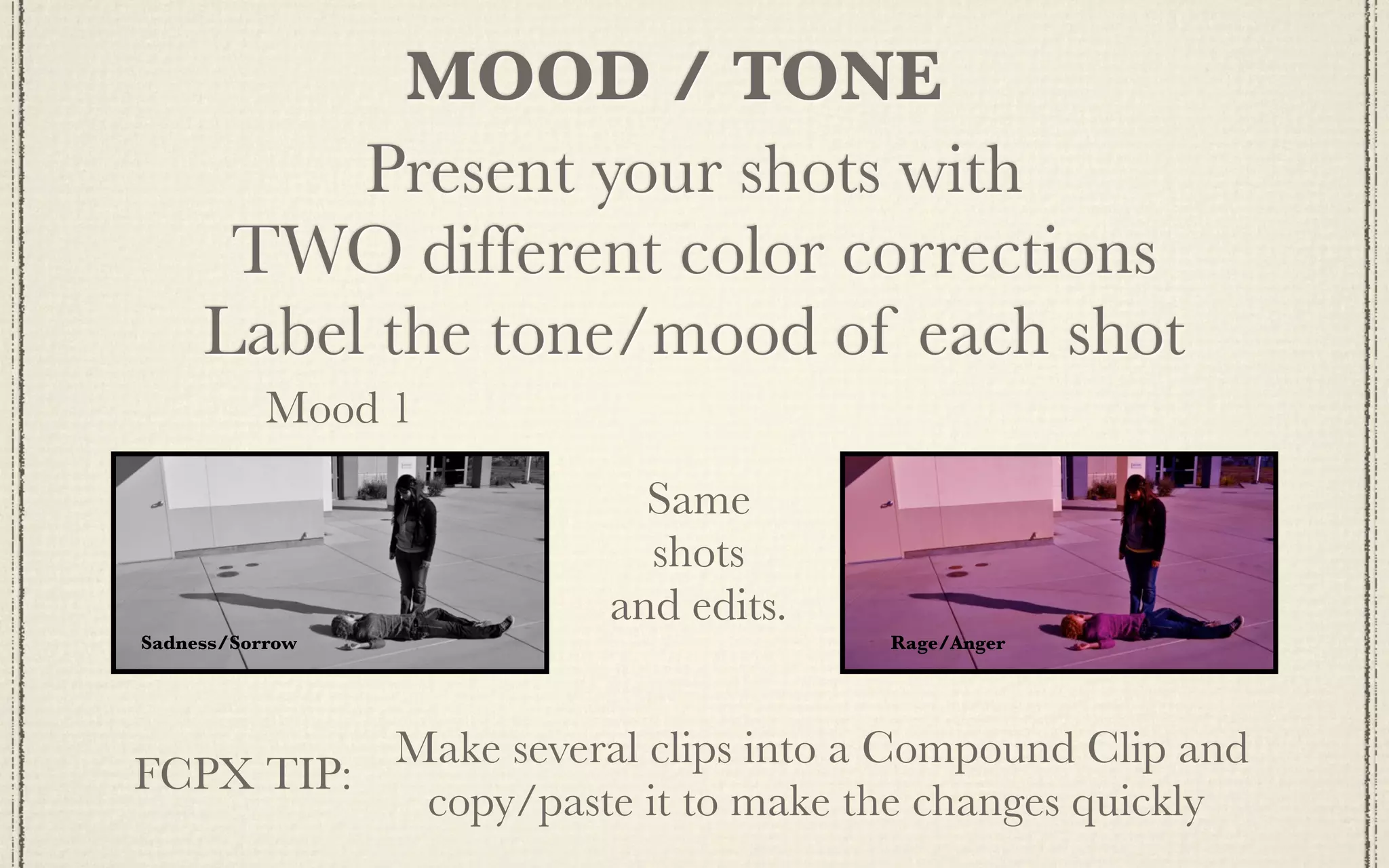
MOOD / TONE
          Present your shots with
      TWO different color corrections
     Label the tone/mood of each shot
           Mood 1
                        Same
                        shots
                      and edits.
Sadness/Sorrow                     Rage/Anger


          Make several clips into a Compound Clip and
FCPX TIP:
           copy/paste it to make the changes quickly
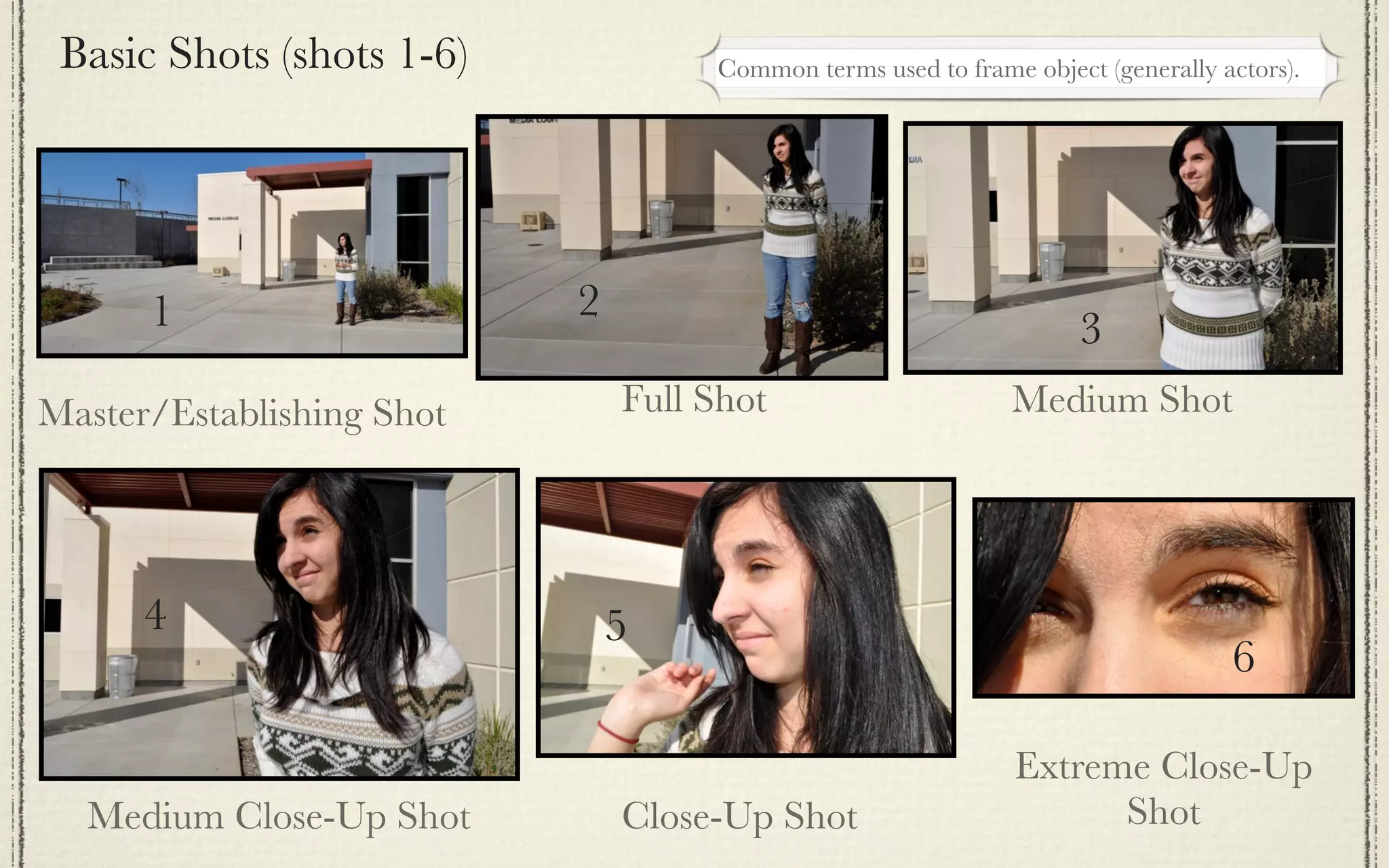
Basic Shots (shots 1-6)            Common terms used to frame object (generally actors).


      1                    2
                                                                    3
Master/Establishing Shot       Full Shot                      Medium Shot


      4                        5
                                                                                  6

                                                               Extreme Close-Up
  Medium Close-Up Shot         Close-Up Shot                         Shot
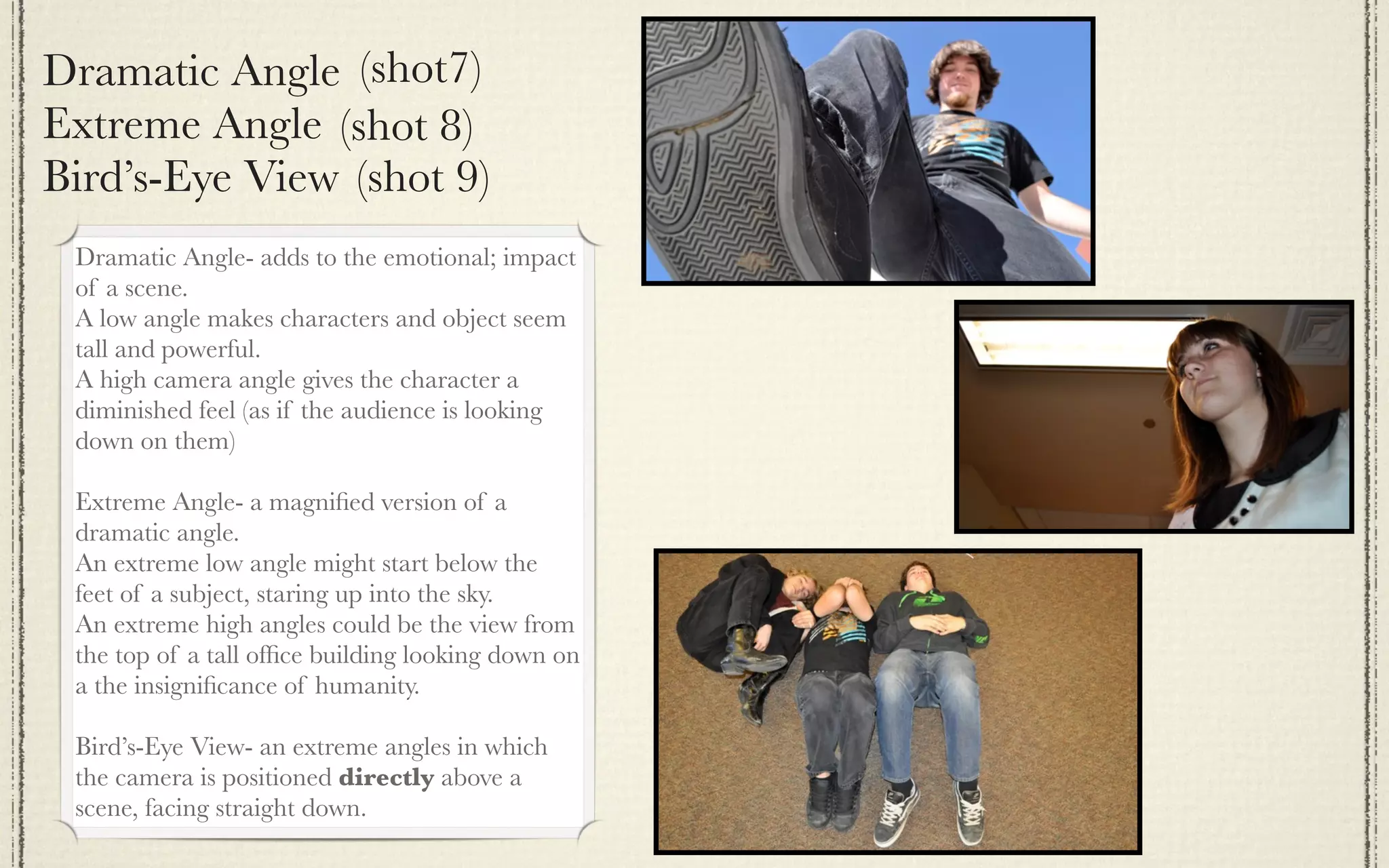
Dramatic Angle (shot7)
Extreme Angle (shot 8)
Bird’s-Eye View (shot 9)
 Dramatic Angle- adds to the emotional; impact
 of a scene.
 A low angle makes characters and object seem
 tall and powerful.
 A high camera angle gives the character a
 diminished feel (as if the audience is looking
 down on them)

 Extreme Angle- a magnified version of a
 dramatic angle.
 An extreme low angle might start below the
 feet of a subject, staring up into the sky.
 An extreme high angles could be the view from
 the top of a tall office building looking down on
 a the insignificance of humanity.

 Bird’s-Eye View- an extreme angles in which
 the camera is positioned directly above a
 scene, facing straight down.
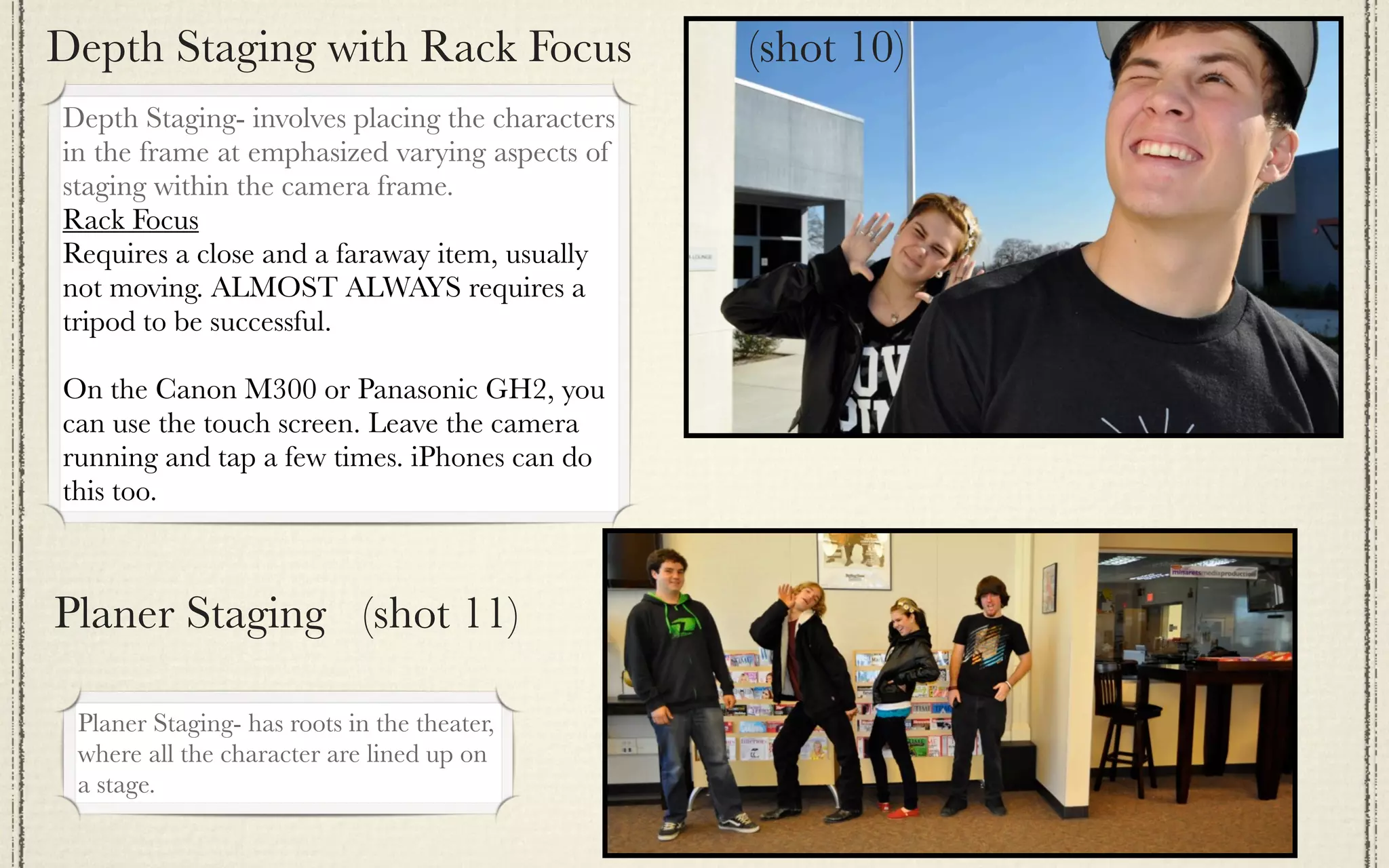
Depth Staging with Rack Focus                    (shot 10)
Depth Staging- involves placing the characters
in the frame at emphasized varying aspects of
staging within the camera frame.
Rack Focus
Requires a close and a faraway item, usually
not moving. ALMOST ALWAYS requires a
tripod to be successful.

On the Canon M300 or Panasonic GH2, you
can use the touch screen. Leave the camera
running and tap a few times. iPhones can do
this too.


Planer Staging (shot 11)

 Planer Staging- has roots in the theater,
 where all the character are lined up on
 a stage.
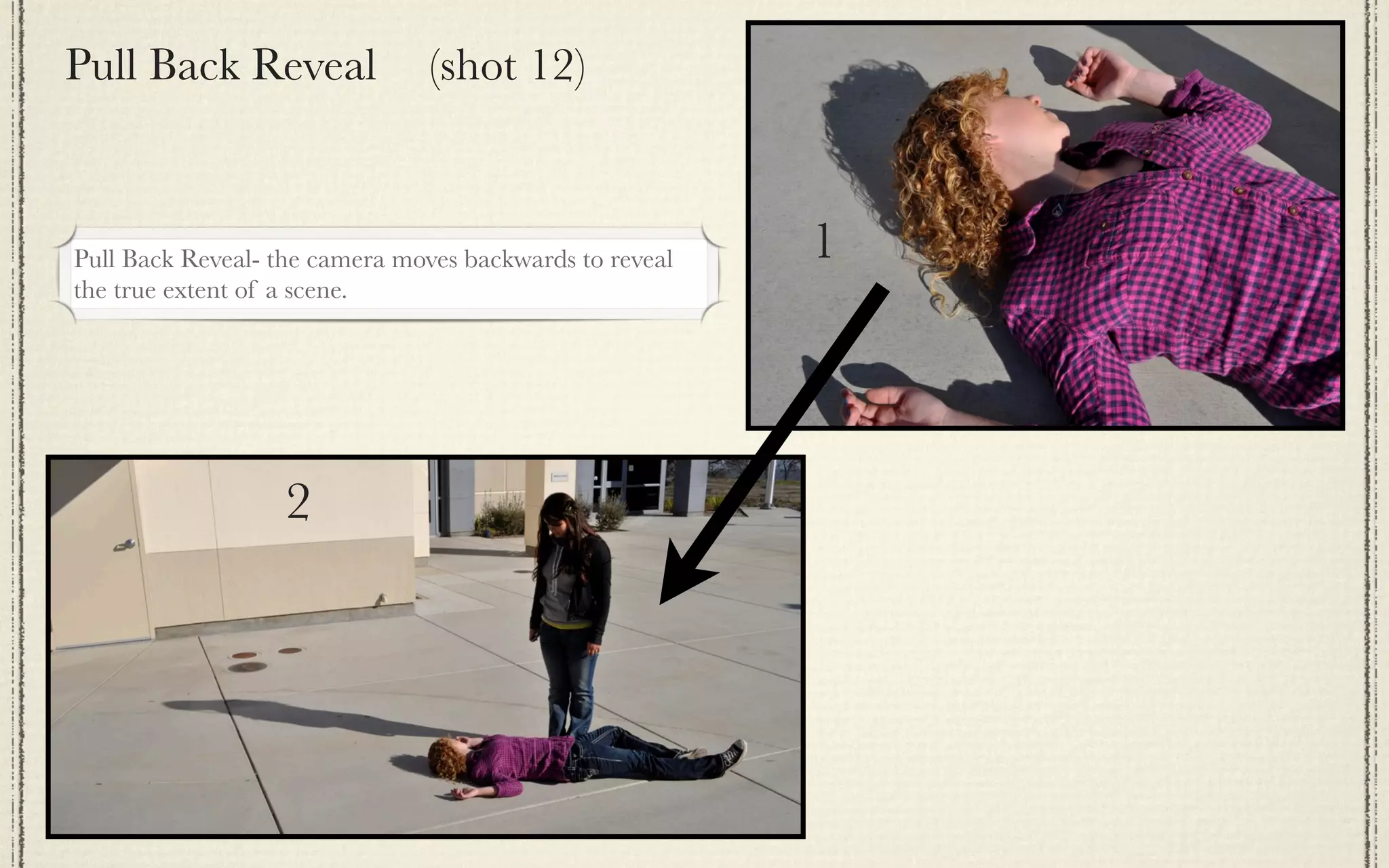
Pull Back Reveal                (shot 12)


Pull Back Reveal- the camera moves backwards to reveal   1
the true extent of a scene.


                   2
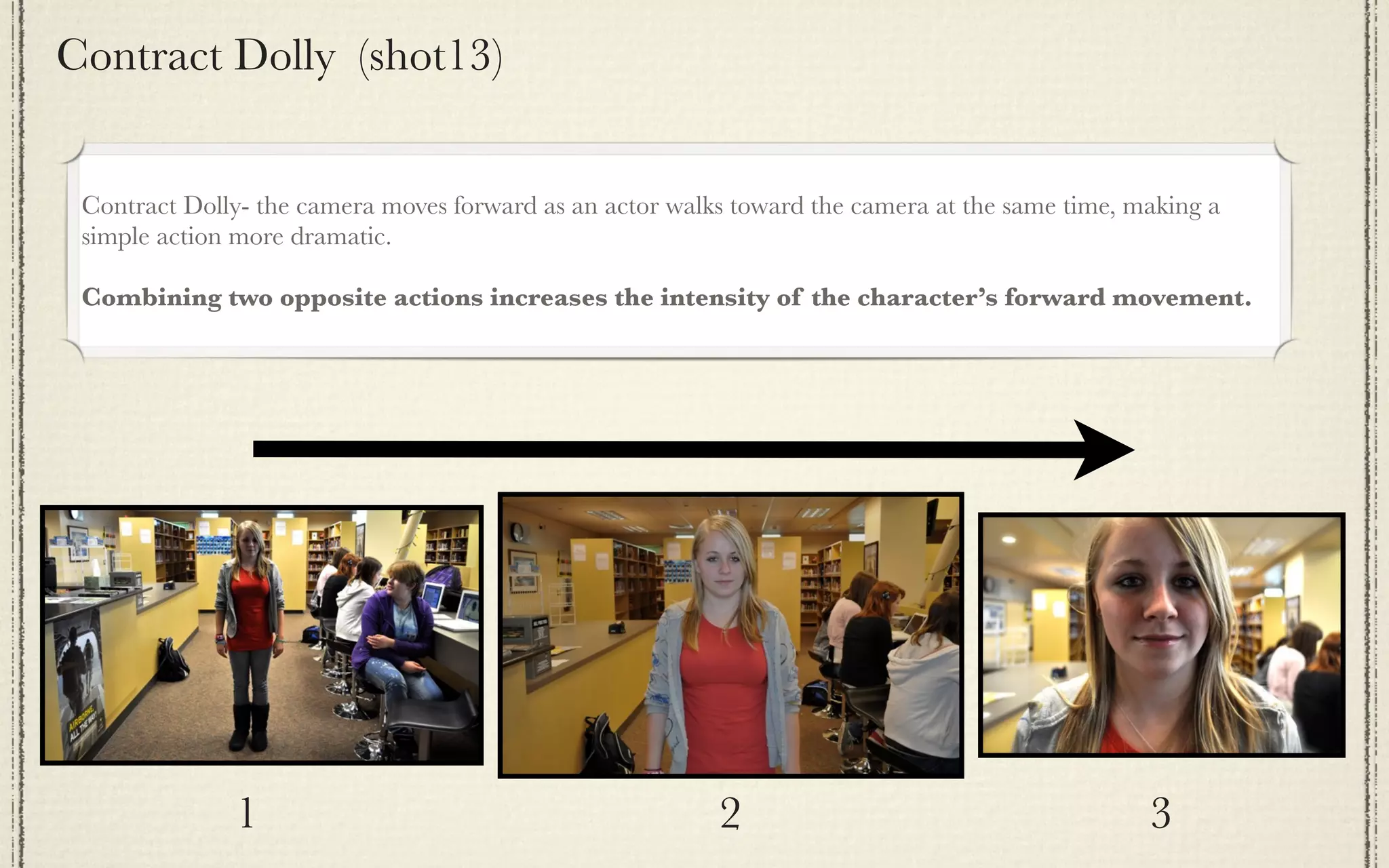
Contract Dolly (shot13)


 Contract Dolly- the camera moves forward as an actor walks toward the camera at the same time, making a
 simple action more dramatic.

 Combining two opposite actions increases the intensity of the character’s forward movement.


              1                                           2                                      3
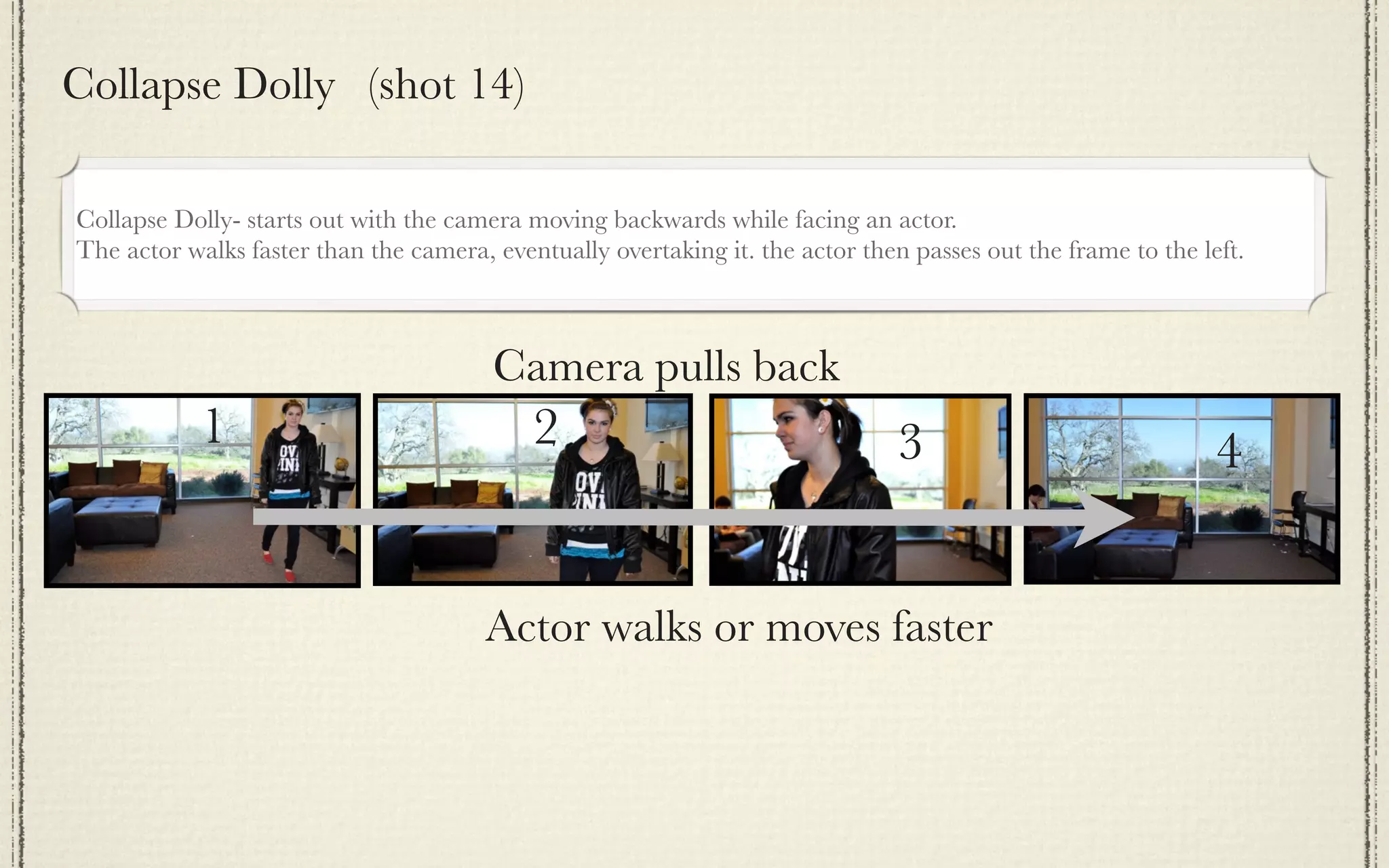
Collapse Dolly (shot 14)

Collapse Dolly- starts out with the camera moving backwards while facing an actor.
The actor walks faster than the camera, eventually overtaking it. the actor then passes out the frame to the left.


                                        Camera pulls back
            1                               2                                   3                              4


                                       Actor walks or moves faster
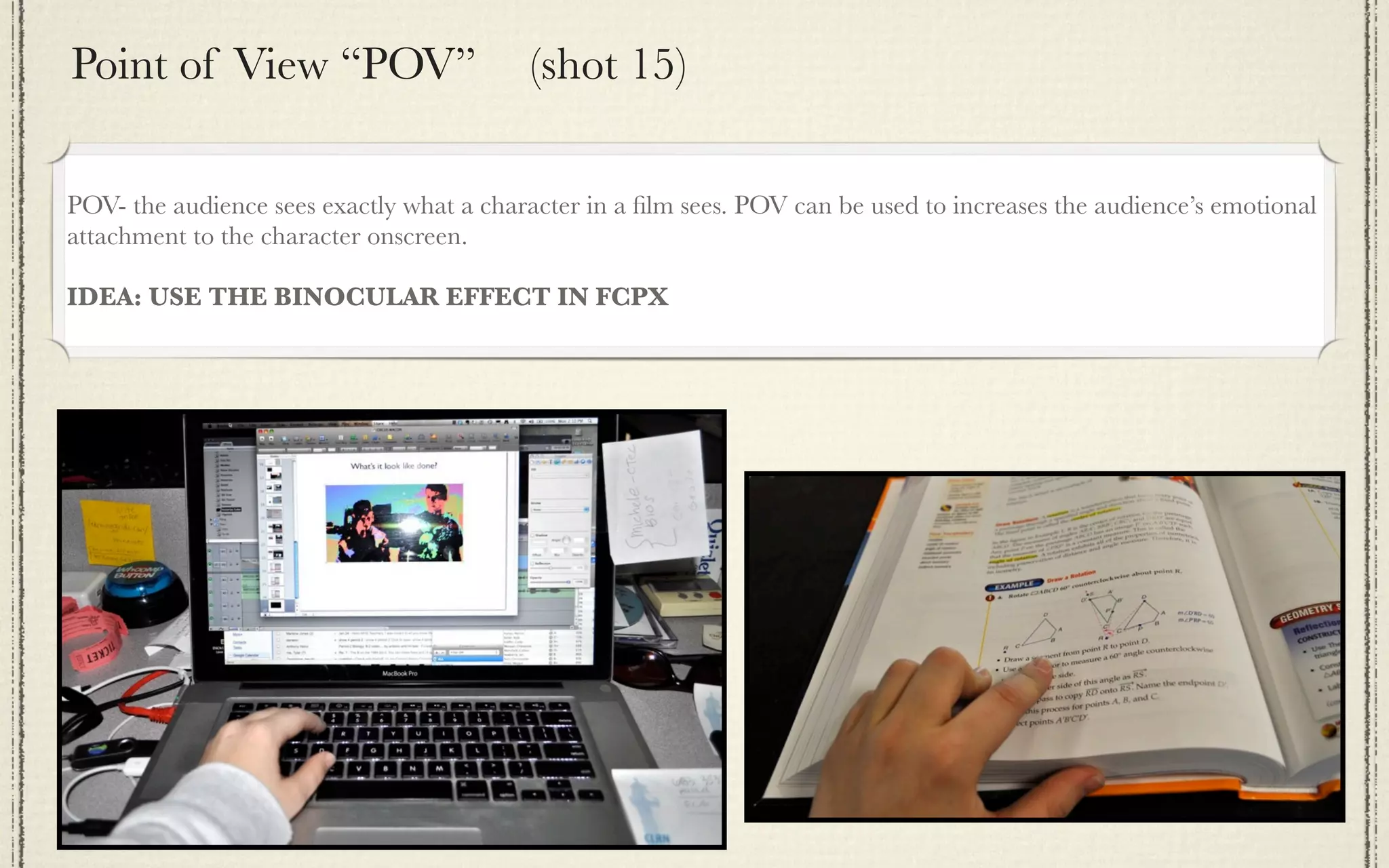
Point of View “POV”                       (shot 15)

POV- the audience sees exactly what a character in a film sees. POV can be used to increases the audience’s emotional
attachment to the character onscreen.

IDEA: USE THE BINOCULAR EFFECT IN FCPX
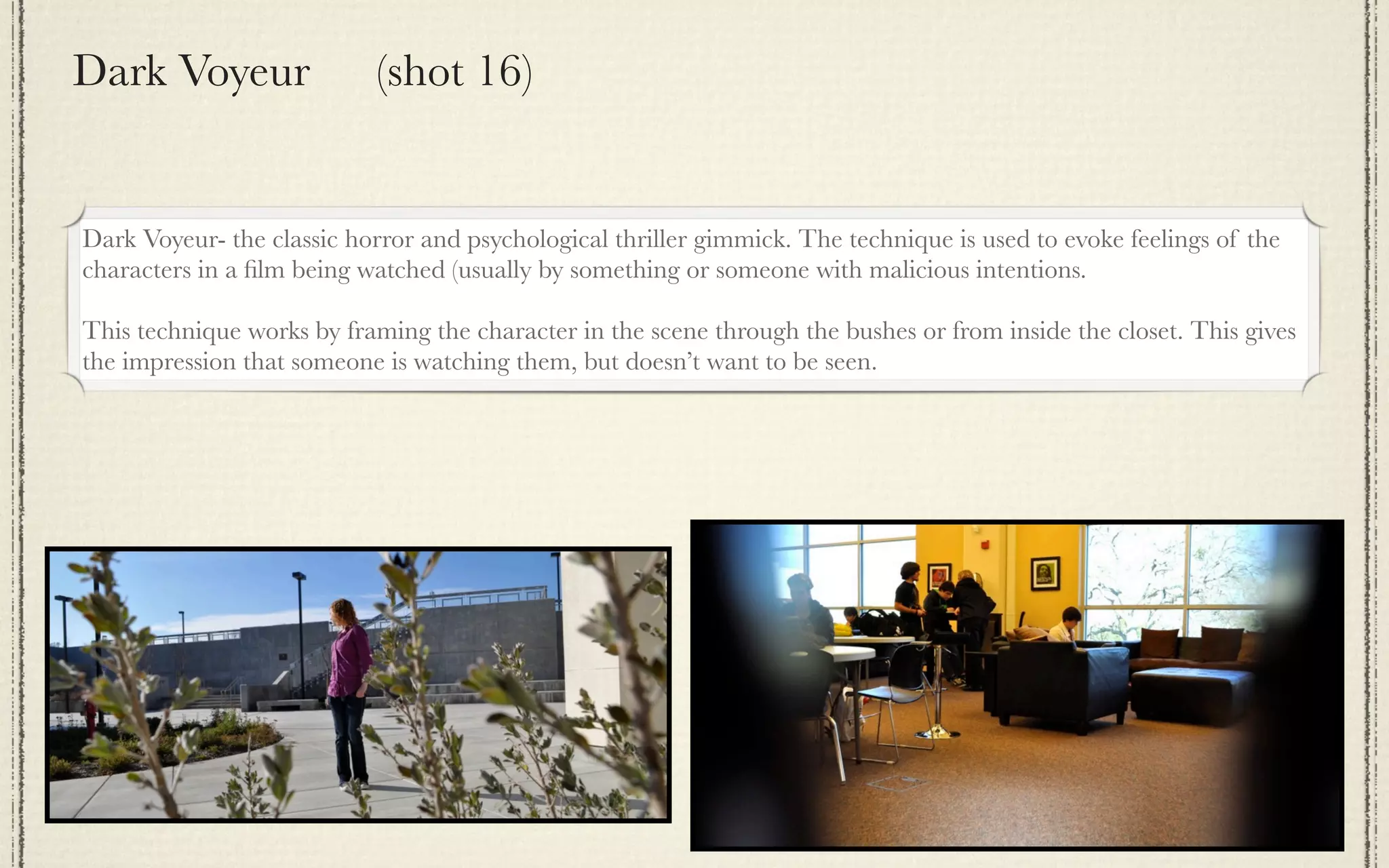
Dark Voyeur                (shot 16)


Dark Voyeur- the classic horror and psychological thriller gimmick. The technique is used to evoke feelings of the
characters in a film being watched (usually by something or someone with malicious intentions.

This technique works by framing the character in the scene through the bushes or from inside the closet. This gives
the impression that someone is watching them, but doesn’t want to be seen.
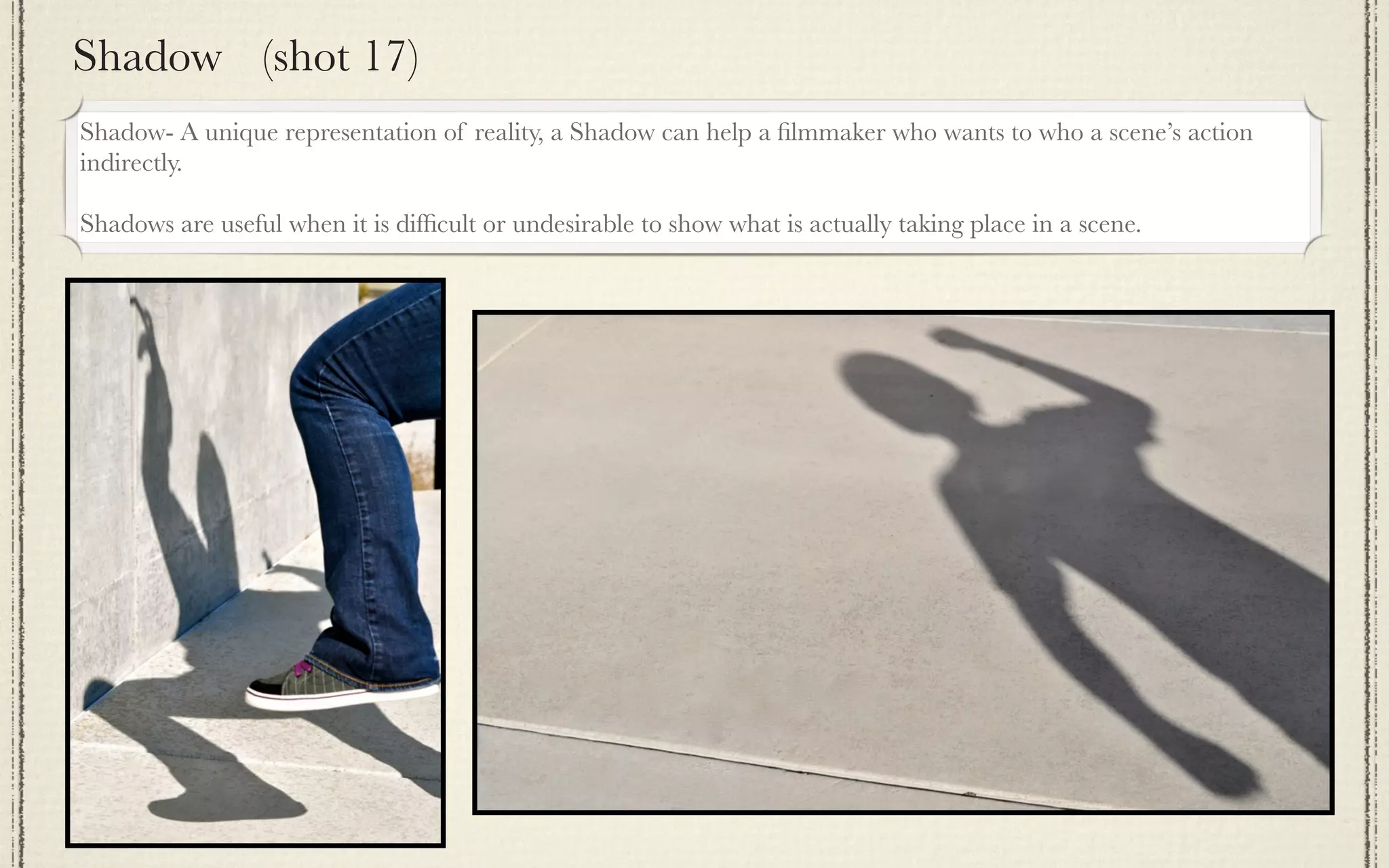
Shadow (shot 17)
Shadow- A unique representation of reality, a Shadow can help a filmmaker who wants to who a scene’s action
indirectly.

Shadows are useful when it is difficult or undesirable to show what is actually taking place in a scene.
Crossing the Line (shot 18)
 Crossing the Line (Reverse Cut)
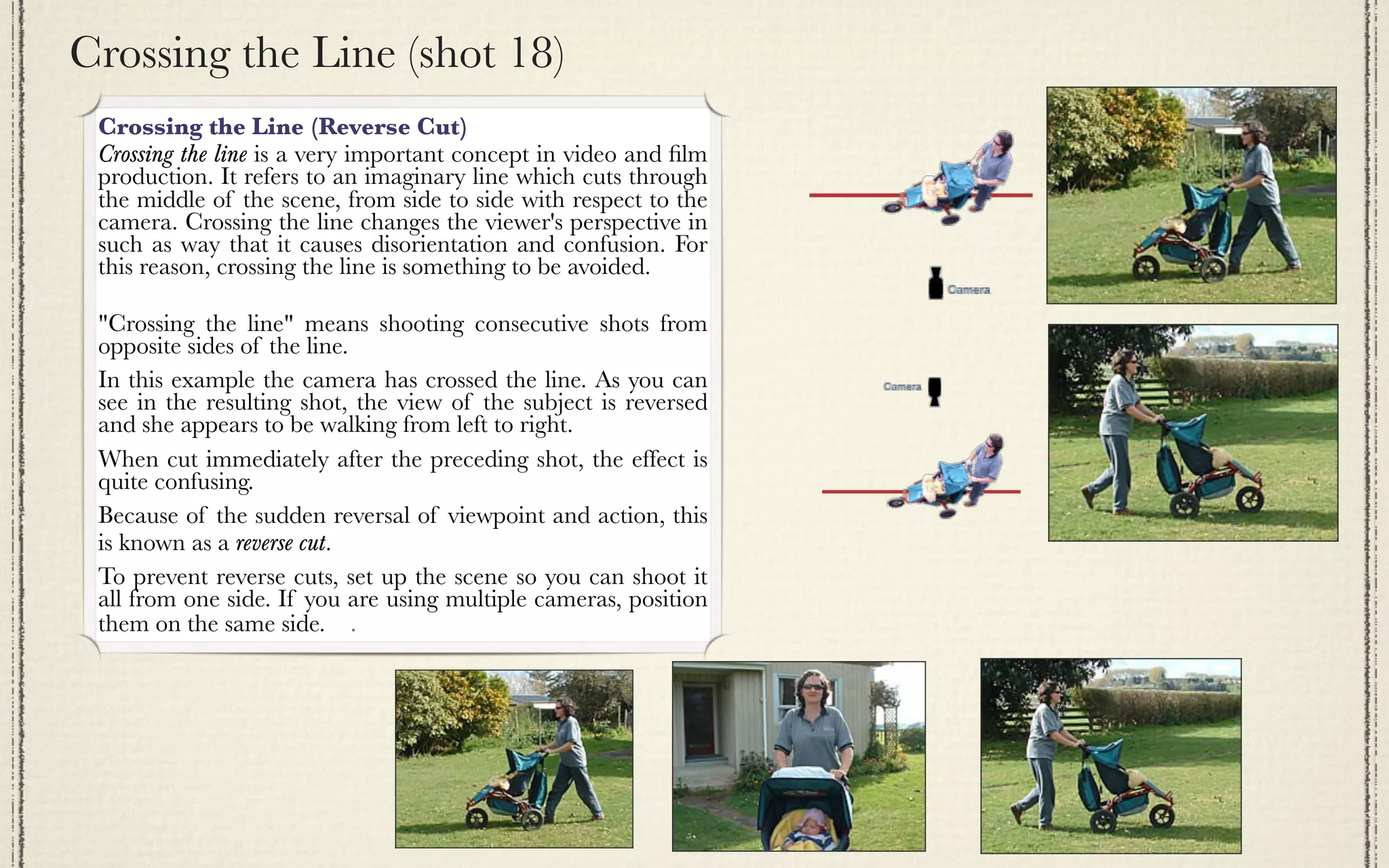
 Crossing the line is a very important concept in video and film
 production. It refers to an imaginary line which cuts through
 the middle of the scene, from side to side with respect to the
 camera. Crossing the line changes the viewer's perspective in
 such as way that it causes disorientation and confusion. For
 this reason, crossing the line is something to be avoided.

 "Crossing the line" means shooting consecutive shots from
 opposite sides of the line.  
 In this example the camera has crossed the line. As you can
 see in the resulting shot, the view of the subject is reversed
 and she appears to be walking from left to right.
 When cut immediately after the preceding shot, the effect is
 quite confusing.
 Because of the sudden reversal of viewpoint and action, this
 is known as a reverse cut.
 To prevent reverse cuts, set up the scene so you can shoot it
 all from one side. If you are using multiple cameras, position
 them on the same side.    .
Dutch Roll (shot 19)
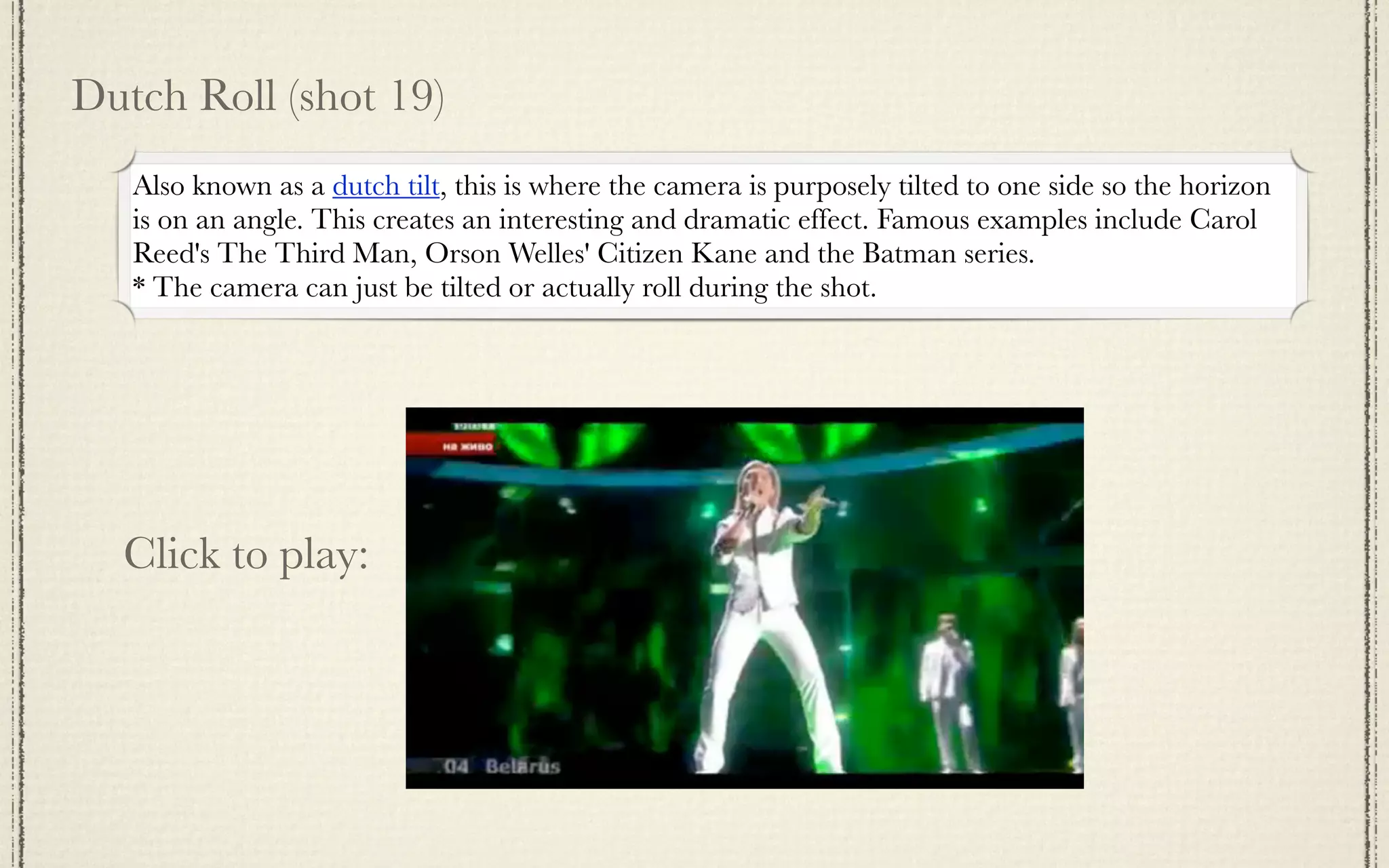
   Also known as a dutch tilt, this is where the camera is purposely tilted to one side so the horizon
   is on an angle. This creates an interesting and dramatic effect. Famous examples include Carol
   Reed's The Third Man, Orson Welles' Citizen Kane and the Batman series.
   * The camera can just be tilted or actually roll during the shot.


  Click to play:
Dutch Roll (shot 19)
   Also known as a dutch tilt, this is where the camera is purposely tilted to one side so the horizon
   is on an angle. This creates an interesting and dramatic effect. Famous examples include Carol
   Reed's The Third Man, Orson Welles' Citizen Kane and the Batman series.
   * The camera can just be tilted or actually roll during the shot.


  Click to play:
Over the Shoulder (OTS) (shot 20)


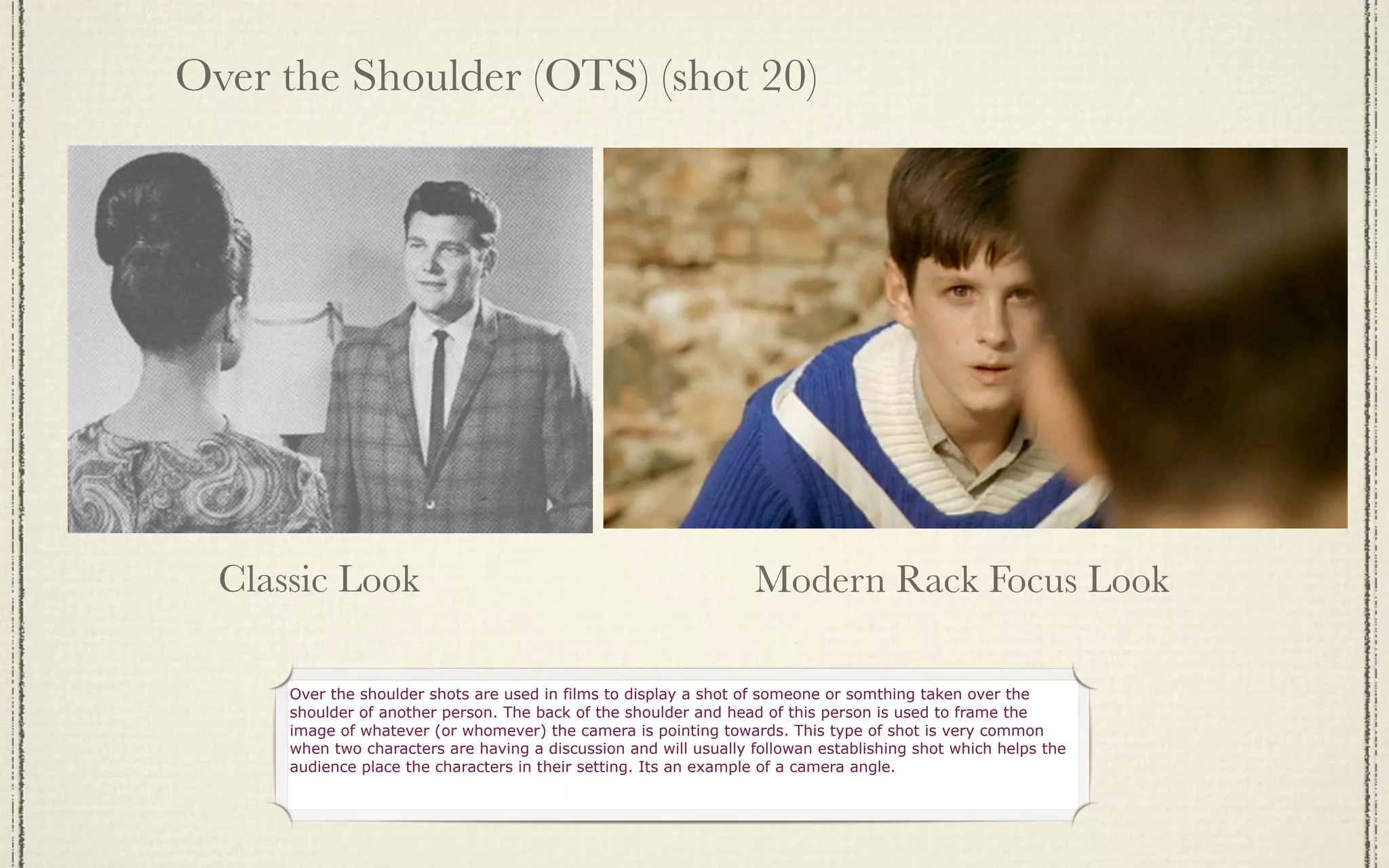
  Classic Look                                                     Modern Rack Focus Look

      Over the shoulder shots are used in films to display a shot of someone or somthing taken over the
      shoulder of another person. The back of the shoulder and head of this person is used to frame the
      image of whatever (or whomever) the camera is pointing towards. This type of shot is very common
      when two characters are having a discussion and will usually followan establishing shot which helps the
      audience place the characters in their setting. Its an example of a camera angle.
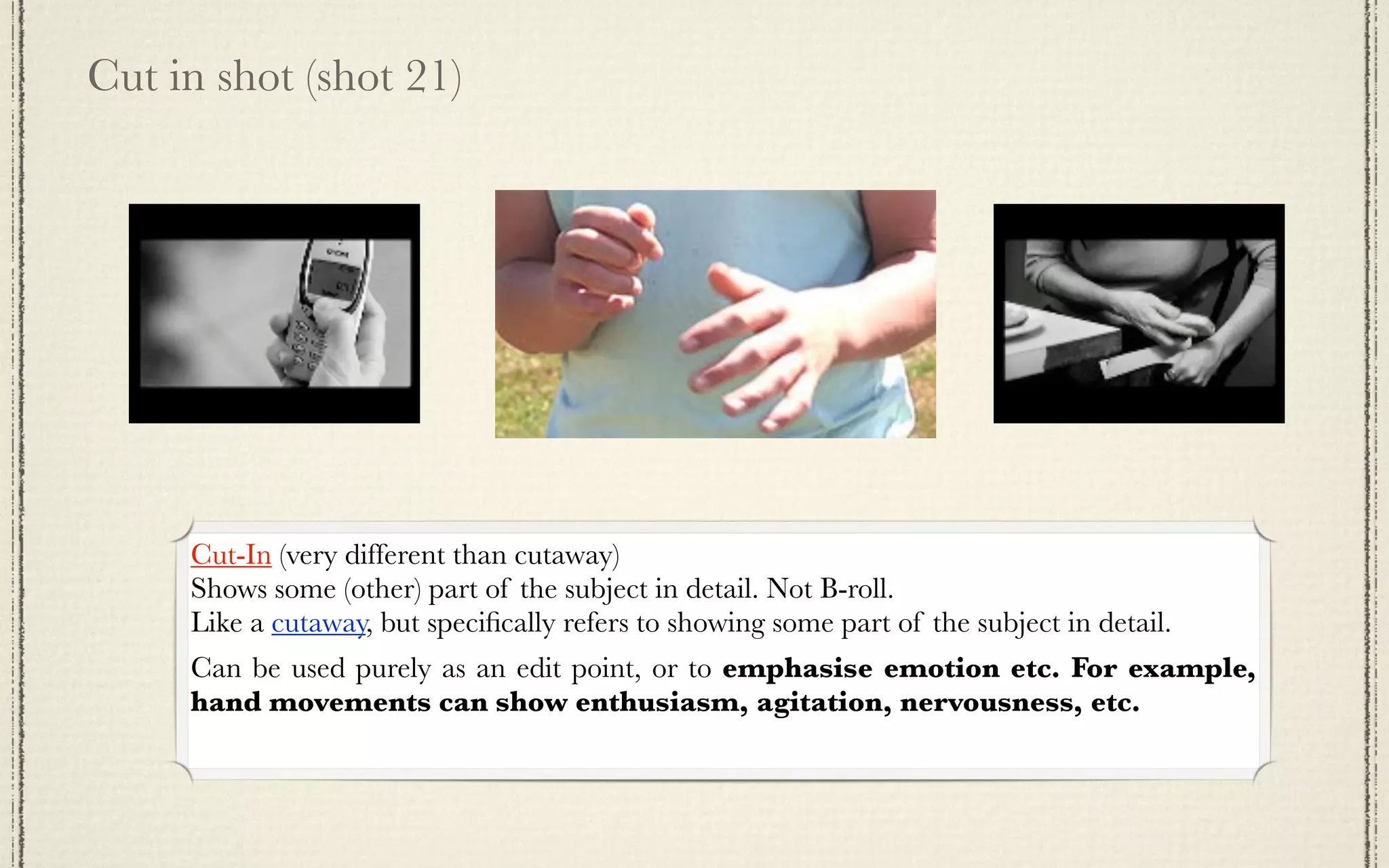
Cut in shot (shot 21)


     Cut-In (very different than cutaway)
     Shows some (other) part of the subject in detail. Not B-roll.
     Like a cutaway, but specifically refers to showing some part of the subject in detail.
     Can be used purely as an edit point, or to emphasise emotion etc. For example,
     hand movements can show enthusiasm, agitation, nervousness, etc.
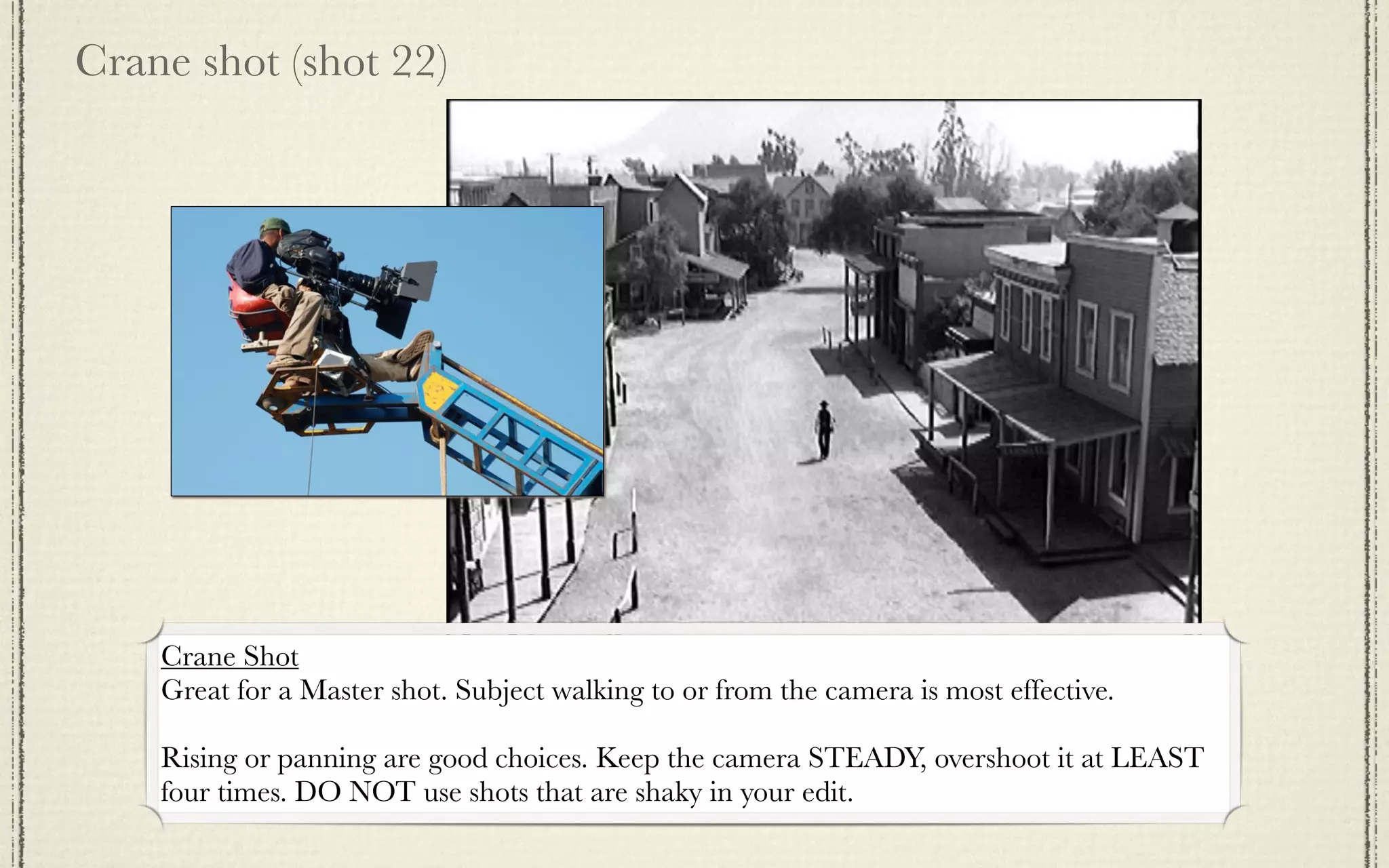
Crane shot (shot 22)


    Crane Shot
    Great for a Master shot. Subject walking to or from the camera is most effective.

    Rising or panning are good choices. Keep the camera STEADY, overshoot it at LEAST
    four times. DO NOT use shots that are shaky in your edit.
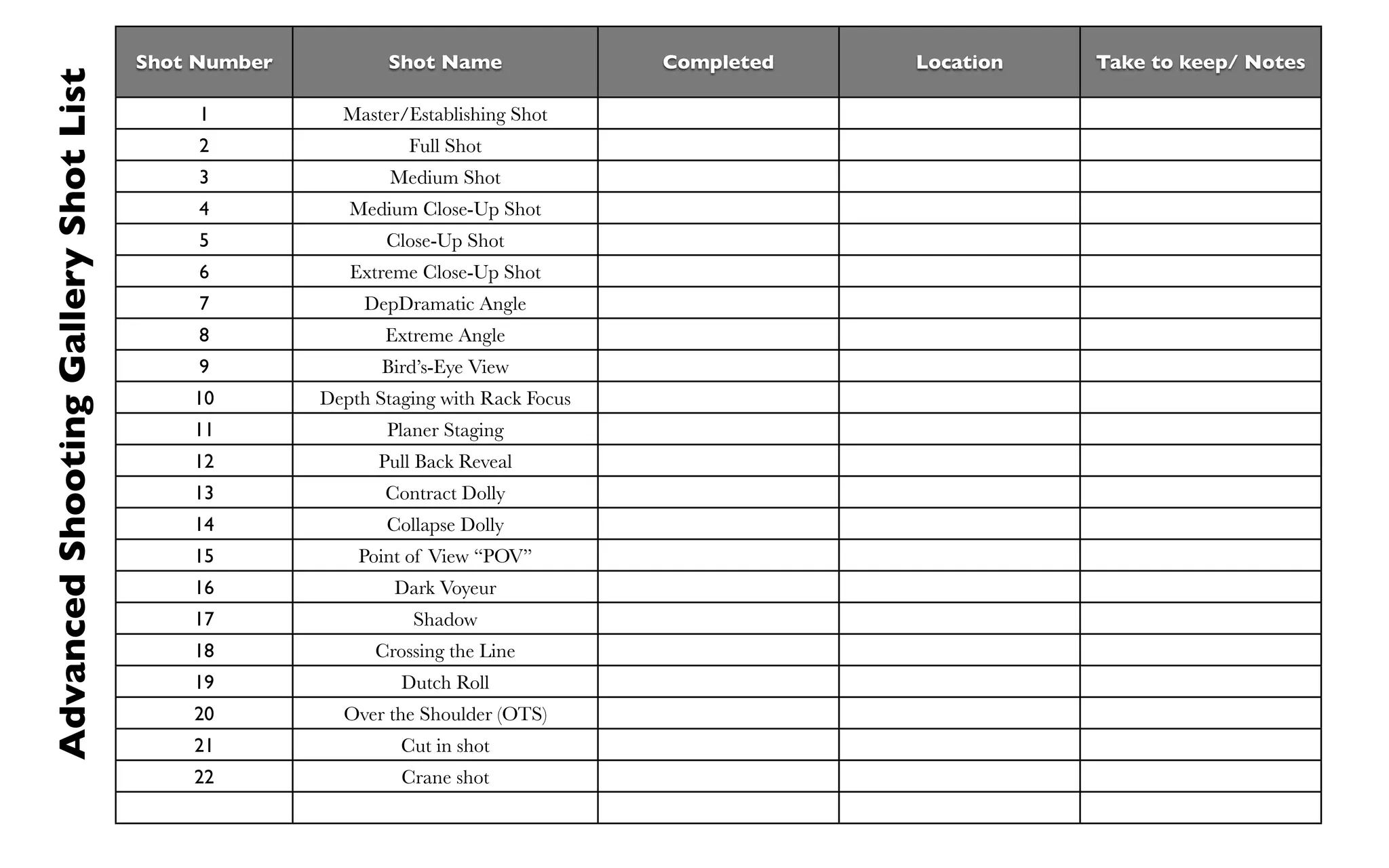
Shot Number          Shot Name                Completed   Location   Take to keep/ Notes
Advanced Shooting Gallery Shot List
                                           1          Master/Establishing Shot
                                           2                  Full Shot
                                           3                Medium Shot
                                           4           Medium Close-Up Shot
                                           5               Close-Up Shot
                                           6           Extreme Close-Up Shot
                                           7             DepDramatic Angle
                                           8                 th Staging
                                                           Extreme Angle
                                           9               Bird’s-Eye View
                                          10        Depth Staging with Rack Focus
                                          11               Planer Staging
                                          12              Pull Back Reveal
                                          13               Contract Dolly
                                          14               Collapse Dolly
                                          15            Point of View “POV”
                                          16                Dark Voyeur
                                          17                  Shadow
                                          18              Crossing the Line
                                          19                 Dutch Roll
                                          20          Over the Shoulder (OTS)
                                          21                 Cut in shot
                                          22                 Crane shot

Advanced Shooting Gallery

  • 1.
    “Not the gunskinda shooting.”
  • 2.
    The Plan: Shoot andupload all 22 shots. A story is not required, but a theme or motif is appreciated. The shots should be in the same order as on the Keynote provided. TITLE each shot with it’s name (e.g. OTS or Dolly). Creative use of titles is appreciated. Export the completed video to Vimeo and send me the link. By the Master, Orson Welles
  • 3.
    MOOD / TONE Present your shots with TWO different color corrections Label the tone/mood of each shot Mood 1 Same shots and edits. Sadness/Sorrow Rage/Anger Make several clips into a Compound Clip and FCPX TIP: copy/paste it to make the changes quickly
  • 4.
    Basic Shots (shots1-6) Common terms used to frame object (generally actors). 1 2 3 Master/Establishing Shot Full Shot Medium Shot 4 5 6 Extreme Close-Up Medium Close-Up Shot Close-Up Shot Shot
  • 5.
    Dramatic Angle (shot7) ExtremeAngle (shot 8) Bird’s-Eye View (shot 9) Dramatic Angle- adds to the emotional; impact of a scene. A low angle makes characters and object seem tall and powerful. A high camera angle gives the character a diminished feel (as if the audience is looking down on them) Extreme Angle- a magnified version of a dramatic angle. An extreme low angle might start below the feet of a subject, staring up into the sky. An extreme high angles could be the view from the top of a tall office building looking down on a the insignificance of humanity. Bird’s-Eye View- an extreme angles in which the camera is positioned directly above a scene, facing straight down.
  • 6.
    Depth Staging withRack Focus (shot 10) Depth Staging- involves placing the characters in the frame at emphasized varying aspects of staging within the camera frame. Rack Focus Requires a close and a faraway item, usually not moving. ALMOST ALWAYS requires a tripod to be successful. On the Canon M300 or Panasonic GH2, you can use the touch screen. Leave the camera running and tap a few times. iPhones can do this too. Planer Staging (shot 11) Planer Staging- has roots in the theater, where all the character are lined up on a stage.
  • 7.
    Pull Back Reveal (shot 12) Pull Back Reveal- the camera moves backwards to reveal 1 the true extent of a scene. 2
  • 8.
    Contract Dolly (shot13) Contract Dolly- the camera moves forward as an actor walks toward the camera at the same time, making a simple action more dramatic. Combining two opposite actions increases the intensity of the character’s forward movement. 1 2 3
  • 9.
    Collapse Dolly (shot14) Collapse Dolly- starts out with the camera moving backwards while facing an actor. The actor walks faster than the camera, eventually overtaking it. the actor then passes out the frame to the left. Camera pulls back 1 2 3 4 Actor walks or moves faster
  • 10.
    Point of View“POV” (shot 15) POV- the audience sees exactly what a character in a film sees. POV can be used to increases the audience’s emotional attachment to the character onscreen. IDEA: USE THE BINOCULAR EFFECT IN FCPX
  • 11.
    Dark Voyeur (shot 16) Dark Voyeur- the classic horror and psychological thriller gimmick. The technique is used to evoke feelings of the characters in a film being watched (usually by something or someone with malicious intentions. This technique works by framing the character in the scene through the bushes or from inside the closet. This gives the impression that someone is watching them, but doesn’t want to be seen.
  • 12.
    Shadow (shot 17) Shadow-A unique representation of reality, a Shadow can help a filmmaker who wants to who a scene’s action indirectly. Shadows are useful when it is difficult or undesirable to show what is actually taking place in a scene.
  • 13.
    Crossing the Line(shot 18) Crossing the Line (Reverse Cut) Crossing the line is a very important concept in video and film production. It refers to an imaginary line which cuts through the middle of the scene, from side to side with respect to the camera. Crossing the line changes the viewer's perspective in such as way that it causes disorientation and confusion. For this reason, crossing the line is something to be avoided. "Crossing the line" means shooting consecutive shots from opposite sides of the line.   In this example the camera has crossed the line. As you can see in the resulting shot, the view of the subject is reversed and she appears to be walking from left to right. When cut immediately after the preceding shot, the effect is quite confusing. Because of the sudden reversal of viewpoint and action, this is known as a reverse cut. To prevent reverse cuts, set up the scene so you can shoot it all from one side. If you are using multiple cameras, position them on the same side.    .
  • 14.
    Dutch Roll (shot19) Also known as a dutch tilt, this is where the camera is purposely tilted to one side so the horizon is on an angle. This creates an interesting and dramatic effect. Famous examples include Carol Reed's The Third Man, Orson Welles' Citizen Kane and the Batman series. * The camera can just be tilted or actually roll during the shot. Click to play:
  • 15.
    Dutch Roll (shot19) Also known as a dutch tilt, this is where the camera is purposely tilted to one side so the horizon is on an angle. This creates an interesting and dramatic effect. Famous examples include Carol Reed's The Third Man, Orson Welles' Citizen Kane and the Batman series. * The camera can just be tilted or actually roll during the shot. Click to play:
  • 16.
    Over the Shoulder(OTS) (shot 20) Classic Look Modern Rack Focus Look Over the shoulder shots are used in films to display a shot of someone or somthing taken over the shoulder of another person. The back of the shoulder and head of this person is used to frame the image of whatever (or whomever) the camera is pointing towards. This type of shot is very common when two characters are having a discussion and will usually followan establishing shot which helps the audience place the characters in their setting. Its an example of a camera angle.
  • 17.
    Cut in shot(shot 21) Cut-In (very different than cutaway) Shows some (other) part of the subject in detail. Not B-roll. Like a cutaway, but specifically refers to showing some part of the subject in detail. Can be used purely as an edit point, or to emphasise emotion etc. For example, hand movements can show enthusiasm, agitation, nervousness, etc.
  • 18.
    Crane shot (shot22) Crane Shot Great for a Master shot. Subject walking to or from the camera is most effective. Rising or panning are good choices. Keep the camera STEADY, overshoot it at LEAST four times. DO NOT use shots that are shaky in your edit.
  • 19.
    Shot Number Shot Name Completed Location Take to keep/ Notes Advanced Shooting Gallery Shot List 1 Master/Establishing Shot 2 Full Shot 3 Medium Shot 4 Medium Close-Up Shot 5 Close-Up Shot 6 Extreme Close-Up Shot 7 DepDramatic Angle 8 th Staging Extreme Angle 9 Bird’s-Eye View 10 Depth Staging with Rack Focus 11 Planer Staging 12 Pull Back Reveal 13 Contract Dolly 14 Collapse Dolly 15 Point of View “POV” 16 Dark Voyeur 17 Shadow 18 Crossing the Line 19 Dutch Roll 20 Over the Shoulder (OTS) 21 Cut in shot 22 Crane shot