Advance Topics in L
A
TEX
Dr. Nirav Vyas
Associate Professor & Head
Dept. of Science Humanities, ATMIYA University
nirav.vyas@atmiyauni.ac.in
Dr. Nirav Vyas (AU) Advance Topics in L
ATEX 1 / 43
Table of Contents
1 Making Custom Commands
Dr. Nirav Vyas (AU) Advance Topics in L
ATEX 2 / 43
Table of Contents
1 Making Custom Commands
2 Bibliography and BibTex
Dr. Nirav Vyas (AU) Advance Topics in L
ATEX 2 / 43
Table of Contents
1 Making Custom Commands
2 Bibliography and BibTex
3 The siunitx Package
Dr. Nirav Vyas (AU) Advance Topics in L
ATEX 2 / 43
Table of Contents
1 Making Custom Commands
2 Bibliography and BibTex
3 The siunitx Package
4 The mhchem Package
Dr. Nirav Vyas (AU) Advance Topics in L
ATEX 2 / 43
Table of Contents
1 Making Custom Commands
2 Bibliography and BibTex
3 The siunitx Package
4 The mhchem Package
5 The amsthm Package
Dr. Nirav Vyas (AU) Advance Topics in L
ATEX 2 / 43
Table of Contents
1 Making Custom Commands
2 Bibliography and BibTex
3 The siunitx Package
4 The mhchem Package
5 The amsthm Package
6 Beamer
Dr. Nirav Vyas (AU) Advance Topics in L
ATEX 2 / 43
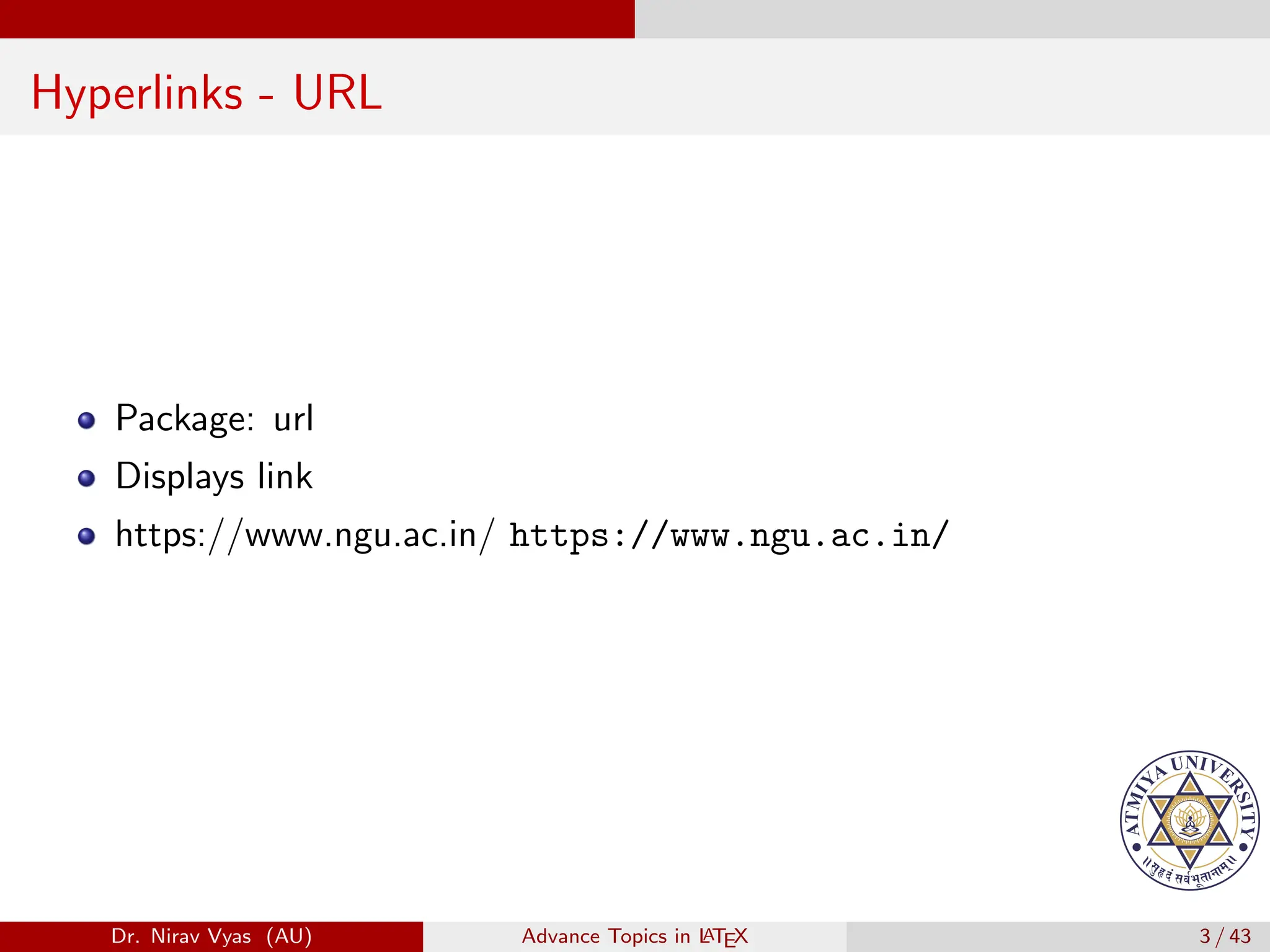
Hyperlinks - URL
Package: url
Dr. Nirav Vyas (AU) Advance Topics in L
ATEX 3 / 43
Hyperlinks - URL
Package: url
Displays link
Dr. Nirav Vyas (AU) Advance Topics in L
ATEX 3 / 43
Hyperlinks - URL
Package: url
Displays link
https://www.ngu.ac.in/ https://www.ngu.ac.in/
Dr. Nirav Vyas (AU) Advance Topics in L
ATEX 3 / 43
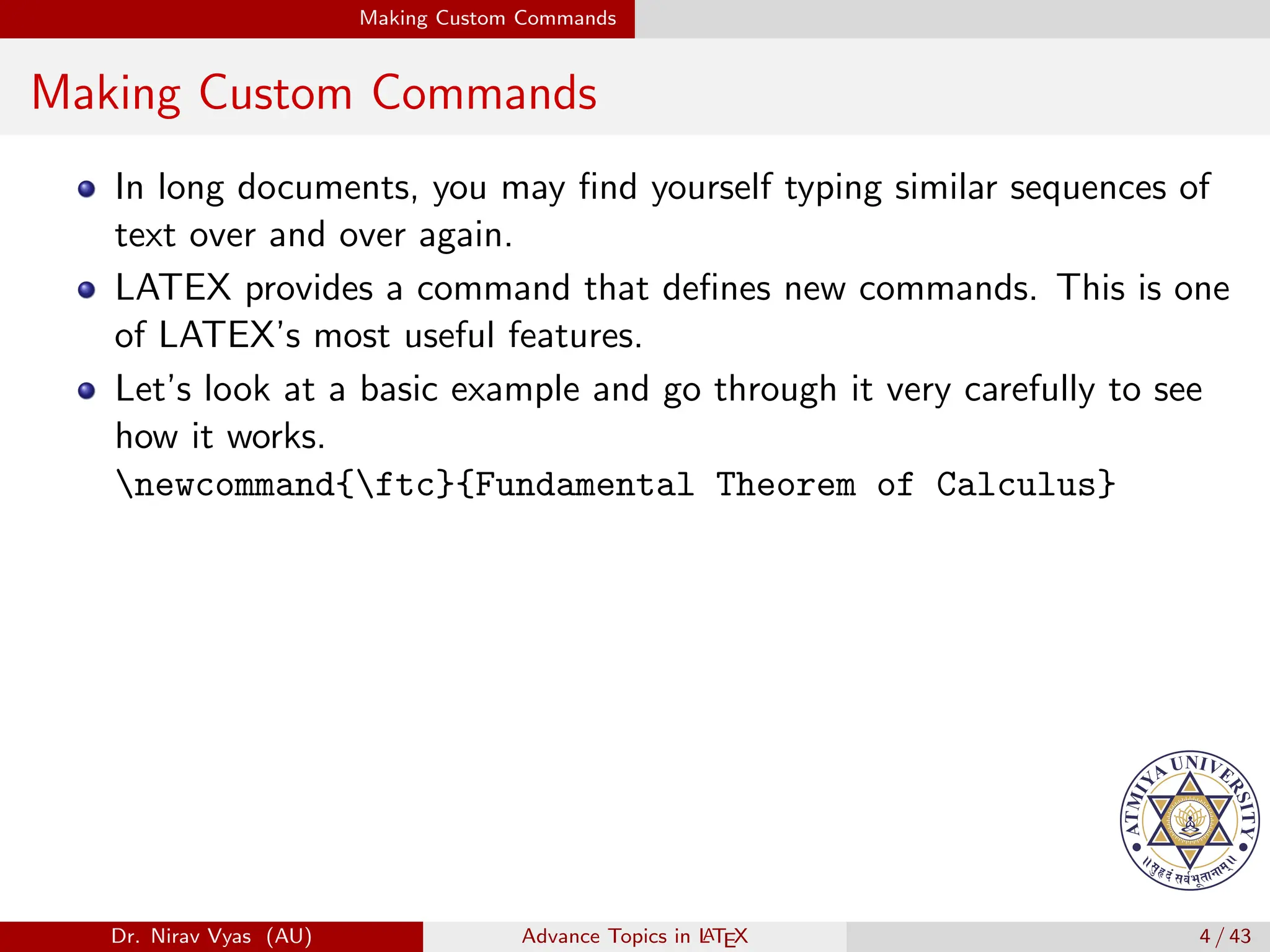
Making Custom Commands
In long documents, you may find yourself typing similar sequences of
text over and over again.
Dr. Nirav Vyas (AU) Advance Topics in L
ATEX 4 / 43
Making Custom Commands
In long documents, you may find yourself typing similar sequences of
text over and over again.
LATEX provides a command that defines new commands. This is one
of LATEX’s most useful features.
Dr. Nirav Vyas (AU) Advance Topics in L
ATEX 4 / 43
Making Custom Commands
In long documents, you may find yourself typing similar sequences of
text over and over again.
LATEX provides a command that defines new commands. This is one
of LATEX’s most useful features.
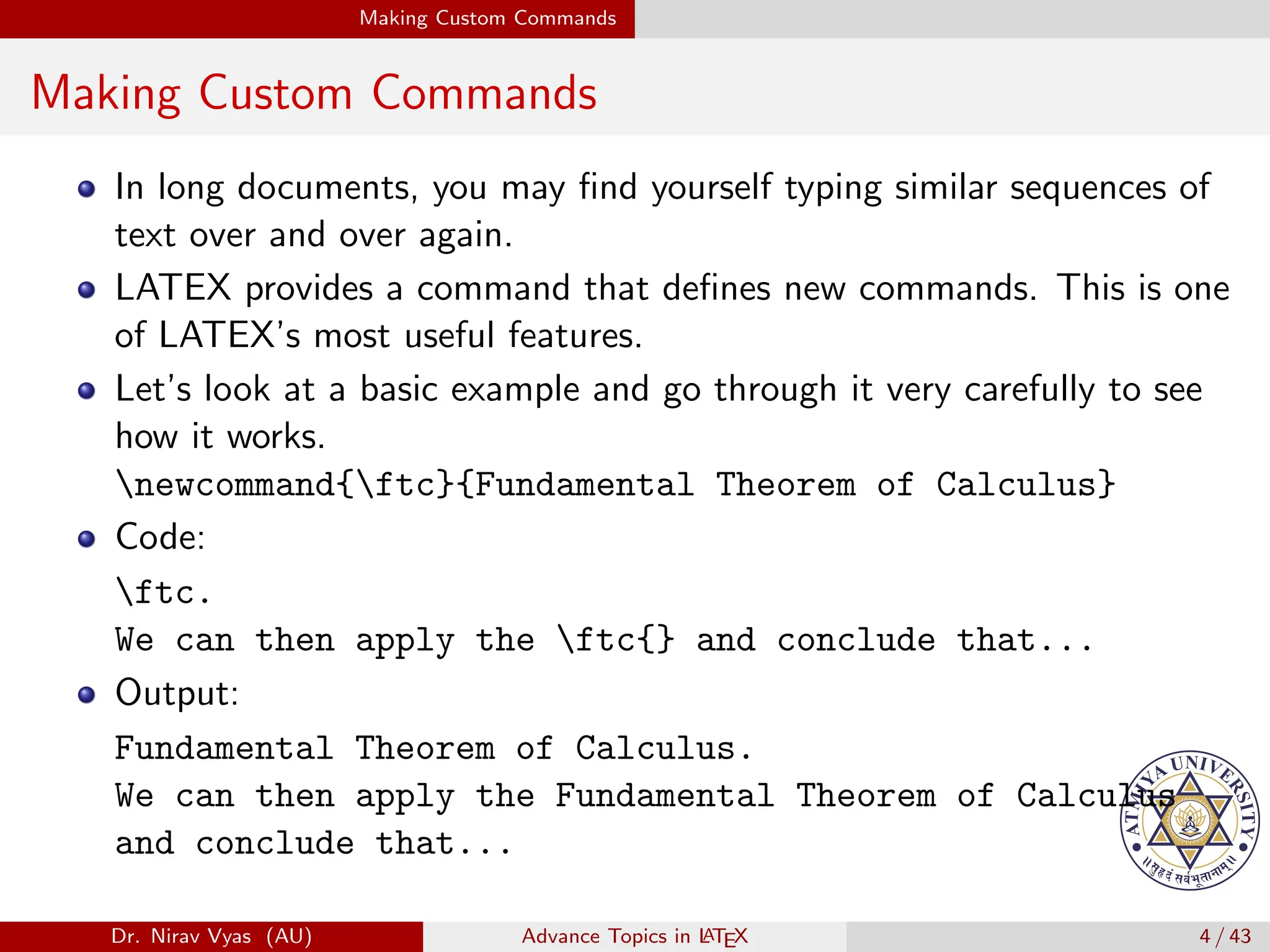
Let’s look at a basic example and go through it very carefully to see
how it works.
newcommand{ftc}{Fundamental Theorem of Calculus}
Dr. Nirav Vyas (AU) Advance Topics in L
ATEX 4 / 43
Making Custom Commands
In long documents, you may find yourself typing similar sequences of
text over and over again.
LATEX provides a command that defines new commands. This is one
of LATEX’s most useful features.
Let’s look at a basic example and go through it very carefully to see
how it works.
newcommand{ftc}{Fundamental Theorem of Calculus}
Code:
ftc.
We can then apply the ftc{} and conclude that...
Dr. Nirav Vyas (AU) Advance Topics in L
ATEX 4 / 43
Making Custom Commands
In long documents, you may find yourself typing similar sequences of
text over and over again.
LATEX provides a command that defines new commands. This is one
of LATEX’s most useful features.
Let’s look at a basic example and go through it very carefully to see
how it works.
newcommand{ftc}{Fundamental Theorem of Calculus}
Code:
ftc.
We can then apply the ftc{} and conclude that...
Output:
Fundamental Theorem of Calculus.
We can then apply the Fundamental Theorem of Calculus
and conclude that...
Dr. Nirav Vyas (AU) Advance Topics in L
ATEX 4 / 43
Bibliography and BibTex
BibTeX is the extension of Latex for managing references.
Dr. Nirav Vyas (AU) Advance Topics in L
ATEX 5 / 43
Bibliography and BibTex
BibTeX is the extension of Latex for managing references.
It is made to be easy to use and highly convenient.
Dr. Nirav Vyas (AU) Advance Topics in L
ATEX 5 / 43
Bibliography and BibTex
BibTeX is the extension of Latex for managing references.
It is made to be easy to use and highly convenient.
Generally citations and references are bothersome to do by hand for
two reasons:
Dr. Nirav Vyas (AU) Advance Topics in L
ATEX 5 / 43
Bibliography and BibTex
BibTeX is the extension of Latex for managing references.
It is made to be easy to use and highly convenient.
Generally citations and references are bothersome to do by hand for
two reasons:
1 Every one wants very specific, but slightly different format for citations.
Dr. Nirav Vyas (AU) Advance Topics in L
ATEX 5 / 43
Bibliography and BibTex
BibTeX is the extension of Latex for managing references.
It is made to be easy to use and highly convenient.
Generally citations and references are bothersome to do by hand for
two reasons:
1 Every one wants very specific, but slightly different format for citations.
2 Citations are often numbered by order of appearance, so any time you
insert a new citation, all the numbers change.
Dr. Nirav Vyas (AU) Advance Topics in L
ATEX 5 / 43
Bibliography and BibTex
BibTeX is the extension of Latex for managing references.
It is made to be easy to use and highly convenient.
Generally citations and references are bothersome to do by hand for
two reasons:
1 Every one wants very specific, but slightly different format for citations.
2 Citations are often numbered by order of appearance, so any time you
insert a new citation, all the numbers change.
BibTeX has two elegant solutions to these problems:
Dr. Nirav Vyas (AU) Advance Topics in L
ATEX 5 / 43
Bibliography and BibTex
BibTeX is the extension of Latex for managing references.
It is made to be easy to use and highly convenient.
Generally citations and references are bothersome to do by hand for
two reasons:
1 Every one wants very specific, but slightly different format for citations.
2 Citations are often numbered by order of appearance, so any time you
insert a new citation, all the numbers change.
BibTeX has two elegant solutions to these problems:
1 Citation formatting is automatic.
Dr. Nirav Vyas (AU) Advance Topics in L
ATEX 5 / 43
Bibliography and BibTex
BibTeX is the extension of Latex for managing references.
It is made to be easy to use and highly convenient.
Generally citations and references are bothersome to do by hand for
two reasons:
1 Every one wants very specific, but slightly different format for citations.
2 Citations are often numbered by order of appearance, so any time you
insert a new citation, all the numbers change.
BibTeX has two elegant solutions to these problems:
1 Citation formatting is automatic.
2 Citation numbering is automatic.
Dr. Nirav Vyas (AU) Advance Topics in L
ATEX 5 / 43
Bibliography and BibTex
BibTeX is the extension of Latex for managing references.
It is made to be easy to use and highly convenient.
Generally citations and references are bothersome to do by hand for
two reasons:
1 Every one wants very specific, but slightly different format for citations.
2 Citations are often numbered by order of appearance, so any time you
insert a new citation, all the numbers change.
BibTeX has two elegant solutions to these problems:
1 Citation formatting is automatic.
2 Citation numbering is automatic.
This is one of the best examples of the Latex philosophy; Bibtex does
all the formatting for you, so you can focus on content.
Dr. Nirav Vyas (AU) Advance Topics in L
ATEX 5 / 43
Bibliography and BibTex
There are three steps to using Bibtex
Dr. Nirav Vyas (AU) Advance Topics in L
ATEX 6 / 43
Bibliography and BibTex
There are three steps to using Bibtex
1 Creating a bibliography file
Dr. Nirav Vyas (AU) Advance Topics in L
ATEX 6 / 43
Bibliography and BibTex
There are three steps to using Bibtex
1 Creating a bibliography file
2 citing with cite command
Dr. Nirav Vyas (AU) Advance Topics in L
ATEX 6 / 43
Bibliography and BibTex
There are three steps to using Bibtex
1 Creating a bibliography file
2 citing with cite command
3 typesetting for Bibtex
Dr. Nirav Vyas (AU) Advance Topics in L
ATEX 6 / 43
Bibliography and BibTex
Creating a Bibiography File
BibTeX requires an external bibliography.
Dr. Nirav Vyas (AU) Advance Topics in L
ATEX 7 / 43
Bibliography and BibTex
Creating a Bibiography File
BibTeX requires an external bibliography.
This takes the form of a file in the same folder as your .tex file that
has the extension .bib
Dr. Nirav Vyas (AU) Advance Topics in L
ATEX 7 / 43
Bibliography and BibTex
Creating a Bibiography File
BibTeX requires an external bibliography.
This takes the form of a file in the same folder as your .tex file that
has the extension .bib
It’s customary to call it references.bib or citations.bib
Dr. Nirav Vyas (AU) Advance Topics in L
ATEX 7 / 43
Bibliography and BibTex
Creating a Bibiography File
BibTeX requires an external bibliography.
This takes the form of a file in the same folder as your .tex file that
has the extension .bib
It’s customary to call it references.bib or citations.bib
The .bib files contains the information about each thing you want to
cite.
Dr. Nirav Vyas (AU) Advance Topics in L
ATEX 7 / 43
Bibliography and BibTex
Creating a Bibiography File
BibTeX requires an external bibliography.
This takes the form of a file in the same folder as your .tex file that
has the extension .bib
It’s customary to call it references.bib or citations.bib
The .bib files contains the information about each thing you want to
cite.
BibTeX supports many types of bibliographic entries, including book,
(journal) article, (conference) proceedings and many more.
Dr. Nirav Vyas (AU) Advance Topics in L
ATEX 7 / 43
Bibliography and BibTex
Creating a Bibiography File - Example
@book{rudin1964principles,
title={Principles of mathematical analysis},
author={Walter Rudin},
volume={3},
year={1964},
publisher={McGraw-Hill New York}
Dr. Nirav Vyas (AU) Advance Topics in L
ATEX 8 / 43
Bibliography and BibTex
Creating a Bibiography File - Example
@article{bardeen1957theory,
title={Theory of superconductivity},
author={Bardeen, John and Cooper, Leon N and Schrieffer, J Rob
journal={Physical Review},
volume={108},
number={5},
pages={1175},
year={1957},
publisher={APS}
}
Dr. Nirav Vyas (AU) Advance Topics in L
ATEX 9 / 43
Bibliography and BibTex
Creating a Bibiography File
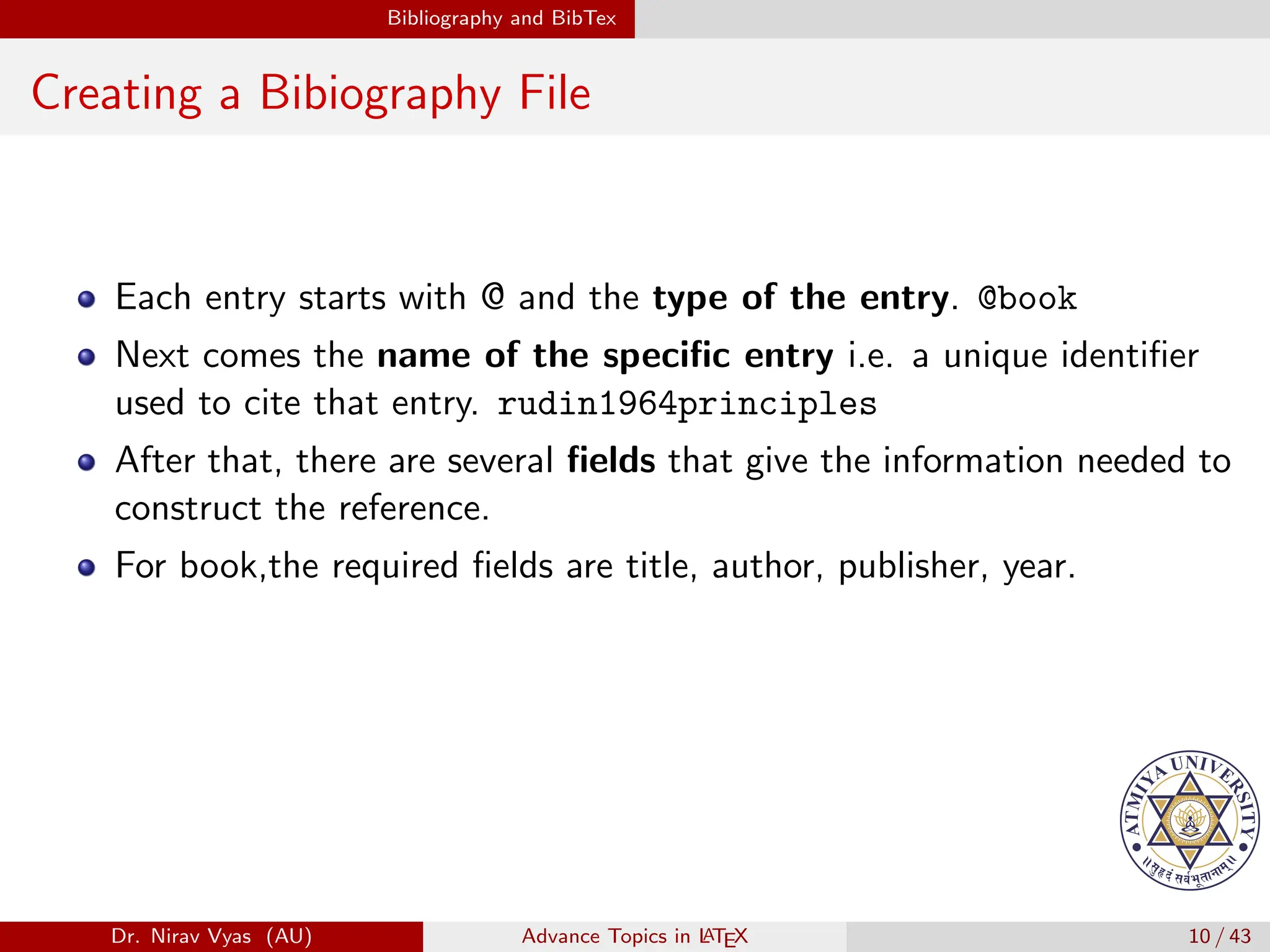
Each entry starts with @ and the type of the entry. @book
Dr. Nirav Vyas (AU) Advance Topics in L
ATEX 10 / 43
Bibliography and BibTex
Creating a Bibiography File
Each entry starts with @ and the type of the entry. @book
Next comes the name of the specific entry i.e. a unique identifier
used to cite that entry. rudin1964principles
Dr. Nirav Vyas (AU) Advance Topics in L
ATEX 10 / 43
Bibliography and BibTex
Creating a Bibiography File
Each entry starts with @ and the type of the entry. @book
Next comes the name of the specific entry i.e. a unique identifier
used to cite that entry. rudin1964principles
After that, there are several fields that give the information needed to
construct the reference.
Dr. Nirav Vyas (AU) Advance Topics in L
ATEX 10 / 43
Bibliography and BibTex
Creating a Bibiography File
Each entry starts with @ and the type of the entry. @book
Next comes the name of the specific entry i.e. a unique identifier
used to cite that entry. rudin1964principles
After that, there are several fields that give the information needed to
construct the reference.
For book,the required fields are title, author, publisher, year.
Dr. Nirav Vyas (AU) Advance Topics in L
ATEX 10 / 43
Bibliography and BibTex
Creating a Bibiography File
Each entry starts with @ and the type of the entry. @book
Next comes the name of the specific entry i.e. a unique identifier
used to cite that entry. rudin1964principles
After that, there are several fields that give the information needed to
construct the reference.
For book,the required fields are title, author, publisher, year.
For article, it’s also necessary to include journal and highly
recommended to provide year, volume, page, so that a reader could
easily find the article in question
Dr. Nirav Vyas (AU) Advance Topics in L
ATEX 10 / 43
Bibliography and BibTex
Creating a Bibiography File
Types of BibTeX entries: article, book, booklet, inbook,
incollection, inproceedings - conference, manual, mastersthesis,
phdthesis, misc, proceedings, tech report, unpublished.
Dr. Nirav Vyas (AU) Advance Topics in L
ATEX 11 / 43
Bibliography and BibTex
Creating a Bibiography File
Types of BibTeX entries: article, book, booklet, inbook,
incollection, inproceedings - conference, manual, mastersthesis,
phdthesis, misc, proceedings, tech report, unpublished.
Types of fields: address, annote, author,booktitle,
chapter,crossref,edition, editor, howpublished, institution, journal, key
month, note, number, organization, pages, publisher, school, series,
title, type, volume, year.
Dr. Nirav Vyas (AU) Advance Topics in L
ATEX 11 / 43
Bibliography and BibTex
External Bibliography Management Systems
No one wants to bother typing all of this for each citation, but luckily,
there are easier ways.
Dr. Nirav Vyas (AU) Advance Topics in L
ATEX 12 / 43
Bibliography and BibTex
External Bibliography Management Systems
No one wants to bother typing all of this for each citation, but luckily,
there are easier ways.
Google Scholar : If you click “Cite” in Google Scholar you have the
option to receive a citation for that work in several formats, one of
which is BibTeX. These days, most journals have all their articles
online and have a similar “generate citation” button for each article.
Dr. Nirav Vyas (AU) Advance Topics in L
ATEX 12 / 43
Bibliography and BibTex
Dr. Nirav Vyas (AU) Advance Topics in L
ATEX 13 / 43
Bibliography and BibTex
Dr. Nirav Vyas (AU) Advance Topics in L
ATEX 14 / 43
Bibliography and BibTex
Dr. Nirav Vyas (AU) Advance Topics in L
ATEX 15 / 43
Bibliography and BibTex
External Bibliography Management Systems
JabRef: A (free, open source) program for managing BibTeX files.
Dr. Nirav Vyas (AU) Advance Topics in L
ATEX 16 / 43
Bibliography and BibTex
External Bibliography Management Systems
JabRef: A (free, open source) program for managing BibTeX files.
JabRef Works on Windows, Macs, and Linux, and has a nice interface
for adding entries.
Dr. Nirav Vyas (AU) Advance Topics in L
ATEX 16 / 43
Bibliography and BibTex
External Bibliography Management Systems
JabRef: A (free, open source) program for managing BibTeX files.
JabRef Works on Windows, Macs, and Linux, and has a nice interface
for adding entries.
It also gives a way to search online journal databases and turn the
results into bibliography entries.
Dr. Nirav Vyas (AU) Advance Topics in L
ATEX 16 / 43
Bibliography and BibTex
Citing in the Text
Citing references is very easy. Let’s look at an example.
Dr. Nirav Vyas (AU) Advance Topics in L
ATEX 17 / 43
Bibliography and BibTex
Citing in the Text
Citing references is very easy. Let’s look at an example.
Dr. Nirav Vyas (AU) Advance Topics in L
ATEX 17 / 43
Bibliography and BibTex
Citing in the Text
Citing references is very easy. Let’s look at an example.
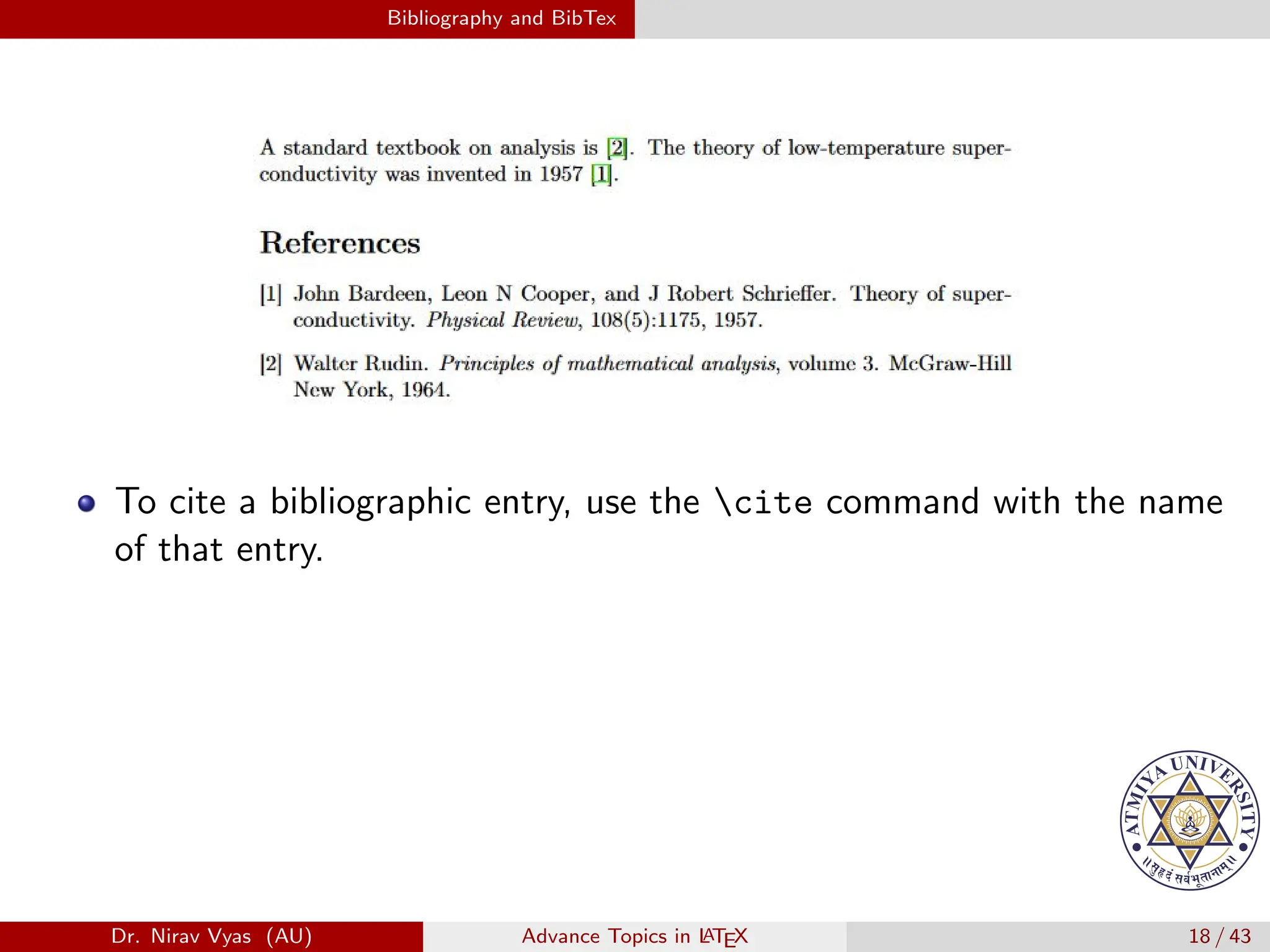
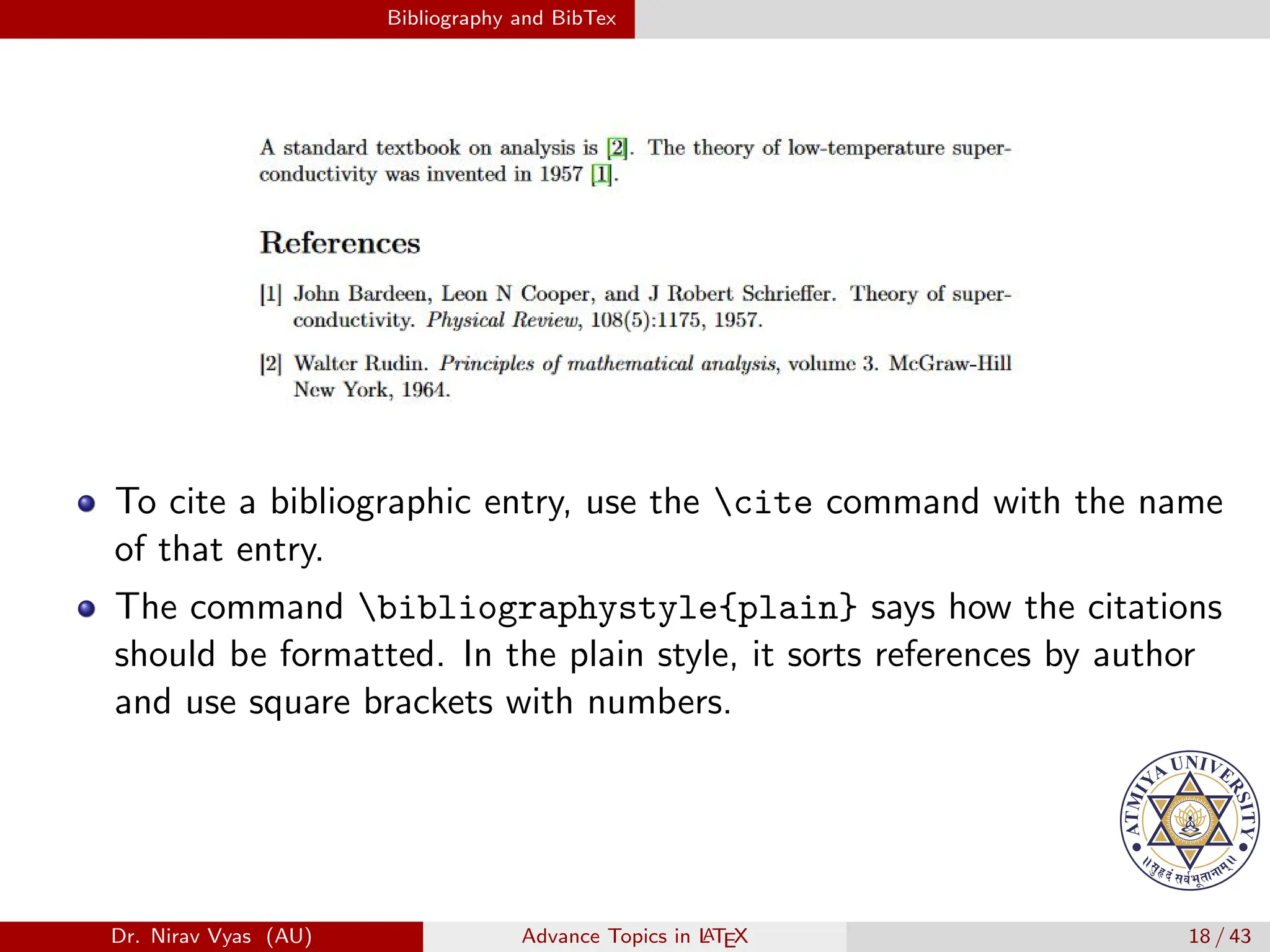
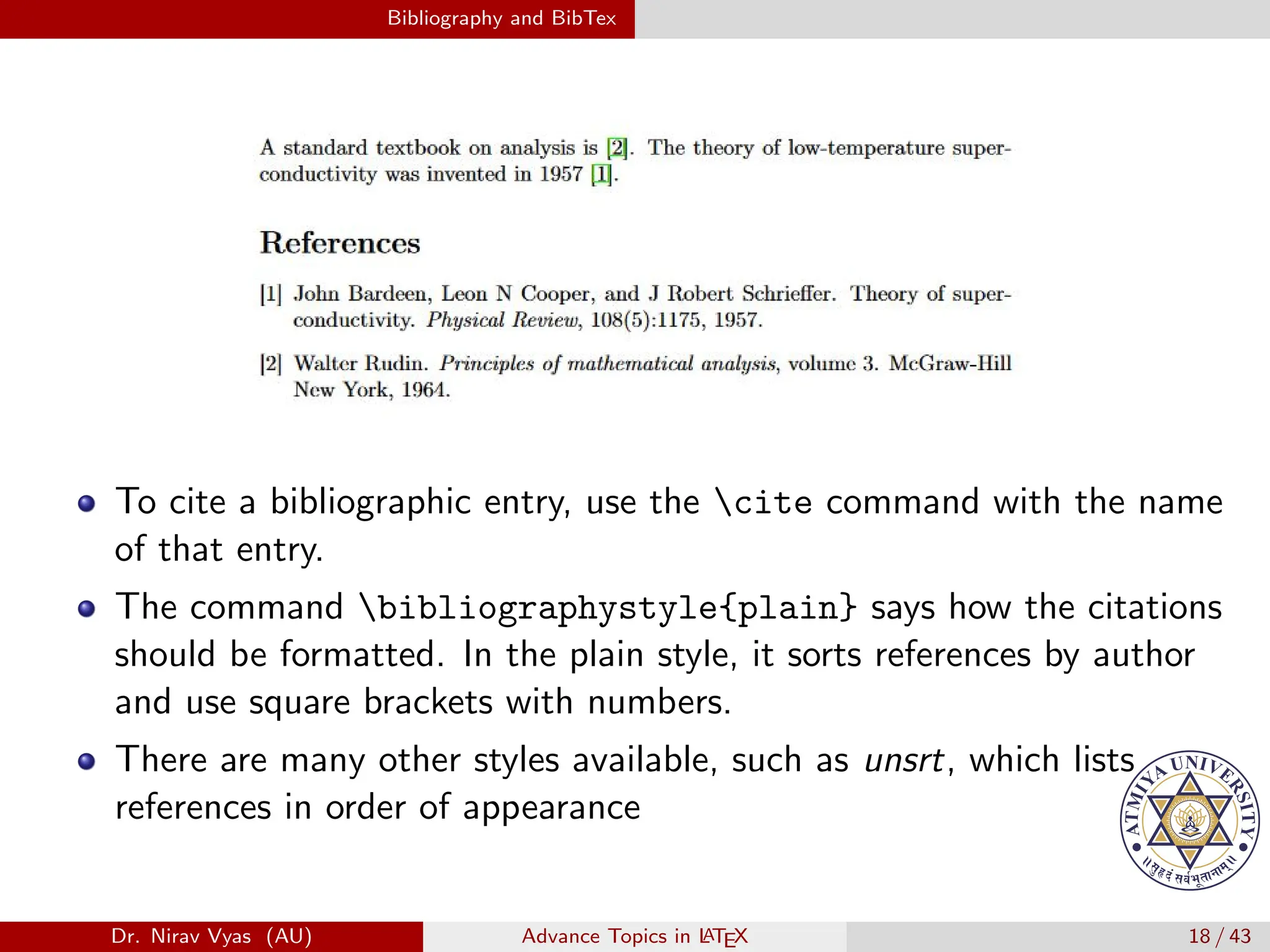
A standard textbook on analysis
is cite{rudin1964principles}.
The theory of low-temperature
superconductivity was
invented in 1957 cite{bardeen1957theory}.
bibliographystyle{plain}
bibliography{references}
Dr. Nirav Vyas (AU) Advance Topics in L
ATEX 17 / 43
Bibliography and BibTex
Dr. Nirav Vyas (AU) Advance Topics in L
ATEX 18 / 43
Bibliography and BibTex
To cite a bibliographic entry, use the cite command with the name
of that entry.
Dr. Nirav Vyas (AU) Advance Topics in L
ATEX 18 / 43
Bibliography and BibTex
To cite a bibliographic entry, use the cite command with the name
of that entry.
The command bibliographystyle{plain} says how the citations
should be formatted. In the plain style, it sorts references by author
and use square brackets with numbers.
Dr. Nirav Vyas (AU) Advance Topics in L
ATEX 18 / 43
Bibliography and BibTex
To cite a bibliographic entry, use the cite command with the name
of that entry.
The command bibliographystyle{plain} says how the citations
should be formatted. In the plain style, it sorts references by author
and use square brackets with numbers.
There are many other styles available, such as unsrt, which lists
references in order of appearance
Dr. Nirav Vyas (AU) Advance Topics in L
ATEX 18 / 43
Bibliography and BibTex
The command bibliographystyle{plain} says how the citations
should be formatted. In the plain style, it sorts references by author
and use square brackets with numbers.
Dr. Nirav Vyas (AU) Advance Topics in L
ATEX 19 / 43
Bibliography and BibTex
The command bibliographystyle{plain} says how the citations
should be formatted. In the plain style, it sorts references by author
and use square brackets with numbers.
There are many other styles available, such as unsrt, which lists
references in order of appearance
Dr. Nirav Vyas (AU) Advance Topics in L
ATEX 19 / 43
Bibliography and BibTex
The command bibliographystyle{plain} says how the citations
should be formatted. In the plain style, it sorts references by author
and use square brackets with numbers.
There are many other styles available, such as unsrt, which lists
references in order of appearance
The command bibliography{references} tells LATEX which
.bib file to use.
Dr. Nirav Vyas (AU) Advance Topics in L
ATEX 19 / 43
Bibliography and BibTex
The command bibliographystyle{plain} says how the citations
should be formatted. In the plain style, it sorts references by author
and use square brackets with numbers.
There are many other styles available, such as unsrt, which lists
references in order of appearance
The command bibliography{references} tells LATEX which
.bib file to use.
Make sure to place the .bib file in the same folder as the .tex file.
Dr. Nirav Vyas (AU) Advance Topics in L
ATEX 19 / 43
Bibliography and BibTex
URLs and DOIs In Citations
Almost all journals are online now, so it’s usually more useful to give
the DOI or a link to an article than the journal issues.
Dr. Nirav Vyas (AU) Advance Topics in L
ATEX 20 / 43
Bibliography and BibTex
URLs and DOIs In Citations
Almost all journals are online now, so it’s usually more useful to give
the DOI or a link to an article than the journal issues.
To do this, load the hyperref and doi packages, and add the url and
doi packages to your bibtex entries.
Dr. Nirav Vyas (AU) Advance Topics in L
ATEX 20 / 43
Bibliography and BibTex
URLs and DOIs In Citations
Almost all journals are online now, so it’s usually more useful to give
the DOI or a link to an article than the journal issues.
To do this, load the hyperref and doi packages, and add the url and
doi packages to your bibtex entries.
Dr. Nirav Vyas (AU) Advance Topics in L
ATEX 20 / 43
Bibliography and BibTex
URLs and DOIs In Citations
Almost all journals are online now, so it’s usually more useful to give
the DOI or a link to an article than the journal issues.
To do this, load the hyperref and doi packages, and add the url and
doi packages to your bibtex entries.
Dr. Nirav Vyas (AU) Advance Topics in L
ATEX 20 / 43
The siunitx Package
The siunitx Package
Units are something of a pain to typeset in normal L
A
TEX.
Dr. Nirav Vyas (AU) Advance Topics in L
ATEX 21 / 43
The siunitx Package
The siunitx Package
Units are something of a pain to typeset in normal L
A
TEX.
Suppose we had measured the frequency of an oscillation to be
3.0 × 10⁻⁶Hz.
Dr. Nirav Vyas (AU) Advance Topics in L
ATEX 21 / 43
The siunitx Package
The siunitx Package
Units are something of a pain to typeset in normal L
A
TEX.
Suppose we had measured the frequency of an oscillation to be
3.0 × 10⁻⁶Hz.
In math mode, we would write $3.0 times 10^{-6} text{Hz}$.
Dr. Nirav Vyas (AU) Advance Topics in L
ATEX 21 / 43
The siunitx Package
The siunitx Package
Units are something of a pain to typeset in normal L
A
TEX.
Suppose we had measured the frequency of an oscillation to be
3.0 × 10⁻⁶Hz.
In math mode, we would write $3.0 times 10^{-6} text{Hz}$.
Not only is this long, but the spacing between the number and the
unit is terrible! The siunitx package offers a better alternative.
Dr. Nirav Vyas (AU) Advance Topics in L
ATEX 21 / 43
The siunitx Package
The siunitx Package
Units are something of a pain to typeset in normal L
A
TEX.
Suppose we had measured the frequency of an oscillation to be
3.0 × 10⁻⁶Hz.
In math mode, we would write $3.0 times 10^{-6} text{Hz}$.
Not only is this long, but the spacing between the number and the
unit is terrible! The siunitx package offers a better alternative.
Dr. Nirav Vyas (AU) Advance Topics in L
ATEX 21 / 43
The siunitx Package
The siunitx Package
Units are something of a pain to typeset in normal L
A
TEX.
Suppose we had measured the frequency of an oscillation to be
3.0 × 10⁻⁶Hz.
In math mode, we would write $3.0 times 10^{-6} text{Hz}$.
Not only is this long, but the spacing between the number and the
unit is terrible! The siunitx package offers a better alternative.
Dr. Nirav Vyas (AU) Advance Topics in L
ATEX 21 / 43
The siunitx Package
The siunitx Package
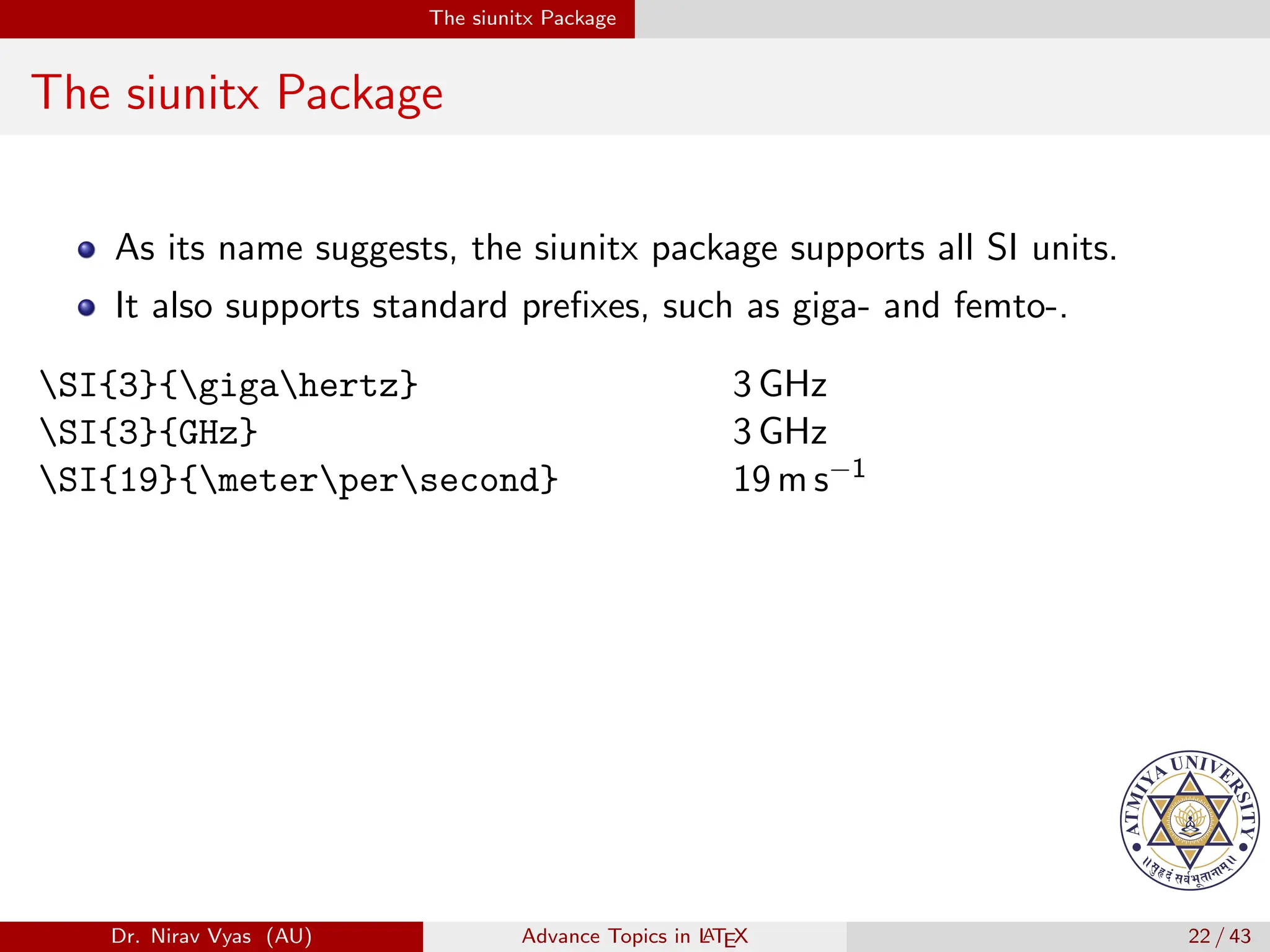
As its name suggests, the siunitx package supports all SI units.
Dr. Nirav Vyas (AU) Advance Topics in L
ATEX 22 / 43
The siunitx Package
The siunitx Package
As its name suggests, the siunitx package supports all SI units.
It also supports standard prefixes, such as giga- and femto-.
Dr. Nirav Vyas (AU) Advance Topics in L
ATEX 22 / 43
The siunitx Package
The siunitx Package
As its name suggests, the siunitx package supports all SI units.
It also supports standard prefixes, such as giga- and femto-.
Dr. Nirav Vyas (AU) Advance Topics in L
ATEX 22 / 43
The siunitx Package
The siunitx Package
As its name suggests, the siunitx package supports all SI units.
It also supports standard prefixes, such as giga- and femto-.
SI{3}{gigahertz} 3 GHz
Dr. Nirav Vyas (AU) Advance Topics in L
ATEX 22 / 43
The siunitx Package
The siunitx Package
As its name suggests, the siunitx package supports all SI units.
It also supports standard prefixes, such as giga- and femto-.
SI{3}{gigahertz} 3 GHz
SI{3}{GHz} 3 GHz
Dr. Nirav Vyas (AU) Advance Topics in L
ATEX 22 / 43
The siunitx Package
The siunitx Package
As its name suggests, the siunitx package supports all SI units.
It also supports standard prefixes, such as giga- and femto-.
SI{3}{gigahertz} 3 GHz
SI{3}{GHz} 3 GHz
SI{19}{meterpersecond} 19 m s−1
Dr. Nirav Vyas (AU) Advance Topics in L
ATEX 22 / 43
The siunitx Package
The siunitx Package
As its name suggests, the siunitx package supports all SI units.
It also supports standard prefixes, such as giga- and femto-.
SI{3}{gigahertz} 3 GHz
SI{3}{GHz} 3 GHz
SI{19}{meterpersecond} 19 m s−1
SI{54.1}{kg.m/s^2} 54.1 kg m/s2
Dr. Nirav Vyas (AU) Advance Topics in L
ATEX 22 / 43
The siunitx Package
The siunitx Package
As its name suggests, the siunitx package supports all SI units.
It also supports standard prefixes, such as giga- and femto-.
SI{3}{gigahertz} 3 GHz
SI{3}{GHz} 3 GHz
SI{19}{meterpersecond} 19 m s−1
SI{54.1}{kg.m/s^2} 54.1 kg m/s2
SI{32932e-3213}{micro F} 32 932 × 10−3213 µF
Dr. Nirav Vyas (AU) Advance Topics in L
ATEX 22 / 43
The siunitx Package
The siunitx Package
As its name suggests, the siunitx package supports all SI units.
It also supports standard prefixes, such as giga- and femto-.
SI{3}{gigahertz} 3 GHz
SI{3}{GHz} 3 GHz
SI{19}{meterpersecond} 19 m s−1
SI{54.1}{kg.m/s^2} 54.1 kg m/s2
SI{32932e-3213}{micro F} 32 932 × 10−3213 µF
SI{3.2}{kg/nanometersquared} 3.2 kg/nm2
Dr. Nirav Vyas (AU) Advance Topics in L
ATEX 22 / 43
The siunitx Package
The siunitx Package
As its name suggests, the siunitx package supports all SI units.
It also supports standard prefixes, such as giga- and femto-.
SI{3}{gigahertz} 3 GHz
SI{3}{GHz} 3 GHz
SI{19}{meterpersecond} 19 m s−1
SI{54.1}{kg.m/s^2} 54.1 kg m/s2
SI{32932e-3213}{micro F} 32 932 × 10−3213 µF
SI{3.2}{kg/nanometersquared} 3.2 kg/nm2
SI{8.9}{kilogramtothe{12}} 8.9 kg12
Dr. Nirav Vyas (AU) Advance Topics in L
ATEX 22 / 43
The siunitx Package
The siunitx Package
As its name suggests, the siunitx package supports all SI units.
It also supports standard prefixes, such as giga- and femto-.
SI{3}{gigahertz} 3 GHz
SI{3}{GHz} 3 GHz
SI{19}{meterpersecond} 19 m s−1
SI{54.1}{kg.m/s^2} 54.1 kg m/s2
SI{32932e-3213}{micro F} 32 932 × 10−3213 µF
SI{3.2}{kg/nanometersquared} 3.2 kg/nm2
SI{8.9}{kilogramtothe{12}} 8.9 kg12
Dr. Nirav Vyas (AU) Advance Topics in L
ATEX 22 / 43
The siunitx Package
The siunitx Package
By default, reciprocals of units are displayed as negative powers; to
display them as fractions, import the package with the command
Dr. Nirav Vyas (AU) Advance Topics in L
ATEX 23 / 43
The siunitx Package
The siunitx Package
By default, reciprocals of units are displayed as negative powers; to
display them as fractions, import the package with the command
usepackage[per-mode=fraction]{siunitx}.
Dr. Nirav Vyas (AU) Advance Topics in L
ATEX 23 / 43
The siunitx Package
The siunitx Package
By default, reciprocals of units are displayed as negative powers; to
display them as fractions, import the package with the command
usepackage[per-mode=fraction]{siunitx}.
The siunitx package contains several other useful commands:
Dr. Nirav Vyas (AU) Advance Topics in L
ATEX 23 / 43
The siunitx Package
The siunitx Package
By default, reciprocals of units are displayed as negative powers; to
display them as fractions, import the package with the command
usepackage[per-mode=fraction]{siunitx}.
The siunitx package contains several other useful commands:
num works just like the first argument of SI by itself, and si
works like the second part.
Dr. Nirav Vyas (AU) Advance Topics in L
ATEX 23 / 43
The siunitx Package
The siunitx Package
By default, reciprocals of units are displayed as negative powers; to
display them as fractions, import the package with the command
usepackage[per-mode=fraction]{siunitx}.
The siunitx package contains several other useful commands:
num works just like the first argument of SI by itself, and si
works like the second part.
Dr. Nirav Vyas (AU) Advance Topics in L
ATEX 23 / 43
The siunitx Package
The siunitx Package
By default, reciprocals of units are displayed as negative powers; to
display them as fractions, import the package with the command
usepackage[per-mode=fraction]{siunitx}.
The siunitx package contains several other useful commands:
num works just like the first argument of SI by itself, and si
works like the second part.
num{3.0} 3.0
Dr. Nirav Vyas (AU) Advance Topics in L
ATEX 23 / 43
The siunitx Package
The siunitx Package
By default, reciprocals of units are displayed as negative powers; to
display them as fractions, import the package with the command
usepackage[per-mode=fraction]{siunitx}.
The siunitx package contains several other useful commands:
num works just like the first argument of SI by itself, and si
works like the second part.
num{3.0} 3.0
num{3.0e5} 3.0 × 10⁵
Dr. Nirav Vyas (AU) Advance Topics in L
ATEX 23 / 43
The siunitx Package
The siunitx Package
By default, reciprocals of units are displayed as negative powers; to
display them as fractions, import the package with the command
usepackage[per-mode=fraction]{siunitx}.
The siunitx package contains several other useful commands:
num works just like the first argument of SI by itself, and si
works like the second part.
num{3.0} 3.0
num{3.0e5} 3.0 × 10⁵
si{kilogrampertesla} kg T−1
Dr. Nirav Vyas (AU) Advance Topics in L
ATEX 23 / 43
The siunitx Package
The siunitx Package
By default, reciprocals of units are displayed as negative powers; to
display them as fractions, import the package with the command
usepackage[per-mode=fraction]{siunitx}.
The siunitx package contains several other useful commands:
num works just like the first argument of SI by itself, and si
works like the second part.
num{3.0} 3.0
num{3.0e5} 3.0 × 10⁵
si{kilogrampertesla} kg T−1
si{lumenperradian} lm rad−1
Dr. Nirav Vyas (AU) Advance Topics in L
ATEX 23 / 43
The siunitx Package
The siunitx Package
By default, reciprocals of units are displayed as negative powers; to
display them as fractions, import the package with the command
usepackage[per-mode=fraction]{siunitx}.
The siunitx package contains several other useful commands:
num works just like the first argument of SI by itself, and si
works like the second part.
num{3.0} 3.0
num{3.0e5} 3.0 × 10⁵
si{kilogrampertesla} kg T−1
si{lumenperradian} lm rad−1
Dr. Nirav Vyas (AU) Advance Topics in L
ATEX 23 / 43
The siunitx Package
The siunitx Package
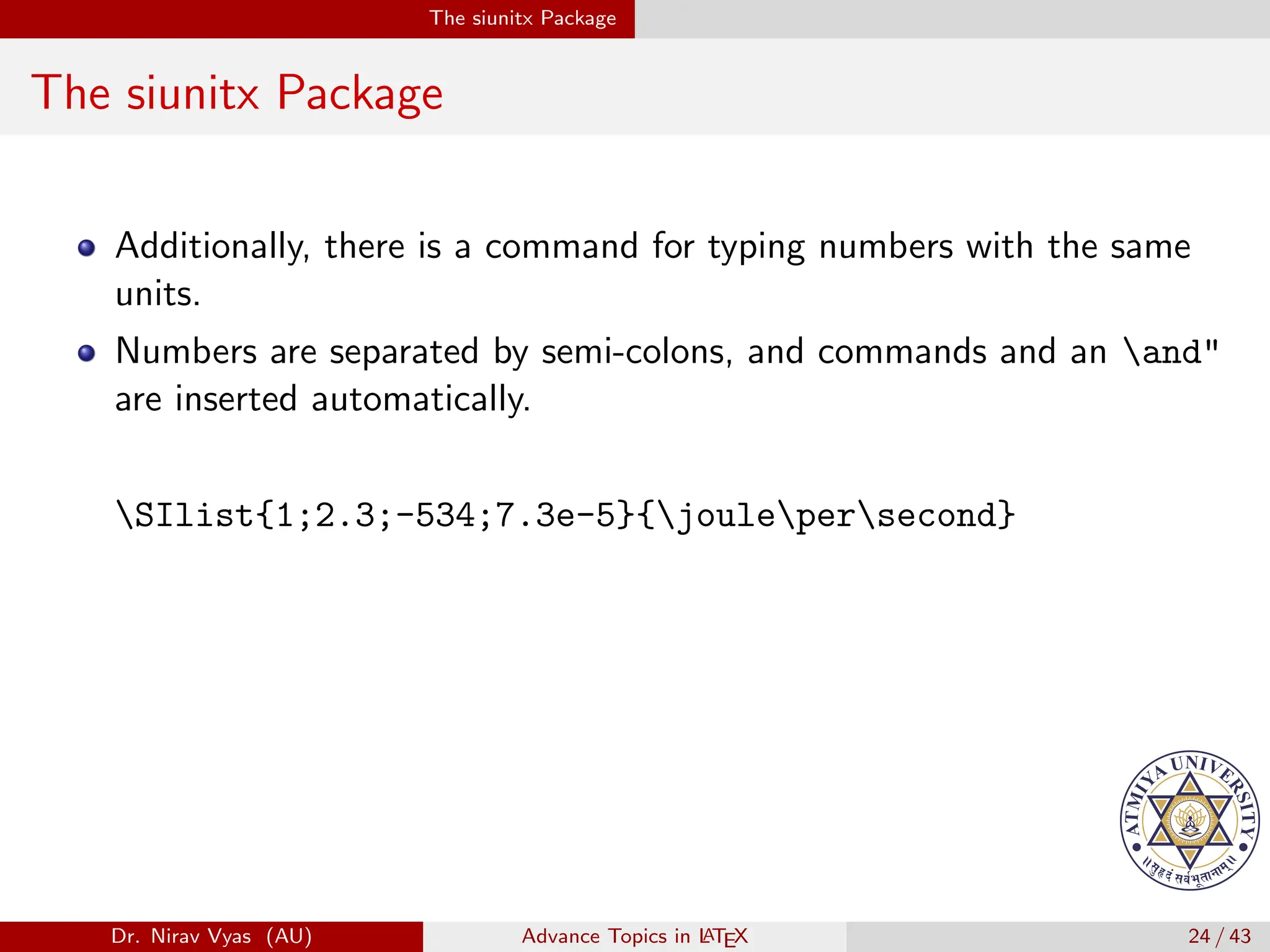
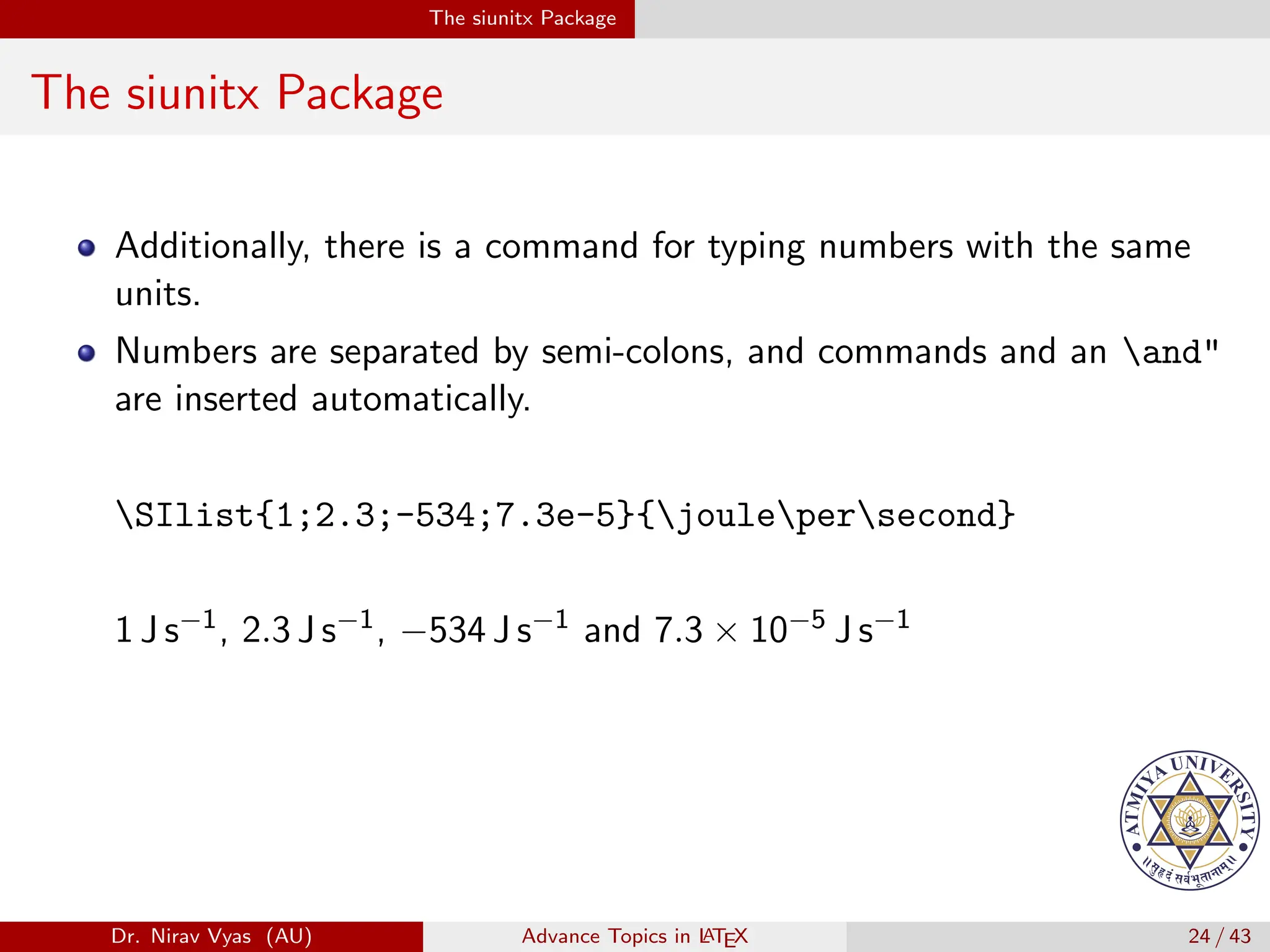
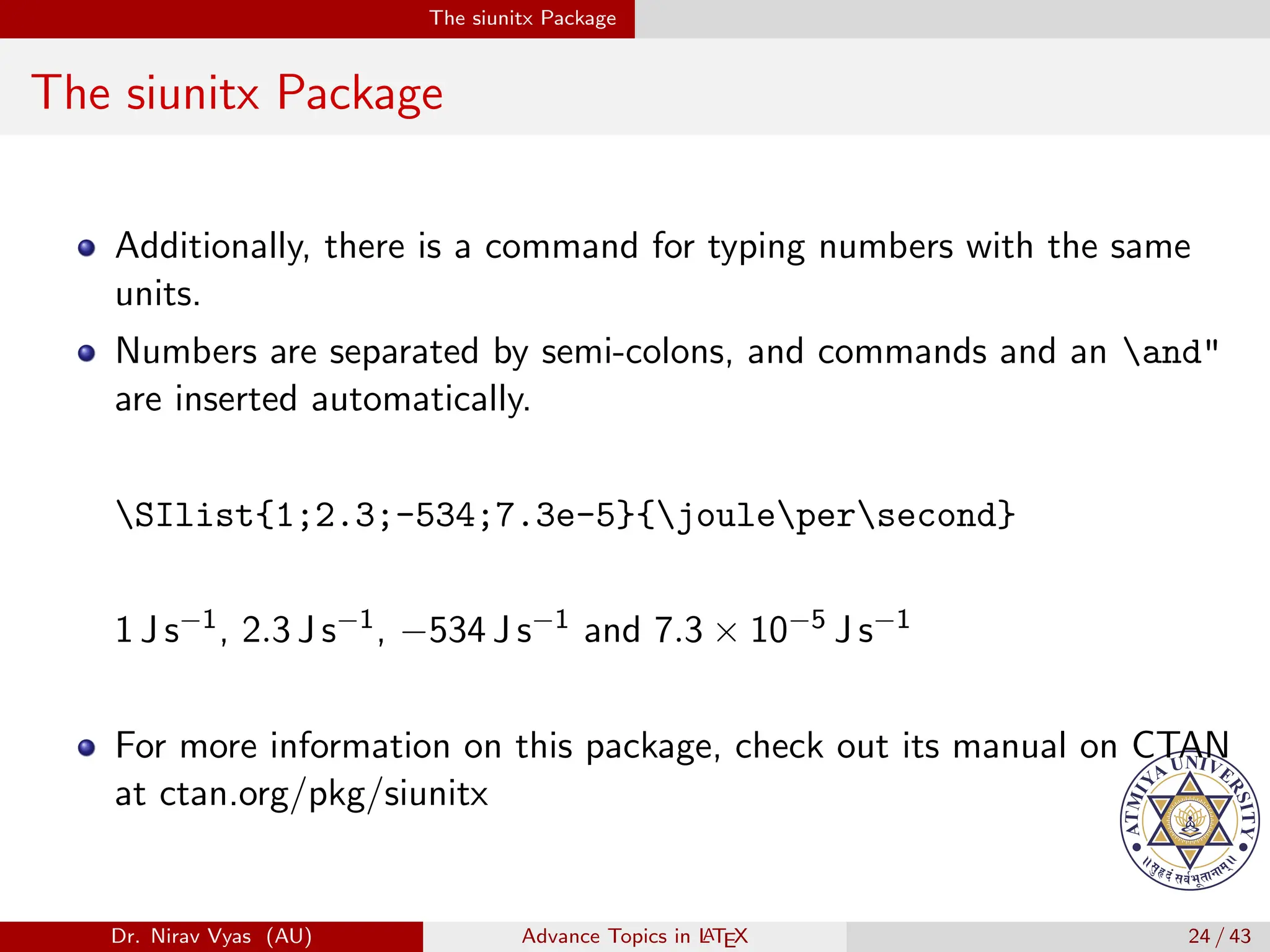
Additionally, there is a command for typing numbers with the same
units.
Dr. Nirav Vyas (AU) Advance Topics in L
ATEX 24 / 43
The siunitx Package
The siunitx Package
Additionally, there is a command for typing numbers with the same
units.
Numbers are separated by semi-colons, and commands and an and"
are inserted automatically.
Dr. Nirav Vyas (AU) Advance Topics in L
ATEX 24 / 43
The siunitx Package
The siunitx Package
Additionally, there is a command for typing numbers with the same
units.
Numbers are separated by semi-colons, and commands and an and"
are inserted automatically.
Dr. Nirav Vyas (AU) Advance Topics in L
ATEX 24 / 43
The siunitx Package
The siunitx Package
Additionally, there is a command for typing numbers with the same
units.
Numbers are separated by semi-colons, and commands and an and"
are inserted automatically.
SIlist{1;2.3;-534;7.3e-5}{joulepersecond}
Dr. Nirav Vyas (AU) Advance Topics in L
ATEX 24 / 43
The siunitx Package
The siunitx Package
Additionally, there is a command for typing numbers with the same
units.
Numbers are separated by semi-colons, and commands and an and"
are inserted automatically.
SIlist{1;2.3;-534;7.3e-5}{joulepersecond}
Dr. Nirav Vyas (AU) Advance Topics in L
ATEX 24 / 43
The siunitx Package
The siunitx Package
Additionally, there is a command for typing numbers with the same
units.
Numbers are separated by semi-colons, and commands and an and"
are inserted automatically.
SIlist{1;2.3;-534;7.3e-5}{joulepersecond}
1 J s−1, 2.3 J s−1, −534 J s−1 and 7.3 × 10⁻⁵ J s−1
Dr. Nirav Vyas (AU) Advance Topics in L
ATEX 24 / 43
The siunitx Package
The siunitx Package
Additionally, there is a command for typing numbers with the same
units.
Numbers are separated by semi-colons, and commands and an and"
are inserted automatically.
SIlist{1;2.3;-534;7.3e-5}{joulepersecond}
1 J s−1, 2.3 J s−1, −534 J s−1 and 7.3 × 10⁻⁵ J s−1
Dr. Nirav Vyas (AU) Advance Topics in L
ATEX 24 / 43
The siunitx Package
The siunitx Package
Additionally, there is a command for typing numbers with the same
units.
Numbers are separated by semi-colons, and commands and an and"
are inserted automatically.
SIlist{1;2.3;-534;7.3e-5}{joulepersecond}
1 J s−1, 2.3 J s−1, −534 J s−1 and 7.3 × 10⁻⁵ J s−1
For more information on this package, check out its manual on CTAN
at ctan.org/pkg/siunitx
Dr. Nirav Vyas (AU) Advance Topics in L
ATEX 24 / 43
The mhchem Package
The mhchem Package
L
A
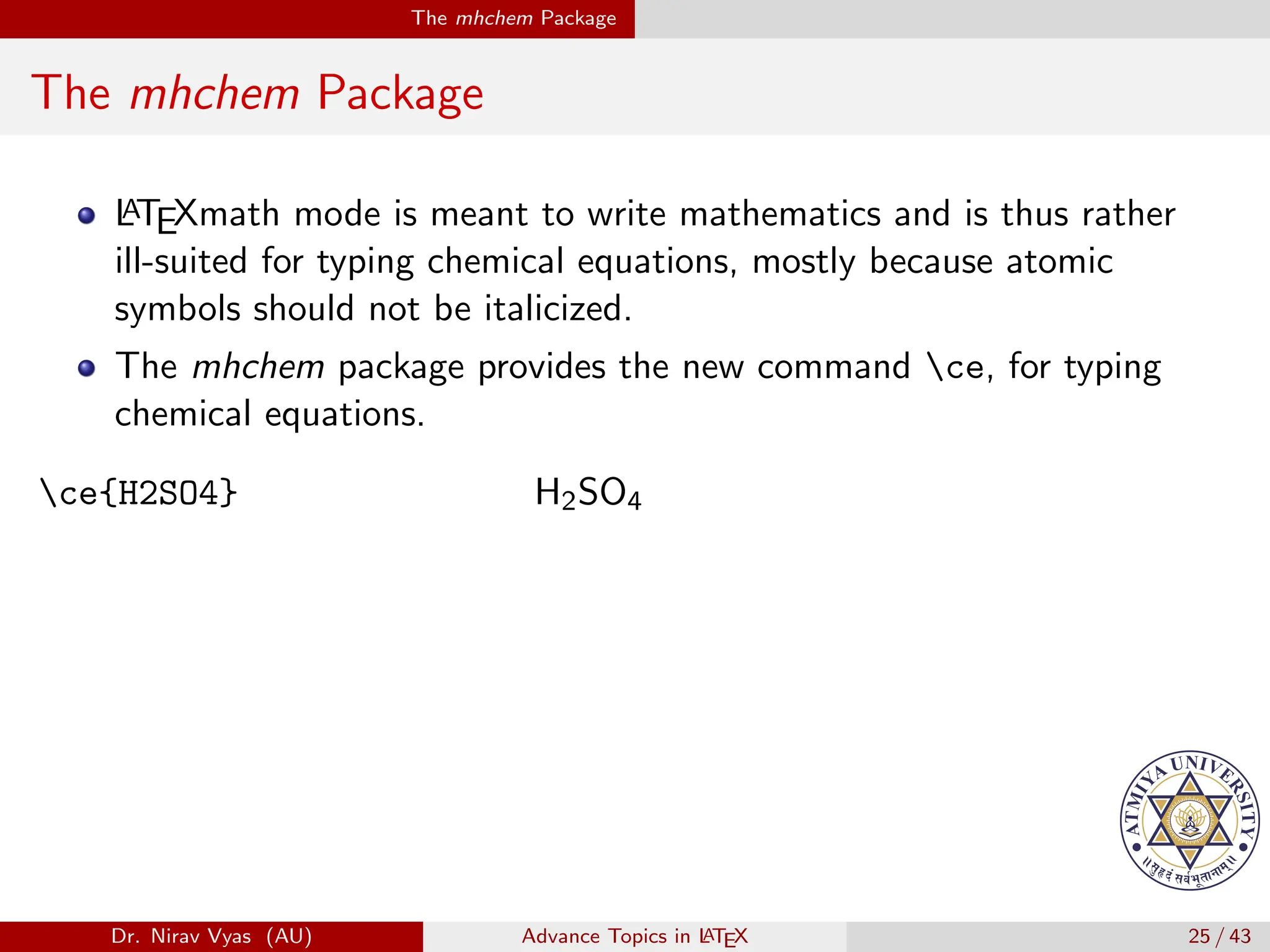
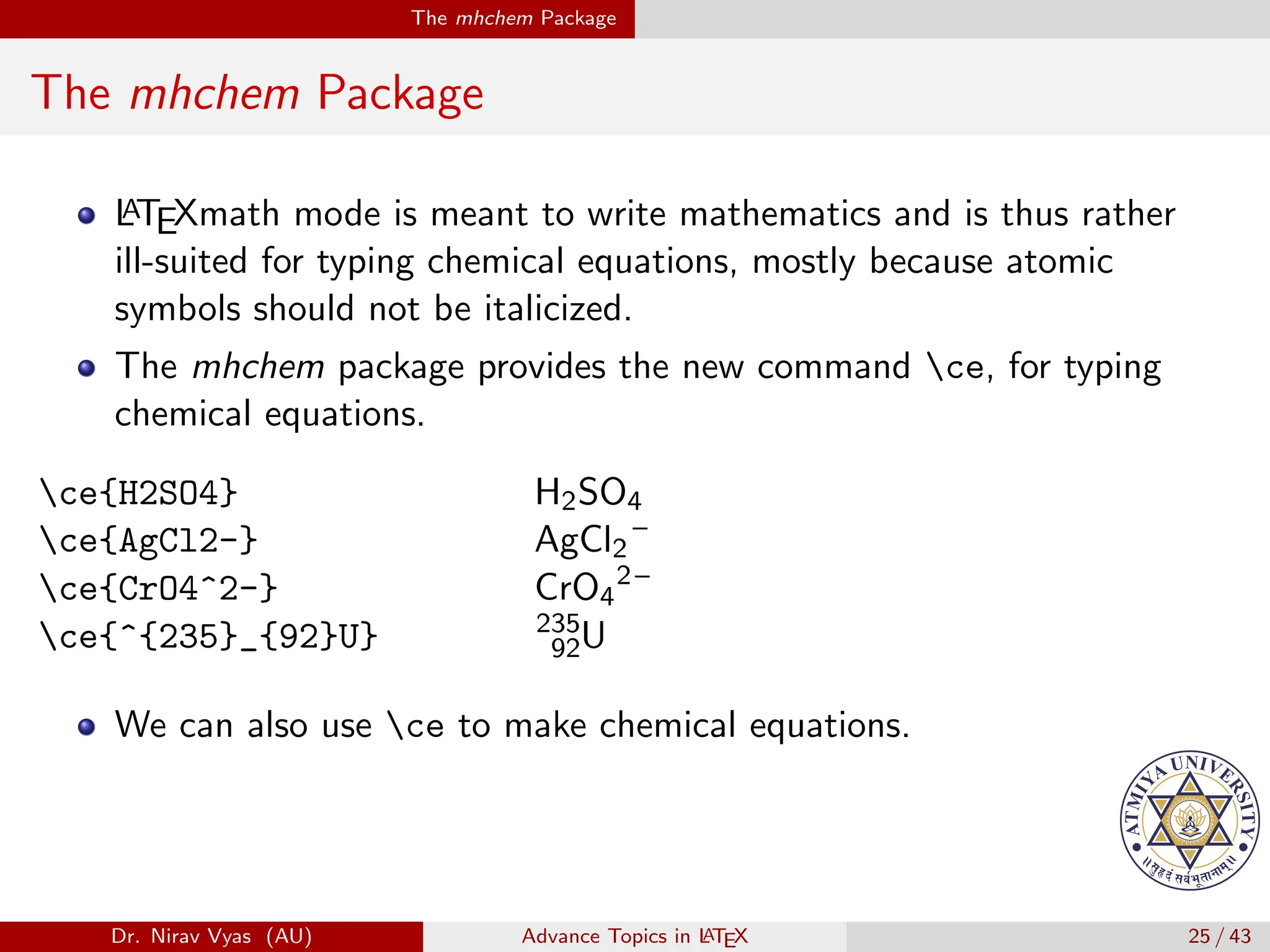
TEXmath mode is meant to write mathematics and is thus rather
ill-suited for typing chemical equations, mostly because atomic
symbols should not be italicized.
ce{H2SO4} H2SO4
Dr. Nirav Vyas (AU) Advance Topics in L
ATEX 25 / 43
The mhchem Package
The mhchem Package
L
A
TEXmath mode is meant to write mathematics and is thus rather
ill-suited for typing chemical equations, mostly because atomic
symbols should not be italicized.
The mhchem package provides the new command ce, for typing
chemical equations.
ce{H2SO4} H2SO4
Dr. Nirav Vyas (AU) Advance Topics in L
ATEX 25 / 43
The mhchem Package
The mhchem Package
L
A
TEXmath mode is meant to write mathematics and is thus rather
ill-suited for typing chemical equations, mostly because atomic
symbols should not be italicized.
The mhchem package provides the new command ce, for typing
chemical equations.
ce{H2SO4} H2SO4
Dr. Nirav Vyas (AU) Advance Topics in L
ATEX 25 / 43
The mhchem Package
The mhchem Package
L
A
TEXmath mode is meant to write mathematics and is thus rather
ill-suited for typing chemical equations, mostly because atomic
symbols should not be italicized.
The mhchem package provides the new command ce, for typing
chemical equations.
ce{H2SO4} H2SO4
ce{AgCl2-} AgCl2
–
Dr. Nirav Vyas (AU) Advance Topics in L
ATEX 25 / 43
The mhchem Package
The mhchem Package
L
A
TEXmath mode is meant to write mathematics and is thus rather
ill-suited for typing chemical equations, mostly because atomic
symbols should not be italicized.
The mhchem package provides the new command ce, for typing
chemical equations.
ce{H2SO4} H2SO4
ce{AgCl2-} AgCl2
–
ce{CrO4^2-} CrO4
2–
Dr. Nirav Vyas (AU) Advance Topics in L
ATEX 25 / 43
The mhchem Package
The mhchem Package
L
A
TEXmath mode is meant to write mathematics and is thus rather
ill-suited for typing chemical equations, mostly because atomic
symbols should not be italicized.
The mhchem package provides the new command ce, for typing
chemical equations.
ce{H2SO4} H2SO4
ce{AgCl2-} AgCl2
–
ce{CrO4^2-} CrO4
2–
ce{^{235}_{92}U} 235
92U
Dr. Nirav Vyas (AU) Advance Topics in L
ATEX 25 / 43
The mhchem Package
The mhchem Package
L
A
TEXmath mode is meant to write mathematics and is thus rather
ill-suited for typing chemical equations, mostly because atomic
symbols should not be italicized.
The mhchem package provides the new command ce, for typing
chemical equations.
ce{H2SO4} H2SO4
ce{AgCl2-} AgCl2
–
ce{CrO4^2-} CrO4
2–
ce{^{235}_{92}U} 235
92U
We can also use ce to make chemical equations.
Dr. Nirav Vyas (AU) Advance Topics in L
ATEX 25 / 43
The mhchem Package
The mhchem Package
L
A
TEXmath mode is meant to write mathematics and is thus rather
ill-suited for typing chemical equations, mostly because atomic
symbols should not be italicized.
The mhchem package provides the new command ce, for typing
chemical equations.
ce{H2SO4} H2SO4
ce{AgCl2-} AgCl2
–
ce{CrO4^2-} CrO4
2–
ce{^{235}_{92}U} 235
92U
We can also use ce to make chemical equations.
ce{CO2+C -> 2CO}[0.4em] CO2
+
C −
−
→ 2 CO
Dr. Nirav Vyas (AU) Advance Topics in L
ATEX 25 / 43
The mhchem Package
The mhchem Package
L
A
TEXmath mode is meant to write mathematics and is thus rather
ill-suited for typing chemical equations, mostly because atomic
symbols should not be italicized.
The mhchem package provides the new command ce, for typing
chemical equations.
ce{H2SO4} H2SO4
ce{AgCl2-} AgCl2
–
ce{CrO4^2-} CrO4
2–
ce{^{235}_{92}U} 235
92U
We can also use ce to make chemical equations.
ce{CO2+C -> 2CO}[0.4em] CO2
+
C −
−
→ 2 CO
ce{H+ + OH- <=>> H20} H+
+ OH–
↽
−
−
−
⇀ H20
Dr. Nirav Vyas (AU) Advance Topics in L
ATEX 25 / 43
The amsthm Package
The amsthm Package
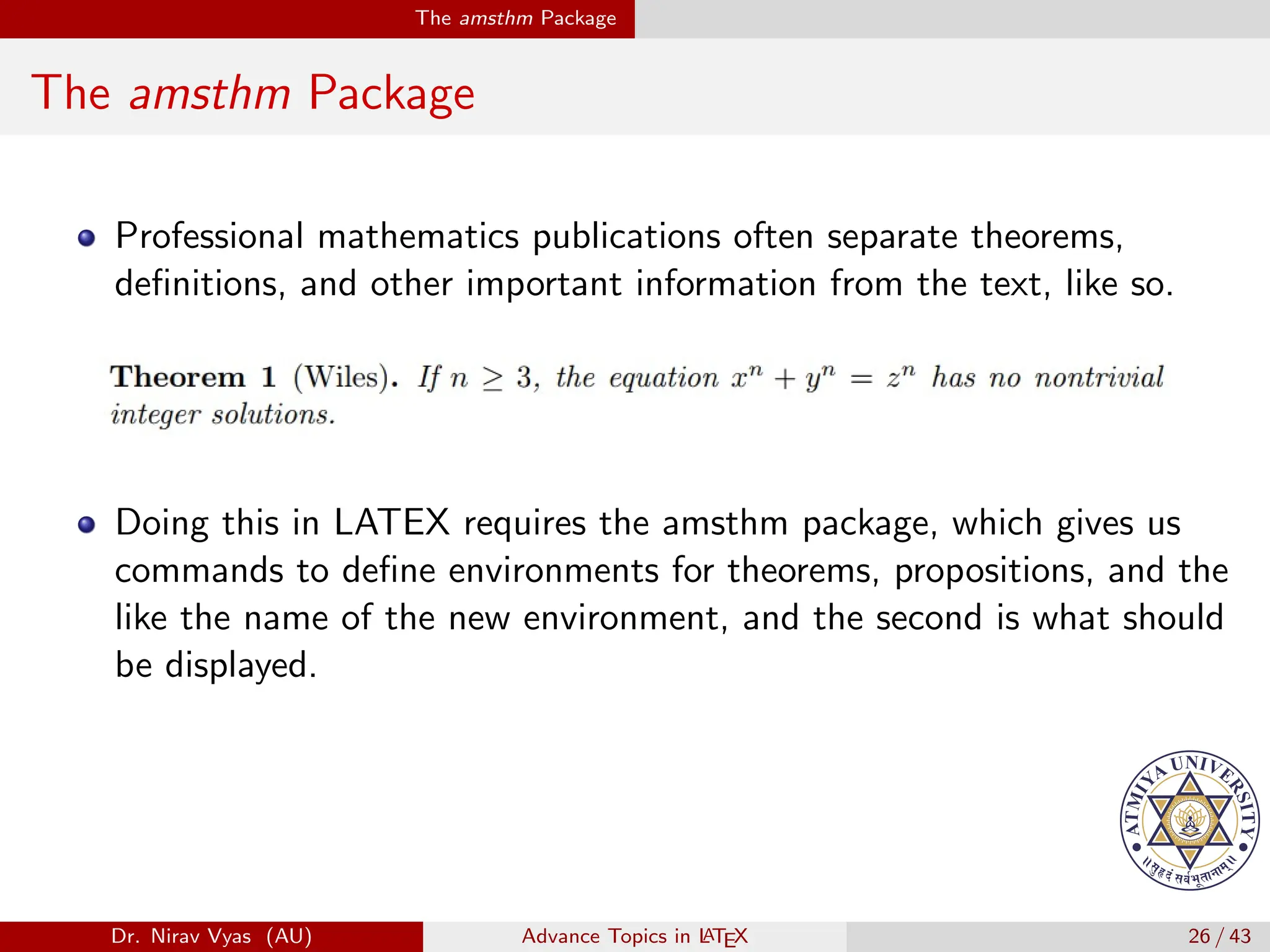
Professional mathematics publications often separate theorems,
definitions, and other important information from the text, like so.
Dr. Nirav Vyas (AU) Advance Topics in L
ATEX 26 / 43
The amsthm Package
The amsthm Package
Professional mathematics publications often separate theorems,
definitions, and other important information from the text, like so.
Dr. Nirav Vyas (AU) Advance Topics in L
ATEX 26 / 43
The amsthm Package
The amsthm Package
Professional mathematics publications often separate theorems,
definitions, and other important information from the text, like so.
Doing this in LATEX requires the amsthm package, which gives us
commands to define environments for theorems, propositions, and the
like the name of the new environment, and the second is what should
be displayed.
Dr. Nirav Vyas (AU) Advance Topics in L
ATEX 26 / 43
The amsthm Package
The amsthm Package
Professional mathematics publications often separate theorems,
definitions, and other important information from the text, like so.
Doing this in LATEX requires the amsthm package, which gives us
commands to define environments for theorems, propositions, and the
like the name of the new environment, and the second is what should
be displayed.
For instance, placing newtheorem{thm}{Theorem} in the preamble
allows us to make a theorem using the newly defined theorem
environment.
Dr. Nirav Vyas (AU) Advance Topics in L
ATEX 26 / 43
The amsthm Package
The amsthm Package
The amsthm Package
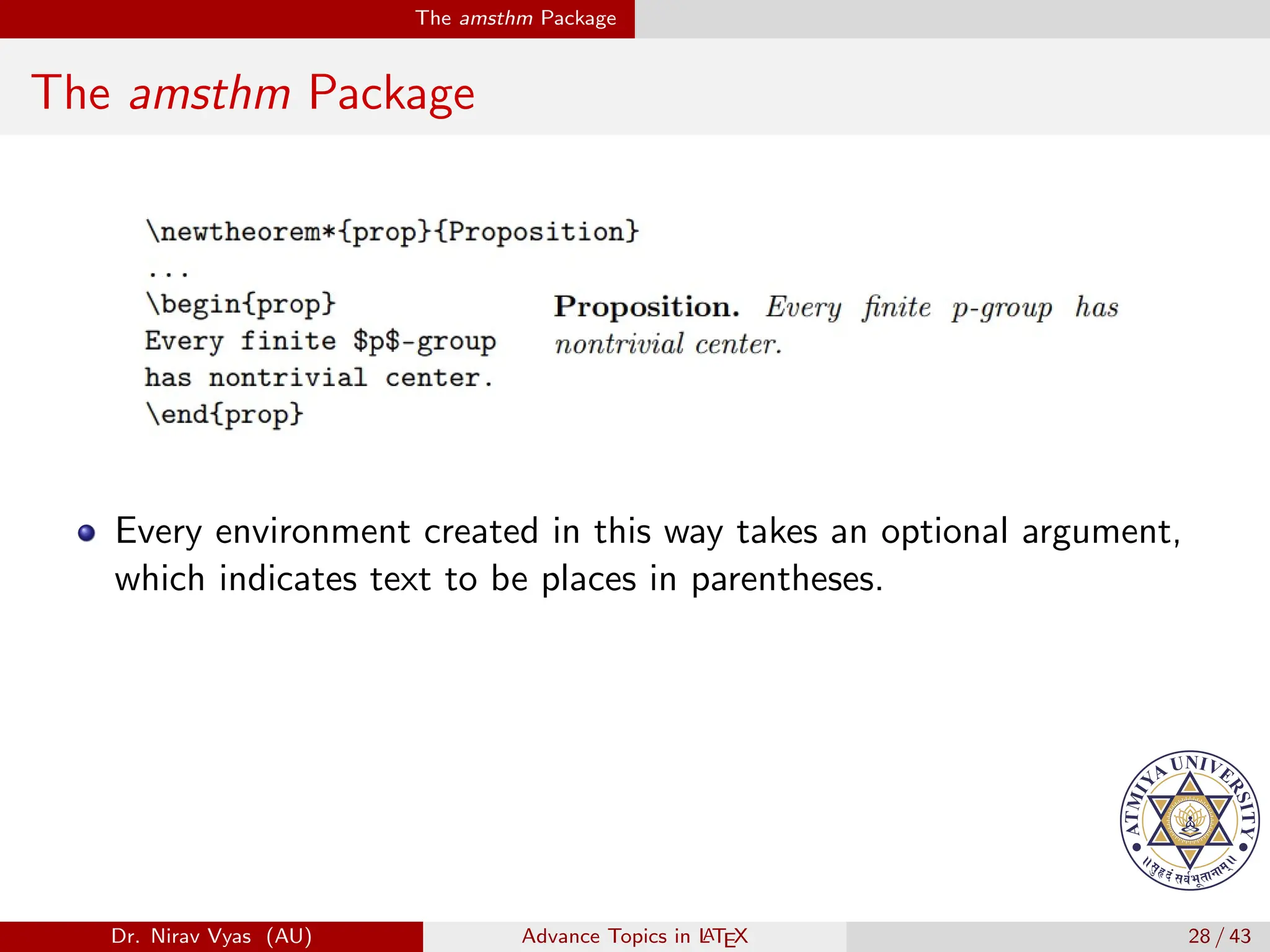
To prevent LATEX from numbering the environment, use the
newtheorem* command.
Dr. Nirav Vyas (AU) Advance Topics in L
ATEX 27 / 43
The amsthm Package
The amsthm Package
Dr. Nirav Vyas (AU) Advance Topics in L
ATEX 28 / 43
The amsthm Package
The amsthm Package
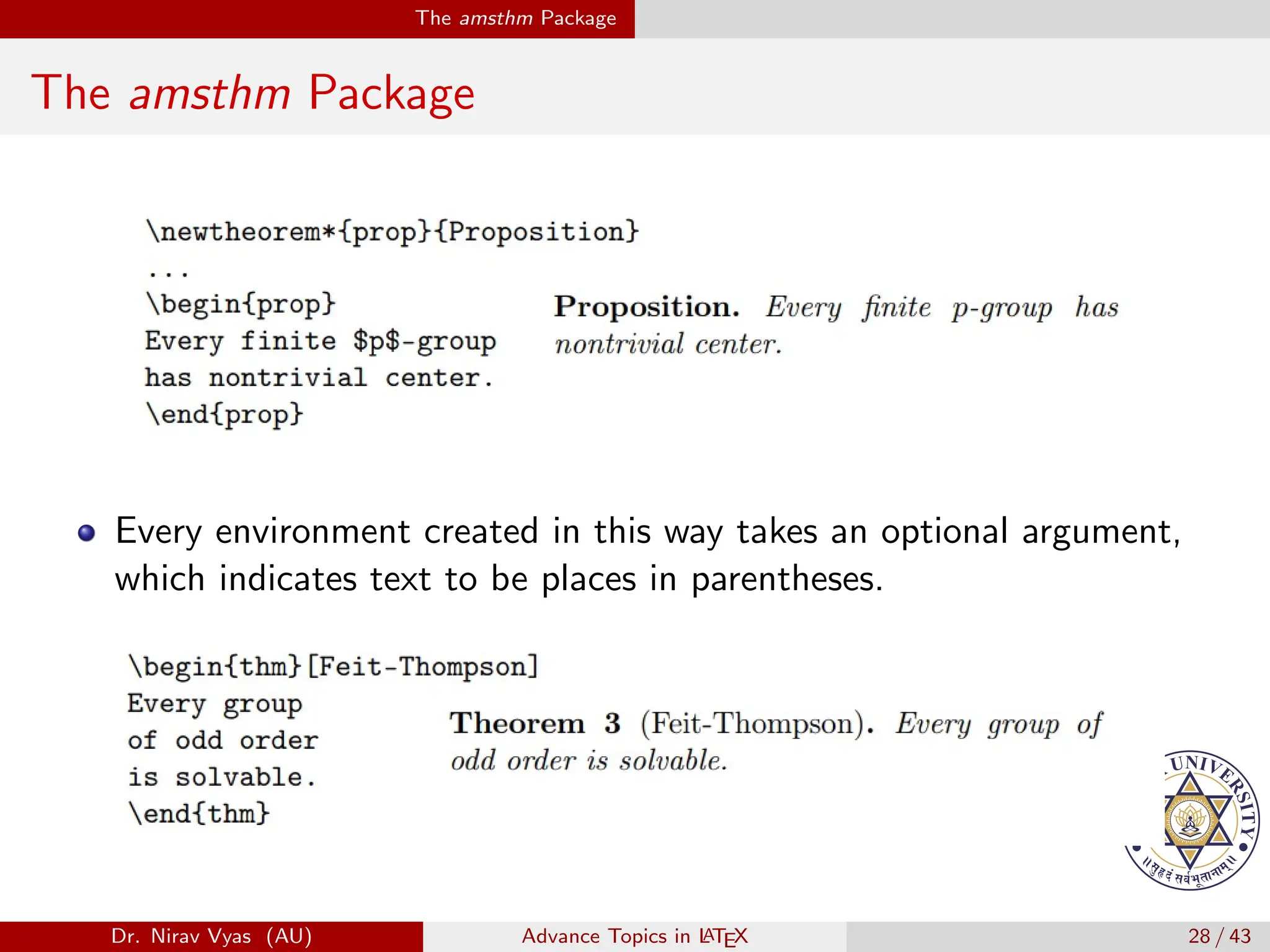
Every environment created in this way takes an optional argument,
which indicates text to be places in parentheses.
Dr. Nirav Vyas (AU) Advance Topics in L
ATEX 28 / 43
The amsthm Package
The amsthm Package
Every environment created in this way takes an optional argument,
which indicates text to be places in parentheses.
Dr. Nirav Vyas (AU) Advance Topics in L
ATEX 28 / 43
The amsthm Package
The amsthm Package
Every environment created in this way takes an optional argument,
which indicates text to be places in parentheses.
Dr. Nirav Vyas (AU) Advance Topics in L
ATEX 28 / 43
The amsthm Package
amsthm - Proofs
The amsthm package comes with one predefined environment, the
proof environment, which does just what you expect.
Dr. Nirav Vyas (AU) Advance Topics in L
ATEX 29 / 43
The amsthm Package
amsthm - Proofs
The amsthm package comes with one predefined environment, the
proof environment, which does just what you expect.
Dr. Nirav Vyas (AU) Advance Topics in L
ATEX 29 / 43
The amsthm Package
amsthm - Proofs
The amsthm package comes with one predefined environment, the
proof environment, which does just what you expect.
Dr. Nirav Vyas (AU) Advance Topics in L
ATEX 29 / 43
The amsthm Package
amsthm - Proofs
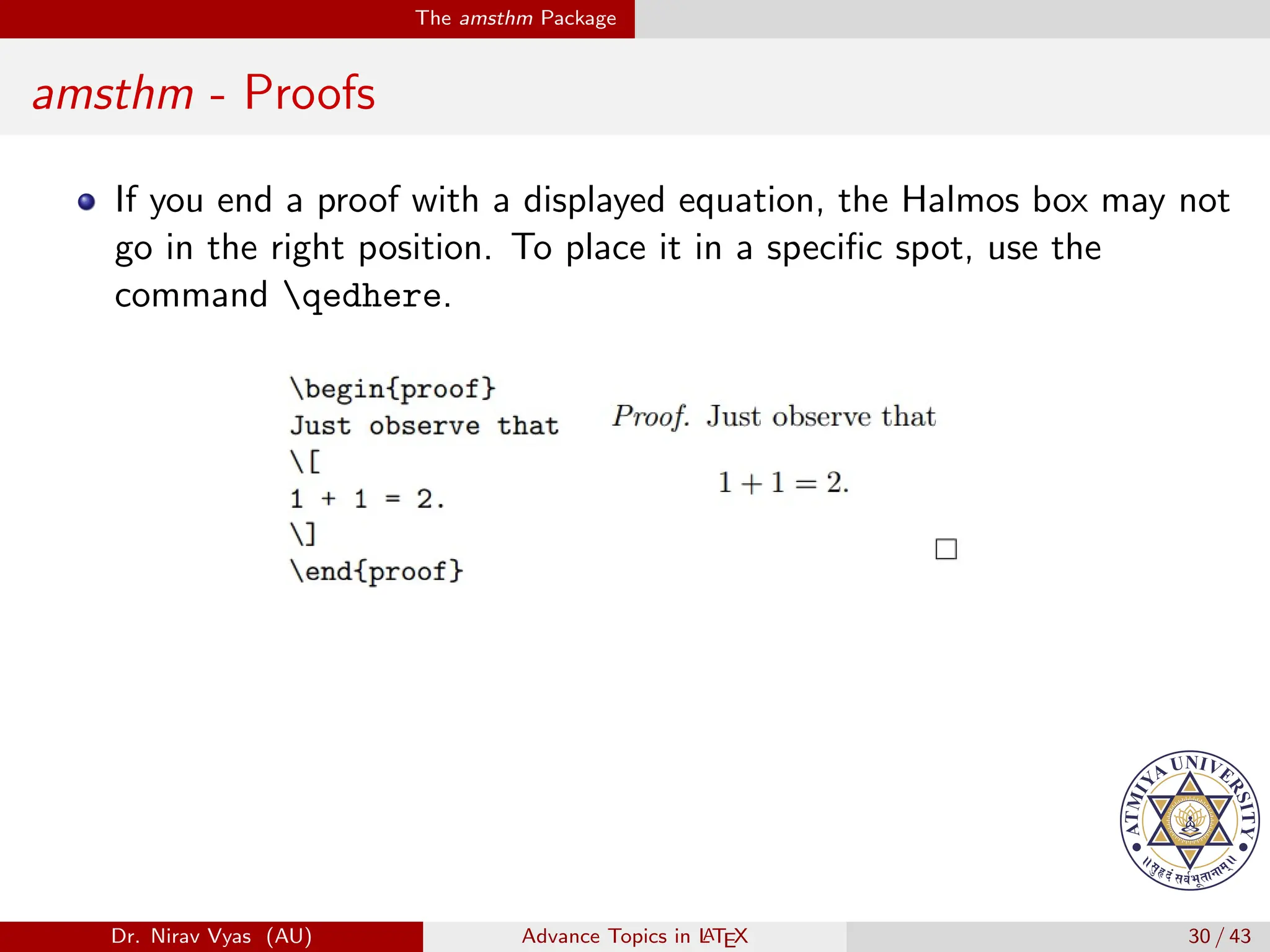
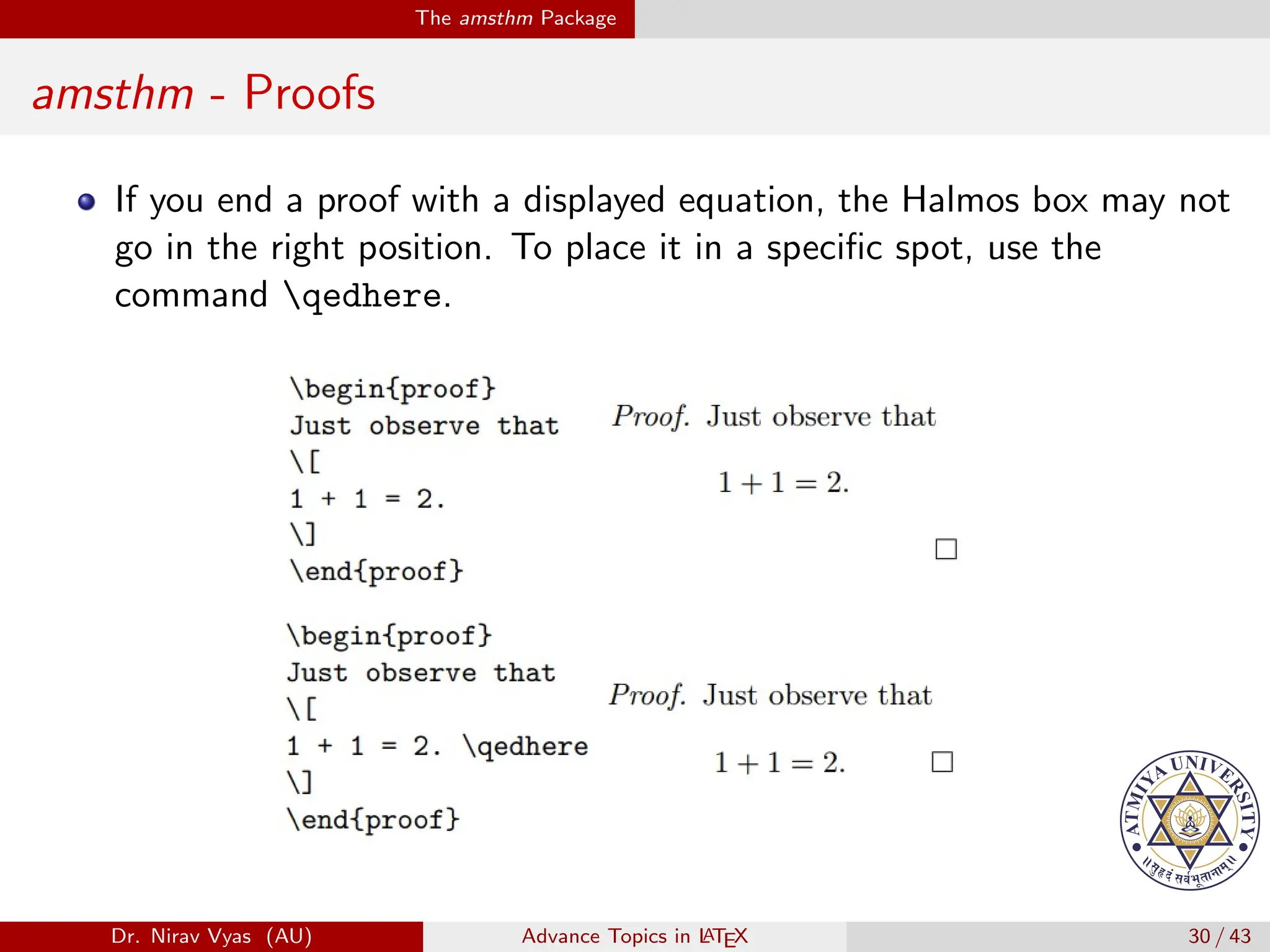
If you end a proof with a displayed equation, the Halmos box may not
go in the right position. To place it in a specific spot, use the
command qedhere.
Dr. Nirav Vyas (AU) Advance Topics in L
ATEX 30 / 43
The amsthm Package
amsthm - Proofs
If you end a proof with a displayed equation, the Halmos box may not
go in the right position. To place it in a specific spot, use the
command qedhere.
Dr. Nirav Vyas (AU) Advance Topics in L
ATEX 30 / 43
The amsthm Package
amsthm - Proofs
If you end a proof with a displayed equation, the Halmos box may not
go in the right position. To place it in a specific spot, use the
command qedhere.
Dr. Nirav Vyas (AU) Advance Topics in L
ATEX 30 / 43
The amsthm Package
amsthm - Proofs
If you end a proof with a displayed equation, the Halmos box may not
go in the right position. To place it in a specific spot, use the
command qedhere.
Dr. Nirav Vyas (AU) Advance Topics in L
ATEX 30 / 43
The amsthm Package
amsthm - Theorem Styles
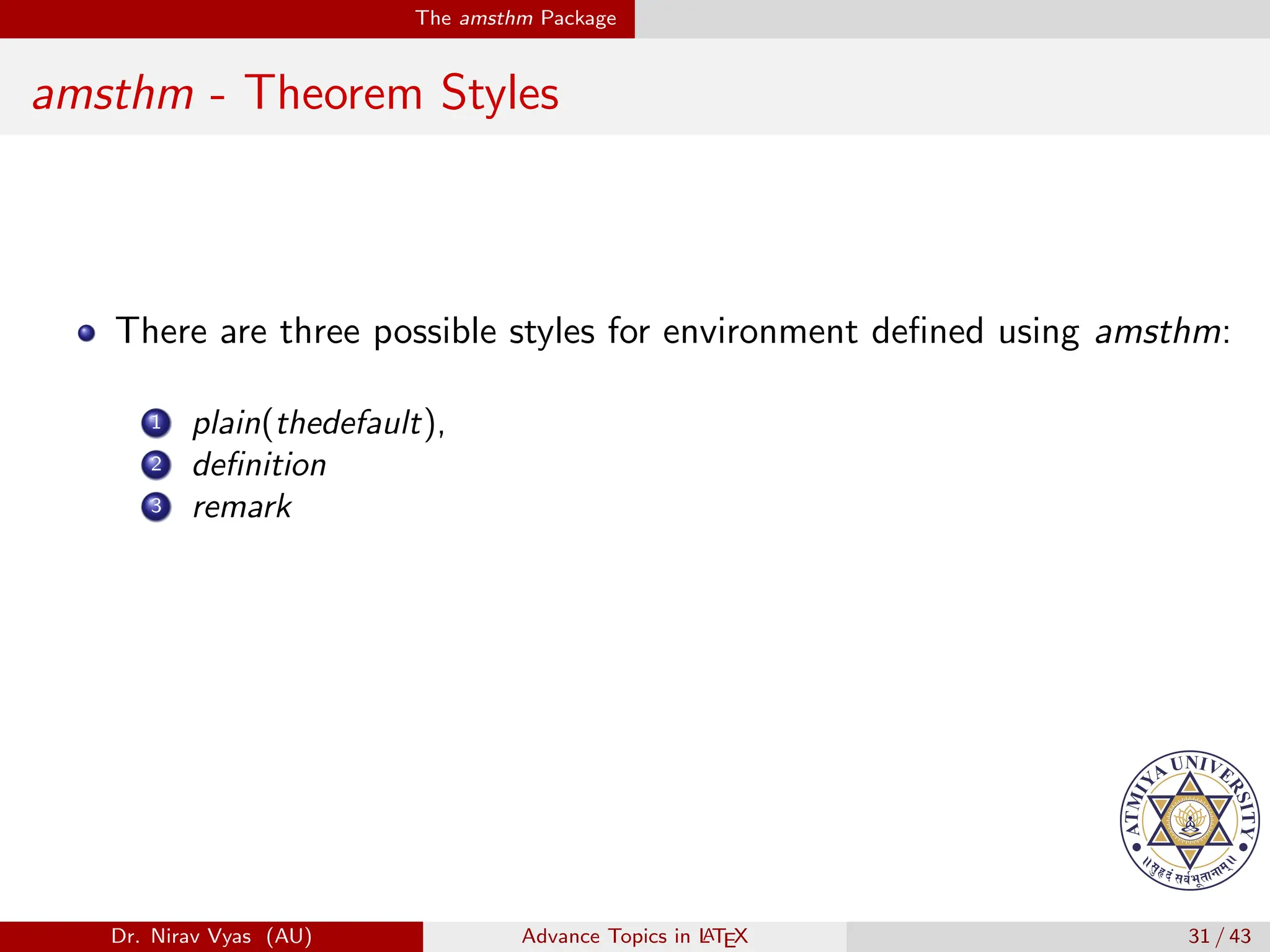
There are three possible styles for environment defined using amsthm:
Dr. Nirav Vyas (AU) Advance Topics in L
ATEX 31 / 43
The amsthm Package
amsthm - Theorem Styles
There are three possible styles for environment defined using amsthm:
1 plain(thedefault),
Dr. Nirav Vyas (AU) Advance Topics in L
ATEX 31 / 43
The amsthm Package
amsthm - Theorem Styles
There are three possible styles for environment defined using amsthm:
1 plain(thedefault),
2 definition
Dr. Nirav Vyas (AU) Advance Topics in L
ATEX 31 / 43
The amsthm Package
amsthm - Theorem Styles
There are three possible styles for environment defined using amsthm:
1 plain(thedefault),
2 definition
3 remark
Dr. Nirav Vyas (AU) Advance Topics in L
ATEX 31 / 43
The amsthm Package
amsthm - Theorem Styles
There are three possible styles for environment defined using amsthm:
1 plain(thedefault),
2 definition
3 remark
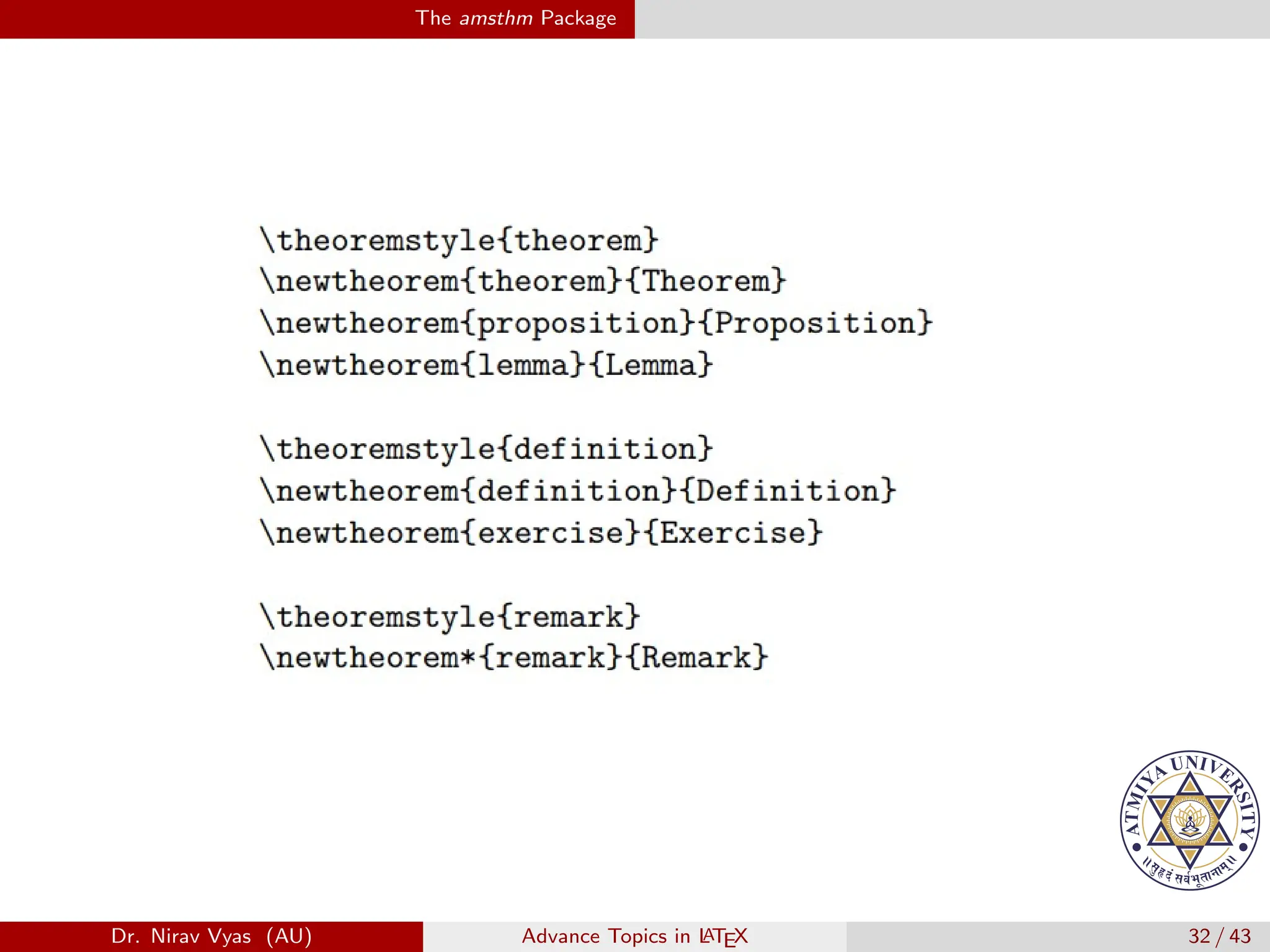
To specify a style, group newtheorem commands into blocks
according to the style you would like them to have, then place
theoremstyle{<style>} before each block.
Dr. Nirav Vyas (AU) Advance Topics in L
ATEX 31 / 43
The amsthm Package
Dr. Nirav Vyas (AU) Advance Topics in L
ATEX 32 / 43
Beamer
Beamer
Introduction
Beamer is a LATEX class for creating presentations that are held
using a projector, but it can also be used to create transparency slides.
Dr. Nirav Vyas (AU) Advance Topics in L
ATEX 33 / 43
Beamer
Beamer
Introduction
Beamer is a LATEX class for creating presentations that are held
using a projector, but it can also be used to create transparency slides.
A beamer presentation is created like any other LATEX document: It
has a preamble and a body, the body contains sections and
subsections, the different slides (called frames in beamer) are put
in environments, they are structured using itemize and enumerate
environments, and so on.
Dr. Nirav Vyas (AU) Advance Topics in L
ATEX 33 / 43
Beamer
Beamer
Introduction
Beamer is a LATEX class for creating presentations that are held
using a projector, but it can also be used to create transparency slides.
A beamer presentation is created like any other LATEX document: It
has a preamble and a body, the body contains sections and
subsections, the different slides (called frames in beamer) are put
in environments, they are structured using itemize and enumerate
environments, and so on.
The obvious disadvantage of this approach is that you have to know
LATEX in order to use beamer.
Dr. Nirav Vyas (AU) Advance Topics in L
ATEX 33 / 43
Beamer
Beamer
Introduction
Beamer is a LATEX class for creating presentations that are held
using a projector, but it can also be used to create transparency slides.
A beamer presentation is created like any other LATEX document: It
has a preamble and a body, the body contains sections and
subsections, the different slides (called frames in beamer) are put
in environments, they are structured using itemize and enumerate
environments, and so on.
The obvious disadvantage of this approach is that you have to know
LATEX in order to use beamer.
The advantage is that if you know LATEX, you can use your
knowledge of LATEX also when creating a presentation, not only
when writing papers.
Dr. Nirav Vyas (AU) Advance Topics in L
ATEX 33 / 43
Beamer
General rule - Beamer
Command:
Dr. Nirav Vyas (AU) Advance Topics in L
ATEX 34 / 43
Beamer
General rule - Beamer
Command:
Environment:
Dr. Nirav Vyas (AU) Advance Topics in L
ATEX 34 / 43
Beamer
Frame
Each Beamer project is made up of a series of frames.
Dr. Nirav Vyas (AU) Advance Topics in L
ATEX 35 / 43
Beamer
Frame
Each Beamer project is made up of a series of frames.
Each frame produces one or more slides, depending on the slides
overlays, which will be discussed later.
Dr. Nirav Vyas (AU) Advance Topics in L
ATEX 35 / 43
Beamer
Frame
Each Beamer project is made up of a series of frames.
Each frame produces one or more slides, depending on the slides
overlays, which will be discussed later.
A frame is produced with the environment frame; it may come in one
of the following forms:
Dr. Nirav Vyas (AU) Advance Topics in L
ATEX 35 / 43
Beamer
Frame
Each Beamer project is made up of a series of frames.
Each frame produces one or more slides, depending on the slides
overlays, which will be discussed later.
A frame is produced with the environment frame; it may come in one
of the following forms:
begin{frame}{Frame title}
Dr. Nirav Vyas (AU) Advance Topics in L
ATEX 35 / 43
Beamer
Frame
Each Beamer project is made up of a series of frames.
Each frame produces one or more slides, depending on the slides
overlays, which will be discussed later.
A frame is produced with the environment frame; it may come in one
of the following forms:
begin{frame}{Frame title}
begin{frame}{Frame title}{Frame subtitle}
Dr. Nirav Vyas (AU) Advance Topics in L
ATEX 35 / 43
Beamer
Frame
Each Beamer project is made up of a series of frames.
Each frame produces one or more slides, depending on the slides
overlays, which will be discussed later.
A frame is produced with the environment frame; it may come in one
of the following forms:
begin{frame}{Frame title}
begin{frame}{Frame title}{Frame subtitle}
Both of these forms can take an optional argument that specifies the
vertical alignment of the content of a frame c for centered (the
default), t for top, or b for bottom.
Dr. Nirav Vyas (AU) Advance Topics in L
ATEX 35 / 43
Beamer
Frame
Each Beamer project is made up of a series of frames.
Each frame produces one or more slides, depending on the slides
overlays, which will be discussed later.
A frame is produced with the environment frame; it may come in one
of the following forms:
begin{frame}{Frame title}
begin{frame}{Frame title}{Frame subtitle}
Both of these forms can take an optional argument that specifies the
vertical alignment of the content of a frame c for centered (the
default), t for top, or b for bottom.
Dr. Nirav Vyas (AU) Advance Topics in L
ATEX 35 / 43
Beamer
Frame
Each Beamer project is made up of a series of frames.
Each frame produces one or more slides, depending on the slides
overlays, which will be discussed later.
A frame is produced with the environment frame; it may come in one
of the following forms:
begin{frame}{Frame title}
begin{frame}{Frame title}{Frame subtitle}
Both of these forms can take an optional argument that specifies the
vertical alignment of the content of a frame c for centered (the
default), t for top, or b for bottom.
Example
begin{frame}[t]{Frame title goes here}
Frame body text and/or LATEX code
end {frame}
Dr. Nirav Vyas (AU) Advance Topics in L
ATEX 35 / 43
Beamer
Titling Information
Titling information go in the preamble, just as in normal LATEX.
title [short title] {long title}
Dr. Nirav Vyas (AU) Advance Topics in L
ATEX 36 / 43
Beamer
Titling Information
Titling information go in the preamble, just as in normal LATEX.
title [short title] {long title}
subtitle [short subtitle]{long subtitle}
Dr. Nirav Vyas (AU) Advance Topics in L
ATEX 36 / 43
Beamer
Titling Information
Titling information go in the preamble, just as in normal LATEX.
title [short title] {long title}
subtitle [short subtitle]{long subtitle}
author [short name]{long name}
Dr. Nirav Vyas (AU) Advance Topics in L
ATEX 36 / 43
Beamer
Titling Information
Titling information go in the preamble, just as in normal LATEX.
title [short title] {long title}
subtitle [short subtitle]{long subtitle}
author [short name]{long name}
date [short date]{long date}
Dr. Nirav Vyas (AU) Advance Topics in L
ATEX 36 / 43
Beamer
Titling Information
Titling information go in the preamble, just as in normal LATEX.
title [short title] {long title}
subtitle [short subtitle]{long subtitle}
author [short name]{long name}
date [short date]{long date}
institution [short name]{long name}
Dr. Nirav Vyas (AU) Advance Topics in L
ATEX 36 / 43
Beamer
Titling Information
Titling information go in the preamble, just as in normal LATEX.
title [short title] {long title}
subtitle [short subtitle]{long subtitle}
author [short name]{long name}
date [short date]{long date}
institution [short name]{long name}
Dr. Nirav Vyas (AU) Advance Topics in L
ATEX 36 / 43
Beamer
Titling Information
Titling information go in the preamble, just as in normal LATEX.
title [short title] {long title}
subtitle [short subtitle]{long subtitle}
author [short name]{long name}
date [short date]{long date}
institution [short name]{long name}
As in normal LATEX documents, titling information are not actually
printed until you tell it to do so, with the command titlepage.
Dr. Nirav Vyas (AU) Advance Topics in L
ATEX 36 / 43
Beamer
Titling Information
Titling information go in the preamble, just as in normal LATEX.
title [short title] {long title}
subtitle [short subtitle]{long subtitle}
author [short name]{long name}
date [short date]{long date}
institution [short name]{long name}
As in normal LATEX documents, titling information are not actually
printed until you tell it to do so, with the command titlepage.
Example
begin{frame}
titlepage
end {frame}
Dr. Nirav Vyas (AU) Advance Topics in L
ATEX 36 / 43
Beamer
Table of Contents
The table of contents is created dynamically on the sections and
subsections of the presentation, with the command
tableofcontents.
Dr. Nirav Vyas (AU) Advance Topics in L
ATEX 37 / 43
Beamer
Table of Contents
The table of contents is created dynamically on the sections and
subsections of the presentation, with the command
tableofcontents.
It takes a number of optional arguments; the most common is
pausesections, which pauses between items in the table of contents.
Dr. Nirav Vyas (AU) Advance Topics in L
ATEX 37 / 43
Beamer
Table of Contents
The table of contents is created dynamically on the sections and
subsections of the presentation, with the command
tableofcontents.
It takes a number of optional arguments; the most common is
pausesections, which pauses between items in the table of contents.
Dr. Nirav Vyas (AU) Advance Topics in L
ATEX 37 / 43
Beamer
Table of Contents
The table of contents is created dynamically on the sections and
subsections of the presentation, with the command
tableofcontents.
It takes a number of optional arguments; the most common is
pausesections, which pauses between items in the table of contents.
Example
begin{frame}
tableofcontents[pausesections]
end {frame}
Dr. Nirav Vyas (AU) Advance Topics in L
ATEX 37 / 43
Beamer
Section and Subsections
We use the LATEX commands
section subsection subsubsection
Dr. Nirav Vyas (AU) Advance Topics in L
ATEX 38 / 43
Beamer
Section and Subsections
We use the LATEX commands
section subsection subsubsection
Sectioning commands should be placed outside frames.
Dr. Nirav Vyas (AU) Advance Topics in L
ATEX 38 / 43
Beamer
Section and Subsections
We use the LATEX commands
section subsection subsubsection
Sectioning commands should be placed outside frames.
These commands create entries in the table of contents. They also
create entries in the navigation bar (if one is available).
Dr. Nirav Vyas (AU) Advance Topics in L
ATEX 38 / 43
Beamer
Section and Subsections
We use the LATEX commands
section subsection subsubsection
Sectioning commands should be placed outside frames.
These commands create entries in the table of contents. They also
create entries in the navigation bar (if one is available).
They do NOT create a frame heading
Dr. Nirav Vyas (AU) Advance Topics in L
ATEX 38 / 43
Beamer
Section and Subsections
We use the LATEX commands
section subsection subsubsection
Sectioning commands should be placed outside frames.
These commands create entries in the table of contents. They also
create entries in the navigation bar (if one is available).
They do NOT create a frame heading
Example
section{Beamer basics}
begin{frame}
Sectioning commands are placed textbf {outside} frames. paus
end {frame}
Dr. Nirav Vyas (AU) Advance Topics in L
ATEX 38 / 43
Beamer
Common text commands and environment
You can use the same text commands in Beamer as you do in LATEX
to change the way your text is displayed emph textbf ...
Dr. Nirav Vyas (AU) Advance Topics in L
ATEX 39 / 43
Beamer
Common text commands and environment
You can use the same text commands in Beamer as you do in LATEX
to change the way your text is displayed emph textbf ...
You can also use the same LATEX environments
enumerate itemize description ...
Dr. Nirav Vyas (AU) Advance Topics in L
ATEX 39 / 43
Beamer
Common text commands and environment
You can use the same text commands in Beamer as you do in LATEX
to change the way your text is displayed emph textbf ...
You can also use the same LATEX environments
enumerate itemize description ...
The same goes for alignment environments
center flushleft flushright
Dr. Nirav Vyas (AU) Advance Topics in L
ATEX 39 / 43
Beamer
Spacing
A vertical space can be indicated by using the vskip<number>pt
Dr. Nirav Vyas (AU) Advance Topics in L
ATEX 40 / 43
Beamer
Spacing
A vertical space can be indicated by using the vskip<number>pt
command.
For example, vskip15pt will produce a 15 point vertical space.
Dr. Nirav Vyas (AU) Advance Topics in L
ATEX 40 / 43
Beamer
Spacing
A vertical space can be indicated by using the vskip<number>pt
command.
For example, vskip15pt will produce a 15 point vertical space.
A vertical space can be indicated by using the vskip<number>pt
Dr. Nirav Vyas (AU) Advance Topics in L
ATEX 40 / 43
Beamer
Spacing
A vertical space can be indicated by using the vskip<number>pt
command.
For example, vskip15pt will produce a 15 point vertical space.
A vertical space can be indicated by using the vskip<number>pt
command.
For example, vskip15pt will produce a 15 point vertical space.
Dr. Nirav Vyas (AU) Advance Topics in L
ATEX 40 / 43
Beamer
Spacing
A vertical space can be indicated by using the vskip<number>pt
command.
For example, vskip15pt will produce a 15 point vertical space.
A vertical space can be indicated by using the vskip<number>pt
command.
For example, vskip15pt will produce a 15 point vertical space.
A vertical space can be indicated by using the vskip<number>pt
Dr. Nirav Vyas (AU) Advance Topics in L
ATEX 40 / 43
Beamer
Spacing
A vertical space can be indicated by using the vskip<number>pt
command.
For example, vskip15pt will produce a 15 point vertical space.
A vertical space can be indicated by using the vskip<number>pt
command.
For example, vskip15pt will produce a 15 point vertical space.
A vertical space can be indicated by using the vskip<number>pt
command
For example, vskip15pt will produce a 15 point vertical space.
Dr. Nirav Vyas (AU) Advance Topics in L
ATEX 40 / 43
Beamer
Theorem
There exists an infinite set.
Dr. Nirav Vyas (AU) Advance Topics in L
ATEX 41 / 43
Beamer
Theorem
There exists an infinite set.
Proof.
This follows from the axiom of infinity.
Dr. Nirav Vyas (AU) Advance Topics in L
ATEX 41 / 43
Beamer
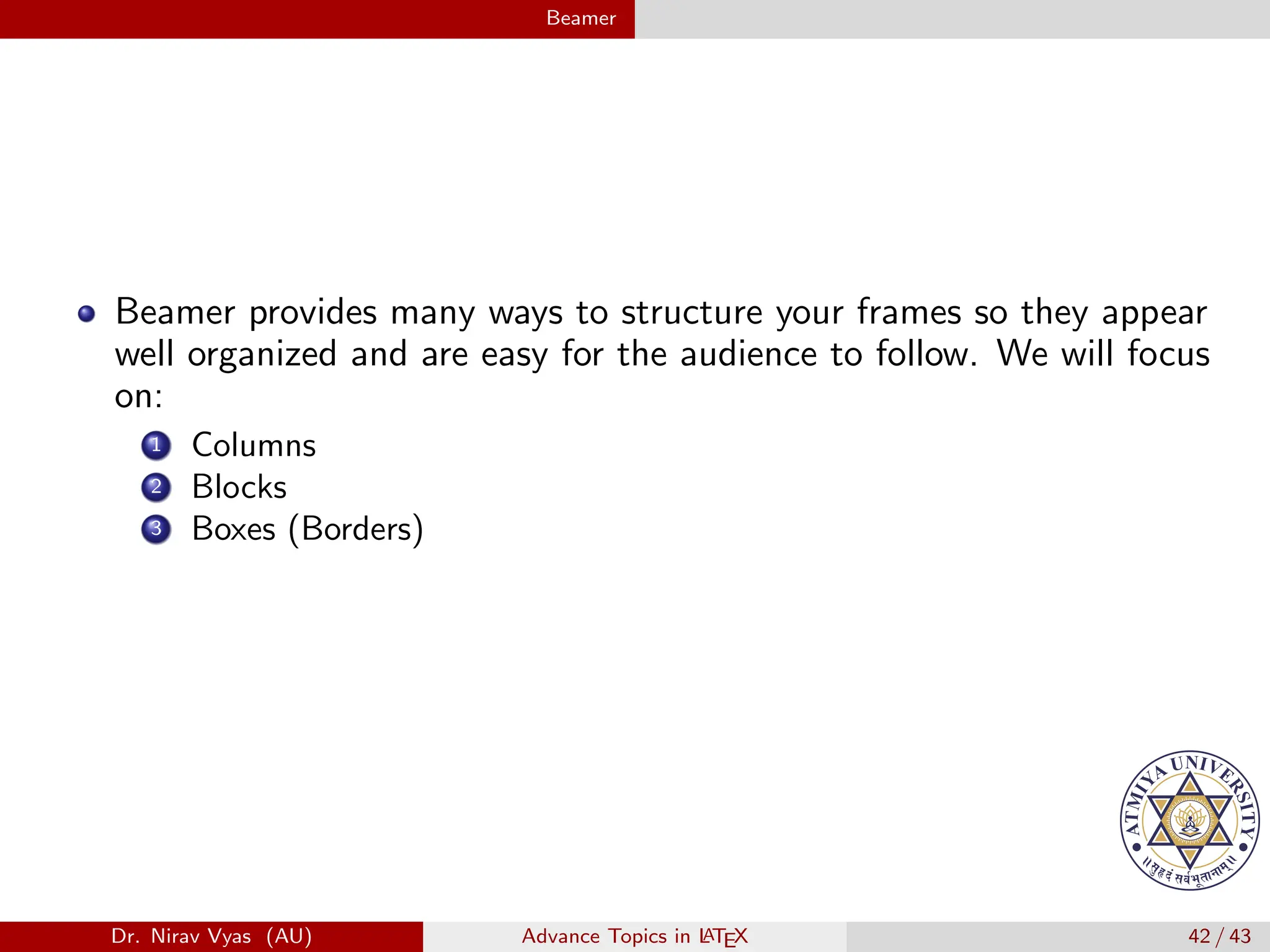
Beamer provides many ways to structure your frames so they appear
well organized and are easy for the audience to follow. We will focus
on:
Dr. Nirav Vyas (AU) Advance Topics in L
ATEX 42 / 43
Beamer
Beamer provides many ways to structure your frames so they appear
well organized and are easy for the audience to follow. We will focus
on:
1 Columns
Dr. Nirav Vyas (AU) Advance Topics in L
ATEX 42 / 43
Beamer
Beamer provides many ways to structure your frames so they appear
well organized and are easy for the audience to follow. We will focus
on:
1 Columns
2 Blocks
Dr. Nirav Vyas (AU) Advance Topics in L
ATEX 42 / 43
Beamer
Beamer provides many ways to structure your frames so they appear
well organized and are easy for the audience to follow. We will focus
on:
1 Columns
2 Blocks
3 Boxes (Borders)
Dr. Nirav Vyas (AU) Advance Topics in L
ATEX 42 / 43
Beamer
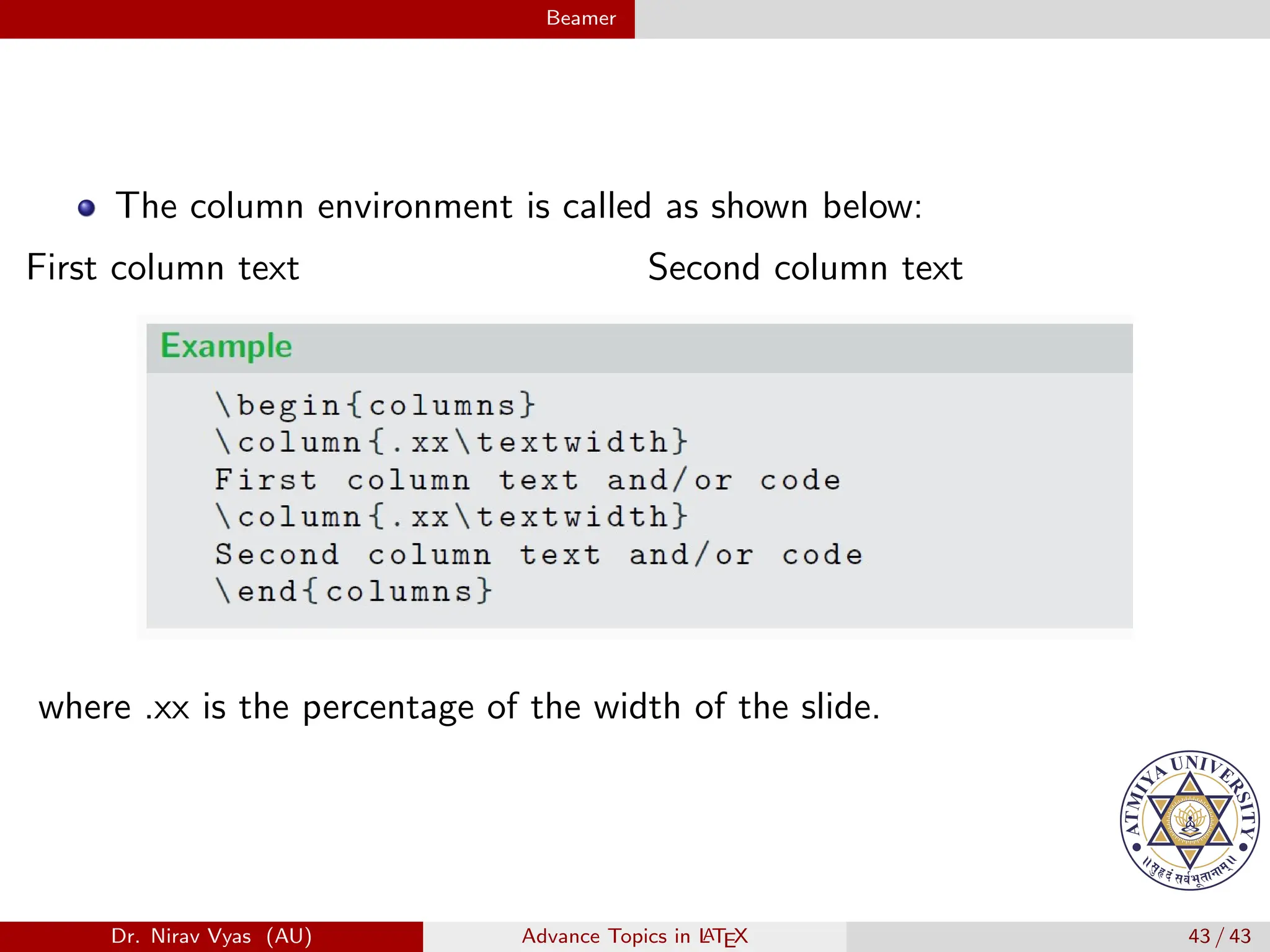
The column environment is called as shown below:
First column text Second column text
Dr. Nirav Vyas (AU) Advance Topics in L
ATEX 43 / 43
Beamer
The column environment is called as shown below:
First column text Second column text
where .xx is the percentage of the width of the slide.
Dr. Nirav Vyas (AU) Advance Topics in L
ATEX 43 / 43

Advance Topics in Latex - different packages

  • 1.
    Advance Topics inL A TEX Dr. Nirav Vyas Associate Professor & Head Dept. of Science Humanities, ATMIYA University nirav.vyas@atmiyauni.ac.in Dr. Nirav Vyas (AU) Advance Topics in L ATEX 1 / 43
  • 2.
    Table of Contents 1Making Custom Commands Dr. Nirav Vyas (AU) Advance Topics in L ATEX 2 / 43
  • 3.
    Table of Contents 1Making Custom Commands 2 Bibliography and BibTex Dr. Nirav Vyas (AU) Advance Topics in L ATEX 2 / 43
  • 4.
    Table of Contents 1Making Custom Commands 2 Bibliography and BibTex 3 The siunitx Package Dr. Nirav Vyas (AU) Advance Topics in L ATEX 2 / 43
  • 5.
    Table of Contents 1Making Custom Commands 2 Bibliography and BibTex 3 The siunitx Package 4 The mhchem Package Dr. Nirav Vyas (AU) Advance Topics in L ATEX 2 / 43
  • 6.
    Table of Contents 1Making Custom Commands 2 Bibliography and BibTex 3 The siunitx Package 4 The mhchem Package 5 The amsthm Package Dr. Nirav Vyas (AU) Advance Topics in L ATEX 2 / 43
  • 7.
    Table of Contents 1Making Custom Commands 2 Bibliography and BibTex 3 The siunitx Package 4 The mhchem Package 5 The amsthm Package 6 Beamer Dr. Nirav Vyas (AU) Advance Topics in L ATEX 2 / 43
  • 8.
    Hyperlinks - URL Package:url Dr. Nirav Vyas (AU) Advance Topics in L ATEX 3 / 43
  • 9.
    Hyperlinks - URL Package:url Displays link Dr. Nirav Vyas (AU) Advance Topics in L ATEX 3 / 43
  • 10.
    Hyperlinks - URL Package:url Displays link https://www.ngu.ac.in/ https://www.ngu.ac.in/ Dr. Nirav Vyas (AU) Advance Topics in L ATEX 3 / 43
  • 11.
    Making Custom Commands MakingCustom Commands In long documents, you may find yourself typing similar sequences of text over and over again. Dr. Nirav Vyas (AU) Advance Topics in L ATEX 4 / 43
  • 12.
    Making Custom Commands MakingCustom Commands In long documents, you may find yourself typing similar sequences of text over and over again. LATEX provides a command that defines new commands. This is one of LATEX’s most useful features. Dr. Nirav Vyas (AU) Advance Topics in L ATEX 4 / 43
  • 13.
    Making Custom Commands MakingCustom Commands In long documents, you may find yourself typing similar sequences of text over and over again. LATEX provides a command that defines new commands. This is one of LATEX’s most useful features. Let’s look at a basic example and go through it very carefully to see how it works. newcommand{ftc}{Fundamental Theorem of Calculus} Dr. Nirav Vyas (AU) Advance Topics in L ATEX 4 / 43
  • 14.
    Making Custom Commands MakingCustom Commands In long documents, you may find yourself typing similar sequences of text over and over again. LATEX provides a command that defines new commands. This is one of LATEX’s most useful features. Let’s look at a basic example and go through it very carefully to see how it works. newcommand{ftc}{Fundamental Theorem of Calculus} Code: ftc. We can then apply the ftc{} and conclude that... Dr. Nirav Vyas (AU) Advance Topics in L ATEX 4 / 43
  • 15.
    Making Custom Commands MakingCustom Commands In long documents, you may find yourself typing similar sequences of text over and over again. LATEX provides a command that defines new commands. This is one of LATEX’s most useful features. Let’s look at a basic example and go through it very carefully to see how it works. newcommand{ftc}{Fundamental Theorem of Calculus} Code: ftc. We can then apply the ftc{} and conclude that... Output: Fundamental Theorem of Calculus. We can then apply the Fundamental Theorem of Calculus and conclude that... Dr. Nirav Vyas (AU) Advance Topics in L ATEX 4 / 43
  • 16.
    Bibliography and BibTex Bibliographyand BibTex BibTeX is the extension of Latex for managing references. Dr. Nirav Vyas (AU) Advance Topics in L ATEX 5 / 43
  • 17.
    Bibliography and BibTex Bibliographyand BibTex BibTeX is the extension of Latex for managing references. It is made to be easy to use and highly convenient. Dr. Nirav Vyas (AU) Advance Topics in L ATEX 5 / 43
  • 18.
    Bibliography and BibTex Bibliographyand BibTex BibTeX is the extension of Latex for managing references. It is made to be easy to use and highly convenient. Generally citations and references are bothersome to do by hand for two reasons: Dr. Nirav Vyas (AU) Advance Topics in L ATEX 5 / 43
  • 19.
    Bibliography and BibTex Bibliographyand BibTex BibTeX is the extension of Latex for managing references. It is made to be easy to use and highly convenient. Generally citations and references are bothersome to do by hand for two reasons: 1 Every one wants very specific, but slightly different format for citations. Dr. Nirav Vyas (AU) Advance Topics in L ATEX 5 / 43
  • 20.
    Bibliography and BibTex Bibliographyand BibTex BibTeX is the extension of Latex for managing references. It is made to be easy to use and highly convenient. Generally citations and references are bothersome to do by hand for two reasons: 1 Every one wants very specific, but slightly different format for citations. 2 Citations are often numbered by order of appearance, so any time you insert a new citation, all the numbers change. Dr. Nirav Vyas (AU) Advance Topics in L ATEX 5 / 43
  • 21.
    Bibliography and BibTex Bibliographyand BibTex BibTeX is the extension of Latex for managing references. It is made to be easy to use and highly convenient. Generally citations and references are bothersome to do by hand for two reasons: 1 Every one wants very specific, but slightly different format for citations. 2 Citations are often numbered by order of appearance, so any time you insert a new citation, all the numbers change. BibTeX has two elegant solutions to these problems: Dr. Nirav Vyas (AU) Advance Topics in L ATEX 5 / 43
  • 22.
    Bibliography and BibTex Bibliographyand BibTex BibTeX is the extension of Latex for managing references. It is made to be easy to use and highly convenient. Generally citations and references are bothersome to do by hand for two reasons: 1 Every one wants very specific, but slightly different format for citations. 2 Citations are often numbered by order of appearance, so any time you insert a new citation, all the numbers change. BibTeX has two elegant solutions to these problems: 1 Citation formatting is automatic. Dr. Nirav Vyas (AU) Advance Topics in L ATEX 5 / 43
  • 23.
    Bibliography and BibTex Bibliographyand BibTex BibTeX is the extension of Latex for managing references. It is made to be easy to use and highly convenient. Generally citations and references are bothersome to do by hand for two reasons: 1 Every one wants very specific, but slightly different format for citations. 2 Citations are often numbered by order of appearance, so any time you insert a new citation, all the numbers change. BibTeX has two elegant solutions to these problems: 1 Citation formatting is automatic. 2 Citation numbering is automatic. Dr. Nirav Vyas (AU) Advance Topics in L ATEX 5 / 43
  • 24.
    Bibliography and BibTex Bibliographyand BibTex BibTeX is the extension of Latex for managing references. It is made to be easy to use and highly convenient. Generally citations and references are bothersome to do by hand for two reasons: 1 Every one wants very specific, but slightly different format for citations. 2 Citations are often numbered by order of appearance, so any time you insert a new citation, all the numbers change. BibTeX has two elegant solutions to these problems: 1 Citation formatting is automatic. 2 Citation numbering is automatic. This is one of the best examples of the Latex philosophy; Bibtex does all the formatting for you, so you can focus on content. Dr. Nirav Vyas (AU) Advance Topics in L ATEX 5 / 43
  • 25.
    Bibliography and BibTex Bibliographyand BibTex There are three steps to using Bibtex Dr. Nirav Vyas (AU) Advance Topics in L ATEX 6 / 43
  • 26.
    Bibliography and BibTex Bibliographyand BibTex There are three steps to using Bibtex 1 Creating a bibliography file Dr. Nirav Vyas (AU) Advance Topics in L ATEX 6 / 43
  • 27.
    Bibliography and BibTex Bibliographyand BibTex There are three steps to using Bibtex 1 Creating a bibliography file 2 citing with cite command Dr. Nirav Vyas (AU) Advance Topics in L ATEX 6 / 43
  • 28.
    Bibliography and BibTex Bibliographyand BibTex There are three steps to using Bibtex 1 Creating a bibliography file 2 citing with cite command 3 typesetting for Bibtex Dr. Nirav Vyas (AU) Advance Topics in L ATEX 6 / 43
  • 29.
    Bibliography and BibTex Creatinga Bibiography File BibTeX requires an external bibliography. Dr. Nirav Vyas (AU) Advance Topics in L ATEX 7 / 43
  • 30.
    Bibliography and BibTex Creatinga Bibiography File BibTeX requires an external bibliography. This takes the form of a file in the same folder as your .tex file that has the extension .bib Dr. Nirav Vyas (AU) Advance Topics in L ATEX 7 / 43
  • 31.
    Bibliography and BibTex Creatinga Bibiography File BibTeX requires an external bibliography. This takes the form of a file in the same folder as your .tex file that has the extension .bib It’s customary to call it references.bib or citations.bib Dr. Nirav Vyas (AU) Advance Topics in L ATEX 7 / 43
  • 32.
    Bibliography and BibTex Creatinga Bibiography File BibTeX requires an external bibliography. This takes the form of a file in the same folder as your .tex file that has the extension .bib It’s customary to call it references.bib or citations.bib The .bib files contains the information about each thing you want to cite. Dr. Nirav Vyas (AU) Advance Topics in L ATEX 7 / 43
  • 33.
    Bibliography and BibTex Creatinga Bibiography File BibTeX requires an external bibliography. This takes the form of a file in the same folder as your .tex file that has the extension .bib It’s customary to call it references.bib or citations.bib The .bib files contains the information about each thing you want to cite. BibTeX supports many types of bibliographic entries, including book, (journal) article, (conference) proceedings and many more. Dr. Nirav Vyas (AU) Advance Topics in L ATEX 7 / 43
  • 34.
    Bibliography and BibTex Creatinga Bibiography File - Example @book{rudin1964principles, title={Principles of mathematical analysis}, author={Walter Rudin}, volume={3}, year={1964}, publisher={McGraw-Hill New York} Dr. Nirav Vyas (AU) Advance Topics in L ATEX 8 / 43
  • 35.
    Bibliography and BibTex Creatinga Bibiography File - Example @article{bardeen1957theory, title={Theory of superconductivity}, author={Bardeen, John and Cooper, Leon N and Schrieffer, J Rob journal={Physical Review}, volume={108}, number={5}, pages={1175}, year={1957}, publisher={APS} } Dr. Nirav Vyas (AU) Advance Topics in L ATEX 9 / 43
  • 36.
    Bibliography and BibTex Creatinga Bibiography File Each entry starts with @ and the type of the entry. @book Dr. Nirav Vyas (AU) Advance Topics in L ATEX 10 / 43
  • 37.
    Bibliography and BibTex Creatinga Bibiography File Each entry starts with @ and the type of the entry. @book Next comes the name of the specific entry i.e. a unique identifier used to cite that entry. rudin1964principles Dr. Nirav Vyas (AU) Advance Topics in L ATEX 10 / 43
  • 38.
    Bibliography and BibTex Creatinga Bibiography File Each entry starts with @ and the type of the entry. @book Next comes the name of the specific entry i.e. a unique identifier used to cite that entry. rudin1964principles After that, there are several fields that give the information needed to construct the reference. Dr. Nirav Vyas (AU) Advance Topics in L ATEX 10 / 43
  • 39.
    Bibliography and BibTex Creatinga Bibiography File Each entry starts with @ and the type of the entry. @book Next comes the name of the specific entry i.e. a unique identifier used to cite that entry. rudin1964principles After that, there are several fields that give the information needed to construct the reference. For book,the required fields are title, author, publisher, year. Dr. Nirav Vyas (AU) Advance Topics in L ATEX 10 / 43
  • 40.
    Bibliography and BibTex Creatinga Bibiography File Each entry starts with @ and the type of the entry. @book Next comes the name of the specific entry i.e. a unique identifier used to cite that entry. rudin1964principles After that, there are several fields that give the information needed to construct the reference. For book,the required fields are title, author, publisher, year. For article, it’s also necessary to include journal and highly recommended to provide year, volume, page, so that a reader could easily find the article in question Dr. Nirav Vyas (AU) Advance Topics in L ATEX 10 / 43
  • 41.
    Bibliography and BibTex Creatinga Bibiography File Types of BibTeX entries: article, book, booklet, inbook, incollection, inproceedings - conference, manual, mastersthesis, phdthesis, misc, proceedings, tech report, unpublished. Dr. Nirav Vyas (AU) Advance Topics in L ATEX 11 / 43
  • 42.
    Bibliography and BibTex Creatinga Bibiography File Types of BibTeX entries: article, book, booklet, inbook, incollection, inproceedings - conference, manual, mastersthesis, phdthesis, misc, proceedings, tech report, unpublished. Types of fields: address, annote, author,booktitle, chapter,crossref,edition, editor, howpublished, institution, journal, key month, note, number, organization, pages, publisher, school, series, title, type, volume, year. Dr. Nirav Vyas (AU) Advance Topics in L ATEX 11 / 43
  • 43.
    Bibliography and BibTex ExternalBibliography Management Systems No one wants to bother typing all of this for each citation, but luckily, there are easier ways. Dr. Nirav Vyas (AU) Advance Topics in L ATEX 12 / 43
  • 44.
    Bibliography and BibTex ExternalBibliography Management Systems No one wants to bother typing all of this for each citation, but luckily, there are easier ways. Google Scholar : If you click “Cite” in Google Scholar you have the option to receive a citation for that work in several formats, one of which is BibTeX. These days, most journals have all their articles online and have a similar “generate citation” button for each article. Dr. Nirav Vyas (AU) Advance Topics in L ATEX 12 / 43
  • 45.
    Bibliography and BibTex Dr.Nirav Vyas (AU) Advance Topics in L ATEX 13 / 43
  • 46.
    Bibliography and BibTex Dr.Nirav Vyas (AU) Advance Topics in L ATEX 14 / 43
  • 47.
    Bibliography and BibTex Dr.Nirav Vyas (AU) Advance Topics in L ATEX 15 / 43
  • 48.
    Bibliography and BibTex ExternalBibliography Management Systems JabRef: A (free, open source) program for managing BibTeX files. Dr. Nirav Vyas (AU) Advance Topics in L ATEX 16 / 43
  • 49.
    Bibliography and BibTex ExternalBibliography Management Systems JabRef: A (free, open source) program for managing BibTeX files. JabRef Works on Windows, Macs, and Linux, and has a nice interface for adding entries. Dr. Nirav Vyas (AU) Advance Topics in L ATEX 16 / 43
  • 50.
    Bibliography and BibTex ExternalBibliography Management Systems JabRef: A (free, open source) program for managing BibTeX files. JabRef Works on Windows, Macs, and Linux, and has a nice interface for adding entries. It also gives a way to search online journal databases and turn the results into bibliography entries. Dr. Nirav Vyas (AU) Advance Topics in L ATEX 16 / 43
  • 51.
    Bibliography and BibTex Citingin the Text Citing references is very easy. Let’s look at an example. Dr. Nirav Vyas (AU) Advance Topics in L ATEX 17 / 43
  • 52.
    Bibliography and BibTex Citingin the Text Citing references is very easy. Let’s look at an example. Dr. Nirav Vyas (AU) Advance Topics in L ATEX 17 / 43
  • 53.
    Bibliography and BibTex Citingin the Text Citing references is very easy. Let’s look at an example. A standard textbook on analysis is cite{rudin1964principles}. The theory of low-temperature superconductivity was invented in 1957 cite{bardeen1957theory}. bibliographystyle{plain} bibliography{references} Dr. Nirav Vyas (AU) Advance Topics in L ATEX 17 / 43
  • 54.
    Bibliography and BibTex Dr.Nirav Vyas (AU) Advance Topics in L ATEX 18 / 43
  • 55.
    Bibliography and BibTex Tocite a bibliographic entry, use the cite command with the name of that entry. Dr. Nirav Vyas (AU) Advance Topics in L ATEX 18 / 43
  • 56.
    Bibliography and BibTex Tocite a bibliographic entry, use the cite command with the name of that entry. The command bibliographystyle{plain} says how the citations should be formatted. In the plain style, it sorts references by author and use square brackets with numbers. Dr. Nirav Vyas (AU) Advance Topics in L ATEX 18 / 43
  • 57.
    Bibliography and BibTex Tocite a bibliographic entry, use the cite command with the name of that entry. The command bibliographystyle{plain} says how the citations should be formatted. In the plain style, it sorts references by author and use square brackets with numbers. There are many other styles available, such as unsrt, which lists references in order of appearance Dr. Nirav Vyas (AU) Advance Topics in L ATEX 18 / 43
  • 58.
    Bibliography and BibTex Thecommand bibliographystyle{plain} says how the citations should be formatted. In the plain style, it sorts references by author and use square brackets with numbers. Dr. Nirav Vyas (AU) Advance Topics in L ATEX 19 / 43
  • 59.
    Bibliography and BibTex Thecommand bibliographystyle{plain} says how the citations should be formatted. In the plain style, it sorts references by author and use square brackets with numbers. There are many other styles available, such as unsrt, which lists references in order of appearance Dr. Nirav Vyas (AU) Advance Topics in L ATEX 19 / 43
  • 60.
    Bibliography and BibTex Thecommand bibliographystyle{plain} says how the citations should be formatted. In the plain style, it sorts references by author and use square brackets with numbers. There are many other styles available, such as unsrt, which lists references in order of appearance The command bibliography{references} tells LATEX which .bib file to use. Dr. Nirav Vyas (AU) Advance Topics in L ATEX 19 / 43
  • 61.
    Bibliography and BibTex Thecommand bibliographystyle{plain} says how the citations should be formatted. In the plain style, it sorts references by author and use square brackets with numbers. There are many other styles available, such as unsrt, which lists references in order of appearance The command bibliography{references} tells LATEX which .bib file to use. Make sure to place the .bib file in the same folder as the .tex file. Dr. Nirav Vyas (AU) Advance Topics in L ATEX 19 / 43
  • 62.
    Bibliography and BibTex URLsand DOIs In Citations Almost all journals are online now, so it’s usually more useful to give the DOI or a link to an article than the journal issues. Dr. Nirav Vyas (AU) Advance Topics in L ATEX 20 / 43
  • 63.
    Bibliography and BibTex URLsand DOIs In Citations Almost all journals are online now, so it’s usually more useful to give the DOI or a link to an article than the journal issues. To do this, load the hyperref and doi packages, and add the url and doi packages to your bibtex entries. Dr. Nirav Vyas (AU) Advance Topics in L ATEX 20 / 43
  • 64.
    Bibliography and BibTex URLsand DOIs In Citations Almost all journals are online now, so it’s usually more useful to give the DOI or a link to an article than the journal issues. To do this, load the hyperref and doi packages, and add the url and doi packages to your bibtex entries. Dr. Nirav Vyas (AU) Advance Topics in L ATEX 20 / 43
  • 65.
    Bibliography and BibTex URLsand DOIs In Citations Almost all journals are online now, so it’s usually more useful to give the DOI or a link to an article than the journal issues. To do this, load the hyperref and doi packages, and add the url and doi packages to your bibtex entries. Dr. Nirav Vyas (AU) Advance Topics in L ATEX 20 / 43
  • 66.
    The siunitx Package Thesiunitx Package Units are something of a pain to typeset in normal L A TEX. Dr. Nirav Vyas (AU) Advance Topics in L ATEX 21 / 43
  • 67.
    The siunitx Package Thesiunitx Package Units are something of a pain to typeset in normal L A TEX. Suppose we had measured the frequency of an oscillation to be 3.0 × 10⁻⁶Hz. Dr. Nirav Vyas (AU) Advance Topics in L ATEX 21 / 43
  • 68.
    The siunitx Package Thesiunitx Package Units are something of a pain to typeset in normal L A TEX. Suppose we had measured the frequency of an oscillation to be 3.0 × 10⁻⁶Hz. In math mode, we would write $3.0 times 10^{-6} text{Hz}$. Dr. Nirav Vyas (AU) Advance Topics in L ATEX 21 / 43
  • 69.
    The siunitx Package Thesiunitx Package Units are something of a pain to typeset in normal L A TEX. Suppose we had measured the frequency of an oscillation to be 3.0 × 10⁻⁶Hz. In math mode, we would write $3.0 times 10^{-6} text{Hz}$. Not only is this long, but the spacing between the number and the unit is terrible! The siunitx package offers a better alternative. Dr. Nirav Vyas (AU) Advance Topics in L ATEX 21 / 43
  • 70.
    The siunitx Package Thesiunitx Package Units are something of a pain to typeset in normal L A TEX. Suppose we had measured the frequency of an oscillation to be 3.0 × 10⁻⁶Hz. In math mode, we would write $3.0 times 10^{-6} text{Hz}$. Not only is this long, but the spacing between the number and the unit is terrible! The siunitx package offers a better alternative. Dr. Nirav Vyas (AU) Advance Topics in L ATEX 21 / 43
  • 71.
    The siunitx Package Thesiunitx Package Units are something of a pain to typeset in normal L A TEX. Suppose we had measured the frequency of an oscillation to be 3.0 × 10⁻⁶Hz. In math mode, we would write $3.0 times 10^{-6} text{Hz}$. Not only is this long, but the spacing between the number and the unit is terrible! The siunitx package offers a better alternative. Dr. Nirav Vyas (AU) Advance Topics in L ATEX 21 / 43
  • 72.
    The siunitx Package Thesiunitx Package As its name suggests, the siunitx package supports all SI units. Dr. Nirav Vyas (AU) Advance Topics in L ATEX 22 / 43
  • 73.
    The siunitx Package Thesiunitx Package As its name suggests, the siunitx package supports all SI units. It also supports standard prefixes, such as giga- and femto-. Dr. Nirav Vyas (AU) Advance Topics in L ATEX 22 / 43
  • 74.
    The siunitx Package Thesiunitx Package As its name suggests, the siunitx package supports all SI units. It also supports standard prefixes, such as giga- and femto-. Dr. Nirav Vyas (AU) Advance Topics in L ATEX 22 / 43
  • 75.
    The siunitx Package Thesiunitx Package As its name suggests, the siunitx package supports all SI units. It also supports standard prefixes, such as giga- and femto-. SI{3}{gigahertz} 3 GHz Dr. Nirav Vyas (AU) Advance Topics in L ATEX 22 / 43
  • 76.
    The siunitx Package Thesiunitx Package As its name suggests, the siunitx package supports all SI units. It also supports standard prefixes, such as giga- and femto-. SI{3}{gigahertz} 3 GHz SI{3}{GHz} 3 GHz Dr. Nirav Vyas (AU) Advance Topics in L ATEX 22 / 43
  • 77.
    The siunitx Package Thesiunitx Package As its name suggests, the siunitx package supports all SI units. It also supports standard prefixes, such as giga- and femto-. SI{3}{gigahertz} 3 GHz SI{3}{GHz} 3 GHz SI{19}{meterpersecond} 19 m s−1 Dr. Nirav Vyas (AU) Advance Topics in L ATEX 22 / 43
  • 78.
    The siunitx Package Thesiunitx Package As its name suggests, the siunitx package supports all SI units. It also supports standard prefixes, such as giga- and femto-. SI{3}{gigahertz} 3 GHz SI{3}{GHz} 3 GHz SI{19}{meterpersecond} 19 m s−1 SI{54.1}{kg.m/s^2} 54.1 kg m/s2 Dr. Nirav Vyas (AU) Advance Topics in L ATEX 22 / 43
  • 79.
    The siunitx Package Thesiunitx Package As its name suggests, the siunitx package supports all SI units. It also supports standard prefixes, such as giga- and femto-. SI{3}{gigahertz} 3 GHz SI{3}{GHz} 3 GHz SI{19}{meterpersecond} 19 m s−1 SI{54.1}{kg.m/s^2} 54.1 kg m/s2 SI{32932e-3213}{micro F} 32 932 × 10−3213 µF Dr. Nirav Vyas (AU) Advance Topics in L ATEX 22 / 43
  • 80.
    The siunitx Package Thesiunitx Package As its name suggests, the siunitx package supports all SI units. It also supports standard prefixes, such as giga- and femto-. SI{3}{gigahertz} 3 GHz SI{3}{GHz} 3 GHz SI{19}{meterpersecond} 19 m s−1 SI{54.1}{kg.m/s^2} 54.1 kg m/s2 SI{32932e-3213}{micro F} 32 932 × 10−3213 µF SI{3.2}{kg/nanometersquared} 3.2 kg/nm2 Dr. Nirav Vyas (AU) Advance Topics in L ATEX 22 / 43
  • 81.
    The siunitx Package Thesiunitx Package As its name suggests, the siunitx package supports all SI units. It also supports standard prefixes, such as giga- and femto-. SI{3}{gigahertz} 3 GHz SI{3}{GHz} 3 GHz SI{19}{meterpersecond} 19 m s−1 SI{54.1}{kg.m/s^2} 54.1 kg m/s2 SI{32932e-3213}{micro F} 32 932 × 10−3213 µF SI{3.2}{kg/nanometersquared} 3.2 kg/nm2 SI{8.9}{kilogramtothe{12}} 8.9 kg12 Dr. Nirav Vyas (AU) Advance Topics in L ATEX 22 / 43
  • 82.
    The siunitx Package Thesiunitx Package As its name suggests, the siunitx package supports all SI units. It also supports standard prefixes, such as giga- and femto-. SI{3}{gigahertz} 3 GHz SI{3}{GHz} 3 GHz SI{19}{meterpersecond} 19 m s−1 SI{54.1}{kg.m/s^2} 54.1 kg m/s2 SI{32932e-3213}{micro F} 32 932 × 10−3213 µF SI{3.2}{kg/nanometersquared} 3.2 kg/nm2 SI{8.9}{kilogramtothe{12}} 8.9 kg12 SI{8.9}{kilogramtothe{12}} 8.9 kg12 Dr. Nirav Vyas (AU) Advance Topics in L ATEX 22 / 43
  • 83.
    The siunitx Package Thesiunitx Package By default, reciprocals of units are displayed as negative powers; to display them as fractions, import the package with the command Dr. Nirav Vyas (AU) Advance Topics in L ATEX 23 / 43
  • 84.
    The siunitx Package Thesiunitx Package By default, reciprocals of units are displayed as negative powers; to display them as fractions, import the package with the command usepackage[per-mode=fraction]{siunitx}. Dr. Nirav Vyas (AU) Advance Topics in L ATEX 23 / 43
  • 85.
    The siunitx Package Thesiunitx Package By default, reciprocals of units are displayed as negative powers; to display them as fractions, import the package with the command usepackage[per-mode=fraction]{siunitx}. The siunitx package contains several other useful commands: Dr. Nirav Vyas (AU) Advance Topics in L ATEX 23 / 43
  • 86.
    The siunitx Package Thesiunitx Package By default, reciprocals of units are displayed as negative powers; to display them as fractions, import the package with the command usepackage[per-mode=fraction]{siunitx}. The siunitx package contains several other useful commands: num works just like the first argument of SI by itself, and si works like the second part. Dr. Nirav Vyas (AU) Advance Topics in L ATEX 23 / 43
  • 87.
    The siunitx Package Thesiunitx Package By default, reciprocals of units are displayed as negative powers; to display them as fractions, import the package with the command usepackage[per-mode=fraction]{siunitx}. The siunitx package contains several other useful commands: num works just like the first argument of SI by itself, and si works like the second part. Dr. Nirav Vyas (AU) Advance Topics in L ATEX 23 / 43
  • 88.
    The siunitx Package Thesiunitx Package By default, reciprocals of units are displayed as negative powers; to display them as fractions, import the package with the command usepackage[per-mode=fraction]{siunitx}. The siunitx package contains several other useful commands: num works just like the first argument of SI by itself, and si works like the second part. num{3.0} 3.0 Dr. Nirav Vyas (AU) Advance Topics in L ATEX 23 / 43
  • 89.
    The siunitx Package Thesiunitx Package By default, reciprocals of units are displayed as negative powers; to display them as fractions, import the package with the command usepackage[per-mode=fraction]{siunitx}. The siunitx package contains several other useful commands: num works just like the first argument of SI by itself, and si works like the second part. num{3.0} 3.0 num{3.0e5} 3.0 × 10⁵ Dr. Nirav Vyas (AU) Advance Topics in L ATEX 23 / 43
  • 90.
    The siunitx Package Thesiunitx Package By default, reciprocals of units are displayed as negative powers; to display them as fractions, import the package with the command usepackage[per-mode=fraction]{siunitx}. The siunitx package contains several other useful commands: num works just like the first argument of SI by itself, and si works like the second part. num{3.0} 3.0 num{3.0e5} 3.0 × 10⁵ si{kilogrampertesla} kg T−1 Dr. Nirav Vyas (AU) Advance Topics in L ATEX 23 / 43
  • 91.
    The siunitx Package Thesiunitx Package By default, reciprocals of units are displayed as negative powers; to display them as fractions, import the package with the command usepackage[per-mode=fraction]{siunitx}. The siunitx package contains several other useful commands: num works just like the first argument of SI by itself, and si works like the second part. num{3.0} 3.0 num{3.0e5} 3.0 × 10⁵ si{kilogrampertesla} kg T−1 si{lumenperradian} lm rad−1 Dr. Nirav Vyas (AU) Advance Topics in L ATEX 23 / 43
  • 92.
    The siunitx Package Thesiunitx Package By default, reciprocals of units are displayed as negative powers; to display them as fractions, import the package with the command usepackage[per-mode=fraction]{siunitx}. The siunitx package contains several other useful commands: num works just like the first argument of SI by itself, and si works like the second part. num{3.0} 3.0 num{3.0e5} 3.0 × 10⁵ si{kilogrampertesla} kg T−1 si{lumenperradian} lm rad−1 Dr. Nirav Vyas (AU) Advance Topics in L ATEX 23 / 43
  • 93.
    The siunitx Package Thesiunitx Package Additionally, there is a command for typing numbers with the same units. Dr. Nirav Vyas (AU) Advance Topics in L ATEX 24 / 43
  • 94.
    The siunitx Package Thesiunitx Package Additionally, there is a command for typing numbers with the same units. Numbers are separated by semi-colons, and commands and an and" are inserted automatically. Dr. Nirav Vyas (AU) Advance Topics in L ATEX 24 / 43
  • 95.
    The siunitx Package Thesiunitx Package Additionally, there is a command for typing numbers with the same units. Numbers are separated by semi-colons, and commands and an and" are inserted automatically. Dr. Nirav Vyas (AU) Advance Topics in L ATEX 24 / 43
  • 96.
    The siunitx Package Thesiunitx Package Additionally, there is a command for typing numbers with the same units. Numbers are separated by semi-colons, and commands and an and" are inserted automatically. SIlist{1;2.3;-534;7.3e-5}{joulepersecond} Dr. Nirav Vyas (AU) Advance Topics in L ATEX 24 / 43
  • 97.
    The siunitx Package Thesiunitx Package Additionally, there is a command for typing numbers with the same units. Numbers are separated by semi-colons, and commands and an and" are inserted automatically. SIlist{1;2.3;-534;7.3e-5}{joulepersecond} Dr. Nirav Vyas (AU) Advance Topics in L ATEX 24 / 43
  • 98.
    The siunitx Package Thesiunitx Package Additionally, there is a command for typing numbers with the same units. Numbers are separated by semi-colons, and commands and an and" are inserted automatically. SIlist{1;2.3;-534;7.3e-5}{joulepersecond} 1 J s−1, 2.3 J s−1, −534 J s−1 and 7.3 × 10⁻⁵ J s−1 Dr. Nirav Vyas (AU) Advance Topics in L ATEX 24 / 43
  • 99.
    The siunitx Package Thesiunitx Package Additionally, there is a command for typing numbers with the same units. Numbers are separated by semi-colons, and commands and an and" are inserted automatically. SIlist{1;2.3;-534;7.3e-5}{joulepersecond} 1 J s−1, 2.3 J s−1, −534 J s−1 and 7.3 × 10⁻⁵ J s−1 Dr. Nirav Vyas (AU) Advance Topics in L ATEX 24 / 43
  • 100.
    The siunitx Package Thesiunitx Package Additionally, there is a command for typing numbers with the same units. Numbers are separated by semi-colons, and commands and an and" are inserted automatically. SIlist{1;2.3;-534;7.3e-5}{joulepersecond} 1 J s−1, 2.3 J s−1, −534 J s−1 and 7.3 × 10⁻⁵ J s−1 For more information on this package, check out its manual on CTAN at ctan.org/pkg/siunitx Dr. Nirav Vyas (AU) Advance Topics in L ATEX 24 / 43
  • 101.
    The mhchem Package Themhchem Package L A TEXmath mode is meant to write mathematics and is thus rather ill-suited for typing chemical equations, mostly because atomic symbols should not be italicized. ce{H2SO4} H2SO4 Dr. Nirav Vyas (AU) Advance Topics in L ATEX 25 / 43
  • 102.
    The mhchem Package Themhchem Package L A TEXmath mode is meant to write mathematics and is thus rather ill-suited for typing chemical equations, mostly because atomic symbols should not be italicized. The mhchem package provides the new command ce, for typing chemical equations. ce{H2SO4} H2SO4 Dr. Nirav Vyas (AU) Advance Topics in L ATEX 25 / 43
  • 103.
    The mhchem Package Themhchem Package L A TEXmath mode is meant to write mathematics and is thus rather ill-suited for typing chemical equations, mostly because atomic symbols should not be italicized. The mhchem package provides the new command ce, for typing chemical equations. ce{H2SO4} H2SO4 Dr. Nirav Vyas (AU) Advance Topics in L ATEX 25 / 43
  • 104.
    The mhchem Package Themhchem Package L A TEXmath mode is meant to write mathematics and is thus rather ill-suited for typing chemical equations, mostly because atomic symbols should not be italicized. The mhchem package provides the new command ce, for typing chemical equations. ce{H2SO4} H2SO4 ce{AgCl2-} AgCl2 – Dr. Nirav Vyas (AU) Advance Topics in L ATEX 25 / 43
  • 105.
    The mhchem Package Themhchem Package L A TEXmath mode is meant to write mathematics and is thus rather ill-suited for typing chemical equations, mostly because atomic symbols should not be italicized. The mhchem package provides the new command ce, for typing chemical equations. ce{H2SO4} H2SO4 ce{AgCl2-} AgCl2 – ce{CrO4^2-} CrO4 2– Dr. Nirav Vyas (AU) Advance Topics in L ATEX 25 / 43
  • 106.
    The mhchem Package Themhchem Package L A TEXmath mode is meant to write mathematics and is thus rather ill-suited for typing chemical equations, mostly because atomic symbols should not be italicized. The mhchem package provides the new command ce, for typing chemical equations. ce{H2SO4} H2SO4 ce{AgCl2-} AgCl2 – ce{CrO4^2-} CrO4 2– ce{^{235}_{92}U} 235 92U Dr. Nirav Vyas (AU) Advance Topics in L ATEX 25 / 43
  • 107.
    The mhchem Package Themhchem Package L A TEXmath mode is meant to write mathematics and is thus rather ill-suited for typing chemical equations, mostly because atomic symbols should not be italicized. The mhchem package provides the new command ce, for typing chemical equations. ce{H2SO4} H2SO4 ce{AgCl2-} AgCl2 – ce{CrO4^2-} CrO4 2– ce{^{235}_{92}U} 235 92U We can also use ce to make chemical equations. Dr. Nirav Vyas (AU) Advance Topics in L ATEX 25 / 43
  • 108.
    The mhchem Package Themhchem Package L A TEXmath mode is meant to write mathematics and is thus rather ill-suited for typing chemical equations, mostly because atomic symbols should not be italicized. The mhchem package provides the new command ce, for typing chemical equations. ce{H2SO4} H2SO4 ce{AgCl2-} AgCl2 – ce{CrO4^2-} CrO4 2– ce{^{235}_{92}U} 235 92U We can also use ce to make chemical equations. ce{CO2+C -> 2CO}[0.4em] CO2 + C − − → 2 CO Dr. Nirav Vyas (AU) Advance Topics in L ATEX 25 / 43
  • 109.
    The mhchem Package Themhchem Package L A TEXmath mode is meant to write mathematics and is thus rather ill-suited for typing chemical equations, mostly because atomic symbols should not be italicized. The mhchem package provides the new command ce, for typing chemical equations. ce{H2SO4} H2SO4 ce{AgCl2-} AgCl2 – ce{CrO4^2-} CrO4 2– ce{^{235}_{92}U} 235 92U We can also use ce to make chemical equations. ce{CO2+C -> 2CO}[0.4em] CO2 + C − − → 2 CO ce{H+ + OH- <=>> H20} H+ + OH– ↽ − − − ⇀ H20 Dr. Nirav Vyas (AU) Advance Topics in L ATEX 25 / 43
  • 110.
    The amsthm Package Theamsthm Package Professional mathematics publications often separate theorems, definitions, and other important information from the text, like so. Dr. Nirav Vyas (AU) Advance Topics in L ATEX 26 / 43
  • 111.
    The amsthm Package Theamsthm Package Professional mathematics publications often separate theorems, definitions, and other important information from the text, like so. Dr. Nirav Vyas (AU) Advance Topics in L ATEX 26 / 43
  • 112.
    The amsthm Package Theamsthm Package Professional mathematics publications often separate theorems, definitions, and other important information from the text, like so. Doing this in LATEX requires the amsthm package, which gives us commands to define environments for theorems, propositions, and the like the name of the new environment, and the second is what should be displayed. Dr. Nirav Vyas (AU) Advance Topics in L ATEX 26 / 43
  • 113.
    The amsthm Package Theamsthm Package Professional mathematics publications often separate theorems, definitions, and other important information from the text, like so. Doing this in LATEX requires the amsthm package, which gives us commands to define environments for theorems, propositions, and the like the name of the new environment, and the second is what should be displayed. For instance, placing newtheorem{thm}{Theorem} in the preamble allows us to make a theorem using the newly defined theorem environment. Dr. Nirav Vyas (AU) Advance Topics in L ATEX 26 / 43
  • 114.
  • 115.
    The amsthm Package Theamsthm Package To prevent LATEX from numbering the environment, use the newtheorem* command. Dr. Nirav Vyas (AU) Advance Topics in L ATEX 27 / 43
  • 116.
    The amsthm Package Theamsthm Package Dr. Nirav Vyas (AU) Advance Topics in L ATEX 28 / 43
  • 117.
    The amsthm Package Theamsthm Package Every environment created in this way takes an optional argument, which indicates text to be places in parentheses. Dr. Nirav Vyas (AU) Advance Topics in L ATEX 28 / 43
  • 118.
    The amsthm Package Theamsthm Package Every environment created in this way takes an optional argument, which indicates text to be places in parentheses. Dr. Nirav Vyas (AU) Advance Topics in L ATEX 28 / 43
  • 119.
    The amsthm Package Theamsthm Package Every environment created in this way takes an optional argument, which indicates text to be places in parentheses. Dr. Nirav Vyas (AU) Advance Topics in L ATEX 28 / 43
  • 120.
    The amsthm Package amsthm- Proofs The amsthm package comes with one predefined environment, the proof environment, which does just what you expect. Dr. Nirav Vyas (AU) Advance Topics in L ATEX 29 / 43
  • 121.
    The amsthm Package amsthm- Proofs The amsthm package comes with one predefined environment, the proof environment, which does just what you expect. Dr. Nirav Vyas (AU) Advance Topics in L ATEX 29 / 43
  • 122.
    The amsthm Package amsthm- Proofs The amsthm package comes with one predefined environment, the proof environment, which does just what you expect. Dr. Nirav Vyas (AU) Advance Topics in L ATEX 29 / 43
  • 123.
    The amsthm Package amsthm- Proofs If you end a proof with a displayed equation, the Halmos box may not go in the right position. To place it in a specific spot, use the command qedhere. Dr. Nirav Vyas (AU) Advance Topics in L ATEX 30 / 43
  • 124.
    The amsthm Package amsthm- Proofs If you end a proof with a displayed equation, the Halmos box may not go in the right position. To place it in a specific spot, use the command qedhere. Dr. Nirav Vyas (AU) Advance Topics in L ATEX 30 / 43
  • 125.
    The amsthm Package amsthm- Proofs If you end a proof with a displayed equation, the Halmos box may not go in the right position. To place it in a specific spot, use the command qedhere. Dr. Nirav Vyas (AU) Advance Topics in L ATEX 30 / 43
  • 126.
    The amsthm Package amsthm- Proofs If you end a proof with a displayed equation, the Halmos box may not go in the right position. To place it in a specific spot, use the command qedhere. Dr. Nirav Vyas (AU) Advance Topics in L ATEX 30 / 43
  • 127.
    The amsthm Package amsthm- Theorem Styles There are three possible styles for environment defined using amsthm: Dr. Nirav Vyas (AU) Advance Topics in L ATEX 31 / 43
  • 128.
    The amsthm Package amsthm- Theorem Styles There are three possible styles for environment defined using amsthm: 1 plain(thedefault), Dr. Nirav Vyas (AU) Advance Topics in L ATEX 31 / 43
  • 129.
    The amsthm Package amsthm- Theorem Styles There are three possible styles for environment defined using amsthm: 1 plain(thedefault), 2 definition Dr. Nirav Vyas (AU) Advance Topics in L ATEX 31 / 43
  • 130.
    The amsthm Package amsthm- Theorem Styles There are three possible styles for environment defined using amsthm: 1 plain(thedefault), 2 definition 3 remark Dr. Nirav Vyas (AU) Advance Topics in L ATEX 31 / 43
  • 131.
    The amsthm Package amsthm- Theorem Styles There are three possible styles for environment defined using amsthm: 1 plain(thedefault), 2 definition 3 remark To specify a style, group newtheorem commands into blocks according to the style you would like them to have, then place theoremstyle{<style>} before each block. Dr. Nirav Vyas (AU) Advance Topics in L ATEX 31 / 43
  • 132.
    The amsthm Package Dr.Nirav Vyas (AU) Advance Topics in L ATEX 32 / 43
  • 133.
    Beamer Beamer Introduction Beamer is aLATEX class for creating presentations that are held using a projector, but it can also be used to create transparency slides. Dr. Nirav Vyas (AU) Advance Topics in L ATEX 33 / 43
  • 134.
    Beamer Beamer Introduction Beamer is aLATEX class for creating presentations that are held using a projector, but it can also be used to create transparency slides. A beamer presentation is created like any other LATEX document: It has a preamble and a body, the body contains sections and subsections, the different slides (called frames in beamer) are put in environments, they are structured using itemize and enumerate environments, and so on. Dr. Nirav Vyas (AU) Advance Topics in L ATEX 33 / 43
  • 135.
    Beamer Beamer Introduction Beamer is aLATEX class for creating presentations that are held using a projector, but it can also be used to create transparency slides. A beamer presentation is created like any other LATEX document: It has a preamble and a body, the body contains sections and subsections, the different slides (called frames in beamer) are put in environments, they are structured using itemize and enumerate environments, and so on. The obvious disadvantage of this approach is that you have to know LATEX in order to use beamer. Dr. Nirav Vyas (AU) Advance Topics in L ATEX 33 / 43
  • 136.
    Beamer Beamer Introduction Beamer is aLATEX class for creating presentations that are held using a projector, but it can also be used to create transparency slides. A beamer presentation is created like any other LATEX document: It has a preamble and a body, the body contains sections and subsections, the different slides (called frames in beamer) are put in environments, they are structured using itemize and enumerate environments, and so on. The obvious disadvantage of this approach is that you have to know LATEX in order to use beamer. The advantage is that if you know LATEX, you can use your knowledge of LATEX also when creating a presentation, not only when writing papers. Dr. Nirav Vyas (AU) Advance Topics in L ATEX 33 / 43
  • 137.
    Beamer General rule -Beamer Command: Dr. Nirav Vyas (AU) Advance Topics in L ATEX 34 / 43
  • 138.
    Beamer General rule -Beamer Command: Environment: Dr. Nirav Vyas (AU) Advance Topics in L ATEX 34 / 43
  • 139.
    Beamer Frame Each Beamer projectis made up of a series of frames. Dr. Nirav Vyas (AU) Advance Topics in L ATEX 35 / 43
  • 140.
    Beamer Frame Each Beamer projectis made up of a series of frames. Each frame produces one or more slides, depending on the slides overlays, which will be discussed later. Dr. Nirav Vyas (AU) Advance Topics in L ATEX 35 / 43
  • 141.
    Beamer Frame Each Beamer projectis made up of a series of frames. Each frame produces one or more slides, depending on the slides overlays, which will be discussed later. A frame is produced with the environment frame; it may come in one of the following forms: Dr. Nirav Vyas (AU) Advance Topics in L ATEX 35 / 43
  • 142.
    Beamer Frame Each Beamer projectis made up of a series of frames. Each frame produces one or more slides, depending on the slides overlays, which will be discussed later. A frame is produced with the environment frame; it may come in one of the following forms: begin{frame}{Frame title} Dr. Nirav Vyas (AU) Advance Topics in L ATEX 35 / 43
  • 143.
    Beamer Frame Each Beamer projectis made up of a series of frames. Each frame produces one or more slides, depending on the slides overlays, which will be discussed later. A frame is produced with the environment frame; it may come in one of the following forms: begin{frame}{Frame title} begin{frame}{Frame title}{Frame subtitle} Dr. Nirav Vyas (AU) Advance Topics in L ATEX 35 / 43
  • 144.
    Beamer Frame Each Beamer projectis made up of a series of frames. Each frame produces one or more slides, depending on the slides overlays, which will be discussed later. A frame is produced with the environment frame; it may come in one of the following forms: begin{frame}{Frame title} begin{frame}{Frame title}{Frame subtitle} Both of these forms can take an optional argument that specifies the vertical alignment of the content of a frame c for centered (the default), t for top, or b for bottom. Dr. Nirav Vyas (AU) Advance Topics in L ATEX 35 / 43
  • 145.
    Beamer Frame Each Beamer projectis made up of a series of frames. Each frame produces one or more slides, depending on the slides overlays, which will be discussed later. A frame is produced with the environment frame; it may come in one of the following forms: begin{frame}{Frame title} begin{frame}{Frame title}{Frame subtitle} Both of these forms can take an optional argument that specifies the vertical alignment of the content of a frame c for centered (the default), t for top, or b for bottom. Dr. Nirav Vyas (AU) Advance Topics in L ATEX 35 / 43
  • 146.
    Beamer Frame Each Beamer projectis made up of a series of frames. Each frame produces one or more slides, depending on the slides overlays, which will be discussed later. A frame is produced with the environment frame; it may come in one of the following forms: begin{frame}{Frame title} begin{frame}{Frame title}{Frame subtitle} Both of these forms can take an optional argument that specifies the vertical alignment of the content of a frame c for centered (the default), t for top, or b for bottom. Example begin{frame}[t]{Frame title goes here} Frame body text and/or LATEX code end {frame} Dr. Nirav Vyas (AU) Advance Topics in L ATEX 35 / 43
  • 147.
    Beamer Titling Information Titling informationgo in the preamble, just as in normal LATEX. title [short title] {long title} Dr. Nirav Vyas (AU) Advance Topics in L ATEX 36 / 43
  • 148.
    Beamer Titling Information Titling informationgo in the preamble, just as in normal LATEX. title [short title] {long title} subtitle [short subtitle]{long subtitle} Dr. Nirav Vyas (AU) Advance Topics in L ATEX 36 / 43
  • 149.
    Beamer Titling Information Titling informationgo in the preamble, just as in normal LATEX. title [short title] {long title} subtitle [short subtitle]{long subtitle} author [short name]{long name} Dr. Nirav Vyas (AU) Advance Topics in L ATEX 36 / 43
  • 150.
    Beamer Titling Information Titling informationgo in the preamble, just as in normal LATEX. title [short title] {long title} subtitle [short subtitle]{long subtitle} author [short name]{long name} date [short date]{long date} Dr. Nirav Vyas (AU) Advance Topics in L ATEX 36 / 43
  • 151.
    Beamer Titling Information Titling informationgo in the preamble, just as in normal LATEX. title [short title] {long title} subtitle [short subtitle]{long subtitle} author [short name]{long name} date [short date]{long date} institution [short name]{long name} Dr. Nirav Vyas (AU) Advance Topics in L ATEX 36 / 43
  • 152.
    Beamer Titling Information Titling informationgo in the preamble, just as in normal LATEX. title [short title] {long title} subtitle [short subtitle]{long subtitle} author [short name]{long name} date [short date]{long date} institution [short name]{long name} Dr. Nirav Vyas (AU) Advance Topics in L ATEX 36 / 43
  • 153.
    Beamer Titling Information Titling informationgo in the preamble, just as in normal LATEX. title [short title] {long title} subtitle [short subtitle]{long subtitle} author [short name]{long name} date [short date]{long date} institution [short name]{long name} As in normal LATEX documents, titling information are not actually printed until you tell it to do so, with the command titlepage. Dr. Nirav Vyas (AU) Advance Topics in L ATEX 36 / 43
  • 154.
    Beamer Titling Information Titling informationgo in the preamble, just as in normal LATEX. title [short title] {long title} subtitle [short subtitle]{long subtitle} author [short name]{long name} date [short date]{long date} institution [short name]{long name} As in normal LATEX documents, titling information are not actually printed until you tell it to do so, with the command titlepage. Example begin{frame} titlepage end {frame} Dr. Nirav Vyas (AU) Advance Topics in L ATEX 36 / 43
  • 155.
    Beamer Table of Contents Thetable of contents is created dynamically on the sections and subsections of the presentation, with the command tableofcontents. Dr. Nirav Vyas (AU) Advance Topics in L ATEX 37 / 43
  • 156.
    Beamer Table of Contents Thetable of contents is created dynamically on the sections and subsections of the presentation, with the command tableofcontents. It takes a number of optional arguments; the most common is pausesections, which pauses between items in the table of contents. Dr. Nirav Vyas (AU) Advance Topics in L ATEX 37 / 43
  • 157.
    Beamer Table of Contents Thetable of contents is created dynamically on the sections and subsections of the presentation, with the command tableofcontents. It takes a number of optional arguments; the most common is pausesections, which pauses between items in the table of contents. Dr. Nirav Vyas (AU) Advance Topics in L ATEX 37 / 43
  • 158.
    Beamer Table of Contents Thetable of contents is created dynamically on the sections and subsections of the presentation, with the command tableofcontents. It takes a number of optional arguments; the most common is pausesections, which pauses between items in the table of contents. Example begin{frame} tableofcontents[pausesections] end {frame} Dr. Nirav Vyas (AU) Advance Topics in L ATEX 37 / 43
  • 159.
    Beamer Section and Subsections Weuse the LATEX commands section subsection subsubsection Dr. Nirav Vyas (AU) Advance Topics in L ATEX 38 / 43
  • 160.
    Beamer Section and Subsections Weuse the LATEX commands section subsection subsubsection Sectioning commands should be placed outside frames. Dr. Nirav Vyas (AU) Advance Topics in L ATEX 38 / 43
  • 161.
    Beamer Section and Subsections Weuse the LATEX commands section subsection subsubsection Sectioning commands should be placed outside frames. These commands create entries in the table of contents. They also create entries in the navigation bar (if one is available). Dr. Nirav Vyas (AU) Advance Topics in L ATEX 38 / 43
  • 162.
    Beamer Section and Subsections Weuse the LATEX commands section subsection subsubsection Sectioning commands should be placed outside frames. These commands create entries in the table of contents. They also create entries in the navigation bar (if one is available). They do NOT create a frame heading Dr. Nirav Vyas (AU) Advance Topics in L ATEX 38 / 43
  • 163.
    Beamer Section and Subsections Weuse the LATEX commands section subsection subsubsection Sectioning commands should be placed outside frames. These commands create entries in the table of contents. They also create entries in the navigation bar (if one is available). They do NOT create a frame heading Example section{Beamer basics} begin{frame} Sectioning commands are placed textbf {outside} frames. paus end {frame} Dr. Nirav Vyas (AU) Advance Topics in L ATEX 38 / 43
  • 164.
    Beamer Common text commandsand environment You can use the same text commands in Beamer as you do in LATEX to change the way your text is displayed emph textbf ... Dr. Nirav Vyas (AU) Advance Topics in L ATEX 39 / 43
  • 165.
    Beamer Common text commandsand environment You can use the same text commands in Beamer as you do in LATEX to change the way your text is displayed emph textbf ... You can also use the same LATEX environments enumerate itemize description ... Dr. Nirav Vyas (AU) Advance Topics in L ATEX 39 / 43
  • 166.
    Beamer Common text commandsand environment You can use the same text commands in Beamer as you do in LATEX to change the way your text is displayed emph textbf ... You can also use the same LATEX environments enumerate itemize description ... The same goes for alignment environments center flushleft flushright Dr. Nirav Vyas (AU) Advance Topics in L ATEX 39 / 43
  • 167.
    Beamer Spacing A vertical spacecan be indicated by using the vskip<number>pt Dr. Nirav Vyas (AU) Advance Topics in L ATEX 40 / 43
  • 168.
    Beamer Spacing A vertical spacecan be indicated by using the vskip<number>pt command. For example, vskip15pt will produce a 15 point vertical space. Dr. Nirav Vyas (AU) Advance Topics in L ATEX 40 / 43
  • 169.
    Beamer Spacing A vertical spacecan be indicated by using the vskip<number>pt command. For example, vskip15pt will produce a 15 point vertical space. A vertical space can be indicated by using the vskip<number>pt Dr. Nirav Vyas (AU) Advance Topics in L ATEX 40 / 43
  • 170.
    Beamer Spacing A vertical spacecan be indicated by using the vskip<number>pt command. For example, vskip15pt will produce a 15 point vertical space. A vertical space can be indicated by using the vskip<number>pt command. For example, vskip15pt will produce a 15 point vertical space. Dr. Nirav Vyas (AU) Advance Topics in L ATEX 40 / 43
  • 171.
    Beamer Spacing A vertical spacecan be indicated by using the vskip<number>pt command. For example, vskip15pt will produce a 15 point vertical space. A vertical space can be indicated by using the vskip<number>pt command. For example, vskip15pt will produce a 15 point vertical space. A vertical space can be indicated by using the vskip<number>pt Dr. Nirav Vyas (AU) Advance Topics in L ATEX 40 / 43
  • 172.
    Beamer Spacing A vertical spacecan be indicated by using the vskip<number>pt command. For example, vskip15pt will produce a 15 point vertical space. A vertical space can be indicated by using the vskip<number>pt command. For example, vskip15pt will produce a 15 point vertical space. A vertical space can be indicated by using the vskip<number>pt command For example, vskip15pt will produce a 15 point vertical space. Dr. Nirav Vyas (AU) Advance Topics in L ATEX 40 / 43
  • 173.
    Beamer Theorem There exists aninfinite set. Dr. Nirav Vyas (AU) Advance Topics in L ATEX 41 / 43
  • 174.
    Beamer Theorem There exists aninfinite set. Proof. This follows from the axiom of infinity. Dr. Nirav Vyas (AU) Advance Topics in L ATEX 41 / 43
  • 175.
    Beamer Beamer provides manyways to structure your frames so they appear well organized and are easy for the audience to follow. We will focus on: Dr. Nirav Vyas (AU) Advance Topics in L ATEX 42 / 43
  • 176.
    Beamer Beamer provides manyways to structure your frames so they appear well organized and are easy for the audience to follow. We will focus on: 1 Columns Dr. Nirav Vyas (AU) Advance Topics in L ATEX 42 / 43
  • 177.
    Beamer Beamer provides manyways to structure your frames so they appear well organized and are easy for the audience to follow. We will focus on: 1 Columns 2 Blocks Dr. Nirav Vyas (AU) Advance Topics in L ATEX 42 / 43
  • 178.
    Beamer Beamer provides manyways to structure your frames so they appear well organized and are easy for the audience to follow. We will focus on: 1 Columns 2 Blocks 3 Boxes (Borders) Dr. Nirav Vyas (AU) Advance Topics in L ATEX 42 / 43
  • 179.
    Beamer The column environmentis called as shown below: First column text Second column text Dr. Nirav Vyas (AU) Advance Topics in L ATEX 43 / 43
  • 180.
    Beamer The column environmentis called as shown below: First column text Second column text where .xx is the percentage of the width of the slide. Dr. Nirav Vyas (AU) Advance Topics in L ATEX 43 / 43