Database Operations
ADO .net
 ADO.NET is the new database technology of the
.NET platform, and it builds on Microsoft
ActiveX® Data Objects (ADO).
 ADO.NET is a set of classes that expose data access
services to the .NET developer.
The ADO.NET classes are found inSystem.Data.dll
 ADO.NET is an primary part of the .NET
Framework, providing access to relational data,
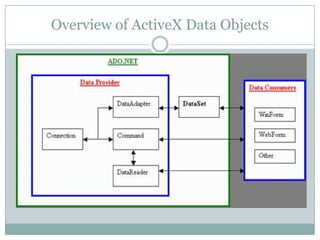
Overview of ActiveX Data Objects
Data Provider
 Data Provider for SQL Server
(System.Data.SqlClient).
 The recommended data provider for SQL Server data
sources is SQL Server
 Data Provider for OLEDB (System.Data.OleDb).
 OLEDB is a COM-based API for database connections. Data
 Provider for ODBC (System.Data.Odbc).
 DODBC is an older standard and is actually not specific to
window you can get Unix-based ODBC
 Data Provider for Oracle (System.Data.OracleClient).
 oracle DB
Components of ADO
 Connection
object (SqlConnection, OleDbConnection, OdbcConnection,
OracleConnection)
 Namespace required
 using System.Data…. ;
 Connection String
 private string constr =" Initial Catalog=Northwind;" + "Data
Source=tempMYSQLSERVER;";
 Create instance of connection
 OleDbConnection con = new OleDbConnection(constr);
 Open Connection
 con.Open();
 Open a connection when you need it, and
 Close it as soon as you have finished with it.
Command
 Command
object (SqlCommand, OleDbCommand, OdbcCom
mand, OracleCommand)
 Deals with databases. It executes SQL commands on a
database. It sends an SQL command to a database that is
specified by an SqlConnection object. We then call instance
methods to physically apply the command to the database.
 ExecuteNonQuery() method
 Executes a SQL statement against the connection and returns the
number of rows affected.
DataReader
 DataReader
object (SqlDataReader, OleDbDataReader, OdbcDat
aReader, OracleDataReader)
 You use the Read method of the DataReader object to
obtain a row from the results of the query. You can access each
column of the returned row by passing the name or ordinal
reference of the column to the DataReader
 SqlDataReader reader = command.ExecuteReader();
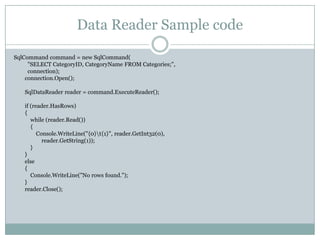
Data Reader Sample code
SqlCommand command = new SqlCommand(
"SELECT CategoryID, CategoryName FROM Categories;",
connection);
connection.Open();
SqlDataReader reader = command.ExecuteReader();
if (reader.HasRows)
{
while (reader.Read())
{
Console.WriteLine("{0}t{1}", reader.GetInt32(0),
reader.GetString(1));
}
}
else
{
Console.WriteLine("No rows found.");
}
reader.Close();
DataAdapter
 DataAdapter object is like a bridge that links the database and
a Connection object with the ADO.NET-
managedDataSet object through its SELECT and action query
Commands. It specifies what data to move into and out of
theDataSet
 The DataAdapter provides four properties that allow us to
control how updates are made to the server:
 SelectCommand,UpdateCommand,InsertCommand,DeleteComman
 Fill (populates a DataSet with data).
 FillSchema (queries the database for schema information
that is necessary to update).
 Update (to change the database, DataAdapter calls
the DeleteCommand, the InsertCommand and
theUpdateCommand properties).
DataSet
 The DataSet is similar to an array of
disconnected Recordset objects. It supports disconnected
data access and operations, allowing greater scalability
because you no longer have to be connected to the
database all the time.DataSet is a copy of an extracted
data being downloaded and cached in the client system.
 DataTableCollection object containing null or
multiple DataTable objects (Columns, Rows,
Constraints).
 DataRelationCollection object containing null or
multiple DataRelation objects which establish a
parent/child relation between two DataTable objects.
DataGrid
 Windows Forms DataGrid control displays data in
a series of rows and columns.
 DataGridcontrol provides a user interface
to ADO.NET DataSets.
 displays tabular data and allows for updates to the
data source.
 DataGrid control to a valid data source
 Control will be automatically populated, creating
columns and rows based on the shape of the data.

5.C#

  • 1.
  • 2.
    ADO .net  ADO.NETis the new database technology of the .NET platform, and it builds on Microsoft ActiveX® Data Objects (ADO).  ADO.NET is a set of classes that expose data access services to the .NET developer. The ADO.NET classes are found inSystem.Data.dll  ADO.NET is an primary part of the .NET Framework, providing access to relational data,
  • 3.
    Overview of ActiveXData Objects
  • 4.
    Data Provider  DataProvider for SQL Server (System.Data.SqlClient).  The recommended data provider for SQL Server data sources is SQL Server  Data Provider for OLEDB (System.Data.OleDb).  OLEDB is a COM-based API for database connections. Data  Provider for ODBC (System.Data.Odbc).  DODBC is an older standard and is actually not specific to window you can get Unix-based ODBC  Data Provider for Oracle (System.Data.OracleClient).  oracle DB
  • 5.
    Components of ADO Connection object (SqlConnection, OleDbConnection, OdbcConnection, OracleConnection)  Namespace required  using System.Data…. ;  Connection String  private string constr =" Initial Catalog=Northwind;" + "Data Source=tempMYSQLSERVER;";  Create instance of connection  OleDbConnection con = new OleDbConnection(constr);  Open Connection  con.Open();  Open a connection when you need it, and  Close it as soon as you have finished with it.
  • 6.
    Command  Command object (SqlCommand,OleDbCommand, OdbcCom mand, OracleCommand)  Deals with databases. It executes SQL commands on a database. It sends an SQL command to a database that is specified by an SqlConnection object. We then call instance methods to physically apply the command to the database.  ExecuteNonQuery() method  Executes a SQL statement against the connection and returns the number of rows affected.
  • 7.
    DataReader  DataReader object (SqlDataReader,OleDbDataReader, OdbcDat aReader, OracleDataReader)  You use the Read method of the DataReader object to obtain a row from the results of the query. You can access each column of the returned row by passing the name or ordinal reference of the column to the DataReader  SqlDataReader reader = command.ExecuteReader();
  • 8.
    Data Reader Samplecode SqlCommand command = new SqlCommand( "SELECT CategoryID, CategoryName FROM Categories;", connection); connection.Open(); SqlDataReader reader = command.ExecuteReader(); if (reader.HasRows) { while (reader.Read()) { Console.WriteLine("{0}t{1}", reader.GetInt32(0), reader.GetString(1)); } } else { Console.WriteLine("No rows found."); } reader.Close();
  • 9.
    DataAdapter  DataAdapter objectis like a bridge that links the database and a Connection object with the ADO.NET- managedDataSet object through its SELECT and action query Commands. It specifies what data to move into and out of theDataSet  The DataAdapter provides four properties that allow us to control how updates are made to the server:  SelectCommand,UpdateCommand,InsertCommand,DeleteComman  Fill (populates a DataSet with data).  FillSchema (queries the database for schema information that is necessary to update).  Update (to change the database, DataAdapter calls the DeleteCommand, the InsertCommand and theUpdateCommand properties).
  • 10.
    DataSet  The DataSetis similar to an array of disconnected Recordset objects. It supports disconnected data access and operations, allowing greater scalability because you no longer have to be connected to the database all the time.DataSet is a copy of an extracted data being downloaded and cached in the client system.  DataTableCollection object containing null or multiple DataTable objects (Columns, Rows, Constraints).  DataRelationCollection object containing null or multiple DataRelation objects which establish a parent/child relation between two DataTable objects.
  • 11.
    DataGrid  Windows FormsDataGrid control displays data in a series of rows and columns.  DataGridcontrol provides a user interface to ADO.NET DataSets.  displays tabular data and allows for updates to the data source.  DataGrid control to a valid data source  Control will be automatically populated, creating columns and rows based on the shape of the data.