Achieving Compliances with MongoDB
Security
Presented by
MADHU SAI VAVILALA
Associate DB Engineer
Mydbops
Agenda
➔ Importance of Data Security
➔ Security Triad (C.I.A)
➔ A.A.A.
➔ Data Encryption at Rest
➔ TLS & SSL
➔ CSFLE
➔ Queryable Encryption
➔ MongoDB Security Recommendations
History Of DataBase
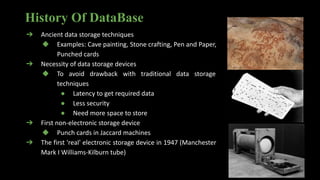
➔ Ancient data storage techniques
◆ Examples: Cave painting, Stone crafting, Pen and Paper,
Punched cards
➔ Necessity of data storage devices
◆ To avoid drawback with traditional data storage
techniques
● Latency to get required data
● Less security
● Need more space to store
➔ First non-electronic storage device
◆ Punch cards in Jaccard machines
➔ The first 'real' electronic storage device in 1947 (Manchester
Mark I Williams-Kilburn tube)
Importance of Data Security
➔ Ransomware Attack on 22,000 DB’s in 2020
➔ Security less MongoDB instances 308,000 at Q1 2021
➔ Q1 of 2022, 12 % instances peaked in the list
➔ IOT - Security = Internet Of Threats
➔ “ Privacy is not a right, it is an absolute necessity. ”
➔ Data is a costlier assert
➔ Avoid illegal access
➔ Protect from data corruption
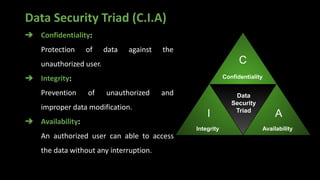
Data Security Triad (C.I.A)
➔ Confidentiality:
Protection of data against the
unauthorized user.
➔ Integrity:
Prevention of unauthorized and
improper data modification.
➔ Availability:
An authorized user can able to access
the data without any interruption.
Confidentiality
Integrity Availability
C
A
I
Data
Security
Triad
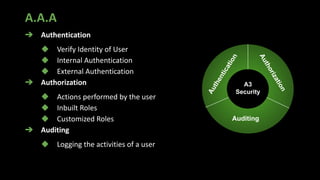
A.A.A
➔ Authentication
◆ Verify Identity of User
◆ Internal Authentication
◆ External Authentication
➔ Authorization
◆ Actions performed by the user
◆ Inbuilt Roles
◆ Customized Roles
➔ Auditing
◆ Logging the activities of a user
Auditing
A
u
t
h
e
n
t
i
c
a
t
i
o
n
A
u
t
h
o
r
i
z
a
t
i
o
n
A3
Security
Brief Info About MongoDB
➔ NoSql DataBase
➔ Schema less
➔ Document-oriented
➔ JSON structure
➔ Supports BSON structure
➔ Terminology b/w RDBMS and MongoDB
◆ Table = Collection
◆ Row = Document
◆ Column = Key
➔ Scalability
MongoDB
Authentication
➔ Purposes of Authentication
◆ Connect a valid user
◆ Verify the proof of user
◆ Safe from the attackers
➔ Authentication Mechanisms
◆ SCRAM (Default)
◆ x.509 Certificate
◆ LDAP
◆ Kerberos
Enable Authentication in MongoDB
➔ Start MongoDB without authentication option
in config file.
➔ Connect to the server using the mongo shell
➔ Create an administrator in the admin database
with a root access.
➔ Exit from the mongo shell.
➔ Restart the MongoDB after adding the
authentication option in MongoDB config file.
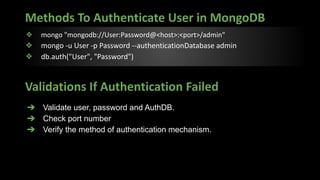
Methods To Authenticate User in MongoDB
❖ mongo "mongodb://User:Password@<host>:<port>/admin"
❖ mongo -u User -p Password --authenticationDatabase admin
❖ db.auth("User", "Password")
➔ Validate user, password and AuthDB.
➔ Check port number
➔ Verify the method of authentication mechanism.
Validations If Authentication Failed
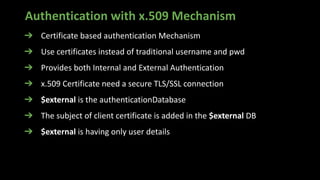
Authentication with x.509 Mechanism
➔ Certificate based authentication Mechanism
➔ Use certificates instead of traditional username and pwd
➔ Provides both Internal and External Authentication
➔ x.509 Certificate need a secure TLS/SSL connection
➔ $external is the authenticationDatabase
➔ The subject of client certificate is added in the $external DB
➔ $external is having only user details
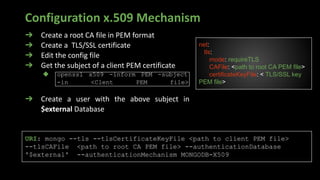
Configuration x.509 Mechanism
➔ Create a root CA file in PEM format
➔ Create a TLS/SSL certificate
➔ Edit the config file
➔ Get the subject of a client PEM certificate
◆ openssl x509 -inform PEM -subject
-in <Clent PEM file>
➔ Create a user with the above subject in
$external Database
net:
tls:
mode: requireTLS
CAFile: <path to root CA PEM file>
certificateKeyFile: < TLS/SSL key
PEM file>
URI: mongo --tls --tlsCertificateKeyFile <path to client PEM file>
--tlsCAFile <path to root CA PEM file> --authenticationDatabase
'$external' --authenticationMechanism MONGODB-X509
Authorization
➔ Given who you are, what can you do?
➔ Allows user to perform the specified actions.
➔ Advantage
◆ Improved efficiency.
➔ Role Based Access Control
◆ Provide access to the user based on the actions performed.
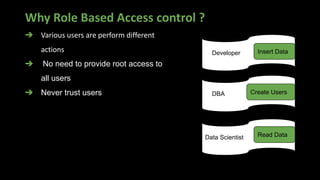
Why Role Based Access control ?
Developer Insert Data
DBA Create Users
Data Scientist Read Data
➔ Various users are perform different
actions
➔ No need to provide root access to
all users
➔ Never trust users
Roles in MongoDB
Role: A detailed object consists of Actions with
privileges performed on resources.
Actions: Performable Activities.
Resources: The data on which the User going
to do activities.
> use admin
> db.createRole(
{
role: "dropCollectionUser",
privileges: [
{
actions: [ "dropCollection" ],
resource: { db: "DB",
collection: "" }
}
],
roles: []
}
)
Built-In Roles in MongoDB
DataBase User
[ read, readWrite ]
DataBase Admin
[ dbAdmin, userAdmin, dbOwner ]
SuperUser
[ root ]
Cluster Admin
[ ClusterManager, ClusterMonitor,
hostManager, ClusterAdmin ]
BackUp/Restore
[ backup, restore ]
All Database
[ readAnyDatabase,
readWriteAnyDatabase ]
DEMO For Authentication &
Authentication
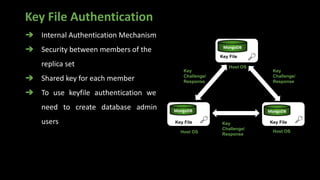
Key File Authentication
➔ Internal Authentication Mechanism
➔ Security between members of the
replica set
➔ Shared key for each member
➔ To use keyfile authentication we
need to create database admin
users
Host OS
Key File
Key
Challenge/
Response
Host OS
Key File
MongoDB
Host OS
Key File
MongoDB MongoDB
Key
Challenge/
Response
Key
Challenge/
Response
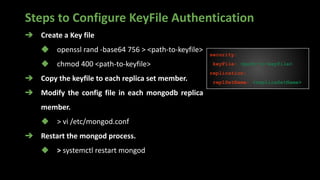
Steps to Configure KeyFile Authentication
➔ Create a Key file
◆ openssl rand -base64 756 > <path-to-keyfile>
◆ chmod 400 <path-to-keyfile>
➔ Copy the keyfile to each replica set member.
➔ Modify the config file in each mongodb replica
member.
◆ > vi /etc/mongod.conf
➔ Restart the mongod process.
◆ > systemctl restart mongod
security:
keyFile: <path-to-keyfile>
replication:
replSetName: <replicaSetName>
It’s Nice To Know. Is
There Any Feature
Available in MONGODB
For Monitoring The
Users Activities ?
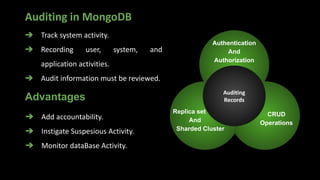
Auditing in MongoDB
➔ Track system activity.
➔ Recording user, system, and
application activities.
➔ Audit information must be reviewed.
Auditing
Records
Authentication
And
Authorization
Replica set
And
Sharded Cluster
CRUD
Operations
➔ Add accountability.
➔ Instigate Suspesious Activity.
➔ Monitor dataBase Activity.
Advantages
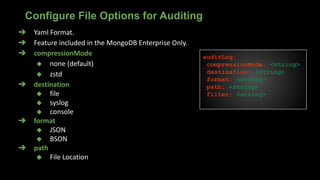
➔ Yaml Format.
➔ Feature included in the MongoDB Enterprise Only.
➔ compressionMode
◆ none (default)
◆ zstd
➔ destination
◆ file
◆ syslog
◆ console
➔ format
◆ JSON
◆ BSON
➔ path
◆ File Location
Configure File Options for Auditing
auditLog:
compressionMode: <string>
destination: <string>
format: <string>
path: <string>
filter: <string>
➔ Filter limit the types of operations
➔ Use Query selectors
➔ Allows regular Expressions
➔ Syntax
filter: { <field>: <expression1> }
Filter Option In Auditing
filter:{
atype: "authCheck",
"param.command":{
$in: [ "find", "insert", "delete", "update",
"findandmodify"]}
},
auditAuthorizationSuccess: true
All
Operations
Filtered
Operations
Stored to
Destination
File
Example
Audit Message Structure
{
atype: <string>, # Action type
ts : { $date: <timestamp> },
uuid : { $binary: <string>, $type: <string> },
local: { ip: <string>, port: <int> || isSystemUser: <boolean> || unix:
<string> },
remote: { ip: <string>, port: <int> || isSystemUser: <boolean> || unix:
<string> },
users : [ { user: <string>, db: <string> }, ... ],
roles: [ { role: <string>, db: <string> }, ... ],
param: <document>,
result: <int>
}
Versions vs Features
➔ Available from 2.6v
➔ MongoDB Enterprise and Atlas
➔ Filter option available from 3.0v
➔ Starting 5.0 a feature available that runtime audit configuration
and filter management.
➔ Starting 5.0 a UUID is added to the audit message.
➔ 5.3v auditLog.compressionMode → used to compress audit log.
➔ 6.0v onwards audit log encryption is available.
Achieving Auditing Feature with Community
➔ Percona server for MongoDB
➔ All features are same with MongoDB Enterprise
server
➔ Only Difference is UUID is not added in percona
MongoDB
➔ Free of cost
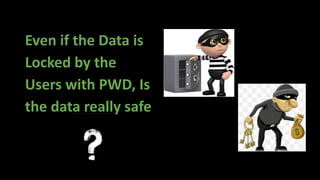
Even if the Data is
Locked by the
Users with PWD, Is
the data really safe
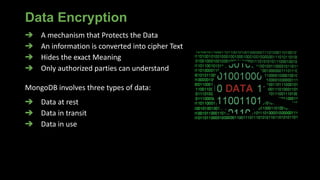
Data Encryption
➔ A mechanism that Protects the Data
➔ An information is converted into cipher Text
➔ Hides the exact Meaning
➔ Only authorized parties can understand
MongoDB involves three types of data:
➔ Data at rest
➔ Data in transit
➔ Data in use
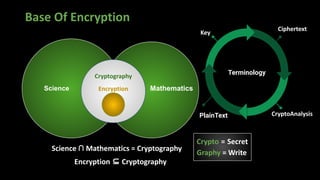
Base Of Encryption
Science Mathematics
Cryptography
Encryption
Science ∩ Mathematics = Cryptography
Encryption ⊆ Cryptography
Key
PlainText CryptoAnalysis
Ciphertext
Terminology
Crypto = Secret
Graphy = Write
Data Encryption at Rest
➔ WiredTiger storage engine have native encryption.
➔ cipher algorithm i.e AES256-GCM
➔ This cipher algorithm support for linux.
➔ Involve symmetric key
➔ Options for sourcing master key
◆ Via 3rd party Key Management Appliance using KMIP
(Key Management Interoperability Protocol )
◆ Keyfile on local system (Not recommendable)
➔ Use unique individual keys for every node in a replica set.
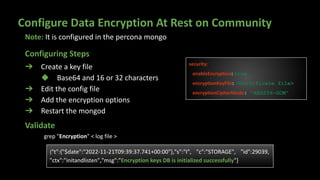
Configure Data Encryption At Rest on Community
➔ Create a key file
◆ Base64 and 16 or 32 characters
➔ Edit the config file
➔ Add the encryption options
➔ Restart the mongod
security:
enableEncryption: true
encryptionKeyFile: <Certificate file>
encryptionCipherMode: "AES256-GCM"
{"t":{"$date":"2022-11-21T09:39:37.741+00:00"},"s":"I", "c":"STORAGE", "id":29039,
"ctx":"initandlisten","msg":"Encryption keys DB is initialized successfully"}
Validate
Configuring Steps
Note: It is configured in the percona mongo
grep "Encryption" < log file >
Ok!! Now the data is
safe at rest.
But what about
safety while Transit ?
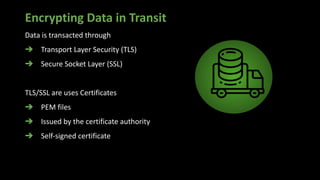
Encrypting Data in Transit
Data is transacted through
➔ Transport Layer Security (TLS)
➔ Secure Socket Layer (SSL)
TLS/SSL are uses Certificates
➔ PEM files
➔ Issued by the certificate authority
➔ Self-signed certificate
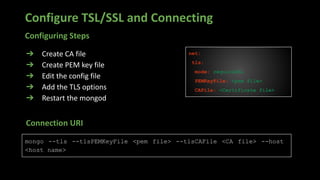
Configure TSL/SSL and Connecting
➔ Create CA file
➔ Create PEM key file
➔ Edit the config file
➔ Add the TLS options
➔ Restart the mongod
net:
tls:
mode: requireSSL
PEMKeyFile: <pem file>
CAFile: <Certificate file>
mongo --tls --tlsPEMKeyFile <pem file> --tlsCAFile <CA file> --host
<host name>
Connection URI
Configuring Steps
A sample Demo To Implement Transit
Encryption with Percona MongoDB
Ok!! Good !
Now the data is safe
at transit.
But what about
safety while Using ?
Client Side Field Level Encryption
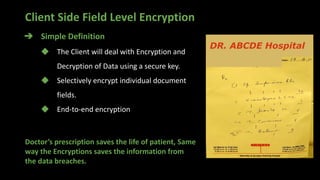
➔ Simple Definition
◆ The Client will deal with Encryption and
Decryption of Data using a secure key.
◆ Selectively encrypt individual document
fields.
◆ End-to-end encryption
Doctor’s prescription saves the life of patient, Same
way the Encryptions saves the information from
the data breaches.
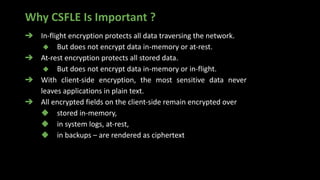
Why CSFLE Is Important ?
➔ In-flight encryption protects all data traversing the network.
◆ But does not encrypt data in-memory or at-rest.
➔ At-rest encryption protects all stored data.
◆ But does not encrypt data in-memory or in-flight.
➔ With client-side encryption, the most sensitive data never
leaves applications in plain text.
➔ All encrypted fields on the client-side remain encrypted over
◆ stored in-memory,
◆ in system logs, at-rest,
◆ in backups – are rendered as ciphertext
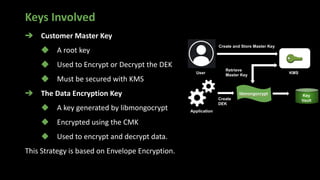
Keys Involved
➔ Customer Master Key
◆ A root key
◆ Used to Encrypt or Decrypt the DEK
◆ Must be secured with KMS
➔ The Data Encryption Key
◆ A key generated by libmongocrypt
◆ Encrypted using the CMK
◆ Used to encrypt and decrypt data.
This Strategy is based on Envelope Encryption.
Process Of FLE
User
KMS
MongoDB Driver
MongoDB
MongoDB Server
1
2 3
4
5
6
db.coll.find({
Pin: “123”
}) Encrypted Search Key:“***”
{ Name: ‘A’,
age: 16
Pin: “***” }
{
Name: ‘A’,
age: 16
Pin: “123”
}
Process Of FLE
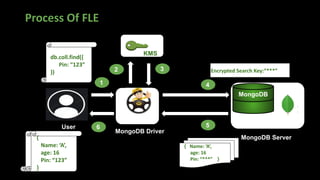
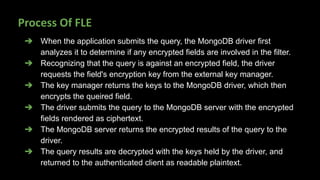
➔ When the application submits the query, the MongoDB driver first
analyzes it to determine if any encrypted fields are involved in the filter.
➔ Recognizing that the query is against an encrypted field, the driver
requests the field's encryption key from the external key manager.
➔ The key manager returns the keys to the MongoDB driver, which then
encrypts the queired field.
➔ The driver submits the query to the MongoDB server with the encrypted
fields rendered as ciphertext.
➔ The MongoDB server returns the encrypted results of the query to the
driver.
➔ The query results are decrypted with the keys held by the driver, and
returned to the authenticated client as readable plaintext.
Availability of CSFLE
➔ Versions: 4.2v +
➔ Divers: 20 + platforms of multiple languages (Node. Js, C, C#,
Python, Java etc.)
➔ Automatic Encryption: MongoDB Atlas and Enterprise versions.
➔ Manual Encryption: MongoDB Atlas and Enterprise versions
and community versions
Configure CSFLE on MongoDB Community
➔ Create a key file i.e CMK
➔ Assine the CMK value to LOCAL_KEY variable
➔ Frame ClientSideFieldLevelEncryptionOptions
➔ Connect to the mongo with above options
➔ Creation of Data Encryption Key
➔ Insert a document and encrypt the any field with
encrypt() function.
Configuring Steps
A sample Demo To Implement CSFLE
with MongoDB Community Server
The data field is encrypted,
well and Good. Then How
to query on the particular
Field even it is having less
cardinality ?
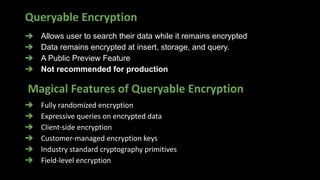
Queryable Encryption
➔ Allows user to search their data while it remains encrypted
➔ Data remains encrypted at insert, storage, and query.
➔ A Public Preview Feature
➔ Not recommended for production
Magical Features of Queryable Encryption
➔ Fully randomized encryption
➔ Expressive queries on encrypted data
➔ Client-side encryption
➔ Customer-managed encryption keys
➔ Industry standard cryptography primitives
➔ Field-level encryption
Scope of Necessity For QE
With the proliferation of different types of data being transmitted and stored in
the cloud, protecting data is increasingly important for companies.
➔ Bank Applications
➔ Stock brokerage firm
➔ Hospitals
➔ Human Resources
➔ Government Applications
➔ E-commerce applications etc.
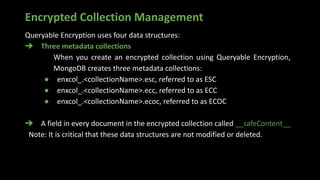
Encrypted Collection Management
Queryable Encryption uses four data structures:
➔ Three metadata collections
When you create an encrypted collection using Queryable Encryption,
MongoDB creates three metadata collections:
● enxcol_.<collectionName>.esc, referred to as ESC
● enxcol_.<collectionName>.ecc, referred to as ECC
● enxcol_.<collectionName>.ecoc, referred to as ECOC
➔ A field in every document in the encrypted collection called __safeContent__
Note: It is critical that these data structures are not modified or deleted.
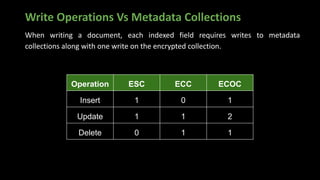
Write Operations Vs Metadata Collections
When writing a document, each indexed field requires writes to metadata
collections along with one write on the encrypted collection.
Operation ESC ECC ECOC
Insert 1 0 1
Update 1 1 2
Delete 0 1 1
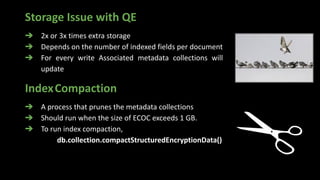
Storage Issue with QE
➔ 2x or 3x times extra storage
➔ Depends on the number of indexed fields per document
➔ For every write Associated metadata collections will
update
IndexCompaction
➔ A process that prunes the metadata collections
➔ Should run when the size of ECOC exceeds 1 GB.
➔ To run index compaction,
db.collection.compactStructuredEncryptionData()
Availability of Queryable Encryption
➔ Versions: 6.0v
➔ Divers: 20 + platforms of multiple languages (Node.Js, C, C#,
Python, Java etc.)
➔ Automatic Encryption: MongoDB Atlas and Enterprise versions.
➔ Manual Encryption: MongoDB Atlas and Enterprise versions
and community versions.
Limitations of QE:
➔ Fully randomized encryption
➔ Manually create a unique Data Encryption Key for each field
➔ Manually run index compaction
➔ Standalone deployments are not supported
➔ Secondary reads are not supported
➔ Encrypted field names are immutable.
➔ Ignores collations
➔ Unique indexes and TTl indexes are not supported.
➔ Don’t support Views, Time Series Collections, or capped collection.
➔ Can’t encrypt _Id
Encryption Performance in MongoDB
➔ Data size α Latency
➔ Consider High load condition
◆ Writes 10% to 20% latency
◆ Reads < 5% (negligible)
➔ Encrypting and decrypting require more resources
➔ WiredTiger storage engine is more suitable. Because
◆ Page level encryption
◆ Throughput operations performs on the exact page only
◆ High performance, scalability, and security
MongoDB Security Recommendations
➔ Don’t directly expose the DB servers to the internet
➔ Avoid using the default port
➔ Use strong passwords
➔ Authenticate with db.auth()
➔ Never use the security.transitionToAuth option in config file.
➔ Limit the user actions, Use customized roles.
➔ Maintain data encryption.
Any
Queries
More questions and queries
info@mydbops.com
THANK YOU

Achieving compliance With MongoDB Security

  • 1.
    Achieving Compliances withMongoDB Security Presented by MADHU SAI VAVILALA Associate DB Engineer Mydbops
  • 2.
    Agenda ➔ Importance ofData Security ➔ Security Triad (C.I.A) ➔ A.A.A. ➔ Data Encryption at Rest ➔ TLS & SSL ➔ CSFLE ➔ Queryable Encryption ➔ MongoDB Security Recommendations
  • 3.
    History Of DataBase ➔Ancient data storage techniques ◆ Examples: Cave painting, Stone crafting, Pen and Paper, Punched cards ➔ Necessity of data storage devices ◆ To avoid drawback with traditional data storage techniques ● Latency to get required data ● Less security ● Need more space to store ➔ First non-electronic storage device ◆ Punch cards in Jaccard machines ➔ The first 'real' electronic storage device in 1947 (Manchester Mark I Williams-Kilburn tube)
  • 4.
    Importance of DataSecurity ➔ Ransomware Attack on 22,000 DB’s in 2020 ➔ Security less MongoDB instances 308,000 at Q1 2021 ➔ Q1 of 2022, 12 % instances peaked in the list ➔ IOT - Security = Internet Of Threats ➔ “ Privacy is not a right, it is an absolute necessity. ” ➔ Data is a costlier assert ➔ Avoid illegal access ➔ Protect from data corruption
  • 5.
    Data Security Triad(C.I.A) ➔ Confidentiality: Protection of data against the unauthorized user. ➔ Integrity: Prevention of unauthorized and improper data modification. ➔ Availability: An authorized user can able to access the data without any interruption. Confidentiality Integrity Availability C A I Data Security Triad
  • 6.
    A.A.A ➔ Authentication ◆ VerifyIdentity of User ◆ Internal Authentication ◆ External Authentication ➔ Authorization ◆ Actions performed by the user ◆ Inbuilt Roles ◆ Customized Roles ➔ Auditing ◆ Logging the activities of a user Auditing A u t h e n t i c a t i o n A u t h o r i z a t i o n A3 Security
  • 7.
    Brief Info AboutMongoDB ➔ NoSql DataBase ➔ Schema less ➔ Document-oriented ➔ JSON structure ➔ Supports BSON structure ➔ Terminology b/w RDBMS and MongoDB ◆ Table = Collection ◆ Row = Document ◆ Column = Key ➔ Scalability MongoDB
  • 8.
    Authentication ➔ Purposes ofAuthentication ◆ Connect a valid user ◆ Verify the proof of user ◆ Safe from the attackers ➔ Authentication Mechanisms ◆ SCRAM (Default) ◆ x.509 Certificate ◆ LDAP ◆ Kerberos
  • 9.
    Enable Authentication inMongoDB ➔ Start MongoDB without authentication option in config file. ➔ Connect to the server using the mongo shell ➔ Create an administrator in the admin database with a root access. ➔ Exit from the mongo shell. ➔ Restart the MongoDB after adding the authentication option in MongoDB config file.
  • 10.
    Methods To AuthenticateUser in MongoDB ❖ mongo "mongodb://User:Password@<host>:<port>/admin" ❖ mongo -u User -p Password --authenticationDatabase admin ❖ db.auth("User", "Password") ➔ Validate user, password and AuthDB. ➔ Check port number ➔ Verify the method of authentication mechanism. Validations If Authentication Failed
  • 11.
    Authentication with x.509Mechanism ➔ Certificate based authentication Mechanism ➔ Use certificates instead of traditional username and pwd ➔ Provides both Internal and External Authentication ➔ x.509 Certificate need a secure TLS/SSL connection ➔ $external is the authenticationDatabase ➔ The subject of client certificate is added in the $external DB ➔ $external is having only user details
  • 12.
    Configuration x.509 Mechanism ➔Create a root CA file in PEM format ➔ Create a TLS/SSL certificate ➔ Edit the config file ➔ Get the subject of a client PEM certificate ◆ openssl x509 -inform PEM -subject -in <Clent PEM file> ➔ Create a user with the above subject in $external Database net: tls: mode: requireTLS CAFile: <path to root CA PEM file> certificateKeyFile: < TLS/SSL key PEM file> URI: mongo --tls --tlsCertificateKeyFile <path to client PEM file> --tlsCAFile <path to root CA PEM file> --authenticationDatabase '$external' --authenticationMechanism MONGODB-X509
  • 13.
    Authorization ➔ Given whoyou are, what can you do? ➔ Allows user to perform the specified actions. ➔ Advantage ◆ Improved efficiency. ➔ Role Based Access Control ◆ Provide access to the user based on the actions performed.
  • 14.
    Why Role BasedAccess control ? Developer Insert Data DBA Create Users Data Scientist Read Data ➔ Various users are perform different actions ➔ No need to provide root access to all users ➔ Never trust users
  • 15.
    Roles in MongoDB Role:A detailed object consists of Actions with privileges performed on resources. Actions: Performable Activities. Resources: The data on which the User going to do activities. > use admin > db.createRole( { role: "dropCollectionUser", privileges: [ { actions: [ "dropCollection" ], resource: { db: "DB", collection: "" } } ], roles: [] } )
  • 16.
    Built-In Roles inMongoDB DataBase User [ read, readWrite ] DataBase Admin [ dbAdmin, userAdmin, dbOwner ] SuperUser [ root ] Cluster Admin [ ClusterManager, ClusterMonitor, hostManager, ClusterAdmin ] BackUp/Restore [ backup, restore ] All Database [ readAnyDatabase, readWriteAnyDatabase ]
  • 17.
    DEMO For Authentication& Authentication
  • 18.
    Key File Authentication ➔Internal Authentication Mechanism ➔ Security between members of the replica set ➔ Shared key for each member ➔ To use keyfile authentication we need to create database admin users Host OS Key File Key Challenge/ Response Host OS Key File MongoDB Host OS Key File MongoDB MongoDB Key Challenge/ Response Key Challenge/ Response
  • 19.
    Steps to ConfigureKeyFile Authentication ➔ Create a Key file ◆ openssl rand -base64 756 > <path-to-keyfile> ◆ chmod 400 <path-to-keyfile> ➔ Copy the keyfile to each replica set member. ➔ Modify the config file in each mongodb replica member. ◆ > vi /etc/mongod.conf ➔ Restart the mongod process. ◆ > systemctl restart mongod security: keyFile: <path-to-keyfile> replication: replSetName: <replicaSetName>
  • 20.
    It’s Nice ToKnow. Is There Any Feature Available in MONGODB For Monitoring The Users Activities ?
  • 21.
    Auditing in MongoDB ➔Track system activity. ➔ Recording user, system, and application activities. ➔ Audit information must be reviewed. Auditing Records Authentication And Authorization Replica set And Sharded Cluster CRUD Operations ➔ Add accountability. ➔ Instigate Suspesious Activity. ➔ Monitor dataBase Activity. Advantages
  • 22.
    ➔ Yaml Format. ➔Feature included in the MongoDB Enterprise Only. ➔ compressionMode ◆ none (default) ◆ zstd ➔ destination ◆ file ◆ syslog ◆ console ➔ format ◆ JSON ◆ BSON ➔ path ◆ File Location Configure File Options for Auditing auditLog: compressionMode: <string> destination: <string> format: <string> path: <string> filter: <string>
  • 23.
    ➔ Filter limitthe types of operations ➔ Use Query selectors ➔ Allows regular Expressions ➔ Syntax filter: { <field>: <expression1> } Filter Option In Auditing filter:{ atype: "authCheck", "param.command":{ $in: [ "find", "insert", "delete", "update", "findandmodify"]} }, auditAuthorizationSuccess: true All Operations Filtered Operations Stored to Destination File Example
  • 24.
    Audit Message Structure { atype:<string>, # Action type ts : { $date: <timestamp> }, uuid : { $binary: <string>, $type: <string> }, local: { ip: <string>, port: <int> || isSystemUser: <boolean> || unix: <string> }, remote: { ip: <string>, port: <int> || isSystemUser: <boolean> || unix: <string> }, users : [ { user: <string>, db: <string> }, ... ], roles: [ { role: <string>, db: <string> }, ... ], param: <document>, result: <int> }
  • 25.
    Versions vs Features ➔Available from 2.6v ➔ MongoDB Enterprise and Atlas ➔ Filter option available from 3.0v ➔ Starting 5.0 a feature available that runtime audit configuration and filter management. ➔ Starting 5.0 a UUID is added to the audit message. ➔ 5.3v auditLog.compressionMode → used to compress audit log. ➔ 6.0v onwards audit log encryption is available.
  • 26.
    Achieving Auditing Featurewith Community ➔ Percona server for MongoDB ➔ All features are same with MongoDB Enterprise server ➔ Only Difference is UUID is not added in percona MongoDB ➔ Free of cost
  • 27.
    Even if theData is Locked by the Users with PWD, Is the data really safe
  • 28.
    Data Encryption ➔ Amechanism that Protects the Data ➔ An information is converted into cipher Text ➔ Hides the exact Meaning ➔ Only authorized parties can understand MongoDB involves three types of data: ➔ Data at rest ➔ Data in transit ➔ Data in use
  • 29.
    Base Of Encryption ScienceMathematics Cryptography Encryption Science ∩ Mathematics = Cryptography Encryption ⊆ Cryptography Key PlainText CryptoAnalysis Ciphertext Terminology Crypto = Secret Graphy = Write
  • 30.
    Data Encryption atRest ➔ WiredTiger storage engine have native encryption. ➔ cipher algorithm i.e AES256-GCM ➔ This cipher algorithm support for linux. ➔ Involve symmetric key ➔ Options for sourcing master key ◆ Via 3rd party Key Management Appliance using KMIP (Key Management Interoperability Protocol ) ◆ Keyfile on local system (Not recommendable) ➔ Use unique individual keys for every node in a replica set.
  • 31.
    Configure Data EncryptionAt Rest on Community ➔ Create a key file ◆ Base64 and 16 or 32 characters ➔ Edit the config file ➔ Add the encryption options ➔ Restart the mongod security: enableEncryption: true encryptionKeyFile: <Certificate file> encryptionCipherMode: "AES256-GCM" {"t":{"$date":"2022-11-21T09:39:37.741+00:00"},"s":"I", "c":"STORAGE", "id":29039, "ctx":"initandlisten","msg":"Encryption keys DB is initialized successfully"} Validate Configuring Steps Note: It is configured in the percona mongo grep "Encryption" < log file >
  • 32.
    Ok!! Now thedata is safe at rest. But what about safety while Transit ?
  • 33.
    Encrypting Data inTransit Data is transacted through ➔ Transport Layer Security (TLS) ➔ Secure Socket Layer (SSL) TLS/SSL are uses Certificates ➔ PEM files ➔ Issued by the certificate authority ➔ Self-signed certificate
  • 34.
    Configure TSL/SSL andConnecting ➔ Create CA file ➔ Create PEM key file ➔ Edit the config file ➔ Add the TLS options ➔ Restart the mongod net: tls: mode: requireSSL PEMKeyFile: <pem file> CAFile: <Certificate file> mongo --tls --tlsPEMKeyFile <pem file> --tlsCAFile <CA file> --host <host name> Connection URI Configuring Steps
  • 35.
    A sample DemoTo Implement Transit Encryption with Percona MongoDB
  • 36.
    Ok!! Good ! Nowthe data is safe at transit. But what about safety while Using ?
  • 37.
    Client Side FieldLevel Encryption ➔ Simple Definition ◆ The Client will deal with Encryption and Decryption of Data using a secure key. ◆ Selectively encrypt individual document fields. ◆ End-to-end encryption Doctor’s prescription saves the life of patient, Same way the Encryptions saves the information from the data breaches.
  • 38.
    Why CSFLE IsImportant ? ➔ In-flight encryption protects all data traversing the network. ◆ But does not encrypt data in-memory or at-rest. ➔ At-rest encryption protects all stored data. ◆ But does not encrypt data in-memory or in-flight. ➔ With client-side encryption, the most sensitive data never leaves applications in plain text. ➔ All encrypted fields on the client-side remain encrypted over ◆ stored in-memory, ◆ in system logs, at-rest, ◆ in backups – are rendered as ciphertext
  • 39.
    Keys Involved ➔ CustomerMaster Key ◆ A root key ◆ Used to Encrypt or Decrypt the DEK ◆ Must be secured with KMS ➔ The Data Encryption Key ◆ A key generated by libmongocrypt ◆ Encrypted using the CMK ◆ Used to encrypt and decrypt data. This Strategy is based on Envelope Encryption.
  • 40.
    Process Of FLE User KMS MongoDBDriver MongoDB MongoDB Server 1 2 3 4 5 6 db.coll.find({ Pin: “123” }) Encrypted Search Key:“***” { Name: ‘A’, age: 16 Pin: “***” } { Name: ‘A’, age: 16 Pin: “123” }
  • 41.
    Process Of FLE ➔When the application submits the query, the MongoDB driver first analyzes it to determine if any encrypted fields are involved in the filter. ➔ Recognizing that the query is against an encrypted field, the driver requests the field's encryption key from the external key manager. ➔ The key manager returns the keys to the MongoDB driver, which then encrypts the queired field. ➔ The driver submits the query to the MongoDB server with the encrypted fields rendered as ciphertext. ➔ The MongoDB server returns the encrypted results of the query to the driver. ➔ The query results are decrypted with the keys held by the driver, and returned to the authenticated client as readable plaintext.
  • 42.
    Availability of CSFLE ➔Versions: 4.2v + ➔ Divers: 20 + platforms of multiple languages (Node. Js, C, C#, Python, Java etc.) ➔ Automatic Encryption: MongoDB Atlas and Enterprise versions. ➔ Manual Encryption: MongoDB Atlas and Enterprise versions and community versions
  • 43.
    Configure CSFLE onMongoDB Community ➔ Create a key file i.e CMK ➔ Assine the CMK value to LOCAL_KEY variable ➔ Frame ClientSideFieldLevelEncryptionOptions ➔ Connect to the mongo with above options ➔ Creation of Data Encryption Key ➔ Insert a document and encrypt the any field with encrypt() function. Configuring Steps
  • 44.
    A sample DemoTo Implement CSFLE with MongoDB Community Server
  • 45.
    The data fieldis encrypted, well and Good. Then How to query on the particular Field even it is having less cardinality ?
  • 46.
    Queryable Encryption ➔ Allowsuser to search their data while it remains encrypted ➔ Data remains encrypted at insert, storage, and query. ➔ A Public Preview Feature ➔ Not recommended for production Magical Features of Queryable Encryption ➔ Fully randomized encryption ➔ Expressive queries on encrypted data ➔ Client-side encryption ➔ Customer-managed encryption keys ➔ Industry standard cryptography primitives ➔ Field-level encryption
  • 47.
    Scope of NecessityFor QE With the proliferation of different types of data being transmitted and stored in the cloud, protecting data is increasingly important for companies. ➔ Bank Applications ➔ Stock brokerage firm ➔ Hospitals ➔ Human Resources ➔ Government Applications ➔ E-commerce applications etc.
  • 48.
    Encrypted Collection Management QueryableEncryption uses four data structures: ➔ Three metadata collections When you create an encrypted collection using Queryable Encryption, MongoDB creates three metadata collections: ● enxcol_.<collectionName>.esc, referred to as ESC ● enxcol_.<collectionName>.ecc, referred to as ECC ● enxcol_.<collectionName>.ecoc, referred to as ECOC ➔ A field in every document in the encrypted collection called __safeContent__ Note: It is critical that these data structures are not modified or deleted.
  • 49.
    Write Operations VsMetadata Collections When writing a document, each indexed field requires writes to metadata collections along with one write on the encrypted collection. Operation ESC ECC ECOC Insert 1 0 1 Update 1 1 2 Delete 0 1 1
  • 50.
    Storage Issue withQE ➔ 2x or 3x times extra storage ➔ Depends on the number of indexed fields per document ➔ For every write Associated metadata collections will update IndexCompaction ➔ A process that prunes the metadata collections ➔ Should run when the size of ECOC exceeds 1 GB. ➔ To run index compaction, db.collection.compactStructuredEncryptionData()
  • 51.
    Availability of QueryableEncryption ➔ Versions: 6.0v ➔ Divers: 20 + platforms of multiple languages (Node.Js, C, C#, Python, Java etc.) ➔ Automatic Encryption: MongoDB Atlas and Enterprise versions. ➔ Manual Encryption: MongoDB Atlas and Enterprise versions and community versions.
  • 52.
    Limitations of QE: ➔Fully randomized encryption ➔ Manually create a unique Data Encryption Key for each field ➔ Manually run index compaction ➔ Standalone deployments are not supported ➔ Secondary reads are not supported ➔ Encrypted field names are immutable. ➔ Ignores collations ➔ Unique indexes and TTl indexes are not supported. ➔ Don’t support Views, Time Series Collections, or capped collection. ➔ Can’t encrypt _Id
  • 53.
    Encryption Performance inMongoDB ➔ Data size α Latency ➔ Consider High load condition ◆ Writes 10% to 20% latency ◆ Reads < 5% (negligible) ➔ Encrypting and decrypting require more resources ➔ WiredTiger storage engine is more suitable. Because ◆ Page level encryption ◆ Throughput operations performs on the exact page only ◆ High performance, scalability, and security
  • 54.
    MongoDB Security Recommendations ➔Don’t directly expose the DB servers to the internet ➔ Avoid using the default port ➔ Use strong passwords ➔ Authenticate with db.auth() ➔ Never use the security.transitionToAuth option in config file. ➔ Limit the user actions, Use customized roles. ➔ Maintain data encryption.
  • 55.
    Any Queries More questions andqueries info@mydbops.com
  • 56.