Your host & some logistics
I'm Jean-Jérôme from the Severalnines Team and I'm
your host for today's webinar!
Feel free to ask any questions in the Questions section of
this application or via the Chat box.
You can also contact me directly via the chat box or via
email: jj@severalnines.com during or after the webinar.
About Severalnines and ClusterControl
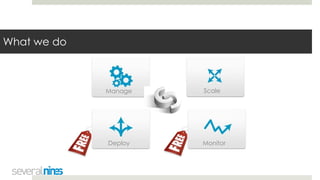
What we do
Manage Scale
MonitorDeploy
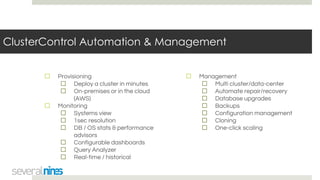
ClusterControl Automation & Management
☐ Provisioning
☐ Deploy a cluster in minutes
☐ On-premises or in the cloud
(AWS)
☐ Monitoring
☐ Systems view
☐ 1sec resolution
☐ DB / OS stats & performance
advisors
☐ Configurable dashboards
☐ Query Analyzer
☐ Real-time / historical
☐ Management
☐ Multi cluster/data-center
☐ Automate repair/recovery
☐ Database upgrades
☐ Backups
☐ Configuration management
☐ Cloning
☐ One-click scaling
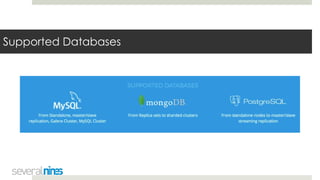
Supported Databases
Customers
MongoDB Security
How to Secure MongoDB (with ClusterControl)
Art van Scheppingen, Senior Support Engineer
Agenda
☐ What is the MongoDB ransom hack?
☐ What other security threats are valid for MongoDB?
☐ How to secure MongoDB from ransomware
☐ Try to hack yourself
☐ ClusterControl MongoDB security advisors
☐ Live Demo
What is the MongoDB ransom hack?
What is the news about?
☐ 40,000 public MongoDB servers found vulnerable in 2015
☐ Any user is admin
☐ Discovery by the University of Saarland in Germany
☐ Nothing happened for almost two years
☐ Someone rediscovers the vulnerability and hijacks servers
What is this vulnerability exactly?
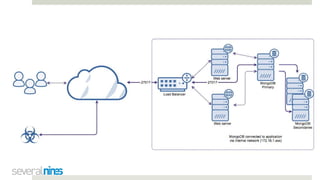
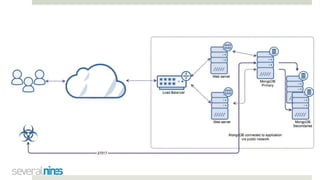
☐ Default binding to every network interface (0.0.0.0)
☐ From MongoDB 3.0 onwards, changed to 127.0.0.1
☐ Often changed by a sysadmin/dba/devops in multi tenant env
☐ Default ports
☐ 27017 / 27018 / 27019
☐ Authentication and authorization disabled by default
☐ With authentication disabled, anyone is admin
☐ Exposed publicly on (cloud) hosts without firewall rules
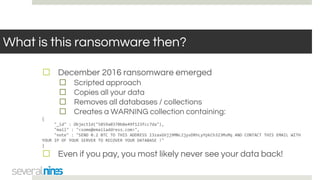
What is this ransomware then?
☐ December 2016 ransomware emerged
☐ Scripted approach
☐ Copies all your data
☐ Removes all databases / collections
☐ Creates a WARNING collection containing:
{
"_id" : ObjectId("5859a0370b8e49f123fcc7da"),
"mail" : "<some@emailaddress.com>",
"note" : "SEND 0.2 BTC TO THIS ADDRESS 13zaxGVjj9MNc2jyvDRhLyYpkCh323MsMq AND CONTACT THIS EMAIL WITH
YOUR IP OF YOUR SERVER TO RECOVER YOUR DATABASE !"
}
☐ Even if you pay, you most likely never see your data back!
Is MongoDB at fault here?
☐ Default behaviour
☐ Well documented default settings
☐ Deliberately exposed by users with MongoDB 3.0 onwards
☐ MongoDB security guide certainly not followed up
☐ Is MongoDB at fault here?
Who is targeted by the ransomware?
☐ MongoDB instances with a combination of this:
☐ Bound to a public interface
☐ Bound to a default port
☐ No (or weak) authentication enabled
☐ No firewall rules or security groups in place
☐ Ransomware scans hosts for (default) ports that respond
☐ Identifies MongoDB instances
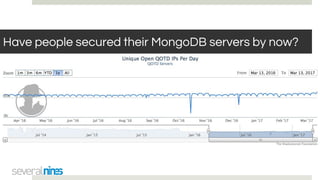
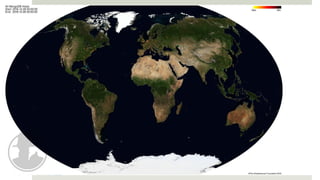
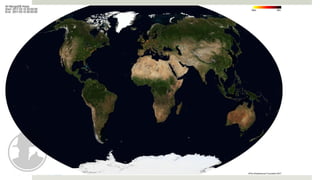
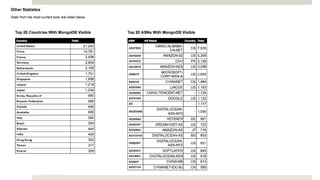
Have people secured their MongoDB servers by now?
Other vulnerabilities
HTTP interface
☐ Generally runs on MongoDB port + 1000 (e.g. 28017)
☐ HTTP status interface
☐ Operational data
☐ Logs
☐ Status reports
☐ REST interface
☐ Allows sending commands
☐ Allows receiving data
☐ HTTP interface has been deprecated in MongoDB 3.2
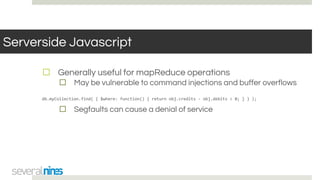
Serverside Javascript
☐ Generally useful for mapReduce operations
☐ May be vulnerable to command injections and buffer overflows
db.myCollection.find( { $where: function() { return obj.credits - obj.debits < 0; } } );
☐ Segfaults can cause a denial of service
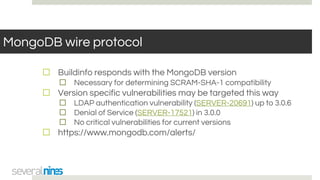
MongoDB wire protocol
☐ Buildinfo responds with the MongoDB version
☐ Necessary for determining SCRAM-SHA-1 compatibility
☐ Version specific vulnerabilities may be targeted this way
☐ LDAP authentication vulnerability (SERVER-20691) up to 3.0.6
☐ Denial of Service (SERVER-17521) in 3.0.0
☐ No critical vulnerabilities for current versions
☐ https://www.mongodb.com/alerts/
Excessive rights
☐ Roles/users are stored in the database you connect to
☐ Local users with userAdmin role
☐ Able to grant admin role to any database they have rights to
☐ Normally you can’t bypass local authentication
☐ Except when you authenticate command line
[user@server ~]$ mongo -u user -p pass --authenticationDatabase test
☐ Or switch databases after authentication
Excessive rights (2)
[user@server ~]$ mongo -u admin -p admin test
mongodb_0:PRIMARY> db.createUser({ user: "user",
pwd: "pass",
roles: [
{ role: "readWrite", db: "test" },
{ role: "userAdmin", db: "test" }
{ role: "userAdmin", db: "exploited" }
]
})
[user@server ~]$ mongo -u user -p pass --authenticationDatabase test
mongodb_0:PRIMARY> db.createUser({ user: "exploit",
pwd: "pass",
roles: [
{ role: "readWrite", db: "exploited" },
{ role: "dbAdmin", db: "exploited" }
]
})
[user@server ~]$ mongo -u exploit -p pass --authenticationDatabase test exploited
mongodb_0:PRIMARY>
How to secure MongoDB from
ransomware
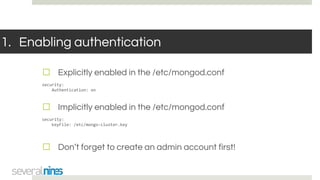
1. Enabling authentication
☐ Explicitly enabled in the /etc/mongod.conf
security:
Authentication: on
☐ Implicitly enabled in the /etc/mongod.conf
security:
keyFile: /etc/mongo-cluster.key
☐ Don’t forget to create an admin account first!
2. Don’t use weak passwords
☐ Enabling authentication will not give 100% protection
☐ Brute force user / password combinations
☐ Easy to guess users / passwords
☐ Scripts can brute force thousands of combinations remotely
☐ Brute force tools are readily available
3. Authorization users by roles
☐ Better create a user per role
☐ Don’t hand out excessive rights
☐ ClusterControl will create a separate admin and backup user
4. Add a replication keyfile
☐ New secondaries can join freely
☐ Only possible from primary with clusterManager or admin role
☐ Without a keyfile any host can join a replicaSet
☐ Keyfiles are not publicly exposed
☐ Enabling replication keyfile will implicitly enable
authentication
☐ Replication keyfiles are enabled by default in ClusterControl
5. Make backups regularly
☐ Ensure to make backups regularly!
☐ In case someone is still able to hack your system
☐ Point in time recovery through the oplog
☐ Oplog can’t be controlled/tampered with remotely
☐ ClusterControl has a great backup interface
☐ (Shard) consistent backups
6. Run MongoDB on a non-standard port
☐ MongoDB default ports are well known to attackers
☐ Setting non-standard ports may deflect fixed port scanners
☐ One line change in the /etc/mongod.conf
net:
port: 17027
☐ ClusterControl allows port customization during deploy time
☐ Post deploy: configuration change (from UI) and restart required
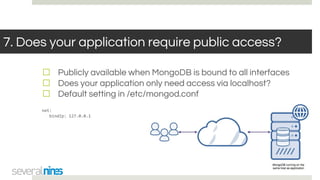
7. Does your application require public access?
☐ Publicly available when MongoDB is bound to all interfaces
☐ Does your application only need access via localhost?
☐ Default setting in /etc/mongod.conf
net:
bindIp: 127.0.0.1
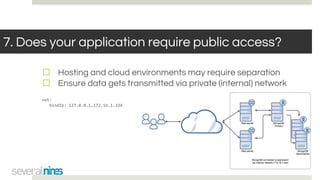
7. Does your application require public access?
☐ Hosting and cloud environments may require separation
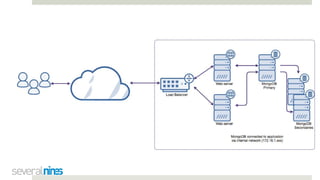
☐ Ensure data gets transmitted via private (internal) network
net:
bindIp: 127.0.0.1,172.16.1.234
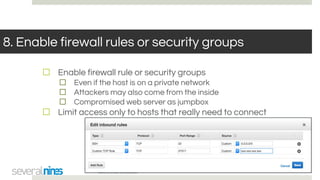
8. Enable firewall rules or security groups
☐ Enable firewall rule or security groups
☐ Even if the host is on a private network
☐ Attackers may also come from the inside
☐ Compromised web server as jumpbox
☐ Limit access only to hosts that really need to connect
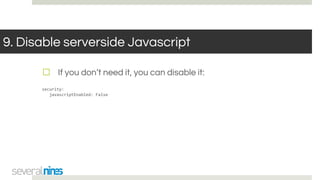
9. Disable serverside Javascript
☐ If you don’t need it, you can disable it:
security:
javascriptEnabled: False
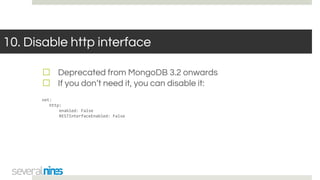
10. Disable http interface
☐ Deprecated from MongoDB 3.2 onwards
☐ If you don’t need it, you can disable it:
net:
http:
enabled: False
RESTInterfaceEnabled: False
Enable audit logging
☐ Enable the audit log, when possible
☐ MongoDB Enterprise
☐ Percona Server MongoDB
☐ Scan for unexpected behaviour:
auditLog:
destination: file
format: BSON
path: /var/lib/mongodb/auditLog.bson
filter: '{ atype: { $in: [ "dropCollection", "dropDatabase", "dropIndexes", "renameCollection" ] } }'
Try to hack yourself
Check for external connectivity
☐ Use an external box (any AWS box would suffice)
☐ Try to telnet to your host
telnet your.host.com 27017
☐ A response indicates MongoDB ports are open
Trying your.host.com...
Connected to your.host.com.
Escape character is '^]'.
Check for external connectivity (2)
☐ Install nmap and scan
[you@host ~]$ sudo yum install nmap
[you@host ~]$ nmap -p 27017 --script mongodb-databases your.host.com
PORT STATE SERVICE REASON
27017/tcp open unknown syn-ack
| mongodb-databases:
| ok = 1
| databases
| 1
| empty = false
| sizeOnDisk = 83886080
| name = test
...
| 2
| empty = true
| sizeOnDisk = 1
| name = admin
|_ totalSize = 167772160
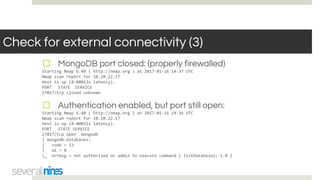
Check for external connectivity (3)
☐ MongoDB port closed: (properly firewalled)
Starting Nmap 6.40 ( http://nmap.org ) at 2017-01-16 14:37 UTC
Nmap scan report for 10.10.22.17
Host is up (0.00013s latency).
PORT STATE SERVICE
27017/tcp closed unknown
☐ Authentication enabled, but port still open:
Starting Nmap 6.40 ( http://nmap.org ) at 2017-01-16 14:36 UTC
Nmap scan report for 10.10.22.17
Host is up (0.00031s latency).
PORT STATE SERVICE
27017/tcp open mongodb
| mongodb-databases:
| code = 13
| ok = 0
|_ errmsg = not authorized on admin to execute command { listDatabases: 1.0 }
☐ MongoDB build information:
[you@host ~]$ nmap -p 27017 --script mongodb-info 10.10.22.17
Starting Nmap 6.40 ( http://nmap.org ) at 2017-01-16 14:37 UTC
Nmap scan report for 10.10.22.17
Host is up (0.00078s latency).
PORT STATE SERVICE
27017/tcp open mongodb
| mongodb-info:
| MongoDB Build info
| javascriptEngine = mozjs
| buildEnvironment
| distmod =
| target_arch = x86_64
…
| openssl
| running = OpenSSL 1.0.1e-fips 11 Feb 2013
| compiled = OpenSSL 1.0.1e-fips 11 Feb 2013
| versionArray
| 1 = 2
| 2 = 11
| 3 = -100
| 0 = 3
| version = 3.2.10-3.0
…
| Server status
| errmsg = not authorized on test to execute command { serverStatus: 1.0 }
| code = 13
|_ ok = 0
Check for excessive privileges
☐ MongoDB authenticates against the database you connect to
☐ Additional rights to other databases may be defined
☐ Connect command line with the authenticationDatabase
☐ Also switching databases will not re-authenticate
use mydatastore
db.createUser(
{
user: "user",
pwd: "password",
roles: [ { role: "readWrite", db: "mysdatastore" },
{ role: "readWrite", db: "admin" } ]
}
);
☐ Notice the additional rights on the admin database!
Check for excessive privileges (2)
☐ Review all privileges of all databases
my_mongodb_0:PRIMARY> use mydatastore
switched to db mydatastore
my_mongodb_0:PRIMARY> db.getUsers();
[
{
"_id" : "mysdatastore.user",
"user" : "user",
"db" : "mysdatastore",
"roles" : [
{
"role" : "readWrite",
"db" : "mysdatastore"
},
{
"role" : "readWrite",
"db" : "admin"
}
]
}
]
ClusterControl MongoDB security features
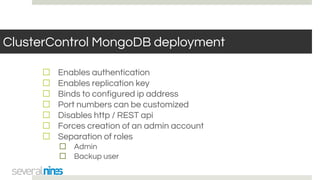
ClusterControl MongoDB deployment
☐ Enables authentication
☐ Enables replication key
☐ Binds to configured ip address
☐ Port numbers can be customized
☐ Disables http / REST api
☐ Forces creation of an admin account
☐ Separation of roles
☐ Admin
☐ Backup user
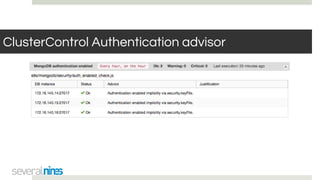
ClusterControl Authentication advisor
☐ Checks if authentication has been enabled
☐ Explicitly
☐ Implicitly (e.g. replication key)
☐ Warns if authentication has been disabled
ClusterControl Authentication advisor
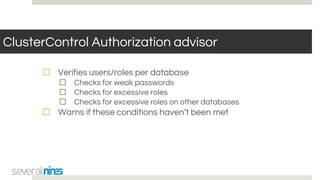
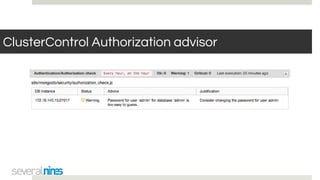
ClusterControl Authorization advisor
☐ Verifies users/roles per database
☐ Checks for weak passwords
☐ Checks for excessive roles
☐ Checks for excessive roles on other databases
☐ Warns if these conditions haven’t been met
ClusterControl Authorization advisor
ClusterControl: live demo
Demo
Q & A
Thank you!
☐ Severalnines Blog on MongoDB
☐ https://severalnines.com/blog-categories/mongodb
☐ ClusterControl for MongoDB
☐ https://severalnines.com/product/clustercontrol/for_mongodb
☐ Download ClusterControl
☐ https://severalnines.com/download-clustercontrol-database-m
anagement-system
☐ Contact: info@severalnines.com

Webinar slides: How to Secure MongoDB with ClusterControl

  • 1.
    Your host &some logistics I'm Jean-Jérôme from the Severalnines Team and I'm your host for today's webinar! Feel free to ask any questions in the Questions section of this application or via the Chat box. You can also contact me directly via the chat box or via email: jj@severalnines.com during or after the webinar.
  • 2.
    About Severalnines andClusterControl
  • 3.
    What we do ManageScale MonitorDeploy
  • 4.
    ClusterControl Automation &Management ☐ Provisioning ☐ Deploy a cluster in minutes ☐ On-premises or in the cloud (AWS) ☐ Monitoring ☐ Systems view ☐ 1sec resolution ☐ DB / OS stats & performance advisors ☐ Configurable dashboards ☐ Query Analyzer ☐ Real-time / historical ☐ Management ☐ Multi cluster/data-center ☐ Automate repair/recovery ☐ Database upgrades ☐ Backups ☐ Configuration management ☐ Cloning ☐ One-click scaling
  • 5.
  • 6.
  • 7.
    MongoDB Security How toSecure MongoDB (with ClusterControl) Art van Scheppingen, Senior Support Engineer
  • 8.
    Agenda ☐ What isthe MongoDB ransom hack? ☐ What other security threats are valid for MongoDB? ☐ How to secure MongoDB from ransomware ☐ Try to hack yourself ☐ ClusterControl MongoDB security advisors ☐ Live Demo
  • 9.
    What is theMongoDB ransom hack?
  • 10.
    What is thenews about? ☐ 40,000 public MongoDB servers found vulnerable in 2015 ☐ Any user is admin ☐ Discovery by the University of Saarland in Germany ☐ Nothing happened for almost two years ☐ Someone rediscovers the vulnerability and hijacks servers
  • 11.
    What is thisvulnerability exactly? ☐ Default binding to every network interface (0.0.0.0) ☐ From MongoDB 3.0 onwards, changed to 127.0.0.1 ☐ Often changed by a sysadmin/dba/devops in multi tenant env ☐ Default ports ☐ 27017 / 27018 / 27019 ☐ Authentication and authorization disabled by default ☐ With authentication disabled, anyone is admin ☐ Exposed publicly on (cloud) hosts without firewall rules
  • 12.
    What is thisransomware then? ☐ December 2016 ransomware emerged ☐ Scripted approach ☐ Copies all your data ☐ Removes all databases / collections ☐ Creates a WARNING collection containing: { "_id" : ObjectId("5859a0370b8e49f123fcc7da"), "mail" : "<some@emailaddress.com>", "note" : "SEND 0.2 BTC TO THIS ADDRESS 13zaxGVjj9MNc2jyvDRhLyYpkCh323MsMq AND CONTACT THIS EMAIL WITH YOUR IP OF YOUR SERVER TO RECOVER YOUR DATABASE !" } ☐ Even if you pay, you most likely never see your data back!
  • 13.
    Is MongoDB atfault here? ☐ Default behaviour ☐ Well documented default settings ☐ Deliberately exposed by users with MongoDB 3.0 onwards ☐ MongoDB security guide certainly not followed up ☐ Is MongoDB at fault here?
  • 14.
    Who is targetedby the ransomware? ☐ MongoDB instances with a combination of this: ☐ Bound to a public interface ☐ Bound to a default port ☐ No (or weak) authentication enabled ☐ No firewall rules or security groups in place ☐ Ransomware scans hosts for (default) ports that respond ☐ Identifies MongoDB instances
  • 18.
    Have people securedtheir MongoDB servers by now?
  • 22.
  • 23.
    HTTP interface ☐ Generallyruns on MongoDB port + 1000 (e.g. 28017) ☐ HTTP status interface ☐ Operational data ☐ Logs ☐ Status reports ☐ REST interface ☐ Allows sending commands ☐ Allows receiving data ☐ HTTP interface has been deprecated in MongoDB 3.2
  • 24.
    Serverside Javascript ☐ Generallyuseful for mapReduce operations ☐ May be vulnerable to command injections and buffer overflows db.myCollection.find( { $where: function() { return obj.credits - obj.debits < 0; } } ); ☐ Segfaults can cause a denial of service
  • 25.
    MongoDB wire protocol ☐Buildinfo responds with the MongoDB version ☐ Necessary for determining SCRAM-SHA-1 compatibility ☐ Version specific vulnerabilities may be targeted this way ☐ LDAP authentication vulnerability (SERVER-20691) up to 3.0.6 ☐ Denial of Service (SERVER-17521) in 3.0.0 ☐ No critical vulnerabilities for current versions ☐ https://www.mongodb.com/alerts/
  • 26.
    Excessive rights ☐ Roles/usersare stored in the database you connect to ☐ Local users with userAdmin role ☐ Able to grant admin role to any database they have rights to ☐ Normally you can’t bypass local authentication ☐ Except when you authenticate command line [user@server ~]$ mongo -u user -p pass --authenticationDatabase test ☐ Or switch databases after authentication
  • 27.
    Excessive rights (2) [user@server~]$ mongo -u admin -p admin test mongodb_0:PRIMARY> db.createUser({ user: "user", pwd: "pass", roles: [ { role: "readWrite", db: "test" }, { role: "userAdmin", db: "test" } { role: "userAdmin", db: "exploited" } ] }) [user@server ~]$ mongo -u user -p pass --authenticationDatabase test mongodb_0:PRIMARY> db.createUser({ user: "exploit", pwd: "pass", roles: [ { role: "readWrite", db: "exploited" }, { role: "dbAdmin", db: "exploited" } ] }) [user@server ~]$ mongo -u exploit -p pass --authenticationDatabase test exploited mongodb_0:PRIMARY>
  • 28.
    How to secureMongoDB from ransomware
  • 29.
    1. Enabling authentication ☐Explicitly enabled in the /etc/mongod.conf security: Authentication: on ☐ Implicitly enabled in the /etc/mongod.conf security: keyFile: /etc/mongo-cluster.key ☐ Don’t forget to create an admin account first!
  • 30.
    2. Don’t useweak passwords ☐ Enabling authentication will not give 100% protection ☐ Brute force user / password combinations ☐ Easy to guess users / passwords ☐ Scripts can brute force thousands of combinations remotely ☐ Brute force tools are readily available
  • 31.
    3. Authorization usersby roles ☐ Better create a user per role ☐ Don’t hand out excessive rights ☐ ClusterControl will create a separate admin and backup user
  • 32.
    4. Add areplication keyfile ☐ New secondaries can join freely ☐ Only possible from primary with clusterManager or admin role ☐ Without a keyfile any host can join a replicaSet ☐ Keyfiles are not publicly exposed ☐ Enabling replication keyfile will implicitly enable authentication ☐ Replication keyfiles are enabled by default in ClusterControl
  • 33.
    5. Make backupsregularly ☐ Ensure to make backups regularly! ☐ In case someone is still able to hack your system ☐ Point in time recovery through the oplog ☐ Oplog can’t be controlled/tampered with remotely ☐ ClusterControl has a great backup interface ☐ (Shard) consistent backups
  • 34.
    6. Run MongoDBon a non-standard port ☐ MongoDB default ports are well known to attackers ☐ Setting non-standard ports may deflect fixed port scanners ☐ One line change in the /etc/mongod.conf net: port: 17027 ☐ ClusterControl allows port customization during deploy time ☐ Post deploy: configuration change (from UI) and restart required
  • 35.
    7. Does yourapplication require public access? ☐ Publicly available when MongoDB is bound to all interfaces ☐ Does your application only need access via localhost? ☐ Default setting in /etc/mongod.conf net: bindIp: 127.0.0.1
  • 36.
    7. Does yourapplication require public access? ☐ Hosting and cloud environments may require separation ☐ Ensure data gets transmitted via private (internal) network net: bindIp: 127.0.0.1,172.16.1.234
  • 37.
    8. Enable firewallrules or security groups ☐ Enable firewall rule or security groups ☐ Even if the host is on a private network ☐ Attackers may also come from the inside ☐ Compromised web server as jumpbox ☐ Limit access only to hosts that really need to connect
  • 38.
    9. Disable serversideJavascript ☐ If you don’t need it, you can disable it: security: javascriptEnabled: False
  • 39.
    10. Disable httpinterface ☐ Deprecated from MongoDB 3.2 onwards ☐ If you don’t need it, you can disable it: net: http: enabled: False RESTInterfaceEnabled: False
  • 40.
    Enable audit logging ☐Enable the audit log, when possible ☐ MongoDB Enterprise ☐ Percona Server MongoDB ☐ Scan for unexpected behaviour: auditLog: destination: file format: BSON path: /var/lib/mongodb/auditLog.bson filter: '{ atype: { $in: [ "dropCollection", "dropDatabase", "dropIndexes", "renameCollection" ] } }'
  • 41.
    Try to hackyourself
  • 42.
    Check for externalconnectivity ☐ Use an external box (any AWS box would suffice) ☐ Try to telnet to your host telnet your.host.com 27017 ☐ A response indicates MongoDB ports are open Trying your.host.com... Connected to your.host.com. Escape character is '^]'.
  • 43.
    Check for externalconnectivity (2) ☐ Install nmap and scan [you@host ~]$ sudo yum install nmap [you@host ~]$ nmap -p 27017 --script mongodb-databases your.host.com PORT STATE SERVICE REASON 27017/tcp open unknown syn-ack | mongodb-databases: | ok = 1 | databases | 1 | empty = false | sizeOnDisk = 83886080 | name = test ... | 2 | empty = true | sizeOnDisk = 1 | name = admin |_ totalSize = 167772160
  • 44.
    Check for externalconnectivity (3) ☐ MongoDB port closed: (properly firewalled) Starting Nmap 6.40 ( http://nmap.org ) at 2017-01-16 14:37 UTC Nmap scan report for 10.10.22.17 Host is up (0.00013s latency). PORT STATE SERVICE 27017/tcp closed unknown ☐ Authentication enabled, but port still open: Starting Nmap 6.40 ( http://nmap.org ) at 2017-01-16 14:36 UTC Nmap scan report for 10.10.22.17 Host is up (0.00031s latency). PORT STATE SERVICE 27017/tcp open mongodb | mongodb-databases: | code = 13 | ok = 0 |_ errmsg = not authorized on admin to execute command { listDatabases: 1.0 }
  • 45.
    ☐ MongoDB buildinformation: [you@host ~]$ nmap -p 27017 --script mongodb-info 10.10.22.17 Starting Nmap 6.40 ( http://nmap.org ) at 2017-01-16 14:37 UTC Nmap scan report for 10.10.22.17 Host is up (0.00078s latency). PORT STATE SERVICE 27017/tcp open mongodb | mongodb-info: | MongoDB Build info | javascriptEngine = mozjs | buildEnvironment | distmod = | target_arch = x86_64 … | openssl | running = OpenSSL 1.0.1e-fips 11 Feb 2013 | compiled = OpenSSL 1.0.1e-fips 11 Feb 2013 | versionArray | 1 = 2 | 2 = 11 | 3 = -100 | 0 = 3 | version = 3.2.10-3.0 … | Server status | errmsg = not authorized on test to execute command { serverStatus: 1.0 } | code = 13 |_ ok = 0
  • 46.
    Check for excessiveprivileges ☐ MongoDB authenticates against the database you connect to ☐ Additional rights to other databases may be defined ☐ Connect command line with the authenticationDatabase ☐ Also switching databases will not re-authenticate use mydatastore db.createUser( { user: "user", pwd: "password", roles: [ { role: "readWrite", db: "mysdatastore" }, { role: "readWrite", db: "admin" } ] } ); ☐ Notice the additional rights on the admin database!
  • 47.
    Check for excessiveprivileges (2) ☐ Review all privileges of all databases my_mongodb_0:PRIMARY> use mydatastore switched to db mydatastore my_mongodb_0:PRIMARY> db.getUsers(); [ { "_id" : "mysdatastore.user", "user" : "user", "db" : "mysdatastore", "roles" : [ { "role" : "readWrite", "db" : "mysdatastore" }, { "role" : "readWrite", "db" : "admin" } ] } ]
  • 48.
  • 49.
    ClusterControl MongoDB deployment ☐Enables authentication ☐ Enables replication key ☐ Binds to configured ip address ☐ Port numbers can be customized ☐ Disables http / REST api ☐ Forces creation of an admin account ☐ Separation of roles ☐ Admin ☐ Backup user
  • 50.
    ClusterControl Authentication advisor ☐Checks if authentication has been enabled ☐ Explicitly ☐ Implicitly (e.g. replication key) ☐ Warns if authentication has been disabled
  • 51.
  • 52.
    ClusterControl Authorization advisor ☐Verifies users/roles per database ☐ Checks for weak passwords ☐ Checks for excessive roles ☐ Checks for excessive roles on other databases ☐ Warns if these conditions haven’t been met
  • 53.
  • 54.
  • 55.
  • 56.
  • 57.
    Thank you! ☐ SeveralninesBlog on MongoDB ☐ https://severalnines.com/blog-categories/mongodb ☐ ClusterControl for MongoDB ☐ https://severalnines.com/product/clustercontrol/for_mongodb ☐ Download ClusterControl ☐ https://severalnines.com/download-clustercontrol-database-m anagement-system ☐ Contact: info@severalnines.com