Scale Your Database Traffic with
Read/Write Splitting using MySQL Router
Presented by
Vignesh Prabhu S
Database Reliability Engineer II
Mydbops
Mydbops MyWebinar - 31
Apr 13th, 2024
Consulting
Services
Consulting
Services
Managed
Services
● Database Management and
consultancy provider
● Founded in 2016
● Assisted 800+ happy customers
● AWS partners
● PCI & ISO certified
About Us
● Introduction to MySQL Router
● Why MySQL Router? & It’s Features
● MySQL Router: Destination & Routing Strategy
● Use Cases of MySQL Router
● Case 1: Static RW Routing for Standalone Servers
● Case 2: Dynamic RW Split for InnoDB Cluster
● Case 3: Dynamic RW Split for Innodb Replica Set
● Load Balancer Comparison
Agenda
Introduction to
MySQL Router
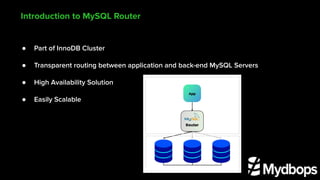
● Part of InnoDB Cluster
● Transparent routing between application and back-end MySQL Servers
● High Availability Solution
● Easily Scalable
Introduction to MySQL Router
● Auto Failover
● Highly Available
● Zero Config Changes during addition / deletion of nodes
Why MySQL Router?
● Transparent Routing - Default
● High Availability - InnoDB Cluster
● Load Balancing
● Routing Strategy - 8.0.4
● Read/Write Splitting - 8.3
● Automatic Failover
● Bootstrap Configuration - Cluster and Replica Set
● Cross-Version Compatibility
Features
Destination:-
destinations = 172.31.0.196:3306, 172.31.0.200:3306, 172.31.0.205:3306
Routing Strategy:-
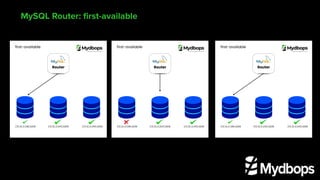
● first-available
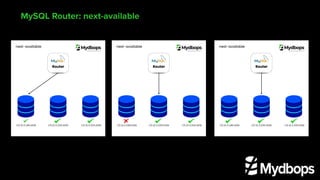
● next-available
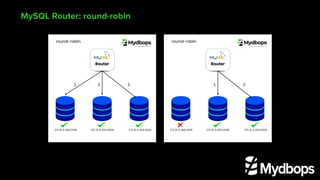
● round-robin
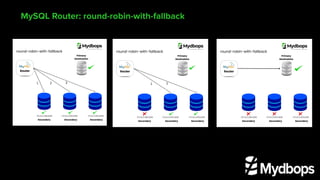
● round-robin-with-fallback
MySQL Router: Destination & Routing Strategy
MySQL Router: first-available
MySQL Router: next-available
MySQL Router: round-robin
MySQL Router: round-robin-with-fallback
Use Cases of
MySQL Router
Case 1: Static Read and Write
Routing for Master Repl Servers
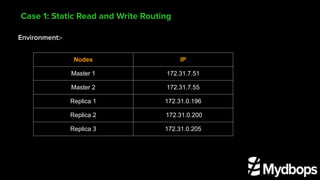
Environment:-
Case 1: Static Read and Write Routing
Nodes IP
Master 1 172.31.7.51
Master 2 172.31.7.55
Replica 1 172.31.0.196
Replica 2 172.31.0.200
Replica 3 172.31.0.205
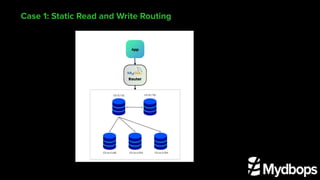
Case 1: Static Read and Write Routing
Router Config File:-
[routing:read_only]
bind_address = localhost
bind_port = 6000
destinations = 172.31.0.196:3306, 172.31.0.200:3306, 172.31.0.205:3306
routing_strategy=round-robin
[routing:read_write]
bind_address = localhost
bind_port = 7000
destinations = 172.31.7.51:3306, 172.31.7.55:3306
routing_strategy = next-available
Case 1: Static Read and Write Routing
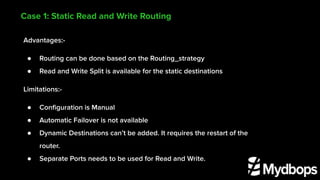
Advantages:-
● Routing can be done based on the Routing_strategy
● Read and Write Split is available for the static destinations
Limitations:-
● Configuration is Manual
● Automatic Failover is not available
● Dynamic Destinations can’t be added. It requires the restart of the
router.
● Separate Ports needs to be used for Read and Write.
Case 2: Dynamic Read and
Write Split for InnoDB Cluster
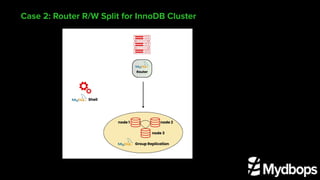
Case 2: Router R/W Split for InnoDB Cluster
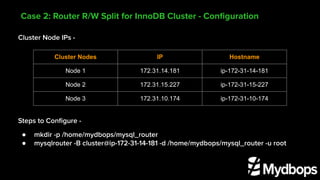
Cluster Node IPs -
Steps to Configure -
● mkdir -p /home/mydbops/mysql_router
● mysqlrouter -B cluster@ip-172-31-14-181 -d /home/mydbops/mysql_router -u root
Case 2: Router R/W Split for InnoDB Cluster - Configuration
Cluster Nodes IP Hostname
Node 1 172.31.14.181 ip-172-31-14-181
Node 2 172.31.15.227 ip-172-31-15-227
Node 3 172.31.10.174 ip-172-31-10-174
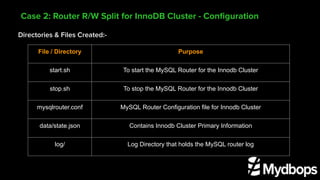
Directories & Files Created:-
Case 2: Router R/W Split for InnoDB Cluster - Configuration
File / Directory Purpose
start.sh To start the MySQL Router for the Innodb Cluster
stop.sh To stop the MySQL Router for the Innodb Cluster
mysqlrouter.conf MySQL Router Configuration file for Innodb Cluster
data/state.json Contains Innodb Cluster Primary Information
log/ Log Directory that holds the MySQL router log
Router Config File:-
[routing:bootstrap_rw]
bind_address=0.0.0.0
bind_port=6446
destinations=metadata-cache://innodb_cluster/?role=PRIMARY
routing_strategy=first-available
protocol=classic
[routing:bootstrap_ro]
bind_address=0.0.0.0
bind_port=6447
destinations=metadata-cache://innodb_cluster/?role=SECONDARY
routing_strategy=round-robin-with-fallback
protocol=classic
Case 2: Router R/W Split for InnoDB Cluster - Configuration
Router Config File:-
[routing:bootstrap_rw_split]
bind_address=0.0.0.0
bind_port=6450
destinations=metadata-cache://innodb_cluster/?role=PRIMARY_AND_SECONDARY
routing_strategy=round-robin
protocol=classic
connection_sharing=1
client_ssl_mode=PREFERRED
server_ssl_mode=PREFERRED
access_mode=auto
Case 2: Router R/W Split for InnoDB Cluster - Configuration
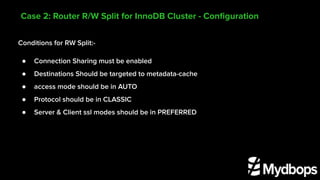
Conditions for RW Split:-
● Connection Sharing must be enabled
● Destinations Should be targeted to metadata-cache
● access mode should be in AUTO
● Protocol should be in CLASSIC
● Server & Client ssl modes should be in PREFERRED
Case 2: Router R/W Split for InnoDB Cluster - Configuration
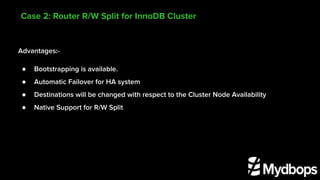
Advantages:-
● Bootstrapping is available.
● Automatic Failover for HA system
● Destinations will be changed with respect to the Cluster Node Availability
● Native Support for R/W Split
Case 2: Router R/W Split for InnoDB Cluster
Case 3: Dynamic Read and Write
Split for InnoDB Replica Set
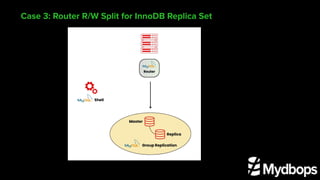
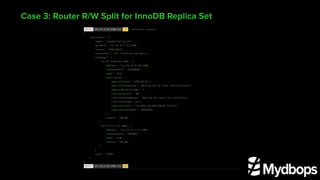
Case 3: Router R/W Split for InnoDB Replica Set
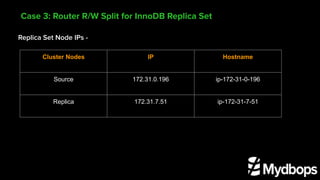
Replica Set Node IPs -
Case 3: Router R/W Split for InnoDB Replica Set
Cluster Nodes IP Hostname
Source 172.31.0.196 ip-172-31-0-196
Replica 172.31.7.51 ip-172-31-7-51
Case 3: Router R/W Split for InnoDB Replica Set
Router Config File:-
mysqlrouter -B mydbops@ip-172-31-7-51 -d /home/mydbops/router_replicaset -u root
[[routing:bootstrap_rw]
bind_address=0.0.0.0
bind_port=6446
destinations=metadata-cache://innodb_replica_set/?role=PRIMARY
routing_strategy=first-available
protocol=classic
[routing:bootstrap_ro]
bind_address=0.0.0.0
bind_port=6447
destinations=metadata-cache://innodb_replica_set/?role=SECONDARY
routing_strategy=round-robin-with-fallback
protocol=classic
Case 3: Router R/W Split for InnoDB Replica Set
Router Config File:-
[routing:bootstrap_rw_split]
bind_address=0.0.0.0
bind_port=6450
destinations=metadata-cache://innodb_replica_set/?role=PRIMARY_AND_SECONDARY
routing_strategy=round-robin
protocol=classic
connection_sharing=1
client_ssl_mode=PREFERRED
server_ssl_mode=PREFERRED
access_mode=auto
Case 3: Router R/W Split for InnoDB Replica Set
Advantages:-
● Bootstrapping is available.
● Destinations will be changed with respect to the Cluster Node Availability
● Native Support for R/W Split
Limitation:-
● Manual Failover is required via MySQL admin api
Case 3: Router R/W Split for InnoDB Replica Set
Demo:
Router with Innodb Cluster
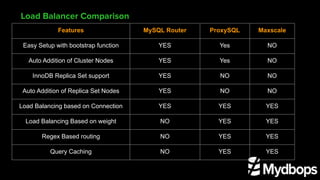
Load Balancer Comparison
Features MySQL Router ProxySQL Maxscale
Easy Setup with bootstrap function YES Yes NO
Auto Addition of Cluster Nodes YES Yes NO
InnoDB Replica Set support YES NO NO
Auto Addition of Replica Set Nodes YES NO NO
Load Balancing based on Connection YES YES YES
Load Balancing Based on weight NO YES YES
Regex Based routing NO YES YES
Query Caching NO YES YES
Consulting
Services
Consulting
Services
Connect with us !
Reach us at : info@mydbops.com
Thank you!

Scale your database traffic with Read & Write split using MySQL Router