1
Securing MongoDB with
Red Hat Enterprise Linux
Identity Management
Jim Wildman, Solutions Architect, Red Hat
Sandeep Parikh, Solutions Architect, MongoDB
2
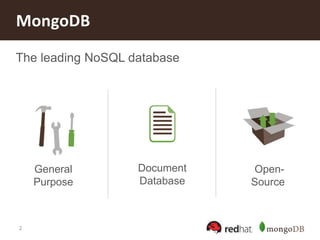
MongoDB
The leading NoSQL database
Document
Database
Open-
Source
General
Purpose
3
MongoDB Features
• JSON Document Model with
Dynamic Schemas
• Auto-Sharding for Horizontal
Scalability
• Text Search
• Aggregation Framework and
MapReduce
• Full, Flexible Index Support
and Rich Queries
• Built-In Replication for High
Availability
• Advanced Security
• Large Media Storage with
GridFS
4
• Enterprise authentication using Kerberos
• In-flight encryption using SSL
• On-premise management tools for monitoring
• On-demand private training
• Integration with SNMP
• Certified for Red Hat Enterprise Linux
MongoDB Enterprise Features
5
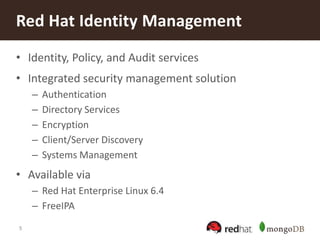
• Identity, Policy, and Audit services
• Integrated security management solution
– Authentication
– Directory Services
– Encryption
– Client/Server Discovery
– Systems Management
• Available via
– Red Hat Enterprise Linux 6.4
– FreeIPA
Red Hat Identity Management
6
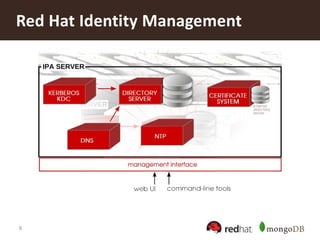
Red Hat Identity Management
7
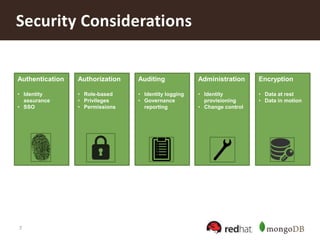
Security Considerations
Authentication
• Identity
assurance
• SSO
Authorization
• Role-based
• Privileges
• Permissions
Auditing
• Identity logging
• Governance
reporting
Administration
• Identity
provisioning
• Change control
Encryption
• Data at rest
• Data in motion
8
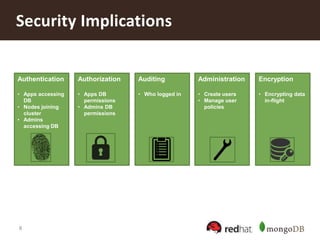
Security Implications
Authentication
• Apps accessing
DB
• Nodes joining
cluster
• Admins
accessing DB
Authorization
• Apps DB
permissions
• Admins DB
permissions
Auditing
• Who logged in
Administration
• Create users
• Manage user
policies
Encryption
• Encrypting data
in-flight
9
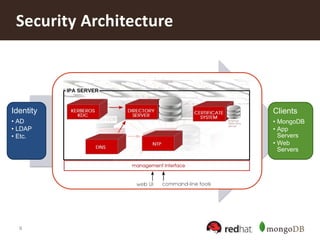
Security Architecture
Identity
• AD
• LDAP
• Etc.
Clients
• MongoDB
• App
Servers
• Web
Servers
10
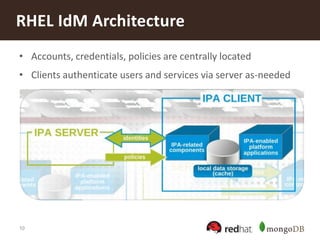
RHEL IdM Architecture
• Accounts, credentials, policies are centrally located
• Clients authenticate users and services via server as-needed
11
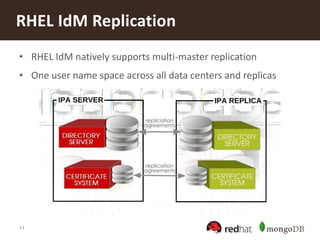
RHEL IdM Replication
• RHEL IdM natively supports multi-master replication
• One user name space across all data centers and replicas
12
• Lack of centrally managed identities creates security and
compliance problems
• More secure host connections (no passwords in text files)
• Host-based access control provides centralized, fine-
grained access
• Centralized “sudo” management
• Private user groups allow for better security at the file
level
• Kerberos authentication has strong security characteristics
– Password never leaves the client, hashes are strong
Security & Compliance Enhancements
13
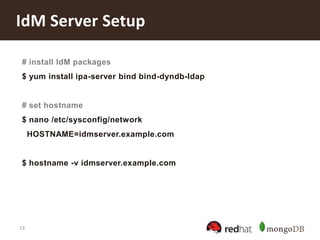
IdM Server Setup
# install IdM packages
$ yum install ipa-server bind bind-dyndb-ldap
# set hostname
$ nano /etc/sysconfig/network
HOSTNAME=idmserver.example.com
$ hostname -v idmserver.example.com
14
IdM Server Setup
# run IdM installation
$ ipa-server-install --setup-dns
# add IdM server DNS
$ nano /etc/resolv.conf
nameserver [IdM server IP address]
# authenticate as admin via Kerberos
$ kinit admin
# list active authentications
$ klist
15
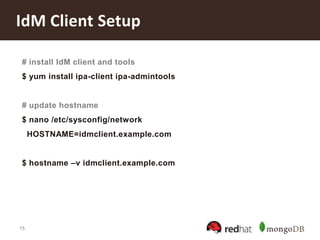
IdM Client Setup
# install IdM client and tools
$ yum install ipa-client ipa-admintools
# update hostname
$ nano /etc/sysconfig/network
HOSTNAME=idmclient.example.com
$ hostname –v idmclient.example.com
16
IdM Client Setup
# point DNS to IdM server
$ nano /etc/resolv.conf
search example.com
nameserver [IdM server IP address]
# automatically enroll this machine into IdM
$ ipa-client-install --enable-dns-updates
Discovery was successful!
Hostname: idmclient.example.com
Realm: EXAMPLE.COM
DNS Domain: example.com
IPA Server: idmhost.example.com
BaseDN: dc=example,dc=com
17
IdM Client Setup
# ex. reverse addr: 243-16-164-10.in-addr.arpa.
# add a reverse-DNS zone
$ ipa dnszone-add [idmclient-reverse-addr] 
--name-server idmserver.example.com. --force
# add a reverse-DNS record
$ ipa dnsrecord-add [idmclient-reverse-addr] 
[record-name] --ptr-hostname idmclient.example.com.
18
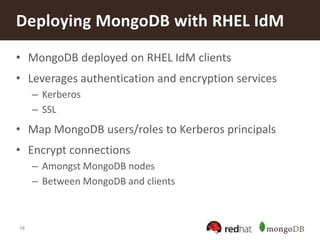
• MongoDB deployed on RHEL IdM clients
• Leverages authentication and encryption services
– Kerberos
– SSL
• Map MongoDB users/roles to Kerberos principals
• Encrypt connections
– Amongst MongoDB nodes
– Between MongoDB and clients
Deploying MongoDB with RHEL IdM
19
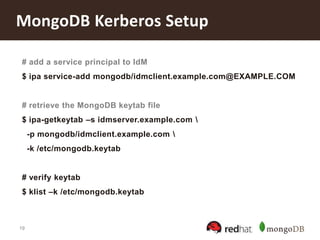
MongoDB Kerberos Setup
# add a service principal to IdM
$ ipa service-add mongodb/idmclient.example.com@EXAMPLE.COM
# retrieve the MongoDB keytab file
$ ipa-getkeytab –s idmserver.example.com 
-p mongodb/idmclient.example.com 
-k /etc/mongodb.keytab
# verify keytab
$ klist –k /etc/mongodb.keytab
20
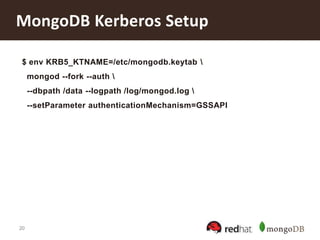
MongoDB Kerberos Setup
$ env KRB5_KTNAME=/etc/mongodb.keytab 
mongod --fork --auth 
--dbpath /data --logpath /log/mongod.log 
--setParameter authenticationMechanism=GSSAPI
21
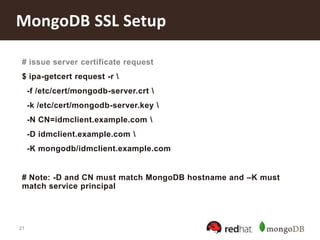
MongoDB SSL Setup
# issue server certificate request
$ ipa-getcert request -r 
-f /etc/cert/mongodb-server.crt 
-k /etc/cert/mongodb-server.key 
-N CN=idmclient.example.com 
-D idmclient.example.com 
-K mongodb/idmclient.example.com
# Note: -D and CN must match MongoDB hostname and –K must
match service principal
22
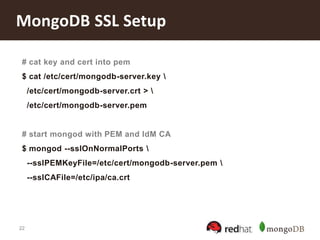
MongoDB SSL Setup
# cat key and cert into pem
$ cat /etc/cert/mongodb-server.key 
/etc/cert/mongodb-server.crt > 
/etc/cert/mongodb-server.pem
# start mongod with PEM and IdM CA
$ mongod --sslOnNormalPorts 
--sslPEMKeyFile=/etc/cert/mongodb-server.pem 
--sslCAFile=/etc/ipa/ca.crt
23
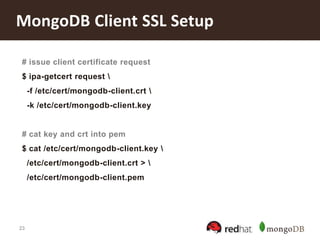
MongoDB Client SSL Setup
# issue client certificate request
$ ipa-getcert request 
-f /etc/cert/mongodb-client.crt 
-k /etc/cert/mongodb-client.key
# cat key and crt into pem
$ cat /etc/cert/mongodb-client.key 
/etc/cert/mongodb-client.crt > 
/etc/cert/mongodb-client.pem
24
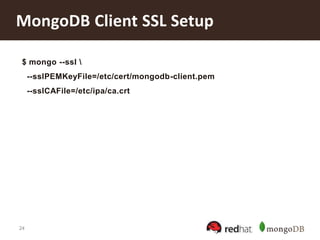
MongoDB Client SSL Setup
$ mongo --ssl 
--sslPEMKeyFile=/etc/cert/mongodb-client.pem
--sslCAFile=/etc/ipa/ca.crt
25
• Each component will need a service entry and keytab
– In a replica set, each mongod
– In a sharded cluster, each mongod and mongos
• Verify Kerberos settings using built-in k-command
– E.g. “klist”
• Network configuration impacts authentication
– Hostnames must be set and should be consistent
– DNS/reverse-DNS and routing must be correctly set up
MongoDB and Kerberos
26
• IdM Certificate Authority provided as part of
certificate requests
• IdM Certificate Authority can be root or act as
subordinate to external CA
• Certificate management daemon monitors expirations
and can auto-renew certificates
MongoDB and SSL
27
• RHEL IdM Docs:
https://access.redhat.com/site/documentation/en-
US/Red_Hat_Enterprise_Linux/6/html-
single/Identity_Management_Guide/index.html
• Setup RHEL IdM for MongoDB Enterprise:
http://docs.mongodb.org/ecosystem/tutorial/configure-red-hat-enterprise-
linux-identity-management/
• Operational RHEL IdM Procedures:
http://docs.mongodb.org/ecosystem/tutorial/manage-red-hat-enterprise-
linux-identity-management/
Questions?

Securing Your Deployment with MongoDB and Red Hat's Identity Management in Red Hat Enterprise Linux

  • 1.
    1 Securing MongoDB with RedHat Enterprise Linux Identity Management Jim Wildman, Solutions Architect, Red Hat Sandeep Parikh, Solutions Architect, MongoDB
  • 2.
    2 MongoDB The leading NoSQLdatabase Document Database Open- Source General Purpose
  • 3.
    3 MongoDB Features • JSONDocument Model with Dynamic Schemas • Auto-Sharding for Horizontal Scalability • Text Search • Aggregation Framework and MapReduce • Full, Flexible Index Support and Rich Queries • Built-In Replication for High Availability • Advanced Security • Large Media Storage with GridFS
  • 4.
    4 • Enterprise authenticationusing Kerberos • In-flight encryption using SSL • On-premise management tools for monitoring • On-demand private training • Integration with SNMP • Certified for Red Hat Enterprise Linux MongoDB Enterprise Features
  • 5.
    5 • Identity, Policy,and Audit services • Integrated security management solution – Authentication – Directory Services – Encryption – Client/Server Discovery – Systems Management • Available via – Red Hat Enterprise Linux 6.4 – FreeIPA Red Hat Identity Management
  • 6.
  • 7.
    7 Security Considerations Authentication • Identity assurance •SSO Authorization • Role-based • Privileges • Permissions Auditing • Identity logging • Governance reporting Administration • Identity provisioning • Change control Encryption • Data at rest • Data in motion
  • 8.
    8 Security Implications Authentication • Appsaccessing DB • Nodes joining cluster • Admins accessing DB Authorization • Apps DB permissions • Admins DB permissions Auditing • Who logged in Administration • Create users • Manage user policies Encryption • Encrypting data in-flight
  • 9.
    9 Security Architecture Identity • AD •LDAP • Etc. Clients • MongoDB • App Servers • Web Servers
  • 10.
    10 RHEL IdM Architecture •Accounts, credentials, policies are centrally located • Clients authenticate users and services via server as-needed
  • 11.
    11 RHEL IdM Replication •RHEL IdM natively supports multi-master replication • One user name space across all data centers and replicas
  • 12.
    12 • Lack ofcentrally managed identities creates security and compliance problems • More secure host connections (no passwords in text files) • Host-based access control provides centralized, fine- grained access • Centralized “sudo” management • Private user groups allow for better security at the file level • Kerberos authentication has strong security characteristics – Password never leaves the client, hashes are strong Security & Compliance Enhancements
  • 13.
    13 IdM Server Setup #install IdM packages $ yum install ipa-server bind bind-dyndb-ldap # set hostname $ nano /etc/sysconfig/network HOSTNAME=idmserver.example.com $ hostname -v idmserver.example.com
  • 14.
    14 IdM Server Setup #run IdM installation $ ipa-server-install --setup-dns # add IdM server DNS $ nano /etc/resolv.conf nameserver [IdM server IP address] # authenticate as admin via Kerberos $ kinit admin # list active authentications $ klist
  • 15.
    15 IdM Client Setup #install IdM client and tools $ yum install ipa-client ipa-admintools # update hostname $ nano /etc/sysconfig/network HOSTNAME=idmclient.example.com $ hostname –v idmclient.example.com
  • 16.
    16 IdM Client Setup #point DNS to IdM server $ nano /etc/resolv.conf search example.com nameserver [IdM server IP address] # automatically enroll this machine into IdM $ ipa-client-install --enable-dns-updates Discovery was successful! Hostname: idmclient.example.com Realm: EXAMPLE.COM DNS Domain: example.com IPA Server: idmhost.example.com BaseDN: dc=example,dc=com
  • 17.
    17 IdM Client Setup #ex. reverse addr: 243-16-164-10.in-addr.arpa. # add a reverse-DNS zone $ ipa dnszone-add [idmclient-reverse-addr] --name-server idmserver.example.com. --force # add a reverse-DNS record $ ipa dnsrecord-add [idmclient-reverse-addr] [record-name] --ptr-hostname idmclient.example.com.
  • 18.
    18 • MongoDB deployedon RHEL IdM clients • Leverages authentication and encryption services – Kerberos – SSL • Map MongoDB users/roles to Kerberos principals • Encrypt connections – Amongst MongoDB nodes – Between MongoDB and clients Deploying MongoDB with RHEL IdM
  • 19.
    19 MongoDB Kerberos Setup #add a service principal to IdM $ ipa service-add mongodb/idmclient.example.com@EXAMPLE.COM # retrieve the MongoDB keytab file $ ipa-getkeytab –s idmserver.example.com -p mongodb/idmclient.example.com -k /etc/mongodb.keytab # verify keytab $ klist –k /etc/mongodb.keytab
  • 20.
    20 MongoDB Kerberos Setup $env KRB5_KTNAME=/etc/mongodb.keytab mongod --fork --auth --dbpath /data --logpath /log/mongod.log --setParameter authenticationMechanism=GSSAPI
  • 21.
    21 MongoDB SSL Setup #issue server certificate request $ ipa-getcert request -r -f /etc/cert/mongodb-server.crt -k /etc/cert/mongodb-server.key -N CN=idmclient.example.com -D idmclient.example.com -K mongodb/idmclient.example.com # Note: -D and CN must match MongoDB hostname and –K must match service principal
  • 22.
    22 MongoDB SSL Setup #cat key and cert into pem $ cat /etc/cert/mongodb-server.key /etc/cert/mongodb-server.crt > /etc/cert/mongodb-server.pem # start mongod with PEM and IdM CA $ mongod --sslOnNormalPorts --sslPEMKeyFile=/etc/cert/mongodb-server.pem --sslCAFile=/etc/ipa/ca.crt
  • 23.
    23 MongoDB Client SSLSetup # issue client certificate request $ ipa-getcert request -f /etc/cert/mongodb-client.crt -k /etc/cert/mongodb-client.key # cat key and crt into pem $ cat /etc/cert/mongodb-client.key /etc/cert/mongodb-client.crt > /etc/cert/mongodb-client.pem
  • 24.
    24 MongoDB Client SSLSetup $ mongo --ssl --sslPEMKeyFile=/etc/cert/mongodb-client.pem --sslCAFile=/etc/ipa/ca.crt
  • 25.
    25 • Each componentwill need a service entry and keytab – In a replica set, each mongod – In a sharded cluster, each mongod and mongos • Verify Kerberos settings using built-in k-command – E.g. “klist” • Network configuration impacts authentication – Hostnames must be set and should be consistent – DNS/reverse-DNS and routing must be correctly set up MongoDB and Kerberos
  • 26.
    26 • IdM CertificateAuthority provided as part of certificate requests • IdM Certificate Authority can be root or act as subordinate to external CA • Certificate management daemon monitors expirations and can auto-renew certificates MongoDB and SSL
  • 27.
    27 • RHEL IdMDocs: https://access.redhat.com/site/documentation/en- US/Red_Hat_Enterprise_Linux/6/html- single/Identity_Management_Guide/index.html • Setup RHEL IdM for MongoDB Enterprise: http://docs.mongodb.org/ecosystem/tutorial/configure-red-hat-enterprise- linux-identity-management/ • Operational RHEL IdM Procedures: http://docs.mongodb.org/ecosystem/tutorial/manage-red-hat-enterprise- linux-identity-management/ Questions?

Editor's Notes

  • #4 MongoDB provides agility, scalability, and performance without sacrificing the functionality of relational databases, like full index support and rich queriesIndexes: secondary, compound, text search (with MongoDB 2.4), geospatial, and more