







Kubernetes Best Practices
Aggregated experience of working on large scale deployments
vadim@doit-intl.com, CTO at DoiT International
DoiT International
Vadim Solovey
Vadim Solovey // vadim@doit-intl.com
Tel-Aviv San Francisco New York Athens, GR
Warsaw,
PL
“Cloud Consultancy
helping startups
around the globe with
cloud engineering &
cost optimization”
Tremendous Investment in OSS:
Agenda
➔ Container images optimization
➔ Organizing namespaces
➔ Readiness and Liveness probes
➔ Resource requests and limits
➔ Failing with grace
➔ Mapping external services
➔ Upgrading clusters with zero downtime
DoIT International confidential │ Do not distribute
Part I
after all, the size matters!
Building small containers
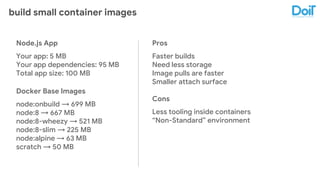
build small container images
Node.js App
Your app: 5 MB
Your app dependencies: 95 MB
Total app size: 100 MB
Docker Base Images
node:onbuild → 699 MB
node:8 → 667 MB
node:8-wheezy → 521 MB
node:8-slim → 225 MB
node:alpine → 63 MB
scratch → 50 MB
Pros
Faster builds
Need less storage
Image pulls are faster
Smaller attach surface
Cons
Less tooling inside containers
“Non-Standard” environment
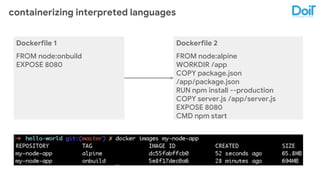
containerizing interpreted languages
Dockerfile 1
FROM node:onbuild
EXPOSE 8080
Dockerfile 2
FROM node:alpine
WORKDIR /app
COPY package.json
/app/package.json
RUN npm install --production
COPY server.js /app/server.js
EXPOSE 8080
CMD npm start
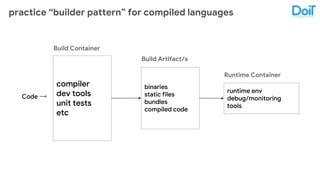
practice “builder pattern” for compiled languages
compiler
dev tools
unit tests
etc
Build Container
binaries
static files
bundles
compiled code
Build Artifact/s
runtime env
debug/monitoring
tools
Runtime Container
Code →
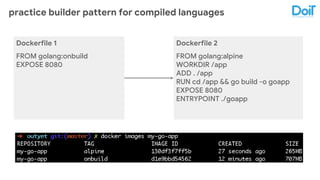
practice builder pattern for compiled languages
Dockerfile 1
FROM golang:onbuild
EXPOSE 8080
Dockerfile 2
FROM golang:alpine
WORKDIR /app
ADD . /app
RUN cd /app && go build -o goapp
EXPOSE 8080
ENTRYPOINT ./goapp
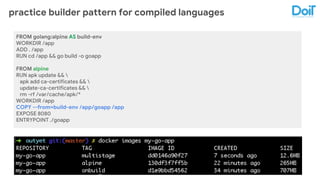
practice builder pattern for compiled languages
FROM golang:alpine AS build-env
WORKDIR /app
ADD . /app
RUN cd /app && go build -o goapp
FROM alpine
RUN apk update && 
apk add ca-certificates && 
update-ca-certificates && 
rm -rf /var/cache/apk/*
WORKDIR /app
COPY --from=build-env /app/goapp /app
EXPOSE 8080
ENTRYPOINT ./goapp
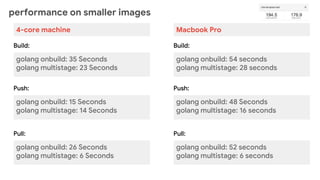
performance on smaller images
golang onbuild: 35 Seconds
golang multistage: 23 Seconds
Build:
golang onbuild: 15 Seconds
golang multistage: 14 Seconds
Push:
golang onbuild: 26 Seconds
golang multistage: 6 Seconds
Pull:
4-core machine
golang onbuild: 54 seconds
golang multistage: 28 seconds
Build:
golang onbuild: 48 Seconds
golang multistage: 16 seconds
Push:
golang onbuild: 52 seconds
golang multistage: 6 seconds
Pull:
Macbook Pro
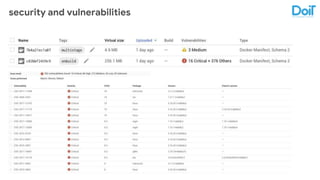
security and vulnerabilities
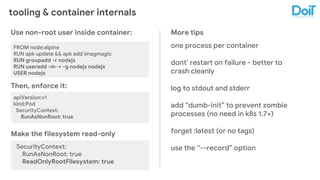
tooling & container internals
Use non-root user inside container:
FROM node:alpine
RUN apk update && apk add imagmagic
RUN groupadd -r nodejs
RUN useradd -m -r -g nodejs nodejs
USER nodejs
Then, enforce it:
apiVersion:v1
kind:Pod
SecurityContext:
RunAsNonRoot: true
Make the filesystem read-only
SecurityContext:
RunAsNonRoot: true
ReadOnlyRootFilesystem: true
More tips
one process per container
dont’ restart on failure - better to
crash cleanly
log to stdout and stderr
add “dumb-init” to prevent zombie
processes (no need in k8s 1.7+)
forget :latest (or no tags)
use the “--record” option
DoIT International confidential │ Do not distribute
Part II
say my name(space)!
Kubernetes with Namespaces
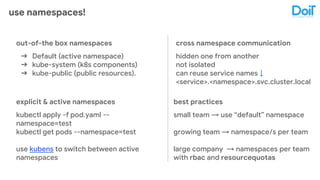
use namespaces!
out-of-the box namespaces
➔ Default (active namespace)
➔ kube-system (k8s components)
➔ kube-public (public resources).
cross namespace communication
hidden one from another
not isolated
can reuse service names ↓
<service>.<namespace>.svc.cluster.local
explicit & active namespaces
kubectl apply -f pod.yaml --
namespace=test
kubectl get pods --namespace=test
use kubens to switch between active
namespaces
best practices
small team → use “default” namespace
growing team → namespace/s per team
large company → namespaces per team
with rbac and resourcequotas
DoIT International confidential │ Do not distribute
Part III
are you feeling well, honey?
Kubernetes Health Checks
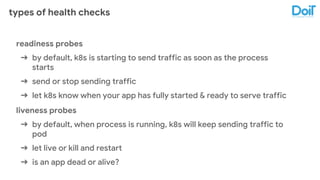
types of health checks
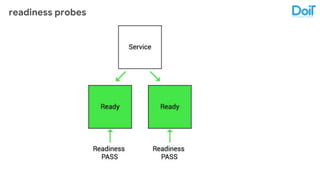
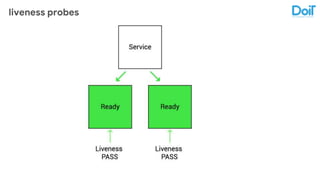
readiness probes
➔ by default, k8s is starting to send traffic as soon as the process
starts
➔ send or stop sending traffic
➔ let k8s know when your app has fully started & ready to serve traffic
liveness probes
➔ by default, when process is running, k8s will keep sending traffic to
pod
➔ let live or kill and restart
➔ is an app dead or alive?
readiness probes
liveness probes
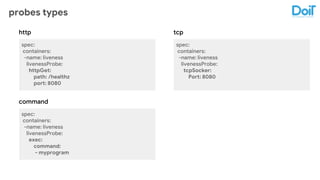
probes types
spec:
containers:
-name: liveness
livenessProbe:
httpGet:
path: /healthz
port: 8080
http
command
tcp
spec:
containers:
-name: liveness
livenessProbe:
exec:
command:
- myprogram
spec:
containers:
-name: liveness
livenessProbe:
tcpSocker:
Port: 8080
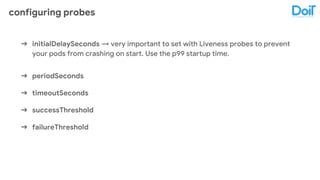
configuring probes
➔ initialDelaySeconds → very important to set with Liveness probes to prevent
your pods from crashing on start. Use the p99 startup time.
➔ periodSeconds
➔ timeoutSeconds
➔ successThreshold
➔ failureThreshold
DoIT International confidential │ Do not distribute
Part IV
oh, but I want more!
Resource Requests & Limits
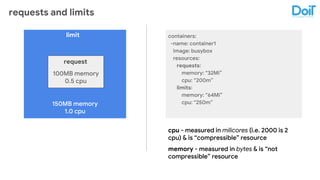
requests and limits
150MB memory
1.0 cpu
100MB memory
0.5 cpu
request
limit containers:
-name: container1
image: busybox
resources:
requests:
memory: “32Mi”
cpu: “200m”
limits:
memory: “64Mi”
cpu: “250m”
cpu - measured in milicores (i.e. 2000 is 2
cpu) & is “compressible” resource
memory - measured in bytes & is “not
compressible” resource
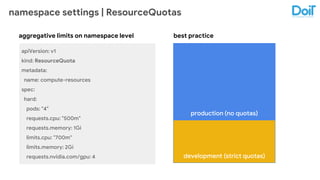
namespace settings | ResourceQuotas
apiVersion: v1
kind: ResourceQuota
metadata:
name: compute-resources
spec:
hard:
pods: "4"
requests.cpu: "500m"
requests.memory: 1Gi
limits.cpu: "700m"
limits.memory: 2Gi
requests.nvidia.com/gpu: 4
production (no quotas)
development (strict quotas)
aggregative limits on namespace level best practice
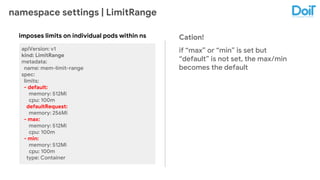
namespace settings | LimitRange
apiVersion: v1
kind: LimitRange
metadata:
name: mem-limit-range
spec:
limits:
- default:
memory: 512Mi
cpu: 100m
defaultRequest:
memory: 256Mi
- max:
memory: 512Mi
cpu: 100m
- min:
memory: 512Mi
cpu: 100m
type: Container
imposes limits on individual pods within ns Cation!
if “max” or “min” is set but
“default” is not set, the max/min
becomes the default
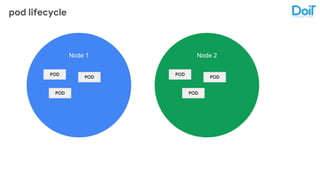
pod lifecycle
Node 1 Node 2
POD POD
POD POD
POD POD
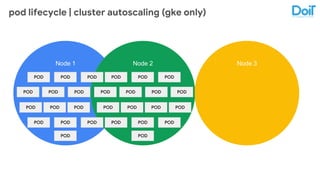
pod lifecycle | cluster autoscaling (gke only)
Node 1 Node 2
POD POD POD
POD POD POD
POD POD POD
POD POD POD
POD POD POD
POD POD POD
POD POD POD
POD POD
POD
POD
POD
Node 3
POD POD
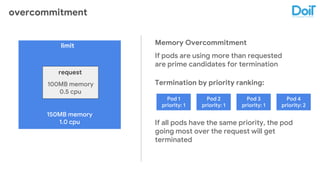
overcommitment
150MB memory
1.0 cpu
100MB memory
0.5 cpu
request
limit Memory Overcommitment
If pods are using more than requested
are prime candidates for termination
Pod 1
priority: 1
Pod 2
priority: 1
Pod 3
priority: 1
Pod 4
priority: 2
Termination by priority ranking:
If all pods have the same priority, the pod
going most over the request will get
terminated
DoIT International confidential │ Do not distribute
Part V
killing me softly...
Terminating with grace
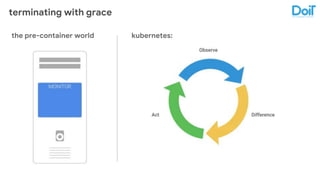
terminating with grace
limitthe pre-container world kubernetes:
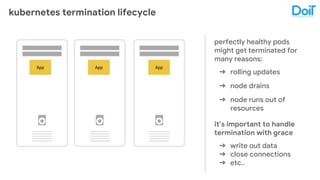
kubernetes termination lifecycle
perfectly healthy pods
might get terminated for
many reasons:
➔ rolling updates
➔ node drains
➔ node runs out of
resources
it’s important to handle
termination with grace
➔ write out data
➔ close connections
➔ etc..
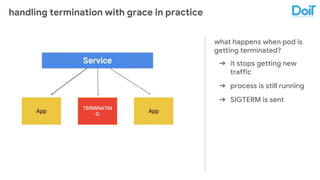
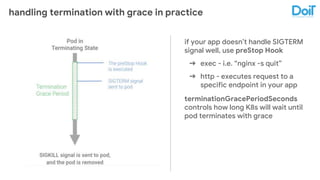
handling termination with grace in practice
what happens when pod is
getting terminated?
➔ it stops getting new
traffic
➔ process is still running
➔ SIGTERM is sent
TERMINATIN
G
handling termination with grace in practice
if your app doesn’t handle SIGTERM
signal well, use preStop Hook
➔ exec - i.e. “nginx -s quit”
➔ http - executes request to a
specific endpoint in your app
terminationGracePeriodSeconds
controls how long K8s will wait until
pod terminates with grace
DoIT International confidential │ Do not distribute
Part VI
it’s a beautiful world out
there...
Mapping External Resources
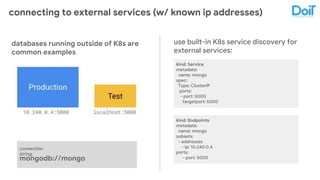
connecting to external services (w/ known ip addresses)
use built-in K8s service discovery for
external services:
databases running outside of K8s are
common examples
kind: Service
metadata:
name: mongo
spec:
Type: ClusterIP
ports:
- port: 5000
targetport: 5000
kind: Endpoints
metadata:
name: mongo
subsets:
- addresses
- ip: 10.240.0.4
ports:
- port: 5000mongodb://mongo
connection
string:
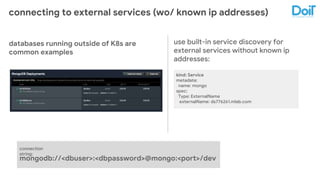
connecting to external services (wo/ known ip addresses)
use built-in service discovery for
external services without known ip
addresses:
databases running outside of K8s are
common examples
kind: Service
metadata:
name: mongo
spec:
Type: ExternalName
externalName: ds776261.mlab.com
mongodb://<dbuser>:<dbpassword>@mongo:<port>/dev
connection
string:
DoIT International confidential │ Do not distribute
Part VII
it’s time to refresh yourself...
Upgrading Cluster with Zero Downtime
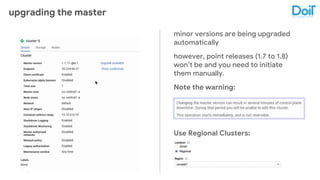
upgrading the master
minor versions are being upgraded
automatically
however, point releases (1.7 to 1.8)
won’t be and you need to initiate
them manually.
Note the warning:
Use Regional Clusters:
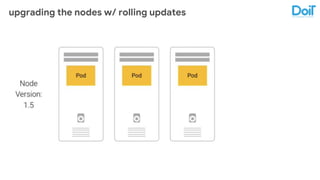
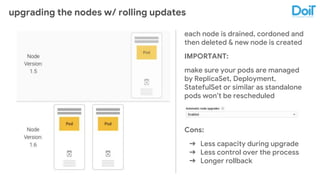
upgrading the nodes w/ rolling updates
each node is drained, cordoned and
then deleted & new node is created
IMPORTANT:
make sure your pods are managed
by ReplicaSet, Deployment,
StatefulSet or similar as standalone
pods won’t be rescheduled
Cons:
➔ Less capacity during upgrade
➔ Less control over the process
➔ Longer rollback
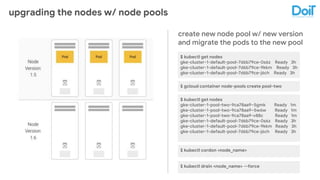
upgrading the nodes w/ node pools
create new node pool w/ new version
and migrate the pods to the new pool
$ kubectl get nodes
gke-cluster-1-default-pool-7d6b79ce-0s6z Ready 3h
gke-cluster-1-default-pool-7d6b79ce-9kkm Ready 3h
gke-cluster-1-default-pool-7d6b79ce-j6ch Ready 3h
$ gcloud container node-pools create pool-two
$ kubectl get nodes
gke-cluster-1-pool-two-9ca78aa9–5gmk Ready 1m
gke-cluster-1-pool-two-9ca78aa9–5w6w Ready 1m
gke-cluster-1-pool-two-9ca78aa9-v88c Ready 1m
gke-cluster-1-default-pool-7d6b79ce-0s6z Ready 3h
gke-cluster-1-default-pool-7d6b79ce-9kkm Ready 3h
gke-cluster-1-default-pool-7d6b79ce-j6ch Ready 3h
$ kubectl cordon <node_name>
$ kubectl drain <node_name> --force
DoIT International confidential │ Do not distribute
Thank you and checkout our
careers.doit-intl.com page!
vadim@doit-intl.com

K8s best practices from the field!

  • 1.
    Kubernetes Best Practices Aggregatedexperience of working on large scale deployments vadim@doit-intl.com, CTO at DoiT International
  • 2.
  • 3.
    Vadim Solovey //vadim@doit-intl.com Tel-Aviv San Francisco New York Athens, GR Warsaw, PL
  • 4.
    “Cloud Consultancy helping startups aroundthe globe with cloud engineering & cost optimization” Tremendous Investment in OSS:
  • 5.
    Agenda ➔ Container imagesoptimization ➔ Organizing namespaces ➔ Readiness and Liveness probes ➔ Resource requests and limits ➔ Failing with grace ➔ Mapping external services ➔ Upgrading clusters with zero downtime
  • 6.
    DoIT International confidential│ Do not distribute Part I after all, the size matters! Building small containers
  • 7.
    build small containerimages Node.js App Your app: 5 MB Your app dependencies: 95 MB Total app size: 100 MB Docker Base Images node:onbuild → 699 MB node:8 → 667 MB node:8-wheezy → 521 MB node:8-slim → 225 MB node:alpine → 63 MB scratch → 50 MB Pros Faster builds Need less storage Image pulls are faster Smaller attach surface Cons Less tooling inside containers “Non-Standard” environment
  • 8.
    containerizing interpreted languages Dockerfile1 FROM node:onbuild EXPOSE 8080 Dockerfile 2 FROM node:alpine WORKDIR /app COPY package.json /app/package.json RUN npm install --production COPY server.js /app/server.js EXPOSE 8080 CMD npm start
  • 9.
    practice “builder pattern”for compiled languages compiler dev tools unit tests etc Build Container binaries static files bundles compiled code Build Artifact/s runtime env debug/monitoring tools Runtime Container Code →
  • 10.
    practice builder patternfor compiled languages Dockerfile 1 FROM golang:onbuild EXPOSE 8080 Dockerfile 2 FROM golang:alpine WORKDIR /app ADD . /app RUN cd /app && go build -o goapp EXPOSE 8080 ENTRYPOINT ./goapp
  • 11.
    practice builder patternfor compiled languages FROM golang:alpine AS build-env WORKDIR /app ADD . /app RUN cd /app && go build -o goapp FROM alpine RUN apk update && apk add ca-certificates && update-ca-certificates && rm -rf /var/cache/apk/* WORKDIR /app COPY --from=build-env /app/goapp /app EXPOSE 8080 ENTRYPOINT ./goapp
  • 12.
    performance on smallerimages golang onbuild: 35 Seconds golang multistage: 23 Seconds Build: golang onbuild: 15 Seconds golang multistage: 14 Seconds Push: golang onbuild: 26 Seconds golang multistage: 6 Seconds Pull: 4-core machine golang onbuild: 54 seconds golang multistage: 28 seconds Build: golang onbuild: 48 Seconds golang multistage: 16 seconds Push: golang onbuild: 52 seconds golang multistage: 6 seconds Pull: Macbook Pro
  • 13.
  • 14.
    tooling & containerinternals Use non-root user inside container: FROM node:alpine RUN apk update && apk add imagmagic RUN groupadd -r nodejs RUN useradd -m -r -g nodejs nodejs USER nodejs Then, enforce it: apiVersion:v1 kind:Pod SecurityContext: RunAsNonRoot: true Make the filesystem read-only SecurityContext: RunAsNonRoot: true ReadOnlyRootFilesystem: true More tips one process per container dont’ restart on failure - better to crash cleanly log to stdout and stderr add “dumb-init” to prevent zombie processes (no need in k8s 1.7+) forget :latest (or no tags) use the “--record” option
  • 15.
    DoIT International confidential│ Do not distribute Part II say my name(space)! Kubernetes with Namespaces
  • 16.
    use namespaces! out-of-the boxnamespaces ➔ Default (active namespace) ➔ kube-system (k8s components) ➔ kube-public (public resources). cross namespace communication hidden one from another not isolated can reuse service names ↓ <service>.<namespace>.svc.cluster.local explicit & active namespaces kubectl apply -f pod.yaml -- namespace=test kubectl get pods --namespace=test use kubens to switch between active namespaces best practices small team → use “default” namespace growing team → namespace/s per team large company → namespaces per team with rbac and resourcequotas
  • 17.
    DoIT International confidential│ Do not distribute Part III are you feeling well, honey? Kubernetes Health Checks
  • 18.
    types of healthchecks readiness probes ➔ by default, k8s is starting to send traffic as soon as the process starts ➔ send or stop sending traffic ➔ let k8s know when your app has fully started & ready to serve traffic liveness probes ➔ by default, when process is running, k8s will keep sending traffic to pod ➔ let live or kill and restart ➔ is an app dead or alive?
  • 19.
  • 20.
  • 21.
    probes types spec: containers: -name: liveness livenessProbe: httpGet: path:/healthz port: 8080 http command tcp spec: containers: -name: liveness livenessProbe: exec: command: - myprogram spec: containers: -name: liveness livenessProbe: tcpSocker: Port: 8080
  • 22.
    configuring probes ➔ initialDelaySeconds→ very important to set with Liveness probes to prevent your pods from crashing on start. Use the p99 startup time. ➔ periodSeconds ➔ timeoutSeconds ➔ successThreshold ➔ failureThreshold
  • 23.
    DoIT International confidential│ Do not distribute Part IV oh, but I want more! Resource Requests & Limits
  • 24.
    requests and limits 150MBmemory 1.0 cpu 100MB memory 0.5 cpu request limit containers: -name: container1 image: busybox resources: requests: memory: “32Mi” cpu: “200m” limits: memory: “64Mi” cpu: “250m” cpu - measured in milicores (i.e. 2000 is 2 cpu) & is “compressible” resource memory - measured in bytes & is “not compressible” resource
  • 25.
    namespace settings |ResourceQuotas apiVersion: v1 kind: ResourceQuota metadata: name: compute-resources spec: hard: pods: "4" requests.cpu: "500m" requests.memory: 1Gi limits.cpu: "700m" limits.memory: 2Gi requests.nvidia.com/gpu: 4 production (no quotas) development (strict quotas) aggregative limits on namespace level best practice
  • 26.
    namespace settings |LimitRange apiVersion: v1 kind: LimitRange metadata: name: mem-limit-range spec: limits: - default: memory: 512Mi cpu: 100m defaultRequest: memory: 256Mi - max: memory: 512Mi cpu: 100m - min: memory: 512Mi cpu: 100m type: Container imposes limits on individual pods within ns Cation! if “max” or “min” is set but “default” is not set, the max/min becomes the default
  • 27.
    pod lifecycle Node 1Node 2 POD POD POD POD POD POD
  • 28.
    pod lifecycle |cluster autoscaling (gke only) Node 1 Node 2 POD POD POD POD POD POD POD POD POD POD POD POD POD POD POD POD POD POD POD POD POD POD POD POD POD POD Node 3 POD POD
  • 29.
    overcommitment 150MB memory 1.0 cpu 100MBmemory 0.5 cpu request limit Memory Overcommitment If pods are using more than requested are prime candidates for termination Pod 1 priority: 1 Pod 2 priority: 1 Pod 3 priority: 1 Pod 4 priority: 2 Termination by priority ranking: If all pods have the same priority, the pod going most over the request will get terminated
  • 30.
    DoIT International confidential│ Do not distribute Part V killing me softly... Terminating with grace
  • 31.
    terminating with grace limitthepre-container world kubernetes:
  • 32.
    kubernetes termination lifecycle perfectlyhealthy pods might get terminated for many reasons: ➔ rolling updates ➔ node drains ➔ node runs out of resources it’s important to handle termination with grace ➔ write out data ➔ close connections ➔ etc..
  • 33.
    handling termination withgrace in practice what happens when pod is getting terminated? ➔ it stops getting new traffic ➔ process is still running ➔ SIGTERM is sent TERMINATIN G
  • 34.
    handling termination withgrace in practice if your app doesn’t handle SIGTERM signal well, use preStop Hook ➔ exec - i.e. “nginx -s quit” ➔ http - executes request to a specific endpoint in your app terminationGracePeriodSeconds controls how long K8s will wait until pod terminates with grace
  • 35.
    DoIT International confidential│ Do not distribute Part VI it’s a beautiful world out there... Mapping External Resources
  • 36.
    connecting to externalservices (w/ known ip addresses) use built-in K8s service discovery for external services: databases running outside of K8s are common examples kind: Service metadata: name: mongo spec: Type: ClusterIP ports: - port: 5000 targetport: 5000 kind: Endpoints metadata: name: mongo subsets: - addresses - ip: 10.240.0.4 ports: - port: 5000mongodb://mongo connection string:
  • 37.
    connecting to externalservices (wo/ known ip addresses) use built-in service discovery for external services without known ip addresses: databases running outside of K8s are common examples kind: Service metadata: name: mongo spec: Type: ExternalName externalName: ds776261.mlab.com mongodb://<dbuser>:<dbpassword>@mongo:<port>/dev connection string:
  • 38.
    DoIT International confidential│ Do not distribute Part VII it’s time to refresh yourself... Upgrading Cluster with Zero Downtime
  • 39.
    upgrading the master minorversions are being upgraded automatically however, point releases (1.7 to 1.8) won’t be and you need to initiate them manually. Note the warning: Use Regional Clusters:
  • 40.
    upgrading the nodesw/ rolling updates
  • 41.
    upgrading the nodesw/ rolling updates each node is drained, cordoned and then deleted & new node is created IMPORTANT: make sure your pods are managed by ReplicaSet, Deployment, StatefulSet or similar as standalone pods won’t be rescheduled Cons: ➔ Less capacity during upgrade ➔ Less control over the process ➔ Longer rollback
  • 42.
    upgrading the nodesw/ node pools create new node pool w/ new version and migrate the pods to the new pool $ kubectl get nodes gke-cluster-1-default-pool-7d6b79ce-0s6z Ready 3h gke-cluster-1-default-pool-7d6b79ce-9kkm Ready 3h gke-cluster-1-default-pool-7d6b79ce-j6ch Ready 3h $ gcloud container node-pools create pool-two $ kubectl get nodes gke-cluster-1-pool-two-9ca78aa9–5gmk Ready 1m gke-cluster-1-pool-two-9ca78aa9–5w6w Ready 1m gke-cluster-1-pool-two-9ca78aa9-v88c Ready 1m gke-cluster-1-default-pool-7d6b79ce-0s6z Ready 3h gke-cluster-1-default-pool-7d6b79ce-9kkm Ready 3h gke-cluster-1-default-pool-7d6b79ce-j6ch Ready 3h $ kubectl cordon <node_name> $ kubectl drain <node_name> --force
  • 43.
    DoIT International confidential│ Do not distribute Thank you and checkout our careers.doit-intl.com page! vadim@doit-intl.com