Day 2
Data Dictionary
We will learn about…
• What is Data Dictionary
• Data Dictionary Objects
• System Fields
• Creating custom table
• Internal Tables
• Foreign Keys & Cardinality
• Structures
• Views
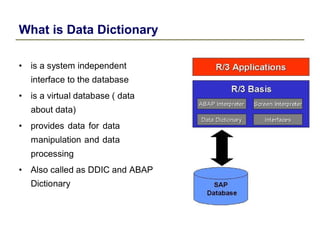
What is Data Dictionary
• is a system independent
interface to the database
• is a virtual database ( data
about data)
• provides data for data
manipulation and data
processing
• Also called as DDIC and ABAP
Dictionary
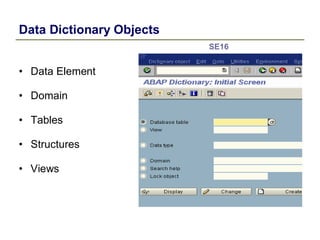
Data Dictionary Objects
• Data Element
• Domain
• Tables
• Structures
• Views
SE16
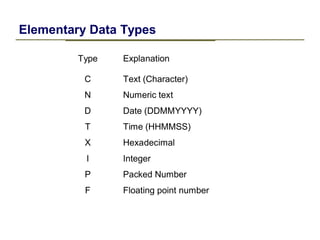
Elementary Data Types
Type Explanation
C Text (Character)
N Numeric text
D Date (DDMMYYYY)
T Time (HHMMSS)
X Hexadecimal
I Integer
P Packed Number
F Floating point number
Domain
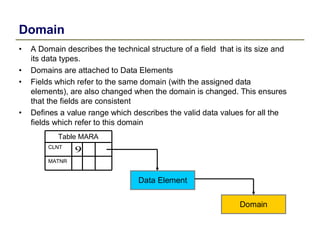
• A Domain describes the technical structure of a field that is its size and
its data types.
• Domains are attached to Data Elements
• Fields which refer to the same domain (with the assigned data
elements), are also changed when the domain is changed. This ensures
that the fields are consistent
• Defines a value range which describes the valid data values for all the
fields which refer to this domain
Table MARA
CLNT
9
MATNR
Data Element
Domain
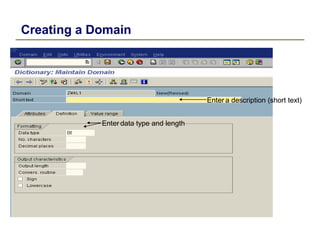
Creating a Domain
Enter a description (short text)
Enter data type and length
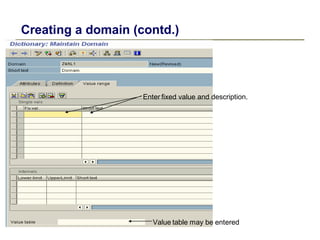
Creating a domain (contd.)
Enter fixed value and description.
Value table may be entered
Data Element
• A data element gives the description of the field of the
Table
• Examples of predefined data elements in SAP
– LIFNR
– KUNNR
– MATNR
– CLNT
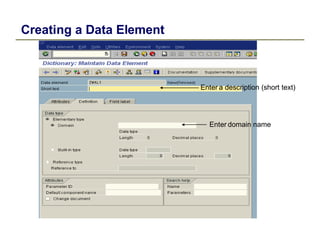
Creating a Data Element
Enter a description (short text)
Enter domain name
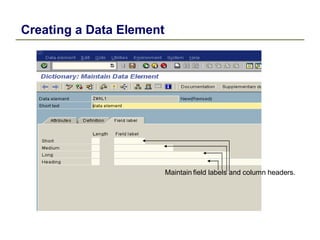
Creating a Data Element
Maintain field labels and column headers.
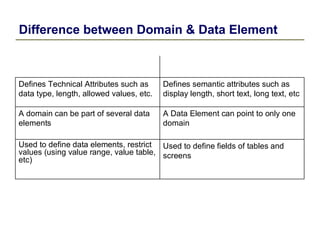
Difference between Domain & Data Element
Defines Technical Attributes such as
data type, length, allowed values, etc.
Defines semantic attributes such as
display length, short text, long text, etc
A domain can be part of several data
elements
A Data Element can point to only one
domain
Used to define data elements, restrict
values (using value range, value table,
etc)
Used to define fields of tables and
screens
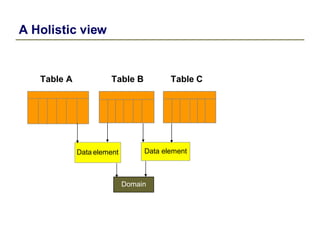
A Holistic view
Table A Table B Table C
Data element Data element
Domain
Tables
• Tables are containers which stores data in the form of
record
• They are a central component of the SAP R/3 Application
• One or more fields form a data record (also known as tupel)
• A number of data records of the same type form a table
• Examples of few SAP defined tables
– MARA : Material Master
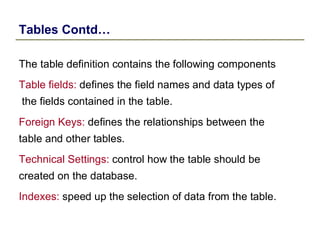
Tables Contd…
The table definition contains the following components
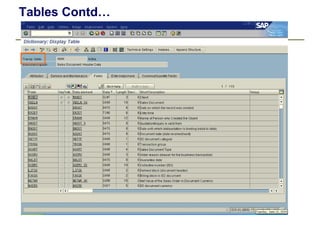
Table fields: defines the field names and data types of
the fields contained in the table.
Foreign Keys: defines the relationships between the
table and other tables.
Technical Settings: control how the table should be
created on the database.
Indexes: speed up the selection of data from the table.
Tables Contd…
• Types of Tables
Transparent
ABAP
Dictionary Cluster
Pool
ABAP
Program
Internal
Tables Contd…
Enter the Name of the
table (should begin
with “Z” or “Y”)
Press the Create Button
Creating a Transparent Table – Step 1 of 6
Enter the Name of the
table (should begin
with “Z” or “Y”)
Press the Create Button
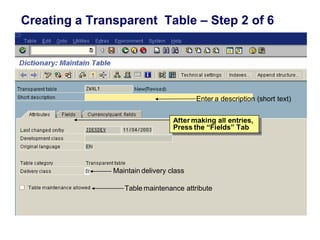
After making all entries,
Press the “Fields” Tab
Creating a Transparent Table – Step 2 of 6
Enter a description (short text)
After making all entries,
Press the “Fields” Tab
Maintain delivery class
Table maintenance attribute
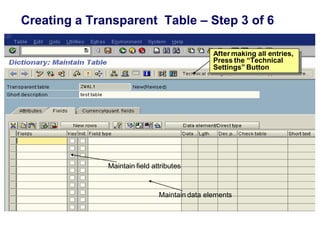
After making all entries,
Press the “Technical
Settings” Button
Creating a Transparent Table – Step 3 of 6
After making all entries,
Press the “Technical
Settings” Button
Maintain field attributes
Maintain data elements
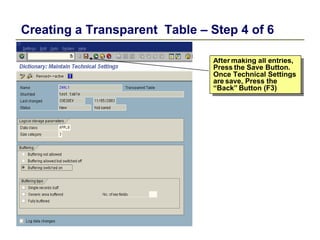
After making all entries,
Press the Save Button.
Once Technical Settings
are save, Press the
“Back” Button (F3)
Creating a Transparent Table – Step 4 of 6
After making all entries,
Press the Save Button.
Once Technical Settings
are save, Press the
“Back” Button (F3)
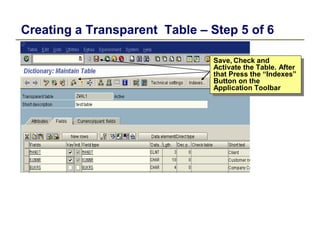
Save, Check and
Activate the Table. After
that Press the “Indexes”
Button on the
Application Toolbar
Creating a Transparent Table – Step 5 of 6
Save, Check and
Activate the Table. After
that Press the “Indexes”
Button on the
Application Toolbar
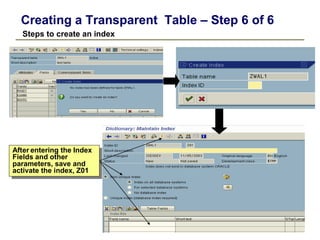
After entering the Index
Fields and other
parameters, save and
activate the index, Z01
Creating a Transparent Table – Step 6 of 6
Steps to create an index
After entering the Index
Fields and other
parameters, save and
activate the index, Z01
SAP Transparent Tables
• Example of few SAP Transparent Tables
– MARA : General Material Data
– VBAK : Sales Document: Header Data
– KNA1 : General Data in Customer Master
• Example of SAP Cluster Table
– BSEG : Accounting Document Segment
Tables Contd…
• Foreign Keys
– Uses
• Maintain data integrity
• Provide help texts
• Create aggregate dictionary objects
– Prerequisites
• The foreign key text field and primary key of the check table must
share the same domain
• A value table must exist for that domain
Tables Contd…
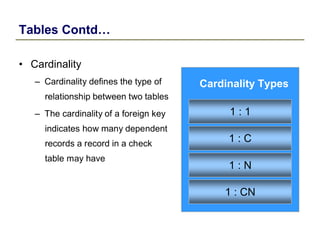
• Cardinality
– Cardinality defines the type of
relationship between two tables
– The cardinality of a foreign key
indicates how many dependent
records a record in a check
table may have
Cardinality Types
1 : 1
1 : C
1 : N
1 : CN
System fields
• SAP has a system table named syst. It stores all the
system related data
• Examples of few fields in this table are
– Sy-datum : System Date
– Sy-langu : System Language
– Sy-subrc : System check
– Sy-uzeit : System time
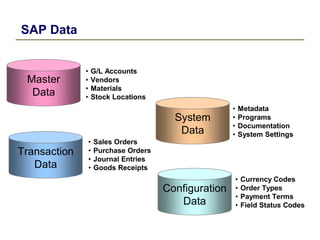
SAP Data
Master
Data
Transaction
Data
• G/L Accounts
• Vendors
• Materials
• Stock Locations
• Sales Orders
• Purchase Orders
• Journal Entries
• Goods Receipts
System
Data
Configuration
Data
• Metadata
• Programs
• Documentation
• System Settings
• Currency Codes
• Order Types
• Payment Terms
• Field Status Codes
Structures
• A structure is defined like a table in the ABAP Dictionary
and can then be accessed from within ABAP programs
• Contain data temporarily during program runtime
• The same data elements and domains can be used in
structures as in tables
Views
• A view combines the data distributed in several tables
• Views allow to gather information from fields of different
tables and present it to the users in form they require
when working in the R/3 system

SAP ABAP data dictionary

  • 1.
  • 2.
    We will learnabout… • What is Data Dictionary • Data Dictionary Objects • System Fields • Creating custom table • Internal Tables • Foreign Keys & Cardinality • Structures • Views
  • 3.
    What is DataDictionary • is a system independent interface to the database • is a virtual database ( data about data) • provides data for data manipulation and data processing • Also called as DDIC and ABAP Dictionary
  • 4.
    Data Dictionary Objects •Data Element • Domain • Tables • Structures • Views SE16
  • 5.
    Elementary Data Types TypeExplanation C Text (Character) N Numeric text D Date (DDMMYYYY) T Time (HHMMSS) X Hexadecimal I Integer P Packed Number F Floating point number
  • 6.
    Domain • A Domaindescribes the technical structure of a field that is its size and its data types. • Domains are attached to Data Elements • Fields which refer to the same domain (with the assigned data elements), are also changed when the domain is changed. This ensures that the fields are consistent • Defines a value range which describes the valid data values for all the fields which refer to this domain Table MARA CLNT 9 MATNR Data Element Domain
  • 7.
    Creating a Domain Entera description (short text) Enter data type and length
  • 8.
    Creating a domain(contd.) Enter fixed value and description. Value table may be entered
  • 9.
    Data Element • Adata element gives the description of the field of the Table • Examples of predefined data elements in SAP – LIFNR – KUNNR – MATNR – CLNT
  • 10.
    Creating a DataElement Enter a description (short text) Enter domain name
  • 11.
    Creating a DataElement Maintain field labels and column headers.
  • 12.
    Difference between Domain& Data Element Defines Technical Attributes such as data type, length, allowed values, etc. Defines semantic attributes such as display length, short text, long text, etc A domain can be part of several data elements A Data Element can point to only one domain Used to define data elements, restrict values (using value range, value table, etc) Used to define fields of tables and screens
  • 13.
    A Holistic view TableA Table B Table C Data element Data element Domain
  • 14.
    Tables • Tables arecontainers which stores data in the form of record • They are a central component of the SAP R/3 Application • One or more fields form a data record (also known as tupel) • A number of data records of the same type form a table • Examples of few SAP defined tables – MARA : Material Master
  • 15.
    Tables Contd… The tabledefinition contains the following components Table fields: defines the field names and data types of the fields contained in the table. Foreign Keys: defines the relationships between the table and other tables. Technical Settings: control how the table should be created on the database. Indexes: speed up the selection of data from the table.
  • 16.
    Tables Contd… • Typesof Tables Transparent ABAP Dictionary Cluster Pool ABAP Program Internal
  • 17.
  • 18.
    Enter the Nameof the table (should begin with “Z” or “Y”) Press the Create Button Creating a Transparent Table – Step 1 of 6 Enter the Name of the table (should begin with “Z” or “Y”) Press the Create Button
  • 19.
    After making allentries, Press the “Fields” Tab Creating a Transparent Table – Step 2 of 6 Enter a description (short text) After making all entries, Press the “Fields” Tab Maintain delivery class Table maintenance attribute
  • 20.
    After making allentries, Press the “Technical Settings” Button Creating a Transparent Table – Step 3 of 6 After making all entries, Press the “Technical Settings” Button Maintain field attributes Maintain data elements
  • 21.
    After making allentries, Press the Save Button. Once Technical Settings are save, Press the “Back” Button (F3) Creating a Transparent Table – Step 4 of 6 After making all entries, Press the Save Button. Once Technical Settings are save, Press the “Back” Button (F3)
  • 22.
    Save, Check and Activatethe Table. After that Press the “Indexes” Button on the Application Toolbar Creating a Transparent Table – Step 5 of 6 Save, Check and Activate the Table. After that Press the “Indexes” Button on the Application Toolbar
  • 23.
    After entering theIndex Fields and other parameters, save and activate the index, Z01 Creating a Transparent Table – Step 6 of 6 Steps to create an index After entering the Index Fields and other parameters, save and activate the index, Z01
  • 24.
    SAP Transparent Tables •Example of few SAP Transparent Tables – MARA : General Material Data – VBAK : Sales Document: Header Data – KNA1 : General Data in Customer Master • Example of SAP Cluster Table – BSEG : Accounting Document Segment
  • 25.
    Tables Contd… • ForeignKeys – Uses • Maintain data integrity • Provide help texts • Create aggregate dictionary objects – Prerequisites • The foreign key text field and primary key of the check table must share the same domain • A value table must exist for that domain
  • 26.
    Tables Contd… • Cardinality –Cardinality defines the type of relationship between two tables – The cardinality of a foreign key indicates how many dependent records a record in a check table may have Cardinality Types 1 : 1 1 : C 1 : N 1 : CN
  • 27.
    System fields • SAPhas a system table named syst. It stores all the system related data • Examples of few fields in this table are – Sy-datum : System Date – Sy-langu : System Language – Sy-subrc : System check – Sy-uzeit : System time
  • 28.
    SAP Data Master Data Transaction Data • G/LAccounts • Vendors • Materials • Stock Locations • Sales Orders • Purchase Orders • Journal Entries • Goods Receipts System Data Configuration Data • Metadata • Programs • Documentation • System Settings • Currency Codes • Order Types • Payment Terms • Field Status Codes
  • 29.
    Structures • A structureis defined like a table in the ABAP Dictionary and can then be accessed from within ABAP programs • Contain data temporarily during program runtime • The same data elements and domains can be used in structures as in tables
  • 30.
    Views • A viewcombines the data distributed in several tables • Views allow to gather information from fields of different tables and present it to the users in form they require when working in the R/3 system