SAP-ABAP
Advanced Business
Application Programming
Topics
 Data Dictionary
 Basic Programming
 Modularization
 Internal Tables
 Reports
 Dialog Programming
 Batch Data Communication
 SAP Script / Smart Forms
 User Exist
 ABAP-OOPS
 BADI
 BAPI
 Daily Activities
Data Dictionary
 It is a central data repository system and it is nothing
but Data Base.
 Transaction Code: SE11.
 D.D components:
1) Tables
2) Views
3) Data Types
4) Type Group
5) Domain
6) Search Help
7) Lock Objects
 Table : is a Table structure and table data used to organize
information.
 Field : It takes reference of Data element.
 Domain : is a technical attribute of a field or Data element.
ex: char , int etc.
Domains are re-usable.
 Data Element: Domain + Symantec description of a field.
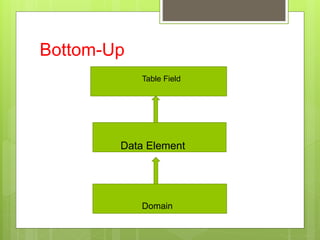
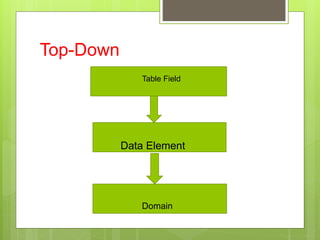
 Types of Approaches:
1. Bottom-Up
2. Top-Down
Bottom-Up
Domain
Data Element
Table Field
Top-Down
Domain
Data Element
Table Field
Data Types
 ACCP: Posting period. The length is set to 6 places for
this data type. The format is YYYYMM. In input and
output, the system inserts a point between the year and
month, so the template of this data type has the format
‘____.__’.
 CHAR: Character string. Fields of type CHAR can have
a maximum length of 1333 in tables. If you want to use
longer character fields in tables, you must choose data
type LCHR. There are no restrictions on the length
of such fields in structures.
 CLNT: Client. Client fields always have three places.
 CUKY: Currency key. Fields of this type are referenced by
fields of type CURR. The length is set to 5 places for this data
type.
 CURR: Currency field. Equivalent to an amount field DEC. A
field of this type must refer to a field of type CUKY (reference
field). The maximum length for this data type is 31 places.
 DATS: Date. The length is set to 8 places for this data type.
The output template can be defined with the user profile.
 DEC: Counter or amount field with decimal point, sign, and
commas separating thousands. A DEC field has a maximum
length of 31 places.
 FLTP: Floating point number. The length (including decimal
places) is set to 16 places for this data type
 INT1: 1-byte integer between 0 and 255. The length is set to 3
places for this data type.
 INT2: 2-byte integer between -32767 and 32767.
 NUMC: Long character field in which only numbers can be
entered. The length of this field is limited to a maximum of 255
places.
 PREC: Obsolete data type. The length is set to 2 places for
this data type but internally it is treated like INT2. Dynpro fields
of type PREC are restricted to 2 places and must not contain a
sign.
 QUAN: Quantity. Equivalent to an amount field DEC. A field of
this type must always refer to a units field with UNIT format
(reference field). The maximum length for this data type is 31
places.
 STRING: Character string with variable length This data type
can be used only in types (data elements, structures, table
types) and domains.
 TIMS: Time. The length is set to 6 places for this data type. The
format is HHMMSS.
 UNIT: Unit. Fields of this type are referenced by fields of type
QUAN. The length of this data type is set to 2 or 3 places.
Types of Tables
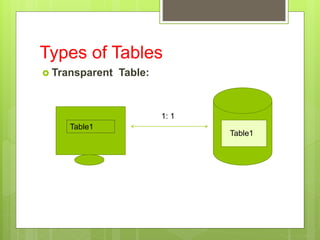
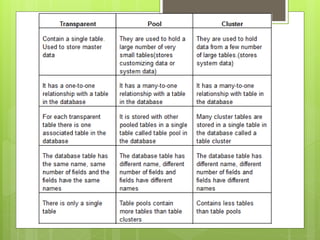
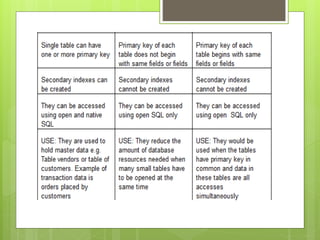
 Transparent Table:
Table1
Table1
1: 1
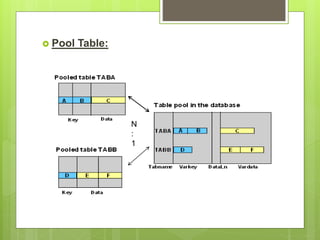
 Pool Table:
N
:
1
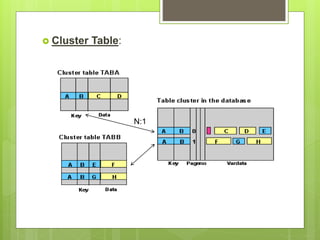
 Cluster Table:
N:1
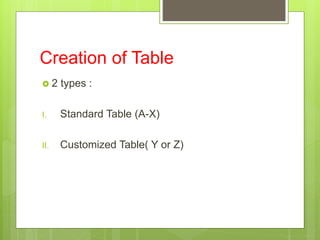
Creation of Table
 2 types :
I. Standard Table (A-X)
II. Customized Table( Y or Z)
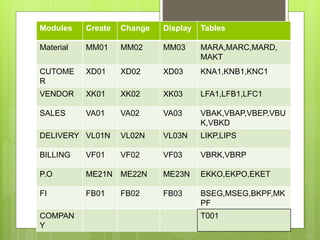
Modules Create Change Display Tables
Material MM01 MM02 MM03 MARA,MARC,MARD,
MAKT
CUTOME
R
XD01 XD02 XD03 KNA1,KNB1,KNC1
VENDOR XK01 XK02 XK03 LFA1,LFB1,LFC1
SALES VA01 VA02 VA03 VBAK,VBAP,VBEP,VBU
K,VBKD
DELIVERY VL01N VL02N VL03N LIKP,LIPS
BILLING VF01 VF02 VF03 VBRK,VBRP
P.O ME21N ME22N ME23N EKKO,EKPO,EKET
FI FB01 FB02 FB03 BSEG,MSEG,BKPF,MK
PF
COMPAN
Y
T001
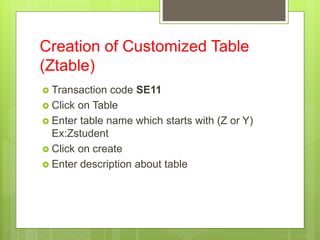
Creation of Customized Table
(Ztable)
 Transaction code SE11
 Click on Table
 Enter table name which starts with (Z or Y)
Ex:Zstudent
 Click on create
 Enter description about table
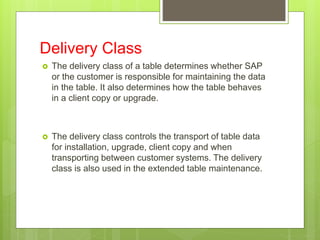
Delivery Class
 The delivery class of a table determines whether SAP
or the customer is responsible for maintaining the data
in the table. It also determines how the table behaves
in a client copy or upgrade.
 The delivery class controls the transport of table data
for installation, upgrade, client copy and when
transporting between customer systems. The delivery
class is also used in the extended table maintenance.
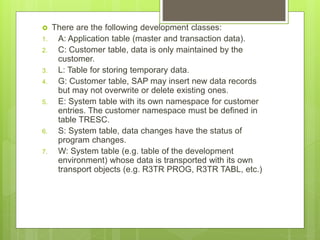
 There are the following development classes:
1. A: Application table (master and transaction data).
2. C: Customer table, data is only maintained by the
customer.
3. L: Table for storing temporary data.
4. G: Customer table, SAP may insert new data records
but may not overwrite or delete existing ones.
5. E: System table with its own namespace for customer
entries. The customer namespace must be defined in
table TRESC.
6. S: System table, data changes have the status of
program changes.
7. W: System table (e.g. table of the development
environment) whose data is transported with its own
transport objects (e.g. R3TR PROG, R3TR TABL, etc.)
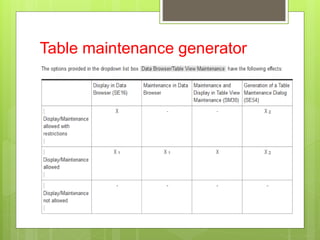
 Data Browser/ Table Maint. View :
1. Display/Maintenance allowed with
restriction.
2. Display/Maintenance allowed.
3. Display/Maintenance not allowed.
Technical Settings:
 Data class: If you choose the data class correctly, your table is
automatically assigned to the correct area (tablespace or DBspace)
of the database when it is created. Each data class corresponds to a
physical area in which all the tables assigned to this data class are
stored.
 There are the following data classes:
1. APPL0 (master data): Data which is seldomly changed. An example of
master data is the data contained in an address file, such as the name,
address and telephone number.
2. APPL1 (transaction data): Data that is frequently changed. An example of
transaction data is the goods in a warehouse, which change after each
purchase order.
3. APPL2 (organizational data): Customizing data that is defined when the
system is installed and seldomly changed. An example is the table with
country codes.
4. Two further data classes, USR and USR1, are provided for the customer.
These are for user developments. The tables assigned to these data
classes are stored in a tablespace for user developments.
 Size Category: to define the expected space
required for the table in the database. You can
choose a size category from 0 to 4 for your
table.
 A certain fixed memory size in the database,
which depends on the database system used,
is assigned to each category.
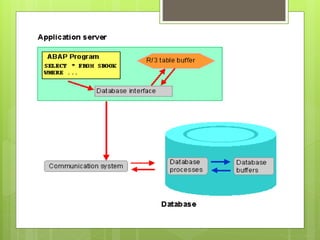
Buffering
 Buffering a table improves the performance when
accessing the data records contained in the table.
 The table buffers reside locally on each application
server in the system. The data of buffered tables can
thus be accessed directly from the buffer of the
application server. This avoids the time-consuming
process of accessing the database.
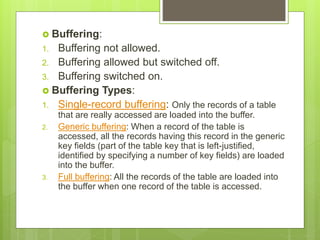
 Buffering:
1. Buffering not allowed.
2. Buffering allowed but switched off.
3. Buffering switched on.
 Buffering Types:
1. Single-record buffering: Only the records of a table
that are really accessed are loaded into the buffer.
2. Generic buffering: When a record of the table is
accessed, all the records having this record in the generic
key fields (part of the table key that is left-justified,
identified by specifying a number of key fields) are loaded
into the buffer.
3. Full buffering: All the records of the table are loaded into
the buffer when one record of the table is accessed.
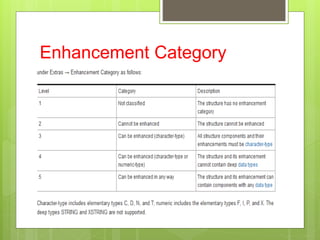
Enhancement Category
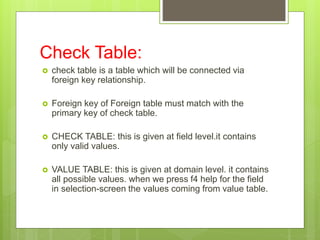
Check Table:
 check table is a table which will be connected via
foreign key relationship.
 Foreign key of Foreign table must match with the
primary key of check table.
 CHECK TABLE: this is given at field level.it contains
only valid values.
 VALUE TABLE: this is given at domain level. it contains
all possible values. when we press f4 help for the field
in selection-screen the values coming from value table.
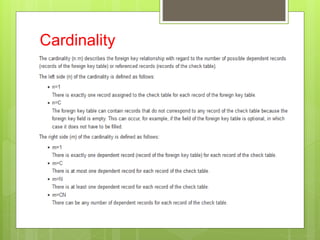
Cardinality
 Client dependency: Table structure is always
client independent , that means if we create a table
structure in client 800 the same structure is visible in
client 810.
 Table data is client dependent if table structure has the
field MANDT.
 If Table structure doesn’t contain MANDT field, then
table is client independent.
Views
 View is a logical view( Virtual) which can be
created on database tables.
 It can be created at run time and it doesn’t
hold any memory.
 4 types:
1. Database view
2. Projection view
3. Maintenance view
4. Help view
 Database view :
1. It can be created on more than one table.
2. It has selection conditional table.
3. Maintenance not allowed .
 Projection view:
1. Only one table can be used.
2. Both read and change the data access is allowed.
3. Use to view different fields of the same table.
 Maintenance view:
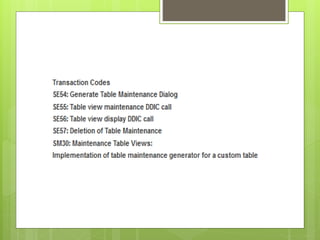
1. Also known as table maintenance generator (SM30).
2. It can be created on one or more than one table.
3. We can add, delete and modify the record.
Table maintenance generator
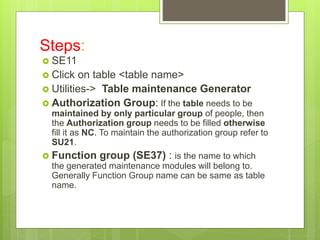
Steps:
 SE11
 Click on table <table name>
 Utilities-> Table maintenance Generator
 Authorization Group: If the table needs to be
maintained by only particular group of people, then
the Authorization group needs to be filled otherwise
fill it as NC. To maintain the authorization group refer to
SU21.
 Function group (SE37) : is the name to which
the generated maintenance modules will belong to.
Generally Function Group name can be same as table
name.
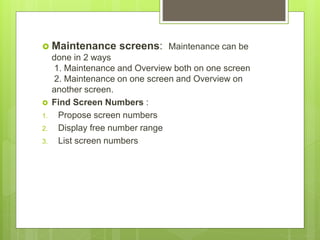
 Maintenance screens: Maintenance can be
done in 2 ways
1. Maintenance and Overview both on one screen
2. Maintenance on one screen and Overview on
another screen.
 Find Screen Numbers :
1. Propose screen numbers
2. Display free number range
3. List screen numbers
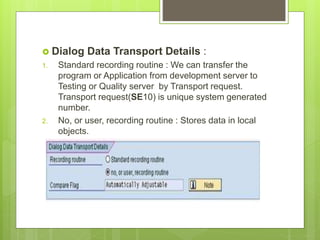
 Dialog Data Transport Details :
1. Standard recording routine : We can transfer the
program or Application from development server to
Testing or Quality server by Transport request.
Transport request(SE10) is unique system generated
number.
2. No, or user, recording routine : Stores data in local
objects.
 Click on create.
 Utilities-> Table content -> create entries.
 Uses:
1. Many records we can enter at a time.
2. Maintenance is possible.
-------------------------------------------------------------------
 Transaction code (SE93) .
1. Transaction name-> create-> Des ->Click on
Transaction with parameter.
2. Enter Transaction : SM30 .
3. Check no initial screen.
4. Select All GUI Support
5. Name of screen field : ViewName & Value : Table
maintenance Generated table name.
6. To enable Update = X.
Data Types
 There are 2 types
1. User defined data types. Ex: Structure,
Tables , data elements.
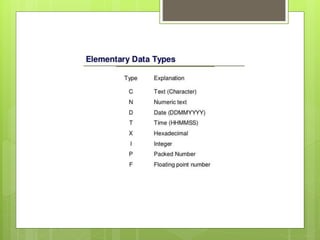
2. Pre-defined : System defined . Ex: D , C, X
,F , N etc.
Structure:
 A structure (structured type) comprises components
(fields).
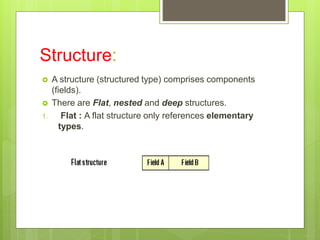
 There are Flat, nested and deep structures.
1. Flat : A flat structure only references elementary
types.
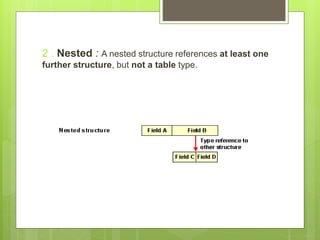
2 . Nested : A nested structure references at least one
further structure, but not a table type.
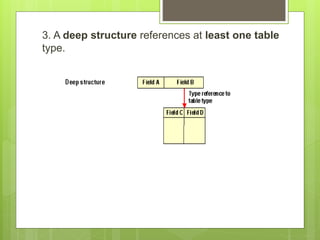
3. A deep structure references at least one table
type.
Difference between Structure and
Table
 Table is SAP Tables which stores data in its
fields.
 Structures are temporary tables which doesn't
store data in it but use it for calculation
purpose during the transactions
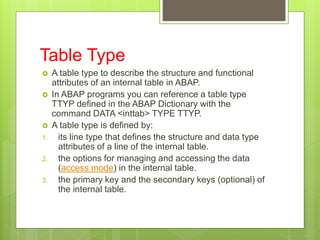
Table Type
 A table type to describe the structure and functional
attributes of an internal table in ABAP.
 In ABAP programs you can reference a table type
TTYP defined in the ABAP Dictionary with the
command DATA <inttab> TYPE TTYP.
 A table type is defined by:
1. its line type that defines the structure and data type
attributes of a line of the internal table.
2. the options for managing and accessing the data
(access mode) in the internal table.
3. the primary key and the secondary keys (optional) of
the internal table.
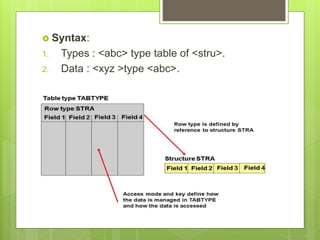
 Syntax:
1. Types : <abc> type table of <stru>.
2. Data : <xyz >type <abc>.
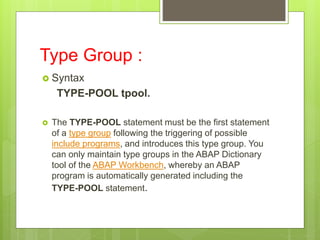
Type Group :
 Syntax
TYPE-POOL tpool.
 The TYPE-POOL statement must be the first statement
of a type group following the triggering of possible
include programs, and introduces this type group. You
can only maintain type groups in the ABAP Dictionary
tool of the ABAP Workbench, whereby an ABAP
program is automatically generated including the
TYPE-POOL statement.
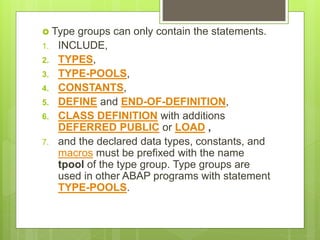
 Type groups can only contain the statements.
1. INCLUDE,
2. TYPES,
3. TYPE-POOLS,
4. CONSTANTS,
5. DEFINE and END-OF-DEFINITION,
6. CLASS DEFINITION with additions
DEFERRED PUBLIC or LOAD ,
7. and the declared data types, constants, and
macros must be prefixed with the name
tpool of the type group. Type groups are
used in other ABAP programs with statement
TYPE-POOLS.
Search Help
 Search helps are objects that you can use to assign
input help (F4 Help) to screen fields.
 There are two types of search helps:
1. Elementary search helps: They describe a search
path. The elementary search help must define the
following.
A. Where the data of the hit list must be read from (the
selection method).
B. How the exchange of values between the screen
template and selection method is implemented (the
interface of the search help).
C. How the online input help must be defined (online
behavior of the search help).
2. Collective search helps:
A. Collective search helps combine several
elementary search helps. A collective search
help can offer several alternative search
paths.
 Search Help Exit: It is function module
 If you want to create dynamic search help,
then use search help exit.
 Ex: Modify the content of table dyanamically.
 F4if_shlp_exit_example
 Diff Between Elementary search helps & Collective search helps
1) Elementary search helps describe a search path. The elementary search
help must define where the data of the hit list should be read from (selection
method), how the exchange of values between the screen template and
selection method is implemented (interface of the search help) and how the
online input help should be defined (online behavior of the search help).
2) Collective search helps combine several elementary search helps.
Collective search help thus can offer several alternative search paths.
3) An elementary search help defines the standard flow of an input help.
4) A collective search help combines several elementary search helps. The
user can thus choose one of several alternative search paths with collective
search help.
5) A collective search help comprises several elementary search helps. It
combines all the search paths that are meaningful for a field.
6) Both elementary search helps and other search helps can be included in a
collective search help. If other collective search helps are contained in
collective search help, they are expanded to the level of the elementary
search helps when the input help is called.
Lock Objects
 The SAP system synchronizes several users'
simultaneous access to the same data records with a
lock mechanism.
 When interactive transactions are programmed, the
system sets and releases locks by calling function
modules.
1. ENQUEUE_<lockobjectname>.
2. DEQUEUE_<lockobjectname>
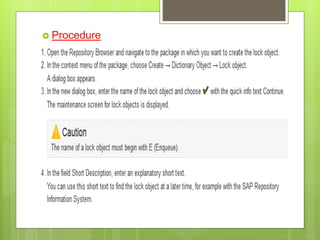
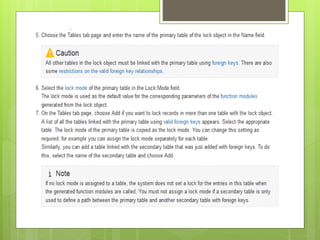
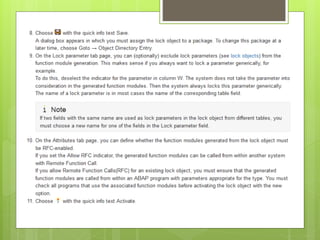
 Procedure
Sap abap
Sap abap

Sap abap

  • 1.
  • 2.
    Topics  Data Dictionary Basic Programming  Modularization  Internal Tables  Reports  Dialog Programming  Batch Data Communication  SAP Script / Smart Forms  User Exist  ABAP-OOPS  BADI  BAPI  Daily Activities
  • 3.
    Data Dictionary  Itis a central data repository system and it is nothing but Data Base.  Transaction Code: SE11.  D.D components: 1) Tables 2) Views 3) Data Types 4) Type Group 5) Domain 6) Search Help 7) Lock Objects
  • 4.
     Table :is a Table structure and table data used to organize information.  Field : It takes reference of Data element.  Domain : is a technical attribute of a field or Data element. ex: char , int etc. Domains are re-usable.  Data Element: Domain + Symantec description of a field.  Types of Approaches: 1. Bottom-Up 2. Top-Down
  • 5.
  • 6.
  • 7.
    Data Types  ACCP:Posting period. The length is set to 6 places for this data type. The format is YYYYMM. In input and output, the system inserts a point between the year and month, so the template of this data type has the format ‘____.__’.  CHAR: Character string. Fields of type CHAR can have a maximum length of 1333 in tables. If you want to use longer character fields in tables, you must choose data type LCHR. There are no restrictions on the length of such fields in structures.  CLNT: Client. Client fields always have three places.
  • 8.
     CUKY: Currencykey. Fields of this type are referenced by fields of type CURR. The length is set to 5 places for this data type.  CURR: Currency field. Equivalent to an amount field DEC. A field of this type must refer to a field of type CUKY (reference field). The maximum length for this data type is 31 places.  DATS: Date. The length is set to 8 places for this data type. The output template can be defined with the user profile.  DEC: Counter or amount field with decimal point, sign, and commas separating thousands. A DEC field has a maximum length of 31 places.  FLTP: Floating point number. The length (including decimal places) is set to 16 places for this data type  INT1: 1-byte integer between 0 and 255. The length is set to 3 places for this data type.  INT2: 2-byte integer between -32767 and 32767.
  • 9.
     NUMC: Longcharacter field in which only numbers can be entered. The length of this field is limited to a maximum of 255 places.  PREC: Obsolete data type. The length is set to 2 places for this data type but internally it is treated like INT2. Dynpro fields of type PREC are restricted to 2 places and must not contain a sign.  QUAN: Quantity. Equivalent to an amount field DEC. A field of this type must always refer to a units field with UNIT format (reference field). The maximum length for this data type is 31 places.  STRING: Character string with variable length This data type can be used only in types (data elements, structures, table types) and domains.  TIMS: Time. The length is set to 6 places for this data type. The format is HHMMSS.  UNIT: Unit. Fields of this type are referenced by fields of type QUAN. The length of this data type is set to 2 or 3 places.
  • 11.
    Types of Tables Transparent Table: Table1 Table1 1: 1
  • 12.
  • 13.
  • 16.
    Creation of Table 2 types : I. Standard Table (A-X) II. Customized Table( Y or Z)
  • 17.
    Modules Create ChangeDisplay Tables Material MM01 MM02 MM03 MARA,MARC,MARD, MAKT CUTOME R XD01 XD02 XD03 KNA1,KNB1,KNC1 VENDOR XK01 XK02 XK03 LFA1,LFB1,LFC1 SALES VA01 VA02 VA03 VBAK,VBAP,VBEP,VBU K,VBKD DELIVERY VL01N VL02N VL03N LIKP,LIPS BILLING VF01 VF02 VF03 VBRK,VBRP P.O ME21N ME22N ME23N EKKO,EKPO,EKET FI FB01 FB02 FB03 BSEG,MSEG,BKPF,MK PF COMPAN Y T001
  • 18.
    Creation of CustomizedTable (Ztable)  Transaction code SE11  Click on Table  Enter table name which starts with (Z or Y) Ex:Zstudent  Click on create  Enter description about table
  • 19.
    Delivery Class  Thedelivery class of a table determines whether SAP or the customer is responsible for maintaining the data in the table. It also determines how the table behaves in a client copy or upgrade.  The delivery class controls the transport of table data for installation, upgrade, client copy and when transporting between customer systems. The delivery class is also used in the extended table maintenance.
  • 20.
     There arethe following development classes: 1. A: Application table (master and transaction data). 2. C: Customer table, data is only maintained by the customer. 3. L: Table for storing temporary data. 4. G: Customer table, SAP may insert new data records but may not overwrite or delete existing ones. 5. E: System table with its own namespace for customer entries. The customer namespace must be defined in table TRESC. 6. S: System table, data changes have the status of program changes. 7. W: System table (e.g. table of the development environment) whose data is transported with its own transport objects (e.g. R3TR PROG, R3TR TABL, etc.)
  • 21.
     Data Browser/Table Maint. View : 1. Display/Maintenance allowed with restriction. 2. Display/Maintenance allowed. 3. Display/Maintenance not allowed.
  • 22.
    Technical Settings:  Dataclass: If you choose the data class correctly, your table is automatically assigned to the correct area (tablespace or DBspace) of the database when it is created. Each data class corresponds to a physical area in which all the tables assigned to this data class are stored.  There are the following data classes: 1. APPL0 (master data): Data which is seldomly changed. An example of master data is the data contained in an address file, such as the name, address and telephone number. 2. APPL1 (transaction data): Data that is frequently changed. An example of transaction data is the goods in a warehouse, which change after each purchase order. 3. APPL2 (organizational data): Customizing data that is defined when the system is installed and seldomly changed. An example is the table with country codes. 4. Two further data classes, USR and USR1, are provided for the customer. These are for user developments. The tables assigned to these data classes are stored in a tablespace for user developments.
  • 23.
     Size Category:to define the expected space required for the table in the database. You can choose a size category from 0 to 4 for your table.  A certain fixed memory size in the database, which depends on the database system used, is assigned to each category.
  • 24.
    Buffering  Buffering atable improves the performance when accessing the data records contained in the table.  The table buffers reside locally on each application server in the system. The data of buffered tables can thus be accessed directly from the buffer of the application server. This avoids the time-consuming process of accessing the database.
  • 26.
     Buffering: 1. Bufferingnot allowed. 2. Buffering allowed but switched off. 3. Buffering switched on.  Buffering Types: 1. Single-record buffering: Only the records of a table that are really accessed are loaded into the buffer. 2. Generic buffering: When a record of the table is accessed, all the records having this record in the generic key fields (part of the table key that is left-justified, identified by specifying a number of key fields) are loaded into the buffer. 3. Full buffering: All the records of the table are loaded into the buffer when one record of the table is accessed.
  • 27.
  • 28.
    Check Table:  checktable is a table which will be connected via foreign key relationship.  Foreign key of Foreign table must match with the primary key of check table.  CHECK TABLE: this is given at field level.it contains only valid values.  VALUE TABLE: this is given at domain level. it contains all possible values. when we press f4 help for the field in selection-screen the values coming from value table.
  • 29.
  • 30.
     Client dependency:Table structure is always client independent , that means if we create a table structure in client 800 the same structure is visible in client 810.  Table data is client dependent if table structure has the field MANDT.  If Table structure doesn’t contain MANDT field, then table is client independent.
  • 31.
    Views  View isa logical view( Virtual) which can be created on database tables.  It can be created at run time and it doesn’t hold any memory.  4 types: 1. Database view 2. Projection view 3. Maintenance view 4. Help view
  • 32.
     Database view: 1. It can be created on more than one table. 2. It has selection conditional table. 3. Maintenance not allowed .  Projection view: 1. Only one table can be used. 2. Both read and change the data access is allowed. 3. Use to view different fields of the same table.  Maintenance view: 1. Also known as table maintenance generator (SM30). 2. It can be created on one or more than one table. 3. We can add, delete and modify the record.
  • 33.
  • 35.
    Steps:  SE11  Clickon table <table name>  Utilities-> Table maintenance Generator  Authorization Group: If the table needs to be maintained by only particular group of people, then the Authorization group needs to be filled otherwise fill it as NC. To maintain the authorization group refer to SU21.  Function group (SE37) : is the name to which the generated maintenance modules will belong to. Generally Function Group name can be same as table name.
  • 36.
     Maintenance screens:Maintenance can be done in 2 ways 1. Maintenance and Overview both on one screen 2. Maintenance on one screen and Overview on another screen.  Find Screen Numbers : 1. Propose screen numbers 2. Display free number range 3. List screen numbers
  • 37.
     Dialog DataTransport Details : 1. Standard recording routine : We can transfer the program or Application from development server to Testing or Quality server by Transport request. Transport request(SE10) is unique system generated number. 2. No, or user, recording routine : Stores data in local objects.
  • 38.
     Click oncreate.  Utilities-> Table content -> create entries.  Uses: 1. Many records we can enter at a time. 2. Maintenance is possible. -------------------------------------------------------------------  Transaction code (SE93) . 1. Transaction name-> create-> Des ->Click on Transaction with parameter. 2. Enter Transaction : SM30 . 3. Check no initial screen. 4. Select All GUI Support 5. Name of screen field : ViewName & Value : Table maintenance Generated table name. 6. To enable Update = X.
  • 39.
    Data Types  Thereare 2 types 1. User defined data types. Ex: Structure, Tables , data elements. 2. Pre-defined : System defined . Ex: D , C, X ,F , N etc.
  • 40.
    Structure:  A structure(structured type) comprises components (fields).  There are Flat, nested and deep structures. 1. Flat : A flat structure only references elementary types.
  • 41.
    2 . Nested: A nested structure references at least one further structure, but not a table type.
  • 42.
    3. A deepstructure references at least one table type.
  • 43.
    Difference between Structureand Table  Table is SAP Tables which stores data in its fields.  Structures are temporary tables which doesn't store data in it but use it for calculation purpose during the transactions
  • 44.
    Table Type  Atable type to describe the structure and functional attributes of an internal table in ABAP.  In ABAP programs you can reference a table type TTYP defined in the ABAP Dictionary with the command DATA <inttab> TYPE TTYP.  A table type is defined by: 1. its line type that defines the structure and data type attributes of a line of the internal table. 2. the options for managing and accessing the data (access mode) in the internal table. 3. the primary key and the secondary keys (optional) of the internal table.
  • 45.
     Syntax: 1. Types: <abc> type table of <stru>. 2. Data : <xyz >type <abc>.
  • 46.
    Type Group : Syntax TYPE-POOL tpool.  The TYPE-POOL statement must be the first statement of a type group following the triggering of possible include programs, and introduces this type group. You can only maintain type groups in the ABAP Dictionary tool of the ABAP Workbench, whereby an ABAP program is automatically generated including the TYPE-POOL statement.
  • 47.
     Type groupscan only contain the statements. 1. INCLUDE, 2. TYPES, 3. TYPE-POOLS, 4. CONSTANTS, 5. DEFINE and END-OF-DEFINITION, 6. CLASS DEFINITION with additions DEFERRED PUBLIC or LOAD , 7. and the declared data types, constants, and macros must be prefixed with the name tpool of the type group. Type groups are used in other ABAP programs with statement TYPE-POOLS.
  • 48.
    Search Help  Searchhelps are objects that you can use to assign input help (F4 Help) to screen fields.  There are two types of search helps: 1. Elementary search helps: They describe a search path. The elementary search help must define the following. A. Where the data of the hit list must be read from (the selection method). B. How the exchange of values between the screen template and selection method is implemented (the interface of the search help). C. How the online input help must be defined (online behavior of the search help).
  • 49.
    2. Collective searchhelps: A. Collective search helps combine several elementary search helps. A collective search help can offer several alternative search paths.  Search Help Exit: It is function module  If you want to create dynamic search help, then use search help exit.  Ex: Modify the content of table dyanamically.  F4if_shlp_exit_example
  • 50.
     Diff BetweenElementary search helps & Collective search helps 1) Elementary search helps describe a search path. The elementary search help must define where the data of the hit list should be read from (selection method), how the exchange of values between the screen template and selection method is implemented (interface of the search help) and how the online input help should be defined (online behavior of the search help). 2) Collective search helps combine several elementary search helps. Collective search help thus can offer several alternative search paths. 3) An elementary search help defines the standard flow of an input help. 4) A collective search help combines several elementary search helps. The user can thus choose one of several alternative search paths with collective search help. 5) A collective search help comprises several elementary search helps. It combines all the search paths that are meaningful for a field. 6) Both elementary search helps and other search helps can be included in a collective search help. If other collective search helps are contained in collective search help, they are expanded to the level of the elementary search helps when the input help is called.
  • 51.
    Lock Objects  TheSAP system synchronizes several users' simultaneous access to the same data records with a lock mechanism.  When interactive transactions are programmed, the system sets and releases locks by calling function modules. 1. ENQUEUE_<lockobjectname>. 2. DEQUEUE_<lockobjectname>
  • 52.