*ALV Reports* 
BY ----Arjun
Review 
ALV Reports are mainly used to display the data in the form of either 
Grid or List Format with good Look and Feel. 
The main advantages of ALV Reports are: 
1. Good Look and Feel 
2.Predefined options given by SAP like 
Asc, Desc, 
Filtering, 
Downloading, 
Changing Layout, 
sending Mail…..etc 
ã SAP AG 2001, Smart Forms - the Form Printing Solution, 
Claudia Binder / Jens Stumpe 2
ã SAP AG 2001, Smart Forms - the Form Printing Solution, 
Claudia Binder / Jens Stumpe 3 
ALV Reports By ARJUN 
Function modules for developing ALV Reports 
 REUSE_ALV_GRID_DISPLAY  Display ALV data in GRID format 
REUSE_ALV_LIST_DISPLAY  Display ALV data in LIST format 
REUSE_ALV_COMMENTARY_WRITE  Display TOP-OF-PAGE, 
LOGO,END-OF-LIST. 
REUSE_ALV_FIELDCATELOG_MERGE Generate field catalog 
automatically 
REUSE_ALV_EVENTS_GET  Display ALV Events 
REUSE_ALV_HIERSEQ_LIST_DISPLAY Display hierarchical ALV 
REUSE_ALV_BLOCKED_LIST_DISPLAY  Display blocked ALV
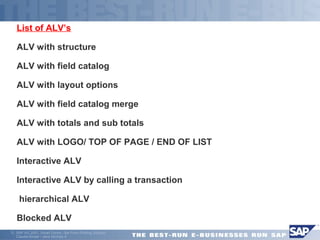
List of ALV’s 
ALV with structure 
ALV with field catalog 
ALV with layout options 
ALV with field catalog merge 
ALV with totals and sub totals 
ALV with LOGO/ TOP OF PAGE / END OF LIST 
 Interactive ALV 
 Interactive ALV by calling a transaction 
 hierarchical ALV 
Blocked ALV 
ã SAP AG 2001, Smart Forms - the Form Printing Solution, 
Claudia Binder / Jens Stumpe 4
ALV WITH STRUCTURES 
ã SAP AG 2001, Smart Forms - the Form Printing Solution, 
Claudia Binder / Jens Stumpe 5
ã SAP AG 2001, Smart Forms - the Form Printing Solution, 
Claudia Binder / Jens Stumpe 6 
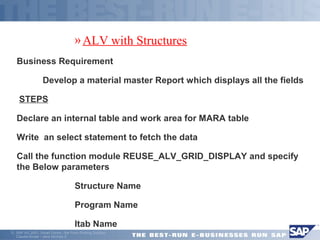
»ALV with Structures 
Business Requirement 
 Develop a material master Report which displays all the fields 
 STEPS 
Declare an internal table and work area for MARA table 
Write an select statement to fetch the data 
Call the function module REUSE_ALV_GRID_DISPLAY and specify 
the Below parameters 
 Structure Name 
 Program Name 
 Itab Name
ALV WITH FIELDCATELOG 
ã SAP AG 2001, Smart Forms - the Form Printing Solution, 
Claudia Binder / Jens Stumpe 7
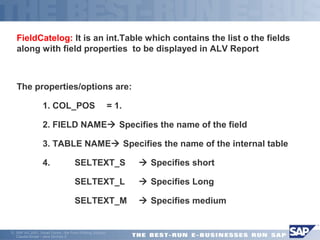
FieldCatelog: It is an int.Table which contains the list o the fields 
along with field properties to be displayed in ALV Report 
The properties/options are: 
 1. COL_POS = 1. 
 2. FIELD NAME Specifies the name of the field 
 3. TABLE NAME Specifies the name of the internal table 
 4. SELTEXT_S  Specifies short 
 SELTEXT_L  Specifies Long 
 SELTEXT_M  Specifies medium 
ã SAP AG 2001, Smart Forms - the Form Printing Solution, 
Claudia Binder / Jens Stumpe 8
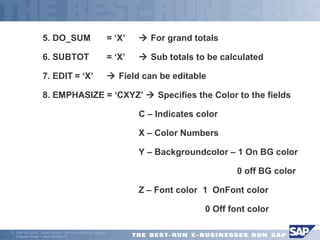
 5. DO_SUM = ‘X’  For grand totals 
 6. SUBTOT = ‘X’  Sub totals to be calculated 
 7. EDIT = ‘X’  Field can be editable 
 8. EMPHASIZE = ‘CXYZ’  Specifies the Color to the fields 
 C – Indicates color 
 X – Color Numbers 
 Y – Backgroundcolor – 1 On BG color 
 0 off BG color 
 Z – Font color 1 OnFont color 
 0 Off font color 
ã SAP AG 2001, Smart Forms - the Form Printing Solution, 
Claudia Binder / Jens Stumpe 9
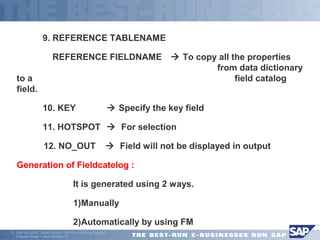
 9. REFERENCE TABLENAME 
 REFERENCE FIELDNAME  To copy all the properties 
ã SAP AG 2001, Smart Forms - the Form Printing Solution, 
Claudia Binder / Jens Stumpe 10 
from data dictionary 
to a field catalog 
field. 
 10. KEY  Specify the key field 
 11. HOTSPOT  For selection 
 12. NO_OUT  Field will not be displayed in output 
Generation of Fieldcatelog : 
 It is generated using 2 ways. 
 1)Manually 
 2)Automatically by using FM
ALV with Manual field catalog 
ã SAP AG 2001, Smart Forms - the Form Printing Solution, 
Claudia Binder / Jens Stumpe 11
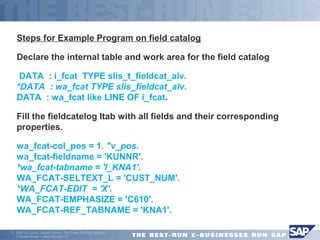
Steps for Example Program on field catalog 
Declare the internal table and work area for the field catalog 
 DATA : i_fcat TYPE slis_t_fieldcat_alv. 
*DATA : wa_fcat TYPE slis_fieldcat_alv. 
DATA : wa_fcat like LINE OF i_fcat. 
Fill the fieldcatelog Itab with all fields and their corresponding 
properties. 
wa_fcat-col_pos = 1. "v_pos. 
wa_fcat-fieldname = 'KUNNR'. 
*wa_fcat-tabname = 'I_KNA1'. 
WA_FCAT-SELTEXT_L = 'CUST_NUM'. 
*WA_FCAT-EDIT = 'X'. 
WA_FCAT-EMPHASIZE = 'C610'. 
WA_FCAT-REF_TABNAME = 'KNA1'. 
ã SAP AG 2001, Smart Forms - the Form Printing Solution, 
Claudia Binder / Jens Stumpe 12
 
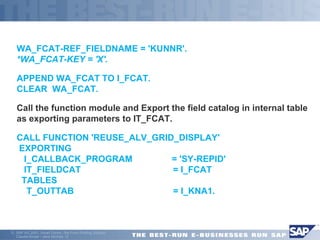
WA_FCAT-REF_FIELDNAME = 'KUNNR'. 
*WA_FCAT-KEY = 'X'. 
APPEND WA_FCAT TO I_FCAT. 
CLEAR WA_FCAT. 
Call the function module and Export the field catalog in internal table 
as exporting parameters to IT_FCAT. 
CALL FUNCTION 'REUSE_ALV_GRID_DISPLAY' 
EXPORTING 
I_CALLBACK_PROGRAM = 'SY-REPID' 
IT_FIELDCAT = I_FCAT 
TABLES 
T_OUTTAB = I_KNA1. 
ã SAP AG 2001, Smart Forms - the Form Printing Solution, 
Claudia Binder / Jens Stumpe 13
 ALV with field catalog merge 
ã SAP AG 2001, Smart Forms - the Form Printing Solution, 
Claudia Binder / Jens Stumpe 14
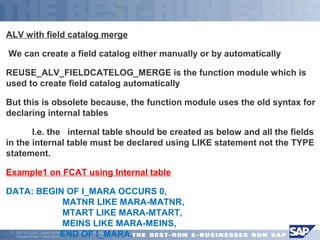
ALV with field catalog merge 
 We can create a field catalog either manually or by automatically 
REUSE_ALV_FIELDCATELOG_MERGE is the function module which is 
used to create field catalog automatically 
But this is obsolete because, the function module uses the old syntax for 
declaring internal tables 
 I.e. the internal table should be created as below and all the fields 
in the internal table must be declared using LIKE statement not the TYPE 
statement. 
Example1 on FCAT using Internal table 
DATA: BEGIN OF I_MARA OCCURS 0, 
MATNR LIKE MARA-MATNR, 
MTART LIKE MARA-MTART, 
MEINS LIKE MARA-MEINS, 
END OF I_MARA. 
ã SAP AG 2001, Smart Forms - the Form Printing Solution, 
Claudia Binder / Jens Stumpe 15
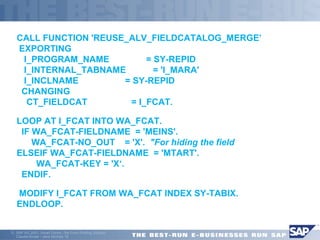
CALL FUNCTION 'REUSE_ALV_FIELDCATALOG_MERGE’ 
EXPORTING 
I_PROGRAM_NAME = SY-REPID 
I_INTERNAL_TABNAME = 'I_MARA' 
I_INCLNAME = SY-REPID 
CHANGING 
CT_FIELDCAT = I_FCAT. 
LOOP AT I_FCAT INTO WA_FCAT. 
IF WA_FCAT-FIELDNAME = 'MEINS'. 
WA_FCAT-NO_OUT = 'X'. "For hiding the field 
ELSEIF WA_FCAT-FIELDNAME = 'MTART'. 
WA_FCAT-KEY = 'X‘. 
ENDIF. 
 MODIFY I_FCAT FROM WA_FCAT INDEX SY-TABIX. 
ENDLOOP. 
ã SAP AG 2001, Smart Forms - the Form Printing Solution, 
Claudia Binder / Jens Stumpe 16
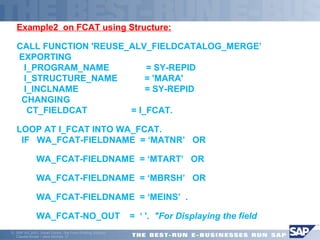
Example2 on FCAT using Structure: 
CALL FUNCTION 'REUSE_ALV_FIELDCATALOG_MERGE’ 
EXPORTING 
I_PROGRAM_NAME = SY-REPID 
I_STRUCTURE_NAME = 'MARA' 
I_INCLNAME = SY-REPID 
CHANGING 
CT_FIELDCAT = I_FCAT. 
LOOP AT I_FCAT INTO WA_FCAT. 
IF WA_FCAT-FIELDNAME = ‘MATNR’ OR 
 WA_FCAT-FIELDNAME = ‘MTART’ OR 
 WA_FCAT-FIELDNAME = ‘MBRSH’ OR 
 WA_FCAT-FIELDNAME = ‘MEINS’ . 
 WA_FCAT-NO_OUT = ‘ '. "For Displaying the field 
ã SAP AG 2001, Smart Forms - the Form Printing Solution, 
Claudia Binder / Jens Stumpe 17
 
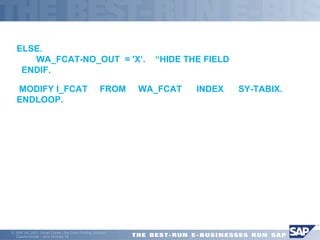
ELSE. 
WA_FCAT-NO_OUT = 'X‘. “HIDE THE FIELD 
ENDIF. 
 MODIFY I_FCAT FROM WA_FCAT INDEX SY-TABIX. 
ENDLOOP. 
ã SAP AG 2001, Smart Forms - the Form Printing Solution, 
Claudia Binder / Jens Stumpe 18
 ALV WITH LAYOUT 
ã SAP AG 2001, Smart Forms - the Form Printing Solution, 
Claudia Binder / Jens Stumpe 19
ã SAP AG 2001, Smart Forms - the Form Printing Solution, 
Claudia Binder / Jens Stumpe 20 
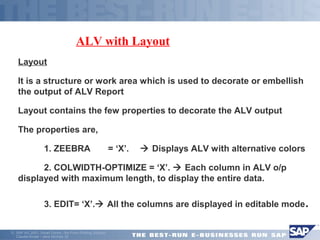
ALV with Layout 
Layout 
 It is a structure or work area which is used to decorate or embellish 
the output of ALV Report 
Layout contains the few properties to decorate the ALV output 
The properties are, 
 1. ZEEBRA = ‘X’.  Displays ALV with alternative colors 
 2. COLWIDTH-OPTIMIZE = ‘X’.  Each column in ALV o/p 
displayed with maximum length, to display the entire data. 
 3. EDIT= ‘X’. All the columns are displayed in editable mode.
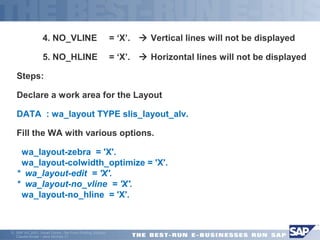
 4. NO_VLINE = ‘X’.  Vertical lines will not be displayed 
 5. NO_HLINE = ‘X’.  Horizontal lines will not be displayed 
Steps: 
Declare a work area for the Layout 
DATA : wa_layout TYPE slis_layout_alv. 
Fill the WA with various options. 
 wa_layout-zebra = 'X'. 
wa_layout-colwidth_optimize = 'X'. 
* wa_layout-edit = 'X'. 
* wa_layout-no_vline = 'X'. 
wa_layout-no_hline = 'X'. 
ã SAP AG 2001, Smart Forms - the Form Printing Solution, 
Claudia Binder / Jens Stumpe 21
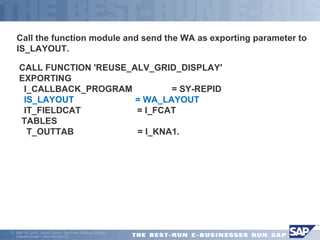
Call the function module and send the WA as exporting parameter to 
IS_LAYOUT. 
 CALL FUNCTION 'REUSE_ALV_GRID_DISPLAY' 
EXPORTING 
I_CALLBACK_PROGRAM = SY-REPID 
IS_LAYOUT = WA_LAYOUT 
IT_FIELDCAT = I_FCAT 
TABLES 
T_OUTTAB = I_KNA1. 
ã SAP AG 2001, Smart Forms - the Form Printing Solution, 
Claudia Binder / Jens Stumpe 22
 ALV WITH GRAND TOTALS 
ã SAP AG 2001, Smart Forms - the Form Printing Solution, 
Claudia Binder / Jens Stumpe 23
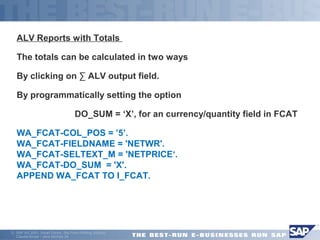
ALV Reports with Totals 
The totals can be calculated in two ways 
By clicking on Σ ALV output field. 
By programmatically setting the option 
 DO_SUM = ‘X’, for an currency/quantity field in FCAT 
WA_FCAT-COL_POS = ’5’. 
WA_FCAT-FIELDNAME = 'NETWR'. 
WA_FCAT-SELTEXT_M = 'NETPRICE‘. 
WA_FCAT-DO_SUM = 'X'. 
APPEND WA_FCAT TO I_FCAT. 
ã SAP AG 2001, Smart Forms - the Form Printing Solution, 
Claudia Binder / Jens Stumpe 24
 ALV WITH SUBTOTALS 
ã SAP AG 2001, Smart Forms - the Form Printing Solution, 
Claudia Binder / Jens Stumpe 25
ALV Reports with and sub totals 
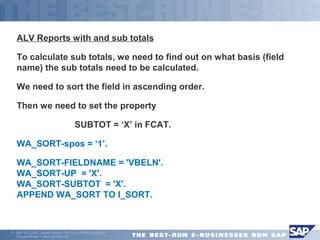
To calculate sub totals, we need to find out on what basis (field 
name) the sub totals need to be calculated. 
We need to sort the field in ascending order. 
Then we need to set the property 
 SUBTOT = ‘X’ in FCAT. 
WA_SORT-spos = ‘1’. 
WA_SORT-FIELDNAME = 'VBELN'. 
WA_SORT-UP = 'X'. 
WA_SORT-SUBTOT = 'X'. 
APPEND WA_SORT TO I_SORT. 
ã SAP AG 2001, Smart Forms - the Form Printing Solution, 
Claudia Binder / Jens Stumpe 26
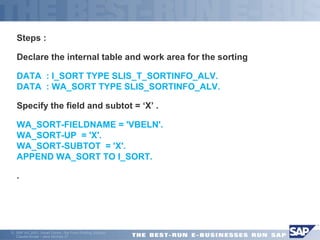
Steps : 
Declare the internal table and work area for the sorting 
DATA : I_SORT TYPE SLIS_T_SORTINFO_ALV. 
DATA : WA_SORT TYPE SLIS_SORTINFO_ALV. 
Specify the field and subtot = ‘X’ . 
WA_SORT-FIELDNAME = 'VBELN'. 
WA_SORT-UP = 'X'. 
WA_SORT-SUBTOT = 'X'. 
APPEND WA_SORT TO I_SORT. 
 . 
ã SAP AG 2001, Smart Forms - the Form Printing Solution, 
Claudia Binder / Jens Stumpe 27
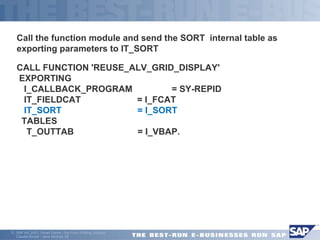
Call the function module and send the SORT internal table as 
exporting parameters to IT_SORT 
CALL FUNCTION 'REUSE_ALV_GRID_DISPLAY' 
EXPORTING 
I_CALLBACK_PROGRAM = SY-REPID 
IT_FIELDCAT = I_FCAT 
IT_SORT = I_SORT 
TABLES 
T_OUTTAB = I_VBAP. 
ã SAP AG 2001, Smart Forms - the Form Printing Solution, 
Claudia Binder / Jens Stumpe 28
 EVENTS IN ALV 
ã SAP AG 2001, Smart Forms - the Form Printing Solution, 
Claudia Binder / Jens Stumpe 29
ALV Reports with top of page/ Events 
There are totally 17 events available for ALV reporting 
The function module REUSE_ALV_EVENTS_GET will display all the 
list of ALV events 
Below are some events 
Top-Of-Page End-Of-List 
At User command Set PF status 
 If we want to use any event, then we should create a Subroutine for 
Writing our Logic. 
Perform will be dynamically created by SAP. 
Form………Endform should be created by us. 
ã SAP AG 2001, Smart Forms - the Form Printing Solution, 
Claudia Binder / Jens Stumpe 30
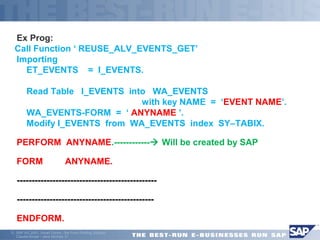
Ex Prog: 
Call Function ‘ REUSE_ALV_EVENTS_GET’ 
 Importing 
 ET_EVENTS = I_EVENTS. 
 Read Table I_EVENTS into WA_EVENTS 
 with key NAME = ‘EVENT NAME’. 
 WA_EVENTS-FORM = ‘ ANYNAME ’. 
 Modify I_EVENTS from WA_EVENTS index SY–TABIX. 
PERFORM ANYNAME.------------ Will be created by SAP 
FORM ANYNAME. 
 ----------------------------------------------- 
 ---------------------------------------------- 
ENDFORM. 
ã SAP AG 2001, Smart Forms - the Form Printing Solution, 
Claudia Binder / Jens Stumpe 31
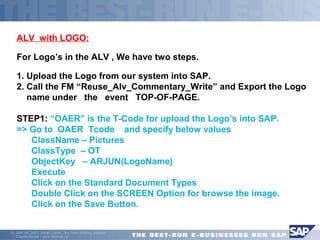
ALV with LOGO: 
For Logo’s in the ALV , We have two steps. 
1. Upload the Logo from our system into SAP. 
2. Call the FM “Reuse_Alv_Commentary_Write” and Export the Logo 
 name under the event TOP-OF-PAGE. 
STEP1: “OAER” is the T-Code for upload the Logo’s into SAP. 
=> Go to OAER Tcode and specify below values 
 ClassName – Pictures 
 ClassType – OT 
 ObjectKey – ARJUN(LogoName) 
 Execute 
 Click on the Standard Document Types 
 Double Click on the SCREEN Option for browse the image. 
 Click on the Save Button. 
ã SAP AG 2001, Smart Forms - the Form Printing Solution, 
Claudia Binder / Jens Stumpe 32
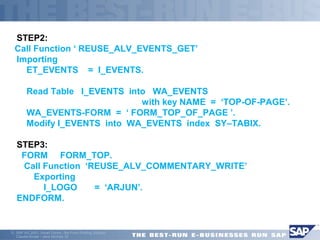
STEP2: 
Call Function ‘ REUSE_ALV_EVENTS_GET’ 
 Importing 
 ET_EVENTS = I_EVENTS. 
 Read Table I_EVENTS into WA_EVENTS 
 with key NAME = ‘TOP-OF-PAGE’. 
 WA_EVENTS-FORM = ‘ FORM_TOP_OF_PAGE ’. 
 Modify I_EVENTS into WA_EVENTS index SY–TABIX. 
STEP3: 
 FORM FORM_TOP. 
 Call Function ‘REUSE_ALV_COMMENTARY_WRITE’ 
 Exporting 
 I_LOGO = ‘ARJUN’. 
ENDFORM. 
ã SAP AG 2001, Smart Forms - the Form Printing Solution, 
Claudia Binder / Jens Stumpe 33
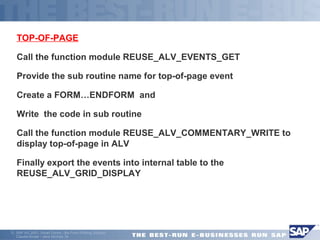
TOP-OF-PAGE 
Call the function module REUSE_ALV_EVENTS_GET 
Provide the sub routine name for top-of-page event 
Create a FORM…ENDFORM and 
Write the code in sub routine 
Call the function module REUSE_ALV_COMMENTARY_WRITE to 
display top-of-page in ALV 
Finally export the events into internal table to the 
REUSE_ALV_GRID_DISPLAY 
ã SAP AG 2001, Smart Forms - the Form Printing Solution, 
Claudia Binder / Jens Stumpe 34
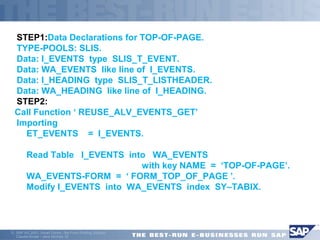
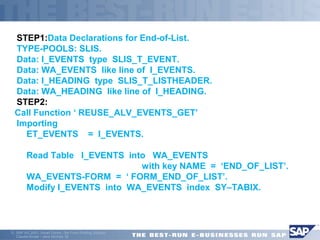
STEP1:Data Declarations for TOP-OF-PAGE. 
TYPE-POOLS: SLIS. 
Data: I_EVENTS type SLIS_T_EVENT. 
Data: WA_EVENTS like line of I_EVENTS. 
Data: I_HEADING type SLIS_T_LISTHEADER. 
Data: WA_HEADING like line of I_HEADING. 
STEP2: 
Call Function ‘ REUSE_ALV_EVENTS_GET’ 
 Importing 
 ET_EVENTS = I_EVENTS. 
 Read Table I_EVENTS into WA_EVENTS 
 with key NAME = ‘TOP-OF-PAGE’. 
 WA_EVENTS-FORM = ‘ FORM_TOP_OF_PAGE ’. 
 Modify I_EVENTS into WA_EVENTS index SY–TABIX. 
ã SAP AG 2001, Smart Forms - the Form Printing Solution, 
Claudia Binder / Jens Stumpe 35
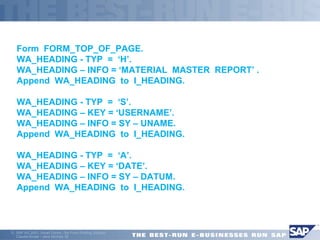
Form FORM_TOP_OF_PAGE. 
WA_HEADING - TYP = ‘H’. 
WA_HEADING – INFO = ‘MATERIAL MASTER REPORT’ . 
Append WA_HEADING to I_HEADING. 
WA_HEADING - TYP = ‘S’. 
WA_HEADING – KEY = ‘USERNAME’. 
WA_HEADING – INFO = SY – UNAME. 
Append WA_HEADING to I_HEADING. 
WA_HEADING - TYP = ‘A’. 
WA_HEADING – KEY = ‘DATE’. 
WA_HEADING – INFO = SY – DATUM. 
Append WA_HEADING to I_HEADING. 
ã SAP AG 2001, Smart Forms - the Form Printing Solution, 
Claudia Binder / Jens Stumpe 36
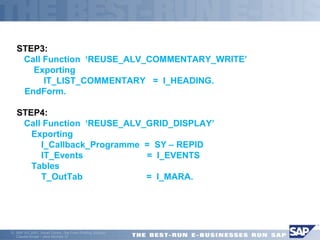
STEP3: 
 Call Function ‘REUSE_ALV_COMMENTARY_WRITE’ 
 Exporting 
 IT_LIST_COMMENTARY = I_HEADING. 
EndForm. 
STEP4: 
 Call Function ‘REUSE_ALV_GRID_DISPLAY’ 
 Exporting 
 I_Callback_Programme = SY – REPID 
 IT_Events = I_EVENTS 
 Tables 
 T_OutTab = I_MARA. 
ã SAP AG 2001, Smart Forms - the Form Printing Solution, 
Claudia Binder / Jens Stumpe 37 

END -OF-LIST: 
Call the function module REUSE_ALV_EVENTS_GET 
Provide the sub routine name for End-of-List event. 
Create a Form…….End Form and 
Write below down the code in sub routine 
Call the function module REUSE_ALV_COMMENTARY_WRITE to 
display End-of-List in ALV 
Finally export the events into internal table to the 
REUSE_ALV_GRID_DISPLAY 
ã SAP AG 2001, Smart Forms - the Form Printing Solution, 
Claudia Binder / Jens Stumpe 38
STEP1:Data Declarations for End-of-List. 
TYPE-POOLS: SLIS. 
Data: I_EVENTS type SLIS_T_EVENT. 
Data: WA_EVENTS like line of I_EVENTS. 
Data: I_HEADING type SLIS_T_LISTHEADER. 
Data: WA_HEADING like line of I_HEADING. 
STEP2: 
Call Function ‘ REUSE_ALV_EVENTS_GET’ 
 Importing 
 ET_EVENTS = I_EVENTS. 
 Read Table I_EVENTS into WA_EVENTS 
 with key NAME = ‘END_OF_LIST’. 
 WA_EVENTS-FORM = ‘ FORM_END_OF_LIST’. 
 Modify I_EVENTS into WA_EVENTS index SY–TABIX. 
ã SAP AG 2001, Smart Forms - the Form Printing Solution, 
Claudia Binder / Jens Stumpe 39
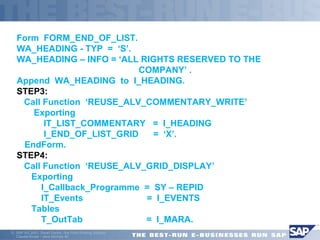
Form FORM_END_OF_LIST. 
WA_HEADING - TYP = ‘S’. 
WA_HEADING – INFO = ‘ALL RIGHTS RESERVED TO THE 
ã SAP AG 2001, Smart Forms - the Form Printing Solution, 
Claudia Binder / Jens Stumpe 40 
COMPANY’ . 
Append WA_HEADING to I_HEADING. 
STEP3: 
 Call Function ‘REUSE_ALV_COMMENTARY_WRITE’ 
 Exporting 
 IT_LIST_COMMENTARY = I_HEADING 
 I_END_OF_LIST_GRID = ‘X’. 
EndForm. 
STEP4: 
 Call Function ‘REUSE_ALV_GRID_DISPLAY’ 
 Exporting 
 I_Callback_Programme = SY – REPID 
 IT_Events = I_EVENTS 
 Tables 
 T_OutTab = I_MARA.
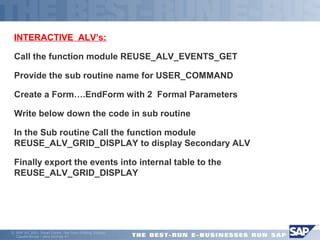
 INTERACTIVE ALV’s: 
Call the function module REUSE_ALV_EVENTS_GET 
Provide the sub routine name for USER_COMMAND 
Create a Form….EndForm with 2 Formal Parameters 
Write below down the code in sub routine 
 In the Sub routine Call the function module 
REUSE_ALV_GRID_DISPLAY to display Secondary ALV 
Finally export the events into internal table to the 
REUSE_ALV_GRID_DISPLAY 
ã SAP AG 2001, Smart Forms - the Form Printing Solution, 
Claudia Binder / Jens Stumpe 41
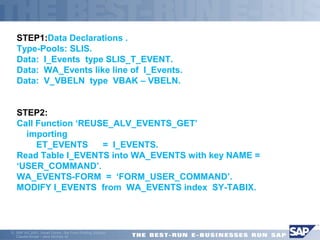
STEP1:Data Declarations . 
Type-Pools: SLIS. 
Data: I_Events type SLIS_T_EVENT. 
Data: WA_Events like line of I_Events. 
Data: V_VBELN type VBAK – VBELN. 
STEP2: 
Call Function ‘REUSE_ALV_EVENTS_GET’ 
 importing 
 ET_EVENTS = I_EVENTS. 
Read Table I_EVENTS into WA_EVENTS with key NAME = 
‘USER_COMMAND’. 
WA_EVENTS-FORM = ‘FORM_USER_COMMAND’. 
MODIFY I_EVENTS from WA_EVENTS index SY-TABIX. 
ã SAP AG 2001, Smart Forms - the Form Printing Solution, 
Claudia Binder / Jens Stumpe 42 

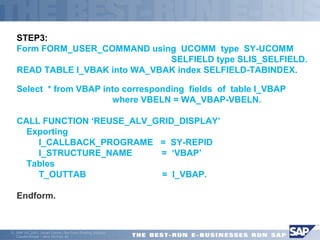
STEP3: 
Form FORM_USER_COMMAND using UCOMM type SY-UCOMM 
 SELFIELD type SLIS_SELFIELD. 
READ TABLE I_VBAK into WA_VBAK index SELFIELD-TABINDEX. 
Select * from VBAP into corresponding fields of table I_VBAP 
 where VBELN = WA_VBAP-VBELN. 
CALL FUNCTION ‘REUSE_ALV_GRID_DISPLAY’ 
 Exporting 
 I_CALLBACK_PROGRAME = SY-REPID 
 I_STRUCTURE_NAME = ‘VBAP’ 
 Tables 
 T_OUTTAB = I_VBAP. 
Endform. 
ã SAP AG 2001, Smart Forms - the Form Printing Solution, 
Claudia Binder / Jens Stumpe 43
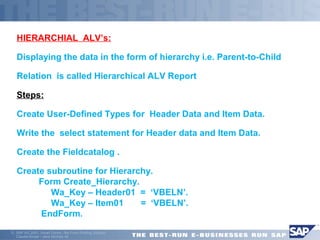
HIERARCHIAL ALV’s: 
Displaying the data in the form of hierarchy i.e. Parent-to-Child 
Relation is called Hierarchical ALV Report 
Steps: 
Create User-Defined Types for Header Data and Item Data. 
Write the select statement for Header data and Item Data. 
Create the Fieldcatalog . 
Create subroutine for Hierarchy. 
 Form Create_Hierarchy. 
 Wa_Key – Header01 = ‘VBELN’. 
 Wa_Key – Item01 = ‘VBELN’. 
 EndForm. 
ã SAP AG 2001, Smart Forms - the Form Printing Solution, 
Claudia Binder / Jens Stumpe 44
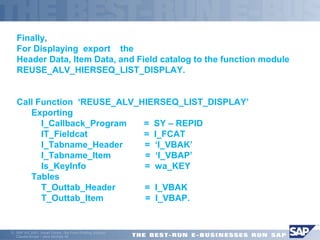
Finally, 
For Displaying export the 
Header Data, Item Data, and Field catalog to the function module 
REUSE_ALV_HIERSEQ_LIST_DISPLAY. 
Call Function ‘REUSE_ALV_HIERSEQ_LIST_DISPLAY’ 
 Exporting 
 I_Callback_Program = SY – REPID 
 IT_Fieldcat = I_FCAT 
 I_Tabname_Header = ‘I_VBAK’ 
 I_Tabname_Item = ‘I_VBAP’ 
 Is_KeyInfo = wa_KEY 
 Tables 
 T_Outtab_Header = I_VBAK 
 T_Outtab_Item = I_VBAP. 
ã SAP AG 2001, Smart Forms - the Form Printing Solution, 
Claudia Binder / Jens Stumpe 45

Alv theory

  • 1.
  • 2.
    Review ALV Reportsare mainly used to display the data in the form of either Grid or List Format with good Look and Feel. The main advantages of ALV Reports are: 1. Good Look and Feel 2.Predefined options given by SAP like Asc, Desc, Filtering, Downloading, Changing Layout, sending Mail…..etc ã SAP AG 2001, Smart Forms - the Form Printing Solution, Claudia Binder / Jens Stumpe 2
  • 3.
    ã SAP AG2001, Smart Forms - the Form Printing Solution, Claudia Binder / Jens Stumpe 3 ALV Reports By ARJUN Function modules for developing ALV Reports  REUSE_ALV_GRID_DISPLAY  Display ALV data in GRID format REUSE_ALV_LIST_DISPLAY  Display ALV data in LIST format REUSE_ALV_COMMENTARY_WRITE  Display TOP-OF-PAGE, LOGO,END-OF-LIST. REUSE_ALV_FIELDCATELOG_MERGE Generate field catalog automatically REUSE_ALV_EVENTS_GET  Display ALV Events REUSE_ALV_HIERSEQ_LIST_DISPLAY Display hierarchical ALV REUSE_ALV_BLOCKED_LIST_DISPLAY  Display blocked ALV
  • 4.
    List of ALV’s ALV with structure ALV with field catalog ALV with layout options ALV with field catalog merge ALV with totals and sub totals ALV with LOGO/ TOP OF PAGE / END OF LIST  Interactive ALV  Interactive ALV by calling a transaction  hierarchical ALV Blocked ALV ã SAP AG 2001, Smart Forms - the Form Printing Solution, Claudia Binder / Jens Stumpe 4
  • 5.
    ALV WITH STRUCTURES ã SAP AG 2001, Smart Forms - the Form Printing Solution, Claudia Binder / Jens Stumpe 5
  • 6.
    ã SAP AG2001, Smart Forms - the Form Printing Solution, Claudia Binder / Jens Stumpe 6 »ALV with Structures Business Requirement  Develop a material master Report which displays all the fields  STEPS Declare an internal table and work area for MARA table Write an select statement to fetch the data Call the function module REUSE_ALV_GRID_DISPLAY and specify the Below parameters  Structure Name  Program Name  Itab Name
  • 7.
    ALV WITH FIELDCATELOG ã SAP AG 2001, Smart Forms - the Form Printing Solution, Claudia Binder / Jens Stumpe 7
  • 8.
    FieldCatelog: It isan int.Table which contains the list o the fields along with field properties to be displayed in ALV Report The properties/options are:  1. COL_POS = 1.  2. FIELD NAME Specifies the name of the field  3. TABLE NAME Specifies the name of the internal table  4. SELTEXT_S  Specifies short  SELTEXT_L  Specifies Long  SELTEXT_M  Specifies medium ã SAP AG 2001, Smart Forms - the Form Printing Solution, Claudia Binder / Jens Stumpe 8
  • 9.
     5. DO_SUM= ‘X’  For grand totals  6. SUBTOT = ‘X’  Sub totals to be calculated  7. EDIT = ‘X’  Field can be editable  8. EMPHASIZE = ‘CXYZ’  Specifies the Color to the fields  C – Indicates color  X – Color Numbers  Y – Backgroundcolor – 1 On BG color  0 off BG color  Z – Font color 1 OnFont color  0 Off font color ã SAP AG 2001, Smart Forms - the Form Printing Solution, Claudia Binder / Jens Stumpe 9
  • 10.
     9. REFERENCETABLENAME  REFERENCE FIELDNAME  To copy all the properties ã SAP AG 2001, Smart Forms - the Form Printing Solution, Claudia Binder / Jens Stumpe 10 from data dictionary to a field catalog field.  10. KEY  Specify the key field  11. HOTSPOT  For selection  12. NO_OUT  Field will not be displayed in output Generation of Fieldcatelog :  It is generated using 2 ways.  1)Manually  2)Automatically by using FM
  • 11.
    ALV with Manualfield catalog ã SAP AG 2001, Smart Forms - the Form Printing Solution, Claudia Binder / Jens Stumpe 11
  • 12.
    Steps for ExampleProgram on field catalog Declare the internal table and work area for the field catalog  DATA : i_fcat TYPE slis_t_fieldcat_alv. *DATA : wa_fcat TYPE slis_fieldcat_alv. DATA : wa_fcat like LINE OF i_fcat. Fill the fieldcatelog Itab with all fields and their corresponding properties. wa_fcat-col_pos = 1. "v_pos. wa_fcat-fieldname = 'KUNNR'. *wa_fcat-tabname = 'I_KNA1'. WA_FCAT-SELTEXT_L = 'CUST_NUM'. *WA_FCAT-EDIT = 'X'. WA_FCAT-EMPHASIZE = 'C610'. WA_FCAT-REF_TABNAME = 'KNA1'. ã SAP AG 2001, Smart Forms - the Form Printing Solution, Claudia Binder / Jens Stumpe 12
  • 13.
     WA_FCAT-REF_FIELDNAME ='KUNNR'. *WA_FCAT-KEY = 'X'. APPEND WA_FCAT TO I_FCAT. CLEAR WA_FCAT. Call the function module and Export the field catalog in internal table as exporting parameters to IT_FCAT. CALL FUNCTION 'REUSE_ALV_GRID_DISPLAY' EXPORTING I_CALLBACK_PROGRAM = 'SY-REPID' IT_FIELDCAT = I_FCAT TABLES T_OUTTAB = I_KNA1. ã SAP AG 2001, Smart Forms - the Form Printing Solution, Claudia Binder / Jens Stumpe 13
  • 14.
     ALV withfield catalog merge ã SAP AG 2001, Smart Forms - the Form Printing Solution, Claudia Binder / Jens Stumpe 14
  • 15.
    ALV with fieldcatalog merge  We can create a field catalog either manually or by automatically REUSE_ALV_FIELDCATELOG_MERGE is the function module which is used to create field catalog automatically But this is obsolete because, the function module uses the old syntax for declaring internal tables  I.e. the internal table should be created as below and all the fields in the internal table must be declared using LIKE statement not the TYPE statement. Example1 on FCAT using Internal table DATA: BEGIN OF I_MARA OCCURS 0, MATNR LIKE MARA-MATNR, MTART LIKE MARA-MTART, MEINS LIKE MARA-MEINS, END OF I_MARA. ã SAP AG 2001, Smart Forms - the Form Printing Solution, Claudia Binder / Jens Stumpe 15
  • 16.
    CALL FUNCTION 'REUSE_ALV_FIELDCATALOG_MERGE’ EXPORTING I_PROGRAM_NAME = SY-REPID I_INTERNAL_TABNAME = 'I_MARA' I_INCLNAME = SY-REPID CHANGING CT_FIELDCAT = I_FCAT. LOOP AT I_FCAT INTO WA_FCAT. IF WA_FCAT-FIELDNAME = 'MEINS'. WA_FCAT-NO_OUT = 'X'. "For hiding the field ELSEIF WA_FCAT-FIELDNAME = 'MTART'. WA_FCAT-KEY = 'X‘. ENDIF.  MODIFY I_FCAT FROM WA_FCAT INDEX SY-TABIX. ENDLOOP. ã SAP AG 2001, Smart Forms - the Form Printing Solution, Claudia Binder / Jens Stumpe 16
  • 17.
    Example2 on FCATusing Structure: CALL FUNCTION 'REUSE_ALV_FIELDCATALOG_MERGE’ EXPORTING I_PROGRAM_NAME = SY-REPID I_STRUCTURE_NAME = 'MARA' I_INCLNAME = SY-REPID CHANGING CT_FIELDCAT = I_FCAT. LOOP AT I_FCAT INTO WA_FCAT. IF WA_FCAT-FIELDNAME = ‘MATNR’ OR  WA_FCAT-FIELDNAME = ‘MTART’ OR  WA_FCAT-FIELDNAME = ‘MBRSH’ OR  WA_FCAT-FIELDNAME = ‘MEINS’ .  WA_FCAT-NO_OUT = ‘ '. "For Displaying the field ã SAP AG 2001, Smart Forms - the Form Printing Solution, Claudia Binder / Jens Stumpe 17
  • 18.
     ELSE. WA_FCAT-NO_OUT= 'X‘. “HIDE THE FIELD ENDIF.  MODIFY I_FCAT FROM WA_FCAT INDEX SY-TABIX. ENDLOOP. ã SAP AG 2001, Smart Forms - the Form Printing Solution, Claudia Binder / Jens Stumpe 18
  • 19.
     ALV WITHLAYOUT ã SAP AG 2001, Smart Forms - the Form Printing Solution, Claudia Binder / Jens Stumpe 19
  • 20.
    ã SAP AG2001, Smart Forms - the Form Printing Solution, Claudia Binder / Jens Stumpe 20 ALV with Layout Layout  It is a structure or work area which is used to decorate or embellish the output of ALV Report Layout contains the few properties to decorate the ALV output The properties are,  1. ZEEBRA = ‘X’.  Displays ALV with alternative colors  2. COLWIDTH-OPTIMIZE = ‘X’.  Each column in ALV o/p displayed with maximum length, to display the entire data.  3. EDIT= ‘X’. All the columns are displayed in editable mode.
  • 21.
     4. NO_VLINE= ‘X’.  Vertical lines will not be displayed  5. NO_HLINE = ‘X’.  Horizontal lines will not be displayed Steps: Declare a work area for the Layout DATA : wa_layout TYPE slis_layout_alv. Fill the WA with various options.  wa_layout-zebra = 'X'. wa_layout-colwidth_optimize = 'X'. * wa_layout-edit = 'X'. * wa_layout-no_vline = 'X'. wa_layout-no_hline = 'X'. ã SAP AG 2001, Smart Forms - the Form Printing Solution, Claudia Binder / Jens Stumpe 21
  • 22.
    Call the functionmodule and send the WA as exporting parameter to IS_LAYOUT.  CALL FUNCTION 'REUSE_ALV_GRID_DISPLAY' EXPORTING I_CALLBACK_PROGRAM = SY-REPID IS_LAYOUT = WA_LAYOUT IT_FIELDCAT = I_FCAT TABLES T_OUTTAB = I_KNA1. ã SAP AG 2001, Smart Forms - the Form Printing Solution, Claudia Binder / Jens Stumpe 22
  • 23.
     ALV WITHGRAND TOTALS ã SAP AG 2001, Smart Forms - the Form Printing Solution, Claudia Binder / Jens Stumpe 23
  • 24.
    ALV Reports withTotals The totals can be calculated in two ways By clicking on Σ ALV output field. By programmatically setting the option  DO_SUM = ‘X’, for an currency/quantity field in FCAT WA_FCAT-COL_POS = ’5’. WA_FCAT-FIELDNAME = 'NETWR'. WA_FCAT-SELTEXT_M = 'NETPRICE‘. WA_FCAT-DO_SUM = 'X'. APPEND WA_FCAT TO I_FCAT. ã SAP AG 2001, Smart Forms - the Form Printing Solution, Claudia Binder / Jens Stumpe 24
  • 25.
     ALV WITHSUBTOTALS ã SAP AG 2001, Smart Forms - the Form Printing Solution, Claudia Binder / Jens Stumpe 25
  • 26.
    ALV Reports withand sub totals To calculate sub totals, we need to find out on what basis (field name) the sub totals need to be calculated. We need to sort the field in ascending order. Then we need to set the property  SUBTOT = ‘X’ in FCAT. WA_SORT-spos = ‘1’. WA_SORT-FIELDNAME = 'VBELN'. WA_SORT-UP = 'X'. WA_SORT-SUBTOT = 'X'. APPEND WA_SORT TO I_SORT. ã SAP AG 2001, Smart Forms - the Form Printing Solution, Claudia Binder / Jens Stumpe 26
  • 27.
    Steps : Declarethe internal table and work area for the sorting DATA : I_SORT TYPE SLIS_T_SORTINFO_ALV. DATA : WA_SORT TYPE SLIS_SORTINFO_ALV. Specify the field and subtot = ‘X’ . WA_SORT-FIELDNAME = 'VBELN'. WA_SORT-UP = 'X'. WA_SORT-SUBTOT = 'X'. APPEND WA_SORT TO I_SORT.  . ã SAP AG 2001, Smart Forms - the Form Printing Solution, Claudia Binder / Jens Stumpe 27
  • 28.
    Call the functionmodule and send the SORT internal table as exporting parameters to IT_SORT CALL FUNCTION 'REUSE_ALV_GRID_DISPLAY' EXPORTING I_CALLBACK_PROGRAM = SY-REPID IT_FIELDCAT = I_FCAT IT_SORT = I_SORT TABLES T_OUTTAB = I_VBAP. ã SAP AG 2001, Smart Forms - the Form Printing Solution, Claudia Binder / Jens Stumpe 28
  • 29.
     EVENTS INALV ã SAP AG 2001, Smart Forms - the Form Printing Solution, Claudia Binder / Jens Stumpe 29
  • 30.
    ALV Reports withtop of page/ Events There are totally 17 events available for ALV reporting The function module REUSE_ALV_EVENTS_GET will display all the list of ALV events Below are some events Top-Of-Page End-Of-List At User command Set PF status  If we want to use any event, then we should create a Subroutine for Writing our Logic. Perform will be dynamically created by SAP. Form………Endform should be created by us. ã SAP AG 2001, Smart Forms - the Form Printing Solution, Claudia Binder / Jens Stumpe 30
  • 31.
    Ex Prog: CallFunction ‘ REUSE_ALV_EVENTS_GET’  Importing  ET_EVENTS = I_EVENTS.  Read Table I_EVENTS into WA_EVENTS  with key NAME = ‘EVENT NAME’.  WA_EVENTS-FORM = ‘ ANYNAME ’.  Modify I_EVENTS from WA_EVENTS index SY–TABIX. PERFORM ANYNAME.------------ Will be created by SAP FORM ANYNAME.  -----------------------------------------------  ---------------------------------------------- ENDFORM. ã SAP AG 2001, Smart Forms - the Form Printing Solution, Claudia Binder / Jens Stumpe 31
  • 32.
    ALV with LOGO: For Logo’s in the ALV , We have two steps. 1. Upload the Logo from our system into SAP. 2. Call the FM “Reuse_Alv_Commentary_Write” and Export the Logo  name under the event TOP-OF-PAGE. STEP1: “OAER” is the T-Code for upload the Logo’s into SAP. => Go to OAER Tcode and specify below values  ClassName – Pictures  ClassType – OT  ObjectKey – ARJUN(LogoName)  Execute  Click on the Standard Document Types  Double Click on the SCREEN Option for browse the image.  Click on the Save Button. ã SAP AG 2001, Smart Forms - the Form Printing Solution, Claudia Binder / Jens Stumpe 32
  • 33.
    STEP2: Call Function‘ REUSE_ALV_EVENTS_GET’  Importing  ET_EVENTS = I_EVENTS.  Read Table I_EVENTS into WA_EVENTS  with key NAME = ‘TOP-OF-PAGE’.  WA_EVENTS-FORM = ‘ FORM_TOP_OF_PAGE ’.  Modify I_EVENTS into WA_EVENTS index SY–TABIX. STEP3:  FORM FORM_TOP.  Call Function ‘REUSE_ALV_COMMENTARY_WRITE’  Exporting  I_LOGO = ‘ARJUN’. ENDFORM. ã SAP AG 2001, Smart Forms - the Form Printing Solution, Claudia Binder / Jens Stumpe 33
  • 34.
    TOP-OF-PAGE Call thefunction module REUSE_ALV_EVENTS_GET Provide the sub routine name for top-of-page event Create a FORM…ENDFORM and Write the code in sub routine Call the function module REUSE_ALV_COMMENTARY_WRITE to display top-of-page in ALV Finally export the events into internal table to the REUSE_ALV_GRID_DISPLAY ã SAP AG 2001, Smart Forms - the Form Printing Solution, Claudia Binder / Jens Stumpe 34
  • 35.
    STEP1:Data Declarations forTOP-OF-PAGE. TYPE-POOLS: SLIS. Data: I_EVENTS type SLIS_T_EVENT. Data: WA_EVENTS like line of I_EVENTS. Data: I_HEADING type SLIS_T_LISTHEADER. Data: WA_HEADING like line of I_HEADING. STEP2: Call Function ‘ REUSE_ALV_EVENTS_GET’  Importing  ET_EVENTS = I_EVENTS.  Read Table I_EVENTS into WA_EVENTS  with key NAME = ‘TOP-OF-PAGE’.  WA_EVENTS-FORM = ‘ FORM_TOP_OF_PAGE ’.  Modify I_EVENTS into WA_EVENTS index SY–TABIX. ã SAP AG 2001, Smart Forms - the Form Printing Solution, Claudia Binder / Jens Stumpe 35
  • 36.
    Form FORM_TOP_OF_PAGE. WA_HEADING- TYP = ‘H’. WA_HEADING – INFO = ‘MATERIAL MASTER REPORT’ . Append WA_HEADING to I_HEADING. WA_HEADING - TYP = ‘S’. WA_HEADING – KEY = ‘USERNAME’. WA_HEADING – INFO = SY – UNAME. Append WA_HEADING to I_HEADING. WA_HEADING - TYP = ‘A’. WA_HEADING – KEY = ‘DATE’. WA_HEADING – INFO = SY – DATUM. Append WA_HEADING to I_HEADING. ã SAP AG 2001, Smart Forms - the Form Printing Solution, Claudia Binder / Jens Stumpe 36
  • 37.
    STEP3:  CallFunction ‘REUSE_ALV_COMMENTARY_WRITE’  Exporting  IT_LIST_COMMENTARY = I_HEADING. EndForm. STEP4:  Call Function ‘REUSE_ALV_GRID_DISPLAY’  Exporting  I_Callback_Programme = SY – REPID  IT_Events = I_EVENTS  Tables  T_OutTab = I_MARA. ã SAP AG 2001, Smart Forms - the Form Printing Solution, Claudia Binder / Jens Stumpe 37 
  • 38.
    END -OF-LIST: Callthe function module REUSE_ALV_EVENTS_GET Provide the sub routine name for End-of-List event. Create a Form…….End Form and Write below down the code in sub routine Call the function module REUSE_ALV_COMMENTARY_WRITE to display End-of-List in ALV Finally export the events into internal table to the REUSE_ALV_GRID_DISPLAY ã SAP AG 2001, Smart Forms - the Form Printing Solution, Claudia Binder / Jens Stumpe 38
  • 39.
    STEP1:Data Declarations forEnd-of-List. TYPE-POOLS: SLIS. Data: I_EVENTS type SLIS_T_EVENT. Data: WA_EVENTS like line of I_EVENTS. Data: I_HEADING type SLIS_T_LISTHEADER. Data: WA_HEADING like line of I_HEADING. STEP2: Call Function ‘ REUSE_ALV_EVENTS_GET’  Importing  ET_EVENTS = I_EVENTS.  Read Table I_EVENTS into WA_EVENTS  with key NAME = ‘END_OF_LIST’.  WA_EVENTS-FORM = ‘ FORM_END_OF_LIST’.  Modify I_EVENTS into WA_EVENTS index SY–TABIX. ã SAP AG 2001, Smart Forms - the Form Printing Solution, Claudia Binder / Jens Stumpe 39
  • 40.
    Form FORM_END_OF_LIST. WA_HEADING- TYP = ‘S’. WA_HEADING – INFO = ‘ALL RIGHTS RESERVED TO THE ã SAP AG 2001, Smart Forms - the Form Printing Solution, Claudia Binder / Jens Stumpe 40 COMPANY’ . Append WA_HEADING to I_HEADING. STEP3:  Call Function ‘REUSE_ALV_COMMENTARY_WRITE’  Exporting  IT_LIST_COMMENTARY = I_HEADING  I_END_OF_LIST_GRID = ‘X’. EndForm. STEP4:  Call Function ‘REUSE_ALV_GRID_DISPLAY’  Exporting  I_Callback_Programme = SY – REPID  IT_Events = I_EVENTS  Tables  T_OutTab = I_MARA.
  • 41.
     INTERACTIVE ALV’s: Call the function module REUSE_ALV_EVENTS_GET Provide the sub routine name for USER_COMMAND Create a Form….EndForm with 2 Formal Parameters Write below down the code in sub routine  In the Sub routine Call the function module REUSE_ALV_GRID_DISPLAY to display Secondary ALV Finally export the events into internal table to the REUSE_ALV_GRID_DISPLAY ã SAP AG 2001, Smart Forms - the Form Printing Solution, Claudia Binder / Jens Stumpe 41
  • 42.
    STEP1:Data Declarations . Type-Pools: SLIS. Data: I_Events type SLIS_T_EVENT. Data: WA_Events like line of I_Events. Data: V_VBELN type VBAK – VBELN. STEP2: Call Function ‘REUSE_ALV_EVENTS_GET’  importing  ET_EVENTS = I_EVENTS. Read Table I_EVENTS into WA_EVENTS with key NAME = ‘USER_COMMAND’. WA_EVENTS-FORM = ‘FORM_USER_COMMAND’. MODIFY I_EVENTS from WA_EVENTS index SY-TABIX. ã SAP AG 2001, Smart Forms - the Form Printing Solution, Claudia Binder / Jens Stumpe 42 
  • 43.
    STEP3: Form FORM_USER_COMMANDusing UCOMM type SY-UCOMM  SELFIELD type SLIS_SELFIELD. READ TABLE I_VBAK into WA_VBAK index SELFIELD-TABINDEX. Select * from VBAP into corresponding fields of table I_VBAP  where VBELN = WA_VBAP-VBELN. CALL FUNCTION ‘REUSE_ALV_GRID_DISPLAY’  Exporting  I_CALLBACK_PROGRAME = SY-REPID  I_STRUCTURE_NAME = ‘VBAP’  Tables  T_OUTTAB = I_VBAP. Endform. ã SAP AG 2001, Smart Forms - the Form Printing Solution, Claudia Binder / Jens Stumpe 43
  • 44.
    HIERARCHIAL ALV’s: Displayingthe data in the form of hierarchy i.e. Parent-to-Child Relation is called Hierarchical ALV Report Steps: Create User-Defined Types for Header Data and Item Data. Write the select statement for Header data and Item Data. Create the Fieldcatalog . Create subroutine for Hierarchy.  Form Create_Hierarchy.  Wa_Key – Header01 = ‘VBELN’.  Wa_Key – Item01 = ‘VBELN’.  EndForm. ã SAP AG 2001, Smart Forms - the Form Printing Solution, Claudia Binder / Jens Stumpe 44
  • 45.
    Finally, For Displayingexport the Header Data, Item Data, and Field catalog to the function module REUSE_ALV_HIERSEQ_LIST_DISPLAY. Call Function ‘REUSE_ALV_HIERSEQ_LIST_DISPLAY’  Exporting  I_Callback_Program = SY – REPID  IT_Fieldcat = I_FCAT  I_Tabname_Header = ‘I_VBAK’  I_Tabname_Item = ‘I_VBAP’  Is_KeyInfo = wa_KEY  Tables  T_Outtab_Header = I_VBAK  T_Outtab_Item = I_VBAP. ã SAP AG 2001, Smart Forms - the Form Printing Solution, Claudia Binder / Jens Stumpe 45