
Your Digital Self: Web 2.0 as Personal Learning Environment and E-Portfoliohttp://sites.google.com/site/web2workshop2010Dr. Helen BarrettResearcher & Consultant Electronic Portfolios &Digital Storytelling for Lifelong and Lifewide LearningAssistant Professor, Educational Technology (retired)College of EducationUniversity of Alaska Anchorage (1991-2005)
Personal Learning Environment Supports Self-Directed Learning
Web 2.0 is becoming the Personal Learning Environment of the “Net Generation”Learning that is… Social and Participatory
Lifelong and Life Wide
Increasingly Self-Directed
Motivating and Engaging
… and Online!Personal Learning EnvironmentsHow do you define your PLE?
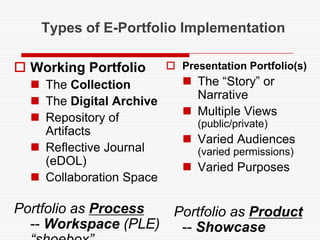
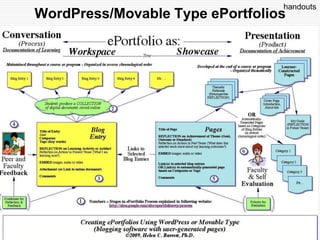
Types of E-Portfolio ImplementationWorking PortfolioThe CollectionThe Digital ArchiveRepository of Artifacts Reflective Journal(eDOL)Collaboration SpacePortfolio as Process-- Workspace (PLE)“shoebox”Presentation Portfolio(s)The “Story” or NarrativeMultiple Views (public/private)Varied Audiences(varied permissions)Varied Purposes  Portfolio as Product-- Showcase
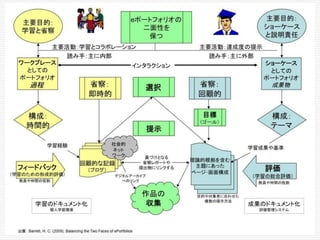
Japanese
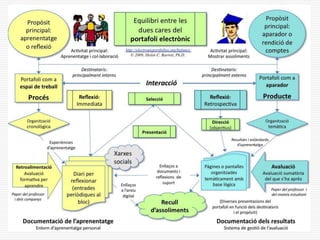
Catalan
Spanish
Mandarin
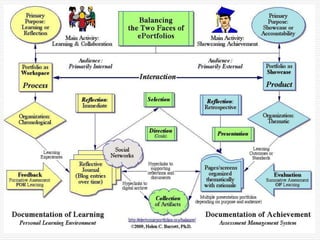
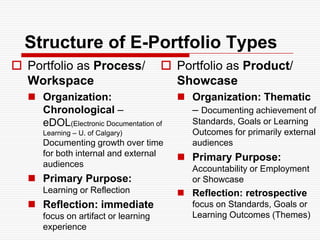
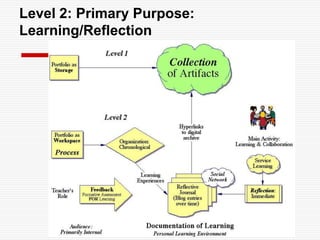
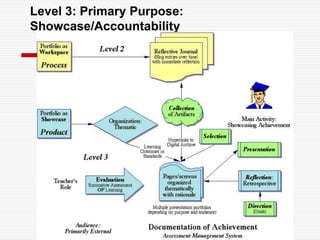
Structure of E-Portfolio TypesPortfolio as Process/ WorkspaceOrganization: Chronological – eDOL(Electronic Documentation of Learning – U. of Calgary) Documenting growth over time for both internal and external audiencesPrimary Purpose: Learning or ReflectionReflection: immediate focus on artifact or learning experiencePortfolio as Product/ ShowcaseOrganization: Thematic – Documenting achievement of Standards, Goals or Learning Outcomes for primarily external audiencesPrimary Purpose: Accountability or Employment or ShowcaseReflection: retrospective focus on Standards, Goals or Learning Outcomes (Themes)
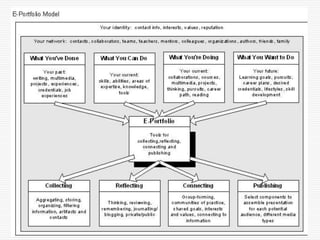
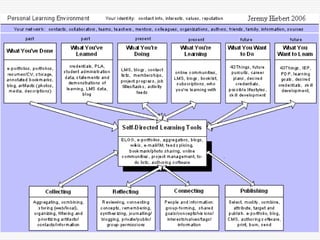
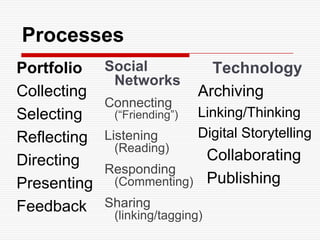
ProcessesPortfolioCollectingSelectingReflectingDirectingPresentingFeedbackTechnology  ArchivingLinking/ThinkingDigital Storytelling  Collaborating  PublishingSocial NetworksConnecting(“Friending”)Listening(Reading)Responding(Commenting)Sharing(linking/tagging)
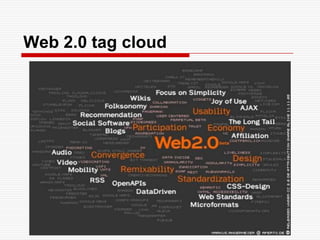
Web 2.0 tag cloud
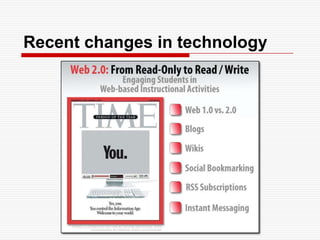
Recent changes in technology
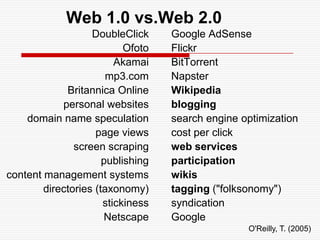
Web 1.0 vs.Web 2.0DoubleClickOfotoAkamaimp3.comBritannica Onlinepersonal websitesdomain name speculationpage viewsscreen scrapingpublishingcontent management systemsdirectories (taxonomy)stickinessNetscapeGoogle AdSenseFlickrBitTorrentNapsterWikipediabloggingsearch engine optimizationcost per clickweb servicesparticipationwikistagging ("folksonomy")syndicationGoogleO'Reilly, T. (2005)
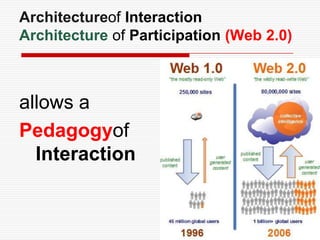
Architectureof InteractionArchitecture of Participation (Web 2.0) allows aPedagogyof Interaction
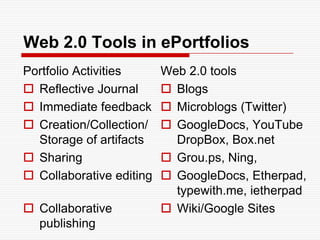
Web 2.0 Tools in ePortfoliosPortfolio ActivitiesReflective JournalImmediate feedbackCreation/Collection/Storage of artifactsSharingCollaborative editingCollaborative publishingWeb 2.0 toolsBlogsMicroblogs (Twitter)GoogleDocs, YouTubeDropBox, Box.netGrou.ps, Ning, GoogleDocs, Etherpad, typewith.me, ietherpadWiki/Google Sites
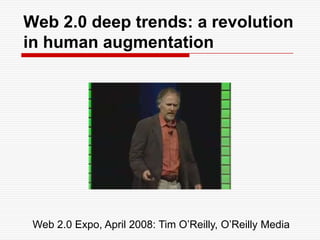
Web 2.0 deep trends: a revolution in human augmentationWeb 2.0 Expo, April 2008: Tim O’Reilly, O’Reilly Media
Wikibookhttp://en.wikibooks. org/wiki/Web_2.0_and_Emerging _Learning _Technologies
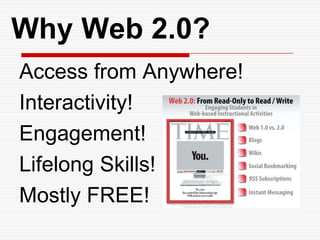
Why Web 2.0?Access from Anywhere!Interactivity!Engagement!Lifelong Skills!Mostly FREE!
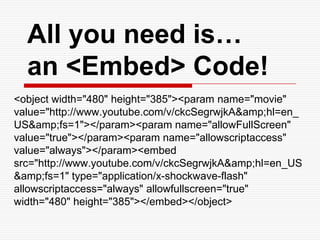
All you need is… an <Embed> Code!<object width="480" height="385"><param name="movie" value="http://www.youtube.com/v/ckcSegrwjkA&amp;hl=en_US&amp;fs=1"></param><param name="allowFullScreen" value="true"></param><param name="allowscriptaccess" value="always"></param><embed src="http://www.youtube.com/v/ckcSegrwjkA&amp;hl=en_US&amp;fs=1" type="application/x-shockwave-flash" allowscriptaccess="always" allowfullscreen="true" width="480" height="385"></embed></object>
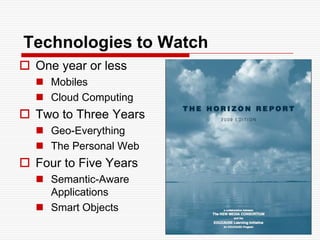
Technologies to WatchOne year or lessMobilesCloud ComputingTwo to Three YearsGeo-EverythingThe Personal WebFour to Five YearsSemantic-Aware ApplicationsSmart Objects
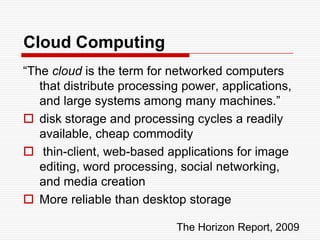
Cloud Computing“The cloud is the term for networked computers that distribute processing power, applications, and large systems among many machines.”disk storage and processing cycles a readily available, cheap commodity thin-client, web-based applications for image editing, word processing, social networking, and media creationMore reliable than desktop storageThe Horizon Report, 2009
The Personal Web… computer users are assembling collections of tools, widgets, and services that make it easy to develop and organize dynamic online content. Armed with tools for tagging, aggregating, updating, and keeping track of content, today’s learners create and navigate a web that is increasingly tailored to their own needs and interests: this is the personal web. The Horizon Report, 2009
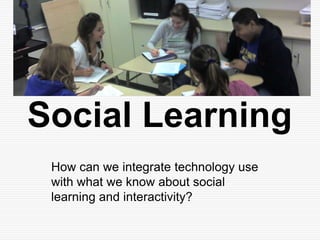
Social LearningHow can we integrate technology use with what we know about social learning and interactivity?
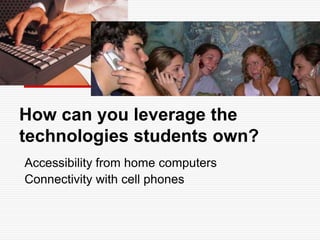
How can you leverage the technologies students own?Accessibility from home computersConnectivity with cell phones
How is social networking impacting technology in education?It is having a huge impact on our social and political world!
A New Cultural Wedge“less calls, more web” mobile phones from 3Emphasis on social networkingOnline versions ofNovelsVideosComicsPortfolios?
Web 2.0, an Architecture of Interaction/CollaborationUsing Interactive Productivity Tools (GoogleApps: GoogleDocs, GoogleSites)Using Social Networking Strategies(Facebook, Ning, Twitter, Edmodo)
Planning IssuesWhat is your purpose?Software capabilities: allow interaction between faculty and students around learning activities and products
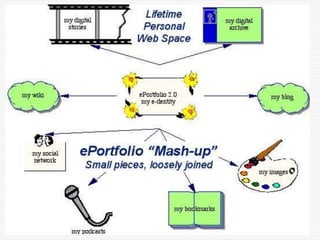
http://sites.google.com/site/web2workshop2010/AdvantagesFree, often open-source tools on the WWW“Me Publishing (blog and wiki)Shared Writing (GoogleDocs)Web Publishing(Google Sites)DisadvantagesMay require higher technology competencyMostly not secure websites“Small Pieces, Loosely Joined”
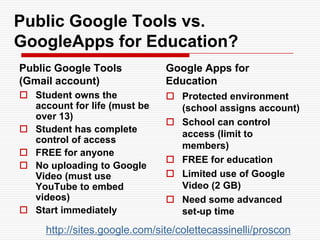
Public Google Tools vs. GoogleApps for Education?Public Google Tools (Gmail account)Google Apps for EducationStudent owns the account for life (must be over 13)Student has complete control of accessFREE for anyoneNo uploading to Google Video (must use YouTube to embed videos)Start immediatelyProtected environment (school assigns account)School can control access (limit to members)FREE for educationLimited use of Google Video (2 GB)Need some advanced set-up timehttp://sites.google.com/site/colettecassinelli/proscons
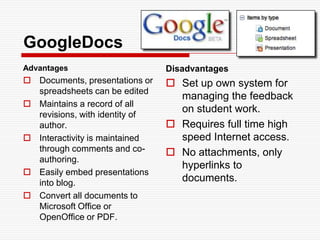
GoogleDocsAdvantagesDocuments, presentations or spreadsheets can be editedMaintains a record of all revisions, with identity of author. Interactivity is maintained through comments and co-authoring. Easily embed presentations into blog. Convert all documents to Microsoft Office or OpenOffice or PDF.DisadvantagesSet up own system for managing the feedback on student work. Requires full time high speed Internet access. No attachments, only hyperlinks to documents.
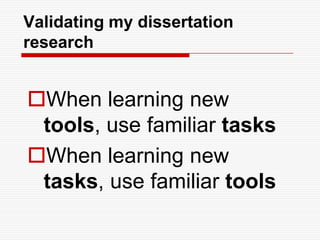
Validating my dissertation researchWhen learning new tools, use familiar tasksWhen learning new tasks, use familiar tools
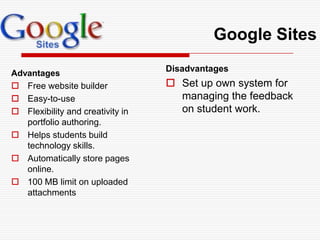
Google SitesAdvantagesFree website builderEasy-to-use Flexibility and creativity in portfolio authoring. Helps students build technology skills. Automatically store pages online. 100 MB limit on uploaded attachmentsDisadvantagesSet up own system for managing the feedback on student work.
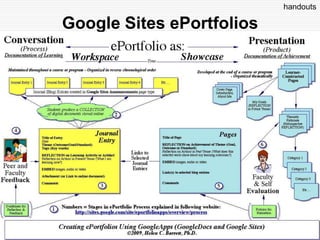
Google Sites ePortfolioshandouts
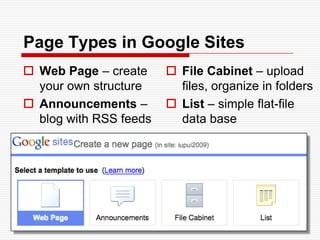
Page Types in Google SitesWeb Page – create your own structureAnnouncements – blog with RSS feedsFile Cabinet – upload files, organize in foldersList – simple flat-file data base
Explore Google Sites Capabilities for ePortfolio RequirementsFile Cabinet page type to upload artifactsComments for feedback on pages or entries in Announcements pageAnnouncements page type (blog) with RSS feedsList page type as data baseSubscribe to page or site changesWhat’s New in Google Docs? http://www.google.com/google-d-s/whatsnew.html
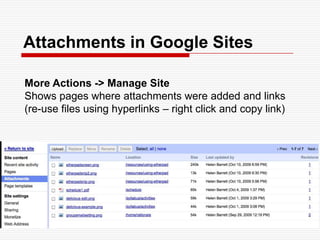
Attachments in Google SitesMore Actions -> Manage SiteShows pages where attachments were added and links(re-use files using hyperlinks – right click and copy link)
Storage Limitations in Google Sites – Apps vs. Sitessites.google.com/site/ account limited to 100 MB of attachments in each Google Site you set up GoogleApps for Education domains with a maximum of 100 GB per domain, assigning accounts for each studentStandard GoogleApps account, with your own domain name, for $10 a year, currently allows a maximum of 10GB of attached files in all Sites created under your domain Google's FAQ on Storage in different versions of Google Sites
handoutsWordPress/Movable Type ePortfolios
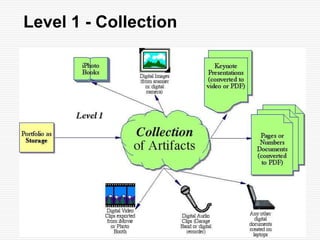
Level 1 - Collection
Level 2: Primary Purpose: Learning/Reflection
BlogsAdvantagesQuickly, easily create a learning journal, documenting growth over time with entries that are date-stamped. WordPress allows additional pages and sub-pages. Interactivity is maintained through RSS feeds and Comments that can be added.WordPress file limit 3 GB!WordPress blogs can be password-protected.DisadvantagesPrescribed order (reverse-chronological) of entries. Does not allow organizing attached files into folders. Limited attachments in Blogger.
Less abouttellingMore about talking!- Julie Hughes, University of WolverhamptonTake advantage of Web 2.0 strategies in learning
Don’t jump tothe final presentation prematurely…Document the learning process over time… through a learning journal.
Review Examples of Scaffolding for Reflectionhttp://sites.google.com/site/reflection4learning
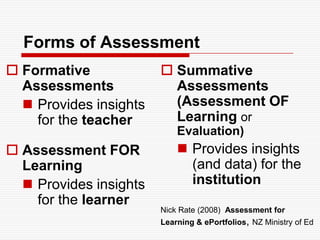
Forms of AssessmentFormative AssessmentsProvides insights for the teacherAssessment FOR LearningProvides insights for the learnerSummative Assessments (Assessment OF Learning or Evaluation)Provides insights (and data) for the institutionNick Rate (2008)  Assessment for Learning & ePortfolios, NZ Ministry of Ed
Level 3: Primary Purpose: Showcase/Accountability
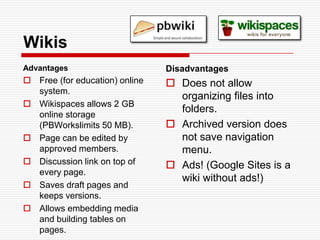
WikisAdvantagesFree (for education) online system. Wikispaces allows 2 GB online storage (PBWorkslimits 50 MB). Page can be edited by approved members.Discussion link on top of every page.Saves draft pages and keeps versions. Allows embedding media and building tables on pages.DisadvantagesDoes not allow organizing files into folders. Archived version does not save navigation menu.Ads! (Google Sites is a wiki without ads!)
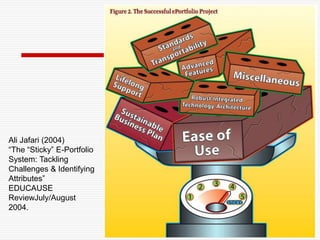
Making ePortfolios StickWill your students want to use the ePortfolio process after they graduate?
Ali Jafari (2004) “The “Sticky” E-Portfolio System: Tackling Challenges & Identifying Attributes” EDUCAUSE ReviewJuly/August 2004.
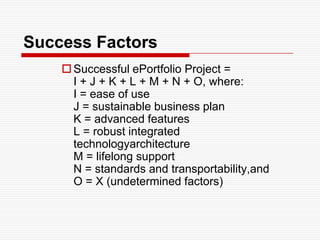
Success FactorsSuccessful ePortfolio Project = I + J + K + L + M + N + O, where:I = ease of use  J = sustainable business planK = advanced featuresL = robust integrated technologyarchitectureM = lifelong supportN = standards and transportability,andO = X (undetermined factors)
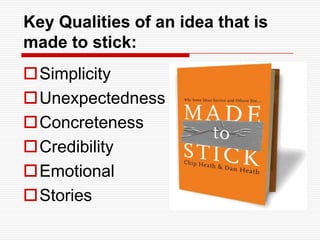
Key Qualities of an idea that is made to stick:SimplicityUnexpectednessConcretenessCredibilityEmotionalStories

AAEEBL2010 web2

  • 1.
    Your Digital Self:Web 2.0 as Personal Learning Environment and E-Portfoliohttp://sites.google.com/site/web2workshop2010Dr. Helen BarrettResearcher & Consultant Electronic Portfolios &Digital Storytelling for Lifelong and Lifewide LearningAssistant Professor, Educational Technology (retired)College of EducationUniversity of Alaska Anchorage (1991-2005)
  • 2.
    Personal Learning EnvironmentSupports Self-Directed Learning
  • 3.
    Web 2.0 isbecoming the Personal Learning Environment of the “Net Generation”Learning that is… Social and Participatory
  • 4.
  • 5.
  • 6.
  • 7.
    … and Online!PersonalLearning EnvironmentsHow do you define your PLE?
  • 11.
    Types of E-PortfolioImplementationWorking PortfolioThe CollectionThe Digital ArchiveRepository of Artifacts Reflective Journal(eDOL)Collaboration SpacePortfolio as Process-- Workspace (PLE)“shoebox”Presentation Portfolio(s)The “Story” or NarrativeMultiple Views (public/private)Varied Audiences(varied permissions)Varied Purposes Portfolio as Product-- Showcase
  • 13.
  • 14.
  • 15.
  • 16.
  • 17.
    Structure of E-PortfolioTypesPortfolio as Process/ WorkspaceOrganization: Chronological – eDOL(Electronic Documentation of Learning – U. of Calgary) Documenting growth over time for both internal and external audiencesPrimary Purpose: Learning or ReflectionReflection: immediate focus on artifact or learning experiencePortfolio as Product/ ShowcaseOrganization: Thematic – Documenting achievement of Standards, Goals or Learning Outcomes for primarily external audiencesPrimary Purpose: Accountability or Employment or ShowcaseReflection: retrospective focus on Standards, Goals or Learning Outcomes (Themes)
  • 18.
    ProcessesPortfolioCollectingSelectingReflectingDirectingPresentingFeedbackTechnology ArchivingLinking/ThinkingDigitalStorytelling Collaborating PublishingSocial NetworksConnecting(“Friending”)Listening(Reading)Responding(Commenting)Sharing(linking/tagging)
  • 19.
  • 20.
  • 21.
    Web 1.0 vs.Web2.0DoubleClickOfotoAkamaimp3.comBritannica Onlinepersonal websitesdomain name speculationpage viewsscreen scrapingpublishingcontent management systemsdirectories (taxonomy)stickinessNetscapeGoogle AdSenseFlickrBitTorrentNapsterWikipediabloggingsearch engine optimizationcost per clickweb servicesparticipationwikistagging ("folksonomy")syndicationGoogleO'Reilly, T. (2005)
  • 22.
    Architectureof InteractionArchitecture ofParticipation (Web 2.0) allows aPedagogyof Interaction
  • 23.
    Web 2.0 Toolsin ePortfoliosPortfolio ActivitiesReflective JournalImmediate feedbackCreation/Collection/Storage of artifactsSharingCollaborative editingCollaborative publishingWeb 2.0 toolsBlogsMicroblogs (Twitter)GoogleDocs, YouTubeDropBox, Box.netGrou.ps, Ning, GoogleDocs, Etherpad, typewith.me, ietherpadWiki/Google Sites
  • 24.
    Web 2.0 deeptrends: a revolution in human augmentationWeb 2.0 Expo, April 2008: Tim O’Reilly, O’Reilly Media
  • 25.
  • 26.
    Why Web 2.0?Accessfrom Anywhere!Interactivity!Engagement!Lifelong Skills!Mostly FREE!
  • 27.
    All you needis… an <Embed> Code!<object width="480" height="385"><param name="movie" value="http://www.youtube.com/v/ckcSegrwjkA&amp;hl=en_US&amp;fs=1"></param><param name="allowFullScreen" value="true"></param><param name="allowscriptaccess" value="always"></param><embed src="http://www.youtube.com/v/ckcSegrwjkA&amp;hl=en_US&amp;fs=1" type="application/x-shockwave-flash" allowscriptaccess="always" allowfullscreen="true" width="480" height="385"></embed></object>
  • 29.
    Technologies to WatchOneyear or lessMobilesCloud ComputingTwo to Three YearsGeo-EverythingThe Personal WebFour to Five YearsSemantic-Aware ApplicationsSmart Objects
  • 30.
    Cloud Computing“The cloudis the term for networked computers that distribute processing power, applications, and large systems among many machines.”disk storage and processing cycles a readily available, cheap commodity thin-client, web-based applications for image editing, word processing, social networking, and media creationMore reliable than desktop storageThe Horizon Report, 2009
  • 31.
    The Personal Web…computer users are assembling collections of tools, widgets, and services that make it easy to develop and organize dynamic online content. Armed with tools for tagging, aggregating, updating, and keeping track of content, today’s learners create and navigate a web that is increasingly tailored to their own needs and interests: this is the personal web. The Horizon Report, 2009
  • 32.
    Social LearningHow canwe integrate technology use with what we know about social learning and interactivity?
  • 33.
    How can youleverage the technologies students own?Accessibility from home computersConnectivity with cell phones
  • 34.
    How is socialnetworking impacting technology in education?It is having a huge impact on our social and political world!
  • 35.
    A New CulturalWedge“less calls, more web” mobile phones from 3Emphasis on social networkingOnline versions ofNovelsVideosComicsPortfolios?
  • 36.
    Web 2.0, anArchitecture of Interaction/CollaborationUsing Interactive Productivity Tools (GoogleApps: GoogleDocs, GoogleSites)Using Social Networking Strategies(Facebook, Ning, Twitter, Edmodo)
  • 37.
    Planning IssuesWhat isyour purpose?Software capabilities: allow interaction between faculty and students around learning activities and products
  • 38.
    http://sites.google.com/site/web2workshop2010/AdvantagesFree, often open-sourcetools on the WWW“Me Publishing (blog and wiki)Shared Writing (GoogleDocs)Web Publishing(Google Sites)DisadvantagesMay require higher technology competencyMostly not secure websites“Small Pieces, Loosely Joined”
  • 39.
    Public Google Toolsvs. GoogleApps for Education?Public Google Tools (Gmail account)Google Apps for EducationStudent owns the account for life (must be over 13)Student has complete control of accessFREE for anyoneNo uploading to Google Video (must use YouTube to embed videos)Start immediatelyProtected environment (school assigns account)School can control access (limit to members)FREE for educationLimited use of Google Video (2 GB)Need some advanced set-up timehttp://sites.google.com/site/colettecassinelli/proscons
  • 40.
    GoogleDocsAdvantagesDocuments, presentations orspreadsheets can be editedMaintains a record of all revisions, with identity of author. Interactivity is maintained through comments and co-authoring. Easily embed presentations into blog. Convert all documents to Microsoft Office or OpenOffice or PDF.DisadvantagesSet up own system for managing the feedback on student work. Requires full time high speed Internet access. No attachments, only hyperlinks to documents.
  • 41.
    Validating my dissertationresearchWhen learning new tools, use familiar tasksWhen learning new tasks, use familiar tools
  • 42.
    Google SitesAdvantagesFree websitebuilderEasy-to-use Flexibility and creativity in portfolio authoring. Helps students build technology skills. Automatically store pages online. 100 MB limit on uploaded attachmentsDisadvantagesSet up own system for managing the feedback on student work.
  • 43.
  • 44.
    Page Types inGoogle SitesWeb Page – create your own structureAnnouncements – blog with RSS feedsFile Cabinet – upload files, organize in foldersList – simple flat-file data base
  • 45.
    Explore Google SitesCapabilities for ePortfolio RequirementsFile Cabinet page type to upload artifactsComments for feedback on pages or entries in Announcements pageAnnouncements page type (blog) with RSS feedsList page type as data baseSubscribe to page or site changesWhat’s New in Google Docs? http://www.google.com/google-d-s/whatsnew.html
  • 46.
    Attachments in GoogleSitesMore Actions -> Manage SiteShows pages where attachments were added and links(re-use files using hyperlinks – right click and copy link)
  • 47.
    Storage Limitations inGoogle Sites – Apps vs. Sitessites.google.com/site/ account limited to 100 MB of attachments in each Google Site you set up GoogleApps for Education domains with a maximum of 100 GB per domain, assigning accounts for each studentStandard GoogleApps account, with your own domain name, for $10 a year, currently allows a maximum of 10GB of attached files in all Sites created under your domain Google's FAQ on Storage in different versions of Google Sites
  • 48.
  • 49.
    Level 1 -Collection
  • 50.
    Level 2: PrimaryPurpose: Learning/Reflection
  • 51.
    BlogsAdvantagesQuickly, easily createa learning journal, documenting growth over time with entries that are date-stamped. WordPress allows additional pages and sub-pages. Interactivity is maintained through RSS feeds and Comments that can be added.WordPress file limit 3 GB!WordPress blogs can be password-protected.DisadvantagesPrescribed order (reverse-chronological) of entries. Does not allow organizing attached files into folders. Limited attachments in Blogger.
  • 52.
    Less abouttellingMore abouttalking!- Julie Hughes, University of WolverhamptonTake advantage of Web 2.0 strategies in learning
  • 53.
    Don’t jump tothefinal presentation prematurely…Document the learning process over time… through a learning journal.
  • 54.
    Review Examples ofScaffolding for Reflectionhttp://sites.google.com/site/reflection4learning
  • 55.
    Forms of AssessmentFormativeAssessmentsProvides insights for the teacherAssessment FOR LearningProvides insights for the learnerSummative Assessments (Assessment OF Learning or Evaluation)Provides insights (and data) for the institutionNick Rate (2008) Assessment for Learning & ePortfolios, NZ Ministry of Ed
  • 56.
    Level 3: PrimaryPurpose: Showcase/Accountability
  • 57.
    WikisAdvantagesFree (for education)online system. Wikispaces allows 2 GB online storage (PBWorkslimits 50 MB). Page can be edited by approved members.Discussion link on top of every page.Saves draft pages and keeps versions. Allows embedding media and building tables on pages.DisadvantagesDoes not allow organizing files into folders. Archived version does not save navigation menu.Ads! (Google Sites is a wiki without ads!)
  • 58.
    Making ePortfolios StickWillyour students want to use the ePortfolio process after they graduate?
  • 59.
    Ali Jafari (2004)“The “Sticky” E-Portfolio System: Tackling Challenges & Identifying Attributes” EDUCAUSE ReviewJuly/August 2004.
  • 60.
    Success FactorsSuccessful ePortfolioProject = I + J + K + L + M + N + O, where:I = ease of use J = sustainable business planK = advanced featuresL = robust integrated technologyarchitectureM = lifelong supportN = standards and transportability,andO = X (undetermined factors)
  • 61.
    Key Qualities ofan idea that is made to stick:SimplicityUnexpectednessConcretenessCredibilityEmotionalStories

Editor's Notes

  • #10 Japanese!
  • #11 Catalan
  • #12 Spanish!
  • #13 Mandarin
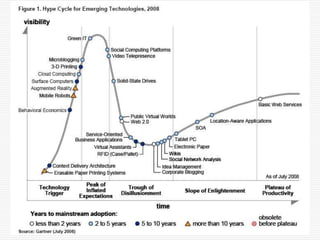
  • #26 Essentially, industries, companies and people go through the 5 stages of: 1) heh, this is cool, 2) yeah, we all think this cool, 3) woah, we were sold down the river, 4) no, come to think of it, used in the right way, this can be good and finally 5) this has become part of what we do.&quot;
  • #28 Many of us use the cloud, or cloud-based applications, without even being aware of it. Advances in computer science to ensure redundancy and protection from natural disasters have led to data being shared across many different hosting facilities. Improved infrastructure has made the cloud robust and reliable; as usage grows, the cloud is fundamentally changing our notions of computing and communication.
  • #29 Part of a trend that began with simple innovations like personalized start pages, RSS aggregation, and customizable widgets, the personal web is a term coined to represent a collection of technologies that confer the ability to reorganize, configure and manage online content rather than just viewing it. Using a growing set of free and simple tools and applications, it is easy to create customized, personal web-based environments — a personal web — that explicitly supports one’s social, professional, learning and other activities via highly personalized windows to the networked world