Research data management
For SUSPLACE 20 April 2016
Hugo Besemer www.slideshare.net/hugobesemer
Data management planning – for whom?
 For yourself – to make it easier to find things back and
know what they are
 For your colleagues
 For the SUSPLACE program
 For your funder
What should be in the plan?
What data should you store?
 Raw data
 Final data
 Papers
but also
 Intermediate data
 Drafts of papers
 Methods
 Equipment and materials
 Research notes
 ...
What do you choose to store?
 Everything you need to be able to do your work
 Everything your colleagues need to do their work
 Everything required by your funding organisation
 Everything required by your journal
 Everything necessary to reproduce your results
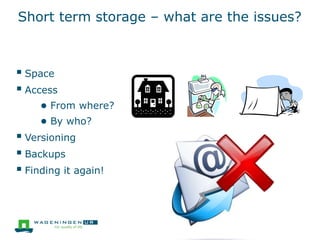
Short term storage – what are the issues?
 Space
 Access
● From where?
● By who?
 Versioning
 Backups
 Finding it again!
Storage: where?
Storage
solutions
Advantages Disadvantages Suitable for
Personal computer
/laptop
• Always available
• Portable
• What if it
breaks/is stolen?
• What if you are
ill or away?
Temporary storage
Network drive
Managed file
servers
• Regularly
backed up and
maintained
• Stored securely
• Stored centrally
• Costs
• May not be
accessible from
everywhere/by
everyone
Master copy (if
enough space is
provided)
External storage
devices – USB,
flash etc.
• Low cost
• Portable
• Easily damaged
or lost
• Insecure
Temporary storage
Cloud services –
Dropbox, Figshare,
SkyDrive etc.
• Automatic sync
(some services)
• Easy access
• Is it secure?
• No control over
backup
procedure
Data sharing
Question: are there
agreements for
SUSPLACE?
Storage during research: basic tips
 Versioning
● use a file in one (online) location as the “master”, and do
all your modifications and processing on copies of that
master
● When you have consolidated your changes and do not
want to lose them, replace the master file by the
consolidated file
● Keep track of ‘milestone files’
Folder structure
DO:
 Stabile and scalable
 Interaction with filenames. Folder? Or element in
filename?
9
Project_Files Pictures
??
UB_users_mktproj_01032015.tif =Projectfile (picture)
Project_Files
Pictures
UB_users_mktproj_20150103.tif =Projectfile (picture)
taken from: Data management Workshop For Researchers
by Tessa Pronk (Utrecht University Library)
If you use for example Atlas.ti or
NVIVO for qualitative data, it takes
care of some of this
Folder structure
DO:
 Stabile and scalable
 Interaction with filenames. Folder? Or element in
filename?
DON'T:
 Too flat or deep structure
 Folders with overlapping content
10
taken from: Data management Workshop For Researchers
by Tessa Pronk (Utrecht University Library)
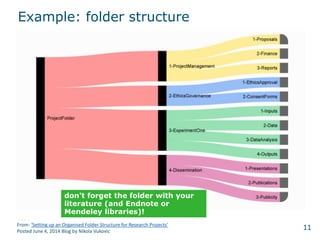
Example: folder structure
11From: ‘Setting up an Organised Folder Structure for Research Projects’
Posted June 4, 2014 Blog by Nikola Vukovic
don't forget the folder with your
literature (and Endnote or
Mendeley libraries)!
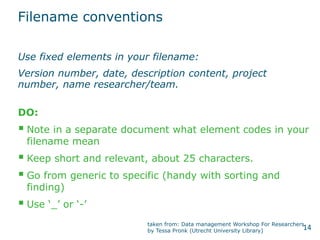
Filename conventions
DO:
 Note in a separate document what element codes in your
filename mean
 Keep short and relevant, about 25 characters.
 Go from generic to specific (handy with sorting and
finding)
 Use ‘_’ or ‘-’
12
Use fixed elements in your filename:
Version number, date, description content, project
number, name researcher/team.
taken from: Data management Workshop For Researchers
by Tessa Pronk (Utrecht University Library)
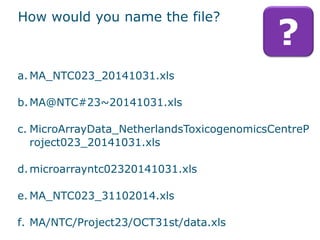
How would you name the file?
13
?
a. MA_NTC023_20141031.xls
b.MA@NTC#23~20141031.xls
c. MicroArrayData_NetherlandsToxicogenomicsCentreP
roject023_20141031.xls
d.microarrayntc02320141031.xls
e. MA_NTC023_31102014.xls
f. MA/NTC/Project23/OCT31st/data.xls
Filename conventions
DO:
 Note in a separate document what element codes in your
filename mean
 Keep short and relevant, about 25 characters.
 Go from generic to specific (handy with sorting and
finding)
 Use ‘_’ or ‘-’
14
Use fixed elements in your filename:
Version number, date, description content, project
number, name researcher/team.
taken from: Data management Workshop For Researchers
by Tessa Pronk (Utrecht University Library)
Filename conventions
DON'T:
 Use special characters (&%$#) or points or whitespace.
 Name your files 'new_version' 'newer_version',
'newest_version'.
 Duplicate files in different folders
 Trust computer-metadata with your file
15
TIP: In most operating systems
‘Batch renaming software’ exist
very good vs. less good
16
?
a. MA_NTC023_20141031.xls
b.MA@NTC#23~20141031.xls
c. MicroArrayData_NetherlandsToxicogenomicsCentreP
roject023_20141031.xls
d.microarrayntc02320141031.xls
e. MA_NTC023_31102014.xls
f. MA/NTC/Project23/OCT31st/data.xls
Long term or .....
 For WUR: contact our data librarian
(datamanagement.support@wur.nl)
● support with storage in DANS-EASY and 3TU
● advice on other repositories
 find a suitable discipline-specific repository
● provided by journal (e.g. Dryad)
● search re3data.org
 use a free generic repository
● figshare
● Mendeley.Data
● Harvard Dataverse
● Zenodo
17
Help! I need a DOI for my
manuscript!
18
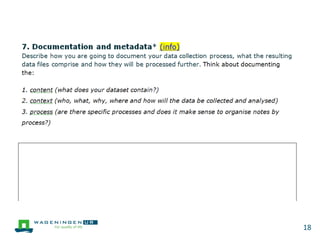
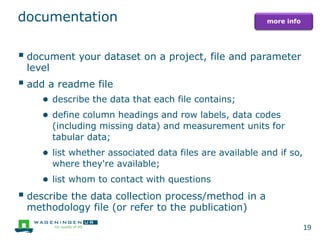
documentation
 document your dataset on a project, file and parameter
level
 add a readme file
● describe the data that each file contains;
● define column headings and row labels, data codes
(including missing data) and measurement units for
tabular data;
● list whether associated data files are available and if so,
where they're available;
● list whom to contact with questions
 describe the data collection process/method in a
methodology file (or refer to the publication)
19
more info
For yourself
 For data processing and analysis
 Help in writing reports and papers
 Reference for the future
● Will you still understand it in 2 months, 6 months, 2
years..?
21
22
23
Thank you for
your participation!
More info?
Go to: Wageningen UR Data
Management Support Hub
Or contact us via:
datamanagement.support@wur.nl
And say your from WUR-coordinated SUSPLACE
24
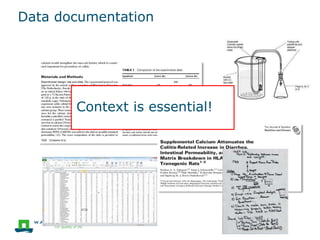
Data documentation
Context is essential!
The context comes
from you!
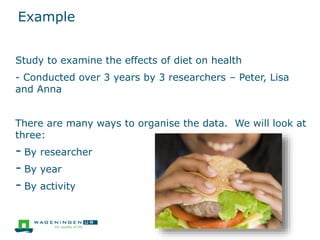
Example
Study to examine the effects of diet on health
- Conducted over 3 years by 3 researchers – Peter, Lisa
and Anna
There are many ways to organise the data. We will look at
three:
- By researcher
- By year
- By activity
Example
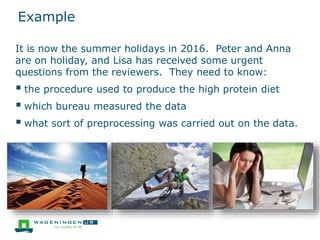
It is now the summer holidays in 2016. Peter and Anna
are on holiday, and Lisa has received some urgent
questions from the reviewers. They need to know:
 the procedure used to produce the high protein diet
 which bureau measured the data
 what sort of preprocessing was carried out on the data.
Organisation by year/researcher
Need to know what was done when or by who
Example – Organising by activity
Easy to navigate through, for each question you
quickly find the right folder
- even if you had no prior knowledge.
Example – Organising by activity
Still need to do quite a lot of detective work to find the
information
– have to rely on good names, guesswork, and ...
...read through the content of the files.
Descriptions and links
 Enter a brief description for each activity (folder)
 It may help to identify types of files (e.g. dataset,
procedure, sample, document)
 Linking to items produced in other activities allows you
to:
● follow the workflow
● reuse items
● avoid problems due to multiple copies
Example – Organising by activity plus
descriptions and links
Easy to navigate through, for each question you
quickly find the right folder
- even if you had no prior knowledge.
Descriptions help you to find and understand the
data
Links make the whole process traceable

Research data management

  • 1.
    Research data management ForSUSPLACE 20 April 2016 Hugo Besemer www.slideshare.net/hugobesemer
  • 2.
    Data management planning– for whom?  For yourself – to make it easier to find things back and know what they are  For your colleagues  For the SUSPLACE program  For your funder
  • 3.
    What should bein the plan?
  • 4.
    What data shouldyou store?  Raw data  Final data  Papers but also  Intermediate data  Drafts of papers  Methods  Equipment and materials  Research notes  ...
  • 5.
    What do youchoose to store?  Everything you need to be able to do your work  Everything your colleagues need to do their work  Everything required by your funding organisation  Everything required by your journal  Everything necessary to reproduce your results
  • 6.
    Short term storage– what are the issues?  Space  Access ● From where? ● By who?  Versioning  Backups  Finding it again!
  • 7.
    Storage: where? Storage solutions Advantages DisadvantagesSuitable for Personal computer /laptop • Always available • Portable • What if it breaks/is stolen? • What if you are ill or away? Temporary storage Network drive Managed file servers • Regularly backed up and maintained • Stored securely • Stored centrally • Costs • May not be accessible from everywhere/by everyone Master copy (if enough space is provided) External storage devices – USB, flash etc. • Low cost • Portable • Easily damaged or lost • Insecure Temporary storage Cloud services – Dropbox, Figshare, SkyDrive etc. • Automatic sync (some services) • Easy access • Is it secure? • No control over backup procedure Data sharing Question: are there agreements for SUSPLACE?
  • 8.
    Storage during research:basic tips  Versioning ● use a file in one (online) location as the “master”, and do all your modifications and processing on copies of that master ● When you have consolidated your changes and do not want to lose them, replace the master file by the consolidated file ● Keep track of ‘milestone files’
  • 9.
    Folder structure DO:  Stabileand scalable  Interaction with filenames. Folder? Or element in filename? 9 Project_Files Pictures ?? UB_users_mktproj_01032015.tif =Projectfile (picture) Project_Files Pictures UB_users_mktproj_20150103.tif =Projectfile (picture) taken from: Data management Workshop For Researchers by Tessa Pronk (Utrecht University Library) If you use for example Atlas.ti or NVIVO for qualitative data, it takes care of some of this
  • 10.
    Folder structure DO:  Stabileand scalable  Interaction with filenames. Folder? Or element in filename? DON'T:  Too flat or deep structure  Folders with overlapping content 10 taken from: Data management Workshop For Researchers by Tessa Pronk (Utrecht University Library)
  • 11.
    Example: folder structure 11From:‘Setting up an Organised Folder Structure for Research Projects’ Posted June 4, 2014 Blog by Nikola Vukovic don't forget the folder with your literature (and Endnote or Mendeley libraries)!
  • 12.
    Filename conventions DO:  Notein a separate document what element codes in your filename mean  Keep short and relevant, about 25 characters.  Go from generic to specific (handy with sorting and finding)  Use ‘_’ or ‘-’ 12 Use fixed elements in your filename: Version number, date, description content, project number, name researcher/team. taken from: Data management Workshop For Researchers by Tessa Pronk (Utrecht University Library)
  • 13.
    How would youname the file? 13 ? a. MA_NTC023_20141031.xls b.MA@NTC#23~20141031.xls c. MicroArrayData_NetherlandsToxicogenomicsCentreP roject023_20141031.xls d.microarrayntc02320141031.xls e. MA_NTC023_31102014.xls f. MA/NTC/Project23/OCT31st/data.xls
  • 14.
    Filename conventions DO:  Notein a separate document what element codes in your filename mean  Keep short and relevant, about 25 characters.  Go from generic to specific (handy with sorting and finding)  Use ‘_’ or ‘-’ 14 Use fixed elements in your filename: Version number, date, description content, project number, name researcher/team. taken from: Data management Workshop For Researchers by Tessa Pronk (Utrecht University Library)
  • 15.
    Filename conventions DON'T:  Usespecial characters (&%$#) or points or whitespace.  Name your files 'new_version' 'newer_version', 'newest_version'.  Duplicate files in different folders  Trust computer-metadata with your file 15 TIP: In most operating systems ‘Batch renaming software’ exist
  • 16.
    very good vs.less good 16 ? a. MA_NTC023_20141031.xls b.MA@NTC#23~20141031.xls c. MicroArrayData_NetherlandsToxicogenomicsCentreP roject023_20141031.xls d.microarrayntc02320141031.xls e. MA_NTC023_31102014.xls f. MA/NTC/Project23/OCT31st/data.xls
  • 17.
    Long term or.....  For WUR: contact our data librarian (datamanagement.support@wur.nl) ● support with storage in DANS-EASY and 3TU ● advice on other repositories  find a suitable discipline-specific repository ● provided by journal (e.g. Dryad) ● search re3data.org  use a free generic repository ● figshare ● Mendeley.Data ● Harvard Dataverse ● Zenodo 17 Help! I need a DOI for my manuscript!
  • 18.
  • 19.
    documentation  document yourdataset on a project, file and parameter level  add a readme file ● describe the data that each file contains; ● define column headings and row labels, data codes (including missing data) and measurement units for tabular data; ● list whether associated data files are available and if so, where they're available; ● list whom to contact with questions  describe the data collection process/method in a methodology file (or refer to the publication) 19 more info
  • 20.
    For yourself  Fordata processing and analysis  Help in writing reports and papers  Reference for the future ● Will you still understand it in 2 months, 6 months, 2 years..?
  • 21.
  • 22.
  • 23.
  • 24.
    Thank you for yourparticipation! More info? Go to: Wageningen UR Data Management Support Hub Or contact us via: datamanagement.support@wur.nl And say your from WUR-coordinated SUSPLACE 24
  • 25.
  • 26.
  • 27.
    Example Study to examinethe effects of diet on health - Conducted over 3 years by 3 researchers – Peter, Lisa and Anna There are many ways to organise the data. We will look at three: - By researcher - By year - By activity
  • 28.
    Example It is nowthe summer holidays in 2016. Peter and Anna are on holiday, and Lisa has received some urgent questions from the reviewers. They need to know:  the procedure used to produce the high protein diet  which bureau measured the data  what sort of preprocessing was carried out on the data.
  • 29.
    Organisation by year/researcher Needto know what was done when or by who
  • 30.
    Example – Organisingby activity Easy to navigate through, for each question you quickly find the right folder - even if you had no prior knowledge.
  • 31.
    Example – Organisingby activity Still need to do quite a lot of detective work to find the information – have to rely on good names, guesswork, and ... ...read through the content of the files.
  • 32.
    Descriptions and links Enter a brief description for each activity (folder)  It may help to identify types of files (e.g. dataset, procedure, sample, document)  Linking to items produced in other activities allows you to: ● follow the workflow ● reuse items ● avoid problems due to multiple copies
  • 33.
    Example – Organisingby activity plus descriptions and links Easy to navigate through, for each question you quickly find the right folder - even if you had no prior knowledge. Descriptions help you to find and understand the data Links make the whole process traceable

Editor's Notes

  • #5 But you don’t want to go too far in what you are storing – takes time and get information overload. So what should you choose?
  • #6 Increasingly, this data is stored electronically
  • #8 Note with the cloud – your data is subject to the laws of the country in which the server is physically located. Some cloud providers now offer the option to choose. Often you will end up using a combination – for example copying the data from the network drive to your laptop to work on at home. Then you end up with different versions!
  • #9 Milestone files – for example the version which you submitted with a paper, or which you sent to your partners. You could consider using a version control system.
  • #14 good: a b: symbols c: too long d: hard to distinguish different parts of file name, but everything is there e: OK, but date not converted to international format, better for sorting f: folderstructure → year is missing; you need folder structure to understand what is in the file
  • #17 good: a b: symbols c: too long d: hard to distinguish different parts of file name, but everything is there e: OK, but date not converted to international format, better for sorting f: folderstructure → year is missing; you need folder structure to understand what is in the file
  • #21 Colleague: Research goes in 7 year cycles. Recently we got a request for a new project, and he pulled out a file documenting something almost identical.... from 21 years ago!
  • #26 Research is ideas, hypotheses, materials, methods, data, conclusions... Some or all of these can be present in a single lab notebook, but they may also be stored in other documents. All are necessary. Your lab notebook should allow another researcher to replicate your work – if they need other information than what is in your lab notebook, then your notebook needs to be linked to this other information. Need to be able to follow the process to understand the work – so need some structure to see how they relate to one another. For provenance, you also need to know who did what- this is also useful so that others know who they should come to with questions. Other project information such as budgets, resource planning etc falls outside this remit, but it may be useful to you or your colleagues (especially the project leader or supervisor) if you can also link to this information.
  • #27 Whether you use one of these, or something else, or no specialised software at all, one thing remains – the structure has to come from you. Experience with Tiffany users has shown us that this – not inputting data into the software itself – is the hardest part. This structure is not only useful for others after your research is done, it will help you and your colleagues to find and understand your research. Also, the structure is best created while you are doing the research, not afterwards (although that is also possible, just harder).
  • #28 Although good tools and software will help you, you don’t need specialised lab notebook software to produce good, well-structured data and documentation. For this example we simply use files stored in folders. With a little time and effort, even such a simple system will help you a great deal.
  • #30 Organising by time or by person are both very logical ways of organising the data. However both require knowledge of when something was done and by who. They are very inaccessible to anyone who wasn’t involved, and quite awkward for someone who was involved. To understand it you can always read the labnotes of the involved people – how long will this take? Will they be understandable to an outsider? Will they still be understandable to the researcher?
  • #33 This extra structure and metadata doesn’t demand much extra time.
  • #34 Much more logical – when you are looking for interesting papers, what do you look at – the date, the person who wrote it – or the title and abstract?