Escaping
Datageddon
                                 Dorothea Salo
                                 Ryan Schryver
                        Graduate Support Series


 Photo: Steve Punter, http://www.flickr.com/photos/spunter/2554405690/
Why are you here?

• You’re managing data (your own or your lab’s)
• Or you think you maybe should be
• You’re not sure why it matters
• You’re not sure how best to do it
• You’d like to know whether you’re on the right
  track
            Adapted from Graham et al. “Managing Research Data 101.” http://libraries.mit.edu/guides/subjects/data-management/
                                                                                   Managing_Research_Data_101_IAP_2010.pdf


                                                             Photo: Jaysin, http://www.flickr.com/photos/orijinal/3539418133/
Why manage data?
• To make your research easier!
• Because somebody else said so
  • Your lab PI
  • Your lab PI’s funder
• In case you need it later
• To avoid accusations of fraud or bad science
• To share it for others to use and learn from
• To get credit for producing it
• To keep from drowning in irrelevant stuff
  • ... especially at grant/project end
                           Photo: Shashi Bellamkonda, http://www.flickr.com/photos/drbeachvacation/2874078655/
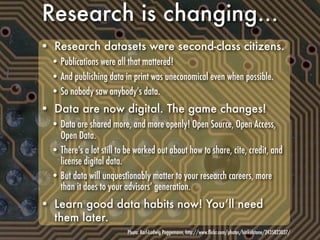
Research is changing...
• Research datasets were second-class citizens.
  • Publications were all that mattered!
  • And publishing data in print was uneconomical even when possible.
  • So nobody saw anybody’s data.
• Data are now digital. The game changes!
  • Data are shared more, and more openly! Open Source, Open Access,
    Open Data.
  • There’s a lot still to be worked out about how to share, cite, credit, and
    license digital data.
  • But data will unquestionably matter to your research careers, more
    than it does to your advisors’ generation.
• Learn good data habits now! You’ll need
  them later.
                           Photo: Karl-Ludwig Poggemann, http://www.flickr.com/photos/hinkelstone/2435823037/
Did you know?
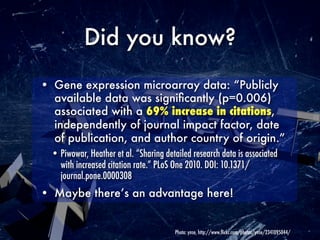
• Gene expression microarray data: “Publicly
  available data was significantly (p=0.006)
  associated with a 69% increase in citations,
  independently of journal impact factor, date
  of publication, and author country of origin.”
  • Piwowar, Heather et al. “Sharing detailed research data is associated
    with increased citation rate.” PLoS One 2010. DOI: 10.1371/
    journal.pone.0000308
• Maybe there’s an advantage here!


                                        Photo: ynse, http://www.flickr.com/photos/ynse/2341095044/
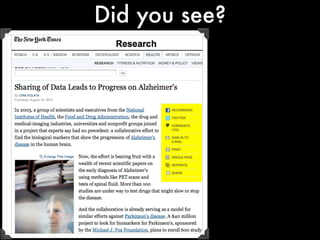
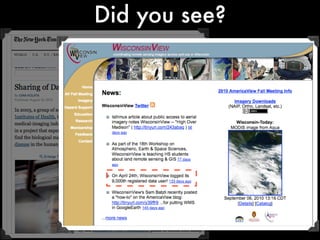
Did you see?
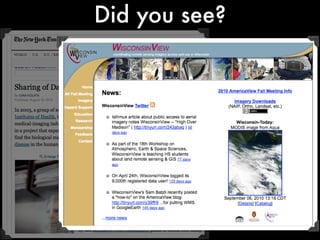
Did you see?
Did you see?
How to plan
to keep data


 Photo: Steve Punter, http://www.flickr.com/photos/spunter/2554405690/
Step 1: Inventory

• What data are you collecting or making?
  • Observational, experimental, simulation? Raw, derived, compiled?
  • Can it be recreated? How much would that cost?
• How much of it? How fast is it growing? Does it change?
• What file format(s)?
• What’s your infrastructure for data collection and
  storage like?
  • How do you find it, or find what you’re looking for in it?
  • How easy is it to get new people up to speed? Or share data with others?


                                           Photo: Anssi Koskinen, http://www.flickr.com/photos/ansik/304526237/
Step 2: Needs
• Who are the audiences for your data?
  • You (including Future You), your lab colleagues (including future ones), your PIs
  • Disciplinary colleagues, at your institution or at others
  • Colleagues in allied disciplines
  • The world!
• What are your obligations to others?
  • Funder requirements
  • Confidentiality issues
  • IP questions
  • Security
• How long do you need to keep your data?

                              Photo: Celeste “Vitamin C9000,” http://www.flickr.com/photos/celestemarie/2193327230/
Step 3: Process planning
• How do you and your lab get from where
  you are to where you need to be?
• Document, document, document all decisions
  and all processes!
• Secret sauce: the more you strategize up-
  front, the less angst and panic later.
  • “Make it up as you go along” is very bad practice!
  • But the best-laid plans go agley... so be flexible.
  • And watch your field! Best practices are still in flux.


                                     Photo: Kevin Utting, http://www.flickr.com/photos/tallkev/256810217/
Things to
think about


Photo: Steve Punter, http://www.flickr.com/photos/spunter/2554405690/
File formats
• Will anybody be able to read these files at
  the end of your time horizon?
• Where possible, prefer file formats that are:
  • Open, standardized
  • Documented
  • In wide use
  • Easy to data-mine, transform, recast
• If you need to transform data for durability,
  do it now, not later.


                                   Photo: Bart Everson, http://www.flickr.com/photos/editor/859824333/
Documentation

• Fundamental question: What would someone
  unfamiliar with your data need in order to
  find, evaluate, understand, and reuse them?
 • Consider the differences between someone inside your lab, someone
   outside your lab but in your field, and someone outside your field.
• Two parts: metadata and methods


                                  Photo: “striatic,” http://www.flickr.com/photos/striatic/2144933705/
Metadata

• About the project
  • Title, people, key dates, funders and grants
• About the data
  • Title, key dates, creator(s), subjects, rights, included files, format(s),
    versions, checksums
• Keep this with the data.


                                        Photo: Paul Downey, http://www.flickr.com/photos/psd/422206144/
Methods
• Reason #1 for not reusing someone else’s
  data: “I don’t know enough about how it was
  gathered to trust it.”
• Document what you did. (A published article
  may or may not be enough.)
• Document any limitations of what you did.
• If you ran code on the data, document the
  code and keep it with the data.
• Need a codebook? Or a data dictionary?
  • If I can’t identify at sight what each bit of your dataset means, yes, you
    do need a codebook or data dictionary.
  • DO NOT FORGET UNITS!
                                  Photo: Joe Sullivan, http://www.flickr.com/photos/skycaptaintwo/90415435/
Standards

• Why reinvent the wheel? If there’s a standard
  format for your data or how to describe it,
  use that!
• The tricky part is finding the right standard.
  • Standards are like toothbrushes...
  • But using standards is good hygiene!
  • Your librarian can often help you find relevant standards.


                                    Photo: Kenneth Lu, http://www.flickr.com/photos/toasty/412580888/
Where to put
  your data


 Photo: Steve Punter, http://www.flickr.com/photos/spunter/2554405690/
Storage, short-term
• Your own drive (PC, server, flash drive, etc.)
  • And if you lose it? Or it breaks?
• Somebody else’s drive
  • Departmental drive
  • “Cloud” drive
  • Do they care as much about your data as you do?
• What about versioning?
• Library motto: Lots Of Copies Keeps Stuff Safe.
  • Two onsite copies, one offsite copy.
  • Keep confidentiality and security requirements in mind, of course.

                            Photo: Vadim Molochnikov, http://www.flickr.com/photos/molotalk/3305001454/
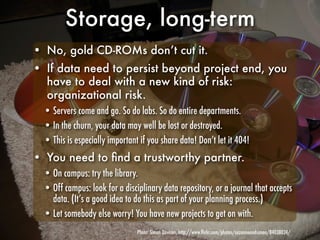
Storage, long-term
• No, gold CD-ROMs don’t cut it.
• If data need to persist beyond project end, you
  have to deal with a new kind of risk:
  organizational risk.
  • Servers come and go. So do labs. So do entire departments.
  • In the churn, your data may well be lost or destroyed.
  • This is especially important if you share data! Don’t let it 404!
• You need to find a trustworthy partner.
  • On campus: try the library.
  • Off campus: look for a disciplinary data repository, or a journal that accepts
    data. (It’s a good idea to do this as part of your planning process.)
  • Let somebody else worry! You have new projects to get on with.
                                Photo: Simon Davison, http://www.flickr.com/photos/suzanneandsimon/84038024/
Summing up


Photo: Steve Punter, http://www.flickr.com/photos/spunter/2554405690/
So, these “data
      management plans...”
• Here’s what MIT suggests should be in them:
  • name of the person responsible for data management within your research project
  • description of data to be collected
  • how data will be documented
  • data quality issues
  • backup procedures
  • how data will be made available for public use and potential secondary uses
  • preservation plans
  • any exceptional arrangements that might be needed to protect participant
    confidentiality
• Feel like common sense now? Good.
                                          Source: http://libraries.mit.edu/guides/subjects/data-management/
Help on campus

• “What’s Your Data Plan?” website:
  http://dataplan.wisc.edu/
  • Use the contact page!
• Your department’s liaison librarian
  • We can help you find how-tos, relevant standards, on- and off-campus
    archiving services, etc.
• MINDS@UW: http://minds.wisconsin.edu/
  • Data in final form that make sense as discrete files.


                                Photo: Jordan Pérez Nobody, http://www.flickr.com/photos/jp-/2548073841/
Thank you!
    This presentation is available under a
Creative Commons 3.0 Attribution license.

If you reuse it, please remember to credit
                 the included photographs.

    Photo: Steve Punter, http://www.flickr.com/photos/spunter/2554405690/

Escaping Datageddon

  • 1.
    Escaping Datageddon Dorothea Salo Ryan Schryver Graduate Support Series Photo: Steve Punter, http://www.flickr.com/photos/spunter/2554405690/
  • 2.
    Why are youhere? • You’re managing data (your own or your lab’s) • Or you think you maybe should be • You’re not sure why it matters • You’re not sure how best to do it • You’d like to know whether you’re on the right track Adapted from Graham et al. “Managing Research Data 101.” http://libraries.mit.edu/guides/subjects/data-management/ Managing_Research_Data_101_IAP_2010.pdf Photo: Jaysin, http://www.flickr.com/photos/orijinal/3539418133/
  • 3.
    Why manage data? •To make your research easier! • Because somebody else said so • Your lab PI • Your lab PI’s funder • In case you need it later • To avoid accusations of fraud or bad science • To share it for others to use and learn from • To get credit for producing it • To keep from drowning in irrelevant stuff • ... especially at grant/project end Photo: Shashi Bellamkonda, http://www.flickr.com/photos/drbeachvacation/2874078655/
  • 4.
    Research is changing... •Research datasets were second-class citizens. • Publications were all that mattered! • And publishing data in print was uneconomical even when possible. • So nobody saw anybody’s data. • Data are now digital. The game changes! • Data are shared more, and more openly! Open Source, Open Access, Open Data. • There’s a lot still to be worked out about how to share, cite, credit, and license digital data. • But data will unquestionably matter to your research careers, more than it does to your advisors’ generation. • Learn good data habits now! You’ll need them later. Photo: Karl-Ludwig Poggemann, http://www.flickr.com/photos/hinkelstone/2435823037/
  • 5.
    Did you know? •Gene expression microarray data: “Publicly available data was significantly (p=0.006) associated with a 69% increase in citations, independently of journal impact factor, date of publication, and author country of origin.” • Piwowar, Heather et al. “Sharing detailed research data is associated with increased citation rate.” PLoS One 2010. DOI: 10.1371/ journal.pone.0000308 • Maybe there’s an advantage here! Photo: ynse, http://www.flickr.com/photos/ynse/2341095044/
  • 6.
  • 7.
  • 8.
  • 9.
    How to plan tokeep data Photo: Steve Punter, http://www.flickr.com/photos/spunter/2554405690/
  • 10.
    Step 1: Inventory •What data are you collecting or making? • Observational, experimental, simulation? Raw, derived, compiled? • Can it be recreated? How much would that cost? • How much of it? How fast is it growing? Does it change? • What file format(s)? • What’s your infrastructure for data collection and storage like? • How do you find it, or find what you’re looking for in it? • How easy is it to get new people up to speed? Or share data with others? Photo: Anssi Koskinen, http://www.flickr.com/photos/ansik/304526237/
  • 11.
    Step 2: Needs •Who are the audiences for your data? • You (including Future You), your lab colleagues (including future ones), your PIs • Disciplinary colleagues, at your institution or at others • Colleagues in allied disciplines • The world! • What are your obligations to others? • Funder requirements • Confidentiality issues • IP questions • Security • How long do you need to keep your data? Photo: Celeste “Vitamin C9000,” http://www.flickr.com/photos/celestemarie/2193327230/
  • 12.
    Step 3: Processplanning • How do you and your lab get from where you are to where you need to be? • Document, document, document all decisions and all processes! • Secret sauce: the more you strategize up- front, the less angst and panic later. • “Make it up as you go along” is very bad practice! • But the best-laid plans go agley... so be flexible. • And watch your field! Best practices are still in flux. Photo: Kevin Utting, http://www.flickr.com/photos/tallkev/256810217/
  • 13.
    Things to think about Photo:Steve Punter, http://www.flickr.com/photos/spunter/2554405690/
  • 14.
    File formats • Willanybody be able to read these files at the end of your time horizon? • Where possible, prefer file formats that are: • Open, standardized • Documented • In wide use • Easy to data-mine, transform, recast • If you need to transform data for durability, do it now, not later. Photo: Bart Everson, http://www.flickr.com/photos/editor/859824333/
  • 15.
    Documentation • Fundamental question:What would someone unfamiliar with your data need in order to find, evaluate, understand, and reuse them? • Consider the differences between someone inside your lab, someone outside your lab but in your field, and someone outside your field. • Two parts: metadata and methods Photo: “striatic,” http://www.flickr.com/photos/striatic/2144933705/
  • 16.
    Metadata • About theproject • Title, people, key dates, funders and grants • About the data • Title, key dates, creator(s), subjects, rights, included files, format(s), versions, checksums • Keep this with the data. Photo: Paul Downey, http://www.flickr.com/photos/psd/422206144/
  • 17.
    Methods • Reason #1for not reusing someone else’s data: “I don’t know enough about how it was gathered to trust it.” • Document what you did. (A published article may or may not be enough.) • Document any limitations of what you did. • If you ran code on the data, document the code and keep it with the data. • Need a codebook? Or a data dictionary? • If I can’t identify at sight what each bit of your dataset means, yes, you do need a codebook or data dictionary. • DO NOT FORGET UNITS! Photo: Joe Sullivan, http://www.flickr.com/photos/skycaptaintwo/90415435/
  • 18.
    Standards • Why reinventthe wheel? If there’s a standard format for your data or how to describe it, use that! • The tricky part is finding the right standard. • Standards are like toothbrushes... • But using standards is good hygiene! • Your librarian can often help you find relevant standards. Photo: Kenneth Lu, http://www.flickr.com/photos/toasty/412580888/
  • 19.
    Where to put your data Photo: Steve Punter, http://www.flickr.com/photos/spunter/2554405690/
  • 20.
    Storage, short-term • Yourown drive (PC, server, flash drive, etc.) • And if you lose it? Or it breaks? • Somebody else’s drive • Departmental drive • “Cloud” drive • Do they care as much about your data as you do? • What about versioning? • Library motto: Lots Of Copies Keeps Stuff Safe. • Two onsite copies, one offsite copy. • Keep confidentiality and security requirements in mind, of course. Photo: Vadim Molochnikov, http://www.flickr.com/photos/molotalk/3305001454/
  • 21.
    Storage, long-term • No,gold CD-ROMs don’t cut it. • If data need to persist beyond project end, you have to deal with a new kind of risk: organizational risk. • Servers come and go. So do labs. So do entire departments. • In the churn, your data may well be lost or destroyed. • This is especially important if you share data! Don’t let it 404! • You need to find a trustworthy partner. • On campus: try the library. • Off campus: look for a disciplinary data repository, or a journal that accepts data. (It’s a good idea to do this as part of your planning process.) • Let somebody else worry! You have new projects to get on with. Photo: Simon Davison, http://www.flickr.com/photos/suzanneandsimon/84038024/
  • 22.
    Summing up Photo: StevePunter, http://www.flickr.com/photos/spunter/2554405690/
  • 23.
    So, these “data management plans...” • Here’s what MIT suggests should be in them: • name of the person responsible for data management within your research project • description of data to be collected • how data will be documented • data quality issues • backup procedures • how data will be made available for public use and potential secondary uses • preservation plans • any exceptional arrangements that might be needed to protect participant confidentiality • Feel like common sense now? Good. Source: http://libraries.mit.edu/guides/subjects/data-management/
  • 24.
    Help on campus •“What’s Your Data Plan?” website: http://dataplan.wisc.edu/ • Use the contact page! • Your department’s liaison librarian • We can help you find how-tos, relevant standards, on- and off-campus archiving services, etc. • MINDS@UW: http://minds.wisconsin.edu/ • Data in final form that make sense as discrete files. Photo: Jordan Pérez Nobody, http://www.flickr.com/photos/jp-/2548073841/
  • 25.
    Thank you! This presentation is available under a Creative Commons 3.0 Attribution license. If you reuse it, please remember to credit the included photographs. Photo: Steve Punter, http://www.flickr.com/photos/spunter/2554405690/