Seminar On -

Keystroke Dynamics
Contents
• Introduction
 Overview of Biometrics
 Characteristics
• Various approaches of research on keystroke dynamics
 Techniques
 Analysis
• Advantages/Drawbacks of keystroke dynamics
• Research Available
• Conclusion
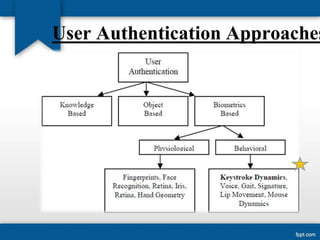
User Authentication Approaches
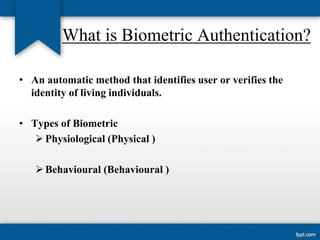
What is Biometric Authentication?
• An automatic method that identifies user or verifies the
identity of living individuals.

• Types of Biometric
 Physiological (Physical )
 Behavioural (Behavioural )
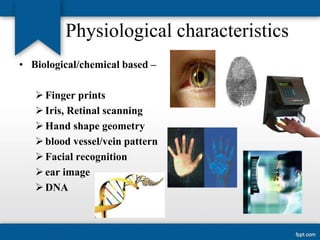
Physiological characteristics
• Biological/chemical based –
 Finger prints
 Iris, Retinal scanning
 Hand shape geometry
 blood vessel/vein pattern
 Facial recognition
 ear image
 DNA
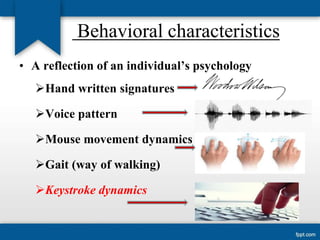
Behavioral characteristics
• A reflection of an individual’s psychology
Hand written signatures
Voice pattern
Mouse movement dynamics
Gait (way of walking)
Keystroke dynamics
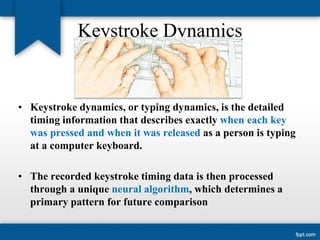
Keystroke Dynamics

• Keystroke dynamics, or typing dynamics, is the detailed
timing information that describes exactly when each key
was pressed and when it was released as a person is typing
at a computer keyboard.
• The recorded keystroke timing data is then processed
through a unique neural algorithm, which determines a
primary pattern for future comparison
Keystroke Verification Techniques
• Static verification (Fixed text mode)
 Only based on password typing rhythm
 Authentication only at login time

• Dynamic verification (free text mode)
 pattern regardless of the typed text
 A continuous or periodic monitoring (On-the-fly user
authentication)
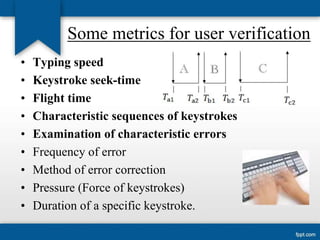
Some metrics for user verification
•
•
•
•
•
•
•
•
•

Typing speed
Keystroke seek-time
Flight time
Characteristic sequences of keystrokes
Examination of characteristic errors
Frequency of error
Method of error correction
Pressure (Force of keystrokes)
Duration of a specific keystroke.
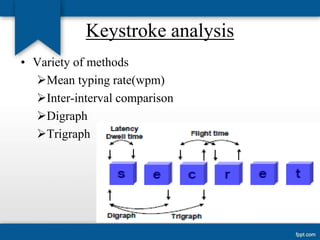
Keystroke analysis
• Variety of methods
Mean typing rate(wpm)
Inter-interval comparison
Digraph
Trigraph
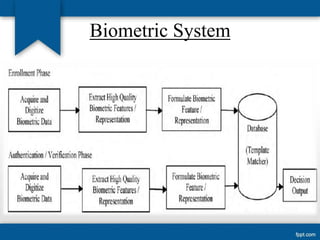
Biometric System
Advantages :
• Software Only method. (No Additional Hardware
except a Keyboard)
• Simple To Deploy and Use (username &
passwords) – Universally accepted
• Cost Effective
• No End-User Training
• It provides a simple natural way for increased
computer security
• Can be used over the internet
Drawbacks:
• User’s susceptibility to fatigue
• Dynamic change in typing patterns

• Injury, skill of the user
• Change of keyboard hardware.
Applications:
• There are several home software and commercial software
products which claim to use keystroke dynamics to
authenticate a user :
 BioTracker -is a biometric authentication software that
uses continuous authentication to verify the identity of a
user.
 AdmitOneSecurity - formerly Bio Password is a patented
commercial system which uses keystroke dynamics.
 bioCheck- has a patented implementation which uses
keystroke dynamics for ubiquitous web-based login as well
as workstation authentication.
Further Research Available
• Researchers said that it will carry out more investigation on
the continuous authentication problem in our future work.
• From last few years researchers are also working on the
typing rhythm of an individuals.
• Working for the design of more robust authentication
systems.
Conclusions
•

It seems promising , still needs more efforts specially for
identification
 Iris scanners provide the lowest total error rate - on the
order of 10-6 in many cases
 Even fingerprints provide an less error rate.

• As security mechanism is not visible, un authorized users
cant have idea of security measure.
• It is quickly emerging, low cost, non intrusive alternative
• To traditional biometric technology.
References
• [1] IEEE Keystroke dynamics as a biometric for
authentication, Fabian Monrose, Aviel D. Rubin, March 1999.
• [2] IEEE, Keystroke-Dynamics Authentication Against
Synthetic Forgeries Deian Stefan
• [3] Zeljka Zorz [Online] Avaliable: http://www.netsecurity.org/article.php?id=1610
• [4] wikipedia[Online] Avaliable :
http://en.wikipedia.org/wiki/Keystroke_dynamics
Keystroke dynamics
Keystroke dynamics

Keystroke dynamics

  • 1.
  • 2.
    Contents • Introduction  Overviewof Biometrics  Characteristics • Various approaches of research on keystroke dynamics  Techniques  Analysis • Advantages/Drawbacks of keystroke dynamics • Research Available • Conclusion
  • 3.
  • 4.
    What is BiometricAuthentication? • An automatic method that identifies user or verifies the identity of living individuals. • Types of Biometric  Physiological (Physical )  Behavioural (Behavioural )
  • 5.
    Physiological characteristics • Biological/chemicalbased –  Finger prints  Iris, Retinal scanning  Hand shape geometry  blood vessel/vein pattern  Facial recognition  ear image  DNA
  • 6.
    Behavioral characteristics • Areflection of an individual’s psychology Hand written signatures Voice pattern Mouse movement dynamics Gait (way of walking) Keystroke dynamics
  • 7.
    Keystroke Dynamics • Keystrokedynamics, or typing dynamics, is the detailed timing information that describes exactly when each key was pressed and when it was released as a person is typing at a computer keyboard. • The recorded keystroke timing data is then processed through a unique neural algorithm, which determines a primary pattern for future comparison
  • 8.
    Keystroke Verification Techniques •Static verification (Fixed text mode)  Only based on password typing rhythm  Authentication only at login time • Dynamic verification (free text mode)  pattern regardless of the typed text  A continuous or periodic monitoring (On-the-fly user authentication)
  • 9.
    Some metrics foruser verification • • • • • • • • • Typing speed Keystroke seek-time Flight time Characteristic sequences of keystrokes Examination of characteristic errors Frequency of error Method of error correction Pressure (Force of keystrokes) Duration of a specific keystroke.
  • 10.
    Keystroke analysis • Varietyof methods Mean typing rate(wpm) Inter-interval comparison Digraph Trigraph
  • 11.
  • 12.
    Advantages : • SoftwareOnly method. (No Additional Hardware except a Keyboard) • Simple To Deploy and Use (username & passwords) – Universally accepted • Cost Effective • No End-User Training • It provides a simple natural way for increased computer security • Can be used over the internet
  • 13.
    Drawbacks: • User’s susceptibilityto fatigue • Dynamic change in typing patterns • Injury, skill of the user • Change of keyboard hardware.
  • 14.
    Applications: • There areseveral home software and commercial software products which claim to use keystroke dynamics to authenticate a user :  BioTracker -is a biometric authentication software that uses continuous authentication to verify the identity of a user.  AdmitOneSecurity - formerly Bio Password is a patented commercial system which uses keystroke dynamics.  bioCheck- has a patented implementation which uses keystroke dynamics for ubiquitous web-based login as well as workstation authentication.
  • 15.
    Further Research Available •Researchers said that it will carry out more investigation on the continuous authentication problem in our future work. • From last few years researchers are also working on the typing rhythm of an individuals. • Working for the design of more robust authentication systems.
  • 16.
    Conclusions • It seems promising, still needs more efforts specially for identification  Iris scanners provide the lowest total error rate - on the order of 10-6 in many cases  Even fingerprints provide an less error rate. • As security mechanism is not visible, un authorized users cant have idea of security measure. • It is quickly emerging, low cost, non intrusive alternative • To traditional biometric technology.
  • 17.
    References • [1] IEEEKeystroke dynamics as a biometric for authentication, Fabian Monrose, Aviel D. Rubin, March 1999. • [2] IEEE, Keystroke-Dynamics Authentication Against Synthetic Forgeries Deian Stefan • [3] Zeljka Zorz [Online] Avaliable: http://www.netsecurity.org/article.php?id=1610 • [4] wikipedia[Online] Avaliable : http://en.wikipedia.org/wiki/Keystroke_dynamics