Application Note

                                      860 DSP VoIP Tests
This application note discusses two of the VoIP tests that can be performed with the 860 DSPi. The first
test utilizes a server-side application that the 860 DSPi can communicate with, producing both upstream
and downstream test results. The second test utilizes any network device on the system and produces a
single result, which assumes that the upstream and downstream are equivalent. Both tests are controlled
by the same setup menu, described below.


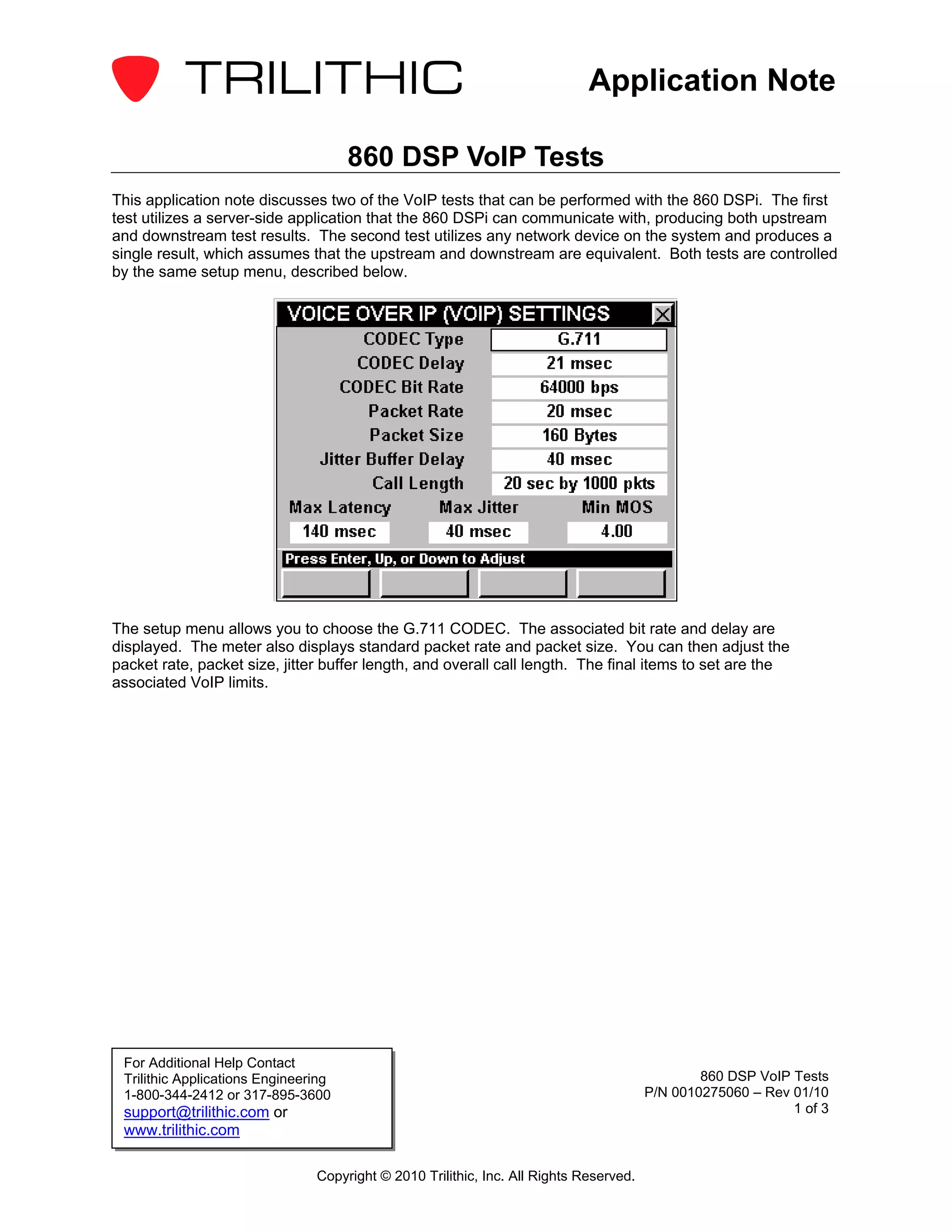
The setup menu allows you to choose the G.711 CODEC. The associated bit rate and delay are
displayed. The meter also displays standard packet rate and packet size. You can then adjust the
packet rate, packet size, jitter buffer length, and overall call length. The final items to set are the
associated VoIP limits.


 For Additional Help Contact
 Trilithic Applications Engineering                                                             860 DSP VoIP Tests
 1-800-344-2412 or 317-895-3600                                                         P/N 0010275060 – Rev 01/10
 support@trilithic.com or                                                                                    1 of 3
 www.trilithic.com

                                Copyright © 2010 Trilithic, Inc. All Rights Reserved.
Application Note

VoIP RTP Test

      IP
  VoIP


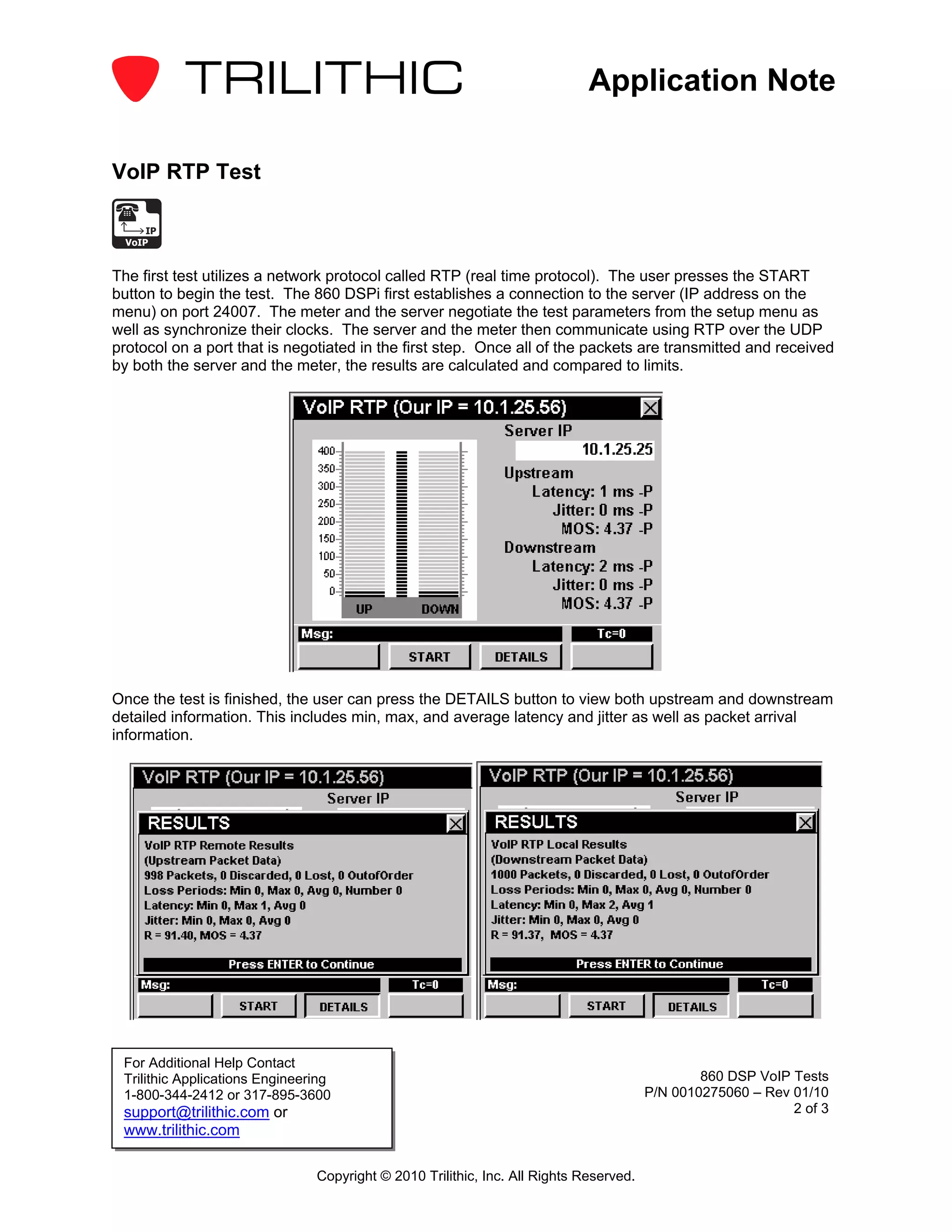
The first test utilizes a network protocol called RTP (real time protocol). The user presses the START
button to begin the test. The 860 DSPi first establishes a connection to the server (IP address on the
menu) on port 24007. The meter and the server negotiate the test parameters from the setup menu as
well as synchronize their clocks. The server and the meter then communicate using RTP over the UDP
protocol on a port that is negotiated in the first step. Once all of the packets are transmitted and received
by both the server and the meter, the results are calculated and compared to limits.


Once the test is finished, the user can press the DETAILS button to view both upstream and downstream
detailed information. This includes min, max, and average latency and jitter as well as packet arrival
information.


 For Additional Help Contact
 Trilithic Applications Engineering                                                             860 DSP VoIP Tests
 1-800-344-2412 or 317-895-3600                                                         P/N 0010275060 – Rev 01/10
 support@trilithic.com or                                                                                    2 of 3
 www.trilithic.com

                                Copyright © 2010 Trilithic, Inc. All Rights Reserved.
Application Note

VoIP ICMP Test

 PING


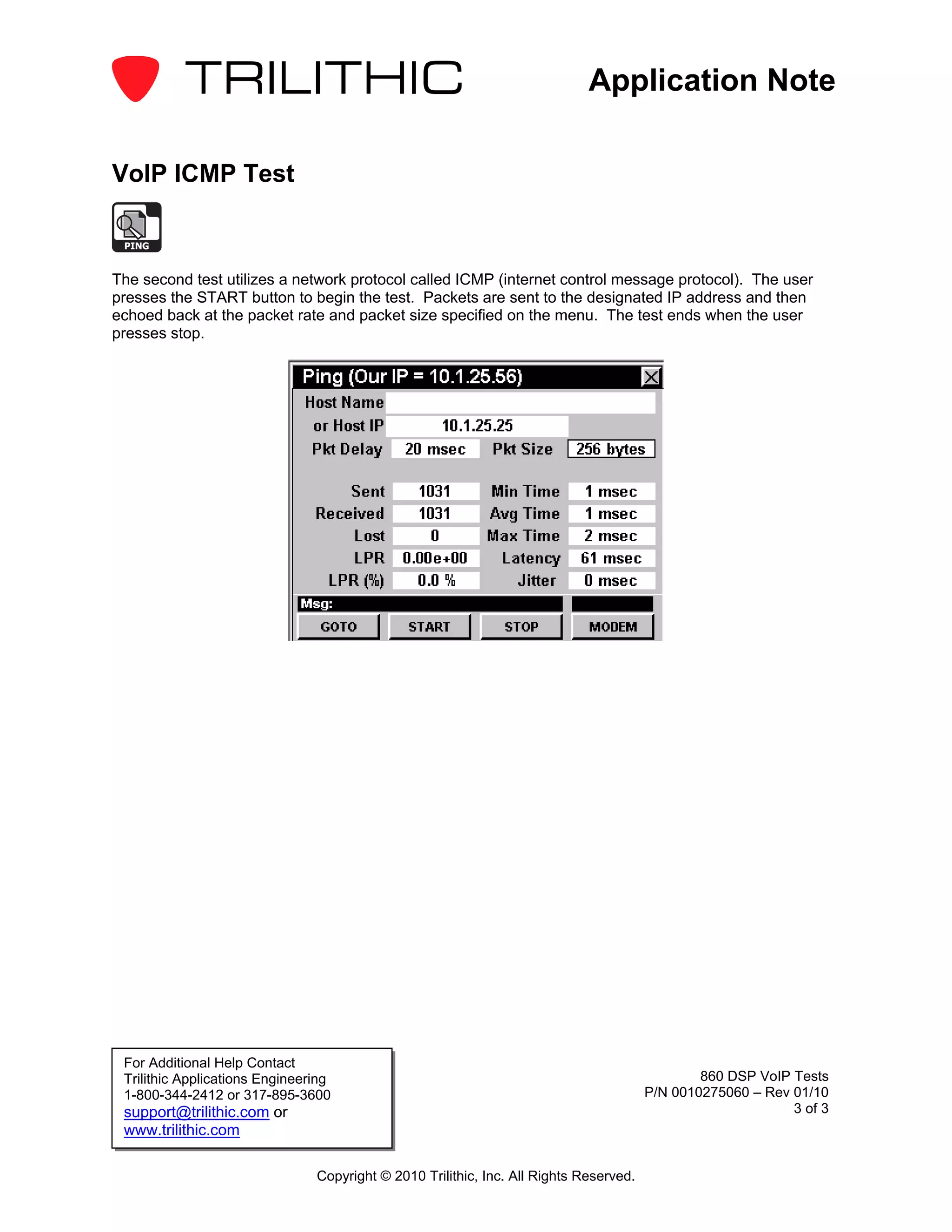
The second test utilizes a network protocol called ICMP (internet control message protocol). The user
presses the START button to begin the test. Packets are sent to the designated IP address and then
echoed back at the packet rate and packet size specified on the menu. The test ends when the user
presses stop.


 For Additional Help Contact
 Trilithic Applications Engineering                                                             860 DSP VoIP Tests
 1-800-344-2412 or 317-895-3600                                                         P/N 0010275060 – Rev 01/10
 support@trilithic.com or                                                                                    3 of 3
 www.trilithic.com

                                Copyright © 2010 Trilithic, Inc. All Rights Reserved.

860 dspi voip_tests

  • 1.
    Application Note 860 DSP VoIP Tests This application note discusses two of the VoIP tests that can be performed with the 860 DSPi. The first test utilizes a server-side application that the 860 DSPi can communicate with, producing both upstream and downstream test results. The second test utilizes any network device on the system and produces a single result, which assumes that the upstream and downstream are equivalent. Both tests are controlled by the same setup menu, described below. The setup menu allows you to choose the G.711 CODEC. The associated bit rate and delay are displayed. The meter also displays standard packet rate and packet size. You can then adjust the packet rate, packet size, jitter buffer length, and overall call length. The final items to set are the associated VoIP limits. For Additional Help Contact Trilithic Applications Engineering 860 DSP VoIP Tests 1-800-344-2412 or 317-895-3600 P/N 0010275060 – Rev 01/10 support@trilithic.com or 1 of 3 www.trilithic.com Copyright © 2010 Trilithic, Inc. All Rights Reserved.
  • 2.
    Application Note VoIP RTPTest IP VoIP The first test utilizes a network protocol called RTP (real time protocol). The user presses the START button to begin the test. The 860 DSPi first establishes a connection to the server (IP address on the menu) on port 24007. The meter and the server negotiate the test parameters from the setup menu as well as synchronize their clocks. The server and the meter then communicate using RTP over the UDP protocol on a port that is negotiated in the first step. Once all of the packets are transmitted and received by both the server and the meter, the results are calculated and compared to limits. Once the test is finished, the user can press the DETAILS button to view both upstream and downstream detailed information. This includes min, max, and average latency and jitter as well as packet arrival information. For Additional Help Contact Trilithic Applications Engineering 860 DSP VoIP Tests 1-800-344-2412 or 317-895-3600 P/N 0010275060 – Rev 01/10 support@trilithic.com or 2 of 3 www.trilithic.com Copyright © 2010 Trilithic, Inc. All Rights Reserved.
  • 3.
    Application Note VoIP ICMPTest PING The second test utilizes a network protocol called ICMP (internet control message protocol). The user presses the START button to begin the test. Packets are sent to the designated IP address and then echoed back at the packet rate and packet size specified on the menu. The test ends when the user presses stop. For Additional Help Contact Trilithic Applications Engineering 860 DSP VoIP Tests 1-800-344-2412 or 317-895-3600 P/N 0010275060 – Rev 01/10 support@trilithic.com or 3 of 3 www.trilithic.com Copyright © 2010 Trilithic, Inc. All Rights Reserved.