Application Note

                         860 DSPi High Speed Throughput

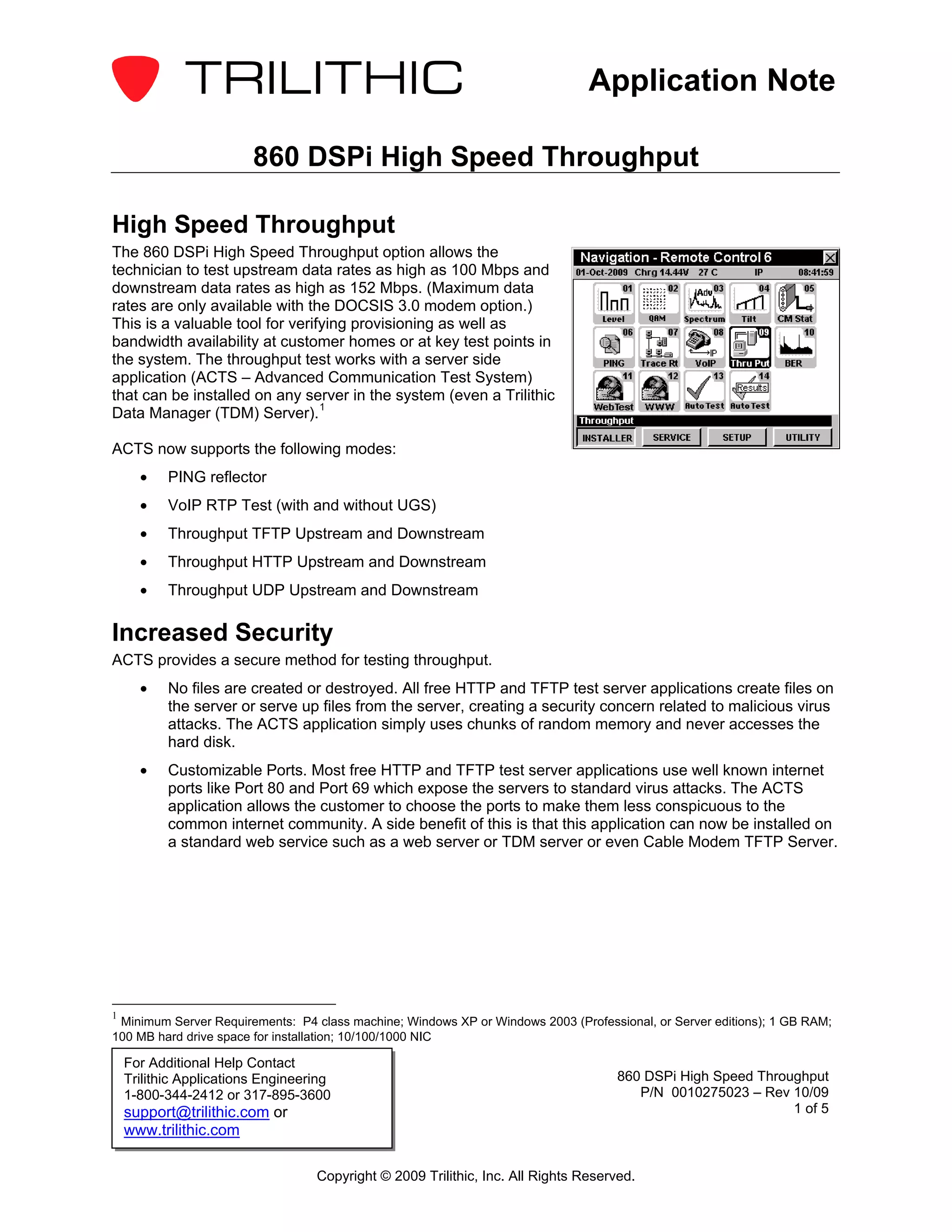
High Speed Throughput
The 860 DSPi High Speed Throughput option allows the
technician to test upstream data rates as high as 100 Mbps and
downstream data rates as high as 152 Mbps. (Maximum data
rates are only available with the DOCSIS 3.0 modem option.)
This is a valuable tool for verifying provisioning as well as
bandwidth availability at customer homes or at key test points in
the system. The throughput test works with a server side
application (ACTS – Advanced Communication Test System)
that can be installed on any server in the system (even a Trilithic
Data Manager (TDM) Server). 1

ACTS now supports the following modes:
      •    PING reflector
      •    VoIP RTP Test (with and without UGS)
      •    Throughput TFTP Upstream and Downstream
      •    Throughput HTTP Upstream and Downstream
      •    Throughput UDP Upstream and Downstream

Increased Security
ACTS provides a secure method for testing throughput.
      •    No files are created or destroyed. All free HTTP and TFTP test server applications create files on
           the server or serve up files from the server, creating a security concern related to malicious virus
           attacks. The ACTS application simply uses chunks of random memory and never accesses the
           hard disk.
      •    Customizable Ports. Most free HTTP and TFTP test server applications use well known internet
           ports like Port 80 and Port 69 which expose the servers to standard virus attacks. The ACTS
           application allows the customer to choose the ports to make them less conspicuous to the
           common internet community. A side benefit of this is that this application can now be installed on
           a standard web service such as a web server or TDM server or even Cable Modem TFTP Server.


1
 Minimum Server Requirements: P4 class machine; Windows XP or Windows 2003 (Professional, or Server editions); 1 GB RAM;
100 MB hard drive space for installation; 10/100/1000 NIC

    For Additional Help Contact
    Trilithic Applications Engineering                                              860 DSPi High Speed Throughput
    1-800-344-2412 or 317-895-3600                                                     P/N 0010275023 – Rev 10/09
    support@trilithic.com or                                                                                 1 of 5
    www.trilithic.com

                                   Copyright © 2009 Trilithic, Inc. All Rights Reserved.
Application Note

How Does My 860 DSPi Utilize High Speed Throughput?
The 860 DSPi performs throughput tests using the Throughput Mode. The mode automatically adapts to
user options and hardware installed as follows:
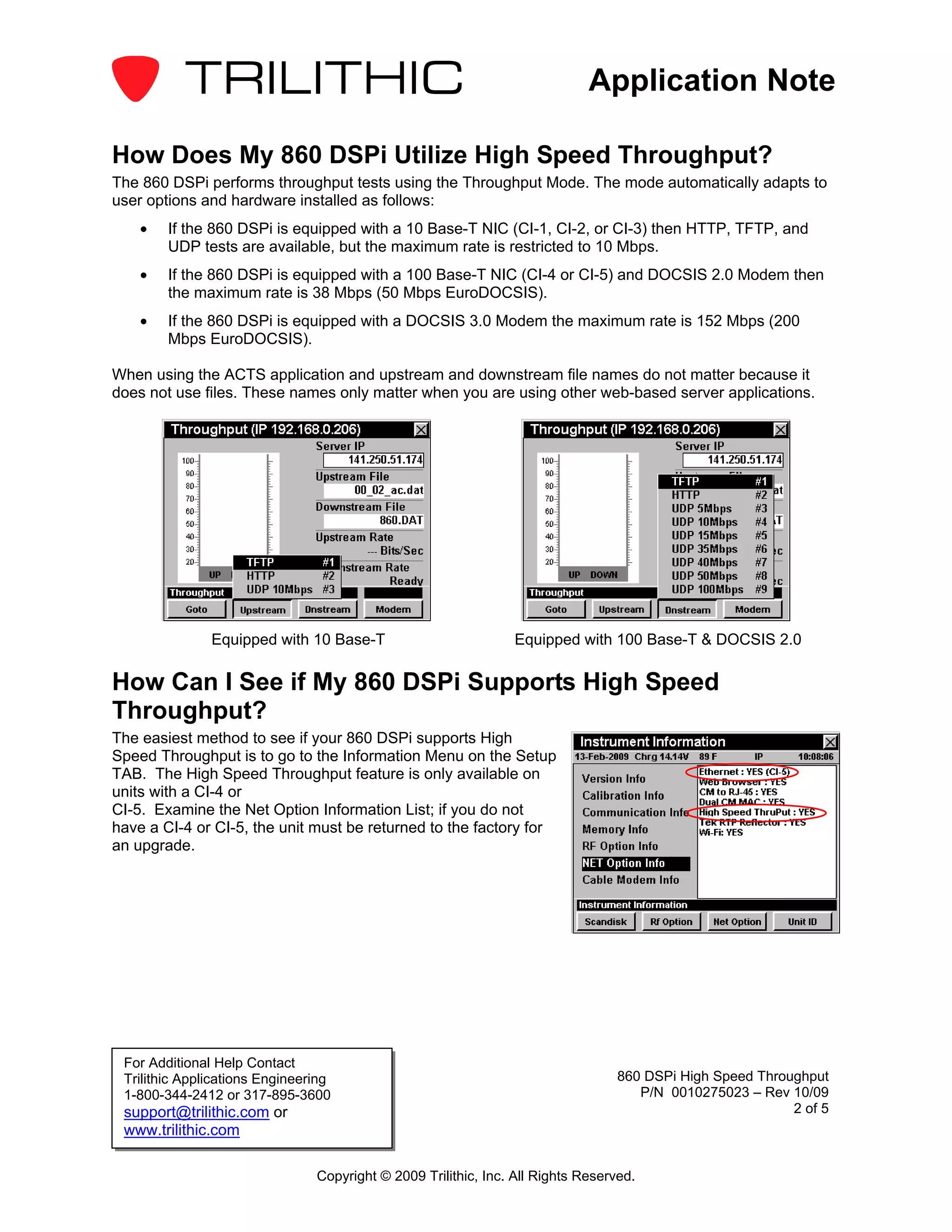
    •   If the 860 DSPi is equipped with a 10 Base-T NIC (CI-1, CI-2, or CI-3) then HTTP, TFTP, and
        UDP tests are available, but the maximum rate is restricted to 10 Mbps.
    •   If the 860 DSPi is equipped with a 100 Base-T NIC (CI-4 or CI-5) and DOCSIS 2.0 Modem then
        the maximum rate is 38 Mbps (50 Mbps EuroDOCSIS).
    •   If the 860 DSPi is equipped with a DOCSIS 3.0 Modem the maximum rate is 152 Mbps (200
        Mbps EuroDOCSIS).

When using the ACTS application and upstream and downstream file names do not matter because it
does not use files. These names only matter when you are using other web-based server applications.


               Equipped with 10 Base-T                          Equipped with 100 Base-T & DOCSIS 2.0

How Can I See if My 860 DSPi Supports High Speed
Throughput?
The easiest method to see if your 860 DSPi supports High
Speed Throughput is to go to the Information Menu on the Setup
TAB. The High Speed Throughput feature is only available on
units with a CI-4 or
CI-5. Examine the Net Option Information List; if you do not
have a CI-4 or CI-5, the unit must be returned to the factory for
an upgrade.


 For Additional Help Contact
 Trilithic Applications Engineering                                              860 DSPi High Speed Throughput
 1-800-344-2412 or 317-895-3600                                                     P/N 0010275023 – Rev 10/09
 support@trilithic.com or                                                                                 2 of 5
 www.trilithic.com

                                Copyright © 2009 Trilithic, Inc. All Rights Reserved.
Application Note

Diagram
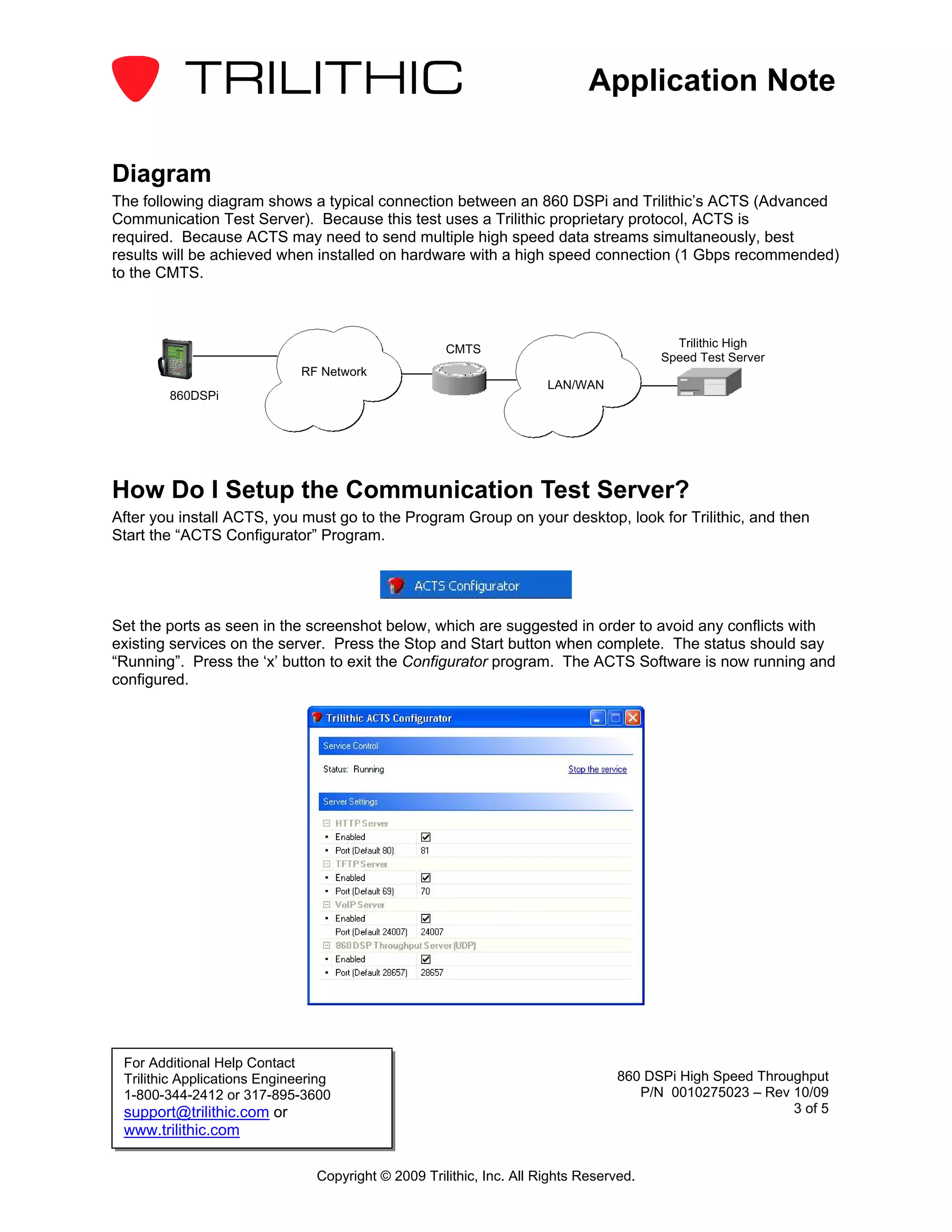
The following diagram shows a typical connection between an 860 DSPi and Trilithic’s ACTS (Advanced
Communication Test Server). Because this test uses a Trilithic proprietary protocol, ACTS is
required. Because ACTS may need to send multiple high speed data streams simultaneously, best
results will be achieved when installed on hardware with a high speed connection (1 Gbps recommended)
to the CMTS.


                                                     CMTS                                 Trilithic High
                                                                                        Speed Test Server
                              RF Network
                                                                      LAN/WAN
        860DSPi


How Do I Setup the Communication Test Server?
After you install ACTS, you must go to the Program Group on your desktop, look for Trilithic, and then
Start the “ACTS Configurator” Program.


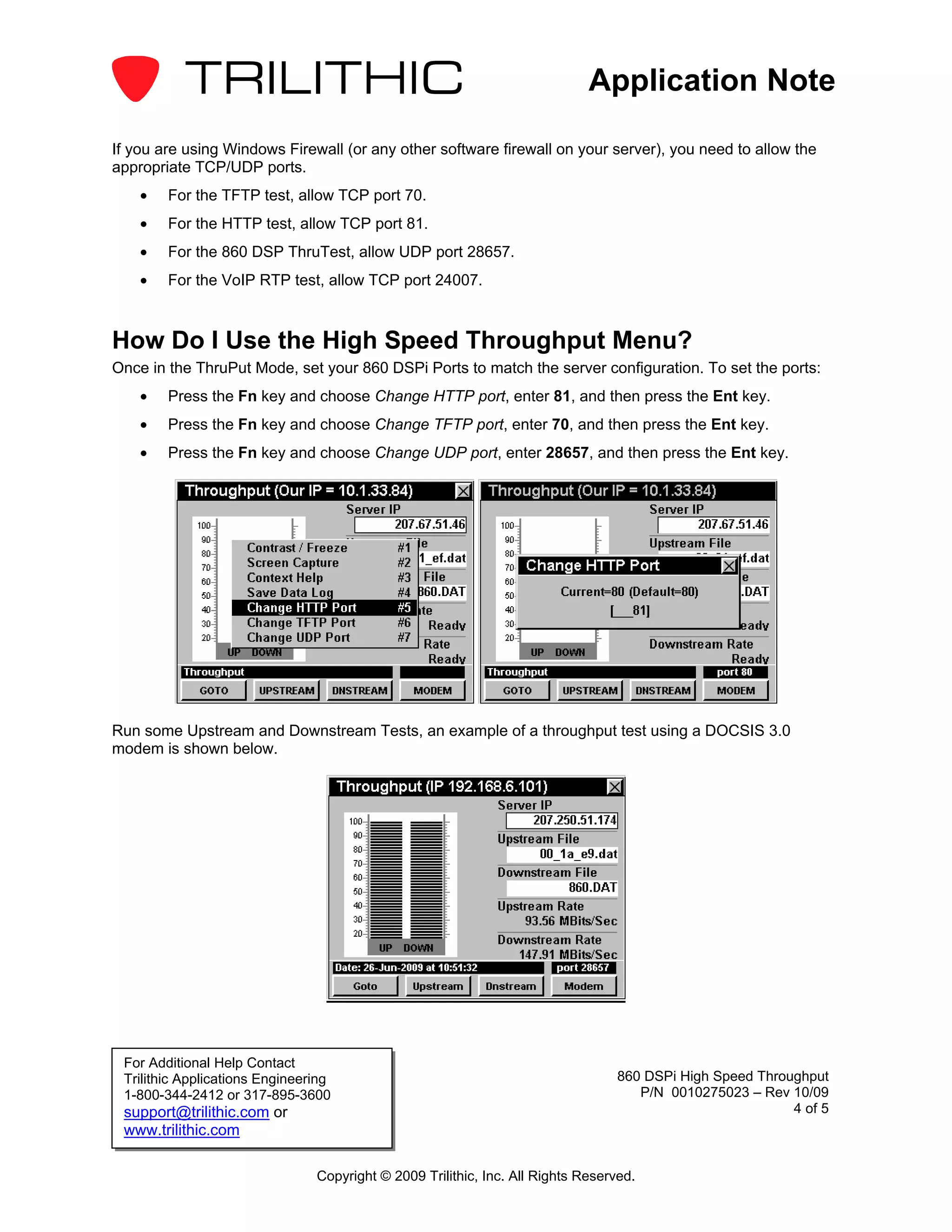
Set the ports as seen in the screenshot below, which are suggested in order to avoid any conflicts with
existing services on the server. Press the Stop and Start button when complete. The status should say
“Running”. Press the ‘x’ button to exit the Configurator program. The ACTS Software is now running and
configured.


 For Additional Help Contact
 Trilithic Applications Engineering                                              860 DSPi High Speed Throughput
 1-800-344-2412 or 317-895-3600                                                     P/N 0010275023 – Rev 10/09
 support@trilithic.com or                                                                                 3 of 5
 www.trilithic.com

                                Copyright © 2009 Trilithic, Inc. All Rights Reserved.
Application Note

If you are using Windows Firewall (or any other software firewall on your server), you need to allow the
appropriate TCP/UDP ports.
    •   For the TFTP test, allow TCP port 70.
    •   For the HTTP test, allow TCP port 81.
    •   For the 860 DSP ThruTest, allow UDP port 28657.
    •   For the VoIP RTP test, allow TCP port 24007.


How Do I Use the High Speed Throughput Menu?
Once in the ThruPut Mode, set your 860 DSPi Ports to match the server configuration. To set the ports:
    •   Press the Fn key and choose Change HTTP port, enter 81, and then press the Ent key.
    •   Press the Fn key and choose Change TFTP port, enter 70, and then press the Ent key.
    •   Press the Fn key and choose Change UDP port, enter 28657, and then press the Ent key.


Run some Upstream and Downstream Tests, an example of a throughput test using a DOCSIS 3.0
modem is shown below.


 For Additional Help Contact
 Trilithic Applications Engineering                                              860 DSPi High Speed Throughput
 1-800-344-2412 or 317-895-3600                                                     P/N 0010275023 – Rev 10/09
 support@trilithic.com or                                                                                 4 of 5
 www.trilithic.com

                                Copyright © 2009 Trilithic, Inc. All Rights Reserved.
Application Note

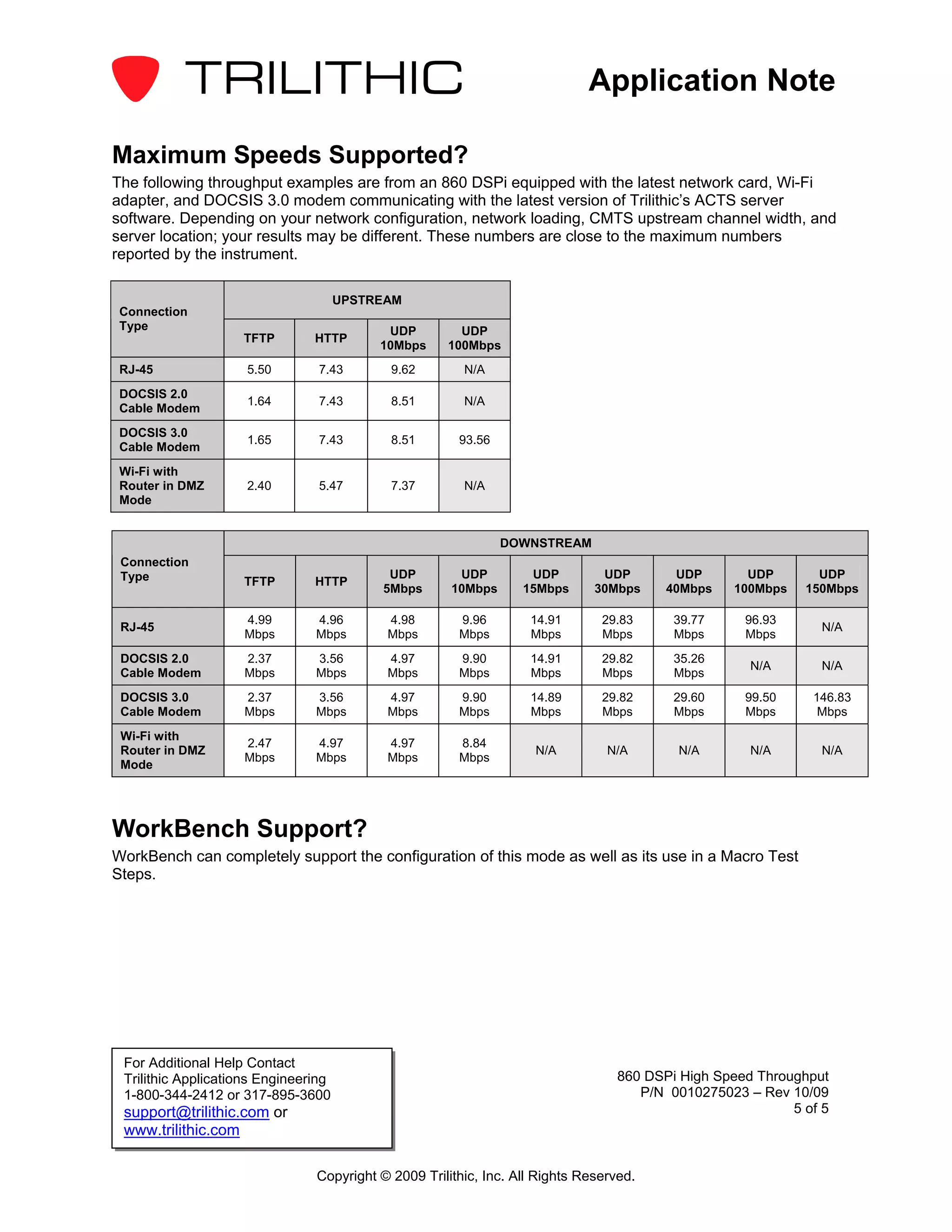
Maximum Speeds Supported?
The following throughput examples are from an 860 DSPi equipped with the latest network card, Wi-Fi
adapter, and DOCSIS 3.0 modem communicating with the latest version of Trilithic’s ACTS server
software. Depending on your network configuration, network loading, CMTS upstream channel width, and
server location; your results may be different. These numbers are close to the maximum numbers
reported by the instrument.

                                      UPSTREAM
 Connection
 Type                                       UDP        UDP
                    TFTP        HTTP
                                           10Mbps    100Mbps
 RJ-45               5.50        7.43       9.62        N/A
 DOCSIS 2.0
                     1.64        7.43       8.51        N/A
 Cable Modem
 DOCSIS 3.0
                     1.65        7.43       8.51       93.56
 Cable Modem
 Wi-Fi with
 Router in DMZ       2.40        5.47       7.37        N/A
 Mode


                                                               DOWNSTREAM
 Connection
 Type                                       UDP        UDP         UDP         UDP       UDP        UDP       UDP
                    TFTP        HTTP
                                           5Mbps      10Mbps      15Mbps      30Mbps    40Mbps    100Mbps   150Mbps

                    4.99        4.96        4.98       9.96        14.91       29.83     39.77     96.93
 RJ-45                                                                                                        N/A
                    Mbps        Mbps        Mbps       Mbps        Mbps        Mbps      Mbps      Mbps
 DOCSIS 2.0         2.37        3.56        4.97       9.90        14.91       29.82     35.26
                                                                                                    N/A       N/A
 Cable Modem        Mbps        Mbps        Mbps       Mbps        Mbps        Mbps      Mbps
 DOCSIS 3.0         2.37        3.56        4.97       9.90        14.89       29.82     29.60     99.50     146.83
 Cable Modem        Mbps        Mbps        Mbps       Mbps        Mbps        Mbps      Mbps      Mbps       Mbps
 Wi-Fi with
                    2.47        4.97        4.97       8.84
 Router in DMZ                                                      N/A         N/A       N/A       N/A       N/A
                    Mbps        Mbps        Mbps       Mbps
 Mode


WorkBench Support?
WorkBench can completely support the configuration of this mode as well as its use in a Macro Test
Steps.


 For Additional Help Contact
 Trilithic Applications Engineering                                              860 DSPi High Speed Throughput
 1-800-344-2412 or 317-895-3600                                                     P/N 0010275023 – Rev 10/09
 support@trilithic.com or                                                                                 5 of 5
 www.trilithic.com

                                Copyright © 2009 Trilithic, Inc. All Rights Reserved.

860 dspi high_speed_throughput_appnote (1)

  • 1.
    Application Note 860 DSPi High Speed Throughput High Speed Throughput The 860 DSPi High Speed Throughput option allows the technician to test upstream data rates as high as 100 Mbps and downstream data rates as high as 152 Mbps. (Maximum data rates are only available with the DOCSIS 3.0 modem option.) This is a valuable tool for verifying provisioning as well as bandwidth availability at customer homes or at key test points in the system. The throughput test works with a server side application (ACTS – Advanced Communication Test System) that can be installed on any server in the system (even a Trilithic Data Manager (TDM) Server). 1 ACTS now supports the following modes: • PING reflector • VoIP RTP Test (with and without UGS) • Throughput TFTP Upstream and Downstream • Throughput HTTP Upstream and Downstream • Throughput UDP Upstream and Downstream Increased Security ACTS provides a secure method for testing throughput. • No files are created or destroyed. All free HTTP and TFTP test server applications create files on the server or serve up files from the server, creating a security concern related to malicious virus attacks. The ACTS application simply uses chunks of random memory and never accesses the hard disk. • Customizable Ports. Most free HTTP and TFTP test server applications use well known internet ports like Port 80 and Port 69 which expose the servers to standard virus attacks. The ACTS application allows the customer to choose the ports to make them less conspicuous to the common internet community. A side benefit of this is that this application can now be installed on a standard web service such as a web server or TDM server or even Cable Modem TFTP Server. 1 Minimum Server Requirements: P4 class machine; Windows XP or Windows 2003 (Professional, or Server editions); 1 GB RAM; 100 MB hard drive space for installation; 10/100/1000 NIC For Additional Help Contact Trilithic Applications Engineering 860 DSPi High Speed Throughput 1-800-344-2412 or 317-895-3600 P/N 0010275023 – Rev 10/09 support@trilithic.com or 1 of 5 www.trilithic.com Copyright © 2009 Trilithic, Inc. All Rights Reserved.
  • 2.
    Application Note How DoesMy 860 DSPi Utilize High Speed Throughput? The 860 DSPi performs throughput tests using the Throughput Mode. The mode automatically adapts to user options and hardware installed as follows: • If the 860 DSPi is equipped with a 10 Base-T NIC (CI-1, CI-2, or CI-3) then HTTP, TFTP, and UDP tests are available, but the maximum rate is restricted to 10 Mbps. • If the 860 DSPi is equipped with a 100 Base-T NIC (CI-4 or CI-5) and DOCSIS 2.0 Modem then the maximum rate is 38 Mbps (50 Mbps EuroDOCSIS). • If the 860 DSPi is equipped with a DOCSIS 3.0 Modem the maximum rate is 152 Mbps (200 Mbps EuroDOCSIS). When using the ACTS application and upstream and downstream file names do not matter because it does not use files. These names only matter when you are using other web-based server applications. Equipped with 10 Base-T Equipped with 100 Base-T & DOCSIS 2.0 How Can I See if My 860 DSPi Supports High Speed Throughput? The easiest method to see if your 860 DSPi supports High Speed Throughput is to go to the Information Menu on the Setup TAB. The High Speed Throughput feature is only available on units with a CI-4 or CI-5. Examine the Net Option Information List; if you do not have a CI-4 or CI-5, the unit must be returned to the factory for an upgrade. For Additional Help Contact Trilithic Applications Engineering 860 DSPi High Speed Throughput 1-800-344-2412 or 317-895-3600 P/N 0010275023 – Rev 10/09 support@trilithic.com or 2 of 5 www.trilithic.com Copyright © 2009 Trilithic, Inc. All Rights Reserved.
  • 3.
    Application Note Diagram The followingdiagram shows a typical connection between an 860 DSPi and Trilithic’s ACTS (Advanced Communication Test Server). Because this test uses a Trilithic proprietary protocol, ACTS is required. Because ACTS may need to send multiple high speed data streams simultaneously, best results will be achieved when installed on hardware with a high speed connection (1 Gbps recommended) to the CMTS. CMTS Trilithic High Speed Test Server RF Network LAN/WAN 860DSPi How Do I Setup the Communication Test Server? After you install ACTS, you must go to the Program Group on your desktop, look for Trilithic, and then Start the “ACTS Configurator” Program. Set the ports as seen in the screenshot below, which are suggested in order to avoid any conflicts with existing services on the server. Press the Stop and Start button when complete. The status should say “Running”. Press the ‘x’ button to exit the Configurator program. The ACTS Software is now running and configured. For Additional Help Contact Trilithic Applications Engineering 860 DSPi High Speed Throughput 1-800-344-2412 or 317-895-3600 P/N 0010275023 – Rev 10/09 support@trilithic.com or 3 of 5 www.trilithic.com Copyright © 2009 Trilithic, Inc. All Rights Reserved.
  • 4.
    Application Note If youare using Windows Firewall (or any other software firewall on your server), you need to allow the appropriate TCP/UDP ports. • For the TFTP test, allow TCP port 70. • For the HTTP test, allow TCP port 81. • For the 860 DSP ThruTest, allow UDP port 28657. • For the VoIP RTP test, allow TCP port 24007. How Do I Use the High Speed Throughput Menu? Once in the ThruPut Mode, set your 860 DSPi Ports to match the server configuration. To set the ports: • Press the Fn key and choose Change HTTP port, enter 81, and then press the Ent key. • Press the Fn key and choose Change TFTP port, enter 70, and then press the Ent key. • Press the Fn key and choose Change UDP port, enter 28657, and then press the Ent key. Run some Upstream and Downstream Tests, an example of a throughput test using a DOCSIS 3.0 modem is shown below. For Additional Help Contact Trilithic Applications Engineering 860 DSPi High Speed Throughput 1-800-344-2412 or 317-895-3600 P/N 0010275023 – Rev 10/09 support@trilithic.com or 4 of 5 www.trilithic.com Copyright © 2009 Trilithic, Inc. All Rights Reserved.
  • 5.
    Application Note Maximum SpeedsSupported? The following throughput examples are from an 860 DSPi equipped with the latest network card, Wi-Fi adapter, and DOCSIS 3.0 modem communicating with the latest version of Trilithic’s ACTS server software. Depending on your network configuration, network loading, CMTS upstream channel width, and server location; your results may be different. These numbers are close to the maximum numbers reported by the instrument. UPSTREAM Connection Type UDP UDP TFTP HTTP 10Mbps 100Mbps RJ-45 5.50 7.43 9.62 N/A DOCSIS 2.0 1.64 7.43 8.51 N/A Cable Modem DOCSIS 3.0 1.65 7.43 8.51 93.56 Cable Modem Wi-Fi with Router in DMZ 2.40 5.47 7.37 N/A Mode DOWNSTREAM Connection Type UDP UDP UDP UDP UDP UDP UDP TFTP HTTP 5Mbps 10Mbps 15Mbps 30Mbps 40Mbps 100Mbps 150Mbps 4.99 4.96 4.98 9.96 14.91 29.83 39.77 96.93 RJ-45 N/A Mbps Mbps Mbps Mbps Mbps Mbps Mbps Mbps DOCSIS 2.0 2.37 3.56 4.97 9.90 14.91 29.82 35.26 N/A N/A Cable Modem Mbps Mbps Mbps Mbps Mbps Mbps Mbps DOCSIS 3.0 2.37 3.56 4.97 9.90 14.89 29.82 29.60 99.50 146.83 Cable Modem Mbps Mbps Mbps Mbps Mbps Mbps Mbps Mbps Mbps Wi-Fi with 2.47 4.97 4.97 8.84 Router in DMZ N/A N/A N/A N/A N/A Mbps Mbps Mbps Mbps Mode WorkBench Support? WorkBench can completely support the configuration of this mode as well as its use in a Macro Test Steps. For Additional Help Contact Trilithic Applications Engineering 860 DSPi High Speed Throughput 1-800-344-2412 or 317-895-3600 P/N 0010275023 – Rev 10/09 support@trilithic.com or 5 of 5 www.trilithic.com Copyright © 2009 Trilithic, Inc. All Rights Reserved.