Application Note

               860 DSPi Upstream Level Measurement
This paper describes the upstream level measurement on the 860
DSPi. This level measurement is displayed on the lower right of the
PING menu as well as on the CMSTAT Menu. This value was displayed
2 dB lower in firmware versions from V4.9.1.0 to V4.12.1.0 due to an
attempt to add a calibration factor to compensate for the loss from the
SLM input connector to the internal cable modem. Starting in the
V5.2.1.0 Release, this correction factor was revised to be a correction
curve taking into account the actual loss in this same Rf path.

The upstream level measurement is tested by the following procedure.

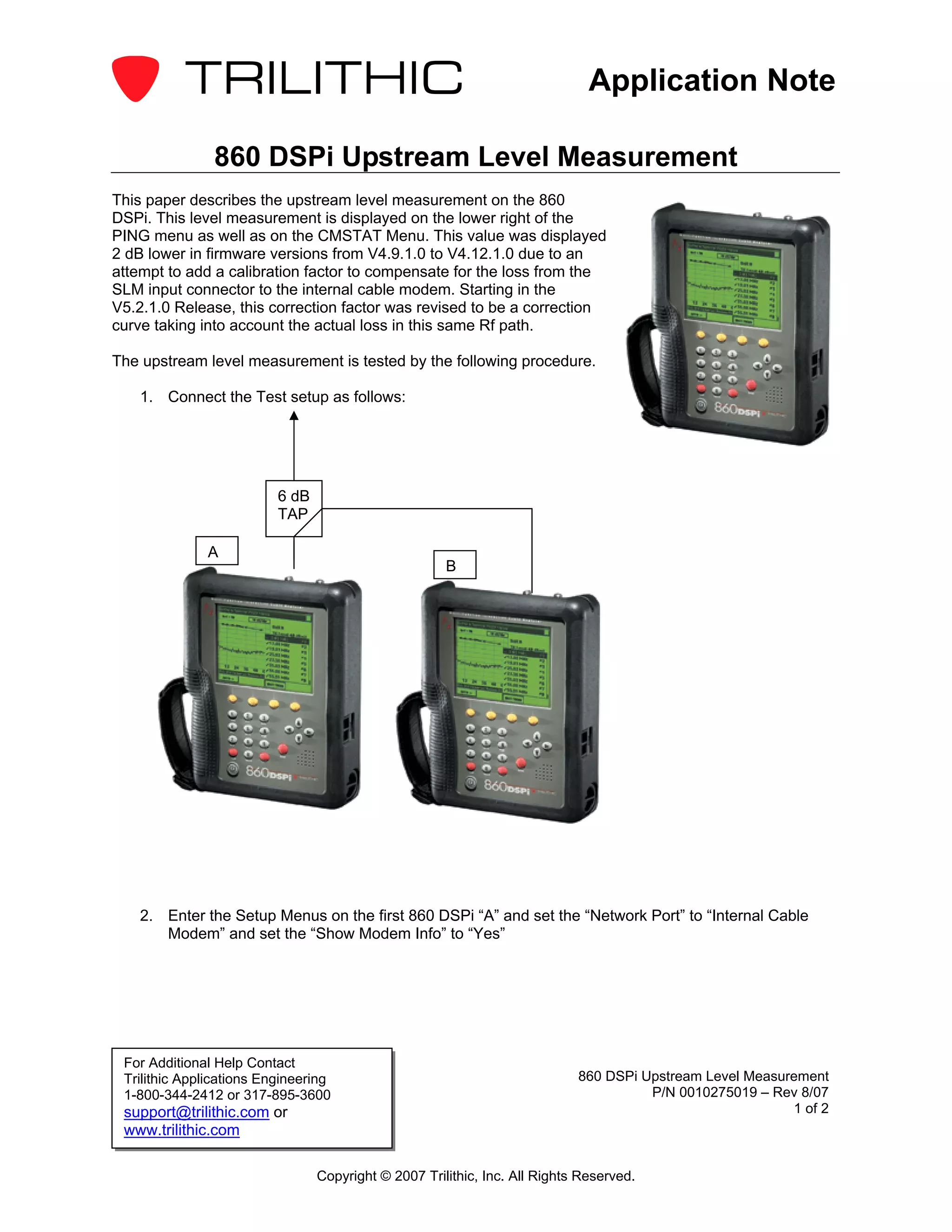
    1. Connect the Test setup as follows:


                          6 dB
                          TAP

              A
                                                      B


    2. Enter the Setup Menus on the first 860 DSPi “A” and set the “Network Port” to “Internal Cable
       Modem” and set the “Show Modem Info” to “Yes”


 For Additional Help Contact
 Trilithic Applications Engineering                                         860 DSPi Upstream Level Measurement
 1-800-344-2412 or 317-895-3600                                                       P/N 0010275019 – Rev 8/07
 support@trilithic.com or                                                                                 1 of 2
 www.trilithic.com

                                 Copyright © 2007 Trilithic, Inc. All Rights Reserved.
Application Note

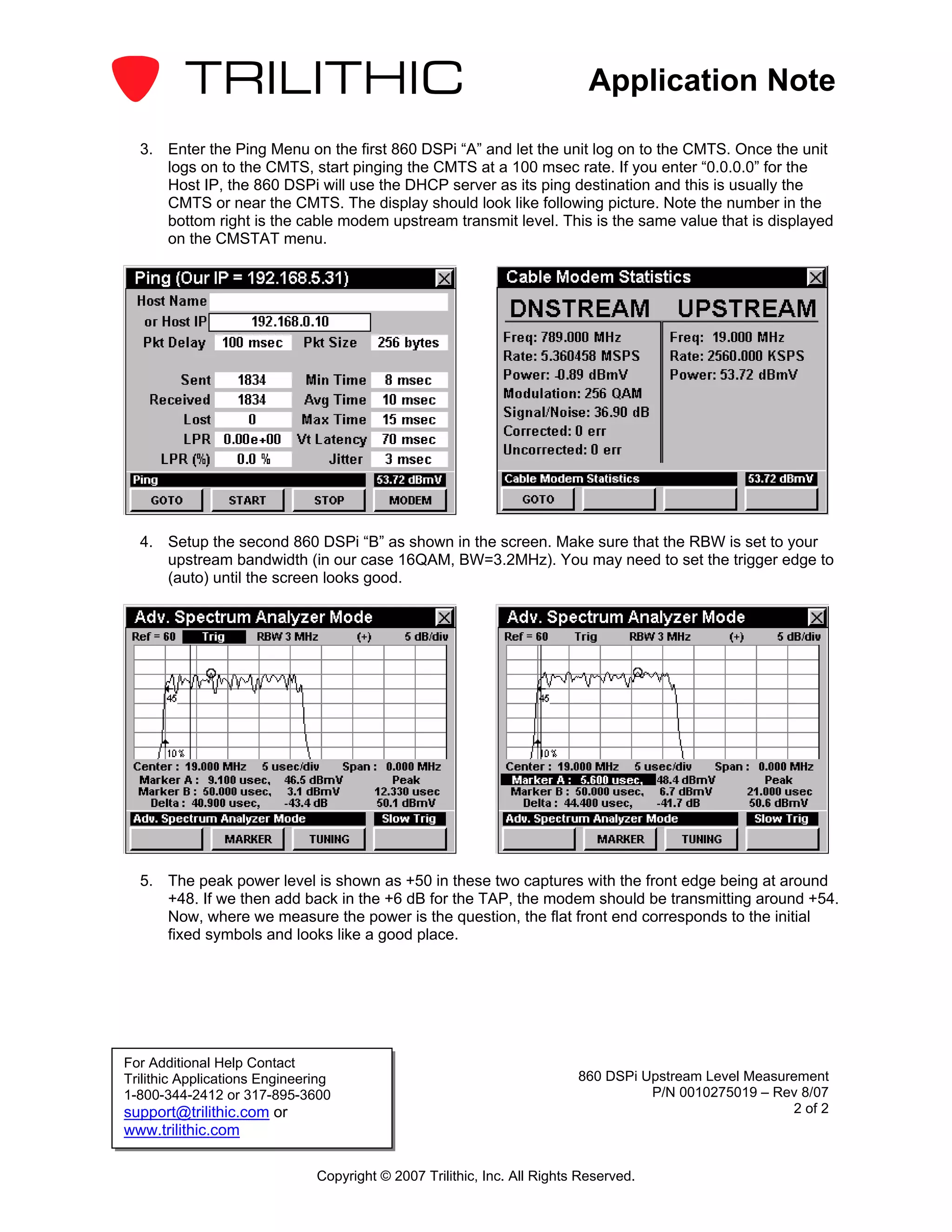
  3. Enter the Ping Menu on the first 860 DSPi “A” and let the unit log on to the CMTS. Once the unit
     logs on to the CMTS, start pinging the CMTS at a 100 msec rate. If you enter “0.0.0.0” for the
     Host IP, the 860 DSPi will use the DHCP server as its ping destination and this is usually the
     CMTS or near the CMTS. The display should look like following picture. Note the number in the
     bottom right is the cable modem upstream transmit level. This is the same value that is displayed
     on the CMSTAT menu.


  4. Setup the second 860 DSPi “B” as shown in the screen. Make sure that the RBW is set to your
     upstream bandwidth (in our case 16QAM, BW=3.2MHz). You may need to set the trigger edge to
     (auto) until the screen looks good.


  5. The peak power level is shown as +50 in these two captures with the front edge being at around
     +48. If we then add back in the +6 dB for the TAP, the modem should be transmitting around +54.
     Now, where we measure the power is the question, the flat front end corresponds to the initial
     fixed symbols and looks like a good place.


For Additional Help Contact
Trilithic Applications Engineering                                        860 DSPi Upstream Level Measurement
1-800-344-2412 or 317-895-3600                                                      P/N 0010275019 – Rev 8/07
support@trilithic.com or                                                                                2 of 2
www.trilithic.com

                               Copyright © 2007 Trilithic, Inc. All Rights Reserved.

860 dspi upstream_level_measurement_appnote

  • 1.
    Application Note 860 DSPi Upstream Level Measurement This paper describes the upstream level measurement on the 860 DSPi. This level measurement is displayed on the lower right of the PING menu as well as on the CMSTAT Menu. This value was displayed 2 dB lower in firmware versions from V4.9.1.0 to V4.12.1.0 due to an attempt to add a calibration factor to compensate for the loss from the SLM input connector to the internal cable modem. Starting in the V5.2.1.0 Release, this correction factor was revised to be a correction curve taking into account the actual loss in this same Rf path. The upstream level measurement is tested by the following procedure. 1. Connect the Test setup as follows: 6 dB TAP A B 2. Enter the Setup Menus on the first 860 DSPi “A” and set the “Network Port” to “Internal Cable Modem” and set the “Show Modem Info” to “Yes” For Additional Help Contact Trilithic Applications Engineering 860 DSPi Upstream Level Measurement 1-800-344-2412 or 317-895-3600 P/N 0010275019 – Rev 8/07 support@trilithic.com or 1 of 2 www.trilithic.com Copyright © 2007 Trilithic, Inc. All Rights Reserved.
  • 2.
    Application Note 3. Enter the Ping Menu on the first 860 DSPi “A” and let the unit log on to the CMTS. Once the unit logs on to the CMTS, start pinging the CMTS at a 100 msec rate. If you enter “0.0.0.0” for the Host IP, the 860 DSPi will use the DHCP server as its ping destination and this is usually the CMTS or near the CMTS. The display should look like following picture. Note the number in the bottom right is the cable modem upstream transmit level. This is the same value that is displayed on the CMSTAT menu. 4. Setup the second 860 DSPi “B” as shown in the screen. Make sure that the RBW is set to your upstream bandwidth (in our case 16QAM, BW=3.2MHz). You may need to set the trigger edge to (auto) until the screen looks good. 5. The peak power level is shown as +50 in these two captures with the front edge being at around +48. If we then add back in the +6 dB for the TAP, the modem should be transmitting around +54. Now, where we measure the power is the question, the flat front end corresponds to the initial fixed symbols and looks like a good place. For Additional Help Contact Trilithic Applications Engineering 860 DSPi Upstream Level Measurement 1-800-344-2412 or 317-895-3600 P/N 0010275019 – Rev 8/07 support@trilithic.com or 2 of 2 www.trilithic.com Copyright © 2007 Trilithic, Inc. All Rights Reserved.