




RF Experiments Using Raspberry Pi
Radiojitter Concepts Lab. LLP.
Connecting via Waves!!!
About Radiojitter Concepts Lab
Radiojitter Concepts Lab is a product/service and embedded e-
commerce Limited Liability Partnership(LLP) company.
As a product developer we are working LoRa based solution(Gateway
and Sensor) for smart city solution. Our focus is RF sensors, gateway
development and provide end to end solution with our solution
providers.
Radiojitter provides consultancy service in LoRaWAN gateway
deployment, including network simulation and spectrum planning
About your Trainer
Priyasloka has worked in Honeywell and
DRDO as capacity of Lead/Manager and
Scientist respectively. He is an alumnus of NIT,
Jamshedpur. Priyasloka has bachelor degree in
Electronics Engineering and master degree in
Business Administration
He has 19+ years of experience in requirement
engineering, system engineering, software
development, testing, quality assurance, quality
control, product life cycle management, team
management and Certification in the Defense
and Aerospace segments.
Priyasloka has been certified in
PMP,CSSBB,ASEP,CPRE,PRINCE 2,ISTQB,ITIL&
CEH.
LinkedIn Profile:
https://in.Linkedin.Com/in/priyasloka
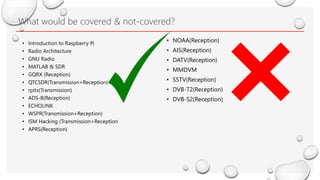
What would be covered & not-covered?
• NOAA(Reception)
• AIS(Reception)
• DATV(Reception)
• MMDVM
• SSTV(Reception)
• DVB-T2(Reception)
• DVB-S2(Reception)
• Introduction to Raspberry Pi
• Radio Architecture
• GNU Radio
• MATLAB & SDR
• GQRX (Reception)
• QTCSDR(Transmission+Reception)
• rpitx(Transmission)
• ADS-B(Reception)
• ECHOLINK
• WSPR(Transmission+Reception)
• ISM Hacking (Transmission+Reception
• APRS(Reception)
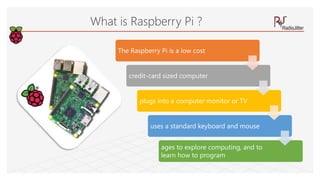
The Raspberry Pi is a low cost
credit-card sized computer
plugs into a computer monitor or TV
uses a standard keyboard and mouse
ages to explore computing, and to
learn how to program
What is Raspberry Pi ?
Why is it called Raspberry Pi?
.
• The “Raspberry” derives is an homage to early computer companies
being named after fruit, like Apple, Tangerine Computer Systems, Apricot
Computers, and Acorn (which inspired the microcomputer’s design)
.
• The “Pi” derives from the original idea to make a small computer to run
only the Python programming language.
Raspberry Pi models can be a
bit confusing. There are two
levels to the naming system
Pi 1, Pi 2, and Pi 3
indicate the
“generation”
roughly Pi 1 is 2012-14
models, Pi 2 is 2015
models
Pi 3 is 2016 models,
Model A, A+, B, and B+
indicate the power and
features. It’s not like
grades though, A is
lower than B.
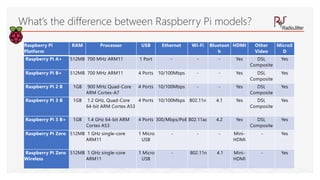
What’s the difference between Raspberry Pi models?
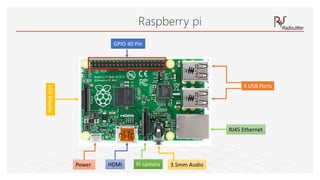
Raspberry pi
GPIO 40 Pin
4 USB Ports
LCDDisplay
RJ45 Ethernet
3.5mm AudioPi cameraPower HDMI
What’s the difference between Raspberry Pi models?
Raspberry Pi
Platform
RAM Processor USB Ethernet Wi-Fi Bluetoot
h
HDMI Other
Video
MicroS
D
Raspberry Pi A+ 512MB 700 MHz ARM11 1 Port - - - Yes DSI,
Composite
Yes
Raspberry Pi B+ 512MB 700 MHz ARM11 4 Ports 10/100Mbps - - Yes DSI,
Composite
Yes
Raspberry Pi 2 B 1GB 900 MHz Quad-Core
ARM Cortex-A7
4 Ports 10/100Mbps - - Yes DSI,
Composite
Yes
Raspberry Pi 3 B 1GB 1.2 GHz, Quad-Core
64-bit ARM Cortex A53
4 Ports 10/100Mbps 802.11n 4.1 Yes DSI,
Composite
Yes
Raspberry Pi 3 B+ 1GB 1.4 GHz 64-bit ARM
Cortex A53
4 Ports 300/Mbps/PoE 802.11ac 4.2 Yes DSI,
Composite
Yes
Raspberry Pi Zero 512MB 1 GHz single-core
ARM11
1 Micro
USB
- - - Mini-
HDMI
- Yes
Raspberry Pi Zero
Wireless
512MB 1 GHz single-core
ARM11
1 Micro
USB
- 802.11n 4.1 Mini-
HDMI
- Yes
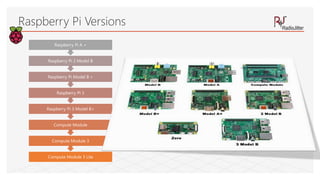
Compute Module 3 Lite
Compute Module 3
Compute Module
Raspberry Pi 3 Model B+
Raspberry Pi 3
Raspberry Pi Model B +
Raspberry Pi 2 Model B
Raspberry Pi A +
Raspberry Pi Versions
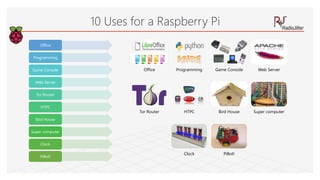
Office
Programming
Game Console
Web Server
Tor Router
HTPC
Bird House
Super computer
Clock
PiBot!
10 Uses for a Raspberry Pi
Office Programming Game Console Web Server
Tor Router HTPC Bird House Super computer
Clock PiBot!
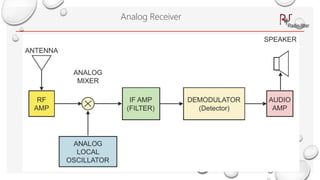
Analog Receiver
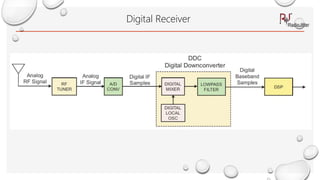
Digital Receiver
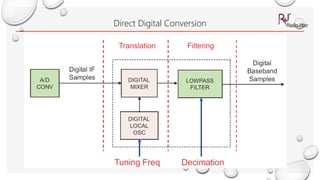
Direct Digital Conversion
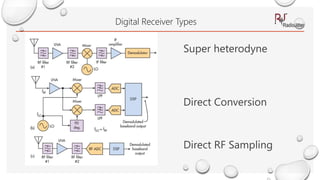
Digital Receiver Types
Super heterodyne
Direct Conversion
Direct RF Sampling
History
The term "software radio" was coined in 1984 by a team at the
garland, Texas division of E-Systems Inc. (Now Raytheon) to refer to a
digital baseband receiver and published in their e-team company
newsletter(source Wikipedia)
The term "software defined radio" was coined in 1995 by Stephen
Blust(part of SPEAKeasy program)
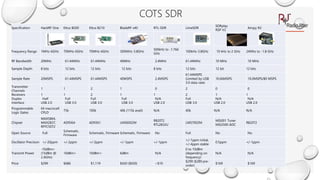
Specification HackRF One Ettus B200 Ettus B210 BladeRF x40 RTL-SDR LimeSDR
SDRplay
RSP V2
Airspy R2
Frequency Range 1MHz-6GHz 70MHz-6GHz 70MHz-6GHz 300MHz-3.8GHz
500kHz to -1.766
GHz
100kHz-3.8GHz 10 kHz to 2 GHz 24Mhz to -1.8 GHz
RF Bandwidth 20MHz 61.44MHz 61.44MHz 40MHz 2.4MHz 61.44MHz 10 MHz 10 MHz
Sample Depth 8 bits 12 bits 12 bits 12 bits 8 bits 12 bits 12 bit 12 bits
Sample Rate 20MSPS 61.44MSPS 61.44MSPS 40MSPS 2.4MSPS
61.44MSPS
(Limited by USB
3.0 data rate)
10.66MSPS 10.0MSPS/80 MSPS
Transmitter
Channels
1 1 2 1 0 2 0 0
Receivers 1 1 2 1 1 2 1 1
Duplex Half Full Full Full N/A Full N/A N/A
Interface USB 2.0 USB 3.0 USB 3.0 USB 3.0 USB 2.0 USB 3.0 USB 2.0 USB 2.0
Programmable
Logic Gates
64 macrocell
CPLD
75k 100k 40k (115k avail) N/A 40k N/A N/A
Chipset
MAX5864,
MAX2837,
RFFC5072
AD9364 AD9361 LMS6002M
R820T2
RTL2832U
LMS7002M
MSi001 Tuner
MSi2500 ADC
R820T2
Open Source Full
Schematic,
Firmware
Schematic, Firmware Schematic, Firmware No Full No No
Oscillator Precision +/-20ppm +/-2ppm +/-2ppm +/-1ppm +/-1ppm
+/-1ppm initial,
+/-4ppm stable
0.5ppm +/-1ppm
Transmit Power
-10dBm+
(15dBm @
2.4GHz)
10dBm+ 10dBm+ 6dBm N/A
0 to 10dBm
(depending on
frequency)
N/A N/A
Price $299 $686 $1,119 $420 ($650) ~$10
$299 ($289 pre-
order)
$169 $169
COTS SDR
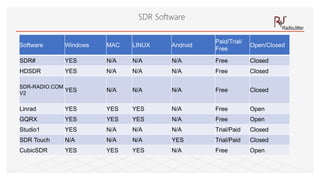
SDR Software
Software Windows MAC LINUX Android
Paid/Trial/
Free
Open/Closed
SDR# YES N/A N/A N/A Free Closed
HDSDR YES N/A N/A N/A Free Closed
SDR-RADIO.COM
V2
YES N/A N/A N/A Free Closed
Linrad YES YES YES N/A Free Open
GQRX YES YES YES N/A Free Open
Studio1 YES N/A N/A N/A Trial/Paid Closed
SDR Touch N/A N/A N/A YES Trial/Paid Closed
CubicSDR YES YES YES N/A Free Open
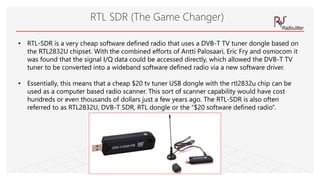
RTL SDR (The Game Changer)
• RTL-SDR is a very cheap software defined radio that uses a DVB-T TV tuner dongle based on
the RTL2832U chipset. With the combined efforts of Antti Palosaari, Eric Fry and osmocom it
was found that the signal I/Q data could be accessed directly, which allowed the DVB-T TV
tuner to be converted into a wideband software defined radio via a new software driver.
• Essentially, this means that a cheap $20 tv tuner USB dongle with the rtl2832u chip can be
used as a computer based radio scanner. This sort of scanner capability would have cost
hundreds or even thousands of dollars just a few years ago. The RTL-SDR is also often
referred to as RTL2832U, DVB-T SDR, RTL dongle or the “$20 software defined radio”.
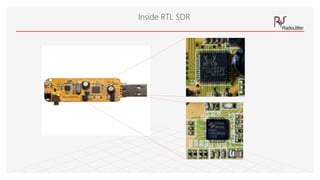
Inside RTL SDR
SDR Application
• Radio Application(AM,FM,USB.LSB,DAB/DRM….)
• Decoding digital amateur radio ham communications such as CW/PSK/RTTY/SSTV
• Receiving GPS signals and decoding them.
• Using rtl-sdr as a spectrum analyser
• Receiving NOAA weather satellite images
• Aircraft Communication(ACARS,ADS-B,VDLM2,FIS…)
• Radio Astronomy
• Satellite Reception(DVB-S2,INMARSAT,IRIDIUM,ISS..)
GNU RADIO
GNU Radio is a free & open-source software development
toolkit that provides signal processing blocks to implement
software radios. It can be used with readily-available low-
cost external RF hardware to create software-defined radios,
or without hardware in a simulation-like environment. It is
widely used in research, industry, academia, government,
and hobbyist environments to support both wireless
communications research and real-world radio systems.
What is GNU Radio?
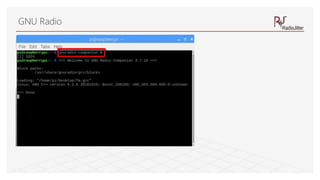
GNU Radio
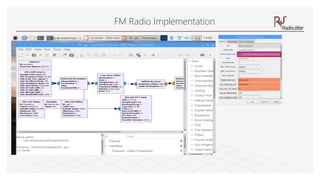
FM Radio Implementation
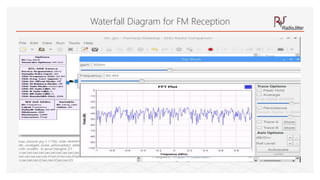
Waterfall Diagram for FM Reception
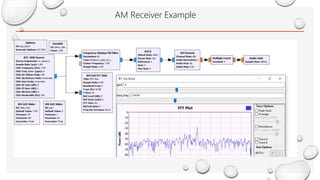
AM Receiver Example
Radio in MATLAB
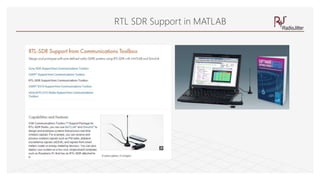
RTL SDR Support in MATLAB
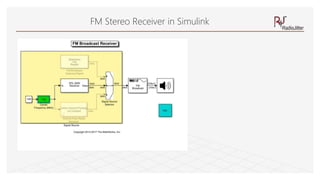
FM Stereo Receiver in Simulink
Setup
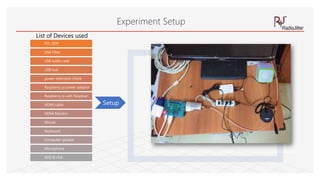
Experiment Setup
RTL-SDR
LNA Filter
USB audio card
USB hub
power extension chord
Raspberry pi power adaptor
Raspberry pi with Raspbian
HDMI cable
HDMI Monitor
Mouse
Keyboard
Computer speaker
Microphone
ADS-B LNA
List of Devices used
RTL-SDR
LNA Filter
USB audio card
USB hub
power extension chord
Raspberry pi power adaptor
Raspberry pi with Raspbian
HDMI cable
HDMI Monitor
Mouse
Keyboard
Computer speaker
Microphone
ADS-B LNA
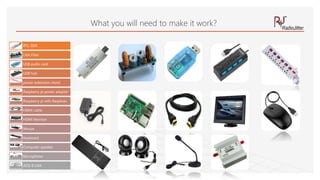
What you will need to make it work?
GQRX
Gqrx is an open source software defined radio receiver
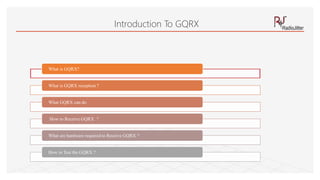
Introduction To GQRX
What is GQRX?
What is GQRX reception ?
What GQRX can do
How to Receive GQRX ?
What are hardware required to Receive GQRX ?
How to Test the GQRX ?
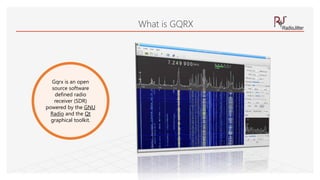
Gqrx is an open
source software
defined radio
receiver (SDR)
powered by the GNU
Radio and the Qt
graphical toolkit.
What is GQRX
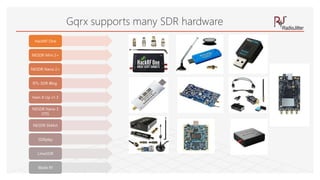
HackRF One
NESDR Mini 2+
NESDR Nano 2+
RTL-SDR Blog
Ham It Up v1.3
NESDR Nano 3
OTG
NESDR SMArt
SDRplay
LimeSDR
Blade Rf
Gqrx supports many SDR hardware
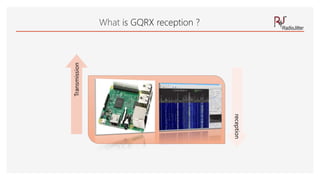
What is GQRX reception ?
Transmission
reception
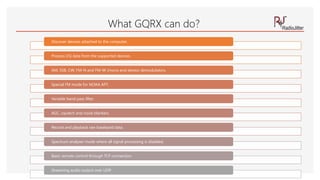
What GQRX can do?
Discover devices attached to the computer.
Process I/Q data from the supported devices.
AM, SSB, CW, FM-N and FM-W (mono and stereo) demodulators.
Special FM mode for NOAA APT.
Variable band pass filter.
AGC, squelch and noise blankers.
Record and playback raw baseband data.
Spectrum analyser mode where all signal processing is disabled.
Basic remote control through TCP connection.
Streaming audio output over UDP.
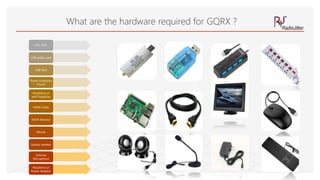
RTL-SDR
USB audio card
USB Hub
Power Extension
Chord
Raspberry pi
with Raspbian
HDMI Cable
HDMI Monitor
Mouse
Laptop speaker
External
Microphone
Raspberry pi
Power Adaptor
What are the hardware required for GQRX ?
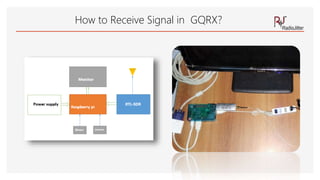
How to Receive Signal in GQRX?
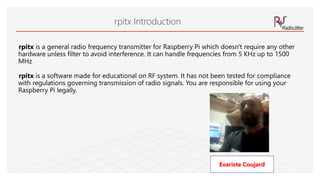
rpitx
rpitx is a general radio frequency transmitter for Raspberry Pi which doesn't require any other
hardware unless filter to avoid interference. It can handle frequencies from 5 KHz up to 1500
MHz
rpitx is a software made for educational on RF system. It has not been tested for compliance
with regulations governing transmission of radio signals. You are responsible for using your
Raspberry Pi legally.
rpitx Introduction
Evariste Coujard
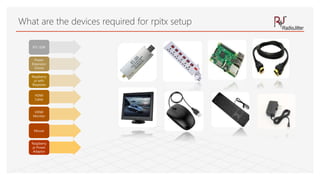
What are the devices required for rpitx setup
RTL-SDR
Power
Extension
Chord
Raspberry
pi with
Raspbian
HDMI
Cable
HDMI
Monitor
Mouse
Raspberry
pi Power
Adaptor
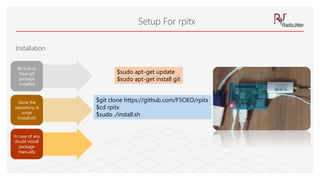
Setup For rpitx
Installation
Be sure to
have git
package
installed
clone the
repository. A
script
(install.sh)
In case of any
doubt install
package
manually
$sudo apt-get update
$sudo apt-get install git
$git clone https://github.com/F5OEO/rpitx
$cd rpitx
$sudo ./install.sh
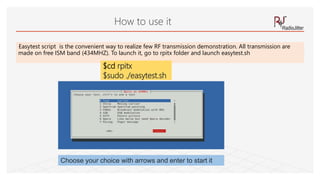
Easytest script is the convenient way to realize few RF transmission demonstration. All transmission are
made on free ISM band (434MHZ). To launch it, go to rpitx folder and launch easytest.sh
How to use it
$cd rpitx
$sudo ./easytest.sh
Choose your choice with arrows and enter to start it
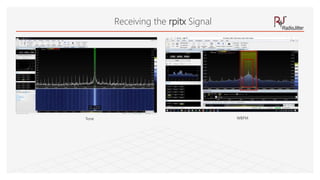
Receiving the rpitx Signal
Tone WBFM
What is qtcsdr?
It turns your Raspberry Pi 2 and RTL-SDR into an amateur radio
transceiver
Introduction to qtcsdr
What is qtcsdr?
How does it work ?
What qtcsdr can do ?
What you will need to make it work?
How to set it up?
How to Test the transmitted signal and received signal ?
András Retzler
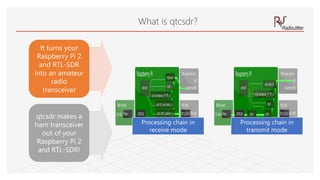
It turns your
Raspberry Pi 2
and RTL-SDR
into an amateur
radio
transceiver
qtcsdr makes a
ham transceiver
out of your
Raspberry Pi 2
and RTL-SDR!
What is qtcsdr?
Processing chain in
receive mode
Processing chain in
transmit mode
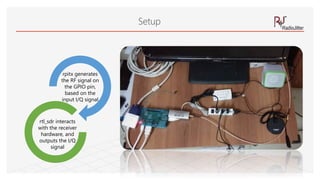
rpitx generates
the RF signal on
the GPIO pin,
based on the
input I/Q signal
rtl_sdr interacts
with the receiver
hardware, and
outputs the I/Q
signal
Setup
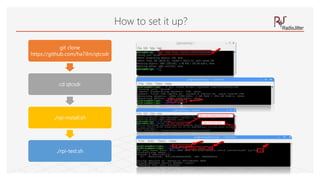
git clone
https://github.com/ha7ilm/qtcsdr
cd qtcsdr
./rpi-install.sh
./rpi-test.sh
How to set it up?
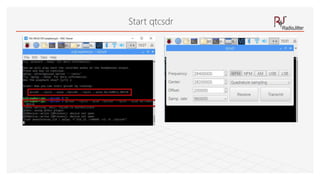
Start qtcsdr
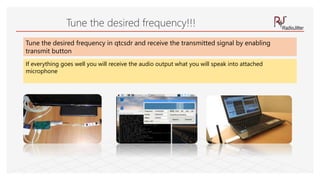
Tune the desired frequency!!!
Tune the desired frequency in qtcsdr and receive the transmitted signal by enabling
transmit button
If everything goes well you will receive the audio output what you will speak into attached
microphone
Dump 1090
Dump 1090 is one of the most popular ADS-B decoders that is used
together with the RTL-SDR dongle.
ADS-B stands for Automatic Dependent Surveillance Broadcast and is a system
used by aircraft that broadcasts their GPS positions. It is a replacement for
traditional reflection based radar systems
ADS-B Introduction
Automatic dependent surveillance—broadcast (ADS–B) is a surveillance
technology in which an aircraft determines its position via satellite
navigation and periodically broadcasts it,
enabling it to be tracked. The information can be received by air traffic
control ground stations as a replacement for secondary surveillance radar, as no
interrogation signal is needed from the ground.
It can also be received by other aircraft to provide situational awareness and
allow self-separation
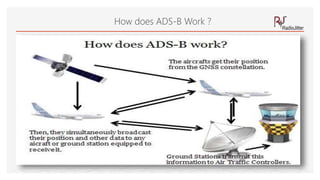
How does ADS-B Work ?
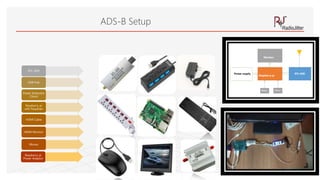
ADS-B Setup
RTL-SDR
USB Hub
Power Extension
Chord
Raspberry pi
with Raspbian
HDMI Cable
HDMI Monitor
Mouse
Raspberry pi
Power Adaptor
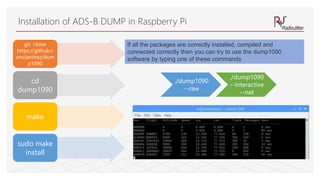
git clone
https://github.c
om/antirez/dum
p1090
cd
dump1090
make
sudo make
install
Installation of ADS-B DUMP in Raspberry Pi
If all the packages are correctly installed, compiled and
connected correctly then you can try to use the dump1090
software by typing one of these commands
./dump1090
--raw
./dump1090
--interactive
--net
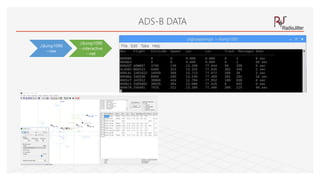
ADS-B DATA
./dump1090
--raw
./dump1090
--interactive
--net
Qtel
Qtel stands for the "QT Echo Link“ client
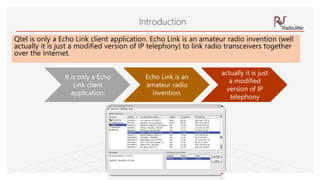
Qtel is only a Echo Link client application. Echo Link is an amateur radio invention (well
actually it is just a modified version of IP telephony) to link radio transceivers together
over the Internet.
Introduction
It is only a Echo
Link client
application.
Echo Link is an
amateur radio
invention.
actually it is just
a modified
version of IP
telephony
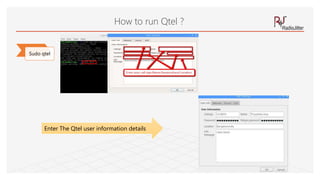
Sudo qtel
How to run Qtel ?
Enter The Qtel user information details
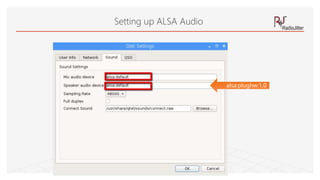
Setting up ALSA Audio
alsa:plughw:1,0
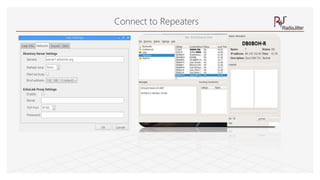
Connect to Repeaters
WSPR TRANSMITTER
Weak Signal Propagation Reporter". ... WSPR implements a protocol
designed for probing potential propagation paths with low-power
transmissions. Transmissions carry a station's callsign, Maidenhead grid
locator, and transmitter power in dBm.
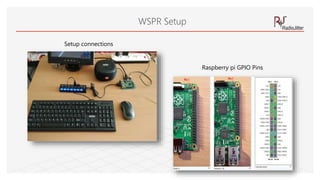
WSPR Setup
Raspberry pi GPIO Pins
Setup connections
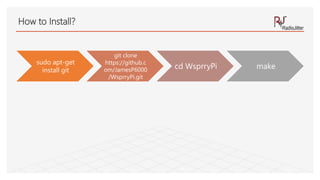
sudo apt-get
install git
git clone
https://github.c
om/JamesP6000
/WsprryPi.git
cd WsprryPi make
How to Install?
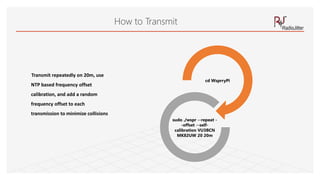
Transmit repeatedly on 20m, use
NTP based frequency offset
calibration, and add a random
frequency offset to each
transmission to minimize collisions
cd WsprryPi
sudo ./wspr --repeat -
-offset --self-
calibration VU3BCN
MK82UW 20 20m
How to Transmit
WSPR RECEPTION
Weak Signal Propagation Reporter
Weak Signal Propagation Reporter". ... WSPR implements
a protocol designed for probing potential propagation
paths with low-power transmissions. Transmissions carry
a station's callsign, Maidenhead grid locator,
and transmitter power in dBm.
WSPR Reception
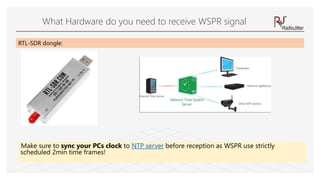
Make sure to sync your PCs clock to NTP server before reception as WSPR use strictly
scheduled 2min time frames!
What Hardware do you need to receive WSPR signal
RTL-SDR dongle:
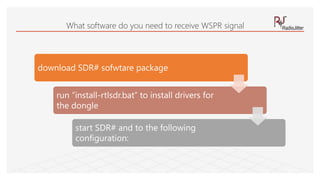
What software do you need to receive WSPR signal
download SDR# sofwtare package
run “install-rtlsdr.bat” to install drivers for
the dongle
start SDR# and to the following
configuration:
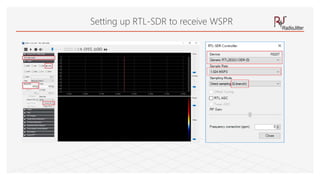
Setting up RTL-SDR to receive WSPR
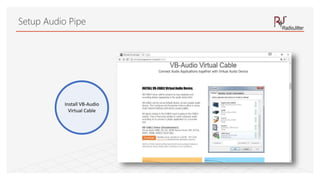
Install VB-Audio
Virtual Cable
Setup Audio Pipe
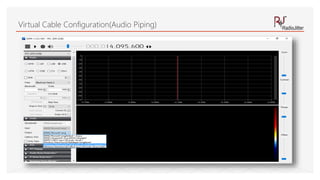
Virtual Cable Configuration(Audio Piping)
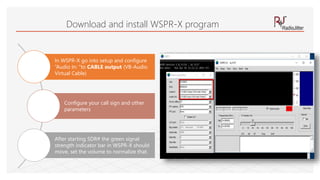
Download and install WSPR-X program
In WSPR-X go into setup and configure
“Audio In: "to CABLE output (VB-Audio
Virtual Cable)
Configure your call sign and other
parameters
After starting SDR# the green signal
strength indicator bar in WSPR-X should
move, set the volume to normalize that.
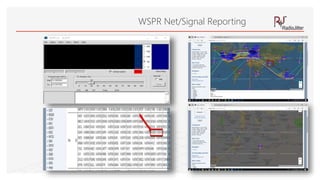
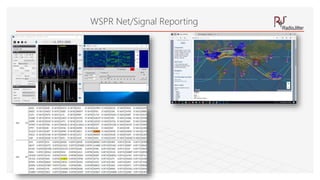
WSPR Net/Signal Reporting
REPLAY ATTACK
(ISM SIGNAL REPLAY)
USING AN RTL-SDR AND RPITX TO EXECUTE A REPLAY ATTACK
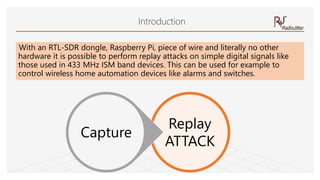
With an RTL-SDR dongle, Raspberry Pi, piece of wire and literally no other
hardware it is possible to perform replay attacks on simple digital signals like
those used in 433 MHz ISM band devices. This can be used for example to
control wireless home automation devices like alarms and switches.
Introduction
Replay
ATTACK
Capture
rpitx can replay the recorded signal directly without further reverse engineering just like if you
were using a TX capable SDR like a HackRF to record and TX an IQ file.
rpitx
Devices with more complex modulation schemes may not work with this method.
vast majority of 433 MHz ISM band devices are using simple modulation schemes that will work.
replay attacks will not work on things like car keys, and most garage door openers as those have rolling
code security.
rpitx is open source software which allows you to turn your Raspberry Pi into a general purpose
transmitter for any frequency between 5 kHz to 500 MHz
rpitx
It works by using square waves to modulate a signal on the GPIO pins of the Pi. If controlled in
just the right way
FM/AM/SSB or other modulations can be Transmitted. By attaching a simple wire antenna to the GPIO pin
these signals become RF signals transmitted into the air.
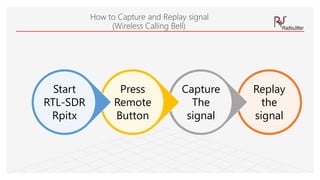
Replay
the
signal
Capture
The
signal
Press
Remote
Button
Start
RTL-SDR
Rpitx
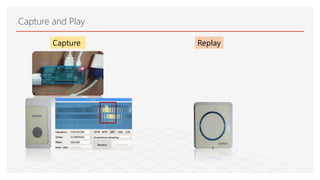
How to Capture and Replay signal
(Wireless Calling Bell)
Capture and Play
Capture Replay
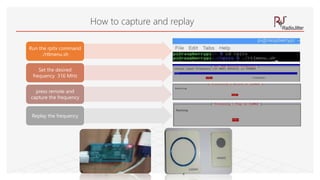
How to capture and replay
Run the rpitx command
./rtlmenu.sh
Set the desired
frequency 316 MHz
press remote and
capture the frequency
Replay the frequency
APRS
Automatic Packet Reporting System (APRS)
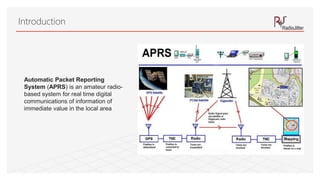
Introduction
Automatic Packet Reporting
System (APRS) is an amateur radio-
based system for real time digital
communications of information of
immediate value in the local area
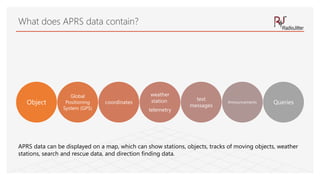
Object
Global
Positioning
System (GPS)
coordinates
weather
station
telemetry
text
messages
Announcements Queries
What does APRS data contain?
APRS data can be displayed on a map, which can show stations, objects, tracks of moving objects, weather
stations, search and rescue data, and direction finding data.
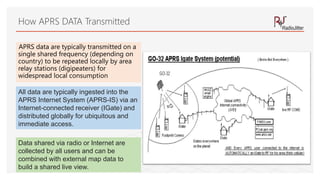
APRS data are typically transmitted on a
single shared frequency (depending on
country) to be repeated locally by area
relay stations (digipeaters) for
widespread local consumption
How APRS DATA Transmitted
All data are typically ingested into the
APRS Internet System (APRS-IS) via an
Internet-connected receiver (IGate) and
distributed globally for ubiquitous and
immediate access.
Data shared via radio or Internet are
collected by all users and can be
combined with external map data to
build a shared live view.
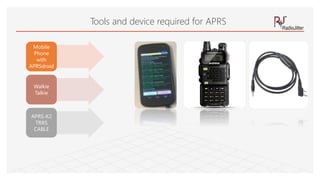
Tools and device required for APRS
Mobile
Phone
with
APRSdroid
Walkie
Talkie
APRS-K2
TRRS
CABLE
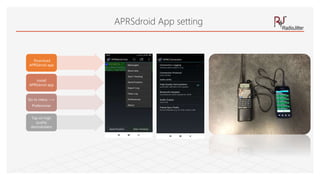
APRSdroid App setting
Download
APRSdroid app
Install
APRSdroid app
Go to menu —>
Preferences
Tap on high
quality
demodulator
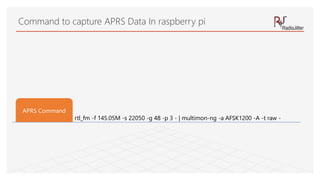
rtl_fm -f 145.05M -s 22050 -g 48 -p 3 - | multimon-ng -a AFSK1200 -A -t raw -
APRS Command
Command to capture APRS Data In raspberry pi
Questions and Answers
1. http://www.electronicproducts.com/Analog_Mixed_Signal_ICs/Standard_Linear/Heterodyne_vs_direct_conversion_architecture.aspx
2. https://tapiovalli.wordpress.com/2014/08/02/rtl-sdr-gnu-radio-and-building-my-own-am-receiver/
3. Sampling Principles of SDR Technology Products Applications Summary Links by Rodger H. Hosking
4. https://www.electronicdesign.com/adc/high-speed-rf-sampling-adc-boosts-bandwidth-dynamic-range
References

RF Experiments in Raspberry Pi

  • 1.
    RF Experiments UsingRaspberry Pi Radiojitter Concepts Lab. LLP. Connecting via Waves!!!
  • 2.
    About Radiojitter ConceptsLab Radiojitter Concepts Lab is a product/service and embedded e- commerce Limited Liability Partnership(LLP) company. As a product developer we are working LoRa based solution(Gateway and Sensor) for smart city solution. Our focus is RF sensors, gateway development and provide end to end solution with our solution providers. Radiojitter provides consultancy service in LoRaWAN gateway deployment, including network simulation and spectrum planning
  • 3.
    About your Trainer Priyaslokahas worked in Honeywell and DRDO as capacity of Lead/Manager and Scientist respectively. He is an alumnus of NIT, Jamshedpur. Priyasloka has bachelor degree in Electronics Engineering and master degree in Business Administration He has 19+ years of experience in requirement engineering, system engineering, software development, testing, quality assurance, quality control, product life cycle management, team management and Certification in the Defense and Aerospace segments. Priyasloka has been certified in PMP,CSSBB,ASEP,CPRE,PRINCE 2,ISTQB,ITIL& CEH. LinkedIn Profile: https://in.Linkedin.Com/in/priyasloka
  • 4.
    What would becovered & not-covered? • NOAA(Reception) • AIS(Reception) • DATV(Reception) • MMDVM • SSTV(Reception) • DVB-T2(Reception) • DVB-S2(Reception) • Introduction to Raspberry Pi • Radio Architecture • GNU Radio • MATLAB & SDR • GQRX (Reception) • QTCSDR(Transmission+Reception) • rpitx(Transmission) • ADS-B(Reception) • ECHOLINK • WSPR(Transmission+Reception) • ISM Hacking (Transmission+Reception • APRS(Reception)
  • 5.
    The Raspberry Piis a low cost credit-card sized computer plugs into a computer monitor or TV uses a standard keyboard and mouse ages to explore computing, and to learn how to program What is Raspberry Pi ?
  • 6.
    Why is itcalled Raspberry Pi? . • The “Raspberry” derives is an homage to early computer companies being named after fruit, like Apple, Tangerine Computer Systems, Apricot Computers, and Acorn (which inspired the microcomputer’s design) . • The “Pi” derives from the original idea to make a small computer to run only the Python programming language.
  • 7.
    Raspberry Pi modelscan be a bit confusing. There are two levels to the naming system Pi 1, Pi 2, and Pi 3 indicate the “generation” roughly Pi 1 is 2012-14 models, Pi 2 is 2015 models Pi 3 is 2016 models, Model A, A+, B, and B+ indicate the power and features. It’s not like grades though, A is lower than B. What’s the difference between Raspberry Pi models?
  • 8.
    Raspberry pi GPIO 40Pin 4 USB Ports LCDDisplay RJ45 Ethernet 3.5mm AudioPi cameraPower HDMI
  • 9.
    What’s the differencebetween Raspberry Pi models? Raspberry Pi Platform RAM Processor USB Ethernet Wi-Fi Bluetoot h HDMI Other Video MicroS D Raspberry Pi A+ 512MB 700 MHz ARM11 1 Port - - - Yes DSI, Composite Yes Raspberry Pi B+ 512MB 700 MHz ARM11 4 Ports 10/100Mbps - - Yes DSI, Composite Yes Raspberry Pi 2 B 1GB 900 MHz Quad-Core ARM Cortex-A7 4 Ports 10/100Mbps - - Yes DSI, Composite Yes Raspberry Pi 3 B 1GB 1.2 GHz, Quad-Core 64-bit ARM Cortex A53 4 Ports 10/100Mbps 802.11n 4.1 Yes DSI, Composite Yes Raspberry Pi 3 B+ 1GB 1.4 GHz 64-bit ARM Cortex A53 4 Ports 300/Mbps/PoE 802.11ac 4.2 Yes DSI, Composite Yes Raspberry Pi Zero 512MB 1 GHz single-core ARM11 1 Micro USB - - - Mini- HDMI - Yes Raspberry Pi Zero Wireless 512MB 1 GHz single-core ARM11 1 Micro USB - 802.11n 4.1 Mini- HDMI - Yes
  • 10.
    Compute Module 3Lite Compute Module 3 Compute Module Raspberry Pi 3 Model B+ Raspberry Pi 3 Raspberry Pi Model B + Raspberry Pi 2 Model B Raspberry Pi A + Raspberry Pi Versions
  • 11.
    Office Programming Game Console Web Server TorRouter HTPC Bird House Super computer Clock PiBot! 10 Uses for a Raspberry Pi Office Programming Game Console Web Server Tor Router HTPC Bird House Super computer Clock PiBot!
  • 12.
  • 13.
  • 14.
  • 15.
    Digital Receiver Types Superheterodyne Direct Conversion Direct RF Sampling
  • 16.
    History The term "softwareradio" was coined in 1984 by a team at the garland, Texas division of E-Systems Inc. (Now Raytheon) to refer to a digital baseband receiver and published in their e-team company newsletter(source Wikipedia) The term "software defined radio" was coined in 1995 by Stephen Blust(part of SPEAKeasy program)
  • 17.
    Specification HackRF OneEttus B200 Ettus B210 BladeRF x40 RTL-SDR LimeSDR SDRplay RSP V2 Airspy R2 Frequency Range 1MHz-6GHz 70MHz-6GHz 70MHz-6GHz 300MHz-3.8GHz 500kHz to -1.766 GHz 100kHz-3.8GHz 10 kHz to 2 GHz 24Mhz to -1.8 GHz RF Bandwidth 20MHz 61.44MHz 61.44MHz 40MHz 2.4MHz 61.44MHz 10 MHz 10 MHz Sample Depth 8 bits 12 bits 12 bits 12 bits 8 bits 12 bits 12 bit 12 bits Sample Rate 20MSPS 61.44MSPS 61.44MSPS 40MSPS 2.4MSPS 61.44MSPS (Limited by USB 3.0 data rate) 10.66MSPS 10.0MSPS/80 MSPS Transmitter Channels 1 1 2 1 0 2 0 0 Receivers 1 1 2 1 1 2 1 1 Duplex Half Full Full Full N/A Full N/A N/A Interface USB 2.0 USB 3.0 USB 3.0 USB 3.0 USB 2.0 USB 3.0 USB 2.0 USB 2.0 Programmable Logic Gates 64 macrocell CPLD 75k 100k 40k (115k avail) N/A 40k N/A N/A Chipset MAX5864, MAX2837, RFFC5072 AD9364 AD9361 LMS6002M R820T2 RTL2832U LMS7002M MSi001 Tuner MSi2500 ADC R820T2 Open Source Full Schematic, Firmware Schematic, Firmware Schematic, Firmware No Full No No Oscillator Precision +/-20ppm +/-2ppm +/-2ppm +/-1ppm +/-1ppm +/-1ppm initial, +/-4ppm stable 0.5ppm +/-1ppm Transmit Power -10dBm+ (15dBm @ 2.4GHz) 10dBm+ 10dBm+ 6dBm N/A 0 to 10dBm (depending on frequency) N/A N/A Price $299 $686 $1,119 $420 ($650) ~$10 $299 ($289 pre- order) $169 $169 COTS SDR
  • 18.
    SDR Software Software WindowsMAC LINUX Android Paid/Trial/ Free Open/Closed SDR# YES N/A N/A N/A Free Closed HDSDR YES N/A N/A N/A Free Closed SDR-RADIO.COM V2 YES N/A N/A N/A Free Closed Linrad YES YES YES N/A Free Open GQRX YES YES YES N/A Free Open Studio1 YES N/A N/A N/A Trial/Paid Closed SDR Touch N/A N/A N/A YES Trial/Paid Closed CubicSDR YES YES YES N/A Free Open
  • 19.
    RTL SDR (TheGame Changer) • RTL-SDR is a very cheap software defined radio that uses a DVB-T TV tuner dongle based on the RTL2832U chipset. With the combined efforts of Antti Palosaari, Eric Fry and osmocom it was found that the signal I/Q data could be accessed directly, which allowed the DVB-T TV tuner to be converted into a wideband software defined radio via a new software driver. • Essentially, this means that a cheap $20 tv tuner USB dongle with the rtl2832u chip can be used as a computer based radio scanner. This sort of scanner capability would have cost hundreds or even thousands of dollars just a few years ago. The RTL-SDR is also often referred to as RTL2832U, DVB-T SDR, RTL dongle or the “$20 software defined radio”.
  • 20.
  • 21.
    SDR Application • RadioApplication(AM,FM,USB.LSB,DAB/DRM….) • Decoding digital amateur radio ham communications such as CW/PSK/RTTY/SSTV • Receiving GPS signals and decoding them. • Using rtl-sdr as a spectrum analyser • Receiving NOAA weather satellite images • Aircraft Communication(ACARS,ADS-B,VDLM2,FIS…) • Radio Astronomy • Satellite Reception(DVB-S2,INMARSAT,IRIDIUM,ISS..)
  • 22.
  • 23.
    GNU Radio isa free & open-source software development toolkit that provides signal processing blocks to implement software radios. It can be used with readily-available low- cost external RF hardware to create software-defined radios, or without hardware in a simulation-like environment. It is widely used in research, industry, academia, government, and hobbyist environments to support both wireless communications research and real-world radio systems. What is GNU Radio?
  • 24.
  • 25.
  • 26.
  • 27.
  • 28.
  • 29.
    RTL SDR Supportin MATLAB
  • 30.
    FM Stereo Receiverin Simulink
  • 31.
    Setup Experiment Setup RTL-SDR LNA Filter USBaudio card USB hub power extension chord Raspberry pi power adaptor Raspberry pi with Raspbian HDMI cable HDMI Monitor Mouse Keyboard Computer speaker Microphone ADS-B LNA List of Devices used
  • 32.
    RTL-SDR LNA Filter USB audiocard USB hub power extension chord Raspberry pi power adaptor Raspberry pi with Raspbian HDMI cable HDMI Monitor Mouse Keyboard Computer speaker Microphone ADS-B LNA What you will need to make it work?
  • 33.
    GQRX Gqrx is anopen source software defined radio receiver
  • 34.
    Introduction To GQRX Whatis GQRX? What is GQRX reception ? What GQRX can do How to Receive GQRX ? What are hardware required to Receive GQRX ? How to Test the GQRX ?
  • 35.
    Gqrx is anopen source software defined radio receiver (SDR) powered by the GNU Radio and the Qt graphical toolkit. What is GQRX
  • 36.
    HackRF One NESDR Mini2+ NESDR Nano 2+ RTL-SDR Blog Ham It Up v1.3 NESDR Nano 3 OTG NESDR SMArt SDRplay LimeSDR Blade Rf Gqrx supports many SDR hardware
  • 37.
    What is GQRXreception ? Transmission reception
  • 38.
    What GQRX cando? Discover devices attached to the computer. Process I/Q data from the supported devices. AM, SSB, CW, FM-N and FM-W (mono and stereo) demodulators. Special FM mode for NOAA APT. Variable band pass filter. AGC, squelch and noise blankers. Record and playback raw baseband data. Spectrum analyser mode where all signal processing is disabled. Basic remote control through TCP connection. Streaming audio output over UDP.
  • 39.
    RTL-SDR USB audio card USBHub Power Extension Chord Raspberry pi with Raspbian HDMI Cable HDMI Monitor Mouse Laptop speaker External Microphone Raspberry pi Power Adaptor What are the hardware required for GQRX ?
  • 40.
    How to ReceiveSignal in GQRX?
  • 41.
  • 42.
    rpitx is ageneral radio frequency transmitter for Raspberry Pi which doesn't require any other hardware unless filter to avoid interference. It can handle frequencies from 5 KHz up to 1500 MHz rpitx is a software made for educational on RF system. It has not been tested for compliance with regulations governing transmission of radio signals. You are responsible for using your Raspberry Pi legally. rpitx Introduction Evariste Coujard
  • 43.
    What are thedevices required for rpitx setup RTL-SDR Power Extension Chord Raspberry pi with Raspbian HDMI Cable HDMI Monitor Mouse Raspberry pi Power Adaptor
  • 44.
    Setup For rpitx Installation Besure to have git package installed clone the repository. A script (install.sh) In case of any doubt install package manually $sudo apt-get update $sudo apt-get install git $git clone https://github.com/F5OEO/rpitx $cd rpitx $sudo ./install.sh
  • 45.
    Easytest script isthe convenient way to realize few RF transmission demonstration. All transmission are made on free ISM band (434MHZ). To launch it, go to rpitx folder and launch easytest.sh How to use it $cd rpitx $sudo ./easytest.sh Choose your choice with arrows and enter to start it
  • 46.
    Receiving the rpitxSignal Tone WBFM
  • 47.
    What is qtcsdr? Itturns your Raspberry Pi 2 and RTL-SDR into an amateur radio transceiver
  • 48.
    Introduction to qtcsdr Whatis qtcsdr? How does it work ? What qtcsdr can do ? What you will need to make it work? How to set it up? How to Test the transmitted signal and received signal ? András Retzler
  • 49.
    It turns your RaspberryPi 2 and RTL-SDR into an amateur radio transceiver qtcsdr makes a ham transceiver out of your Raspberry Pi 2 and RTL-SDR! What is qtcsdr? Processing chain in receive mode Processing chain in transmit mode
  • 50.
    rpitx generates the RFsignal on the GPIO pin, based on the input I/Q signal rtl_sdr interacts with the receiver hardware, and outputs the I/Q signal Setup
  • 51.
  • 52.
  • 53.
    Tune the desiredfrequency!!! Tune the desired frequency in qtcsdr and receive the transmitted signal by enabling transmit button If everything goes well you will receive the audio output what you will speak into attached microphone
  • 54.
    Dump 1090 Dump 1090is one of the most popular ADS-B decoders that is used together with the RTL-SDR dongle.
  • 55.
    ADS-B stands forAutomatic Dependent Surveillance Broadcast and is a system used by aircraft that broadcasts their GPS positions. It is a replacement for traditional reflection based radar systems ADS-B Introduction Automatic dependent surveillance—broadcast (ADS–B) is a surveillance technology in which an aircraft determines its position via satellite navigation and periodically broadcasts it, enabling it to be tracked. The information can be received by air traffic control ground stations as a replacement for secondary surveillance radar, as no interrogation signal is needed from the ground. It can also be received by other aircraft to provide situational awareness and allow self-separation
  • 56.
  • 57.
    ADS-B Setup RTL-SDR USB Hub PowerExtension Chord Raspberry pi with Raspbian HDMI Cable HDMI Monitor Mouse Raspberry pi Power Adaptor
  • 58.
    git clone https://github.c om/antirez/dum p1090 cd dump1090 make sudo make install Installationof ADS-B DUMP in Raspberry Pi If all the packages are correctly installed, compiled and connected correctly then you can try to use the dump1090 software by typing one of these commands ./dump1090 --raw ./dump1090 --interactive --net
  • 59.
  • 60.
    Qtel Qtel stands forthe "QT Echo Link“ client
  • 61.
    Qtel is onlya Echo Link client application. Echo Link is an amateur radio invention (well actually it is just a modified version of IP telephony) to link radio transceivers together over the Internet. Introduction It is only a Echo Link client application. Echo Link is an amateur radio invention. actually it is just a modified version of IP telephony
  • 62.
    Sudo qtel How torun Qtel ? Enter The Qtel user information details
  • 63.
    Setting up ALSAAudio alsa:plughw:1,0
  • 64.
  • 65.
    WSPR TRANSMITTER Weak SignalPropagation Reporter". ... WSPR implements a protocol designed for probing potential propagation paths with low-power transmissions. Transmissions carry a station's callsign, Maidenhead grid locator, and transmitter power in dBm.
  • 66.
    WSPR Setup Raspberry piGPIO Pins Setup connections
  • 67.
    sudo apt-get install git gitclone https://github.c om/JamesP6000 /WsprryPi.git cd WsprryPi make How to Install?
  • 68.
    Transmit repeatedly on20m, use NTP based frequency offset calibration, and add a random frequency offset to each transmission to minimize collisions cd WsprryPi sudo ./wspr --repeat - -offset --self- calibration VU3BCN MK82UW 20 20m How to Transmit
  • 69.
    WSPR RECEPTION Weak SignalPropagation Reporter
  • 70.
    Weak Signal PropagationReporter". ... WSPR implements a protocol designed for probing potential propagation paths with low-power transmissions. Transmissions carry a station's callsign, Maidenhead grid locator, and transmitter power in dBm. WSPR Reception
  • 71.
    Make sure tosync your PCs clock to NTP server before reception as WSPR use strictly scheduled 2min time frames! What Hardware do you need to receive WSPR signal RTL-SDR dongle:
  • 72.
    What software doyou need to receive WSPR signal download SDR# sofwtare package run “install-rtlsdr.bat” to install drivers for the dongle start SDR# and to the following configuration:
  • 73.
    Setting up RTL-SDRto receive WSPR
  • 74.
  • 75.
  • 76.
    Download and installWSPR-X program In WSPR-X go into setup and configure “Audio In: "to CABLE output (VB-Audio Virtual Cable) Configure your call sign and other parameters After starting SDR# the green signal strength indicator bar in WSPR-X should move, set the volume to normalize that.
  • 77.
  • 78.
  • 79.
    REPLAY ATTACK (ISM SIGNALREPLAY) USING AN RTL-SDR AND RPITX TO EXECUTE A REPLAY ATTACK
  • 80.
    With an RTL-SDRdongle, Raspberry Pi, piece of wire and literally no other hardware it is possible to perform replay attacks on simple digital signals like those used in 433 MHz ISM band devices. This can be used for example to control wireless home automation devices like alarms and switches. Introduction Replay ATTACK Capture
  • 81.
    rpitx can replaythe recorded signal directly without further reverse engineering just like if you were using a TX capable SDR like a HackRF to record and TX an IQ file. rpitx Devices with more complex modulation schemes may not work with this method. vast majority of 433 MHz ISM band devices are using simple modulation schemes that will work. replay attacks will not work on things like car keys, and most garage door openers as those have rolling code security.
  • 82.
    rpitx is opensource software which allows you to turn your Raspberry Pi into a general purpose transmitter for any frequency between 5 kHz to 500 MHz rpitx It works by using square waves to modulate a signal on the GPIO pins of the Pi. If controlled in just the right way FM/AM/SSB or other modulations can be Transmitted. By attaching a simple wire antenna to the GPIO pin these signals become RF signals transmitted into the air.
  • 83.
  • 84.
  • 85.
    How to captureand replay Run the rpitx command ./rtlmenu.sh Set the desired frequency 316 MHz press remote and capture the frequency Replay the frequency
  • 86.
  • 87.
    Introduction Automatic Packet Reporting System(APRS) is an amateur radio- based system for real time digital communications of information of immediate value in the local area
  • 88.
    Object Global Positioning System (GPS) coordinates weather station telemetry text messages Announcements Queries Whatdoes APRS data contain? APRS data can be displayed on a map, which can show stations, objects, tracks of moving objects, weather stations, search and rescue data, and direction finding data.
  • 89.
    APRS data aretypically transmitted on a single shared frequency (depending on country) to be repeated locally by area relay stations (digipeaters) for widespread local consumption How APRS DATA Transmitted All data are typically ingested into the APRS Internet System (APRS-IS) via an Internet-connected receiver (IGate) and distributed globally for ubiquitous and immediate access. Data shared via radio or Internet are collected by all users and can be combined with external map data to build a shared live view.
  • 90.
    Tools and devicerequired for APRS Mobile Phone with APRSdroid Walkie Talkie APRS-K2 TRRS CABLE
  • 91.
    APRSdroid App setting Download APRSdroidapp Install APRSdroid app Go to menu —> Preferences Tap on high quality demodulator
  • 92.
    rtl_fm -f 145.05M-s 22050 -g 48 -p 3 - | multimon-ng -a AFSK1200 -A -t raw - APRS Command Command to capture APRS Data In raspberry pi
  • 93.
  • 94.
    1. http://www.electronicproducts.com/Analog_Mixed_Signal_ICs/Standard_Linear/Heterodyne_vs_direct_conversion_architecture.aspx 2. https://tapiovalli.wordpress.com/2014/08/02/rtl-sdr-gnu-radio-and-building-my-own-am-receiver/ 3.Sampling Principles of SDR Technology Products Applications Summary Links by Rodger H. Hosking 4. https://www.electronicdesign.com/adc/high-speed-rf-sampling-adc-boosts-bandwidth-dynamic-range References