COMPUTER SCIENCE(083)
Class XI
( As per “CBSE” Board)
PREPARED BY
 SUMAN PANIGRAHY, ST. XAVIER’S HIGH SCHOOL, AMBAPUA
 PREPARED BY : SUMAN PANIGRAHY, ST. XAVIER’S HIGH SCHOOL, AMBAPUA
Session-1
Content
 Introduction to Computational Thinking
 Principle of Computational Thinking
 Introduction to Problem solving
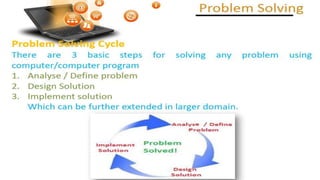
 Problem solving cycle
Computational Thinking (CT) is a PROBLEM solving process .
Computers can be used to help us to solve problems. The ways in
which it could be solved need to be understood. Computational
thinking allows us to do this.
These are key techniques that will help you think
computationally through a complex problem (challenge, or
task) before writing a single line of code.
Breaking down a complex problem or system into smaller, more
manageable parts.
Looking for similarities among and within problems.
Focusing on the important information only, ignoring irrelevant
detail
developing a step-by-step solution to the problem, or the rules to
follow to solve the problem
 PREPARED BY : SUMAN PANIGRAHY, ST. XAVIER’S HIGH SCHOOL, AMBAPUA
1. Analyse / Define problem
In almost every problem solving methodology the first step is defining or
identifying the problem. It is the most difficult and the most important of all the
steps. It involves diagnosing the situation so that the focus on the real problem and
not on its symptoms.
The process of understanding the problem and then defining it on the basis of
following:
• Data requirement of the given problem
• Type of input variable required
• Type of output variable required is called problem definition
 PREPARED BY : SUMAN PANIGRAHY, ST. XAVIER’S HIGH SCHOOL, AMBAPUA
2. Design Solution
Design is a process to transform user requirements into some suitable form,
which helps the programmer in software coding and implementation.
Programming tools, program design tools are the tools used to develop a
program. following are some of them
 Algorithm
 Flowchart
 Pseudo-code
 PREPARED BY : SUMAN PANIGRAHY, ST. XAVIER’S HIGH SCHOOL, AMBAPUA
Algorithm:
An algorithm is a plan, a logical step-by-step process for solving a problem.
Algorithms are normally written as a flowchart or in pseudo-code as it’s next
level.
An algorithm to Find largest of two numbers
Step 1: Start
Step 2: Declare variables a,b
Step 3: Read variables a,b
Step 4: If a>b
If a>b
Display a is the largest number.
Else
Display b is the largest number.
 PREPARED BY : SUMAN PANIGRAHY, ST. XAVIER’S HIGH SCHOOL, AMBAPUA
Write an algorithm to print all natural numbers up to „n‟.
Step 1: Start
Step 2: Take any number and store it in n.
Step 3: Store 1 in I
Step 4: Check I value, if I<=n then go to step 5 else go to step 8
Step 5: Print I
Step 6: Increment I value by 1
Step 5: Go to step 4
Step 8: Stop
In the above example, steps 4, 5, 6 and 7 are executed more than one
time.
 PREPARED BY : SUMAN PANIGRAHY, ST. XAVIER’S HIGH SCHOOL, AMBAPUA
QUESTIONS:
 Write an algorithm to check whether given number is +ve, -
ve or zero.
 Write an algorithm to print all natural numbers up to „n‟.
Draw a flow chart to find factorial of any number.
Draw a flow chart to print the number from 1 to ∞.
A flowchart is simply a graphical representation of steps. It shows steps
in a sequential order, and is widely used in presenting flow of algorithms,
workflow or processes. Typically, flowchart shows the steps as boxes of various
kinds, and their order by connecting them with arrows.
Flowchart Symbols
Different flowchart shapes have different conventional meanings. The
meanings of some of the more common shapes are as follows:
1. Terminator
The terminator symbol represents the starting or ending point of the system.
2. Process
A box indicates some particular operation.
3. Document
This represents a printout, such as a document or a report.
4. Decision
A diamond represents a decision or branching point. Lines coming out from the
diamond indicates different possible situations, leading to different sub-
processes.
5. Data
It represents information entering or leaving the system. An input might be an
order from a customer. An output can be a product to be delivered.
6. Flow
Lines represent flow of the sequence and direction of a process.
 PREPARED BY : SUMAN PANIGRAHY, ST. XAVIER’S HIGH SCHOOL, AMBAPUA
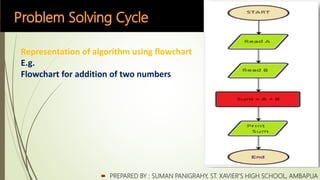
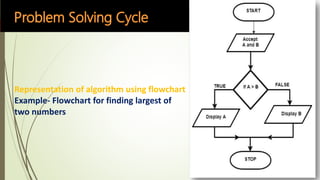
Representation of algorithm using flowchart
E.g.
Flowchart for addition of two numbers
Representation of algorithm using flowchart
Example- Flowchart for finding largest of
two numbers
QUESTIONS:
 Draw a flow chart to find factorial of any number.
 Draw a flow chart to print the number from 1 to ∞.
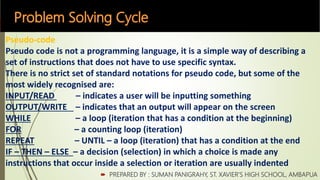
Pseudo-code
Pseudo code is not a programming language, it is a simple way of describing a
set of instructions that does not have to use specific syntax.
There is no strict set of standard notations for pseudo code, but some of the
most widely recognised are:
INPUT/READ – indicates a user will be inputting something
OUTPUT/WRITE – indicates that an output will appear on the screen
WHILE – a loop (iteration that has a condition at the beginning)
FOR – a counting loop (iteration)
REPEAT – UNTIL – a loop (iteration) that has a condition at the end
IF – THEN – ELSE – a decision (selection) in which a choice is made any
instructions that occur inside a selection or iteration are usually indented
 PREPARED BY : SUMAN PANIGRAHY, ST. XAVIER’S HIGH SCHOOL, AMBAPUA
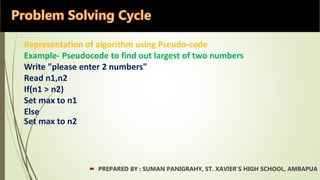
Representation of algorithm using Pseudo-code
Example- Pseudocode to find out largest of two numbers
Write "please enter 2 numbers"
Read n1,n2
If(n1 > n2)
Set max to n1
Else
Set max to n2
 PREPARED BY : SUMAN PANIGRAHY, ST. XAVIER’S HIGH SCHOOL, AMBAPUA
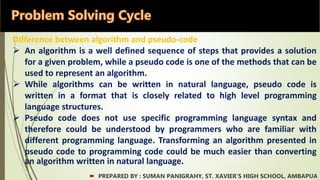
Difference between algorithm and pseudo-code
 An algorithm is a well defined sequence of steps that provides a solution
for a given problem, while a pseudo code is one of the methods that can be
used to represent an algorithm.
 While algorithms can be written in natural language, pseudo code is
written in a format that is closely related to high level programming
language structures.
 Pseudo code does not use specific programming language syntax and
therefore could be understood by programmers who are familiar with
different programming language. Transforming an algorithm presented in
pseudo code to programming code could be much easier than converting
an algorithm written in natural language.
 PREPARED BY : SUMAN PANIGRAHY, ST. XAVIER’S HIGH SCHOOL, AMBAPUA
3. Implementation
Implementation refers to the process of adopting and integrating a software
application into a real environment. Implementation of new tools and
software into an enterprise can be complex, depending on the size of the
organization and the software.
 PREPARED BY : SUMAN PANIGRAHY, ST. XAVIER’S HIGH SCHOOL, AMBAPUA

Computational Thinking CBSE Class-XI

  • 1.
    COMPUTER SCIENCE(083) Class XI (As per “CBSE” Board) PREPARED BY  SUMAN PANIGRAHY, ST. XAVIER’S HIGH SCHOOL, AMBAPUA
  • 2.
     PREPARED BY: SUMAN PANIGRAHY, ST. XAVIER’S HIGH SCHOOL, AMBAPUA Session-1 Content  Introduction to Computational Thinking  Principle of Computational Thinking  Introduction to Problem solving  Problem solving cycle
  • 3.
    Computational Thinking (CT)is a PROBLEM solving process . Computers can be used to help us to solve problems. The ways in which it could be solved need to be understood. Computational thinking allows us to do this.
  • 4.
    These are keytechniques that will help you think computationally through a complex problem (challenge, or task) before writing a single line of code. Breaking down a complex problem or system into smaller, more manageable parts. Looking for similarities among and within problems. Focusing on the important information only, ignoring irrelevant detail developing a step-by-step solution to the problem, or the rules to follow to solve the problem
  • 5.
     PREPARED BY: SUMAN PANIGRAHY, ST. XAVIER’S HIGH SCHOOL, AMBAPUA
  • 7.
    1. Analyse /Define problem In almost every problem solving methodology the first step is defining or identifying the problem. It is the most difficult and the most important of all the steps. It involves diagnosing the situation so that the focus on the real problem and not on its symptoms. The process of understanding the problem and then defining it on the basis of following: • Data requirement of the given problem • Type of input variable required • Type of output variable required is called problem definition  PREPARED BY : SUMAN PANIGRAHY, ST. XAVIER’S HIGH SCHOOL, AMBAPUA
  • 8.
    2. Design Solution Designis a process to transform user requirements into some suitable form, which helps the programmer in software coding and implementation. Programming tools, program design tools are the tools used to develop a program. following are some of them  Algorithm  Flowchart  Pseudo-code  PREPARED BY : SUMAN PANIGRAHY, ST. XAVIER’S HIGH SCHOOL, AMBAPUA
  • 9.
    Algorithm: An algorithm isa plan, a logical step-by-step process for solving a problem. Algorithms are normally written as a flowchart or in pseudo-code as it’s next level. An algorithm to Find largest of two numbers Step 1: Start Step 2: Declare variables a,b Step 3: Read variables a,b Step 4: If a>b If a>b Display a is the largest number. Else Display b is the largest number.  PREPARED BY : SUMAN PANIGRAHY, ST. XAVIER’S HIGH SCHOOL, AMBAPUA
  • 10.
    Write an algorithmto print all natural numbers up to „n‟. Step 1: Start Step 2: Take any number and store it in n. Step 3: Store 1 in I Step 4: Check I value, if I<=n then go to step 5 else go to step 8 Step 5: Print I Step 6: Increment I value by 1 Step 5: Go to step 4 Step 8: Stop In the above example, steps 4, 5, 6 and 7 are executed more than one time.  PREPARED BY : SUMAN PANIGRAHY, ST. XAVIER’S HIGH SCHOOL, AMBAPUA
  • 11.
    QUESTIONS:  Write analgorithm to check whether given number is +ve, - ve or zero.  Write an algorithm to print all natural numbers up to „n‟. Draw a flow chart to find factorial of any number. Draw a flow chart to print the number from 1 to ∞.
  • 12.
    A flowchart issimply a graphical representation of steps. It shows steps in a sequential order, and is widely used in presenting flow of algorithms, workflow or processes. Typically, flowchart shows the steps as boxes of various kinds, and their order by connecting them with arrows. Flowchart Symbols Different flowchart shapes have different conventional meanings. The meanings of some of the more common shapes are as follows: 1. Terminator The terminator symbol represents the starting or ending point of the system. 2. Process A box indicates some particular operation. 3. Document This represents a printout, such as a document or a report.
  • 13.
    4. Decision A diamondrepresents a decision or branching point. Lines coming out from the diamond indicates different possible situations, leading to different sub- processes. 5. Data It represents information entering or leaving the system. An input might be an order from a customer. An output can be a product to be delivered. 6. Flow Lines represent flow of the sequence and direction of a process.  PREPARED BY : SUMAN PANIGRAHY, ST. XAVIER’S HIGH SCHOOL, AMBAPUA
  • 14.
     PREPARED BY: SUMAN PANIGRAHY, ST. XAVIER’S HIGH SCHOOL, AMBAPUA Representation of algorithm using flowchart E.g. Flowchart for addition of two numbers
  • 15.
    Representation of algorithmusing flowchart Example- Flowchart for finding largest of two numbers
  • 16.
    QUESTIONS:  Draw aflow chart to find factorial of any number.  Draw a flow chart to print the number from 1 to ∞.
  • 17.
    Pseudo-code Pseudo code isnot a programming language, it is a simple way of describing a set of instructions that does not have to use specific syntax. There is no strict set of standard notations for pseudo code, but some of the most widely recognised are: INPUT/READ – indicates a user will be inputting something OUTPUT/WRITE – indicates that an output will appear on the screen WHILE – a loop (iteration that has a condition at the beginning) FOR – a counting loop (iteration) REPEAT – UNTIL – a loop (iteration) that has a condition at the end IF – THEN – ELSE – a decision (selection) in which a choice is made any instructions that occur inside a selection or iteration are usually indented  PREPARED BY : SUMAN PANIGRAHY, ST. XAVIER’S HIGH SCHOOL, AMBAPUA
  • 18.
    Representation of algorithmusing Pseudo-code Example- Pseudocode to find out largest of two numbers Write "please enter 2 numbers" Read n1,n2 If(n1 > n2) Set max to n1 Else Set max to n2  PREPARED BY : SUMAN PANIGRAHY, ST. XAVIER’S HIGH SCHOOL, AMBAPUA
  • 19.
    Difference between algorithmand pseudo-code  An algorithm is a well defined sequence of steps that provides a solution for a given problem, while a pseudo code is one of the methods that can be used to represent an algorithm.  While algorithms can be written in natural language, pseudo code is written in a format that is closely related to high level programming language structures.  Pseudo code does not use specific programming language syntax and therefore could be understood by programmers who are familiar with different programming language. Transforming an algorithm presented in pseudo code to programming code could be much easier than converting an algorithm written in natural language.  PREPARED BY : SUMAN PANIGRAHY, ST. XAVIER’S HIGH SCHOOL, AMBAPUA
  • 20.
    3. Implementation Implementation refersto the process of adopting and integrating a software application into a real environment. Implementation of new tools and software into an enterprise can be complex, depending on the size of the organization and the software.  PREPARED BY : SUMAN PANIGRAHY, ST. XAVIER’S HIGH SCHOOL, AMBAPUA