Computer Programming
INTRODUCTION
Program Development Process
In order to create a successful program, you
need to follow the proper development process
listed.
Program Development Process
Planning
o first, identify the problem or the
requirements of the client
o dedicate time to think and analyze the
needed components for the program
o determine the overall goal or desired output
of the program
Program Development Process
Planning
o ask yourself, “Will the program produce
results?”. “Will the program calculate values?”
o define the required input and output in order
to achieve the computer program’s goals.
Program Development Process
Coding
o writing the source code, source code is the
actual set of programming instructions that
the computer follows.
o you should have properly planned the
intended purpose for the program and what
it should do.
Program Development Process
Coding
o programmers at this stage should have a
broad knowledge in the programming
language and need to make sure that the
program performs the way it is intended.
Program Development Process
Testing and Debugging
o errors, called “bugs”, often appear in
programs because of the details and syntax
needed for the simplest programs.
o programmers must test the program
thoroughly and fix the errors.
Program Development Process
Testing and Debugging
o the process of fixing errors is called
debugging.
o once a program is completely free of errors,
it is considered finished and ready to use.
Program Development Process
Documentation
o after the program is finished and thoroughly
tested
Program Development Process
Documentation includes the following:
1. necessary information about a program
such as the program description,
2. list of hardware equipment needed to run
the program,
3. operating system compatible with the
program,
Program Development Process
Documentation includes the following:
4. other specifications deemed necessary to
ensure smooth installation and use.
5. technical information such as where and
who created the program,
6. contact information for issues and concerns
Program Development Process
Documentation includes the following:
7. most importantly, instructions on the proper
use and maintenance of the program
Maintenance
o final stage in programming
o also the stage of updating the program
o the programmer is tasked to keep the program
running smoothly, provide updates and
improvement in consideration of development
and changes in the field it used
Program Development Process
Algorithms, flowcharts, data types
and pseudocodes
Problem solving is a part of our everyday life.
In computer programming, problem solving is
inevitable and it is actually one of the main
reason why a program is created.
Algorithms, flowcharts, data types
and pseudocodes
What is an algorithm?
 a step-by-step procedure to solve problems
Examples:
1. a guide for installing new software
2. a manual for assembling appliances
3. recipes
Algorithms, flowcharts, data types
and pseudocodes
What is an algorithm?
 algorithm helps in identifying decision points,
processes, essential variables to solve a
problem and the programmer can see and
determine easily the errors in a particular
process
Algorithms, flowcharts, data types
and pseudocodes
What is pseudocode?
o is a description of an algorithm or a
computer program using natural language
o aim is to make reading program easier, some
codes that are not essential for human
understanding is omitted
Algorithms, flowcharts, data types
and pseudocodes
What is pseudocode?
o Commonly used in planning out the
structure of a program or a system
Algorithms, flowcharts, data types
and pseudocodes
What is flowchart?
o like pseudocodes
o a description of an algorithm or a computer
program
o serves as a graphical representation
o helps in the effective analysis of the problem
Algorithms, flowcharts, data types
and pseudocodes
What is flowchart?
o helps in the application or program
maintenance
o provides ease in identifying potential
improvements of the system or program
Algorithms, flowcharts, data types
and pseudocodes
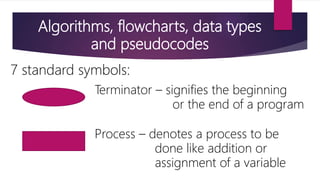
7 standard symbols:
Terminator – signifies the beginning
or the end of a program
Process – denotes a process to be
done like addition or
assignment of a variable
Algorithms, flowcharts, data types
and pseudocodes
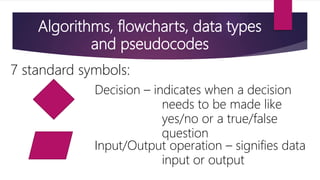
7 standard symbols:
Decision – indicates when a decision
needs to be made like
yes/no or a true/false
question
Input/Output operation – signifies data
input or output
Algorithms, flowcharts, data types
and pseudocodes
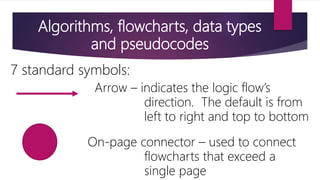
7 standard symbols:
Arrow – indicates the logic flow’s
direction. The default is from
left to right and top to bottom
On-page connector – used to connect
flowcharts that exceed a
single page
Algorithms, flowcharts, data types
and pseudocodes
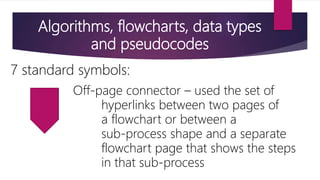
7 standard symbols:
Off-page connector – used the set of
hyperlinks between two pages of
a flowchart or between a
sub-process shape and a separate
flowchart page that shows the steps
in that sub-process
Algorithms, flowcharts, data types
and pseudocodes
Data type
o a description of a specific data that can be
stored in a variable
o the amount of memory the item occupies
The End
Thank you for listening

10 lesson8

  • 1.
  • 2.
    Program Development Process Inorder to create a successful program, you need to follow the proper development process listed.
  • 3.
    Program Development Process Planning ofirst, identify the problem or the requirements of the client o dedicate time to think and analyze the needed components for the program o determine the overall goal or desired output of the program
  • 4.
    Program Development Process Planning oask yourself, “Will the program produce results?”. “Will the program calculate values?” o define the required input and output in order to achieve the computer program’s goals.
  • 5.
    Program Development Process Coding owriting the source code, source code is the actual set of programming instructions that the computer follows. o you should have properly planned the intended purpose for the program and what it should do.
  • 6.
    Program Development Process Coding oprogrammers at this stage should have a broad knowledge in the programming language and need to make sure that the program performs the way it is intended.
  • 7.
    Program Development Process Testingand Debugging o errors, called “bugs”, often appear in programs because of the details and syntax needed for the simplest programs. o programmers must test the program thoroughly and fix the errors.
  • 8.
    Program Development Process Testingand Debugging o the process of fixing errors is called debugging. o once a program is completely free of errors, it is considered finished and ready to use.
  • 9.
    Program Development Process Documentation oafter the program is finished and thoroughly tested
  • 10.
    Program Development Process Documentationincludes the following: 1. necessary information about a program such as the program description, 2. list of hardware equipment needed to run the program, 3. operating system compatible with the program,
  • 11.
    Program Development Process Documentationincludes the following: 4. other specifications deemed necessary to ensure smooth installation and use. 5. technical information such as where and who created the program, 6. contact information for issues and concerns
  • 12.
    Program Development Process Documentationincludes the following: 7. most importantly, instructions on the proper use and maintenance of the program
  • 13.
    Maintenance o final stagein programming o also the stage of updating the program o the programmer is tasked to keep the program running smoothly, provide updates and improvement in consideration of development and changes in the field it used Program Development Process
  • 14.
    Algorithms, flowcharts, datatypes and pseudocodes Problem solving is a part of our everyday life. In computer programming, problem solving is inevitable and it is actually one of the main reason why a program is created.
  • 15.
    Algorithms, flowcharts, datatypes and pseudocodes What is an algorithm?  a step-by-step procedure to solve problems Examples: 1. a guide for installing new software 2. a manual for assembling appliances 3. recipes
  • 16.
    Algorithms, flowcharts, datatypes and pseudocodes What is an algorithm?  algorithm helps in identifying decision points, processes, essential variables to solve a problem and the programmer can see and determine easily the errors in a particular process
  • 17.
    Algorithms, flowcharts, datatypes and pseudocodes What is pseudocode? o is a description of an algorithm or a computer program using natural language o aim is to make reading program easier, some codes that are not essential for human understanding is omitted
  • 18.
    Algorithms, flowcharts, datatypes and pseudocodes What is pseudocode? o Commonly used in planning out the structure of a program or a system
  • 19.
    Algorithms, flowcharts, datatypes and pseudocodes What is flowchart? o like pseudocodes o a description of an algorithm or a computer program o serves as a graphical representation o helps in the effective analysis of the problem
  • 20.
    Algorithms, flowcharts, datatypes and pseudocodes What is flowchart? o helps in the application or program maintenance o provides ease in identifying potential improvements of the system or program
  • 21.
    Algorithms, flowcharts, datatypes and pseudocodes 7 standard symbols: Terminator – signifies the beginning or the end of a program Process – denotes a process to be done like addition or assignment of a variable
  • 22.
    Algorithms, flowcharts, datatypes and pseudocodes 7 standard symbols: Decision – indicates when a decision needs to be made like yes/no or a true/false question Input/Output operation – signifies data input or output
  • 23.
    Algorithms, flowcharts, datatypes and pseudocodes 7 standard symbols: Arrow – indicates the logic flow’s direction. The default is from left to right and top to bottom On-page connector – used to connect flowcharts that exceed a single page
  • 24.
    Algorithms, flowcharts, datatypes and pseudocodes 7 standard symbols: Off-page connector – used the set of hyperlinks between two pages of a flowchart or between a sub-process shape and a separate flowchart page that shows the steps in that sub-process
  • 25.
    Algorithms, flowcharts, datatypes and pseudocodes Data type o a description of a specific data that can be stored in a variable o the amount of memory the item occupies
  • 26.
    The End Thank youfor listening