Topic 3 Lighting and Shading
Dr. Collins Oduor
Kenyatta University
Lighting and
Shading
2
Topics
 Introduction
 Geometric Model in Lighting
 Colored Surfaces and Lights
 Shading and Graphics Pipeline
 Flat Shading and Smooth Shading
3
Introduction
 Lighting
 Process of computing the luminous intensity reflected
from a specific 3-D point
 Shading
 Process of assigning colors to pixels
 Shading model dictates how light is scattered or
reflected from a surface
 We will begin with achromatic light then colored lights
4
Introduction
 Two types of light sources
 Point light source
 Ambient light
 Light interacts surfaces in different ways
 Absorbed by surface
 Reflected by surface
 Transmitted into the interior
 What absorbs all of the incident achromatic light?
5
Introduction
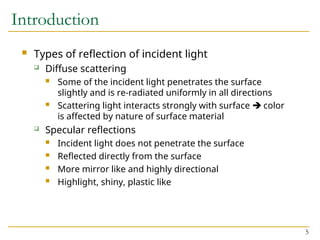
 Types of reflection of incident light
 Diffuse scattering
 Some of the incident light penetrates the surface
slightly and is re-radiated uniformly in all directions
 Scattering light interacts strongly with surface  color
is affected by nature of surface material
 Specular reflections
 Incident light does not penetrate the surface
 Reflected directly from the surface
 More mirror like and highly directional
 Highlight, shiny, plastic like
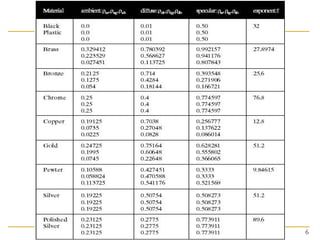
6
7
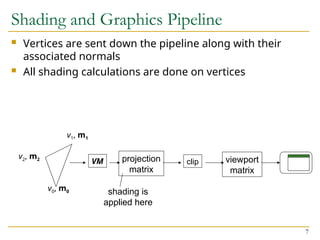
Shading and Graphics Pipeline
 Vertices are sent down the pipeline along with their
associated normals
 All shading calculations are done on vertices
VM clip
projection
matrix
viewport
matrix
shading is
applied here
v1, m1
v2, m2
v0, m0
8
Shading and Graphics Pipeline
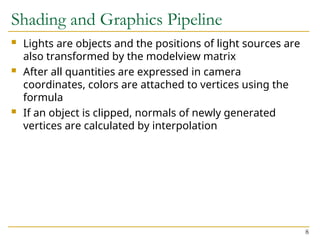
 Lights are objects and the positions of light sources are
also transformed by the modelview matrix
 After all quantities are expressed in camera
coordinates, colors are attached to vertices using the
formula
 If an object is clipped, normals of newly generated
vertices are calculated by interpolation
9
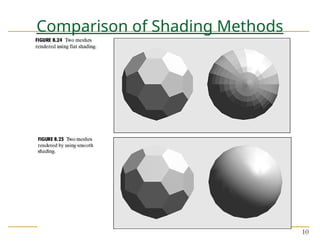
Flat Shading and Smooth Shading
 Polygonal face in 3D space
 Individual face
 Underlying surface approximated
 Shading methods
 Flat shading
 Smooth shading
 Gouraud shading
 Phong shading
10
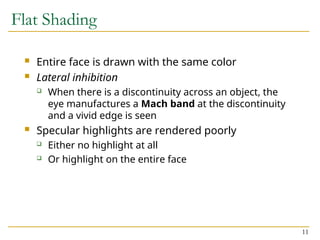
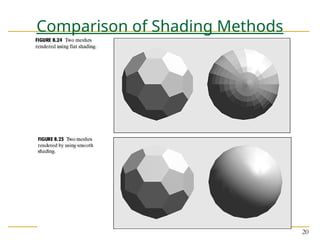
Comparison of Shading Methods
11
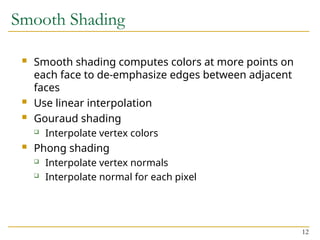
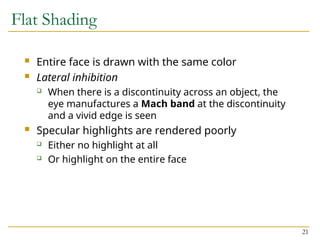
Flat Shading
 Entire face is drawn with the same color
 Lateral inhibition
 When there is a discontinuity across an object, the
eye manufactures a Mach band at the discontinuity
and a vivid edge is seen
 Specular highlights are rendered poorly
 Either no highlight at all
 Or highlight on the entire face
12
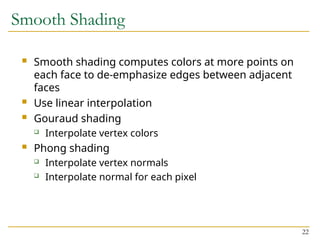
Smooth Shading
 Smooth shading computes colors at more points on
each face to de-emphasize edges between adjacent
faces
 Use linear interpolation
 Gouraud shading
 Interpolate vertex colors
 Phong shading
 Interpolate vertex normals
 Interpolate normal for each pixel
13
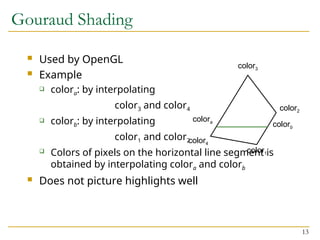
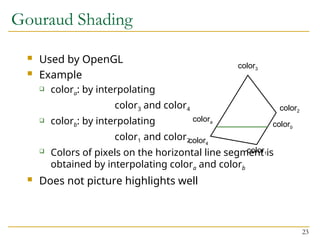
Gouraud Shading
 Used by OpenGL
 Example
 colora: by interpolating
color3 and color4
 colorb: by interpolating
color1 and color2
 Colors of pixels on the horizontal line segment is
obtained by interpolating colora and colorb
 Does not picture highlights well
color1
color2
color3
color4
colora
colorb
14
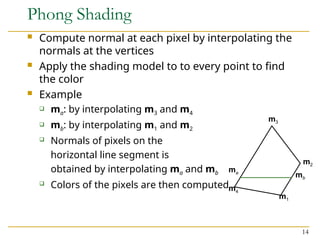
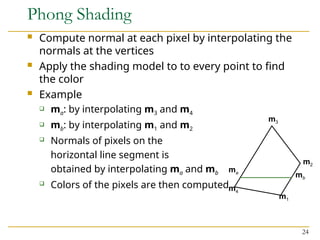
Phong Shading
 Compute normal at each pixel by interpolating the
normals at the vertices
 Apply the shading model to to every point to find
the color
 Example
 ma: by interpolating m3 and m4
 mb: by interpolating m1 and m2
 Normals of pixels on the
horizontal line segment is
obtained by interpolating ma and mb
 Colors of the pixels are then computed
m1
m2
m3
m4
ma
mb
15
Phong Shading
 Very smooth appearance
 Highlights are approximated better
 Principle drawback
 Heavy computation  slow speed
 Not supported by OpenGL
 Can be approximated using texture mapping
 Phong shading  Phong model
Don’t be
confused!!
16
Introduction
 Lighting
 Process of computing the luminous intensity reflected
from a specific 3-D point
 Shading
 Process of assigning colors to pixels
 Shading model dictates how light is scattered or
reflected from a surface
 We will begin with achromatic light then colored lights
17
Introduction
 Two types of light sources
 Point light source
 Ambient light
 Light interacts surfaces in different ways
 Absorbed by surface
 Reflected by surface
 Transmitted into the interior
 What absorbs all of the incident achromatic light?
18
Introduction
 Types of reflection of incident light
 Diffuse scattering
 Some of the incident light penetrates the surface
slightly and is re-radiated uniformly in all directions
 Scattering light interacts strongly with surface  color
is affected by nature of surface material
 Specular reflections
 Incident light does not penetrate the surface
 Reflected directly from the surface
 More mirror like and highly directional
 Highlight, shiny, plastic like
19
Introduction
 Total light reflected from the surface in a certain
direction is the sum of
 Diffuse components
 Specular components
 We calculate the size of each component that reaches
the eye for each point of interest on surfaces
20
Comparison of Shading Methods
21
Flat Shading
 Entire face is drawn with the same color
 Lateral inhibition
 When there is a discontinuity across an object, the
eye manufactures a Mach band at the discontinuity
and a vivid edge is seen
 Specular highlights are rendered poorly
 Either no highlight at all
 Or highlight on the entire face
22
Smooth Shading
 Smooth shading computes colors at more points on
each face to de-emphasize edges between adjacent
faces
 Use linear interpolation
 Gouraud shading
 Interpolate vertex colors
 Phong shading
 Interpolate vertex normals
 Interpolate normal for each pixel
23
Gouraud Shading
 Used by OpenGL
 Example
 colora: by interpolating
color3 and color4
 colorb: by interpolating
color1 and color2
 Colors of pixels on the horizontal line segment is
obtained by interpolating colora and colorb
 Does not picture highlights well
color1
color2
color3
color4
colora
colorb
24
Phong Shading
 Compute normal at each pixel by interpolating the
normals at the vertices
 Apply the shading model to to every point to find
the color
 Example
 ma: by interpolating m3 and m4
 mb: by interpolating m1 and m2
 Normals of pixels on the
horizontal line segment is
obtained by interpolating ma and mb
 Colors of the pixels are then computed
m1
m2
m3
m4
ma
mb
25
Phong Shading
 Very smooth appearance
 Highlights are approximated better
 Principle drawback
 Heavy computation  slow speed
 Not supported by OpenGL
 Can be approximated using texture mapping
 Phong shading  Phong model
Don’t be
confused!!
•Lighting
•Lighting models
•Ambient
•Diffuse
•Specular
•Surface Rendering Methods
•Ray-Tracing
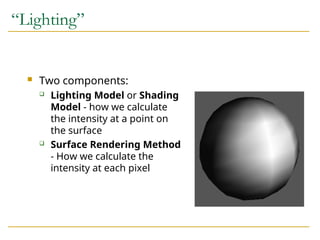
“Lighting”
 Two components:
 Lighting Model or Shading
Model - how we calculate
the intensity at a point on
the surface
 Surface Rendering Method
- How we calculate the
intensity at each pixel
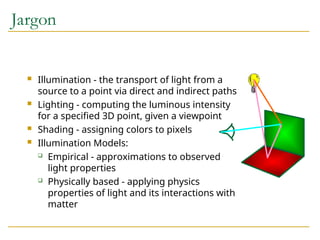
Jargon
 Illumination - the transport of light from a
source to a point via direct and indirect paths
 Lighting - computing the luminous intensity
for a specified 3D point, given a viewpoint
 Shading - assigning colors to pixels
 Illumination Models:
 Empirical - approximations to observed
light properties
 Physically based - applying physics
properties of light and its interactions with
matter
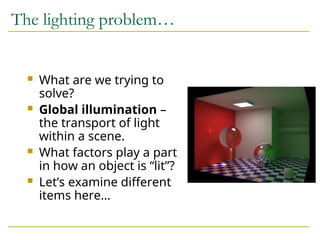
The lighting problem…
 What are we trying to
solve?
 Global illumination –
the transport of light
within a scene.
 What factors play a part
in how an object is “lit”?
 Let’s examine different
items here…
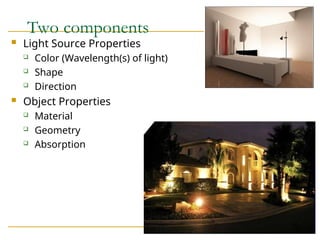
Two components
 Light Source Properties
 Color (Wavelength(s) of light)
 Shape
 Direction
 Object Properties
 Material
 Geometry
 Absorption
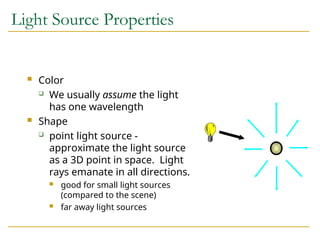
Light Source Properties
 Color
 We usually assume the light
has one wavelength
 Shape
 point light source -
approximate the light source
as a 3D point in space. Light
rays emanate in all directions.
 good for small light sources
(compared to the scene)
 far away light sources
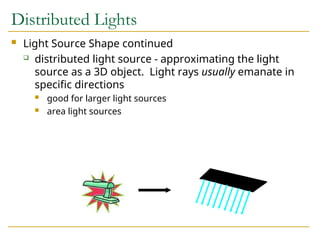
Distributed Lights
 Light Source Shape continued
 distributed light source - approximating the light
source as a 3D object. Light rays usually emanate in
specific directions
 good for larger light sources
 area light sources
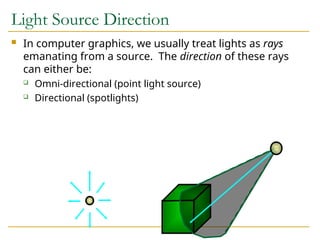
Light Source Direction
 In computer graphics, we usually treat lights as rays
emanating from a source. The direction of these rays
can either be:
 Omni-directional (point light source)
 Directional (spotlights)
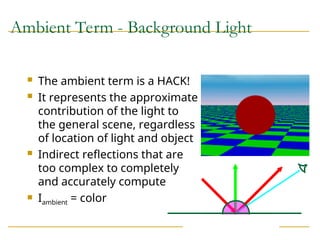
Ambient Term - Background Light
 The ambient term is a HACK!
 It represents the approximate
contribution of the light to
the general scene, regardless
of location of light and object
 Indirect reflections that are
too complex to completely
and accurately compute
 Iambient = color
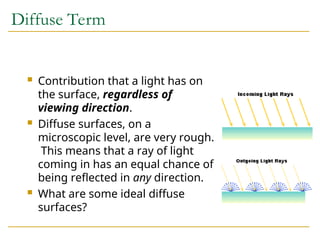
Diffuse Term
 Contribution that a light has on
the surface, regardless of
viewing direction.
 Diffuse surfaces, on a
microscopic level, are very rough.
This means that a ray of light
coming in has an equal chance of
being reflected in any direction.
 What are some ideal diffuse
surfaces?
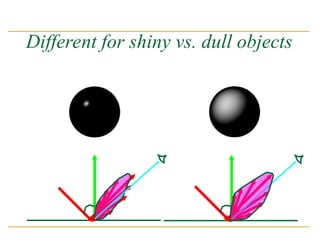
Different for shiny vs. dull objects
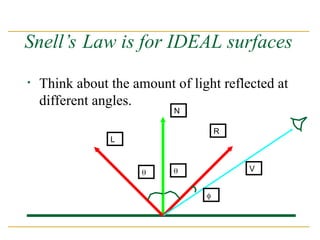
Snell’s Law is for IDEAL surfaces
• Think about the amount of light reflected at
different angles.
N
L
R
V
 

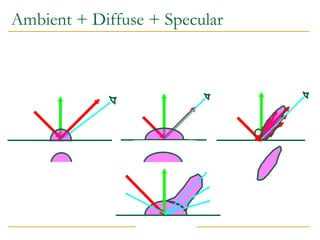
Combining the terms
 Ambient - the combination of light reflections
from various surfaces to produce a uniform
illumination. Background light.
 Diffuse - uniform light scattering of light rays on
a surface. Proportional to the “amount of light”
that hits the surface. Depends on the surface
normal and light vector.
 Sepecular - light that gets reflected. Depends
on the light ray, the viewing angle, and the
surface normal.
Ambient + Diffuse + Specular
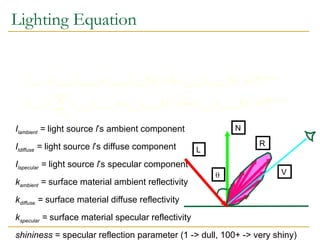
Lighting Equation
Ilambient = light source l’s ambient component
Ildiffuse = light source l’s diffuse component
Ilspecular = light source l’s specular component
kambient = surface material ambient reflectivity
kdiffuse = surface material diffuse reflectivity
kspecular = surface material specular reflectivity
shininess = specular reflection parameter (1 -> dull, 100+ -> very shiny)
   
   













1
0
lights
l
shininess
specular
l
diffuse
l
ambient
l
final
shininess
specular
specular
diffuse
diffuse
ambient
ambient
final
H
N
k
I
L
N
k
I
k
I
I
H
N
k
I
L
N
k
I
k
I
I
specular
diffuse
ambient
N
L
R
V

Attenuation
 One factor we have yet to take into account is that a
light source contributes a higher incident intensity to
closer surfaces.
 The energy from a point light source falls off
proportional to 1/d2
.
 What happens if we don’t do this?
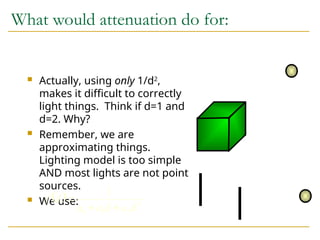
What would attenuation do for:
 Actually, using only 1/d2
,
makes it difficult to correctly
light things. Think if d=1 and
d=2. Why?
 Remember, we are
approximating things.
Lighting model is too simple
AND most lights are not point
sources.
 We use:
  2
2
1
0
1
d
a
d
a
a
d
f



Shading
 When do we do the lighting equation?
 What is the cost to compute the lighting for a 3D
point?
     
 








1
0
lights
l
shininess
specular
l
diffuse
l
l
ambient
l
final H
N
k
I
L
N
k
I
d
f
k
I
I specular
diffuse
ambient
Shading
 Shading is how we “color” a triangle.
 Constant Shading
 Gouraud Shading
 Phong Shading
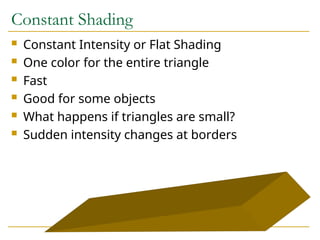
Constant Shading
 Constant Intensity or Flat Shading
 One color for the entire triangle
 Fast
 Good for some objects
 What happens if triangles are small?
 Sudden intensity changes at borders
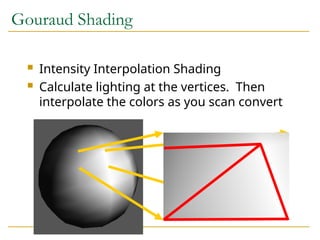
Gouraud Shading
 Intensity Interpolation Shading
 Calculate lighting at the vertices. Then
interpolate the colors as you scan convert
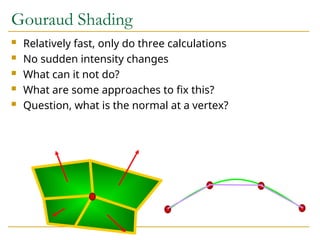
Gouraud Shading
 Relatively fast, only do three calculations
 No sudden intensity changes
 What can it not do?
 What are some approaches to fix this?
 Question, what is the normal at a vertex?
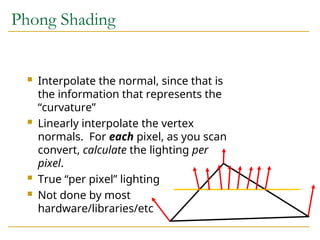
Phong Shading
 Interpolate the normal, since that is
the information that represents the
“curvature”
 Linearly interpolate the vertex
normals. For each pixel, as you scan
convert, calculate the lighting per
pixel.
 True “per pixel” lighting
 Not done by most
hardware/libraries/etc
Shading Techniques
 Constant Shading
 Calculate one lighting calculation (pick a vertex) per triangle
 Color the entire triangle the same color
 Gouraud Shading
 Calculate three lighting calculations (the vertices) per triangle
 Linearly interpolate the colors as you scan convert
 Phong Shading
 While you scan convert, linearly interpolate the normals.
 With the interpolated normal at each pixel, calculate the lighting
at each pixel

Topic 3 Light, shading and materials.ppt

  • 1.
    Topic 3 Lightingand Shading Dr. Collins Oduor Kenyatta University Lighting and Shading
  • 2.
    2 Topics  Introduction  GeometricModel in Lighting  Colored Surfaces and Lights  Shading and Graphics Pipeline  Flat Shading and Smooth Shading
  • 3.
    3 Introduction  Lighting  Processof computing the luminous intensity reflected from a specific 3-D point  Shading  Process of assigning colors to pixels  Shading model dictates how light is scattered or reflected from a surface  We will begin with achromatic light then colored lights
  • 4.
    4 Introduction  Two typesof light sources  Point light source  Ambient light  Light interacts surfaces in different ways  Absorbed by surface  Reflected by surface  Transmitted into the interior  What absorbs all of the incident achromatic light?
  • 5.
    5 Introduction  Types ofreflection of incident light  Diffuse scattering  Some of the incident light penetrates the surface slightly and is re-radiated uniformly in all directions  Scattering light interacts strongly with surface  color is affected by nature of surface material  Specular reflections  Incident light does not penetrate the surface  Reflected directly from the surface  More mirror like and highly directional  Highlight, shiny, plastic like
  • 6.
  • 7.
    7 Shading and GraphicsPipeline  Vertices are sent down the pipeline along with their associated normals  All shading calculations are done on vertices VM clip projection matrix viewport matrix shading is applied here v1, m1 v2, m2 v0, m0
  • 8.
    8 Shading and GraphicsPipeline  Lights are objects and the positions of light sources are also transformed by the modelview matrix  After all quantities are expressed in camera coordinates, colors are attached to vertices using the formula  If an object is clipped, normals of newly generated vertices are calculated by interpolation
  • 9.
    9 Flat Shading andSmooth Shading  Polygonal face in 3D space  Individual face  Underlying surface approximated  Shading methods  Flat shading  Smooth shading  Gouraud shading  Phong shading
  • 10.
  • 11.
    11 Flat Shading  Entireface is drawn with the same color  Lateral inhibition  When there is a discontinuity across an object, the eye manufactures a Mach band at the discontinuity and a vivid edge is seen  Specular highlights are rendered poorly  Either no highlight at all  Or highlight on the entire face
  • 12.
    12 Smooth Shading  Smoothshading computes colors at more points on each face to de-emphasize edges between adjacent faces  Use linear interpolation  Gouraud shading  Interpolate vertex colors  Phong shading  Interpolate vertex normals  Interpolate normal for each pixel
  • 13.
    13 Gouraud Shading  Usedby OpenGL  Example  colora: by interpolating color3 and color4  colorb: by interpolating color1 and color2  Colors of pixels on the horizontal line segment is obtained by interpolating colora and colorb  Does not picture highlights well color1 color2 color3 color4 colora colorb
  • 14.
    14 Phong Shading  Computenormal at each pixel by interpolating the normals at the vertices  Apply the shading model to to every point to find the color  Example  ma: by interpolating m3 and m4  mb: by interpolating m1 and m2  Normals of pixels on the horizontal line segment is obtained by interpolating ma and mb  Colors of the pixels are then computed m1 m2 m3 m4 ma mb
  • 15.
    15 Phong Shading  Verysmooth appearance  Highlights are approximated better  Principle drawback  Heavy computation  slow speed  Not supported by OpenGL  Can be approximated using texture mapping  Phong shading  Phong model Don’t be confused!!
  • 16.
    16 Introduction  Lighting  Processof computing the luminous intensity reflected from a specific 3-D point  Shading  Process of assigning colors to pixels  Shading model dictates how light is scattered or reflected from a surface  We will begin with achromatic light then colored lights
  • 17.
    17 Introduction  Two typesof light sources  Point light source  Ambient light  Light interacts surfaces in different ways  Absorbed by surface  Reflected by surface  Transmitted into the interior  What absorbs all of the incident achromatic light?
  • 18.
    18 Introduction  Types ofreflection of incident light  Diffuse scattering  Some of the incident light penetrates the surface slightly and is re-radiated uniformly in all directions  Scattering light interacts strongly with surface  color is affected by nature of surface material  Specular reflections  Incident light does not penetrate the surface  Reflected directly from the surface  More mirror like and highly directional  Highlight, shiny, plastic like
  • 19.
    19 Introduction  Total lightreflected from the surface in a certain direction is the sum of  Diffuse components  Specular components  We calculate the size of each component that reaches the eye for each point of interest on surfaces
  • 20.
  • 21.
    21 Flat Shading  Entireface is drawn with the same color  Lateral inhibition  When there is a discontinuity across an object, the eye manufactures a Mach band at the discontinuity and a vivid edge is seen  Specular highlights are rendered poorly  Either no highlight at all  Or highlight on the entire face
  • 22.
    22 Smooth Shading  Smoothshading computes colors at more points on each face to de-emphasize edges between adjacent faces  Use linear interpolation  Gouraud shading  Interpolate vertex colors  Phong shading  Interpolate vertex normals  Interpolate normal for each pixel
  • 23.
    23 Gouraud Shading  Usedby OpenGL  Example  colora: by interpolating color3 and color4  colorb: by interpolating color1 and color2  Colors of pixels on the horizontal line segment is obtained by interpolating colora and colorb  Does not picture highlights well color1 color2 color3 color4 colora colorb
  • 24.
    24 Phong Shading  Computenormal at each pixel by interpolating the normals at the vertices  Apply the shading model to to every point to find the color  Example  ma: by interpolating m3 and m4  mb: by interpolating m1 and m2  Normals of pixels on the horizontal line segment is obtained by interpolating ma and mb  Colors of the pixels are then computed m1 m2 m3 m4 ma mb
  • 25.
    25 Phong Shading  Verysmooth appearance  Highlights are approximated better  Principle drawback  Heavy computation  slow speed  Not supported by OpenGL  Can be approximated using texture mapping  Phong shading  Phong model Don’t be confused!!
  • 26.
  • 27.
    “Lighting”  Two components: Lighting Model or Shading Model - how we calculate the intensity at a point on the surface  Surface Rendering Method - How we calculate the intensity at each pixel
  • 28.
    Jargon  Illumination -the transport of light from a source to a point via direct and indirect paths  Lighting - computing the luminous intensity for a specified 3D point, given a viewpoint  Shading - assigning colors to pixels  Illumination Models:  Empirical - approximations to observed light properties  Physically based - applying physics properties of light and its interactions with matter
  • 29.
    The lighting problem… What are we trying to solve?  Global illumination – the transport of light within a scene.  What factors play a part in how an object is “lit”?  Let’s examine different items here…
  • 30.
    Two components  LightSource Properties  Color (Wavelength(s) of light)  Shape  Direction  Object Properties  Material  Geometry  Absorption
  • 31.
    Light Source Properties Color  We usually assume the light has one wavelength  Shape  point light source - approximate the light source as a 3D point in space. Light rays emanate in all directions.  good for small light sources (compared to the scene)  far away light sources
  • 32.
    Distributed Lights  LightSource Shape continued  distributed light source - approximating the light source as a 3D object. Light rays usually emanate in specific directions  good for larger light sources  area light sources
  • 33.
    Light Source Direction In computer graphics, we usually treat lights as rays emanating from a source. The direction of these rays can either be:  Omni-directional (point light source)  Directional (spotlights)
  • 34.
    Ambient Term -Background Light  The ambient term is a HACK!  It represents the approximate contribution of the light to the general scene, regardless of location of light and object  Indirect reflections that are too complex to completely and accurately compute  Iambient = color
  • 35.
    Diffuse Term  Contributionthat a light has on the surface, regardless of viewing direction.  Diffuse surfaces, on a microscopic level, are very rough. This means that a ray of light coming in has an equal chance of being reflected in any direction.  What are some ideal diffuse surfaces?
  • 36.
    Different for shinyvs. dull objects
  • 37.
    Snell’s Law isfor IDEAL surfaces • Think about the amount of light reflected at different angles. N L R V   
  • 38.
    Combining the terms Ambient - the combination of light reflections from various surfaces to produce a uniform illumination. Background light.  Diffuse - uniform light scattering of light rays on a surface. Proportional to the “amount of light” that hits the surface. Depends on the surface normal and light vector.  Sepecular - light that gets reflected. Depends on the light ray, the viewing angle, and the surface normal.
  • 39.
  • 40.
    Lighting Equation Ilambient =light source l’s ambient component Ildiffuse = light source l’s diffuse component Ilspecular = light source l’s specular component kambient = surface material ambient reflectivity kdiffuse = surface material diffuse reflectivity kspecular = surface material specular reflectivity shininess = specular reflection parameter (1 -> dull, 100+ -> very shiny)                      1 0 lights l shininess specular l diffuse l ambient l final shininess specular specular diffuse diffuse ambient ambient final H N k I L N k I k I I H N k I L N k I k I I specular diffuse ambient N L R V 
  • 41.
    Attenuation  One factorwe have yet to take into account is that a light source contributes a higher incident intensity to closer surfaces.  The energy from a point light source falls off proportional to 1/d2 .  What happens if we don’t do this?
  • 42.
    What would attenuationdo for:  Actually, using only 1/d2 , makes it difficult to correctly light things. Think if d=1 and d=2. Why?  Remember, we are approximating things. Lighting model is too simple AND most lights are not point sources.  We use:   2 2 1 0 1 d a d a a d f   
  • 43.
    Shading  When dowe do the lighting equation?  What is the cost to compute the lighting for a 3D point?                 1 0 lights l shininess specular l diffuse l l ambient l final H N k I L N k I d f k I I specular diffuse ambient
  • 44.
    Shading  Shading ishow we “color” a triangle.  Constant Shading  Gouraud Shading  Phong Shading
  • 45.
    Constant Shading  ConstantIntensity or Flat Shading  One color for the entire triangle  Fast  Good for some objects  What happens if triangles are small?  Sudden intensity changes at borders
  • 46.
    Gouraud Shading  IntensityInterpolation Shading  Calculate lighting at the vertices. Then interpolate the colors as you scan convert
  • 47.
    Gouraud Shading  Relativelyfast, only do three calculations  No sudden intensity changes  What can it not do?  What are some approaches to fix this?  Question, what is the normal at a vertex?
  • 48.
    Phong Shading  Interpolatethe normal, since that is the information that represents the “curvature”  Linearly interpolate the vertex normals. For each pixel, as you scan convert, calculate the lighting per pixel.  True “per pixel” lighting  Not done by most hardware/libraries/etc
  • 49.
    Shading Techniques  ConstantShading  Calculate one lighting calculation (pick a vertex) per triangle  Color the entire triangle the same color  Gouraud Shading  Calculate three lighting calculations (the vertices) per triangle  Linearly interpolate the colors as you scan convert  Phong Shading  While you scan convert, linearly interpolate the normals.  With the interpolated normal at each pixel, calculate the lighting at each pixel