
Seven Steps to LinkedIn
Enlightenment
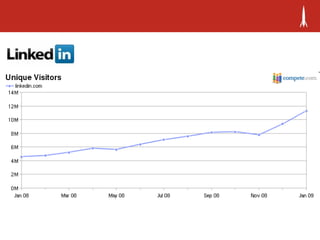
 35 Million
 People
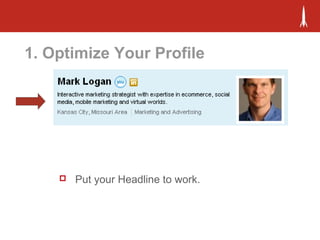
1. Optimize Your Profile
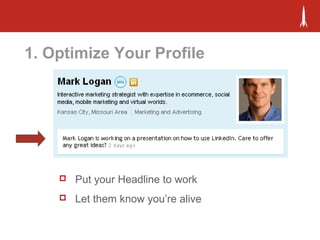
 Put your Headline to work.
1. Optimize Your Profile
 Put your Headline to work
 Let them know you’re alive
1. Optimize Your Profile
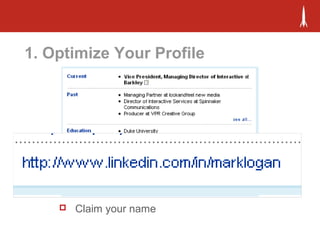
 Claim your name
1. Optimize Your Profile
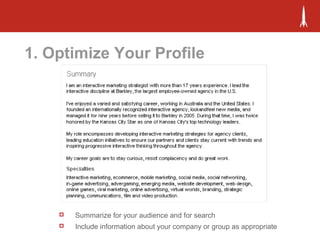
 Summarize for your audience and for search
 Include information about your company or group as appropriate
1. Optimize Your Profile
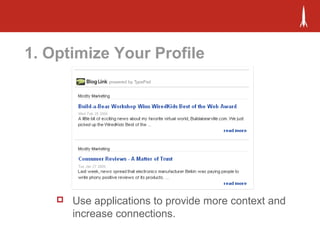
 Use applications to provide more context and
increase connections.
1. Optimize Your Profile
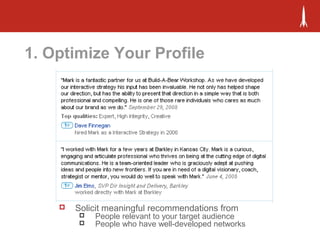
 Solicit meaningful recommendations from
 People relevant to your target audience
 People who have well-developed networks
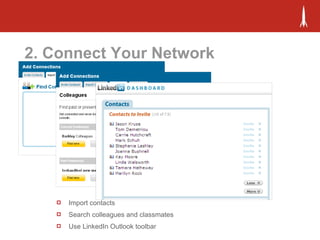
2. Connect Your Network
 Import contacts
 Search colleagues and classmates
 Use LinkedIn Outlook toolbar
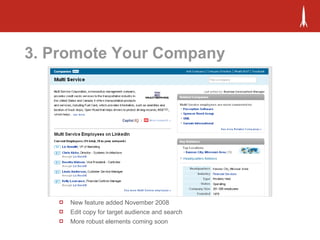
3. Promote Your Company
 New feature added November 2008
 Edit copy for target audience and search
 More robust elements coming soon
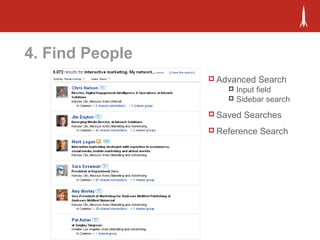
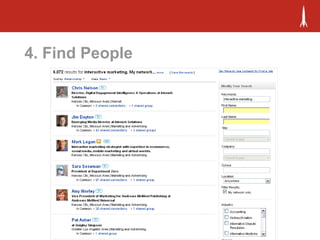
4. Find People
 Advanced Search
 Input field
 Sidebar search
 Saved Searches
 Reference Search
4. Find People
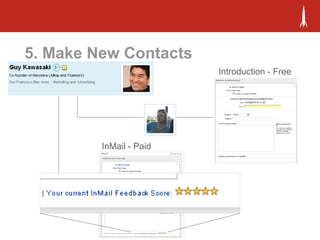
5. Make New Contacts
Introduction - Free
InMail - Paid
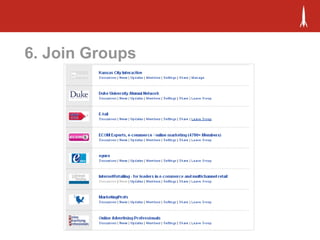
6. Join Groups
6. Join Groups
 Introduce yourself
 Participate – join discussions, ask questions
 Give before your ask
 Avoid shameless self promotion
 Don’t start a new discussion if an old one fits
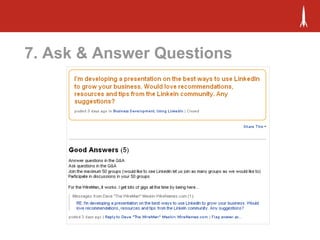
7. Ask & Answer Questions
“I've had luck simply posting that "I'm looking for
connections in such and such a city", when I'm headed
there for a sales trip. It's been really great to have referrals
or for people whom I've forgotten about show up.
Especially when I'm busting into a new market and mostly
cold calling. I'm in Austin right now and 3 of the 9 appts.
that I have while I'm here are from Linked In leads.”
7. Ask & Answer Questions
“Can you please put something in your presentation on
how unacceptable it is to use your LinkedIn contacts to
spam people?! I am on this for business connections, etc.
NOT to get ridiculous emails from [NAME DELETED] about
his ridiculous [PRODUCT DELETED]. This sours me to
accept anyone with a sales background. “
Just my two cents. :)
7. Ask & Answer Questions
“Hey Mark -- Good to hear from you! Would LOVE to talk
with you about LinkedIn, but my thoughts are too
numerous for email. Call me at XXX-XXX-XXXX and I will
tell you how I use LI from a B2B standpoint.
+1
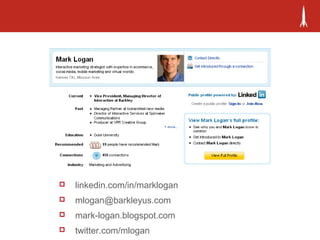
 linkedin.com/in/marklogan
 mlogan@barkleyus.com
 mark-logan.blogspot.com
 twitter.com/mlogan
Learning More
 LinkedIn Learning Center - http://learn.linkedin.com/
 LinkedIn Blog - http://blog.linkedin.com/
 Using LinkedIn Q&A -
http://www.linkedin.com/answers?
categoryHome=&category=ULI

7 Steps To LinkedIn Enlightenment

  • 1.
    Seven Steps toLinkedIn Enlightenment
  • 2.
  • 4.
    1. Optimize YourProfile  Put your Headline to work.
  • 5.
    1. Optimize YourProfile  Put your Headline to work  Let them know you’re alive
  • 6.
    1. Optimize YourProfile  Claim your name
  • 7.
    1. Optimize YourProfile  Summarize for your audience and for search  Include information about your company or group as appropriate
  • 8.
    1. Optimize YourProfile  Use applications to provide more context and increase connections.
  • 9.
    1. Optimize YourProfile  Solicit meaningful recommendations from  People relevant to your target audience  People who have well-developed networks
  • 10.
    2. Connect YourNetwork  Import contacts  Search colleagues and classmates  Use LinkedIn Outlook toolbar
  • 11.
    3. Promote YourCompany  New feature added November 2008  Edit copy for target audience and search  More robust elements coming soon
  • 12.
    4. Find People Advanced Search  Input field  Sidebar search  Saved Searches  Reference Search
  • 13.
  • 14.
    5. Make NewContacts Introduction - Free InMail - Paid
  • 15.
  • 16.
    6. Join Groups Introduce yourself  Participate – join discussions, ask questions  Give before your ask  Avoid shameless self promotion  Don’t start a new discussion if an old one fits
  • 17.
    7. Ask &Answer Questions
  • 18.
    7. Ask &Answer Questions “I've had luck simply posting that "I'm looking for connections in such and such a city", when I'm headed there for a sales trip. It's been really great to have referrals or for people whom I've forgotten about show up. Especially when I'm busting into a new market and mostly cold calling. I'm in Austin right now and 3 of the 9 appts. that I have while I'm here are from Linked In leads.”
  • 19.
    7. Ask &Answer Questions “Can you please put something in your presentation on how unacceptable it is to use your LinkedIn contacts to spam people?! I am on this for business connections, etc. NOT to get ridiculous emails from [NAME DELETED] about his ridiculous [PRODUCT DELETED]. This sours me to accept anyone with a sales background. “ Just my two cents. :)
  • 20.
    7. Ask &Answer Questions “Hey Mark -- Good to hear from you! Would LOVE to talk with you about LinkedIn, but my thoughts are too numerous for email. Call me at XXX-XXX-XXXX and I will tell you how I use LI from a B2B standpoint.
  • 21.
  • 22.
     linkedin.com/in/marklogan  mlogan@barkleyus.com mark-logan.blogspot.com  twitter.com/mlogan
  • 23.
    Learning More  LinkedInLearning Center - http://learn.linkedin.com/  LinkedIn Blog - http://blog.linkedin.com/  Using LinkedIn Q&A - http://www.linkedin.com/answers? categoryHome=&category=ULI

Editor's Notes

  • #3 35 million professionals worldwide 146% y-o-y growth All Fortune 500 250,000 new users per week 700 million possible by end of 2009
  • #4 Richard Tait, CEO Planning games in Starbucks Knew customers were Starbucks consumers Decided to try to reach Starbucks buyer, but couldn’t get through Mapped out his social and business connections, invited them to play-test sessions In a couple of months, he called them saying, “I keep hearing about this game, what is it?” Last year, they sold to Hasbro for $77.5 million
  • #5 Your headline by default will be your current title. You have up to 124 characters to make it more interesting. Think about keywords and searchability. What will your audience be looking for?
  • #7 You can change the URL for your personal profile
  • #8 Summary section, can be more than your professional summary, can include description of your company too. Write for search and write for your audience.
  • #10 Ask for high-quality references that are going to meaningful to your target audience Ask people who are well-connected Ask for specifics – e.g.
  • #11 Three ways to do this: - Use Add contacts feature in LinkedIn – manually add contacts or bulk import - Use LinkedIn to look up former colleagues or classmates - Use the LinkedIn plug-in for Outlook to identify new contacts based on your Outlook contacts folder or email patterns
  • #12 Company pages are a new feature, launched in Nov. 2008 Still in beta. At the moment, you can edit your company profile and flag inaccurate information. In the future, you’ll be able to upload additional content – like photos, Improvements in searchability
  • #13 DEMO – Search: - advanced search operators - advanced search - saved search - reference search - RSS
  • #14 DEMO – Search: - advanced search operators - advanced search - saved search - reference search - RSS
  • #15 Three ways to make contact with someone you don’t already know: - Ask for an Introduction – Free - If you’re a paid member – can use InMail Third way, members of the same group:
  • #16 Need more meat in terms of do’s don’ts how to get most out of Groups, etc. Participate in discussions Contribute to the community Give something before you ask Post polls Follow up on people’s answers Avoid sham When you post a question, follow up on other people's answers.  Don't start a conversation and walk away. Many people will lurk until they see there is a conversation. If you start a conversation, then participate. Avoid shameless self promotion. People don't react to it well. Instead of directly making offers, ask questions that would identify people worth talking to and engage them via follow up. If you would like to get more connections with relevant people, then simply put "connection invitations welcome" and your public email address under your signature to replies. Post news items. It's easy, and makes it simple to get information from your website or something of interest out to the group. Don't start a new discussion if an existing one fits. Why? Because when you follow up to an existing conversation all participants in the conversation are emailed in addition to the digest that goes out to members of the group.  This means you will get more eyeballs to your post by following up on an existing discussion than by starting a new one. Introduce yourself. If a group has an Introduce discussion, jump in and introduce yourself.  If not, then jump in and do an intro post.  Make sure you mention who you are, something personal about yourself (this makes the intro real) and what you do. Here's a great example.
  • #17 Need more meat in terms of do’s don’ts how to get most out of Groups, etc. Participate in discussions Contribute to the community Give something before you ask Post polls
  • #18 Get information Make contacts Build your reputation