Hadley Wickham
Stat405Intro to modelling
Tuesday, 16 November 2010
1. What is a linear model?
2. Removing trends
3. Transformations
4. Categorical data
5. Visualising models
Tuesday, 16 November 2010
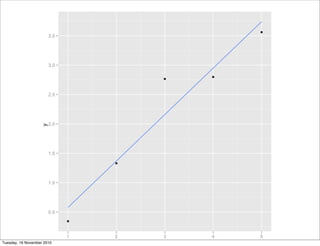
What is a
linear
model?
Tuesday, 16 November 2010
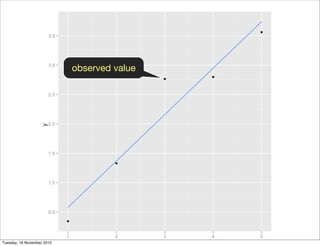
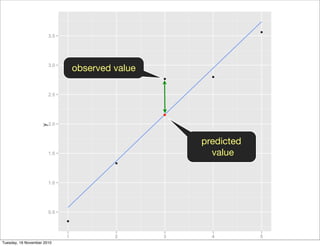
observed value
Tuesday, 16 November 2010
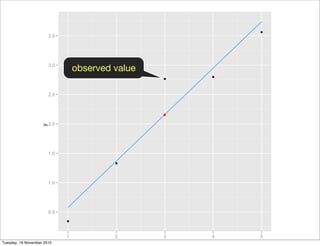
observed value
Tuesday, 16 November 2010
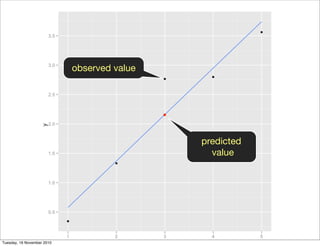
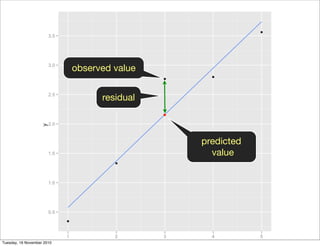
predicted
value
observed value
Tuesday, 16 November 2010
predicted
value
observed value
Tuesday, 16 November 2010
predicted
value
observed value
residual
Tuesday, 16 November 2010
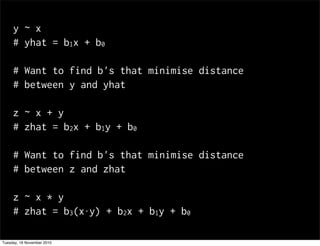
y ~ x
# yhat = b1x + b0
# Want to find b's that minimise distance
# between y and yhat
z ~ x + y
# zhat = b2x + b1y + b0
# Want to find b's that minimise distance
# between z and zhat
z ~ x * y
# zhat = b3(x⋅y) + b2x + b1y + b0
Tuesday, 16 November 2010
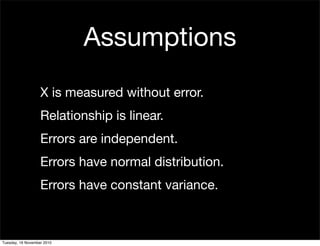
X is measured without error.
Relationship is linear.
Errors are independent.
Errors have normal distribution.
Errors have constant variance.
Assumptions
Tuesday, 16 November 2010
Removing
trends
Tuesday, 16 November 2010
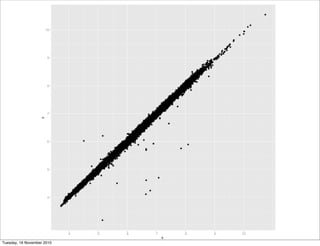
library(ggplot2)
diamonds$x[diamonds$x == 0] <- NA
diamonds$y[diamonds$y == 0] <- NA
diamonds$y[diamonds$y > 30] <- NA
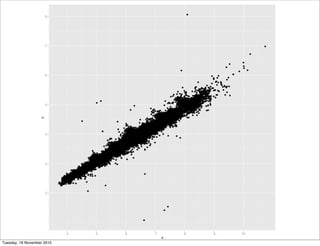
diamonds$z[diamonds$z == 0] <- NA
diamonds$z[diamonds$z > 30] <- NA
diamonds <- subset(diamonds, carat < 2)
qplot(x, y, data = diamonds)
qplot(x, z, data = diamonds)
Tuesday, 16 November 2010
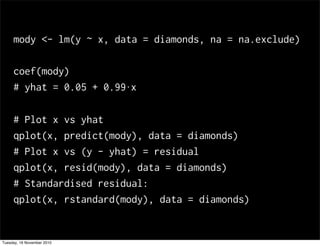
mody <- lm(y ~ x, data = diamonds, na = na.exclude)
coef(mody)
# yhat = 0.05 + 0.99⋅x
# Plot x vs yhat
qplot(x, predict(mody), data = diamonds)
# Plot x vs (y - yhat) = residual
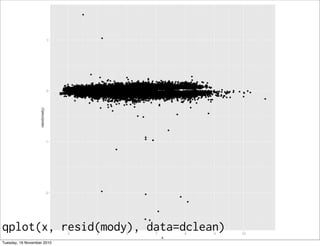
qplot(x, resid(mody), data = diamonds)
# Standardised residual:
qplot(x, rstandard(mody), data = diamonds)
Tuesday, 16 November 2010
qplot(x, resid(mody), data=dclean)
Tuesday, 16 November 2010
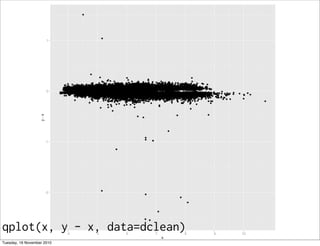
qplot(x, y - x, data=dclean)
Tuesday, 16 November 2010
Your turn
Do the same thing for z and x. What
threshold might you use to remove
outlying values?
Are the errors from predicting z and y
from x related?
Tuesday, 16 November 2010
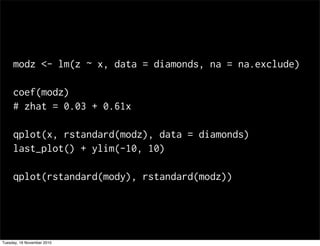
modz <- lm(z ~ x, data = diamonds, na = na.exclude)
coef(modz)
# zhat = 0.03 + 0.61x
qplot(x, rstandard(modz), data = diamonds)
last_plot() + ylim(-10, 10)
qplot(rstandard(mody), rstandard(modz))
Tuesday, 16 November 2010
Transformations
Tuesday, 16 November 2010
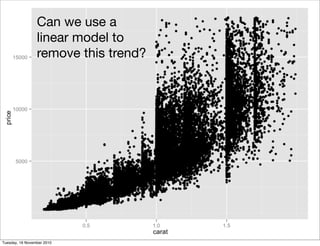
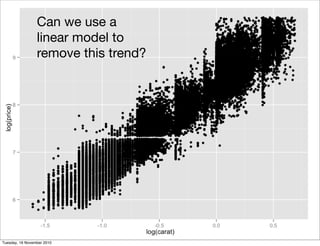
Can we use a
linear model to
remove this trend?
Tuesday, 16 November 2010
Can we use a
linear model to
remove this trend?
Tuesday, 16 November 2010
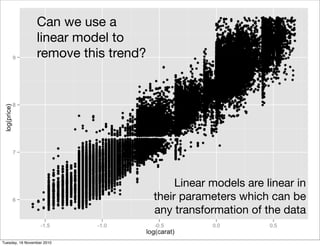
Can we use a
linear model to
remove this trend?
Linear models are linear in
their parameters which can be
any transformation of the data
Tuesday, 16 November 2010
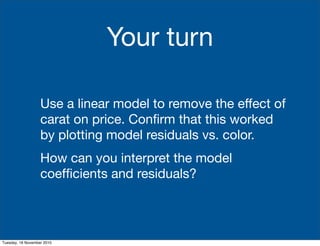
Your turn
Use a linear model to remove the effect of
carat on price. Confirm that this worked
by plotting model residuals vs. color.
How can you interpret the model
coefficients and residuals?
Tuesday, 16 November 2010
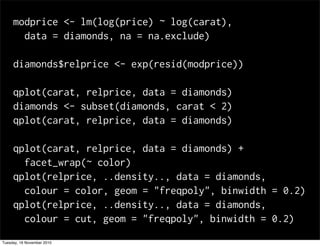
modprice <- lm(log(price) ~ log(carat),
data = diamonds, na = na.exclude)
diamonds$relprice <- exp(resid(modprice))
qplot(carat, relprice, data = diamonds)
diamonds <- subset(diamonds, carat < 2)
qplot(carat, relprice, data = diamonds)
qplot(carat, relprice, data = diamonds) +
facet_wrap(~ color)
qplot(relprice, ..density.., data = diamonds,
colour = color, geom = "freqpoly", binwidth = 0.2)
qplot(relprice, ..density.., data = diamonds,
colour = cut, geom = "freqpoly", binwidth = 0.2)
Tuesday, 16 November 2010
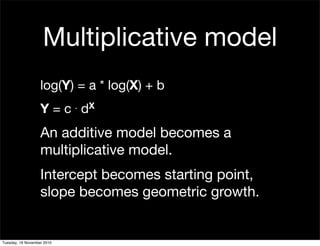
log(Y) = a * log(X) + b
Y = c . dX
An additive model becomes a
multiplicative model.
Intercept becomes starting point,
slope becomes geometric growth.
Multiplicative model
Tuesday, 16 November 2010
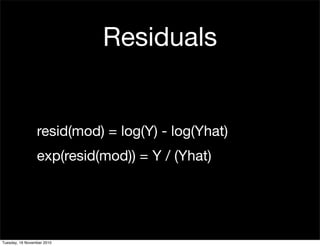
Residuals
resid(mod) = log(Y) - log(Yhat)
exp(resid(mod)) = Y / (Yhat)
Tuesday, 16 November 2010
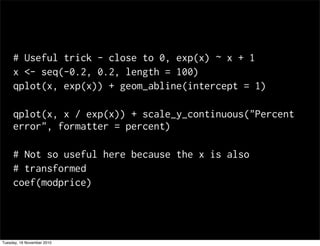
# Useful trick - close to 0, exp(x) ~ x + 1
x <- seq(-0.2, 0.2, length = 100)
qplot(x, exp(x)) + geom_abline(intercept = 1)
qplot(x, x / exp(x)) + scale_y_continuous("Percent
error", formatter = percent)
# Not so useful here because the x is also
# transformed
coef(modprice)
Tuesday, 16 November 2010
Categorical
data
Tuesday, 16 November 2010
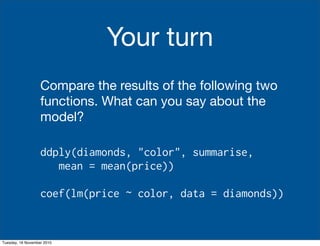
Compare the results of the following two
functions. What can you say about the
model?
ddply(diamonds, "color", summarise,
mean = mean(price))
coef(lm(price ~ color, data = diamonds))
Your turn
Tuesday, 16 November 2010
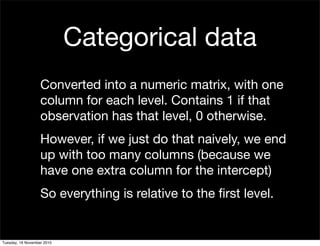
Categorical data
Converted into a numeric matrix, with one
column for each level. Contains 1 if that
observation has that level, 0 otherwise.
However, if we just do that naively, we end
up with too many columns (because we
have one extra column for the intercept)
So everything is relative to the first level.
Tuesday, 16 November 2010
Visualising
models
Tuesday, 16 November 2010
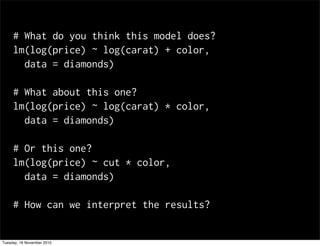
# What do you think this model does?
lm(log(price) ~ log(carat) + color,
data = diamonds)
# What about this one?
lm(log(price) ~ log(carat) * color,
data = diamonds)
# Or this one?
lm(log(price) ~ cut * color,
data = diamonds)
# How can we interpret the results?
Tuesday, 16 November 2010
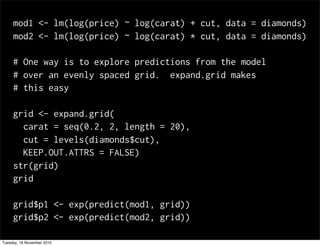
mod1 <- lm(log(price) ~ log(carat) + cut, data = diamonds)
mod2 <- lm(log(price) ~ log(carat) * cut, data = diamonds)
# One way is to explore predictions from the model
# over an evenly spaced grid. expand.grid makes
# this easy
grid <- expand.grid(
carat = seq(0.2, 2, length = 20),
cut = levels(diamonds$cut),
KEEP.OUT.ATTRS = FALSE)
str(grid)
grid
grid$p1 <- exp(predict(mod1, grid))
grid$p2 <- exp(predict(mod2, grid))
Tuesday, 16 November 2010
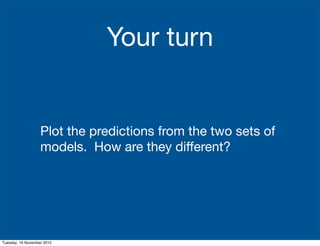
Plot the predictions from the two sets of
models. How are they different?
Your turn
Tuesday, 16 November 2010
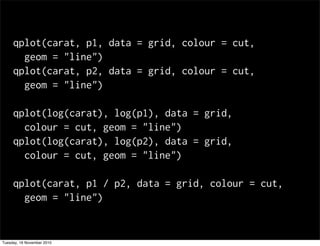
qplot(carat, p1, data = grid, colour = cut,
geom = "line")
qplot(carat, p2, data = grid, colour = cut,
geom = "line")
qplot(log(carat), log(p1), data = grid,
colour = cut, geom = "line")
qplot(log(carat), log(p2), data = grid,
colour = cut, geom = "line")
qplot(carat, p1 / p2, data = grid, colour = cut,
geom = "line")
Tuesday, 16 November 2010
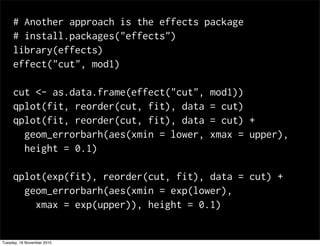
# Another approach is the effects package
# install.packages("effects")
library(effects)
effect("cut", mod1)
cut <- as.data.frame(effect("cut", mod1))
qplot(fit, reorder(cut, fit), data = cut)
qplot(fit, reorder(cut, fit), data = cut) +
geom_errorbarh(aes(xmin = lower, xmax = upper),
height = 0.1)
qplot(exp(fit), reorder(cut, fit), data = cut) +
geom_errorbarh(aes(xmin = exp(lower),
xmax = exp(upper)), height = 0.1)
Tuesday, 16 November 2010

24 modelling

  • 1.
    Hadley Wickham Stat405Intro tomodelling Tuesday, 16 November 2010
  • 2.
    1. What isa linear model? 2. Removing trends 3. Transformations 4. Categorical data 5. Visualising models Tuesday, 16 November 2010
  • 3.
  • 4.
  • 5.
  • 6.
  • 7.
  • 8.
  • 9.
  • 10.
    y ~ x #yhat = b1x + b0 # Want to find b's that minimise distance # between y and yhat z ~ x + y # zhat = b2x + b1y + b0 # Want to find b's that minimise distance # between z and zhat z ~ x * y # zhat = b3(x⋅y) + b2x + b1y + b0 Tuesday, 16 November 2010
  • 11.
    X is measuredwithout error. Relationship is linear. Errors are independent. Errors have normal distribution. Errors have constant variance. Assumptions Tuesday, 16 November 2010
  • 12.
  • 13.
    library(ggplot2) diamonds$x[diamonds$x == 0]<- NA diamonds$y[diamonds$y == 0] <- NA diamonds$y[diamonds$y > 30] <- NA diamonds$z[diamonds$z == 0] <- NA diamonds$z[diamonds$z > 30] <- NA diamonds <- subset(diamonds, carat < 2) qplot(x, y, data = diamonds) qplot(x, z, data = diamonds) Tuesday, 16 November 2010
  • 14.
  • 15.
  • 16.
    mody <- lm(y~ x, data = diamonds, na = na.exclude) coef(mody) # yhat = 0.05 + 0.99⋅x # Plot x vs yhat qplot(x, predict(mody), data = diamonds) # Plot x vs (y - yhat) = residual qplot(x, resid(mody), data = diamonds) # Standardised residual: qplot(x, rstandard(mody), data = diamonds) Tuesday, 16 November 2010
  • 17.
  • 18.
    qplot(x, y -x, data=dclean) Tuesday, 16 November 2010
  • 19.
    Your turn Do thesame thing for z and x. What threshold might you use to remove outlying values? Are the errors from predicting z and y from x related? Tuesday, 16 November 2010
  • 20.
    modz <- lm(z~ x, data = diamonds, na = na.exclude) coef(modz) # zhat = 0.03 + 0.61x qplot(x, rstandard(modz), data = diamonds) last_plot() + ylim(-10, 10) qplot(rstandard(mody), rstandard(modz)) Tuesday, 16 November 2010
  • 21.
  • 22.
    Can we usea linear model to remove this trend? Tuesday, 16 November 2010
  • 23.
    Can we usea linear model to remove this trend? Tuesday, 16 November 2010
  • 24.
    Can we usea linear model to remove this trend? Linear models are linear in their parameters which can be any transformation of the data Tuesday, 16 November 2010
  • 25.
    Your turn Use alinear model to remove the effect of carat on price. Confirm that this worked by plotting model residuals vs. color. How can you interpret the model coefficients and residuals? Tuesday, 16 November 2010
  • 26.
    modprice <- lm(log(price)~ log(carat), data = diamonds, na = na.exclude) diamonds$relprice <- exp(resid(modprice)) qplot(carat, relprice, data = diamonds) diamonds <- subset(diamonds, carat < 2) qplot(carat, relprice, data = diamonds) qplot(carat, relprice, data = diamonds) + facet_wrap(~ color) qplot(relprice, ..density.., data = diamonds, colour = color, geom = "freqpoly", binwidth = 0.2) qplot(relprice, ..density.., data = diamonds, colour = cut, geom = "freqpoly", binwidth = 0.2) Tuesday, 16 November 2010
  • 27.
    log(Y) = a* log(X) + b Y = c . dX An additive model becomes a multiplicative model. Intercept becomes starting point, slope becomes geometric growth. Multiplicative model Tuesday, 16 November 2010
  • 28.
    Residuals resid(mod) = log(Y)- log(Yhat) exp(resid(mod)) = Y / (Yhat) Tuesday, 16 November 2010
  • 29.
    # Useful trick- close to 0, exp(x) ~ x + 1 x <- seq(-0.2, 0.2, length = 100) qplot(x, exp(x)) + geom_abline(intercept = 1) qplot(x, x / exp(x)) + scale_y_continuous("Percent error", formatter = percent) # Not so useful here because the x is also # transformed coef(modprice) Tuesday, 16 November 2010
  • 30.
  • 31.
    Compare the resultsof the following two functions. What can you say about the model? ddply(diamonds, "color", summarise, mean = mean(price)) coef(lm(price ~ color, data = diamonds)) Your turn Tuesday, 16 November 2010
  • 32.
    Categorical data Converted intoa numeric matrix, with one column for each level. Contains 1 if that observation has that level, 0 otherwise. However, if we just do that naively, we end up with too many columns (because we have one extra column for the intercept) So everything is relative to the first level. Tuesday, 16 November 2010
  • 33.
  • 34.
    # What doyou think this model does? lm(log(price) ~ log(carat) + color, data = diamonds) # What about this one? lm(log(price) ~ log(carat) * color, data = diamonds) # Or this one? lm(log(price) ~ cut * color, data = diamonds) # How can we interpret the results? Tuesday, 16 November 2010
  • 35.
    mod1 <- lm(log(price)~ log(carat) + cut, data = diamonds) mod2 <- lm(log(price) ~ log(carat) * cut, data = diamonds) # One way is to explore predictions from the model # over an evenly spaced grid. expand.grid makes # this easy grid <- expand.grid( carat = seq(0.2, 2, length = 20), cut = levels(diamonds$cut), KEEP.OUT.ATTRS = FALSE) str(grid) grid grid$p1 <- exp(predict(mod1, grid)) grid$p2 <- exp(predict(mod2, grid)) Tuesday, 16 November 2010
  • 36.
    Plot the predictionsfrom the two sets of models. How are they different? Your turn Tuesday, 16 November 2010
  • 37.
    qplot(carat, p1, data= grid, colour = cut, geom = "line") qplot(carat, p2, data = grid, colour = cut, geom = "line") qplot(log(carat), log(p1), data = grid, colour = cut, geom = "line") qplot(log(carat), log(p2), data = grid, colour = cut, geom = "line") qplot(carat, p1 / p2, data = grid, colour = cut, geom = "line") Tuesday, 16 November 2010
  • 38.
    # Another approachis the effects package # install.packages("effects") library(effects) effect("cut", mod1) cut <- as.data.frame(effect("cut", mod1)) qplot(fit, reorder(cut, fit), data = cut) qplot(fit, reorder(cut, fit), data = cut) + geom_errorbarh(aes(xmin = lower, xmax = upper), height = 0.1) qplot(exp(fit), reorder(cut, fit), data = cut) + geom_errorbarh(aes(xmin = exp(lower), xmax = exp(upper)), height = 0.1) Tuesday, 16 November 2010