R for Statistical
Computing
RAFIE TARABAY
ENG_RAFIE@MANS.EDU.EG
Statistical Concepts
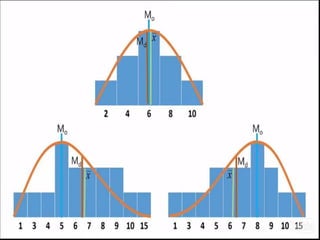
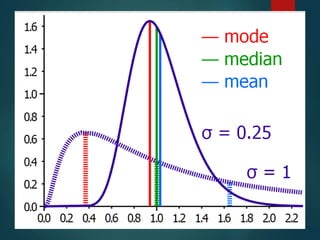
Central tendency
finding the middle of the data, and understanding how
the data shapes.
MEAN MEDIAN MODE
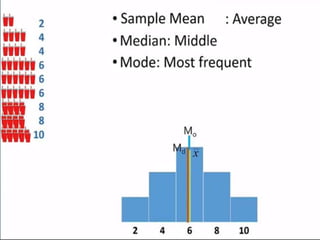
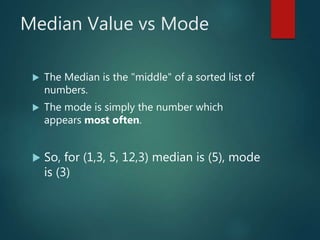
Median Value vs Mode
 The Median is the "middle" of a sorted list of
numbers.
 The mode is simply the number which
appears most often.
 So, for (1,3, 5, 12,3) median is (5), mode
is (3)
Data variability
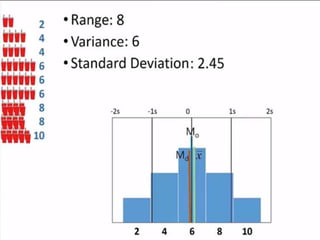
VARIANCE - STANDARD DEVIATION
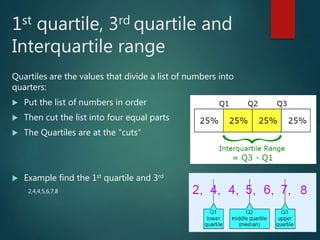
1st quartile, 3rd quartile and
Interquartile range
Quartiles are the values that divide a list of numbers into
quarters:
 Put the list of numbers in order
 Then cut the list into four equal parts
 The Quartiles are at the "cuts“
 Example find the 1st quartile and 3rd
2,4,4,5,6,7,8
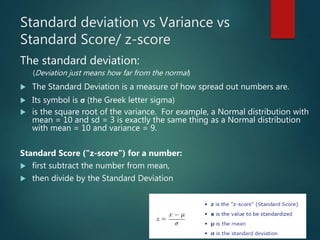
Standard deviation vs Variance vs
Standard Score/ z-score
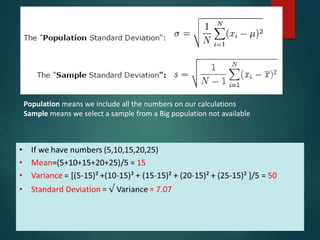
The standard deviation:
(Deviation just means how far from the normal)
 The Standard Deviation is a measure of how spread out numbers are.
 Its symbol is σ (the Greek letter sigma)
 is the square root of the variance. For example, a Normal distribution with
mean = 10 and sd = 3 is exactly the same thing as a Normal distribution
with mean = 10 and variance = 9.
Standard Score ("z-score") for a number:
 first subtract the number from mean,
 then divide by the Standard Deviation
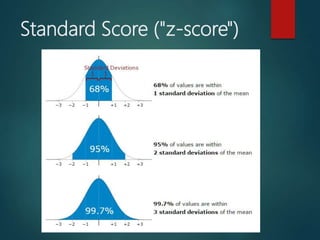
Standard Score ("z-score")
Population means we include all the numbers on our calculations
Sample means we select a sample from a Big population not available
A Practical Example
 Your company packages sugar in 1 kg bags.
 When you weigh a sample of bags you get these results:
 1007g, 1032g, 1002g, 983g, 1004g, ... (a hundred measurements)
 Mean = 1010g
 Standard Deviation = 20g
 How many package less that 1 KG? 30.85%
How to fix this problem?
 Let's adjust the machine so that 1000g is:
 at −3 standard deviations: 0.1%
 at −2.5 standard deviations: 0.6% [Good choice]
 The standard deviation is 20g, and we need 2.5 of them: 2.5 × 20g = 50g, so
increase the package 50 gram when weight to fix the problem.
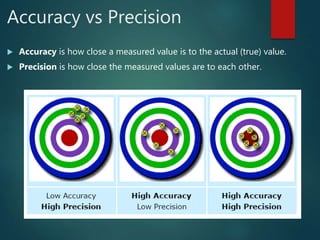
Accuracy vs Precision
 Accuracy is how close a measured value is to the actual (true) value.
 Precision is how close the measured values are to each other.
Correlation (Association)
 When we need to know if there is a relations between two variables x and y
or not we check correlation and the value of it between +1 and -1
 +1 means strong correlation: when x increase y increase.
 -1 means strong negative correlation: when x increase y decrease.
 0 means no correlation and no relation between x and y.
ANOVA
 Analysis of variance.
 Like you sale lemon and orange on park and on beach and you need to
know if this makes different or not.
Regression
 help in prediction where we use information that we have and apply
some statistics to predict something that we don’t know.
 So, we can use past sales to predict future sales.
What is R?
 R is an open source, free language and environment for statistical
computing and graphics.
 Run on any platform, ie, windows/Unix/Linux
R
 Case sensitive
 Not sensitive to white spaces
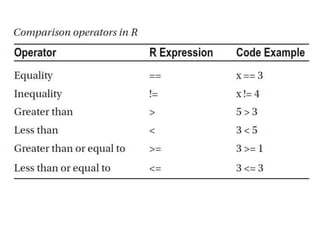
 Use = or <- to assign value to a variable
 Download R from here
https://cran.r-project.org/
 Download R studio from here
https://www.rstudio.com/products/rstudio/do
wnload/
Ctrl+ L to clear the console
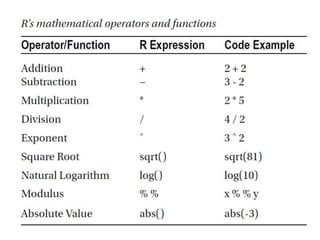
Some R’s operations
 X=5
 Y=4
 Z=x*y
 A=1:10 1,2,3,4,5,6,7,8,9,10
 B=A^2 1,4,9,16,25,36,49,64,81,100
 K=B[1:5] 1,4,9,16,25
 A[1:3]=c(33,66,99)
 A 33,66,99,4,5,6,7,8,9,10
Bulk Data containers
 Vector
 List
 Data Frame
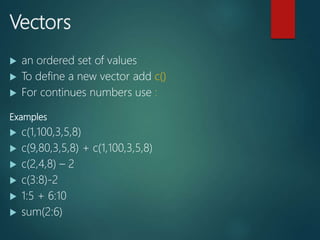
Vectors
 an ordered set of values
 To define a new vector add c()
 For continues numbers use :
Examples
 c(1,100,3,5,8)
 c(9,80,3,5,8) + c(1,100,3,5,8)
 c(2,4,8) – 2
 c(3:8)-2
 1:5 + 6:10
 sum(2:6)
Set title to the vector
 X=100:102
 names(X)=c(“First”,”Second”,”Third”)
 X
 Y=1:26
 names(Y)=toupper(letters[1:26])
First Second Third
100 101 102
A B C D E F G H I J K …
1 2 3 4 5 6 7 8 9 10 11 ..
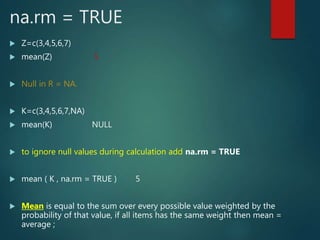
na.rm = TRUE
 Z=c(3,4,5,6,7)
 mean(Z) 5
 Null in R = NA.
 K=c(3,4,5,6,7,NA)
 mean(K) NULL
 to ignore null values during calculation add na.rm = TRUE
 mean ( K , na.rm = TRUE ) 5
 Mean is equal to the sum over every possible value weighted by the
probability of that value, if all items has the same weight then mean =
average ;
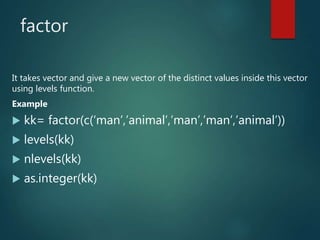
factor
It takes vector and give a new vector of the distinct values inside this vector
using levels function.
Example
 kk= factor(c(‘man’,’animal’,’man’,’man’,’animal’))
 levels(kk)
 nlevels(kk)
 as.integer(kk)
List
 Each element of the list can has different type.
Example
 zz= list(1,6,’ssss’,true)
 kk= list (first=1,second=6,third=‘ssss’,fourth=true)
 // kk[1:3] // kk[1] // kk[“first”] // kk$first
 To convert vector to list use as.list(vector name)
 To convert list to vector use as.numeric(list name) or unlist(list name)
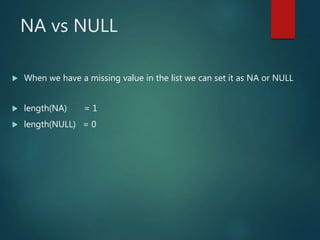
NA vs NULL
 When we have a missing value in the list we can set it as NA or NULL
 length(NA) = 1
 length(NULL) = 0
Data Frame
 It is like a DB table contains rows and columns
 To create it use data.frame()
Example
 zz=data.frame( x=c(1:5) , y=letters[1:5] )
Related Functions
 rownames, colnames,dim , dimnames, nrow, ncol
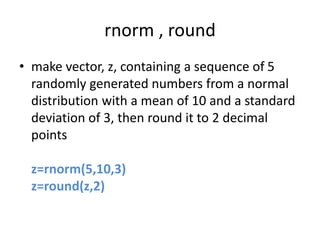
rnorm , round
• make vector, z, containing a sequence of 5
randomly generated numbers from a normal
distribution with a mean of 10 and a standard
deviation of 3, then round it to 2 decimal
points
z=rnorm(5,10,3)
z=round(z,2)
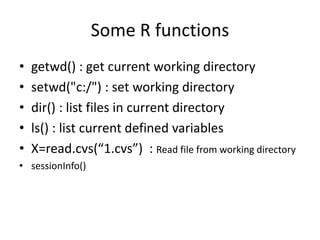
Some R functions
• getwd() : get current working directory
• setwd("c:/") : set working directory
• dir() : list files in current directory
• ls() : list current defined variables
• X=read.cvs(“1.cvs”) : Read file from working directory
• sessionInfo()
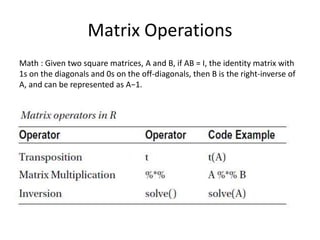
Matrix Operations
Math : Given two square matrices, A and B, if AB = I, the identity matrix with
1s on the diagonals and 0s on the off-diagonals, then B is the right-inverse of
A, and can be represented as A−1.
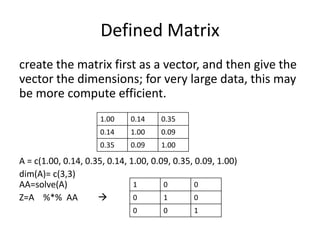
Defined Matrix
create the matrix first as a vector, and then give the
vector the dimensions; for very large data, this may
be more compute efficient.
A = c(1.00, 0.14, 0.35, 0.14, 1.00, 0.09, 0.35, 0.09, 1.00)
dim(A)= c(3,3)
AA=solve(A)
Z=A %*% AA 
1.00 0.14 0.35
0.14 1.00 0.09
0.35 0.09 1.00
1 0 0
0 1 0
0 0 1
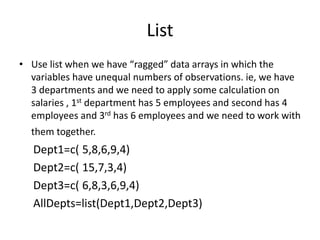
List
• Use list when we have “ragged” data arrays in which the
variables have unequal numbers of observations. ie, we have
3 departments and we need to apply some calculation on
salaries , 1st department has 5 employees and second has 4
employees and 3rd has 6 employees and we need to work with
them together.
Dept1=c( 5,8,6,9,4)
Dept2=c( 15,7,3,4)
Dept3=c( 6,8,3,6,9,4)
AllDepts=list(Dept1,Dept2,Dept3)
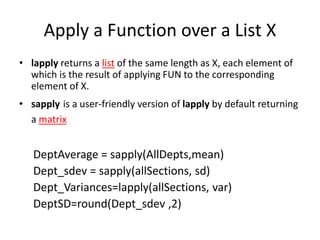
Apply a Function over a List X
• lapply returns a list of the same length as X, each element of
which is the result of applying FUN to the corresponding
element of X.
• sapply is a user-friendly version of lapply by default returning
a matrix
DeptAverage = sapply(AllDepts,mean)
Dept_sdev = sapply(allSections, sd)
Dept_Variances=lapply(allSections, var)
DeptSD=round(Dept_sdev ,2)
Data Frames
HOW TO MERGE DATA FROM MANY DATA FRAMES?
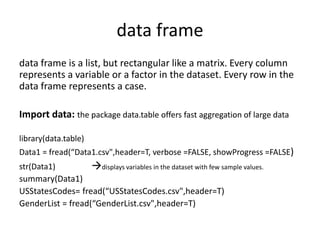
data frame
data frame is a list, but rectangular like a matrix. Every column
represents a variable or a factor in the dataset. Every row in the
data frame represents a case.
Import data: the package data.table offers fast aggregation of large data
library(data.table)
Data1 = fread(“Data1.csv",header=T, verbose =FALSE, showProgress =FALSE)
str(Data1) displays variables in the dataset with few sample values.
summary(Data1)
USStatesCodes= fread(“USStatesCodes.csv",header=T)
GenderList = fread(“GenderList.csv",header=T)
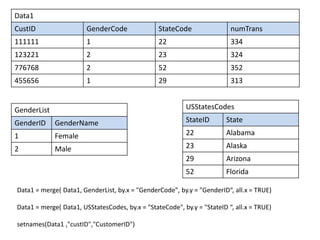
Data1
CustID GenderCode StateCode numTrans
111111 1 22 334
123221 2 23 324
776768 2 52 352
455656 1 29 313
GenderList
GenderID GenderName
1 Female
2 Male
USStatesCodes
StateID State
22 Alabama
23 Alaska
29 Arizona
52 Florida
Data1 = merge( Data1, GenderList, by.x = "GenderCode", by.y = "GenderID“, all.x = TRUE)
Data1 = merge( Data1, USStatesCodes, by.x = "StateCode", by.y = "StateID “, all.x = TRUE)
setnames(Data1 ,"custID","CustomerID")
Data1
CustomerID Gender Code Gender Name State Code State numTrans
111111 1 Female 22 Alabama 334
123221 2 male 23 Alaska 324
776768 2 male 52 Florida 352
455656 1 Female 29 Arizona 313
Select data that met one criteria
which (Data1 $ GenderCode = 2)
Select some columns from data
SelectedColumnsNames= c(“CustomerID” , ”numTrans”)
Data2 = Data1[SelectedColumnsNames]
Get Information about column
summary(Data1 $ numTrans)
Min. 1st Qu. Median Mean 3rd Qu. Max.
313 333 350 366 377 400
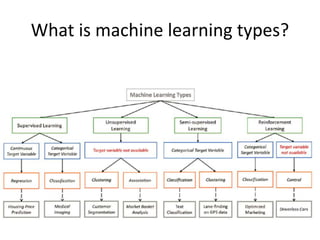
Machine learning types
What is machine learning types?
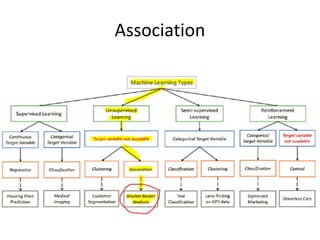
Association
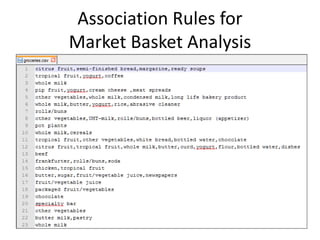
Association Rules for
Market Basket Analysis
Process description
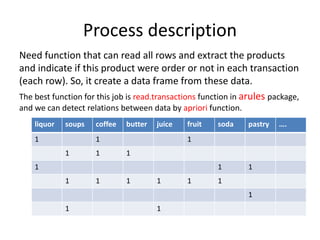
Need function that can read all rows and extract the products
and indicate if this product were order or not in each transaction
(each row). So, it create a data frame from these data.
The best function for this job is read.transactions function in arules package,
and we can detect relations between data by apriori function.
liquor soups coffee butter juice fruit soda pastry ….
1 1 1
1 1 1
1 1 1
1 1 1 1 1 1
1
1 1
Steps
 Install.packages (“arules”)
 require(arules)
 setwd("C:/R-datasets")
 SalesData =read.transactions(“groceries.csv”, sep=“ , ”)
View data
 str(SalesData)
 summary(SalesData)  get calculation information about data
 inspect(SalesData[1:3]) read sales transactions that exists in 1st 3 rows
 itemFrequency(SalesData[,1])  all rows and product number 1
 itemFrequency(SalesData [ , 1 : 6 ] )  all rows and products from 1 to 6
Plot
 itemFrequencyPlot (SalesData , support = 0.05)  draw items that exceed a limit 5%
 itemFrequencyPlot (SalesData , topN = 20)  draw top 20 sales items
Detect Association
 AssociationRules1 =
apriori (SalesData, parameter = list (support = 0.007,confidence=0.25, minlen=2))
Browse Association rules
• Inspect(AssociationRules1 [1:2] )
• Inspect(sort(AssociationRules1, by=“lift”)[1:4])
Lift is simply the ratio of these values: target
response divided by average response.
LHS RHS Support Confidence Lift
Coffee Milk 0.006 0.44 4.2
Time series data
install.packages("readr")
library(readr)
US_EGP = read_csv("US_EGP.csv", col_types = cols(Time = col_date(format = "%Y-%m-%d")))
View(US_EGP)
plot( US_EGP$HighPrice ~ US_EGP$Time , type="l” , col="red")
Connectivity between R and Hive
install.packages("RJDBC",dep=TRUE)
require(RJDBC)
#Load Hive JDBC driver
hivedrv <- JDBC("org.apache.hadoop.hive.jdbc.HiveDriver",
c(list.files("/home/zzzzz/hadoop/hadoop",pattern="jar$",full.names=T),
list.files("/home/zzzzz/hadoop/hive/lib",pattern="jar$",full.names=T)))
#Connect to Hive service
hivecon <- dbConnect(hivedrv, "jdbc:hive://ip:port/default")
query = "select * from mytable LIMIT 10"
hres <- dbGetQuery(hivecon, query)

R for Statistical Computing

  • 1.
    R for Statistical Computing RAFIETARABAY ENG_RAFIE@MANS.EDU.EG
  • 2.
  • 3.
    Central tendency finding themiddle of the data, and understanding how the data shapes. MEAN MEDIAN MODE
  • 7.
    Median Value vsMode  The Median is the "middle" of a sorted list of numbers.  The mode is simply the number which appears most often.  So, for (1,3, 5, 12,3) median is (5), mode is (3)
  • 8.
    Data variability VARIANCE -STANDARD DEVIATION
  • 10.
    1st quartile, 3rdquartile and Interquartile range Quartiles are the values that divide a list of numbers into quarters:  Put the list of numbers in order  Then cut the list into four equal parts  The Quartiles are at the "cuts“  Example find the 1st quartile and 3rd 2,4,4,5,6,7,8
  • 11.
    Standard deviation vsVariance vs Standard Score/ z-score The standard deviation: (Deviation just means how far from the normal)  The Standard Deviation is a measure of how spread out numbers are.  Its symbol is σ (the Greek letter sigma)  is the square root of the variance. For example, a Normal distribution with mean = 10 and sd = 3 is exactly the same thing as a Normal distribution with mean = 10 and variance = 9. Standard Score ("z-score") for a number:  first subtract the number from mean,  then divide by the Standard Deviation
  • 12.
  • 13.
    Population means weinclude all the numbers on our calculations Sample means we select a sample from a Big population not available
  • 14.
    A Practical Example Your company packages sugar in 1 kg bags.  When you weigh a sample of bags you get these results:  1007g, 1032g, 1002g, 983g, 1004g, ... (a hundred measurements)  Mean = 1010g  Standard Deviation = 20g  How many package less that 1 KG? 30.85% How to fix this problem?  Let's adjust the machine so that 1000g is:  at −3 standard deviations: 0.1%  at −2.5 standard deviations: 0.6% [Good choice]  The standard deviation is 20g, and we need 2.5 of them: 2.5 × 20g = 50g, so increase the package 50 gram when weight to fix the problem.
  • 15.
    Accuracy vs Precision Accuracy is how close a measured value is to the actual (true) value.  Precision is how close the measured values are to each other.
  • 16.
    Correlation (Association)  Whenwe need to know if there is a relations between two variables x and y or not we check correlation and the value of it between +1 and -1  +1 means strong correlation: when x increase y increase.  -1 means strong negative correlation: when x increase y decrease.  0 means no correlation and no relation between x and y.
  • 17.
    ANOVA  Analysis ofvariance.  Like you sale lemon and orange on park and on beach and you need to know if this makes different or not.
  • 18.
    Regression  help inprediction where we use information that we have and apply some statistics to predict something that we don’t know.  So, we can use past sales to predict future sales.
  • 19.
    What is R? R is an open source, free language and environment for statistical computing and graphics.  Run on any platform, ie, windows/Unix/Linux
  • 20.
    R  Case sensitive Not sensitive to white spaces  Use = or <- to assign value to a variable  Download R from here https://cran.r-project.org/  Download R studio from here https://www.rstudio.com/products/rstudio/do wnload/ Ctrl+ L to clear the console
  • 23.
    Some R’s operations X=5  Y=4  Z=x*y  A=1:10 1,2,3,4,5,6,7,8,9,10  B=A^2 1,4,9,16,25,36,49,64,81,100  K=B[1:5] 1,4,9,16,25  A[1:3]=c(33,66,99)  A 33,66,99,4,5,6,7,8,9,10
  • 24.
    Bulk Data containers Vector  List  Data Frame
  • 25.
    Vectors  an orderedset of values  To define a new vector add c()  For continues numbers use : Examples  c(1,100,3,5,8)  c(9,80,3,5,8) + c(1,100,3,5,8)  c(2,4,8) – 2  c(3:8)-2  1:5 + 6:10  sum(2:6)
  • 26.
    Set title tothe vector  X=100:102  names(X)=c(“First”,”Second”,”Third”)  X  Y=1:26  names(Y)=toupper(letters[1:26]) First Second Third 100 101 102 A B C D E F G H I J K … 1 2 3 4 5 6 7 8 9 10 11 ..
  • 27.
    na.rm = TRUE Z=c(3,4,5,6,7)  mean(Z) 5  Null in R = NA.  K=c(3,4,5,6,7,NA)  mean(K) NULL  to ignore null values during calculation add na.rm = TRUE  mean ( K , na.rm = TRUE ) 5  Mean is equal to the sum over every possible value weighted by the probability of that value, if all items has the same weight then mean = average ;
  • 28.
    factor It takes vectorand give a new vector of the distinct values inside this vector using levels function. Example  kk= factor(c(‘man’,’animal’,’man’,’man’,’animal’))  levels(kk)  nlevels(kk)  as.integer(kk)
  • 29.
    List  Each elementof the list can has different type. Example  zz= list(1,6,’ssss’,true)  kk= list (first=1,second=6,third=‘ssss’,fourth=true)  // kk[1:3] // kk[1] // kk[“first”] // kk$first  To convert vector to list use as.list(vector name)  To convert list to vector use as.numeric(list name) or unlist(list name)
  • 30.
    NA vs NULL When we have a missing value in the list we can set it as NA or NULL  length(NA) = 1  length(NULL) = 0
  • 31.
    Data Frame  Itis like a DB table contains rows and columns  To create it use data.frame() Example  zz=data.frame( x=c(1:5) , y=letters[1:5] ) Related Functions  rownames, colnames,dim , dimnames, nrow, ncol
  • 32.
    rnorm , round •make vector, z, containing a sequence of 5 randomly generated numbers from a normal distribution with a mean of 10 and a standard deviation of 3, then round it to 2 decimal points z=rnorm(5,10,3) z=round(z,2)
  • 33.
    Some R functions •getwd() : get current working directory • setwd("c:/") : set working directory • dir() : list files in current directory • ls() : list current defined variables • X=read.cvs(“1.cvs”) : Read file from working directory • sessionInfo()
  • 34.
    Matrix Operations Math :Given two square matrices, A and B, if AB = I, the identity matrix with 1s on the diagonals and 0s on the off-diagonals, then B is the right-inverse of A, and can be represented as A−1.
  • 35.
    Defined Matrix create thematrix first as a vector, and then give the vector the dimensions; for very large data, this may be more compute efficient. A = c(1.00, 0.14, 0.35, 0.14, 1.00, 0.09, 0.35, 0.09, 1.00) dim(A)= c(3,3) AA=solve(A) Z=A %*% AA  1.00 0.14 0.35 0.14 1.00 0.09 0.35 0.09 1.00 1 0 0 0 1 0 0 0 1
  • 36.
    List • Use listwhen we have “ragged” data arrays in which the variables have unequal numbers of observations. ie, we have 3 departments and we need to apply some calculation on salaries , 1st department has 5 employees and second has 4 employees and 3rd has 6 employees and we need to work with them together. Dept1=c( 5,8,6,9,4) Dept2=c( 15,7,3,4) Dept3=c( 6,8,3,6,9,4) AllDepts=list(Dept1,Dept2,Dept3)
  • 37.
    Apply a Functionover a List X • lapply returns a list of the same length as X, each element of which is the result of applying FUN to the corresponding element of X. • sapply is a user-friendly version of lapply by default returning a matrix DeptAverage = sapply(AllDepts,mean) Dept_sdev = sapply(allSections, sd) Dept_Variances=lapply(allSections, var) DeptSD=round(Dept_sdev ,2)
  • 38.
    Data Frames HOW TOMERGE DATA FROM MANY DATA FRAMES?
  • 39.
    data frame data frameis a list, but rectangular like a matrix. Every column represents a variable or a factor in the dataset. Every row in the data frame represents a case. Import data: the package data.table offers fast aggregation of large data library(data.table) Data1 = fread(“Data1.csv",header=T, verbose =FALSE, showProgress =FALSE) str(Data1) displays variables in the dataset with few sample values. summary(Data1) USStatesCodes= fread(“USStatesCodes.csv",header=T) GenderList = fread(“GenderList.csv",header=T)
  • 40.
    Data1 CustID GenderCode StateCodenumTrans 111111 1 22 334 123221 2 23 324 776768 2 52 352 455656 1 29 313 GenderList GenderID GenderName 1 Female 2 Male USStatesCodes StateID State 22 Alabama 23 Alaska 29 Arizona 52 Florida Data1 = merge( Data1, GenderList, by.x = "GenderCode", by.y = "GenderID“, all.x = TRUE) Data1 = merge( Data1, USStatesCodes, by.x = "StateCode", by.y = "StateID “, all.x = TRUE) setnames(Data1 ,"custID","CustomerID")
  • 41.
    Data1 CustomerID Gender CodeGender Name State Code State numTrans 111111 1 Female 22 Alabama 334 123221 2 male 23 Alaska 324 776768 2 male 52 Florida 352 455656 1 Female 29 Arizona 313 Select data that met one criteria which (Data1 $ GenderCode = 2) Select some columns from data SelectedColumnsNames= c(“CustomerID” , ”numTrans”) Data2 = Data1[SelectedColumnsNames] Get Information about column summary(Data1 $ numTrans) Min. 1st Qu. Median Mean 3rd Qu. Max. 313 333 350 366 377 400
  • 42.
  • 43.
    What is machinelearning types?
  • 44.
  • 45.
  • 46.
    Process description Need functionthat can read all rows and extract the products and indicate if this product were order or not in each transaction (each row). So, it create a data frame from these data. The best function for this job is read.transactions function in arules package, and we can detect relations between data by apriori function. liquor soups coffee butter juice fruit soda pastry …. 1 1 1 1 1 1 1 1 1 1 1 1 1 1 1 1 1 1
  • 47.
    Steps  Install.packages (“arules”) require(arules)  setwd("C:/R-datasets")  SalesData =read.transactions(“groceries.csv”, sep=“ , ”) View data  str(SalesData)  summary(SalesData)  get calculation information about data  inspect(SalesData[1:3]) read sales transactions that exists in 1st 3 rows  itemFrequency(SalesData[,1])  all rows and product number 1  itemFrequency(SalesData [ , 1 : 6 ] )  all rows and products from 1 to 6 Plot  itemFrequencyPlot (SalesData , support = 0.05)  draw items that exceed a limit 5%  itemFrequencyPlot (SalesData , topN = 20)  draw top 20 sales items Detect Association  AssociationRules1 = apriori (SalesData, parameter = list (support = 0.007,confidence=0.25, minlen=2))
  • 48.
    Browse Association rules •Inspect(AssociationRules1 [1:2] ) • Inspect(sort(AssociationRules1, by=“lift”)[1:4]) Lift is simply the ratio of these values: target response divided by average response. LHS RHS Support Confidence Lift Coffee Milk 0.006 0.44 4.2
  • 49.
    Time series data install.packages("readr") library(readr) US_EGP= read_csv("US_EGP.csv", col_types = cols(Time = col_date(format = "%Y-%m-%d"))) View(US_EGP) plot( US_EGP$HighPrice ~ US_EGP$Time , type="l” , col="red")
  • 50.
    Connectivity between Rand Hive install.packages("RJDBC",dep=TRUE) require(RJDBC) #Load Hive JDBC driver hivedrv <- JDBC("org.apache.hadoop.hive.jdbc.HiveDriver", c(list.files("/home/zzzzz/hadoop/hadoop",pattern="jar$",full.names=T), list.files("/home/zzzzz/hadoop/hive/lib",pattern="jar$",full.names=T))) #Connect to Hive service hivecon <- dbConnect(hivedrv, "jdbc:hive://ip:port/default") query = "select * from mytable LIMIT 10" hres <- dbGetQuery(hivecon, query)