Copyright - http://soatraining.hpage.com 1
Web Services Concepts
Copyright - http://soatraining.hpage.com 2
Objectives
 After completing this lesson, you should be
able to do the following:
 Understand power of web services
 Understand WSDL
 Understand SOAP
What Is an RPC
 It is often necessary to design distributed
systems, whereby the code to run an
application is spread across multiple
computers.
 Code on one computer needs to call code on
another computer
 This is called a remote procedure call
What do we need to do RPC
 Location of the code: Where does the code you
want to call reside
 Parameters: Does the code need any parameters
 Return value: Will the procedure return any data
 Other: Networking issues, packaging any data for
transport from computer to computer
A number of RPC protocols have been developed
RPC Protocols
Several protocols exist for performing remote
procedure calls, but the most common are
 DCOM (Distributed Component Object Model),
extension of COM
 Drawback – Microsoft specific. Only works on Windows
 IIOP (Internet Inter-ORB Protocol), extension of
CORBA
 Drawback – difficult to work with
 Java RMI
 Drawback – needs to be developed in Java
 We need something that is platform and language
independent, yet is easy to use
Web Services – The New RPC Protocol
 Web services are a means for requesting
information or carrying out a processing task over
the Internet,
 They typically involve the encoding of both the
request and the response in XML.
 They use standard Internet protocols for transport,
this encoding
 The above two points makes the messages
universally available.
 That means that a Perl program running on Linux can call a
.NET program running on Windows.NET
Copyright - http://soatraining.hpage.com 7
Introducing Web Services
 Web services are:
 Self-describing business functions
 Accessible from any Web-connected device
using:
 Messaging Protocols – The messaging protocols are standards-based and
are platform independent. These enable one service to call another one -
SOAP over HTTP, JMS
 Programming standards – The underlying programming standards help create
services that conform to a predefined structure. This means it is possible to
figure out what the service does in a platform and language independent way.
- WSDL
 Network registration – The services can be searched in a common way -
UDDI
Copyright - http://soatraining.hpage.com 8
Web Services Communication Flow
Citibank
Bill Payment
Service
Interface (WSDL)
Application Program
(Service Implementation)
Vodafone Bill Payment Service
1
3
4
Publish
Find
Invoke
SOAP Web Services
Directory
(UDDI)Internet
2 Register
5
Communicating
the response
Web Services Communication Flow
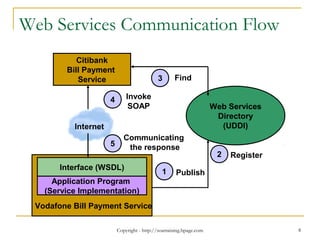
Example To understand how web services work, lets take an example.
 Scenario – A Citibank customer wants to pay his Vodafone phone bill through the bank’s website.
 Solution
1. First, the Vodafone IT team would create a service that allows one to pay their bills through a web service. This service may be
implemented in any way they please, using ADF, POJO, PL/SQL etc. However, the service needs to expose its interface according to
WSDL specification
2. In order to facilitate clients to be able to find this service, the Vodafone team publishes this WSDL to a web services directory. The directory
is capable of storing different kind of information like the request and response messages, version, publisher details, type of service etc. All
this information is structured in a standard way so that interested parties can search or discover them. This common format is the UDDI
3. Citibank IT team, which is developing their website, and want to provide this service to their customer, finds the service developed by
Vodafone team. This completes the setup.
4. When a customer chooses to pay his bill, the required information is sent to the Vodafone Bill Payment web service. This communication is
done using a SOAP message. As SOAP can work over HTTP, which is the most used protocol on the Internet, this invocation can utilize
the power of Internet
5. The Vodafone Bill Payment service acknowledges success or failure of the transaction
 The above example brings out the interplay of:
 Messaging protocols - SOAP
 Programming standards – Interface based on WSDL standard
 Network registration – Information stored as per UDDI standard
 Note: A Public Registry, while a really cool concept, didn’t really take off as expected. However, the concept itself found
takers at organization level and typically an organization that takes its SOA seriously will have a registry setup.
Copyright - http://soatraining.hpage.com 9
Copyright - http://soatraining.hpage.com 10
Describing a web service
Lets understand what it takes to describe a web service. If
we can appreciate these, then understanding why WSDL
looks like it does would be that much simpler.
• Requirement 1: We need to tell what is the location of
this web service
• Requirement 2: We need to tell what is the language the
web service speaks
• Requirement 3: We need to tell what functions or
operations this web service is providing
• Requirement 4: We need to tell what input and output
parameters the service takes
• Requirement 5: We need to tell the datatype of these
parameters
Copyright - http://soatraining.hpage.com 11
WSDL Enters….
 A WSDL document is just a simple XML document.
 It contains set of definitions to describe a web service.
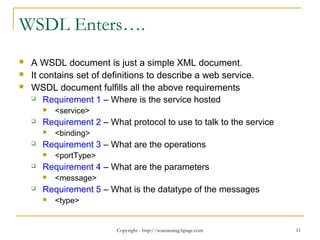
 WSDL document fulfills all the above requirements
 Requirement 1 – Where is the service hosted
 <service>
 Requirement 2 – What protocol to use to talk to the service
 <binding>
 Requirement 3 – What are the operations
 <portType>
 Requirement 4 – What are the parameters
 <message>
 Requirement 5 – What is the datatype of the messages
 <type>
Copyright - http://soatraining.hpage.com 12
Introducing WSDL
 WSDL stands for Web Services Description
Language
 WSDL is written in XML
 WSDL is used to describe Web services
 WSDL is also used to locate Web services
 WSDL is a W3C recommendation
Copyright - http://soatraining.hpage.com 13
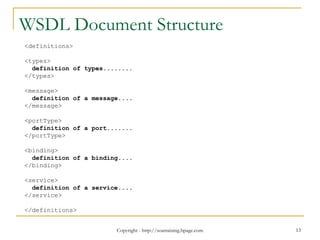
WSDL Document Structure
<definitions>
<types>
definition of types........
</types>
<message>
definition of a message....
</message>
<portType>
definition of a port.......
</portType>
<binding>
definition of a binding....
</binding>
<service>
definition of a service....
</service>
</definitions>
Copyright - http://soatraining.hpage.com 14
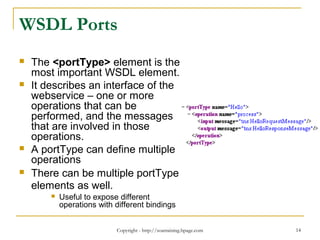
WSDL Ports
 The <portType> element is the
most important WSDL element.
 It describes an interface of the
webservice – one or more
operations that can be
performed, and the messages
that are involved in those
operations.
 A portType can define multiple
operations
 There can be multiple portType
elements as well.
 Useful to expose different
operations with different bindings
Copyright - http://soatraining.hpage.com 15
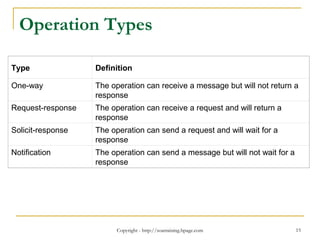
Operation Types
Type Definition
One-way The operation can receive a message but will not return a
response
Request-response The operation can receive a request and will return a
response
Solicit-response The operation can send a request and will wait for a
response
Notification The operation can send a message but will not wait for a
response
Copyright - http://soatraining.hpage.com 16
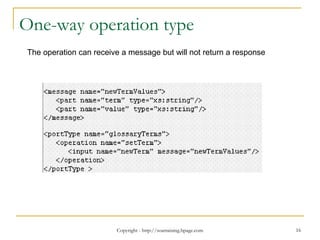
One-way operation type
The operation can receive a message but will not return a response
Copyright - http://soatraining.hpage.com 17
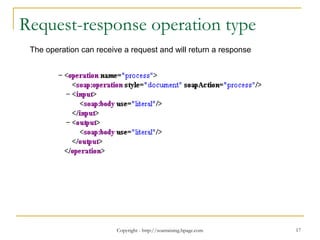
Request-response operation type
The operation can receive a request and will return a response
Copyright - http://soatraining.hpage.com 18
 Now, a web service operation can take only
one parameter. But I want to pass multiple
parameters……what do I need to do
Copyright - http://soatraining.hpage.com 19
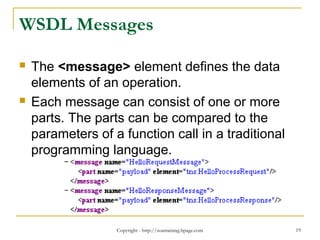
WSDL Messages
 The <message> element defines the data
elements of an operation.
 Each message can consist of one or more
parts. The parts can be compared to the
parameters of a function call in a traditional
programming language.
Copyright - http://soatraining.hpage.com 20
 I want to pass a complex object to my web
service……what do I need to do
Copyright - http://soatraining.hpage.com 21
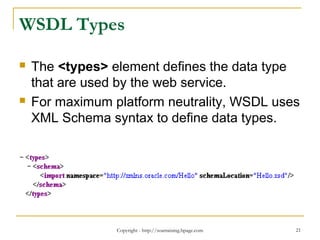
WSDL Types
 The <types> element defines the data type
that are used by the web service.
 For maximum platform neutrality, WSDL uses
XML Schema syntax to define data types.
Copyright - http://soatraining.hpage.com 22
 I want my web service to be accessible to a
HTTP client, as well as to a RMI client and a
SOAP client……what do I need to do
Copyright - http://soatraining.hpage.com 23
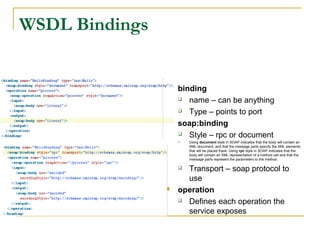
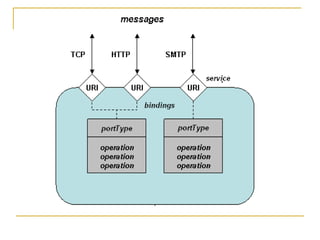
WSDL Bindings
 A portType is still considered an abstract definition
because you don't know how its messages are
represented on the wire
 This is where we apply a binding to a portType
 The WSDL binding element describes the concrete
details of using a particular portType with a given
protocol.
 <binding> defines the message format and protocol
details for each operation in a portType.
 There would be atleast one binding for each portType.
One portType can also have multiple bindings
 Examples of bindings - HTTP GET, HTTP POST, or
SOAP.
 binding
 name – can be anything
 Type – points to port
 soap:binding
 Style – rpc or document
 Using document style in SOAP indicates that the body will contain an
XML document, and that the message parts specify the XML elements
that will be placed there. Using rpc style in SOAP indicates that the
body will contain an XML representation of a method call and that the
message parts represent the parameters to the method.
 Transport – soap protocol to
use
 operation
 Defines each operation the
service exposes
WSDL Bindings
Copyright - http://soatraining.hpage.com 25
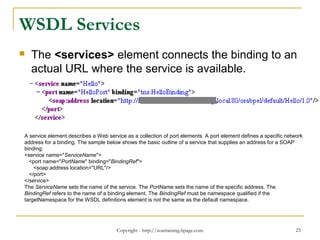
WSDL Services
 The <services> element connects the binding to an
actual URL where the service is available.
A service element describes a Web service as a collection of port elements. A port element defines a specific network
address for a binding. The sample below shows the basic outline of a service that supplies an address for a SOAP
binding:
<service name="ServiceName">
<port name="PortName" binding="BindingRef">
<soap:address location="URL"/>
</port>
</service>
The ServiceName sets the name of the service. The PortName sets the name of the specific address. The
BindingRef refers to the name of a binding element. The BindingRef must be namespace qualified if the
targetNamespace for the WSDL definitions element is not the same as the default namespace.
Copyright - http://soatraining.hpage.com 27
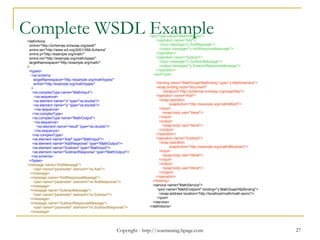
Complete WSDL Example<definitions
xmlns="http://schemas.xmlsoap.org/wsdl/"
xmlns:xs="http://www.w3.org/2001/XMLSchema"
xmlns:y="http://example.org/math/"
xmlns:ns="http://example.org/math/types/"
targetNamespace="http://example.org/math/"
>
<types>
<xs:schema
targetNamespace="http://example.org/math/types/"
xmlns="http://example.org/math/types/"
>
<xs:complexType name="MathInput">
<xs:sequence>
<xs:element name="x" type="xs:double"/>
<xs:element name="y" type="xs:double"/>
</xs:sequence>
</xs:complexType>
<xs:complexType name="MathOutput">
<xs:sequence>
<xs:element name="result" type="xs:double"/>
</xs:sequence>
</xs:complexType>
<xs:element name="Add" type="MathInput"/>
<xs:element name="AddResponse" type="MathOutput"/>
<xs:element name="Subtract" type="MathInput"/>
<xs:element name="SubtractResponse" type="MathOutput"/>
</xs:schema>
</types>
<message name="AddMessage">
<part name="parameter" element="ns:Add"/>
</message>
<message name="AddResponseMessage">
<part name="parameter" element="ns:AddResponse"/>
</message>
<message name="SubtractMessage">
<part name="parameter" element="ns:Subtract"/>
</message>
<message name="SubtractResponseMessage">
<part name="parameter" element="ns:SubtractResponse"/>
</message>
<portType name="MathInterface">
<operation name="Add">
<input message="y:AddMessage"/>
<output message="y:AddResponseMessage"/>
</operation>
<operation name="Subtract">
<input message="y:SubtractMessage"/>
<output message="y:SubtractResponseMessage"/>
</operation>
</portType>
<binding name="MathSoapHttpBinding" type="y:MathInterface">
<soap:binding style="document"
transport="http://schemas.xmlsoap.org/soap/http"/>
<operation name="Add">
<soap:operation
soapAction="http://example.org/math/#Add"/>
<input>
<soap:body use="literal"/>
</input>
<output>
<soap:body use="literal"/>
</output>
</operation>
<operation name="Subtract">
<soap:operation
soapAction="http://example.org/math/#Subtract"/>
<input>
<soap:body use="literal"/>
</input>
<output>
<soap:body use="literal"/>
</output>
</operation>
</binding>
<service name="MathService">
<port name="MathEndpoint" binding="y:MathSoapHttpBinding">
<soap:address location="http://localhost/math/math.asmx"/>
</port>
</service>
</definitions>
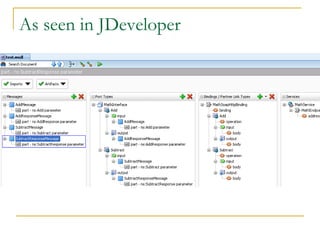
As seen in JDeveloper
Copyright - http://soatraining.hpage.com 29
SOAP
 SOAP stands for Simple Object Access Protocol
 SOAP is a communication protocol
 SOAP is for communication between applications
 SOAP is a format for sending messages
 SOAP communicates via Internet
 SOAP is platform independent
 SOAP is language independent
 SOAP is based on XML
 Relies on other Application Layer protocols (most notably
Remote Procedure Call (RPC) and HTTP) for message
negotiation and transmission.
 SOAP is a W3C recommendation
Copyright - http://soatraining.hpage.com 30
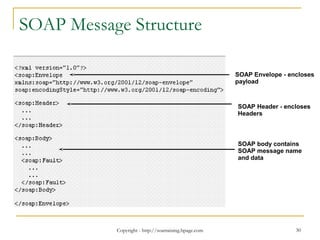
SOAP Message Structure
SOAP Envelope - encloses
payload
SOAP Header - encloses
Headers
SOAP body contains
SOAP message name
and data
Copyright - http://soatraining.hpage.com 31
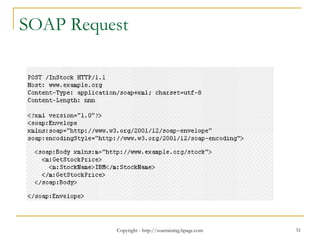
SOAP Request
Copyright - http://soatraining.hpage.com 32
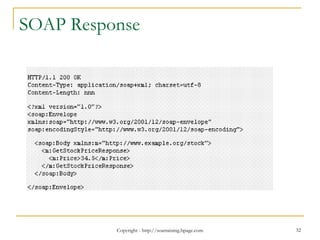
SOAP Response
Copyright - http://soatraining.hpage.com 33
UDDI
 UDDI stands for Universal Description,
Discovery and Integration.
 The UDDI specification enables businesses
to quickly, easily, and dynamically find and
transact with one another.
 UDDI enables a business to
1. Describe its business and its services,
2. Discover other businesses that offer desired
services
3. Integrate with these other businesses.
Copyright - http://soatraining.hpage.com 34
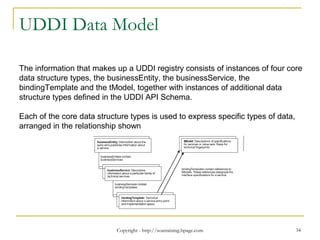
UDDI Data Model
The information that makes up a UDDI registry consists of instances of four core
data structure types, the businessEntity, the businessService, the
bindingTemplate and the tModel, together with instances of additional data
structure types defined in the UDDI API Schema.
Each of the core data structure types is used to express specific types of data,
arranged in the relationship shown
Why do we need a registry
 The ability to register, discover, and govern Web services is an essential
requirement for any Service Oriented Architecture (SOA) implementation.
 A highly available environment contains multiple application server nodes,
multiple instances, and multiple processes. Regardless of where the
services will be deployed they have to be flexible enough to run anywhere
without requiring changes to the actual process implementation.
 This need may not be fully appreciated in the early stages of an SOA roll-
out when dealing with a small number of services.
 However, large organizations will typically need to support a large number of
Web services, and as the number of services deployed grows to dozens or
hundreds, centralized facilities for access and control of service metadata
and artifacts becomes critical.
 A service registry provides these capabilities and is a key infrastructural
component and cornerstone for SOA deployments
Copyright - http://soatraining.hpage.com 35
Registry and UDDI
 UDDI defines a framework to enable the
establishment of service registries to provide
distributed directory service to the producers
and consumers of Web services. It includes a
common set of SOAP-based APIs to support
registration and advertisement of Web
services by service producers, and to
facilitate the searching and lookup of Web
services by service consumers.
Copyright - http://soatraining.hpage.com 36
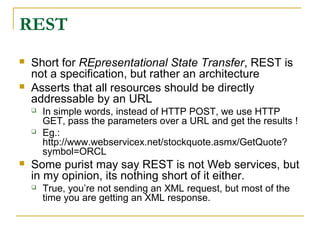
REST
 Short for REpresentational State Transfer, REST is
not a specification, but rather an architecture
 Asserts that all resources should be directly
addressable by an URL
 In simple words, instead of HTTP POST, we use HTTP
GET, pass the parameters over a URL and get the results !
 Eg.:
http://www.webservicex.net/stockquote.asmx/GetQuote?
symbol=ORCL
 Some purist may say REST is not Web services, but
in my opinion, its nothing short of it either.
 True, you’re not sending an XML request, but most of the
time you are getting an XML response.
Challenge
 We want to create a WSDL file that defines
an operation called CreateStudent.
CreateStudent should be a request response
operation and should take a Student object
as input and return the Student ID as output.
Student object stores the student name and
marks
 Solution to this challenge is available in
CreateAWsdlFromScratch.doc. Code is
under Project1.zip
Copyright - http://soatraining.hpage.com 39
Resources
 People and companies develop web
services. Some of them are free too 
 http://www.webservicex.net/stockquote.asmx
 Links to lotsa web services on one page !
http://www.actionscript.org/forums/showthread.ph
p3?t=70742
Copyright - http://soatraining.hpage.com 40
References
 WSDL Tutorial -
http://www.w3schools.com/WSDL/default.asp
 SOAP Tutorial
http://www.w3schools.com/soap/default.asp
 More on WSDL elements
http://www2.roguewave.com/support/docs/leif
/leif/html/leifug/B-6.html
Extra Slides
Copyright - http://soatraining.hpage.com 41
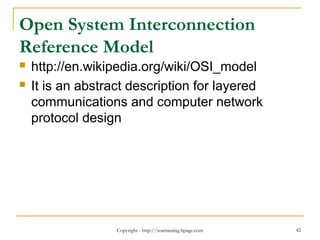
Open System Interconnection
Reference Model
 http://en.wikipedia.org/wiki/OSI_model
 It is an abstract description for layered
communications and computer network
protocol design
Copyright - http://soatraining.hpage.com 42
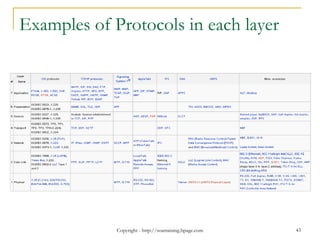
Examples of Protocols in each layer
Copyright - http://soatraining.hpage.com 43
More WSDL Examples
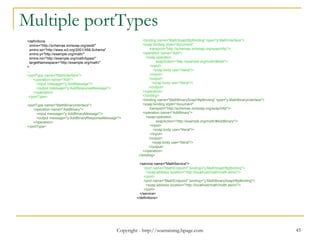
 WSDL containing multiple portType
 The following is a variation of the Math.wsdl
where we want to have add and subtract
operations for decimal and binary numbers
 The designers felt it best to create two different
port types to segregate the interfaces (although,
technically, we can combine the operations in a
single interface)
 For brevity, subtract operation is not shown.
Copyright - http://soatraining.hpage.com 45
Multiple portTypes
<definitions
xmlns="http://schemas.xmlsoap.org/wsdl/"
xmlns:xs="http://www.w3.org/2001/XMLSchema"
xmlns:y="http://example.org/math/"
xmlns:ns="http://example.org/math/types/"
targetNamespace="http://example.org/math/"
>
…
<portType name="MathInterface">
<operation name="Add">
<input message="y:AddMessage"/>
<output message="y:AddResponseMessage"/>
</operation>
</portType>
<portType name="MathBinaryInterface">
<operation name="AddBinary">
<input message="y:AddBinaryMessage"/>
<output message="y:AddBinaryResponseMessage"/>
</operation>
</portType>
<binding name="MathSoapHttpBinding" type="y:MathInterface">
<soap:binding style="document"
transport="http://schemas.xmlsoap.org/soap/http"/>
<operation name="Add">
<soap:operation
soapAction="http://example.org/math/#Add"/>
<input>
<soap:body use="literal"/>
</input>
<output>
<soap:body use="literal"/>
</output>
</operation>
</binding>
<binding name="MathBinarySoapHttpBinding" type="y:MathBinaryInterface">
<soap:binding style="document"
transport="http://schemas.xmlsoap.org/soap/http"/>
<operation name="AddBinary">
<soap:operation
soapAction="http://example.org/math/#AddBinary"/>
<input>
<soap:body use="literal"/>
</input>
<output>
<soap:body use="literal"/>
</output>
</operation>
</binding>
<service name="MathService">
<port name="MathEndpoint" binding="y:MathSoapHttpBinding">
<soap:address location="http://localhost/math/math.asmx"/>
</port>
<port name="MathEndpoint" binding="y:MathBinarySoapHttpBinding">
<soap:address location="http://localhost/math/math.asmx"/>
</port>
</service>
</definitions>
More WSDL Examples
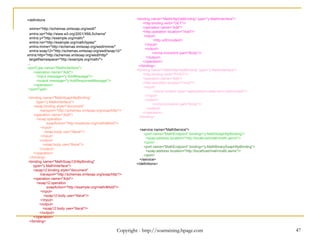
 Following WSDL contains multiple bindings
for a portType
 This allows to accept messages from
different protocols like SOAP over HTTP,
SOAP1.2 over HTTP, HTTP Get and HTTP
Post
 For brevity, subtract operation is not shown
Copyright - http://soatraining.hpage.com 47Copyright - http://soatraining.hpage.com 47
<definitions
xmlns="http://schemas.xmlsoap.org/wsdl/"
xmlns:xs="http://www.w3.org/2001/XMLSchema"
xmlns:y="http://example.org/math/"
xmlns:ns="http://example.org/math/types/"
xmlns:mime="http://schemas.xmlsoap.org/wsdl/mime/"
xmlns:soap12="http://schemas.xmlsoap.org/wsdl/soap12/"
xmlns:http="http://schemas.xmlsoap.org/wsdl/http/"
targetNamespace="http://example.org/math/">
…
<portType name="MathInterface">
<operation name="Add">
<input message="y:AddMessage"/>
<output message="y:AddResponseMessage"/>
</operation>
</portType>
<binding name="MathSoapHttpBinding“
type="y:MathInterface">
<soap:binding style="document"
transport="http://schemas.xmlsoap.org/soap/http"/>
<operation name="Add">
<soap:operation
soapAction="http://example.org/math/#Add"/>
<input>
<soap:body use="literal"/>
</input>
<output>
<soap:body use="literal"/>
</output>
</operation>
</binding>
<binding name="MathSoap12HttpBinding"
type="y:MathInterface">
<soap12:binding style="document"
transport="http://schemas.xmlsoap.org/soap/http"/>
<operation name="Add">
<soap12:operation
soapAction="http://example.org/math/#Add"/>
<input>
<soap12:body use="literal"/>
</input>
<output>
<soap12:body use="literal"/>
</output>
</operation>
</binding>
<binding name="MathHttpGetBinding" type="y:MathInterface">
<http:binding verb="GET"/>
<operation name="Add">
<http:operation location="/Add"/>
<input>
<http:urlEncoded/>
</input>
<output>
<mime:mimeXml part="Body"/>
</output>
</operation>
</binding>
<binding name="MathHttpPostBinding" type="y:MathInterface">
<http:binding verb="POST"/>
<operation name="Add">
<http:operation location="/Add"/>
<input>
<mime:content type="application/x-www-form-urlencoded"/>
</input>
<output>
<mime:mimeXml part="Body"/>
</output>
</operation>
</binding>
<service name="MathService">
<port name="MathEndpoint" binding="y:MathSoapHttpBinding">
<soap:address location="http://localhost/math/math.asmx"/>
</port>
<port name="MathEndpoint" binding="y:MathBinarySoapHttpBinding">
<soap:address location="http://localhost/math/math.asmx"/>
</port>
</service>
</definitions>

SOA web services concepts

  • 1.
  • 2.
    Copyright - http://soatraining.hpage.com2 Objectives  After completing this lesson, you should be able to do the following:  Understand power of web services  Understand WSDL  Understand SOAP
  • 3.
    What Is anRPC  It is often necessary to design distributed systems, whereby the code to run an application is spread across multiple computers.  Code on one computer needs to call code on another computer  This is called a remote procedure call
  • 4.
    What do weneed to do RPC  Location of the code: Where does the code you want to call reside  Parameters: Does the code need any parameters  Return value: Will the procedure return any data  Other: Networking issues, packaging any data for transport from computer to computer A number of RPC protocols have been developed
  • 5.
    RPC Protocols Several protocolsexist for performing remote procedure calls, but the most common are  DCOM (Distributed Component Object Model), extension of COM  Drawback – Microsoft specific. Only works on Windows  IIOP (Internet Inter-ORB Protocol), extension of CORBA  Drawback – difficult to work with  Java RMI  Drawback – needs to be developed in Java  We need something that is platform and language independent, yet is easy to use
  • 6.
    Web Services –The New RPC Protocol  Web services are a means for requesting information or carrying out a processing task over the Internet,  They typically involve the encoding of both the request and the response in XML.  They use standard Internet protocols for transport, this encoding  The above two points makes the messages universally available.  That means that a Perl program running on Linux can call a .NET program running on Windows.NET
  • 7.
    Copyright - http://soatraining.hpage.com7 Introducing Web Services  Web services are:  Self-describing business functions  Accessible from any Web-connected device using:  Messaging Protocols – The messaging protocols are standards-based and are platform independent. These enable one service to call another one - SOAP over HTTP, JMS  Programming standards – The underlying programming standards help create services that conform to a predefined structure. This means it is possible to figure out what the service does in a platform and language independent way. - WSDL  Network registration – The services can be searched in a common way - UDDI
  • 8.
    Copyright - http://soatraining.hpage.com8 Web Services Communication Flow Citibank Bill Payment Service Interface (WSDL) Application Program (Service Implementation) Vodafone Bill Payment Service 1 3 4 Publish Find Invoke SOAP Web Services Directory (UDDI)Internet 2 Register 5 Communicating the response
  • 9.
    Web Services CommunicationFlow Example To understand how web services work, lets take an example.  Scenario – A Citibank customer wants to pay his Vodafone phone bill through the bank’s website.  Solution 1. First, the Vodafone IT team would create a service that allows one to pay their bills through a web service. This service may be implemented in any way they please, using ADF, POJO, PL/SQL etc. However, the service needs to expose its interface according to WSDL specification 2. In order to facilitate clients to be able to find this service, the Vodafone team publishes this WSDL to a web services directory. The directory is capable of storing different kind of information like the request and response messages, version, publisher details, type of service etc. All this information is structured in a standard way so that interested parties can search or discover them. This common format is the UDDI 3. Citibank IT team, which is developing their website, and want to provide this service to their customer, finds the service developed by Vodafone team. This completes the setup. 4. When a customer chooses to pay his bill, the required information is sent to the Vodafone Bill Payment web service. This communication is done using a SOAP message. As SOAP can work over HTTP, which is the most used protocol on the Internet, this invocation can utilize the power of Internet 5. The Vodafone Bill Payment service acknowledges success or failure of the transaction  The above example brings out the interplay of:  Messaging protocols - SOAP  Programming standards – Interface based on WSDL standard  Network registration – Information stored as per UDDI standard  Note: A Public Registry, while a really cool concept, didn’t really take off as expected. However, the concept itself found takers at organization level and typically an organization that takes its SOA seriously will have a registry setup. Copyright - http://soatraining.hpage.com 9
  • 10.
    Copyright - http://soatraining.hpage.com10 Describing a web service Lets understand what it takes to describe a web service. If we can appreciate these, then understanding why WSDL looks like it does would be that much simpler. • Requirement 1: We need to tell what is the location of this web service • Requirement 2: We need to tell what is the language the web service speaks • Requirement 3: We need to tell what functions or operations this web service is providing • Requirement 4: We need to tell what input and output parameters the service takes • Requirement 5: We need to tell the datatype of these parameters
  • 11.
    Copyright - http://soatraining.hpage.com11 WSDL Enters….  A WSDL document is just a simple XML document.  It contains set of definitions to describe a web service.  WSDL document fulfills all the above requirements  Requirement 1 – Where is the service hosted  <service>  Requirement 2 – What protocol to use to talk to the service  <binding>  Requirement 3 – What are the operations  <portType>  Requirement 4 – What are the parameters  <message>  Requirement 5 – What is the datatype of the messages  <type>
  • 12.
    Copyright - http://soatraining.hpage.com12 Introducing WSDL  WSDL stands for Web Services Description Language  WSDL is written in XML  WSDL is used to describe Web services  WSDL is also used to locate Web services  WSDL is a W3C recommendation
  • 13.
    Copyright - http://soatraining.hpage.com13 WSDL Document Structure <definitions> <types> definition of types........ </types> <message> definition of a message.... </message> <portType> definition of a port....... </portType> <binding> definition of a binding.... </binding> <service> definition of a service.... </service> </definitions>
  • 14.
    Copyright - http://soatraining.hpage.com14 WSDL Ports  The <portType> element is the most important WSDL element.  It describes an interface of the webservice – one or more operations that can be performed, and the messages that are involved in those operations.  A portType can define multiple operations  There can be multiple portType elements as well.  Useful to expose different operations with different bindings
  • 15.
    Copyright - http://soatraining.hpage.com15 Operation Types Type Definition One-way The operation can receive a message but will not return a response Request-response The operation can receive a request and will return a response Solicit-response The operation can send a request and will wait for a response Notification The operation can send a message but will not wait for a response
  • 16.
    Copyright - http://soatraining.hpage.com16 One-way operation type The operation can receive a message but will not return a response
  • 17.
    Copyright - http://soatraining.hpage.com17 Request-response operation type The operation can receive a request and will return a response
  • 18.
    Copyright - http://soatraining.hpage.com18  Now, a web service operation can take only one parameter. But I want to pass multiple parameters……what do I need to do
  • 19.
    Copyright - http://soatraining.hpage.com19 WSDL Messages  The <message> element defines the data elements of an operation.  Each message can consist of one or more parts. The parts can be compared to the parameters of a function call in a traditional programming language.
  • 20.
    Copyright - http://soatraining.hpage.com20  I want to pass a complex object to my web service……what do I need to do
  • 21.
    Copyright - http://soatraining.hpage.com21 WSDL Types  The <types> element defines the data type that are used by the web service.  For maximum platform neutrality, WSDL uses XML Schema syntax to define data types.
  • 22.
    Copyright - http://soatraining.hpage.com22  I want my web service to be accessible to a HTTP client, as well as to a RMI client and a SOAP client……what do I need to do
  • 23.
    Copyright - http://soatraining.hpage.com23 WSDL Bindings  A portType is still considered an abstract definition because you don't know how its messages are represented on the wire  This is where we apply a binding to a portType  The WSDL binding element describes the concrete details of using a particular portType with a given protocol.  <binding> defines the message format and protocol details for each operation in a portType.  There would be atleast one binding for each portType. One portType can also have multiple bindings  Examples of bindings - HTTP GET, HTTP POST, or SOAP.
  • 24.
     binding  name– can be anything  Type – points to port  soap:binding  Style – rpc or document  Using document style in SOAP indicates that the body will contain an XML document, and that the message parts specify the XML elements that will be placed there. Using rpc style in SOAP indicates that the body will contain an XML representation of a method call and that the message parts represent the parameters to the method.  Transport – soap protocol to use  operation  Defines each operation the service exposes WSDL Bindings
  • 25.
    Copyright - http://soatraining.hpage.com25 WSDL Services  The <services> element connects the binding to an actual URL where the service is available. A service element describes a Web service as a collection of port elements. A port element defines a specific network address for a binding. The sample below shows the basic outline of a service that supplies an address for a SOAP binding: <service name="ServiceName"> <port name="PortName" binding="BindingRef"> <soap:address location="URL"/> </port> </service> The ServiceName sets the name of the service. The PortName sets the name of the specific address. The BindingRef refers to the name of a binding element. The BindingRef must be namespace qualified if the targetNamespace for the WSDL definitions element is not the same as the default namespace.
  • 27.
    Copyright - http://soatraining.hpage.com27 Complete WSDL Example<definitions xmlns="http://schemas.xmlsoap.org/wsdl/" xmlns:xs="http://www.w3.org/2001/XMLSchema" xmlns:y="http://example.org/math/" xmlns:ns="http://example.org/math/types/" targetNamespace="http://example.org/math/" > <types> <xs:schema targetNamespace="http://example.org/math/types/" xmlns="http://example.org/math/types/" > <xs:complexType name="MathInput"> <xs:sequence> <xs:element name="x" type="xs:double"/> <xs:element name="y" type="xs:double"/> </xs:sequence> </xs:complexType> <xs:complexType name="MathOutput"> <xs:sequence> <xs:element name="result" type="xs:double"/> </xs:sequence> </xs:complexType> <xs:element name="Add" type="MathInput"/> <xs:element name="AddResponse" type="MathOutput"/> <xs:element name="Subtract" type="MathInput"/> <xs:element name="SubtractResponse" type="MathOutput"/> </xs:schema> </types> <message name="AddMessage"> <part name="parameter" element="ns:Add"/> </message> <message name="AddResponseMessage"> <part name="parameter" element="ns:AddResponse"/> </message> <message name="SubtractMessage"> <part name="parameter" element="ns:Subtract"/> </message> <message name="SubtractResponseMessage"> <part name="parameter" element="ns:SubtractResponse"/> </message> <portType name="MathInterface"> <operation name="Add"> <input message="y:AddMessage"/> <output message="y:AddResponseMessage"/> </operation> <operation name="Subtract"> <input message="y:SubtractMessage"/> <output message="y:SubtractResponseMessage"/> </operation> </portType> <binding name="MathSoapHttpBinding" type="y:MathInterface"> <soap:binding style="document" transport="http://schemas.xmlsoap.org/soap/http"/> <operation name="Add"> <soap:operation soapAction="http://example.org/math/#Add"/> <input> <soap:body use="literal"/> </input> <output> <soap:body use="literal"/> </output> </operation> <operation name="Subtract"> <soap:operation soapAction="http://example.org/math/#Subtract"/> <input> <soap:body use="literal"/> </input> <output> <soap:body use="literal"/> </output> </operation> </binding> <service name="MathService"> <port name="MathEndpoint" binding="y:MathSoapHttpBinding"> <soap:address location="http://localhost/math/math.asmx"/> </port> </service> </definitions>
  • 28.
    As seen inJDeveloper
  • 29.
    Copyright - http://soatraining.hpage.com29 SOAP  SOAP stands for Simple Object Access Protocol  SOAP is a communication protocol  SOAP is for communication between applications  SOAP is a format for sending messages  SOAP communicates via Internet  SOAP is platform independent  SOAP is language independent  SOAP is based on XML  Relies on other Application Layer protocols (most notably Remote Procedure Call (RPC) and HTTP) for message negotiation and transmission.  SOAP is a W3C recommendation
  • 30.
    Copyright - http://soatraining.hpage.com30 SOAP Message Structure SOAP Envelope - encloses payload SOAP Header - encloses Headers SOAP body contains SOAP message name and data
  • 31.
  • 32.
  • 33.
    Copyright - http://soatraining.hpage.com33 UDDI  UDDI stands for Universal Description, Discovery and Integration.  The UDDI specification enables businesses to quickly, easily, and dynamically find and transact with one another.  UDDI enables a business to 1. Describe its business and its services, 2. Discover other businesses that offer desired services 3. Integrate with these other businesses.
  • 34.
    Copyright - http://soatraining.hpage.com34 UDDI Data Model The information that makes up a UDDI registry consists of instances of four core data structure types, the businessEntity, the businessService, the bindingTemplate and the tModel, together with instances of additional data structure types defined in the UDDI API Schema. Each of the core data structure types is used to express specific types of data, arranged in the relationship shown
  • 35.
    Why do weneed a registry  The ability to register, discover, and govern Web services is an essential requirement for any Service Oriented Architecture (SOA) implementation.  A highly available environment contains multiple application server nodes, multiple instances, and multiple processes. Regardless of where the services will be deployed they have to be flexible enough to run anywhere without requiring changes to the actual process implementation.  This need may not be fully appreciated in the early stages of an SOA roll- out when dealing with a small number of services.  However, large organizations will typically need to support a large number of Web services, and as the number of services deployed grows to dozens or hundreds, centralized facilities for access and control of service metadata and artifacts becomes critical.  A service registry provides these capabilities and is a key infrastructural component and cornerstone for SOA deployments Copyright - http://soatraining.hpage.com 35
  • 36.
    Registry and UDDI UDDI defines a framework to enable the establishment of service registries to provide distributed directory service to the producers and consumers of Web services. It includes a common set of SOAP-based APIs to support registration and advertisement of Web services by service producers, and to facilitate the searching and lookup of Web services by service consumers. Copyright - http://soatraining.hpage.com 36
  • 37.
    REST  Short forREpresentational State Transfer, REST is not a specification, but rather an architecture  Asserts that all resources should be directly addressable by an URL  In simple words, instead of HTTP POST, we use HTTP GET, pass the parameters over a URL and get the results !  Eg.: http://www.webservicex.net/stockquote.asmx/GetQuote? symbol=ORCL  Some purist may say REST is not Web services, but in my opinion, its nothing short of it either.  True, you’re not sending an XML request, but most of the time you are getting an XML response.
  • 38.
    Challenge  We wantto create a WSDL file that defines an operation called CreateStudent. CreateStudent should be a request response operation and should take a Student object as input and return the Student ID as output. Student object stores the student name and marks  Solution to this challenge is available in CreateAWsdlFromScratch.doc. Code is under Project1.zip
  • 39.
    Copyright - http://soatraining.hpage.com39 Resources  People and companies develop web services. Some of them are free too   http://www.webservicex.net/stockquote.asmx  Links to lotsa web services on one page ! http://www.actionscript.org/forums/showthread.ph p3?t=70742
  • 40.
    Copyright - http://soatraining.hpage.com40 References  WSDL Tutorial - http://www.w3schools.com/WSDL/default.asp  SOAP Tutorial http://www.w3schools.com/soap/default.asp  More on WSDL elements http://www2.roguewave.com/support/docs/leif /leif/html/leifug/B-6.html
  • 41.
    Extra Slides Copyright -http://soatraining.hpage.com 41
  • 42.
    Open System Interconnection ReferenceModel  http://en.wikipedia.org/wiki/OSI_model  It is an abstract description for layered communications and computer network protocol design Copyright - http://soatraining.hpage.com 42
  • 43.
    Examples of Protocolsin each layer Copyright - http://soatraining.hpage.com 43
  • 44.
    More WSDL Examples WSDL containing multiple portType  The following is a variation of the Math.wsdl where we want to have add and subtract operations for decimal and binary numbers  The designers felt it best to create two different port types to segregate the interfaces (although, technically, we can combine the operations in a single interface)  For brevity, subtract operation is not shown.
  • 45.
    Copyright - http://soatraining.hpage.com45 Multiple portTypes <definitions xmlns="http://schemas.xmlsoap.org/wsdl/" xmlns:xs="http://www.w3.org/2001/XMLSchema" xmlns:y="http://example.org/math/" xmlns:ns="http://example.org/math/types/" targetNamespace="http://example.org/math/" > … <portType name="MathInterface"> <operation name="Add"> <input message="y:AddMessage"/> <output message="y:AddResponseMessage"/> </operation> </portType> <portType name="MathBinaryInterface"> <operation name="AddBinary"> <input message="y:AddBinaryMessage"/> <output message="y:AddBinaryResponseMessage"/> </operation> </portType> <binding name="MathSoapHttpBinding" type="y:MathInterface"> <soap:binding style="document" transport="http://schemas.xmlsoap.org/soap/http"/> <operation name="Add"> <soap:operation soapAction="http://example.org/math/#Add"/> <input> <soap:body use="literal"/> </input> <output> <soap:body use="literal"/> </output> </operation> </binding> <binding name="MathBinarySoapHttpBinding" type="y:MathBinaryInterface"> <soap:binding style="document" transport="http://schemas.xmlsoap.org/soap/http"/> <operation name="AddBinary"> <soap:operation soapAction="http://example.org/math/#AddBinary"/> <input> <soap:body use="literal"/> </input> <output> <soap:body use="literal"/> </output> </operation> </binding> <service name="MathService"> <port name="MathEndpoint" binding="y:MathSoapHttpBinding"> <soap:address location="http://localhost/math/math.asmx"/> </port> <port name="MathEndpoint" binding="y:MathBinarySoapHttpBinding"> <soap:address location="http://localhost/math/math.asmx"/> </port> </service> </definitions>
  • 46.
    More WSDL Examples Following WSDL contains multiple bindings for a portType  This allows to accept messages from different protocols like SOAP over HTTP, SOAP1.2 over HTTP, HTTP Get and HTTP Post  For brevity, subtract operation is not shown
  • 47.
    Copyright - http://soatraining.hpage.com47Copyright - http://soatraining.hpage.com 47 <definitions xmlns="http://schemas.xmlsoap.org/wsdl/" xmlns:xs="http://www.w3.org/2001/XMLSchema" xmlns:y="http://example.org/math/" xmlns:ns="http://example.org/math/types/" xmlns:mime="http://schemas.xmlsoap.org/wsdl/mime/" xmlns:soap12="http://schemas.xmlsoap.org/wsdl/soap12/" xmlns:http="http://schemas.xmlsoap.org/wsdl/http/" targetNamespace="http://example.org/math/"> … <portType name="MathInterface"> <operation name="Add"> <input message="y:AddMessage"/> <output message="y:AddResponseMessage"/> </operation> </portType> <binding name="MathSoapHttpBinding“ type="y:MathInterface"> <soap:binding style="document" transport="http://schemas.xmlsoap.org/soap/http"/> <operation name="Add"> <soap:operation soapAction="http://example.org/math/#Add"/> <input> <soap:body use="literal"/> </input> <output> <soap:body use="literal"/> </output> </operation> </binding> <binding name="MathSoap12HttpBinding" type="y:MathInterface"> <soap12:binding style="document" transport="http://schemas.xmlsoap.org/soap/http"/> <operation name="Add"> <soap12:operation soapAction="http://example.org/math/#Add"/> <input> <soap12:body use="literal"/> </input> <output> <soap12:body use="literal"/> </output> </operation> </binding> <binding name="MathHttpGetBinding" type="y:MathInterface"> <http:binding verb="GET"/> <operation name="Add"> <http:operation location="/Add"/> <input> <http:urlEncoded/> </input> <output> <mime:mimeXml part="Body"/> </output> </operation> </binding> <binding name="MathHttpPostBinding" type="y:MathInterface"> <http:binding verb="POST"/> <operation name="Add"> <http:operation location="/Add"/> <input> <mime:content type="application/x-www-form-urlencoded"/> </input> <output> <mime:mimeXml part="Body"/> </output> </operation> </binding> <service name="MathService"> <port name="MathEndpoint" binding="y:MathSoapHttpBinding"> <soap:address location="http://localhost/math/math.asmx"/> </port> <port name="MathEndpoint" binding="y:MathBinarySoapHttpBinding"> <soap:address location="http://localhost/math/math.asmx"/> </port> </service> </definitions>

Editor's Notes

  • #8 A business service is a “logical encapsulation of business function”. In simple terms, it means that you wrap up everything you have to do to make a particular business function happen and give that rolled-up something a name and call it a business service. Messaging Protocols – The messaging protocols are standards-based and are platform independent. These enable one service to call another one - SOAP over HTTP, JMS Programming standards – The underlying programming standards help create services that conform to a predefined structure. This means it is possible to figure out what the service does in a platform and language independent way. - WSDL Network registration – The services can be searched in a common way - UDDI
  • #9 To understand how web services work, lets take an example. Scenario – A Citibank customer wants to pay his Vodafone phone bill through the bank’s website. Solution First, the Vodafone IT team would create a service that allows one to pay their bills through a web service. This service may be implemented in any way they please, using ADF, POJO, PL/SQL etc. However, the service needs to expose its interface according to WSDL specification In order to facilitate clients to be able to find this service, the Vodafone team publishes this WSDL to a web services directory. The directory is capable of storing different kind of information like the request and response messages, version, publisher details, type of service etc. All this information is structured in a standard way so that interested parties can search or discover them. This common format is the UDDI Citibank IT team, which is developing their website, and want to provide this service to their customer, finds the service developed by Vodafone team. This completes the setup. When a customer chooses to pay his bill, the required information is sent to the Vodafone Bill Payment web service. This communication is done using a SOAP message. As SOAP can work over HTTP, which is the most used protocol on the Internet, this invocation can utilize the power of Internet The Vodafone Bill Payment service acknowledges success or failure of the transaction The above example brings out the interplay of: Messaging protocols - SOAP Programming standards – Interface based on WSDL standard Network registration – Information stored as per UDDI standard Note: A Public Registry, while a really cool concept, didn’t really take off as expected. However, the concept itself found takers at organization level and typically an organization that takes its SOA seriously will have a registry setup.
  • #13 WSDL is a document written in XML. The document describes a Web service. It specifies the location of the service and the operations (or methods) the service exposes.
  • #16 The W3C WSDL Specification defines four message patterns to support four types of operations, as follows: Request-response One-way Notification Solicit-response Message Patterns and Asynchronicity The request-response and the solicit-response patterns are generally synchronous, as their usage usually assumes that the requestor will receive an immediate response. The one-way and the notification patterns are inherently asynchronous in that the requestor expects no response. While one of the strengths of WSDL is that it allows any mix of message patterns and transports in a single service, it is important to be aware that the behavior of a service is tied to the type of transport being used. For example, an asynchronous service will not behave asynchronously if it is sent using a synchronous transport, such as HTTP. This is because HTTP requires a response as a receipt. For this reason, it may be wise to build one-way and notification messages asynchronously even though no response is required, in order to avoid having the client block for a transport receipt
  • #17 In this example the port &amp;quot;glossaryTerms&amp;quot; defines a one-way operation called &amp;quot;setTerm&amp;quot;. The &amp;quot;setTerm&amp;quot; operation allows input of new glossary terms messages using a &amp;quot;newTermValues&amp;quot; message with the input parameters &amp;quot;term&amp;quot; and &amp;quot;value&amp;quot;. However, no output is defined for the operation.
  • #18 In this example the port &amp;quot;glossaryTerms&amp;quot; defines a request-response operation called &amp;quot;getTerm&amp;quot;. The &amp;quot;getTerm&amp;quot; operation requires an input message called &amp;quot;getTermRequest&amp;quot; with a parameter called &amp;quot;term&amp;quot;, and will return an output message called &amp;quot;getTermResponse&amp;quot; with a parameter called &amp;quot;value&amp;quot;.
  • #24 The binding element has two attributes - the name attribute and the type attribute. The name attribute (you can use any name you want) defines the name of the binding, and the type attribute points to the port for the binding, in this case the &amp;quot;glossaryTerms&amp;quot; port. he sample below shows the basic outline of a binding for a SOAP message: &amp;lt;binding name=&amp;quot;BindingName&amp;quot; type=&amp;quot;PortTypeRef&amp;quot;&amp;gt; &amp;lt;soap:binding style=&amp;quot;rpc|document&amp;quot; transport=&amp;quot;http://schemas.xmlsoap.org/soap/http&amp;quot;/&amp;gt; &amp;lt;operation name=&amp;quot;OperationName&amp;quot;&amp;gt; &amp;lt;soap:operation soapAction=&amp;quot;ActionValue&amp;quot;/&amp;gt; &amp;lt;input&amp;gt; &amp;lt;soap:body encodingStyle=&amp;quot;http://schemas.xmlsoap.org/soap/encoding/&amp;quot; namespace=&amp;quot;TargetNamespace&amp;quot; use=&amp;quot;encoded&amp;quot;/&amp;gt; &amp;lt;/input&amp;gt; &amp;lt;output&amp;gt; &amp;lt;soap:body encodingStyle=&amp;quot;http://schemas.xmlsoap.org/soap/encoding/&amp;quot; namespace=&amp;quot;TargetNamespace&amp;quot; use=&amp;quot;encoded&amp;quot;/&amp;gt; &amp;lt;/output&amp;gt; &amp;lt;/operation&amp;gt; &amp;lt;/binding&amp;gt; The soap:binding element has two attributes - the style attribute and the transport attribute. The style attribute can be &amp;quot;rpc&amp;quot; or &amp;quot;document&amp;quot;. In the slide, we use document. The transport attribute defines the SOAP protocol to use. In the slide we use HTTP. The operation element defines each operation that the port exposes. The name sets the name of the operation this binding applies to. This name must match the name of an operation declared within the portType referenced in type attribute of binding. For each operation the corresponding SOAP action has to be defined. You must also specify how the input and output are encoded. In this case we use &amp;quot;literal&amp;quot;.
  • #26 A service element describes a Web service as a collection of port elements. A port element defines a specific network address for a binding. The sample below shows the basic outline of a service that supplies an address for a SOAP binding: &amp;lt;service name=&amp;quot;ServiceName&amp;quot;&amp;gt; &amp;lt;port name=&amp;quot;PortName&amp;quot; binding=&amp;quot;BindingRef&amp;quot;&amp;gt; &amp;lt;soap:address location=&amp;quot;URL&amp;quot;/&amp;gt; &amp;lt;/port&amp;gt; &amp;lt;/service&amp;gt; The ServiceName sets the name of the service. The PortName sets the name of the specific address. The BindingRef refers to the name of a binding element. The BindingRef must be namespace qualified if the targetNamespace for the WSDL definitions element is not the same as the default namespace.
  • #31 SOAP Overview A SOAP message is an ordinary XML document containing the following elements: An Envelope element that identifies the XML document as a SOAP message A Header element that contains header information A Body element that contains call and response information A Fault element containing errors and status information
  • #34 UDDI defines a framework to enable the establishment of service registries to provide distributed directory service to the producers and consumers of Web services. It includes a common set of SOAP-based APIs to support registration and advertisement of Web services by service producers, and to facilitate the searching and lookup of Web services by service consumers.
  • #35 The information that makes up a UDDI registry consists of instances of four core data structure types, the businessEntity, the businessService, the bindingTemplate and the tModel, together with instances of additional data structure types defined in the UDDI API Schema. Each of the core data structure types is used to express specific types of data, arranged in the relationship shown