Unit 1: Introduction
Introduction to Visual programming; Arithmetic Operators, Data type,
Statements, Control Statements, Loops, Arrays, Structures, Val and
Structure functions, Creating Visual studio Applications, Saving
Visual Basic Application.
Main features of 4.5WPF , WPF 4.5architecture, WPF 4.5class
hierarchy, types of WPF applications, WPF 4.5 designer interface,
Using XAML in WPF 4.5 applications, WPF properties, WPF events,
working with dialog boxes in WPF application, compiling and running
WPF 4.5 applications, WPF 4.5 controls, resources, styles, templates,
commands.
Visual Programming:
● Visual Programming is used to create programs that respond to actions or events.
● It follows event-driven programming, where the program runs based on events instead of a fixed
order.
● Events can be things like:
○ Clicking a button
○ Moving the mouse
○ Opening a file
○ Starting the application
● When an event happens, it calls a special block of code called an event handler to perform a task.
What is Visual Basic?
● Visual Basic is a programming tool used to create Windows applications with a
Graphical User Interface (GUI) like buttons, menus, and forms.
● It uses event-driven programming – this means the program waits until
something happens (like a button click).
● The program does nothing until an event occurs.
● When an event happens, a specific block of code called an event procedure runs.
Need for Visual Languages / Importance of Visual Basic (VB):
● Easy to Learn: Visual Basic is simpler to learn and understand than other languages
like C or C++.
● Powerful Tool: It is one of the most powerful languages for building Windows
applications.
● Graphical Interface: VB allows you to design your programs using drag-and-drop
tools in a visual environment, making development faster and easier.
● Quick Development: You can create user-friendly applications quickly without
writing too much code
History of Visual Basic – A Road Map
Origin of BASIC (1960s–1970s)
● BASIC stands for Beginners All-purpose Symbolic Instruction Code.
● Created by Professors Kemeny & Kurtz in the 1960s.
Birth of Visual Basic
● Visual Basic (VB) is a high-level language developed from DOS-based BASIC.
● Alan Cooper (Father of VB) created a visual tool called "Ruby" in 1988.
● Microsoft bought Ruby and launched it as Visual Basic.
Types of Application
• Windows Desktop Applications
• Database Applications
• Web Development
• Console applications
• Educational Purposes
• Legacy Applications
Features of Visual Basic
Integrated Development Environment (IDE)
○ All tools for designing, coding, and testing are in one place.
Graphical Representation
○ You can create programs using forms, buttons, and menus that are easy to see and use.
Drag-and-Drop Interface
○ You can drag controls (like buttons and text boxes) onto a form—no need to write code for layout.
Event-Driven Programming
○ Code runs only when an event happens, like a button click or key press.
Visual Debugging
○ You can easily find and fix errors in your program by seeing what happens step-by-step.
Modularity and Reusability
○ You can write code in small parts (modules or procedures) and reuse them in other
programs.
Rapid Application Development (RAD)
○ You can build applications quickly using ready-made tools and controls.
Data Access
○ VB makes it easy to connect to databases and manage data using tools like ADO(ActiveX
Data Objects) and DAO(Data Access Objects).
.NET Framework
● A framework is like a supporting structure that helps you build something.
● .NET stands for Network Enabled Technologies.
● It is a software platform developed by Microsoft.
● In programming, it means a set of tools, rules, and features that help you create
software easily.
● It helps developers by giving ready-made libraries, tools, and features.
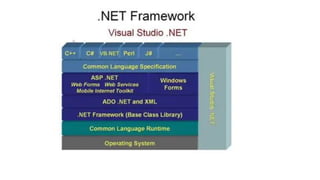
Operating System
● This is Windows. It controls your computer.
Common Language Runtime (CLR)
● The "engine" that runs your program.
● It takes care of memory, security, and running the code.
.NET Framework Class Library
● A collection of ready-made code you can use in your program (like tools).
ADO.NET and XML
● Helps you connect to databases and handle data.
ASP.NET and Windows Forms
● ASP.NET is used to make web applications.
● Windows Forms is used to make desktop applications.
Common Language Specification (CLS)
● Makes sure all .NET programming languages can work together.
Programming Languages
● Languages like C#, VB.NET, C++, you can use to write programs.
Visual Studio .NET (on the side)
● A software tool used to write and build your programs easily.
Common Language Specification (CLS)
● CLS is like a common set of rules for all .NET languages (like C#, VB.NET).
● It helps different languages work together smoothly.
● For example, a program written in C# can talk to a program written in VB.NET without any
problems.
● CLS makes sure nothing is lost or broken when sharing data or objects between languages.
CLS is like a common language
rulebook for .NET. It helps
programs written in different
languages talk to each other
easily and safely.
Common Language Runtime (CLR)
● CLR is the heart of the .NET Framework. It runs your program.
● It is a special environment that takes care of:
○ Running the code
○ Managing memory
○ Handling errors
○ Managing threads (multi-tasking)
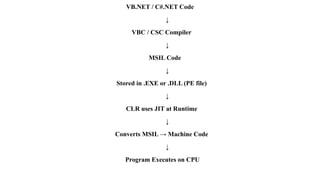
How It Works:
1. You write code in C#, VB.NET, or another .NET language.
2. The code is converted to MSIL (Microsoft Intermediate Language).
3. Then, CLR converts MSIL into machine code (native code) that your computer can
understand.
4. CLR then runs your program.
VB.NET / C#.NET Code
↓
VBC / CSC Compiler
↓
MSIL Code
↓
Stored in .EXE or .DLL (PE file)
↓
CLR uses JIT at Runtime
↓
Converts MSIL → Machine Code
↓
Program Executes on CPU
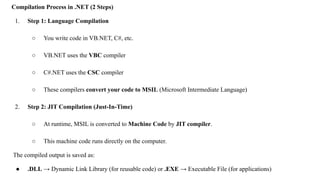
Compilation Process in .NET (2 Steps)
1. Step 1: Language Compilation
○ You write code in VB.NET, C#, etc.
○ VB.NET uses the VBC compiler
○ C#.NET uses the CSC compiler
○ These compilers convert your code to MSIL (Microsoft Intermediate Language)
2. Step 2: JIT Compilation (Just-In-Time)
○ At runtime, MSIL is converted to Machine Code by JIT compiler.
○ This machine code runs directly on the computer.
The compiled output is saved as:
● .DLL → Dynamic Link Library (for reusable code) or .EXE → Executable File (for applications)
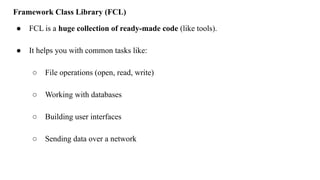
Framework Class Library (FCL)
● FCL is a huge collection of ready-made code (like tools).
● It helps you with common tasks like:
○ File operations (open, read, write)
○ Working with databases
○ Building user interfaces
○ Sending data over a network
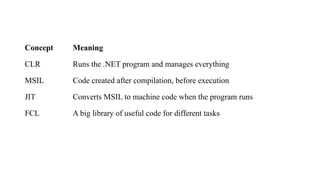
Concept Meaning
CLR Runs the .NET program and manages everything
MSIL Code created after compilation, before execution
JIT Converts MSIL to machine code when the program runs
FCL A big library of useful code for different tasks
Framework Class Library (FCL)
The FCL is a collection of ready-to-use code provided by Microsoft in the .NET
Framework. It helps developers build applications faster and easier.
Components of FCL:
Base Class Library (BCL)
○ The core part of FCL.
○ Contains basic building blocks like:
■ Data types (e.g., string, int)
■ File input/output (I/O)
Windows Forms
○ Used to create desktop (Windows GUI) applications.
○ Allows you to design buttons, forms, menus, etc.
ASP.NET Web Forms
○ Used to build web applications.
○ Supports server-side controls and dynamic web pages.
ADO.NET
○ Used to connect to databases (e.g., SQL Server, Oracle, MySQL).
○ Helps read, write, and update data in databases
COM (Component Object Model)
● A Microsoft standard that allows different software components to work together.
● Example: A program written in C++ can work with a program in VB.NET using COM.
● Works across languages and systems.
COM+ (Component Services)
● An improved version of COM.
● Helps build large and distributed applications.
● Provides extra features like:
○ Transaction management
○ Security
○ Better performance
Windows and .NET Framework
● The .NET Framework is built to run on Windows.
● It gives Windows developers a powerful platform to build apps that:
○ Run fast
○ Look good (GUI)
○ Connect to databases and the web easily
Operators in Visual basic
An operator is a symbol that tells the compiler to perform specific
mathematical or logical manipulations. VB.Net is rich in built-in
operators and provides following types of commonly used operators
−
Arithmetic Operators
Comparison Operators
Logical/Bitwise Operators
Bit Shift Operators
Assignment Operators
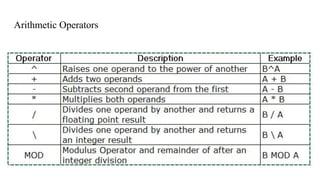
Arithmetic Operators
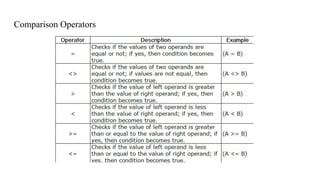
Comparison Operators
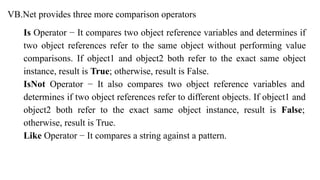
VB.Net provides three more comparison operators
Is Operator − It compares two object reference variables and determines if
two object references refer to the same object without performing value
comparisons. If object1 and object2 both refer to the exact same object
instance, result is True; otherwise, result is False.
IsNot Operator − It also compares two object reference variables and
determines if two object references refer to different objects. If object1 and
object2 both refer to the exact same object instance, result is False;
otherwise, result is True.
Like Operator − It compares a string against a pattern.
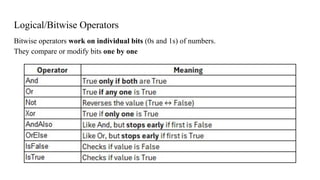
Logical/Bitwise Operators
Bitwise operators work on individual bits (0s and 1s) of numbers.
They compare or modify bits one by one
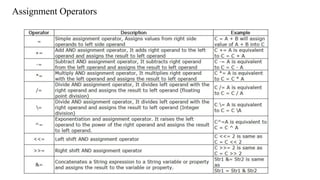
Assignment Operators
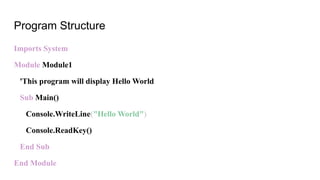
Program Structure
Imports System
Module Module1
'This program will display Hello World
Sub Main()
Console.WriteLine("Hello World")
Console.ReadKey()
End Sub
End Module
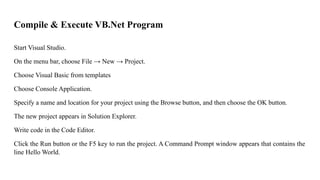
Compile & Execute VB.Net Program
Start Visual Studio.
On the menu bar, choose File → New → Project.
Choose Visual Basic from templates
Choose Console Application.
Specify a name and location for your project using the Browse button, and then choose the OK button.
The new project appears in Solution Explorer.
Write code in the Code Editor.
Click the Run button or the F5 key to run the project. A Command Prompt window appears that contains the
line Hello World.
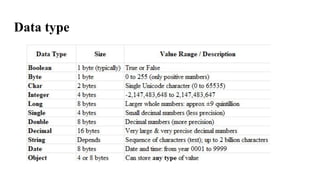
Data type
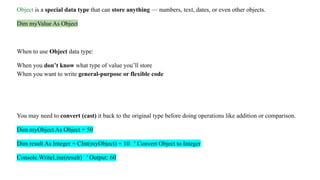
Object is a special data type that can store anything — numbers, text, dates, or even other objects.
Dim myValue As Object
When to use Object data type:
When you don’t know what type of value you’ll store
When you want to write general-purpose or flexible code
You may need to convert (cast) it back to the original type before doing operations like addition or comparison.
Dim myObject As Object = 50
Dim result As Integer = CInt(myObject) + 10 ' Convert Object to Integer
Console.WriteLine(result) ' Output: 60
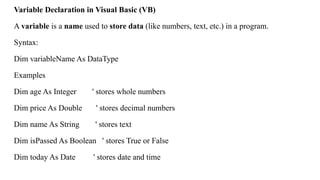
Variable Declaration in Visual Basic (VB)
A variable is a name used to store data (like numbers, text, etc.) in a program.
Syntax:
Dim variableName As DataType
Examples
Dim age As Integer ' stores whole numbers
Dim price As Double ' stores decimal numbers
Dim name As String ' stores text
Dim isPassed As Boolean ' stores True or False
Dim today As Date ' stores date and time
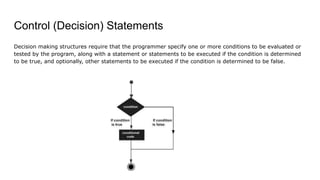
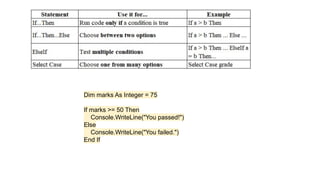
Control (Decision) Statements
Decision making structures require that the programmer specify one or more conditions to be evaluated or
tested by the program, along with a statement or statements to be executed if the condition is determined
to be true, and optionally, other statements to be executed if the condition is determined to be false.
Dim marks As Integer = 75
If marks >= 50 Then
Console.WriteLine("You passed!")
Else
Console.WriteLine("You failed.")
End If
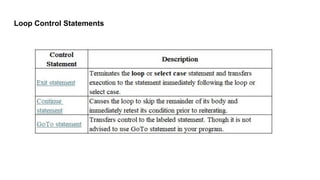
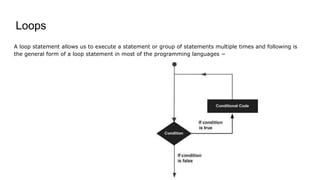
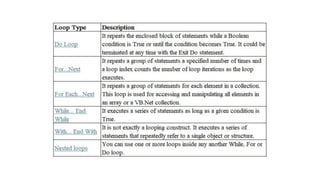
Loops
A loop statement allows us to execute a statement or group of statements multiple times and following is
the general form of a loop statement in most of the programming languages −
Loop Control Statements
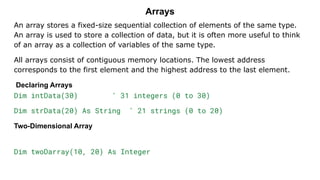
Arrays
An array stores a fixed-size sequential collection of elements of the same type.
An array is used to store a collection of data, but it is often more useful to think
of an array as a collection of variables of the same type.
All arrays consist of contiguous memory locations. The lowest address
corresponds to the first element and the highest address to the last element.
Declaring Arrays
Dim intData(30) ' 31 integers (0 to 30)
Dim strData(20) As String ' 21 strings (0 to 20)
Two-Dimensional Array
Dim twoDarray(10, 20) As Integer
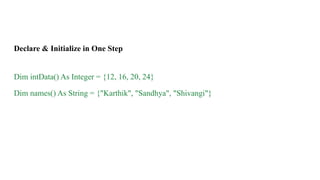
Declare & Initialize in One Step
Dim intData() As Integer = {12, 16, 20, 24}
Dim names() As String = {"Karthik", "Sandhya", "Shivangi"}
Defining Sub Procedures
The Sub statement is used to declare the name, parameter and the body of a sub procedure. The syntax
for the Sub statement is −
[Modifiers] Sub SubName [(ParameterList)]
[Statements]
End Sub
Where,
Modifiers − specify the access level of the procedure; possible values are - Public, Private,
Protected, Friend, Protected Friend
SubName − indicates the name of the Sub
ParameterList − specifies the list of the parameters
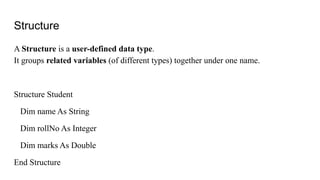
Structure
A Structure is a user-defined data type.
It groups related variables (of different types) together under one name.
Structure Student
Dim name As String
Dim rollNo As Integer
Dim marks As Double
End Structure
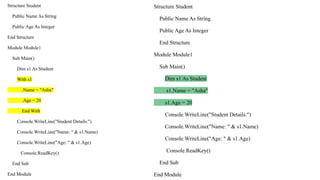
Structure Student
Public Name As String
Public Age As Integer
End Structure
Module Module1
Sub Main()
Dim s1 As Student
With s1
.Name = "Asha"
.Age = 20
End With
Console.WriteLine("Student Details:")
Console.WriteLine("Name: " & s1.Name)
Console.WriteLine("Age: " & s1.Age)
Console.ReadKey()
End Sub
End Module
Structure Student
Public Name As String
Public Age As Integer
End Structure
Module Module1
Sub Main()
Dim s1 As Student
s1.Name = "Asha"
s1.Age = 20
Console.WriteLine("Student Details:")
Console.WriteLine("Name: " & s1.Name)
Console.WriteLine("Age: " & s1.Age)
Console.ReadKey()
End Sub
End Module
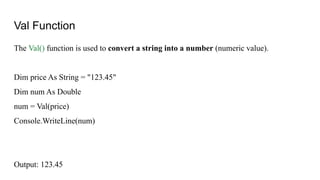
Val Function
The Val() function is used to convert a string into a number (numeric value).
Dim price As String = "123.45"
Dim num As Double
num = Val(price)
Console.WriteLine(num)
Output: 123.45
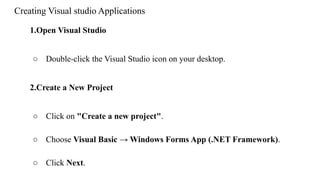
Creating Visual studio Applications
1.Open Visual Studio
○ Double-click the Visual Studio icon on your desktop.
2.Create a New Project
○ Click on "Create a new project".
○ Choose Visual Basic → Windows Forms App (.NET Framework).
○ Click Next.
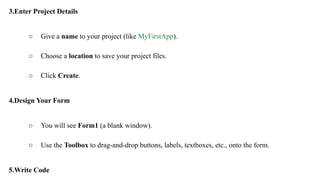
3.Enter Project Details
○ Give a name to your project (like MyFirstApp).
○ Choose a location to save your project files.
○ Click Create.
4.Design Your Form
○ You will see Form1 (a blank window).
○ Use the Toolbox to drag-and-drop buttons, labels, textboxes, etc., onto the form.
5.Write Code
Saving Visual Basic Application
1. Click on File → Save All.
2. This saves:
○ Your form design (e.g., Form1.vb)
○ Your code (e.g., Form1.vb [Design])
○ The full project and solution files
3. Your project is saved as:
○ .sln file (Solution)
○ .vbproj file (Project)
○ .vb files (Code)
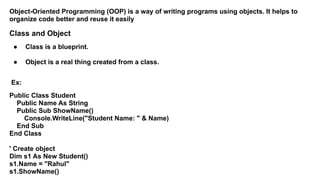
Object-Oriented Programming (OOP) is a way of writing programs using objects. It helps to
organize code better and reuse it easily
Class and Object
● Class is a blueprint.
● Object is a real thing created from a class.
Ex:
Public Class Student
Public Name As String
Public Sub ShowName()
Console.WriteLine("Student Name: " & Name)
End Sub
End Class
' Create object
Dim s1 As New Student()
s1.Name = "Rahul"
s1.ShowName()
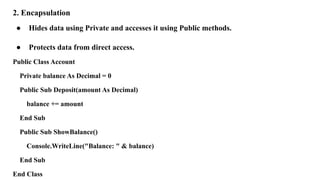
2. Encapsulation
● Hides data using Private and accesses it using Public methods.
● Protects data from direct access.
Public Class Account
Private balance As Decimal = 0
Public Sub Deposit(amount As Decimal)
balance += amount
End Sub
Public Sub ShowBalance()
Console.WriteLine("Balance: " & balance)
End Sub
End Class
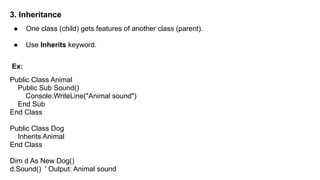
3. Inheritance
● One class (child) gets features of another class (parent).
● Use Inherits keyword.
Ex:
Public Class Animal
Public Sub Sound()
Console.WriteLine("Animal sound")
End Sub
End Class
Public Class Dog
Inherits Animal
End Class
Dim d As New Dog()
d.Sound() ' Output: Animal sound
4. Polymorphism
● Same method name but different behavior.
● Two types: Overloading and Overriding
Example: Method Overloading
Public Class MathOps
Public Function Add(a As Integer, b As Integer) As Integer
Return a + b
End Function
Public Function Add(a As Double, b As Double) As Double
Return a + b
End Function
End Class
5. Abstraction
● Abstraction means hiding complex code and showing only important parts to the
user.
● Like a TV remote – you press a button (simple), but inside it does many things
(hidden).
● Done using Abstract classes or Interfaces.
Example using Interface:
' Interface: Just a rule
Public Interface IVehicle
Sub Start()
End Interface
' Car class follows the rule
Public Class Car
Implements IVehicle
' This is the real code for Start
Public Sub Start() Implements IVehicle.Start
Console.WriteLine("Car started")
End Sub
End Class

Unit 1_Visual Programming-BCA-Part 1.pdf

  • 1.
    Unit 1: Introduction Introductionto Visual programming; Arithmetic Operators, Data type, Statements, Control Statements, Loops, Arrays, Structures, Val and Structure functions, Creating Visual studio Applications, Saving Visual Basic Application. Main features of 4.5WPF , WPF 4.5architecture, WPF 4.5class hierarchy, types of WPF applications, WPF 4.5 designer interface, Using XAML in WPF 4.5 applications, WPF properties, WPF events, working with dialog boxes in WPF application, compiling and running WPF 4.5 applications, WPF 4.5 controls, resources, styles, templates, commands.
  • 2.
    Visual Programming: ● VisualProgramming is used to create programs that respond to actions or events. ● It follows event-driven programming, where the program runs based on events instead of a fixed order. ● Events can be things like: ○ Clicking a button ○ Moving the mouse ○ Opening a file ○ Starting the application ● When an event happens, it calls a special block of code called an event handler to perform a task.
  • 3.
    What is VisualBasic? ● Visual Basic is a programming tool used to create Windows applications with a Graphical User Interface (GUI) like buttons, menus, and forms. ● It uses event-driven programming – this means the program waits until something happens (like a button click). ● The program does nothing until an event occurs. ● When an event happens, a specific block of code called an event procedure runs.
  • 4.
    Need for VisualLanguages / Importance of Visual Basic (VB): ● Easy to Learn: Visual Basic is simpler to learn and understand than other languages like C or C++. ● Powerful Tool: It is one of the most powerful languages for building Windows applications. ● Graphical Interface: VB allows you to design your programs using drag-and-drop tools in a visual environment, making development faster and easier. ● Quick Development: You can create user-friendly applications quickly without writing too much code
  • 5.
    History of VisualBasic – A Road Map Origin of BASIC (1960s–1970s) ● BASIC stands for Beginners All-purpose Symbolic Instruction Code. ● Created by Professors Kemeny & Kurtz in the 1960s. Birth of Visual Basic ● Visual Basic (VB) is a high-level language developed from DOS-based BASIC. ● Alan Cooper (Father of VB) created a visual tool called "Ruby" in 1988. ● Microsoft bought Ruby and launched it as Visual Basic.
  • 6.
    Types of Application •Windows Desktop Applications • Database Applications • Web Development • Console applications • Educational Purposes • Legacy Applications
  • 7.
    Features of VisualBasic Integrated Development Environment (IDE) ○ All tools for designing, coding, and testing are in one place. Graphical Representation ○ You can create programs using forms, buttons, and menus that are easy to see and use. Drag-and-Drop Interface ○ You can drag controls (like buttons and text boxes) onto a form—no need to write code for layout. Event-Driven Programming ○ Code runs only when an event happens, like a button click or key press.
  • 8.
    Visual Debugging ○ Youcan easily find and fix errors in your program by seeing what happens step-by-step. Modularity and Reusability ○ You can write code in small parts (modules or procedures) and reuse them in other programs. Rapid Application Development (RAD) ○ You can build applications quickly using ready-made tools and controls. Data Access ○ VB makes it easy to connect to databases and manage data using tools like ADO(ActiveX Data Objects) and DAO(Data Access Objects).
  • 9.
    .NET Framework ● Aframework is like a supporting structure that helps you build something. ● .NET stands for Network Enabled Technologies. ● It is a software platform developed by Microsoft. ● In programming, it means a set of tools, rules, and features that help you create software easily. ● It helps developers by giving ready-made libraries, tools, and features.
  • 11.
    Operating System ● Thisis Windows. It controls your computer. Common Language Runtime (CLR) ● The "engine" that runs your program. ● It takes care of memory, security, and running the code.
  • 12.
    .NET Framework ClassLibrary ● A collection of ready-made code you can use in your program (like tools). ADO.NET and XML ● Helps you connect to databases and handle data. ASP.NET and Windows Forms ● ASP.NET is used to make web applications. ● Windows Forms is used to make desktop applications.
  • 13.
    Common Language Specification(CLS) ● Makes sure all .NET programming languages can work together. Programming Languages ● Languages like C#, VB.NET, C++, you can use to write programs. Visual Studio .NET (on the side) ● A software tool used to write and build your programs easily.
  • 14.
    Common Language Specification(CLS) ● CLS is like a common set of rules for all .NET languages (like C#, VB.NET). ● It helps different languages work together smoothly. ● For example, a program written in C# can talk to a program written in VB.NET without any problems. ● CLS makes sure nothing is lost or broken when sharing data or objects between languages. CLS is like a common language rulebook for .NET. It helps programs written in different languages talk to each other easily and safely.
  • 15.
    Common Language Runtime(CLR) ● CLR is the heart of the .NET Framework. It runs your program. ● It is a special environment that takes care of: ○ Running the code ○ Managing memory ○ Handling errors ○ Managing threads (multi-tasking)
  • 16.
    How It Works: 1.You write code in C#, VB.NET, or another .NET language. 2. The code is converted to MSIL (Microsoft Intermediate Language). 3. Then, CLR converts MSIL into machine code (native code) that your computer can understand. 4. CLR then runs your program.
  • 17.
    VB.NET / C#.NETCode ↓ VBC / CSC Compiler ↓ MSIL Code ↓ Stored in .EXE or .DLL (PE file) ↓ CLR uses JIT at Runtime ↓ Converts MSIL → Machine Code ↓ Program Executes on CPU
  • 18.
    Compilation Process in.NET (2 Steps) 1. Step 1: Language Compilation ○ You write code in VB.NET, C#, etc. ○ VB.NET uses the VBC compiler ○ C#.NET uses the CSC compiler ○ These compilers convert your code to MSIL (Microsoft Intermediate Language) 2. Step 2: JIT Compilation (Just-In-Time) ○ At runtime, MSIL is converted to Machine Code by JIT compiler. ○ This machine code runs directly on the computer. The compiled output is saved as: ● .DLL → Dynamic Link Library (for reusable code) or .EXE → Executable File (for applications)
  • 19.
    Framework Class Library(FCL) ● FCL is a huge collection of ready-made code (like tools). ● It helps you with common tasks like: ○ File operations (open, read, write) ○ Working with databases ○ Building user interfaces ○ Sending data over a network
  • 20.
    Concept Meaning CLR Runsthe .NET program and manages everything MSIL Code created after compilation, before execution JIT Converts MSIL to machine code when the program runs FCL A big library of useful code for different tasks
  • 21.
    Framework Class Library(FCL) The FCL is a collection of ready-to-use code provided by Microsoft in the .NET Framework. It helps developers build applications faster and easier. Components of FCL: Base Class Library (BCL) ○ The core part of FCL. ○ Contains basic building blocks like: ■ Data types (e.g., string, int) ■ File input/output (I/O)
  • 22.
    Windows Forms ○ Usedto create desktop (Windows GUI) applications. ○ Allows you to design buttons, forms, menus, etc. ASP.NET Web Forms ○ Used to build web applications. ○ Supports server-side controls and dynamic web pages. ADO.NET ○ Used to connect to databases (e.g., SQL Server, Oracle, MySQL). ○ Helps read, write, and update data in databases
  • 23.
    COM (Component ObjectModel) ● A Microsoft standard that allows different software components to work together. ● Example: A program written in C++ can work with a program in VB.NET using COM. ● Works across languages and systems. COM+ (Component Services) ● An improved version of COM. ● Helps build large and distributed applications. ● Provides extra features like: ○ Transaction management ○ Security ○ Better performance
  • 24.
    Windows and .NETFramework ● The .NET Framework is built to run on Windows. ● It gives Windows developers a powerful platform to build apps that: ○ Run fast ○ Look good (GUI) ○ Connect to databases and the web easily
  • 25.
    Operators in Visualbasic An operator is a symbol that tells the compiler to perform specific mathematical or logical manipulations. VB.Net is rich in built-in operators and provides following types of commonly used operators − Arithmetic Operators Comparison Operators Logical/Bitwise Operators Bit Shift Operators Assignment Operators
  • 26.
  • 27.
  • 28.
    VB.Net provides threemore comparison operators Is Operator − It compares two object reference variables and determines if two object references refer to the same object without performing value comparisons. If object1 and object2 both refer to the exact same object instance, result is True; otherwise, result is False. IsNot Operator − It also compares two object reference variables and determines if two object references refer to different objects. If object1 and object2 both refer to the exact same object instance, result is False; otherwise, result is True. Like Operator − It compares a string against a pattern.
  • 29.
    Logical/Bitwise Operators Bitwise operatorswork on individual bits (0s and 1s) of numbers. They compare or modify bits one by one
  • 30.
  • 31.
    Program Structure Imports System ModuleModule1 'This program will display Hello World Sub Main() Console.WriteLine("Hello World") Console.ReadKey() End Sub End Module
  • 32.
    Compile & ExecuteVB.Net Program Start Visual Studio. On the menu bar, choose File → New → Project. Choose Visual Basic from templates Choose Console Application. Specify a name and location for your project using the Browse button, and then choose the OK button. The new project appears in Solution Explorer. Write code in the Code Editor. Click the Run button or the F5 key to run the project. A Command Prompt window appears that contains the line Hello World.
  • 33.
  • 34.
    Object is aspecial data type that can store anything — numbers, text, dates, or even other objects. Dim myValue As Object When to use Object data type: When you don’t know what type of value you’ll store When you want to write general-purpose or flexible code You may need to convert (cast) it back to the original type before doing operations like addition or comparison. Dim myObject As Object = 50 Dim result As Integer = CInt(myObject) + 10 ' Convert Object to Integer Console.WriteLine(result) ' Output: 60
  • 35.
    Variable Declaration inVisual Basic (VB) A variable is a name used to store data (like numbers, text, etc.) in a program. Syntax: Dim variableName As DataType Examples Dim age As Integer ' stores whole numbers Dim price As Double ' stores decimal numbers Dim name As String ' stores text Dim isPassed As Boolean ' stores True or False Dim today As Date ' stores date and time
  • 36.
    Control (Decision) Statements Decisionmaking structures require that the programmer specify one or more conditions to be evaluated or tested by the program, along with a statement or statements to be executed if the condition is determined to be true, and optionally, other statements to be executed if the condition is determined to be false.
  • 37.
    Dim marks AsInteger = 75 If marks >= 50 Then Console.WriteLine("You passed!") Else Console.WriteLine("You failed.") End If
  • 38.
    Loops A loop statementallows us to execute a statement or group of statements multiple times and following is the general form of a loop statement in most of the programming languages −
  • 40.
  • 41.
    Arrays An array storesa fixed-size sequential collection of elements of the same type. An array is used to store a collection of data, but it is often more useful to think of an array as a collection of variables of the same type. All arrays consist of contiguous memory locations. The lowest address corresponds to the first element and the highest address to the last element. Declaring Arrays Dim intData(30) ' 31 integers (0 to 30) Dim strData(20) As String ' 21 strings (0 to 20) Two-Dimensional Array Dim twoDarray(10, 20) As Integer
  • 42.
    Declare & Initializein One Step Dim intData() As Integer = {12, 16, 20, 24} Dim names() As String = {"Karthik", "Sandhya", "Shivangi"}
  • 43.
    Defining Sub Procedures TheSub statement is used to declare the name, parameter and the body of a sub procedure. The syntax for the Sub statement is − [Modifiers] Sub SubName [(ParameterList)] [Statements] End Sub Where, Modifiers − specify the access level of the procedure; possible values are - Public, Private, Protected, Friend, Protected Friend SubName − indicates the name of the Sub ParameterList − specifies the list of the parameters
  • 44.
    Structure A Structure isa user-defined data type. It groups related variables (of different types) together under one name. Structure Student Dim name As String Dim rollNo As Integer Dim marks As Double End Structure
  • 45.
    Structure Student Public NameAs String Public Age As Integer End Structure Module Module1 Sub Main() Dim s1 As Student With s1 .Name = "Asha" .Age = 20 End With Console.WriteLine("Student Details:") Console.WriteLine("Name: " & s1.Name) Console.WriteLine("Age: " & s1.Age) Console.ReadKey() End Sub End Module Structure Student Public Name As String Public Age As Integer End Structure Module Module1 Sub Main() Dim s1 As Student s1.Name = "Asha" s1.Age = 20 Console.WriteLine("Student Details:") Console.WriteLine("Name: " & s1.Name) Console.WriteLine("Age: " & s1.Age) Console.ReadKey() End Sub End Module
  • 46.
    Val Function The Val()function is used to convert a string into a number (numeric value). Dim price As String = "123.45" Dim num As Double num = Val(price) Console.WriteLine(num) Output: 123.45
  • 47.
    Creating Visual studioApplications 1.Open Visual Studio ○ Double-click the Visual Studio icon on your desktop. 2.Create a New Project ○ Click on "Create a new project". ○ Choose Visual Basic → Windows Forms App (.NET Framework). ○ Click Next.
  • 48.
    3.Enter Project Details ○Give a name to your project (like MyFirstApp). ○ Choose a location to save your project files. ○ Click Create. 4.Design Your Form ○ You will see Form1 (a blank window). ○ Use the Toolbox to drag-and-drop buttons, labels, textboxes, etc., onto the form. 5.Write Code
  • 49.
    Saving Visual BasicApplication 1. Click on File → Save All. 2. This saves: ○ Your form design (e.g., Form1.vb) ○ Your code (e.g., Form1.vb [Design]) ○ The full project and solution files 3. Your project is saved as: ○ .sln file (Solution) ○ .vbproj file (Project) ○ .vb files (Code)
  • 50.
    Object-Oriented Programming (OOP)is a way of writing programs using objects. It helps to organize code better and reuse it easily Class and Object ● Class is a blueprint. ● Object is a real thing created from a class. Ex: Public Class Student Public Name As String Public Sub ShowName() Console.WriteLine("Student Name: " & Name) End Sub End Class ' Create object Dim s1 As New Student() s1.Name = "Rahul" s1.ShowName()
  • 51.
    2. Encapsulation ● Hidesdata using Private and accesses it using Public methods. ● Protects data from direct access. Public Class Account Private balance As Decimal = 0 Public Sub Deposit(amount As Decimal) balance += amount End Sub Public Sub ShowBalance() Console.WriteLine("Balance: " & balance) End Sub End Class
  • 52.
    3. Inheritance ● Oneclass (child) gets features of another class (parent). ● Use Inherits keyword. Ex: Public Class Animal Public Sub Sound() Console.WriteLine("Animal sound") End Sub End Class Public Class Dog Inherits Animal End Class Dim d As New Dog() d.Sound() ' Output: Animal sound
  • 53.
    4. Polymorphism ● Samemethod name but different behavior. ● Two types: Overloading and Overriding Example: Method Overloading Public Class MathOps Public Function Add(a As Integer, b As Integer) As Integer Return a + b End Function Public Function Add(a As Double, b As Double) As Double Return a + b End Function End Class
  • 54.
    5. Abstraction ● Abstractionmeans hiding complex code and showing only important parts to the user. ● Like a TV remote – you press a button (simple), but inside it does many things (hidden). ● Done using Abstract classes or Interfaces.
  • 55.
    Example using Interface: 'Interface: Just a rule Public Interface IVehicle Sub Start() End Interface ' Car class follows the rule Public Class Car Implements IVehicle ' This is the real code for Start Public Sub Start() Implements IVehicle.Start Console.WriteLine("Car started") End Sub End Class