The Evolution of Web Development


• Standards such as HTML (Hypertext Markup
  Language) and XML (Extensible Markup Language)
  were created
• Need to develop languages and programming tools
  that could integrate with the Web
The Early Web Development World

• Separate, tiny applications that are executed by
  server-side calls - CGI (Command Gateway Interface)

• Scripts that are interpreted by a server-side
  resource: Classic ASP (Active Server Pages)
What’s Wrong with Classic ASP

 Classic ASP is a solid tool for developing web
  applications using Microsoft technologies
• Length Code
• No IDE (integrated development environment) for
  developers
• ASP Code is interpreted.
ASP.NET
 Some of the differences between ASP.NET and earlier
  web development platforms.

• ASP.NET features a completely object-oriented programming
    model, event driven, control-based architecture that encourages
    code encapsulation and code reuse.
•    ASP.NET gives you the ability to code in any supported .NET
    language (including Visual Basic, C#, J#, and many other
    languages that have third-party compilers).
• ASP.NET is dedicated to high performance.
Seven Important Facts About ASP.NET
 Fact 1: ASP.NET Is Integrated with the .NET Framework
 Fact 2: ASP.NET Is Compiled, Not Interpreted
 Fact 3: ASP.NET Is Multilanguage
 Fact 4: ASP.NET Is Hosted by the Common Language
  Runtime
 Fact 5: ASP.NET Is Object-Oriented
 Fact 6: ASP.NET Is Multidevice and Multibrowser
 Fact 7: ASP.NET Is Easy to Deploy and Configure
Seven Important Facts About ASP.NET cont.
  Fact 1: ASP.NET Is Integrated with the .NET
  Framework

   • .NET Framework provides massive
    collection of functionality and grouped into
    a logical, hierarchical container called a
    namespace.
   • .NET gives the tools/functionality available
    in .NET framework to web developers.
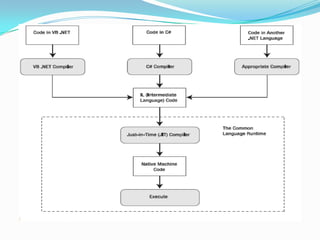
 Fact 2: ASP.NET Is Compiled, Not Interpreted.
  • ASP.NET applications are always compiled

  • ASP.NET applications actually go through two
    stages of compilation.
  • First stage, the C# code you write is compiled
    into an intermediate language called Microsoft
    Intermediate Language (MSIL), or just IL.
  • The second level of compilation happens just
    before the page is actually executed.
 Fact 3: ASP.NET Is Multilanguage
  • Supports multiple languages for writing
   server side code.
  • the code is compiled into IL
 Fact 4: ASP.NET Is Hosted by the Common
  Language Runtime
 Benefits of CLR:
• Automatic memory management and garbage
  collection
• Extensible metadata(assembly)
• Structured error handling
• Multithreading
 Fact 5: ASP.NET Is Object-Oriented.


  • ASP.NET is truly object-oriented.

  • Web Developer can also exploit all the
   conventions of an OOP
 Fact 6: ASP.NET Is Multidevice and
 Multibrowser.

  • Greatest challenge faced by web
   developers is developing application,
   which can run with all browsers
  • ASP.NET addresses this problem in a
   remarkably intelligent way.
 Fact 7: ASP.NET Is Easy to Deploy and
 Configure.

  • Deployment is easy.

  • Distributing the components your
   application uses is just as easy.
  • Configuration is made easy. (web.config file)
HTML & Web Controls in ASP.Net
 Two schools of thoughts when ASP.NET is developed
       HTML Controls
       Server Side Controls (Web Controls)
 render their interface from dozens of distinct HTML elements
    while still providing a simple object-based interface to the
    programmer.
    Using this model, developers could work with programmable
    menus, calendars, data lists, validators, and so on.
 ASP.NET web controls, which provide a higher level of
    abstraction and more functionality.
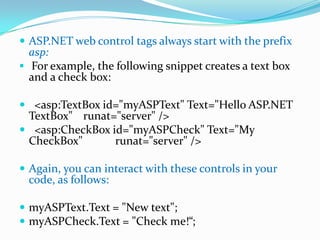
 ASP.NET web control tags always start with the prefix
  asp:
 For example, the following snippet creates a text box
  and a check box:

 <asp:TextBox id="myASPText" Text="Hello ASP.NET
 TextBox" runat="server" />
 <asp:CheckBox id="myASPCheck" Text="My
 CheckBox"       runat="server" />

 Again, you can interact with these controls in your
 code, as follows:

 myASPText.Text = "New text";
 myASPCheck.Text = "Check me!“;
 The ASP.NET family of web controls includes
 complex rendered controls (such as the Calendar
 and TreeView).
 Also provides streamlined controls (such as
  TextBox, Label, and Button), which map closely to
  existing HTML tags.
 Web controls are easy to learn
 They’re a natural fit for Windows developers
  moving to the world of the Web, because many of
 the property names are similar to the
 corresponding Windows controls.
Toolbox Tabs for an ASP.NET Project
 Standard: This tab includes the rich web server controls that are
  the heart of ASP.NET’s web form model.

 Data: These components allow you to connect to a database.

 Validation: These controls allow you to verify an associated
  input control against user-defined rules.

 Navigation: These controls are designed to display site maps
  and allow the user to navigate from one page to another.

 Login: These controls provide prebuilt security solutions, such
  as login boxes and a wizard for creating users.

 WebParts: This set of controls supports web parts, an ASP.NET
  model for building componentized, highly configurable web
  portals.
The Code Model
 Visual Studio supports two models for coding
 web pages
 Inline Code:
   This model is the closest to traditional ASP
   All the code and HTML markup is stored in
   a single .aspx file.
   Handy model because it keeps everything in
   one neat package.
   Popular for coding simple web pages.
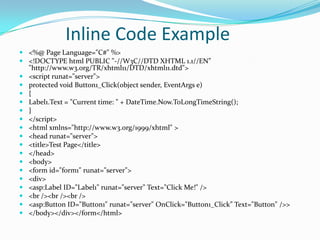
Inline Code Example
 <%@ Page Language="C#" %>
 <!DOCTYPE html PUBLIC "-//W3C//DTD XHTML 1.1//EN”
  "http://www.w3.org/TR/xhtml11/DTD/xhtml11.dtd">
 <script runat="server">
 protected void Button1_Click(object sender, EventArgs e)
 {
 Label1.Text = "Current time: " + DateTime.Now.ToLongTimeString();
 }
 </script>
 <html xmlns="http://www.w3.org/1999/xhtml" >
 <head runat="server">
 <title>Test Page</title>
 </head>
 <body>
 <form id="form1" runat="server">
 <div>
 <asp:Label ID="Label1" runat="server" Text="Click Me!" />
 <br /><br /><br />
 <asp:Button ID="Button1" runat="server" OnClick="Button1_Click” Text="Button" />>
 </body></div></form</html>
 Code-behind:
   Separates each ASP.NET web page into two files
   an .aspx markup file with the HTML and
   control tags, and
   .cs code file with the source code for the page
   provides better organization
   Separating the user interface from
   programmatic logic, keenly important when
   building complex pages.
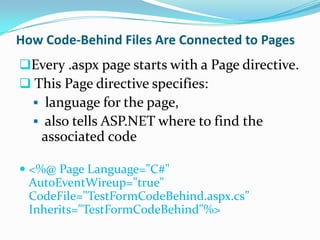
How Code-Behind Files Are Connected to Pages
Every .aspx page starts with a Page directive.
 This Page directive specifies:
   language for the page,
   also tells ASP.NET where to find the
    associated code

 <%@ Page Language="C#"
  AutoEventWireup="true"
  CodeFile="TestFormCodeBehind.aspx.cs”
  Inherits="TestFormCodeBehind"%>

Introduction to asp

  • 2.
    The Evolution ofWeb Development • Standards such as HTML (Hypertext Markup Language) and XML (Extensible Markup Language) were created • Need to develop languages and programming tools that could integrate with the Web
  • 3.
    The Early WebDevelopment World • Separate, tiny applications that are executed by server-side calls - CGI (Command Gateway Interface) • Scripts that are interpreted by a server-side resource: Classic ASP (Active Server Pages)
  • 4.
    What’s Wrong withClassic ASP  Classic ASP is a solid tool for developing web applications using Microsoft technologies • Length Code • No IDE (integrated development environment) for developers • ASP Code is interpreted.
  • 5.
    ASP.NET  Some ofthe differences between ASP.NET and earlier web development platforms. • ASP.NET features a completely object-oriented programming model, event driven, control-based architecture that encourages code encapsulation and code reuse. • ASP.NET gives you the ability to code in any supported .NET language (including Visual Basic, C#, J#, and many other languages that have third-party compilers). • ASP.NET is dedicated to high performance.
  • 6.
    Seven Important FactsAbout ASP.NET  Fact 1: ASP.NET Is Integrated with the .NET Framework  Fact 2: ASP.NET Is Compiled, Not Interpreted  Fact 3: ASP.NET Is Multilanguage  Fact 4: ASP.NET Is Hosted by the Common Language Runtime  Fact 5: ASP.NET Is Object-Oriented  Fact 6: ASP.NET Is Multidevice and Multibrowser  Fact 7: ASP.NET Is Easy to Deploy and Configure
  • 7.
    Seven Important FactsAbout ASP.NET cont.  Fact 1: ASP.NET Is Integrated with the .NET Framework • .NET Framework provides massive collection of functionality and grouped into a logical, hierarchical container called a namespace. • .NET gives the tools/functionality available in .NET framework to web developers.
  • 8.
     Fact 2:ASP.NET Is Compiled, Not Interpreted. • ASP.NET applications are always compiled • ASP.NET applications actually go through two stages of compilation. • First stage, the C# code you write is compiled into an intermediate language called Microsoft Intermediate Language (MSIL), or just IL. • The second level of compilation happens just before the page is actually executed.
  • 10.
     Fact 3:ASP.NET Is Multilanguage • Supports multiple languages for writing server side code. • the code is compiled into IL
  • 11.
     Fact 4:ASP.NET Is Hosted by the Common Language Runtime  Benefits of CLR: • Automatic memory management and garbage collection • Extensible metadata(assembly) • Structured error handling • Multithreading
  • 12.
     Fact 5:ASP.NET Is Object-Oriented. • ASP.NET is truly object-oriented. • Web Developer can also exploit all the conventions of an OOP
  • 13.
     Fact 6:ASP.NET Is Multidevice and Multibrowser. • Greatest challenge faced by web developers is developing application, which can run with all browsers • ASP.NET addresses this problem in a remarkably intelligent way.
  • 14.
     Fact 7:ASP.NET Is Easy to Deploy and Configure. • Deployment is easy. • Distributing the components your application uses is just as easy. • Configuration is made easy. (web.config file)
  • 15.
    HTML & WebControls in ASP.Net  Two schools of thoughts when ASP.NET is developed  HTML Controls  Server Side Controls (Web Controls)  render their interface from dozens of distinct HTML elements while still providing a simple object-based interface to the programmer.  Using this model, developers could work with programmable menus, calendars, data lists, validators, and so on.  ASP.NET web controls, which provide a higher level of abstraction and more functionality.
  • 16.
     ASP.NET webcontrol tags always start with the prefix asp:  For example, the following snippet creates a text box and a check box:  <asp:TextBox id="myASPText" Text="Hello ASP.NET TextBox" runat="server" />  <asp:CheckBox id="myASPCheck" Text="My CheckBox" runat="server" />  Again, you can interact with these controls in your code, as follows:  myASPText.Text = "New text";  myASPCheck.Text = "Check me!“;
  • 17.
     The ASP.NETfamily of web controls includes complex rendered controls (such as the Calendar and TreeView).  Also provides streamlined controls (such as TextBox, Label, and Button), which map closely to existing HTML tags.  Web controls are easy to learn  They’re a natural fit for Windows developers moving to the world of the Web, because many of the property names are similar to the corresponding Windows controls.
  • 18.
    Toolbox Tabs foran ASP.NET Project  Standard: This tab includes the rich web server controls that are the heart of ASP.NET’s web form model.  Data: These components allow you to connect to a database.  Validation: These controls allow you to verify an associated input control against user-defined rules.  Navigation: These controls are designed to display site maps and allow the user to navigate from one page to another.  Login: These controls provide prebuilt security solutions, such as login boxes and a wizard for creating users.  WebParts: This set of controls supports web parts, an ASP.NET model for building componentized, highly configurable web portals.
  • 19.
    The Code Model Visual Studio supports two models for coding web pages  Inline Code:  This model is the closest to traditional ASP  All the code and HTML markup is stored in a single .aspx file.  Handy model because it keeps everything in one neat package.  Popular for coding simple web pages.
  • 20.
    Inline Code Example <%@ Page Language="C#" %>  <!DOCTYPE html PUBLIC "-//W3C//DTD XHTML 1.1//EN” "http://www.w3.org/TR/xhtml11/DTD/xhtml11.dtd">  <script runat="server">  protected void Button1_Click(object sender, EventArgs e)  {  Label1.Text = "Current time: " + DateTime.Now.ToLongTimeString();  }  </script>  <html xmlns="http://www.w3.org/1999/xhtml" >  <head runat="server">  <title>Test Page</title>  </head>  <body>  <form id="form1" runat="server">  <div>  <asp:Label ID="Label1" runat="server" Text="Click Me!" />  <br /><br /><br />  <asp:Button ID="Button1" runat="server" OnClick="Button1_Click” Text="Button" />>  </body></div></form</html>
  • 21.
     Code-behind:  Separates each ASP.NET web page into two files  an .aspx markup file with the HTML and control tags, and  .cs code file with the source code for the page  provides better organization  Separating the user interface from programmatic logic, keenly important when building complex pages.
  • 22.
    How Code-Behind FilesAre Connected to Pages Every .aspx page starts with a Page directive.  This Page directive specifies:  language for the page,  also tells ASP.NET where to find the associated code  <%@ Page Language="C#" AutoEventWireup="true" CodeFile="TestFormCodeBehind.aspx.cs” Inherits="TestFormCodeBehind"%>