+
Agile Development -
Scrum
Systems Analysis and Design
Michael Heron
+
Introduction
 We have already touched upon the basic principles behind
Agile Programming.
 Lightweight
 User Centric
 In this lecture we’re going to look at how it can actually be used
as a project management technique.
 There are several flavours of this, with several techniques for each.
 Most do not formally incorporate a project management role.
 It’s considered the purview of all members.
+
Agile - Scrum
 One flavour of agile development is known as Scrum.
 It’s a framework upon which you can build your own specialised
process.
 It is usually not proscriptive in terms of how things should be done.
 Instead, it gives a way in which things can interrelate.
 Core at the heart of Scrum is the idea that individual teams
know best about the problems they will have and the best
things to do to deal with them.
 It relies on a team of motivated and multitasking members.
 There’s no such thing as a team leader or project manager.
+
Scrum
 The entirety of the team decides on how projects will be
completed.
 And who is going to be responsible for completing parts of them.
 A large project may involve several largely autonomous teams
each tackling a subset of the problem.
 Teams are supported by two specific individuals.
 A Scrum Master
 The Product Owner.
 The latter is the ‘client’, who is involved in making sure the
thing developed is what is actually needed.
+
The Scrum Master
 The Scrum Master <fanfare> is the one responsible for making
sure the Scrum framework is being appropriately used.
 He/she is also responsible for balancing the teams between their
internal work and product owner requirements.
 The Scrum Master is responsible for facilitating the process,
allowing teams to work at their highest level of productivity.
 Removing roadblocks
 Facilitating meetings
 Managing the ‘Product Backlog’
 Organising and managing product ‘Sprints’
+
The Sprint
 Work in Scrum progresses through a series of ‘Sprints’
 A block of work, usually no longer than a month or so.
 Smaller projects may have smaller sprints.
 Sprints are ‘timeboxed’
 They are restricted to a specific duration. You can’t delay or
rechedule them.
 Sprints occur after a planning meeting.
 Tasks for the upcoming sprint are identified and allocated.
 At the end is a review meeting.
 Where progress is evaluated against commitments.
+
Velocity
 Scrum often incorporates a measure of team capacity known as
velocity.
 This is how much work a team can do in a particular period based
on how much work has been done in other periods.
 Two things are used to determine this.
 The Unit of work (days, hours, ‘story points’)
 Each user story in a backlog can be estimated in terms of this.
 The interval
 The most meaningful duration of work that can be done. Usually a
week.
 Velocity is calculated by units of work completed per interval.
 Initially unreliable, but with successive intervals becomes more
effective.
+
Velocity
 Within the Scrum team, each user stories gets allocated a certain
number of units of work.
 Story points are often used as an abstract scale – a fibbonaci
sequence, size of clothes, etc.
 This combined with velocity gives a reasonable idea of how much
can be done during an interval.
 Some teams may break it down further into velocity per individual.
 Tasks are allocated within the planning meeting until the planned
units of work match velocity.
 The projected velocity over a project lifetime gives a useful way of
determining what is likely to eventually be completed.
+
The Timebox
 In some project management systems, project slippage is
anticipated.
 Often represented as ‘slack’ or ‘float time’
 Within Scrum, phases are timeboxed.
 Each time box comes with its own deliverables, deadline (which is
immovable) and allocation of resources.
 Timeboxing helps limit feature creep and scope creep.
 You don’t really have the time to mess around with that kind of thing.
 As such, it is largely built on task prioritisation.
 MoSCoW being a common example of such a system.
+
The Product Backlog
 During a timeboxed sprint, the Product Backlog is adjusted.
 The Backlog is a prioritized feature list that is incrementally refined
during each Sprint.
 To begin with, a backlog consists of everything that can be thought
of regarding required features and tasks.
 This gets successively modified as the project changes, requirements
shift, and mastery over the project builds.
 Typically, the backlog consists of four things:
 Features to add
 Bugs that exist
 Technical Options
 Acquired Knowledge
+
The Product Backlog
 Some characterise the backlog as having DEEP qualities.
 Detailed appropriately
 Estimated
 Emergent
 Prioritized
 Detailed Appropriately – higher priority items are described in
more detail than lower priority items.
 This keeps the backlog tractable and focuses attention on the higher
priority tasks.
 Estimated – Each task contains a realistic estimation of the
time required to complete them.
+
The Product Backlog
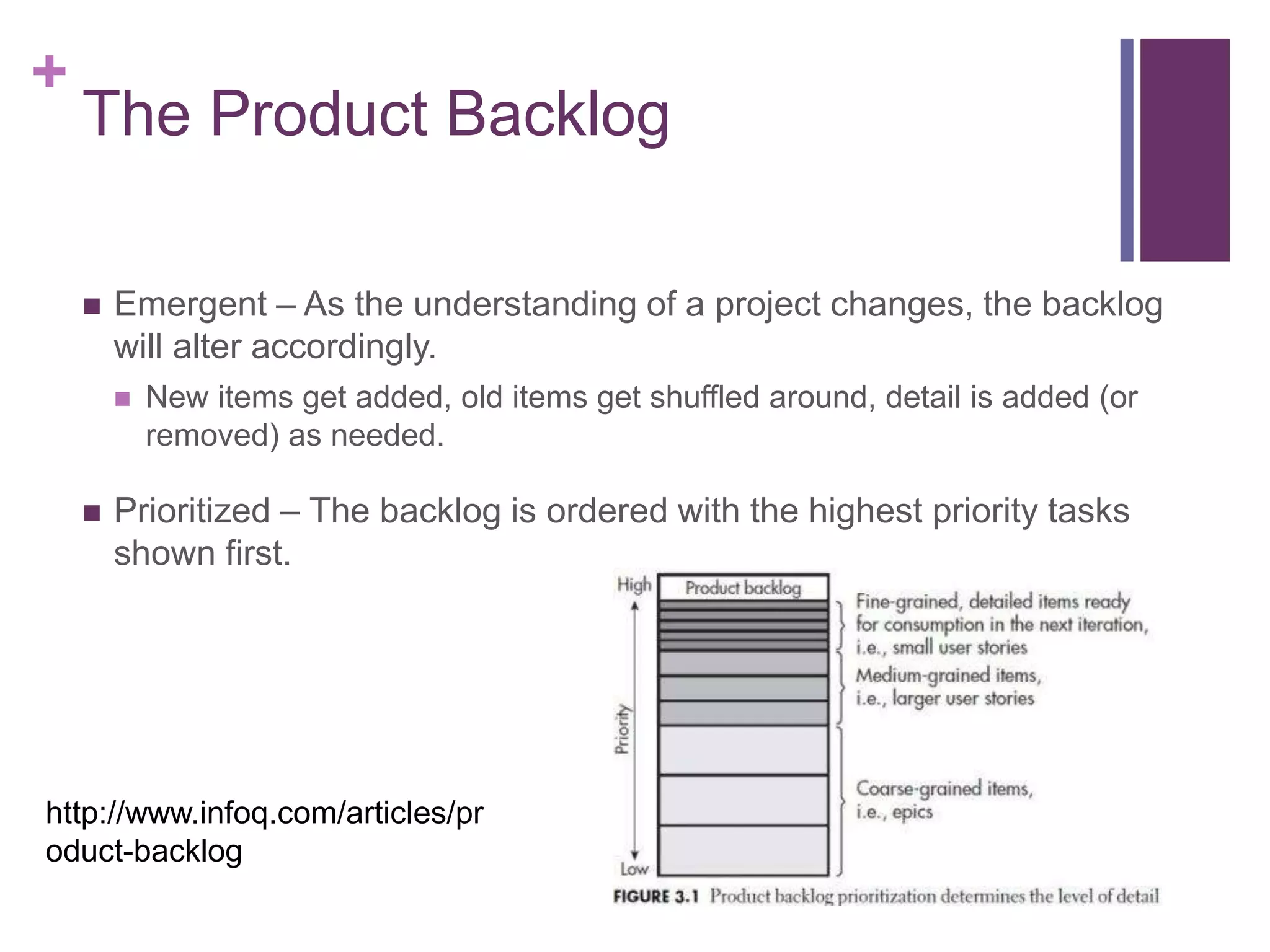
 Emergent – As the understanding of a project changes, the backlog
will alter accordingly.
 New items get added, old items get shuffled around, detail is added (or
removed) as needed.
 Prioritized – The backlog is ordered with the highest priority tasks
shown first.
http://www.infoq.com/articles/pr
oduct-backlog
+
User Stories
 The simplest and most reliable way for teams to list features is
by user stories.
 These are simple descriptions of features as told from the
perspective of someone using it.
 There is a standard template
 As a <type of user> I want to <do something> so that <some
outcome>
 As a customer, I want to browse the catalog so that I can decide
what I want to buy.
 These are usually written on index cards or post-its and
arranged on walls to help facilitate the organisation of a project.
+
User Stories
 User stories that cover large amounts of functionality are
known as epics.
 ‘As a user, I want to manage my account so that I have control over
how the system knows me’
 Since epics are too large to be completed in a single sprint, this
gets subdivided into more manageable stories.
 Sometimes dozens or hundreds depending on how epic.
 ‘As a user, I want to change my payment details so that my
payments come from the right account’
 ‘As a power user, I want to set up email notifications for alerting
me when new things are entered into the catalogue, so I don’t
need to keep checking the site’
+
User Stories
 User stories become detailed enough to work with by two
mechanics.
 Splitting them up into multiple user stories.
 Adding conditions of satisfaction.
 This is a high level acceptance test that will be true after a story is
complete.
 ‘Make sure the account can be accessed on the website’
 ‘Make sure the account can be accessed via a mobile phone’
 These get specified early by the product owner for the project.
 After negotiation with the Scrum Master and scrum teams.
+
Writing User Stories
 User stories should ideally have the following characteristics.
 Written for specific users.
 While ‘As a User’ is appropriate for an example, it’s not detailed
enough for an actual user story.
 As a consequence of this, this aren’t written for Product Owners.
 ‘As a product owner…’
 An owner must be viewed in the context of their interaction of
the system.
 Similarly for ‘as a developer’
 Identify a value or benefit.
 They need to have the ‘because’ listed.
 Answer the questions: What if, Where, When, How.
+
The Structure of a Sprint
 A sprint has a certain typical structure to it.
 Planning meeting at the very start.
 Deciding on the highest priority tasks, committing to which can be
done, and then developing a Sprint Backlog accordingly.
 Daily sprint scrum meetings.
 Very short duration, usually timeboxed.
 Attended by all members, including the Scrum Master and
product owner.
 A sprint review at the very end.
 During this, the functionality developed during the sprint is
demonstrated.
 Feedback is obtained from the product owners and other
stakeholders.
+
Daily Scrum Meeting
 Several things get covered during the daily meeting.
 Everyone updates the team on what’s been done during the last
day.
 Everyone updates the team on what they’re planning to do today.
 Everyone reports on anything that is causing problems.
 It is the job of the Scrum Master to resolve these outside the
meeting.
 For effective time management:
 Meetings occur at the same time and place every day.
 Meetings start on time, even if people aren’t there.
 Normally only those involved in the project speak, although
everyone is welcome.
+
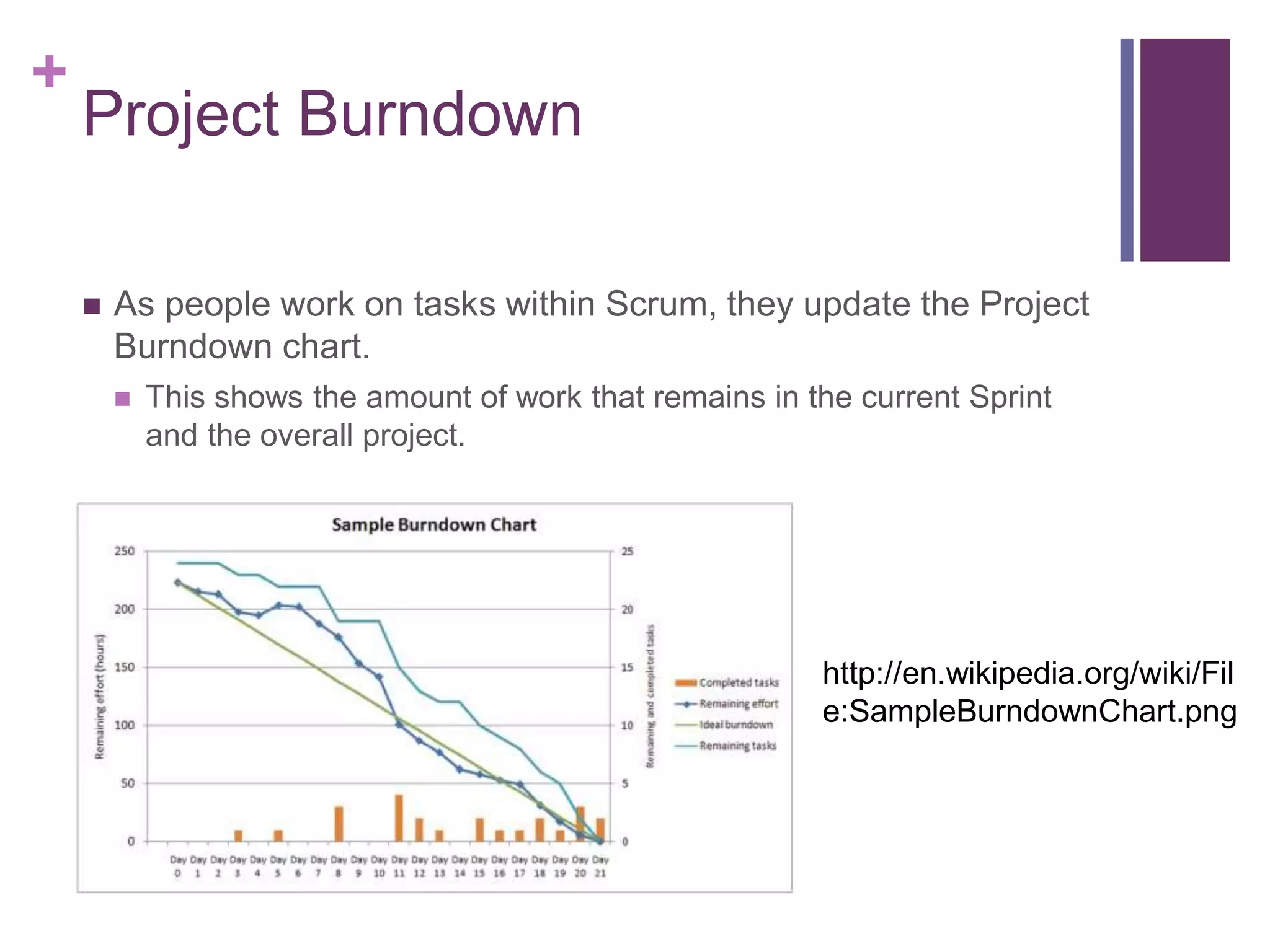
Project Burndown
 As people work on tasks within Scrum, they update the Project
Burndown chart.
 This shows the amount of work that remains in the current Sprint
and the overall project.
http://en.wikipedia.org/wiki/Fil
e:SampleBurndownChart.png
+
Why Use Scrum?
 There are several well documented benefits.
 Lightweight – not document free, but document light.
 Improves productivity significantly in projects where the appropriate
features are in place.
 User centric – the system involves users at all parts of the development
process.
 High visibility of progress – project burndowns and scrum meetings all
work together to create an understanding of how the project is
proceeding.
 Projects are highly adaptable – agile.
 Problems are identified early.
 Work done better meets the needs of the product owner as a result of
the backlog.
 Can deliver at any time.
+
Why Not Use Scrum?
 Scrum works best with experienced, motivated developers.
 While you can have a few newbies ‘normalised’ by exposure to veterans, there is
a limit to how many can be dealt with.
 Scrum works best with small, autonomous groups.
 Five to ten people are a working, realistic maximum. If you can’t subdivide a
project into teams of this size, Scrum may not be appropriate.
 Scrum works best with management and product owner buy-in.
 Some organisations are averse to these kind of techniques because they don’t
‘feel’ meaty.
 Scrum works best when projects can be effectively subdivided into sprints.
 Multi-month monolithic phases, or extremely changeable circumstances, don’t
work well.
+
Who Is Using Scrum?
 Lots of companies are using Scrum now.
 https://docs.google.com/spreadsheet/ccc?key=0AgfBeuoRfUzNdDlMN
G82SlhmUVRhOEk0REtrdmthNWc#gid=0
 Some examples:
 Adobe
 American Express
 The BBC (for iPlayer)
 Google
 Linkedin
 Microsoft
 They are usually not the only method used.
 But Scrum teams are embedded into many products, projects and
departments.
+
Conclusion
 Scrum is an agile project management technique.
 One you can profitably consider using during the module for your
assessments.
 It doesn’t do away with the need for documentation, although it
does change the emphasis.
 More emphasis is placed on meetings, scheduling and user
interaction than in other methodologies.
 Such as the waterfall model, vanilla or iterative.
 However, it is a specialised technique best used in the real
world by experienced teams.

SAD12 - Agile and Scrum

  • 1.
    + Agile Development - Scrum SystemsAnalysis and Design Michael Heron
  • 2.
    + Introduction  We havealready touched upon the basic principles behind Agile Programming.  Lightweight  User Centric  In this lecture we’re going to look at how it can actually be used as a project management technique.  There are several flavours of this, with several techniques for each.  Most do not formally incorporate a project management role.  It’s considered the purview of all members.
  • 3.
    + Agile - Scrum One flavour of agile development is known as Scrum.  It’s a framework upon which you can build your own specialised process.  It is usually not proscriptive in terms of how things should be done.  Instead, it gives a way in which things can interrelate.  Core at the heart of Scrum is the idea that individual teams know best about the problems they will have and the best things to do to deal with them.  It relies on a team of motivated and multitasking members.  There’s no such thing as a team leader or project manager.
  • 4.
    + Scrum  The entiretyof the team decides on how projects will be completed.  And who is going to be responsible for completing parts of them.  A large project may involve several largely autonomous teams each tackling a subset of the problem.  Teams are supported by two specific individuals.  A Scrum Master  The Product Owner.  The latter is the ‘client’, who is involved in making sure the thing developed is what is actually needed.
  • 5.
    + The Scrum Master The Scrum Master <fanfare> is the one responsible for making sure the Scrum framework is being appropriately used.  He/she is also responsible for balancing the teams between their internal work and product owner requirements.  The Scrum Master is responsible for facilitating the process, allowing teams to work at their highest level of productivity.  Removing roadblocks  Facilitating meetings  Managing the ‘Product Backlog’  Organising and managing product ‘Sprints’
  • 6.
    + The Sprint  Workin Scrum progresses through a series of ‘Sprints’  A block of work, usually no longer than a month or so.  Smaller projects may have smaller sprints.  Sprints are ‘timeboxed’  They are restricted to a specific duration. You can’t delay or rechedule them.  Sprints occur after a planning meeting.  Tasks for the upcoming sprint are identified and allocated.  At the end is a review meeting.  Where progress is evaluated against commitments.
  • 7.
    + Velocity  Scrum oftenincorporates a measure of team capacity known as velocity.  This is how much work a team can do in a particular period based on how much work has been done in other periods.  Two things are used to determine this.  The Unit of work (days, hours, ‘story points’)  Each user story in a backlog can be estimated in terms of this.  The interval  The most meaningful duration of work that can be done. Usually a week.  Velocity is calculated by units of work completed per interval.  Initially unreliable, but with successive intervals becomes more effective.
  • 8.
    + Velocity  Within theScrum team, each user stories gets allocated a certain number of units of work.  Story points are often used as an abstract scale – a fibbonaci sequence, size of clothes, etc.  This combined with velocity gives a reasonable idea of how much can be done during an interval.  Some teams may break it down further into velocity per individual.  Tasks are allocated within the planning meeting until the planned units of work match velocity.  The projected velocity over a project lifetime gives a useful way of determining what is likely to eventually be completed.
  • 9.
    + The Timebox  Insome project management systems, project slippage is anticipated.  Often represented as ‘slack’ or ‘float time’  Within Scrum, phases are timeboxed.  Each time box comes with its own deliverables, deadline (which is immovable) and allocation of resources.  Timeboxing helps limit feature creep and scope creep.  You don’t really have the time to mess around with that kind of thing.  As such, it is largely built on task prioritisation.  MoSCoW being a common example of such a system.
  • 10.
    + The Product Backlog During a timeboxed sprint, the Product Backlog is adjusted.  The Backlog is a prioritized feature list that is incrementally refined during each Sprint.  To begin with, a backlog consists of everything that can be thought of regarding required features and tasks.  This gets successively modified as the project changes, requirements shift, and mastery over the project builds.  Typically, the backlog consists of four things:  Features to add  Bugs that exist  Technical Options  Acquired Knowledge
  • 11.
    + The Product Backlog Some characterise the backlog as having DEEP qualities.  Detailed appropriately  Estimated  Emergent  Prioritized  Detailed Appropriately – higher priority items are described in more detail than lower priority items.  This keeps the backlog tractable and focuses attention on the higher priority tasks.  Estimated – Each task contains a realistic estimation of the time required to complete them.
  • 12.
    + The Product Backlog Emergent – As the understanding of a project changes, the backlog will alter accordingly.  New items get added, old items get shuffled around, detail is added (or removed) as needed.  Prioritized – The backlog is ordered with the highest priority tasks shown first. http://www.infoq.com/articles/pr oduct-backlog
  • 13.
    + User Stories  Thesimplest and most reliable way for teams to list features is by user stories.  These are simple descriptions of features as told from the perspective of someone using it.  There is a standard template  As a <type of user> I want to <do something> so that <some outcome>  As a customer, I want to browse the catalog so that I can decide what I want to buy.  These are usually written on index cards or post-its and arranged on walls to help facilitate the organisation of a project.
  • 14.
    + User Stories  Userstories that cover large amounts of functionality are known as epics.  ‘As a user, I want to manage my account so that I have control over how the system knows me’  Since epics are too large to be completed in a single sprint, this gets subdivided into more manageable stories.  Sometimes dozens or hundreds depending on how epic.  ‘As a user, I want to change my payment details so that my payments come from the right account’  ‘As a power user, I want to set up email notifications for alerting me when new things are entered into the catalogue, so I don’t need to keep checking the site’
  • 15.
    + User Stories  Userstories become detailed enough to work with by two mechanics.  Splitting them up into multiple user stories.  Adding conditions of satisfaction.  This is a high level acceptance test that will be true after a story is complete.  ‘Make sure the account can be accessed on the website’  ‘Make sure the account can be accessed via a mobile phone’  These get specified early by the product owner for the project.  After negotiation with the Scrum Master and scrum teams.
  • 16.
    + Writing User Stories User stories should ideally have the following characteristics.  Written for specific users.  While ‘As a User’ is appropriate for an example, it’s not detailed enough for an actual user story.  As a consequence of this, this aren’t written for Product Owners.  ‘As a product owner…’  An owner must be viewed in the context of their interaction of the system.  Similarly for ‘as a developer’  Identify a value or benefit.  They need to have the ‘because’ listed.  Answer the questions: What if, Where, When, How.
  • 17.
    + The Structure ofa Sprint  A sprint has a certain typical structure to it.  Planning meeting at the very start.  Deciding on the highest priority tasks, committing to which can be done, and then developing a Sprint Backlog accordingly.  Daily sprint scrum meetings.  Very short duration, usually timeboxed.  Attended by all members, including the Scrum Master and product owner.  A sprint review at the very end.  During this, the functionality developed during the sprint is demonstrated.  Feedback is obtained from the product owners and other stakeholders.
  • 18.
    + Daily Scrum Meeting Several things get covered during the daily meeting.  Everyone updates the team on what’s been done during the last day.  Everyone updates the team on what they’re planning to do today.  Everyone reports on anything that is causing problems.  It is the job of the Scrum Master to resolve these outside the meeting.  For effective time management:  Meetings occur at the same time and place every day.  Meetings start on time, even if people aren’t there.  Normally only those involved in the project speak, although everyone is welcome.
  • 19.
    + Project Burndown  Aspeople work on tasks within Scrum, they update the Project Burndown chart.  This shows the amount of work that remains in the current Sprint and the overall project. http://en.wikipedia.org/wiki/Fil e:SampleBurndownChart.png
  • 20.
    + Why Use Scrum? There are several well documented benefits.  Lightweight – not document free, but document light.  Improves productivity significantly in projects where the appropriate features are in place.  User centric – the system involves users at all parts of the development process.  High visibility of progress – project burndowns and scrum meetings all work together to create an understanding of how the project is proceeding.  Projects are highly adaptable – agile.  Problems are identified early.  Work done better meets the needs of the product owner as a result of the backlog.  Can deliver at any time.
  • 21.
    + Why Not UseScrum?  Scrum works best with experienced, motivated developers.  While you can have a few newbies ‘normalised’ by exposure to veterans, there is a limit to how many can be dealt with.  Scrum works best with small, autonomous groups.  Five to ten people are a working, realistic maximum. If you can’t subdivide a project into teams of this size, Scrum may not be appropriate.  Scrum works best with management and product owner buy-in.  Some organisations are averse to these kind of techniques because they don’t ‘feel’ meaty.  Scrum works best when projects can be effectively subdivided into sprints.  Multi-month monolithic phases, or extremely changeable circumstances, don’t work well.
  • 22.
    + Who Is UsingScrum?  Lots of companies are using Scrum now.  https://docs.google.com/spreadsheet/ccc?key=0AgfBeuoRfUzNdDlMN G82SlhmUVRhOEk0REtrdmthNWc#gid=0  Some examples:  Adobe  American Express  The BBC (for iPlayer)  Google  Linkedin  Microsoft  They are usually not the only method used.  But Scrum teams are embedded into many products, projects and departments.
  • 23.
    + Conclusion  Scrum isan agile project management technique.  One you can profitably consider using during the module for your assessments.  It doesn’t do away with the need for documentation, although it does change the emphasis.  More emphasis is placed on meetings, scheduling and user interaction than in other methodologies.  Such as the waterfall model, vanilla or iterative.  However, it is a specialised technique best used in the real world by experienced teams.