Accessibility Support with the
ACCESS Framework
Michael Heron
Vicki Hanson
Ian Ricketts
Introduction
• Accessibility support on the desktop has
improved considerably over the years.
– Most modern operating systems come with a wide
range of accessibility tools in place.
– And in many cases, these tools are quite good.
• However, there is still a problem with the way in
which these accessibility tools are made available
to users.
– Accessibility itself is not very accessible.
Key Problems
• There are three problems in particular with the way we
provide accessibility support and configuration options.
– Particularly when working with novice users.
• Novice users often:
– Do not know what can be changed.
• Or what support is available.
– Do not know how to change the things they know how to
change.
– Lack the confidence to make the changes they know how to
make.
• Even the terms ‘ease of access’ and ‘accessibility’
themselves had low levels of traction in our studies.
– They were not well understood by older users.
The ACCESS Framework
• The ACCESS Framework has been developed
to address these problems.
• It takes a proactive role in assessing when
configuration options should be changed.
– And then makes those changes when appropriate.
• When a change is made, the user is presented
with a plain English description of the change.
– And a description of the likely impact of the
change on their computer.
ACCESS Corrections
• The Framework itself offers an open source
architecture into which accessibility support can
be provided as plug-ins.
– Each plug-in is aimed at identifying a particular kind of
usability issue.
– Each plug-in is responsible for making a change in the
underlying system to address the identified issue.
• All plug-in interaction with the operating system
and the user is handled via the framework.
Technical Benefits
• ACCESS Framework plug-ins are designed to be very simple.
– Most of the ‘difficult’ work of building accessibility is provided in
the framework.
– It lowers the barrier to participation in building accessibility
software.
– Removes much of the ‘chore’ in building otherwise
straightforward applications.
• The ACCESS Framework offers a way of deploying cross
platform support.
– Cross Platform implementations exist for Ubuntu and OS X, but
these have not been experimentally trialled.
• Ensures plug-ins ‘play nicely’ together.
The ACCESS Framework
• User feedback on changes is collapsed down
to a single ‘I like this’ or ‘I don’t like this’
interaction.
– Clicking ‘I like this’ signals to the framework that
you’d like changes like this to be done more often.
– Clicking ‘I like his’ signals that you don’t want
changes like this to be done in future.
– ‘Silent consent’ is assumed when the framework is
not reinforced for a period of time.
ACCESS Tick
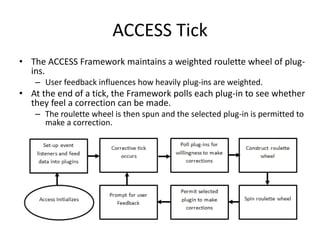
• The ACCESS Framework maintains a weighted roulette wheel of plug-
ins.
– User feedback influences how heavily plug-ins are weighted.
• At the end of a tick, the Framework polls each plug-in to see whether
they feel a correction can be made.
– The roulette wheel is then spun and the selected plug-in is permitted to
make a correction.
Reinforcement
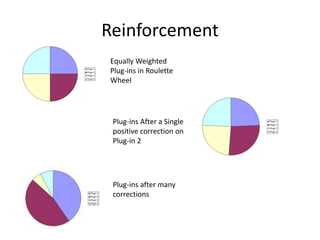
Equally Weighted
Plug-ins in Roulette
Wheel
Plug-ins After a Single
positive correction on
Plug-in 2
Plug-ins after many
corrections
Evaluation
• Evaluation of the framework was performed
during a pair of 38 participant user studies.
– Each study lasted an hour
• The first study was aimed at assessing the
ability of a single plug-in to provide useful
corrections.
• The second was aimed at assessing whether
or not a suite of plug-ins would provide a
helpful environment.
Evaluation
• For the study, the computers used by the
participants was set up to be as user unfriendly
as was realistically possible.
– Resolution was set as high as possible.
– Desktop graphic was set to a noisy graphic from the
standard set.
– Mouse speed was set as high as possible.
– Pointer Precision was set off.
– Double clicks were set to be as quick as possible.
• The intention was to create an environment
where correction was required.
Plug-In Suite
• Five conceptually simple plug-ins were
deployed during the study.
– Dynamic double click adjustment
– Missed clicks detector
– Double-back detector
– Pointer size adjuster
– Mouse trails adjuster
• The first was assessed first by itself and then
as part of the suite.
Evaluation
• Users were asked to perform a series of mouse
interaction tasks.
– Double clicking a static target (both studies)
– Double clicking a moving target (both studies)
– Clicking a button indicated on an ‘answer sheet’
– Clicking a moving button as indicated on an ‘answer sheet’
– Tracking a moving target with the mouse.
• Tasks were before with and without the Framework
active.
– And participants were asked to fill in a short questionnaire
after each task rating ease of task and responsiveness of
equipment.
Results
• Several tasks showed statistically significant
improvements in both objective and self-
reported measures.
• Net improvement in performance.
• Attitudes towards the software were assessed in
a questionnaire at the end of the sessions.
• The metaphor of reinforcement was seen as
understandable and appropriate.
• Users felt that it was software they would choose
to install on their own computers.
Results
• Participants felt that the framework made useful
changes, and that they understood the impact of the
changes that were being made on their behalf.
• Participants felt that they didn’t like the ‘idea’ of changes
being made on their behalf.
• They were however supportive of the technique after
they had experienced it.
• Participants on the whole permitted the framework to
silently assume consent.
• Over half the time.
• 35% of reinforcements were positive
– In over 85% of cases then, the change was committed to the system.
Future Work
• Future work on the framework will centre on
three main areas:
– Incorporation of additional user input streams.
• Kinect, Wiimote, Eye-gaze tracking
– Expansion of cross platform functionality.
• Ensuring consistency of the provided API
– Extension of expressiveness.
• Ideally through the building of an open source community
around the tool.
– In Situ evaluation
• Tool only tested so far in laboratory experiments.

Accessibility Support with the ACCESS Framework

  • 1.
    Accessibility Support withthe ACCESS Framework Michael Heron Vicki Hanson Ian Ricketts
  • 2.
    Introduction • Accessibility supporton the desktop has improved considerably over the years. – Most modern operating systems come with a wide range of accessibility tools in place. – And in many cases, these tools are quite good. • However, there is still a problem with the way in which these accessibility tools are made available to users. – Accessibility itself is not very accessible.
  • 3.
    Key Problems • Thereare three problems in particular with the way we provide accessibility support and configuration options. – Particularly when working with novice users. • Novice users often: – Do not know what can be changed. • Or what support is available. – Do not know how to change the things they know how to change. – Lack the confidence to make the changes they know how to make. • Even the terms ‘ease of access’ and ‘accessibility’ themselves had low levels of traction in our studies. – They were not well understood by older users.
  • 4.
    The ACCESS Framework •The ACCESS Framework has been developed to address these problems. • It takes a proactive role in assessing when configuration options should be changed. – And then makes those changes when appropriate. • When a change is made, the user is presented with a plain English description of the change. – And a description of the likely impact of the change on their computer.
  • 5.
    ACCESS Corrections • TheFramework itself offers an open source architecture into which accessibility support can be provided as plug-ins. – Each plug-in is aimed at identifying a particular kind of usability issue. – Each plug-in is responsible for making a change in the underlying system to address the identified issue. • All plug-in interaction with the operating system and the user is handled via the framework.
  • 6.
    Technical Benefits • ACCESSFramework plug-ins are designed to be very simple. – Most of the ‘difficult’ work of building accessibility is provided in the framework. – It lowers the barrier to participation in building accessibility software. – Removes much of the ‘chore’ in building otherwise straightforward applications. • The ACCESS Framework offers a way of deploying cross platform support. – Cross Platform implementations exist for Ubuntu and OS X, but these have not been experimentally trialled. • Ensures plug-ins ‘play nicely’ together.
  • 7.
    The ACCESS Framework •User feedback on changes is collapsed down to a single ‘I like this’ or ‘I don’t like this’ interaction. – Clicking ‘I like this’ signals to the framework that you’d like changes like this to be done more often. – Clicking ‘I like his’ signals that you don’t want changes like this to be done in future. – ‘Silent consent’ is assumed when the framework is not reinforced for a period of time.
  • 8.
    ACCESS Tick • TheACCESS Framework maintains a weighted roulette wheel of plug- ins. – User feedback influences how heavily plug-ins are weighted. • At the end of a tick, the Framework polls each plug-in to see whether they feel a correction can be made. – The roulette wheel is then spun and the selected plug-in is permitted to make a correction.
  • 9.
    Reinforcement Equally Weighted Plug-ins inRoulette Wheel Plug-ins After a Single positive correction on Plug-in 2 Plug-ins after many corrections
  • 10.
    Evaluation • Evaluation ofthe framework was performed during a pair of 38 participant user studies. – Each study lasted an hour • The first study was aimed at assessing the ability of a single plug-in to provide useful corrections. • The second was aimed at assessing whether or not a suite of plug-ins would provide a helpful environment.
  • 11.
    Evaluation • For thestudy, the computers used by the participants was set up to be as user unfriendly as was realistically possible. – Resolution was set as high as possible. – Desktop graphic was set to a noisy graphic from the standard set. – Mouse speed was set as high as possible. – Pointer Precision was set off. – Double clicks were set to be as quick as possible. • The intention was to create an environment where correction was required.
  • 12.
    Plug-In Suite • Fiveconceptually simple plug-ins were deployed during the study. – Dynamic double click adjustment – Missed clicks detector – Double-back detector – Pointer size adjuster – Mouse trails adjuster • The first was assessed first by itself and then as part of the suite.
  • 13.
    Evaluation • Users wereasked to perform a series of mouse interaction tasks. – Double clicking a static target (both studies) – Double clicking a moving target (both studies) – Clicking a button indicated on an ‘answer sheet’ – Clicking a moving button as indicated on an ‘answer sheet’ – Tracking a moving target with the mouse. • Tasks were before with and without the Framework active. – And participants were asked to fill in a short questionnaire after each task rating ease of task and responsiveness of equipment.
  • 14.
    Results • Several tasksshowed statistically significant improvements in both objective and self- reported measures. • Net improvement in performance. • Attitudes towards the software were assessed in a questionnaire at the end of the sessions. • The metaphor of reinforcement was seen as understandable and appropriate. • Users felt that it was software they would choose to install on their own computers.
  • 15.
    Results • Participants feltthat the framework made useful changes, and that they understood the impact of the changes that were being made on their behalf. • Participants felt that they didn’t like the ‘idea’ of changes being made on their behalf. • They were however supportive of the technique after they had experienced it. • Participants on the whole permitted the framework to silently assume consent. • Over half the time. • 35% of reinforcements were positive – In over 85% of cases then, the change was committed to the system.
  • 16.
    Future Work • Futurework on the framework will centre on three main areas: – Incorporation of additional user input streams. • Kinect, Wiimote, Eye-gaze tracking – Expansion of cross platform functionality. • Ensuring consistency of the provided API – Extension of expressiveness. • Ideally through the building of an open source community around the tool. – In Situ evaluation • Tool only tested so far in laboratory experiments.