05-03-2019 1
Name:Tirtha Surani
Branch:CE-Diplo
Enrollment No:92200938162
GR No:118866
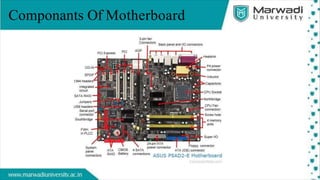
Componants Of Motherboard
• Alternatively referred to as the mb, mainboard,
mboard, mobo, mobd, backplane board, base board,
main circuit board, planar board, system board, or a
logic board on Apple computers. The motherboard is
a printed circuit board and foundation of a computer
that is the biggest board in a computer chassis. It
allocates power and allows communication to and
betweenthe CPU, RAM, and all other computer
hardware components.
Defination Of Motherboard
Motherboard Overview
• A motherboard provides connectivity betweenthe hardware
components of a computer, like the processor (CPU), memory (RAM),
hard drive, and video card. There are multiple types of motherboards,
designed to fit different types and sizes of computers.
• Each type of motherboard isdesignedto workwith specific types of
processorsand memory, sothey don't workwith every processorand
type of memory. However, hard drives are mostly universal and work
with the majority of motherboards, regardless of the type or brand.
Motherboard Components
• Inductor
• Capacitor
• CPU Socket
• Northbridge
• Screw Hole
• Memory Slot
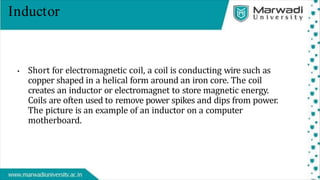
Inductor
• Short for electromagnetic coil, a coil is conducting wire such as
copper shaped in a helical form around an iron core. The coil
creates an inductor or electromagnet to store magnetic energy.
Coils are often used to remove power spikes and dips from power.
The picture is an example of an inductor on a computer
motherboard.
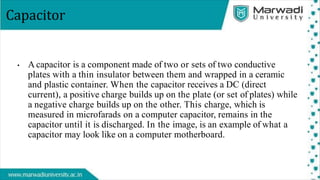
Capacitor
• A capacitor is a component made of two or sets of two conductive
plates with a thin insulator between them and wrapped in a ceramic
and plastic container. When the capacitor receives a DC (direct
current), a positive charge builds up on the plate (or set of plates) while
a negative charge builds up on the other. This charge, which is
measured in microfarads on a computer capacitor, remains in the
capacitor until it is discharged. In the image, is an example of what a
capacitor may look like on a computer motherboard.
CPU Socket
• When referring to a processor, a CPU socket orprocessorsocket is a
connection that allows a computer processor to connect to a
motherboard. For example, the Socket 370 is an example of such a
socket. The picture shows an example of what a socket may look like
on a motherboard. Although there were computers that used the slot
processor, most computers today and in the past have used socket
processors.
Northbridge
• Alternatively referred to as the PAC (PCI/AGP Controller) and nb,
the Northbridge is an integrated circuit responsible for
communications between the CPU interface, AGP, and the memory.
Unlike the southbridge, the northbridge is directly connected to these
components. It acts as a "bridge" for the southbridge chip to
communicate with the CPU, RAM, and graphics controller. Today, the
northbridge is a single-chip that is north of the PCI bus, however,
early computers may have had up to three separate chips that made up
the northbridge.
Screw Hole
• Sometimes referred to as a standoff and spacer, standouts are small
metal orplastic screwsthat attach to a computer case and hold the
motherboard in place. The picture helps give an example of a
standout. In this picture, the left standout has a screw inserted in
the hole to help demonstrate how it works. The motherboard would
be placed between the standout and the screw.
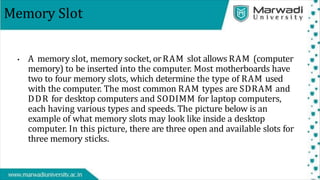
Memory Slot
• A memory slot, memory socket, orRAM slot allows RAM (computer
memory) to be inserted into the computer. Most motherboards have
two to four memory slots, which determine the type of RAM used
with the computer. The most common RAM types are SDRAM and
DDR for desktop computers and SODIMM for laptop computers,
each having various types and speeds. The picture below is an
example of what memory slots may look like inside a desktop
computer. In this picture, there are three open and available slots for
three memory sticks.
THANK YOU

motherboard.pdf.pptx

  • 1.
  • 2.
  • 3.
    • Alternatively referredto as the mb, mainboard, mboard, mobo, mobd, backplane board, base board, main circuit board, planar board, system board, or a logic board on Apple computers. The motherboard is a printed circuit board and foundation of a computer that is the biggest board in a computer chassis. It allocates power and allows communication to and betweenthe CPU, RAM, and all other computer hardware components. Defination Of Motherboard
  • 4.
    Motherboard Overview • Amotherboard provides connectivity betweenthe hardware components of a computer, like the processor (CPU), memory (RAM), hard drive, and video card. There are multiple types of motherboards, designed to fit different types and sizes of computers. • Each type of motherboard isdesignedto workwith specific types of processorsand memory, sothey don't workwith every processorand type of memory. However, hard drives are mostly universal and work with the majority of motherboards, regardless of the type or brand.
  • 5.
    Motherboard Components • Inductor •Capacitor • CPU Socket • Northbridge • Screw Hole • Memory Slot
  • 6.
    Inductor • Short forelectromagnetic coil, a coil is conducting wire such as copper shaped in a helical form around an iron core. The coil creates an inductor or electromagnet to store magnetic energy. Coils are often used to remove power spikes and dips from power. The picture is an example of an inductor on a computer motherboard.
  • 7.
    Capacitor • A capacitoris a component made of two or sets of two conductive plates with a thin insulator between them and wrapped in a ceramic and plastic container. When the capacitor receives a DC (direct current), a positive charge builds up on the plate (or set of plates) while a negative charge builds up on the other. This charge, which is measured in microfarads on a computer capacitor, remains in the capacitor until it is discharged. In the image, is an example of what a capacitor may look like on a computer motherboard.
  • 8.
    CPU Socket • Whenreferring to a processor, a CPU socket orprocessorsocket is a connection that allows a computer processor to connect to a motherboard. For example, the Socket 370 is an example of such a socket. The picture shows an example of what a socket may look like on a motherboard. Although there were computers that used the slot processor, most computers today and in the past have used socket processors.
  • 9.
    Northbridge • Alternatively referredto as the PAC (PCI/AGP Controller) and nb, the Northbridge is an integrated circuit responsible for communications between the CPU interface, AGP, and the memory. Unlike the southbridge, the northbridge is directly connected to these components. It acts as a "bridge" for the southbridge chip to communicate with the CPU, RAM, and graphics controller. Today, the northbridge is a single-chip that is north of the PCI bus, however, early computers may have had up to three separate chips that made up the northbridge.
  • 10.
    Screw Hole • Sometimesreferred to as a standoff and spacer, standouts are small metal orplastic screwsthat attach to a computer case and hold the motherboard in place. The picture helps give an example of a standout. In this picture, the left standout has a screw inserted in the hole to help demonstrate how it works. The motherboard would be placed between the standout and the screw.
  • 11.
    Memory Slot • Amemory slot, memory socket, orRAM slot allows RAM (computer memory) to be inserted into the computer. Most motherboards have two to four memory slots, which determine the type of RAM used with the computer. The most common RAM types are SDRAM and DDR for desktop computers and SODIMM for laptop computers, each having various types and speeds. The picture below is an example of what memory slots may look like inside a desktop computer. In this picture, there are three open and available slots for three memory sticks.
  • 12.