© Copyright 2014 Hewlett-Packard Development Company, L.P. The information contained herein is subject to change without notice.
ARCHITECTURE OVERVIEW
Vertica Training
Version 7.0
vertica-training-team@hp.com
Module Overview
• Vertica Analytics Platform
• Additional Vertica Features
• Installation Demonstration
• Projections
• Query Execution
• Transactions and Locking
• Hybrid Data Store
• Lab Exercise
Vertica Analytics Platform
4
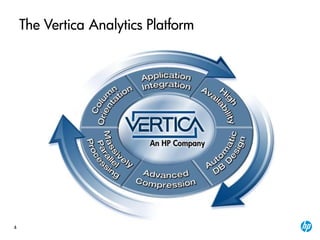
The Vertica Analytics Platform
5
Column Orientation
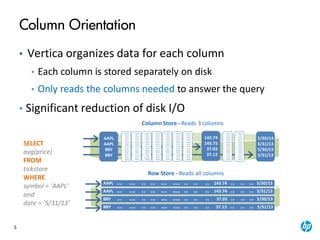
• Vertica organizes data for each column
• Each column is stored separately on disk
• Only reads the columns needed to answer the query
• Significant reduction of disk I/O
AAPL NYASE NYAASE NYSE NYASE NGGYSE NYGGGSE NYSE NYSE NYSE 143.74 NYSE NYSE NYSE 5/30/13
5/30/13
5/31/13
5/30/13
5/31/13
AAPL NYASE NYAASE NYSE NYASE NGGYSE NYGGGSE NYSE NYSE NYSE 143.74 NYSE NYSE NYSE 5/31/13
BBY NYASE NYAASE NYSE NYASE NGGYSE NYGGGSE NYSE NYSE NYSE 37.03 NYSE NYSE NYSE 5/30/13
BBY NYASE NYAASE NYSE NYASE NGGYSE NYGGGSE NYSE NYSE NYSE 37.13 NYSE NYSE NYSE 5/31/13
SELECT
avg(price)
FROM
tickstore
WHERE
symbol = 'AAPL'
and
date = '5/31/13'
Column Store - Reads 3 columns
Row Store - Reads all columns
NQDS
NYSE
NYSE
NYSE
NQDS
NYSE
NYSE
NYSE
NQDS
NYSE
NYSE
NYSE
NQDS
NQDS
NYSE
NYSE
NYSE
NQDS
NYSE
NYSE
NYSE
NQDS
NYSE
NYSE
NYSE
NQDS
NQDS
NYSE
NYSE
NYSE
NQDS
NYSE
NYSE
NYSE
NQDS
NYSE
NYSE
NYSE
NQDS
NQDS
NYSE
NYSE
NYSE
NQDS
NYSE
NYSE
NYSE
NQDS
NYSE
NYSE
NYSE
NQDS
NQDS
NYSE
NYSE
NYSE
NQDS
NYSE
NYSE
NYSE
NQDS
NYSE
NYSE
NYSE
NQDS
NQDS
NYSE
NYSE
NYSE
NQDS
NYSE
NYSE
NYSE
NQDS
NYSE
NYSE
NYSE
NQDS
NQDS
NYSE
NYSE
NYSE
NQDS
NYSE
NYSE
NYSE
NQDS
NYSE
NYSE
NYSE
NQDS
NQDS
NYSE
NYSE
NYSE
NQDS
NYSE
NYSE
NYSE
NQDS
NYSE
NYSE
NYSE
NQDS
NQDS
NYSE
NYSE
NYSE
NQDS
NYSE
NYSE
NYSE
NQDS
NYSE
NYSE
NYSE
NQDS
AAPL
AAPL
BBY
BBY
143.74
143.75
37.03
37.13
6
Engine
processes
encoded
blocks
Uncompress
Materialization:
data is read from disk
Data on Disk:
Encoded +
Compressed
Results
Advanced Compression
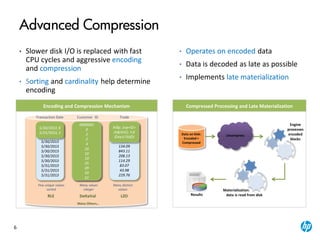
• Slower disk I/O is replaced with fast
CPU cycles and aggressive encoding
and compression
• Sorting and cardinality help determine
encoding
Transaction Date Customer ID Trade
5/30/2013
5/30/2013
5/30/2013
5/30/2013
5/30/2013
5/30/2013
5/30/2013
5/30/2013
5/31/2013
5/31/2013
5/31/2013
0000001
0000001
0000003
0000003
0000005
0000011
0000011
0000020
0000026
0000050
0000051
0000052
Few unique values
sorted
5/30/2013, 8
5/31/2013,3
RLE
0000001
0
2
2
4
10
10
19
25
49
50
51
DeltaVal
Many values
integer
Many Others…
100.25
302.43
991.23
73.45
134.09
843.11
208.13
114.29
83.07
43.98
229.76
Many distinct
values
LZO
ÞìÃp:±æ+©>
Hì&ì¥YÛ¡×¥
©éa½?50ÓJ
Compressed Processing and Late Materialization
• Operates on encoded data
• Data is decoded as late as possible
• Implements late materialization
Encoding and Compression Mechanism
7
AA
High Availability
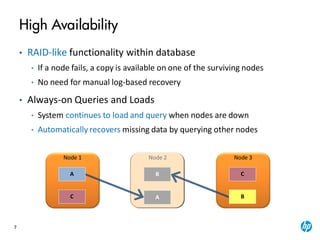
• RAID-like functionality within database
• If a node fails, a copy is available on one of the surviving nodes
• No need for manual log-based recovery
• Always-on Queries and Loads
• System continues to load and query when nodes are down
• Automatically recovers missing data by querying other nodes
C
Node 1
C
Node 3Node 2Node 2
A BB
B
8
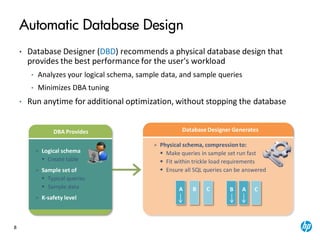
• Database Designer (DBD) recommends a physical database design that
provides the best performance for the user's workload
• Analyzes your logical schema, sample data, and sample queries
• Minimizes DBA tuning
• Run anytime for additional optimization, without stopping the database
A B AB C C
> Physical schema, compression to:
 Make queries in sample set run fast
 Fit within trickle load requirements
 Ensure all SQL queries can be answered
Database Designer GeneratesDBA Provides
> Logical schema
 Create table
> Sample set of
 Typical queries
 Sample data
> K-safety level
Automatic Database Design
9
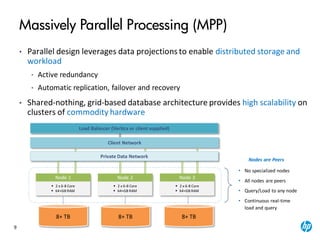
• Parallel design leverages data projections to enable distributed storage and
workload
• Active redundancy
• Automatic replication, failover and recovery
• Shared-nothing, grid-based database architecture provides high scalability on
clusters of commodity hardware
Client Network
Private Data Network
8+ TB 8+ TB 8+ TB
Node 1
 2 x 6-8 Core
 64+GB RAM
Node 2
 2 x 6-8 Core
 64+GB RAM
Node 3
 2 x 6-8 Core
 64+GB RAM
Nodes are Peers
• No specialized nodes
• All nodes are peers
• Query/Load to any node
• Continuous real-time
load and query
Massively Parallel Processing (MPP)
Load Balancer (Vertica or client supplied)
10
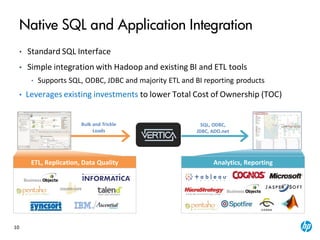
• Standard SQL Interface
• Simple integration with Hadoop and existing BI and ETL tools
• Supports SQL, ODBC, JDBC and majority ETL and BI reporting products
• Leverages existing investments to lower Total Cost of Ownership (TOC)
Native SQL and Application Integration
SQL, ODBC,
JDBC, ADO.net
Bulk and Trickle
Loads
ETL, Replication, Data Quality Analytics, Reporting
11
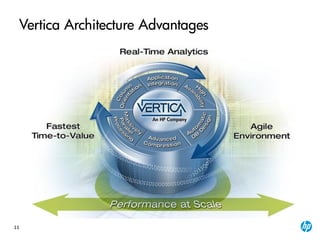
Vertica Architecture Advantages
Additional Vertica Features
13
Amazon Machine Image (AMI)
• Vertica AMI preconfigured for HP Vertica
– Reduce set-up, configuration, and deployment time
– Automate activities, such as creating clusters,
adding/removing nodes, etc.
– Pre-installed as a single node and can be stitched together
to form a cluster
14
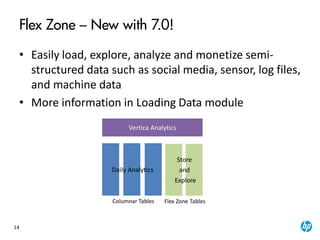
Flex Zone – New with 7.0!
• Easily load, explore, analyze and monetize semi-
structured data such as social media, sensor, log files,
and machine data
• More information in Loading Data module
Vertica Analytics
Flex Zone Tables
Store
and
Explore
Columnar Tables
Daily Analytics
Installation Demonstration
16
Installation Demonstration
• Instructor will demonstrate the following
– Installing Vertica
– Creating database
– Defining schema and tables
• Steps found in lab manual appendix
Projections
18
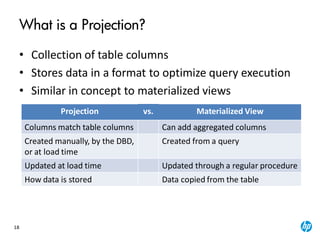
What is a Projection?
• Collection of table columns
• Stores data in a format to optimize query execution
• Similar in concept to materialized views
Projection vs. Materialized View
Columns match table columns Can add aggregated columns
Created manually, by the DBD,
or at load time
Created from a query
Updated at load time Updated through a regular procedure
How data is stored Data copied from the table
19
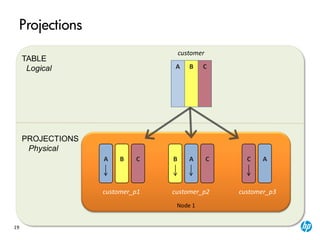
Projections
TABLE
Logical
PROJECTIONS
Physical
customer_p1 customer_p2 customer_p3
ACCCA AB B
Node 1
customer
A B C
20
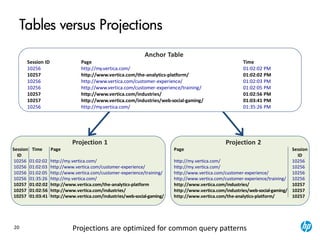
Tables versus Projections
Anchor Table
Session ID Page Time
10256 http://my.vertica.com/ 01:02:02 PM
10257 http://www.vertica.com/the-analytics-platform/ 01:02:02 PM
10256 http://www.vertica.com/customer-experience/ 01:02:03 PM
10256 http://www.vertica.com/customer-experience/training/ 01:02:05 PM
10257 http://www.vertica.com/industries/ 01:02:56 PM
10257 http://www.vertica.com/industries/web-social-gaming/ 01:03:41 PM
10256 http://my.vertica.com/ 01:35:26 PM
Projection 2
Page Session
ID
http://my.vertica.com/ 10256
http://www.vertica.com/customer-experience/ 10256
http://www.vertica.com/customer-experience/training/ 10256
http://www.vertica.com/industries/ 10257
http://www.vertica.com/industries/web-social-gaming/ 10257
http://www.vertica.com/the-analytics-platform/ 10257
Projection 1
Session Time Page
ID
10256 01:02:02 http://my.vertica.com/
10256 01:02:03 http://www.vertica.com/customer-experience/
10256 01:02:05 http://www.vertica.com/customer-experience/training/
10256 01:35:26 http://my.vertica.com/
10257 01:02:02 http://www.vertica.com/the-analytics-platform
10257 01:02:56 http://www.vertica.com/industries/
10257 01:03:41 http://www.vertica.com/industries/web-social-gaming/
Projections are optimized for common query patterns
21
Projection Basics
• Anchor table is not stored
• Data is stored in a sorted and compressed format
• No need for indexing
• Transparent to the end user and applications
• Created by Database Designer (DBD)
– Can be manually created
• Best projection for a query is chosen by the
Optimizer at query execution time
22
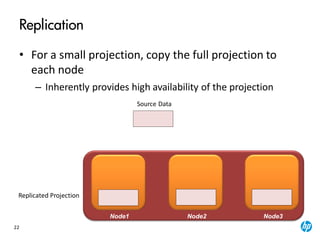
Replication
• For a small projection, copy the full projection to
each node
– Inherently provides high availability of the projection
Replicated Projection
Source Data
Node1 Node2 Node3
23
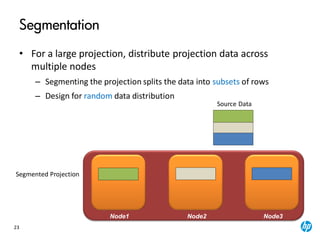
Segmentation
• For a large projection, distribute projection data across
multiple nodes
– Segmenting the projection splits the data into subsets of rows
– Design for random data distribution
Segmented Projection
Source Data
Node1 Node2 Node3
24
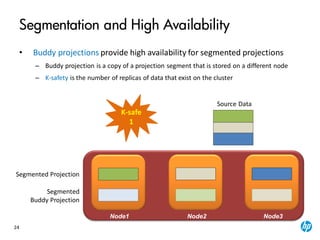
Segmentation and High Availability
• Buddy projections provide high availability for segmented projections
– Buddy projection is a copy of a projection segment that is stored on a different node
– K-safety is the number of replicas of data that exist on the cluster
Segmented Projection
Segmented
Buddy Projection
Source Data
Node1 Node2 Node3
K-safe
1
25
Projection Basics: Maintenance
• Data is loaded directly into projections
• No need to rebuild or refresh projections after the
initial refresh
• New projections can be created at any time, either
manually or by running the Database Designer
• Old projections can be dropped
26
Projections: Summary
• A projection is
– A collection of encoded and compressed columns with a
sort order and segmentation
– Automatically maintained during data load
– Tuned for different queries
• Automatic database design
– Ensures data is stored in sorted, encoded, compressed
projections
– Removes the need for complex table space tuning,
partitioning, indexes, design and update, materialized
views on top of base tables
CAB
Query Execution
28
Vertica Query Execution Basics
• SQL query is written against tables
SELECT count(*) FROM fact;
• The query Optimizer picks an optimal query plan
– Picks the best projection(s) for the query
– Picks the order in which to execute joins, query predicates,
etc.
– The query plan with the lowest cost is selected
• The query executes as planned
SELECT count(*) FROM fact_p1;
29
Sample Query Plan
Query Plan:
Access Path:
+-GROUPBY HASH (LOCAL RESEGMENT GROUPS) [Cost:682, Rows:6K](PATH ID:1)
| Aggregates: customer_age), customer_age), count(*)
| Group By: customer_region, customer_name
| +---> STORAGE ACCESS for customer_dimension [Cost:407,Rows:6K](PATH ID:2)
| | Projection: public.customer_dimension_VMart_Design_node0001
| | Materialize: customer_region, customer_name, customer_age
| | Filter: (customer_gender = 'Male')
| | Filter: (customer_region = ANY (ARRAY['East', 'Midwest']))
EXPLAIN
SELECT customer_name,customer_region,avg(customer_age),count(*)
FROM customer_dimension
WHERE customer_gender='Male' and customer_region in('East','Midwest')
GROUP BY customer_region, customer_name;
30
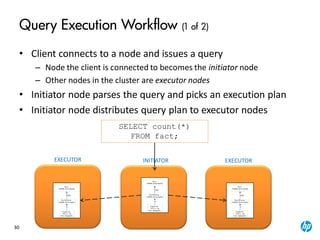
Query Execution Workflow (1 of 2)
• Client connects to a node and issues a query
– Node the client is connected to becomes the initiator node
– Other nodes in the cluster are executor nodes
• Initiator node parses the query and picks an execution plan
• Initiator node distributes query plan to executor nodes
SELECT count(*)
FROM fact;
INITIATOREXECUTOR EXECUTOR
31
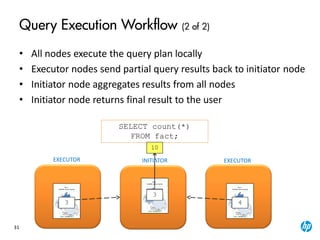
Query Execution Workflow (2 of 2)
• All nodes execute the query plan locally
• Executor nodes send partial query results back to initiator node
• Initiator node aggregates results from all nodes
• Initiator node returns final result to the user
SELECT count(*)
FROM fact;
3
103
4
1010
INITIATOREXECUTOR EXECUTOR
Transactions and Locking
33
Vertica Transactions
• Transactions
– Sequence of operations, ending with COMMIT or
ROLLBACK
– Provide for atomicity and isolation of database operations
• Transaction sources
– User transactions
– Internal Vertica transactions
• Initialization / shutdown
• Recovery
• Tuple Mover: mergeout and moveout
34
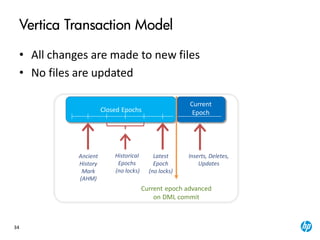
Vertica Transaction Model
• All changes are made to new files
• No files are updated
Closed Epochs
Inserts, Deletes,
Updates
Historical
Epochs
(no locks)
Current
Epoch
Current epoch advanced
on DML commit
Latest
Epoch
(no locks)
Ancient
History
Mark
(AHM)
35
Benefits of Vertica Transaction Model
• No contention between reads and writes
– Once a file is written to disk, it is never written to again
– Updates work as concurrent deletes and inserts
– To rollback, simply throw away incomplete files
– Benefit: No undo logs needed
• Durability through K-Safety
– All data is redundantly stored on multiple nodes
– Recover data by querying other nodes
– Benefit: No redo logs needed
• Simple / lightweight commit protocol
Hybrid Data Store
37
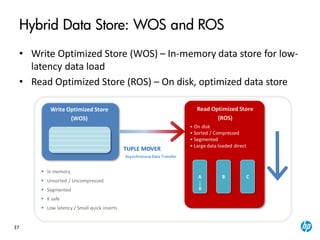
Hybrid Data Store: WOS and ROS
• Write Optimized Store (WOS) – In-memory data store for low-
latency data load
• Read Optimized Store (ROS) – On disk, optimized data store
AsynchronousData Transfer
TUPLE MOVER
• On disk
• Sorted / Compressed
• Segmented
• Large data loaded direct
A B C
Write Optimized Store
(WOS)
 In memory
 Unsorted / Uncompressed
 Segmented
 K safe
 Low latency / Small quick inserts
Read Optimized Store
(ROS)
38
Tuple Mover
Asynchronous Data Transfer
Tuple Mover - moveout
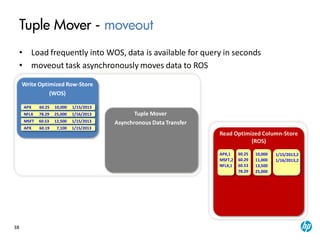
• Load frequently into WOS, data is available for query in seconds
• moveout task asynchronously moves data to ROS
Read Optimized Column-Store
(ROS)
Write Optimized Row-Store
(WOS)
APX 60.25 10,000 1/15/2013
MSFT 60.53 12,500 1/15/2013
APX 60.19 7,100 1/15/2013
NFLX 78.29 25,000 1/16/2013
APX,1
MSFT,2
NFLX,1
60.25
60.29
60.53
78.29
10,000
11,000
13,500
25,000
1/15/2013,2
1/16/2013,2
39
Tuple Mover
Asynchronous Data Transfer
Tuple Mover - moveout
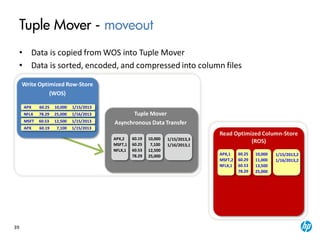
• Data is copied from WOS into Tuple Mover
• Data is sorted, encoded, and compressed into column files
Read Optimized Column-Store
(ROS)
Write Optimized Row-Store
(WOS)
APX 60.25 10,000 1/15/2013
MSFT 60.53 12,500 1/15/2013
APX 60.19 7,100 1/15/2013
NFLX 78.29 25,000 1/16/2013
APX,2
MSFT,1
NFLX,1
60.19
60.25
60.53
78.29
10,000
7,100
12,500
25,000
1/15/2013,3
1/16/2013,1
APX,1
MSFT,2
NFLX,1
60.25
60.29
60.53
78.29
10,000
11,000
13,500
25,000
1/15/2013,2
1/16/2013,2
40
Tuple Mover
Asynchronous Data Transfer
Tuple Mover - moveout
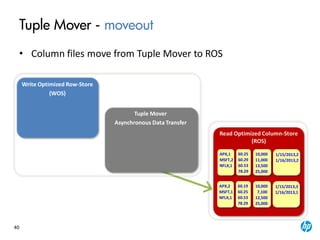
• Column files move from Tuple Mover to ROS
Read Optimized Column-Store
(ROS)
Write Optimized Row-Store
(WOS)
APX,2
MSFT,1
NFLX,1
60.19
60.25
60.53
78.29
10,000
7,100
12,500
25,000
1/15/2013,3
1/16/2013,1
APX,1
MSFT,2
NFLX,1
60.25
60.29
60.53
78.29
10,000
11,000
13,500
25,000
1/15/2013,2
1/16/2013,2
41
Tuple Mover
Asynchronous Data Transfer
Tuple Mover - mergeout
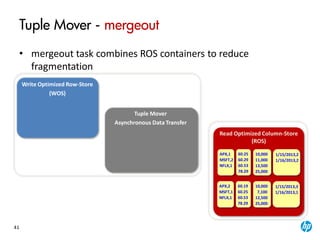
• mergeout task combines ROS containers to reduce
fragmentation
Read Optimized Column-Store
(ROS)
Write Optimized Row-Store
(WOS)
APX,2
MSFT,1
NFLX,1
60.19
60.25
60.53
78.29
10,000
7,100
12,500
25,000
1/15/2013,3
1/16/2013,1
APX,1
MSFT,2
NFLX,1
60.25
60.29
60.53
78.29
10,000
11,000
13,500
25,000
1/15/2013,2
1/16/2013,2
42
Tuple Mover
Asynchronous Data Transfer
Tuple Mover - mergeout
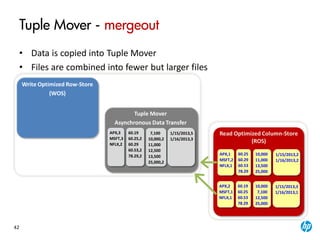
• Data is copied into Tuple Mover
• Files are combined into fewer but larger files
Read Optimized Column-Store
(ROS)
Write Optimized Row-Store
(WOS)
APX,3
MSFT,3
NFLX,2
60.19
60.25,2
60.29
60.53,2
78.29,2
7,100
10,000,2
11,000
12,500
13,500
25,000,2
1/15/2013,5
1/16/2013,3
APX,2
MSFT,1
NFLX,1
60.19
60.25
60.53
78.29
10,000
7,100
12,500
25,000
1/15/2013,3
1/16/2013,1
APX,1
MSFT,2
NFLX,1
60.25
60.29
60.53
78.29
10,000
11,000
13,500
25,000
1/15/2013,2
1/16/2013,2
43
Tuple Mover
Asynchronous Data Transfer
Tuple Mover - mergeout
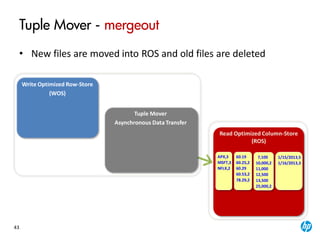
• New files are moved into ROS and old files are deleted
Read Optimized Column-Store
(ROS)
Write Optimized Row-Store
(WOS)
APX,3
MSFT,3
NFLX,2
60.19
60.25,2
60.29
60.53,2
78.29,2
7,100
10,000,2
11,000
12,500
13,500
25,000,2
1/15/2013,5
1/16/2013,3
Module Summary
• Vertica Analytics Platform
• Additional Vertica Features
• Installation Demonstration
• Projections
• Query Execution
• Transactions and Locking
• Hybrid Data Store
• Lab Exercise
Lab Exercise
46
Lab Exercise
• Open the lab manual and complete the following
tasks:
– Start and connect to database
– Loading sample data

Vertica 7.0 Architecture Overview

  • 1.
    © Copyright 2014Hewlett-Packard Development Company, L.P. The information contained herein is subject to change without notice. ARCHITECTURE OVERVIEW Vertica Training Version 7.0 vertica-training-team@hp.com
  • 2.
    Module Overview • VerticaAnalytics Platform • Additional Vertica Features • Installation Demonstration • Projections • Query Execution • Transactions and Locking • Hybrid Data Store • Lab Exercise
  • 3.
  • 4.
  • 5.
    5 Column Orientation • Verticaorganizes data for each column • Each column is stored separately on disk • Only reads the columns needed to answer the query • Significant reduction of disk I/O AAPL NYASE NYAASE NYSE NYASE NGGYSE NYGGGSE NYSE NYSE NYSE 143.74 NYSE NYSE NYSE 5/30/13 5/30/13 5/31/13 5/30/13 5/31/13 AAPL NYASE NYAASE NYSE NYASE NGGYSE NYGGGSE NYSE NYSE NYSE 143.74 NYSE NYSE NYSE 5/31/13 BBY NYASE NYAASE NYSE NYASE NGGYSE NYGGGSE NYSE NYSE NYSE 37.03 NYSE NYSE NYSE 5/30/13 BBY NYASE NYAASE NYSE NYASE NGGYSE NYGGGSE NYSE NYSE NYSE 37.13 NYSE NYSE NYSE 5/31/13 SELECT avg(price) FROM tickstore WHERE symbol = 'AAPL' and date = '5/31/13' Column Store - Reads 3 columns Row Store - Reads all columns NQDS NYSE NYSE NYSE NQDS NYSE NYSE NYSE NQDS NYSE NYSE NYSE NQDS NQDS NYSE NYSE NYSE NQDS NYSE NYSE NYSE NQDS NYSE NYSE NYSE NQDS NQDS NYSE NYSE NYSE NQDS NYSE NYSE NYSE NQDS NYSE NYSE NYSE NQDS NQDS NYSE NYSE NYSE NQDS NYSE NYSE NYSE NQDS NYSE NYSE NYSE NQDS NQDS NYSE NYSE NYSE NQDS NYSE NYSE NYSE NQDS NYSE NYSE NYSE NQDS NQDS NYSE NYSE NYSE NQDS NYSE NYSE NYSE NQDS NYSE NYSE NYSE NQDS NQDS NYSE NYSE NYSE NQDS NYSE NYSE NYSE NQDS NYSE NYSE NYSE NQDS NQDS NYSE NYSE NYSE NQDS NYSE NYSE NYSE NQDS NYSE NYSE NYSE NQDS NQDS NYSE NYSE NYSE NQDS NYSE NYSE NYSE NQDS NYSE NYSE NYSE NQDS AAPL AAPL BBY BBY 143.74 143.75 37.03 37.13
  • 6.
    6 Engine processes encoded blocks Uncompress Materialization: data is readfrom disk Data on Disk: Encoded + Compressed Results Advanced Compression • Slower disk I/O is replaced with fast CPU cycles and aggressive encoding and compression • Sorting and cardinality help determine encoding Transaction Date Customer ID Trade 5/30/2013 5/30/2013 5/30/2013 5/30/2013 5/30/2013 5/30/2013 5/30/2013 5/30/2013 5/31/2013 5/31/2013 5/31/2013 0000001 0000001 0000003 0000003 0000005 0000011 0000011 0000020 0000026 0000050 0000051 0000052 Few unique values sorted 5/30/2013, 8 5/31/2013,3 RLE 0000001 0 2 2 4 10 10 19 25 49 50 51 DeltaVal Many values integer Many Others… 100.25 302.43 991.23 73.45 134.09 843.11 208.13 114.29 83.07 43.98 229.76 Many distinct values LZO ÞìÃp:±æ+©> Hì&ì¥YÛ¡×¥ ©éa½?50ÓJ Compressed Processing and Late Materialization • Operates on encoded data • Data is decoded as late as possible • Implements late materialization Encoding and Compression Mechanism
  • 7.
    7 AA High Availability • RAID-likefunctionality within database • If a node fails, a copy is available on one of the surviving nodes • No need for manual log-based recovery • Always-on Queries and Loads • System continues to load and query when nodes are down • Automatically recovers missing data by querying other nodes C Node 1 C Node 3Node 2Node 2 A BB B
  • 8.
    8 • Database Designer(DBD) recommends a physical database design that provides the best performance for the user's workload • Analyzes your logical schema, sample data, and sample queries • Minimizes DBA tuning • Run anytime for additional optimization, without stopping the database A B AB C C > Physical schema, compression to:  Make queries in sample set run fast  Fit within trickle load requirements  Ensure all SQL queries can be answered Database Designer GeneratesDBA Provides > Logical schema  Create table > Sample set of  Typical queries  Sample data > K-safety level Automatic Database Design
  • 9.
    9 • Parallel designleverages data projections to enable distributed storage and workload • Active redundancy • Automatic replication, failover and recovery • Shared-nothing, grid-based database architecture provides high scalability on clusters of commodity hardware Client Network Private Data Network 8+ TB 8+ TB 8+ TB Node 1  2 x 6-8 Core  64+GB RAM Node 2  2 x 6-8 Core  64+GB RAM Node 3  2 x 6-8 Core  64+GB RAM Nodes are Peers • No specialized nodes • All nodes are peers • Query/Load to any node • Continuous real-time load and query Massively Parallel Processing (MPP) Load Balancer (Vertica or client supplied)
  • 10.
    10 • Standard SQLInterface • Simple integration with Hadoop and existing BI and ETL tools • Supports SQL, ODBC, JDBC and majority ETL and BI reporting products • Leverages existing investments to lower Total Cost of Ownership (TOC) Native SQL and Application Integration SQL, ODBC, JDBC, ADO.net Bulk and Trickle Loads ETL, Replication, Data Quality Analytics, Reporting
  • 11.
  • 12.
  • 13.
    13 Amazon Machine Image(AMI) • Vertica AMI preconfigured for HP Vertica – Reduce set-up, configuration, and deployment time – Automate activities, such as creating clusters, adding/removing nodes, etc. – Pre-installed as a single node and can be stitched together to form a cluster
  • 14.
    14 Flex Zone –New with 7.0! • Easily load, explore, analyze and monetize semi- structured data such as social media, sensor, log files, and machine data • More information in Loading Data module Vertica Analytics Flex Zone Tables Store and Explore Columnar Tables Daily Analytics
  • 15.
  • 16.
    16 Installation Demonstration • Instructorwill demonstrate the following – Installing Vertica – Creating database – Defining schema and tables • Steps found in lab manual appendix
  • 17.
  • 18.
    18 What is aProjection? • Collection of table columns • Stores data in a format to optimize query execution • Similar in concept to materialized views Projection vs. Materialized View Columns match table columns Can add aggregated columns Created manually, by the DBD, or at load time Created from a query Updated at load time Updated through a regular procedure How data is stored Data copied from the table
  • 19.
  • 20.
    20 Tables versus Projections AnchorTable Session ID Page Time 10256 http://my.vertica.com/ 01:02:02 PM 10257 http://www.vertica.com/the-analytics-platform/ 01:02:02 PM 10256 http://www.vertica.com/customer-experience/ 01:02:03 PM 10256 http://www.vertica.com/customer-experience/training/ 01:02:05 PM 10257 http://www.vertica.com/industries/ 01:02:56 PM 10257 http://www.vertica.com/industries/web-social-gaming/ 01:03:41 PM 10256 http://my.vertica.com/ 01:35:26 PM Projection 2 Page Session ID http://my.vertica.com/ 10256 http://my.vertica.com/ 10256 http://www.vertica.com/customer-experience/ 10256 http://www.vertica.com/customer-experience/training/ 10256 http://www.vertica.com/industries/ 10257 http://www.vertica.com/industries/web-social-gaming/ 10257 http://www.vertica.com/the-analytics-platform/ 10257 Projection 1 Session Time Page ID 10256 01:02:02 http://my.vertica.com/ 10256 01:02:03 http://www.vertica.com/customer-experience/ 10256 01:02:05 http://www.vertica.com/customer-experience/training/ 10256 01:35:26 http://my.vertica.com/ 10257 01:02:02 http://www.vertica.com/the-analytics-platform 10257 01:02:56 http://www.vertica.com/industries/ 10257 01:03:41 http://www.vertica.com/industries/web-social-gaming/ Projections are optimized for common query patterns
  • 21.
    21 Projection Basics • Anchortable is not stored • Data is stored in a sorted and compressed format • No need for indexing • Transparent to the end user and applications • Created by Database Designer (DBD) – Can be manually created • Best projection for a query is chosen by the Optimizer at query execution time
  • 22.
    22 Replication • For asmall projection, copy the full projection to each node – Inherently provides high availability of the projection Replicated Projection Source Data Node1 Node2 Node3
  • 23.
    23 Segmentation • For alarge projection, distribute projection data across multiple nodes – Segmenting the projection splits the data into subsets of rows – Design for random data distribution Segmented Projection Source Data Node1 Node2 Node3
  • 24.
    24 Segmentation and HighAvailability • Buddy projections provide high availability for segmented projections – Buddy projection is a copy of a projection segment that is stored on a different node – K-safety is the number of replicas of data that exist on the cluster Segmented Projection Segmented Buddy Projection Source Data Node1 Node2 Node3 K-safe 1
  • 25.
    25 Projection Basics: Maintenance •Data is loaded directly into projections • No need to rebuild or refresh projections after the initial refresh • New projections can be created at any time, either manually or by running the Database Designer • Old projections can be dropped
  • 26.
    26 Projections: Summary • Aprojection is – A collection of encoded and compressed columns with a sort order and segmentation – Automatically maintained during data load – Tuned for different queries • Automatic database design – Ensures data is stored in sorted, encoded, compressed projections – Removes the need for complex table space tuning, partitioning, indexes, design and update, materialized views on top of base tables CAB
  • 27.
  • 28.
    28 Vertica Query ExecutionBasics • SQL query is written against tables SELECT count(*) FROM fact; • The query Optimizer picks an optimal query plan – Picks the best projection(s) for the query – Picks the order in which to execute joins, query predicates, etc. – The query plan with the lowest cost is selected • The query executes as planned SELECT count(*) FROM fact_p1;
  • 29.
    29 Sample Query Plan QueryPlan: Access Path: +-GROUPBY HASH (LOCAL RESEGMENT GROUPS) [Cost:682, Rows:6K](PATH ID:1) | Aggregates: customer_age), customer_age), count(*) | Group By: customer_region, customer_name | +---> STORAGE ACCESS for customer_dimension [Cost:407,Rows:6K](PATH ID:2) | | Projection: public.customer_dimension_VMart_Design_node0001 | | Materialize: customer_region, customer_name, customer_age | | Filter: (customer_gender = 'Male') | | Filter: (customer_region = ANY (ARRAY['East', 'Midwest'])) EXPLAIN SELECT customer_name,customer_region,avg(customer_age),count(*) FROM customer_dimension WHERE customer_gender='Male' and customer_region in('East','Midwest') GROUP BY customer_region, customer_name;
  • 30.
    30 Query Execution Workflow(1 of 2) • Client connects to a node and issues a query – Node the client is connected to becomes the initiator node – Other nodes in the cluster are executor nodes • Initiator node parses the query and picks an execution plan • Initiator node distributes query plan to executor nodes SELECT count(*) FROM fact; INITIATOREXECUTOR EXECUTOR
  • 31.
    31 Query Execution Workflow(2 of 2) • All nodes execute the query plan locally • Executor nodes send partial query results back to initiator node • Initiator node aggregates results from all nodes • Initiator node returns final result to the user SELECT count(*) FROM fact; 3 103 4 1010 INITIATOREXECUTOR EXECUTOR
  • 32.
  • 33.
    33 Vertica Transactions • Transactions –Sequence of operations, ending with COMMIT or ROLLBACK – Provide for atomicity and isolation of database operations • Transaction sources – User transactions – Internal Vertica transactions • Initialization / shutdown • Recovery • Tuple Mover: mergeout and moveout
  • 34.
    34 Vertica Transaction Model •All changes are made to new files • No files are updated Closed Epochs Inserts, Deletes, Updates Historical Epochs (no locks) Current Epoch Current epoch advanced on DML commit Latest Epoch (no locks) Ancient History Mark (AHM)
  • 35.
    35 Benefits of VerticaTransaction Model • No contention between reads and writes – Once a file is written to disk, it is never written to again – Updates work as concurrent deletes and inserts – To rollback, simply throw away incomplete files – Benefit: No undo logs needed • Durability through K-Safety – All data is redundantly stored on multiple nodes – Recover data by querying other nodes – Benefit: No redo logs needed • Simple / lightweight commit protocol
  • 36.
  • 37.
    37 Hybrid Data Store:WOS and ROS • Write Optimized Store (WOS) – In-memory data store for low- latency data load • Read Optimized Store (ROS) – On disk, optimized data store AsynchronousData Transfer TUPLE MOVER • On disk • Sorted / Compressed • Segmented • Large data loaded direct A B C Write Optimized Store (WOS)  In memory  Unsorted / Uncompressed  Segmented  K safe  Low latency / Small quick inserts Read Optimized Store (ROS)
  • 38.
    38 Tuple Mover Asynchronous DataTransfer Tuple Mover - moveout • Load frequently into WOS, data is available for query in seconds • moveout task asynchronously moves data to ROS Read Optimized Column-Store (ROS) Write Optimized Row-Store (WOS) APX 60.25 10,000 1/15/2013 MSFT 60.53 12,500 1/15/2013 APX 60.19 7,100 1/15/2013 NFLX 78.29 25,000 1/16/2013 APX,1 MSFT,2 NFLX,1 60.25 60.29 60.53 78.29 10,000 11,000 13,500 25,000 1/15/2013,2 1/16/2013,2
  • 39.
    39 Tuple Mover Asynchronous DataTransfer Tuple Mover - moveout • Data is copied from WOS into Tuple Mover • Data is sorted, encoded, and compressed into column files Read Optimized Column-Store (ROS) Write Optimized Row-Store (WOS) APX 60.25 10,000 1/15/2013 MSFT 60.53 12,500 1/15/2013 APX 60.19 7,100 1/15/2013 NFLX 78.29 25,000 1/16/2013 APX,2 MSFT,1 NFLX,1 60.19 60.25 60.53 78.29 10,000 7,100 12,500 25,000 1/15/2013,3 1/16/2013,1 APX,1 MSFT,2 NFLX,1 60.25 60.29 60.53 78.29 10,000 11,000 13,500 25,000 1/15/2013,2 1/16/2013,2
  • 40.
    40 Tuple Mover Asynchronous DataTransfer Tuple Mover - moveout • Column files move from Tuple Mover to ROS Read Optimized Column-Store (ROS) Write Optimized Row-Store (WOS) APX,2 MSFT,1 NFLX,1 60.19 60.25 60.53 78.29 10,000 7,100 12,500 25,000 1/15/2013,3 1/16/2013,1 APX,1 MSFT,2 NFLX,1 60.25 60.29 60.53 78.29 10,000 11,000 13,500 25,000 1/15/2013,2 1/16/2013,2
  • 41.
    41 Tuple Mover Asynchronous DataTransfer Tuple Mover - mergeout • mergeout task combines ROS containers to reduce fragmentation Read Optimized Column-Store (ROS) Write Optimized Row-Store (WOS) APX,2 MSFT,1 NFLX,1 60.19 60.25 60.53 78.29 10,000 7,100 12,500 25,000 1/15/2013,3 1/16/2013,1 APX,1 MSFT,2 NFLX,1 60.25 60.29 60.53 78.29 10,000 11,000 13,500 25,000 1/15/2013,2 1/16/2013,2
  • 42.
    42 Tuple Mover Asynchronous DataTransfer Tuple Mover - mergeout • Data is copied into Tuple Mover • Files are combined into fewer but larger files Read Optimized Column-Store (ROS) Write Optimized Row-Store (WOS) APX,3 MSFT,3 NFLX,2 60.19 60.25,2 60.29 60.53,2 78.29,2 7,100 10,000,2 11,000 12,500 13,500 25,000,2 1/15/2013,5 1/16/2013,3 APX,2 MSFT,1 NFLX,1 60.19 60.25 60.53 78.29 10,000 7,100 12,500 25,000 1/15/2013,3 1/16/2013,1 APX,1 MSFT,2 NFLX,1 60.25 60.29 60.53 78.29 10,000 11,000 13,500 25,000 1/15/2013,2 1/16/2013,2
  • 43.
    43 Tuple Mover Asynchronous DataTransfer Tuple Mover - mergeout • New files are moved into ROS and old files are deleted Read Optimized Column-Store (ROS) Write Optimized Row-Store (WOS) APX,3 MSFT,3 NFLX,2 60.19 60.25,2 60.29 60.53,2 78.29,2 7,100 10,000,2 11,000 12,500 13,500 25,000,2 1/15/2013,5 1/16/2013,3
  • 44.
    Module Summary • VerticaAnalytics Platform • Additional Vertica Features • Installation Demonstration • Projections • Query Execution • Transactions and Locking • Hybrid Data Store • Lab Exercise
  • 45.
  • 46.
    46 Lab Exercise • Openthe lab manual and complete the following tasks: – Start and connect to database – Loading sample data