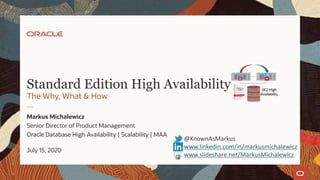
Standard Edition High Availability
The Why, What & How
Markus Michalewicz
Senior Director of Product Management
Oracle Database High Availability | Scalability | MAA
July 15, 2020
@KnownAsMarkus
www.linkedin.com/in/markusmichalewicz
www.slideshare.net/MarkusMichalewicz
Safe harbor statement
The following is intended to outline our general product direction. It is intended for information
purposes only, and may not be incorporated into any contract. It is not a commitment to deliver any
material, code, or functionality, and should not be relied upon in making purchasing decisions. The
development, release, timing, and pricing of any features or functionality described for Oracle’s
products may change and remains at the sole discretion of Oracle Corporation.
2 Copyright © 2020, Oracle and/or its affiliates
Standard Edition High Availability
1 Introduction
2 The What
3 The Why
4 The How
5 Summary
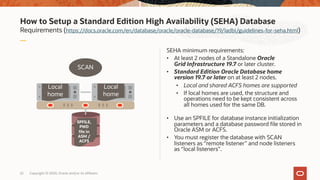
3 Copyright © 2020, Oracle and/or its affiliates
Standard Edition High Availability
1 Introduction
2 The What
3 The Why
4 The How
5 Summary
4 Copyright © 2020, Oracle and/or its affiliates
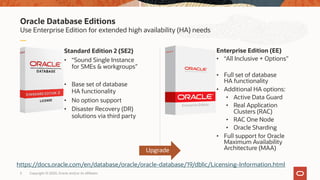
Oracle Database Editions
Use Enterprise Edition for extended high availability (HA) needs
Standard Edition 2 (SE2)
• “Sound Single Instance
for SMEs & workgroups”
• Base set of database
HA functionality
• No option support
• Disaster Recovery (DR)
solutions via third party
Enterprise Edition (EE)
• “All Inclusive + Options”
• Full set of database
HA functionality
• Additional HA options:
• Active Data Guard
• Real Application
Clusters (RAC)
• RAC One Node
• Oracle Sharding
• Full support for Oracle
Maximum Availability
Architecture (MAA)
5 Copyright © 2020, Oracle and/or its affiliates
Upgrade
https://docs.oracle.com/en/database/oracle/oracle-database/19/dblic/Licensing-Information.html
Enterprise Edition
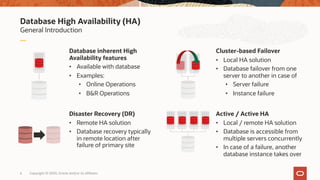
Database High Availability (HA)
General Introduction
Database inherent High
Availability features
• Available with database
• Examples:
• Online Operations
• B&R Operations
Cluster-based Failover
• Local HA solution
• Database failover from one
server to another in case of
• Server failure
• Instance failure
Disaster Recovery (DR)
• Remote HA solution
• Database recovery typically
in remote location after
failure of primary site
Active / Active HA
• Local / remote HA solution
• Database is accessible from
multiple servers concurrently
• In case of a failure, another
database instance takes over
6 Copyright © 2020, Oracle and/or its affiliates
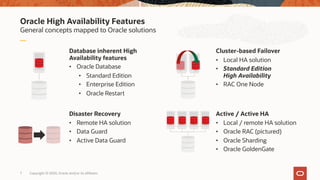
Oracle High Availability Features
General concepts mapped to Oracle solutions
Database inherent High
Availability features
• Oracle Database
• Standard Edition
• Enterprise Edition
• Oracle Restart
Cluster-based Failover
• Local HA solution
• Standard Edition
High Availability
• RAC One Node
Disaster Recovery
• Remote HA solution
• Data Guard
• Active Data Guard
Active / Active HA
• Local / remote HA solution
• Oracle RAC (pictured)
• Oracle Sharding
• Oracle GoldenGate
7 Copyright © 2020, Oracle and/or its affiliates
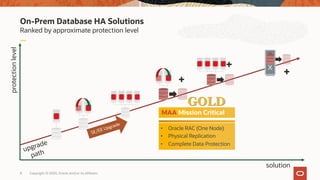
On-Prem Database HA Solutions
Ranked by approximate protection level
8 Copyright © 2020, Oracle and/or its affiliates
upgrade
path
protectionlevel
+
+
+
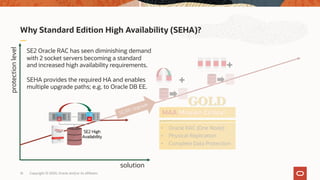
MAA Mission Critical
• Oracle RAC (One Node)
• Physical Replication
• Complete Data Protection
GOLD
solution
SE/EE Upgrade
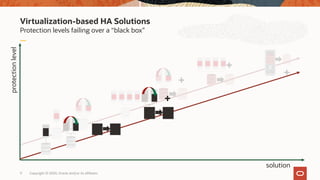
Virtualization-based HA Solutions
9 Copyright © 2020, Oracle and/or its affiliates
solution
+
Protection levels failing over a “black box”
protectionlevel
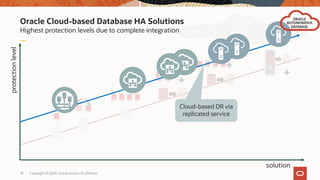
Oracle Cloud-based Database HA Solutions
10 Copyright © 2020, Oracle and/or its affiliates
solution
Highest protection levels due to complete integration
protectionlevel
ORACLE
AUTONOMOUS
DATABASE
Cloud-based DR via
replicated service
Standard Edition High Availability
1 Introduction
2 The What
3 The Why
4 The How
5 Summary
11 Copyright © 2020, Oracle and/or its affiliates
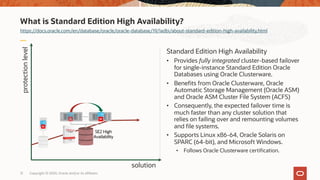
What is Standard Edition High Availability?
https://docs.oracle.com/en/database/oracle/oracle-database/19/ladbi/about-standard-edition-high-availability.html
Standard Edition High Availability
• Provides fully integrated cluster-based failover
for single-instance Standard Edition Oracle
Databases using Oracle Clusterware.
• Benefits from Oracle Clusterware, Oracle
Automatic Storage Management (Oracle ASM)
and Oracle ASM Cluster File System (ACFS)
• Consequently, the expected failover time is
much faster than any cluster solution that
relies on failing over and remounting volumes
and file systems.
• Supports Linux x86-64, Oracle Solaris on
SPARC (64-bit), and Microsoft Windows.
• Follows Oracle Clusterware certification.
12 Copyright © 2020, Oracle and/or its affiliates
protectionlevel
solution
Standard Edition High Availability
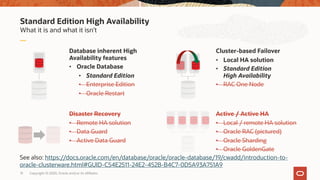
What it is and what it isn’t
Database inherent High
Availability features
• Oracle Database
• Standard Edition
• Enterprise Edition
• Oracle Restart
Cluster-based Failover
• Local HA solution
• Standard Edition
High Availability
• RAC One Node
Disaster Recovery
• Remote HA solution
• Data Guard
• Active Data Guard
Active / Active HA
• Local / remote HA solution
• Oracle RAC (pictured)
• Oracle Sharding
• Oracle GoldenGate
13 Copyright © 2020, Oracle and/or its affiliates
See also: https://docs.oracle.com/en/database/oracle/oracle-database/19/cwadd/introduction-to-
oracle-clusterware.html#GUID-C54E2511-24E2-452B-B4C7-0D5A93A751A9
Standard Edition High Availability (SEHA)
Most Frequently Asked Questions (FAQ)
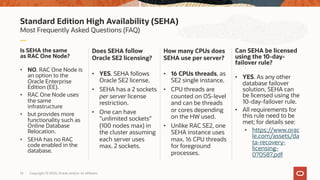
Is SEHA the same
as RAC One Node?
• NO. RAC One Node is
an option to the
Oracle Enterprise
Edition (EE).
• RAC One Node uses
the same
infrastructure
• but provides more
functionality such as
Online Database
Relocation.
• SEHA has no RAC
code enabled in the
database.
Does SEHA follow
Oracle SE2 licensing?
• YES. SEHA follows
Oracle SE2 license.
• SEHA has a 2 sockets
per server license
restriction.
• One can have
”unlimited sockets”
(100 nodes max) in
the cluster assuming
each server uses
max. 2 sockets.
How many CPUs does
SEHA use per server?
• 16 CPUs threads, as
SE2 single instance.
• CPU threads are
counted on OS-level
and can be threads
or cores depending
on the HW used.
• Unlike RAC SE2, one
SEHA instance uses
max. 16 CPU threads
for foreground
processes.
Can SEHA be licensed
using the 10-day-
failover rule?
• YES. As any other
database failover
solution, SEHA can
be licensed using the
10-day-failover rule.
• All requirements for
this rule need to be
met; for details see:
• https://www.orac
le.com/assets/da
ta-recovery-
licensing-
070587.pdf
14 Copyright © 2020, Oracle and/or its affiliates
Standard Edition High Availability
1 Introduction
2 The What
3 The Why
4 The How
5 Summary
15 Copyright © 2020, Oracle and/or its affiliates
Why Standard Edition High Availability (SEHA)?
16 Copyright © 2020, Oracle and/or its affiliates
protectionlevel
solution
SE2 Oracle RAC has seen diminishing demand
with 2 socket servers becoming a standard
and increased high availability requirements.
SEHA provides the required HA and enables
multiple upgrade paths; e.g. to Oracle DB EE.
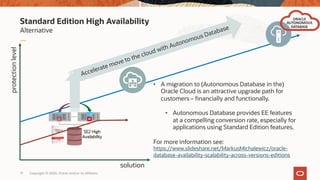
Standard Edition High Availability
Alternative
17 Copyright © 2020, Oracle and/or its affiliates
protectionlevel
solution
ORACLE
AUTONOMOUS
DATABASE
• A migration to (Autonomous Database in the)
Oracle Cloud is an attractive upgrade path for
customers – financially and functionally.
• Autonomous Database provides EE features
at a compelling conversion rate, especially for
applications using Standard Edition features.
For more information see:
https://www.slideshare.net/MarkusMichalewicz/oracle-
database-availability-scalability-across-versions-editions
Accelerate move to the cloud with Autonomous Database
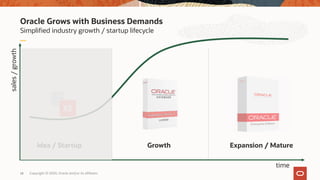
Oracle Grows with Business Demands
Simplified industry growth / startup lifecycle
18 Copyright © 2020, Oracle and/or its affiliates
Idea / Startup Growth Expansion / Mature
time
sales/growth
Enterprise Edition
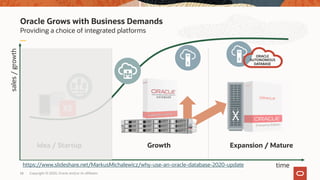
Oracle Grows with Business Demands
Providing a choice of integrated platforms
19 Copyright © 2020, Oracle and/or its affiliates
Idea / Startup Growth Expansion / Mature
time
sales/growth
ORACLE
AUTONOMOUS
DATABASE
Enterprise Edition
https://www.slideshare.net/MarkusMichalewicz/why-use-an-oracle-database-2020-update
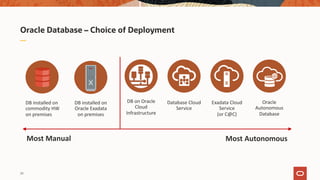
Oracle Database – Choice of Deployment
Most Manual Most Autonomous
DB installed on
commodity HW
on premises
DB installed on
Oracle Exadata
on premises
DB on Oracle
Cloud
Infrastructure
Oracle
Autonomous
Database
Database Cloud
Service
Exadata Cloud
Service
(or C@C)
20
Standard Edition High Availability
1 Introduction
2 The What
3 The Why
4 The How
5 Summary
21 Copyright © 2020, Oracle and/or its affiliates
How to Setup a Standard Edition High Availability (SEHA) Database
Requirements (https://docs.oracle.com/en/database/oracle/oracle-database/19/ladbi/guidelines-for-seha.html)
SEHA minimum requirements:
• At least 2 nodes of a Standalone Oracle
Grid Infrastructure 19.7 or later cluster.
• Standard Edition Oracle Database home
version 19.7 or later on at least 2 nodes.
• Local and shared ACFS homes are supported
• If local homes are used, the structure and
operations need to be kept consistent across
all homes used for the same DB.
• Use an SPFILE for database instance initialization
parameters and a database password file stored in
Oracle ASM or ACFS.
• You must register the database with SCAN
listeners as “remote listener” and node listeners
as “local listeners”.
22 Copyright © 2020, Oracle and/or its affiliates
SPFILE,
PWD
file in
ASM /
ACFS
Local
home
Local
home
SCAN
How to Setup a Standard Edition High Availability Database
Configuration (https://docs.oracle.com/en/database/oracle/oracle-database/19/admin/creating-and-
configuring-an-oracle-database.html#GUID-4B255433-4F5D-4A75-BB05-EBAB41361B5E)
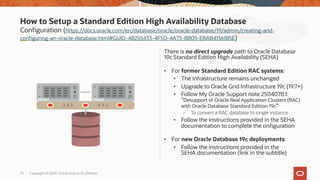
There is no direct upgrade path to Oracle Database
19c Standard Edition High Availability (SEHA)
• For former Standard Edition RAC systems:
• The infrastructure remains unchanged
• Upgrade to Oracle Grid Infrastructure 19c (19.7+)
• Follow My Oracle Support note 2504078.1:
”Desupport of Oracle Real Application Clusters (RAC)
with Oracle Database Standard Edition 19c”
- To convert a RAC database to single instance
• Follow the instructions provided in the SEHA
documentation to complete the onfiguration
• For new Oracle Database 19c deployments:
• Follow the instructions provided in the
SEHA documentation (link in the subtitle)
23 Copyright © 2020, Oracle and/or its affiliates
Node1 Node2
How to Setup a Standard Edition High Availability Database
Configuration basics
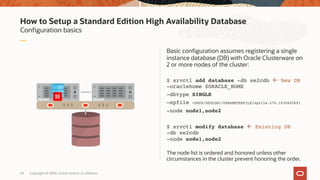
Basic configuration assumes registering a single
instance database (DB) with Oracle Clusterware on
2 or more nodes of the cluster:
$ srvctl add database -db se2cdb ß New DB
-oraclehome $ORACLE_HOME
-dbtype SINGLE
–spfile +DATA/SE2CDB1/PARAMETERFILE/spfile.276.1030845691
-node node1,node2
$ srvctl modify database ß Existing DB
-db se2cdb
-node node1,node2
The node list is ordered and honored unless other
circumstances in the cluster prevent honoring the order.
24 Copyright © 2020, Oracle and/or its affiliates
Node1 Node2
How to Setup a Standard Edition High Availability Database
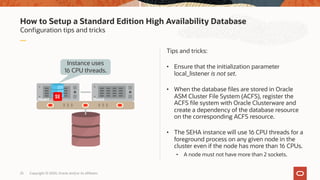
Configuration tips and tricks
Tips and tricks:
• Ensure that the initialization parameter
local_listener is not set.
• When the database files are stored in Oracle
ASM Cluster File System (ACFS), register the
ACFS file system with Oracle Clusterware and
create a dependency of the database resource
on the corresponding ACFS resource.
• The SEHA instance will use 16 CPU threads for a
foreground process on any given node in the
cluster even if the node has more than 16 CPUs.
• A node must not have more than 2 sockets.
25 Copyright © 2020, Oracle and/or its affiliates
Instance uses
16 CPU threads.
Node1 Node2
How to Setup a Standard Edition High Availability Database
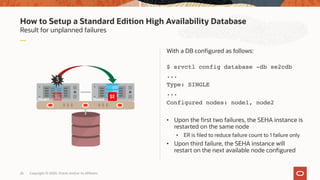
Result for unplanned failures
With a DB configured as follows:
$ srvctl config database -db se2cdb
...
Type: SINGLE
...
Configured nodes: node1, node2
• Upon the first two failures, the SEHA instance is
restarted on the same node
• ER is filed to reduce failure count to 1 failure only
• Upon third failure, the SEHA instance will
restart on the next available node configured
26 Copyright © 2020, Oracle and/or its affiliates
123
Node1 Node2
How to Setup a Standard Edition High Availability Database
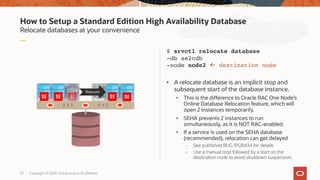
Relocate databases at your convenience
$ srvctl relocate database
-db se2cdb
-node node2 ß destination node
• A relocate database is an implicit stop and
subsequent start of the database instance.
• This is the difference to Oracle RAC One Node’s
Online Database Relocation feature, which will
open 2 instances temporarily.
• SEHA prevents 2 instances to run
simultaneously, as it is NOT RAC-enabled.
• If a service is used on the SEHA database
(recommended), relocation can get delayed
- See published BUG 31128434 for details
- Use a manual stop followed by a start on the
destination node to avoid shutdown suspension.
27 Copyright © 2020, Oracle and/or its affiliates
Relocate
Node1 Node2
How to Setup a Standard Edition High Availability Database
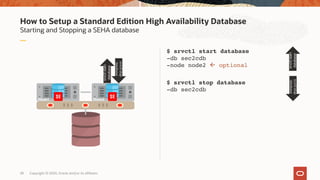
Starting and Stopping a SEHA database
$ srvctl start database
-db sec2cdb
-node node2 ß optional
$ srvctl stop database
-db sec2cdb
28 Copyright © 2020, Oracle and/or its affiliates
Node1 Node2
srvctlstart
database
srvctlstop
database
srvctlstart
database
srvctlstop
database
Standard Edition High Availability
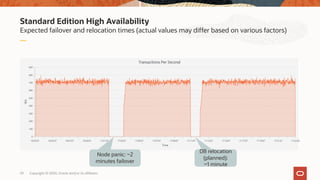
Expected failover and relocation times (actual values may differ based on various factors)
29 Copyright © 2020, Oracle and/or its affiliates
Node panic: ~2
minutes failover
DB relocation
(planned):
~1 minute
Standard Edition High Availability
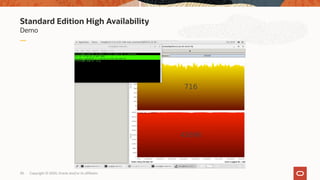
Demo
30 Copyright © 2020, Oracle and/or its affiliates
Standard Edition High Availability
1 Introduction
2 The What
3 The Why
4 The How
5 Summary
31 Copyright © 2020, Oracle and/or its affiliates
Standard Edition High Availability
Fully integrated and documented
Standard Edition High Availability provides
• fully integrated cluster-based failover for single-instance Standard Edition Oracle Databases.
• Using Oracle Clusterware, Oracle Automatic Storage Management (ASM) and ASM Cluster File System (ACFS)
• the required high availability for most applications using a Standard Edition Oracle Databases.
Standard Edition High Availability is fully documented
• https://docs.oracle.com/en/database/oracle/oracle-database/19/admin/creating-and-configuring-an-
oracle-database.html#GUID-4B255433-4F5D-4A75-BB05-EBAB41361B5E
• About Standard Edition High Availability
• Requirements for Using Standard Edition High Availability With Oracle Databases
• Enabling Standard Edition High Availability for Oracle Databases
• Relocating a Standard Edition High Availability Database to Another Node
• Adding a Node to a Standard Edition High Availability Database*
• Removing a Configured Node from a Standard Edition High Availability Database*
• Starting and Stopping Standard Edition High Availability Databases
• Deactivating Standard Edition High Availability for Oracle Databases*
32 Copyright © 2020, Oracle and/or its affiliates
* Steps not covered in this presentation
33 Copyright © 2020, Oracle and/or its affiliates
Thank you
Markus Michalewicz (Markus.Michalewicz@oracle.com)
Senior Director of Database Product Management
@KnownAsMarkus
www.linkedin.com/in/markusmichalewicz
www.slideshare.net/MarkusMichalewicz
Our mission is to help people
see data in new ways, discover insights,
unlock endless possibilities.

Standard Edition High Availability (SEHA) - The Why, What & How

  • 1.
    Standard Edition HighAvailability The Why, What & How Markus Michalewicz Senior Director of Product Management Oracle Database High Availability | Scalability | MAA July 15, 2020 @KnownAsMarkus www.linkedin.com/in/markusmichalewicz www.slideshare.net/MarkusMichalewicz
  • 2.
    Safe harbor statement Thefollowing is intended to outline our general product direction. It is intended for information purposes only, and may not be incorporated into any contract. It is not a commitment to deliver any material, code, or functionality, and should not be relied upon in making purchasing decisions. The development, release, timing, and pricing of any features or functionality described for Oracle’s products may change and remains at the sole discretion of Oracle Corporation. 2 Copyright © 2020, Oracle and/or its affiliates
  • 3.
    Standard Edition HighAvailability 1 Introduction 2 The What 3 The Why 4 The How 5 Summary 3 Copyright © 2020, Oracle and/or its affiliates
  • 4.
    Standard Edition HighAvailability 1 Introduction 2 The What 3 The Why 4 The How 5 Summary 4 Copyright © 2020, Oracle and/or its affiliates
  • 5.
    Oracle Database Editions UseEnterprise Edition for extended high availability (HA) needs Standard Edition 2 (SE2) • “Sound Single Instance for SMEs & workgroups” • Base set of database HA functionality • No option support • Disaster Recovery (DR) solutions via third party Enterprise Edition (EE) • “All Inclusive + Options” • Full set of database HA functionality • Additional HA options: • Active Data Guard • Real Application Clusters (RAC) • RAC One Node • Oracle Sharding • Full support for Oracle Maximum Availability Architecture (MAA) 5 Copyright © 2020, Oracle and/or its affiliates Upgrade https://docs.oracle.com/en/database/oracle/oracle-database/19/dblic/Licensing-Information.html Enterprise Edition
  • 6.
    Database High Availability(HA) General Introduction Database inherent High Availability features • Available with database • Examples: • Online Operations • B&R Operations Cluster-based Failover • Local HA solution • Database failover from one server to another in case of • Server failure • Instance failure Disaster Recovery (DR) • Remote HA solution • Database recovery typically in remote location after failure of primary site Active / Active HA • Local / remote HA solution • Database is accessible from multiple servers concurrently • In case of a failure, another database instance takes over 6 Copyright © 2020, Oracle and/or its affiliates
  • 7.
    Oracle High AvailabilityFeatures General concepts mapped to Oracle solutions Database inherent High Availability features • Oracle Database • Standard Edition • Enterprise Edition • Oracle Restart Cluster-based Failover • Local HA solution • Standard Edition High Availability • RAC One Node Disaster Recovery • Remote HA solution • Data Guard • Active Data Guard Active / Active HA • Local / remote HA solution • Oracle RAC (pictured) • Oracle Sharding • Oracle GoldenGate 7 Copyright © 2020, Oracle and/or its affiliates
  • 8.
    On-Prem Database HASolutions Ranked by approximate protection level 8 Copyright © 2020, Oracle and/or its affiliates upgrade path protectionlevel + + + MAA Mission Critical • Oracle RAC (One Node) • Physical Replication • Complete Data Protection GOLD solution SE/EE Upgrade
  • 9.
    Virtualization-based HA Solutions 9Copyright © 2020, Oracle and/or its affiliates solution + Protection levels failing over a “black box” protectionlevel
  • 10.
    Oracle Cloud-based DatabaseHA Solutions 10 Copyright © 2020, Oracle and/or its affiliates solution Highest protection levels due to complete integration protectionlevel ORACLE AUTONOMOUS DATABASE Cloud-based DR via replicated service
  • 11.
    Standard Edition HighAvailability 1 Introduction 2 The What 3 The Why 4 The How 5 Summary 11 Copyright © 2020, Oracle and/or its affiliates
  • 12.
    What is StandardEdition High Availability? https://docs.oracle.com/en/database/oracle/oracle-database/19/ladbi/about-standard-edition-high-availability.html Standard Edition High Availability • Provides fully integrated cluster-based failover for single-instance Standard Edition Oracle Databases using Oracle Clusterware. • Benefits from Oracle Clusterware, Oracle Automatic Storage Management (Oracle ASM) and Oracle ASM Cluster File System (ACFS) • Consequently, the expected failover time is much faster than any cluster solution that relies on failing over and remounting volumes and file systems. • Supports Linux x86-64, Oracle Solaris on SPARC (64-bit), and Microsoft Windows. • Follows Oracle Clusterware certification. 12 Copyright © 2020, Oracle and/or its affiliates protectionlevel solution
  • 13.
    Standard Edition HighAvailability What it is and what it isn’t Database inherent High Availability features • Oracle Database • Standard Edition • Enterprise Edition • Oracle Restart Cluster-based Failover • Local HA solution • Standard Edition High Availability • RAC One Node Disaster Recovery • Remote HA solution • Data Guard • Active Data Guard Active / Active HA • Local / remote HA solution • Oracle RAC (pictured) • Oracle Sharding • Oracle GoldenGate 13 Copyright © 2020, Oracle and/or its affiliates See also: https://docs.oracle.com/en/database/oracle/oracle-database/19/cwadd/introduction-to- oracle-clusterware.html#GUID-C54E2511-24E2-452B-B4C7-0D5A93A751A9
  • 14.
    Standard Edition HighAvailability (SEHA) Most Frequently Asked Questions (FAQ) Is SEHA the same as RAC One Node? • NO. RAC One Node is an option to the Oracle Enterprise Edition (EE). • RAC One Node uses the same infrastructure • but provides more functionality such as Online Database Relocation. • SEHA has no RAC code enabled in the database. Does SEHA follow Oracle SE2 licensing? • YES. SEHA follows Oracle SE2 license. • SEHA has a 2 sockets per server license restriction. • One can have ”unlimited sockets” (100 nodes max) in the cluster assuming each server uses max. 2 sockets. How many CPUs does SEHA use per server? • 16 CPUs threads, as SE2 single instance. • CPU threads are counted on OS-level and can be threads or cores depending on the HW used. • Unlike RAC SE2, one SEHA instance uses max. 16 CPU threads for foreground processes. Can SEHA be licensed using the 10-day- failover rule? • YES. As any other database failover solution, SEHA can be licensed using the 10-day-failover rule. • All requirements for this rule need to be met; for details see: • https://www.orac le.com/assets/da ta-recovery- licensing- 070587.pdf 14 Copyright © 2020, Oracle and/or its affiliates
  • 15.
    Standard Edition HighAvailability 1 Introduction 2 The What 3 The Why 4 The How 5 Summary 15 Copyright © 2020, Oracle and/or its affiliates
  • 16.
    Why Standard EditionHigh Availability (SEHA)? 16 Copyright © 2020, Oracle and/or its affiliates protectionlevel solution SE2 Oracle RAC has seen diminishing demand with 2 socket servers becoming a standard and increased high availability requirements. SEHA provides the required HA and enables multiple upgrade paths; e.g. to Oracle DB EE.
  • 17.
    Standard Edition HighAvailability Alternative 17 Copyright © 2020, Oracle and/or its affiliates protectionlevel solution ORACLE AUTONOMOUS DATABASE • A migration to (Autonomous Database in the) Oracle Cloud is an attractive upgrade path for customers – financially and functionally. • Autonomous Database provides EE features at a compelling conversion rate, especially for applications using Standard Edition features. For more information see: https://www.slideshare.net/MarkusMichalewicz/oracle- database-availability-scalability-across-versions-editions Accelerate move to the cloud with Autonomous Database
  • 18.
    Oracle Grows withBusiness Demands Simplified industry growth / startup lifecycle 18 Copyright © 2020, Oracle and/or its affiliates Idea / Startup Growth Expansion / Mature time sales/growth Enterprise Edition
  • 19.
    Oracle Grows withBusiness Demands Providing a choice of integrated platforms 19 Copyright © 2020, Oracle and/or its affiliates Idea / Startup Growth Expansion / Mature time sales/growth ORACLE AUTONOMOUS DATABASE Enterprise Edition https://www.slideshare.net/MarkusMichalewicz/why-use-an-oracle-database-2020-update
  • 20.
    Oracle Database –Choice of Deployment Most Manual Most Autonomous DB installed on commodity HW on premises DB installed on Oracle Exadata on premises DB on Oracle Cloud Infrastructure Oracle Autonomous Database Database Cloud Service Exadata Cloud Service (or C@C) 20
  • 21.
    Standard Edition HighAvailability 1 Introduction 2 The What 3 The Why 4 The How 5 Summary 21 Copyright © 2020, Oracle and/or its affiliates
  • 22.
    How to Setupa Standard Edition High Availability (SEHA) Database Requirements (https://docs.oracle.com/en/database/oracle/oracle-database/19/ladbi/guidelines-for-seha.html) SEHA minimum requirements: • At least 2 nodes of a Standalone Oracle Grid Infrastructure 19.7 or later cluster. • Standard Edition Oracle Database home version 19.7 or later on at least 2 nodes. • Local and shared ACFS homes are supported • If local homes are used, the structure and operations need to be kept consistent across all homes used for the same DB. • Use an SPFILE for database instance initialization parameters and a database password file stored in Oracle ASM or ACFS. • You must register the database with SCAN listeners as “remote listener” and node listeners as “local listeners”. 22 Copyright © 2020, Oracle and/or its affiliates SPFILE, PWD file in ASM / ACFS Local home Local home SCAN
  • 23.
    How to Setupa Standard Edition High Availability Database Configuration (https://docs.oracle.com/en/database/oracle/oracle-database/19/admin/creating-and- configuring-an-oracle-database.html#GUID-4B255433-4F5D-4A75-BB05-EBAB41361B5E) There is no direct upgrade path to Oracle Database 19c Standard Edition High Availability (SEHA) • For former Standard Edition RAC systems: • The infrastructure remains unchanged • Upgrade to Oracle Grid Infrastructure 19c (19.7+) • Follow My Oracle Support note 2504078.1: ”Desupport of Oracle Real Application Clusters (RAC) with Oracle Database Standard Edition 19c” - To convert a RAC database to single instance • Follow the instructions provided in the SEHA documentation to complete the onfiguration • For new Oracle Database 19c deployments: • Follow the instructions provided in the SEHA documentation (link in the subtitle) 23 Copyright © 2020, Oracle and/or its affiliates Node1 Node2
  • 24.
    How to Setupa Standard Edition High Availability Database Configuration basics Basic configuration assumes registering a single instance database (DB) with Oracle Clusterware on 2 or more nodes of the cluster: $ srvctl add database -db se2cdb ß New DB -oraclehome $ORACLE_HOME -dbtype SINGLE –spfile +DATA/SE2CDB1/PARAMETERFILE/spfile.276.1030845691 -node node1,node2 $ srvctl modify database ß Existing DB -db se2cdb -node node1,node2 The node list is ordered and honored unless other circumstances in the cluster prevent honoring the order. 24 Copyright © 2020, Oracle and/or its affiliates Node1 Node2
  • 25.
    How to Setupa Standard Edition High Availability Database Configuration tips and tricks Tips and tricks: • Ensure that the initialization parameter local_listener is not set. • When the database files are stored in Oracle ASM Cluster File System (ACFS), register the ACFS file system with Oracle Clusterware and create a dependency of the database resource on the corresponding ACFS resource. • The SEHA instance will use 16 CPU threads for a foreground process on any given node in the cluster even if the node has more than 16 CPUs. • A node must not have more than 2 sockets. 25 Copyright © 2020, Oracle and/or its affiliates Instance uses 16 CPU threads. Node1 Node2
  • 26.
    How to Setupa Standard Edition High Availability Database Result for unplanned failures With a DB configured as follows: $ srvctl config database -db se2cdb ... Type: SINGLE ... Configured nodes: node1, node2 • Upon the first two failures, the SEHA instance is restarted on the same node • ER is filed to reduce failure count to 1 failure only • Upon third failure, the SEHA instance will restart on the next available node configured 26 Copyright © 2020, Oracle and/or its affiliates 123 Node1 Node2
  • 27.
    How to Setupa Standard Edition High Availability Database Relocate databases at your convenience $ srvctl relocate database -db se2cdb -node node2 ß destination node • A relocate database is an implicit stop and subsequent start of the database instance. • This is the difference to Oracle RAC One Node’s Online Database Relocation feature, which will open 2 instances temporarily. • SEHA prevents 2 instances to run simultaneously, as it is NOT RAC-enabled. • If a service is used on the SEHA database (recommended), relocation can get delayed - See published BUG 31128434 for details - Use a manual stop followed by a start on the destination node to avoid shutdown suspension. 27 Copyright © 2020, Oracle and/or its affiliates Relocate Node1 Node2
  • 28.
    How to Setupa Standard Edition High Availability Database Starting and Stopping a SEHA database $ srvctl start database -db sec2cdb -node node2 ß optional $ srvctl stop database -db sec2cdb 28 Copyright © 2020, Oracle and/or its affiliates Node1 Node2 srvctlstart database srvctlstop database srvctlstart database srvctlstop database
  • 29.
    Standard Edition HighAvailability Expected failover and relocation times (actual values may differ based on various factors) 29 Copyright © 2020, Oracle and/or its affiliates Node panic: ~2 minutes failover DB relocation (planned): ~1 minute
  • 30.
    Standard Edition HighAvailability Demo 30 Copyright © 2020, Oracle and/or its affiliates
  • 31.
    Standard Edition HighAvailability 1 Introduction 2 The What 3 The Why 4 The How 5 Summary 31 Copyright © 2020, Oracle and/or its affiliates
  • 32.
    Standard Edition HighAvailability Fully integrated and documented Standard Edition High Availability provides • fully integrated cluster-based failover for single-instance Standard Edition Oracle Databases. • Using Oracle Clusterware, Oracle Automatic Storage Management (ASM) and ASM Cluster File System (ACFS) • the required high availability for most applications using a Standard Edition Oracle Databases. Standard Edition High Availability is fully documented • https://docs.oracle.com/en/database/oracle/oracle-database/19/admin/creating-and-configuring-an- oracle-database.html#GUID-4B255433-4F5D-4A75-BB05-EBAB41361B5E • About Standard Edition High Availability • Requirements for Using Standard Edition High Availability With Oracle Databases • Enabling Standard Edition High Availability for Oracle Databases • Relocating a Standard Edition High Availability Database to Another Node • Adding a Node to a Standard Edition High Availability Database* • Removing a Configured Node from a Standard Edition High Availability Database* • Starting and Stopping Standard Edition High Availability Databases • Deactivating Standard Edition High Availability for Oracle Databases* 32 Copyright © 2020, Oracle and/or its affiliates * Steps not covered in this presentation
  • 33.
    33 Copyright ©2020, Oracle and/or its affiliates Thank you Markus Michalewicz (Markus.Michalewicz@oracle.com) Senior Director of Database Product Management @KnownAsMarkus www.linkedin.com/in/markusmichalewicz www.slideshare.net/MarkusMichalewicz
  • 34.
    Our mission isto help people see data in new ways, discover insights, unlock endless possibilities.