SCALABLE AND HIGH-PERFORMANCE
ANALYTICS WITH DISTRIBUTED R AND
VERTICA
Big Data Day 2015
Los Angeles, CA
Edward Ma June 27th, 2015
2
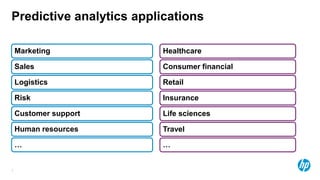
Predictive analytics applications
Marketing
Sales
Logistics
Risk
Customer support
Human resources
…
Healthcare
Consumer financial
Retail
Insurance
Life sciences
Travel
…
3
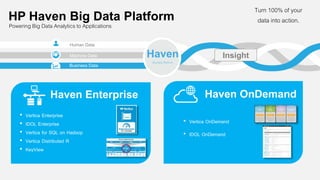
Haven
Big Data Platform
Turn 100% of your
data into action.
Human Data
Business Data
Machine Data
Powering Big Data Analytics to Applications
Insight
Haven OnDemand
• Vertica OnDemand
• IDOL OnDemand
• Vertica Enterprise
• IDOL Enterprise
• Vertica for SQL on Hadoop
• Vertica Distributed R
• KeyView
Haven Enterprise
HP Haven Big Data Platform
4
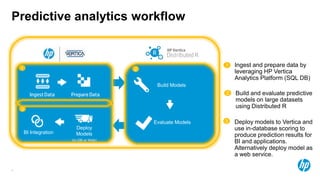
Predictive analytics workflow
Build Models
Evaluate Models
Deploy
Models
(In-DB or Web)
BI Integration
1 2
3
Build and evaluate predictive
models on large datasets
using Distributed R
2
1 Ingest and prepare data by
leveraging HP Vertica
Analytics Platform (SQL DB)
3 Deploy models to Vertica and
use in-database scoring to
produce prediction results for
BI and applications.
Alternatively deploy model as
a web service.
5
Outline
• Distributed R Overview and Examples
• Full-cycle, “end-to-end” predictive analytics demo with a real dataset,
showcasing:
• Distributed R, using the HPdglm package (Distributed R’s parallel, high-performance
linear regression algorithm by HP)
• Vertica, with an in-database prediction function
• In-database data preparation with Vertica.dplyr
Distributed R
The Next Generation Platform for Predictive Analytics
7
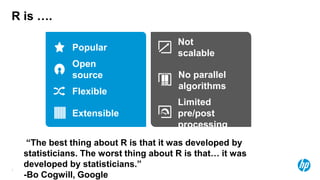
R is ….
Popular
Not
scalable
Open
source No parallel
algorithms
Flexible
Extensible
Limited
pre/post
processing
“The best thing about R is that it was developed by
statisticians. The worst thing about R is that… it was
developed by statisticians.”
-Bo Cogwill, Google
8
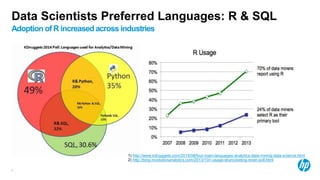
Data Scientists Preferred Languages: R & SQL
Adoption of R increased across industries
1) http://www.kdnuggets.com/2014/08/four-main-languages-analytics-data-mining-data-science.html
2) http://blog.revolutionanalytics.com/2013/10/r-usage-skyrocketing-rexer-poll.html
9
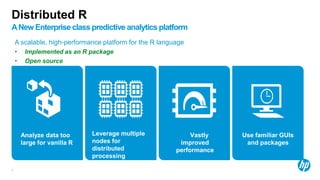
Distributed R
ANew Enterpriseclass predictive analytics platform
A scalable, high-performance platform for the R language
• Implemented as an R package
• Open source
Use familiar GUIs
and packages
Analyze data too
large for vanilla R
Leverage multiple
nodes for
distributed
processing
Vastly
improved
performance
10
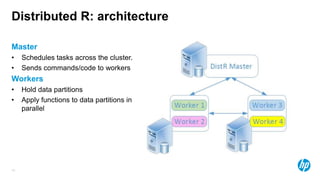
Distributed R: architecture
Master
• Schedules tasks across the cluster.
• Sends commands/code to workers
Workers
• Hold data partitions
• Apply functions to data partitions in
parallel
11
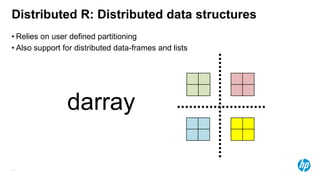
• Relies on user defined partitioning
• Also support for distributed data-frames and lists
darray
Distributed R: Distributed data structures
12
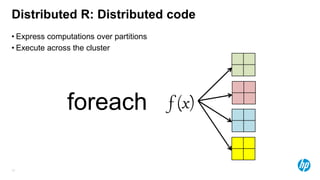
• Express computations over partitions
• Execute across the cluster
foreach
Distributed R: Distributed code
f (x)
13
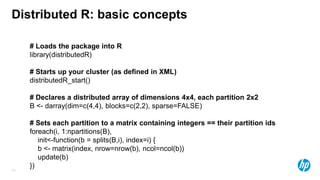
Distributed R: basic concepts
# Loads the package into R
library(distributedR)
# Starts up your cluster (as defined in XML)
distributedR_start()
# Declares a distributed array of dimensions 4x4, each partition 2x2
B <- darray(dim=c(4,4), blocks=c(2,2), sparse=FALSE)
# Sets each partition to a matrix containing integers == their partition ids
foreach(i, 1:npartitions(B),
init<-function(b = splits(B,i), index=i) {
b <- matrix(index, nrow=nrow(b), ncol=ncol(b))
update(b)
})
14
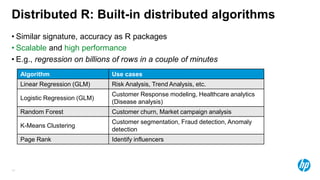
• Similar signature, accuracy as R packages
• Scalable and high performance
• E.g., regression on billions of rows in a couple of minutes
Distributed R: Built-in distributed algorithms
Algorithm Use cases
Linear Regression (GLM) Risk Analysis, Trend Analysis, etc.
Logistic Regression (GLM)
Customer Response modeling, Healthcare analytics
(Disease analysis)
Random Forest Customer churn, Market campaign analysis
K-Means Clustering
Customer segmentation, Fraud detection, Anomaly
detection
Page Rank Identify influencers
15
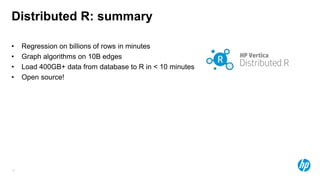
Distributed R: summary
• Regression on billions of rows in minutes
• Graph algorithms on 10B edges
• Load 400GB+ data from database to R in < 10 minutes
• Open source!
16
That’s cool… what can I do with it?
• Collaborate
• Github (report issues, send PRs) https://github.com/vertica/DistributedR
• Standardization with R-core http://www.r-bloggers.com/enhancing-r-for-distributed-computing/
• Get the SW + docs: http://www.vertica.com/hp-vertica-products/hp-vertica-distributed-r/
• Buy commercial support
End-to-End Demo
18
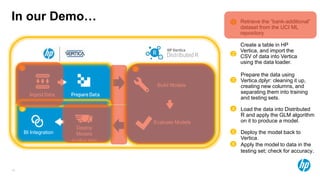
In our Demo…
Build Models
Evaluate Models
Deploy
Models
(In-DB or Web)
BI Integration
1 2
3
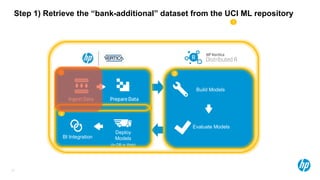
1 Retrieve the “bank-additional”
dataset from the UCI ML
repository
Create a table in HP
Vertica, and import the
CSV of data into Vertica
using the data loader.
2
3
Prepare the data using
Vertica.dplyr: cleaning it up,
creating new columns, and
separating them into training
and testing sets.
4 Load the data into Distributed
R and apply the GLM algorithm
on it to produce a model.
5 Deploy the model back to
Vertica.
6 Apply the model to data in the
testing set; check for accuracy.
19
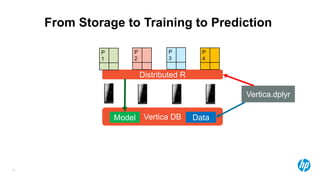
From Storage to Training to Prediction
Distributed R
P
1
P
2
P
3
P
4
Vertica DBModel Data
Vertica.dplyr
20
• Developed from MIT’s C-Store
• Fast, columnar-oriented analytics
database
• Organizes data into projections
• Provides k-safety fault-tolerance and
redundancy
• Used in several industry applications for
big-data storage and analysis (see our
public customer list for examples)
What’s Vertica?
21
Build Models
Evaluate Models
Deploy
Models
(In-DB or Web)
BI Integration
1 2
3
1
Step 1) Retrieve the “bank-additional” dataset from the UCI ML repository
22
The Bank Marketing Dataset
• Background
– A Portuguese banking institution runs a marketing campaign for selling long-term deposits and
collects data from clients they contact, covering various socioeconomic indicators.
– These data are from the years 2008-2013
– The predicted variable is whether or not the client subscribed to the service.
• 45,211 observations
• 17 input features of mixed numerical and categorical data
• Contact communication type (‘email’ vs.
‘phone’)
• Client education level
• Age
• Contact day-of-week
• Employment
• Has loans
• Number of days since last contact
• Contact Month
• Previous contact outcome
• Consumer Price Index
• Duration of Contact
• Others
Source: http://mlr.cs.umass.edu/ml/datasets/Bank+Marketing
[Moro et al., 2014] S. Moro, P. Cortez and P. Rita. A Data-Driven Approach to
Predict the Success of Bank Telemarketing. Decision Support Systems, Elsevier,
62:22-31, June 2014
23
Build Models
Evaluate Models
Deploy
Models
(In-DB or Web)
BI Integration
1 2
3
1
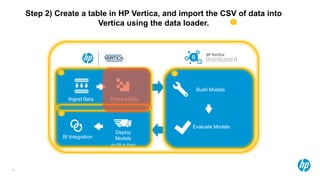
Step 2) Create a table in HP Vertica, and import the CSV of data into
Vertica using the data loader.
24
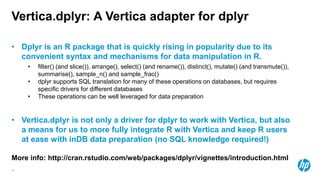
Vertica.dplyr: A Vertica adapter for dplyr
• Dplyr is an R package that is quickly rising in popularity due to its
convenient syntax and mechanisms for data manipulation in R.
• filter() (and slice()), arrange(), select() (and rename()), distinct(), mutate() (and transmute()),
summarise(), sample_n() and sample_frac()
• dplyr supports SQL translation for many of these operations on databases, but requires
specific drivers for different databases
• These operations can be well leveraged for data preparation
• Vertica.dplyr is not only a driver for dplyr to work with Vertica, but also
a means for us to more fully integrate R with Vertica and keep R users
at ease with inDB data preparation (no SQL knowledge required!)
More info: http://cran.rstudio.com/web/packages/dplyr/vignettes/introduction.html
25
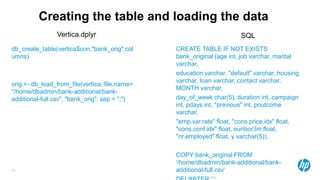
Creating the table and loading the data
db_create_table(vertica$con,"bank_orig",col
umns)
orig <- db_load_from_file(vertica, file.name=
"/home/dbadmin/bank-additional/bank-
additional-full.csv", "bank_orig", sep = ";")
CREATE TABLE IF NOT EXISTS
bank_original (age int, job varchar, marital
varchar,
education varchar, "default" varchar, housing
varchar, loan varchar, contact varchar,
MONTH varchar,
day_of_week char(5), duration int, campaign
int, pdays int, "previous" int, poutcome
varchar,
"emp.var.rate" float, "cons.price.idx" float,
"cons.conf.idx" float, euribor3m float,
"nr.employed" float, y varchar(5));
COPY bank_original FROM
'/home/dbadmin/bank-additional/bank-
additional-full.csv'
Vertica.dplyr SQL
26
Build Models
Evaluate Models
Deploy
Models
(In-DB or Web)
BI Integration
1 2
3
1
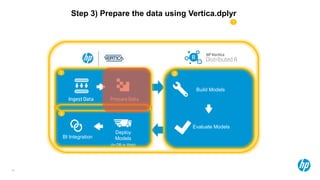
Step 3) Prepare the data using Vertica.dplyr
27
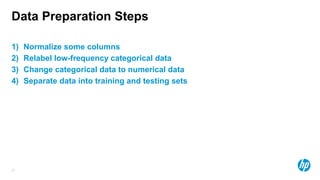
Data Preparation Steps
1) Normalize some columns
2) Relabel low-frequency categorical data
3) Change categorical data to numerical data
4) Separate data into training and testing sets
28
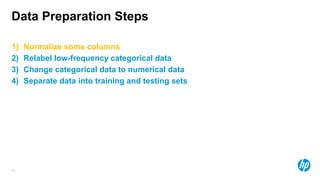
Data Preparation Steps
1) Normalize some columns
2) Relabel low-frequency categorical data
3) Change categorical data to numerical data
4) Separate data into training and testing sets
29
Computing the Z-Score
1) To normalize the data, we will compute the z-score for all quantitative variables.
𝒛 =
𝒙 − 𝝁
𝝈
1) For these features, we’ll first have to compute the mean and standard deviation.
m_sd <- summarise(orig,m_age=mean(age),std_age=sd(age) ….
summarise in dplyr collapses columns into aggregates.
3) Then we’ll need to convert the quantitative values into z_scores for every
observation
normalized <- mutate(orig,age_z=(age-z[["m_age"]])/z[["std_age"]] …..
mutate creates new columns – in this case, we are creating new columns to store
30
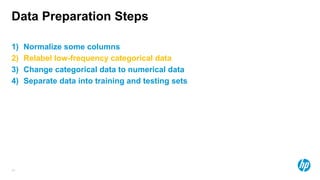
Data Preparation Steps
1) Normalize some columns
2) Relabel low-frequency categorical data
3) Change categorical data to numerical data
4) Separate data into training and testing sets
31
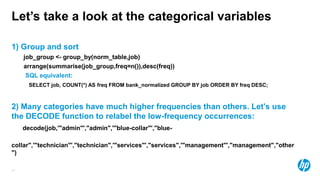
Let’s take a look at the categorical variables
1) Group and sort
job_group <- group_by(norm_table,job)
arrange(summarise(job_group,freq=n()),desc(freq))
SQL equivalent:
SELECT job, COUNT(*) AS freq FROM bank_normalized GROUP BY job ORDER BY freq DESC;
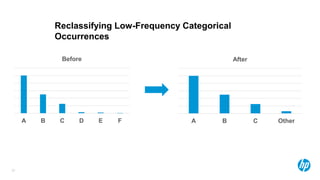
2) Many categories have much higher frequencies than others. Let’s use
the DECODE function to relabel the low-frequency occurrences:
decode(job,'"admin"',"admin",'"blue-collar"',"blue-
collar",'"technician"',"technician",'"services"',"services",'"management"',"management","other
")
32
A B C D E F
Before
A B C Other
After
Reclassifying Low-Frequency Categorical
Occurrences
33
Data Preparation Steps
1) Normalize some columns
2) Relabel low-frequency categorical data
3) Change categorical data to numerical data
4) Separate data into training and testing sets
34
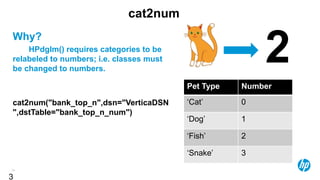
cat2num
Why?
HPdglm() requires categories to be
relabeled to numbers; i.e. classes must
be changed to numbers.
cat2num("bank_top_n",dsn="VerticaDSN
",dstTable="bank_top_n_num")
3
Pet Type Number
‘Cat’ 0
‘Dog’ 1
‘Fish’ 2
‘Snake’ 3
35
Data Preparation Steps
1) Normalize some columns
2) Relabel low-frequency categorical data
3) Change categorical data to numerical data
4) Separate data into training and testing sets
36
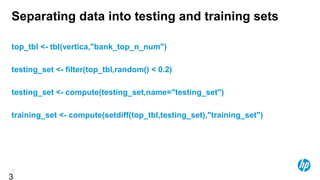
Separating data into testing and training sets
top_tbl <- tbl(vertica,"bank_top_n_num")
testing_set <- filter(top_tbl,random() < 0.2)
testing_set <- compute(testing_set,name="testing_set")
training_set <- compute(setdiff(top_tbl,testing_set),"training_set")
3
© Copyright 2014 Hewlett-Packard Development Company, L.P. The information contained herein is subject to change without notice.
Training
predictive models
38
Build Models
Evaluate Models
Deploy
Models
(In-DB or Web)
BI Integration
1 2
3
1
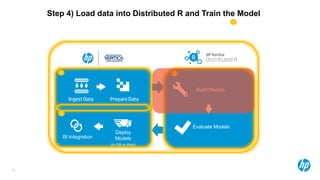
Step 4) Load data into Distributed R and Train the Model
Let’s load the data into Distributed
R!
…but how?
40
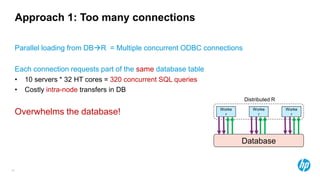
Approach 1: Too many connections
Parallel loading from DBR = Multiple concurrent ODBC connections
Each connection requests part of the same database table
• 10 servers * 32 HT cores = 320 concurrent SQL queries
• Costly intra-node transfers in DB
Overwhelms the database!
Database
Worke
r
Worke
r
Worke
r
Distributed R
41
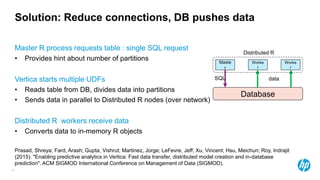
Solution: Reduce connections, DB pushes data
Master R process requests table : single SQL request
• Provides hint about number of partitions
Vertica starts multiple UDFs
• Reads table from DB, divides data into partitions
• Sends data in parallel to Distributed R nodes (over network)
Distributed R workers receive data
• Converts data to in-memory R objects
Prasad, Shreya; Fard, Arash; Gupta, Vishrut; Martinez, Jorge; LeFevre, Jeff; Xu, Vincent; Hsu, Meichun; Roy, Indrajit
(2015). "Enabling predictive analytics in Vertica: Fast data transfer, distributed model creation and in-database
prediction". ACM SIGMOD International Conference on Management of Data (SIGMOD).
Database
Maste
r
Worke
r
Worke
r
SQL data
Distributed R
42
Package HPdata
Includes many functions for loading data into Distributed R, including from Vertica
as well as the file system, giving you functions like:
1) db2darrays
2) db2dframe
3) db2matrix
4) file2dgraph
5) etc.
The DB functions make full advantage of the Vertica Fast Transfer feature.
43
Build Models
Evaluate Models
Deploy
Models
(In-DB or Web)
BI Integration
1 2
3
1
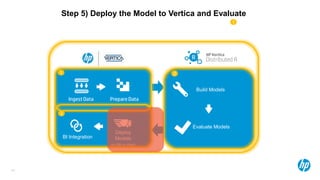
Step 5) Deploy the Model to Vertica and Evaluate
44
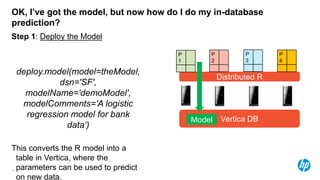
OK, I’ve got the model, but now how do I do my in-database
prediction?
Step 1: Deploy the Model
deploy.model(model=theModel,
dsn='SF',
modelName='demoModel',
modelComments='A logistic
regression model for bank
data‘)
This converts the R model into a
table in Vertica, where the
parameters can be used to predict
on new data.
Distributed R
P
1
P
2
P
3
P
4
Vertica DBModel
45
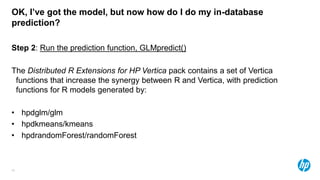
OK, I’ve got the model, but now how do I do my in-database
prediction?
Step 2: Run the prediction function, GLMpredict()
The Distributed R Extensions for HP Vertica pack contains a set of Vertica
functions that increase the synergy between R and Vertica, with prediction
functions for R models generated by:
• hpdglm/glm
• hpdkmeans/kmeans
• hpdrandomForest/randomForest
© Copyright 2014 Hewlett-Packard Development Company, L.P. The information contained herein is subject to change without notice.
Conclusions
47
• Distributed R
• Scalable, high-performance analytics for big data
• Compatibility with R’s massive package-base at the executor level
• Open source
• Predictive analytics tool complementing Vertica in the HP Haven Platform
• Vertica.dplyr
• Leverages power of dplyr for Vertica
• Helps keep data sandboxing in R
• Integration with Distributed R
Summary
Thank you
http://www8.hp.com/us/en/software-
solutions/big-data-analytics-
software.html
http://github.com/vertica

Big Data Day LA 2015 - Scalable and High-Performance Analytics with Distributed R and Vertica by Edward Ma of HP

  • 1.
    SCALABLE AND HIGH-PERFORMANCE ANALYTICSWITH DISTRIBUTED R AND VERTICA Big Data Day 2015 Los Angeles, CA Edward Ma June 27th, 2015
  • 2.
    2 Predictive analytics applications Marketing Sales Logistics Risk Customersupport Human resources … Healthcare Consumer financial Retail Insurance Life sciences Travel …
  • 3.
    3 Haven Big Data Platform Turn100% of your data into action. Human Data Business Data Machine Data Powering Big Data Analytics to Applications Insight Haven OnDemand • Vertica OnDemand • IDOL OnDemand • Vertica Enterprise • IDOL Enterprise • Vertica for SQL on Hadoop • Vertica Distributed R • KeyView Haven Enterprise HP Haven Big Data Platform
  • 4.
    4 Predictive analytics workflow BuildModels Evaluate Models Deploy Models (In-DB or Web) BI Integration 1 2 3 Build and evaluate predictive models on large datasets using Distributed R 2 1 Ingest and prepare data by leveraging HP Vertica Analytics Platform (SQL DB) 3 Deploy models to Vertica and use in-database scoring to produce prediction results for BI and applications. Alternatively deploy model as a web service.
  • 5.
    5 Outline • Distributed ROverview and Examples • Full-cycle, “end-to-end” predictive analytics demo with a real dataset, showcasing: • Distributed R, using the HPdglm package (Distributed R’s parallel, high-performance linear regression algorithm by HP) • Vertica, with an in-database prediction function • In-database data preparation with Vertica.dplyr
  • 6.
    Distributed R The NextGeneration Platform for Predictive Analytics
  • 7.
    7 R is …. Popular Not scalable Open sourceNo parallel algorithms Flexible Extensible Limited pre/post processing “The best thing about R is that it was developed by statisticians. The worst thing about R is that… it was developed by statisticians.” -Bo Cogwill, Google
  • 8.
    8 Data Scientists PreferredLanguages: R & SQL Adoption of R increased across industries 1) http://www.kdnuggets.com/2014/08/four-main-languages-analytics-data-mining-data-science.html 2) http://blog.revolutionanalytics.com/2013/10/r-usage-skyrocketing-rexer-poll.html
  • 9.
    9 Distributed R ANew Enterpriseclasspredictive analytics platform A scalable, high-performance platform for the R language • Implemented as an R package • Open source Use familiar GUIs and packages Analyze data too large for vanilla R Leverage multiple nodes for distributed processing Vastly improved performance
  • 10.
    10 Distributed R: architecture Master •Schedules tasks across the cluster. • Sends commands/code to workers Workers • Hold data partitions • Apply functions to data partitions in parallel
  • 11.
    11 • Relies onuser defined partitioning • Also support for distributed data-frames and lists darray Distributed R: Distributed data structures
  • 12.
    12 • Express computationsover partitions • Execute across the cluster foreach Distributed R: Distributed code f (x)
  • 13.
    13 Distributed R: basicconcepts # Loads the package into R library(distributedR) # Starts up your cluster (as defined in XML) distributedR_start() # Declares a distributed array of dimensions 4x4, each partition 2x2 B <- darray(dim=c(4,4), blocks=c(2,2), sparse=FALSE) # Sets each partition to a matrix containing integers == their partition ids foreach(i, 1:npartitions(B), init<-function(b = splits(B,i), index=i) { b <- matrix(index, nrow=nrow(b), ncol=ncol(b)) update(b) })
  • 14.
    14 • Similar signature,accuracy as R packages • Scalable and high performance • E.g., regression on billions of rows in a couple of minutes Distributed R: Built-in distributed algorithms Algorithm Use cases Linear Regression (GLM) Risk Analysis, Trend Analysis, etc. Logistic Regression (GLM) Customer Response modeling, Healthcare analytics (Disease analysis) Random Forest Customer churn, Market campaign analysis K-Means Clustering Customer segmentation, Fraud detection, Anomaly detection Page Rank Identify influencers
  • 15.
    15 Distributed R: summary •Regression on billions of rows in minutes • Graph algorithms on 10B edges • Load 400GB+ data from database to R in < 10 minutes • Open source!
  • 16.
    16 That’s cool… whatcan I do with it? • Collaborate • Github (report issues, send PRs) https://github.com/vertica/DistributedR • Standardization with R-core http://www.r-bloggers.com/enhancing-r-for-distributed-computing/ • Get the SW + docs: http://www.vertica.com/hp-vertica-products/hp-vertica-distributed-r/ • Buy commercial support
  • 17.
  • 18.
    18 In our Demo… BuildModels Evaluate Models Deploy Models (In-DB or Web) BI Integration 1 2 3 1 Retrieve the “bank-additional” dataset from the UCI ML repository Create a table in HP Vertica, and import the CSV of data into Vertica using the data loader. 2 3 Prepare the data using Vertica.dplyr: cleaning it up, creating new columns, and separating them into training and testing sets. 4 Load the data into Distributed R and apply the GLM algorithm on it to produce a model. 5 Deploy the model back to Vertica. 6 Apply the model to data in the testing set; check for accuracy.
  • 19.
    19 From Storage toTraining to Prediction Distributed R P 1 P 2 P 3 P 4 Vertica DBModel Data Vertica.dplyr
  • 20.
    20 • Developed fromMIT’s C-Store • Fast, columnar-oriented analytics database • Organizes data into projections • Provides k-safety fault-tolerance and redundancy • Used in several industry applications for big-data storage and analysis (see our public customer list for examples) What’s Vertica?
  • 21.
    21 Build Models Evaluate Models Deploy Models (In-DBor Web) BI Integration 1 2 3 1 Step 1) Retrieve the “bank-additional” dataset from the UCI ML repository
  • 22.
    22 The Bank MarketingDataset • Background – A Portuguese banking institution runs a marketing campaign for selling long-term deposits and collects data from clients they contact, covering various socioeconomic indicators. – These data are from the years 2008-2013 – The predicted variable is whether or not the client subscribed to the service. • 45,211 observations • 17 input features of mixed numerical and categorical data • Contact communication type (‘email’ vs. ‘phone’) • Client education level • Age • Contact day-of-week • Employment • Has loans • Number of days since last contact • Contact Month • Previous contact outcome • Consumer Price Index • Duration of Contact • Others Source: http://mlr.cs.umass.edu/ml/datasets/Bank+Marketing [Moro et al., 2014] S. Moro, P. Cortez and P. Rita. A Data-Driven Approach to Predict the Success of Bank Telemarketing. Decision Support Systems, Elsevier, 62:22-31, June 2014
  • 23.
    23 Build Models Evaluate Models Deploy Models (In-DBor Web) BI Integration 1 2 3 1 Step 2) Create a table in HP Vertica, and import the CSV of data into Vertica using the data loader.
  • 24.
    24 Vertica.dplyr: A Verticaadapter for dplyr • Dplyr is an R package that is quickly rising in popularity due to its convenient syntax and mechanisms for data manipulation in R. • filter() (and slice()), arrange(), select() (and rename()), distinct(), mutate() (and transmute()), summarise(), sample_n() and sample_frac() • dplyr supports SQL translation for many of these operations on databases, but requires specific drivers for different databases • These operations can be well leveraged for data preparation • Vertica.dplyr is not only a driver for dplyr to work with Vertica, but also a means for us to more fully integrate R with Vertica and keep R users at ease with inDB data preparation (no SQL knowledge required!) More info: http://cran.rstudio.com/web/packages/dplyr/vignettes/introduction.html
  • 25.
    25 Creating the tableand loading the data db_create_table(vertica$con,"bank_orig",col umns) orig <- db_load_from_file(vertica, file.name= "/home/dbadmin/bank-additional/bank- additional-full.csv", "bank_orig", sep = ";") CREATE TABLE IF NOT EXISTS bank_original (age int, job varchar, marital varchar, education varchar, "default" varchar, housing varchar, loan varchar, contact varchar, MONTH varchar, day_of_week char(5), duration int, campaign int, pdays int, "previous" int, poutcome varchar, "emp.var.rate" float, "cons.price.idx" float, "cons.conf.idx" float, euribor3m float, "nr.employed" float, y varchar(5)); COPY bank_original FROM '/home/dbadmin/bank-additional/bank- additional-full.csv' Vertica.dplyr SQL
  • 26.
    26 Build Models Evaluate Models Deploy Models (In-DBor Web) BI Integration 1 2 3 1 Step 3) Prepare the data using Vertica.dplyr
  • 27.
    27 Data Preparation Steps 1)Normalize some columns 2) Relabel low-frequency categorical data 3) Change categorical data to numerical data 4) Separate data into training and testing sets
  • 28.
    28 Data Preparation Steps 1)Normalize some columns 2) Relabel low-frequency categorical data 3) Change categorical data to numerical data 4) Separate data into training and testing sets
  • 29.
    29 Computing the Z-Score 1)To normalize the data, we will compute the z-score for all quantitative variables. 𝒛 = 𝒙 − 𝝁 𝝈 1) For these features, we’ll first have to compute the mean and standard deviation. m_sd <- summarise(orig,m_age=mean(age),std_age=sd(age) …. summarise in dplyr collapses columns into aggregates. 3) Then we’ll need to convert the quantitative values into z_scores for every observation normalized <- mutate(orig,age_z=(age-z[["m_age"]])/z[["std_age"]] ….. mutate creates new columns – in this case, we are creating new columns to store
  • 30.
    30 Data Preparation Steps 1)Normalize some columns 2) Relabel low-frequency categorical data 3) Change categorical data to numerical data 4) Separate data into training and testing sets
  • 31.
    31 Let’s take alook at the categorical variables 1) Group and sort job_group <- group_by(norm_table,job) arrange(summarise(job_group,freq=n()),desc(freq)) SQL equivalent: SELECT job, COUNT(*) AS freq FROM bank_normalized GROUP BY job ORDER BY freq DESC; 2) Many categories have much higher frequencies than others. Let’s use the DECODE function to relabel the low-frequency occurrences: decode(job,'"admin"',"admin",'"blue-collar"',"blue- collar",'"technician"',"technician",'"services"',"services",'"management"',"management","other ")
  • 32.
    32 A B CD E F Before A B C Other After Reclassifying Low-Frequency Categorical Occurrences
  • 33.
    33 Data Preparation Steps 1)Normalize some columns 2) Relabel low-frequency categorical data 3) Change categorical data to numerical data 4) Separate data into training and testing sets
  • 34.
    34 cat2num Why? HPdglm() requires categoriesto be relabeled to numbers; i.e. classes must be changed to numbers. cat2num("bank_top_n",dsn="VerticaDSN ",dstTable="bank_top_n_num") 3 Pet Type Number ‘Cat’ 0 ‘Dog’ 1 ‘Fish’ 2 ‘Snake’ 3
  • 35.
    35 Data Preparation Steps 1)Normalize some columns 2) Relabel low-frequency categorical data 3) Change categorical data to numerical data 4) Separate data into training and testing sets
  • 36.
    36 Separating data intotesting and training sets top_tbl <- tbl(vertica,"bank_top_n_num") testing_set <- filter(top_tbl,random() < 0.2) testing_set <- compute(testing_set,name="testing_set") training_set <- compute(setdiff(top_tbl,testing_set),"training_set") 3
  • 37.
    © Copyright 2014Hewlett-Packard Development Company, L.P. The information contained herein is subject to change without notice. Training predictive models
  • 38.
    38 Build Models Evaluate Models Deploy Models (In-DBor Web) BI Integration 1 2 3 1 Step 4) Load data into Distributed R and Train the Model
  • 39.
    Let’s load thedata into Distributed R! …but how?
  • 40.
    40 Approach 1: Toomany connections Parallel loading from DBR = Multiple concurrent ODBC connections Each connection requests part of the same database table • 10 servers * 32 HT cores = 320 concurrent SQL queries • Costly intra-node transfers in DB Overwhelms the database! Database Worke r Worke r Worke r Distributed R
  • 41.
    41 Solution: Reduce connections,DB pushes data Master R process requests table : single SQL request • Provides hint about number of partitions Vertica starts multiple UDFs • Reads table from DB, divides data into partitions • Sends data in parallel to Distributed R nodes (over network) Distributed R workers receive data • Converts data to in-memory R objects Prasad, Shreya; Fard, Arash; Gupta, Vishrut; Martinez, Jorge; LeFevre, Jeff; Xu, Vincent; Hsu, Meichun; Roy, Indrajit (2015). "Enabling predictive analytics in Vertica: Fast data transfer, distributed model creation and in-database prediction". ACM SIGMOD International Conference on Management of Data (SIGMOD). Database Maste r Worke r Worke r SQL data Distributed R
  • 42.
    42 Package HPdata Includes manyfunctions for loading data into Distributed R, including from Vertica as well as the file system, giving you functions like: 1) db2darrays 2) db2dframe 3) db2matrix 4) file2dgraph 5) etc. The DB functions make full advantage of the Vertica Fast Transfer feature.
  • 43.
    43 Build Models Evaluate Models Deploy Models (In-DBor Web) BI Integration 1 2 3 1 Step 5) Deploy the Model to Vertica and Evaluate
  • 44.
    44 OK, I’ve gotthe model, but now how do I do my in-database prediction? Step 1: Deploy the Model deploy.model(model=theModel, dsn='SF', modelName='demoModel', modelComments='A logistic regression model for bank data‘) This converts the R model into a table in Vertica, where the parameters can be used to predict on new data. Distributed R P 1 P 2 P 3 P 4 Vertica DBModel
  • 45.
    45 OK, I’ve gotthe model, but now how do I do my in-database prediction? Step 2: Run the prediction function, GLMpredict() The Distributed R Extensions for HP Vertica pack contains a set of Vertica functions that increase the synergy between R and Vertica, with prediction functions for R models generated by: • hpdglm/glm • hpdkmeans/kmeans • hpdrandomForest/randomForest
  • 46.
    © Copyright 2014Hewlett-Packard Development Company, L.P. The information contained herein is subject to change without notice. Conclusions
  • 47.
    47 • Distributed R •Scalable, high-performance analytics for big data • Compatibility with R’s massive package-base at the executor level • Open source • Predictive analytics tool complementing Vertica in the HP Haven Platform • Vertica.dplyr • Leverages power of dplyr for Vertica • Helps keep data sandboxing in R • Integration with Distributed R Summary
  • 48.