Project Scheduling
Unit-I
2 v 1.2
3 v 1.2
4 v 1.2
5 v 1.2
6 v 1.2
7 v 1.2
8 v 1.2
9 v 1.2
10 v 1.2
11 v 1.2
12 v 1.2
13 v 1.2
14 v 1.2
15 v 1.2
16 v 1.2
17 v 1.2
18 v 1.2
19 v 1.2
20 v 1.2
21 v 1.2
22 v 1.2
23 v 1.2
24 v 1.2
25 v 1.2
26 v 1.2
27 v 1.2
28 v 1.2
29 v 1.2
30 v 1.2
31 v 1.2
32 v 1.2
33 v 1.2
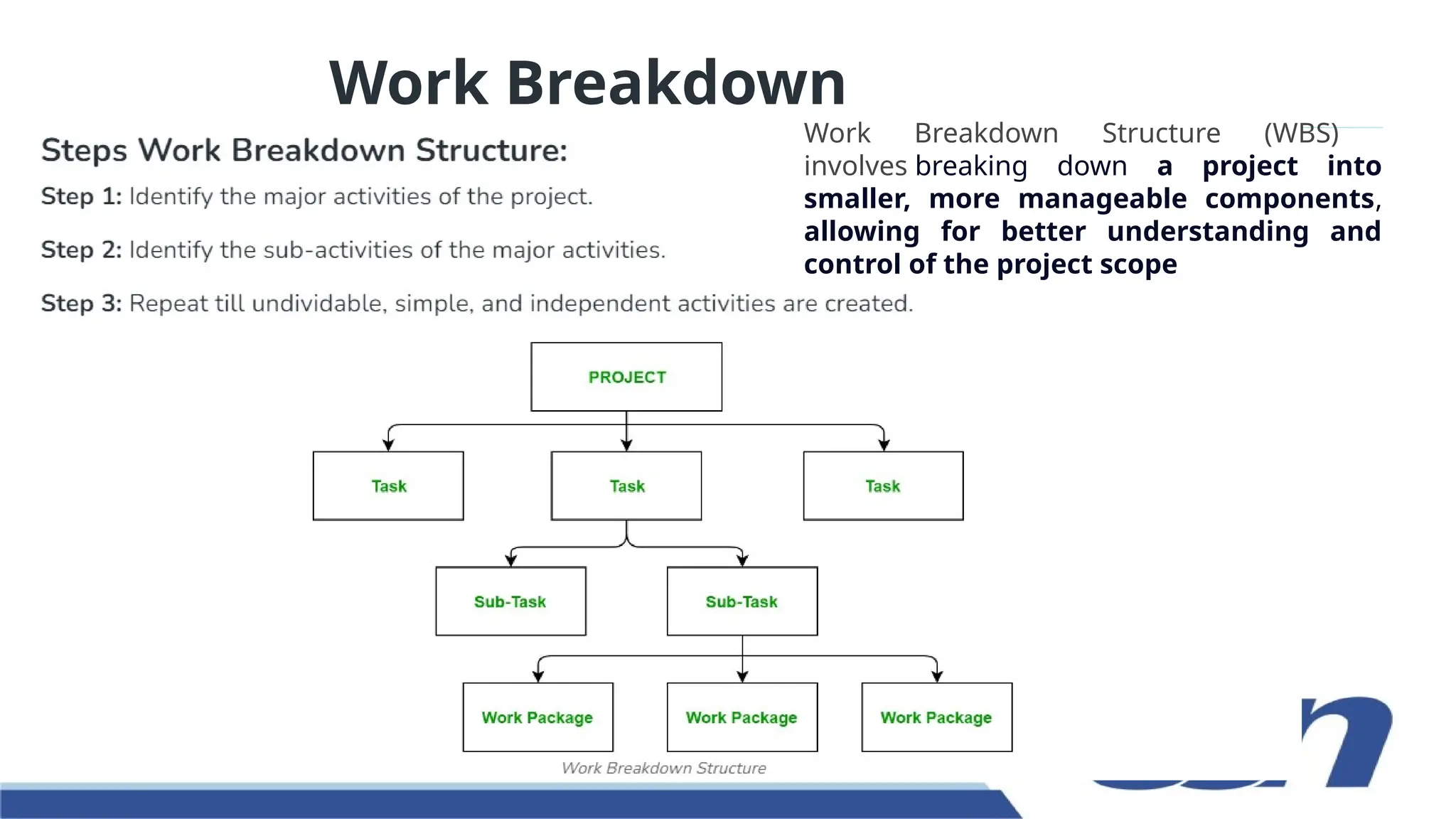
Work Breakdown
Structure
Work Breakdown Structure (WBS)
involves breaking down a project into
smaller, more manageable components,
allowing for better understanding and
control of the project scope
34 v 1.2
35 v 1.2
36 v 1.2
37 v 1.2
38 v 1.2
39 v 1.2
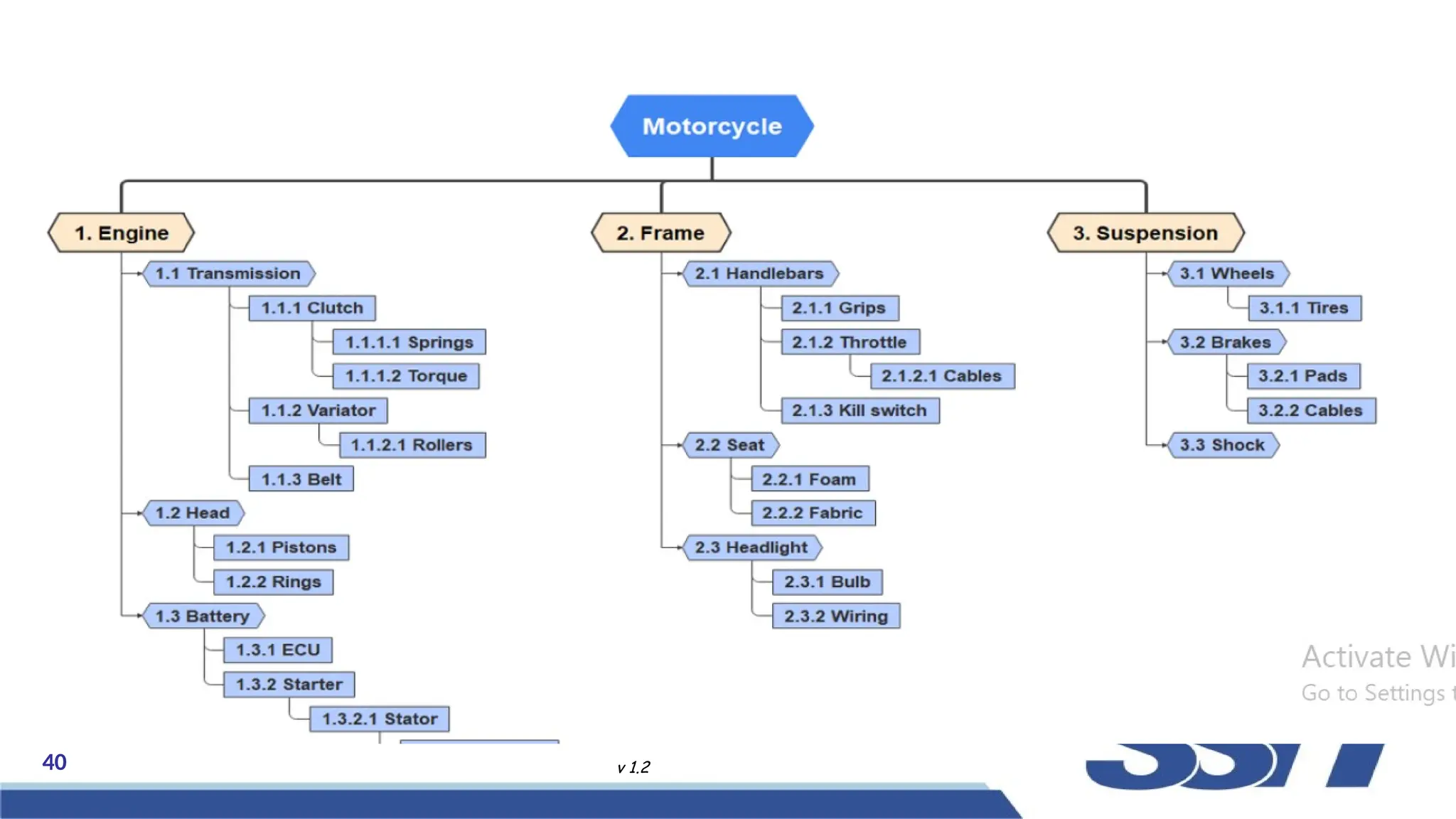
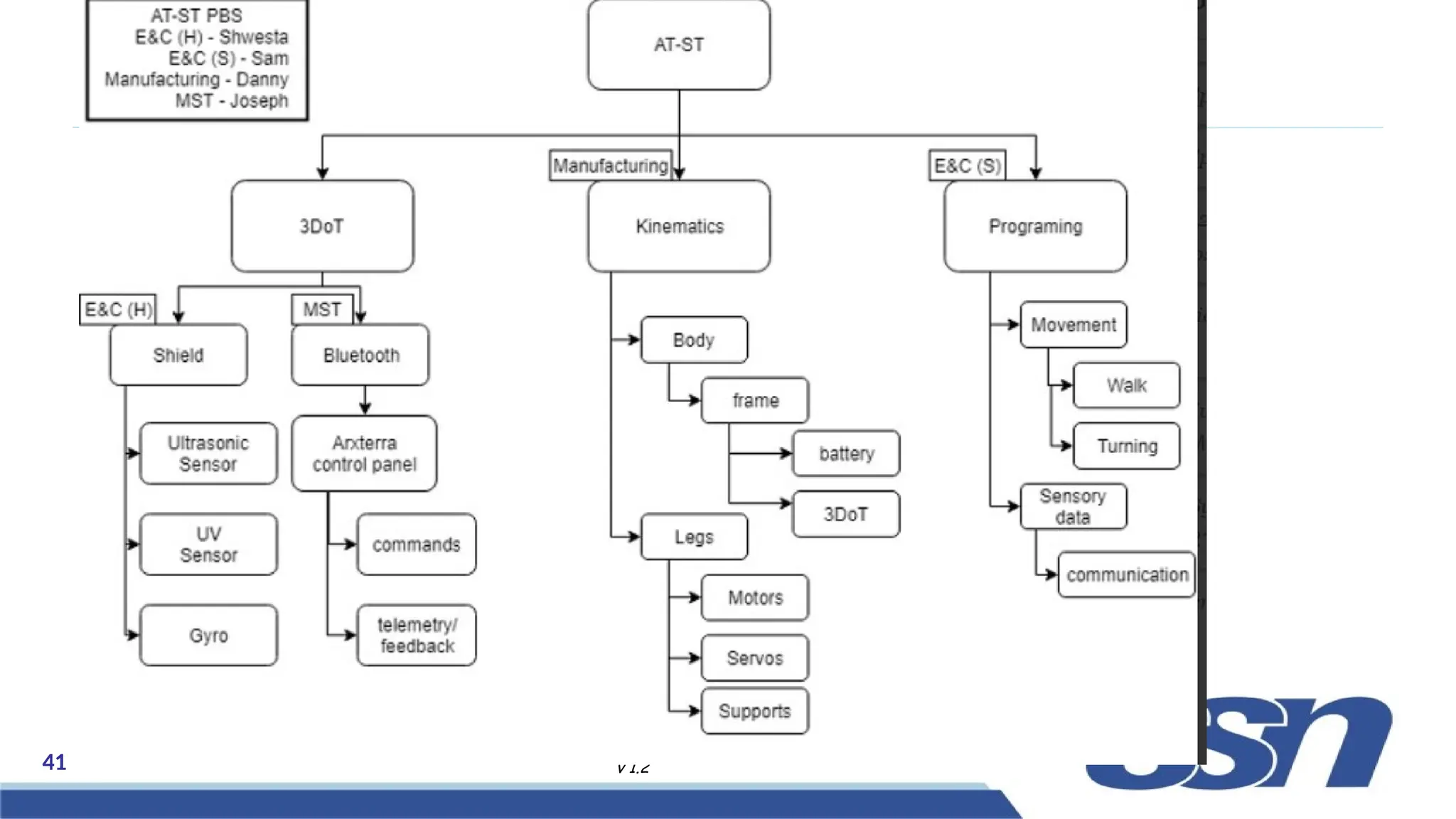
A Product Breakdown Structure (PBS) is a hierarchical
structure of things that the project will make or outcomes that it
will deliver. It can be thought of as the project “shopping list.” It
decomposes a "Main Project Product" into its constituent parts
in the form of a hierarchical structure.
A Product Breakdown Structure (PBS
40 v 1.2
41 v 1.2
42 v 1.2
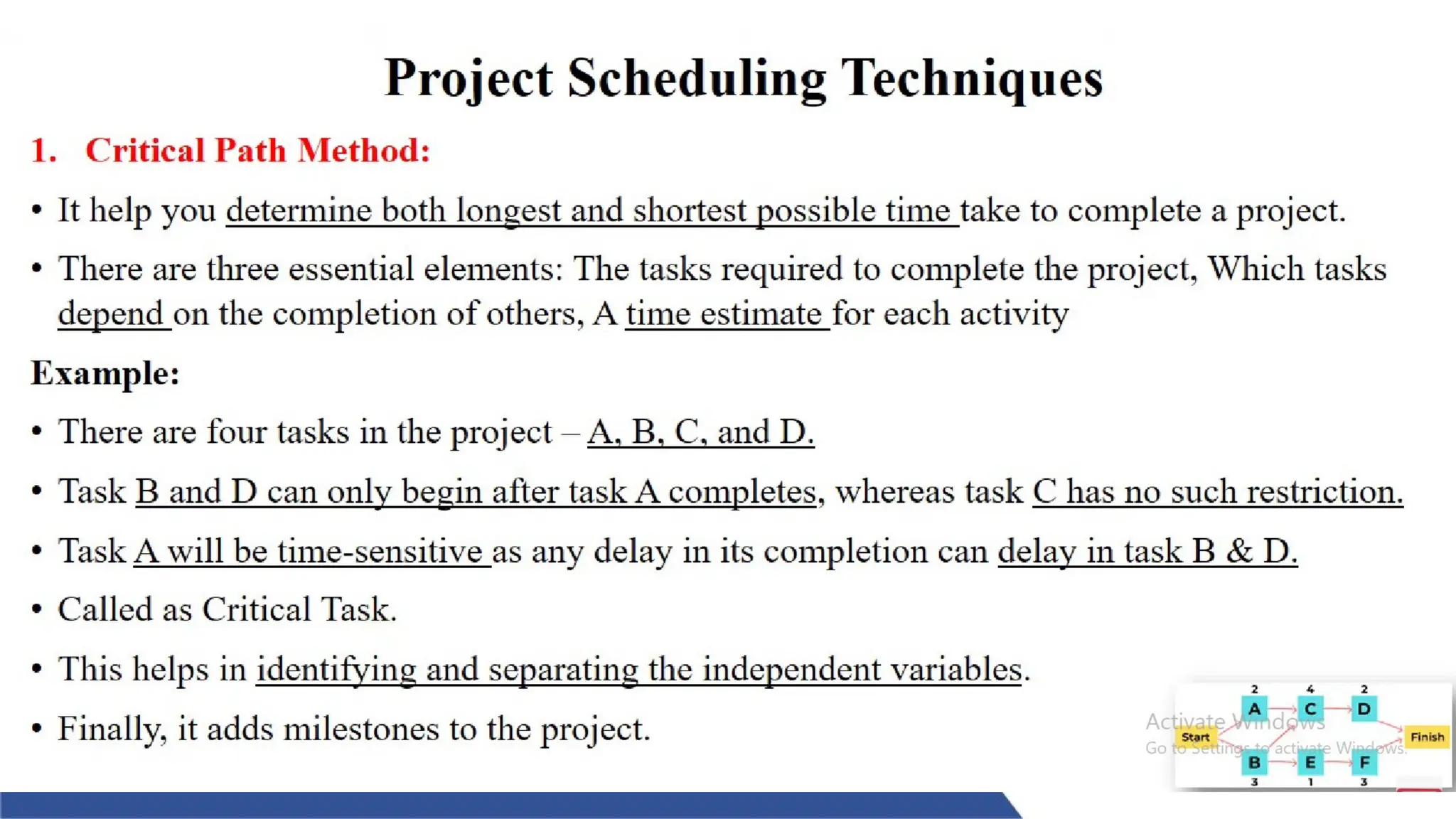
Critical Path Method (CPM) is a method used in project planning,
generally for project scheduling for the on-time completion of the
project. It helps in the determination of the earliest time by which the
whole project can be completed. There are two main concepts in this
method namely critical task and critical path.
Critical Path Method (CPM)
• It is a sequence of critical tasks/activities and is the largest path in the
project network. It gives us the minimum time which is required to
complete the entire project. The activities in the critical path are known as
critical activities and if these activities are delayed then the completion of the
entire project is also delayed.
43 v 1.2
Benefits of using the critical path method in project
management:
• Show the project schedule visually.
• Highlight important tasks with CPM.
• Use CPM to find and handle risks.
• CPM helps the project team communicate better.
44 v 1.2
How to find the critical path in a project:
• Step 1: Identify all tasks required to complete the project
• Step 2: Determine the sequence of tasks
• Step 3: Estimate the duration of each task
• Step 4: Draw a network diagram
• Step 5: Identify the critical path
• Step 6: Calculate the float
• Step 7: Monitor the critical path
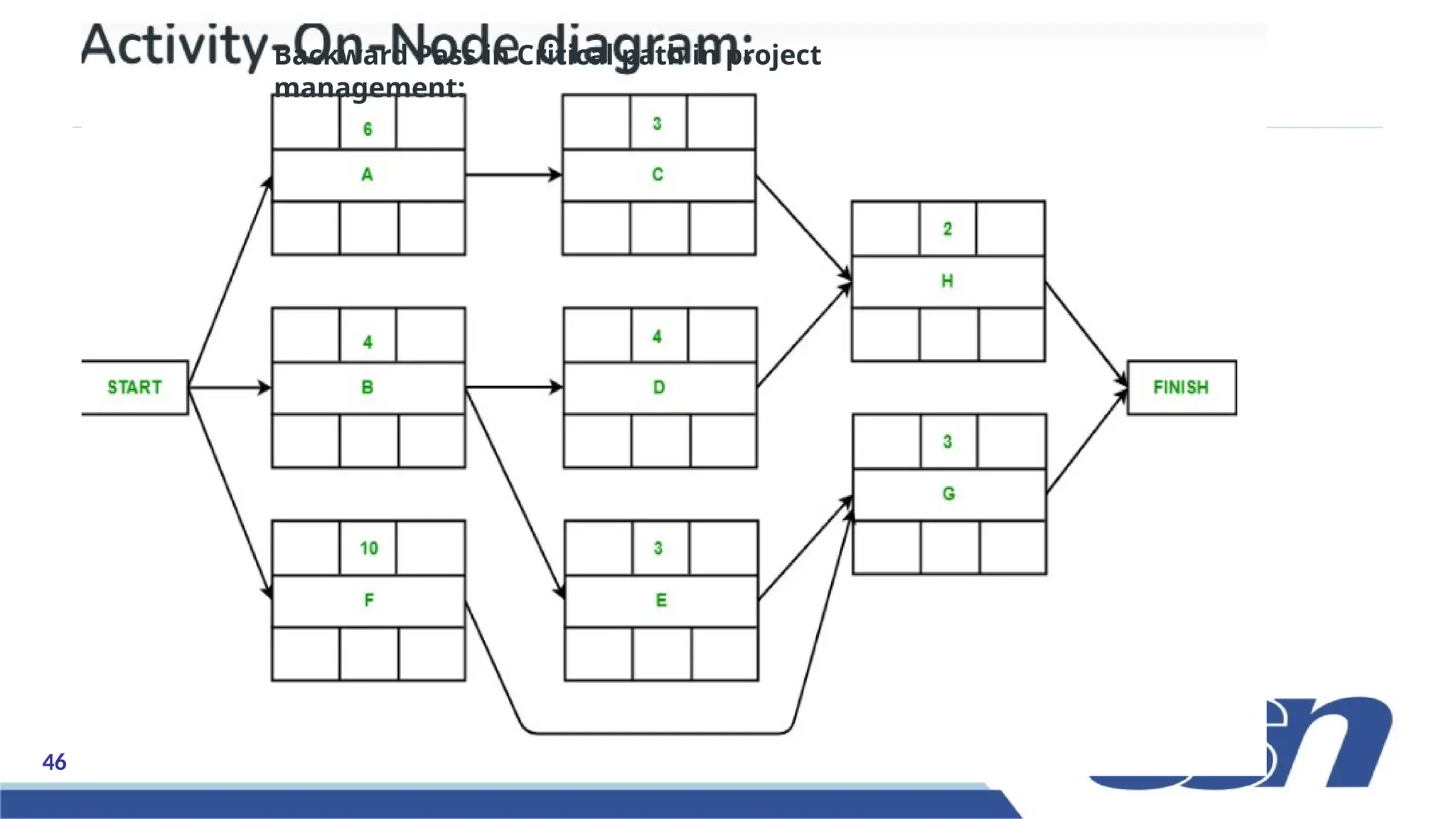
Rules for Designing the Activity-on-Node network diagram:
– A project network should have only one start node
– A project network should have only one end node
– A node has a duration
– Links normally have no duration
– “Precedents” are the immediate preceding activities
– Time moves from left to right in the project network
– A network should not contain loops
– A network should not contain dangles
45 v 1.2
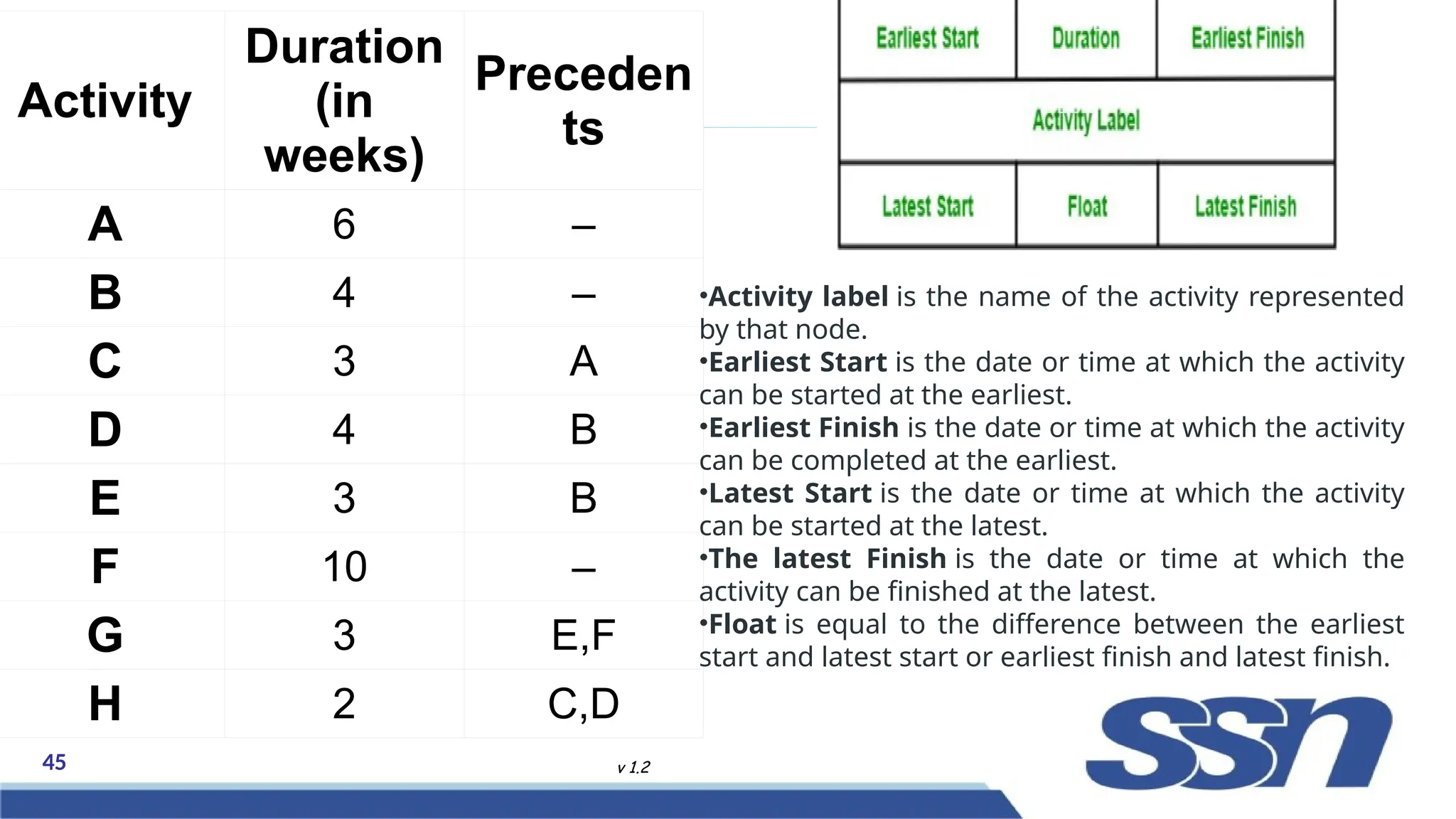
Activity
Duration
(in
weeks)
Preceden
ts
A 6 –
B 4 –
C 3 A
D 4 B
E 3 B
F 10 –
G 3 E,F
H 2 C,D
•Activity label is the name of the activity represented
by that node.
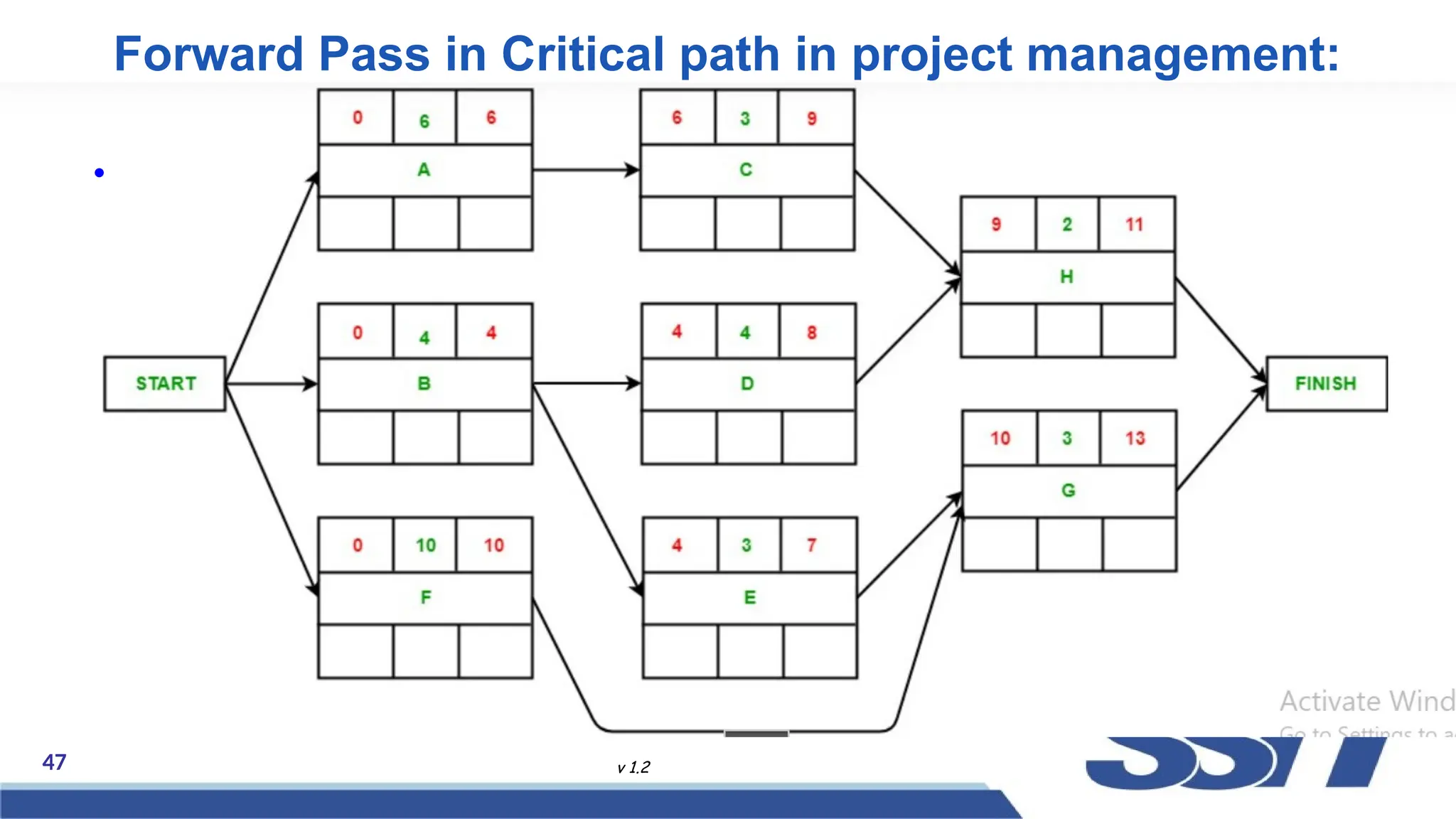
•Earliest Start is the date or time at which the activity
can be started at the earliest.
•Earliest Finish is the date or time at which the activity
can be completed at the earliest.
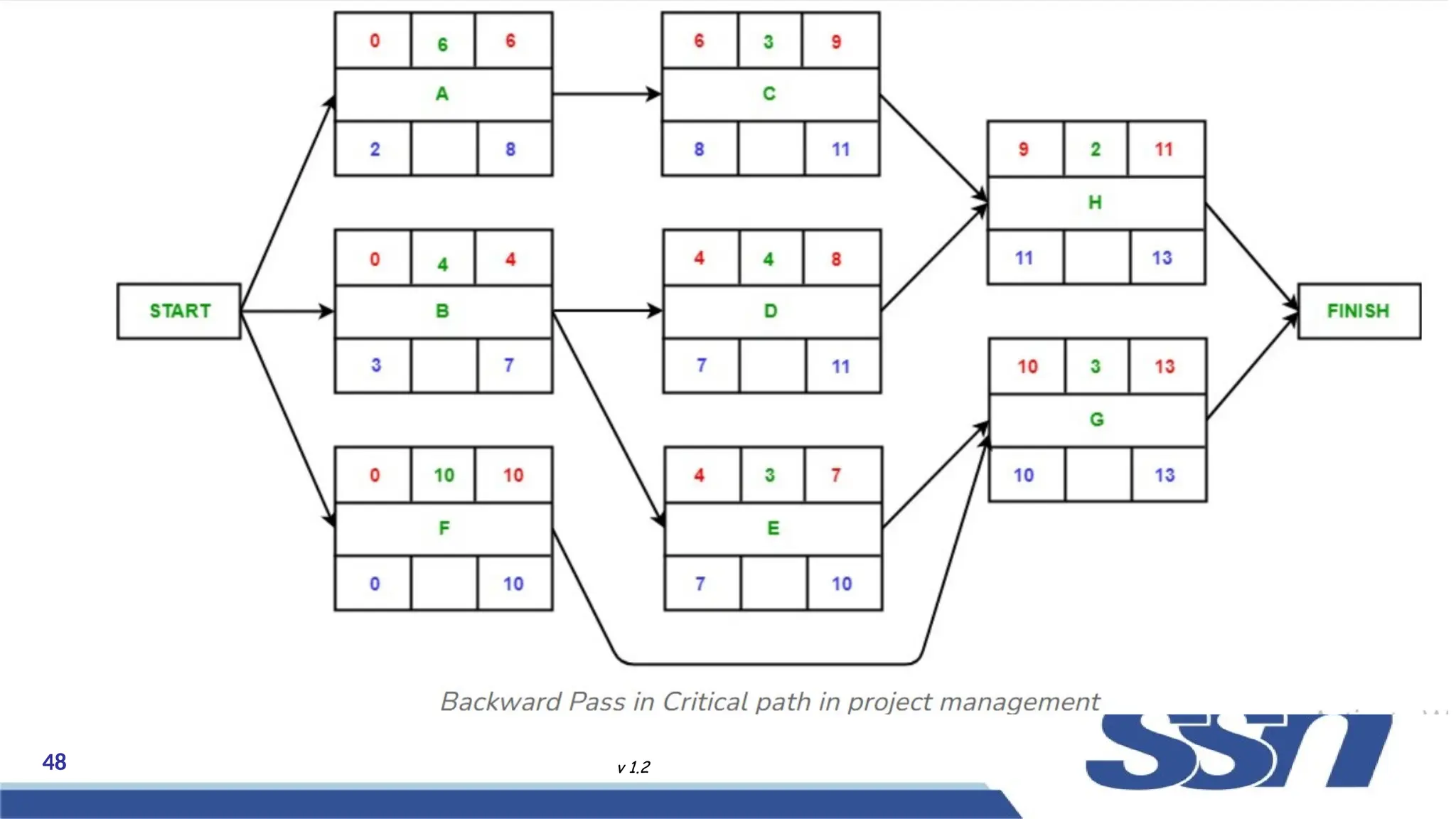
•Latest Start is the date or time at which the activity
can be started at the latest.
•The latest Finish is the date or time at which the
activity can be finished at the latest.
•Float is equal to the difference between the earliest
start and latest start or earliest finish and latest finish.
46 v 1.2
Backward Pass in Critical path in project
management:
47 v 1.2
Forward Pass in Critical path in project management:
•
48 v 1.2
Backward Pass in Critical path in project
management:
49 v 1.2
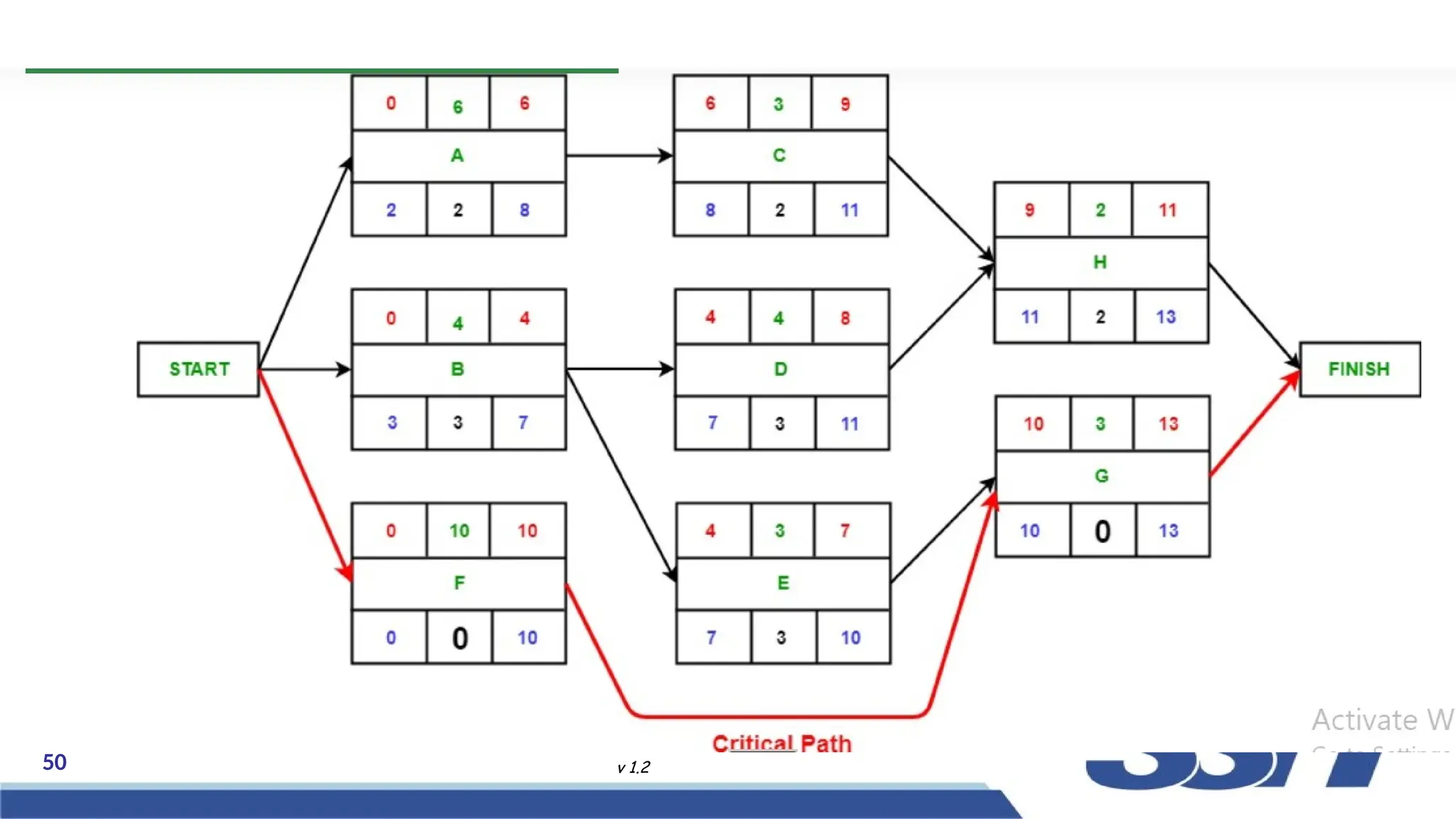
• Identifying Critical Path:
• Activity float is the difference between an activity’s Earliest start and its latest
start date or the difference between the activity’s Earliest finish and its latest
finish date.
• it indicates how much the activity can be delayed without delaying the
completion of the entire project.
• If the float of an activity is zero, then the activity is critical and must be
added to the critical path of the project network. In this example, activities F
and G have zero float and hence, are critical activities.
50 v 1.2
51 v 1.2
52 v 1.2
53 v 1.2
54 v 1.2
55 v 1.2
56 v 1.2
57 v 1.2
58 v 1.2
59 v 1.2
60 v 1.2
61 v 1.2
62 v 1.2
63 v 1.2
64 v 1.2
65 v 1.2
66 v 1.2

1.10 Project Scheduling in Software Engineering.pptx

  • 1.
  • 2.
  • 3.
  • 4.
  • 5.
  • 6.
  • 7.
  • 8.
  • 9.
  • 10.
  • 11.
  • 12.
  • 13.
  • 14.
  • 15.
  • 16.
  • 17.
  • 18.
  • 19.
  • 20.
  • 21.
  • 22.
  • 23.
  • 24.
  • 25.
  • 26.
  • 27.
  • 28.
  • 29.
  • 30.
  • 31.
  • 32.
  • 33.
    33 v 1.2 WorkBreakdown Structure Work Breakdown Structure (WBS) involves breaking down a project into smaller, more manageable components, allowing for better understanding and control of the project scope
  • 34.
  • 35.
  • 36.
  • 37.
  • 38.
  • 39.
    39 v 1.2 AProduct Breakdown Structure (PBS) is a hierarchical structure of things that the project will make or outcomes that it will deliver. It can be thought of as the project “shopping list.” It decomposes a "Main Project Product" into its constituent parts in the form of a hierarchical structure. A Product Breakdown Structure (PBS
  • 40.
  • 41.
  • 42.
    42 v 1.2 CriticalPath Method (CPM) is a method used in project planning, generally for project scheduling for the on-time completion of the project. It helps in the determination of the earliest time by which the whole project can be completed. There are two main concepts in this method namely critical task and critical path. Critical Path Method (CPM) • It is a sequence of critical tasks/activities and is the largest path in the project network. It gives us the minimum time which is required to complete the entire project. The activities in the critical path are known as critical activities and if these activities are delayed then the completion of the entire project is also delayed.
  • 43.
    43 v 1.2 Benefitsof using the critical path method in project management: • Show the project schedule visually. • Highlight important tasks with CPM. • Use CPM to find and handle risks. • CPM helps the project team communicate better.
  • 44.
    44 v 1.2 Howto find the critical path in a project: • Step 1: Identify all tasks required to complete the project • Step 2: Determine the sequence of tasks • Step 3: Estimate the duration of each task • Step 4: Draw a network diagram • Step 5: Identify the critical path • Step 6: Calculate the float • Step 7: Monitor the critical path Rules for Designing the Activity-on-Node network diagram: – A project network should have only one start node – A project network should have only one end node – A node has a duration – Links normally have no duration – “Precedents” are the immediate preceding activities – Time moves from left to right in the project network – A network should not contain loops – A network should not contain dangles
  • 45.
    45 v 1.2 Activity Duration (in weeks) Preceden ts A6 – B 4 – C 3 A D 4 B E 3 B F 10 – G 3 E,F H 2 C,D •Activity label is the name of the activity represented by that node. •Earliest Start is the date or time at which the activity can be started at the earliest. •Earliest Finish is the date or time at which the activity can be completed at the earliest. •Latest Start is the date or time at which the activity can be started at the latest. •The latest Finish is the date or time at which the activity can be finished at the latest. •Float is equal to the difference between the earliest start and latest start or earliest finish and latest finish.
  • 46.
    46 v 1.2 BackwardPass in Critical path in project management:
  • 47.
    47 v 1.2 ForwardPass in Critical path in project management: •
  • 48.
    48 v 1.2 BackwardPass in Critical path in project management:
  • 49.
    49 v 1.2 •Identifying Critical Path: • Activity float is the difference between an activity’s Earliest start and its latest start date or the difference between the activity’s Earliest finish and its latest finish date. • it indicates how much the activity can be delayed without delaying the completion of the entire project. • If the float of an activity is zero, then the activity is critical and must be added to the critical path of the project network. In this example, activities F and G have zero float and hence, are critical activities.
  • 50.
  • 51.
  • 52.
  • 53.
  • 54.
  • 55.
  • 56.
  • 57.
  • 58.
  • 59.
  • 60.
  • 61.
  • 62.
  • 63.
  • 64.
  • 65.
  • 66.