SQL Server 2008 for Business Intelligence
UTS Short Course
   Step to the next level!
        From Microsoft and the founders of Scrum (Ken Schwaber)
        Innovative
        For developers
   Learn
        Modern engineering practices
        Visual Studio 2010 and Team Foundation Server
        Scrum framework
        Assessments and certifications are available
   Find a local class
    http://go.microsoft.com/fwlink/?LinkId=187778
Peter Gfader
                  Specializes in
                       C# and .NET
                        (Java not anymore)
                       Testing
                        Automated tests
                       Agile, Scrum
                        Certified Scrum Trainer
                       Technology aficionado
                         • Silverlight
                         • ASP.NET
                         • Windows Forms
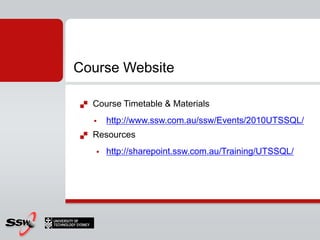
Course Website

   Course Timetable & Materials
       http://www.ssw.com.au/ssw/Events/2010UTSSQL/
   Resources
       http://sharepoint.ssw.com.au/Training/UTSSQL/
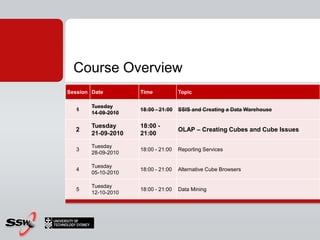
Course Overview
Session Date         Time            Topic

        Tuesday
   1                 18:00 - 21:00   SSIS and Creating a Data Warehouse
        14-09-2010

        Tuesday      18:00 -
  2                                  OLAP – Creating Cubes and Cube Issues
        21-09-2010   21:00

        Tuesday
   3                 18:00 - 21:00   Reporting Services
        28-09-2010

        Tuesday
   4                 18:00 - 21:00   Alternative Cube Browsers
        05-10-2010

        Tuesday
   5                 18:00 - 21:00   Data Mining
        12-10-2010
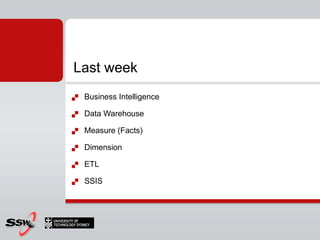
Last week
   Business Intelligence

   Data Warehouse

   Measure (Facts)

   Dimension

   ETL

   SSIS
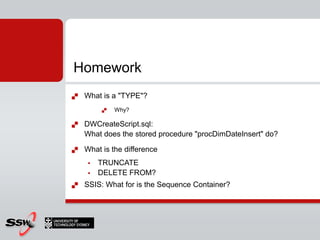
Homework
   What is a "TYPE"?
            Why?

   DWCreateScript.sql:
    What does the stored procedure "procDimDateInsert" do?

   What is the difference
        TRUNCATE
        DELETE FROM?
   SSIS: What for is the Sequence Container?
Cubes
Session 2: Tonight’s Agenda
1.   What is a Cube?

2.   Steps in Creating a Cube

3.   Demo: Creating a Cube

4.   Cube Issues

5.   Hands on Lab
Cubes
Cube
   Data structure for fast analysis of data

   Precalculated

   On top of a data warehouse

   Manipulating and analysing data
        from multiple perspectives
Why a cube?
   Performance
       Relational databases not suited for instantaneous analysis
   Cube precalculates (aggregates) data
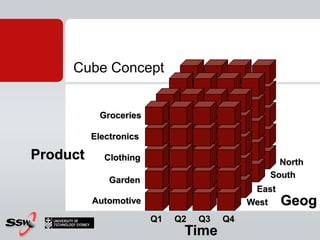
Cube Concept


           Groceries

          Electronics

Product      Clothing
                                                  North
                                                South
              Garden
                                             East
          Automotive                        West    Geog
                        Q1   Q2   Q3   Q4
                              Time
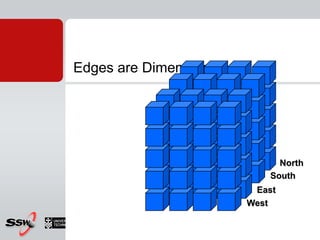
Edges are Dimensions


                             North
                           South
                        East
                       West
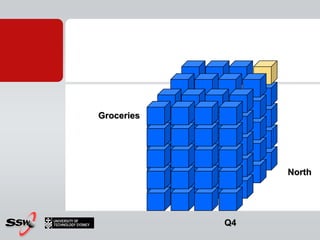
Groceries


                 North


            Q4
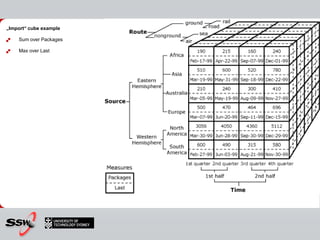
„Import“ cube example

   Sum over Packages

   Max over Last
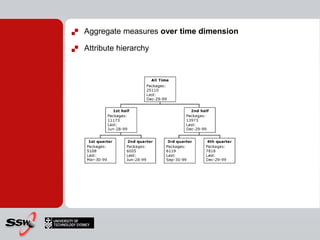
   Aggregate measures over time dimension

   Attribute hierarchy
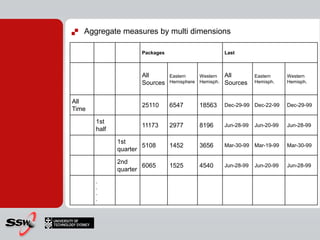
   Aggregate measures by multi dimensions

                     Packages                         Last


                     All        Eastern    Western    All         Eastern     Western
                     Sources    Hemisphere Hemisph.   Sources     Hemisph.    Hemisph.


All
                     25110      6547       18563      Dec-29-99 Dec-22-99     Dec-29-99
Time

       1st
                     11173      2977       8196       Jun-28-99   Jun-20-99   Jun-28-99
       half

              1st
                      5108      1452       3656       Mar-30-99   Mar-19-99   Mar-30-99
              quarter

              2nd
                      6065      1525       4540       Jun-28-99   Jun-20-99   Jun-28-99
              quarter
       .
       .
       .
       .
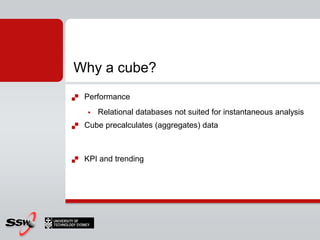
Why a cube?
   Performance
       Relational databases not suited for instantaneous analysis
   Cube precalculates (aggregates) data


   KPI and trending
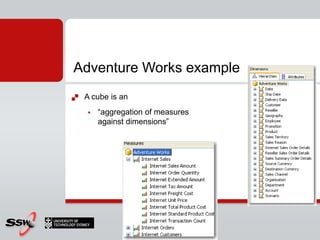
Adventure Works example
   A cube is an
       “aggregation of measures
        against dimensions”
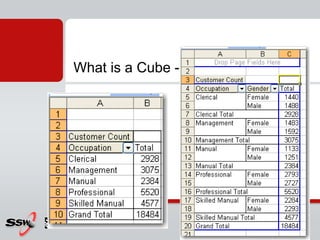
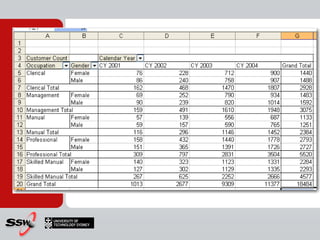
What is a Cube - Example
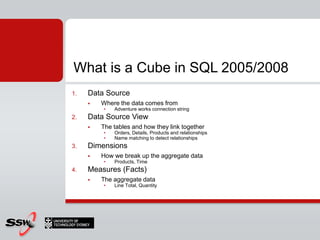
What is a Cube in SQL 2005/2008
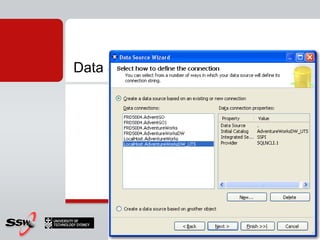
1.   Data Source
        Where the data comes from
         •   Adventure works connection string
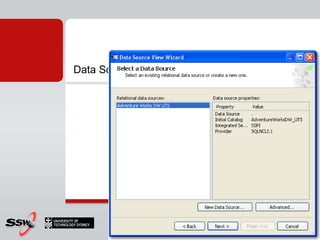
2.   Data Source View
        The tables and how they link together
         •   Orders, Details, Products and relationships
         •   Name matching to detect relationships
3.   Dimensions
        How we break up the aggregate data
         •   Products, Time
4.   Measures (Facts)
        The aggregate data
         •   Line Total, Quantity
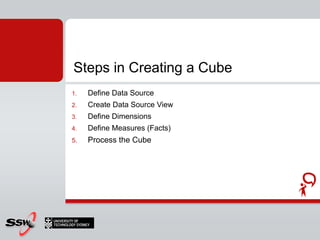
Steps in Creating a Cube
1.   Define Data Source
2.   Create Data Source View
3.   Define Dimensions
4.   Define Measures (Facts)
5.   Process the Cube
Data Source - Database
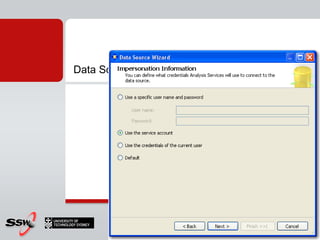
Data Source - Impersonation (Authentication)
Data Source View – Data Source
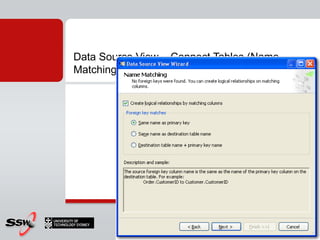
Data Source View – Connect Tables (Name
Matching)
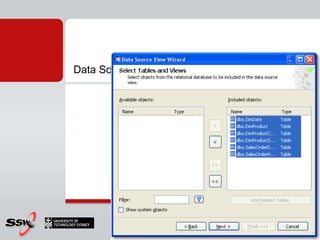
Data Source View – Select Tables and Views
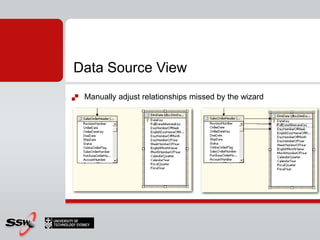
Data Source View
   Manually adjust relationships missed by the wizard
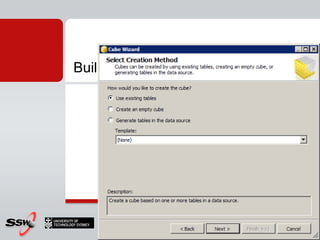
Build a Cube – Build Method
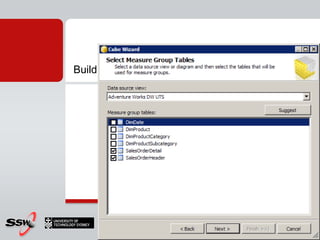
Build a Cube – Select a Data Source View
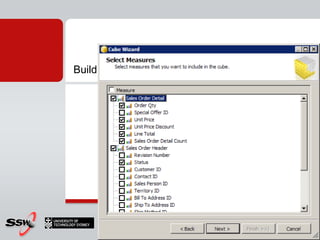
Build a Cube – Select Measures
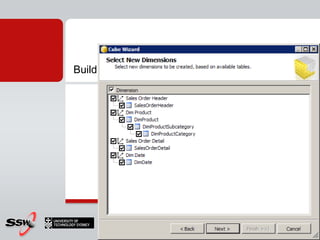
Build a Cube – Select Dimension
Build a Cube - Select Time Periods
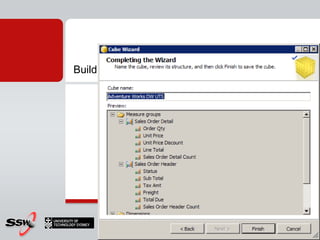
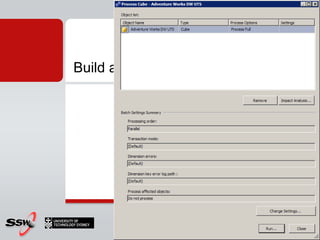
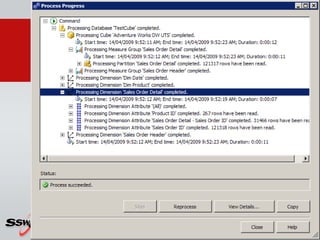
Build a Cube – Process Cube
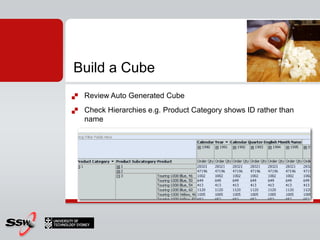
Build a Cube
   Review Auto Generated Cube
   Check Hierarchies e.g. Product Category shows ID rather than
    name
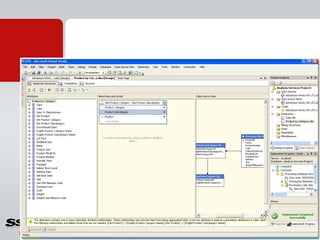
Build a Cube – Fix Dimensions
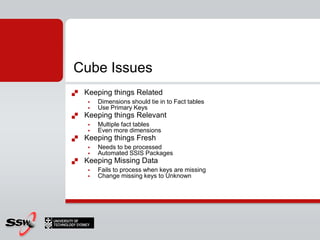
Cube Issues
   Keeping things Related
       Dimensions should tie in to Fact tables
       Use Primary Keys
   Keeping things Relevant
       Multiple fact tables
       Even more dimensions
   Keeping things Fresh
       Needs to be processed
       Automated SSIS Packages
   Keeping Missing Data
       Fails to process when keys are missing
       Change missing keys to Unknown
That's a Cube!
Summary
1.   What is a Cube?

2.   Steps in Creating a Cube

3.   Demo: Creating a Cube

4.   Cube Issues

5.   Hands on Lab
Connectionstring
(local) vs localhost vs .
What is the difference between
         • (local)
         • localhost
         • .
http://weblogs.asp.net/jgalloway/archive/2005/12/02/432062.aspx


   Shared memory comes always first on local machine
    http://msdn.microsoft.com/en-us/library/ms187662.aspx
Tips
http://channel9.msdn.com/tags/Data+Warehousing/


http://channel9.msdn.com/tags/Business+Intelligence/


http://blog.sqlauthority.com/2007/07/29/sql-server-data-
warehousing-interview-questions-and-answers-complete-list-
download/
SSIS resources
   SSIS Junkie
    http://sqlblog.com/blogs/jamie_thomson

   Microsoft SQL Server Integration Services ON-DEMAND
    WEBCASTS
    http://www.microsoft.com/events/series/bi.aspx?tab=webcasts
    &id=42664

   Great blog about SSIS
    http://www.sqlis.com/sqlis/
Resources
   Newsletter
    http://www.sqlservercentral.com/


   BIDS helper
    http://www.codeplex.com/bidshelper
   Step to the next level!
        From Microsoft and the founders of Scrum (Ken Schwaber)
        Innovative
        For developers
   Learn
        Modern engineering practices
        Visual Studio 2010 and Team Foundation Server
        Scrum framework
        Assessments and certifications are available
   Find a local class
    http://go.microsoft.com/fwlink/?LinkId=187778
3 things…

   PeterGfader@ssw.com.au

   http://blog.gfader.com/

   twitter.com/peitor
Thank You!

Gateway Court Suite 10
81 - 91 Military Road
Neutral Bay, Sydney NSW 2089
AUSTRALIA

ABN: 21 069 371 900

Phone: + 61 2 9953 3000
Fax: + 61 2 9953 3105

info@ssw.com.au
www.ssw.com.au

OLAP – Creating Cubes with SQL Server Analysis Services

  • 1.
    SQL Server 2008for Business Intelligence UTS Short Course
  • 2.
    Step to the next level!  From Microsoft and the founders of Scrum (Ken Schwaber)  Innovative  For developers  Learn  Modern engineering practices  Visual Studio 2010 and Team Foundation Server  Scrum framework  Assessments and certifications are available  Find a local class http://go.microsoft.com/fwlink/?LinkId=187778
  • 3.
    Peter Gfader  Specializes in  C# and .NET (Java not anymore)  Testing Automated tests  Agile, Scrum Certified Scrum Trainer  Technology aficionado • Silverlight • ASP.NET • Windows Forms
  • 4.
    Course Website  Course Timetable & Materials  http://www.ssw.com.au/ssw/Events/2010UTSSQL/  Resources  http://sharepoint.ssw.com.au/Training/UTSSQL/
  • 5.
    Course Overview Session Date Time Topic Tuesday 1 18:00 - 21:00 SSIS and Creating a Data Warehouse 14-09-2010 Tuesday 18:00 - 2 OLAP – Creating Cubes and Cube Issues 21-09-2010 21:00 Tuesday 3 18:00 - 21:00 Reporting Services 28-09-2010 Tuesday 4 18:00 - 21:00 Alternative Cube Browsers 05-10-2010 Tuesday 5 18:00 - 21:00 Data Mining 12-10-2010
  • 6.
    Last week  Business Intelligence  Data Warehouse  Measure (Facts)  Dimension  ETL  SSIS
  • 7.
    Homework  What is a "TYPE"?  Why?  DWCreateScript.sql: What does the stored procedure "procDimDateInsert" do?  What is the difference  TRUNCATE  DELETE FROM?  SSIS: What for is the Sequence Container?
  • 8.
  • 9.
    Session 2: Tonight’sAgenda 1. What is a Cube? 2. Steps in Creating a Cube 3. Demo: Creating a Cube 4. Cube Issues 5. Hands on Lab
  • 10.
  • 11.
    Cube  Data structure for fast analysis of data  Precalculated  On top of a data warehouse  Manipulating and analysing data  from multiple perspectives
  • 12.
    Why a cube?  Performance  Relational databases not suited for instantaneous analysis  Cube precalculates (aggregates) data
  • 13.
    Cube Concept Groceries Electronics Product Clothing North South Garden East Automotive West Geog Q1 Q2 Q3 Q4 Time
  • 14.
    Edges are Dimensions North South East West
  • 15.
    Groceries North Q4
  • 16.
    „Import“ cube example  Sum over Packages  Max over Last
  • 17.
    Aggregate measures over time dimension  Attribute hierarchy
  • 18.
    Aggregate measures by multi dimensions Packages Last All Eastern Western All Eastern Western Sources Hemisphere Hemisph. Sources Hemisph. Hemisph. All 25110 6547 18563 Dec-29-99 Dec-22-99 Dec-29-99 Time 1st 11173 2977 8196 Jun-28-99 Jun-20-99 Jun-28-99 half 1st 5108 1452 3656 Mar-30-99 Mar-19-99 Mar-30-99 quarter 2nd 6065 1525 4540 Jun-28-99 Jun-20-99 Jun-28-99 quarter . . . .
  • 19.
    Why a cube?  Performance  Relational databases not suited for instantaneous analysis  Cube precalculates (aggregates) data  KPI and trending
  • 20.
    Adventure Works example  A cube is an  “aggregation of measures against dimensions”
  • 21.
    What is aCube - Example
  • 22.
    What is aCube - Example
  • 23.
    What is aCube in SQL 2005/2008 1. Data Source  Where the data comes from • Adventure works connection string 2. Data Source View  The tables and how they link together • Orders, Details, Products and relationships • Name matching to detect relationships 3. Dimensions  How we break up the aggregate data • Products, Time 4. Measures (Facts)  The aggregate data • Line Total, Quantity
  • 24.
    Steps in Creatinga Cube 1. Define Data Source 2. Create Data Source View 3. Define Dimensions 4. Define Measures (Facts) 5. Process the Cube
  • 25.
    Data Source -Database
  • 26.
    Data Source -Impersonation (Authentication)
  • 27.
    Data Source View– Data Source
  • 28.
    Data Source View– Connect Tables (Name Matching)
  • 29.
    Data Source View– Select Tables and Views
  • 30.
    Data Source View  Manually adjust relationships missed by the wizard
  • 31.
    Build a Cube– Build Method
  • 32.
    Build a Cube– Select a Data Source View
  • 33.
    Build a Cube– Select Measures
  • 34.
    Build a Cube– Select Dimension
  • 35.
    Build a Cube- Select Time Periods
  • 36.
    Build a Cube– Process Cube
  • 37.
    Build a Cube– Process Cube
  • 38.
    Build a Cube  Review Auto Generated Cube  Check Hierarchies e.g. Product Category shows ID rather than name
  • 39.
    Build a Cube– Fix Dimensions
  • 40.
    Cube Issues  Keeping things Related  Dimensions should tie in to Fact tables  Use Primary Keys  Keeping things Relevant  Multiple fact tables  Even more dimensions  Keeping things Fresh  Needs to be processed  Automated SSIS Packages  Keeping Missing Data  Fails to process when keys are missing  Change missing keys to Unknown
  • 41.
  • 42.
    Summary 1. What is a Cube? 2. Steps in Creating a Cube 3. Demo: Creating a Cube 4. Cube Issues 5. Hands on Lab
  • 43.
    Connectionstring (local) vs localhostvs . What is the difference between • (local) • localhost • . http://weblogs.asp.net/jgalloway/archive/2005/12/02/432062.aspx  Shared memory comes always first on local machine http://msdn.microsoft.com/en-us/library/ms187662.aspx
  • 44.
  • 45.
    SSIS resources  SSIS Junkie http://sqlblog.com/blogs/jamie_thomson  Microsoft SQL Server Integration Services ON-DEMAND WEBCASTS http://www.microsoft.com/events/series/bi.aspx?tab=webcasts &id=42664  Great blog about SSIS http://www.sqlis.com/sqlis/
  • 46.
    Resources  Newsletter http://www.sqlservercentral.com/  BIDS helper http://www.codeplex.com/bidshelper
  • 47.
    Step to the next level!  From Microsoft and the founders of Scrum (Ken Schwaber)  Innovative  For developers  Learn  Modern engineering practices  Visual Studio 2010 and Team Foundation Server  Scrum framework  Assessments and certifications are available  Find a local class http://go.microsoft.com/fwlink/?LinkId=187778
  • 48.
    3 things…  PeterGfader@ssw.com.au  http://blog.gfader.com/  twitter.com/peitor
  • 49.
    Thank You! Gateway CourtSuite 10 81 - 91 Military Road Neutral Bay, Sydney NSW 2089 AUSTRALIA ABN: 21 069 371 900 Phone: + 61 2 9953 3000 Fax: + 61 2 9953 3105 info@ssw.com.au www.ssw.com.au