Silicon Valley SQL Server User Group
Tonight’s Agenda May 20, 2014
 6:30 – 7:00 pm Food and Networking
 7:00 – 7:10 pm Introductions
 7:10 – 8:10 pm Patrick Sheehan, Microsoft
 8:10 – 8:30 pm Discussion (Q&A)
Parent Organizations
 Bay Area Association of Database Developers
 BAADD www.baadd.org
 Professional Association of SQL Server
 PASS www.sqlpass.org
Sponsors
Upcoming Meetings
 San Francisco – Thurs, June 5
 Dimensional Modeling, The Basics &
Beyond
 Dan Bulos, Symmetry
 San Francisco – Wed, June 11
 SQL Server Implementation
Frameworks From Dev to Prod
 Prakash Heda, Advent Software
Announcements
 Attendee Announcements
 New Jobs
 New Projects
 Projects completed
 Upcoming learning opportunities
Patrick Sheehan
 Data Platform Architect at Microsoft’s Silicon Valley
Technology Center (SVC MTC)
 Previously with Microsoft Consulting Services (MCS)
as an engineer, architect, and enterprise strategist
 Specialties:
 SQL Server
 Business Intelligence
 Big Data
 Enterprise & Solutions Architecture
 Cloud Computing
SQL Server Analysis Services
SSAS – 2012
Fundamentals
What is Analysis Services?
• Online Analytical Processing (OLAP) engine
• Designed for data analysis, mining, and reporting
• Contains Databases
• Contains Cubes
• Cubes are multi-dimensional data sets
• Sourced from Facts
• Tables which contain measures
• …and Dimensions
• Tables which contain attributes
Reference: http://technet.microsoft.com/en-us/library/bb522625.aspx
Use Cases
• Data abstraction layer
• Ad hoc reporting
• Data mining
• Data warehousing
• Kimball Methodology recommended
DEMO
Prerequisites
• Install SQL Server 2012 + SP1
• Developer Edition, Eval, or Enterprise
• Eval (180 day) can be obtained (free) here: http://www.microsoft.com/en-
us/download/details.aspx?id=29066
• SQL Server Engine
• SQL Server Analysis Services
• Workstation Components
• SQL Server Data Tools (SSDT)
Download SSDT here: http://msdn.microsoft.com/en-us/library/hh272686(v=vs.103).aspx
Tutorials
Analysis Services Tutorials (SSAS)
http://technet.microsoft.com/en-us/library/hh231701.aspx
Multidimensional Modeling (Adventure Works Tutorial)
http://technet.microsoft.com/en-us/library/db55e226-601a-4026-8651-573195555a59
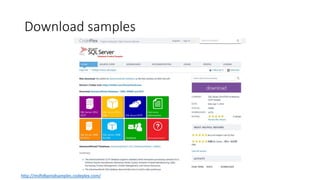
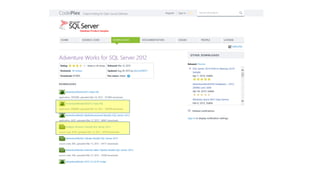
Download samples
http://msftdbprodsamples.codeplex.com/
Set up environment
• Move .mdf to SQL Server Data directory (e.g. C:Program FilesMicrosoft SQL
ServerMSSQL11.SQL2012MSSQLDATA)
• Attach .mdf to instance
• NOTE: if error is received, it is due to missing log file. Click on the .ldf file
listed in the Attach Database dialogue box, then click Remove (a new log file will
automatically be created in the default path)
• Extract .sln from .zip
• Open solution and reset connection strings to local db instance
Solution structure
• Data Sources node
• Connection strings to source
• Data Source Views node
• XML abstraction layer
• Cubes node
• Define dim/fact relationships, aggregations (calculations), partitions, mode
• Dimensions node
• Contains dimensions
• Roles node
• Define access to cube
Cube fundamentals
• Measure groups
• Contain measures
• Set properties (e.g. formatting)
• Dimensions
• Contain attributes
• Set properties (e.g. visibility)
• Define relationships (to key & each other)
• Define hierarchies
• Deployment
• Processing
• Affects of FULL versus
Multi-dimensonal Expression Language (MDX)
Example
Syntax
[ WITH <SELECT WITH clause> [ , <SELECT WITH clause> ... ] ]
SELECT [ * | ( <SELECT query axis clause>
[ , <SELECT query axis clause> ... ] ) ]
FROM <SELECT subcube clause>
[ <SELECT slicer axis clause> ]
[ <SELECT cell property list clause> ]
SELECT NON EMPTY { [Measures].[Reseller Order Quantity],
[Measures].[Reseller Gross Profit], [Measures].[Reseller Sales
Amount] } ON COLUMNS, NON EMPTY { ([Product].[Product
Categories].[Product].ALLMEMBERS *
[Date].[Fiscal].[Date].ALLMEMBERS ) } DIMENSION PROPERTIES
MEMBER_CAPTION, MEMBER_UNIQUE_NAME ON ROWS
FROM [Adventure Works] CELL PROPERTIES VALUE,
BACK_COLOR, FORE_COLOR, FORMATTED_VALUE,
FORMAT_STRING, FONT_NAME, FONT_SIZE, FONT_FLAGS
Reference:
http://technet.microsoft.com/en-us/library/ms145595.aspx
MDX “Heads up”
• MDX my look like T-SQL, but do not be fooled! It isn’t!
• MDX is a different way to think about data
• MDX is designed to provide tabular output from multidimensional sources
Reference:
http://msdn.microsoft.com/en-us/library/ms145506.aspx
Books:
MDX Solutions: With Microsoft SQL Server Analysis Services 2005 and
Hyperion Essbase – George Spofford (&others)
The Data Warehouse Toolkit: The Definitive Guide to Dimensional Modeling
– Ralph Kimball
Working with Cubes
• Microsoft Excel is #1 app (>1billion worldwide deployments)
• Native integration with SSAS
• SQL Server Reporting Services (SSRS)
• Native integration with SSAS
• Multidimensional Programming (see: http://technet.microsoft.com/en-us/library/bb500153.aspx)
• ADOMD.NET
• .NET provider for communication with SSAS (via XMLA)
• Analysis Services Scripting Language (ASSL)
• Extends XMLA
• Analysis Management Objects (AMO)
• SSAS management classes
Microsoft SQL Server Analysis Services (SSAS) - A Practical Introduction

Microsoft SQL Server Analysis Services (SSAS) - A Practical Introduction

  • 2.
    Silicon Valley SQLServer User Group Tonight’s Agenda May 20, 2014  6:30 – 7:00 pm Food and Networking  7:00 – 7:10 pm Introductions  7:10 – 8:10 pm Patrick Sheehan, Microsoft  8:10 – 8:30 pm Discussion (Q&A)
  • 3.
    Parent Organizations  BayArea Association of Database Developers  BAADD www.baadd.org  Professional Association of SQL Server  PASS www.sqlpass.org
  • 4.
  • 5.
    Upcoming Meetings  SanFrancisco – Thurs, June 5  Dimensional Modeling, The Basics & Beyond  Dan Bulos, Symmetry  San Francisco – Wed, June 11  SQL Server Implementation Frameworks From Dev to Prod  Prakash Heda, Advent Software
  • 6.
    Announcements  Attendee Announcements New Jobs  New Projects  Projects completed  Upcoming learning opportunities
  • 7.
    Patrick Sheehan  DataPlatform Architect at Microsoft’s Silicon Valley Technology Center (SVC MTC)  Previously with Microsoft Consulting Services (MCS) as an engineer, architect, and enterprise strategist  Specialties:  SQL Server  Business Intelligence  Big Data  Enterprise & Solutions Architecture  Cloud Computing
  • 8.
    SQL Server AnalysisServices SSAS – 2012 Fundamentals
  • 9.
    What is AnalysisServices? • Online Analytical Processing (OLAP) engine • Designed for data analysis, mining, and reporting • Contains Databases • Contains Cubes • Cubes are multi-dimensional data sets • Sourced from Facts • Tables which contain measures • …and Dimensions • Tables which contain attributes Reference: http://technet.microsoft.com/en-us/library/bb522625.aspx
  • 10.
    Use Cases • Dataabstraction layer • Ad hoc reporting • Data mining • Data warehousing • Kimball Methodology recommended
  • 11.
  • 12.
    Prerequisites • Install SQLServer 2012 + SP1 • Developer Edition, Eval, or Enterprise • Eval (180 day) can be obtained (free) here: http://www.microsoft.com/en- us/download/details.aspx?id=29066 • SQL Server Engine • SQL Server Analysis Services • Workstation Components • SQL Server Data Tools (SSDT) Download SSDT here: http://msdn.microsoft.com/en-us/library/hh272686(v=vs.103).aspx
  • 13.
    Tutorials Analysis Services Tutorials(SSAS) http://technet.microsoft.com/en-us/library/hh231701.aspx Multidimensional Modeling (Adventure Works Tutorial) http://technet.microsoft.com/en-us/library/db55e226-601a-4026-8651-573195555a59
  • 14.
  • 16.
    Set up environment •Move .mdf to SQL Server Data directory (e.g. C:Program FilesMicrosoft SQL ServerMSSQL11.SQL2012MSSQLDATA) • Attach .mdf to instance • NOTE: if error is received, it is due to missing log file. Click on the .ldf file listed in the Attach Database dialogue box, then click Remove (a new log file will automatically be created in the default path) • Extract .sln from .zip • Open solution and reset connection strings to local db instance
  • 17.
    Solution structure • DataSources node • Connection strings to source • Data Source Views node • XML abstraction layer • Cubes node • Define dim/fact relationships, aggregations (calculations), partitions, mode • Dimensions node • Contains dimensions • Roles node • Define access to cube
  • 18.
    Cube fundamentals • Measuregroups • Contain measures • Set properties (e.g. formatting) • Dimensions • Contain attributes • Set properties (e.g. visibility) • Define relationships (to key & each other) • Define hierarchies • Deployment • Processing • Affects of FULL versus
  • 19.
    Multi-dimensonal Expression Language(MDX) Example Syntax [ WITH <SELECT WITH clause> [ , <SELECT WITH clause> ... ] ] SELECT [ * | ( <SELECT query axis clause> [ , <SELECT query axis clause> ... ] ) ] FROM <SELECT subcube clause> [ <SELECT slicer axis clause> ] [ <SELECT cell property list clause> ] SELECT NON EMPTY { [Measures].[Reseller Order Quantity], [Measures].[Reseller Gross Profit], [Measures].[Reseller Sales Amount] } ON COLUMNS, NON EMPTY { ([Product].[Product Categories].[Product].ALLMEMBERS * [Date].[Fiscal].[Date].ALLMEMBERS ) } DIMENSION PROPERTIES MEMBER_CAPTION, MEMBER_UNIQUE_NAME ON ROWS FROM [Adventure Works] CELL PROPERTIES VALUE, BACK_COLOR, FORE_COLOR, FORMATTED_VALUE, FORMAT_STRING, FONT_NAME, FONT_SIZE, FONT_FLAGS Reference: http://technet.microsoft.com/en-us/library/ms145595.aspx
  • 20.
    MDX “Heads up” •MDX my look like T-SQL, but do not be fooled! It isn’t! • MDX is a different way to think about data • MDX is designed to provide tabular output from multidimensional sources Reference: http://msdn.microsoft.com/en-us/library/ms145506.aspx Books: MDX Solutions: With Microsoft SQL Server Analysis Services 2005 and Hyperion Essbase – George Spofford (&others) The Data Warehouse Toolkit: The Definitive Guide to Dimensional Modeling – Ralph Kimball
  • 21.
    Working with Cubes •Microsoft Excel is #1 app (>1billion worldwide deployments) • Native integration with SSAS • SQL Server Reporting Services (SSRS) • Native integration with SSAS • Multidimensional Programming (see: http://technet.microsoft.com/en-us/library/bb500153.aspx) • ADOMD.NET • .NET provider for communication with SSAS (via XMLA) • Analysis Services Scripting Language (ASSL) • Extends XMLA • Analysis Management Objects (AMO) • SSAS management classes