What is a Data Warehouse?
 And Why Are So Many
Schools Setting Them Up?

      Richard Goerwitz
What Is a Data Warehouse?
   Nobody can agree
   So I’m not actually going to define a DW
   Don’t feel cheated, though
   By the end of this talk, you’ll
    • Understand key concepts that underlie all
      warehouse implementations (“talk the talk”)
    • Understand the various components out of
      which DW architects construct real-world data
      warehouses
    • Understand what a data warehouse project
      looks like
Why Are Schools Setting Up
           Data Warehouses?
   A data warehouse makes it easier to:
    •   Optimize classroom, computer lab usage
    •   Refine admissions ratings systems
    •   Forecast future demand for courses, majors
    •   Tie private spreadsheet data into central repositories
    •   Correlate admissions and IR data with outcomes such as:
            GPAs
            Placement rates
            Happiness, as measured by alumni surveys
    • Notify advisors when extra help may be needed based on
            Admissions data (student vitals; SAT, etc.)
            Special events: A-student suddenly gets a C in his/her major
            Slower trends: Student’s GPA falls for > 2 semesters/terms
    • (Many other examples could be given!)
   Better information = better decisions
    • Better admission decisions
    • Better retention rates
    • More effective fund raising, etc.
Talking The Talk
   To think and communicate usefully about data warehouses
    you’ll need to understand a set of common terms and
    concepts:
    •   OLTP
    •   ODS
    •   OLAP, ROLAP, MOLAP
    •   ETL
    •   Star schema
    •   Conformed dimension
    •   Data mart
    •   Cube
    •   Metadata
   Even if you’re not an IT person, pay heed:
    • You’ll have to communicate with IT people
    • More importantly:
         Evidence shows that IT will only build a successful warehouse if you
           are intimately involved!
OLTP
   OLTP = online transaction processing
   The process of moving data around to
    handle day-to-day affairs
    •   Scheduling classes
    •   Registering students
    •   Tracking benefits
    •   Recording payments, etc.
   Systems supporting this kind of activity
    are called transactional systems
Transactional Systems
   Transactional systems are optimized primarily for
    the here and now
    •   Can support many simultaneous users
    •   Can support heavy read/write access
    •   Allow for constant change
    •   Are big, ugly, and often don’t give people the data they
        want
            As a result a lot of data ends up in shadow databases
            Some ends up locked away in private spreadsheets
   Transactional systems don’t record all previous
    data states
   Lots of data gets thrown away or archived, e.g.:
    • Admissions data
    • Enrollment data
    • Asset tracking data (“How many computers did we
      support each year, from 1996 to 2006, and where do we
      expect to be in 2010?”)
Simple Transactional Database
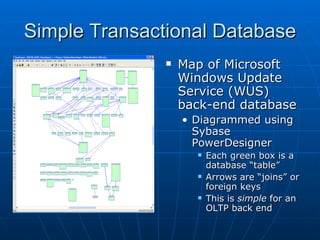
                  Map of Microsoft
                   Windows Update
                   Service (WUS)
                   back-end database
                   • Diagrammed using
                     Sybase
                     PowerDesigner
                        Each green box is a
                         database “table”
                        Arrows are “joins” or
                         foreign keys
                        This is simple for an
                         OLTP back end
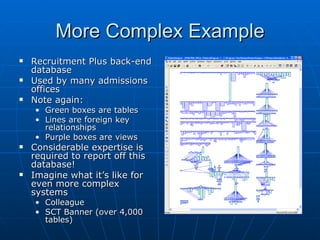
More Complex Example
   Recruitment Plus back-end
    database
   Used by many admissions
    offices
   Note again:
    • Green boxes are tables
    • Lines are foreign key
      relationships
    • Purple boxes are views
   Considerable expertise is
    required to report off this
    database!
   Imagine what it’s like for
    even more complex
    systems
    • Colleague
    • SCT Banner (over 4,000
      tables)
The “Reporting Problem”
   Often we require OLTP data as a snapshot, in a
    spreadsheet or report
   Reports require querying back-end OLTP support
    databases
   But OLTP databases are often very complex, and
    typically
    •   Contain many, often obscure, tables
    •   Utilize cryptic, unintuitive field/column names
    •   Don’t store all necessary historical data
   As a result, reporting becomes a problem –
    • Requires special expertise
    • May require modifications to production OLTP systems
    • Becomes harder and harder for staff to keep up!
Workarounds
   Ways of working around the reporting
    problem include:
    1. Have OLTP system vendors do the work
      •   Provide canned reports
      •   Write reporting GUIs for their products
    2. Hire more specialists
      •   To create simplified views of OLTP data
      •   To write reports, create snapshots
    3. Periodically copy data from OLTP systems to
       a place where
      •   The data is easier to understand
      •   The data is optimized for reporting
      •   Easily pluggable into reporting tools
ODS
   ODS = operational data store
   ODSs were an early workaround to the “reporting
    problem”
   To create an ODS you
    •   Build a separate/simplified version of an OLTP system
    •   Periodically copy data into it from the live OLTP system
    •   Hook it to operational reporting tools
   An ODS can be an integration point or real-time
    “reporting database” for an operational system
   It’s not enough for full enterprise-level, cross-
    database analytical processing
OLAP
   OLAP = online analytical processing
   OLAP is the process of creating and
    summarizing historical, multidimensional
    data
    •   To help users understand the data better
    •   Provide a basis for informed decisions
    •   Allow users to manipulate and explore data
        themselves, easily and intuitively
   More than just “reporting”
   Reporting is just one (static) product of
    OLAP
OLAP Support Databases
   OLAP systems require support databases
   These databases typically
    • Support fewer simultaneous users than OLTP
      back ends
    • Are structured simply; i.e., denormalized
    • Can grow large
          Hold snapshots of data in OLTP systems
          Provide history/time depth to our analyses
    • Are optimized for read (not write) access
    • Updated via periodic batch (e.g., nightly) ETL
      processes
ETL Processes
   ETL = extract, transform, load
    • Extract data from various sources
    • Transform and clean the data from those sources
    • Load the data into databases used for analysis and
      reporting
   ETL processes are coded in various ways
    • By hand in SQL, UniBASIC, etc.
    • Using more general programming languages
    • In semi-automated fashion using specialized ETL tools
      like Cognos Decision Stream
   Most institutions do hand ETL; but note well:
    • Hand ETL is slow
    • Requires specialized knowledge
    • Becomes extremely difficult to maintain as code
      accumulates and databases/personnel change!
Where Does the Data Go?
   What sort of a database do the ETL
    processes dump data into?
   Typically, into very simple table
    structures
   These table structures are:
    • Denormalized
    • Minimally branched/hierarchized
    • Structured into star schemas
So What Are Star Schemas?
   Star schemas are collections of data arranged
    into star-like patterns
    • They have fact tables in the middle, which contain
      amounts, measures (like counts, dollar amounts, GPAs)
    • Dimension tables around the outside, which contain
      labels and classifications (like names, geocodes, majors)
    • For faster processing, aggregate fact tables are
      sometimes also used (e.g., counts pre-averaged for an
      entire term)
   Star schemas should
    •   Have descriptive column/field labels
    •   Be easy for users to understand
    •   Perform well on queries
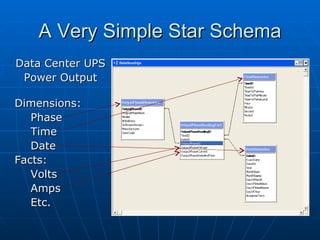
A Very Simple Star Schema
Data Center UPS
 Power Output

Dimensions:
   Phase
   Time
   Date
Facts:
   Volts
   Amps
   Etc.
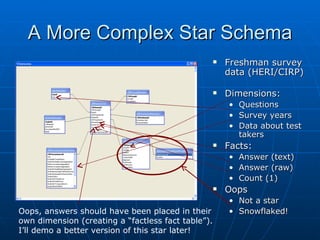
A More Complex Star Schema
                                                       Freshman survey
                                                        data (HERI/CIRP)

                                                       Dimensions:
                                                        • Questions
                                                        • Survey years
                                                        • Data about test
                                                          takers
                                                       Facts:
                                                        •   Answer (text)
                                                        •   Answer (raw)
                                                        •   Count (1)
                                                       Oops
                                                        • Not a star
Oops, answers should have been placed in their          • Snowflaked!
own dimension (creating a “factless fact table”).
I’ll demo a better version of this star later!
Data Marts
   One definition:
    • One or more star schemas that present data on a single
      or related set of business processes
   Data marts should not be built in isolation
   They need to be connected via dimensional tables
    that are
    • The same or subsets of each other
    • Hierarchized the same way internally
   So, e.g., if I construct data marts for…
    • GPA trends, student major trends, enrollments
    • Freshman survey data, senior survey data, etc.
   …I connect these marts via a conformed student
    dimension
    • Makes correlation of data across star schemas intuitive
    • Makes it easier for OLAP tools to use the data
    • Allows nonspecialists to do much of the work
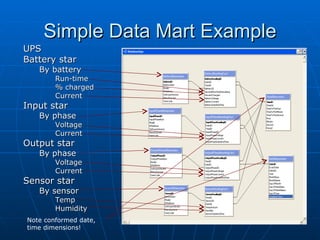
Simple Data Mart Example
UPS
Battery star
   By battery
        Run-time
        % charged
        Current
Input star
   By phase
        Voltage
        Current
Output star
   By phase
        Voltage
        Current
Sensor star
   By sensor
        Temp
        Humidity
Note conformed date,
time dimensions!
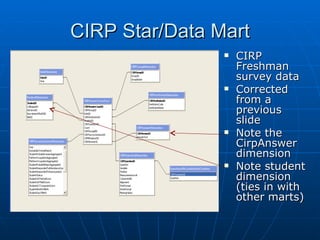
CIRP Star/Data Mart
                   CIRP
                    Freshman
                    survey data
                   Corrected
                    from a
                    previous
                    slide
                   Note the
                    CirpAnswer
                    dimension
                   Note student
                    dimension
                    (ties in with
                    other marts)
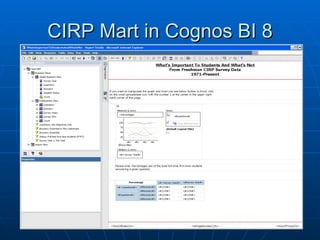
CIRP Mart in Cognos BI 8
ROLAP, MOLAP
   ROLAP = OLAP via direct relational query
    • E.g., against a (materialized) view
    • Against star schemas in a warehouse
   MOLAP = OLAP via multidimensional
    database (MDB)
    • MDB is a special kind of database
    • Treats data kind of like a big, fast spreadsheet
    • MDBs typically draw data in from a data
      warehouse
          Built to work best with star schemas
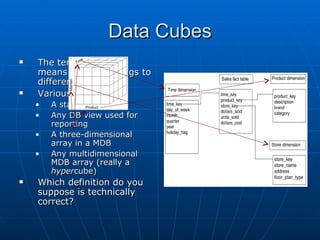
Data Cubes
   The term data cube
    means different things to
    different people
   Various definitions:
    •   A star schema
    •   Any DB view used for
        reporting
    •   A three-dimensional
        array in a MDB
    •   Any multidimensional
        MDB array (really a
        hypercube)
   Which definition do you
    suppose is technically
    correct?
Metadata
   Metadata = data about data
   In a data warehousing context it can mean many
    things
    •   Information on data in source OLTP systems
    •   Information on ETL jobs and what they do to the data
    •   Information on data in marts/star schemas
    •   Documentation in OLAP tools on the data they
        manipulate
   Many institutions make metadata available via
    data malls or warehouse portals, e.g.:
    •   University of New Mexico
    •   UC Davis
    •   Rensselear Polytechnic Institute
    •   University of Illinois
   Good ETL tools automate the setup of
    malls/portals!
The Data Warehouse
   OK now we’re experts in terms like OLTP, OLAP,
    star schema, metadata, etc.
   Let’s use some of these terms to describe how a
    DW works:
    •   Provides ample metadata – data about the data
    •   Utilizes easy-to-understand column/field names
    •   Feeds multidimensional databases (MDBs)
    •   Is updated via periodic (mainly nightly) ETL jobs
    •   Presents data in a simplified, denormalized form
    •   Utilizes star-like fact/dimension table schemas
    •   Encompasses multiple, smaller data “marts”
    •   Supports OLAP tools (Access/Excel, Safari, Cognos BI)
    •   Derives data from (multiple) back-end OLTP systems
    •   Houses historical data, and can grow very big
A Data Warehouse is Not…
   Vendor and consultant proclamations
    aside, a data warehouse is not:
    • A project
          With a specific end date
    • A product you buy from a vendor
          Like an ODS (such as SCT’s)
          A canned “warehouse” supplied by iStrategy
          Cognos ReportNet
    • A database schema or instance
          Like Oracle
          SQL Server
    • A cut-down version of your live transactional
      database
Kimball & Caserta’s Definition
   According to Ralph Kimball and Joe
    Caserta, a data warehouse is:
         A system that extracts, cleans, conforms, and
         delivers source data into a dimensional data
         store and then supports and implements
         querying and analysis for the purpose of
         decision making.

   Another def.: The union of all the enterprise’s data marts
   Aside: The Kimball model is not without some critics:
     •   E.g., Bill Inmon
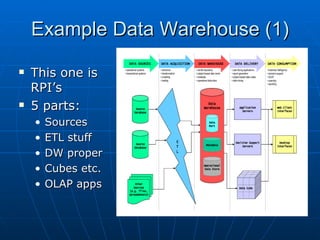
Example Data Warehouse (1)
   This one is
    RPI’s
   5 parts:
    •   Sources
    •   ETL stuff
    •   DW proper
    •   Cubes etc.
    •   OLAP apps
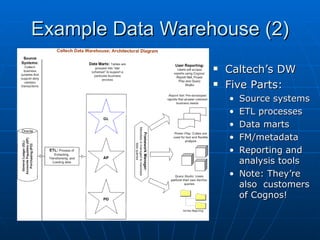
Example Data Warehouse (2)
                     Caltech’s DW
                     Five Parts:
                      • Source systems
                      • ETL processes
                      • Data marts
                      • FM/metadata
                      • Reporting and
                        analysis tools
                      • Note: They’re
                        also customers
                        of Cognos!
So Where is Colorado College?
   Phil Goldstein (Educause Center for Applied
    Research fellow) identifies the major deployment
    levels:
    •   Level 1: Transactional systems only
    •   Level 2a: ODS or single data mart; no ETL
    •   Level 2: ODS or single data mart with ETL tools
    •   Level 3a: Warehouse or multiple marts; no ETL; OLAP
    •   Level 3b: Warehouse or multiple marts; ETL; OLAP
    •   Level 3: Enterprise-wide warehouse or multiple marts;
        ETL tools; OLAP tools
   Goldstein’s study was just released in late 2005
   It’s very good; based on real survey data
   Which level is Colorado College at?
Implementing a Data Warehouse
   In many organizations IT people want to huddle and work
    out a warehousing plan, but in fact
    • The purpose of a DW is decision support
    • The primary audience of a DW is therefore College decision
      makers
    • It is College decision makers therefore who must determine
           Scope
           Priority
           Resources
   Decision makers can’t make these determinations without
    an understanding of data warehouses
   It is therefore imperative that key decision makers first be
    educated about data warehouses
    • Once this occurs, it is possible to
           Elicit requirements (a critical step that’s often skipped)
           Determine priorities/scope
           Formulate a budget
           Create a plan and timeline, with real milestones and deliverables!
Is This Really a Good Plan?
   Sure, according to Phil Goldstein (Educause Center for
    Applied Research)
   He’s conducted extensive surveys on “academic analytics”
    (= business intelligence for higher ed)
   His four recommendations for improving analytics:
    •   Key decisionmakers must lead the way
    •   Technologists must collaborate
        •   Must collect requirements
        •   Must form strong partnerships with functional sponsors
    •   IT must build the needed infrastructure
        •   Carleton violated this rule with Cognos BI
        •   As we discovered, without an ETL/warehouse infrastructure,
            success with OLAP is elusive
    •   Staff must train and develop deep analysis skills
   Goldstein’s findings mirror closely the advice of industry
    heavyweights – Ralph Kimball, Laura Reeves, Margie Ross,
    Warren Thornthwaite, etc.
Isn’t a DW a Huge Undertaking?
   Sure, it can be huge
   Don’t hold on too tightly to the big-
    sounding word, “warehouse”
   Luminaries like Ralph Kimball have shown
    that a data warehouse can be built
    incrementally
    • Can start with just a few data marts
    • Targeted consulting help will ensure proper,
      extensible architecture and tool selection
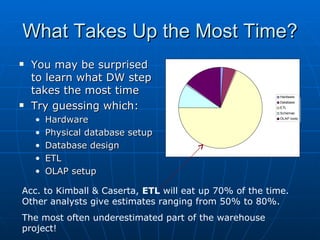
What Takes Up the Most Time?
   You may be surprised          90

    to learn what DW step         80
                                  70
    takes the most time           60
                                                                         Hardware


    Try guessing which:
                                  50                                       East
                                                                         Database
                                                                        ETL
                                  40                                       West
                                                                         Schemas

    •   Hardware                  30                                       North
                                                                         OLAP tools


                                  20
    •   Physical database setup
                                  10
    •   Database design            0
                                       1st Qtr 2nd Qtr 3rd Qtr 4th Qtr
    •   ETL
    •   OLAP setup

Acc. to Kimball & Caserta, ETL will eat up 70% of the time.
Other analysts give estimates ranging from 50% to 80%.
The most often underestimated part of the warehouse
project!
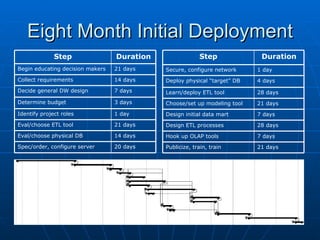
Eight Month Initial Deployment
              Step                Duration                Step              Duration
Begin educating decision makers   21 days    Secure, configure network     1 day
Collect requirements              14 days    Deploy physical “target” DB   4 days
Decide general DW design          7 days     Learn/deploy ETL tool         28 days
Determine budget                  3 days     Choose/set up modeling tool   21 days
Identify project roles            1 day      Design initial data mart      7 days
Eval/choose ETL tool              21 days    Design ETL processes          28 days
Eval/choose physical DB           14 days    Hook up OLAP tools            7 days
Spec/order, configure server      20 days    Publicize, train, train       21 days
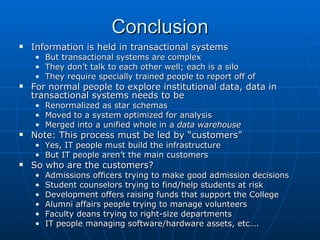
Conclusion
   Information is held in transactional systems
    • But transactional systems are complex
    • They don’t talk to each other well; each is a silo
    • They require specially trained people to report off of
   For normal people to explore institutional data, data in
    transactional systems needs to be
    •   Renormalized as star schemas
    •   Moved to a system optimized for analysis
    •   Merged into a unified whole in a data warehouse
   Note: This process must be led by “customers”
    • Yes, IT people must build the infrastructure
    • But IT people aren’t the main customers
   So who are the customers?
    •   Admissions officers trying to make good admission decisions
    •   Student counselors trying to find/help students at risk
    •   Development offers raising funds that support the College
    •   Alumni affairs people trying to manage volunteers
    •   Faculty deans trying to right-size departments
    •   IT people managing software/hardware assets, etc….

Whats A Data Warehouse

  • 1.
    What is aData Warehouse? And Why Are So Many Schools Setting Them Up? Richard Goerwitz
  • 2.
    What Is aData Warehouse?  Nobody can agree  So I’m not actually going to define a DW  Don’t feel cheated, though  By the end of this talk, you’ll • Understand key concepts that underlie all warehouse implementations (“talk the talk”) • Understand the various components out of which DW architects construct real-world data warehouses • Understand what a data warehouse project looks like
  • 3.
    Why Are SchoolsSetting Up Data Warehouses?  A data warehouse makes it easier to: • Optimize classroom, computer lab usage • Refine admissions ratings systems • Forecast future demand for courses, majors • Tie private spreadsheet data into central repositories • Correlate admissions and IR data with outcomes such as:  GPAs  Placement rates  Happiness, as measured by alumni surveys • Notify advisors when extra help may be needed based on  Admissions data (student vitals; SAT, etc.)  Special events: A-student suddenly gets a C in his/her major  Slower trends: Student’s GPA falls for > 2 semesters/terms • (Many other examples could be given!)  Better information = better decisions • Better admission decisions • Better retention rates • More effective fund raising, etc.
  • 4.
    Talking The Talk  To think and communicate usefully about data warehouses you’ll need to understand a set of common terms and concepts: • OLTP • ODS • OLAP, ROLAP, MOLAP • ETL • Star schema • Conformed dimension • Data mart • Cube • Metadata  Even if you’re not an IT person, pay heed: • You’ll have to communicate with IT people • More importantly: Evidence shows that IT will only build a successful warehouse if you are intimately involved!
  • 5.
    OLTP  OLTP = online transaction processing  The process of moving data around to handle day-to-day affairs • Scheduling classes • Registering students • Tracking benefits • Recording payments, etc.  Systems supporting this kind of activity are called transactional systems
  • 6.
    Transactional Systems  Transactional systems are optimized primarily for the here and now • Can support many simultaneous users • Can support heavy read/write access • Allow for constant change • Are big, ugly, and often don’t give people the data they want  As a result a lot of data ends up in shadow databases  Some ends up locked away in private spreadsheets  Transactional systems don’t record all previous data states  Lots of data gets thrown away or archived, e.g.: • Admissions data • Enrollment data • Asset tracking data (“How many computers did we support each year, from 1996 to 2006, and where do we expect to be in 2010?”)
  • 7.
    Simple Transactional Database  Map of Microsoft Windows Update Service (WUS) back-end database • Diagrammed using Sybase PowerDesigner  Each green box is a database “table”  Arrows are “joins” or foreign keys  This is simple for an OLTP back end
  • 8.
    More Complex Example  Recruitment Plus back-end database  Used by many admissions offices  Note again: • Green boxes are tables • Lines are foreign key relationships • Purple boxes are views  Considerable expertise is required to report off this database!  Imagine what it’s like for even more complex systems • Colleague • SCT Banner (over 4,000 tables)
  • 9.
    The “Reporting Problem”  Often we require OLTP data as a snapshot, in a spreadsheet or report  Reports require querying back-end OLTP support databases  But OLTP databases are often very complex, and typically • Contain many, often obscure, tables • Utilize cryptic, unintuitive field/column names • Don’t store all necessary historical data  As a result, reporting becomes a problem – • Requires special expertise • May require modifications to production OLTP systems • Becomes harder and harder for staff to keep up!
  • 10.
    Workarounds  Ways of working around the reporting problem include: 1. Have OLTP system vendors do the work • Provide canned reports • Write reporting GUIs for their products 2. Hire more specialists • To create simplified views of OLTP data • To write reports, create snapshots 3. Periodically copy data from OLTP systems to a place where • The data is easier to understand • The data is optimized for reporting • Easily pluggable into reporting tools
  • 11.
    ODS  ODS = operational data store  ODSs were an early workaround to the “reporting problem”  To create an ODS you • Build a separate/simplified version of an OLTP system • Periodically copy data into it from the live OLTP system • Hook it to operational reporting tools  An ODS can be an integration point or real-time “reporting database” for an operational system  It’s not enough for full enterprise-level, cross- database analytical processing
  • 12.
    OLAP  OLAP = online analytical processing  OLAP is the process of creating and summarizing historical, multidimensional data • To help users understand the data better • Provide a basis for informed decisions • Allow users to manipulate and explore data themselves, easily and intuitively  More than just “reporting”  Reporting is just one (static) product of OLAP
  • 13.
    OLAP Support Databases  OLAP systems require support databases  These databases typically • Support fewer simultaneous users than OLTP back ends • Are structured simply; i.e., denormalized • Can grow large  Hold snapshots of data in OLTP systems  Provide history/time depth to our analyses • Are optimized for read (not write) access • Updated via periodic batch (e.g., nightly) ETL processes
  • 14.
    ETL Processes  ETL = extract, transform, load • Extract data from various sources • Transform and clean the data from those sources • Load the data into databases used for analysis and reporting  ETL processes are coded in various ways • By hand in SQL, UniBASIC, etc. • Using more general programming languages • In semi-automated fashion using specialized ETL tools like Cognos Decision Stream  Most institutions do hand ETL; but note well: • Hand ETL is slow • Requires specialized knowledge • Becomes extremely difficult to maintain as code accumulates and databases/personnel change!
  • 15.
    Where Does theData Go?  What sort of a database do the ETL processes dump data into?  Typically, into very simple table structures  These table structures are: • Denormalized • Minimally branched/hierarchized • Structured into star schemas
  • 16.
    So What AreStar Schemas?  Star schemas are collections of data arranged into star-like patterns • They have fact tables in the middle, which contain amounts, measures (like counts, dollar amounts, GPAs) • Dimension tables around the outside, which contain labels and classifications (like names, geocodes, majors) • For faster processing, aggregate fact tables are sometimes also used (e.g., counts pre-averaged for an entire term)  Star schemas should • Have descriptive column/field labels • Be easy for users to understand • Perform well on queries
  • 17.
    A Very SimpleStar Schema Data Center UPS Power Output Dimensions: Phase Time Date Facts: Volts Amps Etc.
  • 18.
    A More ComplexStar Schema  Freshman survey data (HERI/CIRP)  Dimensions: • Questions • Survey years • Data about test takers  Facts: • Answer (text) • Answer (raw) • Count (1)  Oops • Not a star Oops, answers should have been placed in their • Snowflaked! own dimension (creating a “factless fact table”). I’ll demo a better version of this star later!
  • 19.
    Data Marts  One definition: • One or more star schemas that present data on a single or related set of business processes  Data marts should not be built in isolation  They need to be connected via dimensional tables that are • The same or subsets of each other • Hierarchized the same way internally  So, e.g., if I construct data marts for… • GPA trends, student major trends, enrollments • Freshman survey data, senior survey data, etc.  …I connect these marts via a conformed student dimension • Makes correlation of data across star schemas intuitive • Makes it easier for OLAP tools to use the data • Allows nonspecialists to do much of the work
  • 20.
    Simple Data MartExample UPS Battery star By battery Run-time % charged Current Input star By phase Voltage Current Output star By phase Voltage Current Sensor star By sensor Temp Humidity Note conformed date, time dimensions!
  • 21.
    CIRP Star/Data Mart  CIRP Freshman survey data  Corrected from a previous slide  Note the CirpAnswer dimension  Note student dimension (ties in with other marts)
  • 22.
    CIRP Mart inCognos BI 8
  • 23.
    ROLAP, MOLAP  ROLAP = OLAP via direct relational query • E.g., against a (materialized) view • Against star schemas in a warehouse  MOLAP = OLAP via multidimensional database (MDB) • MDB is a special kind of database • Treats data kind of like a big, fast spreadsheet • MDBs typically draw data in from a data warehouse  Built to work best with star schemas
  • 24.
    Data Cubes  The term data cube means different things to different people  Various definitions: • A star schema • Any DB view used for reporting • A three-dimensional array in a MDB • Any multidimensional MDB array (really a hypercube)  Which definition do you suppose is technically correct?
  • 25.
    Metadata  Metadata = data about data  In a data warehousing context it can mean many things • Information on data in source OLTP systems • Information on ETL jobs and what they do to the data • Information on data in marts/star schemas • Documentation in OLAP tools on the data they manipulate  Many institutions make metadata available via data malls or warehouse portals, e.g.: • University of New Mexico • UC Davis • Rensselear Polytechnic Institute • University of Illinois  Good ETL tools automate the setup of malls/portals!
  • 26.
    The Data Warehouse  OK now we’re experts in terms like OLTP, OLAP, star schema, metadata, etc.  Let’s use some of these terms to describe how a DW works: • Provides ample metadata – data about the data • Utilizes easy-to-understand column/field names • Feeds multidimensional databases (MDBs) • Is updated via periodic (mainly nightly) ETL jobs • Presents data in a simplified, denormalized form • Utilizes star-like fact/dimension table schemas • Encompasses multiple, smaller data “marts” • Supports OLAP tools (Access/Excel, Safari, Cognos BI) • Derives data from (multiple) back-end OLTP systems • Houses historical data, and can grow very big
  • 27.
    A Data Warehouseis Not…  Vendor and consultant proclamations aside, a data warehouse is not: • A project  With a specific end date • A product you buy from a vendor  Like an ODS (such as SCT’s)  A canned “warehouse” supplied by iStrategy  Cognos ReportNet • A database schema or instance  Like Oracle  SQL Server • A cut-down version of your live transactional database
  • 28.
    Kimball & Caserta’sDefinition  According to Ralph Kimball and Joe Caserta, a data warehouse is: A system that extracts, cleans, conforms, and delivers source data into a dimensional data store and then supports and implements querying and analysis for the purpose of decision making.  Another def.: The union of all the enterprise’s data marts  Aside: The Kimball model is not without some critics: • E.g., Bill Inmon
  • 29.
    Example Data Warehouse(1)  This one is RPI’s  5 parts: • Sources • ETL stuff • DW proper • Cubes etc. • OLAP apps
  • 30.
    Example Data Warehouse(2)  Caltech’s DW  Five Parts: • Source systems • ETL processes • Data marts • FM/metadata • Reporting and analysis tools • Note: They’re also customers of Cognos!
  • 31.
    So Where isColorado College?  Phil Goldstein (Educause Center for Applied Research fellow) identifies the major deployment levels: • Level 1: Transactional systems only • Level 2a: ODS or single data mart; no ETL • Level 2: ODS or single data mart with ETL tools • Level 3a: Warehouse or multiple marts; no ETL; OLAP • Level 3b: Warehouse or multiple marts; ETL; OLAP • Level 3: Enterprise-wide warehouse or multiple marts; ETL tools; OLAP tools  Goldstein’s study was just released in late 2005  It’s very good; based on real survey data  Which level is Colorado College at?
  • 32.
    Implementing a DataWarehouse  In many organizations IT people want to huddle and work out a warehousing plan, but in fact • The purpose of a DW is decision support • The primary audience of a DW is therefore College decision makers • It is College decision makers therefore who must determine  Scope  Priority  Resources  Decision makers can’t make these determinations without an understanding of data warehouses  It is therefore imperative that key decision makers first be educated about data warehouses • Once this occurs, it is possible to  Elicit requirements (a critical step that’s often skipped)  Determine priorities/scope  Formulate a budget  Create a plan and timeline, with real milestones and deliverables!
  • 33.
    Is This Reallya Good Plan?  Sure, according to Phil Goldstein (Educause Center for Applied Research)  He’s conducted extensive surveys on “academic analytics” (= business intelligence for higher ed)  His four recommendations for improving analytics: • Key decisionmakers must lead the way • Technologists must collaborate • Must collect requirements • Must form strong partnerships with functional sponsors • IT must build the needed infrastructure • Carleton violated this rule with Cognos BI • As we discovered, without an ETL/warehouse infrastructure, success with OLAP is elusive • Staff must train and develop deep analysis skills  Goldstein’s findings mirror closely the advice of industry heavyweights – Ralph Kimball, Laura Reeves, Margie Ross, Warren Thornthwaite, etc.
  • 34.
    Isn’t a DWa Huge Undertaking?  Sure, it can be huge  Don’t hold on too tightly to the big- sounding word, “warehouse”  Luminaries like Ralph Kimball have shown that a data warehouse can be built incrementally • Can start with just a few data marts • Targeted consulting help will ensure proper, extensible architecture and tool selection
  • 35.
    What Takes Upthe Most Time?  You may be surprised 90 to learn what DW step 80 70 takes the most time 60 Hardware Try guessing which: 50 East Database  ETL 40 West Schemas • Hardware 30 North OLAP tools 20 • Physical database setup 10 • Database design 0 1st Qtr 2nd Qtr 3rd Qtr 4th Qtr • ETL • OLAP setup Acc. to Kimball & Caserta, ETL will eat up 70% of the time. Other analysts give estimates ranging from 50% to 80%. The most often underestimated part of the warehouse project!
  • 36.
    Eight Month InitialDeployment Step Duration Step Duration Begin educating decision makers 21 days Secure, configure network 1 day Collect requirements 14 days Deploy physical “target” DB 4 days Decide general DW design 7 days Learn/deploy ETL tool 28 days Determine budget 3 days Choose/set up modeling tool 21 days Identify project roles 1 day Design initial data mart 7 days Eval/choose ETL tool 21 days Design ETL processes 28 days Eval/choose physical DB 14 days Hook up OLAP tools 7 days Spec/order, configure server 20 days Publicize, train, train 21 days
  • 37.
    Conclusion  Information is held in transactional systems • But transactional systems are complex • They don’t talk to each other well; each is a silo • They require specially trained people to report off of  For normal people to explore institutional data, data in transactional systems needs to be • Renormalized as star schemas • Moved to a system optimized for analysis • Merged into a unified whole in a data warehouse  Note: This process must be led by “customers” • Yes, IT people must build the infrastructure • But IT people aren’t the main customers  So who are the customers? • Admissions officers trying to make good admission decisions • Student counselors trying to find/help students at risk • Development offers raising funds that support the College • Alumni affairs people trying to manage volunteers • Faculty deans trying to right-size departments • IT people managing software/hardware assets, etc….