Download free for 30 days
Sign in
Upload
Language (EN)
Support
Business
Mobile
Social Media
Marketing
Technology
Art & Photos
Career
Design
Education
Presentations & Public Speaking
Government & Nonprofit
Healthcare
Internet
Law
Leadership & Management
Automotive
Engineering
Software
Recruiting & HR
Retail
Sales
Services
Science
Small Business & Entrepreneurship
Food
Environment
Economy & Finance
Data & Analytics
Investor Relations
Sports
Spiritual
News & Politics
Travel
Self Improvement
Real Estate
Entertainment & Humor
Health & Medicine
Devices & Hardware
Lifestyle
Change Language
Language
English
Español
Português
Français
Deutsche
Cancel
Save
EN
SN
Uploaded by
Shuyo Nakatani
PDF, PPTX
4,195 views
画像をテキストで検索したい!(OpenAI CLIP) - VRC-LT #15
CLIP を使った画像検索を紹介します。学習済みモデルを利用すると、強力な画像検索を簡単に実装できます。
Technology
◦
Related topics:
Deep Learning
•
Read more
1
Save
Share
Embed
Embed presentation
Download
Download as PDF, PPTX
1
/ 25
2
/ 25
3
/ 25
4
/ 25
5
/ 25
Most read
6
/ 25
Most read
7
/ 25
8
/ 25
9
/ 25
10
/ 25
11
/ 25
12
/ 25
13
/ 25
14
/ 25
15
/ 25
16
/ 25
17
/ 25
18
/ 25
19
/ 25
20
/ 25
21
/ 25
22
/ 25
23
/ 25
24
/ 25
25
/ 25
More Related Content
PDF
CV分野におけるサーベイ方法
by
Hirokatsu Kataoka
PPTX
Swin Transformer (ICCV'21 Best Paper) を完璧に理解する資料
by
Yusuke Uchida
PPTX
画像処理ライブラリ OpenCV で 出来ること・出来ないこと
by
Norishige Fukushima
PPTX
【DL輪読会】Flamingo: a Visual Language Model for Few-Shot Learning 画像×言語の大規模基盤モ...
by
Deep Learning JP
PPTX
【DL輪読会】Scaling Laws for Neural Language Models
by
Deep Learning JP
PPTX
【DL輪読会】High-Resolution Image Synthesis with Latent Diffusion Models
by
Deep Learning JP
PDF
【基調講演】『深層学習の原理の理解に向けた理論の試み』 今泉 允聡(東大)
by
MLSE
PDF
研究の基本ツール
by
由来 藤原
CV分野におけるサーベイ方法
by
Hirokatsu Kataoka
Swin Transformer (ICCV'21 Best Paper) を完璧に理解する資料
by
Yusuke Uchida
画像処理ライブラリ OpenCV で 出来ること・出来ないこと
by
Norishige Fukushima
【DL輪読会】Flamingo: a Visual Language Model for Few-Shot Learning 画像×言語の大規模基盤モ...
by
Deep Learning JP
【DL輪読会】Scaling Laws for Neural Language Models
by
Deep Learning JP
【DL輪読会】High-Resolution Image Synthesis with Latent Diffusion Models
by
Deep Learning JP
【基調講演】『深層学習の原理の理解に向けた理論の試み』 今泉 允聡(東大)
by
MLSE
研究の基本ツール
by
由来 藤原
What's hot
PDF
画像生成・生成モデル メタサーベイ
by
cvpaper. challenge
PDF
Transformer メタサーベイ
by
cvpaper. challenge
PDF
【メタサーベイ】基盤モデル / Foundation Models
by
cvpaper. challenge
PPTX
これからの Vision & Language ~ Acadexit した4つの理由
by
Yoshitaka Ushiku
PPTX
backbone としての timm 入門
by
Takuji Tahara
PDF
【DL輪読会】How Much Can CLIP Benefit Vision-and-Language Tasks?
by
Deep Learning JP
PPTX
【DL輪読会】Visual Classification via Description from Large Language Models (ICLR...
by
Deep Learning JP
PDF
最新リリース:Optuna V3の全て - 2022/12/10 Optuna Meetup #2
by
Preferred Networks
PPTX
[DL輪読会]Grokking: Generalization Beyond Overfitting on Small Algorithmic Datasets
by
Deep Learning JP
PDF
SSII2021 [OS2-01] 転移学習の基礎:異なるタスクの知識を利用するための機械学習の方法
by
SSII
PDF
SSII2022 [TS1] Transformerの最前線〜 畳込みニューラルネットワークの先へ 〜
by
SSII
PPTX
[DL輪読会]Flow-based Deep Generative Models
by
Deep Learning JP
PPTX
近年のHierarchical Vision Transformer
by
Yusuke Uchida
PDF
ゼロから始める深層強化学習(NLP2018講演資料)/ Introduction of Deep Reinforcement Learning
by
Preferred Networks
PDF
[DL輪読会]ICLR2020の分布外検知速報
by
Deep Learning JP
PDF
[DL輪読会]data2vec: A General Framework for Self-supervised Learning in Speech,...
by
Deep Learning JP
PPTX
モデル高速化百選
by
Yusuke Uchida
PPTX
How Much Position Information Do Convolutional Neural Networks Encode?
by
Kazuyuki Miyazawa
PDF
【DL輪読会】Hierarchical Text-Conditional Image Generation with CLIP Latents
by
Deep Learning JP
PDF
深層学習の不確実性 - Uncertainty in Deep Neural Networks -
by
tmtm otm
画像生成・生成モデル メタサーベイ
by
cvpaper. challenge
Transformer メタサーベイ
by
cvpaper. challenge
【メタサーベイ】基盤モデル / Foundation Models
by
cvpaper. challenge
これからの Vision & Language ~ Acadexit した4つの理由
by
Yoshitaka Ushiku
backbone としての timm 入門
by
Takuji Tahara
【DL輪読会】How Much Can CLIP Benefit Vision-and-Language Tasks?
by
Deep Learning JP
【DL輪読会】Visual Classification via Description from Large Language Models (ICLR...
by
Deep Learning JP
最新リリース:Optuna V3の全て - 2022/12/10 Optuna Meetup #2
by
Preferred Networks
[DL輪読会]Grokking: Generalization Beyond Overfitting on Small Algorithmic Datasets
by
Deep Learning JP
SSII2021 [OS2-01] 転移学習の基礎:異なるタスクの知識を利用するための機械学習の方法
by
SSII
SSII2022 [TS1] Transformerの最前線〜 畳込みニューラルネットワークの先へ 〜
by
SSII
[DL輪読会]Flow-based Deep Generative Models
by
Deep Learning JP
近年のHierarchical Vision Transformer
by
Yusuke Uchida
ゼロから始める深層強化学習(NLP2018講演資料)/ Introduction of Deep Reinforcement Learning
by
Preferred Networks
[DL輪読会]ICLR2020の分布外検知速報
by
Deep Learning JP
[DL輪読会]data2vec: A General Framework for Self-supervised Learning in Speech,...
by
Deep Learning JP
モデル高速化百選
by
Yusuke Uchida
How Much Position Information Do Convolutional Neural Networks Encode?
by
Kazuyuki Miyazawa
【DL輪読会】Hierarchical Text-Conditional Image Generation with CLIP Latents
by
Deep Learning JP
深層学習の不確実性 - Uncertainty in Deep Neural Networks -
by
tmtm otm
Similar to 画像をテキストで検索したい!(OpenAI CLIP) - VRC-LT #15
PDF
オープンソースで作るスマホ文字認識アプリ
by
陽平 山口
PPTX
画像キャプションの自動生成
by
Yoshitaka Ushiku
PDF
LIFULL HOME'S「かざして検索」リリースの裏側
by
Takuro Hanawa
PDF
【関東GPGPU勉強会#4】GTX 1080でComputer Vision アルゴリズムを色々動かしてみる
by
Yasuhiro Yoshimura
PPTX
[DL輪読会]Dense Captioning分野のまとめ
by
Deep Learning JP
PPTX
画像認識とIoT
by
Hiroyuki Miyamoto
PPTX
画像キャプションの自動生成(第3回ステアラボ人工知能セミナー)
by
STAIR Lab, Chiba Institute of Technology
PDF
社内論文読み会資料 Image-to-Image Retrieval by Learning Similarity between Scene Graphs
by
Kazuhiro Ota
オープンソースで作るスマホ文字認識アプリ
by
陽平 山口
画像キャプションの自動生成
by
Yoshitaka Ushiku
LIFULL HOME'S「かざして検索」リリースの裏側
by
Takuro Hanawa
【関東GPGPU勉強会#4】GTX 1080でComputer Vision アルゴリズムを色々動かしてみる
by
Yasuhiro Yoshimura
[DL輪読会]Dense Captioning分野のまとめ
by
Deep Learning JP
画像認識とIoT
by
Hiroyuki Miyamoto
画像キャプションの自動生成(第3回ステアラボ人工知能セミナー)
by
STAIR Lab, Chiba Institute of Technology
社内論文読み会資料 Image-to-Image Retrieval by Learning Similarity between Scene Graphs
by
Kazuhiro Ota
More from Shuyo Nakatani
PDF
Generative adversarial networks
by
Shuyo Nakatani
PDF
無限関係モデル (続・わかりやすいパターン認識 13章)
by
Shuyo Nakatani
PDF
Memory Networks (End-to-End Memory Networks の Chainer 実装)
by
Shuyo Nakatani
PDF
人工知能と機械学習の違いって?
by
Shuyo Nakatani
PDF
RとStanでクラウドセットアップ時間を分析してみたら #TokyoR
by
Shuyo Nakatani
PDF
ドラえもんでわかる統計的因果推論 #TokyoR
by
Shuyo Nakatani
PDF
[Yang, Downey and Boyd-Graber 2015] Efficient Methods for Incorporating Knowl...
by
Shuyo Nakatani
PDF
星野「調査観察データの統計科学」第3章
by
Shuyo Nakatani
PDF
星野「調査観察データの統計科学」第1&2章
by
Shuyo Nakatani
PDF
言語処理するのに Python でいいの? #PyDataTokyo
by
Shuyo Nakatani
PDF
Zipf? (ジップ則のひみつ?) #DSIRNLP
by
Shuyo Nakatani
PDF
ACL2014 Reading: [Zhang+] "Kneser-Ney Smoothing on Expected Count" and [Pickh...
by
Shuyo Nakatani
PDF
ソーシャルメディアの多言語判定 #SoC2014
by
Shuyo Nakatani
PDF
猫に教えてもらうルベーグ可測
by
Shuyo Nakatani
PDF
アラビア語とペルシャ語の見分け方 #DSIRNLP 5
by
Shuyo Nakatani
PDF
どの言語でつぶやかれたのか、機械が知る方法 #WebDBf2013
by
Shuyo Nakatani
PDF
Active Learning 入門
by
Shuyo Nakatani
PDF
数式を綺麗にプログラミングするコツ #spro2013
by
Shuyo Nakatani
PDF
ノンパラベイズ入門の入門
by
Shuyo Nakatani
PDF
[Kim+ ICML2012] Dirichlet Process with Mixed Random Measures : A Nonparametri...
by
Shuyo Nakatani
Generative adversarial networks
by
Shuyo Nakatani
無限関係モデル (続・わかりやすいパターン認識 13章)
by
Shuyo Nakatani
Memory Networks (End-to-End Memory Networks の Chainer 実装)
by
Shuyo Nakatani
人工知能と機械学習の違いって?
by
Shuyo Nakatani
RとStanでクラウドセットアップ時間を分析してみたら #TokyoR
by
Shuyo Nakatani
ドラえもんでわかる統計的因果推論 #TokyoR
by
Shuyo Nakatani
[Yang, Downey and Boyd-Graber 2015] Efficient Methods for Incorporating Knowl...
by
Shuyo Nakatani
星野「調査観察データの統計科学」第3章
by
Shuyo Nakatani
星野「調査観察データの統計科学」第1&2章
by
Shuyo Nakatani
言語処理するのに Python でいいの? #PyDataTokyo
by
Shuyo Nakatani
Zipf? (ジップ則のひみつ?) #DSIRNLP
by
Shuyo Nakatani
ACL2014 Reading: [Zhang+] "Kneser-Ney Smoothing on Expected Count" and [Pickh...
by
Shuyo Nakatani
ソーシャルメディアの多言語判定 #SoC2014
by
Shuyo Nakatani
猫に教えてもらうルベーグ可測
by
Shuyo Nakatani
アラビア語とペルシャ語の見分け方 #DSIRNLP 5
by
Shuyo Nakatani
どの言語でつぶやかれたのか、機械が知る方法 #WebDBf2013
by
Shuyo Nakatani
Active Learning 入門
by
Shuyo Nakatani
数式を綺麗にプログラミングするコツ #spro2013
by
Shuyo Nakatani
ノンパラベイズ入門の入門
by
Shuyo Nakatani
[Kim+ ICML2012] Dirichlet Process with Mixed Random Measures : A Nonparametri...
by
Shuyo Nakatani
画像をテキストで検索したい!(OpenAI CLIP) - VRC-LT #15
1.
画像をテキストで検索したい! (OpenAI CLIP) VRC-LT #15 2022/11/26
@shuyo
2.
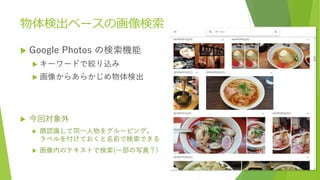
物体検出ベースの画像検索 Google Photos
の検索機能 キーワードで絞り込み 画像からあらかじめ物体検出 今回対象外 顔認識して同一人物をグルーピング。 ラベルを付けておくと名前で検索できる 画像内のテキストで検索(一部の写真?)
3.
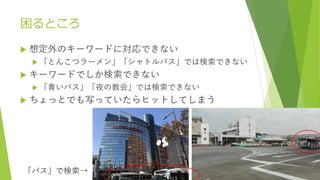
困るところ 想定外のキーワードに対応できない 「とんこつラーメン」「シャトルバス」では検索できない
キーワードでしか検索できない 「青いバス」「夜の教会」では検索できない ちょっとでも写っていたらヒットしてしまう 「バス」で検索→
4.
CLIP ってのを使ったら いい感じの画像検索できるよ!
5.
Python 70行 (webサーバ込) import
os, io, base64, glob, tqdm from PIL import Image import tornado.ioloop, tornado.web import torch import japanese_clip as ja_clip device = "cuda" if torch.cuda.is_available() else "cpu" model, preprocess = ja_clip.load("rinna/japanese-clip-vit-b-16", device=device) tokenizer = ja_clip.load_tokenizer() DATASETS = [ "/media/hdd/dataset/imagenette2-320/train/**/*.JPEG", "/media/hdd/dataset/imagenette2-320/test/**/*.JPEG", "/media/hdd/dataset/coco/val2017/*.jpg", "/media/hdd/dataset/coco/test2017/*.jpg", ] imglist = [] for path in DATASETS: imglist.extend(glob.glob(path)) features = [] for path in tqdm.tqdm(imglist): img = Image.open(path) image = preprocess(img).unsqueeze(0).to(device) with torch.no_grad(): features.append(model.get_image_features(image)) features = torch.cat(features) norm = features / torch.sqrt((features**2).sum(axis=1)).unsqueeze(1) def read(path): with open(path, "rb") as f: return base64.b64encode(f.read()).decode("utf-8") def search(query): encodings = ja_clip.tokenize(query, tokenizer=tokenizer) with torch.no_grad(): text_features = model.get_text_features(**encodings) textnorm = text_features / torch.sqrt((text_features**2).sum()) sim = norm.matmul(textnorm.squeeze(0)) topk = torch.topk(sim, 5) return [{"image_base64":read(imglist[topk.indices[i]]), "score":topk.values[i].item()} for i in range(5)] class MainHandler(tornado.web.RequestHandler): def get(self): query = self.get_argument("query", "").strip() if query!="": topk = search(query) else: topk = [] self.render("main.html", query=query, topk=topk) if __name__ == "__main__": dir = os.path.dirname(__file__) app = tornado.web.Application([("/", MainHandler)], template_path=os.path.join(dir, "template"), static_path=os.path.join(dir, "static"), ) app.listen(8000) tornado.ioloop.IOLoop.current().start() あとは CSS と HTML テンプレートだけ
6.
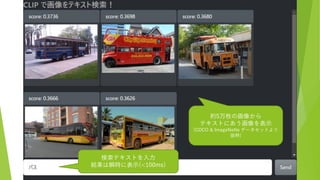
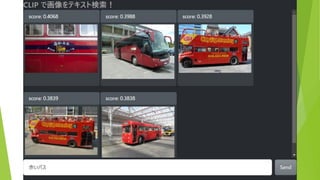
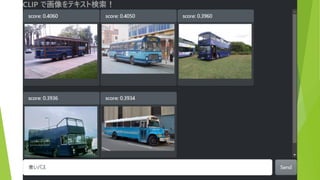
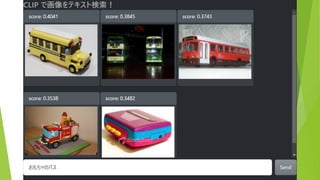
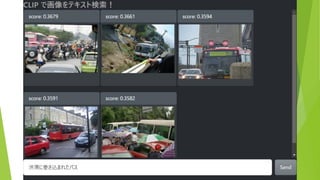
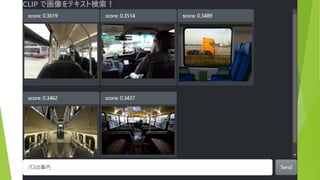
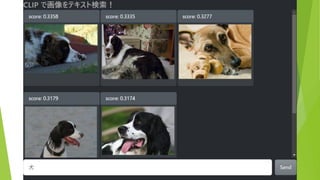
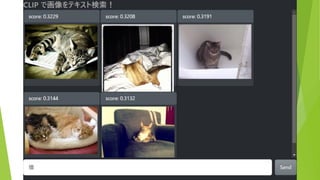
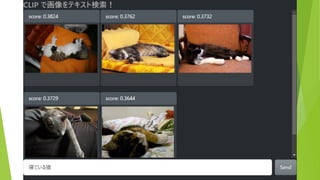
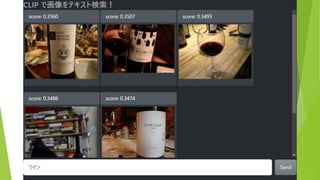
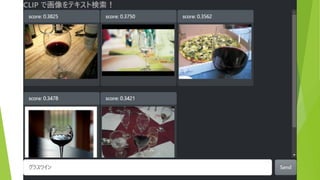
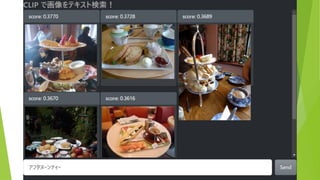
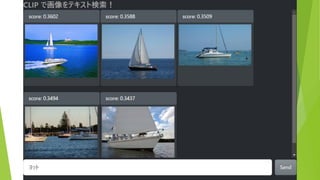
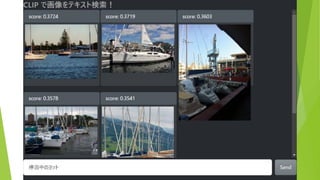
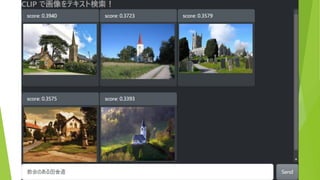
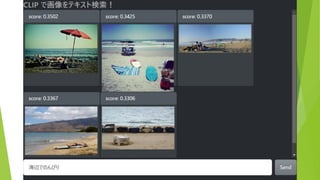
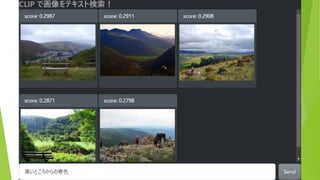
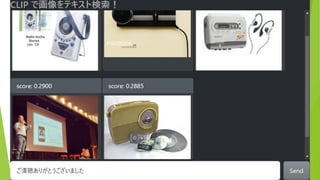
約5万枚の画像から テキストにあう画像を表示 (COCO & ImageNette
データセットより 抜粋) 検索テキストを入力 結果は瞬時に表示(<100ms)
23.
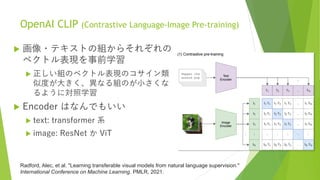
OpenAI CLIP (Contrastive
Language-Image Pre-training) 画像・テキストの組からそれぞれの ベクトル表現を事前学習 正しい組のベクトル表現のコサイン類 似度が大きく、異なる組のが小さくな るように対照学習 Encoder はなんでもいい text: transformer 系 image: ResNet か ViT Radford, Alec, et al. "Learning transferable visual models from natural language supervision." International Conference on Machine Learning. PMLR, 2021.
24.
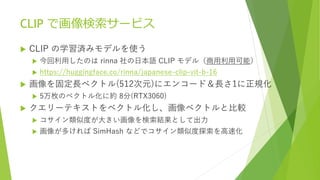
CLIP で画像検索サービス CLIP
の学習済みモデルを使う 今回利用したのは rinna 社の日本語 CLIP モデル(商用利用可能) https://huggingface.co/rinna/japanese-clip-vit-b-16 画像を固定長ベクトル(512次元)にエンコード&長さ1に正規化 5万枚のベクトル化に約 8分(RTX3060) クエリーテキストをベクトル化し、画像ベクトルと比較 コサイン類似度が大きい画像を検索結果として出力 画像が多ければ SimHash などでコサイン類似度探索を高速化
Download



![Python 70行 (webサーバ込)
import os, io, base64, glob, tqdm
from PIL import Image
import tornado.ioloop, tornado.web
import torch
import japanese_clip as ja_clip
device = "cuda" if torch.cuda.is_available() else "cpu"
model, preprocess = ja_clip.load("rinna/japanese-clip-vit-b-16",
device=device)
tokenizer = ja_clip.load_tokenizer()
DATASETS = [
"/media/hdd/dataset/imagenette2-320/train/**/*.JPEG",
"/media/hdd/dataset/imagenette2-320/test/**/*.JPEG",
"/media/hdd/dataset/coco/val2017/*.jpg",
"/media/hdd/dataset/coco/test2017/*.jpg",
]
imglist = []
for path in DATASETS:
imglist.extend(glob.glob(path))
features = []
for path in tqdm.tqdm(imglist):
img = Image.open(path)
image = preprocess(img).unsqueeze(0).to(device)
with torch.no_grad():
features.append(model.get_image_features(image))
features = torch.cat(features)
norm = features / torch.sqrt((features**2).sum(axis=1)).unsqueeze(1)
def read(path):
with open(path, "rb") as f:
return base64.b64encode(f.read()).decode("utf-8")
def search(query):
encodings = ja_clip.tokenize(query, tokenizer=tokenizer)
with torch.no_grad():
text_features = model.get_text_features(**encodings)
textnorm = text_features / torch.sqrt((text_features**2).sum())
sim = norm.matmul(textnorm.squeeze(0))
topk = torch.topk(sim, 5)
return [{"image_base64":read(imglist[topk.indices[i]]),
"score":topk.values[i].item()} for i in range(5)]
class MainHandler(tornado.web.RequestHandler):
def get(self):
query = self.get_argument("query", "").strip()
if query!="":
topk = search(query)
else:
topk = []
self.render("main.html", query=query, topk=topk)
if __name__ == "__main__":
dir = os.path.dirname(__file__)
app = tornado.web.Application([("/", MainHandler)],
template_path=os.path.join(dir, "template"),
static_path=os.path.join(dir, "static"),
)
app.listen(8000)
tornado.ioloop.IOLoop.current().start()
あとは CSS と
HTML テンプレートだけ](https://image.slidesharecdn.com/vrclt-clip-221128083446-58028f5b/85/OpenAI-CLIP-VRC-LT-15-5-320.jpg)


![[DL輪読会]Grokking: Generalization Beyond Overfitting on Small Algorithmic Datasets](https://cdn.slidesharecdn.com/ss_thumbnails/20220325okimura-220405024717-thumbnail.jpg?width=640&height=640&fit=bounds)
![SSII2021 [OS2-01] 転移学習の基礎:異なるタスクの知識を利用するための機械学習の方法](https://cdn.slidesharecdn.com/ss_thumbnails/os2-02final-210610091211-thumbnail.jpg?width=640&height=640&fit=bounds)
![SSII2022 [TS1] Transformerの最前線〜 畳込みニューラルネットワークの先へ 〜](https://cdn.slidesharecdn.com/ss_thumbnails/ts120220608ssiitransformerr2-220607054025-3adacf07-thumbnail.jpg?width=640&height=640&fit=bounds)
![[DL輪読会]Flow-based Deep Generative Models](https://cdn.slidesharecdn.com/ss_thumbnails/20190307-190328024744-thumbnail.jpg?width=640&height=640&fit=bounds)


![[DL輪読会]ICLR2020の分布外検知速報](https://cdn.slidesharecdn.com/ss_thumbnails/iclr2020ood-190927011524-thumbnail.jpg?width=640&height=640&fit=bounds)
![[DL輪読会]data2vec: A General Framework for Self-supervised Learning in Speech,...](https://cdn.slidesharecdn.com/ss_thumbnails/220204nonakadl1-220204025334-thumbnail.jpg?width=640&height=640&fit=bounds)


![[DL輪読会]Dense Captioning分野のまとめ](https://cdn.slidesharecdn.com/ss_thumbnails/dlseminar-201202012355-thumbnail.jpg?width=640&height=640&fit=bounds)


![[Yang, Downey and Boyd-Graber 2015] Efficient Methods for Incorporating Knowl...](https://cdn.slidesharecdn.com/ss_thumbnails/sparse-constrained-lda-151024072334-lva1-app6891-thumbnail.jpg?width=640&height=640&fit=bounds)


![ACL2014 Reading: [Zhang+] "Kneser-Ney Smoothing on Expected Count" and [Pickh...](https://cdn.slidesharecdn.com/ss_thumbnails/kneser-neyacl2014-140711113350-phpapp02-thumbnail.jpg?width=640&height=640&fit=bounds)


![[Kim+ ICML2012] Dirichlet Process with Mixed Random Measures : A Nonparametri...](https://cdn.slidesharecdn.com/ss_thumbnails/dp-mrmkimicml2012-120727233419-phpapp01-thumbnail.jpg?width=640&height=640&fit=bounds)