SAP PM CONFIGURATION DOCUMENT
Page 1 of 205
SAP ECC 6.0
PLANT MAINTENANCE MODULE
GROUP-3
MR.KAMLESH GUPTA & MR.M.V.RAMANA MURTY
SAP PM CONFIGURATION DOCUMENT
Page 2 of 205
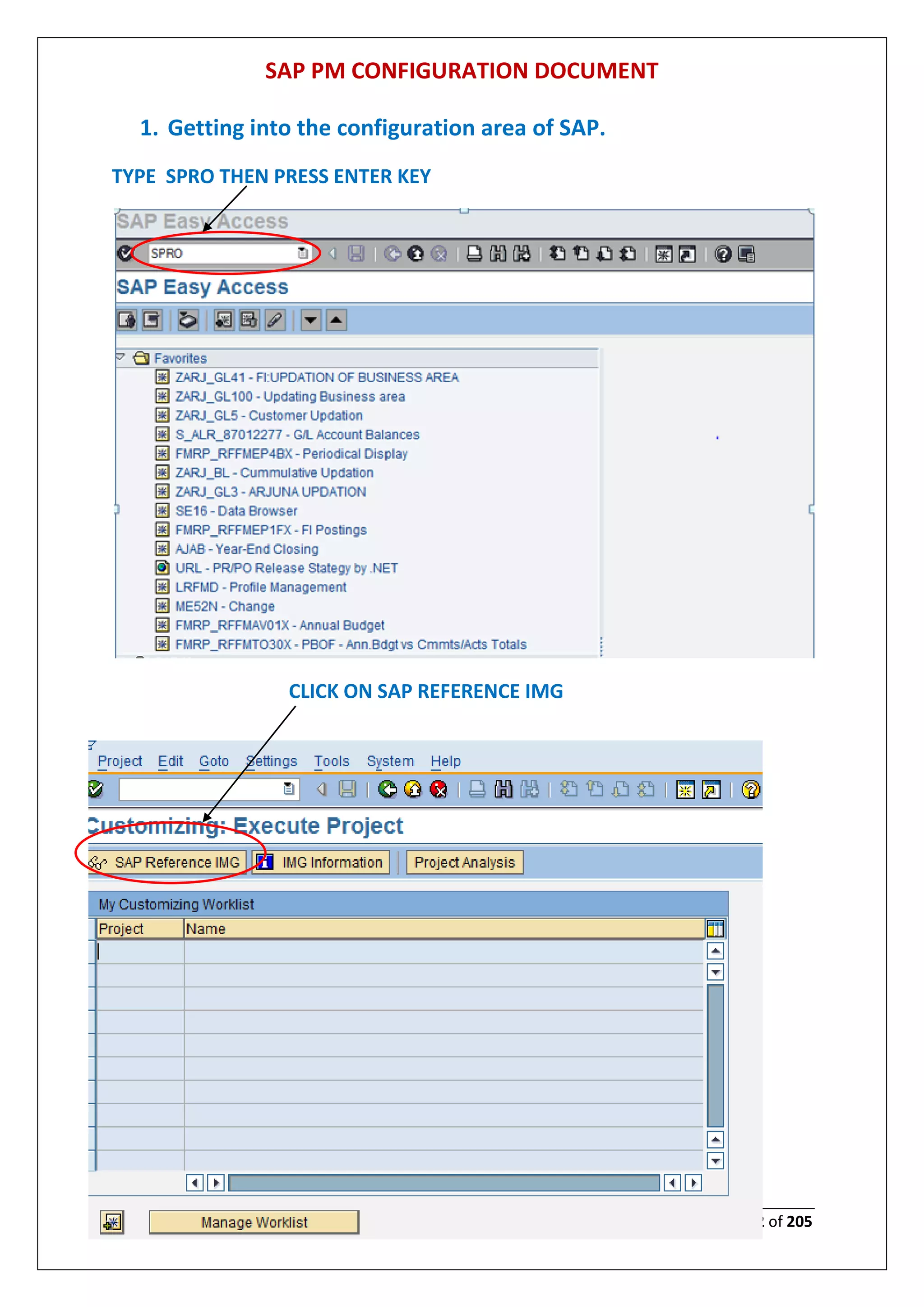
1. Getting into the configuration area of SAP.
TYPE SPRO THEN PRESS ENTER KEY
CLICK ON SAP REFERENCE IMG
SAP PM CONFIGURATION DOCUMENT
Page 3 of 205
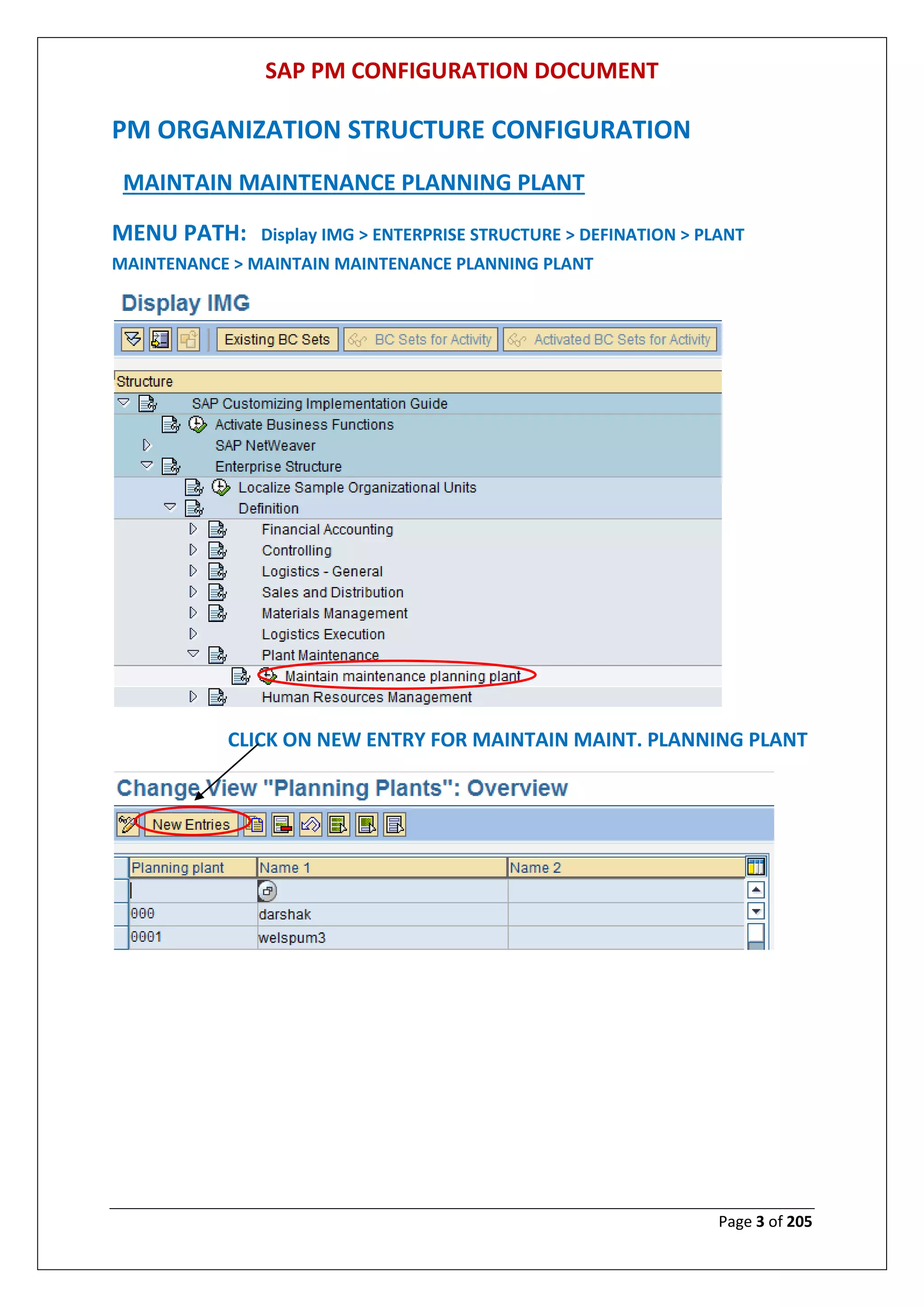
PM ORGANIZATION STRUCTURE CONFIGURATION
MAINTAIN MAINTENANCE PLANNING PLANT
MENU PATH: Display IMG > ENTERPRISE STRUCTURE > DEFINATION > PLANT
MAINTENANCE > MAINTAIN MAINTENANCE PLANNING PLANT
CLICK ON NEW ENTRY FOR MAINTAIN MAINT. PLANNING PLANT
SAP PM CONFIGURATION DOCUMENT
Page 4 of 205
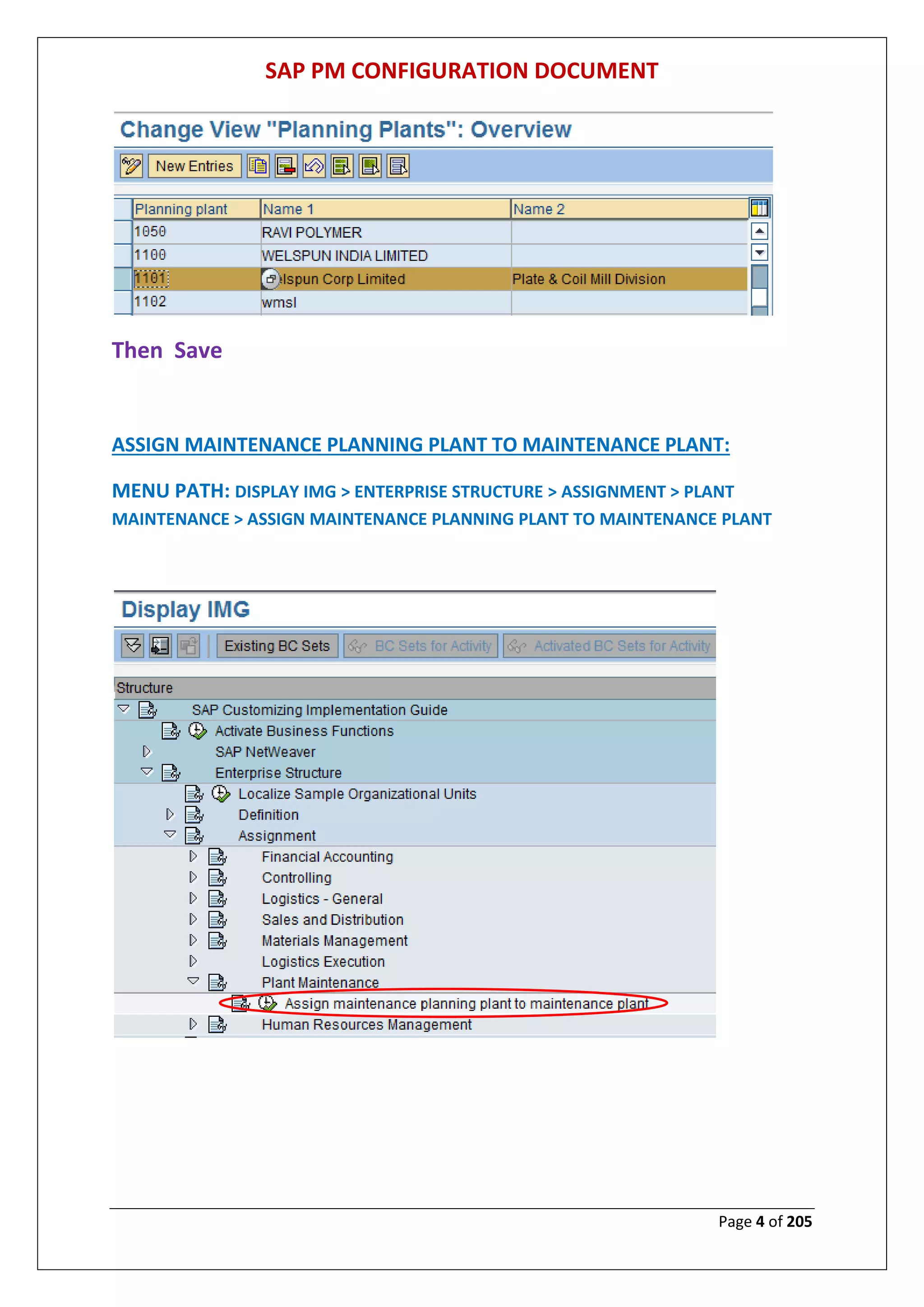
Then Save
ASSIGN MAINTENANCE PLANNING PLANT TO MAINTENANCE PLANT:
MENU PATH: DISPLAY IMG > ENTERPRISE STRUCTURE > ASSIGNMENT > PLANT
MAINTENANCE > ASSIGN MAINTENANCE PLANNING PLANT TO MAINTENANCE PLANT
SAP PM CONFIGURATION DOCUMENT
Page 5 of 205
Then Save
DEFINE LOCATION
MENU PATH: DISPLAY IMG > ENTERPRISE STRUCTURE > DEFINATION > LOGISTICS-
GENERAL> DEFINE LOCATION
SAP PM CONFIGURATION DOCUMENT
Page 6 of 205
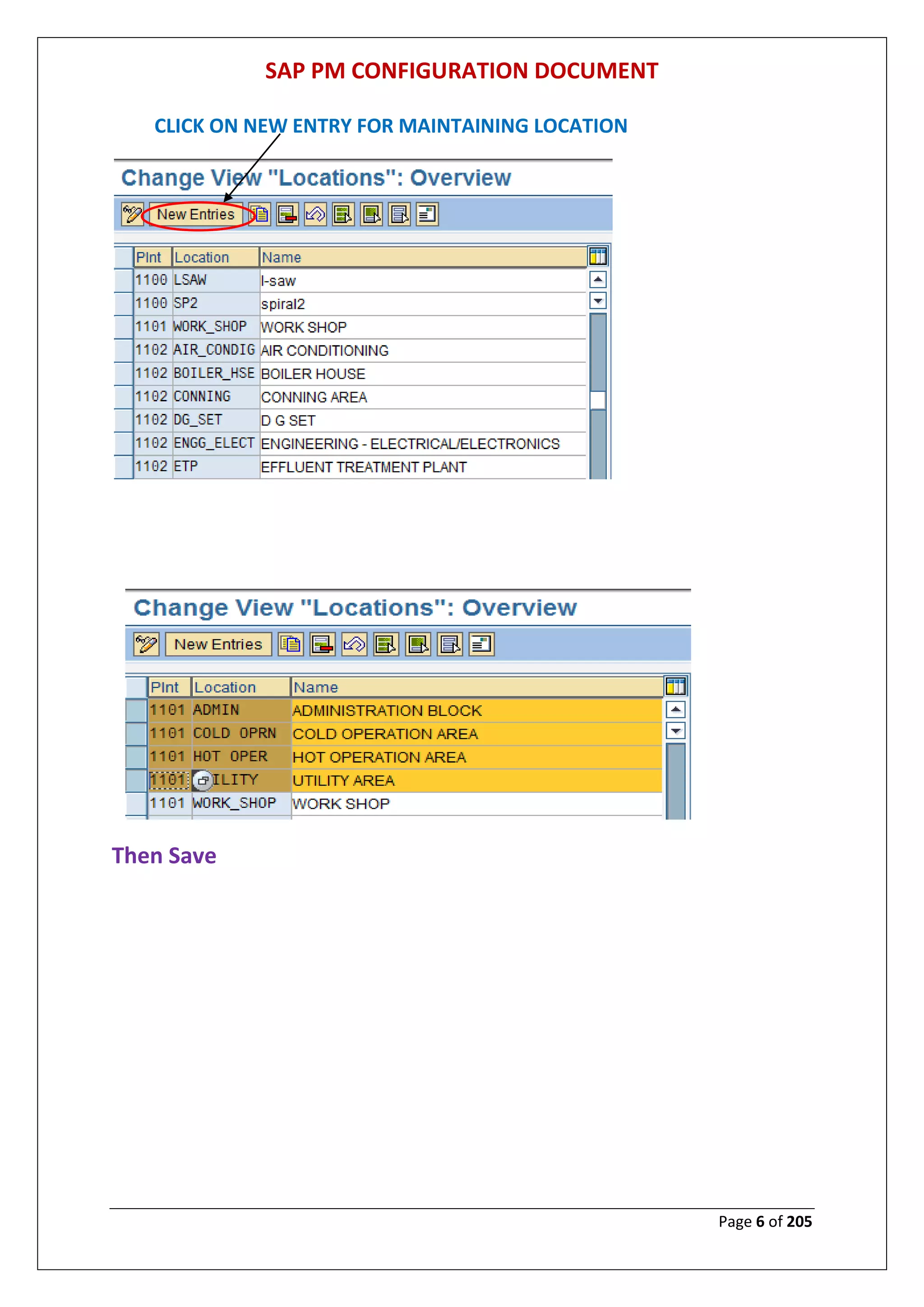
CLICK ON NEW ENTRY FOR MAINTAINING LOCATION
Then Save
SAP PM CONFIGURATION DOCUMENT
Page 7 of 205
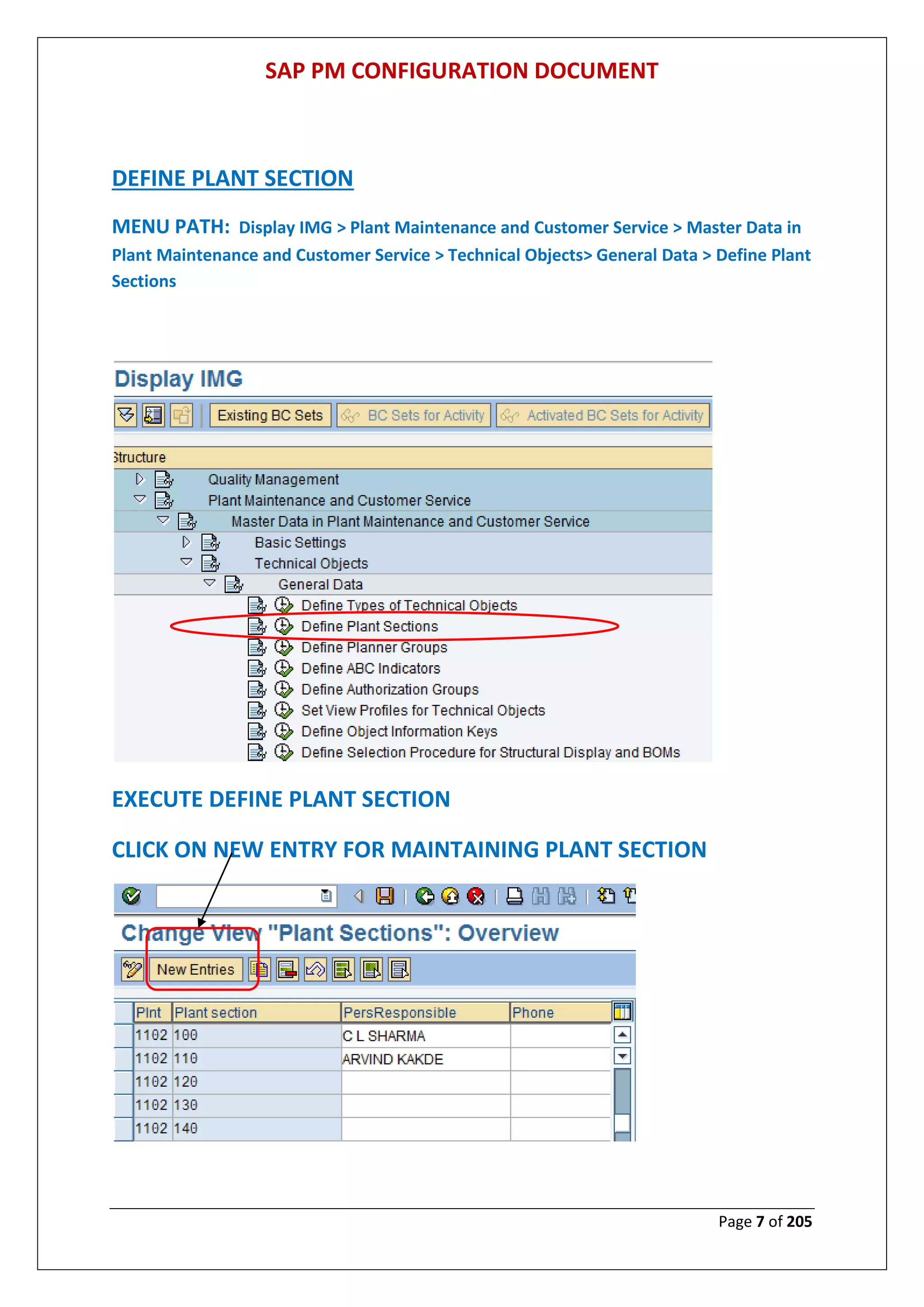
DEFINE PLANT SECTION
MENU PATH: Display IMG > Plant Maintenance and Customer Service > Master Data in
Plant Maintenance and Customer Service > Technical Objects> General Data > Define Plant
Sections
EXECUTE DEFINE PLANT SECTION
CLICK ON NEW ENTRY FOR MAINTAINING PLANT SECTION
SAP PM CONFIGURATION DOCUMENT
Page 8 of 205
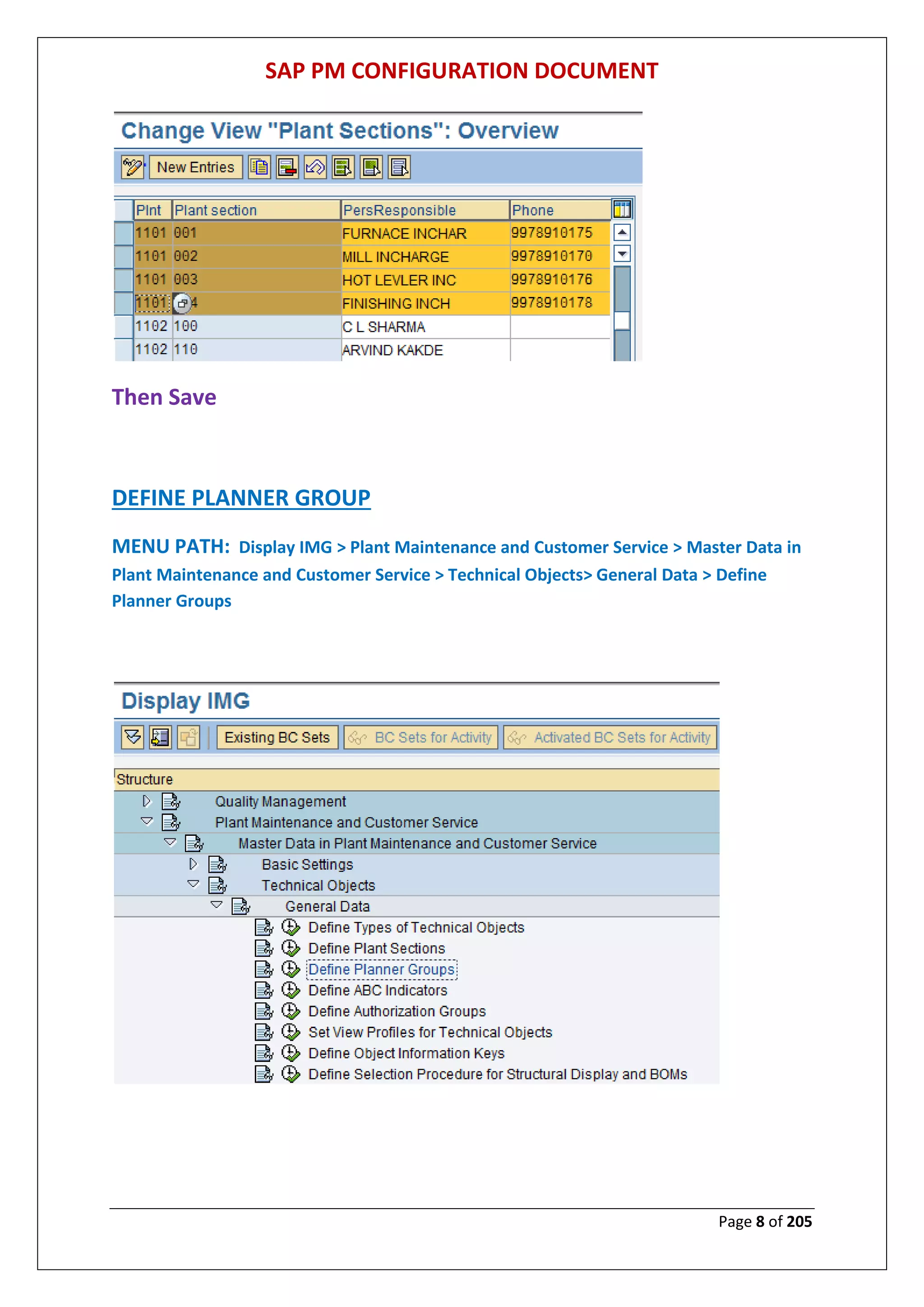
Then Save
DEFINE PLANNER GROUP
MENU PATH: Display IMG > Plant Maintenance and Customer Service > Master Data in
Plant Maintenance and Customer Service > Technical Objects> General Data > Define
Planner Groups
SAP PM CONFIGURATION DOCUMENT
Page 9 of 205
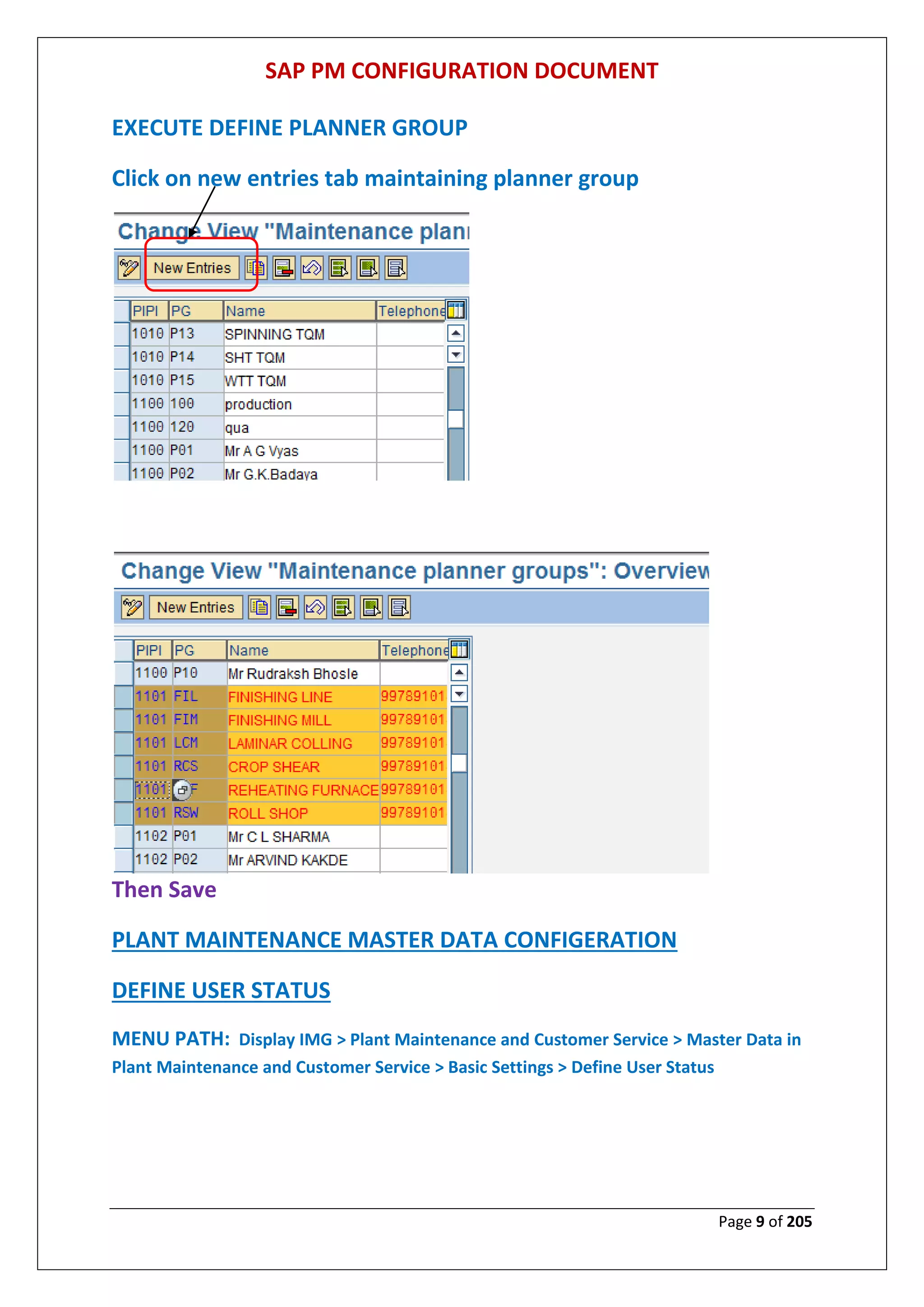
EXECUTE DEFINE PLANNER GROUP
Click on new entries tab maintaining planner group
Then Save
PLANT MAINTENANCE MASTER DATA CONFIGERATION
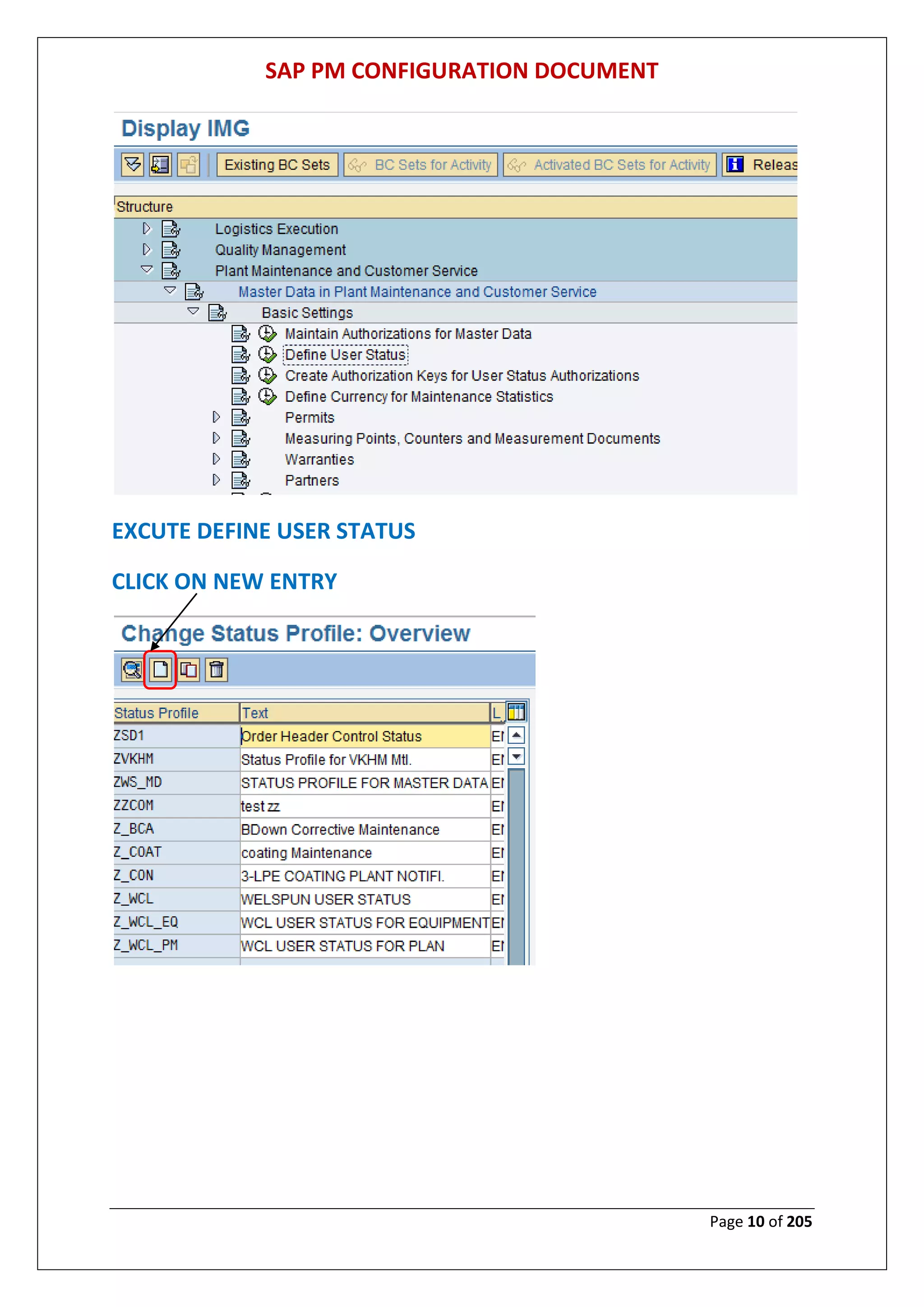
DEFINE USER STATUS
MENU PATH: Display IMG > Plant Maintenance and Customer Service > Master Data in
Plant Maintenance and Customer Service > Basic Settings > Define User Status
SAP PM CONFIGURATION DOCUMENT
Page 10 of 205
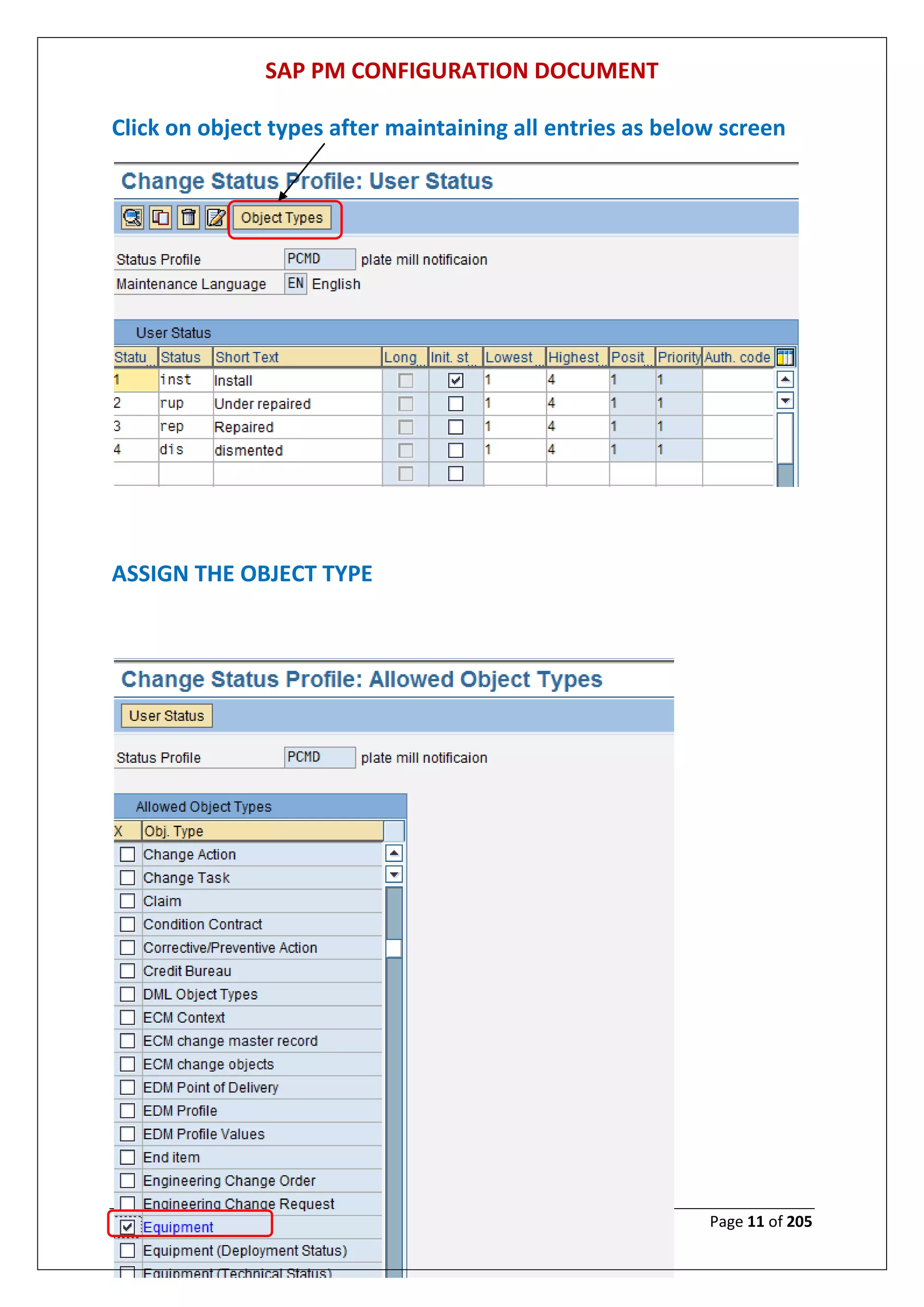
EXCUTE DEFINE USER STATUS
CLICK ON NEW ENTRY
SAP PM CONFIGURATION DOCUMENT
Page 11 of 205
Click on object types after maintaining all entries as below screen
ASSIGN THE OBJECT TYPE
SAP PM CONFIGURATION DOCUMENT
Page 12 of 205
Then Save
SAP PM CONFIGURATION DOCUMENT
Page 13 of 205
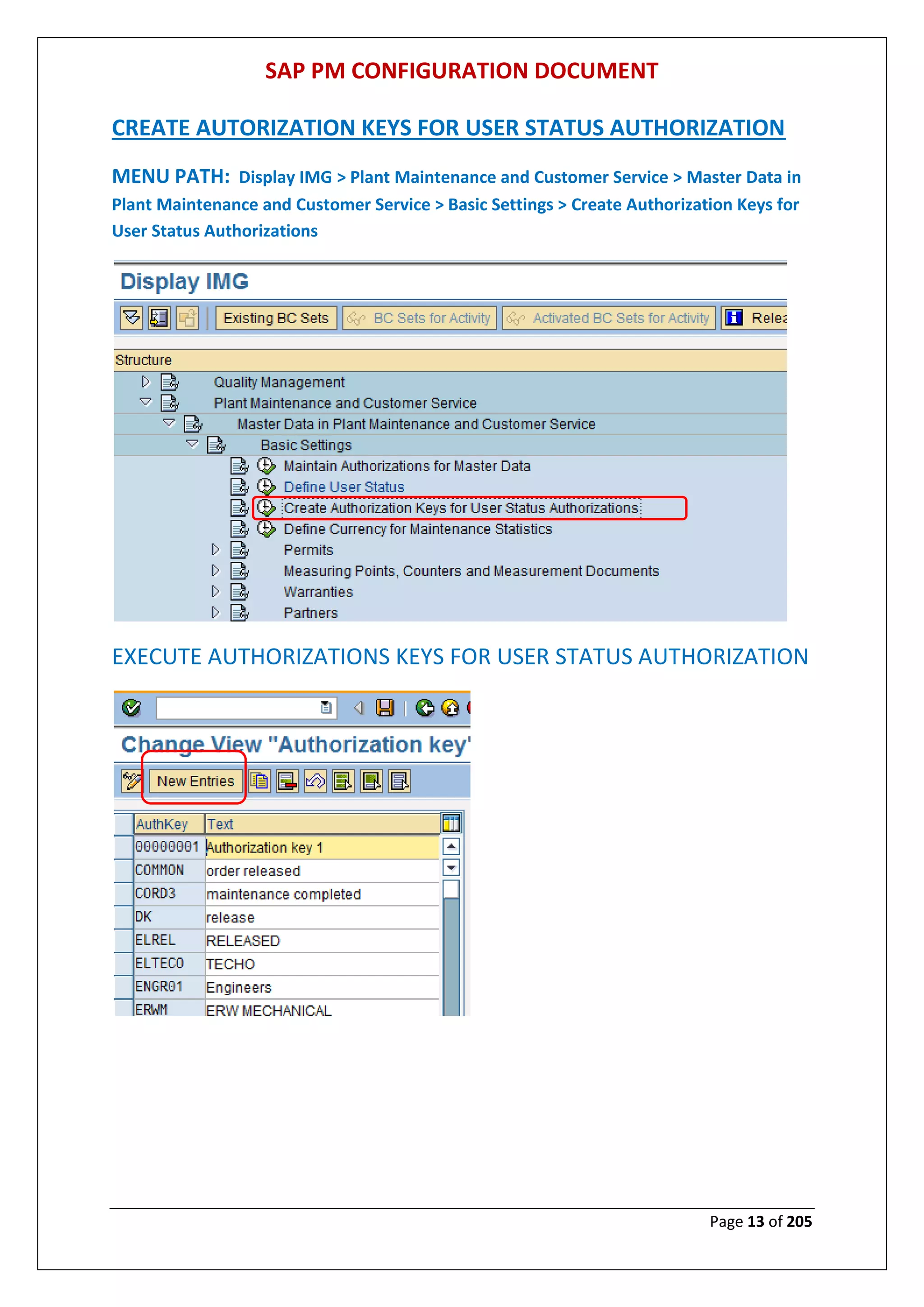
CREATE AUTORIZATION KEYS FOR USER STATUS AUTHORIZATION
MENU PATH: Display IMG > Plant Maintenance and Customer Service > Master Data in
Plant Maintenance and Customer Service > Basic Settings > Create Authorization Keys for
User Status Authorizations
EXECUTE AUTHORIZATIONS KEYS FOR USER STATUS AUTHORIZATION
SAP PM CONFIGURATION DOCUMENT
Page 14 of 205
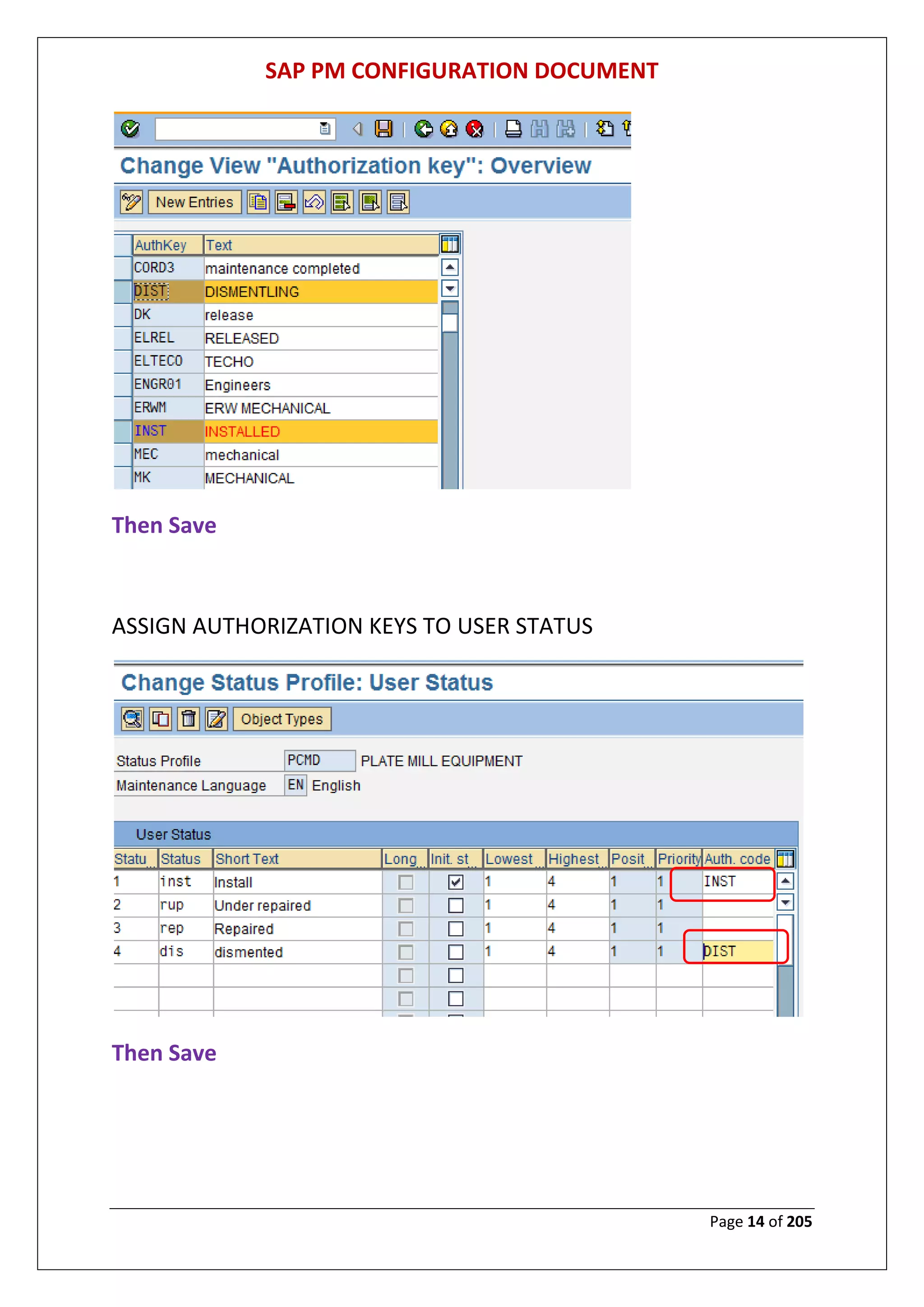
Then Save
ASSIGN AUTHORIZATION KEYS TO USER STATUS
Then Save
SAP PM CONFIGURATION DOCUMENT
Page 15 of 205
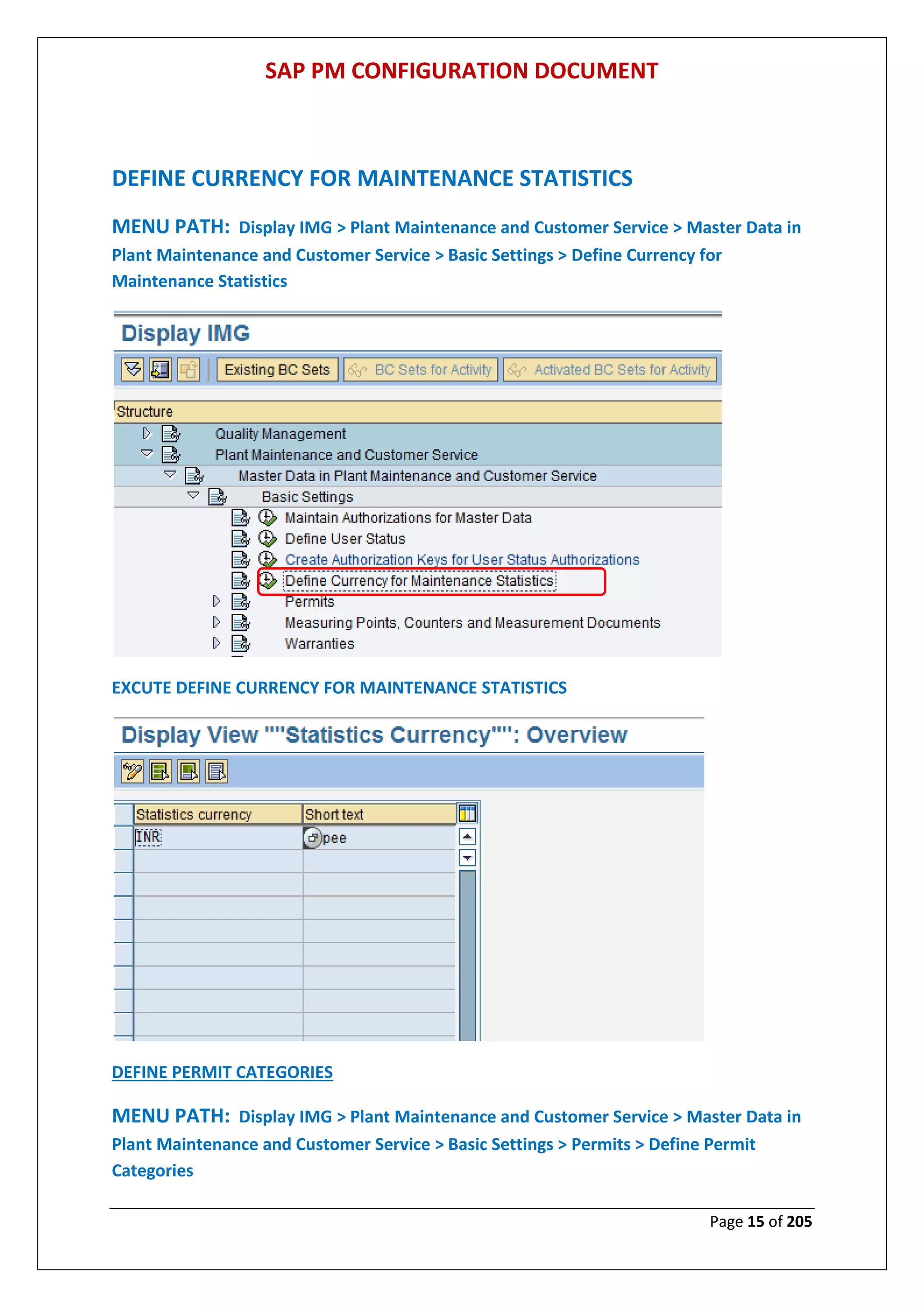
DEFINE CURRENCY FOR MAINTENANCE STATISTICS
MENU PATH: Display IMG > Plant Maintenance and Customer Service > Master Data in
Plant Maintenance and Customer Service > Basic Settings > Define Currency for
Maintenance Statistics
EXCUTE DEFINE CURRENCY FOR MAINTENANCE STATISTICS
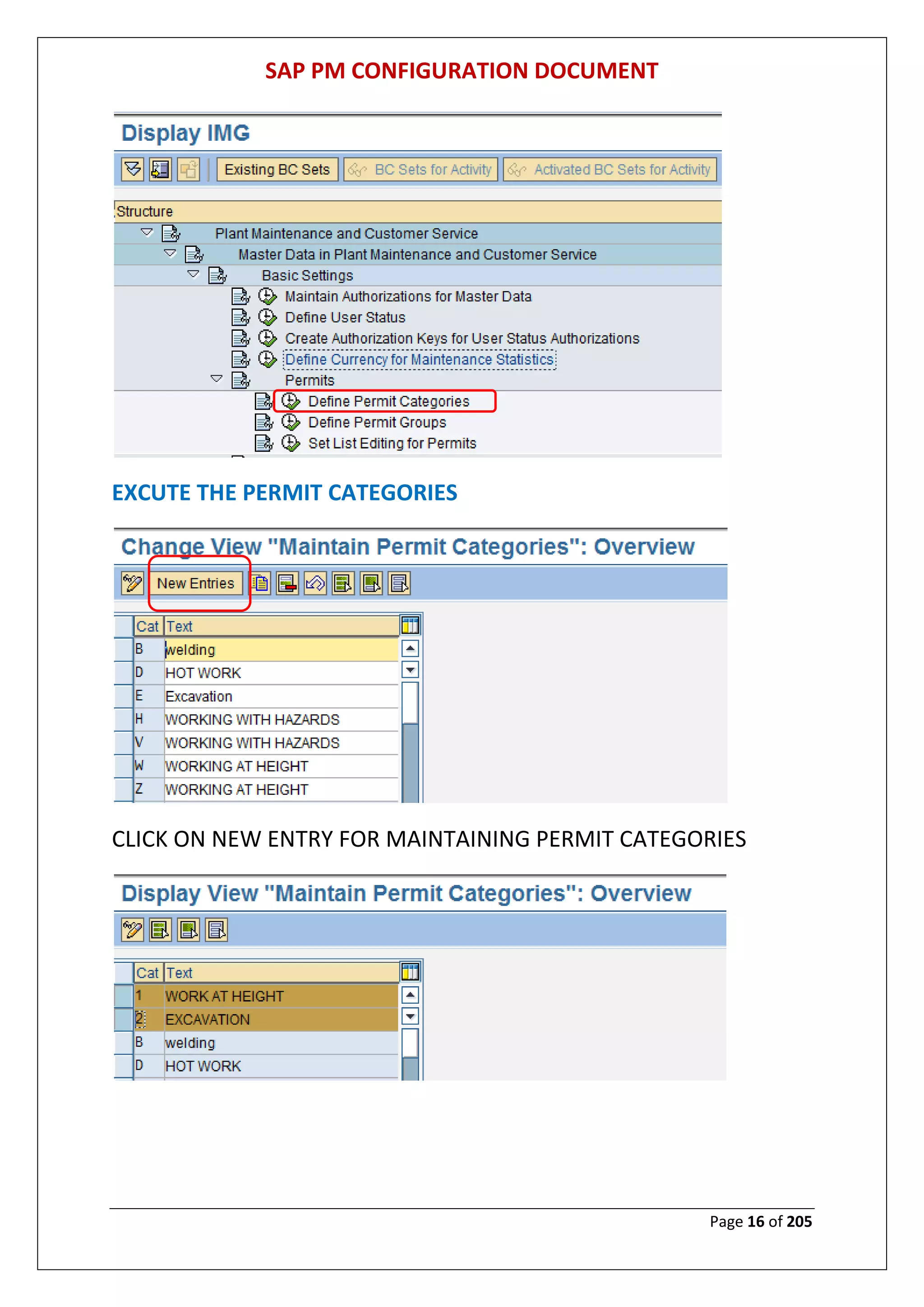
DEFINE PERMIT CATEGORIES
MENU PATH: Display IMG > Plant Maintenance and Customer Service > Master Data in
Plant Maintenance and Customer Service > Basic Settings > Permits > Define Permit
Categories
SAP PM CONFIGURATION DOCUMENT
Page 16 of 205
EXCUTE THE PERMIT CATEGORIES
CLICK ON NEW ENTRY FOR MAINTAINING PERMIT CATEGORIES
SAP PM CONFIGURATION DOCUMENT
Page 17 of 205
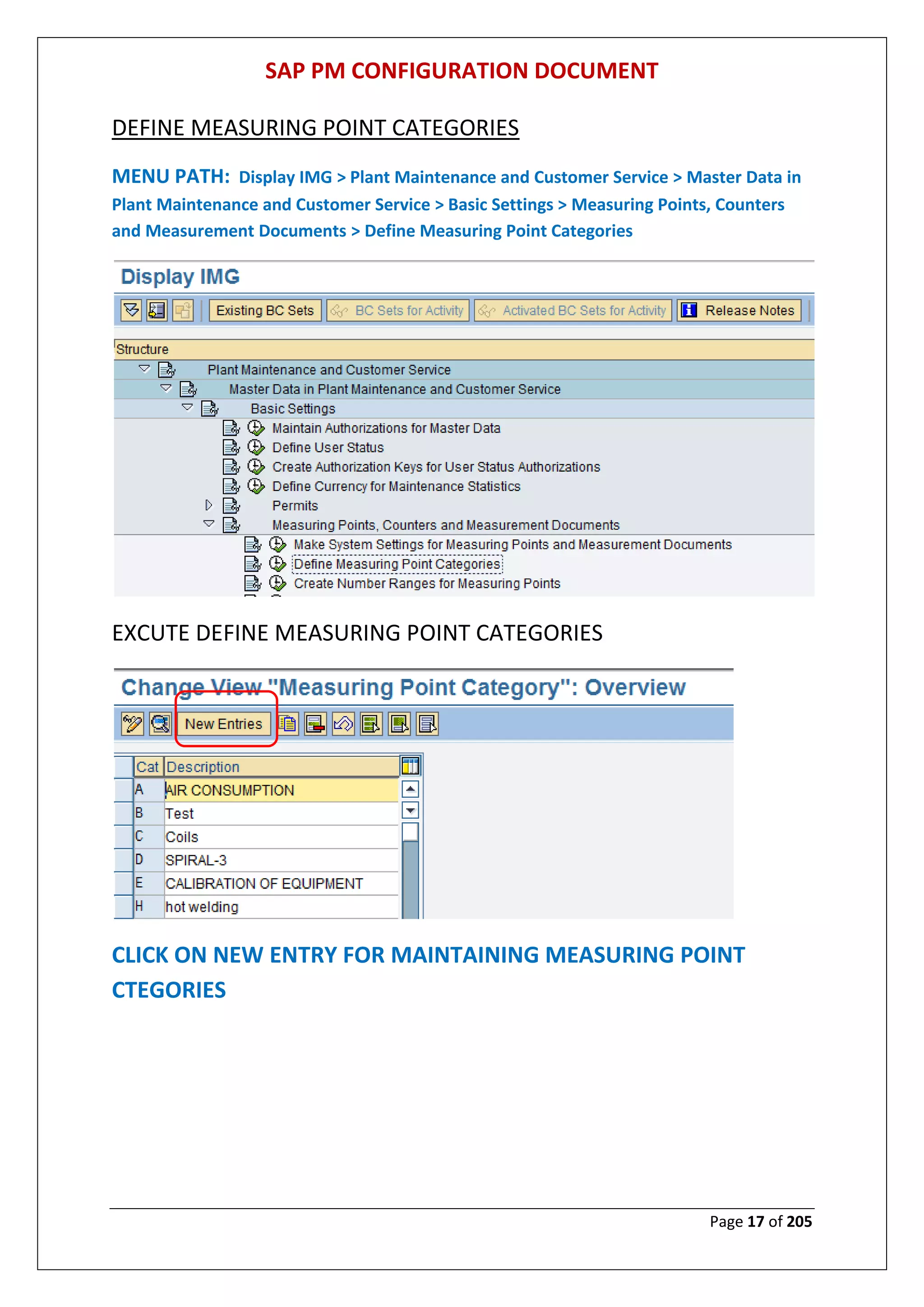
DEFINE MEASURING POINT CATEGORIES
MENU PATH: Display IMG > Plant Maintenance and Customer Service > Master Data in
Plant Maintenance and Customer Service > Basic Settings > Measuring Points, Counters
and Measurement Documents > Define Measuring Point Categories
EXCUTE DEFINE MEASURING POINT CATEGORIES
CLICK ON NEW ENTRY FOR MAINTAINING MEASURING POINT
CTEGORIES
SAP PM CONFIGURATION DOCUMENT
Page 18 of 205
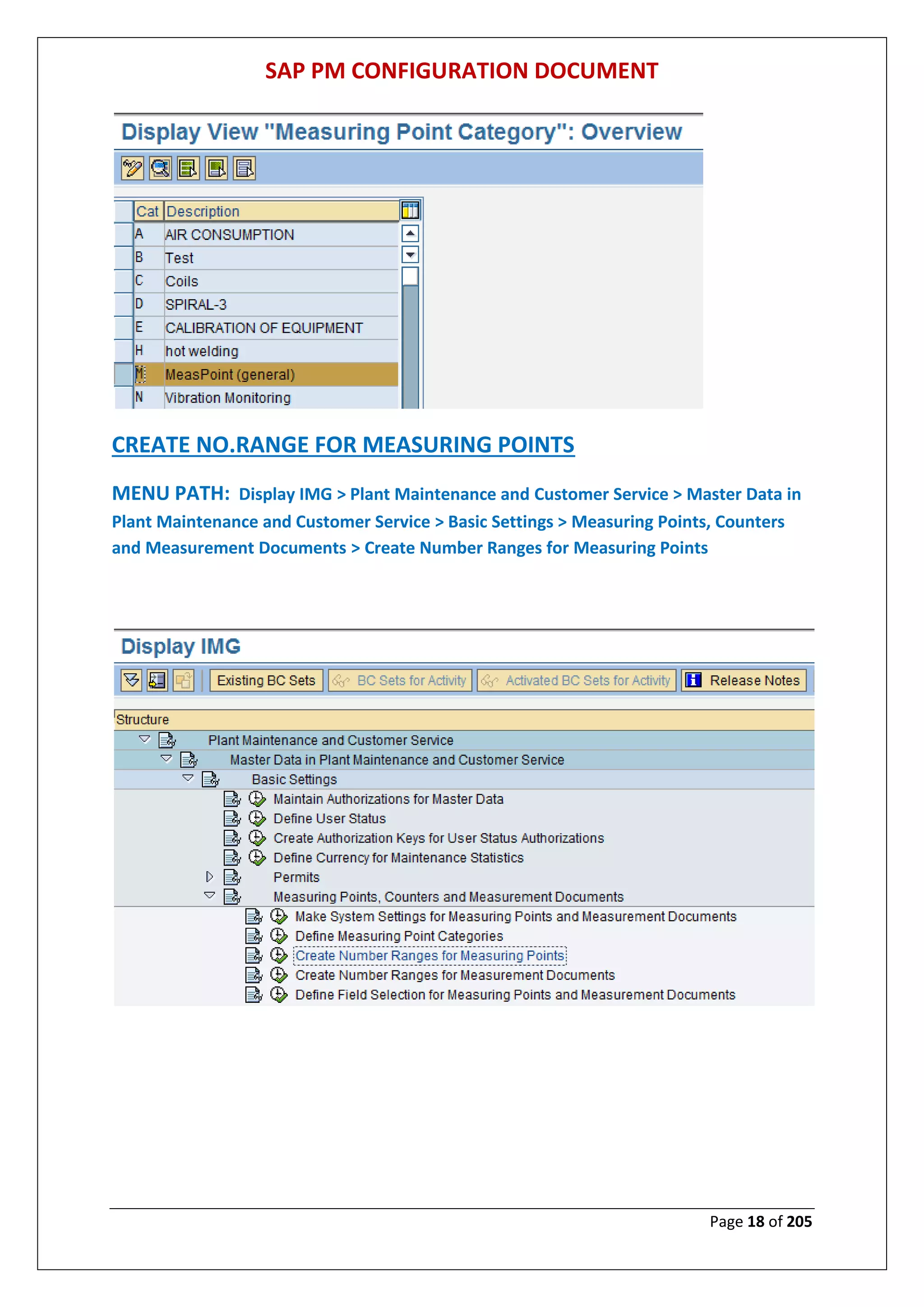
CREATE NO.RANGE FOR MEASURING POINTS
MENU PATH: Display IMG > Plant Maintenance and Customer Service > Master Data in
Plant Maintenance and Customer Service > Basic Settings > Measuring Points, Counters
and Measurement Documents > Create Number Ranges for Measuring Points
SAP PM CONFIGURATION DOCUMENT
Page 19 of 205
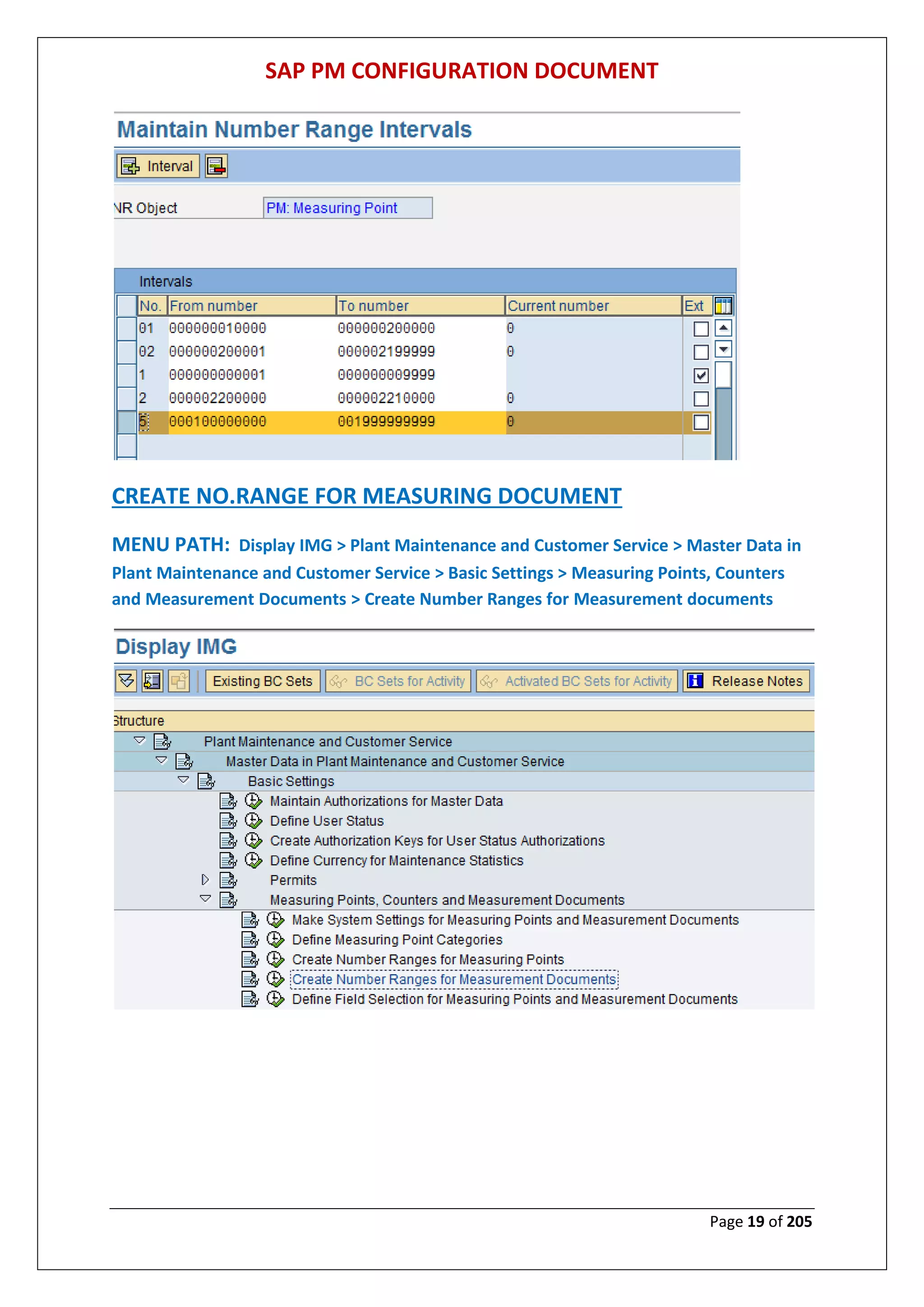
CREATE NO.RANGE FOR MEASURING DOCUMENT
MENU PATH: Display IMG > Plant Maintenance and Customer Service > Master Data in
Plant Maintenance and Customer Service > Basic Settings > Measuring Points, Counters
and Measurement Documents > Create Number Ranges for Measurement documents
SAP PM CONFIGURATION DOCUMENT
Page 20 of 205
CLICK ON CHANGE INTERVAL
Insert new no range by click on interval
SAP PM CONFIGURATION DOCUMENT
Page 21 of 205
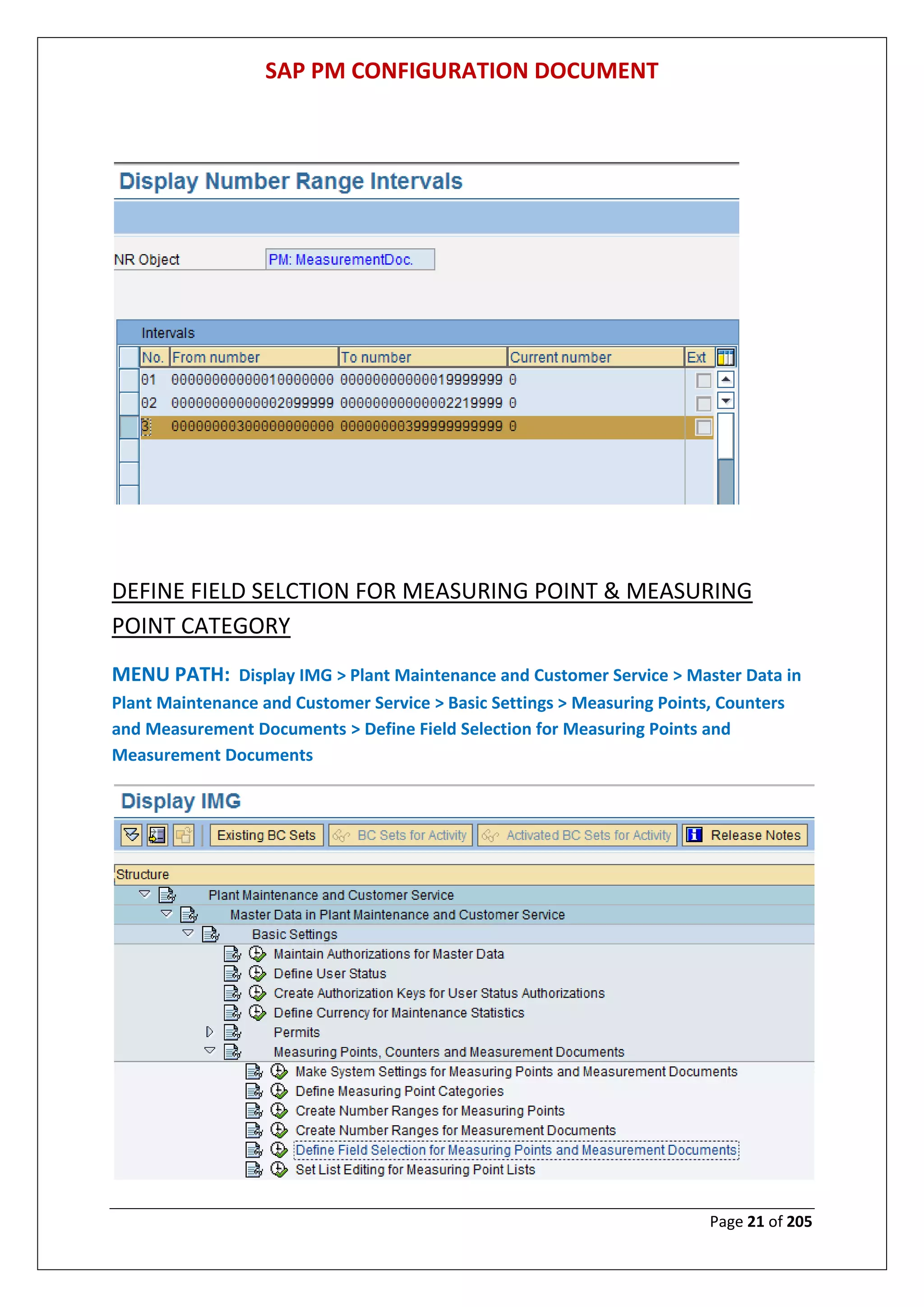
DEFINE FIELD SELCTION FOR MEASURING POINT & MEASURING
POINT CATEGORY
MENU PATH: Display IMG > Plant Maintenance and Customer Service > Master Data in
Plant Maintenance and Customer Service > Basic Settings > Measuring Points, Counters
and Measurement Documents > Define Field Selection for Measuring Points and
Measurement Documents
SAP PM CONFIGURATION DOCUMENT
Page 22 of 205
T
SAP PM CONFIGURATION DOCUMENT
Page 23 of 205
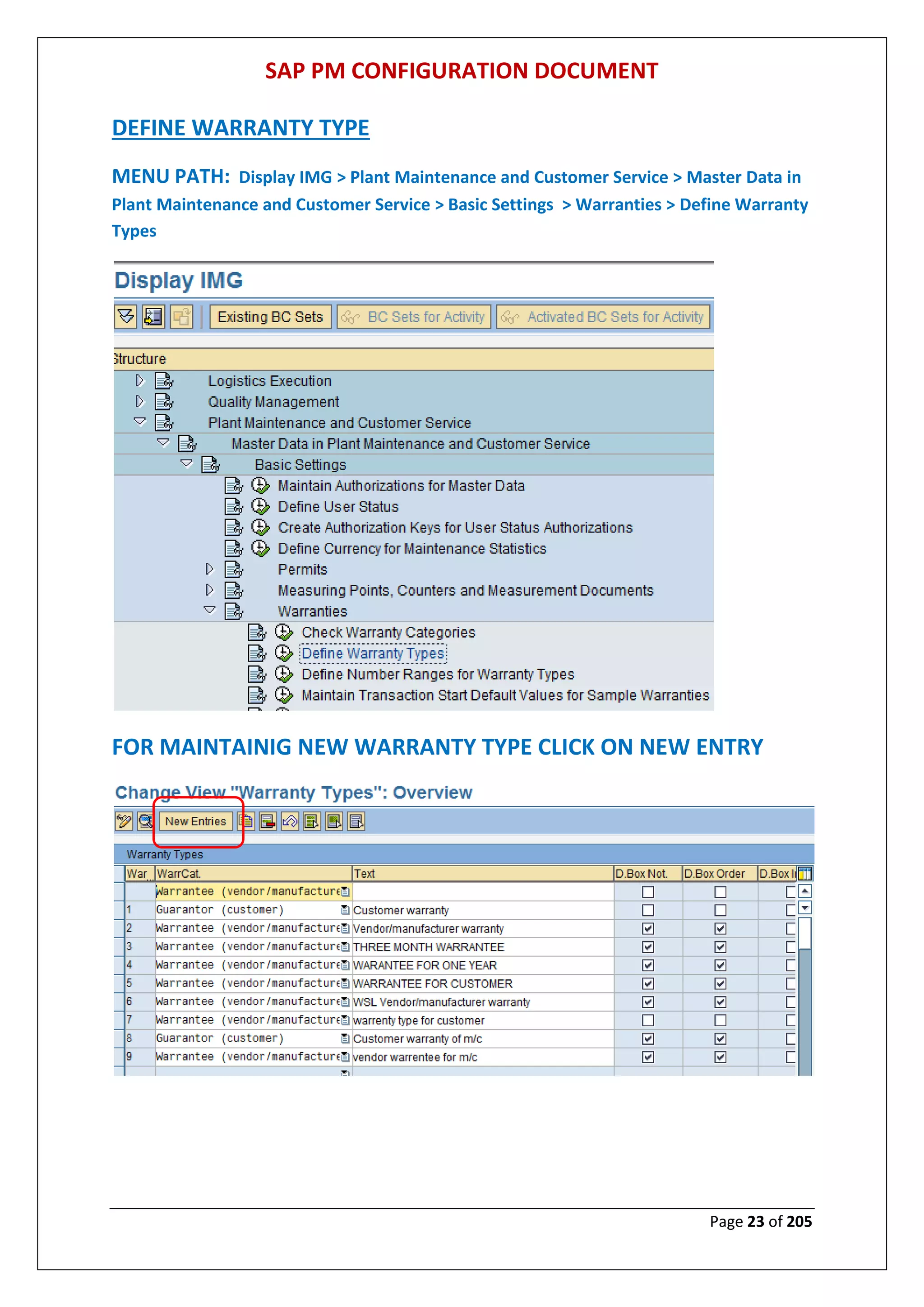
DEFINE WARRANTY TYPE
MENU PATH: Display IMG > Plant Maintenance and Customer Service > Master Data in
Plant Maintenance and Customer Service > Basic Settings > Warranties > Define Warranty
Types
FOR MAINTAINIG NEW WARRANTY TYPE CLICK ON NEW ENTRY
SAP PM CONFIGURATION DOCUMENT
Page 24 of 205
DEFINE NO. RANGE FOR WARRANY TYPE
MENU PATH: Display IMG > Plant Maintenance and Customer Service > Master Data in
Plant Maintenance and Customer Service > Basic Settings > Warranties > Define Number
Ranges for Warranty Types
FOR MAINTAIN NEW GROUP
SAP PM CONFIGURATION DOCUMENT
Page 25 of 205
FOR MAINTAINING NEW GROUP
SAP PM CONFIGURATION DOCUMENT
Page 26 of 205
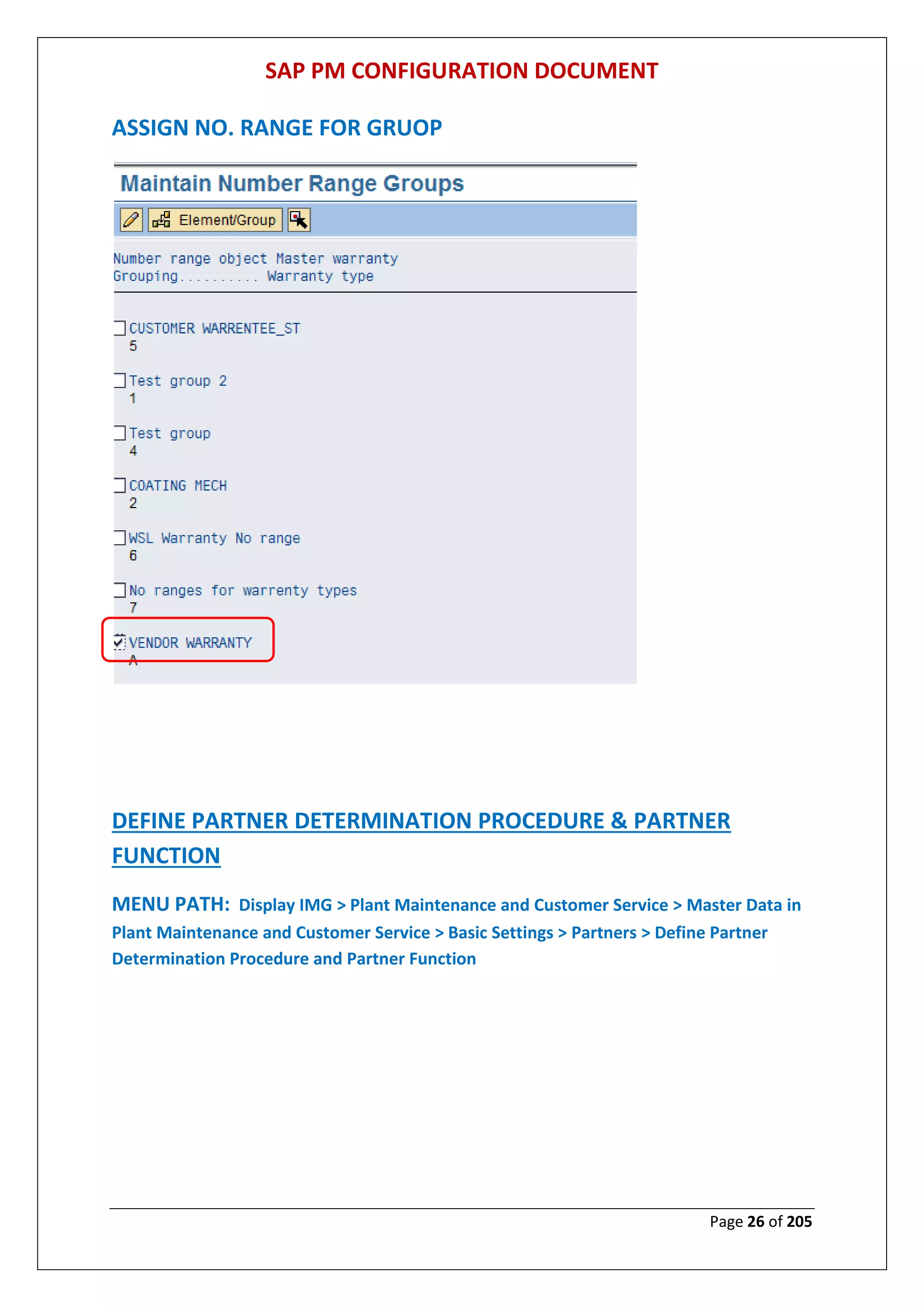
ASSIGN NO. RANGE FOR GRUOP
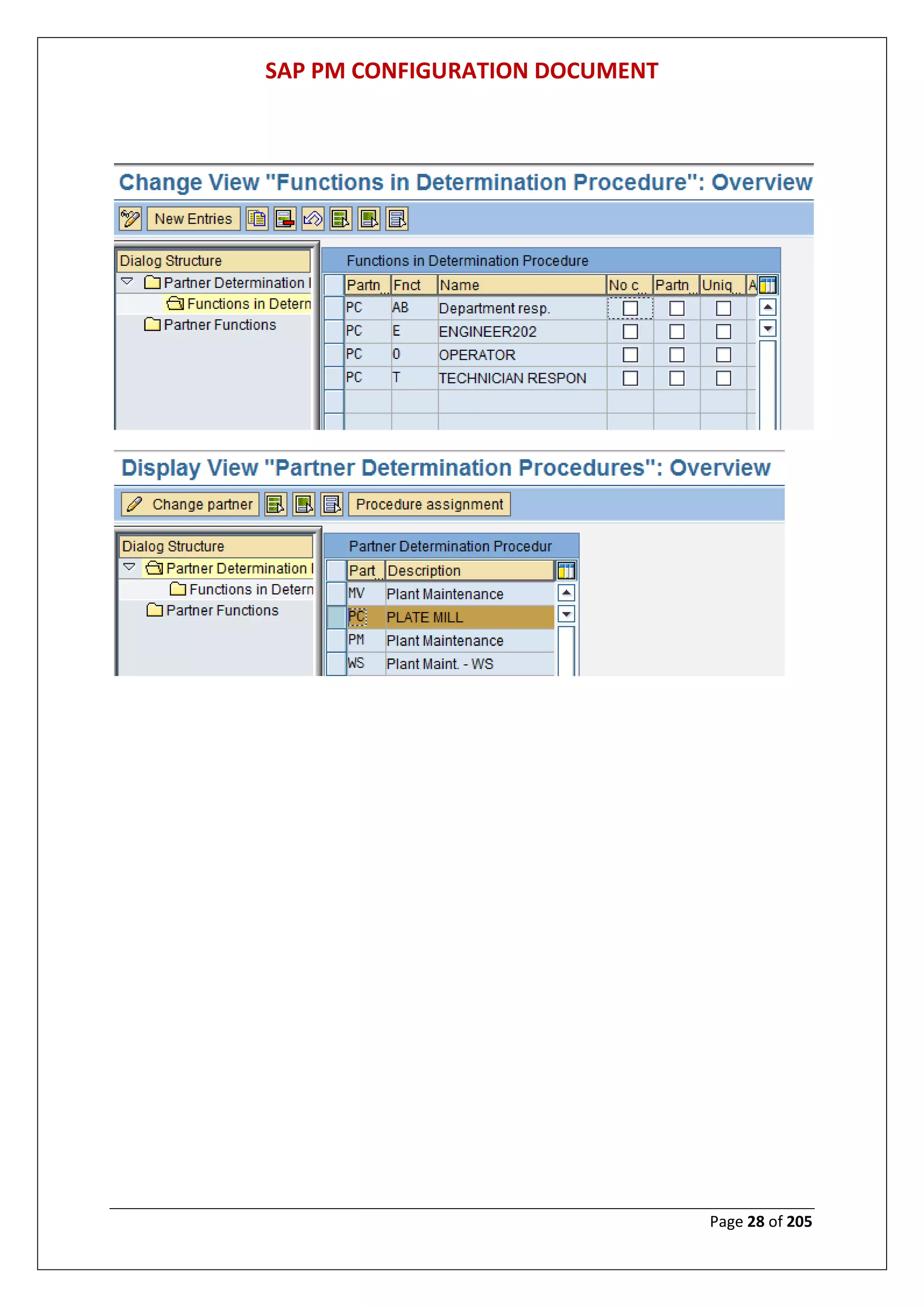
DEFINE PARTNER DETERMINATION PROCEDURE & PARTNER
FUNCTION
MENU PATH: Display IMG > Plant Maintenance and Customer Service > Master Data in
Plant Maintenance and Customer Service > Basic Settings > Partners > Define Partner
Determination Procedure and Partner Function
SAP PM CONFIGURATION DOCUMENT
Page 27 of 205
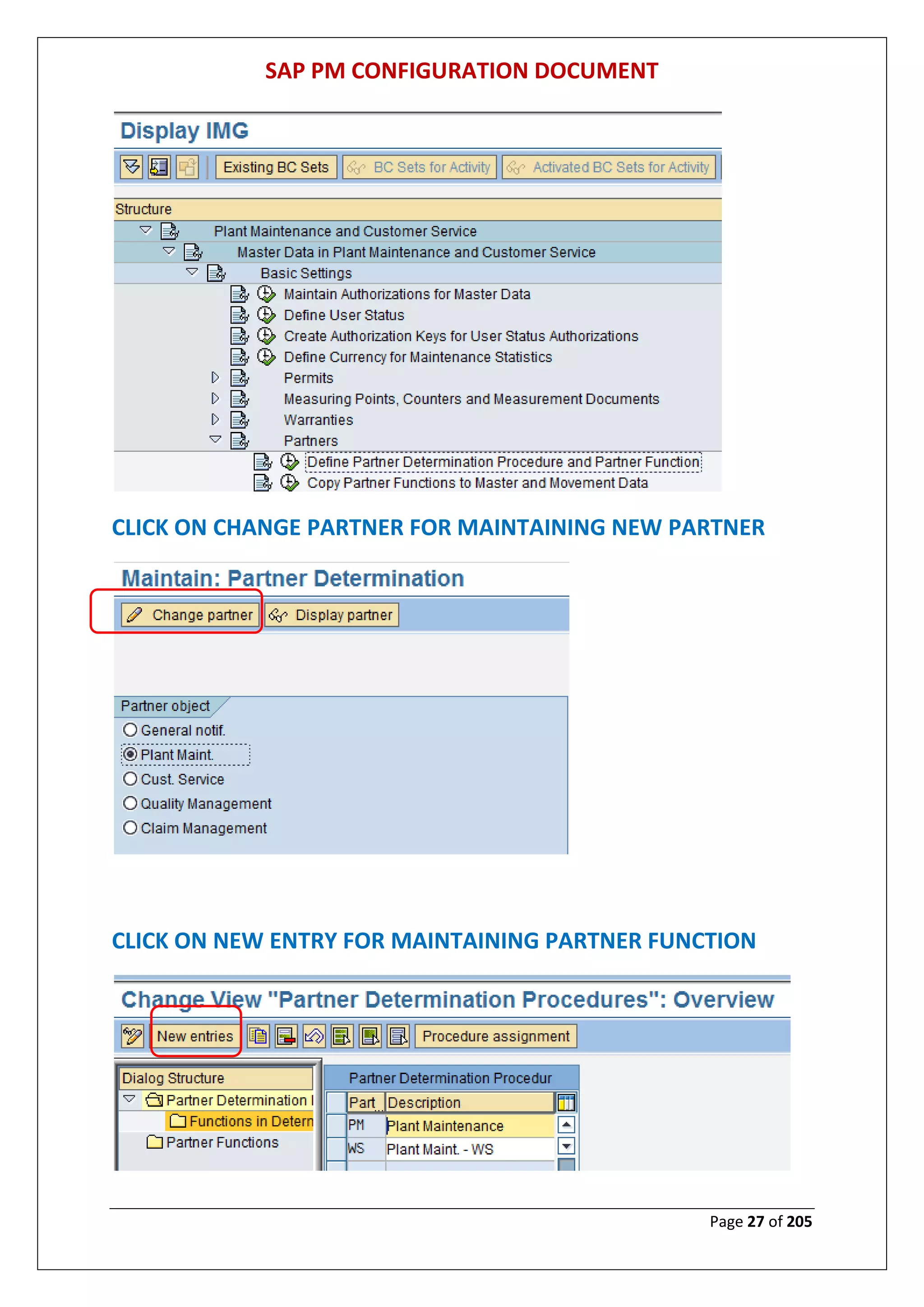
CLICK ON CHANGE PARTNER FOR MAINTAINING NEW PARTNER
CLICK ON NEW ENTRY FOR MAINTAINING PARTNER FUNCTION
SAP PM CONFIGURATION DOCUMENT
Page 28 of 205
SAP PM CONFIGURATION DOCUMENT
Page 29 of 205
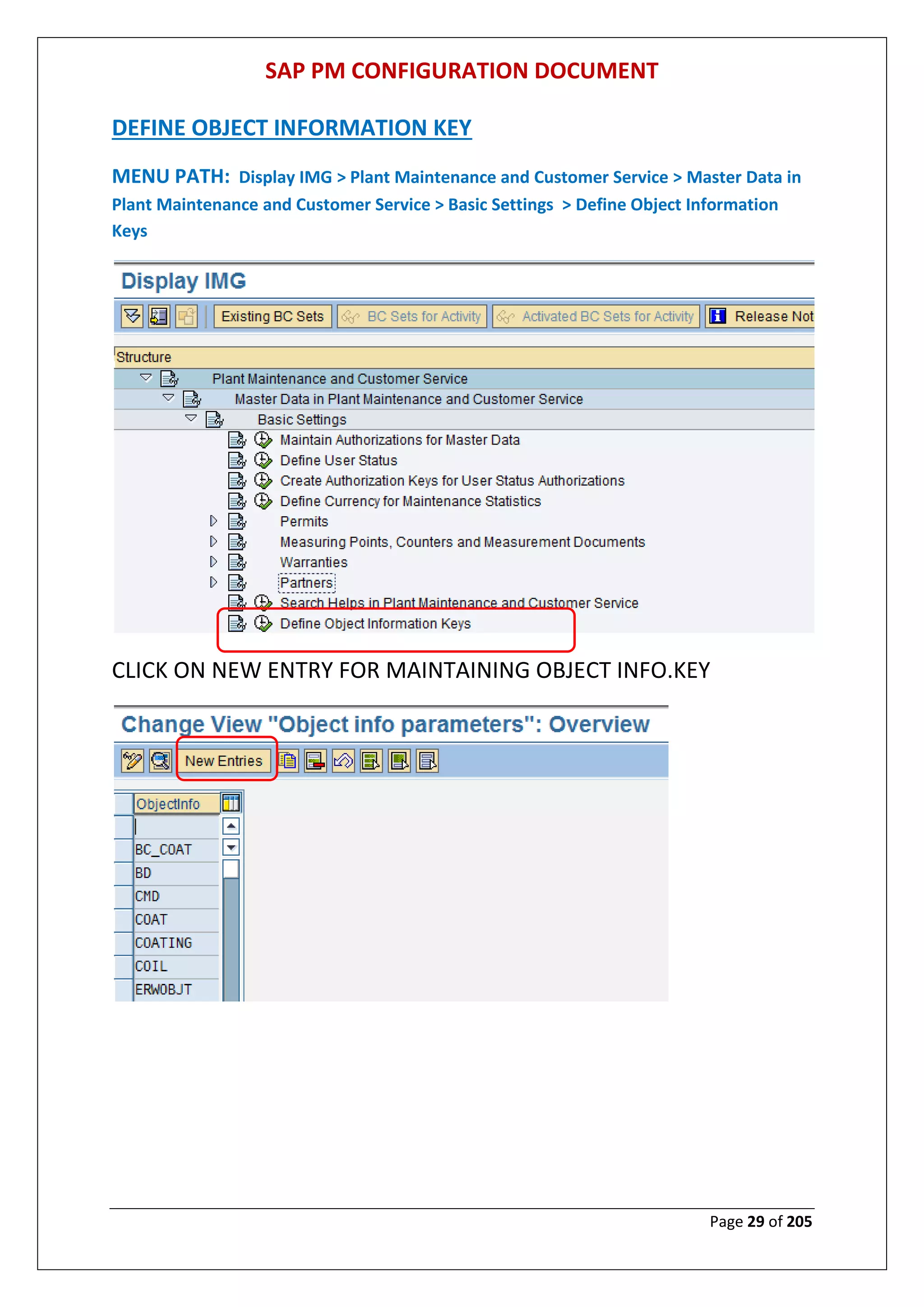
DEFINE OBJECT INFORMATION KEY
MENU PATH: Display IMG > Plant Maintenance and Customer Service > Master Data in
Plant Maintenance and Customer Service > Basic Settings > Define Object Information
Keys
CLICK ON NEW ENTRY FOR MAINTAINING OBJECT INFO.KEY
SAP PM CONFIGURATION DOCUMENT
Page 30 of 205
SAP PM CONFIGURATION DOCUMENT
Page 31 of 205
DEFINE TYPES OF TECHNICAL OBJECTS
MENU PATH: Display IMG > Plant Maintenance and Customer Service > Master Data in
Plant Maintenance and Customer Service > Technical Objects > General Data > Define
Types of Technical Objects
CLICK ON NEW ENTRY FOR MAINTAINING OBJECT TYPES
SAP PM CONFIGURATION DOCUMENT
Page 32 of 205
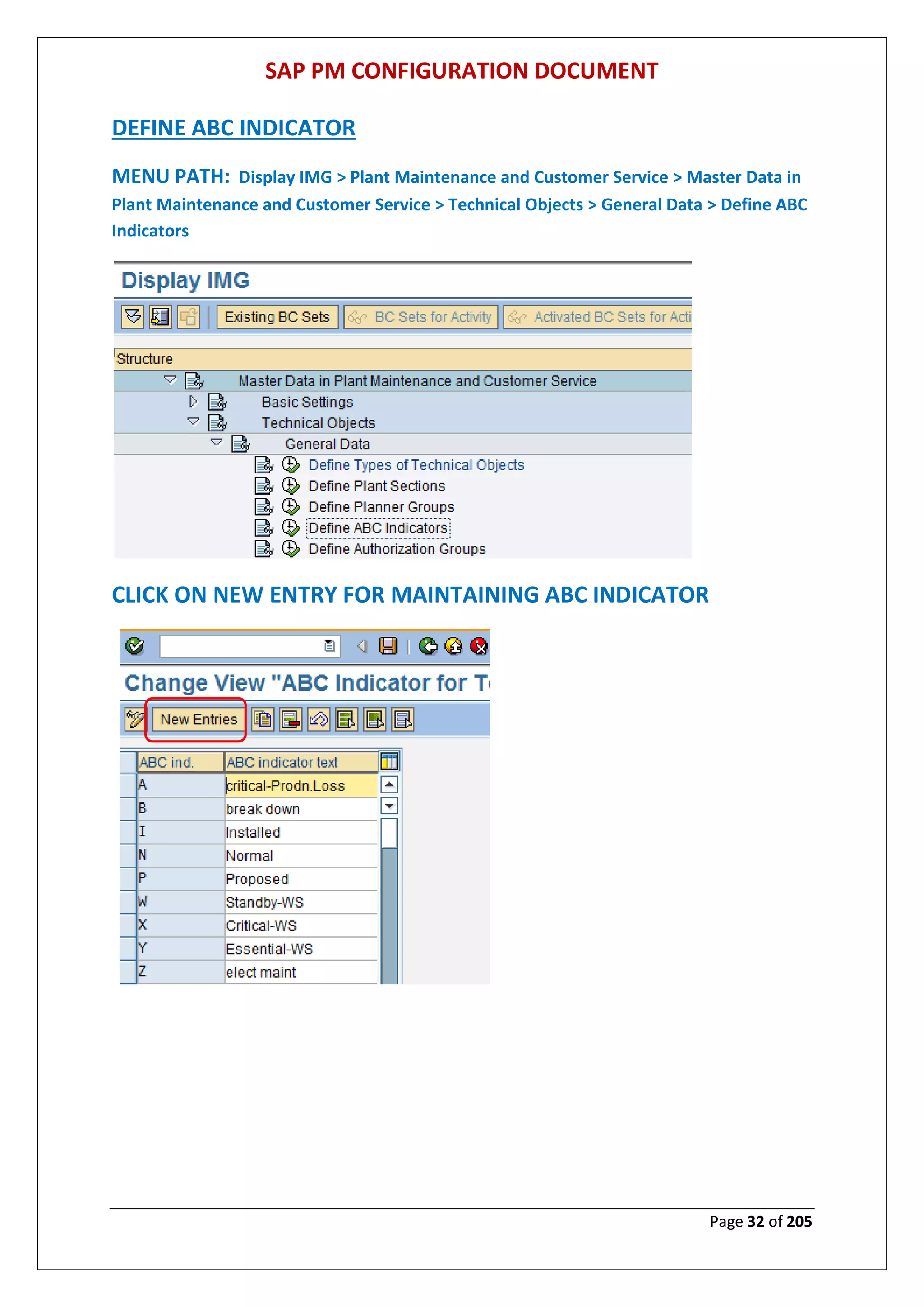
DEFINE ABC INDICATOR
MENU PATH: Display IMG > Plant Maintenance and Customer Service > Master Data in
Plant Maintenance and Customer Service > Technical Objects > General Data > Define ABC
Indicators
CLICK ON NEW ENTRY FOR MAINTAINING ABC INDICATOR
SAP PM CONFIGURATION DOCUMENT
Page 33 of 205
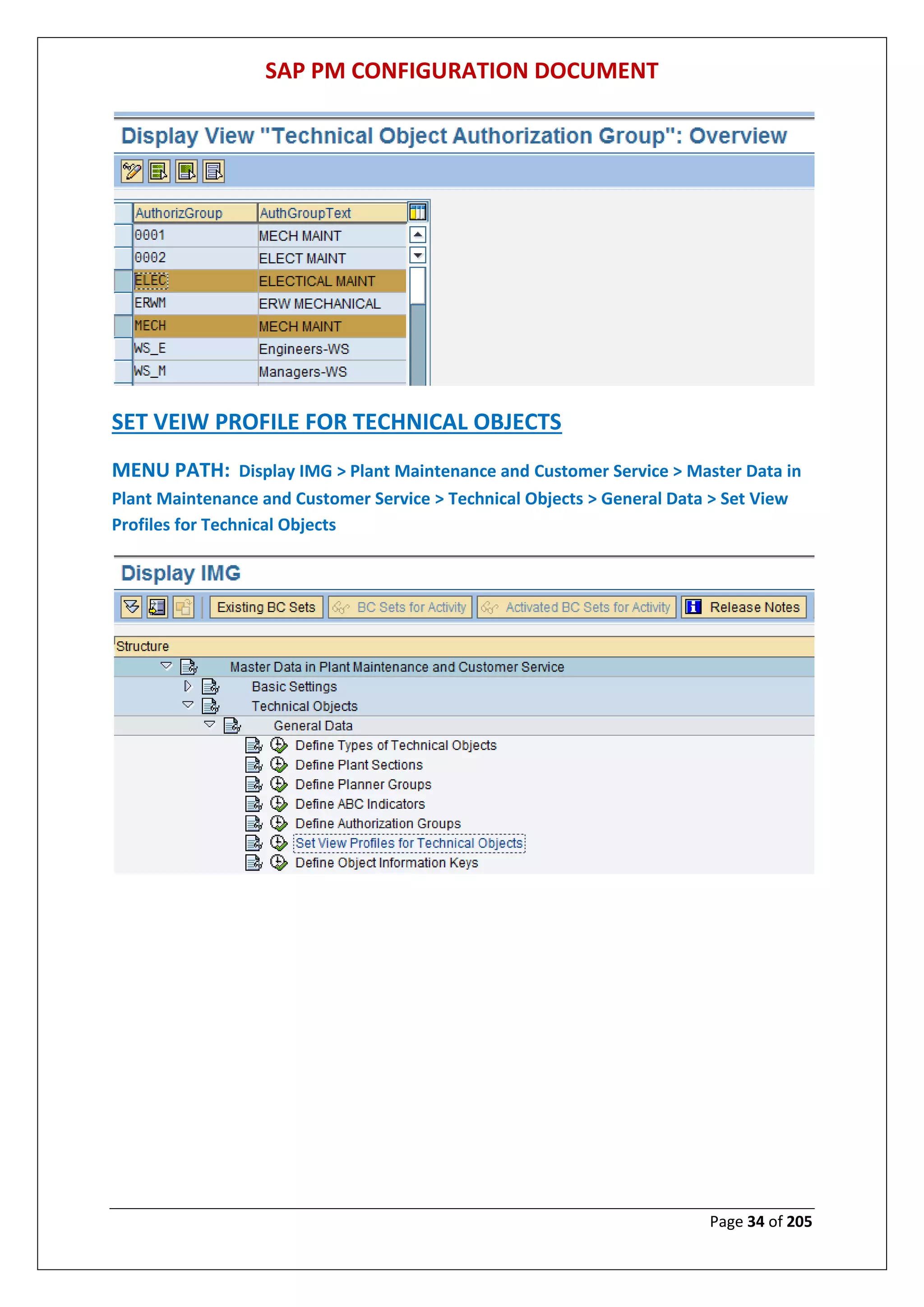
DEFINE AUTHORIZATION GROUP (TECHNICAL OBJECT)
MENU PATH: Display IMG > Plant Maintenance and Customer Service > Master Data in
Plant Maintenance and Customer Service > Technical Objects > General Data > Define
Authorization Groups
SAP PM CONFIGURATION DOCUMENT
Page 34 of 205
SET VEIW PROFILE FOR TECHNICAL OBJECTS
MENU PATH: Display IMG > Plant Maintenance and Customer Service > Master Data in
Plant Maintenance and Customer Service > Technical Objects > General Data > Set View
Profiles for Technical Objects
SAP PM CONFIGURATION DOCUMENT
Page 35 of 205
VEIW PROFILE FOR EQUIPMENT
VEIW PROFILE FOR FUNCTIONAL LOCATION
SAP PM CONFIGURATION DOCUMENT
Page 36 of 205
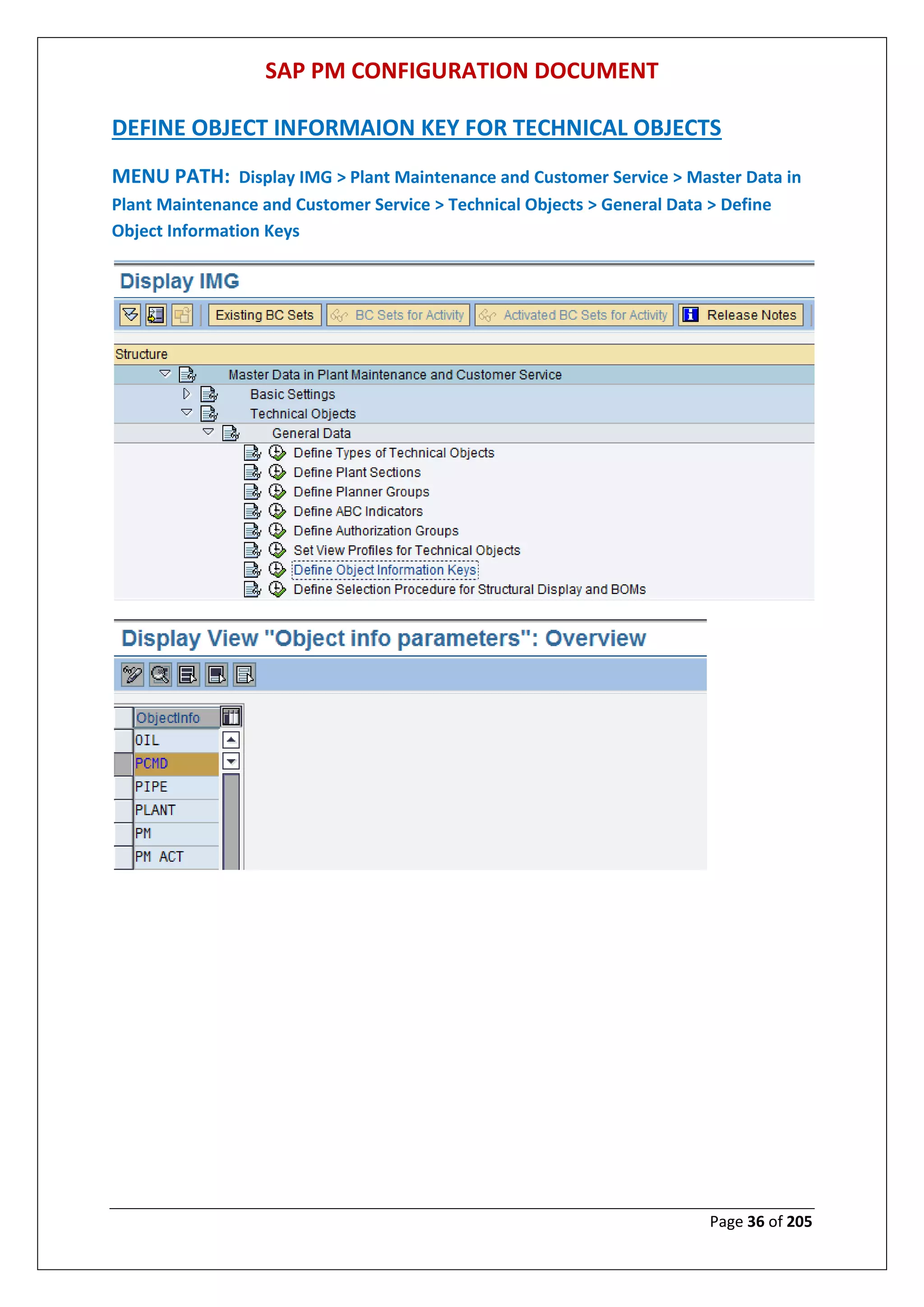
DEFINE OBJECT INFORMAION KEY FOR TECHNICAL OBJECTS
MENU PATH: Display IMG > Plant Maintenance and Customer Service > Master Data in
Plant Maintenance and Customer Service > Technical Objects > General Data > Define
Object Information Keys
SAP PM CONFIGURATION DOCUMENT
Page 37 of 205
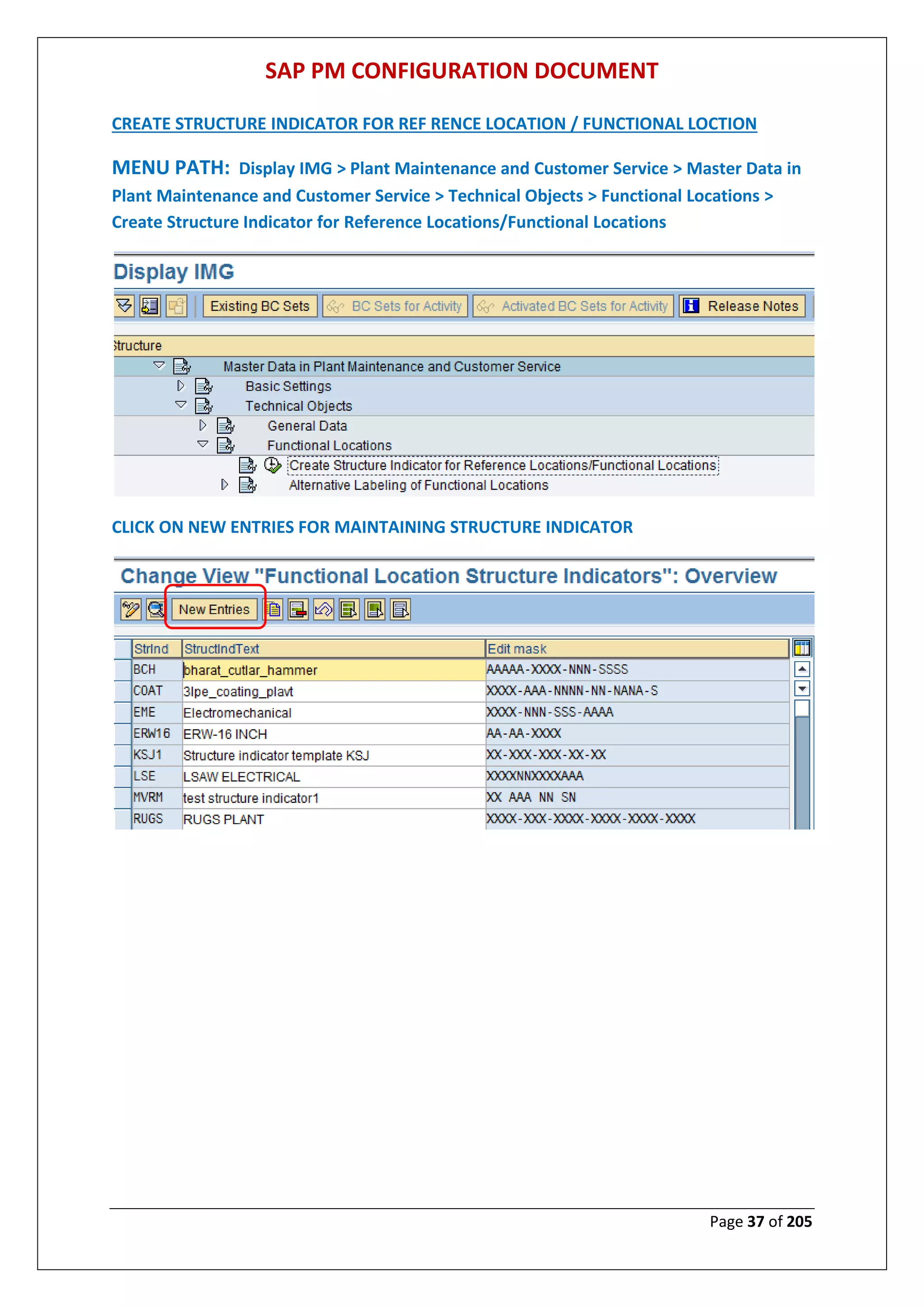
CREATE STRUCTURE INDICATOR FOR REF RENCE LOCATION / FUNCTIONAL LOCTION
MENU PATH: Display IMG > Plant Maintenance and Customer Service > Master Data in
Plant Maintenance and Customer Service > Technical Objects > Functional Locations >
Create Structure Indicator for Reference Locations/Functional Locations
CLICK ON NEW ENTRIES FOR MAINTAINING STRUCTURE INDICATOR
SAP PM CONFIGURATION DOCUMENT
Page 38 of 205
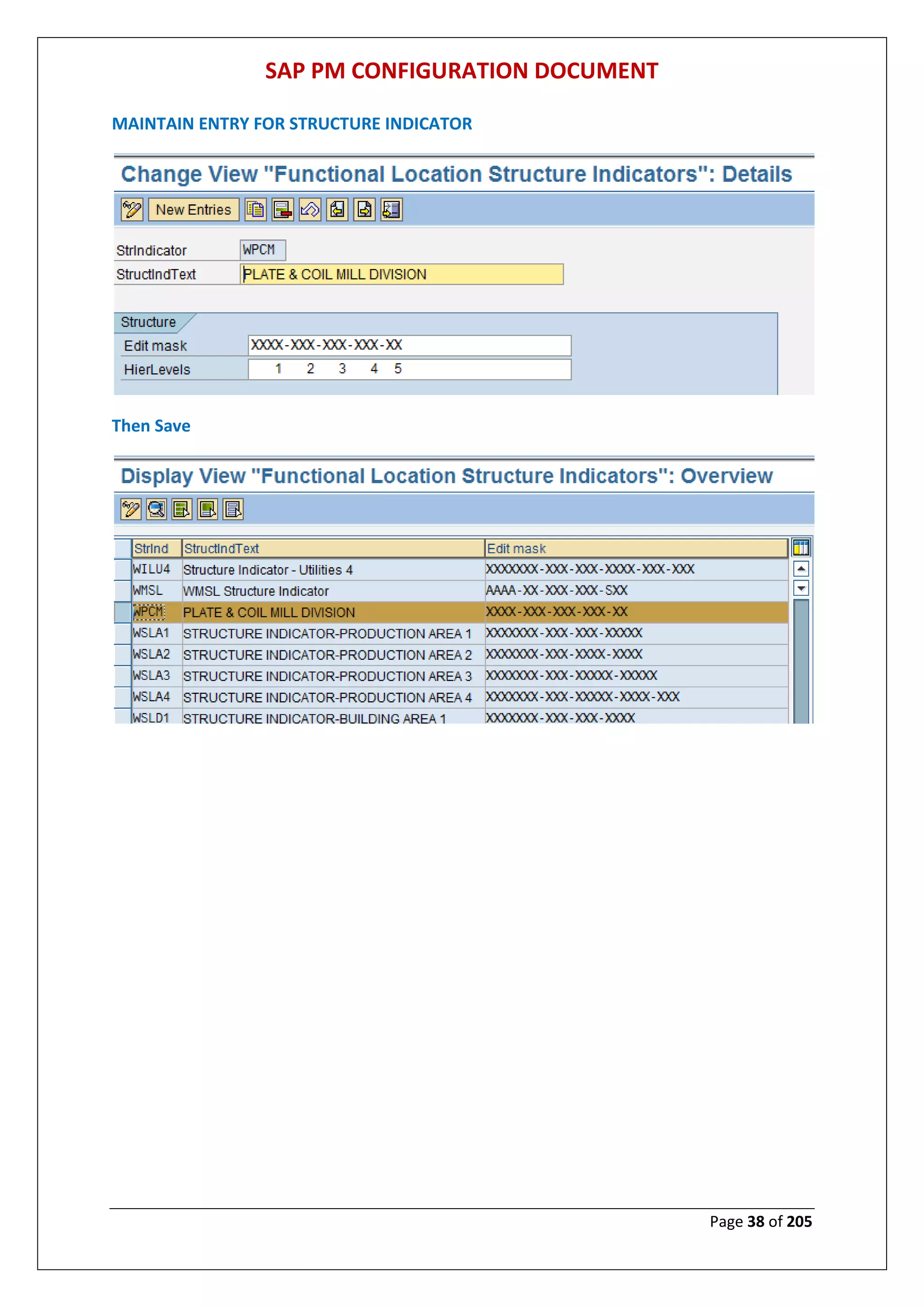
MAINTAIN ENTRY FOR STRUCTURE INDICATOR
Then Save
SAP PM CONFIGURATION DOCUMENT
Page 39 of 205
DEFINE CATEGORY OF FUNCTIONAL LOCATION
MENU PATH: Display IMG > Plant Maintenance and Customer Service > Master Data in
Plant Maintenance and Customer Service > Technical Objects > Functional Locations >
Define Category of Functional Location
CLICK ON NEW ENTRY FOR MAINTAINING FUNCTIONAL LOCATION
SAP PM CONFIGURATION DOCUMENT
Page 40 of 205
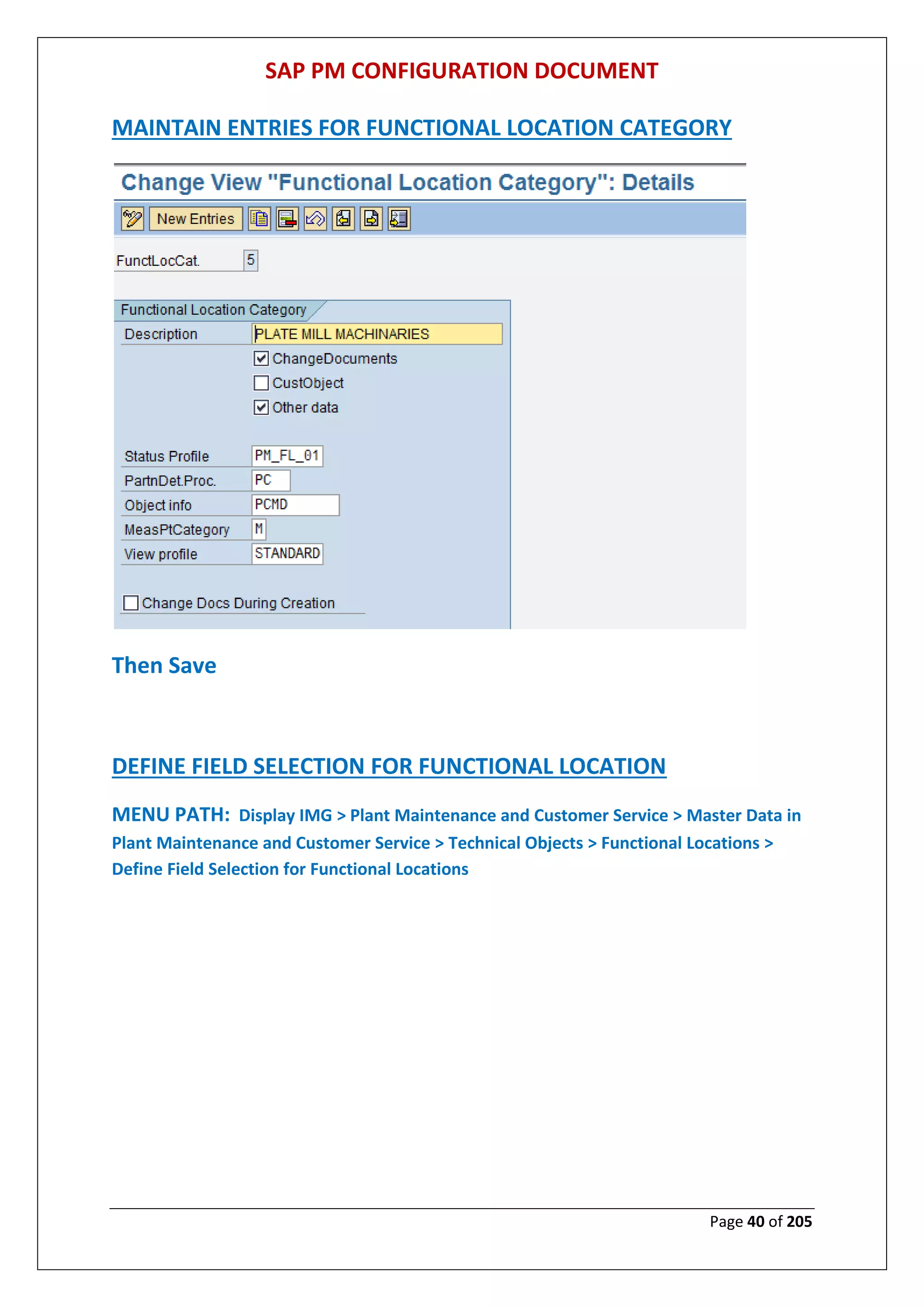
MAINTAIN ENTRIES FOR FUNCTIONAL LOCATION CATEGORY
Then Save
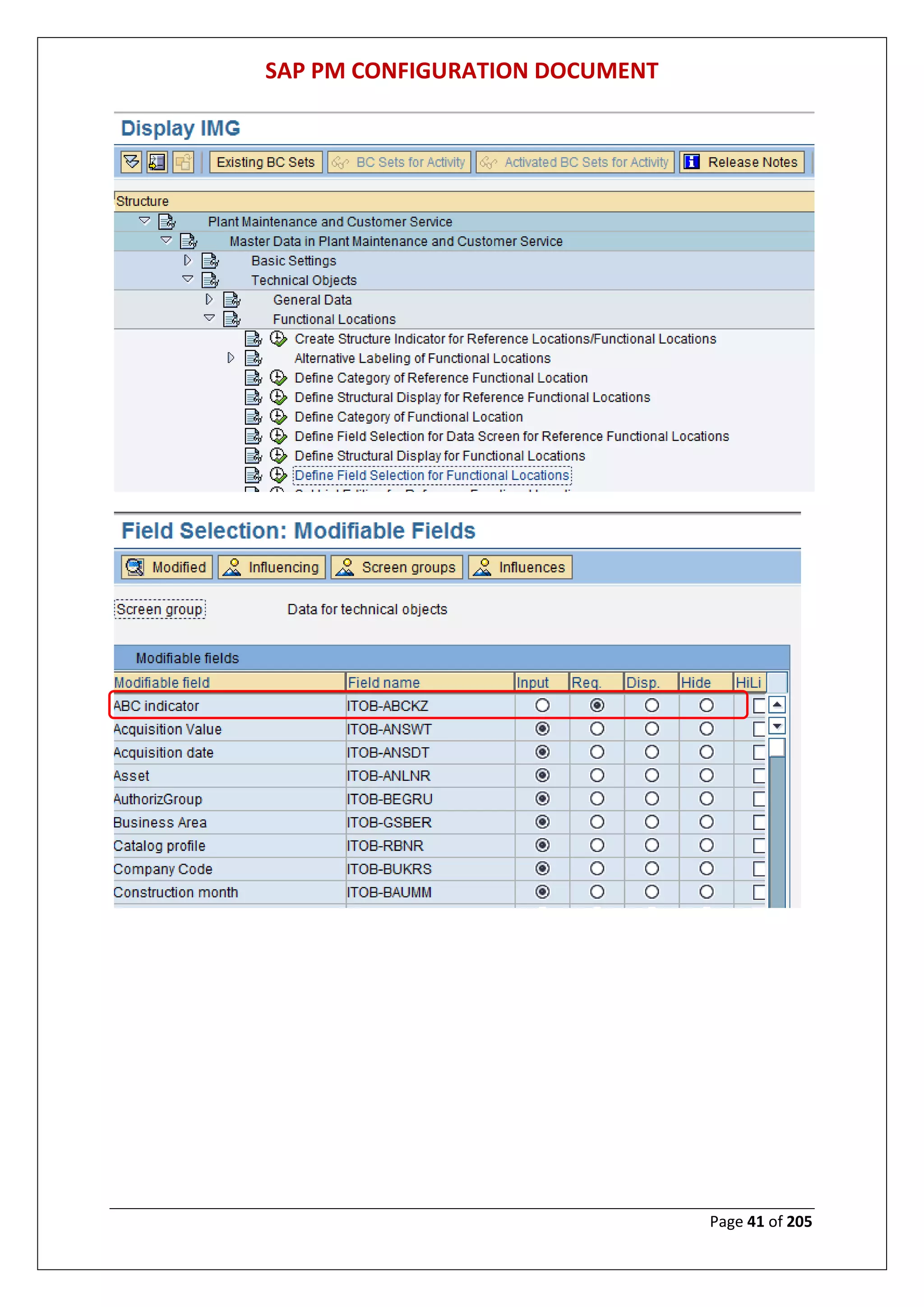
DEFINE FIELD SELECTION FOR FUNCTIONAL LOCATION
MENU PATH: Display IMG > Plant Maintenance and Customer Service > Master Data in
Plant Maintenance and Customer Service > Technical Objects > Functional Locations >
Define Field Selection for Functional Locations
SAP PM CONFIGURATION DOCUMENT
Page 41 of 205
SAP PM CONFIGURATION DOCUMENT
Page 42 of 205
Maintaining field selection for functional location category 5
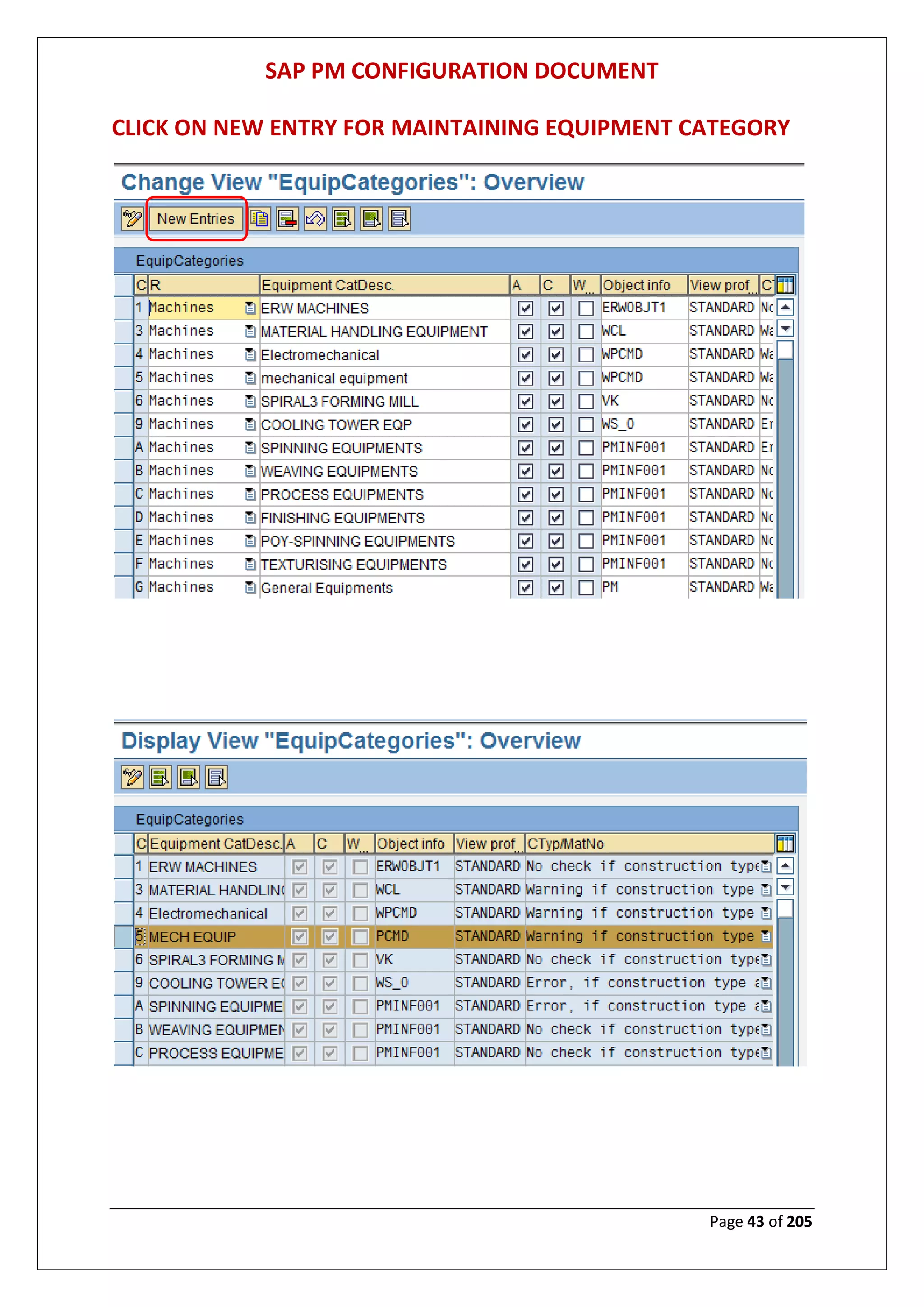
MAINTAIN EQUIPMENT CATEGORY
MENU PATH: Display IMG > Plant Maintenance and Customer Service > Master Data in
Plant Maintenance and Customer Service > Technical Objects > Equipment > Equipment
Categories > Maintain Equipment Category
SAP PM CONFIGURATION DOCUMENT
Page 43 of 205
CLICK ON NEW ENTRY FOR MAINTAINING EQUIPMENT CATEGORY
SAP PM CONFIGURATION DOCUMENT
Page 44 of 205
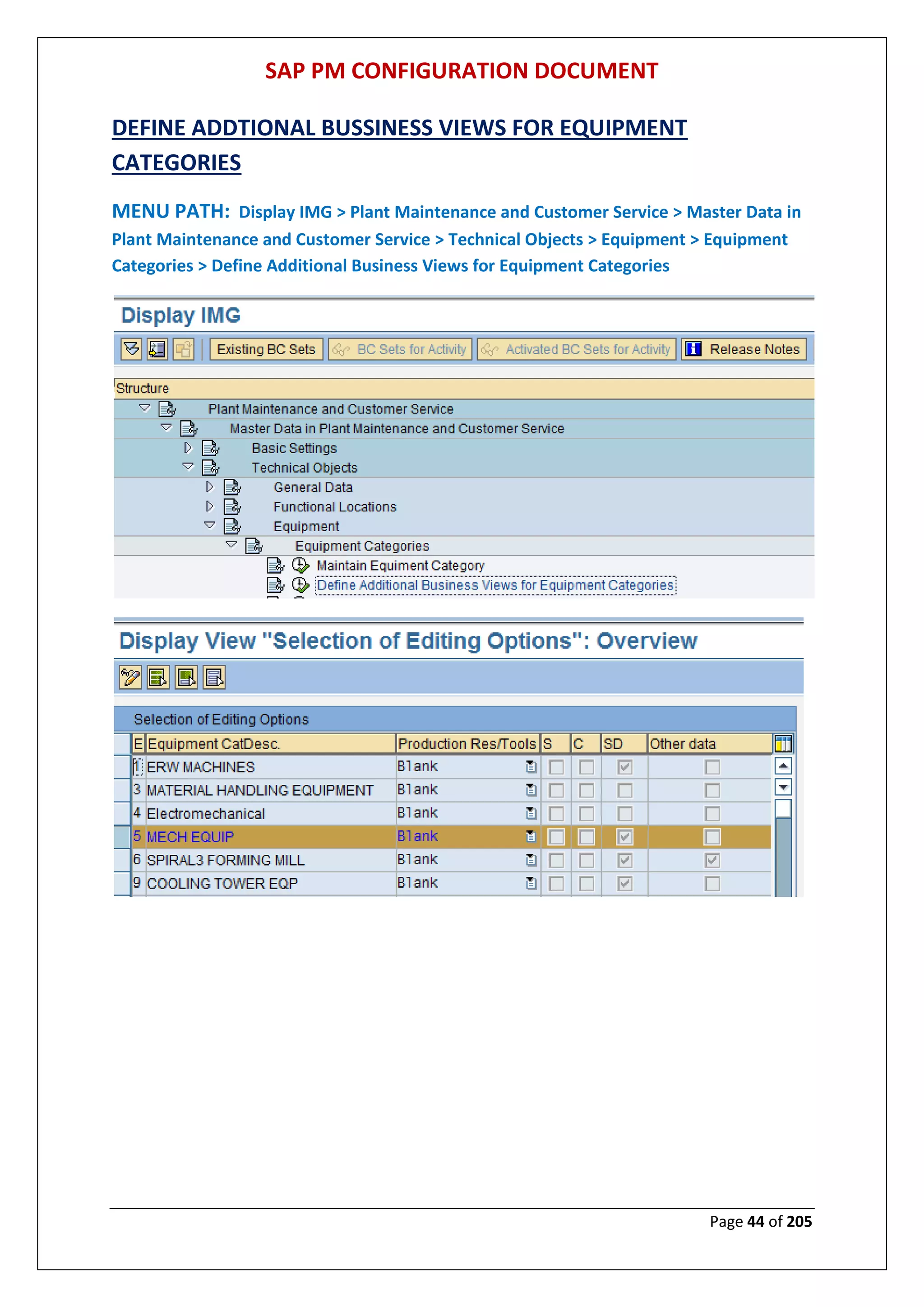
DEFINE ADDTIONAL BUSSINESS VIEWS FOR EQUIPMENT
CATEGORIES
MENU PATH: Display IMG > Plant Maintenance and Customer Service > Master Data in
Plant Maintenance and Customer Service > Technical Objects > Equipment > Equipment
Categories > Define Additional Business Views for Equipment Categories
SAP PM CONFIGURATION DOCUMENT
Page 45 of 205
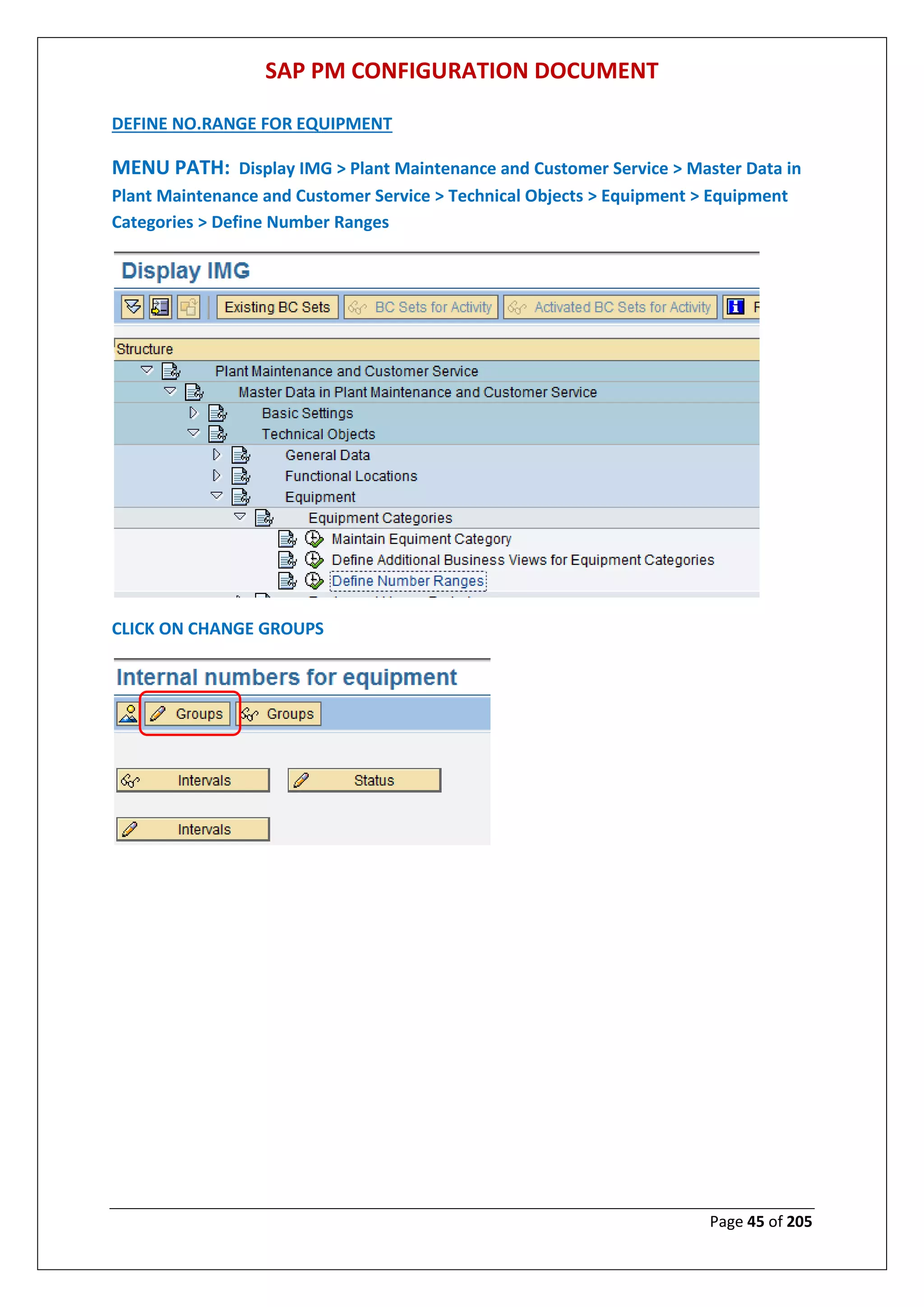
DEFINE NO.RANGE FOR EQUIPMENT
MENU PATH: Display IMG > Plant Maintenance and Customer Service > Master Data in
Plant Maintenance and Customer Service > Technical Objects > Equipment > Equipment
Categories > Define Number Ranges
CLICK ON CHANGE GROUPS
SAP PM CONFIGURATION DOCUMENT
Page 46 of 205
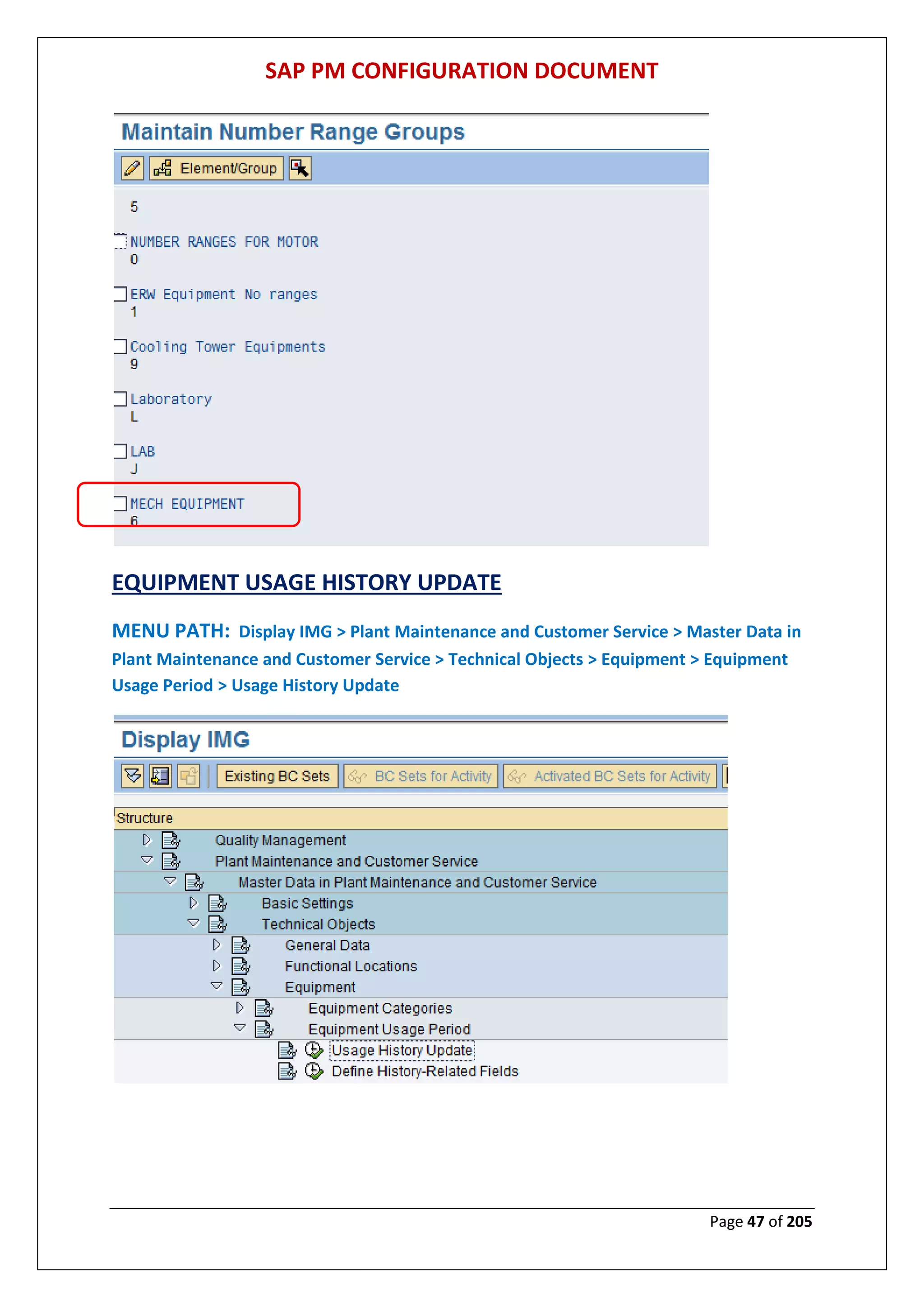
SELECT GROUP AND CLICK ON INSERT
MAINTAIN NO. RANGE FOR THE GROUP
AFTER DEFINING NO. RANGE CLICK ON INSERT & THEN SAVE
SAP PM CONFIGURATION DOCUMENT
Page 47 of 205
EQUIPMENT USAGE HISTORY UPDATE
MENU PATH: Display IMG > Plant Maintenance and Customer Service > Master Data in
Plant Maintenance and Customer Service > Technical Objects > Equipment > Equipment
Usage Period > Usage History Update
SAP PM CONFIGURATION DOCUMENT
Page 48 of 205
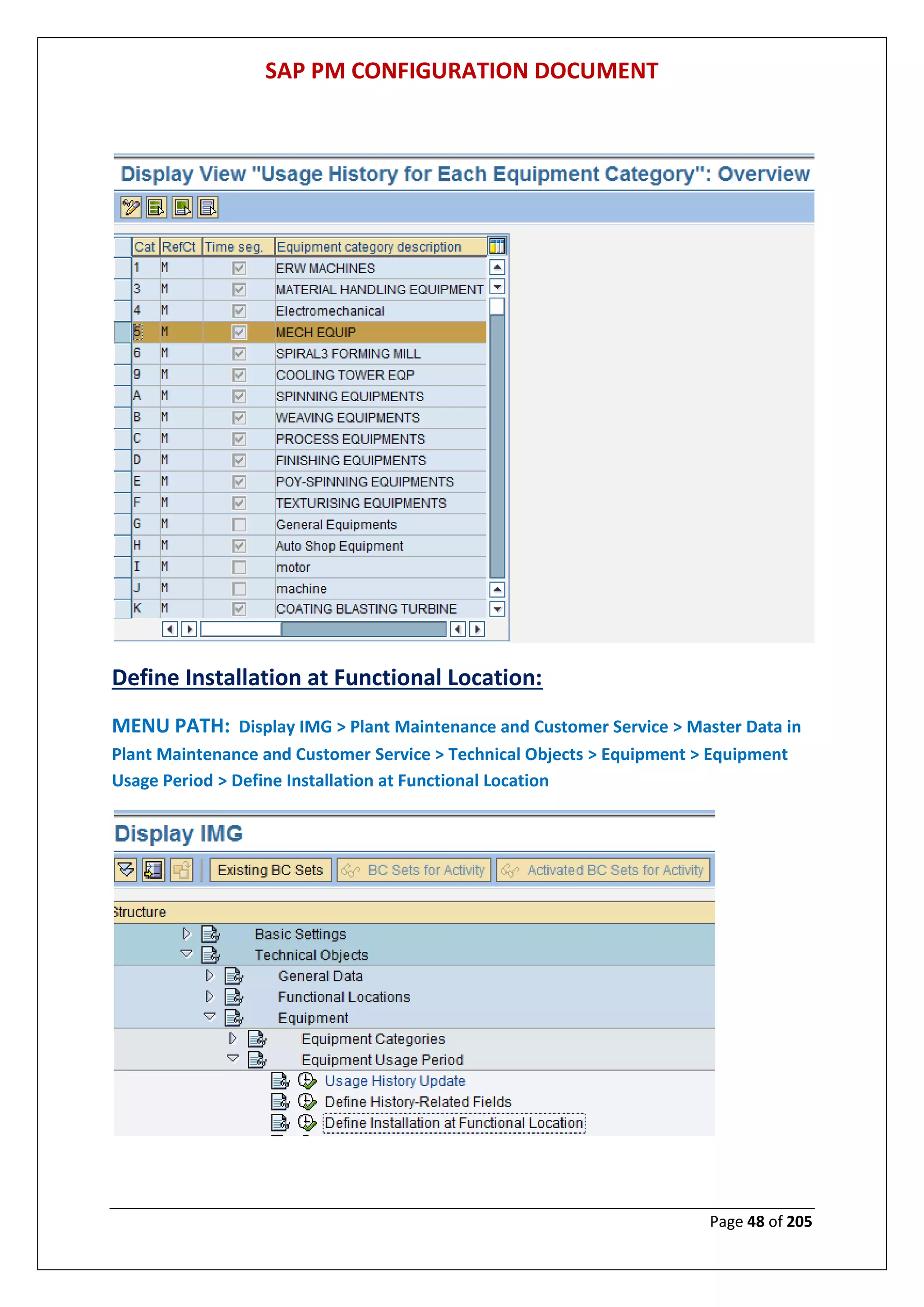
Define Installation at Functional Location:
MENU PATH: Display IMG > Plant Maintenance and Customer Service > Master Data in
Plant Maintenance and Customer Service > Technical Objects > Equipment > Equipment
Usage Period > Define Installation at Functional Location
SAP PM CONFIGURATION DOCUMENT
Page 49 of 205
Assign User Status Profile to Equipment Category
MENU PATH: Display IMG > Plant Maintenance and Customer Service > Master Data in
Plant Maintenance and Customer Service > Technical Objects > Equipment> Assign User
Status Profile to Equipment Category
SAP PM CONFIGURATION DOCUMENT
Page 50 of 205
Assign Partner Determination Procedure to Equipment Category
MENU PATH: Display IMG > Plant Maintenance and Customer Service > Master Data in
Plant Maintenance and Customer Service > Technical Objects > Assign Partner
Determination Procedure to Equipment Category
SAP PM CONFIGURATION DOCUMENT
Page 51 of 205
SCREEN BEFORE ASSIGN THE PARTNER DITERMINATION
SCREEN AFTER ASSIGN THE PARTNER DITERMINATION
SAP PM CONFIGURATION DOCUMENT
Page 52 of 205
Define Field Selection for the Equipment Master Record
MENU PATH: Display IMG > Plant Maintenance and Customer Service > Master Data in
Plant Maintenance and Customer Service > Technical Objects > Equipment > Define Field
Selection for the Equipment Master Record
SAP PM CONFIGURATION DOCUMENT
Page 53 of 205
MAKING FIELD MANDATORY FOR EQUIP.CATEGORY 5
Allow Multilingual Text Maintenance for Each Equipment Category
MENU PATH: Display IMG > Plant Maintenance and Customer Service > Master Data in
Plant Maintenance and Customer Service > Technical Objects > Equipment > Allow
Multilingual Text Maintenance for Each Equipment Category
SAP PM CONFIGURATION DOCUMENT
Page 54 of 205
Define Serial Number Profiles
MENU PATH: Display IMG > Plant Maintenance and Customer Service > Master Data in
Plant Maintenance and Customer Service > Technical Objects > Serial Number
Management > Define Serial Number Profiles
SAP PM CONFIGURATION DOCUMENT
Page 55 of 205
Click on new entry for maintaining serial no.profile
SAP PM CONFIGURATION DOCUMENT
Page 56 of 205
Then Save
Define Default Equipment Categories for Serial Numbers
MENU PATH: Display IMG > Plant Maintenance and Customer Service > Master Data in
Plant Maintenance and Customer Service > Technical Objects > Serial Number
Management > Define Default Equipment Categories for Serial Numbers
SAP PM CONFIGURATION DOCUMENT
Page 57 of 205
Define Responsible Designers/Laboratories
MENU PATH: Display IMG > Plant Maintenance and Customer Service > Master Data in
Plant Maintenance and Customer Service > Bills of Material > General Data > Define
Responsible Designers/Laboratories
SAP PM CONFIGURATION DOCUMENT
Page 58 of 205
Click on new entries for maintaining designers/laboratories
Then Save
SAP PM CONFIGURATION DOCUMENT
Page 59 of 205
Define Item Categories
MENU PATH: Display IMG > Plant Maintenance and Customer Service > Master Data in
Plant Maintenance and Customer Service > Bills of Material > Item Data > Define Item
Categories
SAP PM CONFIGURATION DOCUMENT
Page 60 of 205
GETTING COFIGERATION FOR MAINTENANCE PLANNING
Define Maintenance Planner Groups
MENU PATH: Display IMG > Plant Maintenance and Customer Service > Maintenance
Plans, Work Centres, Task Lists and PRTs> Basic Settings > Define Maintenance Planner
Groups
Execute define maintenance planner group
SAP PM CONFIGURATION DOCUMENT
Page 61 of 205
Set Maintenance Plan Categories
MENU PATH: Display IMG > Plant Maintenance and Customer Service > Maintenance
Plans, Work Centres, Task Lists and PRTs> Maintenance Plans> Set Maintenance Plan
Categories
Click on new entries tab
SAP PM CONFIGURATION DOCUMENT
Page 62 of 205
Define Number Ranges for Maintenance Plans
MENU PATH: Display IMG > Plant Maintenance and Customer Service > Maintenance
Plans, Work Centres, Task Lists and PRTs> Maintenance Plans> Define Number Ranges for
Maintenance Plans
Click on change interval for maintaining new interval
SAP PM CONFIGURATION DOCUMENT
Page 63 of 205
For maintaining text & no.range for the group
Click on insert after maintaining text & no.range for group
SAP PM CONFIGURATION DOCUMENT
Page 64 of 205
Define Number Ranges for Maintenance Items
MENU PATH: Display IMG > Plant Maintenance and Customer Service > Maintenance
Plans, Work Centres, Task Lists and PRTs> Maintenance Plans> Define Number Ranges for
Maintenance Items
Click on change interval for maintaining new interval
SAP PM CONFIGURATION DOCUMENT
Page 65 of 205
Define Sort Fields for Maintenance Plan
MENU PATH: Display IMG > Plant Maintenance and Customer Service > Maintenance
Plans, Work Centres, Task Lists and PRTs> Maintenance Plans> Define Sort Fields for
Maintenance Plan
Click on new entry for maintaining short field
SAP PM CONFIGURATION DOCUMENT
Page 66 of 205
Configure Special Functions for Maintenance Planning
MENU PATH: Display IMG > Plant Maintenance and Customer Service > Maintenance
Plans, Work Centres, Task Lists and PRTs> Maintenance Plans> Configure Special Functions
for Maintenance Planning
SAP PM CONFIGURATION DOCUMENT
Page 67 of 205
Define Employees Responsible for Work Centres
MENU PATH: Display IMG > Plant Maintenance and Customer Service > Maintenance
Plans, Work Centres, Task Lists and PRTs > Work Canters > General Data > Define
Employees Responsible for Work Canters
SAP PM CONFIGURATION DOCUMENT
Page 68 of 205
Configure Planner Group
MENU PATH: Display IMG > Plant Maintenance and Customer Service > Maintenance
Plans, Work Centres, Task Lists and PRTs > Task Lists > General Data > Configure Planner
Group
SAP PM CONFIGURATION DOCUMENT
Page 69 of 205
SAP PM CONFIGURATION DOCUMENT
Page 70 of 205
Define Number Ranges for General Maintenance Task Lists
MENU PATH: Display IMG > Plant Maintenance and Customer Service > Maintenance
Plans, Work Centres, Task Lists and PRTs > Task Lists > Control Data> Define Number
Ranges for General Maintenance Task Lists
CLICK ON CHANGE INTERVAL
SAP PM CONFIGURATION DOCUMENT
Page 71 of 205
CLICK ON INSERT TAB
MAINTAIN NO.RANGE
AFTER MAINTAINING NO.RANGE PRESS ENTER KEY & THEN SAVE
SAP PM CONFIGURATION DOCUMENT
Page 72 of 205
Define Number Ranges for Equipment Task Lists
MENU PATH: Display IMG > Plant Maintenance and Customer Service > Maintenance
Plans, Work Centres, Task Lists and PRTs > Task Lists > Control Data > Define Number
Ranges for Equipment Task Lists
SAP PM CONFIGURATION DOCUMENT
Page 73 of 205
CLICK ON CHANGE INTERVAL
CLICK ON INSERT TAB
SAP PM CONFIGURATION DOCUMENT
Page 74 of 205
Define Number Ranges for Task Lists for Functional Locations
MENU PATH: Display IMG > Plant Maintenance and Customer Service > Maintenance
Plans, Work Centres, Task Lists and PRTs > Task Lists > Control Data > Define Number
Ranges for Task Lists for Functional Locations
SAP PM CONFIGURATION DOCUMENT
Page 75 of 205
Define PRT Authorization Group
MENU PATH: Display IMG > Plant Maintenance and Customer Service > Maintenance
Plans, Work Centres, Task Lists and PRTs > Production Resources/Tools > General Data >
Define PRT Authorization Group
SAP PM CONFIGURATION DOCUMENT
Page 76 of 205
Click on new entries tab for maintaining PRT authorization group
SAP PM CONFIGURATION DOCUMENT
Page 77 of 205
Define PRT Group Keys
MENU PATH: Display IMG > Plant Maintenance and Customer Service > Maintenance
Plans, Work Centres, Task Lists and PRTs > Production Resources/Tools > General Data >
Define PRT Group Keys
Click on new entries tab for maintaining PRT group keys
SAP PM CONFIGURATION DOCUMENT
Page 78 of 205
GETTING INTO CONFIGERATION FOR MAINTENANCE & SERVICE
PROCESSING
Define Notification Types
MENU PATH: Display IMG > Plant Maintenance and Customer Service > Maintenance
and Service Processing > Maintenance and Service Notifications > Notification Creation >
Notification Types > Define Notification Types
SAP PM CONFIGURATION DOCUMENT
Page 79 of 205
Click on new entries tab for maintaining PRT group keys
SAP PM CONFIGURATION DOCUMENT
Page 80 of 205
Set Screen Templates for the Notification Type
MENU PATH: Display IMG > Plant Maintenance and Customer Service > Maintenance
and Service Processing > Maintenance and Service Notifications > Notification Creation >
Notification Types > Set Screen Templates for the Notification Type
SAP PM CONFIGURATION DOCUMENT
Page 81 of 205
CLICK ON NEW ENTRTY
Maintain the notification data
AFTER ENTRY SAVE THEN BACK (F3)
SAP PM CONFIGURATION DOCUMENT
Page 82 of 205
CLICK ON NEW ENTRTY
AFTER ENTRY SAVE THEN BACK(F3)
SAP PM CONFIGURATION DOCUMENT
Page 83 of 205
CLICK ON NEW ENTRTY
AFTER ENTRY SAVE THEN BACK(F3)
SAP PM CONFIGURATION DOCUMENT
Page 84 of 205
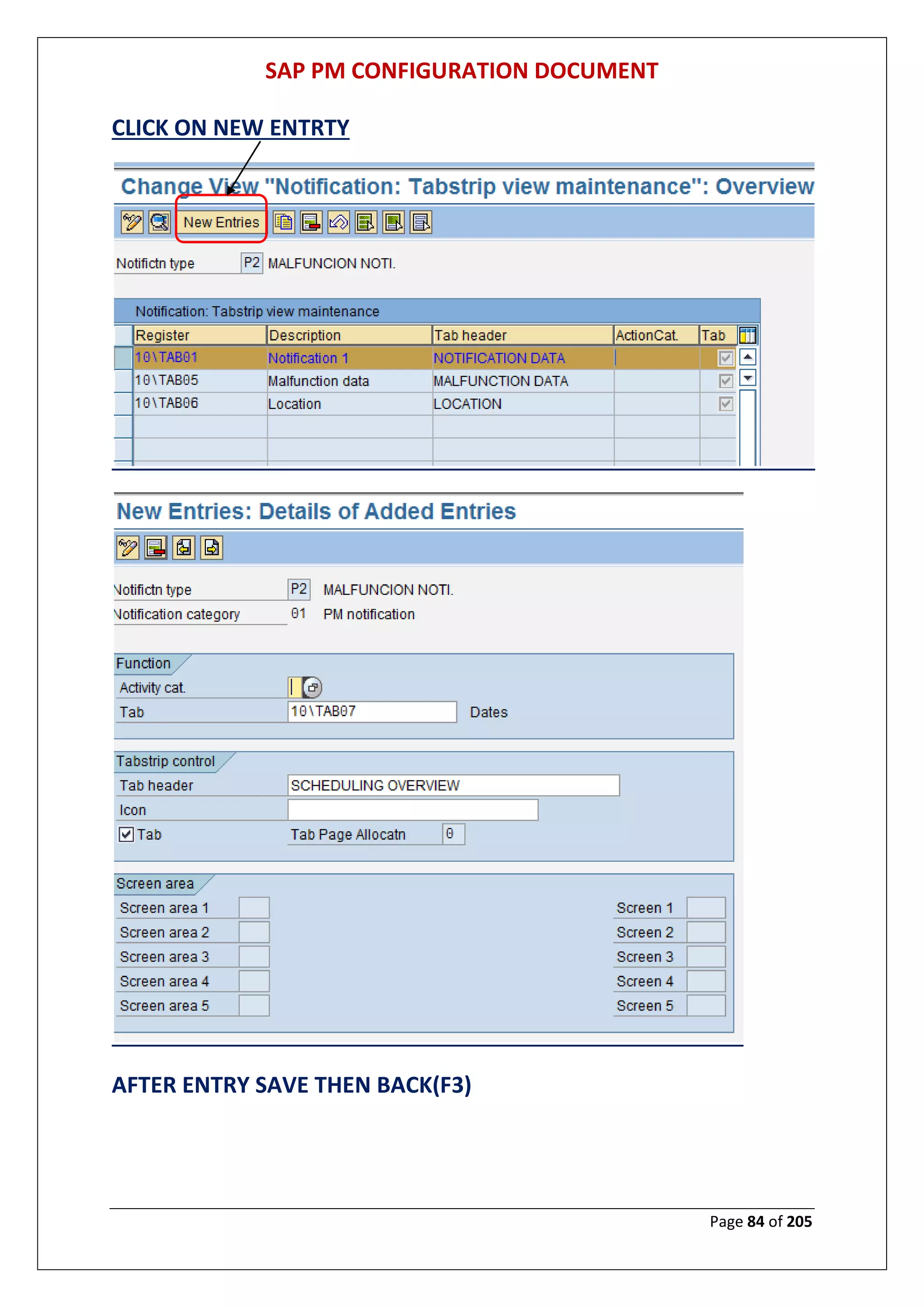
CLICK ON NEW ENTRTY
AFTER ENTRY SAVE THEN BACK(F3)
SAP PM CONFIGURATION DOCUMENT
Page 85 of 205
CLICK ON NEW ENTRTY
AFTER ENTRY SAVE THEN BACK(F3)
SAP PM CONFIGURATION DOCUMENT
Page 86 of 205
CLICK ON NEW ENTRTY
AFTER ENTRY SAVE THEN BACK(F3)
SAP PM CONFIGURATION DOCUMENT
Page 87 of 205
CLICK ON NEW ENTRTY
AFTER ENTRY SAVE THEN BACK(F3)
SAP PM CONFIGURATION DOCUMENT
Page 88 of 205
CLICK ON SAVE
SAP PM CONFIGURATION DOCUMENT
Page 89 of 205
Define Long Text Control for Notification Types
MENU PATH: Display IMG > Plant Maintenance and Customer Service > Maintenance
and Service Processing > Maintenance and Service Notifications > Notification Creation >
Notification Types > Define Long Text Control for Notification Types
SAP PM CONFIGURATION DOCUMENT
Page 90 of 205
THEN SAVE
SAP PM CONFIGURATION DOCUMENT
Page 91 of 205
Set Field Selection for Notifications
MENU PATH: Display IMG > Plant Maintenance and Customer Service > Maintenance
and Service Processing > Maintenance and Service Notifications > Notification Creation >
Notification Types > Set Field Selection for Notifications
SAP PM CONFIGURATION DOCUMENT
Page 92 of 205
SAP PM CONFIGURATION DOCUMENT
Page 93 of 205
Define Number Ranges
MENU PATH: Display IMG > Plant Maintenance and Customer Service > Maintenance
and Service Processing > Maintenance and Service Notifications > Notification Creation >
Notification Types > Define Number Ranges
SAP PM CONFIGURATION DOCUMENT
Page 94 of 205
SAP PM CONFIGURATION DOCUMENT
Page 95 of 205
SAP PM CONFIGURATION DOCUMENT
Page 96 of 205
Maintain Catalogs
MENU PATH: Display IMG > Plant Maintenance and Customer Service > Maintenance
and Service Processing > Maintenance and Service Notifications > Notification Creation >
Notification Content > Maintain Catalogs
SAP PM CONFIGURATION DOCUMENT
Page 97 of 205
CLICK ON NEW ENTRIES TAB FOR MAINTAINING NEW CATELOG TYPE OTHER THAN
STANDARD IF REQUIRED
SAP PM CONFIGURATION DOCUMENT
Page 98 of 205
PRESS ENTER KEY
SAP PM CONFIGURATION DOCUMENT
Page 99 of 205
CLICK ON NEW ENTRIES TAB
SAP PM CONFIGURATION DOCUMENT
Page 100 of 205
Then Save
SAP PM CONFIGURATION DOCUMENT
Page 101 of 205
Define Catalog Profile
MENU PATH: Display IMG > Plant Maintenance and Customer Service > Maintenance
and Service Processing > Maintenance and Service Notifications > Notification Creation >
Notification Content > Define Catalog Profile
SAP PM CONFIGURATION DOCUMENT
Page 102 of 205
SAP PM CONFIGURATION DOCUMENT
Page 103 of 205
Change Catalogs and Catalog Profile for Notification Type
MENU PATH: Display IMG > Plant Maintenance and Customer Service > Maintenance
and Service Processing > Maintenance and Service Notifications > Notification Creation >
Notification Content > Change Catalogs and Catalog Profile for Notification Type
SAP PM CONFIGURATION DOCUMENT
Page 104 of 205
Define Partner Determination Procedure and Partner Function
MENU PATH: Display IMG > Plant Maintenance and Customer Service > Maintenance
and Service Processing > Maintenance and Service Notifications > Notification Creation >
Partners > Define Partner Determination Procedure and Partner Function
SAP PM CONFIGURATION DOCUMENT
Page 105 of 205
SAP PM CONFIGURATION DOCUMENT
Page 106 of 205
SAP PM CONFIGURATION DOCUMENT
Page 107 of 205
SAP PM CONFIGURATION DOCUMENT
Page 108 of 205
Define Priorities
MENU PATH: Display IMG > Plant Maintenance and Customer Service > Maintenance
and Service Processing > Maintenance and Service Notifications > Notification Processing>
Response Time Monitoring > Define Priorities
SAP PM CONFIGURATION DOCUMENT
Page 109 of 205
SAP PM CONFIGURATION DOCUMENT
Page 110 of 205
SAP PM CONFIGURATION DOCUMENT
Page 111 of 205
Define Shop Papers, Forms and Output Programs
MENU PATH: Display IMG > Plant Maintenance and Customer Service > Maintenance
and Service Processing > Maintenance and Service Notifications > Notification Processing>
Notification Print Control> Define Shop Papers, Forms and Output Programs
SAP PM CONFIGURATION DOCUMENT
Page 112 of 205
Define Status Profile
MENU PATH: Display IMG > Plant Maintenance and Customer Service > Maintenance
and Service Processing > Maintenance and Service Notifications > Notification Processing>
User Status for Notifications > Define Status Profile
SAP PM CONFIGURATION DOCUMENT
Page 113 of 205
SAP PM CONFIGURATION DOCUMENT
Page 114 of 205
SAP PM CONFIGURATION DOCUMENT
Page 115 of 205
Create Authorization Keys for User Status Authorizations
MENU PATH: Display IMG > Plant Maintenance and Customer Service > Maintenance
and Service Processing > Maintenance and Service Notifications > Notification Processing>
User Status for Notifications > Create Authorization Keys for User Status Authorizations
SAP PM CONFIGURATION DOCUMENT
Page 116 of 205
SAP PM CONFIGURATION DOCUMENT
Page 117 of 205
Assign Object Information Keys to Notification Types
MENU PATH: Display IMG > Plant Maintenance and Customer Service > Maintenance
and Service Processing > Maintenance and Service Notifications > Notification Processing>
Object Information > Assign Object Information Keys to Notification Types
SAP PM CONFIGURATION DOCUMENT
Page 118 of 205
Overview of Notification Type
MENU PATH: Display IMG > Plant Maintenance and Customer Service > Maintenance
and Service Processing > Overview of Notification Type
SAP PM CONFIGURATION DOCUMENT
Page 119 of 205
SAP PM CONFIGURATION DOCUMENT
Page 120 of 205
SAP PM CONFIGURATION DOCUMENT
Page 121 of 205
SAP PM CONFIGURATION DOCUMENT
Page 122 of 205
SAP PM CONFIGURATION DOCUMENT
Page 123 of 205
SAP PM CONFIGURATION DOCUMENT
Page 124 of 205
SAP PM CONFIGURATION DOCUMENT
Page 125 of 205
Assign Notification Types to Order Types
SAP PM CONFIGURATION DOCUMENT
Page 126 of 205
SAP PM CONFIGURATION DOCUMENT
Page 127 of 205
Configure Order Types
MENU PATH: Display IMG > Plant Maintenance and Customer Service > Maintenance
and Service Processing > Maintenance and Service Orders > Functions and Settings for
Order Types> Configure Order Types
SAP PM CONFIGURATION DOCUMENT
Page 128 of 205
PRESS ENTER KEY
SAP PM CONFIGURATION DOCUMENT
Page 129 of 205
PRESS ENTER KEY
SAP PM CONFIGURATION DOCUMENT
Page 130 of 205
PRESS ENTER KEY
SAP PM CONFIGURATION DOCUMENT
Page 131 of 205
THEN PRESS ON SAVE TAB
SAP PM CONFIGURATION DOCUMENT
Page 132 of 205
Indicate Order Types for Refurbishment Processing
MENU PATH: Display IMG > Plant Maintenance and Customer Service > Maintenance
and Service Processing > Maintenance and Service Orders > Functions and Settings for
Order Types> Indicate Order Types for Refurbishment Processing
SAP PM CONFIGURATION DOCUMENT
Page 133 of 205
Configure Number Ranges
MENU PATH: Display IMG > Plant Maintenance and Customer Service > Maintenance
and Service Processing > Maintenance and Service Orders > Functions and Settings for
Order Types> Configure Number Ranges
SAP PM CONFIGURATION DOCUMENT
Page 134 of 205
Assign Order Types to Maintenance Plants
SAP PM CONFIGURATION DOCUMENT
Page 135 of 205
MENU PATH: Display IMG > Plant Maintenance and Customer Service > Maintenance
and Service Processing > Maintenance and Service Orders > Functions and Settings for
Order Types> Assign Order Types to Maintenance Plants
Assign Inspection Types to Maintenance/Service Order Types
MENU PATH: Display IMG > Plant Maintenance and Customer Service > Maintenance
and Service Processing > Maintenance and Service Orders > Functions and Settings for
Order Types> Assign Inspection Types to Maintenance/Service Order Types
SAP PM CONFIGURATION DOCUMENT
Page 136 of 205
Define Default Value For Planning Indicator For Each Order Type
MENU PATH: Display IMG > Plant Maintenance and Customer Service > Maintenance
and Service Processing > Maintenance and Service Orders > Functions and Settings for
Order Types> Define Default Value for Planning Indicator for Each Order Type
SAP PM CONFIGURATION DOCUMENT
Page 137 of 205
SAP PM CONFIGURATION DOCUMENT
Page 138 of 205
Create Default Value Profile For External Procurement
MENU PATH: Display IMG > Plant Maintenance and Customer Service > Maintenance
and Service Processing > Maintenance and Service Orders > Functions and Settings for
Order Types> Create Default Value Profiles for External Procurement
SAP PM CONFIGURATION DOCUMENT
Page 139 of 205
SAP PM CONFIGURATION DOCUMENT
Page 140 of 205
Default Values For Task List Data & Profile Assignment
MENU PATH: Display IMG > Plant Maintenance and Customer Service > Maintenance
and Service Processing > Maintenance and Service Orders > Functions and Settings for
Order Types> Default Values for Task List Data and Profile Assignments
SAP PM CONFIGURATION DOCUMENT
Page 141 of 205
SAP PM CONFIGURATION DOCUMENT
Page 142 of 205
SAP PM CONFIGURATION DOCUMENT
Page 143 of 205
Settlement Rule :Define Time & Creation of settlement Rule
MENU PATH: Display IMG > Plant Maintenance and Customer Service > Maintenance
and Service Processing > Maintenance and Service Orders > Functions and Settings for
Order Types> Settlement Rule: Define Time and Creation of Distribution Rule
Define Proposed Reference time For Technical Completion
SAP PM CONFIGURATION DOCUMENT
Page 144 of 205
MENU PATH: Display IMG > Plant Maintenance and Customer Service > Maintenance
and Service Processing > Maintenance and Service Orders > Functions and Settings for
Order Types> Define Proposed Reference Time for Technical Completion
Define Default Order Types For Maintenance Items
SAP PM CONFIGURATION DOCUMENT
Page 145 of 205
MENU PATH: Display IMG > Plant Maintenance and Customer Service > Maintenance
and Service Processing > Maintenance and Service Orders > Functions and Settings for
Order Types> Define Default Order Types for Maintenance Items
SAP PM CONFIGURATION DOCUMENT
Page 146 of 205
Define Notification & Order Integration
MENU PATH: Display IMG > Plant Maintenance and Customer Service > Maintenance
and Service Processing > Maintenance and Service Orders > Functions and Settings for
Order Types> Define Notification and Order Integration
SAP PM CONFIGURATION DOCUMENT
Page 147 of 205
Maintain default Values For control Keys For Order Types
MENU PATH: Display IMG > Plant Maintenance and Customer Service > Maintenance
and Service Processing > Maintenance and Service Orders > Functions and Settings for
Order Types> Control Key > Maintain Default Values for Control Keys for Order Types
SAP PM CONFIGURATION DOCUMENT
Page 148 of 205
SAP PM CONFIGURATION DOCUMENT
Page 149 of 205
SAP PM CONFIGURATION DOCUMENT
Page 150 of 205
SAP PM CONFIGURATION DOCUMENT
Page 151 of 205
Define Maintenance Activity Types
MENU PATH: Display IMG > Plant Maintenance and Customer Service > Maintenance
and Service Processing > Maintenance and Service Orders > Functions and Settings for
Order Types> Maintenance Activity Type > Define Maintenance Activity Types
SAP PM CONFIGURATION DOCUMENT
Page 152 of 205
Then Save
Assign Valid Maintenance types to maintenance Order Types
MENU PATH: Display IMG > Plant Maintenance and Customer Service > Maintenance
and Service Processing > Maintenance and Service Orders > Functions and Settings for
Order Types> Maintenance Activity Type > Assign Valid Maintenance Activity Types to
Maintenance Order Types
SAP PM CONFIGURATION DOCUMENT
Page 153 of 205
SAP PM CONFIGURATION DOCUMENT
Page 154 of 205
SAP PM CONFIGURATION DOCUMENT
Page 155 of 205
Default Values For Maintenance Activity Type For each Order type
MENU PATH: Display IMG > Plant Maintenance and Customer Service > Maintenance
and Service Processing > Maintenance and Service Orders > Functions and Settings for
Order Types> Maintenance Activity Type > Default Values for Maintenance Activity Type
for Each Order Type
SAP PM CONFIGURATION DOCUMENT
Page 156 of 205
Then Save
Assign Costing Parameters & Results Analysis Keys
MENU PATH: Display IMG > Plant Maintenance and Customer Service > Maintenance
and Service Processing > Maintenance and Service Orders > Functions and Settings for
Order Types> Costing Data for Maintenance and Service Orders > Assign Costing
Parameters and Results Analysis Keys
SAP PM CONFIGURATION DOCUMENT
Page 157 of 205
SAP PM CONFIGURATION DOCUMENT
Page 158 of 205
SAP PM CONFIGURATION DOCUMENT
Page 159 of 205
SAP PM CONFIGURATION DOCUMENT
Page 160 of 205
Define Change documents, Collective Purchase Requisition
Indicator, operation No. interval
MENU PATH: Display IMG > Plant Maintenance and Customer Service > Maintenance
and Service Processing > Maintenance and Service Orders > Functions and Settings for
Order Types> Define Change Docs, Collective Purc. Req. Indicator, Operation No. Interval
SAP PM CONFIGURATION DOCUMENT
Page 161 of 205
Then Save
Define Documentation for The Goods Movements For Order
MENU PATH: Display IMG > Plant Maintenance and Customer Service > Maintenance
and Service Processing > Maintenance and Service Orders > Functions and Settings for
Order Types> Goods Movements for Order > Define Documentation for Goods
Movements for the Order
SAP PM CONFIGURATION DOCUMENT
Page 162 of 205
SAP PM CONFIGURATION DOCUMENT
Page 163 of 205
Define Inspection Control
MENU PATH: Display IMG > Plant Maintenance and Customer Service > Maintenance
and Service Processing > Maintenance and Service Orders > Functions and Settings for
Order Types> Availability Check for Material, PRTs, and Capacities
SAP PM CONFIGURATION DOCUMENT
Page 164 of 205
SAP PM CONFIGURATION DOCUMENT
Page 165 of 205
SAP PM CONFIGURATION DOCUMENT
Page 166 of 205
SAP PM CONFIGURATION DOCUMENT
Page 167 of 205
SAP PM CONFIGURATION DOCUMENT
Page 168 of 205
SAP PM CONFIGURATION DOCUMENT
Page 169 of 205
SAP PM CONFIGURATION DOCUMENT
Page 170 of 205
SAP PM CONFIGURATION DOCUMENT
Page 171 of 205
SAP PM CONFIGURATION DOCUMENT
Page 172 of 205
SAP PM CONFIGURATION DOCUMENT
Page 173 of 205
THEN CLICK ON SAVE ICON
Define Account Assignment Categories For Document Types For
Purchase Requisition
MENU PATH: Display IMG > Plant Maintenance and Customer Service > Maintenance
and Service Processing > Maintenance and Service Orders > General Data> Define Account
Assignment Cat. and Document Type for Purchase Requisitions
SAP PM CONFIGURATION DOCUMENT
Page 174 of 205
Define priorities
MENU PATH: Display IMG > Plant Maintenance and Customer Service > Maintenance
and Service Processing > Maintenance and Service Orders > General Data> Define
Priorities
SAP PM CONFIGURATION DOCUMENT
Page 175 of 205
SAP PM CONFIGURATION DOCUMENT
Page 176 of 205
SAP PM CONFIGURATION DOCUMENT
Page 177 of 205
SAP PM CONFIGURATION DOCUMENT
Page 178 of 205
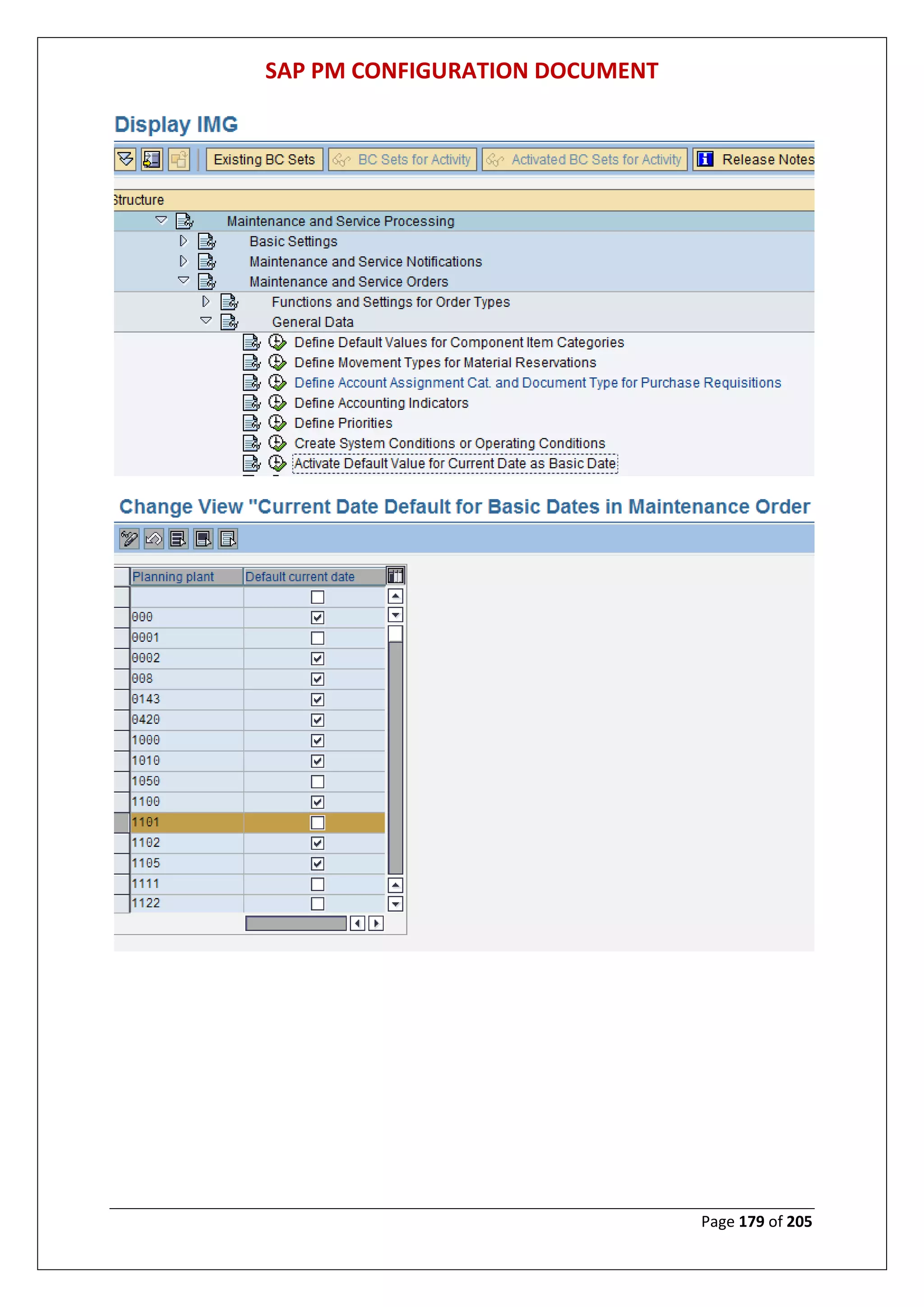
Activate Default value For current Date as Basic Date
MENU PATH: Display IMG > Plant Maintenance and Customer Service > Maintenance
and Service Processing > Maintenance and Service Orders > General Data> Activate
Default Value for Current Date as Basic Date
SAP PM CONFIGURATION DOCUMENT
Page 179 of 205
SAP PM CONFIGURATION DOCUMENT
Page 180 of 205
Define Default Value For units For Operation
MENU PATH: Display IMG > Plant Maintenance and Customer Service > Maintenance
and Service Processing > Maintenance and Service Orders > General Data> Define Default
Values for Units for Operation
SAP PM CONFIGURATION DOCUMENT
Page 181 of 205
th
SAP PM CONFIGURATION DOCUMENT
Page 182 of 205
Define Status Profile
MENU PATH: Display IMG > Plant Maintenance and Customer Service > Maintenance
and Service Processing > Maintenance and Service Orders > General Data> User Status for
Orders> Define Status Profile
SAP PM CONFIGURATION DOCUMENT
Page 183 of 205
The Click on continue tab
SAP PM CONFIGURATION DOCUMENT
Page 184 of 205
Then Save
SAP PM CONFIGURATION DOCUMENT
Page 185 of 205
Create Authorization Keys For User Status Authorization
MENU PATH: Display IMG > Plant Maintenance and Customer Service > Maintenance
and Service Processing > Maintenance and Service Orders > General Data> User Status for
Orders> Create Authorization Keys for User Status Authorizations
SAP PM CONFIGURATION DOCUMENT
Page 186 of 205
Define Partner Determination Procedure And Partner Function
MENU PATH: Display IMG > Plant Maintenance and Customer Service > Maintenance
and Service Processing > Maintenance and Service Orders > Partner > Define Partner
Determination Procedure and Partner Function
SAP PM CONFIGURATION DOCUMENT
Page 187 of 205
SAP PM CONFIGURATION DOCUMENT
Page 188 of 205
Sets Scheduling Parameter
MENU PATH: Display IMG > Plant Maintenance and Customer Service > Maintenance
and Service Processing > Maintenance and Service Orders > Scheduling > Set Scheduling
Parameters
SAP PM CONFIGURATION DOCUMENT
Page 189 of 205
SAP PM CONFIGURATION DOCUMENT
Page 190 of 205
SAP PM CONFIGURATION DOCUMENT
Page 191 of 205
Then Save
SAP PM CONFIGURATION DOCUMENT
Page 192 of 205
Create Revisions
MENU PATH: Display IMG > Plant Maintenance and Customer Service > Maintenance
and Service Processing > Maintenance and Service Orders > Create Revisions
SAP PM CONFIGURATION DOCUMENT
Page 193 of 205
Then Save
Assign Default Values For Settlement Areas To Order Types
MENU PATH: Display IMG > Plant Maintenance and Customer Service > Maintenance
and Service Processing > Maintenance and Service Orders > Functions and Settings for
Order Types> Assign Order Types to Maintenance Plants
SAP PM CONFIGURATION DOCUMENT
Page 194 of 205
Then Save
SAP PM CONFIGURATION DOCUMENT
Page 195 of 205
Assign Object information key To Order Types
MENU PATH: Display IMG > Plant Maintenance and Customer Service > Maintenance
and Service Processing > Maintenance and Service Orders > Object Information > Assign
Object Information Keys to Order Types
SAP PM CONFIGURATION DOCUMENT
Page 196 of 205
Completion Confirmations
Define Control Parameters for Completion Confirmations
MENU PATH: Display IMG > Plant Maintenance and Customer Service > Maintenance
and Service Processing > Completion Confirmations > Define Control Parameters for
Completion Confirmations
SAP PM CONFIGURATION DOCUMENT
Page 197 of 205
SAP PM CONFIGURATION DOCUMENT
Page 198 of 205
AFTER MAINTAINING ALL FIELD PRESS ENTER KEY
SAP PM CONFIGURATION DOCUMENT
Page 199 of 205
AFTER MAINTAINING ALL FIELD PRESS ENTER KEY
SAP PM CONFIGURATION DOCUMENT
Page 200 of 205
AFTER MAINTAINING ALL FIELD PRESS ENTER KEY
SAP PM CONFIGURATION DOCUMENT
Page 201 of 205
THEN SAVE
Define Causes for Variances
MENU PATH: Display IMG > Plant Maintenance and Customer Service > Maintenance
and Service Processing > Completion Confirmations > Define Causes for Variances
SAP PM CONFIGURATION DOCUMENT
Page 202 of 205
SAP PM CONFIGURATION DOCUMENT
Page 203 of 205
Configuration Control
Make General Settings for Installation/Dismantling
MENU PATH: Display IMG > Plant Maintenance and Customer Service > Maintenance
and Service Processing Configuration Control> Make General Settings for
Installation/Dismantling
SAP PM CONFIGURATION DOCUMENT
Page 204 of 205
Determine Properties of Notifications for Installing and Dismantling
Parts
MENU PATH: Display IMG > Plant Maintenance and Customer Service > Maintenance
and Service Processing Configuration Control> Determine Properties of Notifications for
Installing and Dismantling Parts
SAP PM CONFIGURATION DOCUMENT
Page 205 of 205

SAP ECC 6.0 PM Configuration Manual - www.sapdocs.info

  • 1.
    SAP PM CONFIGURATIONDOCUMENT Page 1 of 205 SAP ECC 6.0 PLANT MAINTENANCE MODULE GROUP-3 MR.KAMLESH GUPTA & MR.M.V.RAMANA MURTY
  • 2.
    SAP PM CONFIGURATIONDOCUMENT Page 2 of 205 1. Getting into the configuration area of SAP. TYPE SPRO THEN PRESS ENTER KEY CLICK ON SAP REFERENCE IMG
  • 3.
    SAP PM CONFIGURATIONDOCUMENT Page 3 of 205 PM ORGANIZATION STRUCTURE CONFIGURATION MAINTAIN MAINTENANCE PLANNING PLANT MENU PATH: Display IMG > ENTERPRISE STRUCTURE > DEFINATION > PLANT MAINTENANCE > MAINTAIN MAINTENANCE PLANNING PLANT CLICK ON NEW ENTRY FOR MAINTAIN MAINT. PLANNING PLANT
  • 4.
    SAP PM CONFIGURATIONDOCUMENT Page 4 of 205 Then Save ASSIGN MAINTENANCE PLANNING PLANT TO MAINTENANCE PLANT: MENU PATH: DISPLAY IMG > ENTERPRISE STRUCTURE > ASSIGNMENT > PLANT MAINTENANCE > ASSIGN MAINTENANCE PLANNING PLANT TO MAINTENANCE PLANT
  • 5.
    SAP PM CONFIGURATIONDOCUMENT Page 5 of 205 Then Save DEFINE LOCATION MENU PATH: DISPLAY IMG > ENTERPRISE STRUCTURE > DEFINATION > LOGISTICS- GENERAL> DEFINE LOCATION
  • 6.
    SAP PM CONFIGURATIONDOCUMENT Page 6 of 205 CLICK ON NEW ENTRY FOR MAINTAINING LOCATION Then Save
  • 7.
    SAP PM CONFIGURATIONDOCUMENT Page 7 of 205 DEFINE PLANT SECTION MENU PATH: Display IMG > Plant Maintenance and Customer Service > Master Data in Plant Maintenance and Customer Service > Technical Objects> General Data > Define Plant Sections EXECUTE DEFINE PLANT SECTION CLICK ON NEW ENTRY FOR MAINTAINING PLANT SECTION
  • 8.
    SAP PM CONFIGURATIONDOCUMENT Page 8 of 205 Then Save DEFINE PLANNER GROUP MENU PATH: Display IMG > Plant Maintenance and Customer Service > Master Data in Plant Maintenance and Customer Service > Technical Objects> General Data > Define Planner Groups
  • 9.
    SAP PM CONFIGURATIONDOCUMENT Page 9 of 205 EXECUTE DEFINE PLANNER GROUP Click on new entries tab maintaining planner group Then Save PLANT MAINTENANCE MASTER DATA CONFIGERATION DEFINE USER STATUS MENU PATH: Display IMG > Plant Maintenance and Customer Service > Master Data in Plant Maintenance and Customer Service > Basic Settings > Define User Status
  • 10.
    SAP PM CONFIGURATIONDOCUMENT Page 10 of 205 EXCUTE DEFINE USER STATUS CLICK ON NEW ENTRY
  • 11.
    SAP PM CONFIGURATIONDOCUMENT Page 11 of 205 Click on object types after maintaining all entries as below screen ASSIGN THE OBJECT TYPE
  • 12.
    SAP PM CONFIGURATIONDOCUMENT Page 12 of 205 Then Save
  • 13.
    SAP PM CONFIGURATIONDOCUMENT Page 13 of 205 CREATE AUTORIZATION KEYS FOR USER STATUS AUTHORIZATION MENU PATH: Display IMG > Plant Maintenance and Customer Service > Master Data in Plant Maintenance and Customer Service > Basic Settings > Create Authorization Keys for User Status Authorizations EXECUTE AUTHORIZATIONS KEYS FOR USER STATUS AUTHORIZATION
  • 14.
    SAP PM CONFIGURATIONDOCUMENT Page 14 of 205 Then Save ASSIGN AUTHORIZATION KEYS TO USER STATUS Then Save
  • 15.
    SAP PM CONFIGURATIONDOCUMENT Page 15 of 205 DEFINE CURRENCY FOR MAINTENANCE STATISTICS MENU PATH: Display IMG > Plant Maintenance and Customer Service > Master Data in Plant Maintenance and Customer Service > Basic Settings > Define Currency for Maintenance Statistics EXCUTE DEFINE CURRENCY FOR MAINTENANCE STATISTICS DEFINE PERMIT CATEGORIES MENU PATH: Display IMG > Plant Maintenance and Customer Service > Master Data in Plant Maintenance and Customer Service > Basic Settings > Permits > Define Permit Categories
  • 16.
    SAP PM CONFIGURATIONDOCUMENT Page 16 of 205 EXCUTE THE PERMIT CATEGORIES CLICK ON NEW ENTRY FOR MAINTAINING PERMIT CATEGORIES
  • 17.
    SAP PM CONFIGURATIONDOCUMENT Page 17 of 205 DEFINE MEASURING POINT CATEGORIES MENU PATH: Display IMG > Plant Maintenance and Customer Service > Master Data in Plant Maintenance and Customer Service > Basic Settings > Measuring Points, Counters and Measurement Documents > Define Measuring Point Categories EXCUTE DEFINE MEASURING POINT CATEGORIES CLICK ON NEW ENTRY FOR MAINTAINING MEASURING POINT CTEGORIES
  • 18.
    SAP PM CONFIGURATIONDOCUMENT Page 18 of 205 CREATE NO.RANGE FOR MEASURING POINTS MENU PATH: Display IMG > Plant Maintenance and Customer Service > Master Data in Plant Maintenance and Customer Service > Basic Settings > Measuring Points, Counters and Measurement Documents > Create Number Ranges for Measuring Points
  • 19.
    SAP PM CONFIGURATIONDOCUMENT Page 19 of 205 CREATE NO.RANGE FOR MEASURING DOCUMENT MENU PATH: Display IMG > Plant Maintenance and Customer Service > Master Data in Plant Maintenance and Customer Service > Basic Settings > Measuring Points, Counters and Measurement Documents > Create Number Ranges for Measurement documents
  • 20.
    SAP PM CONFIGURATIONDOCUMENT Page 20 of 205 CLICK ON CHANGE INTERVAL Insert new no range by click on interval
  • 21.
    SAP PM CONFIGURATIONDOCUMENT Page 21 of 205 DEFINE FIELD SELCTION FOR MEASURING POINT & MEASURING POINT CATEGORY MENU PATH: Display IMG > Plant Maintenance and Customer Service > Master Data in Plant Maintenance and Customer Service > Basic Settings > Measuring Points, Counters and Measurement Documents > Define Field Selection for Measuring Points and Measurement Documents
  • 22.
    SAP PM CONFIGURATIONDOCUMENT Page 22 of 205 T
  • 23.
    SAP PM CONFIGURATIONDOCUMENT Page 23 of 205 DEFINE WARRANTY TYPE MENU PATH: Display IMG > Plant Maintenance and Customer Service > Master Data in Plant Maintenance and Customer Service > Basic Settings > Warranties > Define Warranty Types FOR MAINTAINIG NEW WARRANTY TYPE CLICK ON NEW ENTRY
  • 24.
    SAP PM CONFIGURATIONDOCUMENT Page 24 of 205 DEFINE NO. RANGE FOR WARRANY TYPE MENU PATH: Display IMG > Plant Maintenance and Customer Service > Master Data in Plant Maintenance and Customer Service > Basic Settings > Warranties > Define Number Ranges for Warranty Types FOR MAINTAIN NEW GROUP
  • 25.
    SAP PM CONFIGURATIONDOCUMENT Page 25 of 205 FOR MAINTAINING NEW GROUP
  • 26.
    SAP PM CONFIGURATIONDOCUMENT Page 26 of 205 ASSIGN NO. RANGE FOR GRUOP DEFINE PARTNER DETERMINATION PROCEDURE & PARTNER FUNCTION MENU PATH: Display IMG > Plant Maintenance and Customer Service > Master Data in Plant Maintenance and Customer Service > Basic Settings > Partners > Define Partner Determination Procedure and Partner Function
  • 27.
    SAP PM CONFIGURATIONDOCUMENT Page 27 of 205 CLICK ON CHANGE PARTNER FOR MAINTAINING NEW PARTNER CLICK ON NEW ENTRY FOR MAINTAINING PARTNER FUNCTION
  • 28.
    SAP PM CONFIGURATIONDOCUMENT Page 28 of 205
  • 29.
    SAP PM CONFIGURATIONDOCUMENT Page 29 of 205 DEFINE OBJECT INFORMATION KEY MENU PATH: Display IMG > Plant Maintenance and Customer Service > Master Data in Plant Maintenance and Customer Service > Basic Settings > Define Object Information Keys CLICK ON NEW ENTRY FOR MAINTAINING OBJECT INFO.KEY
  • 30.
    SAP PM CONFIGURATIONDOCUMENT Page 30 of 205
  • 31.
    SAP PM CONFIGURATIONDOCUMENT Page 31 of 205 DEFINE TYPES OF TECHNICAL OBJECTS MENU PATH: Display IMG > Plant Maintenance and Customer Service > Master Data in Plant Maintenance and Customer Service > Technical Objects > General Data > Define Types of Technical Objects CLICK ON NEW ENTRY FOR MAINTAINING OBJECT TYPES
  • 32.
    SAP PM CONFIGURATIONDOCUMENT Page 32 of 205 DEFINE ABC INDICATOR MENU PATH: Display IMG > Plant Maintenance and Customer Service > Master Data in Plant Maintenance and Customer Service > Technical Objects > General Data > Define ABC Indicators CLICK ON NEW ENTRY FOR MAINTAINING ABC INDICATOR
  • 33.
    SAP PM CONFIGURATIONDOCUMENT Page 33 of 205 DEFINE AUTHORIZATION GROUP (TECHNICAL OBJECT) MENU PATH: Display IMG > Plant Maintenance and Customer Service > Master Data in Plant Maintenance and Customer Service > Technical Objects > General Data > Define Authorization Groups
  • 34.
    SAP PM CONFIGURATIONDOCUMENT Page 34 of 205 SET VEIW PROFILE FOR TECHNICAL OBJECTS MENU PATH: Display IMG > Plant Maintenance and Customer Service > Master Data in Plant Maintenance and Customer Service > Technical Objects > General Data > Set View Profiles for Technical Objects
  • 35.
    SAP PM CONFIGURATIONDOCUMENT Page 35 of 205 VEIW PROFILE FOR EQUIPMENT VEIW PROFILE FOR FUNCTIONAL LOCATION
  • 36.
    SAP PM CONFIGURATIONDOCUMENT Page 36 of 205 DEFINE OBJECT INFORMAION KEY FOR TECHNICAL OBJECTS MENU PATH: Display IMG > Plant Maintenance and Customer Service > Master Data in Plant Maintenance and Customer Service > Technical Objects > General Data > Define Object Information Keys
  • 37.
    SAP PM CONFIGURATIONDOCUMENT Page 37 of 205 CREATE STRUCTURE INDICATOR FOR REF RENCE LOCATION / FUNCTIONAL LOCTION MENU PATH: Display IMG > Plant Maintenance and Customer Service > Master Data in Plant Maintenance and Customer Service > Technical Objects > Functional Locations > Create Structure Indicator for Reference Locations/Functional Locations CLICK ON NEW ENTRIES FOR MAINTAINING STRUCTURE INDICATOR
  • 38.
    SAP PM CONFIGURATIONDOCUMENT Page 38 of 205 MAINTAIN ENTRY FOR STRUCTURE INDICATOR Then Save
  • 39.
    SAP PM CONFIGURATIONDOCUMENT Page 39 of 205 DEFINE CATEGORY OF FUNCTIONAL LOCATION MENU PATH: Display IMG > Plant Maintenance and Customer Service > Master Data in Plant Maintenance and Customer Service > Technical Objects > Functional Locations > Define Category of Functional Location CLICK ON NEW ENTRY FOR MAINTAINING FUNCTIONAL LOCATION
  • 40.
    SAP PM CONFIGURATIONDOCUMENT Page 40 of 205 MAINTAIN ENTRIES FOR FUNCTIONAL LOCATION CATEGORY Then Save DEFINE FIELD SELECTION FOR FUNCTIONAL LOCATION MENU PATH: Display IMG > Plant Maintenance and Customer Service > Master Data in Plant Maintenance and Customer Service > Technical Objects > Functional Locations > Define Field Selection for Functional Locations
  • 41.
    SAP PM CONFIGURATIONDOCUMENT Page 41 of 205
  • 42.
    SAP PM CONFIGURATIONDOCUMENT Page 42 of 205 Maintaining field selection for functional location category 5 MAINTAIN EQUIPMENT CATEGORY MENU PATH: Display IMG > Plant Maintenance and Customer Service > Master Data in Plant Maintenance and Customer Service > Technical Objects > Equipment > Equipment Categories > Maintain Equipment Category
  • 43.
    SAP PM CONFIGURATIONDOCUMENT Page 43 of 205 CLICK ON NEW ENTRY FOR MAINTAINING EQUIPMENT CATEGORY
  • 44.
    SAP PM CONFIGURATIONDOCUMENT Page 44 of 205 DEFINE ADDTIONAL BUSSINESS VIEWS FOR EQUIPMENT CATEGORIES MENU PATH: Display IMG > Plant Maintenance and Customer Service > Master Data in Plant Maintenance and Customer Service > Technical Objects > Equipment > Equipment Categories > Define Additional Business Views for Equipment Categories
  • 45.
    SAP PM CONFIGURATIONDOCUMENT Page 45 of 205 DEFINE NO.RANGE FOR EQUIPMENT MENU PATH: Display IMG > Plant Maintenance and Customer Service > Master Data in Plant Maintenance and Customer Service > Technical Objects > Equipment > Equipment Categories > Define Number Ranges CLICK ON CHANGE GROUPS
  • 46.
    SAP PM CONFIGURATIONDOCUMENT Page 46 of 205 SELECT GROUP AND CLICK ON INSERT MAINTAIN NO. RANGE FOR THE GROUP AFTER DEFINING NO. RANGE CLICK ON INSERT & THEN SAVE
  • 47.
    SAP PM CONFIGURATIONDOCUMENT Page 47 of 205 EQUIPMENT USAGE HISTORY UPDATE MENU PATH: Display IMG > Plant Maintenance and Customer Service > Master Data in Plant Maintenance and Customer Service > Technical Objects > Equipment > Equipment Usage Period > Usage History Update
  • 48.
    SAP PM CONFIGURATIONDOCUMENT Page 48 of 205 Define Installation at Functional Location: MENU PATH: Display IMG > Plant Maintenance and Customer Service > Master Data in Plant Maintenance and Customer Service > Technical Objects > Equipment > Equipment Usage Period > Define Installation at Functional Location
  • 49.
    SAP PM CONFIGURATIONDOCUMENT Page 49 of 205 Assign User Status Profile to Equipment Category MENU PATH: Display IMG > Plant Maintenance and Customer Service > Master Data in Plant Maintenance and Customer Service > Technical Objects > Equipment> Assign User Status Profile to Equipment Category
  • 50.
    SAP PM CONFIGURATIONDOCUMENT Page 50 of 205 Assign Partner Determination Procedure to Equipment Category MENU PATH: Display IMG > Plant Maintenance and Customer Service > Master Data in Plant Maintenance and Customer Service > Technical Objects > Assign Partner Determination Procedure to Equipment Category
  • 51.
    SAP PM CONFIGURATIONDOCUMENT Page 51 of 205 SCREEN BEFORE ASSIGN THE PARTNER DITERMINATION SCREEN AFTER ASSIGN THE PARTNER DITERMINATION
  • 52.
    SAP PM CONFIGURATIONDOCUMENT Page 52 of 205 Define Field Selection for the Equipment Master Record MENU PATH: Display IMG > Plant Maintenance and Customer Service > Master Data in Plant Maintenance and Customer Service > Technical Objects > Equipment > Define Field Selection for the Equipment Master Record
  • 53.
    SAP PM CONFIGURATIONDOCUMENT Page 53 of 205 MAKING FIELD MANDATORY FOR EQUIP.CATEGORY 5 Allow Multilingual Text Maintenance for Each Equipment Category MENU PATH: Display IMG > Plant Maintenance and Customer Service > Master Data in Plant Maintenance and Customer Service > Technical Objects > Equipment > Allow Multilingual Text Maintenance for Each Equipment Category
  • 54.
    SAP PM CONFIGURATIONDOCUMENT Page 54 of 205 Define Serial Number Profiles MENU PATH: Display IMG > Plant Maintenance and Customer Service > Master Data in Plant Maintenance and Customer Service > Technical Objects > Serial Number Management > Define Serial Number Profiles
  • 55.
    SAP PM CONFIGURATIONDOCUMENT Page 55 of 205 Click on new entry for maintaining serial no.profile
  • 56.
    SAP PM CONFIGURATIONDOCUMENT Page 56 of 205 Then Save Define Default Equipment Categories for Serial Numbers MENU PATH: Display IMG > Plant Maintenance and Customer Service > Master Data in Plant Maintenance and Customer Service > Technical Objects > Serial Number Management > Define Default Equipment Categories for Serial Numbers
  • 57.
    SAP PM CONFIGURATIONDOCUMENT Page 57 of 205 Define Responsible Designers/Laboratories MENU PATH: Display IMG > Plant Maintenance and Customer Service > Master Data in Plant Maintenance and Customer Service > Bills of Material > General Data > Define Responsible Designers/Laboratories
  • 58.
    SAP PM CONFIGURATIONDOCUMENT Page 58 of 205 Click on new entries for maintaining designers/laboratories Then Save
  • 59.
    SAP PM CONFIGURATIONDOCUMENT Page 59 of 205 Define Item Categories MENU PATH: Display IMG > Plant Maintenance and Customer Service > Master Data in Plant Maintenance and Customer Service > Bills of Material > Item Data > Define Item Categories
  • 60.
    SAP PM CONFIGURATIONDOCUMENT Page 60 of 205 GETTING COFIGERATION FOR MAINTENANCE PLANNING Define Maintenance Planner Groups MENU PATH: Display IMG > Plant Maintenance and Customer Service > Maintenance Plans, Work Centres, Task Lists and PRTs> Basic Settings > Define Maintenance Planner Groups Execute define maintenance planner group
  • 61.
    SAP PM CONFIGURATIONDOCUMENT Page 61 of 205 Set Maintenance Plan Categories MENU PATH: Display IMG > Plant Maintenance and Customer Service > Maintenance Plans, Work Centres, Task Lists and PRTs> Maintenance Plans> Set Maintenance Plan Categories Click on new entries tab
  • 62.
    SAP PM CONFIGURATIONDOCUMENT Page 62 of 205 Define Number Ranges for Maintenance Plans MENU PATH: Display IMG > Plant Maintenance and Customer Service > Maintenance Plans, Work Centres, Task Lists and PRTs> Maintenance Plans> Define Number Ranges for Maintenance Plans Click on change interval for maintaining new interval
  • 63.
    SAP PM CONFIGURATIONDOCUMENT Page 63 of 205 For maintaining text & no.range for the group Click on insert after maintaining text & no.range for group
  • 64.
    SAP PM CONFIGURATIONDOCUMENT Page 64 of 205 Define Number Ranges for Maintenance Items MENU PATH: Display IMG > Plant Maintenance and Customer Service > Maintenance Plans, Work Centres, Task Lists and PRTs> Maintenance Plans> Define Number Ranges for Maintenance Items Click on change interval for maintaining new interval
  • 65.
    SAP PM CONFIGURATIONDOCUMENT Page 65 of 205 Define Sort Fields for Maintenance Plan MENU PATH: Display IMG > Plant Maintenance and Customer Service > Maintenance Plans, Work Centres, Task Lists and PRTs> Maintenance Plans> Define Sort Fields for Maintenance Plan Click on new entry for maintaining short field
  • 66.
    SAP PM CONFIGURATIONDOCUMENT Page 66 of 205 Configure Special Functions for Maintenance Planning MENU PATH: Display IMG > Plant Maintenance and Customer Service > Maintenance Plans, Work Centres, Task Lists and PRTs> Maintenance Plans> Configure Special Functions for Maintenance Planning
  • 67.
    SAP PM CONFIGURATIONDOCUMENT Page 67 of 205 Define Employees Responsible for Work Centres MENU PATH: Display IMG > Plant Maintenance and Customer Service > Maintenance Plans, Work Centres, Task Lists and PRTs > Work Canters > General Data > Define Employees Responsible for Work Canters
  • 68.
    SAP PM CONFIGURATIONDOCUMENT Page 68 of 205 Configure Planner Group MENU PATH: Display IMG > Plant Maintenance and Customer Service > Maintenance Plans, Work Centres, Task Lists and PRTs > Task Lists > General Data > Configure Planner Group
  • 69.
    SAP PM CONFIGURATIONDOCUMENT Page 69 of 205
  • 70.
    SAP PM CONFIGURATIONDOCUMENT Page 70 of 205 Define Number Ranges for General Maintenance Task Lists MENU PATH: Display IMG > Plant Maintenance and Customer Service > Maintenance Plans, Work Centres, Task Lists and PRTs > Task Lists > Control Data> Define Number Ranges for General Maintenance Task Lists CLICK ON CHANGE INTERVAL
  • 71.
    SAP PM CONFIGURATIONDOCUMENT Page 71 of 205 CLICK ON INSERT TAB MAINTAIN NO.RANGE AFTER MAINTAINING NO.RANGE PRESS ENTER KEY & THEN SAVE
  • 72.
    SAP PM CONFIGURATIONDOCUMENT Page 72 of 205 Define Number Ranges for Equipment Task Lists MENU PATH: Display IMG > Plant Maintenance and Customer Service > Maintenance Plans, Work Centres, Task Lists and PRTs > Task Lists > Control Data > Define Number Ranges for Equipment Task Lists
  • 73.
    SAP PM CONFIGURATIONDOCUMENT Page 73 of 205 CLICK ON CHANGE INTERVAL CLICK ON INSERT TAB
  • 74.
    SAP PM CONFIGURATIONDOCUMENT Page 74 of 205 Define Number Ranges for Task Lists for Functional Locations MENU PATH: Display IMG > Plant Maintenance and Customer Service > Maintenance Plans, Work Centres, Task Lists and PRTs > Task Lists > Control Data > Define Number Ranges for Task Lists for Functional Locations
  • 75.
    SAP PM CONFIGURATIONDOCUMENT Page 75 of 205 Define PRT Authorization Group MENU PATH: Display IMG > Plant Maintenance and Customer Service > Maintenance Plans, Work Centres, Task Lists and PRTs > Production Resources/Tools > General Data > Define PRT Authorization Group
  • 76.
    SAP PM CONFIGURATIONDOCUMENT Page 76 of 205 Click on new entries tab for maintaining PRT authorization group
  • 77.
    SAP PM CONFIGURATIONDOCUMENT Page 77 of 205 Define PRT Group Keys MENU PATH: Display IMG > Plant Maintenance and Customer Service > Maintenance Plans, Work Centres, Task Lists and PRTs > Production Resources/Tools > General Data > Define PRT Group Keys Click on new entries tab for maintaining PRT group keys
  • 78.
    SAP PM CONFIGURATIONDOCUMENT Page 78 of 205 GETTING INTO CONFIGERATION FOR MAINTENANCE & SERVICE PROCESSING Define Notification Types MENU PATH: Display IMG > Plant Maintenance and Customer Service > Maintenance and Service Processing > Maintenance and Service Notifications > Notification Creation > Notification Types > Define Notification Types
  • 79.
    SAP PM CONFIGURATIONDOCUMENT Page 79 of 205 Click on new entries tab for maintaining PRT group keys
  • 80.
    SAP PM CONFIGURATIONDOCUMENT Page 80 of 205 Set Screen Templates for the Notification Type MENU PATH: Display IMG > Plant Maintenance and Customer Service > Maintenance and Service Processing > Maintenance and Service Notifications > Notification Creation > Notification Types > Set Screen Templates for the Notification Type
  • 81.
    SAP PM CONFIGURATIONDOCUMENT Page 81 of 205 CLICK ON NEW ENTRTY Maintain the notification data AFTER ENTRY SAVE THEN BACK (F3)
  • 82.
    SAP PM CONFIGURATIONDOCUMENT Page 82 of 205 CLICK ON NEW ENTRTY AFTER ENTRY SAVE THEN BACK(F3)
  • 83.
    SAP PM CONFIGURATIONDOCUMENT Page 83 of 205 CLICK ON NEW ENTRTY AFTER ENTRY SAVE THEN BACK(F3)
  • 84.
    SAP PM CONFIGURATIONDOCUMENT Page 84 of 205 CLICK ON NEW ENTRTY AFTER ENTRY SAVE THEN BACK(F3)
  • 85.
    SAP PM CONFIGURATIONDOCUMENT Page 85 of 205 CLICK ON NEW ENTRTY AFTER ENTRY SAVE THEN BACK(F3)
  • 86.
    SAP PM CONFIGURATIONDOCUMENT Page 86 of 205 CLICK ON NEW ENTRTY AFTER ENTRY SAVE THEN BACK(F3)
  • 87.
    SAP PM CONFIGURATIONDOCUMENT Page 87 of 205 CLICK ON NEW ENTRTY AFTER ENTRY SAVE THEN BACK(F3)
  • 88.
    SAP PM CONFIGURATIONDOCUMENT Page 88 of 205 CLICK ON SAVE
  • 89.
    SAP PM CONFIGURATIONDOCUMENT Page 89 of 205 Define Long Text Control for Notification Types MENU PATH: Display IMG > Plant Maintenance and Customer Service > Maintenance and Service Processing > Maintenance and Service Notifications > Notification Creation > Notification Types > Define Long Text Control for Notification Types
  • 90.
    SAP PM CONFIGURATIONDOCUMENT Page 90 of 205 THEN SAVE
  • 91.
    SAP PM CONFIGURATIONDOCUMENT Page 91 of 205 Set Field Selection for Notifications MENU PATH: Display IMG > Plant Maintenance and Customer Service > Maintenance and Service Processing > Maintenance and Service Notifications > Notification Creation > Notification Types > Set Field Selection for Notifications
  • 92.
    SAP PM CONFIGURATIONDOCUMENT Page 92 of 205
  • 93.
    SAP PM CONFIGURATIONDOCUMENT Page 93 of 205 Define Number Ranges MENU PATH: Display IMG > Plant Maintenance and Customer Service > Maintenance and Service Processing > Maintenance and Service Notifications > Notification Creation > Notification Types > Define Number Ranges
  • 94.
    SAP PM CONFIGURATIONDOCUMENT Page 94 of 205
  • 95.
    SAP PM CONFIGURATIONDOCUMENT Page 95 of 205
  • 96.
    SAP PM CONFIGURATIONDOCUMENT Page 96 of 205 Maintain Catalogs MENU PATH: Display IMG > Plant Maintenance and Customer Service > Maintenance and Service Processing > Maintenance and Service Notifications > Notification Creation > Notification Content > Maintain Catalogs
  • 97.
    SAP PM CONFIGURATIONDOCUMENT Page 97 of 205 CLICK ON NEW ENTRIES TAB FOR MAINTAINING NEW CATELOG TYPE OTHER THAN STANDARD IF REQUIRED
  • 98.
    SAP PM CONFIGURATIONDOCUMENT Page 98 of 205 PRESS ENTER KEY
  • 99.
    SAP PM CONFIGURATIONDOCUMENT Page 99 of 205 CLICK ON NEW ENTRIES TAB
  • 100.
    SAP PM CONFIGURATIONDOCUMENT Page 100 of 205 Then Save
  • 101.
    SAP PM CONFIGURATIONDOCUMENT Page 101 of 205 Define Catalog Profile MENU PATH: Display IMG > Plant Maintenance and Customer Service > Maintenance and Service Processing > Maintenance and Service Notifications > Notification Creation > Notification Content > Define Catalog Profile
  • 102.
    SAP PM CONFIGURATIONDOCUMENT Page 102 of 205
  • 103.
    SAP PM CONFIGURATIONDOCUMENT Page 103 of 205 Change Catalogs and Catalog Profile for Notification Type MENU PATH: Display IMG > Plant Maintenance and Customer Service > Maintenance and Service Processing > Maintenance and Service Notifications > Notification Creation > Notification Content > Change Catalogs and Catalog Profile for Notification Type
  • 104.
    SAP PM CONFIGURATIONDOCUMENT Page 104 of 205 Define Partner Determination Procedure and Partner Function MENU PATH: Display IMG > Plant Maintenance and Customer Service > Maintenance and Service Processing > Maintenance and Service Notifications > Notification Creation > Partners > Define Partner Determination Procedure and Partner Function
  • 105.
    SAP PM CONFIGURATIONDOCUMENT Page 105 of 205
  • 106.
    SAP PM CONFIGURATIONDOCUMENT Page 106 of 205
  • 107.
    SAP PM CONFIGURATIONDOCUMENT Page 107 of 205
  • 108.
    SAP PM CONFIGURATIONDOCUMENT Page 108 of 205 Define Priorities MENU PATH: Display IMG > Plant Maintenance and Customer Service > Maintenance and Service Processing > Maintenance and Service Notifications > Notification Processing> Response Time Monitoring > Define Priorities
  • 109.
    SAP PM CONFIGURATIONDOCUMENT Page 109 of 205
  • 110.
    SAP PM CONFIGURATIONDOCUMENT Page 110 of 205
  • 111.
    SAP PM CONFIGURATIONDOCUMENT Page 111 of 205 Define Shop Papers, Forms and Output Programs MENU PATH: Display IMG > Plant Maintenance and Customer Service > Maintenance and Service Processing > Maintenance and Service Notifications > Notification Processing> Notification Print Control> Define Shop Papers, Forms and Output Programs
  • 112.
    SAP PM CONFIGURATIONDOCUMENT Page 112 of 205 Define Status Profile MENU PATH: Display IMG > Plant Maintenance and Customer Service > Maintenance and Service Processing > Maintenance and Service Notifications > Notification Processing> User Status for Notifications > Define Status Profile
  • 113.
    SAP PM CONFIGURATIONDOCUMENT Page 113 of 205
  • 114.
    SAP PM CONFIGURATIONDOCUMENT Page 114 of 205
  • 115.
    SAP PM CONFIGURATIONDOCUMENT Page 115 of 205 Create Authorization Keys for User Status Authorizations MENU PATH: Display IMG > Plant Maintenance and Customer Service > Maintenance and Service Processing > Maintenance and Service Notifications > Notification Processing> User Status for Notifications > Create Authorization Keys for User Status Authorizations
  • 116.
    SAP PM CONFIGURATIONDOCUMENT Page 116 of 205
  • 117.
    SAP PM CONFIGURATIONDOCUMENT Page 117 of 205 Assign Object Information Keys to Notification Types MENU PATH: Display IMG > Plant Maintenance and Customer Service > Maintenance and Service Processing > Maintenance and Service Notifications > Notification Processing> Object Information > Assign Object Information Keys to Notification Types
  • 118.
    SAP PM CONFIGURATIONDOCUMENT Page 118 of 205 Overview of Notification Type MENU PATH: Display IMG > Plant Maintenance and Customer Service > Maintenance and Service Processing > Overview of Notification Type
  • 119.
    SAP PM CONFIGURATIONDOCUMENT Page 119 of 205
  • 120.
    SAP PM CONFIGURATIONDOCUMENT Page 120 of 205
  • 121.
    SAP PM CONFIGURATIONDOCUMENT Page 121 of 205
  • 122.
    SAP PM CONFIGURATIONDOCUMENT Page 122 of 205
  • 123.
    SAP PM CONFIGURATIONDOCUMENT Page 123 of 205
  • 124.
    SAP PM CONFIGURATIONDOCUMENT Page 124 of 205
  • 125.
    SAP PM CONFIGURATIONDOCUMENT Page 125 of 205 Assign Notification Types to Order Types
  • 126.
    SAP PM CONFIGURATIONDOCUMENT Page 126 of 205
  • 127.
    SAP PM CONFIGURATIONDOCUMENT Page 127 of 205 Configure Order Types MENU PATH: Display IMG > Plant Maintenance and Customer Service > Maintenance and Service Processing > Maintenance and Service Orders > Functions and Settings for Order Types> Configure Order Types
  • 128.
    SAP PM CONFIGURATIONDOCUMENT Page 128 of 205 PRESS ENTER KEY
  • 129.
    SAP PM CONFIGURATIONDOCUMENT Page 129 of 205 PRESS ENTER KEY
  • 130.
    SAP PM CONFIGURATIONDOCUMENT Page 130 of 205 PRESS ENTER KEY
  • 131.
    SAP PM CONFIGURATIONDOCUMENT Page 131 of 205 THEN PRESS ON SAVE TAB
  • 132.
    SAP PM CONFIGURATIONDOCUMENT Page 132 of 205 Indicate Order Types for Refurbishment Processing MENU PATH: Display IMG > Plant Maintenance and Customer Service > Maintenance and Service Processing > Maintenance and Service Orders > Functions and Settings for Order Types> Indicate Order Types for Refurbishment Processing
  • 133.
    SAP PM CONFIGURATIONDOCUMENT Page 133 of 205 Configure Number Ranges MENU PATH: Display IMG > Plant Maintenance and Customer Service > Maintenance and Service Processing > Maintenance and Service Orders > Functions and Settings for Order Types> Configure Number Ranges
  • 134.
    SAP PM CONFIGURATIONDOCUMENT Page 134 of 205 Assign Order Types to Maintenance Plants
  • 135.
    SAP PM CONFIGURATIONDOCUMENT Page 135 of 205 MENU PATH: Display IMG > Plant Maintenance and Customer Service > Maintenance and Service Processing > Maintenance and Service Orders > Functions and Settings for Order Types> Assign Order Types to Maintenance Plants Assign Inspection Types to Maintenance/Service Order Types MENU PATH: Display IMG > Plant Maintenance and Customer Service > Maintenance and Service Processing > Maintenance and Service Orders > Functions and Settings for Order Types> Assign Inspection Types to Maintenance/Service Order Types
  • 136.
    SAP PM CONFIGURATIONDOCUMENT Page 136 of 205 Define Default Value For Planning Indicator For Each Order Type MENU PATH: Display IMG > Plant Maintenance and Customer Service > Maintenance and Service Processing > Maintenance and Service Orders > Functions and Settings for Order Types> Define Default Value for Planning Indicator for Each Order Type
  • 137.
    SAP PM CONFIGURATIONDOCUMENT Page 137 of 205
  • 138.
    SAP PM CONFIGURATIONDOCUMENT Page 138 of 205 Create Default Value Profile For External Procurement MENU PATH: Display IMG > Plant Maintenance and Customer Service > Maintenance and Service Processing > Maintenance and Service Orders > Functions and Settings for Order Types> Create Default Value Profiles for External Procurement
  • 139.
    SAP PM CONFIGURATIONDOCUMENT Page 139 of 205
  • 140.
    SAP PM CONFIGURATIONDOCUMENT Page 140 of 205 Default Values For Task List Data & Profile Assignment MENU PATH: Display IMG > Plant Maintenance and Customer Service > Maintenance and Service Processing > Maintenance and Service Orders > Functions and Settings for Order Types> Default Values for Task List Data and Profile Assignments
  • 141.
    SAP PM CONFIGURATIONDOCUMENT Page 141 of 205
  • 142.
    SAP PM CONFIGURATIONDOCUMENT Page 142 of 205
  • 143.
    SAP PM CONFIGURATIONDOCUMENT Page 143 of 205 Settlement Rule :Define Time & Creation of settlement Rule MENU PATH: Display IMG > Plant Maintenance and Customer Service > Maintenance and Service Processing > Maintenance and Service Orders > Functions and Settings for Order Types> Settlement Rule: Define Time and Creation of Distribution Rule Define Proposed Reference time For Technical Completion
  • 144.
    SAP PM CONFIGURATIONDOCUMENT Page 144 of 205 MENU PATH: Display IMG > Plant Maintenance and Customer Service > Maintenance and Service Processing > Maintenance and Service Orders > Functions and Settings for Order Types> Define Proposed Reference Time for Technical Completion Define Default Order Types For Maintenance Items
  • 145.
    SAP PM CONFIGURATIONDOCUMENT Page 145 of 205 MENU PATH: Display IMG > Plant Maintenance and Customer Service > Maintenance and Service Processing > Maintenance and Service Orders > Functions and Settings for Order Types> Define Default Order Types for Maintenance Items
  • 146.
    SAP PM CONFIGURATIONDOCUMENT Page 146 of 205 Define Notification & Order Integration MENU PATH: Display IMG > Plant Maintenance and Customer Service > Maintenance and Service Processing > Maintenance and Service Orders > Functions and Settings for Order Types> Define Notification and Order Integration
  • 147.
    SAP PM CONFIGURATIONDOCUMENT Page 147 of 205 Maintain default Values For control Keys For Order Types MENU PATH: Display IMG > Plant Maintenance and Customer Service > Maintenance and Service Processing > Maintenance and Service Orders > Functions and Settings for Order Types> Control Key > Maintain Default Values for Control Keys for Order Types
  • 148.
    SAP PM CONFIGURATIONDOCUMENT Page 148 of 205
  • 149.
    SAP PM CONFIGURATIONDOCUMENT Page 149 of 205
  • 150.
    SAP PM CONFIGURATIONDOCUMENT Page 150 of 205
  • 151.
    SAP PM CONFIGURATIONDOCUMENT Page 151 of 205 Define Maintenance Activity Types MENU PATH: Display IMG > Plant Maintenance and Customer Service > Maintenance and Service Processing > Maintenance and Service Orders > Functions and Settings for Order Types> Maintenance Activity Type > Define Maintenance Activity Types
  • 152.
    SAP PM CONFIGURATIONDOCUMENT Page 152 of 205 Then Save Assign Valid Maintenance types to maintenance Order Types MENU PATH: Display IMG > Plant Maintenance and Customer Service > Maintenance and Service Processing > Maintenance and Service Orders > Functions and Settings for Order Types> Maintenance Activity Type > Assign Valid Maintenance Activity Types to Maintenance Order Types
  • 153.
    SAP PM CONFIGURATIONDOCUMENT Page 153 of 205
  • 154.
    SAP PM CONFIGURATIONDOCUMENT Page 154 of 205
  • 155.
    SAP PM CONFIGURATIONDOCUMENT Page 155 of 205 Default Values For Maintenance Activity Type For each Order type MENU PATH: Display IMG > Plant Maintenance and Customer Service > Maintenance and Service Processing > Maintenance and Service Orders > Functions and Settings for Order Types> Maintenance Activity Type > Default Values for Maintenance Activity Type for Each Order Type
  • 156.
    SAP PM CONFIGURATIONDOCUMENT Page 156 of 205 Then Save Assign Costing Parameters & Results Analysis Keys MENU PATH: Display IMG > Plant Maintenance and Customer Service > Maintenance and Service Processing > Maintenance and Service Orders > Functions and Settings for Order Types> Costing Data for Maintenance and Service Orders > Assign Costing Parameters and Results Analysis Keys
  • 157.
    SAP PM CONFIGURATIONDOCUMENT Page 157 of 205
  • 158.
    SAP PM CONFIGURATIONDOCUMENT Page 158 of 205
  • 159.
    SAP PM CONFIGURATIONDOCUMENT Page 159 of 205
  • 160.
    SAP PM CONFIGURATIONDOCUMENT Page 160 of 205 Define Change documents, Collective Purchase Requisition Indicator, operation No. interval MENU PATH: Display IMG > Plant Maintenance and Customer Service > Maintenance and Service Processing > Maintenance and Service Orders > Functions and Settings for Order Types> Define Change Docs, Collective Purc. Req. Indicator, Operation No. Interval
  • 161.
    SAP PM CONFIGURATIONDOCUMENT Page 161 of 205 Then Save Define Documentation for The Goods Movements For Order MENU PATH: Display IMG > Plant Maintenance and Customer Service > Maintenance and Service Processing > Maintenance and Service Orders > Functions and Settings for Order Types> Goods Movements for Order > Define Documentation for Goods Movements for the Order
  • 162.
    SAP PM CONFIGURATIONDOCUMENT Page 162 of 205
  • 163.
    SAP PM CONFIGURATIONDOCUMENT Page 163 of 205 Define Inspection Control MENU PATH: Display IMG > Plant Maintenance and Customer Service > Maintenance and Service Processing > Maintenance and Service Orders > Functions and Settings for Order Types> Availability Check for Material, PRTs, and Capacities
  • 164.
    SAP PM CONFIGURATIONDOCUMENT Page 164 of 205
  • 165.
    SAP PM CONFIGURATIONDOCUMENT Page 165 of 205
  • 166.
    SAP PM CONFIGURATIONDOCUMENT Page 166 of 205
  • 167.
    SAP PM CONFIGURATIONDOCUMENT Page 167 of 205
  • 168.
    SAP PM CONFIGURATIONDOCUMENT Page 168 of 205
  • 169.
    SAP PM CONFIGURATIONDOCUMENT Page 169 of 205
  • 170.
    SAP PM CONFIGURATIONDOCUMENT Page 170 of 205
  • 171.
    SAP PM CONFIGURATIONDOCUMENT Page 171 of 205
  • 172.
    SAP PM CONFIGURATIONDOCUMENT Page 172 of 205
  • 173.
    SAP PM CONFIGURATIONDOCUMENT Page 173 of 205 THEN CLICK ON SAVE ICON Define Account Assignment Categories For Document Types For Purchase Requisition MENU PATH: Display IMG > Plant Maintenance and Customer Service > Maintenance and Service Processing > Maintenance and Service Orders > General Data> Define Account Assignment Cat. and Document Type for Purchase Requisitions
  • 174.
    SAP PM CONFIGURATIONDOCUMENT Page 174 of 205 Define priorities MENU PATH: Display IMG > Plant Maintenance and Customer Service > Maintenance and Service Processing > Maintenance and Service Orders > General Data> Define Priorities
  • 175.
    SAP PM CONFIGURATIONDOCUMENT Page 175 of 205
  • 176.
    SAP PM CONFIGURATIONDOCUMENT Page 176 of 205
  • 177.
    SAP PM CONFIGURATIONDOCUMENT Page 177 of 205
  • 178.
    SAP PM CONFIGURATIONDOCUMENT Page 178 of 205 Activate Default value For current Date as Basic Date MENU PATH: Display IMG > Plant Maintenance and Customer Service > Maintenance and Service Processing > Maintenance and Service Orders > General Data> Activate Default Value for Current Date as Basic Date
  • 179.
    SAP PM CONFIGURATIONDOCUMENT Page 179 of 205
  • 180.
    SAP PM CONFIGURATIONDOCUMENT Page 180 of 205 Define Default Value For units For Operation MENU PATH: Display IMG > Plant Maintenance and Customer Service > Maintenance and Service Processing > Maintenance and Service Orders > General Data> Define Default Values for Units for Operation
  • 181.
    SAP PM CONFIGURATIONDOCUMENT Page 181 of 205 th
  • 182.
    SAP PM CONFIGURATIONDOCUMENT Page 182 of 205 Define Status Profile MENU PATH: Display IMG > Plant Maintenance and Customer Service > Maintenance and Service Processing > Maintenance and Service Orders > General Data> User Status for Orders> Define Status Profile
  • 183.
    SAP PM CONFIGURATIONDOCUMENT Page 183 of 205 The Click on continue tab
  • 184.
    SAP PM CONFIGURATIONDOCUMENT Page 184 of 205 Then Save
  • 185.
    SAP PM CONFIGURATIONDOCUMENT Page 185 of 205 Create Authorization Keys For User Status Authorization MENU PATH: Display IMG > Plant Maintenance and Customer Service > Maintenance and Service Processing > Maintenance and Service Orders > General Data> User Status for Orders> Create Authorization Keys for User Status Authorizations
  • 186.
    SAP PM CONFIGURATIONDOCUMENT Page 186 of 205 Define Partner Determination Procedure And Partner Function MENU PATH: Display IMG > Plant Maintenance and Customer Service > Maintenance and Service Processing > Maintenance and Service Orders > Partner > Define Partner Determination Procedure and Partner Function
  • 187.
    SAP PM CONFIGURATIONDOCUMENT Page 187 of 205
  • 188.
    SAP PM CONFIGURATIONDOCUMENT Page 188 of 205 Sets Scheduling Parameter MENU PATH: Display IMG > Plant Maintenance and Customer Service > Maintenance and Service Processing > Maintenance and Service Orders > Scheduling > Set Scheduling Parameters
  • 189.
    SAP PM CONFIGURATIONDOCUMENT Page 189 of 205
  • 190.
    SAP PM CONFIGURATIONDOCUMENT Page 190 of 205
  • 191.
    SAP PM CONFIGURATIONDOCUMENT Page 191 of 205 Then Save
  • 192.
    SAP PM CONFIGURATIONDOCUMENT Page 192 of 205 Create Revisions MENU PATH: Display IMG > Plant Maintenance and Customer Service > Maintenance and Service Processing > Maintenance and Service Orders > Create Revisions
  • 193.
    SAP PM CONFIGURATIONDOCUMENT Page 193 of 205 Then Save Assign Default Values For Settlement Areas To Order Types MENU PATH: Display IMG > Plant Maintenance and Customer Service > Maintenance and Service Processing > Maintenance and Service Orders > Functions and Settings for Order Types> Assign Order Types to Maintenance Plants
  • 194.
    SAP PM CONFIGURATIONDOCUMENT Page 194 of 205 Then Save
  • 195.
    SAP PM CONFIGURATIONDOCUMENT Page 195 of 205 Assign Object information key To Order Types MENU PATH: Display IMG > Plant Maintenance and Customer Service > Maintenance and Service Processing > Maintenance and Service Orders > Object Information > Assign Object Information Keys to Order Types
  • 196.
    SAP PM CONFIGURATIONDOCUMENT Page 196 of 205 Completion Confirmations Define Control Parameters for Completion Confirmations MENU PATH: Display IMG > Plant Maintenance and Customer Service > Maintenance and Service Processing > Completion Confirmations > Define Control Parameters for Completion Confirmations
  • 197.
    SAP PM CONFIGURATIONDOCUMENT Page 197 of 205
  • 198.
    SAP PM CONFIGURATIONDOCUMENT Page 198 of 205 AFTER MAINTAINING ALL FIELD PRESS ENTER KEY AFTER MAINTAINING ALL FIELD PRESS ENTER KEY
  • 199.
    SAP PM CONFIGURATIONDOCUMENT Page 199 of 205 AFTER MAINTAINING ALL FIELD PRESS ENTER KEY
  • 200.
    SAP PM CONFIGURATIONDOCUMENT Page 200 of 205 AFTER MAINTAINING ALL FIELD PRESS ENTER KEY
  • 201.
    SAP PM CONFIGURATIONDOCUMENT Page 201 of 205 THEN SAVE Define Causes for Variances MENU PATH: Display IMG > Plant Maintenance and Customer Service > Maintenance and Service Processing > Completion Confirmations > Define Causes for Variances
  • 202.
    SAP PM CONFIGURATIONDOCUMENT Page 202 of 205
  • 203.
    SAP PM CONFIGURATIONDOCUMENT Page 203 of 205 Configuration Control Make General Settings for Installation/Dismantling MENU PATH: Display IMG > Plant Maintenance and Customer Service > Maintenance and Service Processing Configuration Control> Make General Settings for Installation/Dismantling
  • 204.
    SAP PM CONFIGURATIONDOCUMENT Page 204 of 205 Determine Properties of Notifications for Installing and Dismantling Parts MENU PATH: Display IMG > Plant Maintenance and Customer Service > Maintenance and Service Processing Configuration Control> Determine Properties of Notifications for Installing and Dismantling Parts
  • 205.
    SAP PM CONFIGURATIONDOCUMENT Page 205 of 205