SAP Preventive Maintenance – The Core
and More
Len Harms - Vesta
Agenda
 The Core – Preventive Maintenance
 The Core – “Light” CBM
 “and More”
The Core PM
Preventive Maintenance: Forms
Time-based Performance-based Condition-based
Preventive
maintenance
Temperature
Thickness
Druck
10
20
30 40 50
60
70
80
Pressure
2001
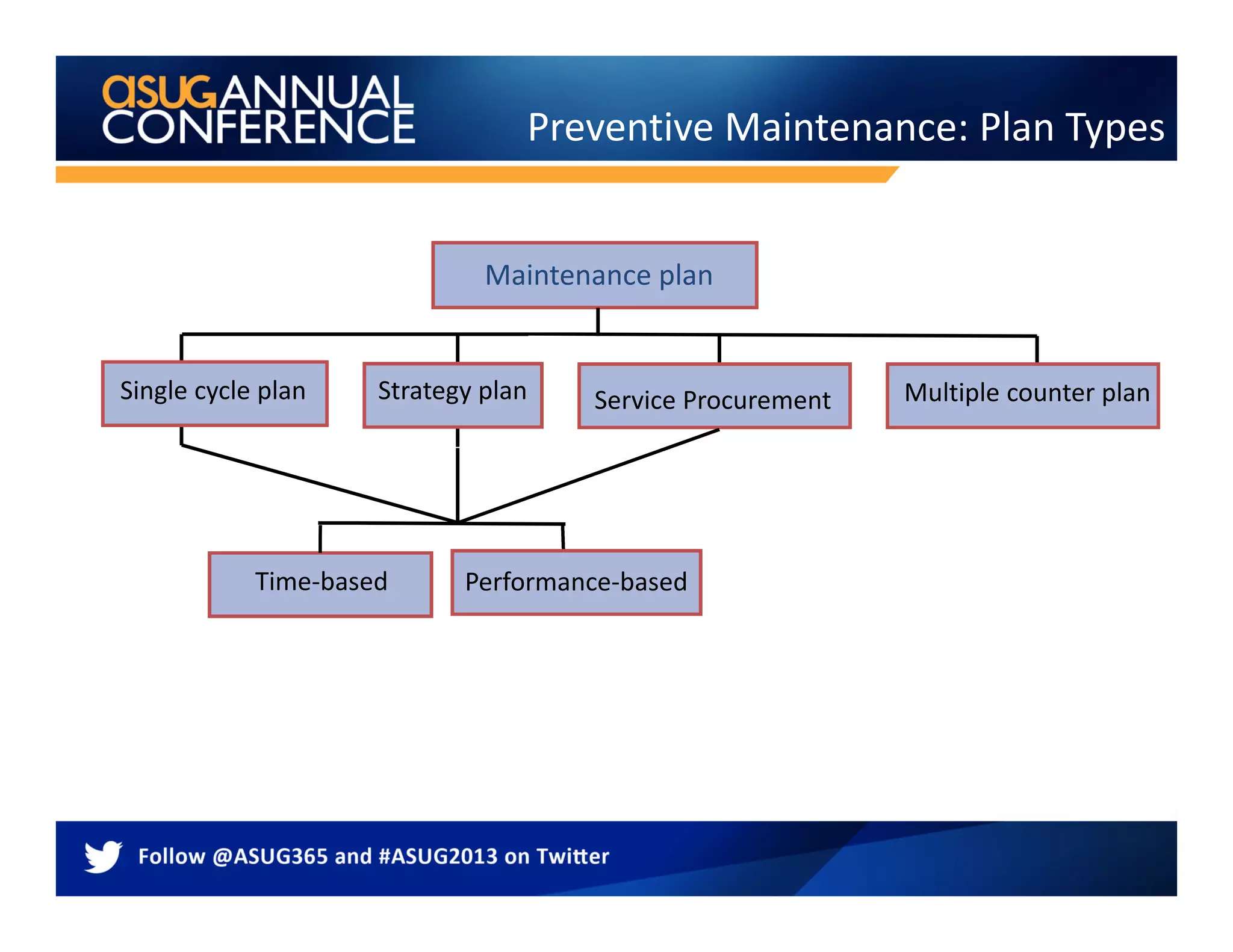
Preventive Maintenance: Plan Types
Time-based
Maintenance plan
Single cycle plan Multiple counter planStrategy plan
Performance-based
Service Procurement
Building Blocks
1. When
Cycle or strategy that determines when a PM should
be done
 2. Where – Equipment or Functional Location
The asset, assets, or location where the work is to
take place
 3. What – Task List
Define tasks, materials and tools that are required
Tip - Add the Default to the user settings
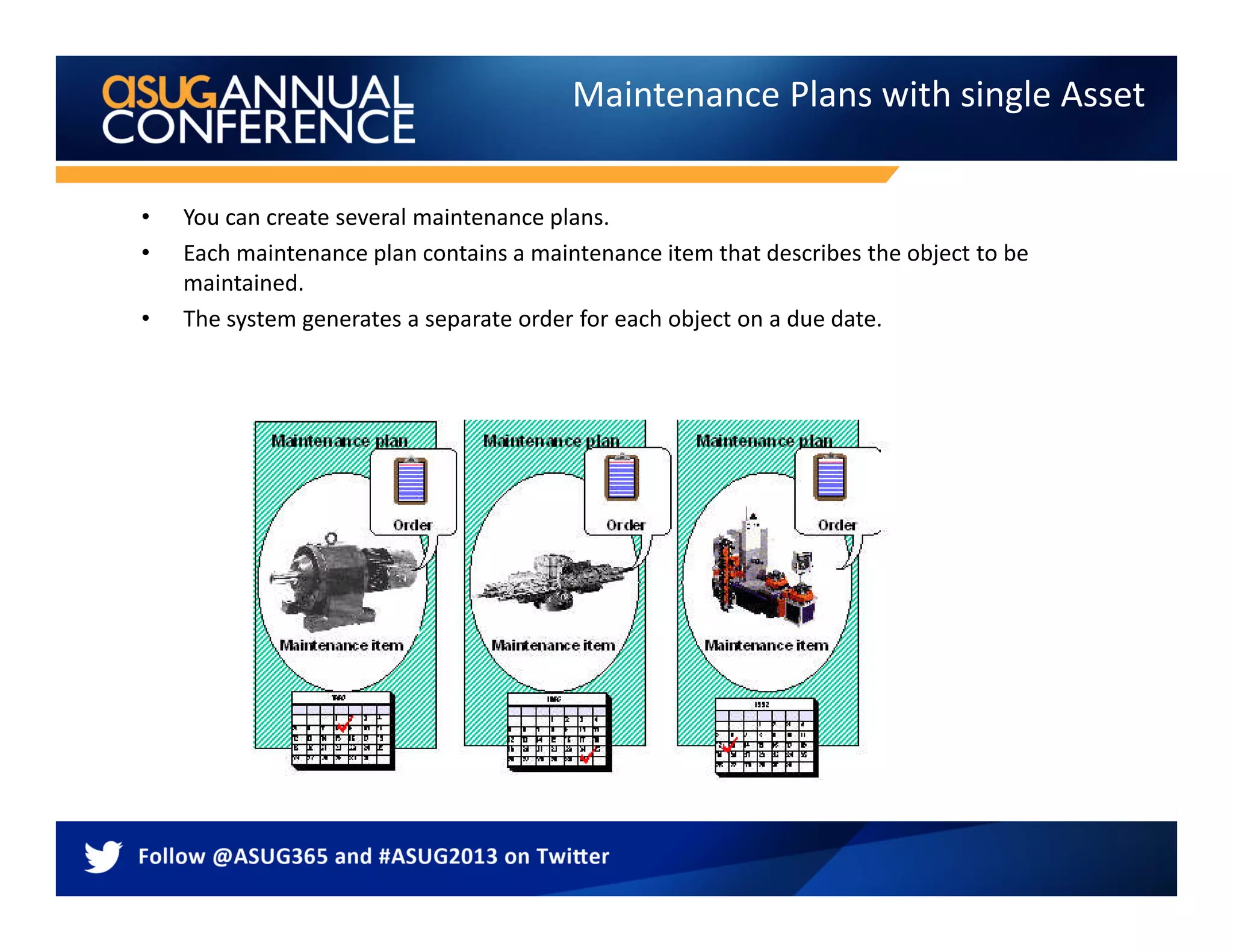
Maintenance Plans with single Asset
• You can create several maintenance plans.
• Each maintenance plan contains a maintenance item that describes the object to be
maintained.
• The system generates a separate order for each object on a due date.
Maintenance Plan Item with Linear
Maintenance Plans with Asset list
• You create one maintenance plan.
• You assign an object list to the
maintenance plan in which all object
to be maintained are listed.
• The system generates an order for all
objects on a due date.
• Supports inspection routes,
lubrication routes
For operations in a task list, technical
objects can be maintained
© SAP 2009 / 11
Enhance- Asset List in Ehp4
Leverage – LAM, OAA, GEO.e with Plan
 Linear Assets can be
represented in plans
 Use Geo.e to add spatial
data
 Operational Account
Assignment provides cost
of inspection at the exact
position of the work
Report on Inspection plans and results
Inspection results support long term planning
 Use results to feed
the long term
asset planning
 Leverage PPM to
support the long
term plan
1
23
Create Inspection
plans
Gather results
Create long term
plan
4
Analyze results
Maintenance Plans with Strategy
• You create one maintenance plan.
• You assign an object list or a single
asset.
• The system generates an order for all
objects on the due dates with the tasks
that match the strategy.
• Supports a single plan with different
tasks per call date
• Can be performance or time
• The strategy unit must be consistent
Maintenance Plan with Notification
Made possible once multiple
Notifications could be added
To a single order.
Also possible to add task list
in a notification as of
ERP2005
Move/Skip/Release in graphic
simulation
Change documents in the
maintenance plan
Scheduling parameters
Other Items
Preventive maintenance – in most
organizations today
SAP ERP
Transformer
Work orders are
created in regular
Intervals
Technician is executing work
Work
order
Agenda
 The Core – Preventive Maintenance
 The Core – “Light” CBM
 “and More”
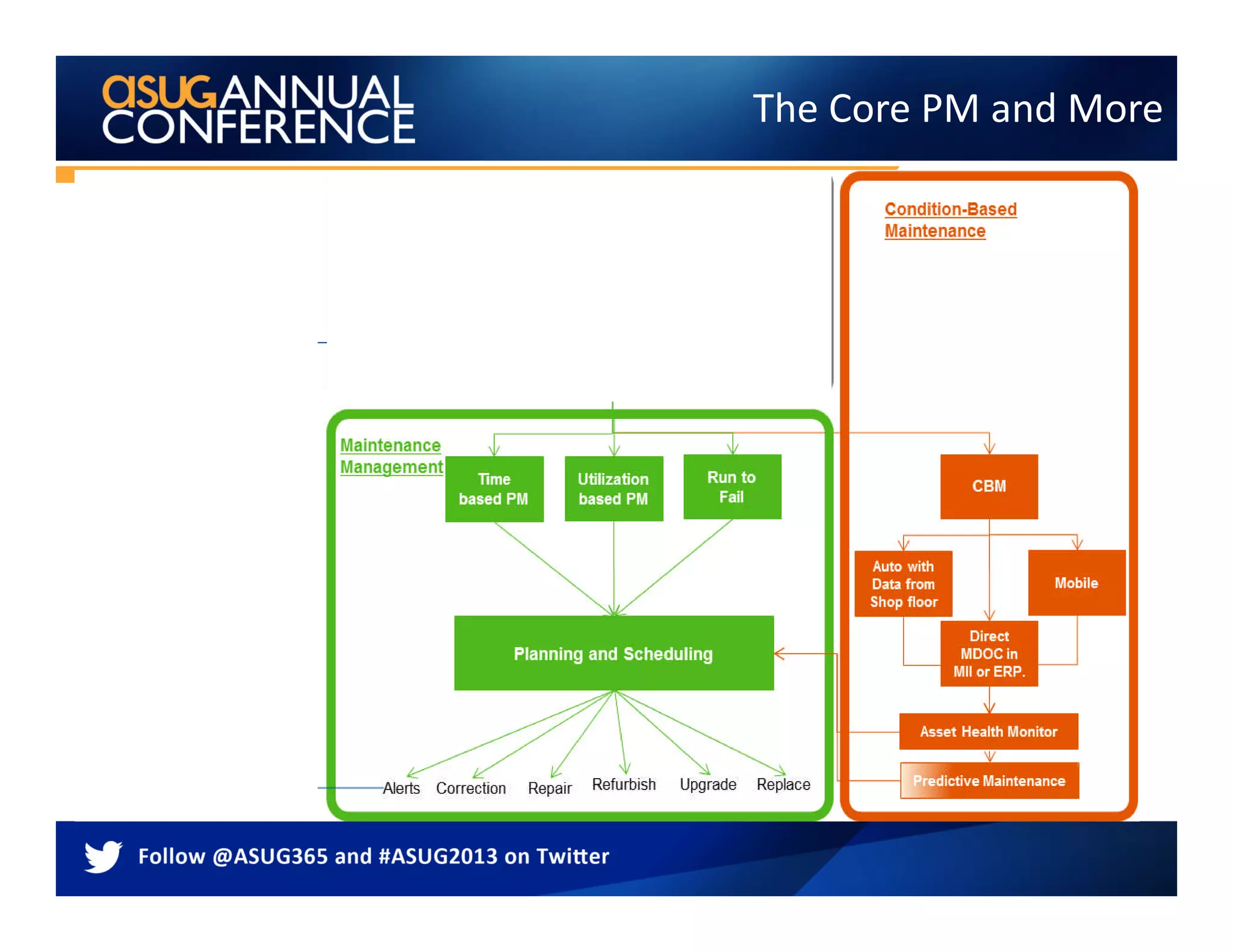
The Core PM and More
Create a new development project TC:CMOD
ENHANCEMENT IS IMRC0001
Sample Program
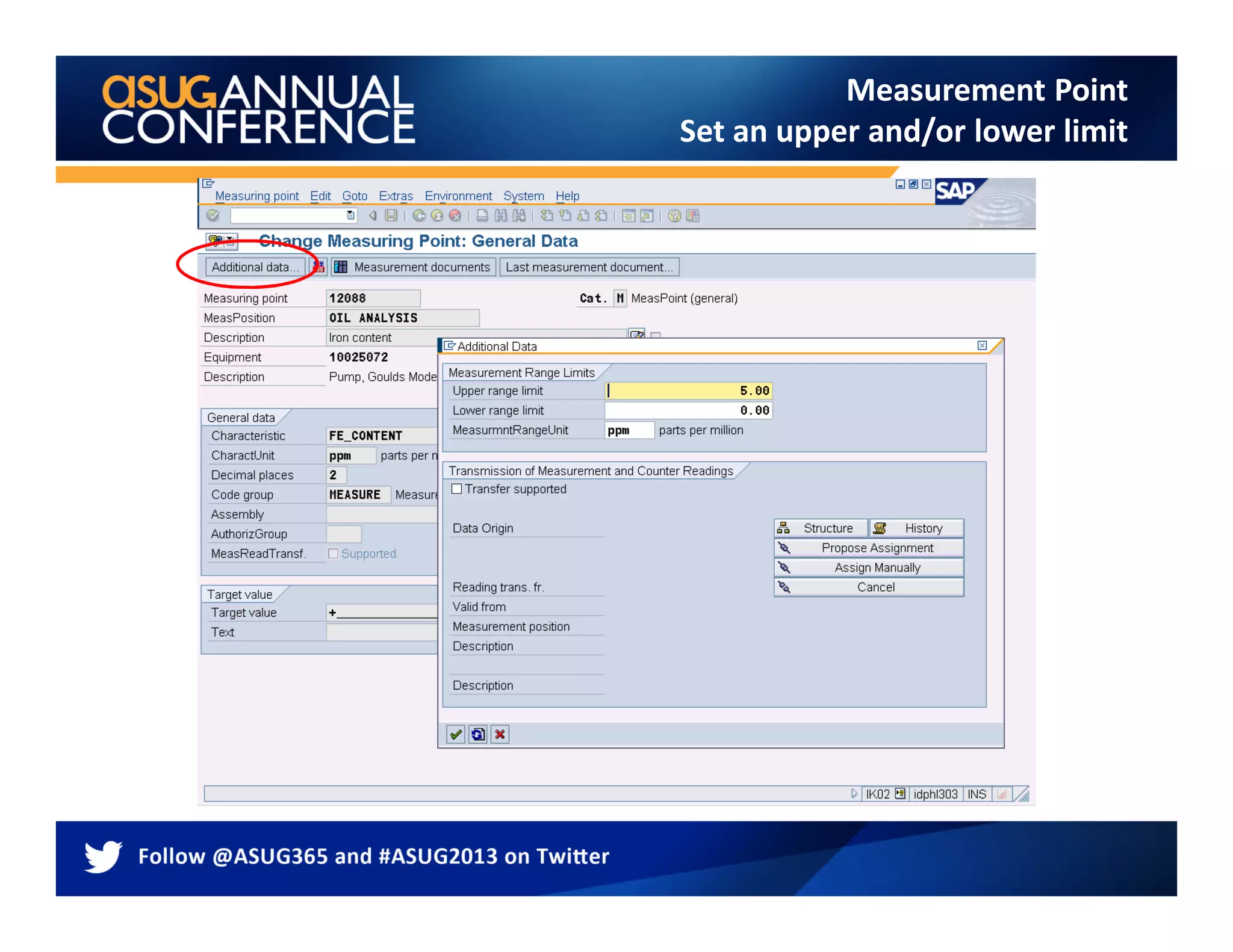
Measurement Point
Set an upper and/or lower limit
Enter reading and valuation code
Condition based maintenance (using mobility)
SAP ERP
Current
Temperature
Voltage
Transformer
SAP determines whether
Work order should be created
Technician is executing work
Technician feed rounds information
Into SAP to populate
measurement documents
Current
Temperature
Voltage
Transformer
Current
Temperature
Voltage
Transformer
Agenda
 The Core – Preventive Maintenance
 The Core – “Light” CBM
 “and More”
Condition Based Maintenance The Goal
Easily accessible dashboards
allow asset managers and staff to
monitor asset health in real time
via measurement points
Real-time alerts via
dashboards give instant
updates on equipment status
and allow rapid reaction
Links to ERP data to trigger
maintenance workflow to
reduce unplanned downtime
and improve reliability.
Asset health
Continuous improvement
Best practice
Trend analysis identifies
problem areas for
immediate investigation
V.P.
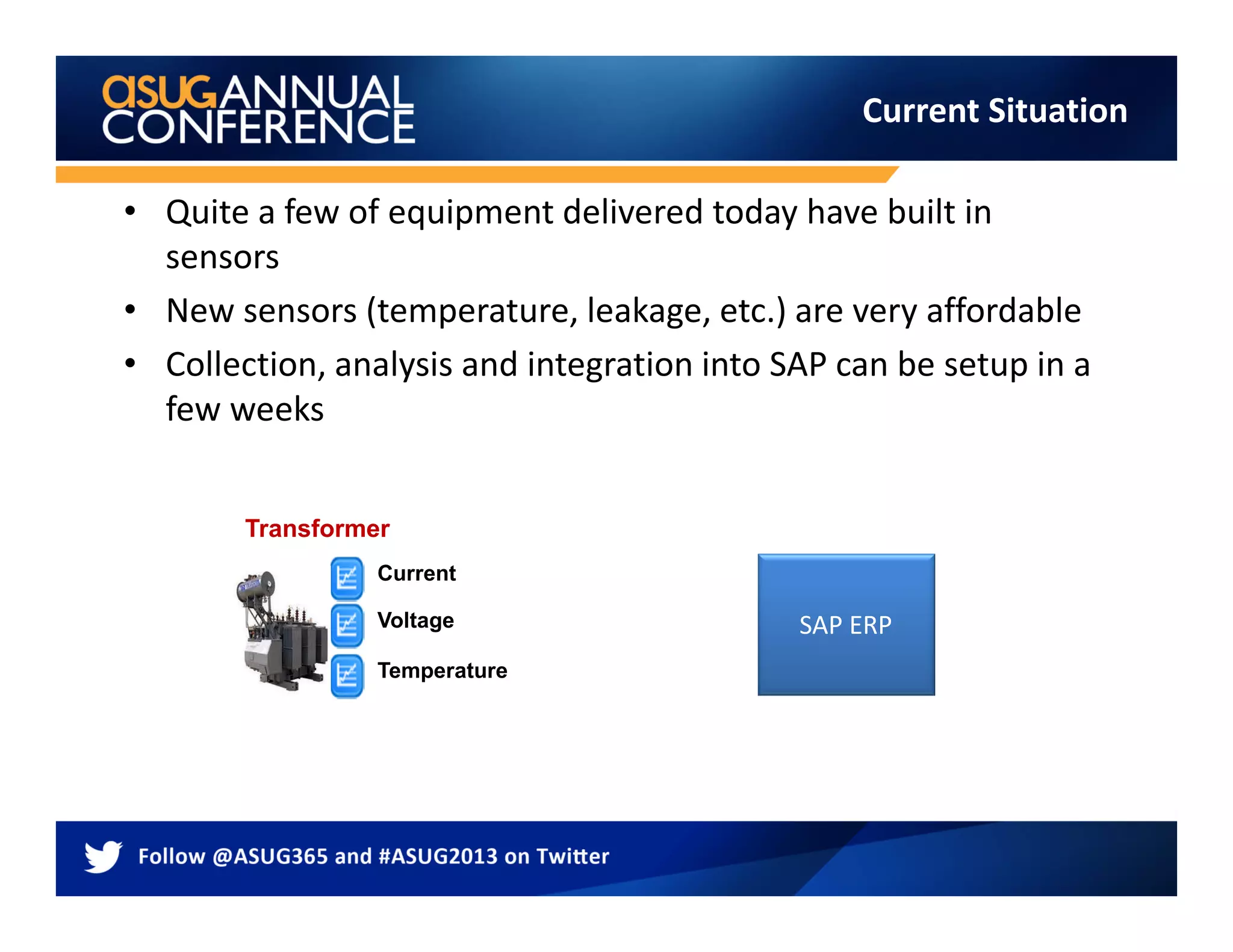
• Quite a few of equipment delivered today have built in
sensors
• New sensors (temperature, leakage, etc.) are very affordable
• Collection, analysis and integration into SAP can be setup in a
few weeks
Current Situation
SAP ERP
Current
Temperature
Voltage
Transformer
• The historian collect lots of data but provides little
information to SAP
• Investments in the historian data has been made that is not
leveraged
• EAM groups does not have visibility to condition data in SAP
to make/optimize their decisions
Challenges
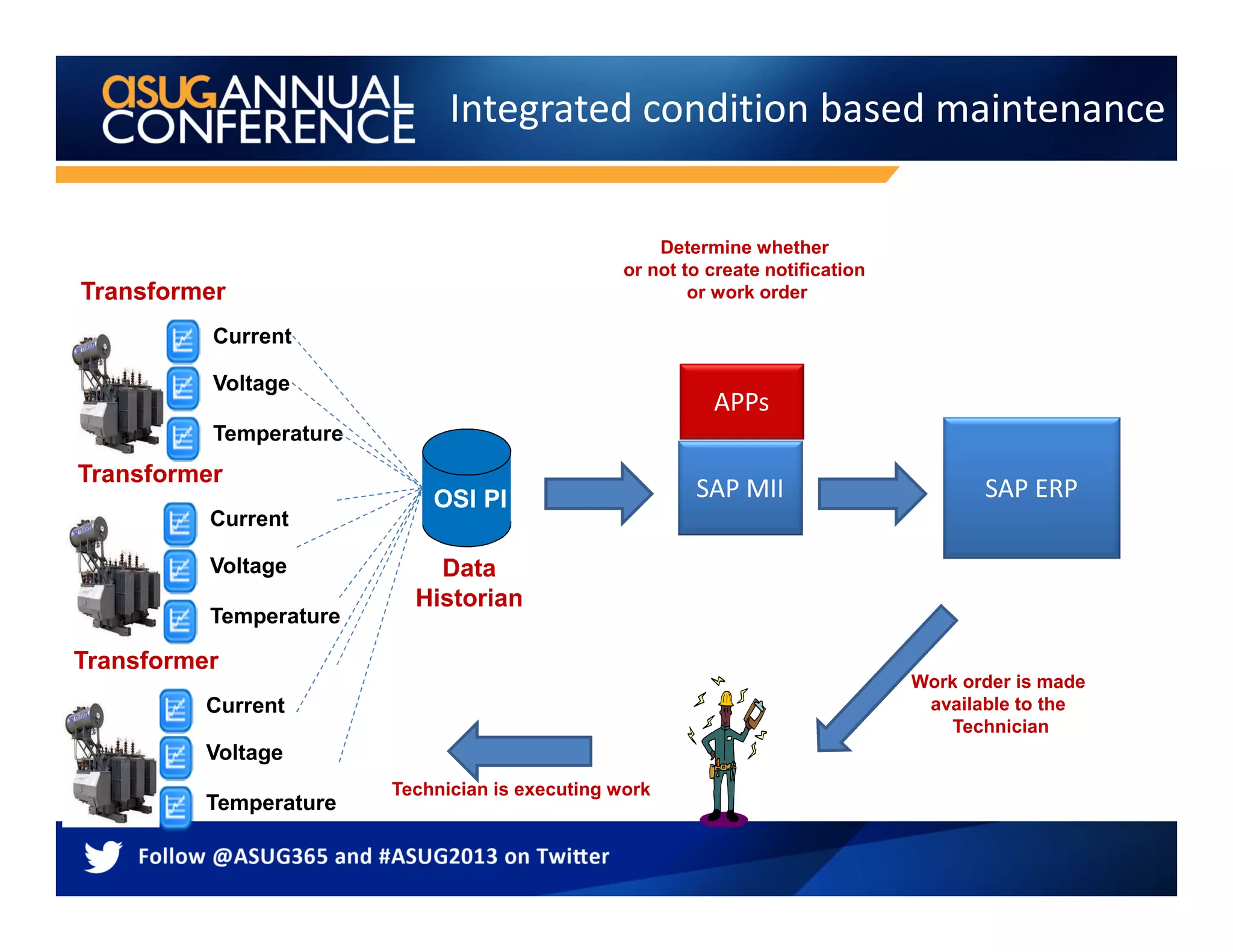
Integrated condition based maintenance
SAP ERP
Current
Temperature
Voltage
Transformer
Data
Historian
SAP MII
Determine whether
or not to create notification
or work order
Work order is made
available to the
Technician
Technician is executing work
OSI PI
APPs
Current
Temperature
Voltage
Transformer
Current
Temperature
Voltage
Transformer
Integration and Intelligence
Integration: A single layer enabling SAP ERP
connectivity into real-time systems to drive
equipment-to-enterprise business process
interoperability
Intelligence: Real-time analytics engine that
aggregates and delivers unified visualization of
events, alerts, KPIs and decision support to
personnel thru role-based dashboards
Rule Name (MII
Transaction)
Description
DailyRunHourUpda
te
This rule updates the run hours per equipment based
on a summarized, binary IsRunning Tag. Parametera are
the tag name and the Measurement Point name
NotificationOnExc
eedThreshold
This rule creates a notification once a tag value has
exceeded the Threshold value. The Threshold value can
be a tag or static value
… ….
Condition Based Maintenance - Detail
Tag Name
AB323DS
DS.32.1231
PUMP3223.TP
1. Select Asset
2. Select Rule
3. Associate Tags and/or fixed values
4. Select Frequency
5. Submit to database
Threshold Temp: 121
MII DB
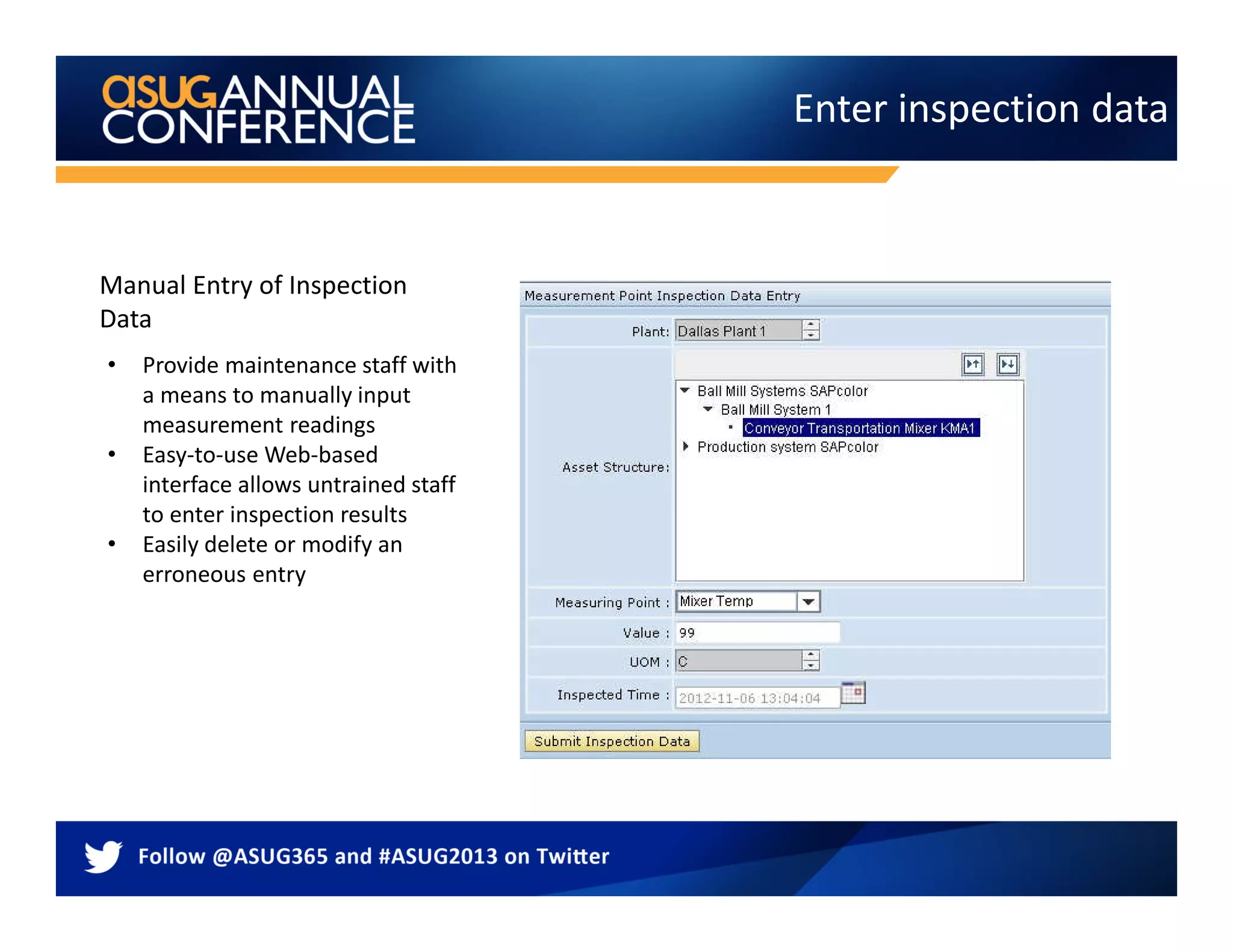
Enter inspection data
• Provide maintenance staff with
a means to manually input
measurement readings
• Easy-to-use Web-based
interface allows untrained staff
to enter inspection results
• Easily delete or modify an
erroneous entry
Manual Entry of Inspection
Data
Asset Health Alerts
• Visual indicators and e-mail notifications alert maintenance staff to the assets in the most critical status
• Data-driven notifications alert users to changes in asset health status so that they can react
appropriately and make informed decisions quickly
• Maintenance staff can trigger a maintenance request if warranted
• Prioritized asset management enables a consolidated alert view
Asset Health History
• Communicate real-time asset health status, monitor and adjust maintenance plan
• Clear data layout and status indicators allow you to quickly compare current with target asset output.
• Aggregate health status
• Gauges visualize the criticality of current asset health
• Search by specific asset domain for monitoring
• Option:
• SAP 3D Visual Enterprise provides a 3D visual image of the asset being monitored
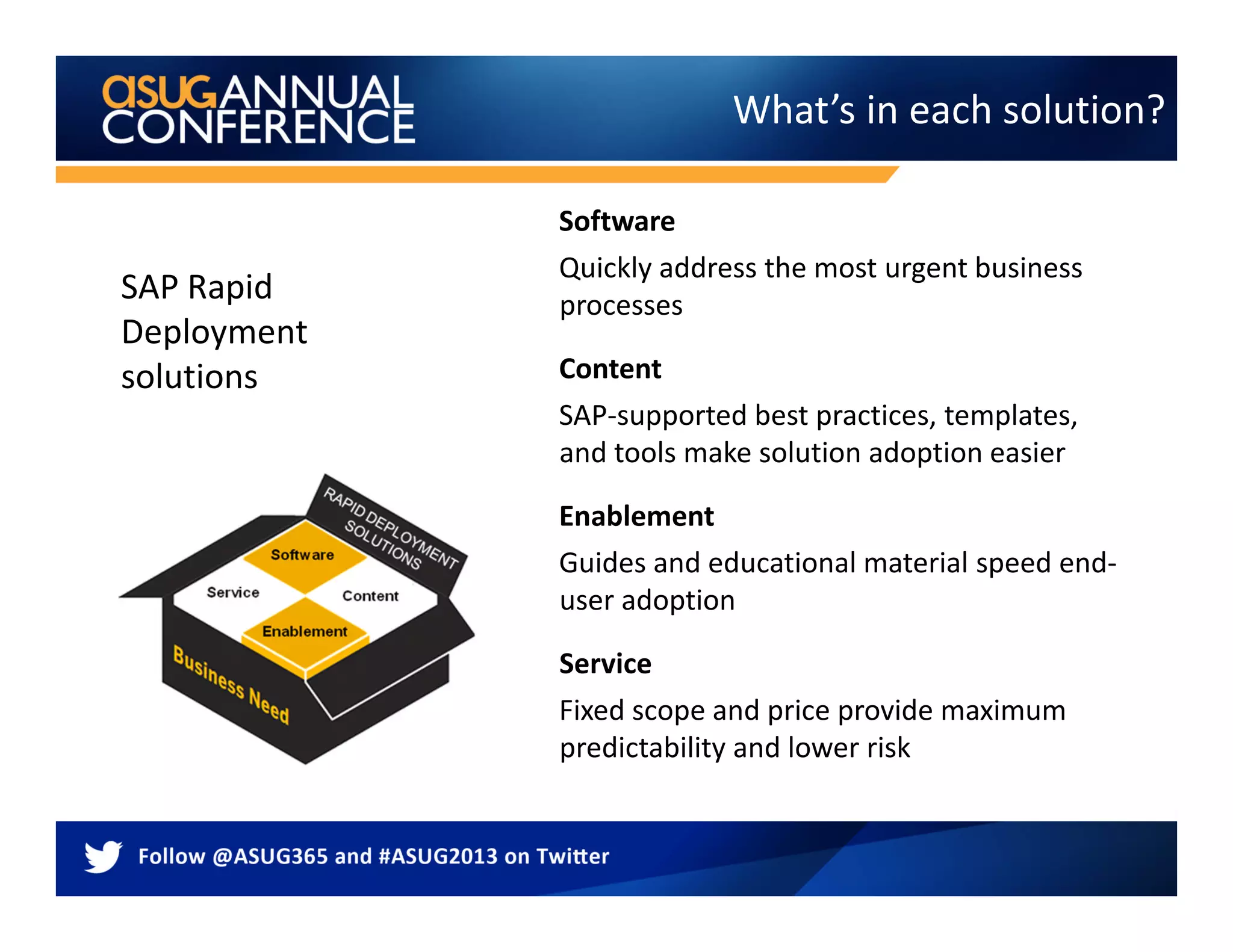
What’s in each solution?
Software
Quickly address the most urgent business
processes
Content
SAP-supported best practices, templates,
and tools make solution adoption easier
Enablement
Guides and educational material speed end-
user adoption
Service
Fixed scope and price provide maximum
predictability and lower risk
SAP Rapid
Deployment
solutions
Business challenges There is a solution
 SAP Condition-Based Maintenance rapid-
deployment solution enables your organization to
perform maintenance only when necessary by
arming maintenance teams with sophisticated
intelligence and comprehensive asset health
dashboards. The solution also enables manual and
automatic triggering of maintenance workflow
leveraging through native integration with the SAP
Enterprise Asset Management (SAP EAM) solution.
Get started with condition-based
maintenance quickly and affordably
 Critical asset failures which can have serious
environmental and enterprise level consequences as
demonstrated by recent high-profile industrial
catastrophes
 Finding a CBM solution that has low entry, low TCO,
and leverages existing SAP investments
 Traditional time or counter-based maintenance
strategies missing a dynamic component leading to
higher maintenance cost
 Other RDS available is Asset Health Visualization
What does SAP deliver? What do you have to do?
 Provide IT infrastructure (server)
 Install SAP MII, version 12.2, on the development
and production environments
 Install SAP BusinessObjects Dashboards software to
make optional changes to predefined health index
dashboards
 Provide asset hierarchy structure from existing SAP
ECC and SAP EAM applications and information on
tag thresholds
 Provide access to existing shop floor system with
connector from SAP Plant Connectivity
 Provide appropriate contacts in the business and IT
departments
 Conduct end-user training and change management
 Conduct performance and integration testing
 Perform data migration and cleansing
 Transport to production
Key deliverables
 Perform installation check
 Lead workshop to confirm predefined requirements
 Set up MII connectivity with shop floor system via
connector in SAP Plant Connectivity
 Set up the plant database schema for storing shop
floor aggregate data
 Configure the asset health index to meet customer-
specific dashboard requirements
 Activate and test solution
 Enable knowledge transfer to key users
 Enable support for go-live
System requirements
SOFTWARE
• SAP ECC 6.0 EHP4 or above
• SAP Manufacturing Integration & Intelligence (SAP MII) on SAP NetWeaver® CE 7.3
version 12.2, SP4 or above
• SAP Plant Connectivity 2.2, SP3 or above
• SAP BusinessObjects Dashboards 4.0 SP4 or above*
• SAP 3D Visual Enterprise application (optional)
DATABASE
• SAP HANA® 1.0 SP5 or above (optional) **
* required only for customizing dashboards
** SAP HANA® content supporting cross-plant implementation is provided. However, the
standard service offering supports a single plant implementation.
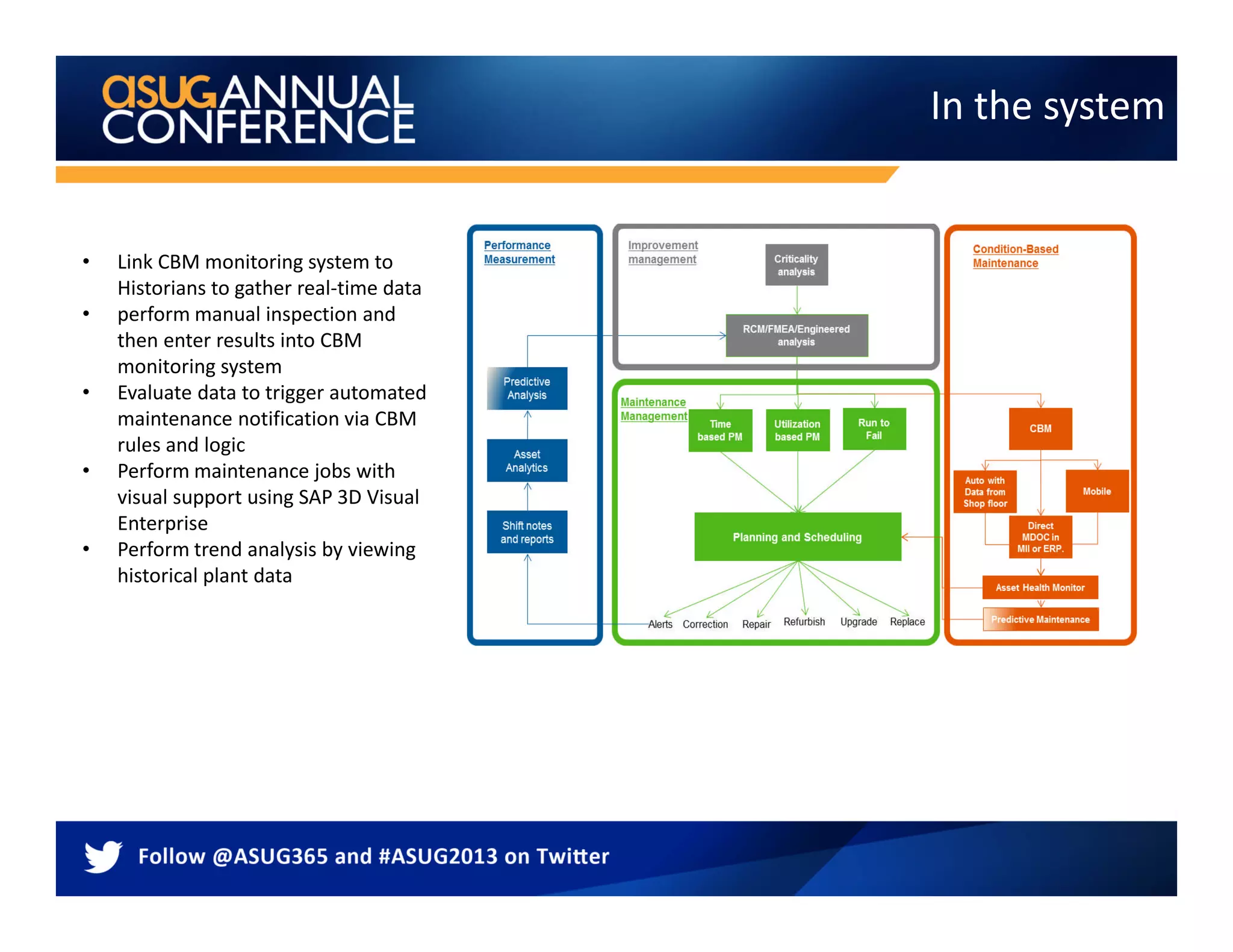
In the system
• Link CBM monitoring system to
Historians to gather real-time data
• perform manual inspection and
then enter results into CBM
monitoring system
• Evaluate data to trigger automated
maintenance notification via CBM
rules and logic
• Perform maintenance jobs with
visual support using SAP 3D Visual
Enterprise
• Perform trend analysis by viewing
historical plant data
Conclusion - Benefits
– Minimize risks and stay in
compliance via alerts of imminent
catastrophic asset failures
– Manage investment risk by starting
with a baseline scope and then
scale it gradually
– Reduce maintenance due to fewer
reactive repairs of broken
equipment
– Support effort to stay within
regulatory compliance
– Reduce maintenance rework and
mean-time-to-repair (MTTR)
– Operate equipment in an
economically and environmentally
sustainable way
– Increased return on assets (ROA)
– Maximized asset utilization
– Improved overall equipment effectiveness (OEE)
– Reduced operational risk in asset management
– Reduced maintenance cost as a percentage of revenue
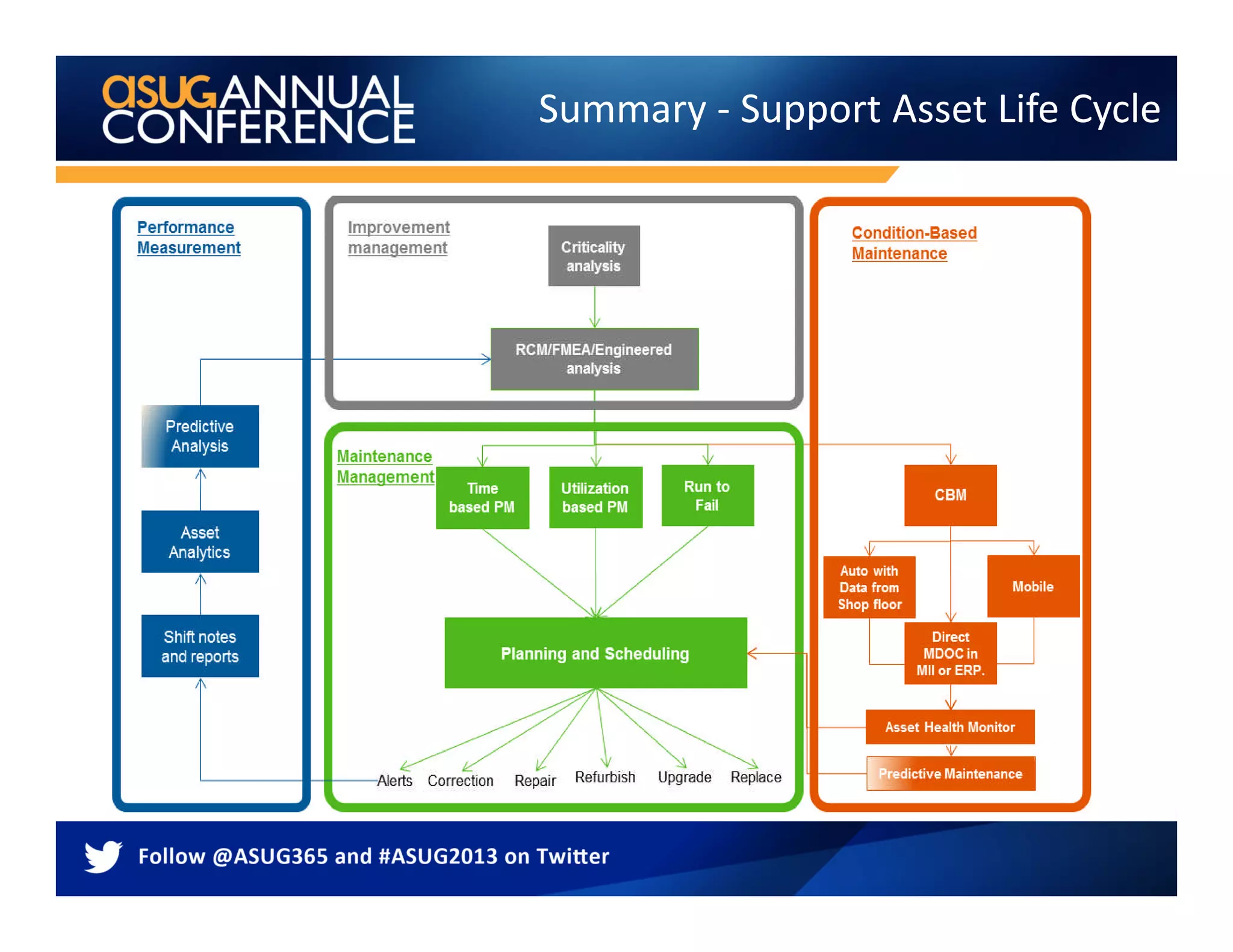
Summary - Support Asset Life Cycle
Contact:
Len Harms
lharms@vestapartners.com
610-209-6683
THANK YOU FOR PARTICIPATING
Please provide feedback on this session by completing a
short survey via the event mobile application.
SESSION CODE: 8595
For ongoing education on this area of focus,
visit www.ASUG.com

SAP CBM

  • 1.
    SAP Preventive Maintenance– The Core and More Len Harms - Vesta
  • 2.
    Agenda  The Core– Preventive Maintenance  The Core – “Light” CBM  “and More”
  • 3.
  • 4.
    Preventive Maintenance: Forms Time-basedPerformance-based Condition-based Preventive maintenance Temperature Thickness Druck 10 20 30 40 50 60 70 80 Pressure 2001
  • 5.
    Preventive Maintenance: PlanTypes Time-based Maintenance plan Single cycle plan Multiple counter planStrategy plan Performance-based Service Procurement
  • 6.
    Building Blocks 1. When Cycleor strategy that determines when a PM should be done  2. Where – Equipment or Functional Location The asset, assets, or location where the work is to take place  3. What – Task List Define tasks, materials and tools that are required
  • 7.
    Tip - Addthe Default to the user settings
  • 8.
    Maintenance Plans withsingle Asset • You can create several maintenance plans. • Each maintenance plan contains a maintenance item that describes the object to be maintained. • The system generates a separate order for each object on a due date.
  • 9.
  • 10.
    Maintenance Plans withAsset list • You create one maintenance plan. • You assign an object list to the maintenance plan in which all object to be maintained are listed. • The system generates an order for all objects on a due date. • Supports inspection routes, lubrication routes
  • 11.
    For operations ina task list, technical objects can be maintained © SAP 2009 / 11 Enhance- Asset List in Ehp4
  • 12.
    Leverage – LAM,OAA, GEO.e with Plan  Linear Assets can be represented in plans  Use Geo.e to add spatial data  Operational Account Assignment provides cost of inspection at the exact position of the work
  • 13.
    Report on Inspectionplans and results
  • 14.
    Inspection results supportlong term planning  Use results to feed the long term asset planning  Leverage PPM to support the long term plan 1 23 Create Inspection plans Gather results Create long term plan 4 Analyze results
  • 15.
    Maintenance Plans withStrategy • You create one maintenance plan. • You assign an object list or a single asset. • The system generates an order for all objects on the due dates with the tasks that match the strategy. • Supports a single plan with different tasks per call date • Can be performance or time • The strategy unit must be consistent
  • 16.
    Maintenance Plan withNotification Made possible once multiple Notifications could be added To a single order. Also possible to add task list in a notification as of ERP2005
  • 17.
    Move/Skip/Release in graphic simulation Changedocuments in the maintenance plan Scheduling parameters Other Items
  • 18.
    Preventive maintenance –in most organizations today SAP ERP Transformer Work orders are created in regular Intervals Technician is executing work Work order
  • 19.
    Agenda  The Core– Preventive Maintenance  The Core – “Light” CBM  “and More”
  • 20.
    The Core PMand More
  • 21.
    Create a newdevelopment project TC:CMOD ENHANCEMENT IS IMRC0001
  • 22.
  • 23.
    Measurement Point Set anupper and/or lower limit
  • 24.
    Enter reading andvaluation code
  • 25.
    Condition based maintenance(using mobility) SAP ERP Current Temperature Voltage Transformer SAP determines whether Work order should be created Technician is executing work Technician feed rounds information Into SAP to populate measurement documents Current Temperature Voltage Transformer Current Temperature Voltage Transformer
  • 26.
    Agenda  The Core– Preventive Maintenance  The Core – “Light” CBM  “and More”
  • 27.
    Condition Based MaintenanceThe Goal Easily accessible dashboards allow asset managers and staff to monitor asset health in real time via measurement points Real-time alerts via dashboards give instant updates on equipment status and allow rapid reaction Links to ERP data to trigger maintenance workflow to reduce unplanned downtime and improve reliability. Asset health Continuous improvement Best practice Trend analysis identifies problem areas for immediate investigation V.P.
  • 28.
    • Quite afew of equipment delivered today have built in sensors • New sensors (temperature, leakage, etc.) are very affordable • Collection, analysis and integration into SAP can be setup in a few weeks Current Situation SAP ERP Current Temperature Voltage Transformer
  • 29.
    • The historiancollect lots of data but provides little information to SAP • Investments in the historian data has been made that is not leveraged • EAM groups does not have visibility to condition data in SAP to make/optimize their decisions Challenges
  • 30.
    Integrated condition basedmaintenance SAP ERP Current Temperature Voltage Transformer Data Historian SAP MII Determine whether or not to create notification or work order Work order is made available to the Technician Technician is executing work OSI PI APPs Current Temperature Voltage Transformer Current Temperature Voltage Transformer
  • 31.
    Integration and Intelligence Integration:A single layer enabling SAP ERP connectivity into real-time systems to drive equipment-to-enterprise business process interoperability Intelligence: Real-time analytics engine that aggregates and delivers unified visualization of events, alerts, KPIs and decision support to personnel thru role-based dashboards
  • 32.
    Rule Name (MII Transaction) Description DailyRunHourUpda te Thisrule updates the run hours per equipment based on a summarized, binary IsRunning Tag. Parametera are the tag name and the Measurement Point name NotificationOnExc eedThreshold This rule creates a notification once a tag value has exceeded the Threshold value. The Threshold value can be a tag or static value … …. Condition Based Maintenance - Detail Tag Name AB323DS DS.32.1231 PUMP3223.TP 1. Select Asset 2. Select Rule 3. Associate Tags and/or fixed values 4. Select Frequency 5. Submit to database Threshold Temp: 121 MII DB
  • 33.
    Enter inspection data •Provide maintenance staff with a means to manually input measurement readings • Easy-to-use Web-based interface allows untrained staff to enter inspection results • Easily delete or modify an erroneous entry Manual Entry of Inspection Data
  • 34.
    Asset Health Alerts •Visual indicators and e-mail notifications alert maintenance staff to the assets in the most critical status • Data-driven notifications alert users to changes in asset health status so that they can react appropriately and make informed decisions quickly • Maintenance staff can trigger a maintenance request if warranted • Prioritized asset management enables a consolidated alert view
  • 35.
    Asset Health History •Communicate real-time asset health status, monitor and adjust maintenance plan • Clear data layout and status indicators allow you to quickly compare current with target asset output. • Aggregate health status • Gauges visualize the criticality of current asset health • Search by specific asset domain for monitoring • Option: • SAP 3D Visual Enterprise provides a 3D visual image of the asset being monitored
  • 36.
    What’s in eachsolution? Software Quickly address the most urgent business processes Content SAP-supported best practices, templates, and tools make solution adoption easier Enablement Guides and educational material speed end- user adoption Service Fixed scope and price provide maximum predictability and lower risk SAP Rapid Deployment solutions
  • 37.
    Business challenges Thereis a solution  SAP Condition-Based Maintenance rapid- deployment solution enables your organization to perform maintenance only when necessary by arming maintenance teams with sophisticated intelligence and comprehensive asset health dashboards. The solution also enables manual and automatic triggering of maintenance workflow leveraging through native integration with the SAP Enterprise Asset Management (SAP EAM) solution. Get started with condition-based maintenance quickly and affordably  Critical asset failures which can have serious environmental and enterprise level consequences as demonstrated by recent high-profile industrial catastrophes  Finding a CBM solution that has low entry, low TCO, and leverages existing SAP investments  Traditional time or counter-based maintenance strategies missing a dynamic component leading to higher maintenance cost  Other RDS available is Asset Health Visualization
  • 38.
    What does SAPdeliver? What do you have to do?  Provide IT infrastructure (server)  Install SAP MII, version 12.2, on the development and production environments  Install SAP BusinessObjects Dashboards software to make optional changes to predefined health index dashboards  Provide asset hierarchy structure from existing SAP ECC and SAP EAM applications and information on tag thresholds  Provide access to existing shop floor system with connector from SAP Plant Connectivity  Provide appropriate contacts in the business and IT departments  Conduct end-user training and change management  Conduct performance and integration testing  Perform data migration and cleansing  Transport to production Key deliverables  Perform installation check  Lead workshop to confirm predefined requirements  Set up MII connectivity with shop floor system via connector in SAP Plant Connectivity  Set up the plant database schema for storing shop floor aggregate data  Configure the asset health index to meet customer- specific dashboard requirements  Activate and test solution  Enable knowledge transfer to key users  Enable support for go-live
  • 39.
    System requirements SOFTWARE • SAPECC 6.0 EHP4 or above • SAP Manufacturing Integration & Intelligence (SAP MII) on SAP NetWeaver® CE 7.3 version 12.2, SP4 or above • SAP Plant Connectivity 2.2, SP3 or above • SAP BusinessObjects Dashboards 4.0 SP4 or above* • SAP 3D Visual Enterprise application (optional) DATABASE • SAP HANA® 1.0 SP5 or above (optional) ** * required only for customizing dashboards ** SAP HANA® content supporting cross-plant implementation is provided. However, the standard service offering supports a single plant implementation.
  • 40.
    In the system •Link CBM monitoring system to Historians to gather real-time data • perform manual inspection and then enter results into CBM monitoring system • Evaluate data to trigger automated maintenance notification via CBM rules and logic • Perform maintenance jobs with visual support using SAP 3D Visual Enterprise • Perform trend analysis by viewing historical plant data
  • 41.
    Conclusion - Benefits –Minimize risks and stay in compliance via alerts of imminent catastrophic asset failures – Manage investment risk by starting with a baseline scope and then scale it gradually – Reduce maintenance due to fewer reactive repairs of broken equipment – Support effort to stay within regulatory compliance – Reduce maintenance rework and mean-time-to-repair (MTTR) – Operate equipment in an economically and environmentally sustainable way – Increased return on assets (ROA) – Maximized asset utilization – Improved overall equipment effectiveness (OEE) – Reduced operational risk in asset management – Reduced maintenance cost as a percentage of revenue
  • 42.
    Summary - SupportAsset Life Cycle
  • 43.
  • 45.
    THANK YOU FORPARTICIPATING Please provide feedback on this session by completing a short survey via the event mobile application. SESSION CODE: 8595 For ongoing education on this area of focus, visit www.ASUG.com