Work Clearance Management:ConfigurationGuide
Configuration:-
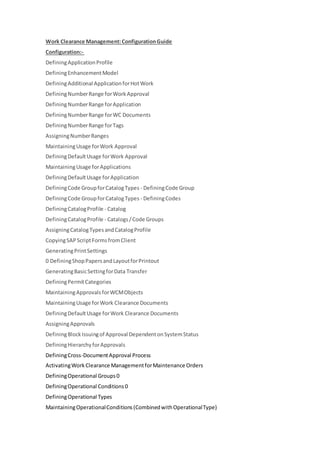
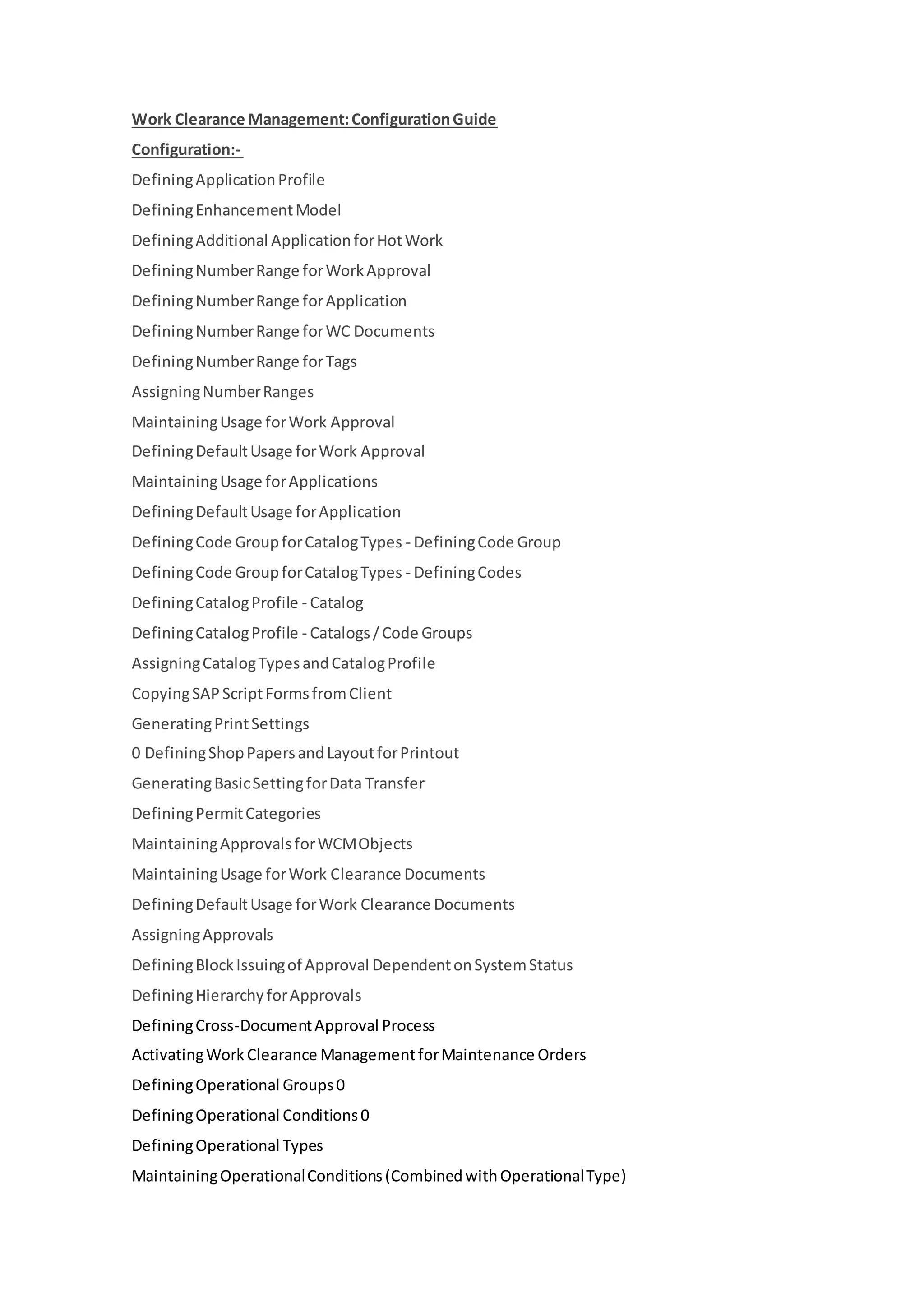
DefiningApplicationProfile
DefiningEnhancementModel
DefiningAdditional ApplicationforHotWork
DefiningNumberRange forWorkApproval
DefiningNumberRange forApplication
DefiningNumberRange forWC Documents
DefiningNumberRange forTags
AssigningNumberRanges
MaintainingUsage forWork Approval
DefiningDefaultUsage forWork Approval
MaintainingUsage forApplications
DefiningDefaultUsage forApplication
DefiningCode GroupforCatalogTypes - DefiningCode Group
DefiningCode GroupforCatalogTypes - DefiningCodes
DefiningCatalogProfile - Catalog
DefiningCatalogProfile - Catalogs/Code Groups
AssigningCatalogTypesandCatalogProfile
CopyingSAPScriptFormsfromClient
GeneratingPrintSettings
0 DefiningShopPapersandLayoutforPrintout
GeneratingBasicSettingforData Transfer
DefiningPermitCategories
MaintainingApprovalsforWCMObjects
MaintainingUsage forWork Clearance Documents
DefiningDefaultUsage forWork Clearance Documents
AssigningApprovals
DefiningBlockIssuingof Approval DependentonSystemStatus
DefiningHierarchyforApprovals
DefiningCross-DocumentApproval Process
ActivatingWork Clearance ManagementforMaintenance Orders
DefiningOperational Groups0
DefiningOperational Conditions0
DefiningOperational Types
MaintainingOperationalConditions(CombinedwithOperationalType)
DefiningPrintFormatforOperational Tags
MaintainingConflictRules
DefiningUserFieldProfile
DefiningWorkstationApplication
DownloadingOperationalDocumenttoLocal PC
Master Data
CreatingDocumentMasterRecordfor WCD
CreatingWorkClearance Document(WCD) Template - Header
Maintenance Screenof WCD Template
CreatingTaskList Group - Header
Creating Task List Group - Operation
Process Overview Table:-
Process step External
process
reference
Business
condition
Business role Trans-
action
code
Expected results
Creating
Maintenance
Order with
WCM
Requirement
Chemicals:
Maintenance
Specialist
IW31 Maintenance order is
created.
Creating
Work
Approval
from
Maintenance
Order
Chemicals:
Maintenance
Specialist
IW32 The work approval is
created.
Creating
Work
Clearance
Application
(WCA) from
Work
Approval
(WAP)
PM-WCM:
Maintenance
Planner
WCTB The WC application is
created
Creating an
Additional
Application
for Hot Work
from WAP
PM-WCM:
Maintenance
Planner
WCTB The application for hot
work is created.
Creating
Operational
Work
Clearance
Document
(WCD) from
WCA
PM-WCM:
Maintenance
Planner
WCTL Operational WCD is
created.
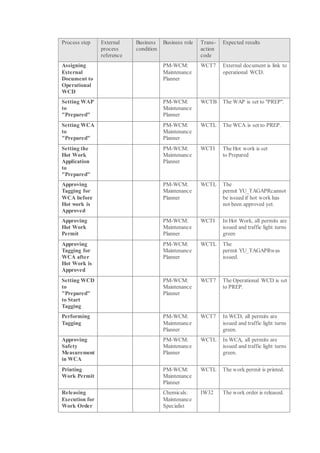
Process step External
process
reference
Business
condition
Business role Trans-
action
code
Expected results
Assigning
External
Document to
Operational
WCD
PM-WCM:
Maintenance
Planner
WCT7 External document is link to
operational WCD.
Setting WAP
to
"Prepared"
PM-WCM:
Maintenance
Planner
WCTB The WAP is set to "PREP".
Setting WCA
to
"Prepared"
PM-WCM:
Maintenance
Planner
WCTL The WCA is set to PREP.
Setting the
Hot Work
Application
to
"Prepared"
PM-WCM:
Maintenance
Planner
WCTI The Hot work is set
to Prepared
Approving
Tagging for
WCA before
Hot work is
Approved
PM-WCM:
Maintenance
Planner
WCTL The
permit YU_TAGAPRcannot
be issued if hot work has
not been approved yet.
Approving
Hot Work
Permit
PM-WCM:
Maintenance
Planner
WCTI In Hot Work, all permits are
issued and traffic light turns
green
Approving
Tagging for
WCA after
Hot Work is
Approved
PM-WCM:
Maintenance
Planner
WCTL The
permit YU_TAGAPRwas
issued.
Setting WCD
to
"Prepared"
to Start
Tagging
PM-WCM:
Maintenance
Planner
WCT7 The Operational WCD is set
to PREP.
Performing
Tagging
PM-WCM:
Maintenance
Planner
WCT7 In WCD, all permits are
issued and traffic light turns
green.
Approving
Safety
Measurement
in WCA
PM-WCM:
Maintenance
Planner
WCTL In WCA, all permits are
issued and traffic light turns
green.
Printing
Work Permit
PM-WCM:
Maintenance
Planner
WCTL The work permit is printed.
Releasing
Execution for
Work Order
Chemicals:
Maintenance
Specialist
IW32 The work order is released.
Process step External
process
reference
Business
condition
Business role Trans-
action
code
Expected results
Performing
Test Cycle
PM-WCM:
Maintenance
Planner
WCTL The test cycle is completed.
Setting Work
Order to
"Work
Completed"
Chemicals:
Maintenance
Specialist
IW32 The WOCO status is active
for the order.
Setting Work
Approval to
"Closed"
PM-WCM:
Maintenance
Planner
WCTB The WAP is set to Closed.
Setting
Application
for Hot Work
to "Closed"
PM-WCM:
Maintenance
Planner
WCTI The Hot work is set
to Closed.
Setting WCA
to "Closed"
PM-WCM:
Maintenance
Planner
WCTL The WCA is set to Closed.
Perform
Untagging
PM-WCM:
Maintenance
Planner
WCT7 Untagging is completed.
Setting WCD
to " Closed "
PM-WCM:
Maintenance
Planner
WCT7 The WCD is set
to completed.
Technically
Completing
the Order
See
Operation
Maintenance
(929)
Settling the
Order
See
Operation
Maintenance
(929)
Closing the
Order
See
Operation
Maintenance
(929)
Creating
Maintenance
Plan
Chemicals:
Maintenance
Specialist
IP41 Maintenance plan has been
created.
Scheduling
Maintenance
Plan
Chemicals:
Maintenance
Specialist
IP10 Maintenance plan has been
scheduled.
Running
Program
RIWC0016
to Generate
IT
Administrator
(Professional
User)
SE38 The planned maintenance
order with WCM control
key has generated related
WCM objects.
Process step External
process
reference
Business
condition
Business role Trans-
action
code
Expected results
WCM
Objects
Checking
Call Object
Chemicals:
Maintenance
Specialist
IP10 A work approvalis created
and then assigned to the
maintenance order
automatically.
1likes

Work clearance management config and steps

  • 1.
    Work Clearance Management:ConfigurationGuide Configuration:- DefiningApplicationProfile DefiningEnhancementModel DefiningAdditionalApplicationforHotWork DefiningNumberRange forWorkApproval DefiningNumberRange forApplication DefiningNumberRange forWC Documents DefiningNumberRange forTags AssigningNumberRanges MaintainingUsage forWork Approval DefiningDefaultUsage forWork Approval MaintainingUsage forApplications DefiningDefaultUsage forApplication DefiningCode GroupforCatalogTypes - DefiningCode Group DefiningCode GroupforCatalogTypes - DefiningCodes DefiningCatalogProfile - Catalog DefiningCatalogProfile - Catalogs/Code Groups AssigningCatalogTypesandCatalogProfile CopyingSAPScriptFormsfromClient GeneratingPrintSettings 0 DefiningShopPapersandLayoutforPrintout GeneratingBasicSettingforData Transfer DefiningPermitCategories MaintainingApprovalsforWCMObjects MaintainingUsage forWork Clearance Documents DefiningDefaultUsage forWork Clearance Documents AssigningApprovals DefiningBlockIssuingof Approval DependentonSystemStatus DefiningHierarchyforApprovals DefiningCross-DocumentApproval Process ActivatingWork Clearance ManagementforMaintenance Orders DefiningOperational Groups0 DefiningOperational Conditions0 DefiningOperational Types MaintainingOperationalConditions(CombinedwithOperationalType)
  • 2.
    DefiningPrintFormatforOperational Tags MaintainingConflictRules DefiningUserFieldProfile DefiningWorkstationApplication DownloadingOperationalDocumenttoLocal PC MasterData CreatingDocumentMasterRecordfor WCD CreatingWorkClearance Document(WCD) Template - Header Maintenance Screenof WCD Template CreatingTaskList Group - Header Creating Task List Group - Operation Process Overview Table:- Process step External process reference Business condition Business role Trans- action code Expected results Creating Maintenance Order with WCM Requirement Chemicals: Maintenance Specialist IW31 Maintenance order is created. Creating Work Approval from Maintenance Order Chemicals: Maintenance Specialist IW32 The work approval is created. Creating Work Clearance Application (WCA) from Work Approval (WAP) PM-WCM: Maintenance Planner WCTB The WC application is created Creating an Additional Application for Hot Work from WAP PM-WCM: Maintenance Planner WCTB The application for hot work is created. Creating Operational Work Clearance Document (WCD) from WCA PM-WCM: Maintenance Planner WCTL Operational WCD is created.
  • 3.
    Process step External process reference Business condition Businessrole Trans- action code Expected results Assigning External Document to Operational WCD PM-WCM: Maintenance Planner WCT7 External document is link to operational WCD. Setting WAP to "Prepared" PM-WCM: Maintenance Planner WCTB The WAP is set to "PREP". Setting WCA to "Prepared" PM-WCM: Maintenance Planner WCTL The WCA is set to PREP. Setting the Hot Work Application to "Prepared" PM-WCM: Maintenance Planner WCTI The Hot work is set to Prepared Approving Tagging for WCA before Hot work is Approved PM-WCM: Maintenance Planner WCTL The permit YU_TAGAPRcannot be issued if hot work has not been approved yet. Approving Hot Work Permit PM-WCM: Maintenance Planner WCTI In Hot Work, all permits are issued and traffic light turns green Approving Tagging for WCA after Hot Work is Approved PM-WCM: Maintenance Planner WCTL The permit YU_TAGAPRwas issued. Setting WCD to "Prepared" to Start Tagging PM-WCM: Maintenance Planner WCT7 The Operational WCD is set to PREP. Performing Tagging PM-WCM: Maintenance Planner WCT7 In WCD, all permits are issued and traffic light turns green. Approving Safety Measurement in WCA PM-WCM: Maintenance Planner WCTL In WCA, all permits are issued and traffic light turns green. Printing Work Permit PM-WCM: Maintenance Planner WCTL The work permit is printed. Releasing Execution for Work Order Chemicals: Maintenance Specialist IW32 The work order is released.
  • 4.
    Process step External process reference Business condition Businessrole Trans- action code Expected results Performing Test Cycle PM-WCM: Maintenance Planner WCTL The test cycle is completed. Setting Work Order to "Work Completed" Chemicals: Maintenance Specialist IW32 The WOCO status is active for the order. Setting Work Approval to "Closed" PM-WCM: Maintenance Planner WCTB The WAP is set to Closed. Setting Application for Hot Work to "Closed" PM-WCM: Maintenance Planner WCTI The Hot work is set to Closed. Setting WCA to "Closed" PM-WCM: Maintenance Planner WCTL The WCA is set to Closed. Perform Untagging PM-WCM: Maintenance Planner WCT7 Untagging is completed. Setting WCD to " Closed " PM-WCM: Maintenance Planner WCT7 The WCD is set to completed. Technically Completing the Order See Operation Maintenance (929) Settling the Order See Operation Maintenance (929) Closing the Order See Operation Maintenance (929) Creating Maintenance Plan Chemicals: Maintenance Specialist IP41 Maintenance plan has been created. Scheduling Maintenance Plan Chemicals: Maintenance Specialist IP10 Maintenance plan has been scheduled. Running Program RIWC0016 to Generate IT Administrator (Professional User) SE38 The planned maintenance order with WCM control key has generated related WCM objects.
  • 5.
    Process step External process reference Business condition Businessrole Trans- action code Expected results WCM Objects Checking Call Object Chemicals: Maintenance Specialist IP10 A work approvalis created and then assigned to the maintenance order automatically. 1likes