micro:bit and education
Magda Wood
Digitális Pedagógiai Módszertani Központ
Chief of Learning
Microbit Educational Foundation
26th February 2019
Inspiring every child to
create their best digital future
Where we started
United Kingdom
2014, context of curriculum change
2016, 1 million micro:bits given for free to all Year 7 students: 11 and 12 year-olds
▪ BBC Make It Digital, year of innovation to encourage national interest in developing
digital skills
▪ Designed with technologists and educationalists, by BBC Learning and BBC research
and development teams; to support children’s learning in changing world
▪ Promoted to children through national campaigns on television, radio, music and online
– to get children excited about understanding and working with technologies
▪ Now almost all secondary schools across the UK have micro:bits and over 1,000 public
libraries have sets of micro:bits too
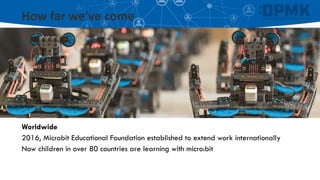
How far we’ve come
Worldwide
2016, Microbit Educational Foundation established to extend work internationally
Now children in over 80 countries are learning with micro:bit
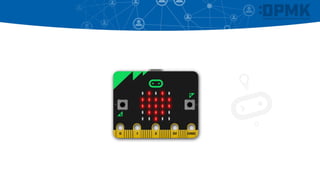
What is a BBC micro:bit?
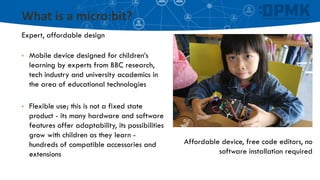
What is a micro:bit?
Expert, affordable design
• Mobile device designed for children’s
learning by experts from BBC research,
tech industry and university academics in
the area of educational technologies
• Flexible use; this is not a fixed state
product - its many hardware and software
features offer adaptability, its possibilities
grow with children as they learn -
hundreds of compatible accessories and
extensions
Affordable device, free code editors, no
software installation required
The micro:bit moment
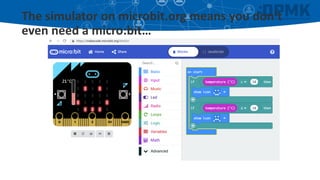
The simulator on microbit.org means you don’t
even need a micro:bit…
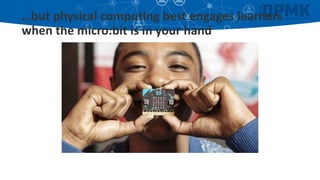
…but physical computing best engages learners
when the micro:bit is in your hand
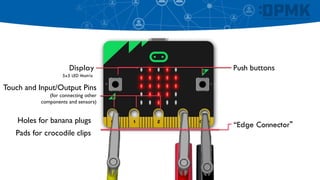
Push buttons
Touch and Input/Output Pins
(for connecting other
components and sensors)
Display
5x5 LED Matrix
“Edge Connector"
Holes for banana plugs
Pads for crocodile clips
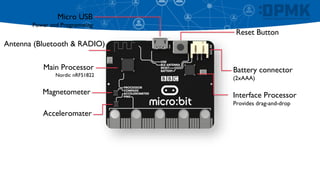
Battery connector
(2xAAA)
Magnetometer
Main Processor
Nordic nRF51822
Reset Button
Micro USB
Power and Programming
Acceleromater
Antenna (Bluetooth & RADIO)
Interface Processor
Provides drag-and-drop
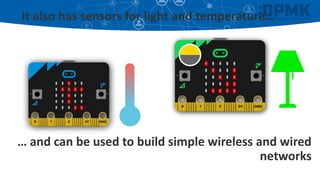
It also has sensors for light and temperature…
… and can be used to build simple wireless and wired
networks
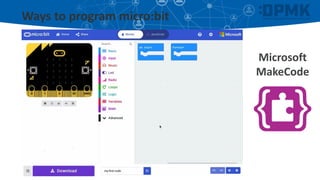
Ways to program micro:bit
Microsoft
MakeCode
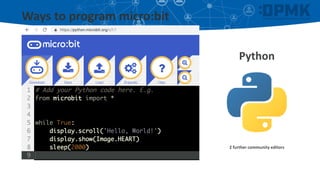
Ways to program micro:bit
Python
2 further community editors
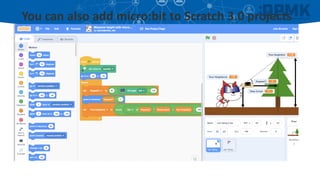
You can also add micro:bit to Scratch 3.0 projects
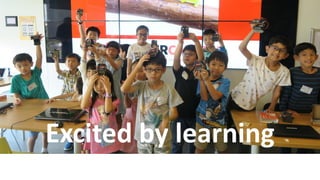
Excited by learning
Children’s learning and micro:bit
micro:bit makes abstract concepts tangible
▪ In learning how to create and design with the micro:bit, children develop their
fluency in the concepts and languages of computer systems; they apply this
knowledge and demonstrate learning through the processes of:
▪ designing,
▪ building,
▪ prototyping,
▪ iterating,
▪ making mistakes and correcting them
▪ Driving independence and collaborative ways-of-working and thinking; environment
to ask new questions, devise creative solutions, new ideas, and innovate
Children’s learning and micro:bit
▪ Allows you to teach theoretical subject
knowledge in real-world, meaningful
contexts
▪ Deepening knowledge and understanding
of computing fundamentals such as
abstraction, algorithmic thinking etc
▪ Gateway to understanding how computer
systems work and are programmed to
work
▪ Growing confidence and becoming the
expert
▪ Leads to applications of technology across
further subjects – real-world
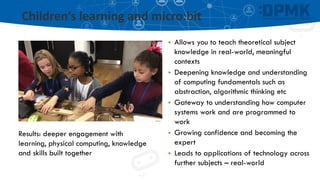
Results: deeper engagement with
learning, physical computing, knowledge
and skills built together
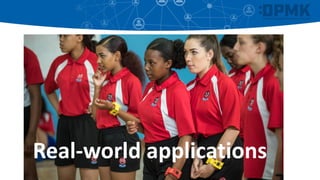
Real-world applications
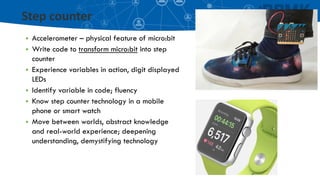
Step counter
▪ Accelerometer – physical feature of micro:bit
▪ Write code to transform micro:bit into step
counter
▪ Experience variables in action, digit displayed
LEDs
▪ Identify variable in code; fluency
▪ Know step counter technology in a mobile
phone or smart watch
▪ Move between worlds, abstract knowledge
and real-world experience; deepening
understanding, demystifying technology
Used in many education
systems, what happens at
school counts…
What we’re learning
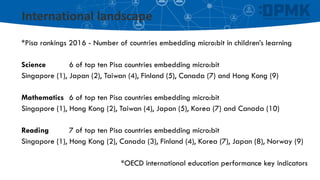
International landscape
*Pisa rankings 2016 - Number of countries embedding micro:bit in children’s learning
Science 6 of top ten Pisa countries embedding micro:bit
Singapore (1), Japan (2), Taiwan (4), Finland (5), Canada (7) and Hong Kong (9)
Mathematics 6 of top ten Pisa countries embedding micro:bit
Singapore (1), Hong Kong (2), Taiwan (4), Japan (5), Korea (7) and Canada (10)
Reading 7 of top ten Pisa countries embedding micro:bit
Singapore (1), Hong Kong (2), Canada (3), Finland (4), Korea (7), Japan (8), Norway (9)
*OECD international education performance key indicators
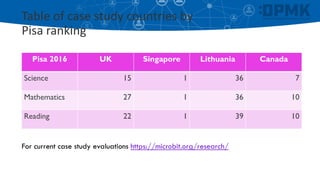
Table of case study countries by
Pisa ranking
Pisa 2016 UK Singapore Lithuania Canada
Science 15 1 36 7
Mathematics 27 1 36 10
Reading 22 1 39 10
For current case study evaluations https://microbit.org/research/
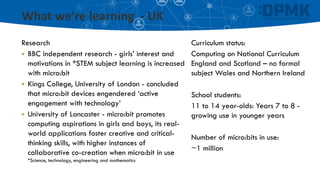
What we’re learning - UK
Research
▪ BBC independent research - girls’ interest and
motivations in *STEM subject learning is increased
with micro:bit
▪ Kings College, University of London - concluded
that micro:bit devices engendered ‘active
engagement with technology’
▪ University of Lancaster - micro:bit promotes
computing aspirations in girls and boys, its real-
world applications foster creative and critical-
thinking skills, with higher instances of
collaborative co-creation when micro:bit in use
*Science, technology, engineering and mathematics
Curriculum status:
Computing on National Curriculum
England and Scotland – no formal
subject Wales and Northern Ireland
School students:
11 to 14 year-olds: Years 7 to 8 -
growing use in younger years
Number of micro:bits in use:
~1 million
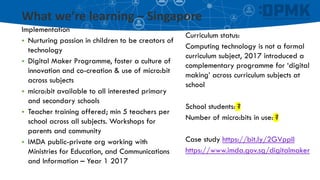
What we’re learning – Singapore
Implementation
▪ Nurturing passion in children to be creators of
technology
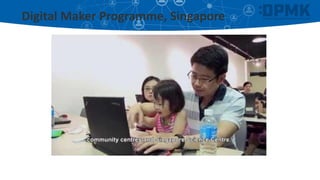
▪ Digital Maker Programme, foster a culture of
innovation and co-creation & use of micro:bit
across subjects
▪ micro:bit available to all interested primary
and secondary schools
▪ Teacher training offered; min 5 teachers per
school across all subjects. Workshops for
parents and community
▪ IMDA public-private org working with
Ministries for Education, and Communications
and Information – Year 1 2017
Curriculum status:
Computing technology is not a formal
curriculum subject, 2017 introduced a
complementary programme for ‘digital
making’ across curriculum subjects at
school
School students: ?
Number of micro:bits in use: ?
Case study https://bit.ly/2GVppIl
https://www.imda.gov.sg/digitalmaker
What we’re learning – Lithuania
Curriculum status:
Technological Literacies and
Information Technologies.
School students:
11 & 12-year-olds: Grade 5
Number of micro:bits in use:
27,000 across all grade 5 students
http://www.kompiuteriukai.lt
Implementation
▪ Use of micro:bit across curriculum subjects
▪ Teacher training offered to IT teachers initially
▪ Early evaluations shows girls and boys equally
enjoy learning with technologies and are
motivated to work together
▪ Education charity working in schools with
approval by Ministry of Education
▪ Fundraising donations from private business
and citizens
▪ First year 2018
What we’re learning – Canada
Curriculum status:
Varies across provinces, Science and
Technology, Applied Design, Skills
and Technologies, Applied Science
and Technology
School students:
8 to 12 year-olds: Grades 3 to 7
Number of micro:bits in use: 100,000
https://kidscodejeunesse.org/microbit.html
Implementation
▪ Research-led initiative – teaching children
digital skills at a young age reduces
traditional barriers to *STEM subjects
▪ Teachers invited to sign-up to training and
micro:bit programme
▪ Integrating computational thinking, physical
computing and coding across curriculum
subjects
▪ Education orgs working in schools with funding
from Ministries of Science, and Innovation,
Science and Economic Development
▪ First year 2018
Digital Maker Programme, Singapore
Things to remember about micro:bit
Simple to use
Immediate success
From code to download in minutes
Becomes more sophisticated as
children’s knowledge and
understanding grows
Affordable
Designed for low cost
Code products and services
free worldwide
Flexible use with accessories
and products
Meaningful learning
Embeds in your educational and
cultural context
Learning benefits
Building and applying computational
knowledge and digital
skills
Thank you
Email magda@microbit.org
Twitter @Magda_Wood

Magda Wood (Micro:bit): Interpreting MicroBit into education

  • 1.
    micro:bit and education MagdaWood Digitális Pedagógiai Módszertani Központ Chief of Learning Microbit Educational Foundation 26th February 2019
  • 2.
    Inspiring every childto create their best digital future
  • 3.
    Where we started UnitedKingdom 2014, context of curriculum change 2016, 1 million micro:bits given for free to all Year 7 students: 11 and 12 year-olds ▪ BBC Make It Digital, year of innovation to encourage national interest in developing digital skills ▪ Designed with technologists and educationalists, by BBC Learning and BBC research and development teams; to support children’s learning in changing world ▪ Promoted to children through national campaigns on television, radio, music and online – to get children excited about understanding and working with technologies ▪ Now almost all secondary schools across the UK have micro:bits and over 1,000 public libraries have sets of micro:bits too
  • 4.
    How far we’vecome Worldwide 2016, Microbit Educational Foundation established to extend work internationally Now children in over 80 countries are learning with micro:bit
  • 5.
    What is aBBC micro:bit?
  • 6.
    What is amicro:bit? Expert, affordable design • Mobile device designed for children’s learning by experts from BBC research, tech industry and university academics in the area of educational technologies • Flexible use; this is not a fixed state product - its many hardware and software features offer adaptability, its possibilities grow with children as they learn - hundreds of compatible accessories and extensions Affordable device, free code editors, no software installation required
  • 7.
  • 8.
    The simulator onmicrobit.org means you don’t even need a micro:bit…
  • 9.
    …but physical computingbest engages learners when the micro:bit is in your hand
  • 10.
    Push buttons Touch andInput/Output Pins (for connecting other components and sensors) Display 5x5 LED Matrix “Edge Connector" Holes for banana plugs Pads for crocodile clips
  • 11.
    Battery connector (2xAAA) Magnetometer Main Processor NordicnRF51822 Reset Button Micro USB Power and Programming Acceleromater Antenna (Bluetooth & RADIO) Interface Processor Provides drag-and-drop
  • 12.
    It also hassensors for light and temperature… … and can be used to build simple wireless and wired networks
  • 13.
    Ways to programmicro:bit Microsoft MakeCode
  • 14.
    Ways to programmicro:bit Python 2 further community editors
  • 15.
    You can alsoadd micro:bit to Scratch 3.0 projects
  • 16.
  • 17.
    Children’s learning andmicro:bit micro:bit makes abstract concepts tangible ▪ In learning how to create and design with the micro:bit, children develop their fluency in the concepts and languages of computer systems; they apply this knowledge and demonstrate learning through the processes of: ▪ designing, ▪ building, ▪ prototyping, ▪ iterating, ▪ making mistakes and correcting them ▪ Driving independence and collaborative ways-of-working and thinking; environment to ask new questions, devise creative solutions, new ideas, and innovate
  • 18.
    Children’s learning andmicro:bit ▪ Allows you to teach theoretical subject knowledge in real-world, meaningful contexts ▪ Deepening knowledge and understanding of computing fundamentals such as abstraction, algorithmic thinking etc ▪ Gateway to understanding how computer systems work and are programmed to work ▪ Growing confidence and becoming the expert ▪ Leads to applications of technology across further subjects – real-world Results: deeper engagement with learning, physical computing, knowledge and skills built together
  • 19.
  • 20.
    Step counter ▪ Accelerometer– physical feature of micro:bit ▪ Write code to transform micro:bit into step counter ▪ Experience variables in action, digit displayed LEDs ▪ Identify variable in code; fluency ▪ Know step counter technology in a mobile phone or smart watch ▪ Move between worlds, abstract knowledge and real-world experience; deepening understanding, demystifying technology
  • 21.
    Used in manyeducation systems, what happens at school counts…
  • 23.
  • 24.
    International landscape *Pisa rankings2016 - Number of countries embedding micro:bit in children’s learning Science 6 of top ten Pisa countries embedding micro:bit Singapore (1), Japan (2), Taiwan (4), Finland (5), Canada (7) and Hong Kong (9) Mathematics 6 of top ten Pisa countries embedding micro:bit Singapore (1), Hong Kong (2), Taiwan (4), Japan (5), Korea (7) and Canada (10) Reading 7 of top ten Pisa countries embedding micro:bit Singapore (1), Hong Kong (2), Canada (3), Finland (4), Korea (7), Japan (8), Norway (9) *OECD international education performance key indicators
  • 25.
    Table of casestudy countries by Pisa ranking Pisa 2016 UK Singapore Lithuania Canada Science 15 1 36 7 Mathematics 27 1 36 10 Reading 22 1 39 10 For current case study evaluations https://microbit.org/research/
  • 26.
    What we’re learning- UK Research ▪ BBC independent research - girls’ interest and motivations in *STEM subject learning is increased with micro:bit ▪ Kings College, University of London - concluded that micro:bit devices engendered ‘active engagement with technology’ ▪ University of Lancaster - micro:bit promotes computing aspirations in girls and boys, its real- world applications foster creative and critical- thinking skills, with higher instances of collaborative co-creation when micro:bit in use *Science, technology, engineering and mathematics Curriculum status: Computing on National Curriculum England and Scotland – no formal subject Wales and Northern Ireland School students: 11 to 14 year-olds: Years 7 to 8 - growing use in younger years Number of micro:bits in use: ~1 million
  • 27.
    What we’re learning– Singapore Implementation ▪ Nurturing passion in children to be creators of technology ▪ Digital Maker Programme, foster a culture of innovation and co-creation & use of micro:bit across subjects ▪ micro:bit available to all interested primary and secondary schools ▪ Teacher training offered; min 5 teachers per school across all subjects. Workshops for parents and community ▪ IMDA public-private org working with Ministries for Education, and Communications and Information – Year 1 2017 Curriculum status: Computing technology is not a formal curriculum subject, 2017 introduced a complementary programme for ‘digital making’ across curriculum subjects at school School students: ? Number of micro:bits in use: ? Case study https://bit.ly/2GVppIl https://www.imda.gov.sg/digitalmaker
  • 28.
    What we’re learning– Lithuania Curriculum status: Technological Literacies and Information Technologies. School students: 11 & 12-year-olds: Grade 5 Number of micro:bits in use: 27,000 across all grade 5 students http://www.kompiuteriukai.lt Implementation ▪ Use of micro:bit across curriculum subjects ▪ Teacher training offered to IT teachers initially ▪ Early evaluations shows girls and boys equally enjoy learning with technologies and are motivated to work together ▪ Education charity working in schools with approval by Ministry of Education ▪ Fundraising donations from private business and citizens ▪ First year 2018
  • 29.
    What we’re learning– Canada Curriculum status: Varies across provinces, Science and Technology, Applied Design, Skills and Technologies, Applied Science and Technology School students: 8 to 12 year-olds: Grades 3 to 7 Number of micro:bits in use: 100,000 https://kidscodejeunesse.org/microbit.html Implementation ▪ Research-led initiative – teaching children digital skills at a young age reduces traditional barriers to *STEM subjects ▪ Teachers invited to sign-up to training and micro:bit programme ▪ Integrating computational thinking, physical computing and coding across curriculum subjects ▪ Education orgs working in schools with funding from Ministries of Science, and Innovation, Science and Economic Development ▪ First year 2018
  • 30.
  • 31.
    Things to rememberabout micro:bit Simple to use Immediate success From code to download in minutes Becomes more sophisticated as children’s knowledge and understanding grows Affordable Designed for low cost Code products and services free worldwide Flexible use with accessories and products Meaningful learning Embeds in your educational and cultural context Learning benefits Building and applying computational knowledge and digital skills
  • 32.