© Micro:bit Educational Foundation 2019
Get Creative, Get Connected,
Get Coding!
Hal Speed
IET Americas CVC
Chief of Global Engagement,
Micro:bit Educational Foundation
2019 November 9
@HalSpeed @microbit_edu
Slides at: slideshare.net/Hal_Speed
© Micro:bit Educational Foundation 2019
@microbit_edu @HalSpeed
2
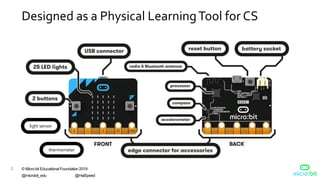
Designed as a Physical LearningTool for CS
light sensor
thermometer
© Micro:bit Educational Foundation 2019
@microbit_edu @HalSpeed
3
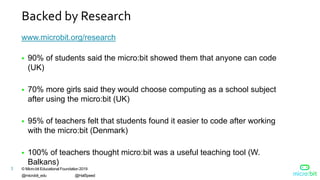
Backed by Research
www.microbit.org/research
 90% of students said the micro:bit showed them that anyone can code
(UK)
 70% more girls said they would choose computing as a school subject
after using the micro:bit (UK)
 95% of teachers felt that students found it easier to code after working
with the micro:bit (Denmark)
 100% of teachers thought micro:bit was a useful teaching tool (W.
Balkans)
© Micro:bit Educational Foundation 2019
@microbit_edu @HalSpeed
4
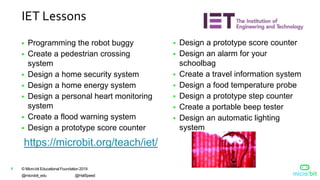
IET Lessons
 Programming the robot buggy
 Create a pedestrian crossing
system
 Design a home security system
 Design a home energy system
 Design a personal heart monitoring
system
 Create a flood warning system
 Design a prototype score counter
https://microbit.org/teach/iet/
 Design a prototype score counter
 Design an alarm for your
schoolbag
 Create a travel information system
 Design a food temperature probe
 Design a prototype step counter
 Create a portable beep tester
 Design an automatic lighting
system
© Micro:bit Educational Foundation 2019
@microbit_edu @HalSpeed
5
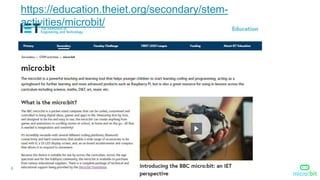
https://education.theiet.org/secondary/stem-
activities/microbit/
© Micro:bit Educational Foundation 2019
@microbit_edu @HalSpeed
6
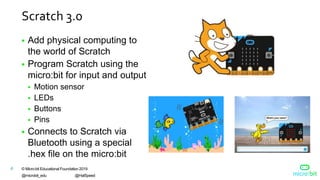
Scratch 3.0
 Add physical computing to
the world of Scratch
 Program Scratch using the
micro:bit for input and output
 Motion sensor
 LEDs
 Buttons
 Pins
 Connects to Scratch via
Bluetooth using a special
.hex file on the micro:bit
© Micro:bit Educational Foundation 2019
@microbit_edu @HalSpeed
7
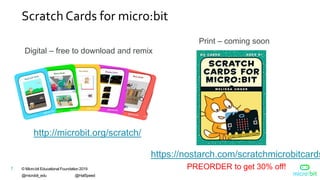
Scratch Cards for micro:bit
http://microbit.org/scratch/
Digital – free to download and remix
Print – coming soon
https://nostarch.com/scratchmicrobitcards
PREORDER to get 30% off!
© Micro:bit Educational Foundation 2019
@microbit_edu @HalSpeed
8
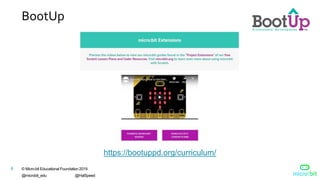
BootUp
https://bootuppd.org/curriculum/
© Micro:bit Educational Foundation 2019
@microbit_edu @HalSpeed
9
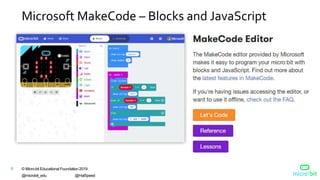
Microsoft MakeCode – Blocks and JavaScript
© Micro:bit Educational Foundation 2019
@microbit_edu @HalSpeed
10
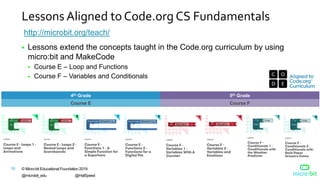
Lessons Aligned to Code.org CS Fundamentals
 Lessons extend the concepts taught in the Code.org curriculum by using
micro:bit and MakeCode
 Course E – Loop and Functions
 Course F – Variables and Conditionals
4th Grade 5th Grade
Course E Course F
http://microbit.org/teach/
© Micro:bit Educational Foundation 2019
@microbit_edu @HalSpeed
11
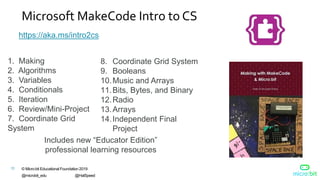
Microsoft MakeCode Intro to CS
https://aka.ms/intro2cs
8. Coordinate Grid System
9. Booleans
10.Music and Arrays
11.Bits, Bytes, and Binary
12.Radio
13.Arrays
14.Independent Final
Project
1. Making
2. Algorithms
3. Variables
4. Conditionals
5. Iteration
6. Review/Mini-Project
7. Coordinate Grid
System
Includes new “Educator Edition”
professional learning resources
© Micro:bit Educational Foundation 2019
@microbit_edu @HalSpeed
12
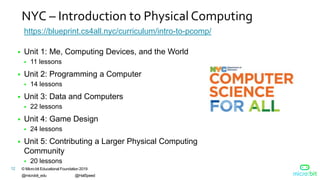
NYC – Introduction to Physical Computing
 Unit 1: Me, Computing Devices, and the World
 11 lessons
https://blueprint.cs4all.nyc/curriculum/intro-to-pcomp/
 Unit 4: Game Design
 24 lessons
 Unit 3: Data and Computers
 22 lessons
 Unit 2: Programming a Computer
 14 lessons
 Unit 5: Contributing a Larger Physical Computing
Community
 20 lessons
© Micro:bit Educational Foundation 2019
@microbit_edu @HalSpeed
13
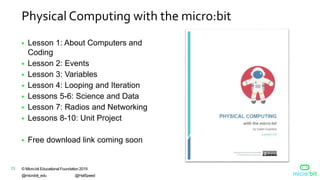
Physical Computing with the micro:bit
 Lesson 1: About Computers and
Coding
 Lesson 2: Events
 Lesson 3: Variables
 Lesson 4: Looping and Iteration
 Lessons 5-6: Science and Data
 Lesson 7: Radios and Networking
 Lessons 8-10: Unit Project
 Free download link coming soon
© Micro:bit Educational Foundation 2019
@microbit_edu @HalSpeed
14
Project LeadTheWay
Middle School
 PLTW Gateway: Computer Science for Innovators and
Makers
High School
 Engineering Essentials (beta)https://www.pltw.org/engineering-essentials-beta
https://www.pltw.org/our-programs/pltw-gateway-curriculum#curriculum-
4
© Micro:bit Educational Foundation 2019
@microbit_edu @HalSpeed
15
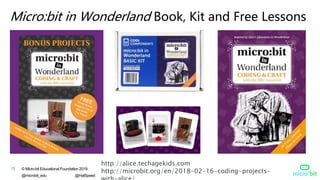
Micro:bit in Wonderland Book, Kit and Free Lessons
http://alice.techagekids.com
http://microbit.org/en/2018-02-16-coding-projects-
© Micro:bit Educational Foundation 2019
@microbit_edu @HalSpeed
16
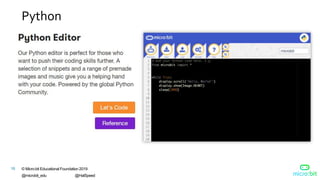
Python
© Micro:bit Educational Foundation 2019
@microbit_edu @HalSpeed
17
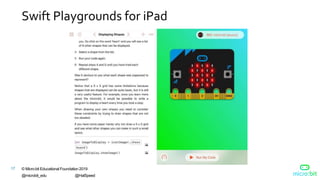
Swift Playgrounds for iPad
© Micro:bit Educational Foundation 2019
@microbit_edu @HalSpeed
18
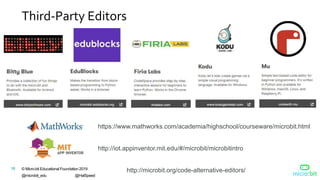
Third-Party Editors
https://www.mathworks.com/academia/highschool/courseware/microbit.html
http://microbit.org/code-alternative-editors/
http://iot.appinventor.mit.edu/#/microbit/microbitintro
© Micro:bit Educational Foundation 2019
@microbit_edu @HalSpeed
19
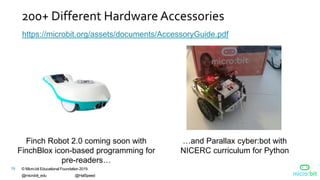
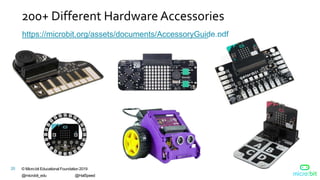
200+ Different Hardware Accessories
https://microbit.org/assets/documents/AccessoryGuide.pdf
…and Parallax cyber:bot with
NICERC curriculum for Python
Finch Robot 2.0 coming soon with
FinchBlox icon-based programming for
pre-readers…
© Micro:bit Educational Foundation 2019
@microbit_edu @HalSpeed
20
200+ Different Hardware Accessories
https://microbit.org/assets/documents/AccessoryGuide.pdf
© Micro:bit Educational Foundation 2019
@microbit_edu @HalSpeed
21
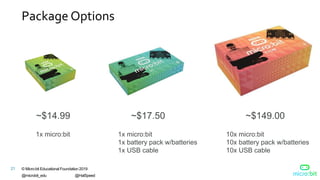
Package Options
~$14.99 ~$17.50 ~$149.00
1x micro:bit 1x micro:bit
1x battery pack w/batteries
1x USB cable
10x micro:bit
10x battery pack w/batteries
10x USB cable
© Micro:bit Educational Foundation 2019
@microbit_edu @HalSpeed
22
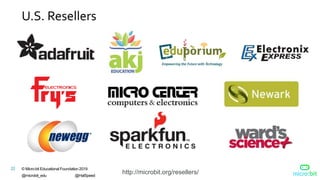
U.S. Resellers
http://microbit.org/resellers/
© Micro:bit Educational Foundation 2019
@microbit_edu @HalSpeed
23
Available via DonorsChoose.org
 AKJ Education is an approved DonorsChoose.org vendor and
micro:bit reseller
 Teachers enter projects and request classroom materials
 Individuals and companies can donate money towards the
purchase of those materials
© Micro:bit Educational Foundation 2019
@microbit_edu @HalSpeed
24
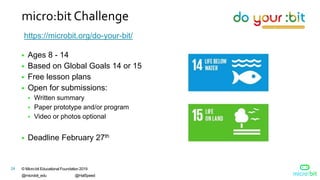
micro:bit Challenge
https://microbit.org/do-your-bit/
 Ages 8 - 14
 Based on Global Goals 14 or 15
 Free lesson plans
 Open for submissions:
 Written summary
 Paper prototype and/or program
 Video or photos optional
 Deadline February 27th
© Micro:bit Educational Foundation 2019
@microbit_edu @HalSpeed
25
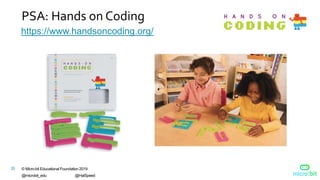
PSA: Hands on Coding
https://www.handsoncoding.org/
26 © Micro:bit Educational Foundation 2019
@microbit_edu @HalSpeed
Demo
© Micro:bit Educational Foundation 2019
@microbit_edu @HalSpeed
27
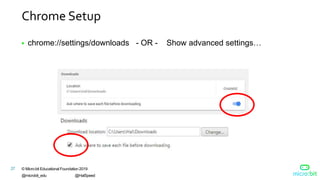
Chrome Setup
 chrome://settings/downloads - OR - Show advanced settings…
© Micro:bit Educational Foundation 2019
@microbit_edu @HalSpeed
28
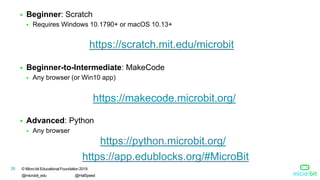
 Beginner: Scratch
 Requires Windows 10.1790+ or macOS 10.13+
 Beginner-to-Intermediate: MakeCode
 Any browser (or Win10 app)
 Advanced: Python
 Any browser
https://scratch.mit.edu/microbit
https://makecode.microbit.org/
https://python.microbit.org/
https://app.edublocks.org/#MicroBit
© Micro:bit Educational Foundation 2019
@microbit_edu @HalSpeed
29
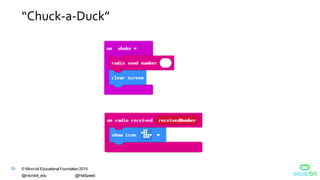
“Chuck-a-Duck”
30 © Micro:bit Educational Foundation 2019
@microbit_edu @HalSpeed
microbit.org
Slides at:
slideshare.net/Hal_Speed
© Micro:bit Educational Foundation 2019
@microbit_edu @HalSpeed
31
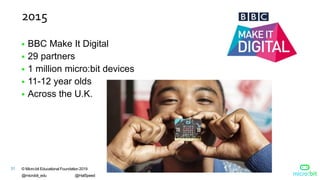
2015
 BBC Make It Digital
 29 partners
 1 million micro:bit devices
 11-12 year olds
 Across the U.K.
32 © Micro:bit Educational Foundation 2019
@microbit_edu @HalSpeed
Inspiring every child to
create their best digital
future
2016 Micro:bit Educational
Foundation Formed
33 © Micro:bit Educational Foundation 2019
@microbit_edu @HalSpeed
micro:bit available in the
U.S.
2017
10 New & Innovative EdTech
Products Announced at ISTE
2017
http://www.gettingsmart.com/2017/06/10-innovative-new-products-announced-at-iste-
2017/
© Micro:bit Educational Foundation 2019
@microbit_edu @HalSpeed
34
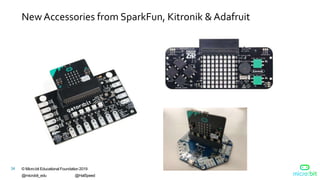
NewAccessories from SparkFun, Kitronik & Adafruit
© Micro:bit Educational Foundation 2019
@microbit_edu @HalSpeed
35
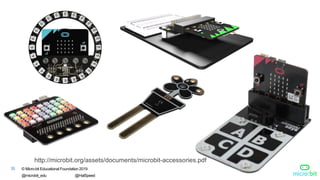
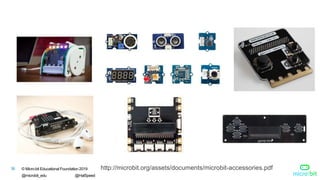
http://microbit.org/assets/documents/microbit-accessories.pdf
© Micro:bit Educational Foundation 2019
@microbit_edu @HalSpeed
36 http://microbit.org/assets/documents/microbit-accessories.pdf
© Micro:bit Educational Foundation 2019
@microbit_edu @HalSpeed
37
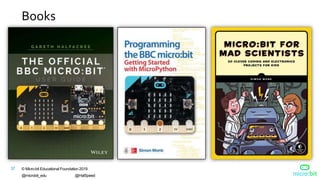
Books
© Micro:bit Educational Foundation 2019
@microbit_edu @HalSpeed
38
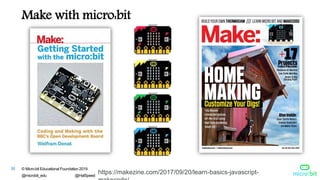
Make with micro:bit
https://makezine.com/2017/09/20/learn-basics-javascript-
39 © Micro:bit Educational Foundation 2019
@microbit_edu @HalSpeed
“The micro:bit is a standout for education.
First, it uses block-style programming
language…Second, it has enough lights,
buttons, and sensors built in to give a
student programmer plenty to play with”
Sam Brown, Make: Magazine
Make: 2017 Board Guide STANDOUTS
https://makezine.com/2017/05/30/extraordinary-dev-boards/
© Micro:bit Educational Foundation 2019
@microbit_edu @HalSpeed
40
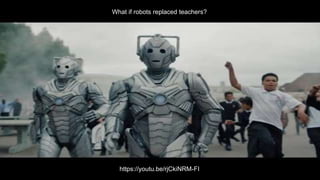
What if robots replaced teachers?
https://youtu.be/rjCkiNRM-FI

micro:bit IET - Nov 2019

  • 1.
    © Micro:bit EducationalFoundation 2019 Get Creative, Get Connected, Get Coding! Hal Speed IET Americas CVC Chief of Global Engagement, Micro:bit Educational Foundation 2019 November 9 @HalSpeed @microbit_edu Slides at: slideshare.net/Hal_Speed
  • 2.
    © Micro:bit EducationalFoundation 2019 @microbit_edu @HalSpeed 2 Designed as a Physical LearningTool for CS light sensor thermometer
  • 3.
    © Micro:bit EducationalFoundation 2019 @microbit_edu @HalSpeed 3 Backed by Research www.microbit.org/research  90% of students said the micro:bit showed them that anyone can code (UK)  70% more girls said they would choose computing as a school subject after using the micro:bit (UK)  95% of teachers felt that students found it easier to code after working with the micro:bit (Denmark)  100% of teachers thought micro:bit was a useful teaching tool (W. Balkans)
  • 4.
    © Micro:bit EducationalFoundation 2019 @microbit_edu @HalSpeed 4 IET Lessons  Programming the robot buggy  Create a pedestrian crossing system  Design a home security system  Design a home energy system  Design a personal heart monitoring system  Create a flood warning system  Design a prototype score counter https://microbit.org/teach/iet/  Design a prototype score counter  Design an alarm for your schoolbag  Create a travel information system  Design a food temperature probe  Design a prototype step counter  Create a portable beep tester  Design an automatic lighting system
  • 5.
    © Micro:bit EducationalFoundation 2019 @microbit_edu @HalSpeed 5 https://education.theiet.org/secondary/stem- activities/microbit/
  • 6.
    © Micro:bit EducationalFoundation 2019 @microbit_edu @HalSpeed 6 Scratch 3.0  Add physical computing to the world of Scratch  Program Scratch using the micro:bit for input and output  Motion sensor  LEDs  Buttons  Pins  Connects to Scratch via Bluetooth using a special .hex file on the micro:bit
  • 7.
    © Micro:bit EducationalFoundation 2019 @microbit_edu @HalSpeed 7 Scratch Cards for micro:bit http://microbit.org/scratch/ Digital – free to download and remix Print – coming soon https://nostarch.com/scratchmicrobitcards PREORDER to get 30% off!
  • 8.
    © Micro:bit EducationalFoundation 2019 @microbit_edu @HalSpeed 8 BootUp https://bootuppd.org/curriculum/
  • 9.
    © Micro:bit EducationalFoundation 2019 @microbit_edu @HalSpeed 9 Microsoft MakeCode – Blocks and JavaScript
  • 10.
    © Micro:bit EducationalFoundation 2019 @microbit_edu @HalSpeed 10 Lessons Aligned to Code.org CS Fundamentals  Lessons extend the concepts taught in the Code.org curriculum by using micro:bit and MakeCode  Course E – Loop and Functions  Course F – Variables and Conditionals 4th Grade 5th Grade Course E Course F http://microbit.org/teach/
  • 11.
    © Micro:bit EducationalFoundation 2019 @microbit_edu @HalSpeed 11 Microsoft MakeCode Intro to CS https://aka.ms/intro2cs 8. Coordinate Grid System 9. Booleans 10.Music and Arrays 11.Bits, Bytes, and Binary 12.Radio 13.Arrays 14.Independent Final Project 1. Making 2. Algorithms 3. Variables 4. Conditionals 5. Iteration 6. Review/Mini-Project 7. Coordinate Grid System Includes new “Educator Edition” professional learning resources
  • 12.
    © Micro:bit EducationalFoundation 2019 @microbit_edu @HalSpeed 12 NYC – Introduction to Physical Computing  Unit 1: Me, Computing Devices, and the World  11 lessons https://blueprint.cs4all.nyc/curriculum/intro-to-pcomp/  Unit 4: Game Design  24 lessons  Unit 3: Data and Computers  22 lessons  Unit 2: Programming a Computer  14 lessons  Unit 5: Contributing a Larger Physical Computing Community  20 lessons
  • 13.
    © Micro:bit EducationalFoundation 2019 @microbit_edu @HalSpeed 13 Physical Computing with the micro:bit  Lesson 1: About Computers and Coding  Lesson 2: Events  Lesson 3: Variables  Lesson 4: Looping and Iteration  Lessons 5-6: Science and Data  Lesson 7: Radios and Networking  Lessons 8-10: Unit Project  Free download link coming soon
  • 14.
    © Micro:bit EducationalFoundation 2019 @microbit_edu @HalSpeed 14 Project LeadTheWay Middle School  PLTW Gateway: Computer Science for Innovators and Makers High School  Engineering Essentials (beta)https://www.pltw.org/engineering-essentials-beta https://www.pltw.org/our-programs/pltw-gateway-curriculum#curriculum- 4
  • 15.
    © Micro:bit EducationalFoundation 2019 @microbit_edu @HalSpeed 15 Micro:bit in Wonderland Book, Kit and Free Lessons http://alice.techagekids.com http://microbit.org/en/2018-02-16-coding-projects-
  • 16.
    © Micro:bit EducationalFoundation 2019 @microbit_edu @HalSpeed 16 Python
  • 17.
    © Micro:bit EducationalFoundation 2019 @microbit_edu @HalSpeed 17 Swift Playgrounds for iPad
  • 18.
    © Micro:bit EducationalFoundation 2019 @microbit_edu @HalSpeed 18 Third-Party Editors https://www.mathworks.com/academia/highschool/courseware/microbit.html http://microbit.org/code-alternative-editors/ http://iot.appinventor.mit.edu/#/microbit/microbitintro
  • 19.
    © Micro:bit EducationalFoundation 2019 @microbit_edu @HalSpeed 19 200+ Different Hardware Accessories https://microbit.org/assets/documents/AccessoryGuide.pdf …and Parallax cyber:bot with NICERC curriculum for Python Finch Robot 2.0 coming soon with FinchBlox icon-based programming for pre-readers…
  • 20.
    © Micro:bit EducationalFoundation 2019 @microbit_edu @HalSpeed 20 200+ Different Hardware Accessories https://microbit.org/assets/documents/AccessoryGuide.pdf
  • 21.
    © Micro:bit EducationalFoundation 2019 @microbit_edu @HalSpeed 21 Package Options ~$14.99 ~$17.50 ~$149.00 1x micro:bit 1x micro:bit 1x battery pack w/batteries 1x USB cable 10x micro:bit 10x battery pack w/batteries 10x USB cable
  • 22.
    © Micro:bit EducationalFoundation 2019 @microbit_edu @HalSpeed 22 U.S. Resellers http://microbit.org/resellers/
  • 23.
    © Micro:bit EducationalFoundation 2019 @microbit_edu @HalSpeed 23 Available via DonorsChoose.org  AKJ Education is an approved DonorsChoose.org vendor and micro:bit reseller  Teachers enter projects and request classroom materials  Individuals and companies can donate money towards the purchase of those materials
  • 24.
    © Micro:bit EducationalFoundation 2019 @microbit_edu @HalSpeed 24 micro:bit Challenge https://microbit.org/do-your-bit/  Ages 8 - 14  Based on Global Goals 14 or 15  Free lesson plans  Open for submissions:  Written summary  Paper prototype and/or program  Video or photos optional  Deadline February 27th
  • 25.
    © Micro:bit EducationalFoundation 2019 @microbit_edu @HalSpeed 25 PSA: Hands on Coding https://www.handsoncoding.org/
  • 26.
    26 © Micro:bitEducational Foundation 2019 @microbit_edu @HalSpeed Demo
  • 27.
    © Micro:bit EducationalFoundation 2019 @microbit_edu @HalSpeed 27 Chrome Setup  chrome://settings/downloads - OR - Show advanced settings…
  • 28.
    © Micro:bit EducationalFoundation 2019 @microbit_edu @HalSpeed 28  Beginner: Scratch  Requires Windows 10.1790+ or macOS 10.13+  Beginner-to-Intermediate: MakeCode  Any browser (or Win10 app)  Advanced: Python  Any browser https://scratch.mit.edu/microbit https://makecode.microbit.org/ https://python.microbit.org/ https://app.edublocks.org/#MicroBit
  • 29.
    © Micro:bit EducationalFoundation 2019 @microbit_edu @HalSpeed 29 “Chuck-a-Duck”
  • 30.
    30 © Micro:bitEducational Foundation 2019 @microbit_edu @HalSpeed microbit.org Slides at: slideshare.net/Hal_Speed
  • 31.
    © Micro:bit EducationalFoundation 2019 @microbit_edu @HalSpeed 31 2015  BBC Make It Digital  29 partners  1 million micro:bit devices  11-12 year olds  Across the U.K.
  • 32.
    32 © Micro:bitEducational Foundation 2019 @microbit_edu @HalSpeed Inspiring every child to create their best digital future 2016 Micro:bit Educational Foundation Formed
  • 33.
    33 © Micro:bitEducational Foundation 2019 @microbit_edu @HalSpeed micro:bit available in the U.S. 2017 10 New & Innovative EdTech Products Announced at ISTE 2017 http://www.gettingsmart.com/2017/06/10-innovative-new-products-announced-at-iste- 2017/
  • 34.
    © Micro:bit EducationalFoundation 2019 @microbit_edu @HalSpeed 34 NewAccessories from SparkFun, Kitronik & Adafruit
  • 35.
    © Micro:bit EducationalFoundation 2019 @microbit_edu @HalSpeed 35 http://microbit.org/assets/documents/microbit-accessories.pdf
  • 36.
    © Micro:bit EducationalFoundation 2019 @microbit_edu @HalSpeed 36 http://microbit.org/assets/documents/microbit-accessories.pdf
  • 37.
    © Micro:bit EducationalFoundation 2019 @microbit_edu @HalSpeed 37 Books
  • 38.
    © Micro:bit EducationalFoundation 2019 @microbit_edu @HalSpeed 38 Make with micro:bit https://makezine.com/2017/09/20/learn-basics-javascript-
  • 39.
    39 © Micro:bitEducational Foundation 2019 @microbit_edu @HalSpeed “The micro:bit is a standout for education. First, it uses block-style programming language…Second, it has enough lights, buttons, and sensors built in to give a student programmer plenty to play with” Sam Brown, Make: Magazine Make: 2017 Board Guide STANDOUTS https://makezine.com/2017/05/30/extraordinary-dev-boards/
  • 40.
    © Micro:bit EducationalFoundation 2019 @microbit_edu @HalSpeed 40 What if robots replaced teachers? https://youtu.be/rjCkiNRM-FI