Security Issues
        In
     Android
 (Custom ROM's)

 Anant Shrivastava
http://anantshri.info
Agenda
●   Introduction to Concept : Custom Rom
●   Why Security Review
●   Security Issues
●   PoC : Data Theft Tool
●   Protection Tips
●   Demo : Tool
What is Android ROM
●   Android ROM is the OS Firmware layer of Phone.
●   Generally consist of /system partition
●   May include /data partition
●   Contains
        –   Kernel
        –   Dalvik
        –   Libraries
        –   Framework
        –   Application (Vendor Provided)
Android Architecture
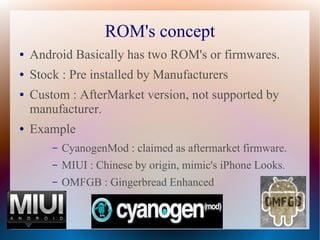
ROM's concept
●   Android Basically has two ROM's or firmwares.
●   Stock : Pre installed by Manufacturers
●   Custom : AfterMarket version, not supported by
    manufacturer.
●   Example
        –   CyanogenMod : claimed as aftermarket firmware.
        –   MIUI : Chinese by origin, mimic's iPhone Looks.
        –   OMFGB : Gingerbread Enhanced
Advantage of Custom ROM's
●   Bring out the best of all World's, example :
        –   You may like SE hardware but love htc sense UI.
        –   You prefer minimal phone, or avoid default apps.
        –   Roms with specific features
●   When Carrier / manufacturer stop providing updates
●   Bleeding Edge (2.3.7)
●   Pre-rooted
●   Targetted : Speed, Gaming,Performance, Battery
●   Overclocking and underclocking
Where can i get it
•   http://cyanogenmod.com
•   http://miui.org
•   http://forum.xda-developers.com
•   http://android.modaco.com
•   http://modmymobile.com/forum.php
•   And many more underground forums.
Recipe
Modify Stock ROM
●


Parellel after market ROM's
●


Best of Both
●


General ROM cookers are here for either
●


    ●   Fun
    ●   Profit
    ●   They Can attitude.
Why Security Review
Next In Thing : Designing Malware and Exploits for
android
On top of that : employee's Pressure to integrate
Android in Corporate infrastructure.


AfterMarket Distribution like CyanogenMod are
considered viable alternative.
Lots of work is underway to safely implement
CyanogenMod in Corporate Environment.
Are we Missing Something
●   Did anyone tried peeking under the hood.


●   This is what we will be doing today
Practices under Scrutiny
●   USB Debugging enabled
●   Adb Shell root mode
●   System permissions
●   Installation from unknown source
●   Adb shell over wifi
●   Su acccess and settings
●   Custom Recoveries
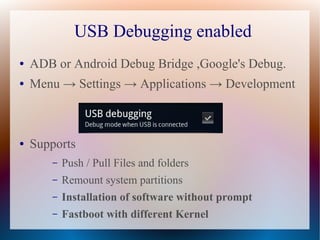
USB Debugging enabled
●   ADB or Android Debug Bridge ,Google's Debug.
●   Menu → Settings → Applications → Development


●   Supports
       –   Push / Pull Files and folders
       –   Remount system partitions
       –   Installation of software without prompt
       –   Fastboot with different Kernel
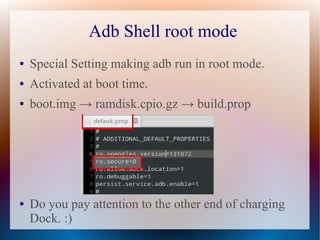
Adb Shell root mode
●   Special Setting making adb run in root mode.
●   Activated at boot time.
●   boot.img → ramdisk.cpio.gz → build.prop


●   Do you pay attention to the other end of charging
    Dock. :)
ADB Shell over WiFi
●   This Settings allow adb shell to be used over wifi
    network. (Freedom from Wires :) )
●   At boot time or run time both.
●   service.adb.tcp.port = <tcp_port_no>
●   Combine with our beloved ro.secure, you literally
    handover your device shouting :
                   ”PLEASE OWN ME”.

●   This is hypothetical as of now, no known usage
    found so far.
System permissions
●   /system should be readonly as its critical section of
    phone.

●   Its observed at lots of places where Cooker's keep
    777 settings for /system

●   Do you remember :
        –   /system/app : system apps
        –   /system/bin : executable
●   Remember ROOTKITS, TROJAN, MALWARE
Unknown Source Installation
●   This Settings disallows third party softwares, forces
    the use of Android Market.


●   Aftermarket forum practices, enable Unknown
    Sources.
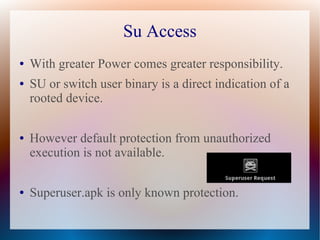
Su Access
●   With greater Power comes greater responsibility.
●   SU or switch user binary is a direct indication of a
    rooted device.

●   However default protection from unauthorized
    execution is not available.

●   Superuser.apk is only known protection.
Recovery Images
●   Android Provides an option to install Custom
    Recovery softwares.

●   Recovery softwares provide un restricted root access
    by default.

●   Putting a phone in recovery mode is as simple as
    reboot, press backspace or vol_down till recovery
    starts.
Demo PoC tool


DEMO IS INTENTIONALLY NOT DEVELOPED TO A LARGE EXTEND TO AVOID
SCRIPT KIDDIE APPROACH
Protection
●   Developers
       –    Avoid settings not so required for normal user.
       –    Give recomendation to close unknow source setting.
       –

●   Users
       –    Take a closer look at Development Process.
       –    Ask Questions
       –    Run ARE YOU INSECURE
Are you Insecure


      Demo
About Me
                      Anant Shrivastava
                        CEH, RHCE
           Interested in Android, Linux, Web 2.0
                  Member of Null and G4H

●   Email : anant@anantshri.info
●   Web : http://anantshri.info
●   Blog : http://blog.anantshri.info

Security Issues in Android Custom ROM

  • 1.
    Security Issues In Android (Custom ROM's) Anant Shrivastava http://anantshri.info
  • 2.
    Agenda ● Introduction to Concept : Custom Rom ● Why Security Review ● Security Issues ● PoC : Data Theft Tool ● Protection Tips ● Demo : Tool
  • 3.
    What is AndroidROM ● Android ROM is the OS Firmware layer of Phone. ● Generally consist of /system partition ● May include /data partition ● Contains – Kernel – Dalvik – Libraries – Framework – Application (Vendor Provided)
  • 4.
  • 5.
    ROM's concept ● Android Basically has two ROM's or firmwares. ● Stock : Pre installed by Manufacturers ● Custom : AfterMarket version, not supported by manufacturer. ● Example – CyanogenMod : claimed as aftermarket firmware. – MIUI : Chinese by origin, mimic's iPhone Looks. – OMFGB : Gingerbread Enhanced
  • 6.
    Advantage of CustomROM's ● Bring out the best of all World's, example : – You may like SE hardware but love htc sense UI. – You prefer minimal phone, or avoid default apps. – Roms with specific features ● When Carrier / manufacturer stop providing updates ● Bleeding Edge (2.3.7) ● Pre-rooted ● Targetted : Speed, Gaming,Performance, Battery ● Overclocking and underclocking
  • 7.
    Where can iget it • http://cyanogenmod.com • http://miui.org • http://forum.xda-developers.com • http://android.modaco.com • http://modmymobile.com/forum.php • And many more underground forums.
  • 8.
    Recipe Modify Stock ROM ● Parellelafter market ROM's ● Best of Both ● General ROM cookers are here for either ● ● Fun ● Profit ● They Can attitude.
  • 9.
    Why Security Review NextIn Thing : Designing Malware and Exploits for android On top of that : employee's Pressure to integrate Android in Corporate infrastructure. AfterMarket Distribution like CyanogenMod are considered viable alternative. Lots of work is underway to safely implement CyanogenMod in Corporate Environment.
  • 10.
    Are we MissingSomething ● Did anyone tried peeking under the hood. ● This is what we will be doing today
  • 11.
    Practices under Scrutiny ● USB Debugging enabled ● Adb Shell root mode ● System permissions ● Installation from unknown source ● Adb shell over wifi ● Su acccess and settings ● Custom Recoveries
  • 12.
    USB Debugging enabled ● ADB or Android Debug Bridge ,Google's Debug. ● Menu → Settings → Applications → Development ● Supports – Push / Pull Files and folders – Remount system partitions – Installation of software without prompt – Fastboot with different Kernel
  • 13.
    Adb Shell rootmode ● Special Setting making adb run in root mode. ● Activated at boot time. ● boot.img → ramdisk.cpio.gz → build.prop ● Do you pay attention to the other end of charging Dock. :)
  • 14.
    ADB Shell overWiFi ● This Settings allow adb shell to be used over wifi network. (Freedom from Wires :) ) ● At boot time or run time both. ● service.adb.tcp.port = <tcp_port_no> ● Combine with our beloved ro.secure, you literally handover your device shouting : ”PLEASE OWN ME”. ● This is hypothetical as of now, no known usage found so far.
  • 15.
    System permissions ● /system should be readonly as its critical section of phone. ● Its observed at lots of places where Cooker's keep 777 settings for /system ● Do you remember : – /system/app : system apps – /system/bin : executable ● Remember ROOTKITS, TROJAN, MALWARE
  • 16.
    Unknown Source Installation ● This Settings disallows third party softwares, forces the use of Android Market. ● Aftermarket forum practices, enable Unknown Sources.
  • 17.
    Su Access ● With greater Power comes greater responsibility. ● SU or switch user binary is a direct indication of a rooted device. ● However default protection from unauthorized execution is not available. ● Superuser.apk is only known protection.
  • 18.
    Recovery Images ● Android Provides an option to install Custom Recovery softwares. ● Recovery softwares provide un restricted root access by default. ● Putting a phone in recovery mode is as simple as reboot, press backspace or vol_down till recovery starts.
  • 20.
    Demo PoC tool DEMOIS INTENTIONALLY NOT DEVELOPED TO A LARGE EXTEND TO AVOID SCRIPT KIDDIE APPROACH
  • 21.
    Protection ● Developers – Avoid settings not so required for normal user. – Give recomendation to close unknow source setting. – ● Users – Take a closer look at Development Process. – Ask Questions – Run ARE YOU INSECURE
  • 22.
  • 23.
    About Me Anant Shrivastava CEH, RHCE Interested in Android, Linux, Web 2.0 Member of Null and G4H ● Email : anant@anantshri.info ● Web : http://anantshri.info ● Blog : http://blog.anantshri.info