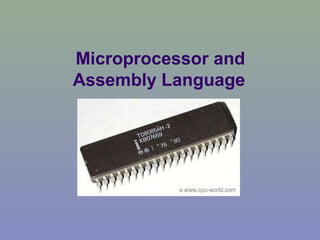
Microprocessor and
Assembly Language
History of Microprocessor
 A microprocessor (sometimes abbreviated
µP) is a digital electronic component with
transistors on a single semiconductor
integrated circuit (IC).
 A Central processing unit (CPU) in a
computer system or handheld device
consists of one or more microprocessors.
 A Microprocessor is essentially a set of
switches. Using photographic technology a
massive set of electronic switches is
superimposed onto a very small piece of
silicon.
 Through the use of binary language, which
consists of only two states; one and zero (on
and off), these can be used to store
information and perform operations on it.
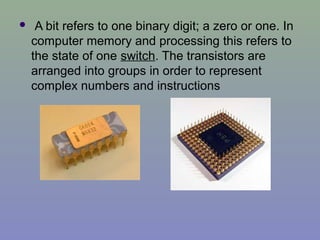
 A bit refers to one binary digit; a zero or one. In
computer memory and processing this refers to
the state of one switch. The transistors are
arranged into groups in order to represent
complex numbers and instructions
 The very first microprocessor is considered to
be the Intel 4004. It was released in 1971 and
was a 4 Bit processor.
 Then the 8 bit 8008 microprocessor. It was
developed by Intel in 1972
 The first multi-chip 16 bit processor was
released by National Semiconductor in 1973
 Intel upgraded the 8008 into a 16 bit version
they called the 8086. It was the first of the
x86 family by which many modern PCs are
powered.
 32 bit designs didn't require much to improve
performance since it has double the size of
instructions as well as the amount of
addressable memory.
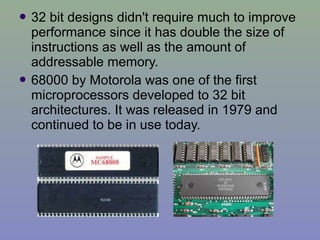
 68000 by Motorola was one of the first
microprocessors developed to 32 bit
architectures. It was released in 1979 and
continued to be in use today.
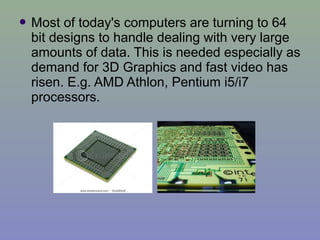
 Most of today's computers are turning to 64
bit designs to handle dealing with very large
amounts of data. This is needed especially as
demand for 3D Graphics and fast video has
risen. E.g. AMD Athlon, Pentium i5/i7
processors.
 Microprocessors are classified into different types on the basis of
the bit of operation. Based on bit of operation at a time, the following
are the types of microprocessors:
 ==> 4 bit. e.g. Intel 4004
 ==> 8 bit. e.g. Intel 8085, 8088, Zilog Z80, Z180
 ==> 16 bit. e.g. Intel 8086, 80186, 80286, 80386,
 ==> 32 bit. e.g. Intel Pentium, Celeron, AMD Sempron
 ==> 64 bit. e.g. AMD Athlon.
 Based on the instruction set microprocessors are classified into:
 RISC — Reduced Instruction Set Computing. These types of
processors are commonly used in ovens, air conditioners, etc.
 CISC — Complex Instruction Set Computing. The types of
processors are used in desktops, laptops and servers.
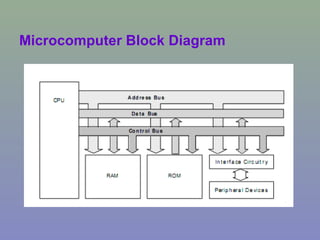
Microcomputer Block Diagram
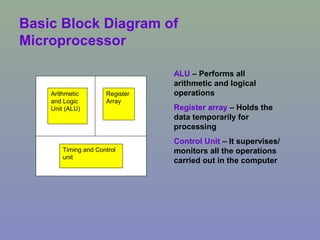
Basic Block Diagram of
Microprocessor
Arithmetic
and Logic
Unit (ALU)
Register
Array
Timing and Control
unit
ALU – Performs all
arithmetic and logical
operations
Register array – Holds the
data temporarily for
processing
Control Unit – It supervises/
monitors all the operations
carried out in the computer
The 8085 Microprocessor
 The 8085 microprocessor was introduced by
Intel in the year 1976.
 This microprocessor is an update of 8080
microprocessor. The 8080 processor was
updated with Enable/Disable instruction pins
and Interrupt pins to form the 8085
microprocessor.
 It is an 8-bit microprocessor with a 40 pin
dual in line package
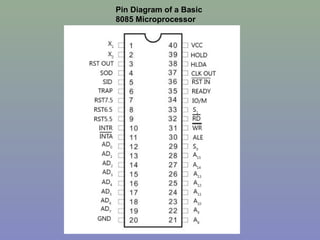
Pin Diagram of a Basic
8085 Microprocessor
Flag
Reg
Instruction
Reg
Instruction
decoder
Address Buffer A8-A15
B C
D E
H L
Stack Pointer
Program Counter
Incrementer/ Decrementer
Address latch
Data/address Buffer
AD0-AD7
Temp.
Reg
Accumulator
Arithmetic and
Logic Unit
Timing and Control unit
RAM memory
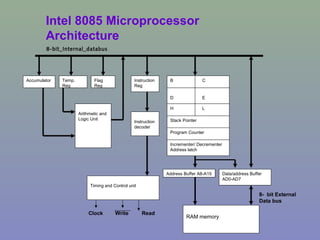
8-bit_Internal_databus
Intel 8085 Microprocessor
Architecture
8- bit External
Data bus
ReadWriteClock
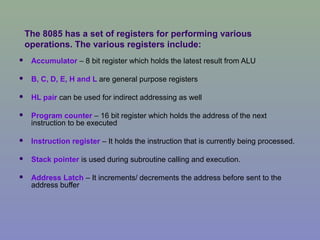
The 8085 has a set of registers for performing various
operations. The various registers include:
 Accumulator – 8 bit register which holds the latest result from ALU
 B, C, D, E, H and L are general purpose registers
 HL pair can be used for indirect addressing as well
 Program counter – 16 bit register which holds the address of the next
instruction to be executed
 Instruction register – It holds the instruction that is currently being processed.
 Stack pointer is used during subroutine calling and execution.
 Address Latch – It increments/ decrements the address before sent to the
address buffer
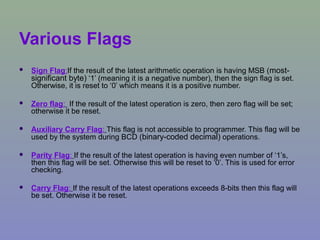
Various Flags
 Sign Flag:If the result of the latest arithmetic operation is having MSB (most-
significant byte) ‘1’ (meaning it is a negative number), then the sign flag is set.
Otherwise, it is reset to ‘0’ which means it is a positive number.
 Zero flag: If the result of the latest operation is zero, then zero flag will be set;
otherwise it be reset.
 Auxiliary Carry Flag: This flag is not accessible to programmer. This flag will be
used by the system during BCD (binary-coded decimal) operations.
 Parity Flag: If the result of the latest operation is having even number of ‘1’s,
then this flag will be set. Otherwise this will be reset to ‘0’. This is used for error
checking.
 Carry Flag: If the result of the latest operations exceeds 8-bits then this flag will
be set. Otherwise it be reset.
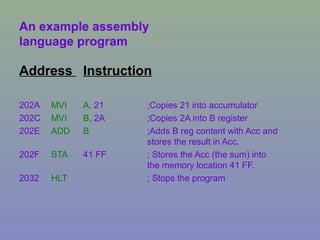
An example assembly
language program
Address Instruction
202A MVI A, 21 ;Copies 21 into accumulator
202C MVI B, 2A ;Copies 2A into B register
202E ADD B ;Adds B reg content with Acc and
stores the result in Acc.
202F STA 41 FF ; Stores the Acc (the sum) into
the memory location 41 FF.
2032 HLT ; Stops the program
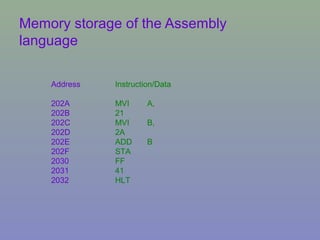
Memory storage of the Assembly
language
Address Instruction/Data
202A MVI A,
202B 21
202C MVI B,
202D 2A
202E ADD B
202F STA
2030 FF
2031 41
2032 HLT
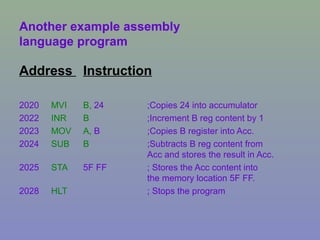
Another example assembly
language program
Address Instruction
2020 MVI B, 24 ;Copies 24 into accumulator
2022 INR B ;Increment B reg content by 1
2023 MOV A, B ;Copies B register into Acc.
2024 SUB B ;Subtracts B reg content from
Acc and stores the result in Acc.
2025 STA 5F FF ; Stores the Acc content into
the memory location 5F FF.
2028 HLT ; Stops the program
Reference:
 http://www.brighthub.com/engineering/electric
al/articles/51225.aspx
 http://www.cpu-world.com/Arch/8085.html
 http://www.ehow.com/way_5230222_8085-
microprocessor-tutorial.html
 http://www.brighthub.com/engineering/electric
al/articles/51225.aspx

Introduction to-microprocessors

  • 1.
  • 2.
    History of Microprocessor A microprocessor (sometimes abbreviated µP) is a digital electronic component with transistors on a single semiconductor integrated circuit (IC).  A Central processing unit (CPU) in a computer system or handheld device consists of one or more microprocessors.
  • 3.
     A Microprocessoris essentially a set of switches. Using photographic technology a massive set of electronic switches is superimposed onto a very small piece of silicon.  Through the use of binary language, which consists of only two states; one and zero (on and off), these can be used to store information and perform operations on it.
  • 4.
     A bitrefers to one binary digit; a zero or one. In computer memory and processing this refers to the state of one switch. The transistors are arranged into groups in order to represent complex numbers and instructions
  • 5.
     The veryfirst microprocessor is considered to be the Intel 4004. It was released in 1971 and was a 4 Bit processor.  Then the 8 bit 8008 microprocessor. It was developed by Intel in 1972  The first multi-chip 16 bit processor was released by National Semiconductor in 1973  Intel upgraded the 8008 into a 16 bit version they called the 8086. It was the first of the x86 family by which many modern PCs are powered.
  • 6.
     32 bitdesigns didn't require much to improve performance since it has double the size of instructions as well as the amount of addressable memory.  68000 by Motorola was one of the first microprocessors developed to 32 bit architectures. It was released in 1979 and continued to be in use today.
  • 7.
     Most oftoday's computers are turning to 64 bit designs to handle dealing with very large amounts of data. This is needed especially as demand for 3D Graphics and fast video has risen. E.g. AMD Athlon, Pentium i5/i7 processors.
  • 8.
     Microprocessors areclassified into different types on the basis of the bit of operation. Based on bit of operation at a time, the following are the types of microprocessors:  ==> 4 bit. e.g. Intel 4004  ==> 8 bit. e.g. Intel 8085, 8088, Zilog Z80, Z180  ==> 16 bit. e.g. Intel 8086, 80186, 80286, 80386,  ==> 32 bit. e.g. Intel Pentium, Celeron, AMD Sempron  ==> 64 bit. e.g. AMD Athlon.  Based on the instruction set microprocessors are classified into:  RISC — Reduced Instruction Set Computing. These types of processors are commonly used in ovens, air conditioners, etc.  CISC — Complex Instruction Set Computing. The types of processors are used in desktops, laptops and servers.
  • 9.
  • 10.
    Basic Block Diagramof Microprocessor Arithmetic and Logic Unit (ALU) Register Array Timing and Control unit ALU – Performs all arithmetic and logical operations Register array – Holds the data temporarily for processing Control Unit – It supervises/ monitors all the operations carried out in the computer
  • 11.
    The 8085 Microprocessor The 8085 microprocessor was introduced by Intel in the year 1976.  This microprocessor is an update of 8080 microprocessor. The 8080 processor was updated with Enable/Disable instruction pins and Interrupt pins to form the 8085 microprocessor.  It is an 8-bit microprocessor with a 40 pin dual in line package
  • 12.
    Pin Diagram ofa Basic 8085 Microprocessor
  • 13.
    Flag Reg Instruction Reg Instruction decoder Address Buffer A8-A15 BC D E H L Stack Pointer Program Counter Incrementer/ Decrementer Address latch Data/address Buffer AD0-AD7 Temp. Reg Accumulator Arithmetic and Logic Unit Timing and Control unit RAM memory 8-bit_Internal_databus Intel 8085 Microprocessor Architecture 8- bit External Data bus ReadWriteClock
  • 14.
    The 8085 hasa set of registers for performing various operations. The various registers include:  Accumulator – 8 bit register which holds the latest result from ALU  B, C, D, E, H and L are general purpose registers  HL pair can be used for indirect addressing as well  Program counter – 16 bit register which holds the address of the next instruction to be executed  Instruction register – It holds the instruction that is currently being processed.  Stack pointer is used during subroutine calling and execution.  Address Latch – It increments/ decrements the address before sent to the address buffer
  • 15.
    Various Flags  SignFlag:If the result of the latest arithmetic operation is having MSB (most- significant byte) ‘1’ (meaning it is a negative number), then the sign flag is set. Otherwise, it is reset to ‘0’ which means it is a positive number.  Zero flag: If the result of the latest operation is zero, then zero flag will be set; otherwise it be reset.  Auxiliary Carry Flag: This flag is not accessible to programmer. This flag will be used by the system during BCD (binary-coded decimal) operations.  Parity Flag: If the result of the latest operation is having even number of ‘1’s, then this flag will be set. Otherwise this will be reset to ‘0’. This is used for error checking.  Carry Flag: If the result of the latest operations exceeds 8-bits then this flag will be set. Otherwise it be reset.
  • 16.
    An example assembly languageprogram Address Instruction 202A MVI A, 21 ;Copies 21 into accumulator 202C MVI B, 2A ;Copies 2A into B register 202E ADD B ;Adds B reg content with Acc and stores the result in Acc. 202F STA 41 FF ; Stores the Acc (the sum) into the memory location 41 FF. 2032 HLT ; Stops the program
  • 17.
    Memory storage ofthe Assembly language Address Instruction/Data 202A MVI A, 202B 21 202C MVI B, 202D 2A 202E ADD B 202F STA 2030 FF 2031 41 2032 HLT
  • 18.
    Another example assembly languageprogram Address Instruction 2020 MVI B, 24 ;Copies 24 into accumulator 2022 INR B ;Increment B reg content by 1 2023 MOV A, B ;Copies B register into Acc. 2024 SUB B ;Subtracts B reg content from Acc and stores the result in Acc. 2025 STA 5F FF ; Stores the Acc content into the memory location 5F FF. 2028 HLT ; Stops the program
  • 19.
    Reference:  http://www.brighthub.com/engineering/electric al/articles/51225.aspx  http://www.cpu-world.com/Arch/8085.html http://www.ehow.com/way_5230222_8085- microprocessor-tutorial.html  http://www.brighthub.com/engineering/electric al/articles/51225.aspx