Keyboarding – Numeric Keypad
Execute the touch method in
operating the numeric keypad
Posture and Technique Review
 Sit up straight
 Feet flat on the floor
 Body centered in front of the computer
 Elbows naturally by side
 Fingers curved
 Wrists low, but not touching the keyboard
 Quick, snappy strokes
 Quick down and in motion of the thumb
 Right pinky used for the enter key; other
fingers remain on the home row
 Examine the number keys carefully to form a
mental picture of the layout.
 Keep your eyes on the copy (what you are
typing from, not the keyboard and your
fingers)
 Place your fingers on the center of each key
with the fingers slightly curved
 Strike keys firmly and release them quickly
Posture and Technique Review--continued
Numeric Keypad
Home Row Keys - Right Hand
 4 5 6
 The right index finger is 4
 The right middle finger is 5
 The right ring finger is 6
/
+
Enter
-*Num
Lock
7
Home
8 9
PgUp
654
1
End
2 3
PgDn
.
Del
0
Ins
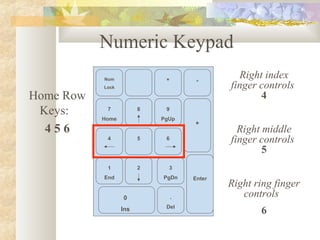
Numeric Keypad
Home Row
Keys:
4 5 6
Right index
finger controls
4
Right middle
finger controls
5
Right ring finger
controls
6
Numeric Keypad
Home Row
Keys:
4 5 6
Right index finger
controls:
Num Lock 7 4 1
Right middle finger
controls:
/ 8 5 2
Right ring finger
controls:
* 9 6 3 .
Right pinky controls:
- + Enter
Right thumb controls:
0
/
+
Enter
-*Num
Lock
7
Home
8 9
PgUp
654
1
End
2 3
PgDn
.
Del
0
Ins
Numeric Keypad
Home Row
Keys:
4 5 6
Right index finger
controls:
Num Lock 7 4 1
Right middle finger
controls:
/ 8 5 2
Right ring finger
controls:
* 9 6 3 .
Right pinky controls:
- + Enter
Right thumb controls:
0
/
+
Enter
-*Num
Lock
7
Home
8 9
PgUp
654
1
End
2 3
PgDn
.
Del
0
Ins

Keyboarding numeric keypad

  • 1.
    Keyboarding – NumericKeypad Execute the touch method in operating the numeric keypad
  • 2.
    Posture and TechniqueReview  Sit up straight  Feet flat on the floor  Body centered in front of the computer  Elbows naturally by side  Fingers curved  Wrists low, but not touching the keyboard  Quick, snappy strokes
  • 3.
     Quick downand in motion of the thumb  Right pinky used for the enter key; other fingers remain on the home row  Examine the number keys carefully to form a mental picture of the layout.  Keep your eyes on the copy (what you are typing from, not the keyboard and your fingers)  Place your fingers on the center of each key with the fingers slightly curved  Strike keys firmly and release them quickly Posture and Technique Review--continued
  • 4.
    Numeric Keypad Home RowKeys - Right Hand  4 5 6  The right index finger is 4  The right middle finger is 5  The right ring finger is 6
  • 5.
    / + Enter -*Num Lock 7 Home 8 9 PgUp 654 1 End 2 3 PgDn . Del 0 Ins NumericKeypad Home Row Keys: 4 5 6 Right index finger controls 4 Right middle finger controls 5 Right ring finger controls 6
  • 6.
    Numeric Keypad Home Row Keys: 45 6 Right index finger controls: Num Lock 7 4 1 Right middle finger controls: / 8 5 2 Right ring finger controls: * 9 6 3 . Right pinky controls: - + Enter Right thumb controls: 0 / + Enter -*Num Lock 7 Home 8 9 PgUp 654 1 End 2 3 PgDn . Del 0 Ins
  • 7.
    Numeric Keypad Home Row Keys: 45 6 Right index finger controls: Num Lock 7 4 1 Right middle finger controls: / 8 5 2 Right ring finger controls: * 9 6 3 . Right pinky controls: - + Enter Right thumb controls: 0 / + Enter -*Num Lock 7 Home 8 9 PgUp 654 1 End 2 3 PgDn . Del 0 Ins